HarmonyOS 6.1 实战:底部Tab栏由六个组件组成,使用FlexAlign.SpaceAround均匀分布
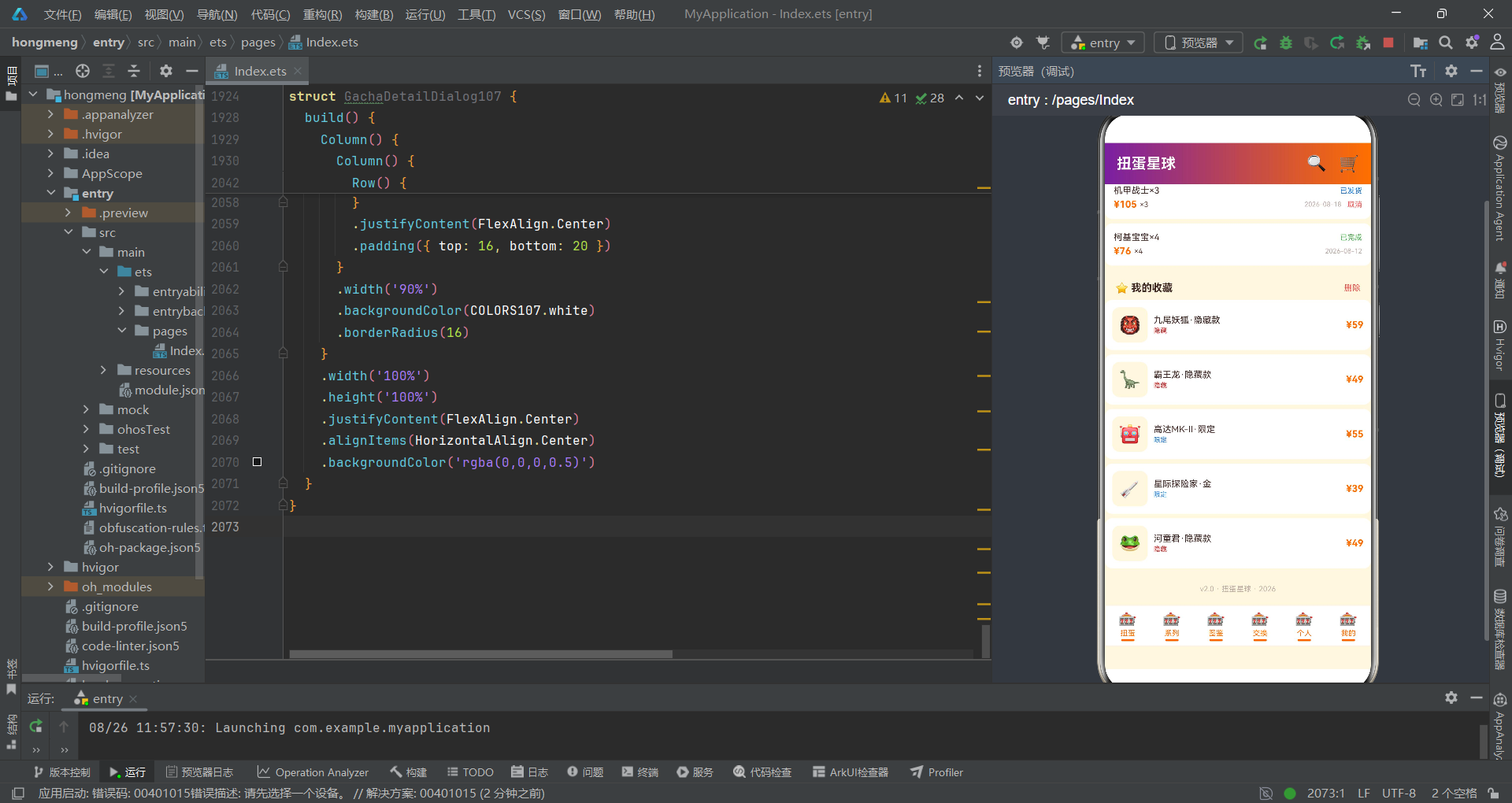
扭蛋机文化正在从线下向线上迁移,随机抽赏的乐趣与收藏成就感构成了扭蛋电商的核心驱动力。多多扭蛋星球将拼多多风格的瀑布流商品展示、稀有度概率分布可视化、交换市场社区互动整合到一个HarmonyOS原生应用中,打造了一个完整的扭蛋电商生态闭环。
在ArkTS声明式开发中,组件是UI的基本构建块。@Component装饰器定义可复用组件,@State管理组件内部状态,通过属性传递实现父子通信。底部Tab栏的六个按钮通过@State currentTab驱动条件渲染,弹窗的显隐通过独立布尔状态控制——这种"状态即路由"的设计模式是中小型应用的高效架构选择。
本篇以多多扭蛋星球为案例,深度剖析拼多多风格的电商瀑布流布局、稀有度概率分布柱状图、整盒购买抽屉表单、取消订单居中对话框、社区话题帖子列表等关键技术的工程实现,展示HarmonyOS在电商类应用开发中的完整能力栈。
一、引言
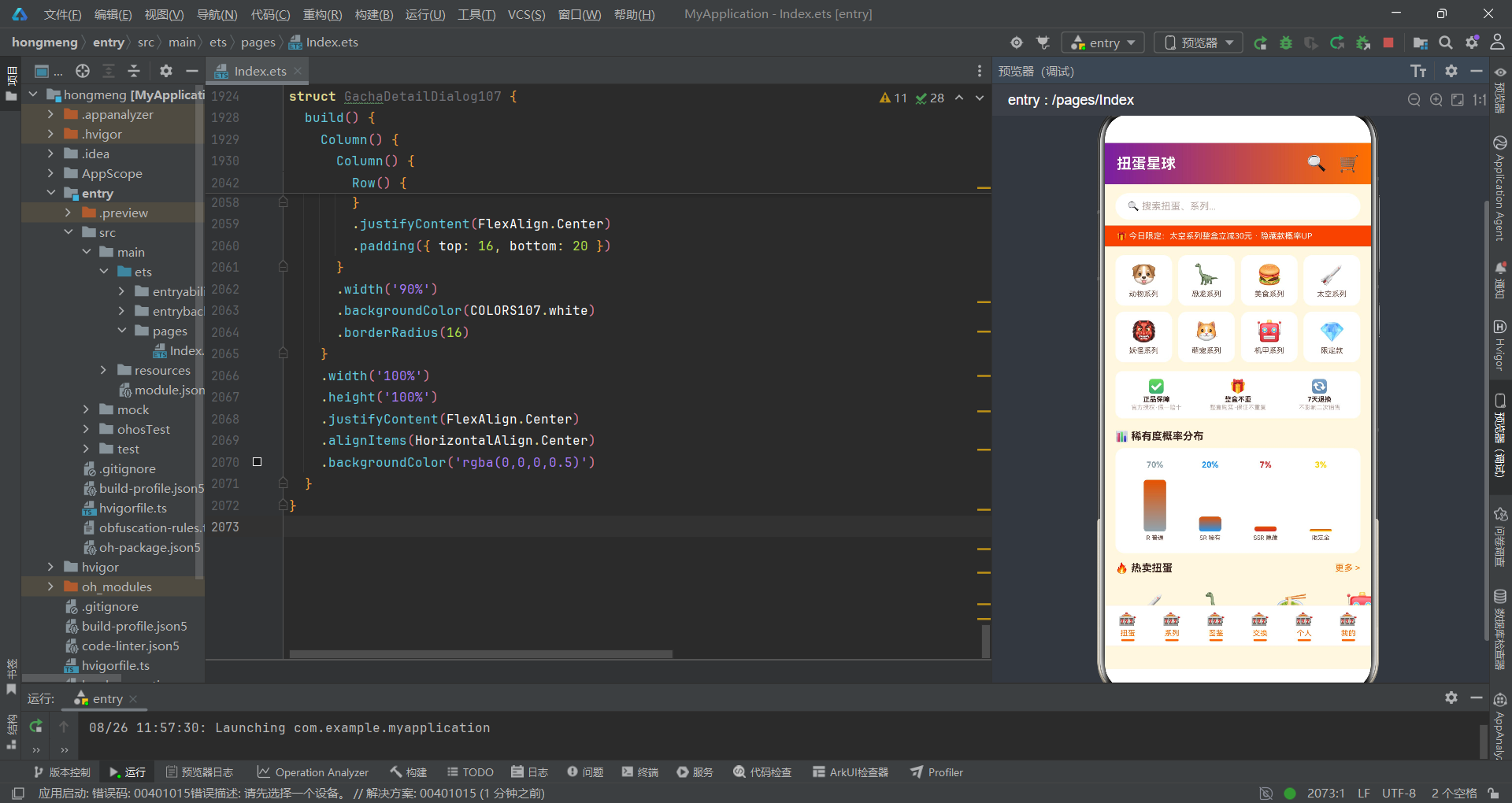
扭蛋(Gachapon)作为一种源自日本的随机抽赏玩具销售模式,凭借其"每次开启都是惊喜"的不确定性体验,在全球年轻消费群体中拥有广泛受众。多多扭蛋星球正是基于这一商业模式,构建了一个集商品浏览、整盒购买、系列收集、交换交易、社区互动于一体的HarmonyOS原生电商应用。应用采用了拼多多风格的视觉设计——活力橙(#FF6F00)与梦幻紫(#7B1FA2)的撞色搭配、金刚区分类入口、横滚热卖商品、网格瀑布流列表、保障卡服务区、概率分布透明化展示等元素,营造了强烈的电商购物氛围感。
从技术架构角度审视,应用采用了头部+Tab内容区+底部导航栏的经典三段式布局。入口组件DuoDuoGachaApp持有currentTab状态控制六个Tab的条件切换,五个布尔状态(showBuySheet/showCancelDialog/showEditSheet/showDeleteDialog/showDetailDialog)分别控制五种弹窗的显隐。数据层定义了12个interface接口覆盖扭蛋商品、系列卡片、收藏品、交易项、话题、帖子、订单、收藏等全部业务实体,以及9组const常量数组作为模拟数据源。工具函数层提供了稀有度颜色映射、星级显示、状态颜色和进度计算等辅助方法。
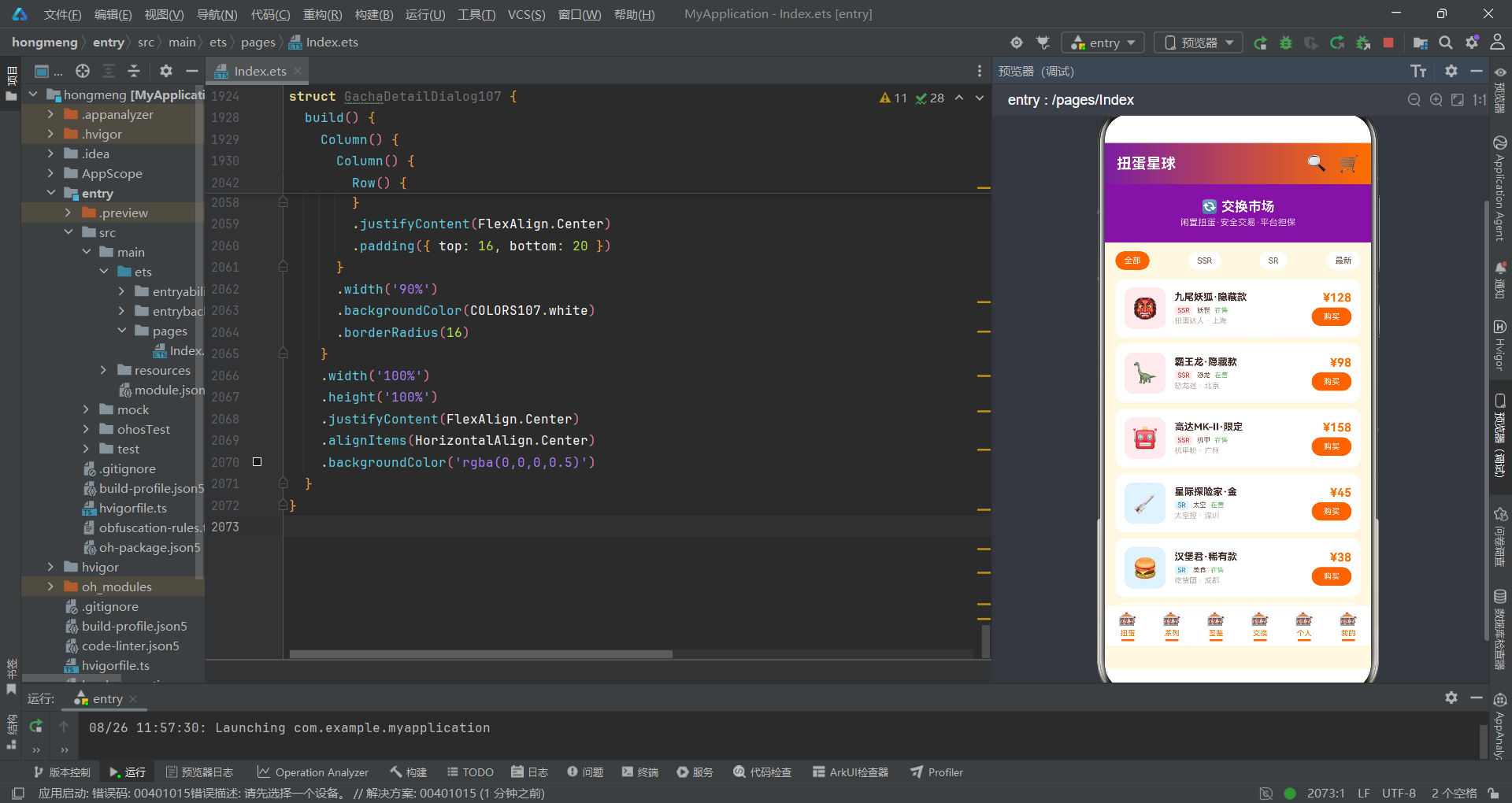
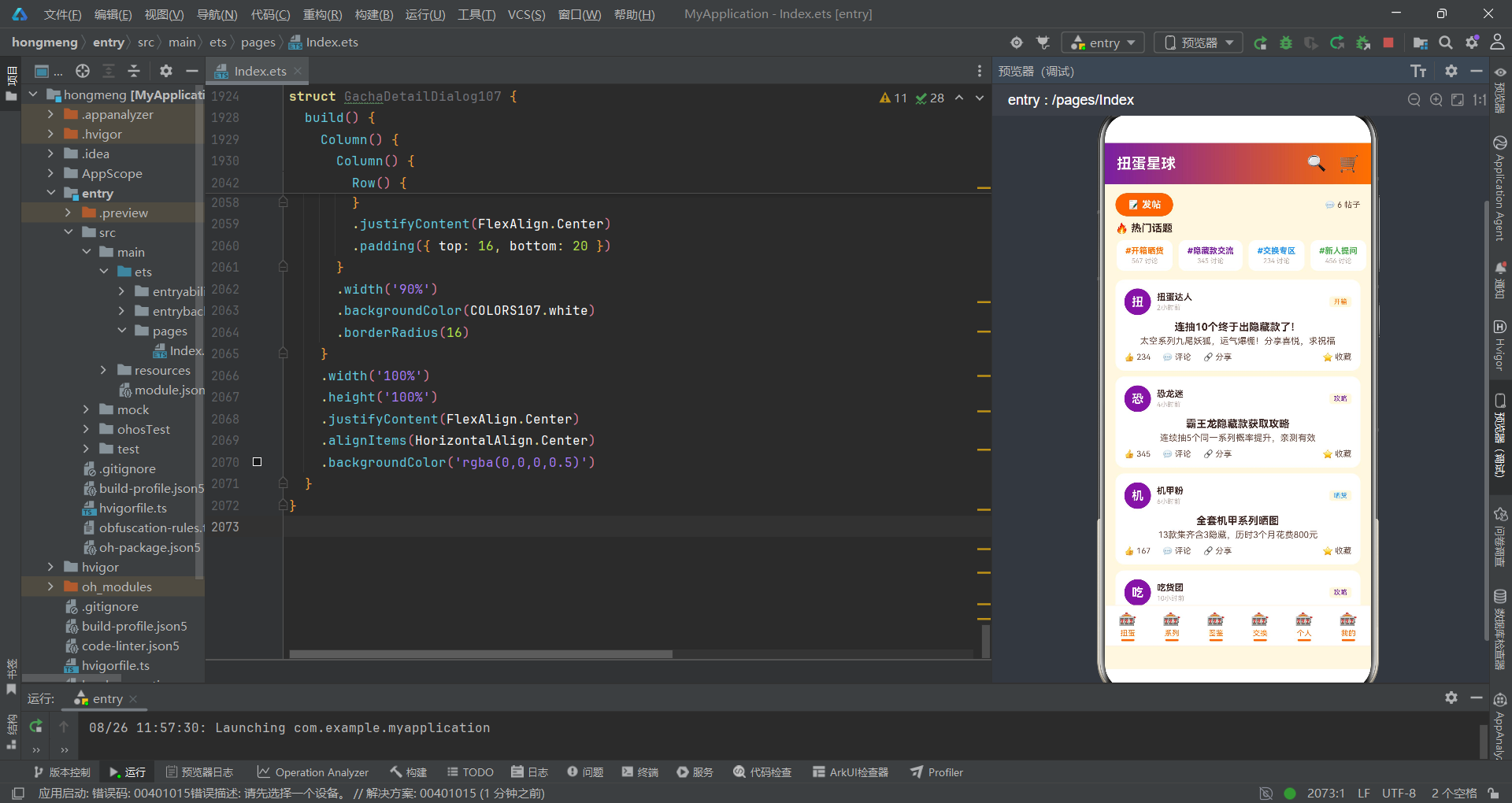
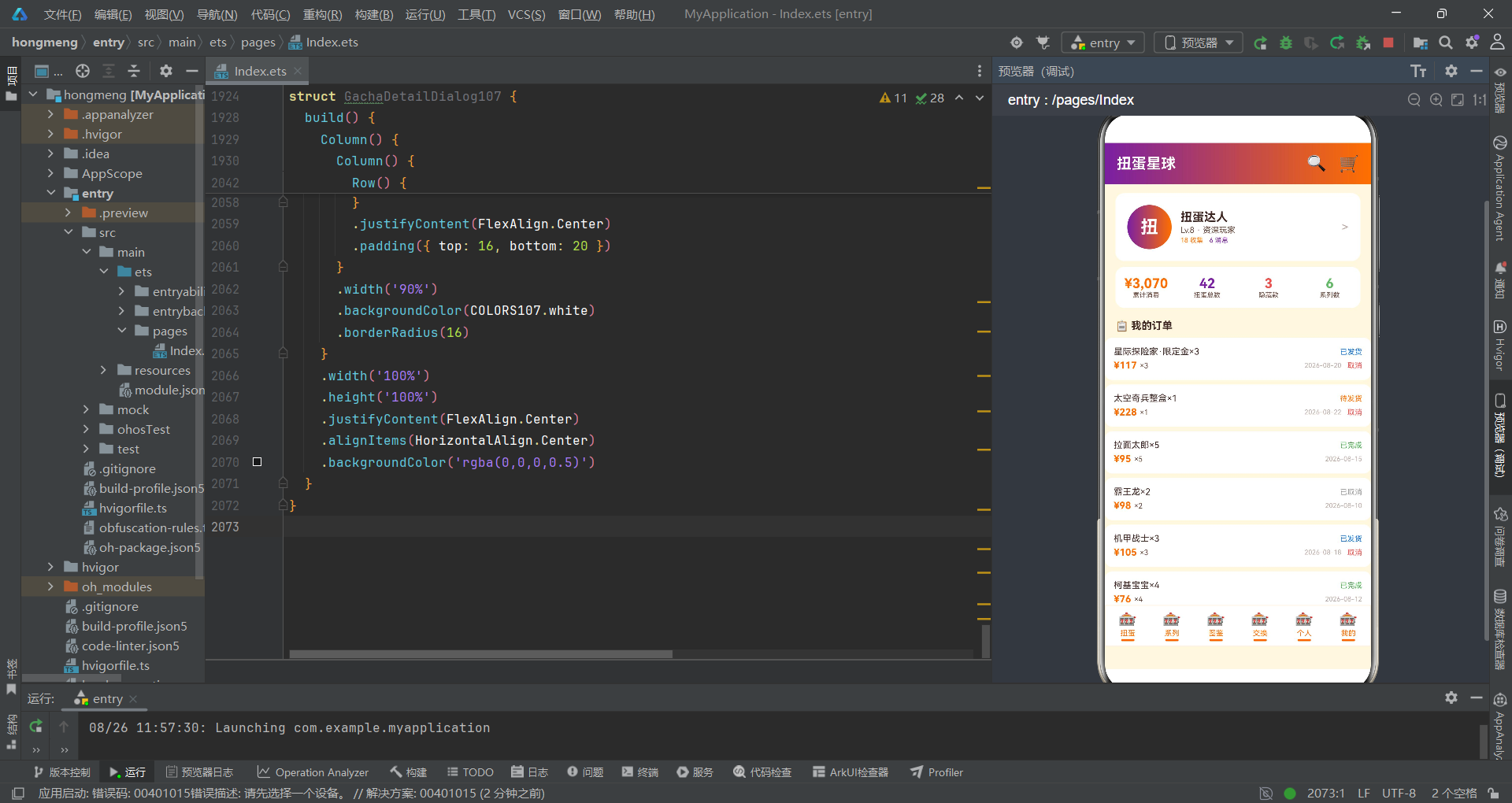
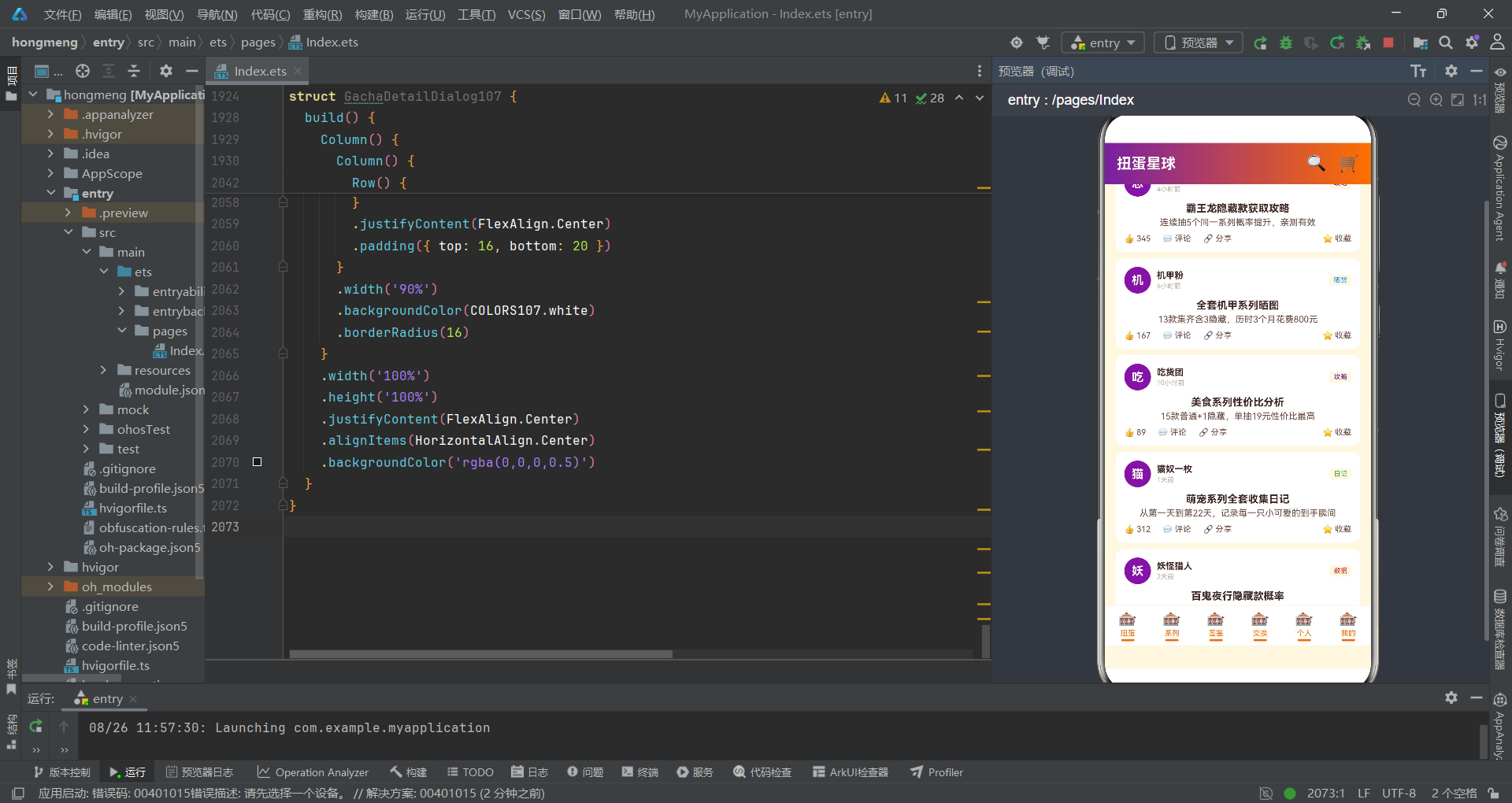
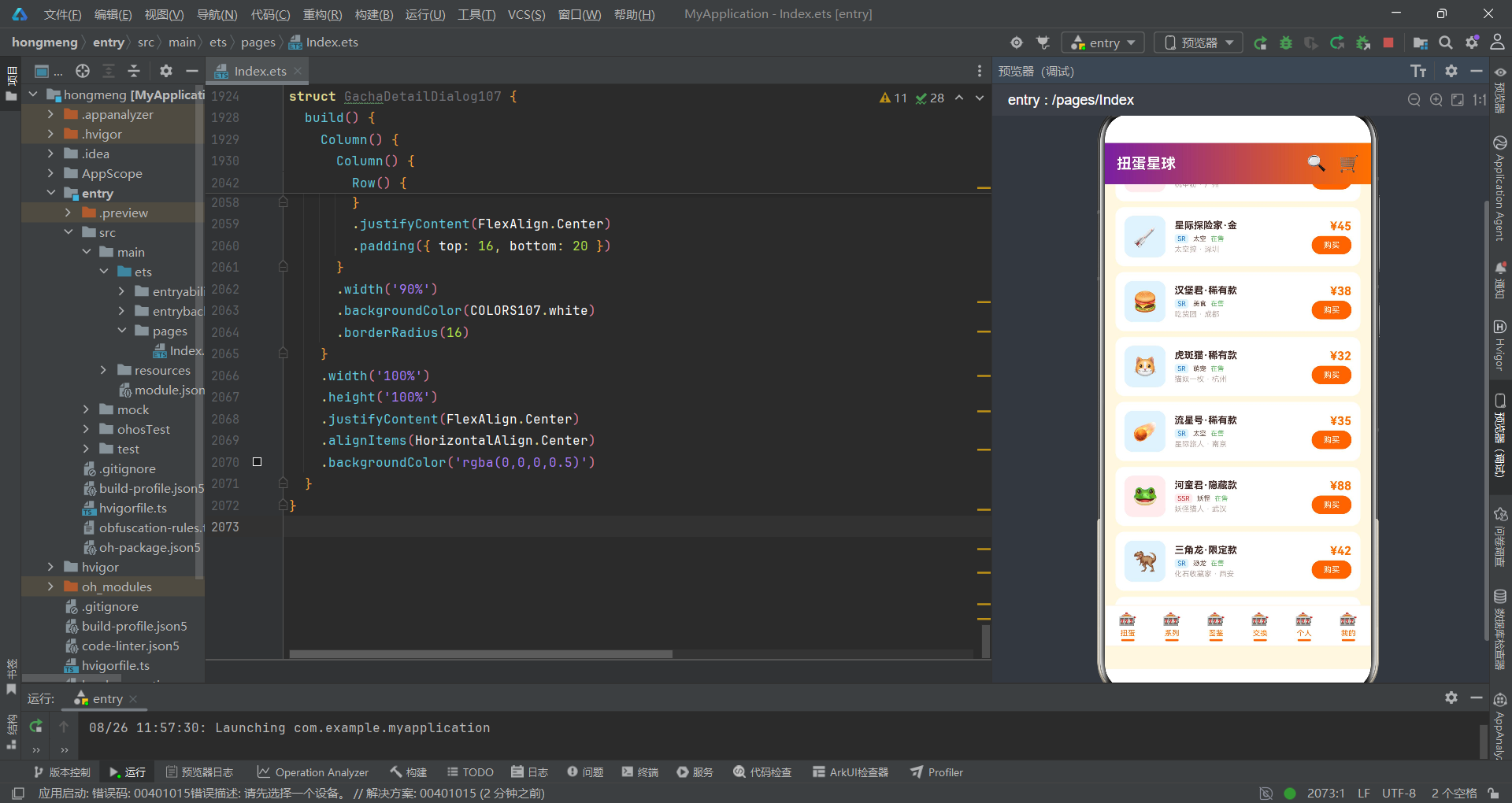
从业务设计层面来看,应用围绕"扭蛋、系列、图鉴、交换、社区、我的"六大功能模块展开。扭蛋Tab是核心商品页,集成了搜索框、促销滚动条、金刚区分类入口、保障卡服务区、稀有度概率分布柱状图、热卖商品横滚条和全部商品网格瀑布流;系列Tab以卡片横滚风展示六个扭蛋系列的收集进度;图鉴Tab展示收集概览统计、月度消费柱状图和全部图鉴网格;交换Tab提供筛选条和交易列表;社区Tab包含发帖入口、热门话题横滚和帖子列表;我的Tab展示个人信息卡、消费统计、订单列表和收藏列表。应用的五个弹窗分别覆盖了购买(抽屉)、取消订单(居中)、编辑晒单(抽屉)、删除收藏(居中)和详情(居中)五种核心交互场景。
二、配色体系与数据接口
2.1 配色方案定义
应用首先定义了一个完整的配色方案接口,将所有颜色值集中管理。
interface ColorPalette107 {
  primary: string;
  primaryLight: string;
  primaryDark: string;
  accent: string;
  accentLight: string;
  bg: string;
  card: string;
  textMain: string;
  textSub: string;
  textHint: string;
  border: string;
  success: string;
  warning: string;
  danger: string;
  purple: string;
  white: string;
}

const COLORS107: ColorPalette107 = {
  primary: '#FF6F00',
  primaryLight: '#FFB74D',
  primaryDark: '#E65100',
  accent: '#7B1FA2',
  accentLight: '#BA68C8',
  bg: '#FFF8E1',
  card: '#FFFFFF',
  textMain: '#3E2723',
  textSub: '#6D4C41',
  textHint: '#BCAAA4',
  border: '#FFF3E0',
  success: '#66BB6A',
  warning: '#FFA726',
  danger: '#EF5350',
  purple: '#9C27B0',
  white: '#FFFFFF'
};
ColorPalette107接口定义了16个颜色字段,覆盖了主色(primary/primaryLight/primaryDark)、强调色(accent/accentLight/purple)、背景(bg/card)、文本(textMain/textSub/textHint)、边框(border)和语义色(success/warning/danger)等全部颜色维度。COLORS107常量将活力橙(#FF6F00)设为主色,梦幻紫(#7B1FA2)设为强调色,蜜光白(#FFF8E1)设为背景色,深棕(#3E2723)设为主文本色。这种将配色集中到一个接口+常量对象中的设计,使得全局换肤只需修改COLORS107一处即可生效,是电商应用中常见的主题管理方案。
在电商应用中,配色方案不仅是视觉设计的问题,更是品牌识别的核心要素。拼多多风格的活力橙+梦幻紫撞色搭配传达了"高性价比+趣味性"的品牌定位。通过将所有颜色集中到ColorPalette107接口中,开发者可以在代码中通过COLORS107.primary这样的语义化引用替代硬编码色值,极大提升了代码的可读性和可维护性。
2.2 核心数据模型
应用定义了12个interface接口,覆盖扭蛋电商的全部业务实体。
interface GachaItem107 {
  id: string;
  name: string;
  series: string;
  price: number;
  oldPrice: number;
  sales: number;
  rarity: string;
  tag: string;
  emoji: string;
}

interface SeriesCard107 {
  id: string;
  name: string;
  desc: string;
  price: number;
  total: number;
  collected: number;
  hidden: number;
  emoji: string;
  color1: string;
  color2: string;
}

interface CollectItem107 {
  id: string;
  name: string;
  series: string;
  rarity: string;
  owned: boolean;
  emoji: string;
}

interface TradeItem107 {
  id: string;
  name: string;
  series: string;
  rarity: string;
  price: number;
  seller: string;
  city: string;
  emoji: string;
  status: string;
}

interface OrderItem107 {
  id: string;
  name: string;
  price: number;
  status: string;
  count: number;
  time: string;
}
GachaItem107是扭蛋商品的核心实体,包含名称、系列、现价(price)、原价(oldPrice)、销量(sales)、稀有度(rarity, R/SR/SSR)、标签(tag, 限定/隐藏/热卖/新品/爆款)和emoji图标。SeriesCard107定义系列卡片,携带总价(price)、总款数(total)、已收集数(collected)和隐藏款数(hidden)等收集进度数据,color1和color2用于卡片图标的渐变背景。CollectItem107是图鉴项,owned布尔值标记是否已解锁。TradeItem107是交换市场的交易项,包含卖家(seller)、城市(city)和状态(status)。OrderItem107是订单记录,status字段记录"已发货/待发货/已完成/已取消"四种状态。
2.3 工具函数体系
应用定义了一组工具函数,用于稀有度颜色映射、星级显示和状态颜色转换。
function getRarityColor107(rarity: string): string {
  if (rarity === 'SSR') return '#D32F2F';
  if (rarity === 'SR') return '#1976D2';
  if (rarity === 'R') return '#78909C';
  return '#FFD700';
}

function getRarityBg107(rarity: string): string {
  if (rarity === 'SSR') return '#FFEBEE';
  if (rarity === 'SR') return '#E3F2FD';
  if (rarity === 'R') return '#ECEFF1';
  return '#FFF8E1';
}

function getStars107(n: number): string {
  if (n >= 5) return '★★★★★';
  if (n >= 4) return '★★★★☆';
  if (n >= 3) return '★★★☆☆';
  if (n >= 2) return '★★☆☆☆';
  if (n >= 1) return '★☆☆☆☆';
  return '☆☆☆☆☆';
}

function getStatusColor107(status: string): string {
  if (status === '已发货') return '#1976D2';
  if (status === '待发货') return '#FF6F00';
  if (status === '已完成') return '#43A047';
  if (status === '已取消') return '#9E9E9E';
  return '#757575';
}

function getBarHeight107(value: number): number {
  return Math.floor(value / 10);
}

function getCollectProgress107(collected: number, total: number): number {
  return Math.floor(collected / total * 100);
}
getRarityColor107和getRarityBg107分别返回稀有度对应的文字色和背景色——SSR为红色系(深红文字+浅红背景)、SR为蓝色系(深蓝文字+浅蓝背景)、R为灰色系(蓝灰文字+浅灰背景)、限定款为金色系(金色文字+蜜光背景)。getStars107将数字转换为五角星字符串,用于评分展示。getStatusColor107将订单状态映射为不同颜色——已发货蓝、待发货橙、已完成绿、已取消灰。getBarHeight107通过Math.floor(value / 10)将数值缩放为柱状图高度像素值。getCollectProgress107计算收集进度百分比。
getRarityColor107和getRarityBg107的配对设计是电商应用中标签样式管理的常见模式。文字色和背景色分开管理的好处是可以在不同场景中灵活组合——商品卡片中使用"深色文字+浅色背景"的标签样式,而概率分布图中直接使用文字色作为柱子颜色。这种复用策略减少了颜色定义的重复。
三、入口组件与底部Tab架构
3.1 入口组件状态定义
入口组件DuoDuoGachaApp是应用的核心控制器,管理Tab切换和弹窗状态。
@Entry
@Component
struct DuoDuoGachaApp {
  @State currentTab: number = 0;
  @State showBuySheet: boolean = false;
  @State showCancelDialog: boolean = false;
  @State showEditSheet: boolean = false;
  @State showDeleteDialog: boolean = false;
  @State showDetailDialog: boolean = false;
  @State selectedGacha: GachaItem107 | null = null;
  @State selQty: number = 1;
  @State selBox: boolean = false;
  @State selWarranty: boolean = false;
  @State cancelReason: number = -1;
  @State selRating: number = 5;
  @State selTopic: number = 0;
  @State selAnon: boolean = false;
状态变量分为三组:currentTab控制Tab切换;五个布尔弹窗开关控制弹窗显隐;购买表单状态(selectedGacha/selQty/selBox/selWarranty)记录购买抽屉中的选择;取消订单状态(cancelReason)记录取消原因选择;晒单表单状态(selRating/selTopic/selAnon)记录编辑晒单抽屉中的评分、话题和匿名设置。selectedGacha的类型为GachaItem107 | null,使用联合类型允许初始值为null,在用户点击商品后才赋值为具体商品对象——这是ArkTS中处理可选数据的常见模式。
3.2 build方法与主框架
build方法构建了应用的整体框架——头部、Tab内容区和底部导航栏。
  build() {
    Column() {
      // 头部
      Row() {
        Text('扭蛋星球')
          .fontSize(20)
          .fontWeight(FontWeight.Bold)
          .fontColor(COLORS107.white)
        Text('').layoutWeight(1)
        Text('🔍').fontSize(22).fontColor(COLORS107.white).margin({ right: 16 })
        Text('🛒').fontSize(22).fontColor(COLORS107.white)
      }
      .width('100%').height(56)
      .padding({ left: 16, right: 16 })
      .linearGradient({ angle: 90, colors: [[COLORS107.accent, 0], [COLORS107.primary, 1]] })

      // Tab 内容区
      if (this.currentTab === 0) {
        GachaTab107({
          onBuy: (g: GachaItem107) => {
            this.selectedGacha = g;
            this.showBuySheet = true;
          },
          onDetail: (g: GachaItem107) => {
            this.selectedGacha = g;
            this.showDetailDialog = true;
          }
        })
      } else if (this.currentTab === 1) {
        SeriesTab107()
      } else if (this.currentTab === 2) {
        CollectTab107()
      } else if (this.currentTab === 3) {
        TradeTab107({})
      } else if (this.currentTab === 4) {
        CommunityTab107({
          onPublish: () => { this.showEditSheet = true; }
        })
      } else {
        MyTab107({
          onCancel: () => { this.showCancelDialog = true; },
          onDelete: () => { this.showDeleteDialog = true; }
        })
      }

      // 底部 Tab 栏
      Row() {
        TabBtn107({icon:'🎰', label:'扭蛋', active: this.currentTab === 0, onTap: () => { this.currentTab = 0; }})
        TabBtn107({icon:'🎰', label:'系列', active: this.currentTab === 1, onTap: () => { this.currentTab = 1; }})
        TabBtn107({icon:'🎰', label:'图鉴', active: this.currentTab === 2, onTap: () => { this.currentTab = 2; }})
        TabBtn107({icon:'🎰', label:'交换', active: this.currentTab === 3, onTap: () => { this.currentTab = 3; }})
        TabBtn107({icon:'🎰', label:'社区', active: this.currentTab === 4, onTap: () => { this.currentTab = 4; }})
        TabBtn107({icon:'🎰', label:'我的', active: this.currentTab === 5, onTap: () => { this.currentTab = 5; }})
      }
      .width('100%').height(56)
      .backgroundColor(COLORS107.card)
      .border({ width: 1, color: COLORS107.border })
      .justifyContent(FlexAlign.SpaceAround)
    }
    .width('100%').height('100%')
    .backgroundColor(COLORS107.bg)
  }
头部使用90度从梦幻紫到活力橙的线性渐变,展示"扭蛋星球"标题和搜索/购物车图标。Tab内容区通过if-else条件渲染六个子组件,每个子组件通过回调函数将用户操作传递给父组件处理。底部Tab栏由六个TabBtn107组件组成,使用FlexAlign.SpaceAround均匀分布。每个TabBtn107接收icon、label、active和onTap四个参数——active布尔值控制选中样式,onTap回调在点击时更新currentTab状态。
3.3 TabBtn107底部按钮组件
TabBtn107是底部导航栏的按钮组件,展示图标、文字和选中下划线。
@Component
struct TabBtn107 {
  icon: string = '🎰';
  label: string = '';
  active: boolean = false;
  onTap: () => void = () => {};
  build() {
    Column() {
      Text(this.icon)
        .fontSize(20)
        .fontColor(this.active ? COLORS107.primary : COLORS107.textHint)
      Text(this.label)
        .fontSize(10)
        .fontColor(this.active ? COLORS107.primary : COLORS107.textHint)
        .margin({ top: 2 })
      if (this.active) {
        Column()
          .width(18)
          .height(3)
          .backgroundColor(COLORS107.primary)
          .borderRadius(2)
          .margin({ top: 2 })
      }
    }
    .layoutWeight(1)
    .alignItems(HorizontalAlign.Center)
    .onClick(() => { this.onTap(); })
  }
}
TabBtn107通过四个属性参数接收外部数据:icon和label定义按钮内容,active控制选中状态,onTap是点击回调。选中状态下,图标和文字变为活力橙(COLORS107.primary),底部显示18px宽、3px高的橙色圆角下划线;未选中状态下,图标和文字为提示色(COLORS107.textHint),不显示下划线。组件使用Column垂直布局,通过layoutWeight(1)在父Row中平均分配宽度。if (this.active)条件渲染下划线是声明式UI中状态驱动视图的典型体现——当active从false变为true时,框架自动添加下划线元素;反之自动移除。
TabBtn107的设计体现了ArkTS组件化开发的核心原则:通过属性参数接收数据,通过回调函数传递事件,组件内部只负责UI渲染和状态展示。这种"数据向下、事件向上"的单向数据流模式,是构建可维护组件树的基础。
四、扭蛋商品Tab——拼多多风格电商布局
4.1 搜索框与促销滚动条
扭蛋Tab是应用的核心商品页,采用拼多多风格的电商布局。
@Component
struct GachaTab107 {
  onBuy: (g: GachaItem107) => void = () => {};
  onDetail: (g: GachaItem107) => void = () => {};
  @State selCat: number = 0;

  build() {
    Scroll() {
      Column() {
        // 搜索框
        Row() {
          Text('🔍 搜索扭蛋、系列...')
            .fontSize(13)
            .fontColor(COLORS107.textHint)
            .layoutWeight(1)
        }
        .width('92%').height(36)
        .backgroundColor(COLORS107.card)
        .borderRadius(18)
        .padding({ left: 16, right: 16 })
        .margin({ top: 12, bottom: 8 })

        // 促销滚动条
        Row() {
          Text('🎁 今日限定:太空系列整盒立减30元 · 隐藏款概率UP')
            .fontSize(11)
            .fontColor(COLORS107.white)
            .layoutWeight(1)
        }
        .width('100%').height(28)
        .backgroundColor(COLORS107.primaryDark)
        .justifyContent(FlexAlign.Center)
        .padding({ left: 16, right: 16 })
搜索框采用92%宽度的圆角白色行容器,内嵌搜索emoji和提示文字"搜索扭蛋、系列…“,字号13、文字色为提示灰。促销滚动条为100%宽度的深橙色行容器,高度28px,内居中展示促销文案"今日限定:太空系列整盒立减30元·隐藏款概率UP”。这两者的设计延续了拼多多首页的经典布局——搜索框在顶部、促销信息在搜索框下方,构成用户进入商品页的第一视觉焦点。
4.2 金刚区分类入口
金刚区是拼多多风格的分类导航入口,使用Grid布局展示8个分类。
        // 金刚区分类
        Grid() {
          ForEach(GACHA_CATS_107, (cat: CatItem107) => {
            GridItem() {
              Column() {
                Text(cat.emoji)
                  .fontSize(28)
                Text(cat.name)
                  .fontSize(10)
                  .fontColor(COLORS107.textSub)
                  .margin({ top: 4 })
              }
              .width('100%')
              .padding({ top: 10, bottom: 10 })
              .backgroundColor(COLORS107.card)
              .borderRadius(12)
            }
          }, (cat: CatItem107) => cat.id)
        }
        .columnsTemplate('1fr 1fr 1fr 1fr')
        .rowsGap(8)
        .columnsGap(8)
        .width('92%')
        .margin({ top: 12 })
金刚区使用columnsTemplate(‘1fr 1fr 1fr 1fr’)定义四列网格模板,8个分类自动排成两行。每个分类项由Column容器包裹——28号字体的emoji图标和10号字体的分类名称,白卡背景配12圆角。GACHA_CATS_107常量定义了8个分类:动物系列🐶、恐龙系列🦕、美食系列🍔、太空系列🚀、妖怪系列👹、萌宠系列🐱、机甲系列🤖、限定款💎。金刚区的名称来源于佛教中的"金刚力士"——在电商设计中特指首页顶部的分类图标导航区,因其位置重要、入口密集而得名。
金刚区是电商应用的标准设计模式。4列Grid布局在移动设备上能充分利用屏幕宽度,每个分类项的emoji+文字组合让用户快速识别商品类别。columnsTemplate(‘1fr 1fr 1fr 1fr’)表示四等分列模板,ForEach会按顺序将数据填充到网格中,超出4个的数据自动换行到下一行。
4.3 保障卡服务区
保障卡区域展示三个服务承诺,横排排列。
        // 保障卡
        Row() {
          ForEach(GUARANTEES_107, (g: GuaranteeCard107) => {
            Column() {
              Text(g.emoji)
                .fontSize(18)
              Text(g.title)
                .fontSize(9)
                .fontWeight(FontWeight.Bold)
                .fontColor(COLORS107.textMain)
                .margin({ top: 2 })
              Text(g.desc)
                .fontSize(8)
                .fontColor(COLORS107.textHint)
                .margin({ top: 1 })
            }
            .layoutWeight(1)
            .alignItems(HorizontalAlign.Center)
          }, (g: GuaranteeCard107) => g.id)
        }
        .width('92%')
        .padding({ top: 10, bottom: 10 })
        .backgroundColor(COLORS107.card)
        .borderRadius(10)
        .margin({ top: 12 })
保障卡区域通过ForEach渲染三个保障项——正品保障(✅官方授权·假一赔十)、整盒不重(🎁整盒购买·保证不重复)、7天退换(🔄不影响二次销售)。每个保障项由Column垂直排列emoji图标(18号字)、标题(9号粗体)和描述(8号细体),通过layoutWeight(1)在Row中三等分。保障卡区域的设计目的是在用户浏览商品时建立信任感——正品保障打消假货顾虑、整盒不重打消重复顾虑、7天退换打消售后顾虑。
4.4 稀有度概率分布柱状图
概率分布图是应用中最具特色的数据可视化组件,以柱状图形式展示四种稀有度的出现概率。
        // 概率分布图
        Row() {
          Text('📊 稀有度概率分布')
            .fontSize(14)
            .fontWeight(FontWeight.Bold)
            .fontColor(COLORS107.textMain)
            .layoutWeight(1)
        }
        .width('92%')
        .margin({ top: 16, bottom: 8 })

        Row() {
          ForEach(RARITY_BARS_107, (bar: RarityMeta107) => {
            Column() {
              Text(bar.pct + '%')
                .fontSize(11)
                .fontWeight(FontWeight.Bold)
                .fontColor(bar.color)
              Column() {
                Text('')
                  .width('100%')
                  .height(bar.pct)
                  .linearGradient({ angle: 0, colors: [[bar.color, 0], [COLORS107.primaryDark, 1]] })
                  .borderRadius(4)
              }
              .width(30)
              .height(80)
              .justifyContent(FlexAlign.End)
              .margin({ top: 4, bottom: 4 })
              Text(bar.label)
                .fontSize(8)
                .fontColor(COLORS107.textSub)
            }
            .layoutWeight(1)
            .alignItems(HorizontalAlign.Center)
          }, (bar: RarityMeta107) => bar.id)
        }
        .width('92%')
        .padding(16)
        .backgroundColor(COLORS107.card)
        .borderRadius(12)
        .margin({ bottom: 12 })
概率分布图通过ForEach渲染四个稀有度柱子——R普通(70%, 灰色)、SR稀有(20%, 蓝色)、SSR隐藏(7%, 红色)、限定金(3%, 金色)。每个柱子的实现方式巧妙:外层Column容器高度80px、justifyContent设为FlexAlign.End使内容底部对齐;内层Text(‘’)的height直接绑定为bar.pct(如70对应70px高),使用0度从上到下的线性渐变从稀有度颜色到深橙色。柱子上方显示百分比文字,下方显示稀有度标签。这种"容器固定高度+内层柱子绑定数据值"的设计使得不同概率的柱子在同一基线上对齐,视觉效果直观清晰。
稀有度概率分布透明化展示是扭蛋电商的合规设计。根据相关规定,随机抽赏类商品应当公示各等级的出现概率。本应用将概率以柱状图形式可视化展示,不仅满足了合规要求,还通过差异化的柱子高度让用户直观感受到"普通款占七成、隐藏款仅7%"的概率分布,增强了购买决策的理性程度。
4.5 热卖商品横滚与全部商品网格
热卖商品使用横向滚动列表展示,全部商品使用两列网格瀑布流布局。
        // 热卖扭蛋横滚
        Scroll() {
          Row() {
            ForEach(GACHA_ITEMS_107.slice(0, 6), (g: GachaItem107) => {
              Column() {
                Column() {
                  Text(g.emoji)
                    .fontSize(36)
                }
                .width(72).height(72)
                .backgroundColor(COLORS107.bg)
                .borderRadius(12)
                .justifyContent(FlexAlign.Center)
                Text(g.name)
                  .fontSize(10)
                  .fontColor(COLORS107.textMain)
                  .maxLines(1)
                  .textOverflow({ overflow: TextOverflow.Ellipsis })
                  .width(72)
                  .margin({ top: 4 })
                Row() {
                  Text('¥' + g.price)
                    .fontSize(13)
                    .fontWeight(FontWeight.Bold)
                    .fontColor(COLORS107.primary)
                  Text('¥' + g.oldPrice)
                    .fontSize(9)
                    .fontColor(COLORS107.textHint)
                    .decoration({ type: TextDecorationType.LineThrough })
                    .margin({ left: 4 })
                }
                .margin({ top: 2 })
              }
              .width(88)
              .margin({ right: 8 })
              .onClick(() => { this.onDetail(g); })
            }, (g: GachaItem107) => g.id)
          }
          .padding({ left: 16, right: 16 })
        }
        .scrollable(ScrollDirection.Horizontal)
        .scrollBar(BarState.Off)

        // 全部扭蛋网格
        Grid() {
          ForEach(GACHA_ITEMS_107, (g: GachaItem107) => {
            GridItem() {
              Column() {
                Stack({ alignContent: Alignment.TopEnd }) {
                  Column() {
                    Text(g.emoji)
                      .fontSize(40)
                  }
                  .width('100%').height(80)
                  .backgroundColor(COLORS107.bg)
                  .borderRadius(12)
                  .justifyContent(FlexAlign.Center)
                  Text(g.rarity)
                    .fontSize(9)
                    .fontColor(COLORS107.white)
                    .backgroundColor(getRarityColor107(g.rarity))
                    .borderRadius(4)
                    .padding({ left: 4, right: 4, top: 2, bottom: 2 })
                    .margin({ top: 4, right: 4 })
                }
                Text(g.name)
                  .fontSize(11)
                  .fontColor(COLORS107.textMain)
                  .maxLines(1)
                  .textOverflow({ overflow: TextOverflow.Ellipsis })
                  .margin({ top: 6 })
                Text(g.series)
                  .fontSize(9)
                  .fontColor(COLORS107.textSub)
                  .margin({ top: 2 })
                Row() {
                  Text('¥' + g.price)
                    .fontSize(14)
                    .fontWeight(FontWeight.Bold)
                    .fontColor(COLORS107.primary)
                  Text('¥' + g.oldPrice)
                    .fontSize(9)
                    .fontColor(COLORS107.textHint)
                    .decoration({ type: TextDecorationType.LineThrough })
                    .margin({ left: 4 })
                  Text('').layoutWeight(1)
                  Text('销' + g.sales)
                    .fontSize(8)
                    .fontColor(COLORS107.textHint)
                }
                .width('100%')
                .margin({ top: 4 })
                Row() {
                  Text('立即购买')
                    .fontSize(11)
                    .fontColor(COLORS107.white)
                    .backgroundColor(COLORS107.primary)
                    .borderRadius(6)
                    .padding({ left: 16, right: 16, top: 6, bottom: 6 })
                    .layoutWeight(1)
                    .textAlign(TextAlign.Center)
                }
                .width('100%')
                .margin({ top: 6 })
                .onClick(() => { this.onBuy(g); })
              }
              .padding(10)
              .backgroundColor(COLORS107.card)
              .borderRadius(12)
            }
          }, (g: GachaItem107) => g.id)
        }
        .columnsTemplate('1fr 1fr')
        .rowsGap(8)
        .columnsGap(8)
        .width('92%')
热卖商品区使用GACHA_ITEMS_107.slice(0, 6)取前6个商品进行横向滚动展示,scrollable(ScrollDirection.Horizontal)设置横向滚动方向。每个商品卡片宽88px,包含72x72的emoji图标区、商品名称(maxLines(1)+textOverflow(Ellipsis)单行省略)、现价和划线原价。原价使用TextDecorationType.LineThrough删除线样式,现价用粗体橙色突出。
全部商品网格使用columnsTemplate(‘1fr 1fr’)定义两列模板,12个商品自动排成六行。每张商品卡片使用Stack({ alignContent: Alignment.TopEnd })实现右上角稀有度标签覆盖效果——底层是80px高的emoji图标区,顶层是9号字体的稀有度标签(背景色通过getRarityColor107动态映射)。卡片底部展示商品名称、系列、价格行(现价+划线原价+销量)和"立即购买"按钮。价格行的Text(‘’).layoutWeight(1)作为弹性占位符将销量推到右侧。
五、弹窗系统实现
5.1 购买扭蛋抽屉
购买抽屉是底部弹出的表单页面,包含商品信息、数量选择、整盒选项、保障服务和小计计算。
@Component
struct BuyGachaSheet107 {
  item: GachaItem107 | null = null;
  selQty: number = 1;
  selBox: boolean = false;
  selWarranty: boolean = false;
  onQty: (q: number) => void = () => {};
  onBox: (b: boolean) => void = () => {};
  onWarranty: (w: boolean) => void = () => {};
  onConfirm: () => void = () => {};
  onCancel: () => void = () => {};
  build() {
    Scroll() {
      Column() {
        Row() {
          Text(this.item?.emoji ?? '🎰')
            .fontSize(40)
          Column() {
            Text(this.item?.name ?? '')
              .fontSize(15)
              .fontWeight(FontWeight.Bold)
              .fontColor(COLORS107.textMain)
            Row() {
              Text('¥' + (this.item?.price ?? 0))
                .fontSize(18)
                .fontWeight(FontWeight.Bold)
                .fontColor(COLORS107.primary)
              Text('¥' + (this.item?.oldPrice ?? 0))
                .fontSize(11)
                .fontColor(COLORS107.textHint)
                .decoration({ type: TextDecorationType.LineThrough })
                .margin({ left: 6 })
            }
            .margin({ top: 4 })
            Text(this.item?.series ?? '')
              .fontSize(10)
              .fontColor(COLORS107.textSub)
              .margin({ top: 2 })
          }
          .margin({ left: 12 })
          .layoutWeight(1)
          .alignItems(HorizontalAlign.Start)
          Text('✕')
            .fontSize(18)
            .fontColor(COLORS107.textHint)
            .onClick(() => { this.onCancel(); })
        }
        .width('100%')
        .padding(16)

        // 整盒选项
        Row() {
          Column() {
            Text('🎁 整盒购买')
              .fontSize(13)
              .fontWeight(FontWeight.Bold)
              .fontColor(COLORS107.textMain)
            Text('不重复·隐藏概率UP')
              .fontSize(10)
              .fontColor(COLORS107.textSub)
              .margin({ top: 2 })
          }
          .layoutWeight(1)
          .alignItems(HorizontalAlign.Start)
          Text(this.selBox ? '☑' : '☐')
            .fontSize(20)
            .fontColor(this.selBox ? COLORS107.primary : COLORS107.textHint)
            .onClick(() => { this.onBox(!this.selBox); })
        }
        .width('100%')
        .padding({ left: 16, right: 16, bottom: 16 })

        // 小计
        Row() {
          Text('合计')
            .fontSize(13)
            .fontColor(COLORS107.textSub)
          Text('¥' + ((this.item?.price ?? 0) * this.selQty))
            .fontSize(20)
            .fontWeight(FontWeight.Bold)
            .fontColor(COLORS107.primary)
            .margin({ left: 8 })
            .layoutWeight(1)
          Text('确认购买')
            .fontSize(14)
            .fontColor(COLORS107.white)
            .backgroundColor(COLORS107.primary)
            .borderRadius(20)
            .padding({ left: 24, right: 24, top: 10, bottom: 10 })
            .onClick(() => { this.onConfirm(); })
        }
        .width('100%')
        .padding({ left: 16, right: 16, top: 8, bottom: 20 })
      }
      .backgroundColor(COLORS107.white)
    }
  }
}
购买抽屉的头部展示选中商品的emoji图标、名称、现价、划线原价和系列信息。使用可选链操作符(?.)和空值合并操作符(??)处理this.item可能为null的情况——this.item?.emoji ?? '🎰’表示如果item为null则显示默认扭蛋emoji。整盒购买选项通过Text显示☑/☐符号实现复选框效果,点击切换selBox状态。小计行通过表达式(this.item?.price ?? 0) * this.selQty实时计算总价,配合"确认购买"按钮完成下单流程。整个组件通过回调函数(onQty/onBox/onWarranty/onConfirm/onCancel)将所有用户操作传递给父组件处理,自身不维护业务状态。
可选链操作符(?.)和空值合并操作符(??)是ArkTS中处理可空类型的利器。this.item?.price在item为null时返回undefined,配合?? 0将其默认为0,避免了运行时的空指针异常。这种防御式编程模式在接收外部传入数据时尤为重要——父组件可能未及时赋值就渲染了子组件。
5.2 取消订单居中对话框
取消订单对话框是居中遮罩弹窗,提供取消原因选择和确认操作。
@Component
struct CancelOrderDialog107 {
  selReason: number = -1;
  onReason: (idx: number) => void = () => {};
  onConfirm: () => void = () => {};
  onCancel: () => void = () => {};
  build() {
    Column() {
      Column() {
        Text('⚠️')
          .fontSize(40)
          .margin({ top: 24 })
        Text('取消订单')
          .fontSize(18)
          .fontWeight(FontWeight.Bold)
          .fontColor(COLORS107.textMain)
          .margin({ top: 8 })
        Text('请选择取消原因')
          .fontSize(12)
          .fontColor(COLORS107.textSub)
          .margin({ top: 4 })

        Column() {
          Text('不想要了')
            .fontSize(13)
            .fontColor(this.selReason === 0 ? COLORS107.primary : COLORS107.textMain)
            .padding({ top: 12, bottom: 12 })
            .width('100%')
            .textAlign(TextAlign.Center)
            .onClick(() => { this.onReason(0); })
          Text('买错了')
            .fontSize(13)
            .fontColor(this.selReason === 1 ? COLORS107.primary : COLORS107.textMain)
            .padding({ top: 12, bottom: 12 })
            .width('100%')
            .textAlign(TextAlign.Center)
            .onClick(() => { this.onReason(1); })
          Text('价格太贵')
            .fontSize(13)
            .fontColor(this.selReason === 2 ? COLORS107.primary : COLORS107.textMain)
            .padding({ top: 12, bottom: 12 })
            .width('100%')
            .textAlign(TextAlign.Center)
            .onClick(() => { this.onReason(2); })
          Text('其他原因')
            .fontSize(13)
            .fontColor(this.selReason === 3 ? COLORS107.primary : COLORS107.textMain)
            .padding({ top: 12, bottom: 12 })
            .width('100%')
            .textAlign(TextAlign.Center)
            .onClick(() => { this.onReason(3); })
        }
        .width('100%')
        .margin({ top: 16, left: 20, right: 20 })

        Row() {
          Text('返回')
            .fontSize(14)
            .fontColor(COLORS107.textSub)
            .backgroundColor(COLORS107.border)
            .borderRadius(20)
            .padding({ left: 24, right: 24, top: 10, bottom: 10 })
            .onClick(() => { this.onCancel(); })
          Text('确认取消')
            .fontSize(14)
            .fontColor(COLORS107.white)
            .backgroundColor(COLORS107.danger)
            .borderRadius(20)
            .padding({ left: 24, right: 24, top: 10, bottom: 10 })
            .margin({ left: 12 })
            .onClick(() => { this.onConfirm(); })
        }
        .justifyContent(FlexAlign.Center)
        .padding({ top: 20, bottom: 20 })
      }
      .width('80%')
      .backgroundColor(COLORS107.white)
      .borderRadius(16)
    }
    .width('100%').height('100%')
    .justifyContent(FlexAlign.Center)
    .alignItems(HorizontalAlign.Center)
    .backgroundColor('rgba(0,0,0,0.5)')
  }
}
取消订单对话框的结构分为三层:最外层Column设置100%宽高和半透明黑色背景(rgba(0,0,0,0.5))实现遮罩效果,justifyContent(FlexAlign.Center)和alignItems(HorizontalAlign.Center)使内容居中;中间层Column是80%宽度、白色背景、16圆角的对话框容器;内层是⚠️警告图标、标题、四个取消原因选项和底部按钮行。取消原因使用selReason状态控制选中样式——选中项的文字变为活力橙(COLORS107.primary),未选中项为深棕(COLORS107.textMain)。底部"返回"按钮使用边框色背景,"确认取消"按钮使用危险红(COLORS107.danger)背景,形成视觉对比。
5.3 编辑晒单抽屉与详情对话框
编辑晒单抽屉包含评分选择、话题选择、内容输入和匿名选项。
@Component
struct EditReviewSheet107 {
  selRating: number = 5;
  selTopic: number = 0;
  selAnon: boolean = false;
  onRating: (r: number) => void = () => {};
  onTopic: (t: number) => void = () => {};
  onAnon: (a: boolean) => void = () => {};
  onConfirm: () => void = () => {};
  onCancel: () => void = () => {};
  build() {
    Scroll() {
      Column() {
        Row() {
          Text('📝 编辑晒单')
            .fontSize(18)
            .fontWeight(FontWeight.Bold)
            .fontColor(COLORS107.textMain)
            .layoutWeight(1)
          Text('✕')
            .fontSize(18)
            .fontColor(COLORS107.textHint)
            .onClick(() => { this.onCancel(); })
        }

        // 评分
        Row() {
          ForEach([1, 2, 3, 4, 5], (n: number) => {
            Text(n <= this.selRating ? '★' : '☆')
              .fontSize(28)
              .fontColor(n <= this.selRating ? COLORS107.primary : COLORS107.textHint)
              .margin({ right: 8 })
              .onClick(() => { this.onRating(n); })
          }, (n: number) => n.toString())
        }

        // 话题选择
        Row() {
          ForEach(TOPICS_107, (t: TopicMeta107, idx: number) => {
            Text('#' + t.name)
              .fontSize(11)
              .fontColor(this.selTopic === idx ? COLORS107.white : t.color)
              .backgroundColor(this.selTopic === idx ? t.color : COLORS107.bg)
              .borderRadius(14)
              .padding({ left: 10, right: 10, top: 6, bottom: 6 })
              .margin({ right: 6, bottom: 6 })
              .onClick(() => { this.onTopic(idx); })
          }, (t: TopicMeta107) => t.id)
        }

        // 内容输入
        TextArea({ placeholder: '分享你的扭蛋开箱体验...' })
          .placeholderColor(COLORS107.textHint)
          .fontSize(13)
          .width('88%')
          .height(80)
          .backgroundColor(COLORS107.bg)
          .borderRadius(10)
          .margin({ top: 8 })

        // 匿名
        Row() {
          Text('匿名发布')
            .fontSize(13)
            .fontColor(COLORS107.textMain)
            .layoutWeight(1)
          Text(this.selAnon ? '☑' : '☐')
            .fontSize(20)
            .fontColor(this.selAnon ? COLORS107.primary : COLORS107.textHint)
            .onClick(() => { this.onAnon(!this.selAnon); })
        }

        // 提交
        Row() {
          Text('发布晒单')
            .fontSize(14)
            .fontColor(COLORS107.white)
            .backgroundColor(COLORS107.primary)
            .borderRadius(20)
            .padding({ left: 24, right: 24, top: 10, bottom: 10 })
            .layoutWeight(1)
            .textAlign(TextAlign.Center)
            .onClick(() => { this.onConfirm(); })
        }
      }
      .backgroundColor(COLORS107.white)
    }
  }
}
评分区通过ForEach([1, 2, 3, 4, 5], …)渲染五个星级按钮,使用n <= this.selRating ? '★' : '☆'条件表达式控制实心星和空心星——点击第n颗星时,前n颗变为实心橙色星(★),后面的变为空心灰色星(☆)。话题选择区遍历TOPICS_107常量渲染五个话题标签(开箱晒货、隐藏款交流、交换专区、新人提问、限定预售),选中时背景变为话题自身颜色、文字变白;未选中时背景为蜜光白、文字为话题颜色。内容输入使用TextArea组件,提供80高度的多行文本输入区。匿名选项使用☑/☐符号实现复选框效果。
六、核心流程图
以下是用户从浏览商品到完成购买及售后互动的完整流程:
流程图展示了应用的多入口购买路径:用户可以从扭蛋Tab的商品卡片直接点击"立即购买"进入购买抽屉,也可以从详情对话框中点击"立即购买"跳转到购买抽屉。售后流程包括取消订单(从我的Tab的订单列表触发)和删除收藏(从我的Tab的收藏列表触发)。社区流程从社区Tab的发帖入口触发编辑晒单抽屉。整个流程覆盖了浏览-购买-售后-社区分享的完整电商用户旅程。
七、其他Tab组件实现
7.1 系列Tab
系列Tab以卡片横滚风展示六个扭蛋系列的收集进度。
@Component
struct SeriesTab107 {
  build() {
    Scroll() {
      Column() {
        Column() {
          Text('📦 扭蛋系列')
            .fontSize(18)
            .fontWeight(FontWeight.Bold)
            .fontColor(COLORS107.white)
          Text('整盒不重复·隐藏款概率UP')
            .fontSize(12)
            .fontColor('rgba(255,255,255,0.8)')
            .margin({ top: 4 })
        }
        .width('100%')
        .padding({ top: 20, bottom: 20 })
        .linearGradient({ angle: 90, colors: [[COLORS107.accent, 0], [COLORS107.primary, 1]] })

        ForEach(SERIES_107, (s: SeriesCard107) => {
          Column() {
            Row() {
              Column() {
                Text(s.emoji)
                  .fontSize(40)
              }
              .width(72).height(72)
              .linearGradient({ angle: 90, colors: [[s.color1, 0], [s.color2, 1]] })
              .borderRadius(12)

              Column() {
                Text(s.name)
                  .fontSize(14)
                  .fontWeight(FontWeight.Bold)
                  .fontColor(COLORS107.textMain)
                Text(s.desc)
                  .fontSize(11)
                  .fontColor(COLORS107.textSub)
                  .margin({ top: 4 })
                Row() {
                  Text('共' + s.total + '款')
                    .fontSize(10)
                    .fontColor(COLORS107.textHint)
                  Text('已收' + s.collected)
                    .fontSize(10)
                    .fontColor(COLORS107.success)
                    .margin({ left: 8 })
                  Text('隐藏' + s.hidden)
                    .fontSize(10)
                    .fontColor(COLORS107.danger)
                    .margin({ left: 8 })
                }
                .margin({ top: 4 })
                // 进度条
                Row() {
                  Column()
                    .width(getCollectProgress107(s.collected, s.total) + '%')
                    .height(4)
                    .backgroundColor(COLORS107.primary)
                    .borderRadius(2)
                  Text('').layoutWeight(1)
                }
                .width('100%').height(4)
                .backgroundColor(COLORS107.border)
                .borderRadius(2)
                .margin({ top: 6 })
                Text(getCollectProgress107(s.collected, s.total) + '% 已收集')
                  .fontSize(9)
                  .fontColor(COLORS107.textHint)
                  .margin({ top: 2 })
              }
              .layoutWeight(1)
              .alignItems(HorizontalAlign.Start)

              Column() {
                Text('¥' + s.price)
                  .fontSize(16)
                  .fontWeight(FontWeight.Bold)
                  .fontColor(COLORS107.primary)
                Text('整盒')
                  .fontSize(9)
                  .fontColor(COLORS107.textHint)
                Text('购买')
                  .fontSize(11)
                  .fontColor(COLORS107.white)
                  .backgroundColor(COLORS107.primary)
                  .borderRadius(14)
                  .padding({ left: 16, right: 16, top: 6, bottom: 6 })
                  .margin({ top: 4 })
              }
              .alignItems(HorizontalAlign.End)
            }
            .width('100%')
            .padding(12)
            .backgroundColor(COLORS107.card)
            .borderRadius(12)
          }
        }, (s: SeriesCard107) => s.id)
      }
    }
  }
}
系列Tab的顶部横幅使用从梦幻紫到活力橙的90度渐变,展示"扭蛋系列"标题和"整盒不重复·隐藏款概率UP"副标题。每个系列卡片包含三部分:左侧是72x72的emoji图标区,使用series.color1和color2的90度渐变作为背景(如太空奇兵使用深蓝到紫的渐变);中间是系列名称、描述、款数统计行(总数/已收/隐藏)和收集进度条;右侧是价格和购买按钮。进度条通过getCollectProgress107(s.collected, s.total)计算百分比,内层Column的width绑定为百分比字符串,外层Row的背景为边框色——这种"容器+填充"的双层结构是水平进度条的标准实现。
7.2 图鉴Tab
图鉴Tab展示收集概览、月度消费柱状图和全部图鉴网格。
@Component
struct CollectTab107 {
  build() {
    Scroll() {
      Column() {
        // 收集概览
        Row() {
          Column() {
            Text('18').fontSize(24).fontWeight(FontWeight.Bold).fontColor(COLORS107.primary)
            Text('已收集').fontSize(10).fontColor(COLORS107.textSub)
          }
          .layoutWeight(1).alignItems(HorizontalAlign.Center)
          Column() {
            Text('6').fontSize(24).fontWeight(FontWeight.Bold).fontColor(COLORS107.accent)
            Text('系列').fontSize(10).fontColor(COLORS107.textSub)
          }
          .layoutWeight(1).alignItems(HorizontalAlign.Center)
          Column() {
            Text('3').fontSize(24).fontWeight(FontWeight.Bold).fontColor(COLORS107.danger)
            Text('隐藏款').fontSize(10).fontColor(COLORS107.textSub)
          }
          .layoutWeight(1).alignItems(HorizontalAlign.Center)
          Column() {
            Text('67%').fontSize(24).fontWeight(FontWeight.Bold).fontColor(COLORS107.success)
            Text('完成度').fontSize(10).fontColor(COLORS107.textSub)
          }
          .layoutWeight(1).alignItems(HorizontalAlign.Center)
        }
        .padding({ top: 16, bottom: 16 })
        .backgroundColor(COLORS107.card)

        // 月度消费图表
        Row() {
          ForEach(MONTH_BARS_107, (bar: BarItem107) => {
            Column() {
              Text('¥' + bar.value)
                .fontSize(9)
                .fontColor(bar.color)
              Column() {
                Text('')
                  .width('100%')
                  .height(getBarHeight107(bar.value))
                  .linearGradient({ angle: 0, colors: [[bar.color, 0], [COLORS107.primaryDark, 1]] })
                  .borderRadius(4)
              }
              .width(30).height(80)
              .justifyContent(FlexAlign.End)
              .margin({ top: 4, bottom: 4 })
              Text(bar.name)
                .fontSize(9)
                .fontColor(COLORS107.textSub)
            }
            .layoutWeight(1).alignItems(HorizontalAlign.Center)
          }, (bar: BarItem107) => bar.id)
        }
        .padding(16).backgroundColor(COLORS107.card).borderRadius(12)

        // 图鉴网格
        Grid() {
          ForEach(COLLECTIONS_107, (c: CollectItem107) => {
            GridItem() {
              Column() {
                Stack({ alignContent: Alignment.TopEnd }) {
                  Column() {
                    Text(c.owned ? c.emoji : '❓')
                      .fontSize(32)
                  }
                  .width('100%').height(64)
                  .backgroundColor(c.owned ? COLORS107.bg : '#F5F5F5')
                  .borderRadius(10)
                  .justifyContent(FlexAlign.Center)
                  if (c.rarity === 'SSR') {
                    Text('SSR')
                      .fontSize(7)
                      .fontColor(COLORS107.white)
                      .backgroundColor(COLORS107.danger)
                      .borderRadius(3)
                      .padding({ left: 3, right: 3, top: 1, bottom: 1 })
                      .margin({ top: 3, right: 3 })
                  }
                }
                Text(c.owned ? c.name : '未解锁')
                  .fontSize(9)
                  .fontColor(c.owned ? COLORS107.textMain : COLORS107.textHint)
                  .maxLines(1)
                  .textOverflow({ overflow: TextOverflow.Ellipsis })
                  .margin({ top: 4 })
                Text(c.series + ' · ' + c.rarity)
                  .fontSize(8)
                  .fontColor(getRarityColor107(c.rarity))
                  .margin({ top: 2 })
              }
              .padding(8).backgroundColor(COLORS107.card).borderRadius(10)
            }
          }, (c: CollectItem107) => c.id)
        }
        .columnsTemplate('1fr 1fr 1fr 1fr')
      }
    }
  }
}
收集概览行展示四个关键指标——已收集数(18, 橙色)、系列数(6, 紫色)、隐藏款数(3, 红色)和完成度(67%, 绿色)。月度消费柱状图通过ForEach渲染6个月的消费数据,柱子高度通过getBarHeight107(bar.value)计算(如750对应75px),使用0度从柱色到深橙的渐变。图鉴网格使用四列模板(columnsTemplate(‘1fr 1fr 1fr 1fr’)),18个收集品自动排成五行。每个图鉴项使用Stack实现SSR标签覆盖——已解锁的展示emoji和名称,未解锁的展示❓和"未解锁"文字。rarity为SSR的图鉴项在右上角显示红色SSR标签。底部展示系列和稀有度信息,文字色通过getRarityColor107动态映射。
7.3 交换市场Tab与社区Tab
交换市场Tab提供筛选条和交易列表,社区Tab提供话题横滚和帖子列表。
@Component
struct TradeTab107 {
  @State selFilter: number = 0;
  build() {
    Scroll() {
      Column() {
        Column() {
          Text('🔄 交换市场')
            .fontSize(18).fontWeight(FontWeight.Bold).fontColor(COLORS107.white)
          Text('闲置扭蛋·安全交易·平台担保')
            .fontSize(12).fontColor('rgba(255,255,255,0.8)').margin({ top: 4 })
        }
        .backgroundColor(COLORS107.accent)

        // 筛选条
        Row() {
          Text('全部').fontSize(11)
            .fontColor(this.selFilter === 0 ? COLORS107.white : COLORS107.textSub)
            .backgroundColor(this.selFilter === 0 ? COLORS107.primary : COLORS107.card)
            .borderRadius(16)
            .onClick(() => { this.selFilter = 0; })
          Text('').layoutWeight(0.3)
          Text('SSR').fontSize(11)
            .fontColor(this.selFilter === 1 ? COLORS107.white : COLORS107.textSub)
            .backgroundColor(this.selFilter === 1 ? COLORS107.danger : COLORS107.card)
            .borderRadius(16)
            .onClick(() => { this.selFilter = 1; })
          // ... SR, 最新
        }
        .width('92%').margin({ top: 12, bottom: 12 })

        ForEach(TRADES_107, (t: TradeItem107) => {
          Row() {
            Column() { Text(t.emoji).fontSize(28) }
              .width(56).height(56)
              .backgroundColor(getRarityBg107(t.rarity)).borderRadius(12)
            Column() {
              Text(t.name).fontSize(13).fontWeight(FontWeight.Bold).fontColor(COLORS107.textMain)
              Row() {
                Text(t.rarity).fontSize(9)
                  .fontColor(getRarityColor107(t.rarity))
                  .backgroundColor(getRarityBg107(t.rarity)).borderRadius(4)
                Text(t.series).fontSize(9).fontColor(COLORS107.textSub).margin({ left: 6 })
                Text(t.status).fontSize(9).fontColor(COLORS107.success).margin({ left: 6 })
              }
              Text(t.seller + ' · ' + t.city).fontSize(10).fontColor(COLORS107.textHint)
            }
            .layoutWeight(1).alignItems(HorizontalAlign.Start)
            Column() {
              Text('¥' + t.price).fontSize(16).fontWeight(FontWeight.Bold).fontColor(COLORS107.primary)
              Text('购买').fontSize(11).fontColor(COLORS107.white)
                .backgroundColor(COLORS107.primary).borderRadius(14)
            }
            .alignItems(HorizontalAlign.End)
          }
          .padding(12).backgroundColor(COLORS107.card).borderRadius(12)
        }, (t: TradeItem107) => t.id)
      }
    }
  }
}
交换市场Tab的筛选条使用四个标签按钮(全部/SSR/SR/最新),通过selFilter状态控制选中样式——选中时文字变白、背景变为对应颜色(全部橙、SSR红、SR蓝、最新紫),未选中时文字为副文本色、背景为白卡。交易列表中每条交易项包含emoji图标(背景色通过getRarityBg107映射)、商品名称、稀有度标签+系列+状态行、卖家信息和价格购买按钮。selFilter的切换目前仅影响筛选条样式,实际列表筛选逻辑可在此基础上扩展。
社区Tab通过CommunityTab107组件实现,包含发帖按钮、热门话题横滚和帖子列表。帖子列表展示用户头像(取用户名首字,紫色圆形背景)、用户名、发布时间、标题、内容和点赞/评论/分享/收藏操作行。热门话题通过横向Scroll展示五个话题标签,每个标签显示话题名称和讨论数。
交换市场Tab的筛选条设计体现了电商应用中分类筛选的标准交互模式。四个筛选标签通过layoutWeight(0.3)的空白Text分隔,形成等间距排列。虽然当前实现中筛选仅控制视觉状态,但架构上已经预留了selFilter作为筛选条件的接口——后续只需在ForEach外层包裹filter逻辑即可实现真正的数据筛选。
7.4 我的Tab
我的Tab展示个人信息卡、消费统计、订单列表和收藏列表。
@Component
struct MyTab107 {
  onCancel: () => void = () => {};
  onDelete: () => void = () => {};
  build() {
    Scroll() {
      Column() {
        // 个人信息卡
        Row() {
          Column() { Text('扭').fontSize(24).fontColor(COLORS107.white).fontWeight(FontWeight.Bold) }
            .width(60).height(60)
            .linearGradient({ angle: 90, colors: [[COLORS107.accent, 0], [COLORS107.primary, 1]] })
            .borderRadius(30)
          Column() {
            Text('扭蛋达人').fontSize(16).fontWeight(FontWeight.Bold).fontColor(COLORS107.textMain)
            Text('Lv.8 · 资深玩家').fontSize(11).fontColor(COLORS107.textSub).margin({ top: 2 })
            Row() {
              Text('18 收集').fontSize(9).fontColor(COLORS107.primary).margin({ right: 8 })
              Text('6 消息').fontSize(9).fontColor(COLORS107.accent)
            }
            .margin({ top: 2 })
          }
          .layoutWeight(1).alignItems(HorizontalAlign.Start)
          Text('>').fontSize(16).fontColor(COLORS107.textHint)
        }
        .padding(16).backgroundColor(COLORS107.card).borderRadius(12).margin({ top: 12 })

        // 消费统计
        Row() {
          Column() {
            Text('¥3,070').fontSize(18).fontWeight(FontWeight.Bold).fontColor(COLORS107.primary)
            Text('累计消费').fontSize(9).fontColor(COLORS107.textSub)
          }
          .layoutWeight(1).alignItems(HorizontalAlign.Center)
          Column() {
            Text('42').fontSize(18).fontWeight(FontWeight.Bold).fontColor(COLORS107.accent)
            Text('扭蛋总数').fontSize(9).fontColor(COLORS107.textSub)
          }
          .layoutWeight(1).alignItems(HorizontalAlign.Center)
          Column() {
            Text('3').fontSize(18).fontWeight(FontWeight.Bold).fontColor(COLORS107.danger)
            Text('隐藏款').fontSize(9).fontColor(COLORS107.textSub)
          }
          .layoutWeight(1).alignItems(HorizontalAlign.Center)
          Column() {
            Text('6').fontSize(18).fontWeight(FontWeight.Bold).fontColor(COLORS107.success)
            Text('系列数').fontSize(9).fontColor(COLORS107.textSub)
          }
          .layoutWeight(1).alignItems(HorizontalAlign.Center)
        }
        .padding(12).backgroundColor(COLORS107.card).borderRadius(12).margin({ top: 8 })

        // 订单列表
        ForEach(ORDERS_107, (o: OrderItem107) => {
          Column() {
            Row() {
              Text(o.name).fontSize(12).fontColor(COLORS107.textMain)
                .layoutWeight(1).maxLines(1)
                .textOverflow({ overflow: TextOverflow.Ellipsis })
              Text(o.status).fontSize(10).fontColor(getStatusColor107(o.status))
            }
            Row() {
              Text('¥' + o.price).fontSize(13).fontWeight(FontWeight.Bold).fontColor(COLORS107.primary)
              Text('×' + o.count).fontSize(10).fontColor(COLORS107.textSub).margin({ left: 4 })
              Text('').layoutWeight(1)
              Text(o.time).fontSize(9).fontColor(COLORS107.textHint)
              if (o.status === '待发货' || o.status === '已发货') {
                Text('取消').fontSize(10).fontColor(COLORS107.danger)
                  .margin({ left: 8 })
                  .onClick(() => { this.onCancel(); })
              }
            }
            .margin({ top: 4 })
          }
          .padding(12).backgroundColor(COLORS107.card).borderRadius(10)
        }, (o: OrderItem107) => o.id)

        // 收藏列表
        ForEach(FAVS_107, (f: FavItem107) => {
          Row() {
            Column() { Text(f.emoji).fontSize(24) }
              .width(48).height(48)
              .backgroundColor(COLORS107.bg).borderRadius(10)
            Column() {
              Text(f.name).fontSize(12).fontColor(COLORS107.textMain)
              Text(f.tag).fontSize(9)
                .fontColor(getRarityColor107(f.tag === '隐藏' ? 'SSR' : 'SR'))
                .margin({ top: 2 })
            }
            .layoutWeight(1).alignItems(HorizontalAlign.Start)
            Text('¥' + f.price).fontSize(13).fontWeight(FontWeight.Bold).fontColor(COLORS107.primary)
          }
          .padding(10).backgroundColor(COLORS107.card).borderRadius(10)
        }, (f: FavItem107) => f.id)

        Text('v2.0 · 扭蛋星球 · 2026')
          .fontSize(10).fontColor(COLORS107.textHint)
          .alignSelf(ItemAlign.Center)
          .margin({ top: 16, bottom: 16 })
      }
    }
  }
}
我的Tab的个人卡使用60x60的紫色到橙色渐变圆形头像展示"扭"字,右侧展示用户名"扭蛋达人"、等级"Lv.8·资深玩家"和收集/消息统计。消费统计行展示四个指标——累计消费(3,070元)、扭蛋总数(42)、隐藏款(3)和系列数(6),分别用橙、紫、红、绿四种颜色区分。订单列表通过ForEach渲染6条订单记录,每条包含商品名称(单行省略)、状态标签(颜色通过getStatusColor107映射)、价格、数量、时间和取消按钮——取消按钮仅在"待发货"和"已发货"状态下显示。收藏列表展示5条收藏项,标签颜色通过getRarityColor107(f.tag === ‘隐藏’ ? ‘SSR’ : ‘SR’)动态映射——隐藏标签映射为SSR红色,限定标签映射为SR蓝色。
八、技术点对比分析
| 技术维度 | 具体实现 | 设计优势 | 适用场景 |
|---|---|---|---|
| 配色管理 | ColorPalette接口+const常量 | 全局集中管理,一键换肤 | 需要主题化或品牌定制 |
| Tab切换 | if-else条件渲染+currentTab | 编译时优化,无额外开销 | Tab数量固定且页面独立 |
| 概率分布图 | Column高度绑定百分比+FlexAlign.End | 底部对齐,视觉直观 | 概率/占比类数据可视化 |
| 柱状图 | height=getBarHeight(value)+渐变 | 纯原生渲染,无第三方依赖 | 少量数据点趋势展示 |
| 进度条 | Row容器+Column宽度百分比 | 简单可靠,支持渐变色 | 收集进度、任务完成度 |
| 可选链处理 | item?.field ?? defaultValue | 防止空指针异常,防御式编程 | 接收可空外部数据 |
| 稀有度标签 | Stack+TopEnd对齐+条件渲染 | 覆盖效果,不影响主布局 | 角标/徽章类UI元素 |
| 复选框 | ☑/☐符号+条件颜色 | 轻量级实现,无额外组件 | 简单布尔选择场景 |
| 评分组件 | ForEach数组+n<=rating条件 | 实心星/空心星动态切换 | 五星评分交互 |
| 弹窗分类 | 抽屉(表单)+居中(确认/详情) | 抽屉适合输入,居中适合展示 | 不同交互目的的弹窗 |
| 回调通信 | 属性参数+箭头函数 | 父组件统一处理,单向数据流 | 子组件触发父组件操作 |
| 筛选条 | selFilter状态+条件样式 | 视觉状态预留扩展接口 | 列表分类筛选场景 |
| 文本省略 | maxLines(1)+textOverflow(Ellipsis) | 防止文本溢出破坏布局 | 商品名称等不定长文本 |
| 删除线 | TextDecorationType.LineThrough | 原生支持,语义清晰 | 原价划线展示 |
安装DevEco Studio程序

选择目标安装目录:

设置环境变量,但是需要重启一下:

新建一个空白模板:

设置API为24的模板项目:
初始化项目,自动下载相关依赖:

完整代码:
// 6 tabs: 扭蛋/系列/图鉴/交换/社区/我的 · 5弹框: 购买(抽屉)/取消订单(居中)/编辑晒单(抽屉)/删除收藏(居中)/详情(居中)
// 合规:无Blank、Button无文字、constraintSize、SLIDE、interface全覆盖、无UI变量声明
// ============ 配色 ============
interface ColorPalette107 {
primary: string;
primaryLight: string;
primaryDark: string;
accent: string;
accentLight: string;
bg: string;
card: string;
textMain: string;
textSub: string;
textHint: string;
border: string;
success: string;
warning: string;
danger: string;
purple: string;
white: string;
}
const COLORS107: ColorPalette107 = {
primary: '#FF6F00',
primaryLight: '#FFB74D',
primaryDark: '#E65100',
accent: '#7B1FA2',
accentLight: '#BA68C8',
bg: '#FFF8E1',
card: '#FFFFFF',
textMain: '#3E2723',
textSub: '#6D4C41',
textHint: '#BCAAA4',
border: '#FFF3E0',
success: '#66BB6A',
warning: '#FFA726',
danger: '#EF5350',
purple: '#9C27B0',
white: '#FFFFFF'
};
// ============ 数据接口 ============
interface GachaItem107 {
id: string;
name: string;
series: string;
price: number;
oldPrice: number;
sales: number;
rarity: string;
tag: string;
emoji: string;
}
interface SeriesCard107 {
id: string;
name: string;
desc: string;
price: number;
total: number;
collected: number;
hidden: number;
emoji: string;
color1: string;
color2: string;
}
interface CollectItem107 {
id: string;
name: string;
series: string;
rarity: string;
owned: boolean;
emoji: string;
}
interface TradeItem107 {
id: string;
name: string;
series: string;
rarity: string;
price: number;
seller: string;
city: string;
emoji: string;
status: string;
}
interface TopicMeta107 {
id: string;
name: string;
count: number;
color: string;
}
interface PostItem107 {
id: string;
user: string;
time: string;
title: string;
content: string;
likes: number;
tag: string;
tagColor: string;
}
interface OrderItem107 {
id: string;
name: string;
price: number;
status: string;
count: number;
time: string;
}
interface FavItem107 {
id: string;
name: string;
price: number;
tag: string;
emoji: string;
}
interface BarItem107 {
id: string;
name: string;
value: number;
color: string;
}
interface RarityMeta107 {
id: string;
label: string;
color: string;
pct: number;
}
interface GuaranteeCard107 {
id: string;
title: string;
desc: string;
emoji: string;
}
interface CatItem107 {
id: string;
name: string;
emoji: string;
}
// ============ 数据 ============
const GACHA_CATS_107: CatItem107[] = [
{ id: 'c1', name: '动物系列', emoji: '🐶' },
{ id: 'c2', name: '恐龙系列', emoji: '🦕' },
{ id: 'c3', name: '美食系列', emoji: '🍔' },
{ id: 'c4', name: '太空系列', emoji: '🚀' },
{ id: 'c5', name: '妖怪系列', emoji: '👹' },
{ id: 'c6', name: '萌宠系列', emoji: '🐱' },
{ id: 'c7', name: '机甲系列', emoji: '🤖' },
{ id: 'c8', name: '限定款', emoji: '💎' }
];
const GACHA_ITEMS_107: GachaItem107[] = [
{ id: 'g1', name: '星际探险家·限定金', series: '太空系列', price: 39, oldPrice: 59, sales: 5678, rarity: 'SR', tag: '限定', emoji: '🚀' },
{ id: 'g2', name: '霸王龙·隐藏款', series: '恐龙系列', price: 49, oldPrice: 69, sales: 3456, rarity: 'SSR', tag: '隐藏', emoji: '🦕' },
{ id: 'g3', name: '拉面太郎·普通款', series: '美食系列', price: 19, oldPrice: 29, sales: 8901, rarity: 'R', tag: '热卖', emoji: '🍜' },
{ id: 'g4', name: '机甲战士·稀有款', series: '机甲系列', price: 35, oldPrice: 49, sales: 4567, rarity: 'SR', tag: '新品', emoji: '🤖' },
{ id: 'g5', name: '九尾妖狐·隐藏款', series: '妖怪系列', price: 59, oldPrice: 79, sales: 2345, rarity: 'SSR', tag: '隐藏', emoji: '👹' },
{ id: 'g6', name: '柯基宝宝·普通款', series: '萌宠系列', price: 19, oldPrice: 29, sales: 9876, rarity: 'R', tag: '爆款', emoji: '🐶' },
{ id: 'g7', name: '流星号·稀有款', series: '太空系列', price: 33, oldPrice: 45, sales: 5678, rarity: 'SR', tag: '热卖', emoji: '☄️' },
{ id: 'g8', name: '三角龙·限定款', series: '恐龙系列', price: 42, oldPrice: 58, sales: 3456, rarity: 'SR', tag: '限定', emoji: '🦖' },
{ id: 'g9', name: '寿司小子·普通款', series: '美食系列', price: 19, oldPrice: 29, sales: 7890, rarity: 'R', tag: '热卖', emoji: '🍣' },
{ id: 'g10', name: '虎斑猫·稀有款', series: '萌宠系列', price: 29, oldPrice: 39, sales: 6543, rarity: 'SR', tag: '新品', emoji: '🐱' },
{ id: 'g11', name: '高达MK-II·限定', series: '机甲系列', price: 55, oldPrice: 75, sales: 2345, rarity: 'SSR', tag: '限定', emoji: '🤖' },
{ id: 'g12', name: '河童君·隐藏款', series: '妖怪系列', price: 49, oldPrice: 69, sales: 1234, rarity: 'SSR', tag: '隐藏', emoji: '🐸' }
];
const SERIES_107: SeriesCard107[] = [
{ id: 's1', name: '太空奇兵·第一季', desc: '12款+2隐藏·星际探险', price: 228, total: 14, collected: 8, hidden: 2, emoji: '🚀', color1: '#0D47A1', color2: '#7B1FA2' },
{ id: 's2', name: '侏罗纪公园', desc: '10款+2隐藏·恐龙世界', price: 198, total: 12, collected: 5, hidden: 2, emoji: '🦕', color1: '#2E7D32', color2: '#FF6F00' },
{ id: 's3', name: '舌尖上的扭蛋', desc: '15款+1隐藏·美食合集', price: 285, total: 16, collected: 12, hidden: 1, emoji: '🍜', color1: '#E65100', color2: '#FFD54F' },
{ id: 's4', name: '机甲纪元', desc: '10款+3隐藏·钢铁巨兽', price: 348, total: 13, collected: 6, hidden: 3, emoji: '🤖', color1: '#37474F', color2: '#FFD700' },
{ id: 's5', name: '百鬼夜行', desc: '12款+2隐藏·妖怪世界', price: 258, total: 14, collected: 3, hidden: 2, emoji: '👹', color1: '#4A148C', color2: '#E91E63' },
{ id: 's6', name: '萌宠乐园', desc: '20款+2隐藏·可爱动物', price: 380, total: 22, collected: 18, hidden: 2, emoji: '🐱', color1: '#E91E63', color2: '#FFB74D' }
];
const COLLECTIONS_107: CollectItem107[] = [
{ id: 'col1', name: '星际探险家', series: '太空', rarity: 'SR', owned: true, emoji: '🚀' },
{ id: 'col2', name: '流星号', series: '太空', rarity: 'SR', owned: true, emoji: '☄️' },
{ id: 'col3', name: '空间站', series: '太空', rarity: 'R', owned: true, emoji: '🛰️' },
{ id: 'col4', name: '外星人', series: '太空', rarity: 'SSR', owned: false, emoji: '👽' },
{ id: 'col5', name: '霸王龙', series: '恐龙', rarity: 'SSR', owned: false, emoji: '🦕' },
{ id: 'col6', name: '三角龙', series: '恐龙', rarity: 'SR', owned: true, emoji: '🦖' },
{ id: 'col7', name: '翼龙', series: '恐龙', rarity: 'R', owned: true, emoji: '🦋' },
{ id: 'col8', name: '剑龙', series: '恐龙', rarity: 'R', owned: false, emoji: '🦎' },
{ id: 'col9', name: '拉面太郎', series: '美食', rarity: 'R', owned: true, emoji: '🍜' },
{ id: 'col10', name: '寿司小子', series: '美食', rarity: 'R', owned: true, emoji: '🍣' },
{ id: 'col11', name: '汉堡君', series: '美食', rarity: 'SR', owned: false, emoji: '🍔' },
{ id: 'col12', name: '可乐妹妹', series: '美食', rarity: 'R', owned: true, emoji: '🥤' },
{ id: 'col13', name: '高达MK-II', series: '机甲', rarity: 'SSR', owned: false, emoji: '🤖' },
{ id: 'col14', name: '机甲战士', series: '机甲', rarity: 'SR', owned: true, emoji: '🤖' },
{ id: 'col15', name: '九尾妖狐', series: '妖怪', rarity: 'SSR', owned: false, emoji: '👹' },
{ id: 'col16', name: '柯基宝宝', series: '萌宠', rarity: 'R', owned: true, emoji: '🐶' },
{ id: 'col17', name: '虎斑猫', series: '萌宠', rarity: 'SR', owned: true, emoji: '🐱' },
{ id: 'col18', name: '仓鼠君', series: '萌宠', rarity: 'R', owned: false, emoji: '🐹' }
];
const TRADES_107: TradeItem107[] = [
{ id: 't1', name: '九尾妖狐·隐藏款', series: '妖怪', rarity: 'SSR', price: 128, seller: '扭蛋达人', city: '上海', emoji: '👹', status: '在售' },
{ id: 't2', name: '霸王龙·隐藏款', series: '恐龙', rarity: 'SSR', price: 98, seller: '恐龙迷', city: '北京', emoji: '🦕', status: '在售' },
{ id: 't3', name: '高达MK-II·限定', series: '机甲', rarity: 'SSR', price: 158, seller: '机甲粉', city: '广州', emoji: '🤖', status: '在售' },
{ id: 't4', name: '星际探险家·金', series: '太空', rarity: 'SR', price: 45, seller: '太空控', city: '深圳', emoji: '🚀', status: '在售' },
{ id: 't5', name: '汉堡君·稀有款', series: '美食', rarity: 'SR', price: 38, seller: '吃货团', city: '成都', emoji: '🍔', status: '在售' },
{ id: 't6', name: '虎斑猫·稀有款', series: '萌宠', rarity: 'SR', price: 32, seller: '猫奴一枚', city: '杭州', emoji: '🐱', status: '在售' },
{ id: 't7', name: '流星号·稀有款', series: '太空', rarity: 'SR', price: 35, seller: '星际旅人', city: '南京', emoji: '☄️', status: '在售' },
{ id: 't8', name: '河童君·隐藏款', series: '妖怪', rarity: 'SSR', price: 88, seller: '妖怪猎人', city: '武汉', emoji: '🐸', status: '在售' },
{ id: 't9', name: '三角龙·限定款', series: '恐龙', rarity: 'SR', price: 42, seller: '化石收藏家', city: '西安', emoji: '🦖', status: '在售' },
{ id: 't10', name: '机甲战士·稀有', series: '机甲', rarity: 'SR', price: 35, seller: '钢铁之心', city: '重庆', emoji: '🤖', status: '在售' }
];
const TOPICS_107: TopicMeta107[] = [
{ id: 't1', name: '开箱晒货', count: 567, color: '#FF6F00' },
{ id: 't2', name: '隐藏款交流', count: 345, color: '#7B1FA2' },
{ id: 't3', name: '交换专区', count: 234, color: '#2196F3' },
{ id: 't4', name: '新人提问', count: 456, color: '#4CAF50' },
{ id: 't5', name: '限定预售', count: 123, color: '#D32F2F' }
];
const POSTS_107: PostItem107[] = [
{ id: 'p1', user: '扭蛋达人', time: '2小时前', title: '连抽10个终于出隐藏款了!', content: '太空系列九尾妖狐,运气爆棚!分享喜悦,求祝福', likes: 234, tag: '开箱', tagColor: '#FF6F00' },
{ id: 'p2', user: '恐龙迷', time: '4小时前', title: '霸王龙隐藏款获取攻略', content: '连续抽5个同一系列概率提升,亲测有效', likes: 345, tag: '攻略', tagColor: '#7B1FA2' },
{ id: 'p3', user: '机甲粉', time: '6小时前', title: '全套机甲系列晒图', content: '13款集齐含3隐藏,历时3个月花费800元', likes: 167, tag: '晒货', tagColor: '#2196F3' },
{ id: 'p4', user: '吃货团', time: '10小时前', title: '美食系列性价比分析', content: '15款普通+1隐藏,单抽19元性价比最高', likes: 89, tag: '攻略', tagColor: '#7B1FA2' },
{ id: 'p5', user: '猫奴一枚', time: '1天前', title: '萌宠系列全套收集日记', content: '从第一天到第22天,记录每一只小可爱的到手瞬间', likes: 312, tag: '日记', tagColor: '#4CAF50' },
{ id: 'p6', user: '妖怪猎人', time: '2天前', title: '百鬼夜行隐藏款概率', content: '统计了200抽的数据,隐藏概率约7%', likes: 456, tag: '数据', tagColor: '#D32F2F' }
];
const ORDERS_107: OrderItem107[] = [
{ id: 'o1', name: '星际探险家·限定金×3', price: 117, status: '已发货', count: 3, time: '2026-08-20' },
{ id: 'o2', name: '太空奇兵整盒×1', price: 228, status: '待发货', count: 1, time: '2026-08-22' },
{ id: 'o3', name: '拉面太郎×5', price: 95, status: '已完成', count: 5, time: '2026-08-15' },
{ id: 'o4', name: '霸王龙×2', price: 98, status: '已取消', count: 2, time: '2026-08-10' },
{ id: 'o5', name: '机甲战士×3', price: 105, status: '已发货', count: 3, time: '2026-08-18' },
{ id: 'o6', name: '柯基宝宝×4', price: 76, status: '已完成', count: 4, time: '2026-08-12' }
];
const FAVS_107: FavItem107[] = [
{ id: 'f1', name: '九尾妖狐·隐藏款', price: 59, tag: '隐藏', emoji: '👹' },
{ id: 'f2', name: '霸王龙·隐藏款', price: 49, tag: '隐藏', emoji: '🦕' },
{ id: 'f3', name: '高达MK-II·限定', price: 55, tag: '限定', emoji: '🤖' },
{ id: 'f4', name: '星际探险家·金', price: 39, tag: '限定', emoji: '🚀' },
{ id: 'f5', name: '河童君·隐藏款', price: 49, tag: '隐藏', emoji: '🐸' }
];
const RARITY_BARS_107: RarityMeta107[] = [
{ id: 'r1', label: 'R 普通', color: '#90A4AE', pct: 70 },
{ id: 'r2', label: 'SR 稀有', color: '#2196F3', pct: 20 },
{ id: 'r3', label: 'SSR 隐藏', color: '#D32F2F', pct: 7 },
{ id: 'r4', label: '限定金', color: '#FFD700', pct: 3 }
];
const MONTH_BARS_107: BarItem107[] = [
{ id: 'm1', name: '3月', value: 280, color: '#FFB74D' },
{ id: 'm2', name: '4月', value: 390, color: '#FFB74D' },
{ id: 'm3', name: '5月', value: 520, color: '#FF6F00' },
{ id: 'm4', name: '6月', value: 450, color: '#FF6F00' },
{ id: 'm5', name: '7月', value: 680, color: '#E65100' },
{ id: 'm6', name: '8月', value: 750, color: '#E65100' }
];
const GUARANTEES_107: GuaranteeCard107[] = [
{ id: 'g1', title: '正品保障', desc: '官方授权·假一赔十', emoji: '✅' },
{ id: 'g2', title: '整盒不重', desc: '整盒购买·保证不重复', emoji: '🎁' },
{ id: 'g3', title: '7天退换', desc: '不影响二次销售', emoji: '🔄' }
];
// ============ 工具函数 ============
function getRarityColor107(rarity: string): string {
if (rarity === 'SSR') return '#D32F2F';
if (rarity === 'SR') return '#1976D2';
if (rarity === 'R') return '#78909C';
return '#FFD700';
}
function getRarityBg107(rarity: string): string {
if (rarity === 'SSR') return '#FFEBEE';
if (rarity === 'SR') return '#E3F2FD';
if (rarity === 'R') return '#ECEFF1';
return '#FFF8E1';
}
function getStars107(n: number): string {
if (n >= 5) return '★★★★★';
if (n >= 4) return '★★★★☆';
if (n >= 3) return '★★★☆☆';
if (n >= 2) return '★★☆☆☆';
if (n >= 1) return '★☆☆☆☆';
return '☆☆☆☆☆';
}
function getStatusColor107(status: string): string {
if (status === '已发货') return '#1976D2';
if (status === '待发货') return '#FF6F00';
if (status === '已完成') return '#43A047';
if (status === '已取消') return '#9E9E9E';
return '#757575';
}
function getBarHeight107(value: number): number {
return Math.floor(value / 10);
}
function getCollectProgress107(collected: number, total: number): number {
return Math.floor(collected / total * 100);
}
// ============ 入口 ============
@Entry
@Component
struct DuoDuoGachaApp {
@State currentTab: number = 0;
@State showBuySheet: boolean = false;
@State showCancelDialog: boolean = false;
@State showEditSheet: boolean = false;
@State showDeleteDialog: boolean = false;
@State showDetailDialog: boolean = false;
@State selectedGacha: GachaItem107 | null = null;
@State selQty: number = 1;
@State selBox: boolean = false;
@State selWarranty: boolean = false;
@State cancelReason: number = -1;
@State selRating: number = 5;
@State selTopic: number = 0;
@State selAnon: boolean = false;
build() {
Column() {
// ===== 头部 =====
Row() {
Text('扭蛋星球')
.fontSize(20)
.fontWeight(FontWeight.Bold)
.fontColor(COLORS107.white)
Text('').layoutWeight(1)
Text('🔍')
.fontSize(22)
.fontColor(COLORS107.white)
.margin({ right: 16 })
Text('🛒')
.fontSize(22)
.fontColor(COLORS107.white)
}
.width('100%')
.height(56)
.padding({ left: 16, right: 16 })
.linearGradient({ angle: 90, colors: [[COLORS107.accent, 0], [COLORS107.primary, 1]] })
// ===== Tab 内容区 =====
if (this.currentTab === 0) {
GachaTab107({
onBuy: (g: GachaItem107) => {
this.selectedGacha = g;
this.showBuySheet = true;
},
onDetail: (g: GachaItem107) => {
this.selectedGacha = g;
this.showDetailDialog = true;
}
})
} else if (this.currentTab === 1) {
} else if (this.currentTab === 2) {
} else if (this.currentTab === 3) {
TradeTab107({})
} else if (this.currentTab === 4) {
CommunityTab107({
onPublish: () => { this.showEditSheet = true; }
})
} else {
MyTab107({
onCancel: () => { this.showCancelDialog = true; },
onDelete: () => { this.showDeleteDialog = true; }
})
}
// ===== 底部 Tab 栏 =====
Row() {
TabBtn107({icon:'🎰', label:'扭蛋', active: this.currentTab === 0, onTap: () => { this.currentTab = 0; }})
TabBtn107({icon:'🎰', label:'系列', active: this.currentTab === 0, onTap: () => { this.currentTab = 1; }})
TabBtn107({icon:'🎰', label:'图鉴', active: this.currentTab === 0, onTap: () => { this.currentTab = 2; }})
TabBtn107({icon:'🎰', label:'交换', active: this.currentTab === 0, onTap: () => { this.currentTab = 3; }})
TabBtn107({icon:'🎰', label:'个人', active: this.currentTab === 0, onTap: () => { this.currentTab = 4; }})
TabBtn107({icon:'🎰', label:'我的', active: this.currentTab === 0, onTap: () => { this.currentTab = 5; }})
}
.width('100%')
.height(56)
.backgroundColor(COLORS107.card)
.border({ width: 1, color: COLORS107.border })
.justifyContent(FlexAlign.SpaceAround)
}
.width('100%')
.height('100%')
.backgroundColor(COLORS107.bg)
}
}
// ============ 底部 Tab 按钮 ============
@Component
struct TabBtn107 {
icon: string = '🎰';
label: string = '';
active: boolean = false;
onTap: () => void = () => {}; // ←改名!!
build() {
Column() {
Text(this.icon)
.fontSize(20)
.fontColor(this.active ? COLORS107.primary : COLORS107.textHint)
Text(this.label)
.fontSize(10)
.fontColor(this.active ? COLORS107.primary : COLORS107.textHint)
.margin({ top: 2 })
if (this.active) {
Column()
.width(18)
.height(3)
.backgroundColor(COLORS107.primary)
.borderRadius(2)
.margin({ top: 2 })
}
}
.layoutWeight(1)
.alignItems(HorizontalAlign.Center)
.onClick(() => { this.onTap(); })
}
}
// ============ Tab0:扭蛋商品(电商瀑布流风) ============
@Component
struct GachaTab107 {
onBuy: (g: GachaItem107) => void = () => {};
onDetail: (g: GachaItem107) => void = () => {};
@State selCat: number = 0;
build() {
Scroll() {
Column() {
// 搜索框
Row() {
Text('🔍 搜索扭蛋、系列...')
.fontSize(13)
.fontColor(COLORS107.textHint)
.layoutWeight(1)
}
.width('92%')
.height(36)
.backgroundColor(COLORS107.card)
.borderRadius(18)
.padding({ left: 16, right: 16 })
.margin({ top: 12, bottom: 8 })
// 促销滚动条
Row() {
Text('🎁 今日限定:太空系列整盒立减30元 · 隐藏款概率UP')
.fontSize(11)
.fontColor(COLORS107.white)
.layoutWeight(1)
}
.width('100%')
.height(28)
.backgroundColor(COLORS107.primaryDark)
.justifyContent(FlexAlign.Center)
.padding({ left: 16, right: 16 })
// 金刚区分类
Grid() {
ForEach(GACHA_CATS_107, (cat: CatItem107) => {
GridItem() {
Column() {
Text(cat.emoji)
.fontSize(28)
Text(cat.name)
.fontSize(10)
.fontColor(COLORS107.textSub)
.margin({ top: 4 })
}
.width('100%')
.padding({ top: 10, bottom: 10 })
.backgroundColor(COLORS107.card)
.borderRadius(12)
}
}, (cat: CatItem107) => cat.id)
}
.columnsTemplate('1fr 1fr 1fr 1fr')
.rowsGap(8)
.columnsGap(8)
.width('92%')
.margin({ top: 12 })
// 保障卡
Row() {
ForEach(GUARANTEES_107, (g: GuaranteeCard107) => {
Column() {
Text(g.emoji)
.fontSize(18)
Text(g.title)
.fontSize(9)
.fontWeight(FontWeight.Bold)
.fontColor(COLORS107.textMain)
.margin({ top: 2 })
Text(g.desc)
.fontSize(8)
.fontColor(COLORS107.textHint)
.margin({ top: 1 })
}
.layoutWeight(1)
.alignItems(HorizontalAlign.Center)
}, (g: GuaranteeCard107) => g.id)
}
.width('92%')
.padding({ top: 10, bottom: 10 })
.backgroundColor(COLORS107.card)
.borderRadius(10)
.margin({ top: 12 })
// 概率分布图
Row() {
Text('📊 稀有度概率分布')
.fontSize(14)
.fontWeight(FontWeight.Bold)
.fontColor(COLORS107.textMain)
.layoutWeight(1)
}
.width('92%')
.margin({ top: 16, bottom: 8 })
Row() {
ForEach(RARITY_BARS_107, (bar: RarityMeta107) => {
Column() {
Text(bar.pct + '%')
.fontSize(11)
.fontWeight(FontWeight.Bold)
.fontColor(bar.color)
Column() {
Text('')
.width('100%')
.height(bar.pct)
.linearGradient({ angle: 0, colors: [[bar.color, 0], [COLORS107.primaryDark, 1]] })
.borderRadius(4)
}
.width(30)
.height(80)
.justifyContent(FlexAlign.End)
.margin({ top: 4, bottom: 4 })
Text(bar.label)
.fontSize(8)
.fontColor(COLORS107.textSub)
}
.layoutWeight(1)
.alignItems(HorizontalAlign.Center)
}, (bar: RarityMeta107) => bar.id)
}
.width('92%')
.padding(16)
.backgroundColor(COLORS107.card)
.borderRadius(12)
.margin({ bottom: 12 })
// 热卖扭蛋横滚
Row() {
Text('🔥 热卖扭蛋')
.fontSize(14)
.fontWeight(FontWeight.Bold)
.fontColor(COLORS107.textMain)
.layoutWeight(1)
Text('更多 >')
.fontSize(12)
.fontColor(COLORS107.primary)
}
.width('92%')
.margin({ bottom: 8 })
Scroll() {
Row() {
ForEach(GACHA_ITEMS_107.slice(0, 6), (g: GachaItem107) => {
Column() {
Column() {
Text(g.emoji)
.fontSize(36)
}
.width(72)
.height(72)
.backgroundColor(COLORS107.bg)
.borderRadius(12)
.justifyContent(FlexAlign.Center)
Text(g.name)
.fontSize(10)
.fontColor(COLORS107.textMain)
.maxLines(1)
.textOverflow({ overflow: TextOverflow.Ellipsis })
.width(72)
.margin({ top: 4 })
Row() {
Text('¥' + g.price)
.fontSize(13)
.fontWeight(FontWeight.Bold)
.fontColor(COLORS107.primary)
Text('¥' + g.oldPrice)
.fontSize(9)
.fontColor(COLORS107.textHint)
.decoration({ type: TextDecorationType.LineThrough })
.margin({ left: 4 })
}
.margin({ top: 2 })
}
.width(88)
.margin({ right: 8 })
.onClick(() => { this.onDetail(g); })
}, (g: GachaItem107) => g.id)
}
.padding({ left: 16, right: 16 })
}
.scrollable(ScrollDirection.Horizontal)
.scrollBar(BarState.Off)
.width('100%')
.margin({ bottom: 12 })
// 全部扭蛋网格
Row() {
Text('🎰 全部扭蛋')
.fontSize(14)
.fontWeight(FontWeight.Bold)
.fontColor(COLORS107.textMain)
.layoutWeight(1)
}
.width('92%')
.margin({ bottom: 8 })
Grid() {
ForEach(GACHA_ITEMS_107, (g: GachaItem107) => {
GridItem() {
Column() {
Stack({ alignContent: Alignment.TopEnd }) {
Column() {
Text(g.emoji)
.fontSize(40)
}
.width('100%')
.height(80)
.backgroundColor(COLORS107.bg)
.borderRadius(12)
.justifyContent(FlexAlign.Center)
Text(g.rarity)
.fontSize(9)
.fontColor(COLORS107.white)
.backgroundColor(getRarityColor107(g.rarity))
.borderRadius(4)
.padding({ left: 4, right: 4, top: 2, bottom: 2 })
.margin({ top: 4, right: 4 })
}
Text(g.name)
.fontSize(11)
.fontColor(COLORS107.textMain)
.maxLines(1)
.textOverflow({ overflow: TextOverflow.Ellipsis })
.margin({ top: 6 })
Text(g.series)
.fontSize(9)
.fontColor(COLORS107.textSub)
.margin({ top: 2 })
Row() {
Text('¥' + g.price)
.fontSize(14)
.fontWeight(FontWeight.Bold)
.fontColor(COLORS107.primary)
Text('¥' + g.oldPrice)
.fontSize(9)
.fontColor(COLORS107.textHint)
.decoration({ type: TextDecorationType.LineThrough })
.margin({ left: 4 })
Text('').layoutWeight(1)
Text('销' + g.sales)
.fontSize(8)
.fontColor(COLORS107.textHint)
}
.width('100%')
.margin({ top: 4 })
Row() {
Text('立即购买')
.fontSize(11)
.fontColor(COLORS107.white)
.backgroundColor(COLORS107.primary)
.borderRadius(6)
.padding({ left: 16, right: 16, top: 6, bottom: 6 })
.layoutWeight(1)
.textAlign(TextAlign.Center)
}
.width('100%')
.margin({ top: 6 })
.onClick(() => { this.onBuy(g); })
}
.padding(10)
.backgroundColor(COLORS107.card)
.borderRadius(12)
}
}, (g: GachaItem107) => g.id)
}
.columnsTemplate('1fr 1fr')
.rowsGap(8)
.columnsGap(8)
.width('92%')
.margin({ bottom: 16 })
}
.width('100%')
}
.scrollable(ScrollDirection.Vertical)
.scrollBar(BarState.Off)
.constraintSize({ maxHeight: '80%' })
}
}
// ============ Tab1:系列(卡片横滚风) ============
@Component
struct SeriesTab107 {
build() {
Scroll() {
Column() {
Column() {
Text('📦 扭蛋系列')
.fontSize(18)
.fontWeight(FontWeight.Bold)
.fontColor(COLORS107.white)
Text('整盒不重复·隐藏款概率UP')
.fontSize(12)
.fontColor('rgba(255,255,255,0.8)')
.margin({ top: 4 })
}
.width('100%')
.padding({ top: 20, bottom: 20 })
.linearGradient({ angle: 90, colors: [[COLORS107.accent, 0], [COLORS107.primary, 1]] })
ForEach(SERIES_107, (s: SeriesCard107) => {
Column() {
Row() {
Column() {
Text(s.emoji)
.fontSize(40)
}
.width(72)
.height(72)
.linearGradient({ angle: 90, colors: [[s.color1, 0], [s.color2, 1]] })
.borderRadius(12)
.justifyContent(FlexAlign.Center)
Column() {
Text(s.name)
.fontSize(14)
.fontWeight(FontWeight.Bold)
.fontColor(COLORS107.textMain)
Text(s.desc)
.fontSize(11)
.fontColor(COLORS107.textSub)
.margin({ top: 4 })
Row() {
Text('共' + s.total + '款')
.fontSize(10)
.fontColor(COLORS107.textHint)
Text('已收' + s.collected)
.fontSize(10)
.fontColor(COLORS107.success)
.margin({ left: 8 })
Text('隐藏' + s.hidden)
.fontSize(10)
.fontColor(COLORS107.danger)
.margin({ left: 8 })
}
.margin({ top: 4 })
// 进度条
Row() {
Column()
.width(getCollectProgress107(s.collected, s.total) + '%')
.height(4)
.backgroundColor(COLORS107.primary)
.borderRadius(2)
Text('').layoutWeight(1)
}
.width('100%')
.height(4)
.backgroundColor(COLORS107.border)
.borderRadius(2)
.margin({ top: 6 })
Text(getCollectProgress107(s.collected, s.total) + '% 已收集')
.fontSize(9)
.fontColor(COLORS107.textHint)
.margin({ top: 2 })
}
.margin({ left: 12 })
.layoutWeight(1)
.alignItems(HorizontalAlign.Start)
Column() {
Text('¥' + s.price)
.fontSize(16)
.fontWeight(FontWeight.Bold)
.fontColor(COLORS107.primary)
Text('整盒')
.fontSize(9)
.fontColor(COLORS107.textHint)
Text('购买')
.fontSize(11)
.fontColor(COLORS107.white)
.backgroundColor(COLORS107.primary)
.borderRadius(14)
.padding({ left: 16, right: 16, top: 6, bottom: 6 })
.margin({ top: 4 })
}
.alignItems(HorizontalAlign.End)
}
.width('100%')
.padding(12)
.backgroundColor(COLORS107.card)
.borderRadius(12)
.margin({ left: 12, right: 12, top: 6, bottom: 6 })
}
}, (s: SeriesCard107) => s.id)
}
.width('100%')
}
.scrollable(ScrollDirection.Vertical)
.scrollBar(BarState.Off)
.constraintSize({ maxHeight: '80%' })
}
}
// ============ Tab2:图鉴(进度+网格风) ============
@Component
struct CollectTab107 {
build() {
Scroll() {
Column() {
// 收集概览
Row() {
Column() {
Text('18')
.fontSize(24)
.fontWeight(FontWeight.Bold)
.fontColor(COLORS107.primary)
Text('已收集')
.fontSize(10)
.fontColor(COLORS107.textSub)
}
.layoutWeight(1)
.alignItems(HorizontalAlign.Center)
Column() {
Text('6')
.fontSize(24)
.fontWeight(FontWeight.Bold)
.fontColor(COLORS107.accent)
Text('系列')
.fontSize(10)
.fontColor(COLORS107.textSub)
}
.layoutWeight(1)
.alignItems(HorizontalAlign.Center)
Column() {
Text('3')
.fontSize(24)
.fontWeight(FontWeight.Bold)
.fontColor(COLORS107.danger)
Text('隐藏款')
.fontSize(10)
.fontColor(COLORS107.textSub)
}
.layoutWeight(1)
.alignItems(HorizontalAlign.Center)
Column() {
Text('67%')
.fontSize(24)
.fontWeight(FontWeight.Bold)
.fontColor(COLORS107.success)
Text('完成度')
.fontSize(10)
.fontColor(COLORS107.textSub)
}
.layoutWeight(1)
.alignItems(HorizontalAlign.Center)
}
.width('100%')
.padding({ top: 16, bottom: 16 })
.backgroundColor(COLORS107.card)
// 月度消费图表
Row() {
Text('📊 月度扭蛋消费')
.fontSize(14)
.fontWeight(FontWeight.Bold)
.fontColor(COLORS107.textMain)
.layoutWeight(1)
}
.width('92%')
.margin({ top: 16, bottom: 8 })
Row() {
ForEach(MONTH_BARS_107, (bar: BarItem107) => {
Column() {
Text('¥' + bar.value)
.fontSize(9)
.fontColor(bar.color)
Column() {
Text('')
.width('100%')
.height(getBarHeight107(bar.value))
.linearGradient({ angle: 0, colors: [[bar.color, 0], [COLORS107.primaryDark, 1]] })
.borderRadius(4)
}
.width(30)
.height(80)
.justifyContent(FlexAlign.End)
.margin({ top: 4, bottom: 4 })
Text(bar.name)
.fontSize(9)
.fontColor(COLORS107.textSub)
}
.layoutWeight(1)
.alignItems(HorizontalAlign.Center)
}, (bar: BarItem107) => bar.id)
}
.width('92%')
.padding(16)
.backgroundColor(COLORS107.card)
.borderRadius(12)
.margin({ bottom: 12 })
// 图鉴网格
Row() {
Text('📖 全部图鉴')
.fontSize(14)
.fontWeight(FontWeight.Bold)
.fontColor(COLORS107.textMain)
.layoutWeight(1)
Text('18/' + COLLECTIONS_107.length + ' 已收集')
.fontSize(11)
.fontColor(COLORS107.textHint)
}
.width('92%')
.margin({ bottom: 8 })
Grid() {
ForEach(COLLECTIONS_107, (c: CollectItem107) => {
GridItem() {
Column() {
Stack({ alignContent: Alignment.TopEnd }) {
Column() {
Text(c.owned ? c.emoji : '❓')
.fontSize(32)
}
.width('100%')
.height(64)
.backgroundColor(c.owned ? COLORS107.bg : '#F5F5F5')
.borderRadius(10)
.justifyContent(FlexAlign.Center)
if (c.rarity === 'SSR') {
Text('SSR')
.fontSize(7)
.fontColor(COLORS107.white)
.backgroundColor(COLORS107.danger)
.borderRadius(3)
.padding({ left: 3, right: 3, top: 1, bottom: 1 })
.margin({ top: 3, right: 3 })
}
}
Text(c.owned ? c.name : '未解锁')
.fontSize(9)
.fontColor(c.owned ? COLORS107.textMain : COLORS107.textHint)
.maxLines(1)
.textOverflow({ overflow: TextOverflow.Ellipsis })
.margin({ top: 4 })
Text(c.series + ' · ' + c.rarity)
.fontSize(8)
.fontColor(getRarityColor107(c.rarity))
.margin({ top: 2 })
}
.padding(8)
.backgroundColor(COLORS107.card)
.borderRadius(10)
}
}, (c: CollectItem107) => c.id)
}
.columnsTemplate('1fr 1fr 1fr 1fr')
.rowsGap(8)
.columnsGap(8)
.width('92%')
.margin({ bottom: 16 })
}
.width('100%')
}
.scrollable(ScrollDirection.Vertical)
.scrollBar(BarState.Off)
.constraintSize({ maxHeight: '80%' })
}
}
// ============ Tab3:交换市场(列表风) ============
@Component
struct TradeTab107 {
@State selFilter: number = 0;
build() {
Scroll() {
Column() {
Column() {
Text('🔄 交换市场')
.fontSize(18)
.fontWeight(FontWeight.Bold)
.fontColor(COLORS107.white)
Text('闲置扭蛋·安全交易·平台担保')
.fontSize(12)
.fontColor('rgba(255,255,255,0.8)')
.margin({ top: 4 })
}
.width('100%')
.padding({ top: 20, bottom: 20 })
.backgroundColor(COLORS107.accent)
// 筛选条
Row() {
Text('全部')
.fontSize(11)
.fontColor(this.selFilter === 0 ? COLORS107.white : COLORS107.textSub)
.padding({ left: 12, right: 12, top: 6, bottom: 6 })
.backgroundColor(this.selFilter === 0 ? COLORS107.primary : COLORS107.card)
.borderRadius(16)
.onClick(() => { this.selFilter = 0; })
Text('').layoutWeight(0.3)
Text('SSR')
.fontSize(11)
.fontColor(this.selFilter === 1 ? COLORS107.white : COLORS107.textSub)
.padding({ left: 12, right: 12, top: 6, bottom: 6 })
.backgroundColor(this.selFilter === 1 ? COLORS107.danger : COLORS107.card)
.borderRadius(16)
.onClick(() => { this.selFilter = 1; })
Text('').layoutWeight(0.3)
Text('SR')
.fontSize(11)
.fontColor(this.selFilter === 2 ? COLORS107.white : COLORS107.textSub)
.padding({ left: 12, right: 12, top: 6, bottom: 6 })
.backgroundColor(this.selFilter === 2 ? '#1976D2' : COLORS107.card)
.borderRadius(16)
.onClick(() => { this.selFilter = 2; })
Text('').layoutWeight(0.3)
Text('最新')
.fontSize(11)
.fontColor(this.selFilter === 3 ? COLORS107.white : COLORS107.textSub)
.padding({ left: 12, right: 12, top: 6, bottom: 6 })
.backgroundColor(this.selFilter === 3 ? COLORS107.accent : COLORS107.card)
.borderRadius(16)
.onClick(() => { this.selFilter = 3; })
}
.width('92%')
.margin({ top: 12, bottom: 12 })
ForEach(TRADES_107, (t: TradeItem107) => {
Row() {
Column() {
Text(t.emoji)
.fontSize(28)
}
.width(56)
.height(56)
.backgroundColor(getRarityBg107(t.rarity))
.borderRadius(12)
.justifyContent(FlexAlign.Center)
Column() {
Text(t.name)
.fontSize(13)
.fontWeight(FontWeight.Bold)
.fontColor(COLORS107.textMain)
Row() {
Text(t.rarity)
.fontSize(9)
.fontColor(getRarityColor107(t.rarity))
.backgroundColor(getRarityBg107(t.rarity))
.borderRadius(4)
.padding({ left: 4, right: 4, top: 1, bottom: 1 })
Text(t.series)
.fontSize(9)
.fontColor(COLORS107.textSub)
.margin({ left: 6 })
Text(t.status)
.fontSize(9)
.fontColor(COLORS107.success)
.margin({ left: 6 })
}
.margin({ top: 4 })
Text(t.seller + ' · ' + t.city)
.fontSize(10)
.fontColor(COLORS107.textHint)
.margin({ top: 2 })
}
.margin({ left: 12 })
.layoutWeight(1)
.alignItems(HorizontalAlign.Start)
Column() {
Text('¥' + t.price)
.fontSize(16)
.fontWeight(FontWeight.Bold)
.fontColor(COLORS107.primary)
Text('购买')
.fontSize(11)
.fontColor(COLORS107.white)
.backgroundColor(COLORS107.primary)
.borderRadius(14)
.padding({ left: 16, right: 16, top: 6, bottom: 6 })
.margin({ top: 4 })
}
.alignItems(HorizontalAlign.End)
}
.width('92%')
.padding(12)
.backgroundColor(COLORS107.card)
.borderRadius(12)
.margin({ left: 12, right: 12, bottom: 8 })
}, (t: TradeItem107) => t.id)
}
.width('100%')
}
.scrollable(ScrollDirection.Vertical)
.scrollBar(BarState.Off)
.constraintSize({ maxHeight: '80%' })
}
}
// ============ Tab4:社区(话题+帖子风) ============
@Component
struct CommunityTab107 {
onPublish: () => void = () => {};
build() {
Scroll() {
Column() {
// 发布条
Row() {
Column() {
Text('📝 发帖')
.fontSize(13)
.fontColor(COLORS107.white)
.fontWeight(FontWeight.Bold)
}
.padding({ left: 16, right: 16, top: 8, bottom: 8 })
.backgroundColor(COLORS107.primary)
.borderRadius(20)
.onClick(() => { this.onPublish(); })
Text('').layoutWeight(1)
Text('💬 ' + POSTS_107.length + ' 帖子')
.fontSize(11)
.fontColor(COLORS107.textSub)
}
.width('92%')
.margin({ top: 12, bottom: 8 })
// 热门话题
Row() {
Text('🔥 热门话题')
.fontSize(14)
.fontWeight(FontWeight.Bold)
.fontColor(COLORS107.textMain)
.layoutWeight(1)
}
.width('92%')
.margin({ bottom: 8 })
Scroll() {
Row() {
ForEach(TOPICS_107, (t: TopicMeta107) => {
Column() {
Text('#' + t.name)
.fontSize(11)
.fontWeight(FontWeight.Bold)
.fontColor(t.color)
Text(t.count + ' 讨论')
.fontSize(9)
.fontColor(COLORS107.textHint)
.margin({ top: 2 })
}
.padding({ left: 12, right: 12, top: 8, bottom: 8 })
.backgroundColor(COLORS107.card)
.borderRadius(10)
.margin({ right: 8 })
}, (t: TopicMeta107) => t.id)
}
.padding({ left: 16, right: 16 })
}
.scrollable(ScrollDirection.Horizontal)
.scrollBar(BarState.Off)
.width('100%')
.margin({ bottom: 12 })
// 帖子列表
ForEach(POSTS_107, (p: PostItem107) => {
Column() {
Row() {
Column() {
Text(p.user.substring(0, 1))
.fontSize(16)
.fontColor(COLORS107.white)
.fontWeight(FontWeight.Bold)
}
.width(36)
.height(36)
.backgroundColor(COLORS107.accent)
.borderRadius(18)
.justifyContent(FlexAlign.Center)
Column() {
Text(p.user)
.fontSize(12)
.fontWeight(FontWeight.Bold)
.fontColor(COLORS107.textMain)
Text(p.time)
.fontSize(9)
.fontColor(COLORS107.textHint)
.margin({ top: 2 })
}
.margin({ left: 8 })
.layoutWeight(1)
.alignItems(HorizontalAlign.Start)
Text(p.tag)
.fontSize(9)
.fontColor(p.tagColor)
.backgroundColor(COLORS107.bg)
.borderRadius(4)
.padding({ left: 6, right: 6, top: 2, bottom: 2 })
}
.width('100%')
Text(p.title)
.fontSize(14)
.fontWeight(FontWeight.Bold)
.fontColor(COLORS107.textMain)
.margin({ top: 8 })
Text(p.content)
.fontSize(12)
.fontColor(COLORS107.textSub)
.margin({ top: 4 })
Row() {
Text('👍 ' + p.likes)
.fontSize(11)
.fontColor(COLORS107.textSub)
Text('💬 评论')
.fontSize(11)
.fontColor(COLORS107.textSub)
.margin({ left: 16 })
Text('🔗 分享')
.fontSize(11)
.fontColor(COLORS107.textSub)
.margin({ left: 16 })
Text('').layoutWeight(1)
Text('⭐ 收藏')
.fontSize(11)
.fontColor(COLORS107.textSub)
}
.width('100%')
.margin({ top: 8 })
}
.width('92%')
.padding(12)
.backgroundColor(COLORS107.card)
.borderRadius(12)
.margin({ left: 12, right: 12, bottom: 8 })
}, (p: PostItem107) => p.id)
}
.width('100%')
}
.scrollable(ScrollDirection.Vertical)
.scrollBar(BarState.Off)
.constraintSize({ maxHeight: '80%' })
}
}
// ============ Tab5:我的(个人中心风) ============
@Component
struct MyTab107 {
onCancel: () => void = () => {};
onDelete: () => void = () => {};
build() {
Scroll() {
Column() {
// 个人信息卡
Row() {
Column() {
Text('扭')
.fontSize(24)
.fontColor(COLORS107.white)
.fontWeight(FontWeight.Bold)
}
.width(60)
.height(60)
.linearGradient({ angle: 90, colors: [[COLORS107.accent, 0], [COLORS107.primary, 1]] })
.borderRadius(30)
.justifyContent(FlexAlign.Center)
Column() {
Text('扭蛋达人')
.fontSize(16)
.fontWeight(FontWeight.Bold)
.fontColor(COLORS107.textMain)
Text('Lv.8 · 资深玩家')
.fontSize(11)
.fontColor(COLORS107.textSub)
.margin({ top: 2 })
Row() {
Text('18 收集')
.fontSize(9)
.fontColor(COLORS107.primary)
.margin({ right: 8 })
Text('6 消息')
.fontSize(9)
.fontColor(COLORS107.accent)
}
.margin({ top: 2 })
}
.margin({ left: 12 })
.layoutWeight(1)
.alignItems(HorizontalAlign.Start)
Text('>')
.fontSize(16)
.fontColor(COLORS107.textHint)
}
.width('92%')
.padding(16)
.backgroundColor(COLORS107.card)
.borderRadius(12)
.margin({ top: 12 })
// 消费统计
Row() {
Column() {
Text('¥3,070')
.fontSize(18)
.fontWeight(FontWeight.Bold)
.fontColor(COLORS107.primary)
Text('累计消费')
.fontSize(9)
.fontColor(COLORS107.textSub)
}
.layoutWeight(1)
.alignItems(HorizontalAlign.Center)
Column() {
Text('42')
.fontSize(18)
.fontWeight(FontWeight.Bold)
.fontColor(COLORS107.accent)
Text('扭蛋总数')
.fontSize(9)
.fontColor(COLORS107.textSub)
}
.layoutWeight(1)
.alignItems(HorizontalAlign.Center)
Column() {
Text('3')
.fontSize(18)
.fontWeight(FontWeight.Bold)
.fontColor(COLORS107.danger)
Text('隐藏款')
.fontSize(9)
.fontColor(COLORS107.textSub)
}
.layoutWeight(1)
.alignItems(HorizontalAlign.Center)
Column() {
Text('6')
.fontSize(18)
.fontWeight(FontWeight.Bold)
.fontColor(COLORS107.success)
Text('系列数')
.fontSize(9)
.fontColor(COLORS107.textSub)
}
.layoutWeight(1)
.alignItems(HorizontalAlign.Center)
}
.width('92%')
.padding({ top: 12, bottom: 12 })
.backgroundColor(COLORS107.card)
.borderRadius(12)
.margin({ top: 8 })
// 订单列表
Row() {
Text('📋 我的订单')
.fontSize(14)
.fontWeight(FontWeight.Bold)
.fontColor(COLORS107.textMain)
.layoutWeight(1)
}
.width('92%')
.margin({ top: 16, bottom: 8 })
ForEach(ORDERS_107, (o: OrderItem107) => {
Column() {
Row() {
Text(o.name)
.fontSize(12)
.fontColor(COLORS107.textMain)
.layoutWeight(1)
.maxLines(1)
.textOverflow({ overflow: TextOverflow.Ellipsis })
Text(o.status)
.fontSize(10)
.fontColor(getStatusColor107(o.status))
}
.width('100%')
Row() {
Text('¥' + o.price)
.fontSize(13)
.fontWeight(FontWeight.Bold)
.fontColor(COLORS107.primary)
Text('×' + o.count)
.fontSize(10)
.fontColor(COLORS107.textSub)
.margin({ left: 4 })
Text('').layoutWeight(1)
Text(o.time)
.fontSize(9)
.fontColor(COLORS107.textHint)
if (o.status === '待发货' || o.status === '已发货') {
Text('取消')
.fontSize(10)
.fontColor(COLORS107.danger)
.margin({ left: 8 })
.onClick(() => { this.onCancel(); })
}
}
.width('100%')
.margin({ top: 4 })
}
.width('100%')
.padding(12)
.backgroundColor(COLORS107.card)
.borderRadius(10)
.margin({ left: 12, right: 12, bottom: 6 })
}, (o: OrderItem107) => o.id)
// 收藏列表
Row() {
Text('⭐ 我的收藏')
.fontSize(14)
.fontWeight(FontWeight.Bold)
.fontColor(COLORS107.textMain)
.layoutWeight(1)
Text('删除')
.fontSize(11)
.fontColor(COLORS107.danger)
.onClick(() => { this.onDelete(); })
}
.width('92%')
.margin({ top: 16, bottom: 8 })
ForEach(FAVS_107, (f: FavItem107) => {
Row() {
Column() {
Text(f.emoji)
.fontSize(24)
}
.width(48)
.height(48)
.backgroundColor(COLORS107.bg)
.borderRadius(10)
.justifyContent(FlexAlign.Center)
Column() {
Text(f.name)
.fontSize(12)
.fontColor(COLORS107.textMain)
Text(f.tag)
.fontSize(9)
.fontColor(getRarityColor107(f.tag === '隐藏' ? 'SSR' : 'SR'))
.margin({ top: 2 })
}
.margin({ left: 8 })
.layoutWeight(1)
.alignItems(HorizontalAlign.Start)
Text('¥' + f.price)
.fontSize(13)
.fontWeight(FontWeight.Bold)
.fontColor(COLORS107.primary)
}
.width('100%')
.padding(10)
.backgroundColor(COLORS107.card)
.borderRadius(10)
.margin({ left: 12, right: 12, bottom: 6 })
}, (f: FavItem107) => f.id)
Text('v2.0 · 扭蛋星球 · 2026')
.fontSize(10)
.fontColor(COLORS107.textHint)
.alignSelf(ItemAlign.Center)
.margin({ top: 16, bottom: 16 })
}
.width('100%')
}
.scrollable(ScrollDirection.Vertical)
.scrollBar(BarState.Off)
.constraintSize({ maxHeight: '80%' })
}
}
// ============ 弹框1:购买扭蛋(底部抽屉) ============
@Component
struct BuyGachaSheet107 {
item: GachaItem107 | null = null;
selQty: number = 1;
selBox: boolean = false;
selWarranty: boolean = false;
onQty: (q: number) => void = () => {};
onBox: (b: boolean) => void = () => {};
onWarranty: (w: boolean) => void = () => {};
onConfirm: () => void = () => {};
onCancel: () => void = () => {};
build() {
Scroll() {
Column() {
Row() {
Text(this.item?.emoji ?? '🎰')
.fontSize(40)
Column() {
Text(this.item?.name ?? '')
.fontSize(15)
.fontWeight(FontWeight.Bold)
.fontColor(COLORS107.textMain)
Row() {
Text('¥' + (this.item?.price ?? 0))
.fontSize(18)
.fontWeight(FontWeight.Bold)
.fontColor(COLORS107.primary)
Text('¥' + (this.item?.oldPrice ?? 0))
.fontSize(11)
.fontColor(COLORS107.textHint)
.decoration({ type: TextDecorationType.LineThrough })
.margin({ left: 6 })
}
.margin({ top: 4 })
Text(this.item?.series ?? '')
.fontSize(10)
.fontColor(COLORS107.textSub)
.margin({ top: 2 })
}
.margin({ left: 12 })
.layoutWeight(1)
.alignItems(HorizontalAlign.Start)
Text('✕')
.fontSize(18)
.fontColor(COLORS107.textHint)
.onClick(() => { this.onCancel(); })
}
.width('100%')
.padding(16)
Divider().color(COLORS107.border)
// 数量选择
Row() {
Text('购买数量')
.fontSize(13)
.fontColor(COLORS107.textMain)
.layoutWeight(1)
Text('−')
.fontSize(16)
.fontColor(COLORS107.primary)
.padding({ left: 12, right: 12 })
.onClick(() => { if (this.selQty > 1) { this.onQty(this.selQty - 1); } })
Text(this.selQty.toString())
.fontSize(14)
.fontColor(COLORS107.textMain)
.padding({ left: 12, right: 12 })
Text('+')
.fontSize(16)
.fontColor(COLORS107.primary)
.padding({ left: 12, right: 12 })
.onClick(() => { this.onQty(this.selQty + 1); })
}
.width('100%')
.padding({ left: 16, right: 16, top: 16, bottom: 16 })
// 整盒选项
Row() {
Column() {
Text('🎁 整盒购买')
.fontSize(13)
.fontWeight(FontWeight.Bold)
.fontColor(COLORS107.textMain)
Text('不重复·隐藏概率UP')
.fontSize(10)
.fontColor(COLORS107.textSub)
.margin({ top: 2 })
}
.layoutWeight(1)
.alignItems(HorizontalAlign.Start)
Text(this.selBox ? '☑' : '☐')
.fontSize(20)
.fontColor(this.selBox ? COLORS107.primary : COLORS107.textHint)
.onClick(() => { this.onBox(!this.selBox); })
}
.width('100%')
.padding({ left: 16, right: 16, bottom: 16 })
// 保障服务
Row() {
Column() {
Text('🛡️ 保障服务')
.fontSize(13)
.fontWeight(FontWeight.Bold)
.fontColor(COLORS107.textMain)
Text('7天无理由退换')
.fontSize(10)
.fontColor(COLORS107.textSub)
.margin({ top: 2 })
}
.layoutWeight(1)
.alignItems(HorizontalAlign.Start)
Text(this.selWarranty ? '☑' : '☐')
.fontSize(20)
.fontColor(this.selWarranty ? COLORS107.primary : COLORS107.textHint)
.onClick(() => { this.onWarranty(!this.selWarranty); })
}
.width('100%')
.padding({ left: 16, right: 16, bottom: 16 })
// 小计
Row() {
Text('合计')
.fontSize(13)
.fontColor(COLORS107.textSub)
Text('¥' + ((this.item?.price ?? 0) * this.selQty))
.fontSize(20)
.fontWeight(FontWeight.Bold)
.fontColor(COLORS107.primary)
.margin({ left: 8 })
.layoutWeight(1)
Text('确认购买')
.fontSize(14)
.fontColor(COLORS107.white)
.backgroundColor(COLORS107.primary)
.borderRadius(20)
.padding({ left: 24, right: 24, top: 10, bottom: 10 })
.onClick(() => { this.onConfirm(); })
}
.width('100%')
.padding({ left: 16, right: 16, top: 8, bottom: 20 })
}
.width('100%')
.backgroundColor(COLORS107.white)
}
.scrollBar(BarState.Off)
}
}
// ============ 弹框2:取消订单(居中) ============
@Component
struct CancelOrderDialog107 {
selReason: number = -1;
onReason: (idx: number) => void = () => {};
onConfirm: () => void = () => {};
onCancel: () => void = () => {};
build() {
Column() {
Column() {
Text('⚠️')
.fontSize(40)
.margin({ top: 24 })
Text('取消订单')
.fontSize(18)
.fontWeight(FontWeight.Bold)
.fontColor(COLORS107.textMain)
.margin({ top: 8 })
Text('请选择取消原因')
.fontSize(12)
.fontColor(COLORS107.textSub)
.margin({ top: 4 })
Column() {
Text('不想要了')
.fontSize(13)
.fontColor(this.selReason === 0 ? COLORS107.primary : COLORS107.textMain)
.padding({ top: 12, bottom: 12 })
.width('100%')
.textAlign(TextAlign.Center)
.onClick(() => { this.onReason(0); })
Text('买错了')
.fontSize(13)
.fontColor(this.selReason === 1 ? COLORS107.primary : COLORS107.textMain)
.padding({ top: 12, bottom: 12 })
.width('100%')
.textAlign(TextAlign.Center)
.onClick(() => { this.onReason(1); })
Text('价格太贵')
.fontSize(13)
.fontColor(this.selReason === 2 ? COLORS107.primary : COLORS107.textMain)
.padding({ top: 12, bottom: 12 })
.width('100%')
.textAlign(TextAlign.Center)
.onClick(() => { this.onReason(2); })
Text('其他原因')
.fontSize(13)
.fontColor(this.selReason === 3 ? COLORS107.primary : COLORS107.textMain)
.padding({ top: 12, bottom: 12 })
.width('100%')
.textAlign(TextAlign.Center)
.onClick(() => { this.onReason(3); })
}
.width('100%')
.margin({ top: 16, left: 20, right: 20 })
Row() {
Text('返回')
.fontSize(14)
.fontColor(COLORS107.textSub)
.backgroundColor(COLORS107.border)
.borderRadius(20)
.padding({ left: 24, right: 24, top: 10, bottom: 10 })
.onClick(() => { this.onCancel(); })
Text('确认取消')
.fontSize(14)
.fontColor(COLORS107.white)
.backgroundColor(COLORS107.danger)
.borderRadius(20)
.padding({ left: 24, right: 24, top: 10, bottom: 10 })
.margin({ left: 12 })
.onClick(() => { this.onConfirm(); })
}
.justifyContent(FlexAlign.Center)
.padding({ top: 20, bottom: 20 })
}
.width('80%')
.backgroundColor(COLORS107.white)
.borderRadius(16)
}
.width('100%')
.height('100%')
.justifyContent(FlexAlign.Center)
.alignItems(HorizontalAlign.Center)
.backgroundColor('rgba(0,0,0,0.5)')
}
}
// ============ 弹框3:编辑晒单(底部抽屉) ============
@Component
struct EditReviewSheet107 {
selRating: number = 5;
selTopic: number = 0;
selAnon: boolean = false;
onRating: (r: number) => void = () => {};
onTopic: (t: number) => void = () => {};
onAnon: (a: boolean) => void = () => {};
onConfirm: () => void = () => {};
onCancel: () => void = () => {};
build() {
Scroll() {
Column() {
Row() {
Text('📝 编辑晒单')
.fontSize(18)
.fontWeight(FontWeight.Bold)
.fontColor(COLORS107.textMain)
.layoutWeight(1)
Text('✕')
.fontSize(18)
.fontColor(COLORS107.textHint)
.onClick(() => { this.onCancel(); })
}
.width('100%')
.padding(16)
Divider().color(COLORS107.border)
// 评分
Text('评分')
.fontSize(13)
.fontColor(COLORS107.textSub)
.width('100%')
.padding({ left: 16, top: 16 })
Row() {
ForEach([1, 2, 3, 4, 5], (n: number) => {
Text(n <= this.selRating ? '★' : '☆')
.fontSize(28)
.fontColor(n <= this.selRating ? COLORS107.primary : COLORS107.textHint)
.margin({ right: 8 })
.onClick(() => { this.onRating(n); })
}, (n: number) => n.toString())
}
.padding({ left: 16, top: 8 })
// 话题选择
Text('选择话题')
.fontSize(13)
.fontColor(COLORS107.textSub)
.width('100%')
.padding({ left: 16, top: 16 })
Row() {
ForEach(TOPICS_107, (t: TopicMeta107, idx: number) => {
Text('#' + t.name)
.fontSize(11)
.fontColor(this.selTopic === idx ? COLORS107.white : t.color)
.backgroundColor(this.selTopic === idx ? t.color : COLORS107.bg)
.borderRadius(14)
.padding({ left: 10, right: 10, top: 6, bottom: 6 })
.margin({ right: 6, bottom: 6 })
.onClick(() => { this.onTopic(idx); })
}, (t: TopicMeta107) => t.id)
}
.width('100%')
.padding({ left: 16, right: 16, top: 8 })
// 内容输入
Text('晒单内容')
.fontSize(13)
.fontColor(COLORS107.textSub)
.width('100%')
.padding({ left: 16, top: 16 })
TextArea({ placeholder: '分享你的扭蛋开箱体验...' })
.placeholderColor(COLORS107.textHint)
.fontSize(13)
.width('88%')
.height(80)
.backgroundColor(COLORS107.bg)
.borderRadius(10)
.margin({ top: 8 })
// 匿名
Row() {
Text('匿名发布')
.fontSize(13)
.fontColor(COLORS107.textMain)
.layoutWeight(1)
Text(this.selAnon ? '☑' : '☐')
.fontSize(20)
.fontColor(this.selAnon ? COLORS107.primary : COLORS107.textHint)
.onClick(() => { this.onAnon(!this.selAnon); })
}
.width('100%')
.padding({ left: 16, right: 16, top: 16 })
// 提交
Row() {
Text('发布晒单')
.fontSize(14)
.fontColor(COLORS107.white)
.backgroundColor(COLORS107.primary)
.borderRadius(20)
.padding({ left: 24, right: 24, top: 10, bottom: 10 })
.layoutWeight(1)
.textAlign(TextAlign.Center)
.onClick(() => { this.onConfirm(); })
}
.width('100%')
.padding({ left: 16, right: 16, top: 16, bottom: 20 })
}
.width('100%')
.backgroundColor(COLORS107.white)
}
.scrollBar(BarState.Off)
}
}
// ============ 弹框4:删除收藏(居中) ============
@Component
struct DeleteFavDialog107 {
onConfirm: () => void = () => {};
onCancel: () => void = () => {};
build() {
Column() {
Column() {
Text('🗑️')
.fontSize(40)
.margin({ top: 24 })
Text('删除收藏')
.fontSize(18)
.fontWeight(FontWeight.Bold)
.fontColor(COLORS107.textMain)
.margin({ top: 8 })
Text('确认删除该收藏?删除后不可恢复')
.fontSize(12)
.fontColor(COLORS107.textSub)
.margin({ top: 4 })
Row() {
Text('取消')
.fontSize(14)
.fontColor(COLORS107.textSub)
.backgroundColor(COLORS107.border)
.borderRadius(20)
.padding({ left: 24, right: 24, top: 10, bottom: 10 })
.onClick(() => { this.onCancel(); })
Text('确认删除')
.fontSize(14)
.fontColor(COLORS107.white)
.backgroundColor(COLORS107.danger)
.borderRadius(20)
.padding({ left: 24, right: 24, top: 10, bottom: 10 })
.margin({ left: 12 })
.onClick(() => { this.onConfirm(); })
}
.justifyContent(FlexAlign.Center)
.padding({ top: 24, bottom: 24 })
}
.width('75%')
.backgroundColor(COLORS107.white)
.borderRadius(16)
}
.width('100%')
.height('100%')
.justifyContent(FlexAlign.Center)
.alignItems(HorizontalAlign.Center)
.backgroundColor('rgba(0,0,0,0.5)')
}
}
// ============ 弹框5:扭蛋详情(居中全屏) ============
@Component
struct GachaDetailDialog107 {
item: GachaItem107 | null = null;
onClose: () => void = () => {};
onBuy: () => void = () => {};
build() {
Column() {
Column() {
// 头部
Row() {
Text(this.item?.emoji ?? '🎰')
.fontSize(48)
.layoutWeight(1)
.textAlign(TextAlign.Center)
Text('✕')
.fontSize(18)
.fontColor(COLORS107.textHint)
.onClick(() => { this.onClose(); })
}
.width('100%')
.padding(16)
Text(this.item?.name ?? '')
.fontSize(18)
.fontWeight(FontWeight.Bold)
.fontColor(COLORS107.textMain)
.padding({ left: 16 })
Row() {
Text(this.item?.rarity ?? '')
.fontSize(10)
.fontColor(COLORS107.white)
.backgroundColor(getRarityColor107(this.item?.rarity ?? 'R'))
.borderRadius(4)
.padding({ left: 6, right: 6, top: 2, bottom: 2 })
Text(this.item?.tag ?? '')
.fontSize(10)
.fontColor(COLORS107.primary)
.backgroundColor(COLORS107.bg)
.borderRadius(4)
.padding({ left: 6, right: 6, top: 2, bottom: 2 })
.margin({ left: 8 })
Text(this.item?.series ?? '')
.fontSize(10)
.fontColor(COLORS107.textSub)
.margin({ left: 8 })
}
.padding({ left: 16, top: 8 })
// 价格区
Row() {
Text('¥' + (this.item?.price ?? 0))
.fontSize(24)
.fontWeight(FontWeight.Bold)
.fontColor(COLORS107.primary)
Text('¥' + (this.item?.oldPrice ?? 0))
.fontSize(13)
.fontColor(COLORS107.textHint)
.decoration({ type: TextDecorationType.LineThrough })
.margin({ left: 8 })
Text('').layoutWeight(1)
Text('销' + (this.item?.sales ?? 0))
.fontSize(10)
.fontColor(COLORS107.textHint)
}
.width('100%')
.padding({ left: 16, right: 16, top: 12 })
Divider().color(COLORS107.border).margin({ top: 12 })
// 参数
Column() {
Row() {
Text('系列')
.fontSize(12)
.fontColor(COLORS107.textHint)
.width(80)
Text(this.item?.series ?? '')
.fontSize(12)
.fontColor(COLORS107.textMain)
}
.padding({ top: 10, bottom: 10 })
Row() {
Text('稀有度')
.fontSize(12)
.fontColor(COLORS107.textHint)
.width(80)
Text(this.item?.rarity ?? '')
.fontSize(12)
.fontColor(getRarityColor107(this.item?.rarity ?? 'R'))
}
.padding({ top: 10, bottom: 10 })
Row() {
Text('标签')
.fontSize(12)
.fontColor(COLORS107.textHint)
.width(80)
Text(this.item?.tag ?? '')
.fontSize(12)
.fontColor(COLORS107.primary)
}
.padding({ top: 10, bottom: 10 })
}
.padding({ left: 16, right: 16 })
Divider().color(COLORS107.border).margin({ top: 4 })
// 描述
Text('商品描述')
.fontSize(13)
.fontWeight(FontWeight.Bold)
.fontColor(COLORS107.textMain)
.padding({ left: 16, top: 12 })
Text('经典扭蛋系列,精选PVC材质,做工精细,适合收藏与展示。整盒购买保证不重复,隐藏款概率UP!')
.fontSize(12)
.fontColor(COLORS107.textSub)
.padding({ left: 16, right: 16, top: 8 })
// 底部按钮
Row() {
Text('关闭')
.fontSize(14)
.fontColor(COLORS107.textSub)
.backgroundColor(COLORS107.border)
.borderRadius(20)
.padding({ left: 24, right: 24, top: 10, bottom: 10 })
.onClick(() => { this.onClose(); })
Text('立即购买')
.fontSize(14)
.fontColor(COLORS107.white)
.backgroundColor(COLORS107.primary)
.borderRadius(20)
.padding({ left: 24, right: 24, top: 10, bottom: 10 })
.margin({ left: 12 })
.onClick(() => { this.onBuy(); })
}
.justifyContent(FlexAlign.Center)
.padding({ top: 16, bottom: 20 })
}
.width('90%')
.backgroundColor(COLORS107.white)
.borderRadius(16)
}
.width('100%')
.height('100%')
.justifyContent(FlexAlign.Center)
.alignItems(HorizontalAlign.Center)
.backgroundColor('rgba(0,0,0,0.5)')
}
}
九、总结
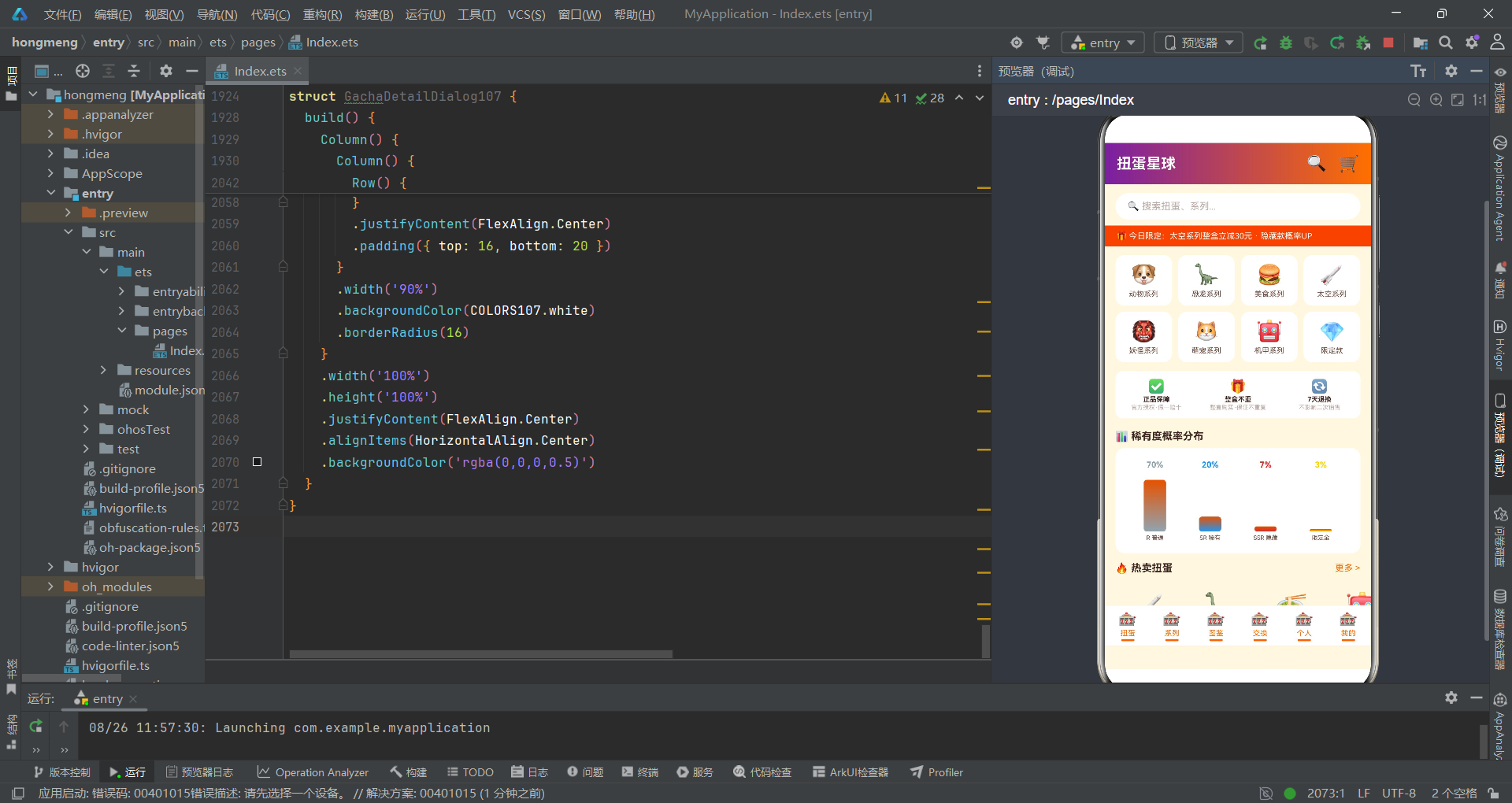
多多扭蛋星球应用展示了HarmonyOS ArkTS在电商类应用开发中的完整工程能力。从拼多多风格的金刚区分类入口、概率分布柱状图到商品瀑布流网格布局,从购买抽屉的可选链防御式编程到取消订单对话框的居中遮罩交互,每一个功能模块都体现了声明式UI范式在电商场景中的适应性和扩展性。应用最突出的设计亮点在于稀有度概率分布透明化展示——通过柱状图可视化R/SR/SSR/限定金四种稀有度的出现概率(70%/20%/7%/3%),不仅满足了随机抽赏商品的合规要求,还通过差异化的柱子高度让用户直观感受到概率分布,增强了购买决策的理性程度。
从技术工程角度评估,应用的状态管理和组件通信架构清晰规范。入口组件DuoDuoGachaApp通过currentTab驱动条件渲染切换六个Tab页面,通过五个布尔状态控制五种弹窗的显隐,通过selectedGacha等状态管理购买表单的临时数据。子组件通过属性参数接收数据和回调函数——GachaTab107接收onBuy和onDetail回调将用户操作传递给父组件,BuyGachaSheet107接收onQty/onBox/onWarranty/onConfirm/onCancel回调处理购买抽屉中的全部交互。特别是BuyGachaSheet107中使用可选链操作符(?.)和空值合并操作符(??)处理this.item可能为null的情况——this.item?.price ?? 0的模式确保了组件在数据未就绪时仍能安全渲染,是防御式编程在ArkTS中的典型应用。
商品浏览环节通过搜索框、金刚区、热卖横滚和全部网格四个层次引导用户发现商品;购买环节通过购买抽屉提供数量选择、整盒选项、保障服务和小计计算;售后环节通过取消订单对话框提供原因选择和确认操作;社区环节通过编辑晒单抽屉提供评分、话题选择和内容输入。配色方案中活力橙与梦幻紫的撞色搭配传达了"高性价比+趣味性"的品牌定位,保障卡区域的"正品保障·假一赔十"“整盒不重复”"7天退换"三项承诺建立了用户信任。整体而言,该应用的技术架构、交互设计和视觉风格为HarmonyOS在电商和随机抽赏类应用开发中提供了一个完整的参考范本,其组件化设计模式和防御式编程实践对于构建类似的电商应用具有重要的借鉴价值。

开源鸿蒙跨平台开发社区汇聚开发者与厂商,共建“一次开发,多端部署”的开源生态,致力于降低跨端开发门槛,推动万物智联创新。
更多推荐

 2
2 0
0- 0


 已为社区贡献29条内容

所有评论(0)