HarmonyOS 6 ArkUI - bindContentCover实现两个居中遮罩(删除确认、点位详情)
萤火虫是生态健康的活体指标,每只萤火虫的闪烁频率、种群密度和生境变化都折射着自然环境的真实状况。云萤火谷将保育员连线夜观、溪谷流萤直播、观测数据上报整合到一个HarmonyOS原生应用中,让公众在手机上即可参与萤火虫保育。
声明式UI的精髓在于状态与视图的自动绑定。当@State装饰的状态变量发生变化时,ArkUI框架自动重新执行build方法,仅更新受影响的UI节点。这种细粒度的差异渲染机制,使得复杂的列表更新、弹窗切换和图表重绘都能在毫秒级完成。
本篇以萤川云萤火谷为案例,深度剖析萤光圆顶部Tab导航、四机位夜观直播、萤种堆叠条占比图、密度走势柱状图、红光手电交互模拟等关键技术,展示HarmonyOS在生态保育类应用中的完整工程实践。
一、引言
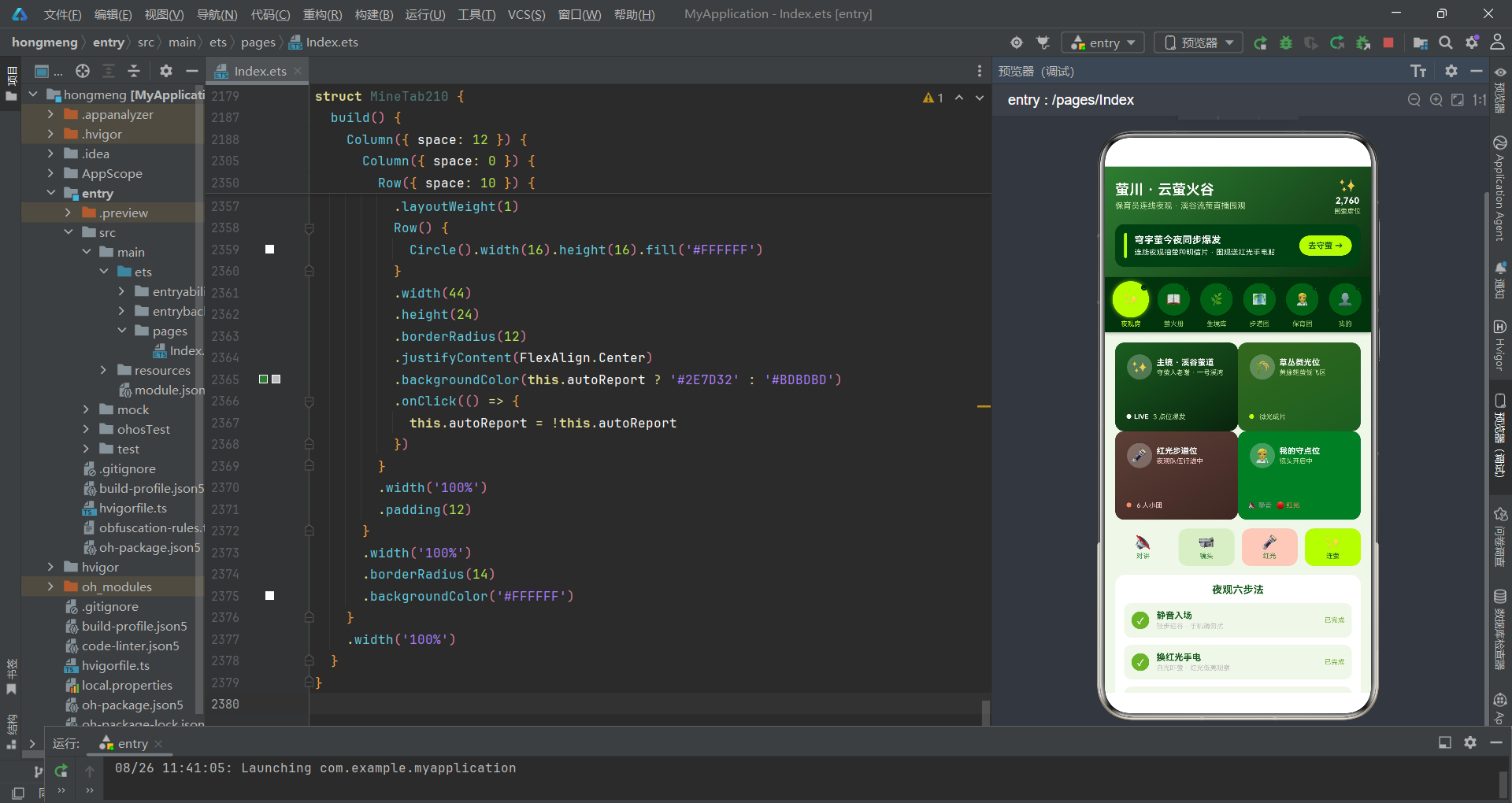
萤火虫作为重要的环境指示生物,其种群数量和分布状况直接反映了水域质量、光污染程度和植被覆盖率等生态指标。然而随着城市化的加速推进,萤火虫的栖息地不断萎缩,许多地区的萤火虫种群已濒临消失。萤川云萤火谷正是基于这一生态危机,构建了一个连接保育员与公众的夜观直播平台——保育员在溪谷现场进行夜观巡查,公众通过直播实时围观萤火虫的同步闪烁奇观,同时可以上报自己的观测数据汇入保育档案,形成一个公众参与的公民科学体系。
从技术架构角度审视,该应用采用了顶部Tab+底部内容区的布局模式,与常见的底部Tab不同,萤光圆导航将六个圆形按钮排列在页面顶部,每个按钮在选中时呈现萤光黄(#C6FF00)的发光效果和1.12倍放大动画,模拟萤火虫发光的视觉感受。状态管理层面,主组件Index210持有全部业务数据(观测点位、生境信息、巡护记录、保育员资料等)作为@State状态变量,通过@Prop向下传递给各子Tab组件。弹窗交互层面,应用使用bindSheet实现三个底部抽屉(预约夜观、上报观测、编辑档案)和bindContentCover实现两个居中遮罩(删除确认、点位详情),形成完整的CRUD交互链路。
从业务设计层面来看,应用围绕"夜观房、萤火册、生境库、步道图、保育团、我的"六大功能模块展开。夜观房是核心直播间,集成了四机位多画面布局(主镜溪谷萤道、草丛微光位、红光步道位、我的守点位)、夜观六步法进度跟踪和围萤弹幕实时互动;萤火册管理观测点位,支持上报、编辑、删除、详情查看和精选标记切换;生境库展示五种萤火虫生境的图鉴与光污染等级;步道图管理夜观步道和密度走势监测;保育团展示保育员人气排行榜;我的页面汇总个人守萤数据与设置开关。整个应用的配色方案采用夜林绿(#1B5E20)、萤光黄(#C6FF00)和月雾白(#E8F5E9)三色体系,视觉风格宁静幽暗,契合萤火虫夜观的暗光环境。
二、数据接口与工具函数体系
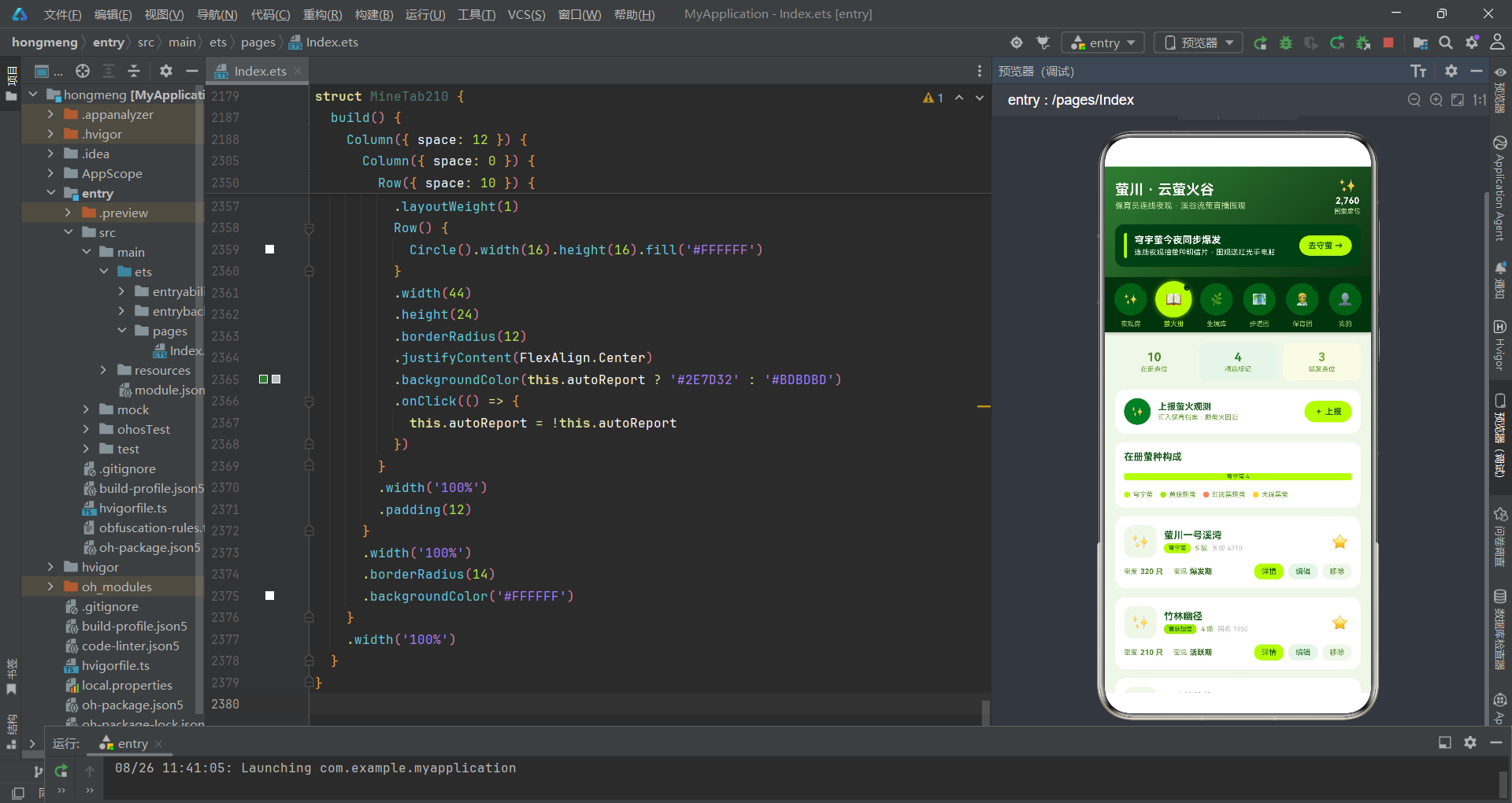
2.1 核心数据模型
应用首先定义了一系列interface来约束萤火虫保育相关的数据结构,每个接口对应一个业务实体。
interface GlowDay210 {
  day: string
  glows: number
}

interface Spot210 {
  id: number
  name: string
  species: string
  level: number
  density: number
  state: string
  watchers: number
  starred: boolean
}

interface Habitat210 {
  id: number
  name: string
  color: string
  feature: string
  light: number
  heat: number
}

interface Patrol210 {
  id: number
  name: string
  species: string
  dayNum: number
  lights: number
  counts: number
  state: string
  top: boolean
}

interface Ranger210 {
  id: number
  name: string
  city: string
  years: number
  online: boolean
  heat: number
}
GlowDay210接口记录每日萤量指数,用于柱状图可视化。Spot210是观测点位的核心实体,包含点位名称、萤种(species)、萤光等级(level, 1-5级)、密度(density, 只数)、当前状态(state, “爆发期”/“活跃期”/“蛰伏期”)、围观数和精选标记。Habitat210描述萤火虫生境信息,light字段记录光污染等级(1-4级),heat字段记录萤况热度值。Patrol210是巡护上报记录,lights字段记录闪光点数量,counts字段记录萤火虫计数。Ranger210描述保育员资料,包括守萤年限和在线状态。这些接口的字段设计兼顾了业务语义和UI展示需求——例如Habitat210的color字段直接被用于生境卡片的背景色。
2.2 状态映射与聚合函数
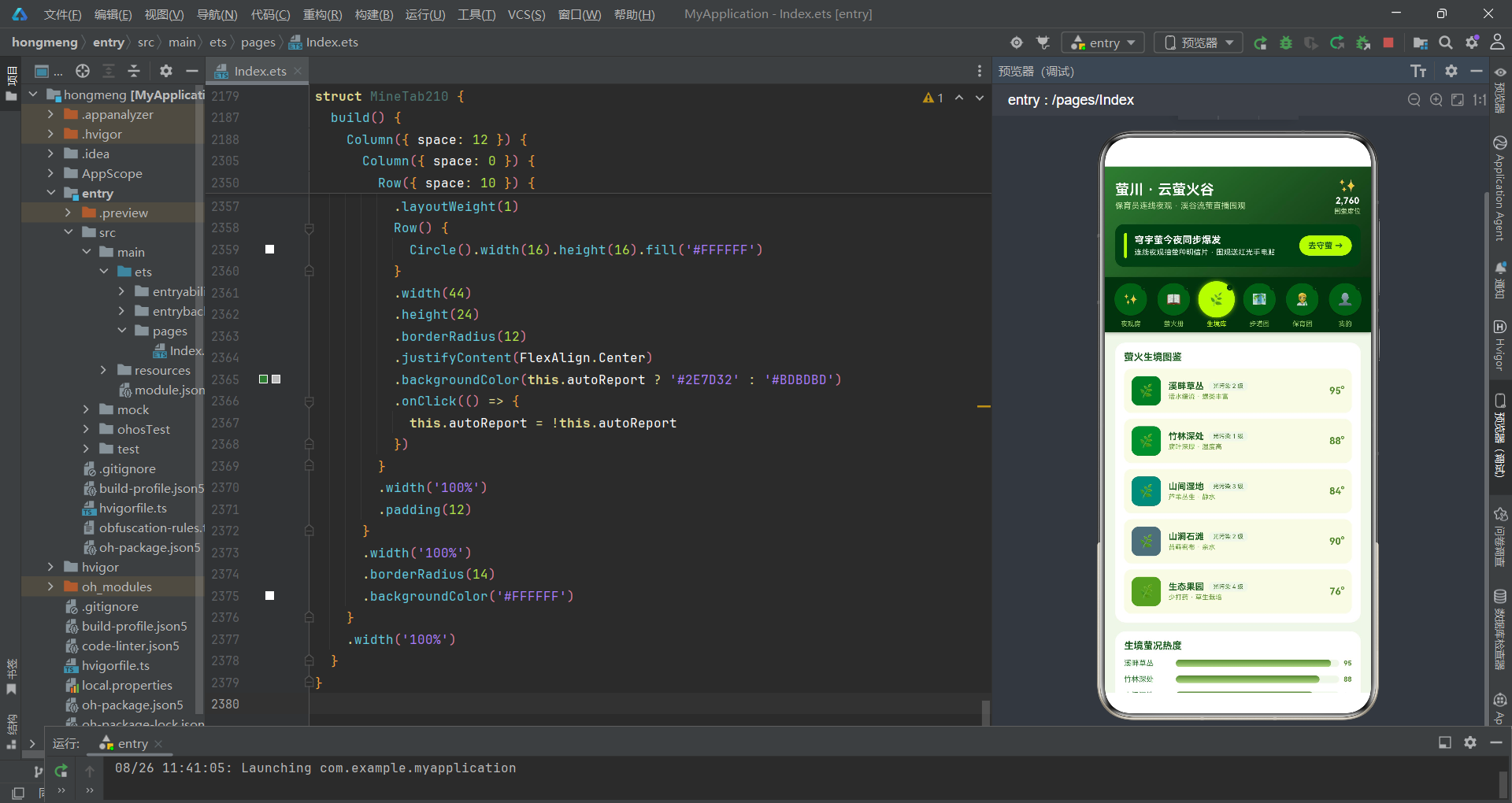
应用定义了一组工具函数实现萤况状态的颜色映射和数据聚合统计。
function spotStateColor210(state: string): string {
  if (state === '爆发期') {
    return '#C6FF00'
  }
  if (state === '活跃期') {
    return '#AEEA00'
  }
  if (state === '蛰伏期') {
    return '#78909C'
  }
  return '#90A4AE'
}

function patrolStateColor210(state: string): string {
  if (state === '今晚爆发') {
    return '#C6FF00'
  }
  if (state === '密度回升') {
    return '#AEEA00'
  }
  if (state === '已归档') {
    return '#7CB342'
  }
  return '#90A4AE'
}

function speciesColor210(species: string): string {
  if (species === '穹宇萤') {
    return '#C6FF00'
  }
  if (species === '黄脉翅萤') {
    return '#AEEA00'
  }
  if (species === '红胸黑翅萤') {
    return '#FF8A65'
  }
  return '#FFD54F'
}
spotStateColor210将观测点的萤况状态映射为三种颜色——爆发期对应萤光黄(#C6FF00)表示大规模同步闪烁、活跃期对应浅萤光(#AEEA00)表示正常活动、蛰伏期对应蓝灰(#78909C)表示休眠状态。patrolStateColor210针对巡护记录的状态做了类似映射。speciesColor210将四种萤火虫物种映射为不同的颜色标识——穹宇萤为萤光黄、黄脉翅萤为浅绿黄、红胸黑翅萤为珊瑚橙(#FF8A65)、大端黑萤为琥珀金(#FFD54F)。这些颜色映射函数在UI渲染中被频繁调用,确保不同萤种和状态在视觉上有清晰的区分。
在ArkTS中,工具函数作为全局函数定义在组件外部,可以在任意组件的build方法中直接引用。这种设计将颜色映射逻辑从UI组件中解耦,当需要调整配色方案时只需修改函数实现,所有引用处自动更新。
2.3 数据聚合统计函数
function starredSpotCount210(spots: Spot210[]): number {
  let n: number = 0
  for (let i = 0; i < spots.length; i++) {
    if (spots[i].starred) {
      n++
    }
  }
  return n
}

function burstingSpotCount210(spots: Spot210[]): number {
  let n: number = 0
  for (let i = 0; i < spots.length; i++) {
    if (spots[i].state === '爆发期') {
      n++
    }
  }
  return n
}

function onlineRangerCount210(rangers: Ranger210[]): number {
  let n: number = 0
  for (let i = 0; i < rangers.length; i++) {
    if (rangers[i].online) {
      n++
    }
  }
  return n
}

function maxRangerHeat210(rangers: Ranger210[]): number {
  let m: number = 1
  for (let i = 0; i < rangers.length; i++) {
    if (rangers[i].heat > m) {
      m = rangers[i].heat
    }
  }
  return m
}

function speciesCounts210(spots: Spot210[]): SpeciesCount210[] {
  const counts: SpeciesCount210[] = []
  for (let i = 0; i < speciesTags210.length; i++) {
    let n: number = 0
    for (let j = 0; j < spots.length; j++) {
      if (spots[j].species === speciesTags210[i]) {
        n++
      }
    }
    counts.push({ label: speciesTags210[i], count: n, color: ['#C6FF00', '#AEEA00', '#FF8A65', '#FFD54F'][i] })
  }
  return counts
}
这些聚合函数遍历数组并根据条件计数或求最大值。starredSpotCount210统计精选标记的点位数量,burstingSpotCount210统计爆发期点位数量(用于直播间的实时数据展示),onlineRangerCount210统计在线保育员人数,maxRangerHeat210获取保育员中的最高人气值。speciesCounts210是一个嵌套循环聚合函数——外层遍历四种萤种标签,内层遍历观测点位数组统计匹配数量,返回带颜色标识的统计结果数组,直接用于萤种占比堆叠条的渲染。
三、主页面架构与萤光圆导航
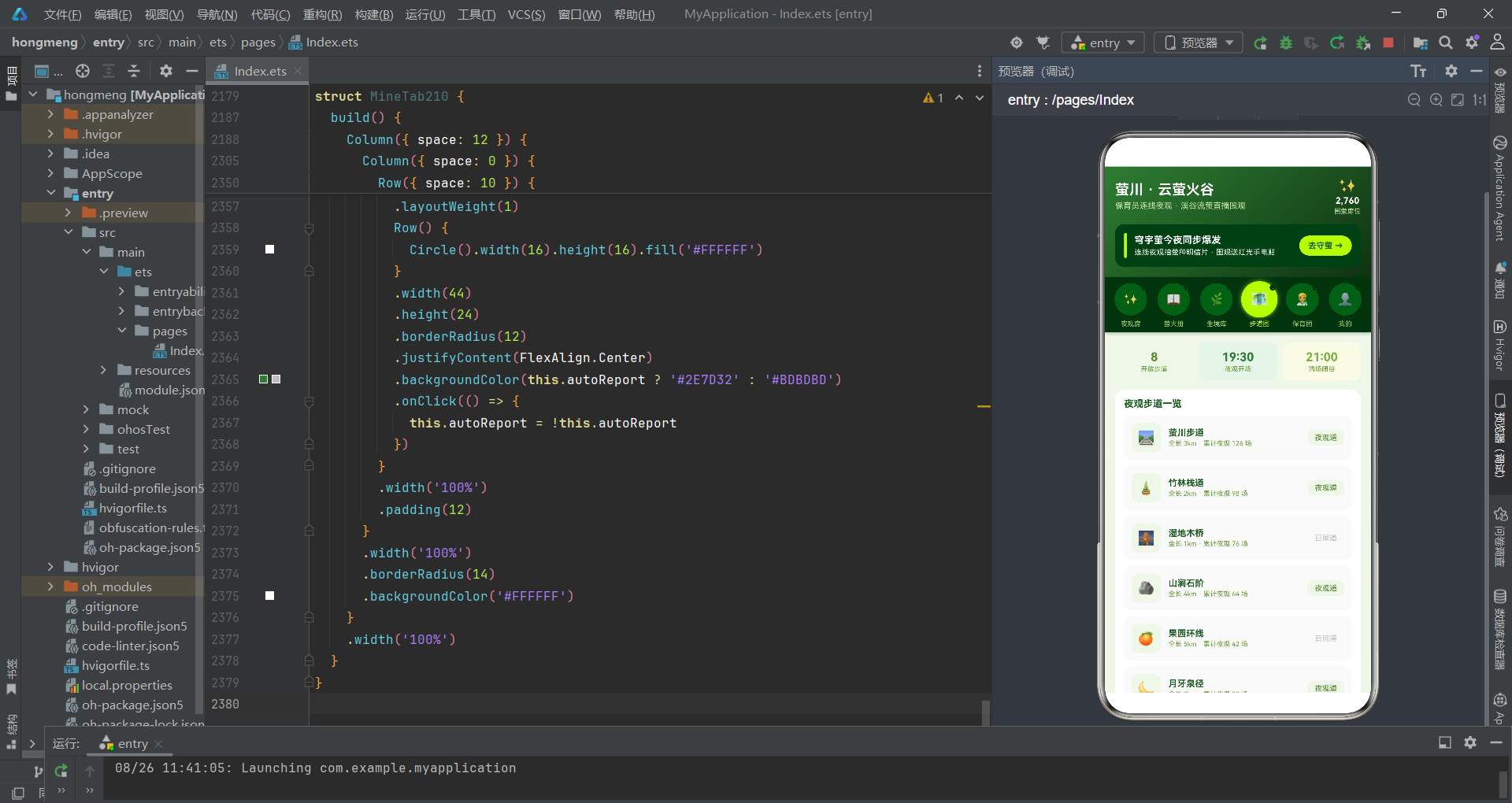
3.1 入口组件状态体系
主组件Index210是应用的核心控制器,集中管理所有状态和弹窗。
@Entry
@Component
struct Index210 {
  @State tabIndex1: number = 0

  // 弹框开关
  @State showJoinSheet: boolean = false
  @State showReportSheet: boolean = false
  @State showEditSheet: boolean = false
  @State showDelDialog: boolean = false
  @State showDetailDialog: boolean = false

  // 预约夜观表单
  @State joinHabitat: number = 0
  @State joinMode: number = 0
  @State joinPeople: number = 2
  @State joinRedLight: boolean = true
  @State joinSilent: boolean = true

  // 上报观测表单
  @State repName: string = ''
  @State repSpecies: number = 0
  @State repCount: number = 20
  @State repLevel: number = 3
  @State repPublic: boolean = true

  // 编辑表单
  @State editIndex: number = -1
  @State editName: string = ''
  @State editCount: number = 20
  @State editLevel: number = 3
  @State editTop: boolean = false

  // 删除
  @State delIndex: number = -1
  @State delKeepLog: boolean = true

  // 详情
  @State detailIndex: number = 0
状态变量按功能分组管理:tabIndex1控制Tab切换;五个布尔弹窗开关分别控制预约抽屉、上报抽屉、编辑抽屉、删除对话框和详情对话框的显隐。预约夜观表单包含目标生境(joinHabitat)、守萤模式(joinMode)、同行人数(joinPeople)、红光手电租借(joinRedLight)和静音守萤承诺(joinSilent)五个字段。上报观测表单记录观测地点(repName)、萤种判断(repSpecies)、目测数量(repCount)、萤光等级(repLevel)和公开设置(repPublic)。编辑表单和删除状态与预约表单的结构类似,体现了表单交互的一致性设计。
3.2 核心业务数据初始化
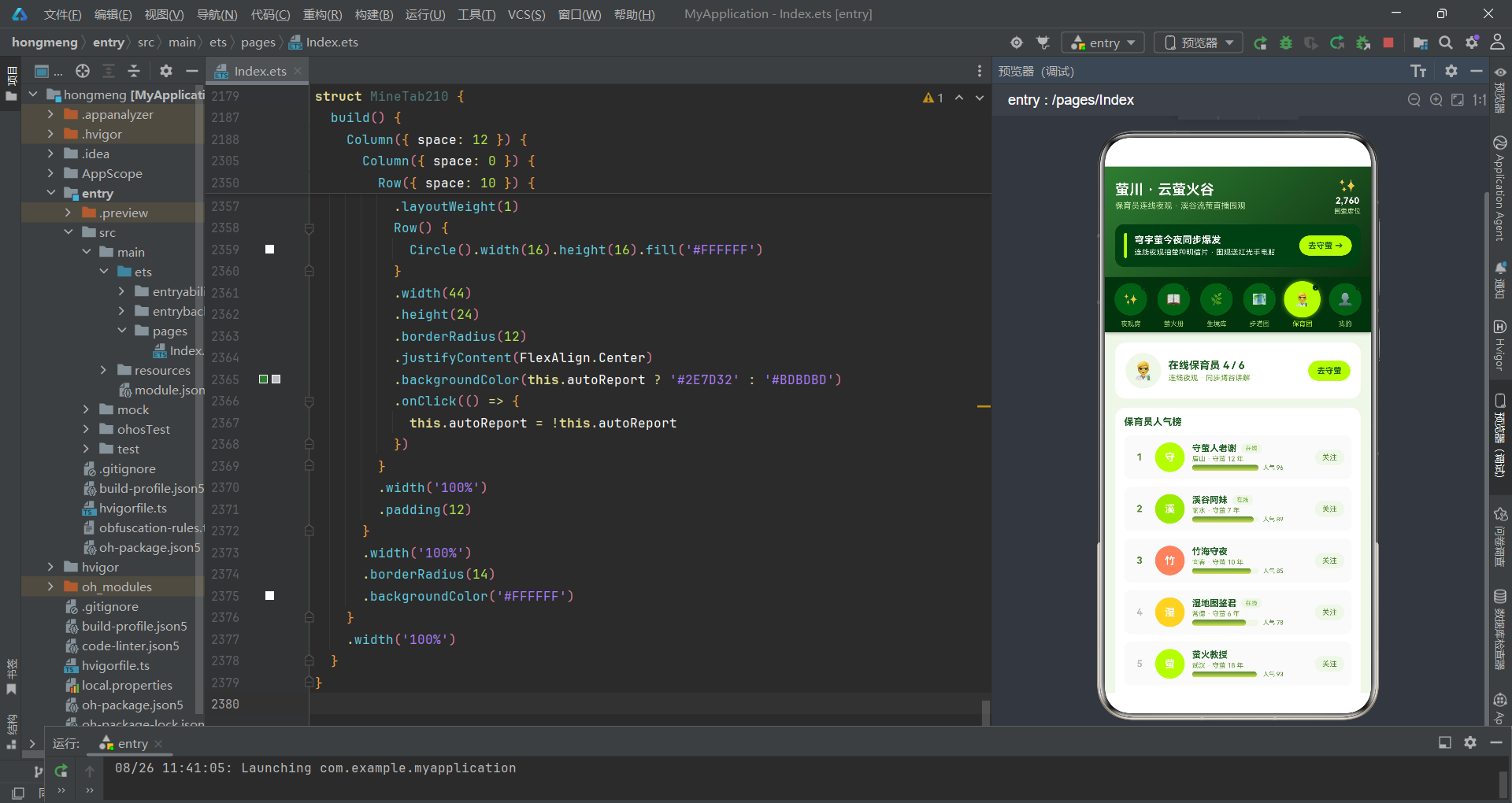
入口组件持有观测点位、生境、巡护记录、保育员等全部业务数据。
  @State spots: Spot210[] = [
    { id: 1, name: '萤川一号溪湾', species: '穹宇萤', level: 5, density: 320, state: '爆发期', watchers: 4210, starred: true },
    { id: 2, name: '竹林幽径', species: '黄脉翅萤', level: 4, density: 210, state: '活跃期', watchers: 1980, starred: true },
    { id: 3, name: '湿地芦苇荡', species: '红胸黑翅萤', level: 3, density: 150, state: '活跃期', watchers: 1420, starred: false },
    { id: 4, name: '山涧石滩', species: '穹宇萤', level: 4, density: 260, state: '爆发期', watchers: 3120, starred: true },
    { id: 5, name: '古桥下游', species: '大端黑萤', level: 2, density: 90, state: '蛰伏期', watchers: 640, starred: false },
    { id: 6, name: '果园坡地', species: '黄脉翅萤', level: 3, density: 170, state: '活跃期', watchers: 1280, starred: false },
    { id: 7, name: '苔石浅滩', species: '穹宇萤', level: 5, density: 380, state: '爆发期', watchers: 4860, starred: true },
    { id: 8, name: '杉林小道', species: '大端黑萤', level: 2, density: 80, state: '蛰伏期', watchers: 520, starred: false },
    { id: 9, name: '稻香田埂', species: '红胸黑翅萤', level: 4, density: 240, state: '活跃期', watchers: 2260, starred: false },
    { id: 10, name: '月牙泉眼', species: '穹宇萤', level: 3, density: 180, state: '活跃期', watchers: 1620, starred: false }
  ]

  @State habitats: Habitat210[] = [
    { id: 1, name: '溪畔草丛', color: '#2E7D32', feature: '活水缓流 · 螺类丰富', light: 2, heat: 95 },
    { id: 2, name: '竹林深处', color: '#388E3C', feature: '腐叶深厚 · 湿度高', light: 1, heat: 88 },
    { id: 3, name: '山间湿地', color: '#00897B', feature: '芦苇丛生 · 静水', light: 3, heat: 84 },
    { id: 4, name: '山涧石滩', color: '#546E7A', feature: '苔藓密布 · 亲水', light: 2, heat: 90 },
    { id: 5, name: '生态果园', color: '#689F38', feature: '少打药 · 草生栽培', light: 4, heat: 76 }
  ]
spots数组是应用最核心的数据源,包含10个观测点位的完整档案:点位名称、萤火虫物种、萤光等级(1-5级)、密度(只数)、当前萤况状态、围览权重和精选标记。穹宇萤是最常见的物种(4个点位),其5级萤光等级和380只密度的高数值代表了大规模同步闪烁的壮观场景。habitats数组定义了5种萤火虫生境——溪畔草丛的热度最高(95°)反映了活水缓流和螺类丰富对萤火虫的吸引力,生态果园的光污染等级最高(4级)导致热度最低(76°),这一数据对比直观地展示了光污染对萤火虫生境的负面影响。
3.3 头部Builder与萤光圆Tab导航
头部区域采用深绿渐变背景模拟夜林氛围,萤光圆Tab导航则使用圆形按钮配合发光效果。
  @Builder
  header210() {
    Column({ space: 12 }) {
      Row({ space: 10 }) {
        Column({ space: 4 }) {
          Text('萤川 · 云萤火谷').fontSize(19).fontColor('#FFFFFF').fontWeight(FontWeight.Bold)
          Text('保育员连线夜观 · 溪谷流萤直播围观').fontSize(11).fontColor('#C5E1A5')
        }
        .alignItems(HorizontalAlign.Start)
        Text('').layoutWeight(1)
        Column({ space: 2 }) {
          Text('✨').fontSize(20)
          Text('2,760').fontSize(12).fontColor('#FFFFFF').fontWeight(FontWeight.Bold)
          Text('围萤席位').fontSize(9).fontColor('#C5E1A5')
        }
        .alignItems(HorizontalAlign.Center)
      }

      Row({ space: 10 }) {
        Column().width(4).height(34).borderRadius(2).backgroundColor('#C6FF00')
        Column({ space: 3 }) {
          Text('穹宇萤今夜同步爆发').fontSize(13).fontColor('#FFFFFF').fontWeight(FontWeight.Bold)
          Text('连线夜观抽萤种明信片 · 围观送红光手电贴').fontSize(10).fontColor('#E8F5E9')
        }
        .alignItems(HorizontalAlign.Start)
        Text('').layoutWeight(1)
        Column() {
          Text('去守萤 →').fontSize(11).fontColor('#1B5E20').fontWeight(FontWeight.Bold)
        }
        .padding({ left: 12, right: 12, top: 7, bottom: 7 })
        .borderRadius(14)
        .backgroundColor('#C6FF00')
        .onClick(() => { this.showJoinSheet = true })
      }
      .padding(12).borderRadius(12).backgroundColor('#14401A')
    }
    .alignItems(HorizontalAlign.Start)
    .padding(14)
    .linearGradient({ angle: 140, colors: [['#2E7D32', 0], ['#0E3312', 1]] })
  }
头部由两行组成:上方是应用名称"萤川 · 云萤火谷"和围萤席位实时人数,右侧用萤光emoji和数字展示当前围观人数2,760人;下方是促销卡片,左侧用4px宽的萤光黄竖条引导视线,中间展示"穹宇萤今夜同步爆发"的实时活动文案,右侧是萤光黄背景的"去守萤"按钮。整个头部使用从夜林绿(#2E7D32)到极深绿(#0E3312)的140度线性渐变,营造夜观时幽暗林间的氛围感。
3.4 萤光圆Tab导航实现
萤光圆Tab导航是本应用最具特色的UI组件——六个圆形按钮排列在页面顶部,选中时呈现萤光黄发光效果。
  @Builder
  tabBar210() {
    Row({ space: 0 }) {
      ForEach(this.tabs210, (t: string, i: number) => {
        Column({ space: 4 }) {
          Stack() {
            Column() {
              Text(this.tabIcons210[i]).fontSize(16)
            }
            .width(44).height(44).borderRadius(22)
            .backgroundColor(this.tabIndex1 === i ? '#C6FF00' : '#1B5E20')
            .justifyContent(FlexAlign.Center)
            .shadow(this.tabIndex1 === i
              ? { radius: 14, color: 'rgba(198,255,0,0.7)', offsetY: 0 }
              : { radius: 4, color: 'rgba(0,0,0,0.3)', offsetY: 2 })
            .scale({ x: this.tabIndex1 === i ? 1.12 : 1, y: this.tabIndex1 === i ? 1.12 : 1 })
            .animation({ duration: 180 })
            Column() {
              Text('·').fontSize(10).fontColor(this.tabIndex1 === i ? '#C6FF00' : '#4E7A56')
            }
            .width(8).height(8).borderRadius(4)
            .backgroundColor('#0E3312')
            .position({ x: 38, y: 4 })
          }
          .width(48).height(48)

          Text(t).fontSize(9).fontColor(this.tabIndex1 === i ? '#C6FF00' : '#9CCC65').maxLines(1)
        }
        .layoutWeight(1)
        .alignItems(HorizontalAlign.Center)
        .padding({ top: 6, bottom: 6 })
        .onClick(() => { this.tabIndex1 = i })
      }, (t: string) => t)
    }
    .width('100%')
    .padding({ left: 6, right: 6 })
    .backgroundColor('#0E3312')
    .shadow({ radius: 10, color: 'rgba(0,0,0,0.3)', offsetY: 4 })
  }
每个Tab按钮由Stack容器包裹:主体是一个44x44的圆形按钮,选中时背景变为萤光黄(#C6FF00)并添加radius为14、颜色为半透明萤光黄的shadow模拟发光效果,同时scale放大1.12倍配合180ms动画过渡;未选中时背景为夜林绿(#1B5E20),shadow为普通的向下偏移投影。Stack的右上角(position x:38, y:4)放置了一个8x8的小圆点,选中时显示萤光黄,未选中时显示暗绿色——这个小萤点的设计灵感来源于萤火虫尾部的发光器官,使得Tab按钮在视觉上更像一只萤火虫。六个Tab分别是:夜观房、萤火册、生境库、步道图、保育团、我的,对应emoji图标依次为✨📖🌿🗺️🧑🔬👤。
萤光圆Tab导航的设计是本应用视觉层面的最大亮点。圆形按钮+发光shadow+小萤点三层视觉元素的叠加,在功能导航之外赋予了UI以"萤火虫"的生命感。当用户切换Tab时,旧Tab的发光效果淡出、新Tab的发光效果亮起,整个过程配合180ms动画过渡,模拟了萤火虫闪烁的节奏。
3.5 build方法与条件路由
  build() {
    Column() {
      this.header210()
      this.tabBar210()
      Scroll() {
        Column({ space: 12 }) {
          if (this.tabIndex1 === 0) {
            LiveTab210({
              spots: this.spots,
              rangers: this.rangers,
              watchSteps: this.watchSteps,
              barrages: this.barrages,
              onStep: (i: number) => {
                this.watchSteps = this.watchSteps.map((s: WatchStep210, si: number) => {
                  if (si === i) {
                    return { id: s.id, title: s.title, tip: s.tip, done: !s.done }
                  }
                  return s
                })
              },
              onJoin: () => { this.showJoinSheet = true }
            })
          }
          if (this.tabIndex1 === 1) {
            SpotTab210({
              spots: this.spots,
              onAdd: () => { this.showReportSheet = true },
              onDetail: (i: number) => { this.detailIndex = i; this.showDetailDialog = true },
              onEdit: (i: number) => {
                this.editIndex = i
                this.editName = this.spots[i].name
                this.editCount = this.spots[i].density
                this.editLevel = this.spots[i].level
                this.editTop = this.spots[i].starred
                this.showEditSheet = true
              },
              onDel: (i: number) => { this.delIndex = i; this.showDelDialog = true },
              onStar: (i: number) => {
                this.spots = this.spots.map((s: Spot210, si: number) => {
                  if (si === i) {
                    return { ...s, starred: !s.starred }
                  }
                  return s
                })
              }
            })
          }
          // ... 其他Tab
        }
        .width('100%').padding(14)
      }
      .layoutWeight(1).align(Alignment.Top)
    }
    .width('100%').height('100%')
    .backgroundColor('#F1F8E9')
    .bindSheet($$this.showJoinSheet, this.joinSheet210(), {
      height: 620, dragBar: true, showClose: false, backgroundColor: '#FFFFFF'
    })
    .bindSheet($$this.showReportSheet, this.reportSheet210(), {
      height: 600, dragBar: true, showClose: false, backgroundColor: '#FFFFFF'
    })
    .bindSheet($$this.showEditSheet, this.editSheet210(), {
      height: 560, dragBar: true, showClose: false, backgroundColor: '#FFFFFF'
    })
    .bindContentCover($$this.showDelDialog, this.delDialog210(), {})
    .bindContentCover($$this.showDetailDialog, this.detailDialog210(), {})
  }
与蜂颂应用不同,萤川应用的Tab导航放在头部下方、内容区上方。build方法的结构为:header210头部、tabBar210导航、Scroll内容区(含六个if条件块)、五个bindSheet/bindContentCover弹窗绑定。onStep回调通过map方法切换步骤的done状态——当用户点击某个步骤时,map遍历整个数组找到对应索引的元素并取反其done值,返回新数组触发重新渲染。onStar回调使用同样的map模式切换精选标记。onEdit回调在弹出编辑抽屉前,先将当前点位的数据赋值到编辑表单状态——editName、editCount、editLevel、editTop分别从spots数组的对应索引取值,实现"编辑前预填"的交互模式。
四、弹窗系统实现
4.1 预约夜观抽屉
预约夜观抽屉包含生境选择、守萤模式、人数选择器、红光手电租借和静音守萤承诺。
  @Builder
  joinSheet210() {
    Column({ space: 16 }) {
      Row({ space: 10 }) {
        Column().width(4).height(30).borderRadius(2).backgroundColor('#C6FF00')
        Column({ space: 2 }) {
          Text('预约连线夜观').fontSize(17).fontWeight(FontWeight.Bold).fontColor('#1B5E20')
          Text('和守萤人老谢同步蹲谷 · 静音守萤').fontSize(10).fontColor('#689F38')
        }
        .alignItems(HorizontalAlign.Start)
        Text('').layoutWeight(1)
        Column() { Text('✕').fontSize(14).fontColor('#689F38') }
          .width(30).height(30).borderRadius(15).backgroundColor('#F1F8E9')
          .justifyContent(FlexAlign.Center)
          .onClick(() => { this.showJoinSheet = false })
      }

      Scroll() {
        Column({ space: 16 }) {
          Column({ space: 8 }) {
            Text('目标生境').fontSize(13).fontWeight(FontWeight.Bold).fontColor('#2E7D32')
            Flex({ wrap: FlexWrap.Wrap }) {
              ForEach(this.habitats, (h: Habitat210, i: number) => {
                Text(h.name)
                  .fontSize(11)
                  .fontColor(this.joinHabitat === i ? '#1B5E20' : '#689F38')
                  .padding({ left: 12, right: 12, top: 6, bottom: 6 })
                  .borderRadius(16)
                  .backgroundColor(this.joinHabitat === i ? '#C6FF00' : '#F1F8E9')
                  .margin(4)
                  .onClick(() => { this.joinHabitat = i })
              }, (h: Habitat210) => ('j' + h.id))
            }
          }

          Row({ space: 10 }) {
            Column({ space: 2 }) {
              Text('红光手电租借').fontSize(13).fontColor('#2E7D32')
              Text('白光禁入 · 红光护萤').fontSize(9).fontColor('#90A4AE')
            }
            .alignItems(HorizontalAlign.Start)
            Text('').layoutWeight(1)
            Row() {
              Circle().width(18).height(18).fill('#FFFFFF')
            }
            .width(48).height(26).borderRadius(13)
            .justifyContent(FlexAlign.Center)
            .backgroundColor(this.joinRedLight ? '#C6FF00' : '#BDBDBD')
            .onClick(() => { this.joinRedLight = !this.joinRedLight })
          }
          .padding(12).borderRadius(12).backgroundColor('#F9FBE7')

          Row({ space: 10 }) {
            Column({ space: 2 }) {
              Text('预计花费').fontSize(13).fontColor('#2E7D32')
              Text('含保育捐与手电租金').fontSize(9).fontColor('#90A4AE')
            }
            .alignItems(HorizontalAlign.Start)
            Text('').layoutWeight(1)
            Text('¥ ' + (this.joinPeople * 39 + (this.joinRedLight ? 10 : 0)))
              .fontSize(20).fontWeight(FontWeight.Bold).fontColor('#558B2F')
          }
          .padding(12).borderRadius(12).backgroundColor('#F9FBE7')

          Button() {
            Text('确认预约守萤').fontSize(15).fontColor('#1B5E20').fontWeight(FontWeight.Bold)
          }
          .width('100%').height(48).borderRadius(24).backgroundColor('#C6FF00')
          .onClick(() => { this.showJoinSheet = false })
        }
        .padding({ left: 18, right: 18, top: 4, bottom: 24 })
      }
      .constraintSize({ maxHeight: 460 })
    }
    .width('100%').height('100%').padding({ top: 14 }).backgroundColor('#FFFFFF')
  }
目标生境选择区的特点在于直接遍历this.habitats数组动态生成标签——五个生境名称(溪畔草丛、竹林深处、山间湿地、山涧石滩、生态果园)作为可选项,选中时背景变为萤光黄。红光手电租借开关使用自定义的Toggle组件——Row容器内嵌Circle圆形滑块,通过backgroundColor条件切换实现开关效果,背景色在萤光黄(开启)和灰色(关闭)之间切换。预计花费通过表达式this.joinPeople * 39 + (this.joinRedLight ? 10 : 0)实时计算——每人39元,租借红光手电额外加10元。确认按钮使用萤光黄背景配合夜林绿文字,形成鲜明对比。
红光手电是萤火虫夜观的标准装备。白光会惊吓萤火虫导致它们停止发光,而红光对萤火虫的干扰最小。应用将"白光禁入·红光护萤"的保育知识融入表单文案,体现了公民科学应用的教育价值。
4.2 点位详情对话框
点位详情对话框展示观测点的萤况数据、围萤人数柱图和观测档案。
  @Builder
  detailDialog210() {
    Column({ space: 0 }) {
      Scroll() {
        Column({ space: 0 }) {
          Column({ space: 8 }) {
            Row({ space: 10 }) {
              Column() { Text('✨').fontSize(30) }
                .width(56).height(56).borderRadius(28).backgroundColor('#FFFFFF')
                .justifyContent(FlexAlign.Center)
              Column({ space: 3 }) {
                Text(this.detailIndex >= 0 && this.detailIndex < this.spots.length
                  ? this.spots[this.detailIndex].name : '')
                  .fontSize(18).fontWeight(FontWeight.Bold).fontColor('#FFFFFF')
                Text(this.detailIndex >= 0 && this.detailIndex < this.spots.length
                  ? this.spots[this.detailIndex].species : '' + ' · 密度 '
                  + (this.detailIndex >= 0 && this.detailIndex < this.spots.length
                  ? this.spots[this.detailIndex].density : 0) + ' 只')
                  .fontSize(11).fontColor('#E8F5E9')
              }
              .alignItems(HorizontalAlign.Start)
              Text('').layoutWeight(1)
              Column() { Text('✕').fontSize(13).fontColor('#FFFFFF') }
                .width(28).height(28).borderRadius(14)
                .backgroundColor('rgba(255,255,255,0.2)')
                .onClick(() => { this.showDetailDialog = false })
            }
          }
          .linearGradient({ angle: 135, colors: [['#2E7D32', 0], ['#C6FF00', 1]] })

          Column({ space: 14 }) {
            Column({ space: 8 }) {
              Text('近 7 日围萤人数').fontSize(13).fontWeight(FontWeight.Bold).fontColor('#1B5E20')
              Row({ space: 6 }) {
                ForEach(this.glowDays, (d: GlowDay210) => {
                  Column({ space: 4 }) {
                    Column()
                      .width(16)
                      .height(d.glows / 12)
                      .borderRadius({ topLeft: 4, topRight: 4 })
                      .linearGradient({ angle: 180, colors: [['#D4E157', 0], ['#558B2F', 1]] })
                    Text(d.day).fontSize(8).fontColor('#689F38')
                  }
                  .alignItems(HorizontalAlign.Center).layoutWeight(1)
                }, (d: GlowDay210) => ('d' + d.day))
              }
              .alignItems(VerticalAlign.Bottom).height(80)
            }
            .padding(12).borderRadius(12).backgroundColor('#F9FBE7')

            Column({ space: 8 }) {
              Text('观测档案').fontSize(13).fontWeight(FontWeight.Bold).fontColor('#1B5E20')
              Row({ space: 8 }) {
                Text('生境').fontSize(11).fontColor('#689F38')
                Text('活水溪湾 · 草丛茂密').fontSize(11).fontColor('#2E7D32').fontWeight(FontWeight.Bold)
                Text('').layoutWeight(1)
                Text('光污染 2 级').fontSize(10).fontColor('#C6FF00')
              }
              Row({ space: 8 }) {
                Text('闪频').fontSize(11).fontColor('#689F38')
                Text('同步闪烁 · 每 0.8s 一轮').fontSize(11).fontColor('#2E7D32').fontWeight(FontWeight.Bold)
                Text('').layoutWeight(1)
                Text('穹宇萤特征').fontSize(10).fontColor('#7CB342')
              }
            }
            .padding(12).borderRadius(12).backgroundColor('#F9FBE7').alignItems(HorizontalAlign.Start)

            Button() {
              Text('预约夜观这个点位').fontSize(14).fontColor('#1B5E20').fontWeight(FontWeight.Bold)
            }
            .width('100%').height(44).borderRadius(22).backgroundColor('#C6FF00')
            .onClick(() => {
              this.showDetailDialog = false
              this.showJoinSheet = true
            })
          }
          .padding(16)
        }
      }
      .constraintSize({ maxHeight: 480 })
    }
    .width('86%').borderRadius(20).backgroundColor('#FFFFFF').clip(true)
  }
详情对话框的头部使用从夜林绿到萤光黄的135度渐变,展示点位名称、萤种和密度信息。数据展示区包含三列统计卡(萤光等级、目测只数、当前萤况)、近7日围萤人数柱状图和观测档案表。柱状图的实现方式与蜂颂应用的温度柱图类似,但柱子高度绑定的表达式为d.glows / 12——将萤量指数除以12进行缩放,避免高数值(如360)导致柱子超出容器高度。观测档案表展示了生境特征和闪频信息,"同步闪烁·每0.8s一轮"标注了穹宇萤的物种特征,"光污染2级"以萤光黄色文字突出显示当前点位的光污染评估结果。底部"预约夜观这个点位"按钮实现了弹窗联动——关闭详情后打开预约抽屉。
五、核心业务Tab组件
5.1 夜观房直播Tab
夜观房是应用核心直播间,四机位布局展示溪谷不同视角的萤火虫实况。
@Component
struct LiveTab210 {
@State localMic: boolean = false
@State localCam: boolean = true
@State localRedLight: boolean = true
@Prop spots: Spot210[] = []
@Prop rangers: Ranger210[] = []
@Prop watchSteps: WatchStep210[] = []
@Prop barrages: Barrage210[] = []
onStep: (i: number) => void = () => {}
onJoin: () => void = () => {}
build() {
Column({ space: 12 }) {
Grid() {
GridItem() {
Column({ space: 4 }) {
Row({ space: 6 }) {
Column() { Text('✨').fontSize(18) }
.width(34).height(34).borderRadius(17)
.backgroundColor('rgba(255,255,255,0.25)')
Column({ space: 2 }) {
Text('主镜 · 溪谷萤道').fontSize(11).fontColor('#FFFFFF').fontWeight(FontWeight.Bold)
Text('守萤人老谢 · 一号溪湾').fontSize(9).fontColor('#C5E1A5')
}
}
Text('').layoutWeight(1)
Row({ space: 6 }) {
Text('● LIVE').fontSize(9).fontColor('#FFFFFF').fontWeight(FontWeight.Bold)
Text(burstingSpotCount210(this.spots) + ' 点位爆发').fontSize(9).fontColor('#C5E1A5')
}
}
.linearGradient({ angle: 150, colors: [['#1B5E20', 0], ['#08240D', 1]] })
.onClick(() => { this.onJoin() })
}
GridItem() {
Column({ space: 4 }) {
Row({ space: 6 }) {
Column() { Text('🌾').fontSize(18) }
.width(34).height(34).borderRadius(17)
.backgroundColor('rgba(255,255,255,0.25)')
Column({ space: 2 }) {
Text('草丛微光位').fontSize(11).fontColor('#FFFFFF').fontWeight(FontWeight.Bold)
Text('黄脉翅萤低飞区').fontSize(9).fontColor('#C5E1A5')
}
}
Text('').layoutWeight(1)
Row({ space: 6 }) {
Text('●').fontSize(9).fontColor('#C6FF00')
Text('微光成片').fontSize(9).fontColor('#C5E1A5')
}
}
.linearGradient({ angle: 150, colors: [['#33691E', 0], ['#1B5E20', 1]] })
}
GridItem() {
Column({ space: 4 }) {
Row({ space: 6 }) {
Column() { Text('🔦').fontSize(18) }
.width(34).height(34).borderRadius(17)
.backgroundColor('rgba(255,255,255,0.25)')
Column({ space: 2 }) {
Text('红光步道位').fontSize(11).fontColor('#FFFFFF').fontWeight(FontWeight.Bold)
Text('夜观队伍行进中').fontSize(9).fontColor('#FFCDD2')
}
}
Text('').layoutWeight(1)
Row({ space: 6 }) {
Text('●').fontSize(9).fontColor('#FF8A65')
Text('6 人小团').fontSize(9).fontColor('#FFCDD2')
}
}
.linearGradient({ angle: 150, colors: [['#5D4037', 0], ['#3E2723', 1]] })
}
GridItem() {
Column({ space: 4 }) {
Row({ space: 6 }) {
Column() { Text('🧑🔬').fontSize(18) }
.width(34).height(34).borderRadius(17)
.backgroundColor('rgba(255,255,255,0.25)')
Column({ space: 2 }) {
Text('我的守点位').fontSize(11).fontColor('#FFFFFF').fontWeight(FontWeight.Bold)
Text(this.localCam ? '镜头开启中' : '镜头已关闭').fontSize(9).fontColor('#C5E1A5')
}
}
Text('').layoutWeight(1)
Row({ space: 6 }) {
Text(this.localMic ? '🎙 开麦' : '🔇 静音').fontSize(9)
.fontColor(this.localMic ? '#FFFFFF' : '#9E9E9E')
Text(this.localRedLight ? '🔴 红光' : '🔴 关灯').fontSize(9)
.fontColor(this.localRedLight ? '#FF8A65' : '#9E9E9E')
}
}
.backgroundColor(this.localCam ? '#2E7D32' : '#263238')
.onClick(() => { this.localCam = !this.localCam })
}
}
.columnsTemplate('1fr 1fr')
.rowsTemplate('1fr 1fr')
.height(240)
.width('100%')
}
}
}
四机位Grid的每个机位使用不同的渐变色系来区分视角:主镜溪谷萤道采用从夜林绿到极深绿的渐变,草丛微光位采用从深绿到夜林绿的渐变,红光步道位采用从褐到深褐的渐变,我的守点位根据镜头开关在夜林绿(开启)和深灰蓝(关闭)之间切换。每个机位底部展示实时状态:主镜显示"LIVE"和爆发点位数(通过burstingSpotCount210实时聚合计算),草丛位显示萤光黄圆点和"微光成片",红光位显示珊瑚橙圆点和"6人小团",守点位显示麦克风和红光手电的状态。工具条包含四个按钮——对讲、镜头、红光、连萤,其中红光按钮的背景色在珊瑚橙(开启)和月雾白(关闭)之间切换,模拟红光手电的开关效果。
夜观房的四机位设计中,"我的守点位"是唯一可点击切换的机位,点击后切换镜头开关状态。其他三个机位为展示型机位——主镜可点击触发预约夜观,草丛位和红光位为纯展示。这种设计反映了直播连线中主镜为权威画面、用户镜头为辅助画面的角色分工。
5.2 萤火册Tab
萤火册Tab管理观测点位列表,支持上报、详情、编辑、删除和精选标记操作。
@Component
struct SpotTab210 {
  @Prop spots: Spot210[] = []
  onAdd: () => void = () => {}
  onDetail: (i: number) => void = () => {}
  onEdit: (i: number) => void = () => {}
  onDel: (i: number) => void = () => {}
  onStar: (i: number) => void = () => {}

  build() {
    Column({ space: 12 }) {
      Row({ space: 8 }) {
        Column({ space: 2 }) {
          Text(this.spots.length + '').fontSize(16).fontWeight(FontWeight.Bold).fontColor('#558B2F')
          Text('在册点位').fontSize(9).fontColor('#689F38')
        }
        .layoutWeight(1).borderRadius(10).backgroundColor('#F1F8E9')
        Column({ space: 2 }) {
          Text(starredSpotCount210(this.spots) + '').fontSize(16).fontWeight(FontWeight.Bold).fontColor('#2E7D32')
          Text('精选标记').fontSize(9).fontColor('#689F38')
        }
        .layoutWeight(1).borderRadius(10).backgroundColor('#E8F5E9')
        Column({ space: 2 }) {
          Text(burstingSpotCount210(this.spots) + '').fontSize(16).fontWeight(FontWeight.Bold).fontColor('#7CB342')
          Text('爆发点位').fontSize(9).fontColor('#689F38')
        }
        .layoutWeight(1).borderRadius(10).backgroundColor('#F9FBE7')
      }

      Column({ space: 8 }) {
        Text('在册萤种构成').fontSize(13).fontWeight(FontWeight.Bold).fontColor('#1B5E20')
        Row() {
          ForEach(speciesCounts210(this.spots), (c: SpeciesCount210) => {
            Row() {
              Text(c.label + ' ' + c.count).fontSize(8).fontColor('#33691E')
            }
            .width('100%').justifyContent(FlexAlign.Center).backgroundColor(c.color)
          }, (c: SpeciesCount210) => (c.label + c.count))
        }
        .width('100%').height(22).borderRadius(11).clip(true)
        Row({ space: 10 }) {
          ForEach(speciesCounts210(this.spots), (c: SpeciesCount210) => {
            Row({ space: 4 }) {
              Column().width(8).height(8).borderRadius(4).backgroundColor(c.color)
              Text(c.label).fontSize(9).fontColor('#689F38')
            }
          }, (c: SpeciesCount210) => ('lg' + c.label))
        }
      }

      ForEach(this.spots, (s: Spot210, i: number) => {
        Column({ space: 8 }) {
          Row({ space: 10 }) {
            Column() { Text('✨').fontSize(20) }
              .width(44).height(44).borderRadius(12).backgroundColor('#F1F8E9')
            Column({ space: 3 }) {
              Text(s.name).fontSize(13).fontColor('#1B5E20').fontWeight(FontWeight.Bold)
              Row({ space: 6 }) {
                Text(s.species).fontSize(8).fontColor('#33691E')
                  .borderRadius(6).backgroundColor(speciesColor210(s.species))
                Text(s.level + ' 级').fontSize(9).fontColor('#689F38')
                Text('围观 ' + s.watchers).fontSize(9).fontColor('#BDBDBD')
              }
            }
            .alignItems(HorizontalAlign.Start).layoutWeight(1)
            Column() { Text(s.starred ? '⭐' : '☆').fontSize(18) }
              .onClick(() => { this.onStar(i) })
          }
          Row() {
            Text('密度').fontSize(9).fontColor('#689F38')
            Text(s.density + ' 只').fontSize(10).fontColor('#558B2F').fontWeight(FontWeight.Bold)
            Text('萤况').fontSize(9).fontColor('#689F38').margin({ left: 14 })
            Text(s.state).fontSize(10).fontColor('#33691E').fontWeight(FontWeight.Bold)
            Text('').layoutWeight(1)
            Column() { Text('详情').fontSize(10).fontColor('#1B5E20') }
              .borderRadius(10).backgroundColor('#C6FF00')
              .onClick(() => { this.onDetail(i) })
            Column() { Text('编辑').fontSize(10).fontColor('#2E7D32') }
              .borderRadius(10).backgroundColor('#E8F5E9').margin({ left: 6 })
              .onClick(() => { this.onEdit(i) })
            Column() { Text('移除').fontSize(10).fontColor('#558B2F') }
              .borderRadius(10).backgroundColor('#F1F8E9').margin({ left: 6 })
              .onClick(() => { this.onDel(i) })
          }
        }
        .padding(12).borderRadius(14).backgroundColor('#FFFFFF')
      }, (s: Spot210) => ('s' + s.id + s.state))
    }
  }
}
萤火册Tab的布局自上而下分为四个部分。统计行展示三个指标——在册点位数、精选标记数和爆发点位数,使用starredSpotCount210和burstingSpotCount210函数实时聚合。萤种占比堆叠条通过speciesCounts210函数统计四种萤种的点位数量,每个色块的背景色取自萤种对应的speciesColor210映射值。点位列表使用ForEach遍历spots数组,每张卡片包含点位名称、萤种标签(背景色通过speciesColor210动态映射)、萤光等级、围观数、密度和当前萤况。精选标记通过⭐/☆ emoji切换,触发onStar回调。底部三个操作按钮——详情(萤光黄背景)、编辑(月雾白背景)、移除(浅绿背景)——形成完整的CRUD操作链路。
speciesCounts210函数的双重嵌套循环是萤种堆叠条实现的关键。外层遍历四种萤种标签(穹宇萤、黄脉翅萤、红胸黑翅萤、大端黑萤),内层遍历全部观测点位统计匹配数量。返回的统计数组直接被ForEach渲染为水平排列的色块,由于每个Row设置了width(‘100%’),它们在Flex容器中按内容比例自动分配宽度,形成了真正的"占比堆叠条"效果。
5.3 生境库Tab
生境库Tab展示五种萤火虫生境的图鉴、热度横条和本周萤量柱图。
@Component
struct HabitatTab210 {
  @Prop habitats: Habitat210[] = []
  @Prop spots: Spot210[] = []
  @Prop glowDays: GlowDay210[] = []

  build() {
    Column({ space: 12 }) {
      Column({ space: 8 }) {
        Text('萤火生境图鉴').fontSize(13).fontWeight(FontWeight.Bold).fontColor('#1B5E20')
        ForEach(this.habitats, (h: Habitat210) => {
          Row({ space: 10 }) {
            Column() { Text('🌿').fontSize(18) }
              .width(40).height(40).borderRadius(10).backgroundColor(h.color)
            Column({ space: 2 }) {
              Row({ space: 6 }) {
                Text(h.name).fontSize(12).fontColor('#1B5E20').fontWeight(FontWeight.Bold)
                Column() { Text('光污染 ' + h.light + ' 级').fontSize(8).fontColor('#33691E') }
                  .borderRadius(6).backgroundColor('#F1F8E9')
              }
              Text(h.feature).fontSize(9).fontColor('#689F38')
            }
            .alignItems(HorizontalAlign.Start).layoutWeight(1)
            Text(h.heat + '°').fontSize(13).fontColor('#558B2F').fontWeight(FontWeight.Bold)
          }
          .padding(10).borderRadius(10).backgroundColor('#F9FBE7')
        }, (h: Habitat210) => ('h' + h.id))
      }

      Column({ space: 10 }) {
        Text('生境萤况热度').fontSize(13).fontWeight(FontWeight.Bold).fontColor('#1B5E20')
        ForEach(this.habitats, (h: Habitat210) => {
          Column({ space: 4 }) {
            Row({ space: 6 }) {
              Text(h.name).fontSize(10).fontColor('#2E7D32').width(64)
              Row() {
                Row()
                  .width(h.heat + '%')
                  .height(10).borderRadius(5)
                  .linearGradient({ angle: 0, colors: [['#AED581', 0], ['#558B2F', 1]] })
              }
              .layoutWeight(1).height(10).borderRadius(5).backgroundColor('#F1F8E9')
              Text(h.heat + '').fontSize(9).fontColor('#558B2F').fontWeight(FontWeight.Bold)
            }
          }
        }, (h: Habitat210) => ('heat' + h.id))
      }

      Column({ space: 8 }) {
        Text('本周每日萤量指数').fontSize(13).fontWeight(FontWeight.Bold).fontColor('#1B5E20')
        Row({ space: 6 }) {
          ForEach(this.glowDays, (d: GlowDay210) => {
            Column({ space: 4 }) {
              Text(d.glows + '').fontSize(8).fontColor('#558B2F')
              Column()
                .width(18)
                .height(d.glows / 4)
                .borderRadius({ topLeft: 4, topRight: 4 })
                .linearGradient({ angle: 180, colors: [['#D4E157', 0], ['#33691E', 1]] })
              Text(d.day).fontSize(8).fontColor('#689F38')
            }
            .alignItems(HorizontalAlign.Center).layoutWeight(1)
          }, (d: GlowDay210) => ('dd' + d.day))
        }
        .alignItems(VerticalAlign.Bottom).height(110)
      }
    }
  }
}
生境图鉴卡片每行展示一种生境:左侧🌿emoji配合生境颜色背景的圆形容器,中间是生境名称和光污染等级标签(浅绿背景的小标签),下方是特征描述(如"活水缓流·螺类丰富"),右侧是热度值。热度横条通过Row嵌套实现:外层Row是月雾白背景的轨道容器,内层Row的width绑定为h.heat + ‘%’,使用从浅绿到深绿的0度线性渐变。本周萤量柱图通过ForEach渲染7天数据,柱子高度绑定为d.glows / 4——将萤量指数除以4进行缩放(如360对应90px),使用180度从浅黄绿到深绿的渐变填充。
六、核心流程图
以下是用户从进入应用到完成预约夜观的完整交互路径:
流程图展示了应用的双入口设计:用户既可以从夜观房的直播画面直接进入预约,也可以从萤火册的点位详情中跳转到预约。上报观测是独立的表单流程,用户填写观测地点、萤种判断、目测数量和萤光等级后提交,数据汇入保育档案。删除操作通过filter方法从spots数组中移除指定点位,实现不可变数据更新。
七、其他Tab组件实现
7.1 步道图Tab
步道图Tab管理夜观步道列表和密度走势监测数据。
@Component
struct TrailTab210 {
  @Prop trails: Trail210[] = []
  @Prop densityLogs: DensityLog210[] = []
  @State pickIndex: number = -1

  build() {
    Column({ space: 12 }) {
      Row({ space: 8 }) {
        Column({ space: 2 }) {
          Text(this.trails.length + '').fontSize(16).fontWeight(FontWeight.Bold).fontColor('#558B2F')
          Text('开放步道').fontSize(9).fontColor('#689F38')
        }
        .layoutWeight(1).borderRadius(10).backgroundColor('#F1F8E9')
        Column({ space: 2 }) {
          Text('19:30').fontSize(16).fontWeight(FontWeight.Bold).fontColor('#2E7D32')
          Text('夜观开场').fontSize(9).fontColor('#689F38')
        }
        .layoutWeight(1).borderRadius(10).backgroundColor('#E8F5E9')
        Column({ space: 2 }) {
          Text('21:00').fontSize(16).fontWeight(FontWeight.Bold).fontColor('#7CB342')
          Text('清场闭谷').fontSize(9).fontColor('#689F38')
        }
        .layoutWeight(1).borderRadius(10).backgroundColor('#F9FBE7')
      }

      Column({ space: 8 }) {
        Text('夜观步道一览').fontSize(13).fontWeight(FontWeight.Bold).fontColor('#1B5E20')
        ForEach(this.trails, (t: Trail210, i: number) => {
          Row({ space: 10 }) {
            Column() { Text(t.icon).fontSize(18) }
              .width(40).height(40).borderRadius(10).backgroundColor('#F1F8E9')
            Column({ space: 2 }) {
              Text(t.name).fontSize(12).fontColor('#1B5E20').fontWeight(FontWeight.Bold)
              Text('全长 ' + t.length + 'km · 累计夜观 ' + t.times + ' 场').fontSize(9).fontColor('#689F38')
            }
            .alignItems(HorizontalAlign.Start).layoutWeight(1)
            Column() {
              Text(this.pickIndex === i ? '已选定' : (t.night ? '夜观道' : '日间道')).fontSize(10)
                .fontColor(this.pickIndex === i ? '#1B5E20' : (t.night ? '#558B2F' : '#BDBDBD'))
            }
            .borderRadius(10)
            .backgroundColor(this.pickIndex === i ? '#C6FF00' : (t.night ? '#F1F8E9' : '#FAFAFA'))
            .onClick(() => { this.pickIndex = i })
          }
          .backgroundColor(this.pickIndex === i ? '#F9FBE7' : '#FAFAFA')
        }, (t: Trail210) => ('t' + t.id + this.pickIndex))
      }

      Column({ space: 8 }) {
        Text('主点位近 7 日密度指数').fontSize(13).fontWeight(FontWeight.Bold).fontColor('#1B5E20')
        Row({ space: 6 }) {
          ForEach(this.densityLogs, (l: DensityLog210) => {
            Column({ space: 4 }) {
              Text(l.density + '').fontSize(8).fontColor('#558B2F')
              Column()
                .width(16)
                .height(l.density / 4)
                .borderRadius({ topLeft: 4, topRight: 4 })
                .linearGradient({ angle: 180, colors: [['#E6EE9C', 0], ['#689F38', 1]] })
              Text(l.day).fontSize(8).fontColor('#689F38')
            }
            .alignItems(HorizontalAlign.Center).layoutWeight(1)
          }, (l: DensityLog210) => ('u' + l.day))
        }
        .alignItems(VerticalAlign.Bottom).height(110)
      }
    }
  }
}
步道图Tab的统计行展示三个指标:开放步道数、夜观开场时间(19:30)和清场闭谷时间(21:00)。步道列表展示8条步道的名称、长度和累计夜观场次,点击可标记为"已选定",右侧标签根据步道属性显示"夜观道"(night=true)或"日间道"(night=false)。密度走势柱图通过ForEach渲染7天密度数据,柱子高度绑定为l.density / 4进行缩放,使用从浅黄绿到深绿的180度渐变。密度从D1的140上升到D6的340再回落到D7的320,呈现先升后稳的趋势,反映了萤火虫种群在适宜条件下逐步增长的过程。
步道图Tab的密度走势柱图是应用中唯一展示"趋势变化"的可视化组件。与生境库Tab的本周萤量柱图不同,密度走势图展示的是同一点位随时间变化的密度波动,而萤量柱图展示的是不同日期的萤量总量。两者的柱子高度缩放系数也不同——密度除以4,萤量除以12,反映了数据量级的差异。
7.2 保育团Tab
保育团Tab展示保育员人气排行榜,每个保育员头像背景色取自萤种颜色。
@Component
struct RangerTab210 {
@Prop rangers: Ranger210[] = []
@State followIndex: number = -1
onJoin: () => void = () => {}
build() {
Column({ space: 12 }) {
Column({ space: 8 }) {
Row({ space: 10 }) {
Column() { Text('🧑🔬').fontSize(24) }
.width(48).height(48).borderRadius(24).backgroundColor('#F1F8E9')
Column({ space: 3 }) {
Text('在线保育员 ' + onlineRangerCount210(this.rangers) + ' / ' + this.rangers.length)
.fontSize(14).fontColor('#1B5E20').fontWeight(FontWeight.Bold)
Text('连线夜观 · 同步蹲谷讲解').fontSize(10).fontColor('#689F38')
}
.alignItems(HorizontalAlign.Start).layoutWeight(1)
Column() { Text('去守萤').fontSize(11).fontColor('#1B5E20').fontWeight(FontWeight.Bold) }
.borderRadius(14).backgroundColor('#C6FF00')
.onClick(() => { this.onJoin() })
}
}
Column({ space: 10 }) {
Text('保育员人气榜').fontSize(13).fontWeight(FontWeight.Bold).fontColor('#1B5E20')
ForEach(this.rangers, (r: Ranger210, i: number) => {
Row({ space: 10 }) {
Text((i + 1) + '').fontSize(13)
.fontColor(i < 3 ? '#558B2F' : '#BDBDBD').fontWeight(FontWeight.Bold)
Column() { Text(r.name.slice(0, 1)).fontSize(14).fontColor('#FFFFFF').fontWeight(FontWeight.Bold) }
.width(40).height(40).borderRadius(20)
.backgroundColor(speciesColor210(speciesTags210[i % speciesTags210.length]))
Column({ space: 2 }) {
Row({ space: 6 }) {
Text(r.name).fontSize(12).fontColor('#1B5E20').fontWeight(FontWeight.Bold)
if (r.online) {
Column() { Text('在线').fontSize(8).fontColor('#7CB342') }
.borderRadius(6).backgroundColor('#F1F8E9')
}
}
Text(r.city + ' · 守萤 ' + r.years + ' 年').fontSize(9).fontColor('#689F38')
Row({ space: 6 }) {
Row() {
Row().width((r.heat / maxRangerHeat210(this.rangers) * 100) + '%')
.height(8).borderRadius(4)
.linearGradient({ angle: 0, colors: [['#D4E157', 0], ['#558B2F', 1]] })
}
.width(90).height(8).borderRadius(4).backgroundColor('#F1F8E9').clip(true)
Text('人气 ' + r.heat).fontSize(8).fontColor('#558B2F')
}
}
.alignItems(HorizontalAlign.Start).layoutWeight(1)
Column() {
Text(this.followIndex === i ? '已关注' : '关注').fontSize(10)
.fontColor(this.followIndex === i ? '#1B5E20' : '#558B2F')
}
.borderRadius(12)
.backgroundColor(this.followIndex === i ? '#C6FF00' : '#F1F8E9')
.onClick(() => { this.followIndex = i })
}
}, (r: Ranger210) => ('r' + r.id + this.followIndex))
}
}
}
}
保育员排行榜的排名数字在前三名使用深绿色(#558B2F),之后使用浅灰色。每个保育员的头像背景色通过speciesColor210(speciesTags210[i % speciesTags210.length])计算——根据排名索引取模选择萤种颜色,让六位保育员的头像分别呈现穹宇萤黄、黄脉翅萤绿、红胸黑翅萤橙、大端黑萤金、穹宇萤黄、黄脉翅萤绿的不同色调。人气横条的宽度通过r.heat / maxRangerHeat210(this.rangers) * 100计算百分比,以最高人气值为基准归一化。关注按钮使用followIndex状态管理单选行为,选中时背景变为萤光黄。
7.3 我的Tab
我的Tab汇总个人守萤数据,包括本周守萤指数柱图、巡护上报记录和设置开关。
@Component
struct MineTab210 {
  @Prop spots: Spot210[] = []
  @Prop patrols: Patrol210[] = []
  @Prop glowDays: GlowDay210[] = []
  @State nightMode: boolean = true
  @State notifyBurst: boolean = true
  @State autoReport: boolean = false

  build() {
    Column({ space: 12 }) {
      Column({ space: 10 }) {
        Row({ space: 12 }) {
          Column() { Text('萤').fontSize(20).fontColor('#FFFFFF').fontWeight(FontWeight.Bold) }
            .width(54).height(54).borderRadius(27).backgroundColor('rgba(255,255,255,0.25)')
          Column({ space: 3 }) {
            Text('萤友 · 谷间微光').fontSize(15).fontColor('#FFFFFF').fontWeight(FontWeight.Bold)
            Text('夜观 31 次 · 上报 22 条 · 精选 6 条').fontSize(10).fontColor('#C5E1A5')
          }
          .alignItems(HorizontalAlign.Start).layoutWeight(1)
          Text('✨').fontSize(22)
        }
        Row({ space: 8 }) {
          Column({ space: 2 }) {
            Text(starredSpotCount210(this.spots) + '').fontSize(15).fontWeight(FontWeight.Bold).fontColor('#F1F8E9')
            Text('精选点位').fontSize(9).fontColor('#C5E1A5')
          }
          .layoutWeight(1).alignItems(HorizontalAlign.Center)
          Column({ space: 2 }) {
            Text('620').fontSize(15).fontWeight(FontWeight.Bold).fontColor('#F1F8E9')
            Text('萤光豆').fontSize(9).fontColor('#C5E1A5')
          }
          .layoutWeight(1).alignItems(HorizontalAlign.Center)
          Column({ space: 2 }) {
            Text('Lv.4').fontSize(15).fontWeight(FontWeight.Bold).fontColor('#F1F8E9')
            Text('萤友等级').fontSize(9).fontColor('#C5E1A5')
          }
          .layoutWeight(1).alignItems(HorizontalAlign.Center)
        }
      }
      .linearGradient({ angle: 135, colors: [['#2E7D32', 0], ['#C6FF00', 1]] })

      Column({ space: 0 }) {
        Row({ space: 10 }) {
          Text('🌙').fontSize(16)
          Column({ space: 2 }) {
            Text('夜览模式').fontSize(12).fontColor('#1B5E20')
            Text('夜间界面自动降亮度').fontSize(9).fontColor('#90A4AE')
          }
          .alignItems(HorizontalAlign.Start).layoutWeight(1)
          Row() { Circle().width(16).height(16).fill('#FFFFFF') }
            .width(44).height(24).borderRadius(12)
            .backgroundColor(this.nightMode ? '#2E7D32' : '#BDBDBD')
            .onClick(() => { this.nightMode = !this.nightMode })
        }
        .padding(12)
        Row({ space: 10 }) {
          Text('🔔').fontSize(16)
          Column({ space: 2 }) {
            Text('爆发期开播提醒').fontSize(12).fontColor('#1B5E20')
            Text('点位爆发时推送').fontSize(9).fontColor('#90A4AE')
          }
          .alignItems(HorizontalAlign.Start).layoutWeight(1)
          Row() { Circle().width(16).height(16).fill('#FFFFFF') }
            .width(44).height(24).borderRadius(12)
            .backgroundColor(this.notifyBurst ? '#2E7D32' : '#BDBDBD')
            .onClick(() => { this.notifyBurst = !this.notifyBurst })
        }
        .padding(12)
      }
    }
  }
}
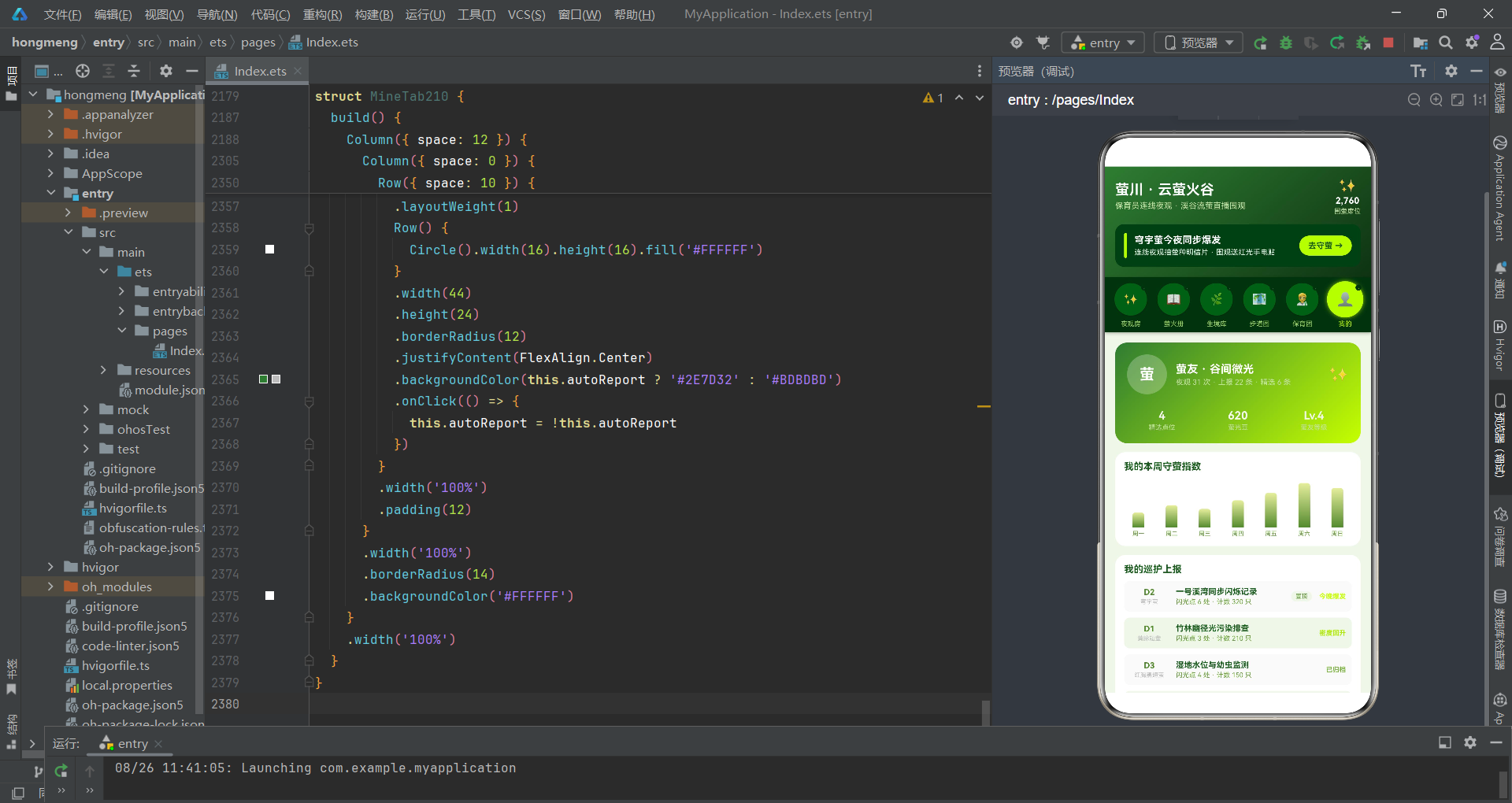
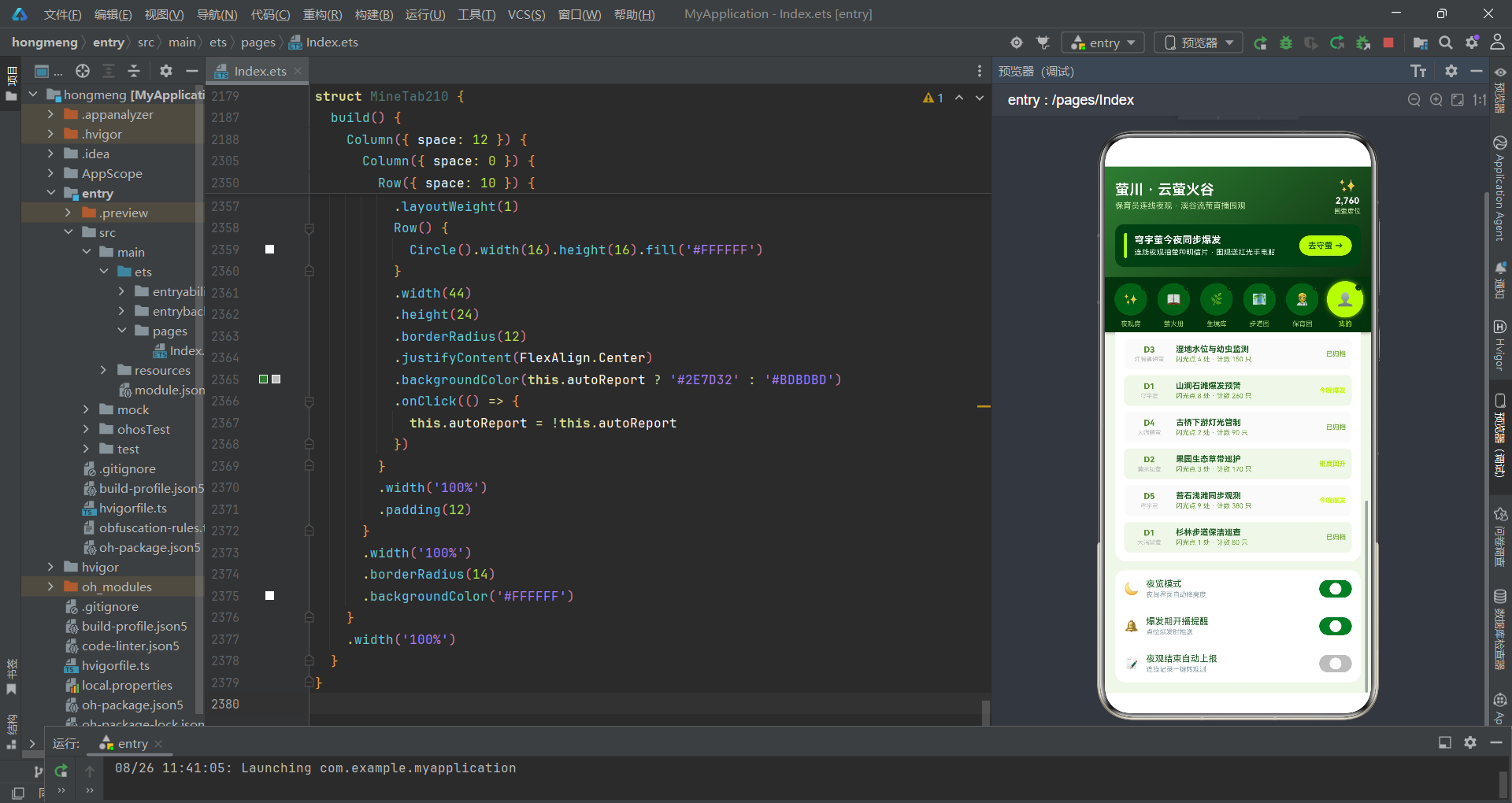
个人卡使用夜林绿到萤光黄的135度渐变背景,左侧显示"萤"字头像和萤友昵称"谷间微光",右侧统计行展示精选点位数、萤光豆(620)和萤友等级(Lv.4)。设置区包含三个开关:夜览模式(nightMode,默认开启)、爆发期开播提醒(notifyBurst,默认开启)和夜观结束自动上报(autoReport,默认关闭)。每个开关使用Row+Circle的自定义Toggle实现——44x24的圆角容器内嵌16px白色圆形滑块,背景色在夜林绿(开启)和灰色(关闭)之间切换。"夜览模式"的设置项设计尤其契合萤火虫夜观的应用场景——夜间使用时自动降低界面亮度,减少光污染对萤火虫的干扰。
八、技术点对比分析
| 技术维度 | 具体实现 | 设计优势 | 适用场景 |
|---|---|---|---|
| Tab导航 | 萤光圆顶部导航,圆形按钮+发光效果 | 模拟萤火虫发光,视觉主题强 | 生态/自然主题应用 |
| 弹窗管理 | bindSheet + bindContentCover | 抽屉承载表单输入,遮罩承载详情展示 | 需要多层弹窗的复杂交互 |
| 状态管理 | 入口组件集中管理全部状态 | 单向数据流,状态变更可追溯 | 中小型应用,Tab间数据共享 |
| 数据更新 | map/filter不可变操作 | 自动触发重新渲染,数据一致性高 | ArkTS声明式范式标准 |
| 柱状图 | Column高度绑定数据值/缩放系数 | 原生渲染无依赖,支持渐变色 | 7日趋势等少量数据点 |
| 热度横条 | Row嵌套+width百分比 | 纯比例分配,无需像素计算 | 评分/热度类指标展示 |
| 堆叠条图 | Flex容器内Row自动比例分配 | 实时反映数据分布变化 | 物种/类别占比可视化 |
| 颜色映射 | 工具函数if-else返回色值 | 配色逻辑集中,易于统一调整 | 状态多且颜色频繁复用 |
| 自定义Toggle | Row+Circle模拟开关 | 视觉风格可控,配色统一 | 需要定制化开关样式的场景 |
| @Builder弹窗 | 弹窗UI封装为Builder方法 | 内联展开,直接访问组件状态 | 弹窗与主组件状态强关联 |
| @Prop传递 | 子组件只读接收数据 | 防止子组件意外修改父状态 | 列表渲染、数据展示 |
| 回调通信 | 箭头函数传递操作意图 | 父组件统一处理状态更新 | 子组件触发父组件状态变更 |
| 弹窗联动 | 关闭一个弹窗后打开另一个 | 形成操作闭环,减少用户跳转 | 详情到预约的转化场景 |
| 萤种颜色关联 | 头像背景取自萤种颜色 | 视觉暗示物种关联,增强记忆 | 需要建立实体间视觉联系 |
安装DevEco Studio程序

选择目标安装目录:

设置环境变量,但是需要重启一下:

新建一个空白模板:

设置API为24的模板项目:
初始化项目,自动下载相关依赖:

完整代码:
// ============================================================
// 场景:萤火虫保育员连线夜观 / 溪谷流萤直播围观
// 配色:夜林绿 #1B5E20 × 萤光黄 #C6FF00 × 月雾白 #E8F5E9
// Tab 布局:顶部「萤光圆」导航(圆形按钮 + 萤黄光晕 + 小萤点)
// ============================================================
interface GlowDay210 {
day: string
glows: number
}
interface Spot210 {
id: number
name: string
species: string
level: number
density: number
state: string
watchers: number
starred: boolean
}
interface Habitat210 {
id: number
name: string
color: string
feature: string
light: number
heat: number
}
interface Patrol210 {
id: number
name: string
species: string
dayNum: number
lights: number
counts: number
state: string
top: boolean
}
interface Ranger210 {
id: number
name: string
city: string
years: number
online: boolean
heat: number
}
interface Barrage210 {
id: number
text: string
}
interface WatchStep210 {
id: number
title: string
tip: string
done: boolean
}
interface SpeciesCount210 {
label: string
count: number
color: string
}
interface DensityLog210 {
day: string
density: number
}
interface Trail210 {
id: number
name: string
icon: string
length: number
night: boolean
times: number
}
const speciesTags210: string[] = ['穹宇萤', '黄脉翅萤', '红胸黑翅萤', '大端黑萤']
const modeTags210: string[] = ['静音守萤', '轻声讲解']
function spotStateColor210(state: string): string {
if (state === '爆发期') {
return '#C6FF00'
}
if (state === '活跃期') {
return '#AEEA00'
}
if (state === '蛰伏期') {
return '#78909C'
}
return '#90A4AE'
}
function patrolStateColor210(state: string): string {
if (state === '今晚爆发') {
return '#C6FF00'
}
if (state === '密度回升') {
return '#AEEA00'
}
if (state === '已归档') {
return '#7CB342'
}
return '#90A4AE'
}
function speciesColor210(species: string): string {
if (species === '穹宇萤') {
return '#C6FF00'
}
if (species === '黄脉翅萤') {
return '#AEEA00'
}
if (species === '红胸黑翅萤') {
return '#FF8A65'
}
return '#FFD54F'
}
function starredSpotCount210(spots: Spot210[]): number {
let n: number = 0
for (let i = 0; i < spots.length; i++) {
if (spots[i].starred) {
n++
}
}
return n
}
function burstingSpotCount210(spots: Spot210[]): number {
let n: number = 0
for (let i = 0; i < spots.length; i++) {
if (spots[i].state === '爆发期') {
n++
}
}
return n
}
function onlineRangerCount210(rangers: Ranger210[]): number {
let n: number = 0
for (let i = 0; i < rangers.length; i++) {
if (rangers[i].online) {
n++
}
}
return n
}
function maxRangerHeat210(rangers: Ranger210[]): number {
let m: number = 1
for (let i = 0; i < rangers.length; i++) {
if (rangers[i].heat > m) {
m = rangers[i].heat
}
}
return m
}
function speciesCounts210(spots: Spot210[]): SpeciesCount210[] {
const counts: SpeciesCount210[] = []
for (let i = 0; i < speciesTags210.length; i++) {
let n: number = 0
for (let j = 0; j < spots.length; j++) {
if (spots[j].species === speciesTags210[i]) {
n++
}
}
counts.push({ label: speciesTags210[i], count: n, color: ['#C6FF00', '#AEEA00', '#FF8A65', '#FFD54F'][i] })
}
return counts
}
// ================= 主页面 =================
@Entry
@Component
struct Index210 {
@State tabIndex1: number = 0
// 弹框开关
@State showJoinSheet: boolean = false
@State showReportSheet: boolean = false
@State showEditSheet: boolean = false
@State showDelDialog: boolean = false
@State showDetailDialog: boolean = false
// 预约夜观表单
@State joinHabitat: number = 0
@State joinMode: number = 0
@State joinPeople: number = 2
@State joinRedLight: boolean = true
@State joinSilent: boolean = true
// 上报观测表单
@State repName: string = ''
@State repSpecies: number = 0
@State repCount: number = 20
@State repLevel: number = 3
@State repPublic: boolean = true
// 编辑表单
@State editIndex: number = -1
@State editName: string = ''
@State editCount: number = 20
@State editLevel: number = 3
@State editTop: boolean = false
// 删除
@State delIndex: number = -1
@State delKeepLog: boolean = true
// 详情
@State detailIndex: number = 0
// 数据
@State spots: Spot210[] = [
{ id: 1, name: '萤川一号溪湾', species: '穹宇萤', level: 5, density: 320, state: '爆发期', watchers: 4210, starred: true },
{ id: 2, name: '竹林幽径', species: '黄脉翅萤', level: 4, density: 210, state: '活跃期', watchers: 1980, starred: true },
{ id: 3, name: '湿地芦苇荡', species: '红胸黑翅萤', level: 3, density: 150, state: '活跃期', watchers: 1420, starred: false },
{ id: 4, name: '山涧石滩', species: '穹宇萤', level: 4, density: 260, state: '爆发期', watchers: 3120, starred: true },
{ id: 5, name: '古桥下游', species: '大端黑萤', level: 2, density: 90, state: '蛰伏期', watchers: 640, starred: false },
{ id: 6, name: '果园坡地', species: '黄脉翅萤', level: 3, density: 170, state: '活跃期', watchers: 1280, starred: false },
{ id: 7, name: '苔石浅滩', species: '穹宇萤', level: 5, density: 380, state: '爆发期', watchers: 4860, starred: true },
{ id: 8, name: '杉林小道', species: '大端黑萤', level: 2, density: 80, state: '蛰伏期', watchers: 520, starred: false },
{ id: 9, name: '稻香田埂', species: '红胸黑翅萤', level: 4, density: 240, state: '活跃期', watchers: 2260, starred: false },
{ id: 10, name: '月牙泉眼', species: '穹宇萤', level: 3, density: 180, state: '活跃期', watchers: 1620, starred: false }
]
@State habitats: Habitat210[] = [
{ id: 1, name: '溪畔草丛', color: '#2E7D32', feature: '活水缓流 · 螺类丰富', light: 2, heat: 95 },
{ id: 2, name: '竹林深处', color: '#388E3C', feature: '腐叶深厚 · 湿度高', light: 1, heat: 88 },
{ id: 3, name: '山间湿地', color: '#00897B', feature: '芦苇丛生 · 静水', light: 3, heat: 84 },
{ id: 4, name: '山涧石滩', color: '#546E7A', feature: '苔藓密布 · 亲水', light: 2, heat: 90 },
{ id: 5, name: '生态果园', color: '#689F38', feature: '少打药 · 草生栽培', light: 4, heat: 76 }
]
@State patrols: Patrol210[] = [
{ id: 1, name: '一号溪湾同步闪烁记录', species: '穹宇萤', dayNum: 2, lights: 6, counts: 320, state: '今晚爆发', top: true },
{ id: 2, name: '竹林幽径光污染排查', species: '黄脉翅萤', dayNum: 1, lights: 3, counts: 210, state: '密度回升', top: false },
{ id: 3, name: '湿地水位与幼虫监测', species: '红胸黑翅萤', dayNum: 3, lights: 4, counts: 150, state: '已归档', top: false },
{ id: 4, name: '山涧石滩爆发预警', species: '穹宇萤', dayNum: 1, lights: 8, counts: 260, state: '今晚爆发', top: false },
{ id: 5, name: '古桥下游灯光管制', species: '大端黑萤', dayNum: 4, lights: 2, counts: 90, state: '已归档', top: false },
{ id: 6, name: '果园生态草带巡护', species: '黄脉翅萤', dayNum: 2, lights: 3, counts: 170, state: '密度回升', top: false },
{ id: 7, name: '苔石浅滩同步观测', species: '穹宇萤', dayNum: 5, lights: 9, counts: 380, state: '今晚爆发', top: false },
{ id: 8, name: '杉林步道保洁巡查', species: '大端黑萤', dayNum: 1, lights: 1, counts: 80, state: '已归档', top: false }
]
@State rangers: Ranger210[] = [
{ id: 1, name: '守萤人老谢', city: '眉山', years: 12, online: true, heat: 96 },
{ id: 2, name: '溪谷阿妹', city: '丽水', years: 7, online: true, heat: 89 },
{ id: 3, name: '竹海守夜', city: '宜春', years: 10, online: false, heat: 85 },
{ id: 4, name: '湿地图鉴君', city: '常德', years: 6, online: true, heat: 78 },
{ id: 5, name: '萤火教授', city: '武汉', years: 18, online: false, heat: 93 },
{ id: 6, name: '山涧小护', city: '桂林', years: 4, online: true, heat: 70 }
]
@State glowDays: GlowDay210[] = [
{ day: '周一', glows: 120 },
{ day: '周二', glows: 180 },
{ day: '周三', glows: 150 },
{ day: '周四', glows: 220 },
{ day: '周五', glows: 280 },
{ day: '周六', glows: 360 },
{ day: '周日', glows: 320 }
]
@State densityLogs: DensityLog210[] = [
{ day: 'D1', density: 140 },
{ day: 'D2', density: 180 },
{ day: 'D3', density: 210 },
{ day: 'D4', density: 260 },
{ day: 'D5', density: 300 },
{ day: 'D6', density: 340 },
{ day: 'D7', density: 320 }
]
@State trails: Trail210[] = [
{ id: 1, name: '萤川步道', icon: '🛤️', length: 3, night: true, times: 126 },
{ id: 2, name: '竹林栈道', icon: '🎍', length: 2, night: true, times: 98 },
{ id: 3, name: '湿地木桥', icon: '🌉', length: 1, night: false, times: 76 },
{ id: 4, name: '山涧石阶', icon: '🪨', length: 4, night: true, times: 64 },
{ id: 5, name: '果园环线', icon: '🍊', length: 5, night: false, times: 42 },
{ id: 6, name: '月牙泉径', icon: '🌙', length: 2, night: true, times: 88 },
{ id: 7, name: '观萤平台', icon: '🏕️', length: 1, night: true, times: 152 },
{ id: 8, name: '田埂小路', icon: '🌾', length: 3, night: false, times: 56 }
]
@State barrages: Barrage210[] = [
{ id: 1, text: '同步闪烁的瞬间起鸡皮疙瘩' },
{ id: 2, text: '穹宇萤的银河感太震撼' },
{ id: 3, text: '第一次云赏萤,不用蹲山里' },
{ id: 4, text: '红光手电这个细节好评' },
{ id: 5, text: '守萤人老谢的讲解好温柔' },
{ id: 6, text: '今晚密度比上周高多了' },
{ id: 7, text: '守萤 +1,记到观测表了' },
{ id: 8, text: '希望明年还能爆发生殖' }
]
@State watchSteps: WatchStep210[] = [
{ id: 1, title: '静音入场', tip: '轻步进谷 · 手机调勿扰', done: true },
{ id: 2, title: '换红光手电', tip: '白光吓萤 · 红光低亮观察', done: true },
{ id: 3, title: '沿步道缓行', tip: '不越线 · 不踩草丛', done: true },
{ id: 4, title: '蹲观草丛', tip: '静待 5 分钟 · 萤自聚来', done: false },
{ id: 5, title: '关灯守萤', tip: '全黑环境 · 看同步闪烁', done: false },
{ id: 6, title: '记录上报', tip: '记数量位置 · 助保育档案', done: false }
]
tabs210: string[] = ['夜观房', '萤火册', '生境库', '步道图', '保育团', '我的']
tabIcons210: string[] = ['✨', '📖', '🌿', '🗺️', '🧑🔬', '👤']
// ---------- 头部(电商赏萤季风,无动画) ----------
@Builder
header210() {
Column({ space: 12 }) {
Row({ space: 10 }) {
Column({ space: 4 }) {
Text('萤川 · 云萤火谷').fontSize(19).fontColor('#FFFFFF').fontWeight(FontWeight.Bold)
Text('保育员连线夜观 · 溪谷流萤直播围观').fontSize(11).fontColor('#C5E1A5')
}
.alignItems(HorizontalAlign.Start)
Text('').layoutWeight(1)
Column({ space: 2 }) {
Text('✨').fontSize(20)
Text('2,760').fontSize(12).fontColor('#FFFFFF').fontWeight(FontWeight.Bold)
Text('围萤席位').fontSize(9).fontColor('#C5E1A5')
}
.alignItems(HorizontalAlign.Center)
}
.width('100%')
Row({ space: 10 }) {
Column().width(4).height(34).borderRadius(2).backgroundColor('#C6FF00')
Column({ space: 3 }) {
Text('穹宇萤今夜同步爆发').fontSize(13).fontColor('#FFFFFF').fontWeight(FontWeight.Bold)
Text('连线夜观抽萤种明信片 · 围观送红光手电贴').fontSize(10).fontColor('#E8F5E9')
}
.alignItems(HorizontalAlign.Start)
Text('').layoutWeight(1)
Column() {
Text('去守萤 →').fontSize(11).fontColor('#1B5E20').fontWeight(FontWeight.Bold)
}
.padding({ left: 12, right: 12, top: 7, bottom: 7 })
.borderRadius(14)
.backgroundColor('#C6FF00')
.onClick(() => {
this.showJoinSheet = true
})
}
.width('100%')
.padding(12)
.borderRadius(12)
.backgroundColor('#14401A')
}
.alignItems(HorizontalAlign.Start)
.padding(14)
.linearGradient({ angle: 140, colors: [['#2E7D32', 0], ['#0E3312', 1]] })
}
// ---------- 顶部「萤光圆」tab ----------
@Builder
tabBar210() {
Row({ space: 0 }) {
ForEach(this.tabs210, (t: string, i: number) => {
Column({ space: 4 }) {
Stack() {
Column() {
Text(this.tabIcons210[i]).fontSize(16)
}
.width(44)
.height(44)
.borderRadius(22)
.backgroundColor(this.tabIndex1 === i ? '#C6FF00' : '#1B5E20')
.justifyContent(FlexAlign.Center)
.shadow(this.tabIndex1 === i ? { radius: 14, color: 'rgba(198,255,0,0.7)', offsetY: 0 } : { radius: 4, color: 'rgba(0,0,0,0.3)', offsetY: 2 })
.scale({ x: this.tabIndex1 === i ? 1.12 : 1, y: this.tabIndex1 === i ? 1.12 : 1 })
.animation({ duration: 180 })
Column() {
Text('·').fontSize(10).fontColor(this.tabIndex1 === i ? '#C6FF00' : '#4E7A56')
}
.width(8)
.height(8)
.borderRadius(4)
.backgroundColor('#0E3312')
.position({ x: 38, y: 4 })
}
.width(48)
.height(48)
Text(t).fontSize(9).fontColor(this.tabIndex1 === i ? '#C6FF00' : '#9CCC65').maxLines(1)
}
.layoutWeight(1)
.alignItems(HorizontalAlign.Center)
.padding({ top: 6, bottom: 6 })
.onClick(() => {
this.tabIndex1 = i
})
}, (t: string) => t)
}
.width('100%')
.padding({ left: 6, right: 6 })
.backgroundColor('#0E3312')
.shadow({ radius: 10, color: 'rgba(0,0,0,0.3)', offsetY: 4 })
}
build() {
Column() {
this.header210()
this.tabBar210()
Scroll() {
Column({ space: 12 }) {
if (this.tabIndex1 === 0) {
LiveTab210({
spots: this.spots,
rangers: this.rangers,
watchSteps: this.watchSteps,
barrages: this.barrages,
onStep: (i: number) => {
this.watchSteps = this.watchSteps.map((s: WatchStep210, si: number) => {
if (si === i) {
return { id: s.id, title: s.title, tip: s.tip, done: !s.done }
}
return s
})
},
onJoin: () => {
this.showJoinSheet = true
}
})
}
if (this.tabIndex1 === 1) {
SpotTab210({
spots: this.spots,
onAdd: () => {
this.showReportSheet = true
},
onDetail: (i: number) => {
this.detailIndex = i
this.showDetailDialog = true
},
onEdit: (i: number) => {
this.editIndex = i
this.editName = this.spots[i].name
this.editCount = this.spots[i].density
this.editLevel = this.spots[i].level
this.editTop = this.spots[i].starred
this.showEditSheet = true
},
onDel: (i: number) => {
this.delIndex = i
this.showDelDialog = true
},
onStar: (i: number) => {
this.spots = this.spots.map((s: Spot210, si: number) => {
if (si === i) {
return { id: s.id, name: s.name, species: s.species, level: s.level, density: s.density, state: s.state, watchers: s.watchers, starred: !s.starred }
}
return s
})
}
})
}
if (this.tabIndex1 === 2) {
HabitatTab210({ habitats: this.habitats, spots: this.spots, glowDays: this.glowDays })
}
if (this.tabIndex1 === 3) {
TrailTab210({ trails: this.trails, densityLogs: this.densityLogs })
}
if (this.tabIndex1 === 4) {
RangerTab210({
rangers: this.rangers,
onJoin: () => {
this.showJoinSheet = true
}
})
}
if (this.tabIndex1 === 5) {
MineTab210({ spots: this.spots, patrols: this.patrols, glowDays: this.glowDays })
}
}
.width('100%')
.padding(14)
}
.layoutWeight(1)
.align(Alignment.Top)
}
.width('100%')
.height('100%')
.backgroundColor('#F1F8E9')
.bindSheet($$this.showJoinSheet, this.joinSheet210(), {
height: 620,
dragBar: true,
showClose: false,
backgroundColor: '#FFFFFF'
})
.bindSheet($$this.showReportSheet, this.reportSheet210(), {
height: 600,
dragBar: true,
showClose: false,
backgroundColor: '#FFFFFF'
})
.bindSheet($$this.showEditSheet, this.editSheet210(), {
height: 560,
dragBar: true,
showClose: false,
backgroundColor: '#FFFFFF'
})
.bindContentCover($$this.showDelDialog, this.delDialog210(), {
})
.bindContentCover($$this.showDetailDialog, this.detailDialog210(), {
})
}
// ---------- 弹框1:预约夜观(抽屉) ----------
@Builder
joinSheet210() {
Column({ space: 16 }) {
Row({ space: 10 }) {
Column().width(4).height(30).borderRadius(2).backgroundColor('#C6FF00')
Column({ space: 2 }) {
Text('预约连线夜观').fontSize(17).fontWeight(FontWeight.Bold).fontColor('#1B5E20')
Text('和守萤人老谢同步蹲谷 · 静音守萤').fontSize(10).fontColor('#689F38')
}
.alignItems(HorizontalAlign.Start)
Text('').layoutWeight(1)
Column() {
Text('✕').fontSize(14).fontColor('#689F38')
}
.width(30)
.height(30)
.borderRadius(15)
.backgroundColor('#F1F8E9')
.justifyContent(FlexAlign.Center)
.onClick(() => {
this.showJoinSheet = false
})
}
.width('100%')
Scroll() {
Column({ space: 16 }) {
Column({ space: 8 }) {
Text('目标生境').fontSize(13).fontWeight(FontWeight.Bold).fontColor('#2E7D32')
Flex({ wrap: FlexWrap.Wrap }) {
ForEach(this.habitats, (h: Habitat210, i: number) => {
Text(h.name)
.fontSize(11)
.fontColor(this.joinHabitat === i ? '#1B5E20' : '#689F38')
.padding({ left: 12, right: 12, top: 6, bottom: 6 })
.borderRadius(16)
.backgroundColor(this.joinHabitat === i ? '#C6FF00' : '#F1F8E9')
.margin(4)
.onClick(() => {
this.joinHabitat = i
})
}, (h: Habitat210) => ('j' + h.id))
}
}
.alignItems(HorizontalAlign.Start)
.width('100%')
Column({ space: 8 }) {
Text('守萤模式').fontSize(13).fontWeight(FontWeight.Bold).fontColor('#2E7D32')
Flex({ wrap: FlexWrap.Wrap }) {
ForEach(modeTags210, (tag: string, i: number) => {
Text(tag)
.fontSize(11)
.fontColor(this.joinMode === i ? '#FFFFFF' : '#689F38')
.padding({ left: 12, right: 12, top: 6, bottom: 6 })
.borderRadius(16)
.backgroundColor(this.joinMode === i ? '#2E7D32' : '#F1F8E9')
.margin(4)
.onClick(() => {
this.joinMode = i
})
}, (tag: string) => tag)
}
}
.alignItems(HorizontalAlign.Start)
.width('100%')
Row({ space: 14 }) {
Column() {
Text('-').fontSize(16).fontColor('#558B2F')
}
.width(34)
.height(34)
.borderRadius(17)
.backgroundColor('#F1F8E9')
.justifyContent(FlexAlign.Center)
.onClick(() => {
if (this.joinPeople > 1) {
this.joinPeople -= 1
}
})
Column({ space: 2 }) {
Text('同行 ' + this.joinPeople + ' 人').fontSize(14).fontWeight(FontWeight.Bold).fontColor('#558B2F')
Text('小团慢行不扰萤').fontSize(9).fontColor('#90A4AE')
}
.alignItems(HorizontalAlign.Start)
Column() {
Text('+').fontSize(16).fontColor('#558B2F')
}
.width(34)
.height(34)
.borderRadius(17)
.backgroundColor('#F1F8E9')
.justifyContent(FlexAlign.Center)
.onClick(() => {
if (this.joinPeople < 4) {
this.joinPeople += 1
}
})
Text('').layoutWeight(1)
}
.width('100%')
Row({ space: 10 }) {
Column({ space: 2 }) {
Text('红光手电租借').fontSize(13).fontColor('#2E7D32')
Text('白光禁入 · 红光护萤').fontSize(9).fontColor('#90A4AE')
}
.alignItems(HorizontalAlign.Start)
Text('').layoutWeight(1)
Row() {
Circle().width(18).height(18).fill('#FFFFFF')
}
.width(48)
.height(26)
.borderRadius(13)
.justifyContent(FlexAlign.Center)
.backgroundColor(this.joinRedLight ? '#C6FF00' : '#BDBDBD')
.onClick(() => {
this.joinRedLight = !this.joinRedLight
})
}
.width('100%')
.padding(12)
.borderRadius(12)
.backgroundColor('#F9FBE7')
Row({ space: 10 }) {
Column({ space: 2 }) {
Text('静音守萤承诺').fontSize(13).fontColor('#2E7D32')
Text('连麦全程轻声不打扰').fontSize(9).fontColor('#90A4AE')
}
.alignItems(HorizontalAlign.Start)
Text('').layoutWeight(1)
Row() {
Circle().width(18).height(18).fill('#FFFFFF')
}
.width(48)
.height(26)
.borderRadius(13)
.justifyContent(FlexAlign.Center)
.backgroundColor(this.joinSilent ? '#2E7D32' : '#BDBDBD')
.onClick(() => {
this.joinSilent = !this.joinSilent
})
}
.width('100%')
.padding(12)
.borderRadius(12)
.backgroundColor('#E8F5E9')
Row({ space: 10 }) {
Column({ space: 2 }) {
Text('预计花费').fontSize(13).fontColor('#2E7D32')
Text('含保育捐与手电租金').fontSize(9).fontColor('#90A4AE')
}
.alignItems(HorizontalAlign.Start)
Text('').layoutWeight(1)
Text('¥ ' + (this.joinPeople * 39 + (this.joinRedLight ? 10 : 0))).fontSize(20).fontWeight(FontWeight.Bold).fontColor('#558B2F')
}
.width('100%')
.padding(12)
.borderRadius(12)
.backgroundColor('#F9FBE7')
Button() {
Text('确认预约守萤').fontSize(15).fontColor('#1B5E20').fontWeight(FontWeight.Bold)
}
.width('100%')
.height(48)
.borderRadius(24)
.backgroundColor('#C6FF00')
.onClick(() => {
this.showJoinSheet = false
})
Text('夜观前 3 小时可免费改期 · 守萤守则需勾选阅读').fontSize(9).fontColor('#BDBDBD')
}
.width('100%')
.padding({ left: 18, right: 18, top: 4, bottom: 24 })
}
.constraintSize({ maxHeight: 460 })
}
.width('100%')
.height('100%')
.padding({ top: 14 })
.backgroundColor('#FFFFFF')
}
// ---------- 弹框2:上报观测(抽屉,concat 前插) ----------
@Builder
reportSheet210() {
Column({ space: 16 }) {
Row({ space: 10 }) {
Column().width(4).height(30).borderRadius(2).backgroundColor('#2E7D32')
Column({ space: 2 }) {
Text('上报萤火观测').fontSize(17).fontWeight(FontWeight.Bold).fontColor('#1B5E20')
Text('你的记录将汇入保育档案').fontSize(10).fontColor('#689F38')
}
.alignItems(HorizontalAlign.Start)
Text('').layoutWeight(1)
Column() {
Text('✕').fontSize(14).fontColor('#689F38')
}
.width(30)
.height(30)
.borderRadius(15)
.backgroundColor('#F1F8E9')
.justifyContent(FlexAlign.Center)
.onClick(() => {
this.showReportSheet = false
})
}
.width('100%')
Scroll() {
Column({ space: 16 }) {
Column({ space: 8 }) {
Text('观测地点').fontSize(13).fontWeight(FontWeight.Bold).fontColor('#2E7D32')
TextInput({ placeholder: '例如:萤川二号石滩', text: this.repName })
.fontSize(13)
.padding(12)
.borderRadius(12)
.backgroundColor('#F1F8E9')
.onChange((v: string) => {
this.repName = v
})
}
.alignItems(HorizontalAlign.Start)
.width('100%')
Column({ space: 8 }) {
Text('萤种判断').fontSize(13).fontWeight(FontWeight.Bold).fontColor('#2E7D32')
Flex({ wrap: FlexWrap.Wrap }) {
ForEach(speciesTags210, (tag: string, i: number) => {
Text(tag)
.fontSize(11)
.fontColor(this.repSpecies === i ? '#1B5E20' : '#689F38')
.padding({ left: 12, right: 12, top: 6, bottom: 6 })
.borderRadius(16)
.backgroundColor(this.repSpecies === i ? '#C6FF00' : '#F1F8E9')
.margin(4)
.onClick(() => {
this.repSpecies = i
})
}, (tag: string) => tag)
}
}
.alignItems(HorizontalAlign.Start)
.width('100%')
Row({ space: 14 }) {
Column() {
Text('-').fontSize(16).fontColor('#558B2F')
}
.width(34)
.height(34)
.borderRadius(17)
.backgroundColor('#F1F8E9')
.justifyContent(FlexAlign.Center)
.onClick(() => {
if (this.repCount > 5) {
this.repCount -= 5
}
})
Column({ space: 2 }) {
Text('目测数量 ' + this.repCount + ' 只').fontSize(14).fontWeight(FontWeight.Bold).fontColor('#558B2F')
Text('按 5 分钟蹲观估算').fontSize(9).fontColor('#90A4AE')
}
.alignItems(HorizontalAlign.Start)
Column() {
Text('+').fontSize(16).fontColor('#558B2F')
}
.width(34)
.height(34)
.borderRadius(17)
.backgroundColor('#F1F8E9')
.justifyContent(FlexAlign.Center)
.onClick(() => {
if (this.repCount < 500) {
this.repCount += 5
}
})
Text('').layoutWeight(1)
}
.width('100%')
Row({ space: 14 }) {
Column() {
Text('-').fontSize(16).fontColor('#2E7D32')
}
.width(34)
.height(34)
.borderRadius(17)
.backgroundColor('#E8F5E9')
.justifyContent(FlexAlign.Center)
.onClick(() => {
if (this.repLevel > 1) {
this.repLevel -= 1
}
})
Column({ space: 2 }) {
Text('萤光等级 ' + this.repLevel + ' 级').fontSize(14).fontWeight(FontWeight.Bold).fontColor('#2E7D32')
Text('1 微光 · 5 银河爆发').fontSize(9).fontColor('#90A4AE')
}
.alignItems(HorizontalAlign.Start)
Column() {
Text('+').fontSize(16).fontColor('#2E7D32')
}
.width(34)
.height(34)
.borderRadius(17)
.backgroundColor('#E8F5E9')
.justifyContent(FlexAlign.Center)
.onClick(() => {
if (this.repLevel < 5) {
this.repLevel += 1
}
})
Text('').layoutWeight(1)
}
.width('100%')
Row({ space: 10 }) {
Column({ space: 2 }) {
Text('公开到萤火册').fontSize(13).fontColor('#2E7D32')
Text('其他萤友可见你的观测').fontSize(9).fontColor('#90A4AE')
}
.alignItems(HorizontalAlign.Start)
Text('').layoutWeight(1)
Row() {
Circle().width(18).height(18).fill('#FFFFFF')
}
.width(48)
.height(26)
.borderRadius(13)
.justifyContent(FlexAlign.Center)
.backgroundColor(this.repPublic ? '#2E7D32' : '#BDBDBD')
.onClick(() => {
this.repPublic = !this.repPublic
})
}
.width('100%')
.padding(12)
.borderRadius(12)
.backgroundColor('#E8F5E9')
Button() {
Text('提交观测').fontSize(15).fontColor('#1B5E20').fontWeight(FontWeight.Bold)
}
.width('100%')
.height(48)
.borderRadius(24)
.backgroundColor('#2E7D32')
.onClick(() => {
this.showReportSheet = false
this.repName = ''
})
}
.width('100%')
.padding({ left: 18, right: 18, top: 4, bottom: 24 })
}
.constraintSize({ maxHeight: 440 })
}
.width('100%')
.height('100%')
.padding({ top: 14 })
.backgroundColor('#FFFFFF')
}
// ---------- 弹框3:编辑观测(抽屉,map 回写) ----------
@Builder
editSheet210() {
Column({ space: 16 }) {
Row({ space: 10 }) {
Column().width(4).height(30).borderRadius(2).backgroundColor('#00897B')
Column({ space: 2 }) {
Text('编辑观测档案').fontSize(17).fontWeight(FontWeight.Bold).fontColor('#1B5E20')
Text('修正数量与萤光等级').fontSize(10).fontColor('#689F38')
}
.alignItems(HorizontalAlign.Start)
Text('').layoutWeight(1)
Column() {
Text('✕').fontSize(14).fontColor('#689F38')
}
.width(30)
.height(30)
.borderRadius(15)
.backgroundColor('#F1F8E9')
.justifyContent(FlexAlign.Center)
.onClick(() => {
this.showEditSheet = false
})
}
.width('100%')
Scroll() {
Column({ space: 16 }) {
Column({ space: 8 }) {
Text('观测地点').fontSize(13).fontWeight(FontWeight.Bold).fontColor('#2E7D32')
TextInput({ placeholder: '输入新地点名', text: this.editName })
.fontSize(13)
.padding(12)
.borderRadius(12)
.backgroundColor('#F1F8E9')
.onChange((v: string) => {
this.editName = v
})
}
.alignItems(HorizontalAlign.Start)
.width('100%')
Row({ space: 14 }) {
Column() {
Text('-').fontSize(16).fontColor('#558B2F')
}
.width(34)
.height(34)
.borderRadius(17)
.backgroundColor('#F1F8E9')
.justifyContent(FlexAlign.Center)
.onClick(() => {
if (this.editCount > 5) {
this.editCount -= 5
}
})
Column({ space: 2 }) {
Text('目测数量 ' + this.editCount + ' 只').fontSize(14).fontWeight(FontWeight.Bold).fontColor('#558B2F')
Text('复查后可修正').fontSize(9).fontColor('#90A4AE')
}
.alignItems(HorizontalAlign.Start)
Column() {
Text('+').fontSize(16).fontColor('#558B2F')
}
.width(34)
.height(34)
.borderRadius(17)
.backgroundColor('#F1F8E9')
.justifyContent(FlexAlign.Center)
.onClick(() => {
if (this.editCount < 500) {
this.editCount += 5
}
})
Text('').layoutWeight(1)
}
.width('100%')
Row({ space: 14 }) {
Column() {
Text('-').fontSize(16).fontColor('#2E7D32')
}
.width(34)
.height(34)
.borderRadius(17)
.backgroundColor('#E8F5E9')
.justifyContent(FlexAlign.Center)
.onClick(() => {
if (this.editLevel > 1) {
this.editLevel -= 1
}
})
Column({ space: 2 }) {
Text('萤光等级 ' + this.editLevel + ' 级').fontSize(14).fontWeight(FontWeight.Bold).fontColor('#2E7D32')
Text('复核当晚亮度').fontSize(9).fontColor('#90A4AE')
}
.alignItems(HorizontalAlign.Start)
Column() {
Text('+').fontSize(16).fontColor('#2E7D32')
}
.width(34)
.height(34)
.borderRadius(17)
.backgroundColor('#E8F5E9')
.justifyContent(FlexAlign.Center)
.onClick(() => {
if (this.editLevel < 5) {
this.editLevel += 1
}
})
Text('').layoutWeight(1)
}
.width('100%')
Row({ space: 10 }) {
Column({ space: 2 }) {
Text('置顶到萤火册').fontSize(13).fontColor('#2E7D32')
Text('最亮的点位放最上面').fontSize(9).fontColor('#90A4AE')
}
.alignItems(HorizontalAlign.Start)
Text('').layoutWeight(1)
Row() {
Circle().width(18).height(18).fill('#FFFFFF')
}
.width(48)
.height(26)
.borderRadius(13)
.justifyContent(FlexAlign.Center)
.backgroundColor(this.editTop ? '#C6FF00' : '#BDBDBD')
.onClick(() => {
this.editTop = !this.editTop
})
}
.width('100%')
.padding(12)
.borderRadius(12)
.backgroundColor('#F9FBE7')
Button() {
Text('保存修改').fontSize(15).fontColor('#FFFFFF').fontWeight(FontWeight.Bold)
}
.width('100%')
.height(48)
.borderRadius(24)
.backgroundColor('#00897B')
.onClick(() => {
this.spots = this.spots.map((s: Spot210, si: number) => {
if (si === this.editIndex) {
return {
id: s.id,
name: this.editName === '' ? s.name : this.editName,
species: s.species,
level: this.editLevel,
density: this.editCount,
state: s.state,
watchers: s.watchers,
starred: this.editTop
}
}
return s
})
this.showEditSheet = false
})
}
.width('100%')
.padding({ left: 18, right: 18, top: 4, bottom: 24 })
}
.constraintSize({ maxHeight: 420 })
}
.width('100%')
.height('100%')
.padding({ top: 14 })
.backgroundColor('#FFFFFF')
}
// ---------- 弹框4:删除观测(居中,filter) ----------
@Builder
delDialog210() {
Column({ space: 14 }) {
Column() {
Text('✨').fontSize(34)
}
.width(64)
.height(64)
.borderRadius(32)
.backgroundColor('#F1F8E9')
.justifyContent(FlexAlign.Center)
Text('移除这条观测?').fontSize(17).fontWeight(FontWeight.Bold).fontColor('#1B5E20')
Text('「' + (this.delIndex >= 0 && this.delIndex < this.spots.length ? this.spots[this.delIndex].name : '') + '」将从萤火册移除,点位密度不再累计').fontSize(11).fontColor('#689F38').textAlign(TextAlign.Center)
Row({ space: 10 }) {
Column({ space: 2 }) {
Text('保留巡护档案').fontSize(12).fontColor('#2E7D32')
Text('仅移除观测卡').fontSize(9).fontColor('#90A4AE')
}
.alignItems(HorizontalAlign.Start)
Text('').layoutWeight(1)
Row() {
Circle().width(16).height(16).fill('#FFFFFF')
}
.width(44)
.height(24)
.borderRadius(12)
.justifyContent(FlexAlign.Center)
.backgroundColor(this.delKeepLog ? '#2E7D32' : '#BDBDBD')
.onClick(() => {
this.delKeepLog = !this.delKeepLog
})
}
.width('100%')
.padding(10)
.borderRadius(10)
.backgroundColor('#F1F8E9')
Row({ space: 10 }) {
Button() {
Text('再想想').fontSize(14).fontColor('#2E7D32').fontWeight(FontWeight.Bold)
}
.layoutWeight(1)
.height(44)
.borderRadius(22)
.backgroundColor('#F1F8E9')
.onClick(() => {
this.showDelDialog = false
})
Button() {
Text('确认移除').fontSize(14).fontColor('#FFFFFF').fontWeight(FontWeight.Bold)
}
.layoutWeight(1)
.height(44)
.borderRadius(22)
.backgroundColor('#558B2F')
.onClick(() => {
this.spots = this.spots.filter((s: Spot210, si: number) => si !== this.delIndex)
this.showDelDialog = false
})
}
.width('100%')
}
.width('82%')
.padding(20)
.borderRadius(20)
.backgroundColor('#FFFFFF')
.alignItems(HorizontalAlign.Center)
}
// ---------- 弹框5:观测点详情(居中,图表+跳转联动) ----------
@Builder
detailDialog210() {
Column({ space: 0 }) {
Scroll() {
Column({ space: 0 }) {
Column({ space: 8 }) {
Row({ space: 10 }) {
Column() {
Text('✨').fontSize(30)
}
.width(56)
.height(56)
.borderRadius(28)
.backgroundColor('#FFFFFF')
.justifyContent(FlexAlign.Center)
Column({ space: 3 }) {
Text(this.detailIndex >= 0 && this.detailIndex < this.spots.length ? this.spots[this.detailIndex].name : '').fontSize(18).fontWeight(FontWeight.Bold).fontColor('#FFFFFF')
Text((this.detailIndex >= 0 && this.detailIndex < this.spots.length ? this.spots[this.detailIndex].species : '') + ' · 密度 ' + (this.detailIndex >= 0 && this.detailIndex < this.spots.length ? this.spots[this.detailIndex].density : 0) + ' 只').fontSize(11).fontColor('#E8F5E9')
}
.alignItems(HorizontalAlign.Start)
Text('').layoutWeight(1)
Column() {
Text('✕').fontSize(13).fontColor('#FFFFFF')
}
.width(28)
.height(28)
.borderRadius(14)
.backgroundColor('rgba(255,255,255,0.2)')
.justifyContent(FlexAlign.Center)
.onClick(() => {
this.showDetailDialog = false
})
}
.width('100%')
}
.width('100%')
.padding(18)
.linearGradient({ angle: 135, colors: [['#2E7D32', 0], ['#C6FF00', 1]] })
Column({ space: 14 }) {
Row({ space: 8 }) {
Column({ space: 2 }) {
Text((this.detailIndex >= 0 && this.detailIndex < this.spots.length ? this.spots[this.detailIndex].level : 0) + ' 级').fontSize(16).fontWeight(FontWeight.Bold).fontColor('#558B2F')
Text('萤光等级').fontSize(9).fontColor('#689F38')
}
.layoutWeight(1)
.alignItems(HorizontalAlign.Center)
.padding({ top: 10, bottom: 10 })
.borderRadius(10)
.backgroundColor('#F9FBE7')
Column({ space: 2 }) {
Text((this.detailIndex >= 0 && this.detailIndex < this.spots.length ? this.spots[this.detailIndex].density : 0) + '').fontSize(16).fontWeight(FontWeight.Bold).fontColor('#2E7D32')
Text('目测只数').fontSize(9).fontColor('#689F38')
}
.layoutWeight(1)
.alignItems(HorizontalAlign.Center)
.padding({ top: 10, bottom: 10 })
.borderRadius(10)
.backgroundColor('#E8F5E9')
Column({ space: 2 }) {
Text(this.detailIndex >= 0 && this.detailIndex < this.spots.length ? this.spots[this.detailIndex].state : '').fontSize(14).fontWeight(FontWeight.Bold).fontColor(spotStateColor210(this.detailIndex >= 0 && this.detailIndex < this.spots.length ? this.spots[this.detailIndex].state : ''))
Text('当前萤况').fontSize(9).fontColor('#689F38')
}
.layoutWeight(1)
.alignItems(HorizontalAlign.Center)
.padding({ top: 10, bottom: 10 })
.borderRadius(10)
.backgroundColor('#E8F5E9')
}
.width('100%')
Column({ space: 8 }) {
Text('近 7 日围萤人数').fontSize(13).fontWeight(FontWeight.Bold).fontColor('#1B5E20')
Row({ space: 6 }) {
ForEach(this.glowDays, (d: GlowDay210) => {
Column({ space: 4 }) {
Column()
.width(16)
.height(d.glows / 12)
.borderRadius({ topLeft: 4, topRight: 4 })
.linearGradient({ angle: 180, colors: [['#D4E157', 0], ['#558B2F', 1]] })
Text(d.day).fontSize(8).fontColor('#689F38')
}
.alignItems(HorizontalAlign.Center)
.layoutWeight(1)
}, (d: GlowDay210) => ('d' + d.day))
}
.width('100%')
.alignItems(VerticalAlign.Bottom)
.height(80)
}
.width('100%')
.padding(12)
.borderRadius(12)
.backgroundColor('#F9FBE7')
Column({ space: 8 }) {
Text('观测档案').fontSize(13).fontWeight(FontWeight.Bold).fontColor('#1B5E20')
Row({ space: 8 }) {
Text('生境').fontSize(11).fontColor('#689F38')
Text('活水溪湾 · 草丛茂密').fontSize(11).fontColor('#2E7D32').fontWeight(FontWeight.Bold)
Text('').layoutWeight(1)
Text('光污染 2 级').fontSize(10).fontColor('#C6FF00')
}
.width('100%')
Row({ space: 8 }) {
Text('闪频').fontSize(11).fontColor('#689F38')
Text('同步闪烁 · 每 0.8s 一轮').fontSize(11).fontColor('#2E7D32').fontWeight(FontWeight.Bold)
Text('').layoutWeight(1)
Text('穹宇萤特征').fontSize(10).fontColor('#7CB342')
}
.width('100%')
}
.width('100%')
.padding(12)
.borderRadius(12)
.backgroundColor('#F9FBE7')
.alignItems(HorizontalAlign.Start)
Button() {
Text('预约夜观这个点位').fontSize(14).fontColor('#1B5E20').fontWeight(FontWeight.Bold)
}
.width('100%')
.height(44)
.borderRadius(22)
.backgroundColor('#C6FF00')
.onClick(() => {
this.showDetailDialog = false
this.showJoinSheet = true
})
}
.width('100%')
.padding(16)
}
.width('100%')
}
.constraintSize({ maxHeight: 480 })
}
.width('86%')
.borderRadius(20)
.backgroundColor('#FFFFFF')
.clip(true)
}
}
// ================= Tab1:夜观房(直播) =================
@Component
struct LiveTab210 {
@State localMic: boolean = false
@State localCam: boolean = true
@State localRedLight: boolean = true
@Prop spots: Spot210[] = []
@Prop rangers: Ranger210[] = []
@Prop watchSteps: WatchStep210[] = []
@Prop barrages: Barrage210[] = []
onStep: (i: number) => void = () => {
}
onJoin: () => void = () => {
}
build() {
Column({ space: 12 }) {
// 四机位
Grid() {
GridItem() {
Column({ space: 4 }) {
Row({ space: 6 }) {
Column() {
Text('✨').fontSize(18)
}
.width(34)
.height(34)
.borderRadius(17)
.backgroundColor('rgba(255,255,255,0.25)')
.justifyContent(FlexAlign.Center)
Column({ space: 2 }) {
Text('主镜 · 溪谷萤道').fontSize(11).fontColor('#FFFFFF').fontWeight(FontWeight.Bold)
Text('守萤人老谢 · 一号溪湾').fontSize(9).fontColor('#C5E1A5')
}
.alignItems(HorizontalAlign.Start)
}
.width('100%')
.padding(10)
Text('').layoutWeight(1)
Row({ space: 6 }) {
Text('● LIVE').fontSize(9).fontColor('#FFFFFF').fontWeight(FontWeight.Bold)
Text(burstingSpotCount210(this.spots) + ' 点位爆发').fontSize(9).fontColor('#C5E1A5')
}
.width('100%')
.padding(8)
}
.width('100%')
.height('100%')
.borderRadius(12)
.padding(6)
.linearGradient({ angle: 150, colors: [['#1B5E20', 0], ['#08240D', 1]] })
.onClick(() => {
this.onJoin()
})
}
GridItem() {
Column({ space: 4 }) {
Row({ space: 6 }) {
Column() {
Text('🌾').fontSize(18)
}
.width(34)
.height(34)
.borderRadius(17)
.backgroundColor('rgba(255,255,255,0.25)')
.justifyContent(FlexAlign.Center)
Column({ space: 2 }) {
Text('草丛微光位').fontSize(11).fontColor('#FFFFFF').fontWeight(FontWeight.Bold)
Text('黄脉翅萤低飞区').fontSize(9).fontColor('#C5E1A5')
}
.alignItems(HorizontalAlign.Start)
}
.width('100%')
.padding(10)
Text('').layoutWeight(1)
Row({ space: 6 }) {
Text('●').fontSize(9).fontColor('#C6FF00')
Text('微光成片').fontSize(9).fontColor('#C5E1A5')
}
.width('100%')
.padding(8)
}
.width('100%')
.height('100%')
.borderRadius(12)
.padding(6)
.linearGradient({ angle: 150, colors: [['#33691E', 0], ['#1B5E20', 1]] })
}
GridItem() {
Column({ space: 4 }) {
Row({ space: 6 }) {
Column() {
Text('🔦').fontSize(18)
}
.width(34)
.height(34)
.borderRadius(17)
.backgroundColor('rgba(255,255,255,0.25)')
.justifyContent(FlexAlign.Center)
Column({ space: 2 }) {
Text('红光步道位').fontSize(11).fontColor('#FFFFFF').fontWeight(FontWeight.Bold)
Text('夜观队伍行进中').fontSize(9).fontColor('#FFCDD2')
}
.alignItems(HorizontalAlign.Start)
}
.width('100%')
.padding(10)
Text('').layoutWeight(1)
Row({ space: 6 }) {
Text('●').fontSize(9).fontColor('#FF8A65')
Text('6 人小团').fontSize(9).fontColor('#FFCDD2')
}
.width('100%')
.padding(8)
}
.width('100%')
.height('100%')
.borderRadius(12)
.padding(6)
.linearGradient({ angle: 150, colors: [['#5D4037', 0], ['#3E2723', 1]] })
}
GridItem() {
Column({ space: 4 }) {
Row({ space: 6 }) {
Column() {
Text('🧑🔬').fontSize(18)
}
.width(34)
.height(34)
.borderRadius(17)
.backgroundColor('rgba(255,255,255,0.25)')
.justifyContent(FlexAlign.Center)
Column({ space: 2 }) {
Text('我的守点位').fontSize(11).fontColor('#FFFFFF').fontWeight(FontWeight.Bold)
Text(this.localCam ? '镜头开启中' : '镜头已关闭').fontSize(9).fontColor('#C5E1A5')
}
.alignItems(HorizontalAlign.Start)
}
.width('100%')
.padding(10)
Text('').layoutWeight(1)
Row({ space: 6 }) {
Text(this.localMic ? '🎙 开麦' : '🔇 静音').fontSize(9).fontColor(this.localMic ? '#FFFFFF' : '#9E9E9E')
Text(this.localRedLight ? '🔴 红光' : '🔴 关灯').fontSize(9).fontColor(this.localRedLight ? '#FF8A65' : '#9E9E9E')
}
.width('100%')
.padding(8)
}
.width('100%')
.height('100%')
.borderRadius(12)
.padding(6)
.backgroundColor(this.localCam ? '#2E7D32' : '#263238')
.onClick(() => {
this.localCam = !this.localCam
})
}
}
.columnsTemplate('1fr 1fr')
.rowsTemplate('1fr 1fr')
.height(240)
.width('100%')
// 工具条
Row({ space: 10 }) {
Column({ space: 3 }) {
Text(this.localMic ? '🎙️' : '🔇').fontSize(18)
Text('对讲').fontSize(9).fontColor('#2E7D32')
}
.layoutWeight(1)
.alignItems(HorizontalAlign.Center)
.padding({ top: 8, bottom: 8 })
.borderRadius(12)
.backgroundColor(this.localMic ? '#DCEDC8' : '#F1F8E9')
.onClick(() => {
this.localMic = !this.localMic
})
Column({ space: 3 }) {
Text(this.localCam ? '📹' : '📷').fontSize(18)
Text('镜头').fontSize(9).fontColor('#2E7D32')
}
.layoutWeight(1)
.alignItems(HorizontalAlign.Center)
.padding({ top: 8, bottom: 8 })
.borderRadius(12)
.backgroundColor(this.localCam ? '#DCEDC8' : '#F1F8E9')
.onClick(() => {
this.localCam = !this.localCam
})
Column({ space: 3 }) {
Text(this.localRedLight ? '🔦' : '🌑').fontSize(18)
Text('红光').fontSize(9).fontColor('#2E7D32')
}
.layoutWeight(1)
.alignItems(HorizontalAlign.Center)
.padding({ top: 8, bottom: 8 })
.borderRadius(12)
.backgroundColor(this.localRedLight ? '#FFCCBC' : '#F1F8E9')
.onClick(() => {
this.localRedLight = !this.localRedLight
})
Column({ space: 3 }) {
Text('✨').fontSize(18)
Text('连萤').fontSize(9).fontColor('#1B5E20')
}
.layoutWeight(1)
.alignItems(HorizontalAlign.Center)
.padding({ top: 8, bottom: 8 })
.borderRadius(12)
.backgroundColor('#C6FF00')
.onClick(() => {
this.onJoin()
})
}
.width('100%')
// 夜观六步
Column({ space: 10 }) {
Text('夜观六步法').fontSize(14).fontWeight(FontWeight.Bold).fontColor('#1B5E20')
ForEach(this.watchSteps, (s: WatchStep210, i: number) => {
Row({ space: 10 }) {
Column() {
Text(s.done ? '✓' : (i + 1) + '').fontSize(12).fontColor('#FFFFFF').fontWeight(FontWeight.Bold)
}
.width(24)
.height(24)
.borderRadius(12)
.backgroundColor(s.done ? '#7CB342' : '#AED581')
.justifyContent(FlexAlign.Center)
Column({ space: 2 }) {
Text(s.title).fontSize(12).fontColor(s.done ? '#1B5E20' : '#689F38').fontWeight(FontWeight.Bold)
Text(s.tip).fontSize(9).fontColor('#BDBDBD')
}
.alignItems(HorizontalAlign.Start)
.layoutWeight(1)
Text(s.done ? '已完成' : '进行中').fontSize(9).fontColor(s.done ? '#7CB342' : '#558B2F')
}
.width('100%')
.padding(10)
.borderRadius(10)
.backgroundColor(s.done ? '#F1F8E9' : '#FFFFFF')
.onClick(() => {
this.onStep(i)
})
}, (s: WatchStep210) => ('s' + s.id))
}
.width('100%')
.padding(12)
.borderRadius(14)
.backgroundColor('#FFFFFF')
// 今晚萤况看点
Column({ space: 10 }) {
Text('今晚萤况看点').fontSize(14).fontWeight(FontWeight.Bold).fontColor('#1B5E20')
ForEach(this.spots, (s: Spot210) => {
if (s.state === '爆发期' || s.state === '活跃期') {
Row({ space: 10 }) {
Column() {
Text('✨').fontSize(14)
}
.width(30)
.height(30)
.borderRadius(8)
.backgroundColor('#F1F8E9')
.justifyContent(FlexAlign.Center)
Column({ space: 2 }) {
Text(s.name).fontSize(12).fontColor('#1B5E20').fontWeight(FontWeight.Bold)
Text(s.species + ' · ' + s.level + ' 级 · ' + s.density + ' 只').fontSize(9).fontColor('#689F38')
}
.alignItems(HorizontalAlign.Start)
.layoutWeight(1)
Column() {
Text(s.state).fontSize(9).fontColor('#1B5E20')
}
.padding({ left: 8, right: 8, top: 4, bottom: 4 })
.borderRadius(8)
.backgroundColor(spotStateColor210(s.state))
}
.width('100%')
.padding(8)
.borderRadius(10)
.backgroundColor('#FAFAFA')
}
}, (s: Spot210) => ('h' + s.id))
}
.width('100%')
.padding(12)
.borderRadius(14)
.backgroundColor('#FFFFFF')
// 弹幕
Column({ space: 6 }) {
Text('围萤弹幕').fontSize(12).fontWeight(FontWeight.Bold).fontColor('#2E7D32')
ForEach(this.barrages, (b: Barrage210, i: number) => {
Row({ space: 6 }) {
Text('#' + (i + 1)).fontSize(8).fontColor('#558B2F')
Text(b.text).fontSize(10).fontColor('#33691E')
}
.width('100%')
.padding(6)
.borderRadius(8)
.backgroundColor(i % 2 === 0 ? '#F1F8E9' : '#DCEDC8')
}, (b: Barrage210) => ('b' + b.id))
}
.width('100%')
.padding(10)
.borderRadius(12)
.backgroundColor('#E8F5E9')
}
.width('100%')
}
}
// ================= Tab2:萤火册 =================
@Component
struct SpotTab210 {
@Prop spots: Spot210[] = []
onAdd: () => void = () => {
}
onDetail: (i: number) => void = () => {
}
onEdit: (i: number) => void = () => {
}
onDel: (i: number) => void = () => {
}
onStar: (i: number) => void = () => {
}
build() {
Column({ space: 12 }) {
Row({ space: 8 }) {
Column({ space: 2 }) {
Text(this.spots.length + '').fontSize(16).fontWeight(FontWeight.Bold).fontColor('#558B2F')
Text('在册点位').fontSize(9).fontColor('#689F38')
}
.layoutWeight(1)
.alignItems(HorizontalAlign.Center)
.padding({ top: 10, bottom: 10 })
.borderRadius(10)
.backgroundColor('#F1F8E9')
Column({ space: 2 }) {
Text(starredSpotCount210(this.spots) + '').fontSize(16).fontWeight(FontWeight.Bold).fontColor('#2E7D32')
Text('精选标记').fontSize(9).fontColor('#689F38')
}
.layoutWeight(1)
.alignItems(HorizontalAlign.Center)
.padding({ top: 10, bottom: 10 })
.borderRadius(10)
.backgroundColor('#E8F5E9')
Column({ space: 2 }) {
Text(burstingSpotCount210(this.spots) + '').fontSize(16).fontWeight(FontWeight.Bold).fontColor('#7CB342')
Text('爆发点位').fontSize(9).fontColor('#689F38')
}
.layoutWeight(1)
.alignItems(HorizontalAlign.Center)
.padding({ top: 10, bottom: 10 })
.borderRadius(10)
.backgroundColor('#F9FBE7')
}
.width('100%')
// 上报入口
Row({ space: 10 }) {
Column({ space: 2 }) {
Text('✨').fontSize(14)
}
.width(36)
.height(36)
.borderRadius(18)
.backgroundColor('#2E7D32')
.justifyContent(FlexAlign.Center)
Column({ space: 2 }) {
Text('上报萤火观测').fontSize(12).fontColor('#1B5E20').fontWeight(FontWeight.Bold)
Text('汇入保育档案 · 助萤火回归').fontSize(9).fontColor('#689F38')
}
.alignItems(HorizontalAlign.Start)
.layoutWeight(1)
Column() {
Text('+ 上报').fontSize(11).fontColor('#1B5E20').fontWeight(FontWeight.Bold)
}
.padding({ left: 14, right: 14, top: 8, bottom: 8 })
.borderRadius(16)
.backgroundColor('#C6FF00')
.onClick(() => {
this.onAdd()
})
}
.width('100%')
.padding(12)
.borderRadius(14)
.backgroundColor('#FFFFFF')
// 萤种占比堆叠条
Column({ space: 8 }) {
Text('在册萤种构成').fontSize(13).fontWeight(FontWeight.Bold).fontColor('#1B5E20')
Row() {
ForEach(speciesCounts210(this.spots), (c: SpeciesCount210) => {
Row() {
Text(c.label + ' ' + c.count).fontSize(8).fontColor('#33691E')
}
.width('100%')
.justifyContent(FlexAlign.Center)
.backgroundColor(c.color)
}, (c: SpeciesCount210) => (c.label + c.count))
}
.width('100%')
.height(22)
.borderRadius(11)
.clip(true)
Row({ space: 10 }) {
ForEach(speciesCounts210(this.spots), (c: SpeciesCount210) => {
Row({ space: 4 }) {
Column().width(8).height(8).borderRadius(4).backgroundColor(c.color)
Text(c.label).fontSize(9).fontColor('#689F38')
}
}, (c: SpeciesCount210) => ('lg' + c.label))
}
.width('100%')
}
}
九、总结
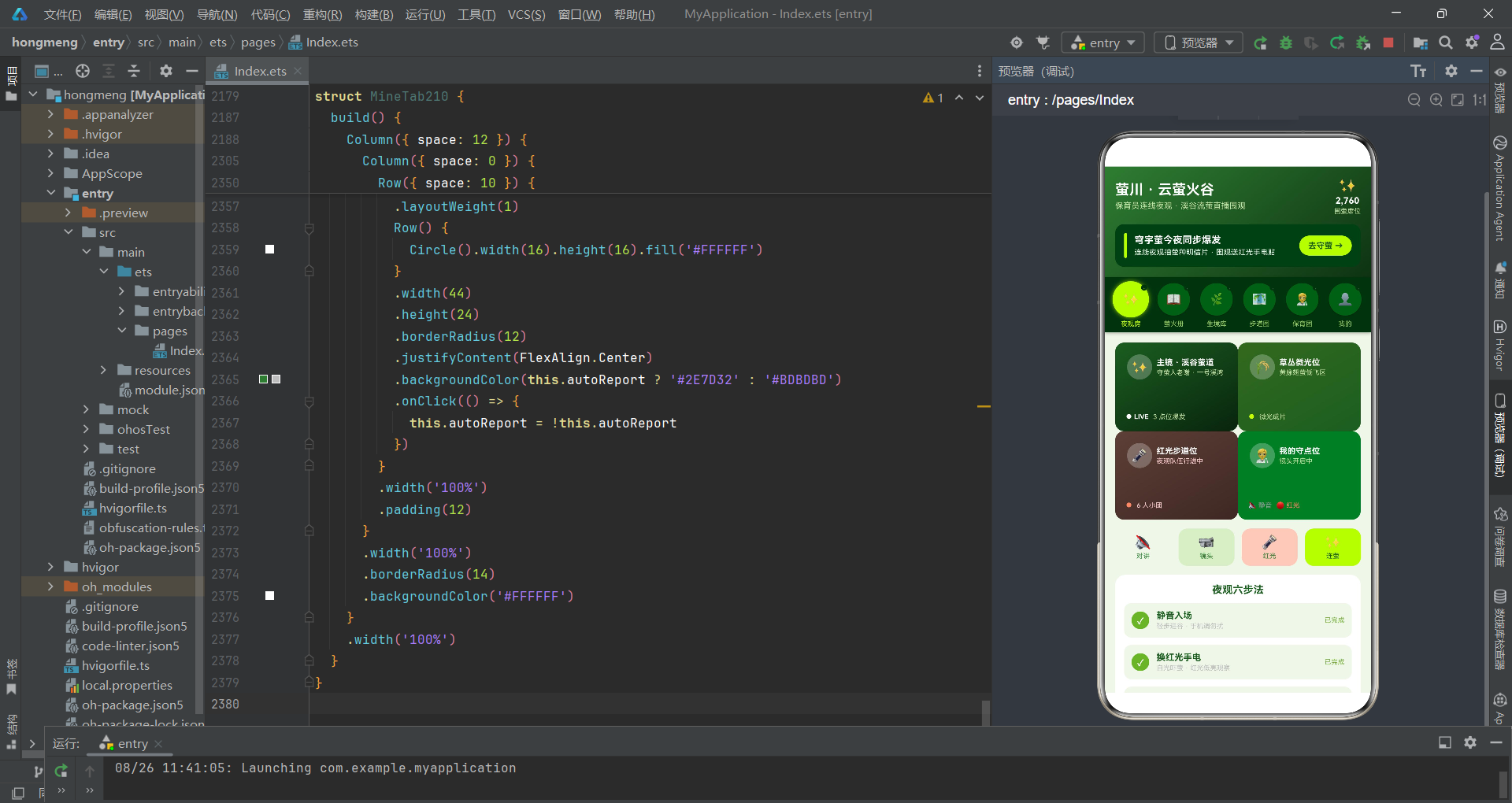
萤川云萤火谷应用展示了HarmonyOS ArkTS在生态保育类应用开发中的完整工程能力。从萤光圆Tab导航的拟物化设计到四机位夜观直播布局,从萤种堆叠条占比图到密度走势柱状图,每一个功能模块都体现了声明式UI范式在垂直领域应用中的适应性和扩展性。应用最突出的设计亮点在于萤光圆Tab导航——圆形按钮配合发光shadow和小萤点三层视觉元素,在功能导航之外赋予了UI以萤火虫的生命感,这种将应用主题特征深度融入交互元素的设计理念值得在各类主题应用中推广。
从技术工程角度评估,应用的状态管理架构清晰高效。入口组件Index210集中持有全部业务数据作为@State状态变量,子Tab组件通过@Prop接收只读数据副本,通过箭头函数回调将用户操作意图传递回父组件处理。这种"状态提升+回调通信"的模式确保了数据流的单向性和可预测性。弹窗系统通过bindSheet和bindContentCover双体系实现——三个底部抽屉(预约夜观、上报观测、编辑档案)承载表单输入交互,两个居中遮罩(删除确认、点位详情)承载信息展示和操作确认。特别是点位详情对话框中的"预约夜观这个点位"按钮实现了弹窗联动——从详情查看无缝跳转到预约下单,形成完整的转化闭环。
红光手电租借开关的文案"白光禁入·红光护萤"传达了光污染对萤火虫的影响知识;静音守萤承诺的文案"连麦全程轻声不打扰"强调了声音对萤火虫的干扰;夜览模式的"夜间界面自动降亮度"将环保理念延伸到应用本身。上报观测表单中的萤种判断、目测数量和萤光等级字段,引导用户在夜观过程中关注萤火虫的物种特征和种群密度,将娱乐性的直播围观转化为有科学价值的观测数据。整体而言,该应用的技术实现和保育理念结合紧密,为HarmonyOS在公民科学和生态教育领域的应用开发提供了一个优秀的参考范本。

开源鸿蒙跨平台开发社区汇聚开发者与厂商,共建“一次开发,多端部署”的开源生态,致力于降低跨端开发门槛,推动万物智联创新。
更多推荐


 1
1 0
0- 0


 已为社区贡献29条内容

所有评论(0)