基于HarmonyOS ArkTS API 24数据更新采用 map/filter 不可变模式,确保状态变更可追踪
孵化是一场时间的艺术——从验受精到破壳出雏,37.8度的恒温、55%的湿度、每天4到6次的翻蛋,每一个参数都关乎生命的诞生。将这套精密的生物过程搬上云端,让远程用户24小时围观破壳瞬间,是物联网与移动应用融合的典型场景。
在ArkTS声明式UI中,组件的状态管理遵循"数据变化驱动UI刷新"的核心原则。@State装饰的可变变量一旦被修改,框架自动触发Diff算法,精确更新受影响的UI节点。这种机制让开发者从繁琐的DOM操作中解放出来,专注于业务逻辑与数据建模。
底部Tab导航在移动端应用中是最经典的布局模式。本应用以「横蛋」造型为设计灵感,将每个Tab项渲染为蛋形圆角卡片,顶部叠加双段裂纹刻痕装饰,选中态采用奶油黄渐变并微放大,在功能导航与主题美学之间取得精妙平衡。
引言
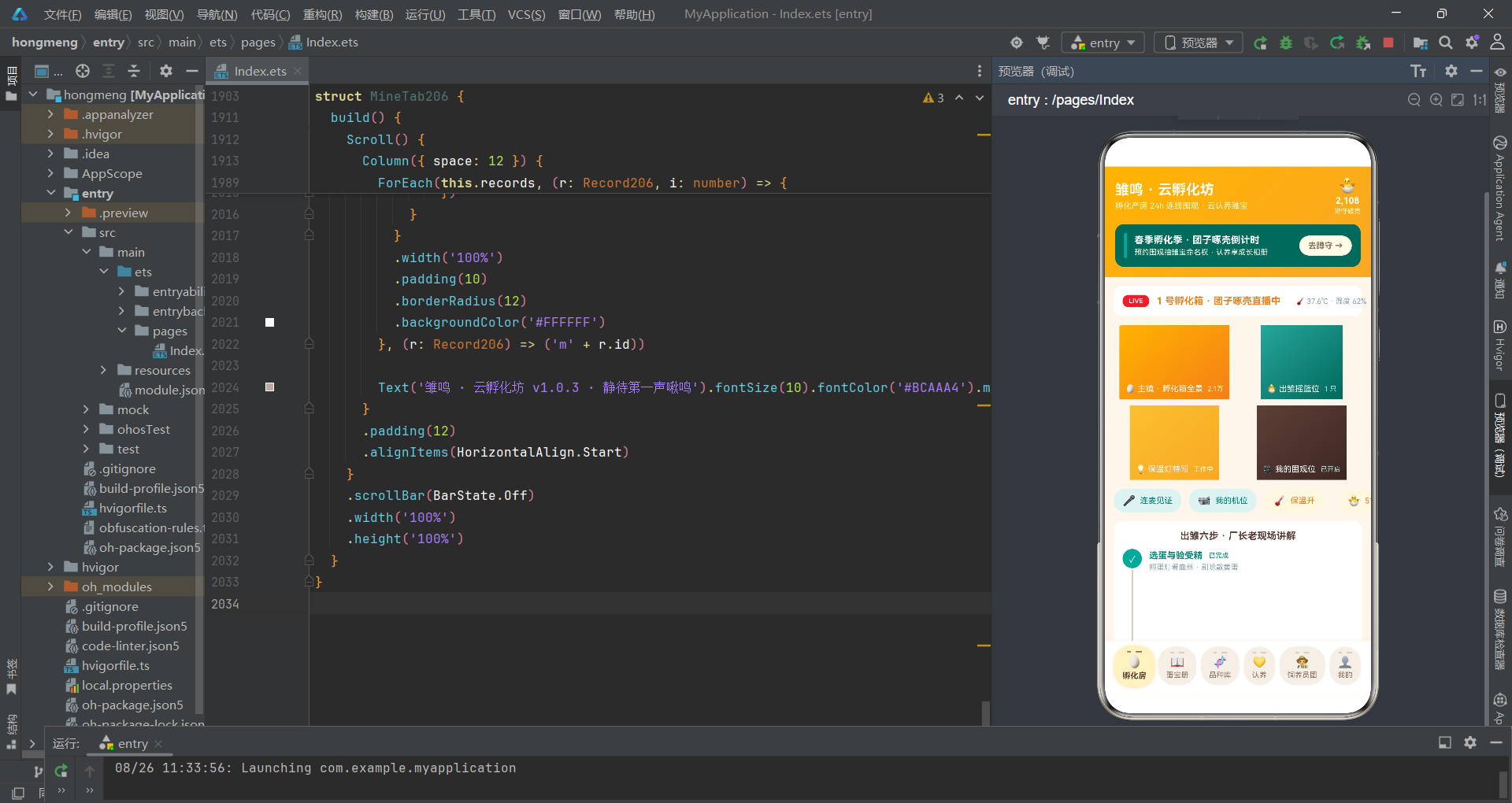
家禽孵化是一项古老而精密的农业技术。从自然界母鸡抱窝到现代电孵化箱,孵化技术经历了从经验驱动到数据驱动的跨越。一颗受精蛋从入孵到破壳,柯尔鸭需要26天、芦花鸡需要21天、白鹅需要30天,期间温度波动不超过0.5度、湿度需根据发育阶段动态调整。传统的孵化管理依赖人工定时巡检——照蛋验受精、翻蛋防粘连、凉蛋散热、落盘停翻——每一步都需要经验判断和手动操作。随着直播技术的普及和云认养模式的兴起,将孵化全过程搬上云端、让远程用户参与围观和互动,成为了连接传统农业与数字用户的新桥梁。
雏鸣·云孵化坊正是在这一背景下设计的数字化孵化围观平台。应用以奶油黄 #F9A825 作为主色,呼应蛋黄与初生雏鸟的温暖色调;以蛋青绿 #26A69A 作为辅助色,象征生命与生机;以壳白 #FFFDE7 作为背景色,模拟蛋壳内壁的柔和质感。六个Tab页分别承载孵化房直播、蛋宝册记录、品种库参考、认养管理、饲养员团和个人中心,形成从围观到记录、从认养到追踪的完整用户体验闭环。底部「横蛋」Tab导航以蛋形卡片为视觉单元,顶部双段裂纹刻痕暗示蛋壳破壁的意象,选中态奶油黄渐变配合1.07倍放大动画,将功能性与叙事性融为一体。
在技术架构上,应用采用ArkTS声明式UI范式,以 @Entry + @Component 作为页面入口,通过 @State 管理全部可变状态,@Prop 实现父子组件间的单向数据同步。底部弹窗(bindSheet)承载预约围观、新增记录、编辑记录等表单操作,居中弹窗(bindContentCover)处理删除确认和蛋宝详情展示。数据更新采用 map/filter 不可变模式,确保状态变更可追踪。全局工具函数处理状态色映射和数据聚合计算,实现业务逻辑与UI渲染的解耦。
数据接口与类型体系
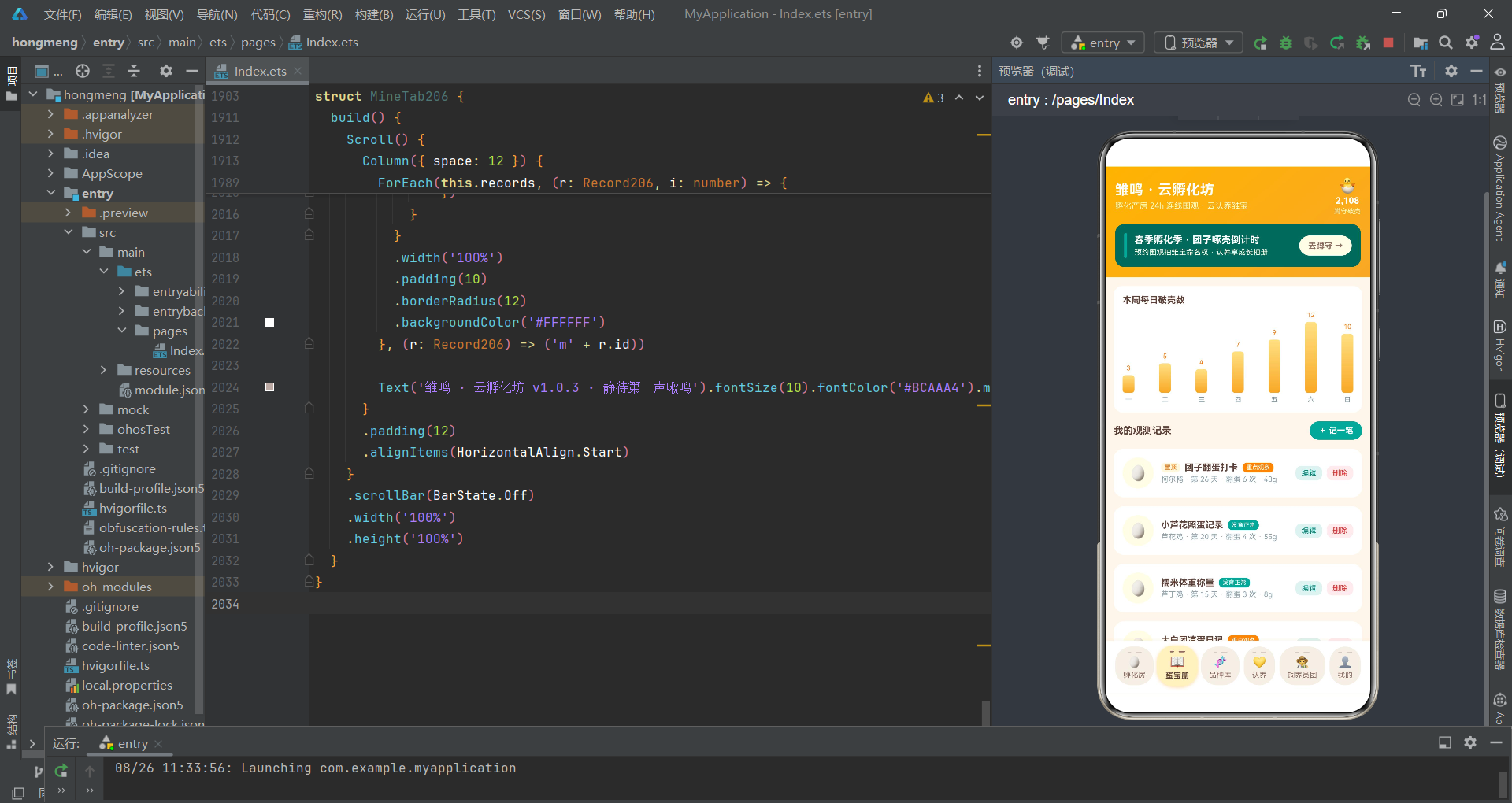
应用首先定义了覆盖全部业务实体的强类型接口,为声明式UI的数据驱动提供类型安全保障。
interface Egg206 {
  id: number
  name: string
  breed: string
  days: number
  weight: number
  fertile: number
  state: string
  watchers: number
  adopted: boolean
}

interface Breed206 {
  id: number
  name: string
  total: number
  cycle: number
  difficulty: string
  heat: number
}

interface Record206 {
  id: number
  name: string
  breed: string
  dayNum: number
  turns: number
  weight: number
  state: string
  top: boolean
}

interface Keeper206 {
  id: number
  name: string
  city: string
  years: number
  online: boolean
  heat: number
}
Egg206 接口是蛋宝实体的核心定义,fertile 字段记录受精率(百分比)、days 记录孵化天数、weight 记录当前蛋重、state 表示孵化状态(恒温孵化/啄壳中/破壳倒计时/已出雏)、watchers 记录围观人次、adopted 标记是否已被认养。每个字段都精确映射了孵化管理中的关键参数。
强类型接口在ArkTS中不仅是编译期的类型检查工具,更是运行时数据访问的安全网。当组件通过 @Prop 接收数据时,类型系统确保了属性名和属性类型的正确性,避免了动态语言中常见的 “undefined is not a function” 类错误。
弹幕、孵化步骤和品种统计也有独立的接口定义:
interface Barrage206 {
  id: number
  text: string
}

interface HatchStep206 {
  id: number
  title: string
  tip: string
  done: boolean
}

interface BreedCount206 {
  label: string
  count: number
  color: string
}

interface WeightLog206 {
  day: string
  weight: number
}

interface HatchDay206 {
  day: string
  hatches: number
}
HatchStep206 的 done 字段标记出雏六步法中每一步的完成状态,用户在直播页点击可切换。WeightLog206 记录七天失重曲线数据——孵化过程中蛋的重量会因水分蒸发而逐渐下降,失重率是判断胚胎发育是否正常的重要指标。HatchDay206 记录本周每日破壳数量,用于蛋宝册页面的柱状图可视化。
全局标签与工具函数
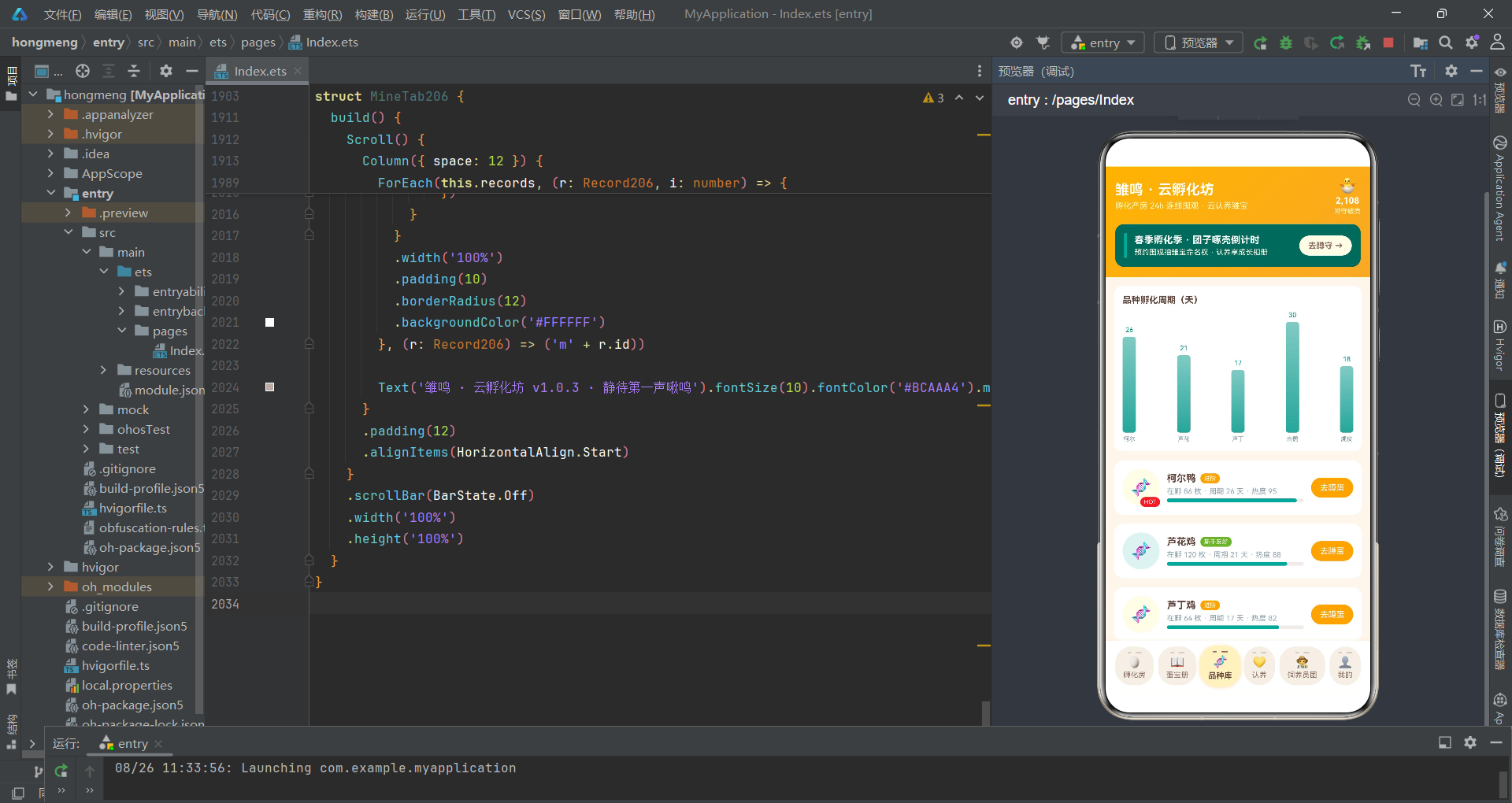
应用在组件外部定义了品种标签和工具函数,这些纯函数不依赖组件实例,可在任意 struct 中直接调用。
const eggBreedTags206: string[] = ['芦花鸡', '柯尔鸭', '芦丁鸡', '白鹅', '虎皮鹦鹉']
const remindTags206: string[] = ['破壳前 1 小时', '破壳前 10 分钟', '第一声啾鸣']
const recordStateTags206: string[] = ['发育正常', '重点观察', '已出雏']

function eggStateColor206(state: string): string {
  if (state === '破壳倒计时') {
    return '#F9A825'
  }
  if (state === '啄壳中') {
    return '#E53935'
  }
  if (state === '恒温孵化') {
    return '#26A69A'
  }
  if (state === '已出雏') {
    return '#7CB342'
  }
  return '#90A4AE'
}

function recordStateColor206(state: string): string {
  if (state === '发育正常') {
    return '#26A69A'
  }
  if (state === '重点观察') {
    return '#FB8C00'
  }
  if (state === '已出雏') {
    return '#7CB342'
  }
  return '#90A4AE'
}

function difficultyColor206(difficulty: string): string {
  if (difficulty === '新手友好') {
    return '#7CB342'
  }
  if (difficulty === '进阶') {
    return '#F9A825'
  }
  return '#E53935'
}
三个颜色映射函数分别处理蛋宝状态、记录状态和品种难度的颜色计算。eggStateColor206 将四种孵化状态映射为不同颜色——破壳倒计时为奶油黄(即将发生的预警色)、啄壳中为红色(紧张刺激的正在进行态)、恒温孵化为蛋青绿(平稳安全的常规态)、已出雏为草绿(完成的成功态)。difficultyColor206 将品种难度映射为三色——新手友好为草绿、进阶为奶油黄、高阶挑战为红色,帮助用户快速识别适合自己水平的品种。
将颜色映射逻辑提取为独立纯函数是ArkTS工程实践的核心原则之一。当全部状态色计算集中在函数中时,配色方案的调整只需修改一处代码,而非在数十个UI节点中逐个查找硬编码的色值。这种做法同时提高了代码的可读性和可维护性。
统计类函数负责数据聚合:
function adoptedEggCount206(eggs: Egg206[]): number {
  let n: number = 0
  for (let i = 0; i < eggs.length; i++) {
    if (eggs[i].adopted) {
      n++
    }
  }
  return n
}

function crackingEggCount206(eggs: Egg206[]): number {
  let n: number = 0
  for (let i = 0; i < eggs.length; i++) {
    if (eggs[i].state === '啄壳中') {
      n++
    }
  }
  return n
}

function breedCounts206(eggs: Egg206[]): BreedCount206[] {
  const counts: BreedCount206[] = []
  for (let i = 0; i < eggBreedTags206.length; i++) {
    let n: number = 0
    for (let j = 0; j < eggs.length; j++) {
      if (eggs[j].breed === eggBreedTags206[i]) {
        n++
      }
    }
    counts.push({
      label: eggBreedTags206[i],
      count: n,
      color: ['#F9A825', '#26A69A', '#EC407A', '#7CB342', '#00ACC1'][i]
    })
  }
  return counts
}
adoptedEggCount206 统计已被认养的蛋宝数量,crackingEggCount206 统计正在啄壳中的蛋宝数量——这两个数值在认养Tab的统计面板中实时展示。breedCounts206 遍历品种标签数组,对每个品种统计蛋宝数组中的匹配数量并分配主题色,返回的 BreedCount206[] 直接用于认养Tab的品种占比堆叠条形图渲染。
主页面状态管理
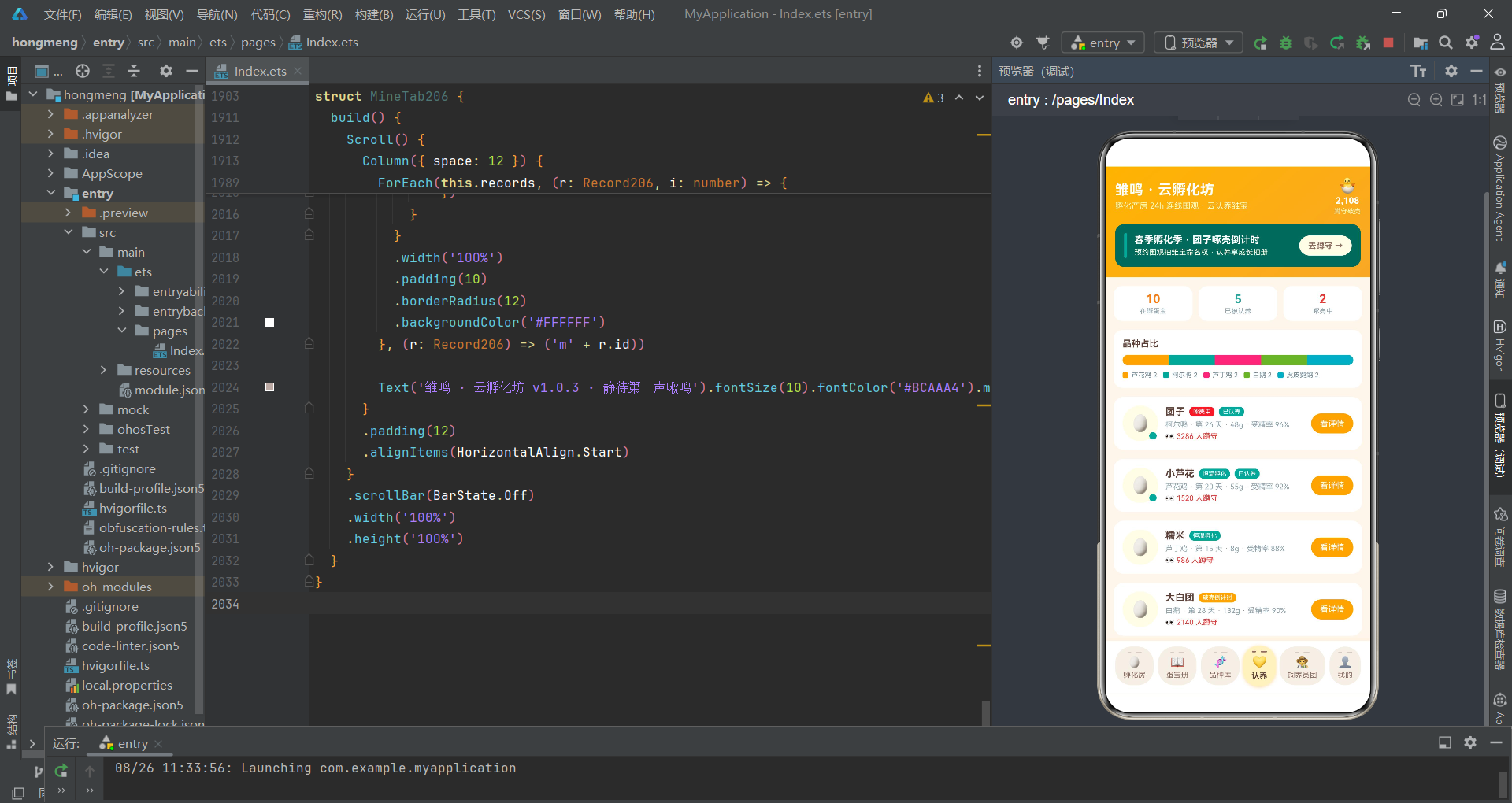
主页面 Index206 作为状态中枢,持有全部 @State 变量并通过回调分发操作。
@Entry
@Component
struct Index206 {
  @State tabIndex1: number = 0

  // 弹框开关
  @State showWatchSheet: boolean = false
  @State showRecordSheet: boolean = false
  @State showEditSheet: boolean = false
  @State showDelDialog: boolean = false
  @State showDetailDialog: boolean = false

  // 预约破壳围观表单
  @State watchBreed: number = 0
  @State watchRemind: number = 1
  @State watchMic: boolean = true
  @State watchAdopt: boolean = false

  // 新增观测记录表单
  @State recName: string = ''
  @State recBreed: number = 0
  @State recDay: number = 7
  @State recTurns: number = 4
  @State recWeight: number = 52
  @State recPublic: boolean = true

  // 编辑表单
  @State editIndex: number = -1
  @State editName: string = ''
  @State editDay: number = 7
  @State editWeight: number = 52
  @State editTop: boolean = false
}
主页面持有六组状态变量:Tab索引、五个弹窗开关、预约围观表单字段、新增记录表单字段、编辑表单字段以及删除/详情索引。预约围观表单包含品种选择(watchBreed)、提醒档位(watchRemind)、连麦开关(watchMic)和认养开关(watchAdopt),完整覆盖了用户预约破壳围观所需的全部参数。
在ArkTS的组件架构中,父组件作为"状态容器"(State Container)持有全部可变数据,子组件通过 @Prop 进行只读消费。这种"单一数据源"模式保证了同一份数据在UI各处的一致性——当父组件的 @State 更新后,所有 @Prop 引用自动同步刷新,无需手动触发。
数据初始化部分预置了丰富的种子数据:
@State eggs: Egg206[] = [
  { id: 1, name: '团子', breed: '柯尔鸭', days: 26, weight: 48, fertile: 96, state: '啄壳中', watchers: 3286, adopted: true },
  { id: 2, name: '小芦花', breed: '芦花鸡', days: 20, weight: 55, fertile: 92, state: '恒温孵化', watchers: 1520, adopted: true },
  { id: 3, name: '糯米', breed: '芦丁鸡', days: 15, weight: 8, fertile: 88, state: '恒温孵化', watchers: 986, adopted: false },
  { id: 4, name: '大白团', breed: '白鹅', days: 28, weight: 132, fertile: 90, state: '破壳倒计时', watchers: 2140, adopted: false },
  // ...更多蛋宝
]

@State hatchSteps: HatchStep206[] = [
  { id: 1, title: '选蛋与验受精', tip: '照蛋灯看血丝 · 剔除散黄蛋', done: true },
  { id: 2, title: '入孵控温', tip: '37.8℃ 恒温 · 湿度 55% 起', done: true },
  { id: 3, title: '每日翻蛋', tip: '每天 4-6 次 · 防 胚胎粘连', done: true },
  { id: 4, title: '照蛋观察', tip: '第 7 天验受精 · 第 14 天看气室', done: false },
  { id: 5, title: '落盘停翻', tip: '最后 3 天停止翻蛋 · 提高湿度', done: false },
  { id: 6, title: '破壳出雏', tip: '切勿手动剥壳 · 静待第一声啾鸣', done: false }
]
孵化六步数据完整还原了从选蛋到出雏的标准流程:前三步(选蛋验受精、入孵控温、每日翻蛋)已完成,后三步(照蛋观察、落盘停翻、破壳出雏)进行中。用户在直播页点击任意步骤触发 onStep 回调,父组件通过 map 方法生成新数组切换该步骤状态,框架自动刷新受影响的UI节点。
头部区域与横蛋Tab导航
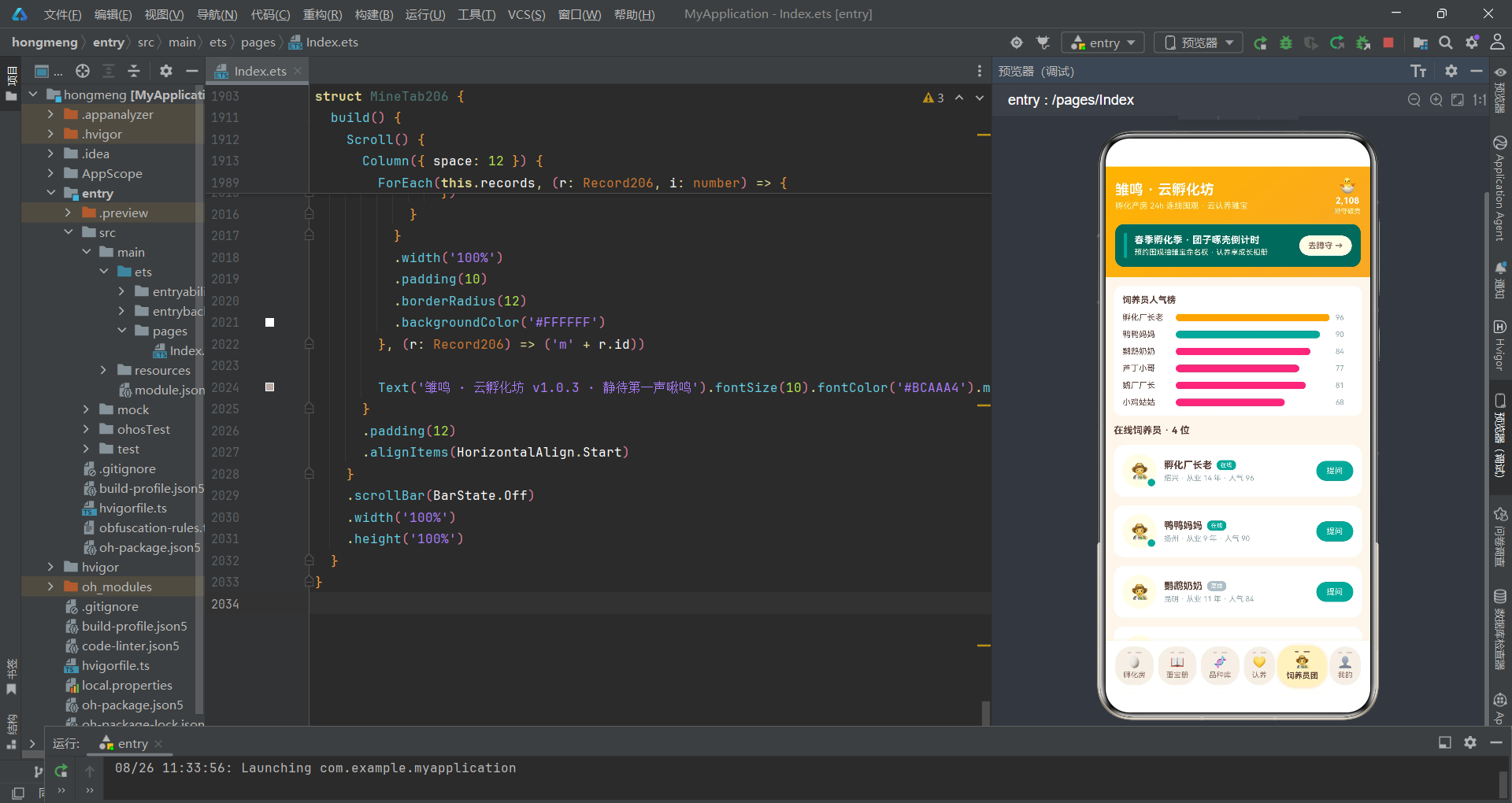
头部区域采用电商孵化季的视觉风格,顶部信息栏展示应用名称与蹲守破壳人数,下方活动横幅引导用户预约围观。
@Builder
header206() {
  Column({ space: 12 }) {
    Row({ space: 10 }) {
      Column({ space: 4 }) {
        Text('雏鸣 · 云孵化坊').fontSize(19).fontColor('#FFFFFF').fontWeight(FontWeight.Bold)
        Text('孵化产房 24h 连线围观 · 云认养雏宝').fontSize(11).fontColor('#FFF9C4')
      }
      .alignItems(HorizontalAlign.Start)
      Text('').layoutWeight(1)
      Column({ space: 2 }) {
        Text('🐣').fontSize(20)
        Text('2,108').fontSize(12).fontColor('#FFFFFF').fontWeight(FontWeight.Bold)
        Text('蹲守破壳').fontSize(9).fontColor('#FFF9C4')
      }
      .alignItems(HorizontalAlign.Center)
    }
    .width('100%')

    Row({ space: 10 }) {
      Column().width(4).height(34).borderRadius(2).backgroundColor('#26A69A')
      Column({ space: 3 }) {
        Text('春季孵化季 · 团子啄壳倒计时').fontSize(13).fontColor('#FFFFFF').fontWeight(FontWeight.Bold)
        Text('预约围观抽雏宝命名权 · 认养享成长相册').fontSize(10).fontColor('#FFFDE7')
      }
      .alignItems(HorizontalAlign.Start)
      Text('').layoutWeight(1)
      Column() {
        Text('去蹲守 →').fontSize(11).fontColor('#8D6E63').fontWeight(FontWeight.Bold)
      }
      .padding({ left: 12, right: 12, top: 7, bottom: 7 })
      .borderRadius(14)
      .backgroundColor('#FFFDE7')
      .onClick(() => { this.showWatchSheet = true })
    }
    .width('100%').padding(12).borderRadius(12).backgroundColor('#00695C')
  }
  .alignItems(HorizontalAlign.Start).padding(14)
  .linearGradient({ angle: 140, colors: [['#FFB300', 0], ['#F9A825', 1]] })
}
头部使用奶油黄渐变背景,活动横幅以蛋青绿为背景色,左侧竖条使用蛋青绿作为视觉引导。点击"去蹲守"按钮直接打开预约围观抽屉(showWatchSheet = true),实现头部与弹窗的联动跳转。layoutWeight(1) 的空Text充当弹性占位符,将右侧统计信息和按钮推到行尾。
底部「横蛋」Tab导航是本应用的视觉焦点:
@Builder
tabBar206() {
  Column({ space: 6 }) {
    Row({ space: 6 }) {
      ForEach(this.tabs206, (t: string, i: number) => {
        Column({ space: 3 }) {
          // 顶部双段裂纹刻痕
          Row({ space: 6 }) {
            Text('').width(5).height(2).borderRadius(1)
              .backgroundColor(this.tabIndex1 === i ? '#8D6E63' : '#D7CCC8')
            Text('').width(8).height(2).borderRadius(1)
              .backgroundColor(this.tabIndex1 === i ? '#8D6E63' : '#D7CCC8')
          }
          .margin({ top: 2 })

          Text(this.tabIcons206[i]).fontSize(15)
          Text(t)
            .fontSize(10)
            .fontColor(this.tabIndex1 === i ? '#5D4037' : '#8D6E63')
            .fontWeight(this.tabIndex1 === i ? FontWeight.Bold : FontWeight.Normal)
        }
        .justifyContent(FlexAlign.Center)
        .padding({ left: 11, right: 11, top: 5, bottom: 8 })
        .borderRadius(22)
        .backgroundColor(this.tabIndex1 === i ? '#FFF3C4' : '#F5EFE6')
        .shadow({
          radius: this.tabIndex1 === i ? 10 : 0,
          color: '#66F9A825',
          offsetY: 3
        })
        .scale({ x: this.tabIndex1 === i ? 1.07 : 1, y: this.tabIndex1 === i ? 1.07 : 1 })
        .animation({ duration: 180 })
        .onClick(() => { this.tabIndex1 = i })
      }, (t: string) => t)
    }
    .width('100%').justifyContent(FlexAlign.SpaceEvenly)
  }
  .width('100%')
  .padding({ left: 8, right: 8, top: 8, bottom: 10 })
  .backgroundColor('#FFFFFF')
  .shadow({ radius: 12, color: '#14F9A825', offsetY: -4 })
}
每个Tab项使用
borderRadius(22)实现蛋形圆角外观,顶部叠加两条宽度不同的裂纹刻痕(5px和8px),模拟蛋壳表面的裂纹纹理。选中态使用奶油黄浅色背景#FFF3C4、棕色刻痕和1.07倍放大动画,未选中态使用米色背景#F5EFE6和浅棕刻痕。底部Tab栏整体使用向上投射的阴影(offsetY: -4),营造悬浮于内容区之上的视觉效果。
预约围观与观测记录抽屉
预约破壳围观抽屉是表单交互的典型场景,包含品种选择、提醒档位、连麦开关和认养开关。
@Builder
watchSheet206() {
  Column() {
    Column() {}
      .width(40).height(4).borderRadius(2)
      .backgroundColor('#D7CCC8').margin({ top: 10 })

    Row({ space: 8 }) {
      Text('预约破壳围观').fontSize(17).fontWeight(FontWeight.Bold).fontColor('#F57F17')
      Text('').layoutWeight(1)
      Column() {
        Text('×').fontSize(16).fontColor('#78909C')
      }
      .width(28).height(28).borderRadius(14)
      .backgroundColor('#EFEBE9')
      .justifyContent(FlexAlign.Center)
      .onClick(() => { this.showWatchSheet = false })
    }
    .width('100%').padding({ left: 16, right: 16, top: 12 })

    Scroll() {
      Column({ space: 16 }) {
        Column({ space: 8 }) {
          Text('蹲守品种').fontSize(13).fontWeight(FontWeight.Bold).fontColor('#5D4037')
          Flex({ wrap: FlexWrap.Wrap }) {
            ForEach(eggBreedTags206, (tag: string, i: number) => {
              Text(tag)
                .fontSize(11)
                .fontColor(this.watchBreed === i ? '#FFFFFF' : '#8D6E63')
                .padding({ left: 12, right: 12, top: 6, bottom: 6 })
                .borderRadius(16)
                .backgroundColor(this.watchBreed === i ? '#F9A825' : '#EFEBE9')
                .margin(4)
                .onClick(() => { this.watchBreed = i })
            }, (tag: string) => tag)
          }
        }
        .alignItems(HorizontalAlign.Start).width('100%')
      }
      .padding({ left: 16, right: 16, bottom: 8 })
    }
    .layoutWeight(1).scrollBar(BarState.Off)

    Row({ space: 12 }) {
      Column({ space: 2 }) {
        Text('围观免费 · 认养').fontSize(10).fontColor('#90A4AE')
        Text('¥ ' + (this.watchAdopt ? 68 : 0))
          .fontSize(18).fontWeight(FontWeight.Bold).fontColor('#F57F17')
      }
      .alignItems(HorizontalAlign.Start)
      Text('').layoutWeight(1)
      Button() {
        Text('蹲住这颗蛋').fontSize(14).fontColor('#FFFFFF').fontWeight(FontWeight.Bold)
      }
      .padding({ left: 28, right: 28, top: 11, bottom: 11 })
      .borderRadius(22).backgroundColor('#26A69A')
      .onClick(() => { this.showWatchSheet = false })
    }
    .width('100%').padding(14)
  }
  .width('100%').height('100%').backgroundColor('#FFFFFF')
}
抽屉顶部有拖拽指示条,品种选择使用 Flex({ wrap: FlexWrap.Wrap }) 实现标签自动换行。选中品种以奶油黄背景高亮,未选中以米色背景展示。底部价格根据认养开关动态计算:this.watchAdopt ? 68 : 0——围观免费、认养68元。提交按钮使用蛋青绿背景和22px圆角,呼应蛋形主题。
$$this.showWatchSheet的双美元符号语法实现了 @State 布尔变量与 bindSheet 显隐状态的双向绑定。当用户下滑关闭抽屉时,框架自动将变量回写为 false,无需在 onClose 回调中手动处理。这种声明式的弹窗管理方式大幅简化了浮层状态管理代码。
观测记录抽屉包含更多表单控件——文本输入、品种选择、天数加减、翻蛋次数加减、称重加减和公开开关:
Row({ space: 14 }) {
  Column() {
    Text('-').fontSize(16).fontColor('#00796B')
  }
  .width(34).height(34).borderRadius(17)
  .backgroundColor('#E0F2F1')
  .justifyContent(FlexAlign.Center)
  .onClick(() => { if (this.recTurns > 0) { this.recTurns -= 1 } })

  Column({ space: 2 }) {
    Text('今日翻蛋 ' + this.recTurns + ' 次').fontSize(14)
      .fontWeight(FontWeight.Bold).fontColor('#F57F17')
    Text('落盘期请记为 0 次').fontSize(9).fontColor('#90A4AE')
  }
  .alignItems(HorizontalAlign.Start)

  Column() {
    Text('+').fontSize(16).fontColor('#00796B')
  }
  .width(34).height(34).borderRadius(17)
  .backgroundColor('#E0F2F1')
  .justifyContent(FlexAlign.Center)
  .onClick(() => { if (this.recTurns < 10) { this.recTurns += 1 } })
  Text('').layoutWeight(1)
}
.width('100%')
翻蛋次数加减器使用两个34x34的圆角方块作为加减按钮,中间显示当前次数和提示文字。减按钮在次数为0时不再递减,加按钮在次数为10时不再递增。这种边界检查确保了表单数据的合法性。称重加减器的逻辑类似,范围控制在5-150克之间。
编辑记录与删除确认
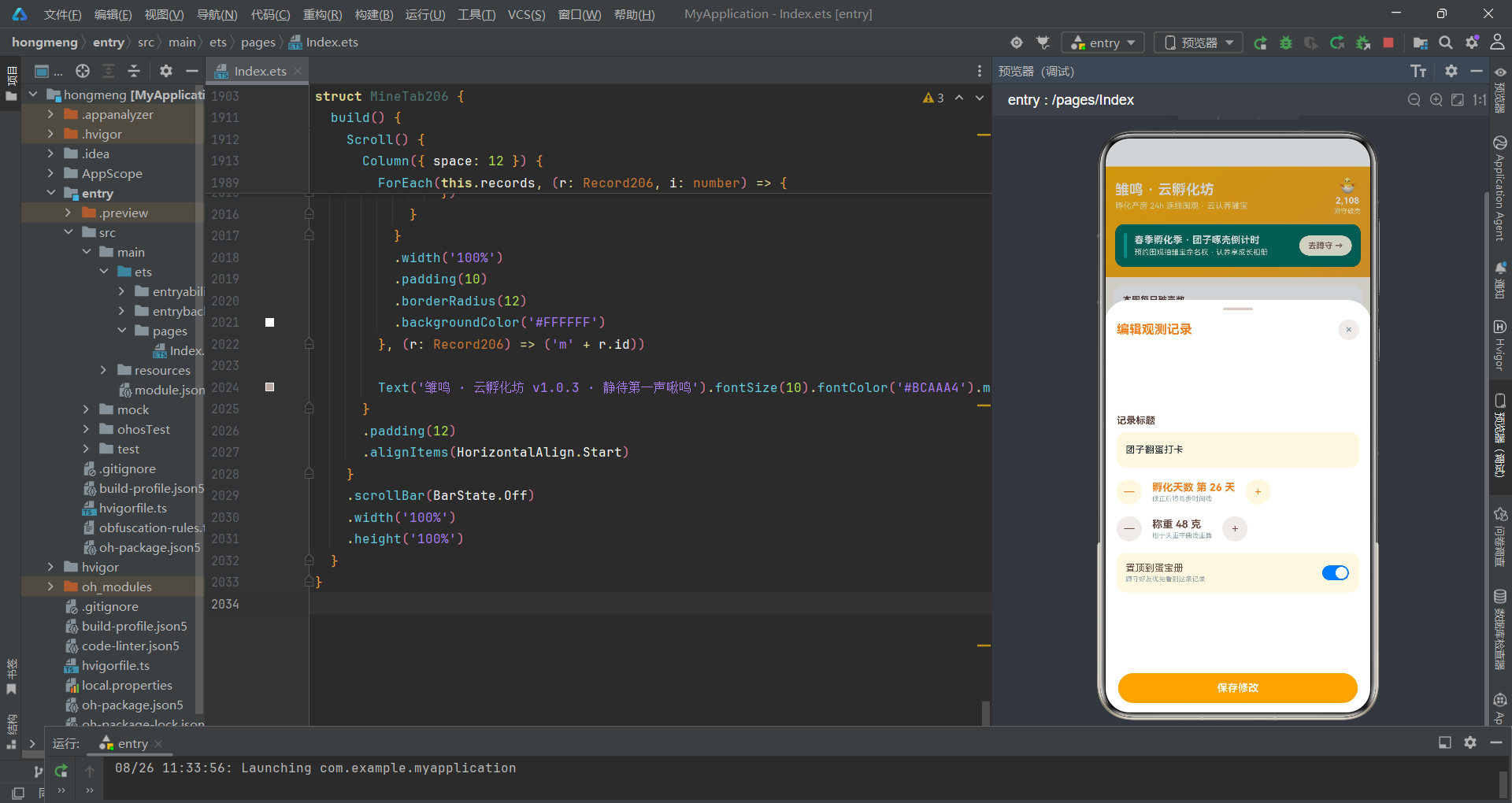
编辑记录抽屉通过 map 方法实现不可变数据更新:
.onClick(() => {
  this.records = this.records.map((r: Record206, i: number) => i === this.editIndex ? {
    id: r.id,
    name: this.editName === '' ? r.name : this.editName,
    breed: r.breed,
    dayNum: this.editDay,
    turns: r.turns,
    weight: this.editWeight,
    state: r.state,
    top: this.editTop
  } : r)
  this.showEditSheet = false
})
map 方法仅替换索引匹配 editIndex 的记录元素,其余元素原样返回。当用户未修改名称时(editName 为空),保留原始名称。更新完成后关闭编辑抽屉,框架自动刷新蛋宝册Tab中受影响的记录卡片。
不可变更新(Immutable Update)是声明式UI数据管理的核心范式。通过
map或filter生成新数组而非原地修改原数组,框架的Diff算法能够通过引用比较快速判断数据是否变化,从而触发精确的UI刷新。原地修改(如this.records[i].name = 'xxx')不会改变数组引用,框架可能无法感知变化。
删除确认弹窗使用 bindContentCover 实现居中浮层:
@Builder
delDialog206() {
  Column({ space: 16 }) {
    Text('🥚').fontSize(34)
    Text('删除这条观测记录?').fontSize(16)
      .fontWeight(FontWeight.Bold).fontColor('#5D4037')
    Text('「' + (this.delIndex >= 0 && this.delIndex < this.records.length
      ? this.records[this.delIndex].name : '') + '」将从蛋宝册消失')
      .fontSize(12).fontColor('#90A4AE').textAlign(TextAlign.Center)

    Row({ space: 10 }) {
      Column({ space: 2 }) {
        Text('保留成长相册').fontSize(12).fontColor('#8D6E63')
      }
      .alignItems(HorizontalAlign.Start)
      Text('').layoutWeight(1)
      Toggle({ type: ToggleType.Switch, isOn: this.delKeepAlbum })
        .onChange((v: boolean) => { this.delKeepAlbum = v })
    }
    .width('100%').padding(12).borderRadius(12).backgroundColor('#FFFDE7')

    Row({ space: 12 }) {
      Button() {
        Text('再想想').fontSize(13).fontColor('#8D6E63')
      }
      .layoutWeight(1).padding({ top: 10, bottom: 10 })
      .borderRadius(20).backgroundColor('#EFEBE9')
      .onClick(() => { this.showDelDialog = false })

      Button() {
        Text('删除记录').fontSize(13).fontColor('#FFFFFF')
      }
      .layoutWeight(1).padding({ top: 10, bottom: 10 })
      .borderRadius(20).backgroundColor('#E53935')
      .onClick(() => {
        this.records = this.records.filter((r: Record206, i: number) => i !== this.delIndex)
        this.showDelDialog = false
      })
    }
    .width('100%')
  }
  .width('84%').padding(22).borderRadius(18).backgroundColor('#FFFFFF')
}
删除弹窗展示记录名称、保留成长相册的Toggle开关和两个操作按钮。删除操作使用 filter 方法排除索引匹配 delIndex 的记录,生成新数组赋值给 this.records。这种不可变删除模式确保了框架能够感知数组变化并触发UI刷新。
主页面build方法与弹层绑定
主入口的 build() 方法将所有组件组装,通过 bindSheet 和 bindContentCover 挂载全部弹层。
build() {
  Column() {
    this.header206()

    Column() {
      if (this.tabIndex1 === 0) {
        LiveTab206({
          barrages: this.barrages,
          hatchSteps: this.hatchSteps,
          eggs: this.eggs,
          onWatch: () => { this.showWatchSheet = true },
          onStep: (i: number) => {
            this.hatchSteps = this.hatchSteps.map((s: HatchStep206, idx: number) =>
              idx === i ? { id: s.id, title: s.title, tip: s.tip, done: !s.done } : s
            )
          }
        })
      } else if (this.tabIndex1 === 1) {
        BookTab206({
          records: this.records,
          hatchDays: this.hatchDays,
          onNew: () => { this.showRecordSheet = true },
          onEdit: (i: number) => {
            this.editIndex = i
            this.editName = this.records[i].name
            this.editDay = this.records[i].dayNum
            this.editWeight = this.records[i].weight
            this.editTop = this.records[i].top
            this.showEditSheet = true
          },
          onDelete: (i: number) => {
            this.delIndex = i
            this.delKeepAlbum = true
            this.showDelDialog = true
          }
        })
      }
      // ...其他Tab
    }
    .layoutWeight(1).width('100%')

    this.tabBar206()
  }
  .width('100%').height('100%').backgroundColor('#FDF6EC')
  .bindSheet($$this.showWatchSheet, this.watchSheet206(), {
    height: 580, dragBar: true, showClose: false, backgroundColor: '#FFFFFF'
  })
  .bindSheet($$this.showRecordSheet, this.recordSheet206(), {
    height: 680, dragBar: true, showClose: false, backgroundColor: '#FFFFFF'
  })
  .bindSheet($$this.showEditSheet, this.editSheet206(), {
    height: 560, dragBar: true, showClose: false, backgroundColor: '#FFFFFF'
  })
  .bindContentCover($$this.showDelDialog, this.delDialog206(), {})
  .bindContentCover($$this.showDetailDialog, this.detailDialog206(), {})
}
Tab切换通过 if/else if 条件渲染实现。子组件通过参数传递接收数据(barrages、hatchSteps、eggs 等)和回调函数(onWatch、onStep、onEdit 等)。底部Tab栏 tabBar206() 在内容区下方,形成上下夹持的布局。bindSheet 配置项中的 height 参数控制抽屉高度——预约围观为580、新增记录为680、编辑为560,根据表单内容的多少灵活调整。
孵化房直播Tab
直播Tab是应用的核心场景,包含四机位网格、控制工具条、出雏六步法、破壳看点列表和弹幕区。
@Component
struct LiveTab206 {
  @Prop barrages: Barrage206[] = []
  @Prop hatchSteps: HatchStep206[] = []
  @Prop eggs: Egg206[] = []
  @State micOn: boolean = true
  @State camOn: boolean = true
  @State heatOn: boolean = true
  @State likeCount: number = 512
  onWatch: () => void = () => {}
  onStep: (i: number) => void = () => {}

  build() {
    Scroll() {
      Column({ space: 12 }) {
        Row({ space: 10 }) {
          Column() {
            Text('LIVE').fontSize(9).fontColor('#FFFFFF').fontWeight(FontWeight.Bold)
          }
          .padding({ left: 8, right: 8, top: 3, bottom: 3 })
          .borderRadius(8).backgroundColor('#E53935')
          Text('1 号孵化箱 · 团子啄壳直播中')
            .fontSize(13).fontColor('#F57F17').fontWeight(FontWeight.Bold)
          Text('').layoutWeight(1)
          Text('🌡️ 37.6℃ · 湿度 62%').fontSize(10).fontColor('#90A4AE')
        }
        .width('100%').padding(12).borderRadius(12).backgroundColor('#FFFFFF')

        Grid() {
          GridItem() {
            Column({ space: 4 }) {
              Text('').layoutWeight(1)
              Row({ space: 6 }) {
                Text('🥚 主镜 · 孵化箱全景').fontSize(11).fontColor('#FFFFFF')
                Text('2.1万').fontSize(9).fontColor('#FFF9C4')
              }
            }
            .padding(8)
            .linearGradient({ angle: 140, colors: [['#FFB300', 0], ['#F57F17', 1]] })
          }
          // ...其他三个机位
        }
        .columnsTemplate('1fr 1fr').rowsTemplate('1fr 1fr')
        .columnsGap(8).rowsGap(8)
        .height(210).borderRadius(14).width('100%')
四机位使用2x2 Grid布局,每个机位使用不同渐变色:主镜为橙黄渐变(孵化箱全景)、出雏摇篮位为绿青渐变、保温灯特写为黄渐变、我的围观位为棕色渐变。顶部LIVE标识使用红色圆角块,右侧实时显示温度和湿度参数——37.6度和62%湿度,这正是啄壳期的标准环境参数。
Grid组件的
columnsTemplate和rowsTemplate属性是ArkTS中实现响应式网格的关键。'1fr 1fr'表示两等分列,结合columnsGap和rowsGap设置间距,可以快速构建出等分卡片矩阵。这种布局在直播类应用中广泛使用——四机位分别展示主画面、特写、辅助画面和用户自己的摄像头。
出雏六步法使用垂直时间线布局,与涂鸦应用类似但内容不同:
Column({ space: 10 }) {
  Text('出雏六步 · 厂长老现场讲解')
    .fontSize(13).fontWeight(FontWeight.Bold).fontColor('#5D4037')
  ForEach(this.hatchSteps, (s: HatchStep206, i: number) => {
    Row({ space: 10 }) {
      Column() {
        Text(s.done ? '✓' : (i + 1) + '')
          .fontSize(12).fontColor('#FFFFFF')
          .textAlign(TextAlign.Center)
          .width(26).height(26).borderRadius(13)
          .backgroundColor(s.done ? '#26A69A' : '#BCAAA4')
        if (i < this.hatchSteps.length - 1) {
          Text('').width(2).layoutWeight(1)
            .backgroundColor('#D7CCC8')
            .margin({ top: 2, bottom: 2 })
        }
      }
      Column({ space: 3 }) {
        Row({ space: 8 }) {
          Text(s.title).fontSize(12).fontWeight(FontWeight.Bold)
            .fontColor(s.done ? '#00897B' : '#5D4037')
          Text(s.done ? '已完成' : '进行中').fontSize(9)
            .fontColor(s.done ? '#00897B' : '#F57F17')
        }
        Text(s.tip).fontSize(10).fontColor('#90A4AE')
      }
      .alignItems(HorizontalAlign.Start)
      .layoutWeight(1)
      .padding({ top: 2, bottom: 8 })
      .onClick(() => { this.onStep(i) })
    }
    .alignItems(VerticalAlign.Top).width('100%')
  }, (s: HatchStep206) => s.id.toString())
}
.width('100%').padding(12).borderRadius(12).backgroundColor('#FFFFFF')
已完成步骤的序号圆块为蛋青绿背景配对勾,进行中步骤为棕色背景配数字。每步之间通过 layoutWeight(1) 的空Text实现自适应高度的连接线。用户点击任意步骤触发 onStep(i) 回调切换状态,父组件通过 map 更新 hatchSteps 数组。每步提示文字包含了专业的孵化知识——如"37.8度恒温"、"切勿手动剥壳"等,体现了应用的教育价值。
蛋宝详情弹窗与失重曲线
蛋宝详情弹窗展示受精率、蛋重、围观人次三项核心数据,以及七天失重曲线柱状图。
@Builder
detailDialog206() {
  Column() {
    Scroll() {
      Column({ space: 0 }) {
        Column({ space: 6 }) {
          Text('🥚').fontSize(40)
          Text(this.detailIndex >= 0 && this.detailIndex < this.eggs.length
            ? this.eggs[this.detailIndex].name : '')
            .fontSize(19).fontWeight(FontWeight.Bold).fontColor('#FFFFFF')
          Text(this.detailIndex >= 0 && this.detailIndex < this.eggs.length
            ? this.eggs[this.detailIndex].breed + ' · 第 '
              + this.eggs[this.detailIndex].days + ' 天' : '')
            .fontSize(11).fontColor('#FFF9C4')
        }
        .width('100%')
        .padding({ top: 28, bottom: 22 })
        .linearGradient({ angle: 140, colors: [['#FFB300', 0], ['#F57F17', 1]] })

        Column({ space: 14 }) {
          Row() {
            Column({ space: 3 }) {
              Text(this.detailIndex >= 0 && this.detailIndex < this.eggs.length
                ? this.eggs[this.detailIndex].fertile + '%' : '')
                .fontSize(15).fontWeight(FontWeight.Bold).fontColor('#26A69A')
              Text('受精率').fontSize(9).fontColor('#90A4AE')
            }
            .layoutWeight(1).alignItems(HorizontalAlign.Center)
            // ...其他数据卡
          }
          .width('100%')

          Column({ space: 8 }) {
            Text('七天失重曲线(克)').fontSize(12)
              .fontWeight(FontWeight.Bold).fontColor('#5D4037')
            Row({ space: 8 }) {
              ForEach(this.weightLogs, (w: WeightLog206) => {
                Column({ space: 4 }) {
                  Text(w.weight + '').fontSize(9).fontColor('#F57F17')
                  Text('')
                    .width(14).height(w.weight)
                    .borderRadius(7).backgroundColor('#FFE082')
                  Text(w.day).fontSize(8).fontColor('#78909C')
                }
              }, (w: WeightLog206) => w.day)
            }
            .alignItems(VerticalAlign.Bottom).width('100%')
          }
          .width('100%').padding(12).borderRadius(12).backgroundColor('#FFFDE7')
详情弹窗顶部使用橙黄渐变背景展示蛋宝名称和品种信息。数据卡以三等分布局展示受精率、当前蛋重和围观人次。七天失重曲线通过简易柱状图实现——每根柱子的高度直接等于蛋重值(46-52克之间),使用浅黄色填充和圆角。底部"认养并蹲守破壳"按钮点击后关闭详情弹窗并打开预约围观抽屉,实现跨弹窗联动跳转。
失重曲线是孵化管理中的专业指标。正常的孵化过程中,蛋的重量会因水分蒸发而逐渐下降——一般27天约失重10-12%。如果失重过快说明湿度偏低,过慢说明湿度偏高。将这一专业数据通过柱状图可视化展示,让非专业用户也能直观理解孵化进程。
认养Tab与品种占比
认养Tab展示在孵蛋宝列表,统计面板显示在孵数量、已认养数量和啄壳中数量。
Row({ space: 8 }) {
  Column({ space: 2 }) {
    Text(this.eggs.length + '').fontSize(16)
      .fontWeight(FontWeight.Bold).fontColor('#F57F17')
    Text('在孵蛋宝').fontSize(9).fontColor('#90A4AE')
  }
  .layoutWeight(1).alignItems(HorizontalAlign.Center)
  .padding({ top: 8, bottom: 8 }).borderRadius(12).backgroundColor('#FFFFFF')

  Column({ space: 2 }) {
    Text(adoptedEggCount206(this.eggs) + '').fontSize(16)
      .fontWeight(FontWeight.Bold).fontColor('#26A69A')
    Text('已被认养').fontSize(9).fontColor('#90A4AE')
  }
  .layoutWeight(1).alignItems(HorizontalAlign.Center)
  .padding({ top: 8, bottom: 8 }).borderRadius(12).backgroundColor('#FFFFFF')

  Column({ space: 2 }) {
    Text(crackingEggCount206(this.eggs) + '').fontSize(16)
      .fontWeight(FontWeight.Bold).fontColor('#E53935')
    Text('啄壳中').fontSize(9).fontColor('#90A4AE')
  }
  .layoutWeight(1).alignItems(HorizontalAlign.Center)
  .padding({ top: 8, bottom: 8 }).borderRadius(12).backgroundColor('#FFFFFF')
}
.width('100%')
三个统计卡通过调用全局函数实时计算——adoptedEggCount206 统计已认养数量、crackingEggCount206 统计啄壳中数量。蛋宝卡片展示头像、名称、状态标签、认养标签、品种/天数/重量/受精率信息和围观人次。已认养的蛋宝在头像右下角显示蛋青绿小圆点作为标识。
品种占比堆叠条形图与涂鸦应用的风格占比图类似,通过 layoutWeight 按比例分配色块宽度:
Column({ space: 8 }) {
  Text('品种占比').fontSize(12).fontWeight(FontWeight.Bold).fontColor('#5D4037')
  Row() {
    ForEach(breedCounts206(this.eggs), (t: BreedCount206) => {
      Column() {}
        .layoutWeight(t.count > 0 ? t.count : 1)
        .height(14)
        .backgroundColor(t.color)
    }, (t: BreedCount206) => t.label)
  }
  .width('100%').borderRadius(7).clip(true)
}
饲养员团Tab与个人中心
饲养员团Tab展示饲养员人气榜和在线列表:
Column({ space: 10 }) {
  Text('饲养员人气榜').fontSize(12).fontWeight(FontWeight.Bold).fontColor('#5D4037')
  ForEach(this.keepers, (k: Keeper206, i: number) => {
    Row({ space: 8 }) {
      Text(k.name).fontSize(11).fontColor('#5D4037').width(64)
      Row() {
        Text('')
          .height(10).borderRadius(5)
          .backgroundColor(i === 0 ? '#F9A825' : (i === 1 ? '#26A69A' : '#EC407A'))
          .width((k.heat / maxKeeperHeat206(this.keepers) * 100) + '%')
        Text('').layoutWeight(1).height(10)
      }
      .layoutWeight(1).borderRadius(5).clip(true)
      Text(k.heat + '').fontSize(10).fontColor('#90A4AE').width(24)
    }
    .width('100%')
  }, (k: Keeper206) => k.id.toString())
}
人气进度条宽度为 (k.heat / maxKeeperHeat206(this.keepers) * 100) + '%'——以最高人气值为基准计算百分比。前三名分别使用奶油黄、蛋青绿和粉红色。在线饲养员列表展示头像、名称、在线状态标签、城市/从业年限/人气信息和提问按钮。在线状态通过头像右下角的蛋青绿小圆点标识。
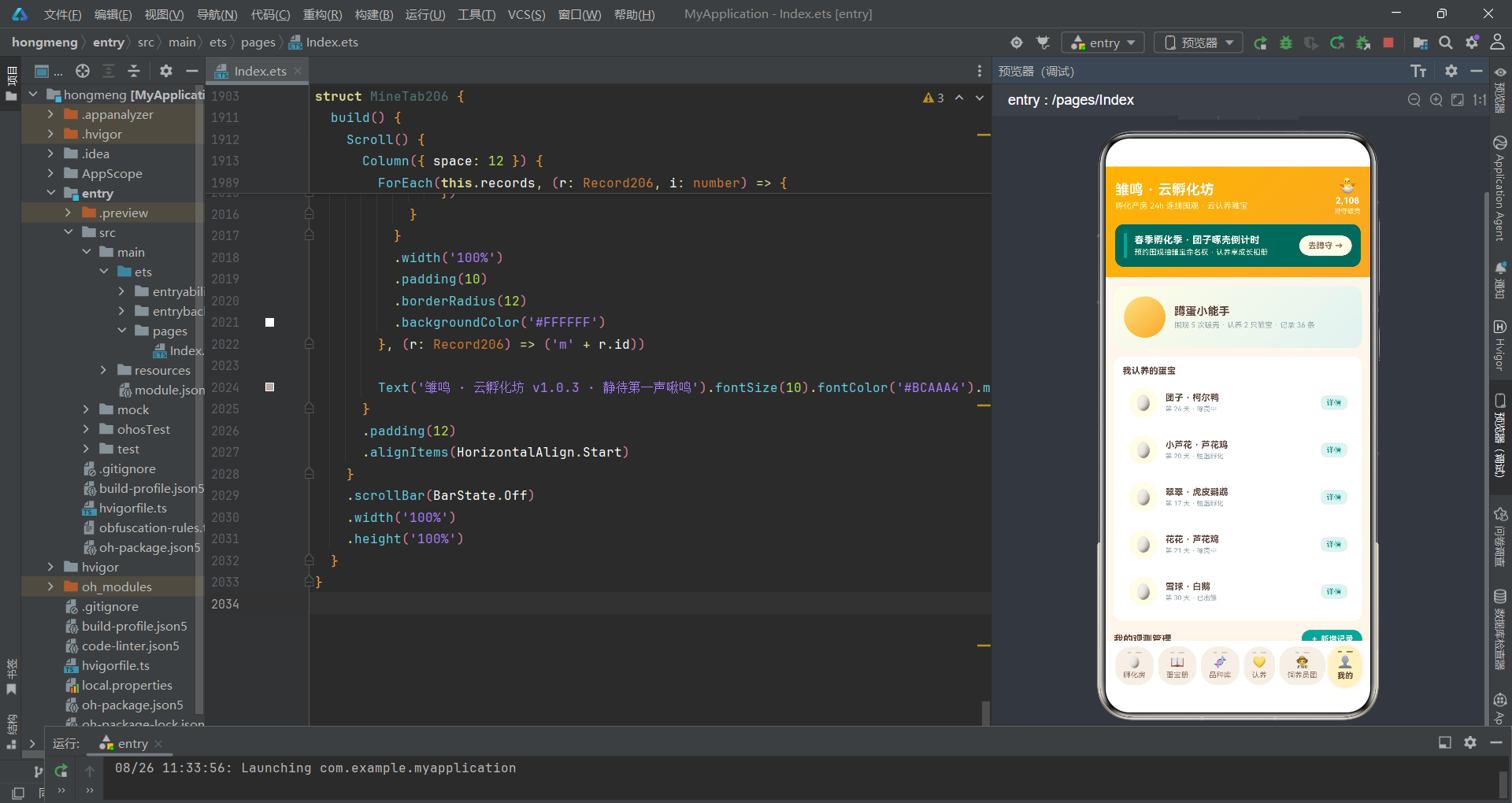
个人中心Tab展示用户信息卡、本周喷罐消耗柱状图(此处为每日破壳数)和我的观测管理列表:
Row({ space: 12 }) {
  Column()
    .width(56).height(56).borderRadius(28)
    .linearGradient({ angle: 140, colors: [['#FFE082', 0], ['#F9A825', 1]] })
    .justifyContent(FlexAlign.Center)
  Column({ space: 4 }) {
    Text('蹲蛋小能手').fontSize(15).fontWeight(FontWeight.Bold).fontColor('#5D4037')
    Text('围观 5 次破壳 · 认养 2 只雏宝 · 记录 36 条')
      .fontSize(10).fontColor('#90A4AE')
  }
  .alignItems(HorizontalAlign.Start).layoutWeight(1)
}
.width('100%').padding(14).borderRadius(14)
.linearGradient({ angle: 140, colors: [['#FFFDE7', 0], ['#E0F2F1', 1]] })
个人卡片使用奶油黄到蛋青绿的渐变背景,头像区域使用橙色渐变。本周每日破壳数柱状图中每根柱子的高度为 h.hatches * 8(将破壳数乘以8转换为像素高度),使用黄色渐变填充。我的观测管理列表与蛋宝册Tab的记录列表功能类似,每条记录展示编辑和删除操作按钮。
数据流与组件通信
下图展示了应用从用户操作到UI刷新的完整数据流转过程:
技术点对比
| 技术点 | 实现方式 | 优势 | 适用场景 |
|---|---|---|---|
| 状态管理 | @State + @Prop 单向数据流 | 数据源唯一、可追踪变更 | 父子组件间数据传递 |
| 弹窗管理 | bindSheet + bindContentCover | 底部抽屉与居中弹窗分离管理 | 表单输入、确认对话框、详情展示 |
| Tab导航 | if/else 条件渲染 + 底部横蛋造型 | 切换时自动卸载旧组件、主题化导航 | 页面级内容切换 |
| 数据更新 | map/filter 不可变更新 | 可追踪变更、触发Diff刷新 | 编辑记录、删除记录、切换状态 |
| 创意UI | borderRadius蛋形圆角 + 裂纹刻痕 | 零图片资源实现蛋形造型 | 主题化Tab导航 |
| 统计图表 | layoutWeight + height映射 | 无需第三方图表库、轻量实现 | 占比堆叠条、柱状图、进度条 |
| 表单控件 | Toggle开关 + 加减按钮 | 原生组件覆盖常见表单场景 | 开关选择、数值调节 |
| 全局函数 | 纯函数提取颜色映射与数据聚合 | 逻辑与UI解耦、可复用 | 状态色计算、统计聚合 |
| 数据安全 | 越界检查 + 三元防护 | 防止空数组或无效索引崩溃 | 详情弹窗、列表访问 |
| 回调通信 | 箭头函数回调上抛 | 子组件无状态、职责单一 | 点击事件、表单提交、状态切换 |
安装DevEco Studio程序

选择目标安装目录:

设置环境变量,但是需要重启一下:

新建一个空白模板:

设置API为24的模板项目:
初始化项目,自动下载相关依赖:

完整代码:
// 场景:线上孵化围观房(腾讯会议类)
// 配色:奶油黄 #F9A825 × 蛋青绿 #26A69A × 壳白 #FFFDE7
// Tab:底部「横蛋」导航(横向蛋形卡 + 顶部双段裂纹刻痕,选中奶油黄渐变 + 微放大)
// ================= 数据接口 =================
interface HatchDay206 {
day: string
hatches: number
}
interface Egg206 {
id: number
name: string
breed: string
days: number
weight: number
fertile: number
state: string
watchers: number
adopted: boolean
}
interface Breed206 {
id: number
name: string
total: number
cycle: number
difficulty: string
heat: number
}
interface Record206 {
id: number
name: string
breed: string
dayNum: number
turns: number
weight: number
state: string
top: boolean
}
interface Keeper206 {
id: number
name: string
city: string
years: number
online: boolean
heat: number
}
interface Barrage206 {
id: number
text: string
}
interface HatchStep206 {
id: number
title: string
tip: string
done: boolean
}
interface BreedCount206 {
label: string
count: number
color: string
}
interface WeightLog206 {
day: string
weight: number
}
// ================= 全局标签 =================
const eggBreedTags206: string[] = ['芦花鸡', '柯尔鸭', '芦丁鸡', '白鹅', '虎皮鹦鹉']
const remindTags206: string[] = ['破壳前 1 小时', '破壳前 10 分钟', '第一声啾鸣']
const recordStateTags206: string[] = ['发育正常', '重点观察', '已出雏']
// ================= 全局函数 =================
function eggStateColor206(state: string): string {
if (state === '破壳倒计时') {
return '#F9A825'
}
if (state === '啄壳中') {
return '#E53935'
}
if (state === '恒温孵化') {
return '#26A69A'
}
if (state === '已出雏') {
return '#7CB342'
}
return '#90A4AE'
}
function recordStateColor206(state: string): string {
if (state === '发育正常') {
return '#26A69A'
}
if (state === '重点观察') {
return '#FB8C00'
}
if (state === '已出雏') {
return '#7CB342'
}
return '#90A4AE'
}
function difficultyColor206(difficulty: string): string {
if (difficulty === '新手友好') {
return '#7CB342'
}
if (difficulty === '进阶') {
return '#F9A825'
}
return '#E53935'
}
function adoptedEggCount206(eggs: Egg206[]): number {
let n: number = 0
for (let i = 0; i < eggs.length; i++) {
if (eggs[i].adopted) {
n++
}
}
return n
}
function crackingEggCount206(eggs: Egg206[]): number {
let n: number = 0
for (let i = 0; i < eggs.length; i++) {
if (eggs[i].state === '啄壳中') {
n++
}
}
return n
}
function onlineKeeperCount206(keepers: Keeper206[]): number {
let n: number = 0
for (let i = 0; i < keepers.length; i++) {
if (keepers[i].online) {
n++
}
}
return n
}
function maxKeeperHeat206(keepers: Keeper206[]): number {
let m: number = 1
for (let i = 0; i < keepers.length; i++) {
if (keepers[i].heat > m) {
m = keepers[i].heat
}
}
return m
}
function breedCounts206(eggs: Egg206[]): BreedCount206[] {
const counts: BreedCount206[] = []
for (let i = 0; i < eggBreedTags206.length; i++) {
let n: number = 0
for (let j = 0; j < eggs.length; j++) {
if (eggs[j].breed === eggBreedTags206[i]) {
n++
}
}
counts.push({ label: eggBreedTags206[i], count: n, color: ['#F9A825', '#26A69A', '#EC407A', '#7CB342', '#00ACC1'][i] })
}
return counts
}
// ================= 主页面 =================
@Entry
@Component
struct Index206 {
@State tabIndex1: number = 0
// 弹框开关
@State showWatchSheet: boolean = false
@State showRecordSheet: boolean = false
@State showEditSheet: boolean = false
@State showDelDialog: boolean = false
@State showDetailDialog: boolean = false
// 预约破壳围观表单
@State watchBreed: number = 0
@State watchRemind: number = 1
@State watchMic: boolean = true
@State watchAdopt: boolean = false
// 新增观测记录表单
@State recName: string = ''
@State recBreed: number = 0
@State recDay: number = 7
@State recTurns: number = 4
@State recWeight: number = 52
@State recPublic: boolean = true
// 编辑表单
@State editIndex: number = -1
@State editName: string = ''
@State editDay: number = 7
@State editWeight: number = 52
@State editTop: boolean = false
// 删除
@State delIndex: number = -1
@State delKeepAlbum: boolean = true
// 详情
@State detailIndex: number = 0
// 数据
@State eggs: Egg206[] = [
{ id: 1, name: '团子', breed: '柯尔鸭', days: 26, weight: 48, fertile: 96, state: '啄壳中', watchers: 3286, adopted: true },
{ id: 2, name: '小芦花', breed: '芦花鸡', days: 20, weight: 55, fertile: 92, state: '恒温孵化', watchers: 1520, adopted: true },
{ id: 3, name: '糯米', breed: '芦丁鸡', days: 15, weight: 8, fertile: 88, state: '恒温孵化', watchers: 986, adopted: false },
{ id: 4, name: '大白团', breed: '白鹅', days: 28, weight: 132, fertile: 90, state: '破壳倒计时', watchers: 2140, adopted: false },
{ id: 5, name: '翠翠', breed: '虎皮鹦鹉', days: 17, weight: 6, fertile: 85, state: '恒温孵化', watchers: 1740, adopted: true },
{ id: 6, name: '蛋黄酥', breed: '柯尔鸭', days: 25, weight: 50, fertile: 94, state: '破壳倒计时', watchers: 2680, adopted: false },
{ id: 7, name: '花花', breed: '芦花鸡', days: 21, weight: 54, fertile: 91, state: '啄壳中', watchers: 1890, adopted: true },
{ id: 8, name: '芝麻', breed: '芦丁鸡', days: 12, weight: 9, fertile: 82, state: '恒温孵化', watchers: 760, adopted: false },
{ id: 9, name: '雪球', breed: '白鹅', days: 30, weight: 140, fertile: 95, state: '已出雏', watchers: 4120, adopted: true },
{ id: 10, name: '豆豆', breed: '虎皮鹦鹉', days: 18, weight: 7, fertile: 87, state: '恒温孵化', watchers: 1320, adopted: false }
]
@State breeds: Breed206[] = [
{ id: 1, name: '柯尔鸭', total: 86, cycle: 26, difficulty: '进阶', heat: 95 },
{ id: 2, name: '芦花鸡', total: 120, cycle: 21, difficulty: '新手友好', heat: 88 },
{ id: 3, name: '芦丁鸡', total: 64, cycle: 17, difficulty: '进阶', heat: 82 },
{ id: 4, name: '白鹅', total: 42, cycle: 30, difficulty: '高阶挑战', heat: 78 },
{ id: 5, name: '虎皮鹦鹉', total: 58, cycle: 18, difficulty: '新手友好', heat: 85 }
]
@State records: Record206[] = [
{ id: 1, name: '团子翻蛋打卡', breed: '柯尔鸭', dayNum: 26, turns: 6, weight: 48, state: '重点观察', top: true },
{ id: 2, name: '小芦花照蛋记录', breed: '芦花鸡', dayNum: 20, turns: 4, weight: 55, state: '发育正常', top: false },
{ id: 3, name: '糯米体重称量', breed: '芦丁鸡', dayNum: 15, turns: 3, weight: 8, state: '发育正常', top: false },
{ id: 4, name: '大白团凉蛋日记', breed: '白鹅', dayNum: 28, turns: 5, weight: 132, state: '重点观察', top: false },
{ id: 5, name: '翠翠验受精', breed: '虎皮鹦鹉', dayNum: 17, turns: 4, weight: 6, state: '发育正常', top: false },
{ id: 6, name: '雪球出雏实录', breed: '白鹅', dayNum: 30, turns: 0, weight: 140, state: '已出雏', top: false },
{ id: 7, name: '蛋黄酥翻身提醒', breed: '柯尔鸭', dayNum: 25, turns: 6, weight: 50, state: '重点观察', top: false },
{ id: 8, name: '芝麻湿度调整', breed: '芦丁鸡', dayNum: 12, turns: 3, weight: 9, state: '发育正常', top: false }
]
@State keepers: Keeper206[] = [
{ id: 1, name: '孵化厂长老', city: '绍兴', years: 14, online: true, heat: 96 },
{ id: 2, name: '鸭鸭妈妈', city: '扬州', years: 9, online: true, heat: 90 },
{ id: 3, name: '鹦鹉奶奶', city: '昆明', years: 11, online: false, heat: 84 },
{ id: 4, name: '芦丁小哥', city: '南宁', years: 6, online: true, heat: 77 },
{ id: 5, name: '鹅厂厂长', city: '潮州', years: 12, online: false, heat: 81 },
{ id: 6, name: '小鸡姑姑', city: '成都', years: 5, online: true, heat: 68 }
]
@State hatchDays: HatchDay206[] = [
{ day: '周一', hatches: 3 },
{ day: '周二', hatches: 5 },
{ day: '周三', hatches: 4 },
{ day: '周四', hatches: 7 },
{ day: '周五', hatches: 9 },
{ day: '周六', hatches: 12 },
{ day: '周日', hatches: 10 }
]
@State weightLogs: WeightLog206[] = [
{ day: 'D24', weight: 52 },
{ day: 'D25', weight: 51 },
{ day: 'D26', weight: 50 },
{ day: 'D27', weight: 49 },
{ day: 'D28', weight: 48 },
{ day: 'D29', weight: 47 },
{ day: 'D30', weight: 46 }
]
@State barrages: Barrage206[] = [
{ id: 1, text: '团子啄壳了!!蹲第一声啾' },
{ id: 2, text: '柯尔鸭破壳全程看了三次' },
{ id: 3, text: '这颗蛋失重率好标准' },
{ id: 4, text: '湿度是不是该降到 55 了' },
{ id: 5, text: '雪球出雏那段太治愈了' },
{ id: 6, text: '第一次云养蛋,紧张过我自己考试' },
{ id: 7, text: '翻蛋打卡 +1' },
{ id: 8, text: '小鹅的第一泡便便也有人造梗' }
]
@State hatchSteps: HatchStep206[] = [
{ id: 1, title: '选蛋与验受精', tip: '照蛋灯看血丝 · 剔除散黄蛋', done: true },
{ id: 2, title: '入孵控温', tip: '37.8℃ 恒温 · 湿度 55% 起', done: true },
{ id: 3, title: '每日翻蛋', tip: '每天 4-6 次 · 防 胚胎粘连', done: true },
{ id: 4, title: '照蛋观察', tip: '第 7 天验受精 · 第 14 天看气室', done: false },
{ id: 5, title: '落盘停翻', tip: '最后 3 天停止翻蛋 · 提高湿度', done: false },
{ id: 6, title: '破壳出雏', tip: '切勿手动剥壳 · 静待第一声啾鸣', done: false }
]
tabs206: string[] = ['孵化房', '蛋宝册', '品种库', '认养', '饲养员团', '我的']
tabIcons206: string[] = ['🥚', '📖', '🧬', '💛', '🧑🌾', '👤']
// ---------- 头部(电商孵化季风,无动画) ----------
@Builder
header206() {
Column({ space: 12 }) {
Row({ space: 10 }) {
Column({ space: 4 }) {
Text('雏鸣 · 云孵化坊').fontSize(19).fontColor('#FFFFFF').fontWeight(FontWeight.Bold)
Text('孵化产房 24h 连线围观 · 云认养雏宝').fontSize(11).fontColor('#FFF9C4')
}
.alignItems(HorizontalAlign.Start)
Text('').layoutWeight(1)
Column({ space: 2 }) {
Text('🐣').fontSize(20)
Text('2,108').fontSize(12).fontColor('#FFFFFF').fontWeight(FontWeight.Bold)
Text('蹲守破壳').fontSize(9).fontColor('#FFF9C4')
}
.alignItems(HorizontalAlign.Center)
}
.width('100%')
Row({ space: 10 }) {
Column().width(4).height(34).borderRadius(2).backgroundColor('#26A69A')
Column({ space: 3 }) {
Text('春季孵化季 · 团子啄壳倒计时').fontSize(13).fontColor('#FFFFFF').fontWeight(FontWeight.Bold)
Text('预约围观抽雏宝命名权 · 认养享成长相册').fontSize(10).fontColor('#FFFDE7')
}
.alignItems(HorizontalAlign.Start)
Text('').layoutWeight(1)
Column() {
Text('去蹲守 →').fontSize(11).fontColor('#8D6E63').fontWeight(FontWeight.Bold)
}
.padding({ left: 12, right: 12, top: 7, bottom: 7 })
.borderRadius(14)
.backgroundColor('#FFFDE7')
.onClick(() => {
this.showWatchSheet = true
})
}
.width('100%')
.padding(12)
.borderRadius(12)
.backgroundColor('#00695C')
}
.alignItems(HorizontalAlign.Start)
.padding(14)
.linearGradient({ angle: 140, colors: [['#FFB300', 0], ['#F9A825', 1]] })
}
// ---------- 底部「横蛋」tab ----------
@Builder
tabBar206() {
Column({ space: 6 }) {
Row({ space: 6 }) {
ForEach(this.tabs206, (t: string, i: number) => {
Column({ space: 3 }) {
Row({ space: 6 }) {
Text('').width(5).height(2).borderRadius(1).backgroundColor(this.tabIndex1 === i ? '#8D6E63' : '#D7CCC8')
Text('').width(8).height(2).borderRadius(1).backgroundColor(this.tabIndex1 === i ? '#8D6E63' : '#D7CCC8')
}
.margin({ top: 2 })
Text(this.tabIcons206[i]).fontSize(15)
Text(t)
.fontSize(10)
.fontColor(this.tabIndex1 === i ? '#5D4037' : '#8D6E63')
.fontWeight(this.tabIndex1 === i ? FontWeight.Bold : FontWeight.Normal)
}
.justifyContent(FlexAlign.Center)
.padding({ left: 11, right: 11, top: 5, bottom: 8 })
.borderRadius(22)
.backgroundColor(this.tabIndex1 === i ? '#FFF3C4' : '#F5EFE6')
.shadow({
radius: this.tabIndex1 === i ? 10 : 0,
color: '#66F9A825',
offsetY: 3
})
.scale({ x: this.tabIndex1 === i ? 1.07 : 1, y: this.tabIndex1 === i ? 1.07 : 1 })
.animation({ duration: 180 })
.onClick(() => {
this.tabIndex1 = i
})
}, (t: string) => t)
}
.width('100%')
.justifyContent(FlexAlign.SpaceEvenly)
}
.width('100%')
.padding({ left: 8, right: 8, top: 8, bottom: 10 })
.backgroundColor('#FFFFFF')
.shadow({ radius: 12, color: '#14F9A825', offsetY: -4 })
}
// ---------- 弹框一:预约破壳围观(底部抽屉) ----------
@Builder
watchSheet206() {
Column() {
Column() {
}
.width(40)
.height(4)
.borderRadius(2)
.backgroundColor('#D7CCC8')
.margin({ top: 10 })
Row({ space: 8 }) {
Text('预约破壳围观').fontSize(17).fontWeight(FontWeight.Bold).fontColor('#F57F17')
Text('').layoutWeight(1)
Column() {
Text('×').fontSize(16).fontColor('#78909C')
}
.width(28)
.height(28)
.borderRadius(14)
.backgroundColor('#EFEBE9')
.justifyContent(FlexAlign.Center)
.onClick(() => {
this.showWatchSheet = false
})
}
.width('100%')
.padding({ left: 16, right: 16, top: 12 })
Scroll() {
Column({ space: 16 }) {
Column({ space: 8 }) {
Text('蹲守品种').fontSize(13).fontWeight(FontWeight.Bold).fontColor('#5D4037')
Flex({ wrap: FlexWrap.Wrap }) {
ForEach(eggBreedTags206, (tag: string, i: number) => {
Text(tag)
.fontSize(11)
.fontColor(this.watchBreed === i ? '#FFFFFF' : '#8D6E63')
.padding({ left: 12, right: 12, top: 6, bottom: 6 })
.borderRadius(16)
.backgroundColor(this.watchBreed === i ? '#F9A825' : '#EFEBE9')
.margin(4)
.onClick(() => {
this.watchBreed = i
})
}, (tag: string) => tag)
}
}
.alignItems(HorizontalAlign.Start)
.width('100%')
Column({ space: 8 }) {
Text('提醒档位').fontSize(13).fontWeight(FontWeight.Bold).fontColor('#5D4037')
Row({ space: 8 }) {
ForEach(remindTags206, (tag: string, i: number) => {
Text(tag)
.fontSize(10)
.fontColor(this.watchRemind === i ? '#FFFFFF' : '#00796B')
.padding({ left: 10, right: 10, top: 6, bottom: 6 })
.borderRadius(14)
.backgroundColor(this.watchRemind === i ? '#26A69A' : '#E0F2F1')
.onClick(() => {
this.watchRemind = i
})
}, (tag: string) => tag)
}
}
.alignItems(HorizontalAlign.Start)
.width('100%')
Row({ space: 10 }) {
Column({ space: 2 }) {
Text('连麦见证出雏').fontSize(13).fontColor('#5D4037')
Text('破壳瞬间可与饲养员连麦同框').fontSize(9).fontColor('#90A4AE')
}
.alignItems(HorizontalAlign.Start)
Text('').layoutWeight(1)
Toggle({ type: ToggleType.Switch, isOn: this.watchMic })
.onChange((v: boolean) => {
this.watchMic = v
})
}
.width('100%')
.padding(12)
.borderRadius(12)
.backgroundColor('#E0F2F1')
Row({ space: 10 }) {
Column({ space: 2 }) {
Text('同时云认养这颗蛋').fontSize(13).fontColor('#5D4037')
Text('认养后可参与命名与成长相册').fontSize(9).fontColor('#90A4AE')
}
.alignItems(HorizontalAlign.Start)
Text('').layoutWeight(1)
Toggle({ type: ToggleType.Switch, isOn: this.watchAdopt })
.onChange((v: boolean) => {
this.watchAdopt = v
})
}
.width('100%')
.padding(12)
.borderRadius(12)
.backgroundColor('#FFF8E1')
}
.padding({ left: 16, right: 16, bottom: 8 })
}
.layoutWeight(1)
.scrollBar(BarState.Off)
Row({ space: 12 }) {
Column({ space: 2 }) {
Text('围观免费 · 认养').fontSize(10).fontColor('#90A4AE')
Text('¥ ' + (this.watchAdopt ? 68 : 0)).fontSize(18).fontWeight(FontWeight.Bold).fontColor('#F57F17')
}
.alignItems(HorizontalAlign.Start)
Text('').layoutWeight(1)
Button() {
Text('蹲住这颗蛋').fontSize(14).fontColor('#FFFFFF').fontWeight(FontWeight.Bold)
}
.padding({ left: 28, right: 28, top: 11, bottom: 11 })
.borderRadius(22)
.backgroundColor('#26A69A')
.onClick(() => {
this.showWatchSheet = false
})
}
.width('100%')
.padding(14)
}
.width('100%')
.height('100%')
.backgroundColor('#FFFFFF')
}
// ---------- 弹框二:新增观测记录(底部抽屉) ----------
@Builder
recordSheet206() {
Column() {
Column() {
}
.width(40)
.height(4)
.borderRadius(2)
.backgroundColor('#D7CCC8')
.margin({ top: 10 })
Row({ space: 8 }) {
Text('新增观测记录').fontSize(17).fontWeight(FontWeight.Bold).fontColor('#00796B')
Text('').layoutWeight(1)
Column() {
Text('×').fontSize(16).fontColor('#78909C')
}
.width(28)
.height(28)
.borderRadius(14)
.backgroundColor('#EFEBE9')
.justifyContent(FlexAlign.Center)
.onClick(() => {
this.showRecordSheet = false
})
}
.width('100%')
.padding({ left: 16, right: 16, top: 12 })
Scroll() {
Column({ space: 16 }) {
Column({ space: 8 }) {
Text('记录标题').fontSize(13).fontWeight(FontWeight.Bold).fontColor('#5D4037')
TextInput({ placeholder: '例如:团子第 26 天翻蛋打卡', text: this.recName })
.fontSize(13)
.padding(12)
.borderRadius(12)
.backgroundColor('#E0F2F1')
.onChange((v: string) => {
this.recName = v
})
}
.alignItems(HorizontalAlign.Start)
.width('100%')
Column({ space: 8 }) {
Text('蛋宝品种').fontSize(13).fontWeight(FontWeight.Bold).fontColor('#5D4037')
Flex({ wrap: FlexWrap.Wrap }) {
ForEach(eggBreedTags206, (tag: string, i: number) => {
Text(tag)
.fontSize(11)
.fontColor(this.recBreed === i ? '#FFFFFF' : '#8D6E63')
.padding({ left: 12, right: 12, top: 6, bottom: 6 })
.borderRadius(16)
.backgroundColor(this.recBreed === i ? '#26A69A' : '#EFEBE9')
.margin(4)
.onClick(() => {
this.recBreed = i
})
}, (tag: string) => tag)
}
}
.alignItems(HorizontalAlign.Start)
.width('100%')
Row({ space: 14 }) {
Column() {
Text('-').fontSize(16).fontColor('#00796B')
}
.width(34)
.height(34)
.borderRadius(17)
.backgroundColor('#E0F2F1')
.justifyContent(FlexAlign.Center)
.onClick(() => {
if (this.recDay > 1) {
this.recDay -= 1
}
})
Column({ space: 2 }) {
Text('孵化天数 第 ' + this.recDay + ' 天').fontSize(14).fontWeight(FontWeight.Bold).fontColor('#00796B')
Text('按品种周期自动校准进度').fontSize(9).fontColor('#90A4AE')
}
.alignItems(HorizontalAlign.Start)
Column() {
Text('+').fontSize(16).fontColor('#00796B')
}
.width(34)
.height(34)
.borderRadius(17)
.backgroundColor('#E0F2F1')
.justifyContent(FlexAlign.Center)
.onClick(() => {
if (this.recDay < 30) {
this.recDay += 1
}
})
Text('').layoutWeight(1)
}
.width('100%')
Row({ space: 14 }) {
Column() {
Text('-').fontSize(16).fontColor('#F57F17')
}
.width(34)
.height(34)
.borderRadius(17)
.backgroundColor('#FFF8E1')
.justifyContent(FlexAlign.Center)
.onClick(() => {
if (this.recTurns > 0) {
this.recTurns -= 1
}
})
Column({ space: 2 }) {
Text('今日翻蛋 ' + this.recTurns + ' 次').fontSize(14).fontWeight(FontWeight.Bold).fontColor('#F57F17')
Text('落盘期请记为 0 次').fontSize(9).fontColor('#90A4AE')
}
.alignItems(HorizontalAlign.Start)
Column() {
Text('+').fontSize(16).fontColor('#F57F17')
}
.width(34)
.height(34)
.borderRadius(17)
.backgroundColor('#FFF8E1')
.justifyContent(FlexAlign.Center)
.onClick(() => {
if (this.recTurns < 10) {
this.recTurns += 1
}
})
Text('').layoutWeight(1)
}
.width('100%')
Row({ space: 14 }) {
Column() {
Text('-').fontSize(16).fontColor('#6D4C41')
}
.width(34)
.height(34)
.borderRadius(17)
.backgroundColor('#EFEBE9')
.justifyContent(FlexAlign.Center)
.onClick(() => {
if (this.recWeight > 5) {
this.recWeight -= 1
}
})
Column({ space: 2 }) {
Text('称重 ' + this.recWeight + ' 克').fontSize(14).fontWeight(FontWeight.Bold).fontColor('#6D4C41')
Text('失重过快需调整湿度').fontSize(9).fontColor('#90A4AE')
}
.alignItems(HorizontalAlign.Start)
Column() {
Text('+').fontSize(16).fontColor('#6D4C41')
}
.width(34)
.height(34)
.borderRadius(17)
.backgroundColor('#EFEBE9')
.justifyContent(FlexAlign.Center)
.onClick(() => {
if (this.recWeight < 150) {
this.recWeight += 1
}
})
Text('').layoutWeight(1)
}
.width('100%')
Row({ space: 10 }) {
Column({ space: 2 }) {
Text('公开到蛋宝册').fontSize(13).fontColor('#5D4037')
Text('其他蹲守用户可见你的打卡').fontSize(9).fontColor('#90A4AE')
}
.alignItems(HorizontalAlign.Start)
Text('').layoutWeight(1)
Toggle({ type: ToggleType.Switch, isOn: this.recPublic })
.onChange((v: boolean) => {
this.recPublic = v
})
}
.width('100%')
.padding(12)
.borderRadius(12)
.backgroundColor('#E0F2F1')
}
.padding({ left: 16, right: 16, bottom: 8 })
}
.layoutWeight(1)
.scrollBar(BarState.Off)
Button() {
Text('保存观测记录').fontSize(14).fontColor('#FFFFFF').fontWeight(FontWeight.Bold)
}
.width('90%')
.padding({ top: 12, bottom: 12 })
.borderRadius(22)
.backgroundColor('#26A69A')
.margin({ bottom: 14 })
.onClick(() => {
this.showRecordSheet = false
this.recName = ''
this.recBreed = 0
this.recDay = 7
this.recTurns = 4
this.recWeight = 52
this.recPublic = true
})
}
.width('100%')
.height('100%')
.backgroundColor('#FFFFFF')
}
// ---------- 弹框三:编辑记录(底部抽屉) ----------
@Builder
editSheet206() {
Column() {
Column() {
}
.width(40)
.height(4)
.borderRadius(2)
.backgroundColor('#D7CCC8')
.margin({ top: 10 })
Row({ space: 8 }) {
Text('编辑观测记录').fontSize(17).fontWeight(FontWeight.Bold).fontColor('#F57F17')
Text('').layoutWeight(1)
Column() {
Text('×').fontSize(16).fontColor('#78909C')
}
.width(28)
.height(28)
.borderRadius(14)
.backgroundColor('#EFEBE9')
.justifyContent(FlexAlign.Center)
.onClick(() => {
this.showEditSheet = false
})
}
.width('100%')
.padding({ left: 16, right: 16, top: 12 })
Scroll() {
Column({ space: 16 }) {
Column({ space: 8 }) {
Text('记录标题').fontSize(13).fontWeight(FontWeight.Bold).fontColor('#5D4037')
TextInput({ placeholder: '输入新标题', text: this.editName })
.fontSize(13)
.padding(12)
.borderRadius(12)
.backgroundColor('#FFF8E1')
.onChange((v: string) => {
this.editName = v
})
}
.alignItems(HorizontalAlign.Start)
.width('100%')
Row({ space: 14 }) {
Column() {
Text('-').fontSize(16).fontColor('#F57F17')
}
.width(34)
.height(34)
.borderRadius(17)
.backgroundColor('#FFF8E1')
.justifyContent(FlexAlign.Center)
.onClick(() => {
if (this.editDay > 1) {
this.editDay -= 1
}
})
Column({ space: 2 }) {
Text('孵化天数 第 ' + this.editDay + ' 天').fontSize(14).fontWeight(FontWeight.Bold).fontColor('#F57F17')
Text('修正后将同步时间线').fontSize(9).fontColor('#90A4AE')
}
.alignItems(HorizontalAlign.Start)
Column() {
Text('+').fontSize(16).fontColor('#F57F17')
}
.width(34)
.height(34)
.borderRadius(17)
.backgroundColor('#FFF8E1')
.justifyContent(FlexAlign.Center)
.onClick(() => {
if (this.editDay < 30) {
this.editDay += 1
}
})
Text('').layoutWeight(1)
}
.width('100%')
Row({ space: 14 }) {
Column() {
Text('-').fontSize(16).fontColor('#6D4C41')
}
.width(34)
.height(34)
.borderRadius(17)
.backgroundColor('#EFEBE9')
.justifyContent(FlexAlign.Center)
.onClick(() => {
if (this.editWeight > 5) {
this.editWeight -= 1
}
})
Column({ space: 2 }) {
Text('称重 ' + this.editWeight + ' 克').fontSize(14).fontWeight(FontWeight.Bold).fontColor('#6D4C41')
Text('用于失重率曲线重算').fontSize(9).fontColor('#90A4AE')
}
.alignItems(HorizontalAlign.Start)
Column() {
Text('+').fontSize(16).fontColor('#6D4C41')
}
.width(34)
.height(34)
.borderRadius(17)
.backgroundColor('#EFEBE9')
.justifyContent(FlexAlign.Center)
.onClick(() => {
if (this.editWeight < 150) {
this.editWeight += 1
}
})
Text('').layoutWeight(1)
}
.width('100%')
Row({ space: 10 }) {
Column({ space: 2 }) {
Text('置顶到蛋宝册').fontSize(13).fontColor('#5D4037')
Text('蹲守好友优先看到这条记录').fontSize(9).fontColor('#90A4AE')
}
.alignItems(HorizontalAlign.Start)
Text('').layoutWeight(1)
Toggle({ type: ToggleType.Switch, isOn: this.editTop })
.onChange((v: boolean) => {
this.editTop = v
})
}
.width('100%')
.padding(12)
.borderRadius(12)
.backgroundColor('#FFF8E1')
}
.padding({ left: 16, right: 16, bottom: 8 })
}
.layoutWeight(1)
.scrollBar(BarState.Off)
Button() {
Text('保存修改').fontSize(14).fontColor('#FFFFFF').fontWeight(FontWeight.Bold)
}
.width('90%')
.padding({ top: 12, bottom: 12 })
.borderRadius(22)
.backgroundColor('#F9A825')
.margin({ bottom: 14 })
.onClick(() => {
this.records = this.records.map((r: Record206, i: number) => i === this.editIndex ? {
id: r.id,
name: this.editName === '' ? r.name : this.editName,
breed: r.breed,
dayNum: this.editDay,
turns: r.turns,
weight: this.editWeight,
state: r.state,
top: this.editTop
} : r)
this.showEditSheet = false
})
}
.width('100%')
.height('100%')
.backgroundColor('#FFFFFF')
}
// ---------- 弹框四:删除记录(居中弹框) ----------
@Builder
delDialog206() {
Column({ space: 16 }) {
Text('🥚').fontSize(34)
Text('删除这条观测记录?').fontSize(16).fontWeight(FontWeight.Bold).fontColor('#5D4037')
Text('「' + (this.delIndex >= 0 && this.delIndex < this.records.length ? this.records[this.delIndex].name : '') + '」将从蛋宝册消失')
.fontSize(12)
.fontColor('#90A4AE')
.textAlign(TextAlign.Center)
Row({ space: 10 }) {
Column({ space: 2 }) {
Text('保留成长相册').fontSize(12).fontColor('#8D6E63')
}
.alignItems(HorizontalAlign.Start)
Text('').layoutWeight(1)
Toggle({ type: ToggleType.Switch, isOn: this.delKeepAlbum })
.onChange((v: boolean) => {
this.delKeepAlbum = v
})
}
.width('100%')
.padding(12)
.borderRadius(12)
.backgroundColor('#FFFDE7')
Row({ space: 12 }) {
Button() {
Text('再想想').fontSize(13).fontColor('#8D6E63')
}
.layoutWeight(1)
.padding({ top: 10, bottom: 10 })
.borderRadius(20)
.backgroundColor('#EFEBE9')
.onClick(() => {
this.showDelDialog = false
})
Button() {
Text('删除记录').fontSize(13).fontColor('#FFFFFF')
}
.layoutWeight(1)
.padding({ top: 10, bottom: 10 })
.borderRadius(20)
.backgroundColor('#E53935')
.onClick(() => {
this.records = this.records.filter((r: Record206, i: number) => i !== this.delIndex)
this.showDelDialog = false
})
}
.width('100%')
}
.width('84%')
.padding(22)
.borderRadius(18)
.backgroundColor('#FFFFFF')
}
// ---------- 弹框五:蛋宝详情(居中弹框) ----------
@Builder
detailDialog206() {
Column() {
Scroll() {
Column({ space: 0 }) {
Column({ space: 6 }) {
Text('🥚').fontSize(40)
Text(this.detailIndex >= 0 && this.detailIndex < this.eggs.length ? this.eggs[this.detailIndex].name : '').fontSize(19).fontWeight(FontWeight.Bold).fontColor('#FFFFFF')
Text(this.detailIndex >= 0 && this.detailIndex < this.eggs.length ? this.eggs[this.detailIndex].breed + ' · 第 ' + this.eggs[this.detailIndex].days + ' 天' : '').fontSize(11).fontColor('#FFF9C4')
}
.width('100%')
.padding({ top: 28, bottom: 22 })
.linearGradient({ angle: 140, colors: [['#FFB300', 0], ['#F57F17', 1]] })
Column({ space: 14 }) {
Row() {
Column({ space: 3 }) {
Text(this.detailIndex >= 0 && this.detailIndex < this.eggs.length ? this.eggs[this.detailIndex].fertile + '%' : '').fontSize(15).fontWeight(FontWeight.Bold).fontColor('#26A69A')
Text('受精率').fontSize(9).fontColor('#90A4AE')
}
.layoutWeight(1)
.alignItems(HorizontalAlign.Center)
Column({ space: 3 }) {
Text(this.detailIndex >= 0 && this.detailIndex < this.eggs.length ? this.eggs[this.detailIndex].weight + 'g' : '').fontSize(15).fontWeight(FontWeight.Bold).fontColor('#F57F17')
Text('当前蛋重').fontSize(9).fontColor('#90A4AE')
}
.layoutWeight(1)
.alignItems(HorizontalAlign.Center)
Column({ space: 3 }) {
Text(this.detailIndex >= 0 && this.detailIndex < this.eggs.length ? this.eggs[this.detailIndex].watchers + '' : '').fontSize(15).fontWeight(FontWeight.Bold).fontColor('#E53935')
Text('围观人次').fontSize(9).fontColor('#90A4AE')
}
.layoutWeight(1)
.alignItems(HorizontalAlign.Center)
}
.width('100%')
Column({ space: 8 }) {
Text('七天失重曲线(克)').fontSize(12).fontWeight(FontWeight.Bold).fontColor('#5D4037')
Row({ space: 8 }) {
ForEach(this.weightLogs, (w: WeightLog206) => {
Column({ space: 4 }) {
Text(w.weight + '').fontSize(9).fontColor('#F57F17')
Text('')
.width(14)
.height(w.weight)
.borderRadius(7)
.backgroundColor('#FFE082')
Text(w.day).fontSize(8).fontColor('#78909C')
}
}, (w: WeightLog206) => w.day)
}
.alignItems(VerticalAlign.Bottom)
.width('100%')
}
.width('100%')
.padding(12)
.borderRadius(12)
.backgroundColor('#FFFDE7')
Row({ space: 8 }) {
ForEach(eggBreedTags206.slice(0, 3), (tag: string) => {
Text(tag)
.fontSize(10)
.fontColor('#00897B')
.padding({ left: 10, right: 10, top: 5, bottom: 5 })
.borderRadius(12)
.backgroundColor('#E0F2F1')
}, (tag: string) => tag)
}
.width('100%')
Button() {
Text('认养 TA 并蹲守破壳 →').fontSize(13).fontColor('#FFFFFF').fontWeight(FontWeight.Bold)
}
.width('100%')
.padding({ top: 11, bottom: 11 })
.borderRadius(20)
.backgroundColor('#26A69A')
.onClick(() => {
this.showDetailDialog = false
this.showWatchSheet = true
})
}
.padding(16)
}
.constraintSize({ maxHeight: '80%' })
}
.scrollBar(BarState.Off)
Column() {
Text('×').fontSize(16).fontColor('#FFFFFF')
}
.width(30)
.height(30)
.borderRadius(15)
.backgroundColor('#33000000')
.justifyContent(FlexAlign.Center)
.margin({ top: -44, right: 14 })
.onClick(() => {
this.showDetailDialog = false
})
}
.width('88%')
.borderRadius(18)
.backgroundColor('#FFFFFF')
}
build() {
Column() {
this.header206()
Column() {
if (this.tabIndex1 === 0) {
LiveTab206({
barrages: this.barrages,
hatchSteps: this.hatchSteps,
eggs: this.eggs,
onWatch: () => {
this.showWatchSheet = true
},
onStep: (i: number) => {
this.hatchSteps = this.hatchSteps.map((s: HatchStep206, idx: number) => idx === i ? {
id: s.id,
title: s.title,
tip: s.tip,
done: !s.done
} : s)
}
})
} else if (this.tabIndex1 === 1) {
BookTab206({
records: this.records,
hatchDays: this.hatchDays,
onNew: () => {
this.showRecordSheet = true
},
onEdit: (i: number) => {
this.editIndex = i
this.editName = this.records[i].name
this.editDay = this.records[i].dayNum
this.editWeight = this.records[i].weight
this.editTop = this.records[i].top
this.showEditSheet = true
},
onDelete: (i: number) => {
this.delIndex = i
this.delKeepAlbum = true
this.showDelDialog = true
}
})
} else if (this.tabIndex1 === 2) {
BreedTab206({
breeds: this.breeds,
onWatch: () => {
this.showWatchSheet = true
}
})
} else if (this.tabIndex1 === 3) {
AdoptTab206({
eggs: this.eggs,
})
} else if (this.tabIndex1 === 4) {
KeeperTab206({
keepers: this.keepers
})
} else {
MineTab206({
records: this.records,
eggs: this.eggs,
onNew: () => {
this.showRecordSheet = true
},
onEdit: (i: number) => {
this.editIndex = i
this.editName = this.records[i].name
this.editDay = this.records[i].dayNum
this.editWeight = this.records[i].weight
this.editTop = this.records[i].top
this.showEditSheet = true
},
onDelete: (i: number) => {
this.delIndex = i
this.delKeepAlbum = true
this.showDelDialog = true
},
onDetail: (i: number) => {
this.detailIndex = i
this.showDetailDialog = true
}
})
}
}
.layoutWeight(1)
.width('100%')
this.tabBar206()
}
.width('100%')
.height('100%')
.backgroundColor('#FDF6EC')
.bindSheet($$this.showWatchSheet, this.watchSheet206(), {
height: 580,
dragBar: true,
showClose: false,
backgroundColor: '#FFFFFF'
})
.bindSheet($$this.showRecordSheet, this.recordSheet206(), {
height: 680,
dragBar: true,
showClose: false,
backgroundColor: '#FFFFFF'
})
.bindSheet($$this.showEditSheet, this.editSheet206(), {
height: 560,
dragBar: true,
showClose: false,
backgroundColor: '#FFFFFF'
})
.bindContentCover($$this.showDelDialog, this.delDialog206(), {
})
.bindContentCover($$this.showDetailDialog, this.detailDialog206(), {
})
}
}
// ================= Tab 1:孵化房(直播) =================
@Component
struct LiveTab206 {
@Prop barrages: Barrage206[] = []
@Prop hatchSteps: HatchStep206[] = []
@Prop eggs: Egg206[] = []
@State micOn: boolean = true
@State camOn: boolean = true
@State heatOn: boolean = true
@State likeCount: number = 512
onWatch: () => void = () => {}
onStep: (i: number) => void = () => {}
build() {
Scroll() {
Column({ space: 12 }) {
Row({ space: 10 }) {
Column() {
Text('LIVE').fontSize(9).fontColor('#FFFFFF').fontWeight(FontWeight.Bold)
}
.padding({ left: 8, right: 8, top: 3, bottom: 3 })
.borderRadius(8)
.backgroundColor('#E53935')
Text('1 号孵化箱 · 团子啄壳直播中').fontSize(13).fontColor('#F57F17').fontWeight(FontWeight.Bold)
Text('').layoutWeight(1)
Text('🌡️ 37.6℃ · 湿度 62%').fontSize(10).fontColor('#90A4AE')
}
.width('100%')
.padding(12)
.borderRadius(12)
.backgroundColor('#FFFFFF')
Grid() {
GridItem() {
Column({ space: 4 }) {
Text('').layoutWeight(1)
Row({ space: 6 }) {
Text('🥚 主镜 · 孵化箱全景').fontSize(11).fontColor('#FFFFFF')
Text('2.1万').fontSize(9).fontColor('#FFF9C4')
}
}
.padding(8)
.linearGradient({ angle: 140, colors: [['#FFB300', 0], ['#F57F17', 1]] })
}
GridItem() {
Column({ space: 4 }) {
Text('').layoutWeight(1)
Row({ space: 6 }) {
Text('🐣 出雏摇篮位').fontSize(11).fontColor('#FFFFFF')
Text('1 只').fontSize(9).fontColor('#B2DFDB')
}
}
.padding(8)
.linearGradient({ angle: 140, colors: [['#26A69A', 0], ['#00695C', 1]] })
}
GridItem() {
Column({ space: 4 }) {
Text('').layoutWeight(1)
Row({ space: 6 }) {
Text('💡 保温灯特写').fontSize(11).fontColor('#FFFFFF')
Text(this.heatOn ? '工作中' : '已关闭').fontSize(9).fontColor(this.heatOn ? '#FFF9C4' : '#FFCDD2')
}
}
.padding(8)
.linearGradient({ angle: 140, colors: [['#FBC02D', 0], ['#F9A825', 1]] })
}
GridItem() {
Column({ space: 4 }) {
Text('').layoutWeight(1)
Row({ space: 6 }) {
Text('🎥 我的围观位').fontSize(11).fontColor('#FFFFFF')
Text(this.camOn ? '已开启' : '已关闭').fontSize(9).fontColor(this.camOn ? '#B2DFDB' : '#FFCDD2')
}
}
.padding(8)
.linearGradient({ angle: 140, colors: [['#5D4037', 0], ['#3E2723', 1]] })
}
}
.columnsTemplate('1fr 1fr')
.rowsTemplate('1fr 1fr')
.columnsGap(8)
.rowsGap(8)
.height(210)
.borderRadius(14)
.width('100%')
Row({ space: 10 }) {
Row({ space: 6 }) {
Text(this.micOn ? '🎤' : '🔇').fontSize(14)
Text('连麦见证').fontSize(11).fontColor(this.micOn ? '#00897B' : '#90A4AE')
}
.padding({ left: 12, right: 12, top: 8, bottom: 8 })
.borderRadius(16)
.backgroundColor(this.micOn ? '#E0F2F1' : '#EFEBE9')
.onClick(() => {
this.micOn = !this.micOn
})
Row({ space: 6 }) {
Text(this.camOn ? '📹' : '📷').fontSize(14)
Text('我的机位').fontSize(11).fontColor(this.camOn ? '#00897B' : '#90A4AE')
}
.padding({ left: 12, right: 12, top: 8, bottom: 8 })
.borderRadius(16)
.backgroundColor(this.camOn ? '#E0F2F1' : '#EFEBE9')
.onClick(() => {
this.camOn = !this.camOn
})
Row({ space: 6 }) {
Text('🌡️').fontSize(14)
Text(this.heatOn ? '保温开' : '保温关').fontSize(11).fontColor(this.heatOn ? '#F57F17' : '#90A4AE')
}
.padding({ left: 12, right: 12, top: 8, bottom: 8 })
.borderRadius(16)
.backgroundColor(this.heatOn ? '#FFF8E1' : '#EFEBE9')
.onClick(() => {
this.heatOn = !this.heatOn
})
Text('').layoutWeight(1)
Row({ space: 6 }) {
Text('🐣').fontSize(14)
Text(this.likeCount + '').fontSize(11).fontColor('#F57F17')
}
.padding({ left: 12, right: 12, top: 8, bottom: 8 })
.borderRadius(16)
.backgroundColor('#FFF8E1')
.onClick(() => {
this.likeCount++
})
}
.width('100%')
Column({ space: 10 }) {
Text('出雏六步 · 厂长老现场讲解').fontSize(13).fontWeight(FontWeight.Bold).fontColor('#5D4037')
ForEach(this.hatchSteps, (s: HatchStep206, i: number) => {
Row({ space: 10 }) {
Column() {
Text(s.done ? '✓' : (i + 1) + '')
.fontSize(12)
.fontColor('#FFFFFF')
.textAlign(TextAlign.Center)
.width(26)
.height(26)
.borderRadius(13)
.backgroundColor(s.done ? '#26A69A' : '#BCAAA4')
if (i < this.hatchSteps.length - 1) {
Text('')
.width(2)
.layoutWeight(1)
.backgroundColor('#D7CCC8')
.margin({ top: 2, bottom: 2 })
}
}
Column({ space: 3 }) {
Row({ space: 8 }) {
Text(s.title).fontSize(12).fontWeight(FontWeight.Bold).fontColor(s.done ? '#00897B' : '#5D4037')
Text(s.done ? '已完成' : '进行中').fontSize(9).fontColor(s.done ? '#00897B' : '#F57F17')
}
Text(s.tip).fontSize(10).fontColor('#90A4AE')
}
.alignItems(HorizontalAlign.Start)
.layoutWeight(1)
.padding({ top: 2, bottom: 8 })
.onClick(() => {
this.onStep(i)
})
}
.alignItems(VerticalAlign.Top)
.width('100%')
}, (s: HatchStep206) => s.id.toString())
}
.width('100%')
.padding(12)
.borderRadius(12)
.backgroundColor('#FFFFFF')
Column({ space: 8 }) {
Text('今晚破壳看点').fontSize(12).fontWeight(FontWeight.Bold).fontColor('#5D4037')
ForEach(this.eggs, (e: Egg206) => {
if (e.state === '啄壳中' || e.state === '破壳倒计时') {
Row({ space: 8 }) {
Text('🥚').fontSize(14)
Column({ space: 2 }) {
Text(e.name + ' · ' + e.breed).fontSize(11).fontWeight(FontWeight.Bold).fontColor('#5D4037')
Text('第 ' + e.days + ' 天 · ' + e.watchers + ' 人蹲守').fontSize(9).fontColor('#90A4AE')
}
.alignItems(HorizontalAlign.Start)
.layoutWeight(1)
Text(e.state)
.fontSize(8)
.fontColor('#FFFFFF')
.padding({ left: 5, right: 5, top: 2, bottom: 2 })
.borderRadius(6)
.backgroundColor(eggStateColor206(e.state))
}
.width('100%')
.padding(8)
.borderRadius(10)
.backgroundColor('#FFFDE7')
}
}, (e: Egg206) => ('h' + e.id))
}
.width('100%')
.padding(12)
.borderRadius(12)
.backgroundColor('#FFFFFF')
.alignItems(HorizontalAlign.Start)
Column({ space: 8 }) {
Text('弹幕 · 全场蹲壳中').fontSize(12).fontWeight(FontWeight.Bold).fontColor('#5D4037')
ForEach(this.barrages, (b: Barrage206, i: number) => {
Text(b.text)
.fontSize(11)
.fontColor(i % 2 === 0 ? '#00897B' : '#F57F17')
.padding({ left: 10, right: 10, top: 5, bottom: 5 })
.borderRadius(12)
.backgroundColor(i % 2 === 0 ? '#E0F2F1' : '#FFF8E1')
.margin({ left: (i % 3) * 36 })
.alignSelf(ItemAlign.Start)
}, (b: Barrage206) => b.id.toString())
}
.width('100%')
.padding(12)
.borderRadius(12)
.backgroundColor('#FFFFFF')
.alignItems(HorizontalAlign.Start)
Button() {
Text('预约下一场破壳围观').fontSize(13).fontColor('#FFFFFF').fontWeight(FontWeight.Bold)
}
.width('100%')
.padding({ top: 11, bottom: 11 })
.borderRadius(18)
.backgroundColor('#26A69A')
.onClick(() => {
this.onWatch()
})
}
.padding(12)
.alignItems(HorizontalAlign.Start)
}
.scrollBar(BarState.Off)
.width('100%')
.height('100%')
}
}
// ================= Tab 2:蛋宝册 =================
@Component
struct BookTab206 {
@Prop records: Record206[] = []
@Prop hatchDays: HatchDay206[] = []
onNew: () => void = () => {}
onEdit: (i: number) => void = () => {}
onDelete: (i: number) => void = () => {}
build() {
Scroll() {
Column({ space: 12 }) {
Column({ space: 8 }) {
Text('本周每日破壳数').fontSize(12).fontWeight(FontWeight.Bold).fontColor('#5D4037')
Row({ space: 10 }) {
ForEach(this.hatchDays, (h: HatchDay206) => {
Column({ space: 4 }) {
Text(h.hatches + '').fontSize(9).fontColor('#F57F17')
Text('')
.width(16)
.height(h.hatches * 8)
.borderRadius(4)
.linearGradient({ angle: 180, colors: [['#FFE082', 0], ['#F9A825', 1]] })
Text(h.day.slice(1)).fontSize(9).fontColor('#78909C')
}
}, (h: HatchDay206) => h.day)
}
.alignItems(VerticalAlign.Bottom)
.width('100%')
.justifyContent(FlexAlign.SpaceBetween)
}
.width('100%')
.padding(12)
.borderRadius(12)
.backgroundColor('#FFFFFF')
.alignItems(HorizontalAlign.Start)
Row({ space: 8 }) {
Text('我的观测记录').fontSize(13).fontWeight(FontWeight.Bold).fontColor('#5D4037')
Text('').layoutWeight(1)
Column() {
Text('+ 记一笔').fontSize(11).fontColor('#FFFFFF').fontWeight(FontWeight.Bold)
}
.padding({ left: 12, right: 12, top: 6, bottom: 6 })
.borderRadius(14)
.backgroundColor('#26A69A')
.onClick(() => {
this.onNew()
})
}
.width('100%')
ForEach(this.records, (r: Record206, i: number) => {
Column({ space: 8 }) {
Row({ space: 10 }) {
Column() {
Text('🥚').fontSize(20)
}
.width(42)
.height(42)
.borderRadius(21)
.backgroundColor('#FFFDE7')
.justifyContent(FlexAlign.Center)
Column({ space: 3 }) {
Row({ space: 6 }) {
if (r.top) {
Text('置顶').fontSize(8).fontColor('#F57F17').padding({ left: 5, right: 5, top: 2, bottom: 2 }).borderRadius(6).backgroundColor('#FFF8E1')
}
Text(r.name).fontSize(12).fontWeight(FontWeight.Bold).fontColor('#5D4037')
Text(r.state)
.fontSize(8)
.fontColor('#FFFFFF')
.padding({ left: 5, right: 5, top: 2, bottom: 2 })
.borderRadius(6)
.backgroundColor(recordStateColor206(r.state))
}
Text(r.breed + ' · 第 ' + r.dayNum + ' 天 · 翻蛋 ' + r.turns + ' 次 · ' + r.weight + 'g').fontSize(10).fontColor('#90A4AE')
}
.alignItems(HorizontalAlign.Start)
.layoutWeight(1)
Row({ space: 6 }) {
Text('编辑').fontSize(10).fontColor('#00897B').padding({ left: 8, right: 8, top: 4, bottom: 4 }).borderRadius(8).backgroundColor('#E0F2F1')
.onClick(() => {
this.onEdit(i)
})
Text('删除').fontSize(10).fontColor('#E53935').padding({ left: 8, right: 8, top: 4, bottom: 4 }).borderRadius(8).backgroundColor('#FFEBEE')
.onClick(() => {
this.onDelete(i)
})
}
}
.width('100%')
}
.width('100%')
.padding(12)
.borderRadius(14)
.backgroundColor('#FFFFFF')
}, (r: Record206) => r.id.toString())
}
.padding(12)
.alignItems(HorizontalAlign.Start)
}
.scrollBar(BarState.Off)
.width('100%')
.height('100%')
}
}
// ================= Tab 3:品种库 =================
@Component
struct BreedTab206 {
@Prop breeds: Breed206[] = []
onWatch: () => void = () => {}
build() {
Scroll() {
Column({ space: 12 }) {
Column({ space: 8 }) {
Text('品种孵化周期(天)').fontSize(12).fontWeight(FontWeight.Bold).fontColor('#5D4037')
Row({ space: 10 }) {
ForEach(this.breeds, (b: Breed206) => {
Column({ space: 4 }) {
Text(b.cycle + '').fontSize(9).fontColor('#00897B')
Text('')
.width(18)
.height(b.cycle * 5)
.borderRadius(4)
.linearGradient({ angle: 180, colors: [['#80CBC4', 0], ['#26A69A', 1]] })
Text(b.name.slice(0, 2)).fontSize(8).fontColor('#78909C')
}
}, (b: Breed206) => b.id.toString())
}
.alignItems(VerticalAlign.Bottom)
.width('100%')
.justifyContent(FlexAlign.SpaceBetween)
}
.width('100%')
.padding(12)
.borderRadius(12)
.backgroundColor('#FFFFFF')
.alignItems(HorizontalAlign.Start)
ForEach(this.breeds, (b: Breed206, i: number) => {
Row({ space: 10 }) {
Stack() {
Column()
.width(50)
.height(50)
.borderRadius(25)
.backgroundColor(i % 2 === 0 ? '#FFFDE7' : '#E0F2F1')
Text('🧬').fontSize(22)
if (i === 0) {
Text('HOT')
.fontSize(8)
.fontColor('#FFFFFF')
.padding({ left: 5, right: 5, top: 2, bottom: 2 })
.borderRadius(8)
.backgroundColor('#E53935')
.position({ x: 24, y: 38 })
}
}
.width(50)
.height(50)
Column({ space: 4 }) {
Row({ space: 6 }) {
Text(b.name).fontSize(13).fontWeight(FontWeight.Bold).fontColor('#5D4037')
Text(b.difficulty)
.fontSize(8)
.fontColor('#FFFFFF')
.padding({ left: 5, right: 5, top: 2, bottom: 2 })
.borderRadius(6)
.backgroundColor(difficultyColor206(b.difficulty))
}
Text('在孵 ' + b.total + ' 枚 · 周期 ' + b.cycle + ' 天 · 热度 ' + b.heat).fontSize(10).fontColor('#90A4AE')
Row() {
Text('')
.height(5)
.borderRadius(3)
.layoutWeight(b.heat)
.backgroundColor('#26A69A')
Text('')
.height(5)
.borderRadius(3)
.layoutWeight(100 - b.heat)
.backgroundColor('#EFEBE9')
}
.width('100%')
.clip(true)
}
.alignItems(HorizontalAlign.Start)
.layoutWeight(1)
Column() {
Text('去蹲蛋').fontSize(11).fontColor('#FFFFFF')
}
.padding({ left: 12, right: 12, top: 7, bottom: 7 })
.borderRadius(14)
.backgroundColor('#F9A825')
.onClick(() => {
this.onWatch()
})
}
.width('100%')
.padding(12)
.borderRadius(14)
.backgroundColor('#FFFFFF')
}, (b: Breed206) => b.id.toString())
}
.padding(12)
.alignItems(HorizontalAlign.Start)
}
.scrollBar(BarState.Off)
.width('100%')
.height('100%')
}
}
// ================= Tab 4:认养 =================
@Component
struct AdoptTab206 {
@Prop eggs: Egg206[] = []
build() {
Scroll() {
Column({ space: 12 }) {
Row({ space: 8 }) {
Column({ space: 2 }) {
Text(this.eggs.length + '').fontSize(16).fontWeight(FontWeight.Bold).fontColor('#F57F17')
Text('在孵蛋宝').fontSize(9).fontColor('#90A4AE')
}
.layoutWeight(1)
.alignItems(HorizontalAlign.Center)
.padding({ top: 8, bottom: 8 })
.borderRadius(12)
.backgroundColor('#FFFFFF')
Column({ space: 2 }) {
Text(adoptedEggCount206(this.eggs) + '').fontSize(16).fontWeight(FontWeight.Bold).fontColor('#26A69A')
Text('已被认养').fontSize(9).fontColor('#90A4AE')
}
.layoutWeight(1)
.alignItems(HorizontalAlign.Center)
.padding({ top: 8, bottom: 8 })
.borderRadius(12)
.backgroundColor('#FFFFFF')
Column({ space: 2 }) {
Text(crackingEggCount206(this.eggs) + '').fontSize(16).fontWeight(FontWeight.Bold).fontColor('#E53935')
Text('啄壳中').fontSize(9).fontColor('#90A4AE')
}
.layoutWeight(1)
.alignItems(HorizontalAlign.Center)
.padding({ top: 8, bottom: 8 })
.borderRadius(12)
.backgroundColor('#FFFFFF')
}
.width('100%')
Column({ space: 8 }) {
Text('品种占比').fontSize(12).fontWeight(FontWeight.Bold).fontColor('#5D4037')
Row() {
ForEach(breedCounts206(this.eggs), (t: BreedCount206) => {
Column() {
}
.layoutWeight(t.count > 0 ? t.count : 1)
.height(14)
.backgroundColor(t.color)
}, (t: BreedCount206) => t.label)
}
.width('100%')
.borderRadius(7)
.clip(true)
Row({ space: 8 }) {
ForEach(breedCounts206(this.eggs), (t: BreedCount206) => {
Row({ space: 4 }) {
Text('').width(8).height(8).borderRadius(2).backgroundColor(t.color)
Text(t.label + ' ' + t.count).fontSize(9).fontColor('#78909C')
}
}, (t: BreedCount206) => t.label)
}
.width('100%')
}
.width('100%')
.padding(12)
.borderRadius(12)
.backgroundColor('#FFFFFF')
.alignItems(HorizontalAlign.Start)
ForEach(this.eggs, (e: Egg206, i: number) => {
Row({ space: 10 }) {
Stack() {
Column()
.width(48)
.height(48)
.borderRadius(24)
.backgroundColor('#FFFDE7')
Text('🥚').fontSize(22)
if (e.adopted) {
Text('')
.width(10)
.height(10)
.borderRadius(5)
.backgroundColor('#26A69A')
.position({ x: 36, y: 36 })
}
}
.width(48)
.height(48)
Column({ space: 4 }) {
Row({ space: 6 }) {
Text(e.name).fontSize(13).fontWeight(FontWeight.Bold).fontColor('#5D4037')
Text(e.state)
.fontSize(8)
.fontColor('#FFFFFF')
.padding({ left: 5, right: 5, top: 2, bottom: 2 })
.borderRadius(6)
.backgroundColor(eggStateColor206(e.state))
if (e.adopted) {
Text('已认养').fontSize(8).fontColor('#FFFFFF').padding({ left: 5, right: 5, top: 2, bottom: 2 }).borderRadius(6).backgroundColor('#26A69A')
}
}
Text(e.breed + ' · 第 ' + e.days + ' 天 · ' + e.weight + 'g · 受精率 ' + e.fertile + '%').fontSize(10).fontColor('#90A4AE')
Text('👀 ' + e.watchers + ' 人蹲守').fontSize(10).fontColor('#E53935')
}
.alignItems(HorizontalAlign.Start)
.layoutWeight(1)
Column() {
Text('看详情').fontSize(11).fontColor('#FFFFFF')
}
.padding({ left: 12, right: 12, top: 7, bottom: 7 })
.borderRadius(14)
.backgroundColor('#F9A825')
}
.width('100%')
.padding(12)
.borderRadius(14)
.backgroundColor('#FFFFFF')
}, (e: Egg206) => e.id.toString())
}
.padding(12)
.alignItems(HorizontalAlign.Start)
}
.scrollBar(BarState.Off)
.width('100%')
.height('100%')
}
}
// ================= Tab 5:饲养员团 =================
@Component
struct KeeperTab206 {
@Prop keepers: Keeper206[] = []
build() {
Scroll() {
Column({ space: 12 }) {
Column({ space: 10 }) {
Text('饲养员人气榜').fontSize(12).fontWeight(FontWeight.Bold).fontColor('#5D4037')
ForEach(this.keepers, (k: Keeper206, i: number) => {
Row({ space: 8 }) {
Text(k.name).fontSize(11).fontColor('#5D4037').width(64)
Row() {
Text('')
.height(10)
.borderRadius(5)
.backgroundColor(i === 0 ? '#F9A825' : (i === 1 ? '#26A69A' : '#EC407A'))
.width((k.heat / maxKeeperHeat206(this.keepers) * 100) + '%')
Text('')
.layoutWeight(1)
.height(10)
}
.layoutWeight(1)
.borderRadius(5)
.clip(true)
Text(k.heat + '').fontSize(10).fontColor('#90A4AE').width(24)
}
.width('100%')
}, (k: Keeper206) => k.id.toString())
}
.width('100%')
.padding(12)
.borderRadius(12)
.backgroundColor('#FFFFFF')
.alignItems(HorizontalAlign.Start)
Text('在线饲养员 · ' + onlineKeeperCount206(this.keepers) + ' 位').fontSize(13).fontWeight(FontWeight.Bold).fontColor('#5D4037')
ForEach(this.keepers, (k: Keeper206) => {
Row({ space: 10 }) {
Stack() {
Column()
.width(46)
.height(46)
.borderRadius(23)
.backgroundColor('#FFFDE7')
Text('🧑🌾').fontSize(20)
if (k.online) {
Text('')
.width(10)
.height(10)
.borderRadius(5)
.backgroundColor('#26A69A')
.position({ x: 34, y: 34 })
}
}
.width(46)
.height(46)
Column({ space: 4 }) {
Row({ space: 6 }) {
Text(k.name).fontSize(13).fontWeight(FontWeight.Bold).fontColor('#5D4037')
Text(k.online ? '在线' : '离线').fontSize(8).fontColor('#FFFFFF').padding({ left: 5, right: 5, top: 2, bottom: 2 }).borderRadius(6).backgroundColor(k.online ? '#26A69A' : '#B0BEC5')
}
Text(k.city + ' · 从业 ' + k.years + ' 年 · 人气 ' + k.heat).fontSize(10).fontColor('#90A4AE')
}
.alignItems(HorizontalAlign.Start)
.layoutWeight(1)
Column() {
Text('提问').fontSize(11).fontColor('#FFFFFF')
}
.padding({ left: 14, right: 14, top: 7, bottom: 7 })
.borderRadius(14)
.backgroundColor('#26A69A')
}
.width('100%')
.padding(12)
.borderRadius(14)
.backgroundColor('#FFFFFF')
}, (k: Keeper206) => k.id.toString())
}
.padding(12)
.alignItems(HorizontalAlign.Start)
}
.scrollBar(BarState.Off)
.width('100%')
.height('100%')
}
}
// ================= Tab 6:我的 =================
@Component
struct MineTab206 {
@Prop records: Record206[] = []
@Prop eggs: Egg206[] = []
onNew: () => void = () => {}
onEdit: (i: number) => void = () => {}
onDelete: (i: number) => void = () => {}
onDetail: (i: number) => void = () => {}
build() {
Scroll() {
Column({ space: 12 }) {
Row({ space: 12 }) {
Column()
.width(56)
.height(56)
.borderRadius(28)
.linearGradient({ angle: 140, colors: [['#FFE082', 0], ['#F9A825', 1]] })
.justifyContent(FlexAlign.Center)
Column({ space: 4 }) {
Text('蹲蛋小能手').fontSize(15).fontWeight(FontWeight.Bold).fontColor('#5D4037')
Text('围观 5 次破壳 · 认养 2 只雏宝 · 记录 36 条').fontSize(10).fontColor('#90A4AE')
}
.alignItems(HorizontalAlign.Start)
.layoutWeight(1)
}
.width('100%')
.padding(14)
.borderRadius(14)
.linearGradient({ angle: 140, colors: [['#FFFDE7', 0], ['#E0F2F1', 1]] })
Column({ space: 8 }) {
Text('我认养的蛋宝').fontSize(12).fontWeight(FontWeight.Bold).fontColor('#5D4037')
ForEach(this.eggs, (e: Egg206, i: number) => {
if (e.adopted) {
Row({ space: 10 }) {
Column() {
Text('🥚').fontSize(20)
}
.width(40)
.height(40)
.borderRadius(20)
.backgroundColor('#FFFDE7')
.justifyContent(FlexAlign.Center)
Column({ space: 3 }) {
Text(e.name + ' · ' + e.breed).fontSize(12).fontWeight(FontWeight.Bold).fontColor('#5D4037')
Text('第 ' + e.days + ' 天 · ' + e.state).fontSize(9).fontColor('#90A4AE')
}
.alignItems(HorizontalAlign.Start)
.layoutWeight(1)
Column() {
Text('详情').fontSize(10).fontColor('#00897B').padding({ left: 8, right: 8, top: 4, bottom: 4 }).borderRadius(8).backgroundColor('#E0F2F1')
}
.onClick(() => {
this.onDetail(i)
})
}
.width('100%')
.padding(8)
.borderRadius(10)
.backgroundColor('#FFFFFF')
}
}, (e: Egg206) => ('a' + e.id))
}
.width('100%')
.padding(12)
.borderRadius(12)
.backgroundColor('#FFFFFF')
.alignItems(HorizontalAlign.Start)
Row({ space: 8 }) {
Text('我的观测管理').fontSize(13).fontWeight(FontWeight.Bold).fontColor('#5D4037')
Text('').layoutWeight(1)
Column() {
Text('+ 新增记录').fontSize(11).fontColor('#FFFFFF').fontWeight(FontWeight.Bold)
}
.padding({ left: 12, right: 12, top: 6, bottom: 6 })
.borderRadius(14)
.backgroundColor('#26A69A')
.onClick(() => {
this.onNew()
})
}
.width('100%')
ForEach(this.records, (r: Record206, i: number) => {
Row({ space: 10 }) {
Column() {
Text('🥚').fontSize(20)
}
.width(40)
.height(40)
.borderRadius(20)
.backgroundColor('#E0F2F1')
.justifyContent(FlexAlign.Center)
Column({ space: 3 }) {
Text(r.name).fontSize(12).fontWeight(FontWeight.Bold).fontColor('#5D4037')
Text(r.breed + ' · 第 ' + r.dayNum + ' 天 · ' + r.weight + 'g').fontSize(9).fontColor('#90A4AE')
}
.alignItems(HorizontalAlign.Start)
.layoutWeight(1)
Row({ space: 6 }) {
Text('编辑').fontSize(10).fontColor('#00897B').padding({ left: 8, right: 8, top: 4, bottom: 4 }).borderRadius(8).backgroundColor('#E0F2F1')
.onClick(() => {
this.onEdit(i)
})
Text('删除').fontSize(10).fontColor('#E53935').padding({ left: 8, right: 8, top: 4, bottom: 4 }).borderRadius(8).backgroundColor('#FFEBEE')
.onClick(() => {
this.onDelete(i)
})
}
}
.width('100%')
.padding(10)
.borderRadius(12)
.backgroundColor('#FFFFFF')
}, (r: Record206) => ('m' + r.id))
Text('雏鸣 · 云孵化坊 v1.0.3 · 静待第一声啾鸣').fontSize(10).fontColor('#BCAAA4').margin({ top: 8, bottom: 20 })
}
.padding(12)
.alignItems(HorizontalAlign.Start)
}
.scrollBar(BarState.Off)
.width('100%')
.height('100%')
}
}
总结
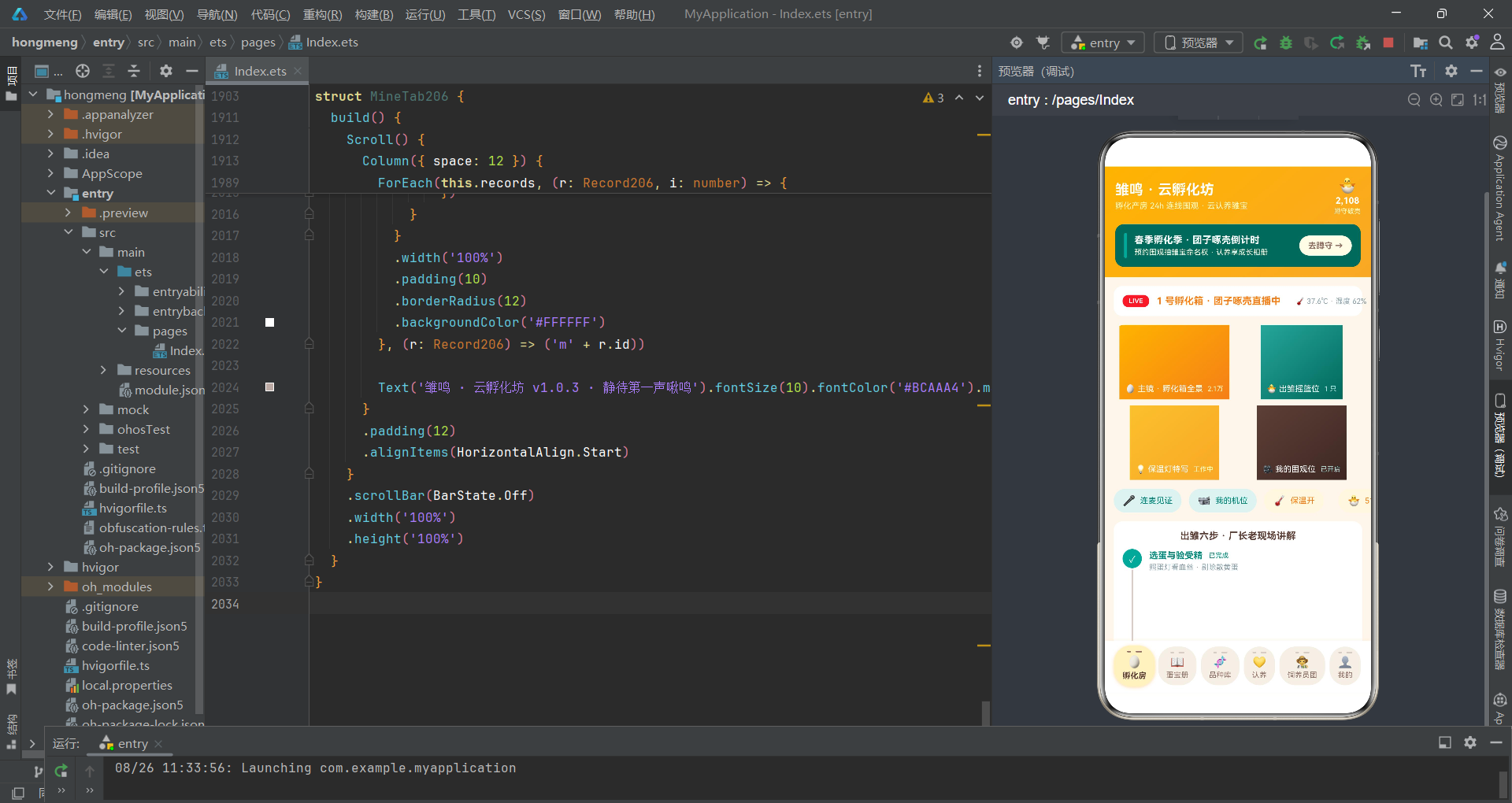
雏鸣·云孵化坊应用完整展示了HarmonyOS ArkTS声明式UI在孵化直播围观场景下的工程实践。通过 @State 集中管理全部状态、@Prop 向下传递只读数据、回调函数向上抛送用户操作,构建了清晰的单向数据流架构。六个Tab页面各司其职——孵化房直播承载四机位网格与出雏六步法时间线、蛋宝册提供观测记录管理与每日破壳数可视化、品种库展示孵化周期与难度评级、认养页支持蛋宝认养与品种占比分析、饲养员团页呈现人气排行与在线状态、个人页汇总认养数据与观测管理入口。底部「横蛋」Tab导航以蛋形圆角卡片配合裂纹刻痕装饰,将功能导航与主题叙事巧妙融合。
在UI实现层面,底部「横蛋」Tab导航通过 borderRadius(22) 实现蛋形圆角外观,顶部叠加两条宽度不同的裂纹刻痕模拟蛋壳纹理,选中态采用奶油黄浅色背景和1.07倍放大动画。弹窗系统采用 bindSheet 和 bindContentCover 双轨制——底部抽屉承载表单密集型操作(预约围观、新增记录、编辑记录),居中弹窗处理删除确认和蛋宝详情展示。$$ 双向绑定语法将弹窗显隐与 @State 布尔变量自动同步。失重曲线柱状图将蛋重值直接映射为柱高,让非专业用户也能直观理解孵化进程中的失重规律。
从工程方法论角度,应用将颜色映射(eggStateColor206、recordStateColor206、difficultyColor206)和数据聚合(adoptedEggCount206、crackingEggCount206、breedCounts206)提取为全局纯函数,使 build() 方法专注于UI结构声明;数据更新采用 map/filter 不可变模式,确保状态变更可追踪;详情弹窗中的数组越界检查体现了防御性编程的严谨态度。这些实践共同构成了一套可复用的ArkTS工程范式,对类似直播围观、内容管理类应用的开发具有参考价值。随着 HarmonyOS 生态的持续演进,声明式UI的能力边界将不断扩展,而本应用展示的架构模式与编码实践也将随之迭代优化。

开源鸿蒙跨平台开发社区汇聚开发者与厂商,共建“一次开发,多端部署”的开源生态,致力于降低跨端开发门槛,推动万物智联创新。
更多推荐


 9
9 0
0- 0


 已为社区贡献29条内容

所有评论(0)