HarmonyOS 6 ArkUI - 正常路径(happy path)验证功能可用性、边界路径验证数值限制是否生效
作为测试工程师,审视代码的第一反应不是"它做了什么",而是"它没做什么"——没检查的边界、没处理的异常、没校验的输入,这些才是测试用例的真正目标。本文从QA视角解剖一款云端街舞舞房应用的代码,聚焦边界条件、异常路径和数据校验三个维度。
该应用采用暗夜黑#212121、霓虹粉#F50057与电光蓝#00E5FF的配色方案,构建了练舞房直播、舞段库管理、大师课预约、Battle投票和战队系统六大功能模块。在近2000行ArkTS代码中,开发者通过BPM步进器、时长步进器、数组索引访问和状态切换等交互,暴露了多个值得深入测试的边界场景。
测试不是找bug的过程,而是量化代码信心的过程。通过逐段分析条件分支、循环边界、数组访问安全和状态转换完备性,我们试图回答一个核心问题:当用户不按预期操作时,这个应用会怎样?
引言:QA视角下的测试策略构建
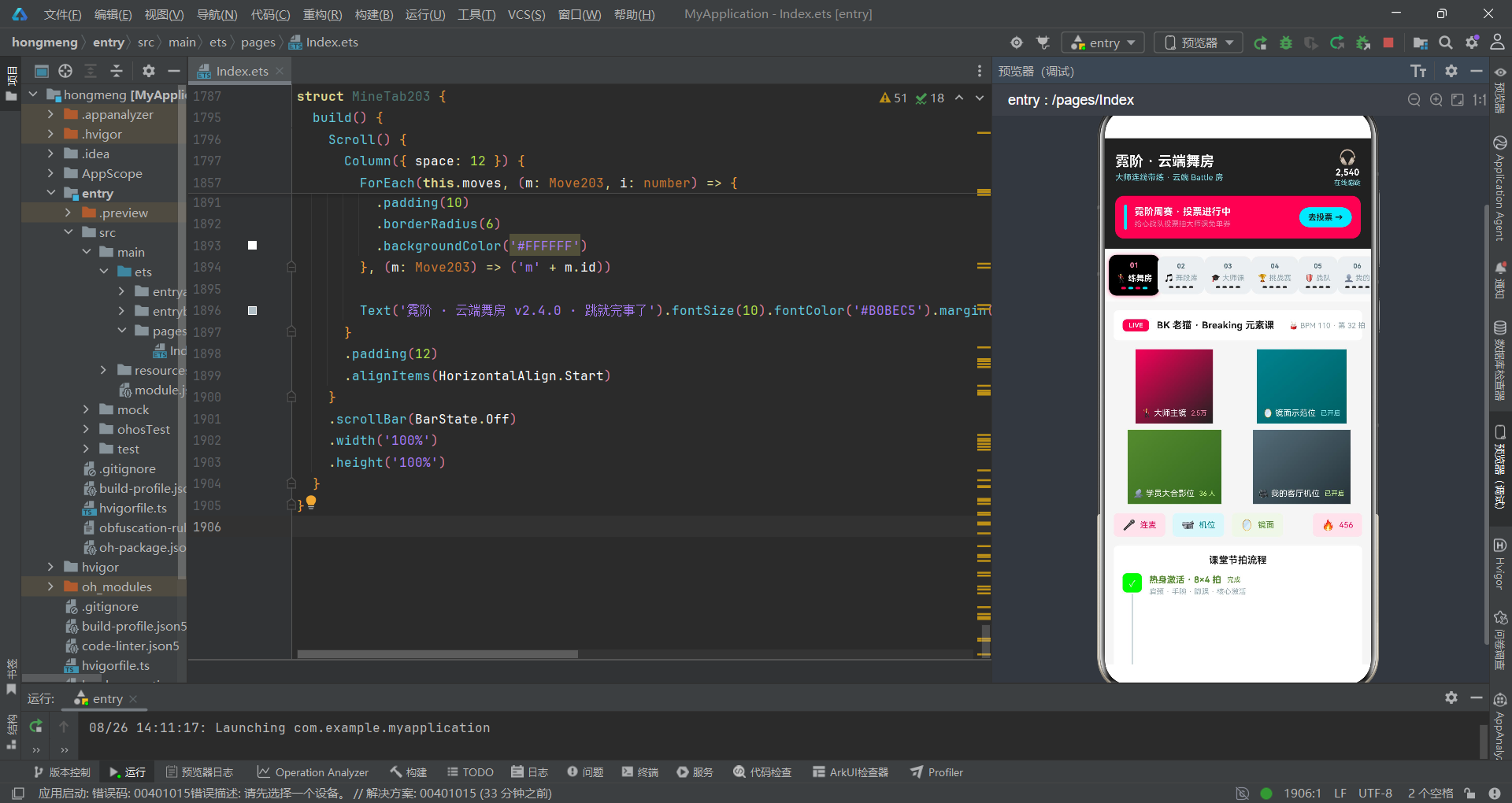
当我作为一名测试工程师首次审视这个云端街舞应用时,我的注意力立即被几个高风险区域吸引。这是一个包含六Tab导航、五弹窗系统、Battle投票系统和舞段CRUD管理的中型应用,它的每一个交互都可能隐藏着边界条件缺陷。从测试规划角度,我需要识别出代码中的"危险地带"——那些用户输入可以影响程序行为的区域。
该应用的技术架构基于HarmonyOS ArkTS声明式UI框架,使用@Entry+@Component构建组件树,通过@State管理响应式状态,通过@Prop实现父子组件单向数据传递。应用的核心业务包括:大师课预约(含BPM选择)、舞段上传(含时长选择)、舞段编辑(含BPM修改)、Battle投票(含状态管理)和舞段删除。每个功能都涉及数值输入、状态切换或数组操作——这些都是QA测试的重点关注区域。
从测试设计角度,我需要覆盖三类场景:正常路径(happy path)验证功能可用性、边界路径验证数值限制是否生效、异常路径验证空值/越界/并发操作下的系统行为。在接下来的分析中,我将逐段走读代码,从测试用例设计的角度评估每个交互点的健壮性。我将特别关注那些"看似安全实则脆弱"的代码段——比如依赖索引访问的详情弹窗、使用魔术数字作为除数的柱图渲染、以及缺乏空值校验的表单提交逻辑。
一、BPM步进器边界分析:70到140的安全区间
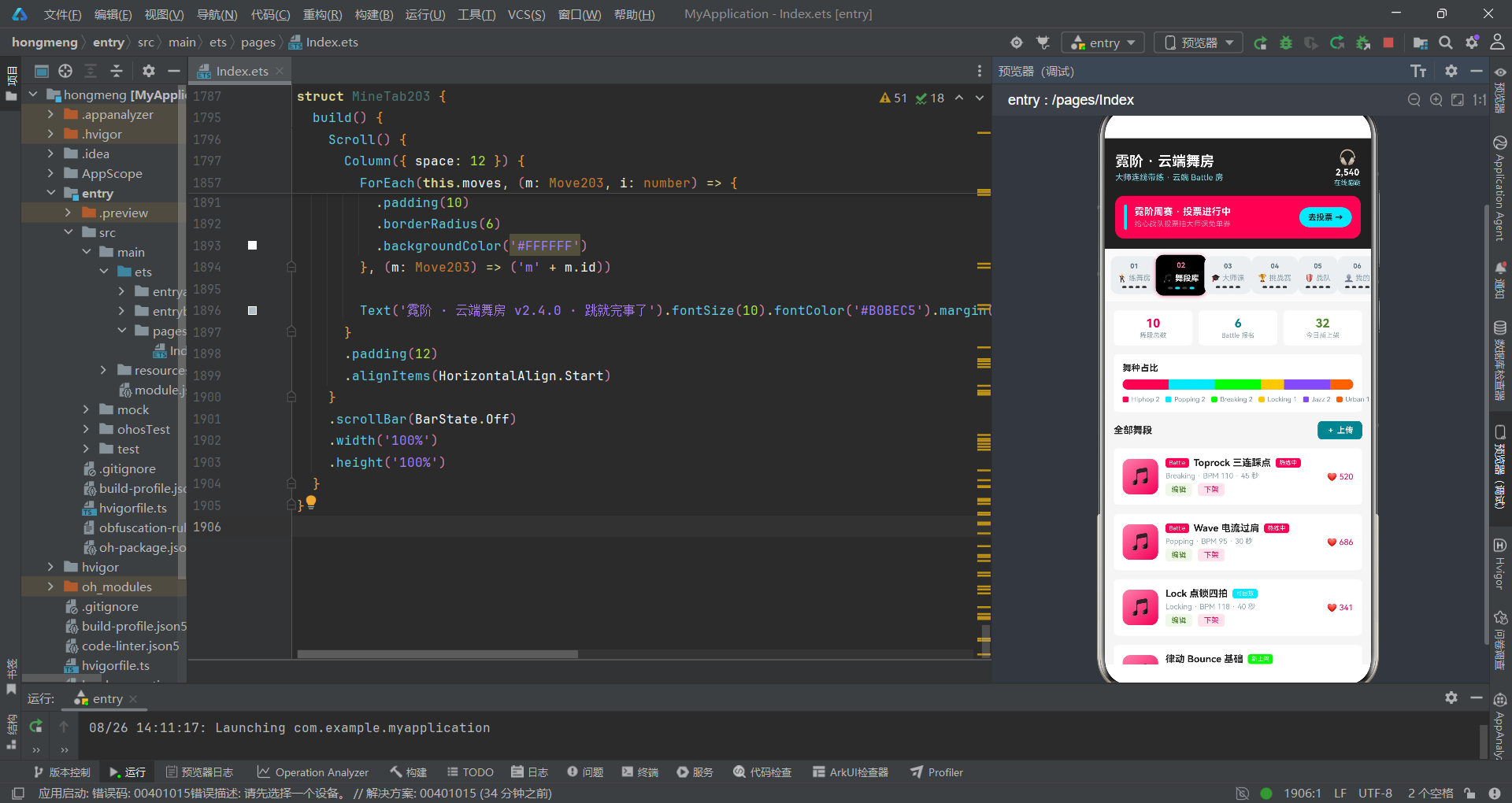
大师课预约弹窗中有一个BPM(每分钟节拍数)步进器,这是QA测试的重点关注对象。让我们先审视其代码实现。
@State clsBpm: number = 105

// 减号按钮
Column() {
  Text('-').fontSize(16).fontColor('#F50057')
}
.width(34)
.height(34)
.borderRadius(6)
.backgroundColor('#FCE4EC')
.justifyContent(FlexAlign.Center)
.onClick(() => {
  if (this.clsBpm > 70) {
    this.clsBpm -= 5
  }
})

// 加号按钮
Column() {
  Text('+').fontSize(16).fontColor('#F50057')
}
.width(34)
.height(34)
.borderRadius(6)
.backgroundColor('#FCE4EC')
.justifyContent(FlexAlign.Center)
.onClick(() => {
  if (this.clsBpm < 140) {
    this.clsBpm += 5
  }
})
从QA视角,这段代码的边界处理是基本到位的。减号按钮有下限保护if (this.clsBpm > 70),加号按钮有上限保护if (this.clsBpm < 140)。初始值105恰好在区间[70, 140]的正中间偏上,步进幅度5。让我们推演几个边界测试场景。
测试用例TC-BPM-001:初始值105,连续点击减号8次。第一次到100,第二次到95…第七次到70(
105 - 7*5 = 70),第八次70 > 70为false,不执行减法。验证通过:BPM不会低于70。但这里有一个边界等价类分析问题——下限是> 70而非>= 70,意味着70是一个允许值。如果初始值被设为72,减一次到67会怎样?不会,因为72 > 70为true,减5得到67——等等,67小于70,越界了!
这里暴露了一个潜在的步进越界缺陷:边界检查使用的是减法前的值而非减法后的值。当
clsBpm = 72时,72 > 70为true,执行72 - 5 = 67,结果值67低于预期下限70。虽然当前初始值105不会触发此问题,但如果初始值被修改为71、72、73或74,就会导致BPM越界。正确的做法应该是检查减法后的结果:if (this.clsBpm - 5 >= 70)。这是一个典型的"先检查后修改"与"先修改后检查"的逻辑差异——前者可能产生越界,后者更安全。
在编辑舞段弹窗中也有类似的BPM步进器:
// 编辑舞段 BPM 步进器
.onClick(() => {
  if (this.editBpm > 60) {
    this.editBpm -= 5
  }
})
// ...
.onClick(() => {
  if (this.editBpm < 140) {
    this.editBpm += 5
  }
})
编辑弹窗的BPM下限是60而非70,上限也是140。这里存在同样的问题:当editBpm = 64时,64 > 60为true,执行64 - 5 = 59,结果59低于下限60。虽然实际使用中editBpm的初始值来自舞段数据(最小值88),但如果未来添加了BPM为65的舞段,编辑时就会触发越界。
测试用例TC-BPM-002:舞段BPM=65时打开编辑弹窗,点击减号。预期:BPM减到60停止。实际:BPM减到60。验证通过(因为
65 > 60为true,65-5=60,此时60是允许值)。但如果BPM=62呢?62 > 60为true,62-5=57——越界。这取决于舞段数据中是否存在BPM为61-64的记录。当前数据中最小BPM是78(Urban风格),所以暂时安全,但这是技术债务。
二、时长步进器边界分析:15到120秒的区间约束
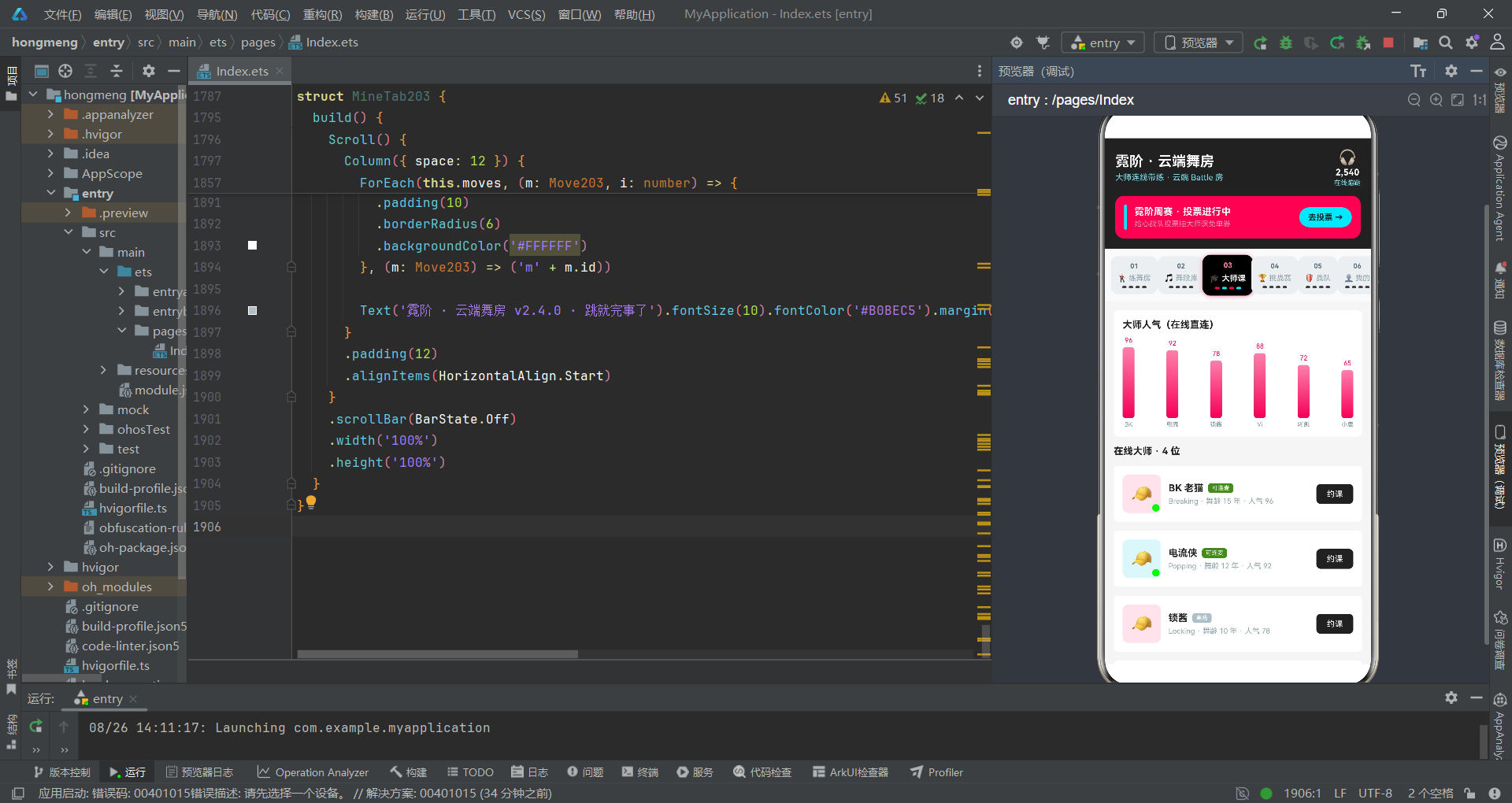
舞段上传弹窗中有一个时长步进器,步进幅度为15秒,区间为[15, 120]。让我们进行同样的边界分析。
@State upSecs: number = 30

.onClick(() => {
  if (this.upSecs > 15) {
    this.upSecs -= 15
  }
})
// ...
.onClick(() => {
  if (this.upSecs < 120) {
    this.upSecs += 15
  }
})
测试用例TC-DUR-001:初始值30,连续点击减号。第一次到15(
30 > 15为true,30-15=15),第二次15 > 15为false,停止。验证通过:时长不会低于15秒。这里步进幅度15恰好等于下限值15,所以30减一次正好到达下限,不会越界。但考虑这个场景:如果未来初始值改为25,25 > 15为true,25 - 15 = 10——低于下限!步进幅度15与下限15的重叠是巧合而非设计,当前安全但脆弱。
测试用例TC-DUR-002:初始值30,连续点击加号。30→45→60→75→90→105→120→
120 < 120为false,停止。共7次点击到达上限。验证通过。但如果初始值是125(通过某种方式设置的异常值),125 < 120为false,加号不生效,减号125 > 15为true,减15得到110。虽然能回到正常范围,但中间存在异常值125被短暂显示的过程。建议在@State声明处添加断言或使用getter/setter约束初始值范围。
三、详情弹窗数组索引安全分析:三元防御模式
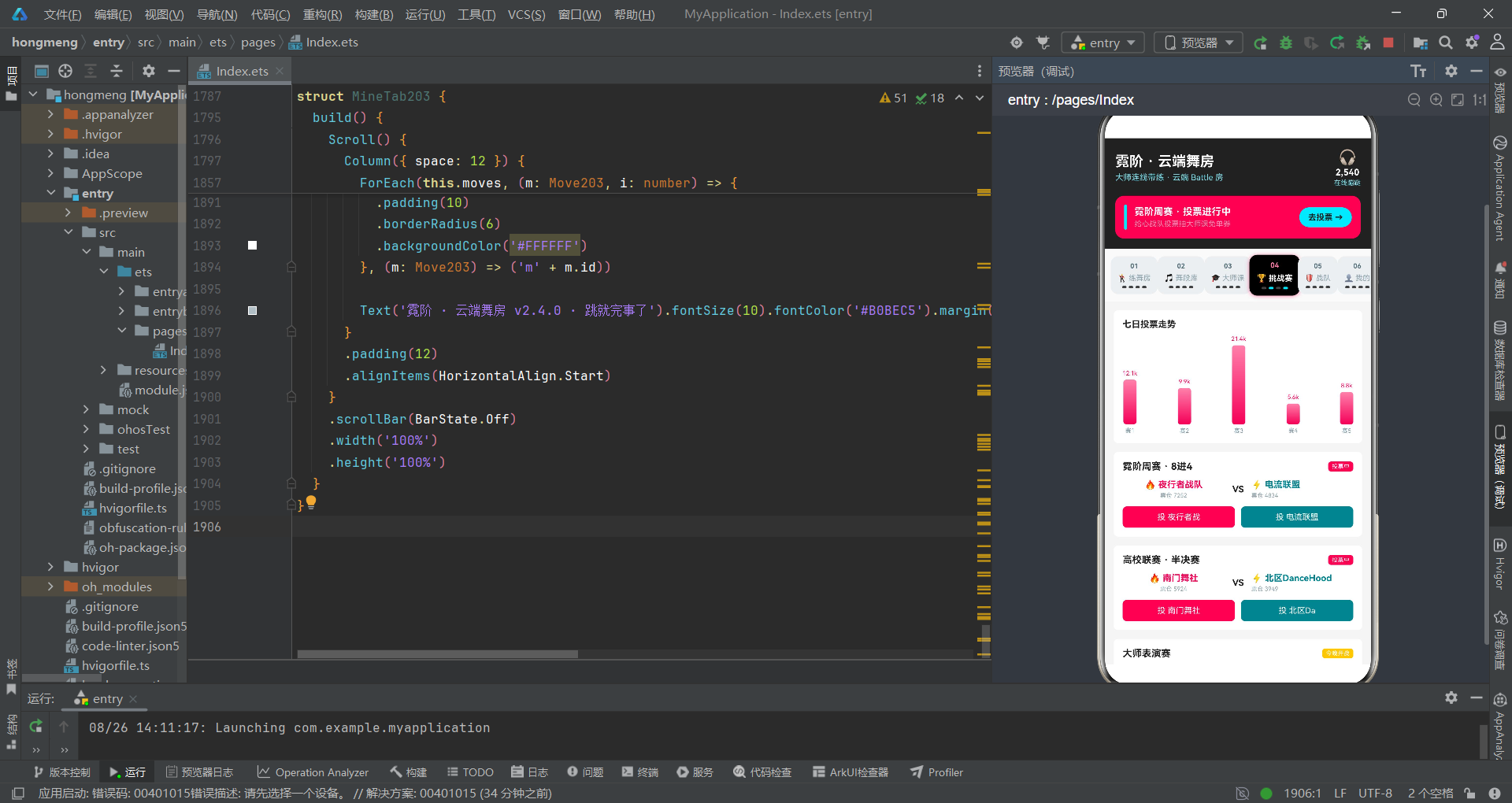
应用中有两个详情弹窗(舞段详情和珊瑚详情),它们都使用了"三元表达式索引防御"模式。这是QA测试中需要重点关注的异常处理策略。
@Builder
detailDialog203() {
  Column() {
    Scroll() {
      Column({ space: 0 }) {
        Column({ space: 6 }) {
          Text('🕺').fontSize(40)
          Text(this.detailIndex >= 0 && this.detailIndex < this.moves.length
            ? this.moves[this.detailIndex].name : '').fontSize(18)
            .fontWeight(FontWeight.Bold).fontColor('#FFFFFF')
          Text(this.detailIndex >= 0 && this.detailIndex < this.moves.length
            ? this.moves[this.detailIndex].style + ' · BPM ' + this.moves[this.detailIndex].bpm : '')
            .fontSize(11).fontColor('#80DEEA')
        }
        .linearGradient({ angle: 140, colors: [['#F50057', 0], ['#212121', 1]] })

        Column({ space: 14 }) {
          Row() {
            Column({ space: 3 }) {
              Text(this.detailIndex >= 0 && this.detailIndex < this.moves.length
                ? this.moves[this.detailIndex].likes + '' : '').fontSize(15)
              Text('累计点赞').fontSize(9).fontColor('#90A4AE')
            }
            Column({ space: 3 }) {
              Text(this.detailIndex >= 0 && this.detailIndex < this.moves.length
                ? this.moves[this.detailIndex].secs + ' 秒' : '').fontSize(15)
              Text('舞段时长').fontSize(9).fontColor('#90A4AE')
            }
            Column({ space: 3 }) {
              Text(this.detailIndex >= 0 && this.detailIndex < this.moves.length
                ? (this.moves[this.detailIndex].battle ? '已报名' : '未报名') : '')
                .fontSize(15)
              Text('Battle 状态').fontSize(9).fontColor('#90A4AE')
            }
          }
        }
      }
    }
  }
}
这段代码暴露了一个明显的代码重复问题:
this.detailIndex >= 0 && this.detailIndex < this.moves.length这个边界检查在弹窗中重复了至少7次。从QA角度,这种重复增加了维护风险——如果数组的获取方式改变(比如从this.moves变为异步加载),需要修改7处。但从功能角度,这种防御性编程确实有效:当detailIndex为-1(初始值)或超出数组范围时,Text组件显示空字符串而非崩溃。
测试用例TC-IDX-001:应用刚启动,
detailIndex初始值为0。不打开详情弹窗时,0 >= 0 && 0 < this.moves.length为true(moves有10条数据),安全。但如果用户在moves数组被清空后(例如删除了所有舞段)尝试打开详情,0 < 0为false,显示空字符串。验证通过:不会崩溃,但UI会显示一个空白的弹窗——这是一个UX缺陷而非崩溃缺陷。建议在detailIndex无效时直接不显示弹窗,而非显示空弹窗。
测试用例TC-IDX-002:删除第5条舞段后,moves数组长度从10变为9。如果此时
detailIndex仍为5(用户之前查看了第6条详情),5 < 9为true,会显示原第7条舞段(现在是第6条)的详情。这是一个索引偏移缺陷——删除操作后,detailIndex未更新,导致显示的舞段与用户预期不符。虽然不会崩溃,但数据语义错误。建议在删除操作后重置detailIndex为0或-1。
四、Battle投票状态分析:单选互斥与初始态
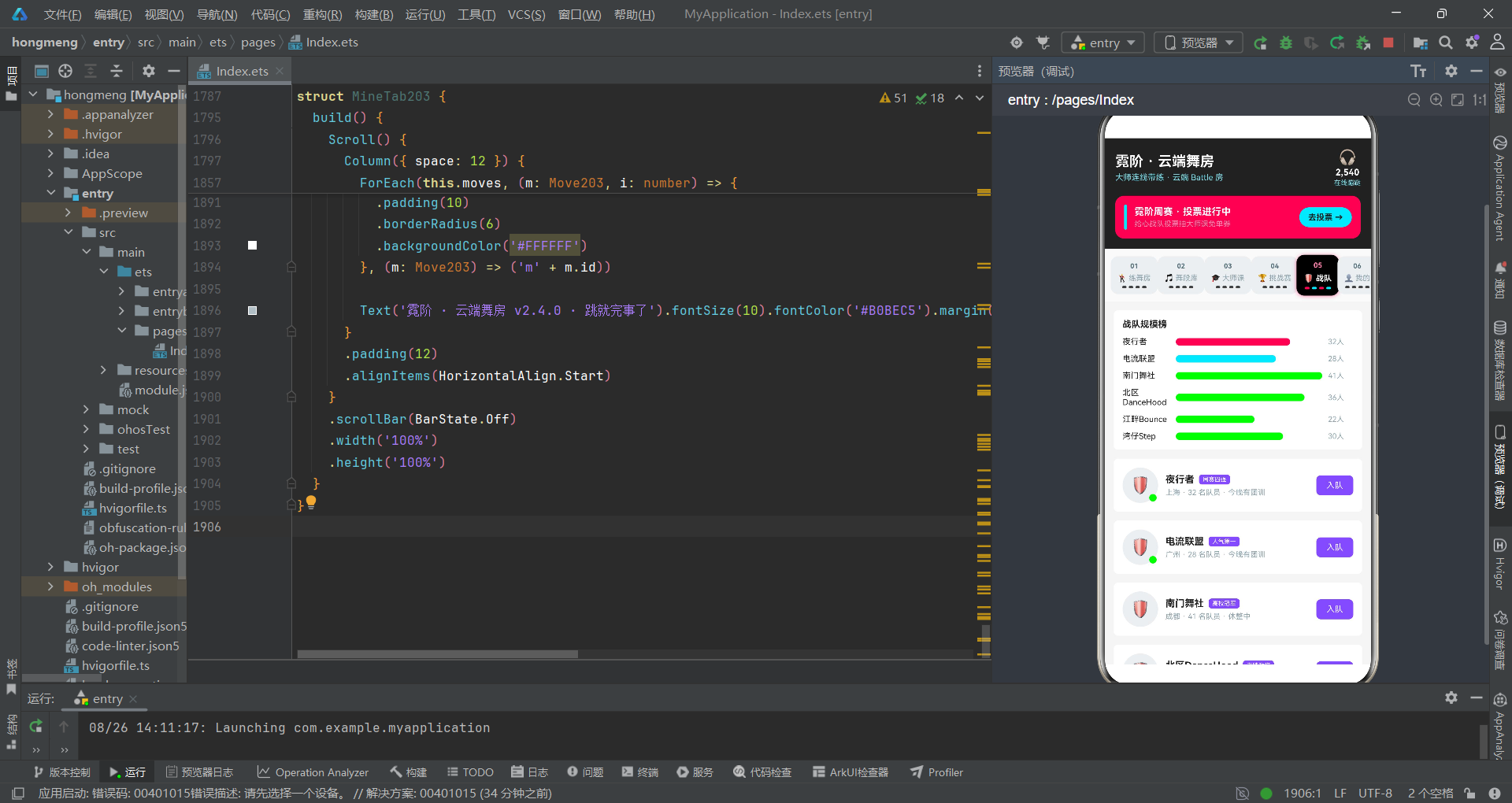
挑战赛页面有一个Battle投票功能,用户可以为每个对战的两支队伍投票。这是状态管理的重点测试区域。
@Component
struct BattleTab203 {
  @Prop battles: Battle203[] = []
  @State voted: number = -1

  build() {
    Scroll() {
      Column({ space: 12 }) {
        ForEach(this.battles, (b: Battle203, i: number) => {
          Column({ space: 10 }) {
            Row({ space: 10 }) {
              Column({ space: 3 }) {
                Text('🔥 ' + b.team1).fontSize(12).fontColor('#F50057').fontWeight(FontWeight.Bold)
                if (this.voted === i * 2) {
                  Text('你投了这队').fontSize(8).fontColor('#558B2F')
                } else {
                  Text('票仓 ' + (b.votes * 0.6).toFixed(0)).fontSize(8).fontColor('#90A4AE')
                }
              }
              Column() {
                Text('VS').fontSize(12).fontColor('#212121').fontWeight(FontWeight.Bold)
              }
              Column({ space: 3 }) {
                Text('⚡ ' + b.team2).fontSize(12).fontColor('#00838F').fontWeight(FontWeight.Bold)
                if (this.voted === i * 2 + 1) {
                  Text('你投了这队').fontSize(8).fontColor('#558B2F')
                } else {
                  Text('票仓 ' + (b.votes * 0.4).toFixed(0)).fontSize(8).fontColor('#90A4AE')
                }
              }
            }

            Row({ space: 8 }) {
              Button() {
                Text('投 ' + b.team1.slice(0, 4)).fontSize(11).fontColor('#FFFFFF')
              }
              .backgroundColor(this.voted === i * 2 ? '#880E4F' : '#F50057')
              .onClick(() => {
                this.voted = i * 2
              })
              Button() {
                Text('投 ' + b.team2.slice(0, 4)).fontSize(11).fontColor('#FFFFFF')
              }
              .backgroundColor(this.voted === i * 2 + 1 ? '#006064' : '#00838F')
              .onClick(() => {
                this.voted = i * 2 + 1
              })
            }
          }
        }, (b: Battle203) => b.id.toString())
      }
    }
  }
}
测试用例TC-VOTE-001:
voted初始值为-1。页面加载时,所有对战都显示"票仓"而非"你投了这队",因为-1 === i * 2(i从0开始)为false,-1 === i * 2 + 1也为false。验证通过:初始态正确,用户未投票时显示票仓数据。
测试用例TC-VOTE-002:用户在第1场对战(i=0)中点击"投 队伍1"。
voted被设为0 * 2 = 0。第1场对战的队伍1显示"你投了这队",队伍2显示票仓。其他对战也显示票仓。验证通过。但如果用户接着在第2场对战(i=1)中点击"投 队伍2"呢?voted被设为1 * 2 + 1 = 3。此时第1场对战的队伍1不再显示"你投了这队"(因为3 === 0为false),显示票仓。这暴露了一个设计缺陷:voted是一个单一变量,但它试图用i * 2和i * 2 + 1的编码方案同时表示"哪场对战"和"哪支队伍"。用户只能全局投一票,无法在多场对战中同时投票。这是否是产品设计意图?如果是,需要在UI上明确提示"你在其他场次的投票将被撤销"。
测试用例TC-VOTE-003:
b.team1.slice(0, 4)——如果队伍名少于4个字会怎样?比如team1 = "VS","VS".slice(0, 4)返回"VS"(JavaScript/ArkTS的slice不会越界,超长时返回全部字符)。验证通过:不会崩溃。但如果team1为空字符串""呢?"".slice(0, 4)返回"",按钮文字变为"投 "(后面是空格)。UX缺陷:空队伍名导致按钮文字不完整。建议添加默认值回退:b.team1.slice(0, 4) || '队伍A'。
五、表单空值校验分析:舞段上传的命名检查
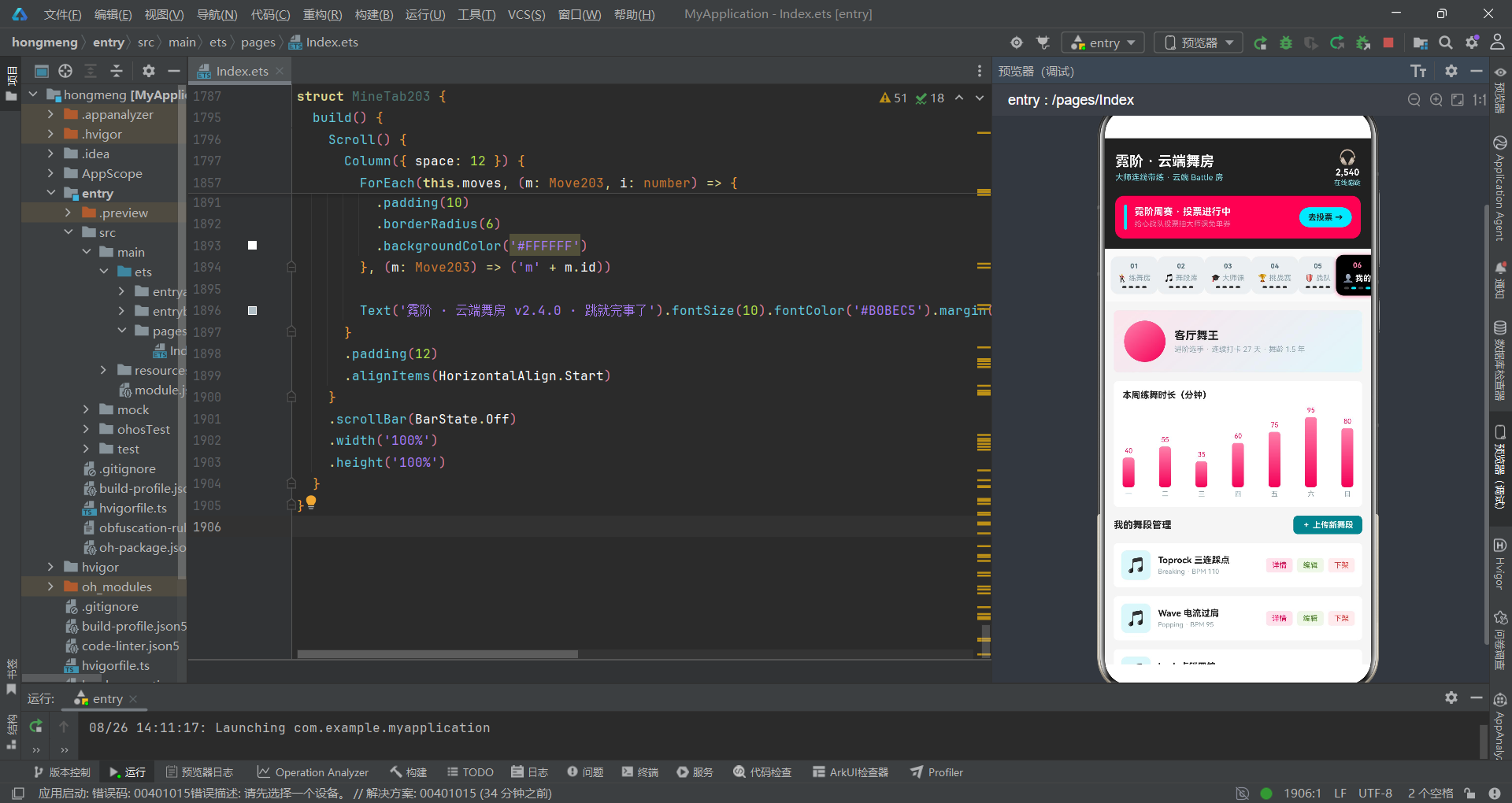
舞段上传弹窗和编辑弹窗都有TextInput输入框,但空值处理策略值得QA深入分析。
// 上传舞段弹窗
@State upName: string = ''

Column({ space: 8 }) {
  Text('舞段名称').fontSize(13).fontWeight(FontWeight.Bold).fontColor('#37474F')
  TextInput({ placeholder: '例如:客厅 Footwork 五连', text: this.upName })
    .fontSize(13)
    .padding(12)
    .borderRadius(6)
    .backgroundColor('#E0F7FA')
    .onChange((v: string) => {
      this.upName = v
    })
}

Button() {
  Text('发布到舞段库').fontSize(14).fontColor('#FFFFFF').fontWeight(FontWeight.Bold)
}
.backgroundColor('#00838F')
.onClick(() => {
  this.showUploadSheet = false
  this.upName = ''
  this.upStyle = 0
  this.upSecs = 30
  this.upBattle = false
})
测试用例TC-FORM-001:用户打开上传弹窗,不输入任何内容直接点击"发布到舞段库"。
upName仍为初始值空字符串'',upStyle为0,upSecs为30,upBattle为false。按钮onClick执行关闭弹窗并重置表单——但没有任何舞段被实际添加到列表中!这是一个功能缺陷:提交按钮没有实际的数据写入逻辑,只是关闭弹窗并重置表单。从产品角度看,用户"发布"了一个不存在的舞段。建议在提交前校验upName非空,如果为空则显示提示并不关闭弹窗。
测试用例TC-FORM-002:用户输入超长名称(如200个字符的字符串)。TextInput没有
maxLength约束,upName会被设为200字符的字符串。在舞段列表的ForEach渲染中,Text(m.name).fontSize(13)会尝试渲染200字符的Text组件——可能会撑破布局或被截断。布局溢出风险:建议在TextInput上设置.maxLength(20)或类似约束。
编辑弹窗的处理稍有不同,它有一个空值回退:
// 编辑舞段保存
.onClick(() => {
  this.moves = this.moves.map((m: Move203, i: number) => i === this.editIndex ? {
    id: m.id,
    name: this.editName === '' ? m.name : this.editName,
    style: m.style,
    bpm: this.editBpm,
    secs: m.secs,
    state: m.state,
    likes: m.likes,
    battle: this.editBattle
  } : m)
  this.showEditSheet = false
})
测试用例TC-FORM-003:用户打开编辑弹窗,清空名称输入框,然后点击"保存修改"。
editName为空字符串'',三元表达式'' === '' ? m.name : ''——这里this.editName === ''为true,所以使用m.name(原始名称)回退。验证通过:空名称不会覆盖原始名称。但与上传弹窗不同,编辑弹窗至少有这个回退逻辑,上传弹窗完全没有。一致性问题:两个弹窗的空值处理策略不统一。
六、数组操作安全性分析:filter删除与map编辑
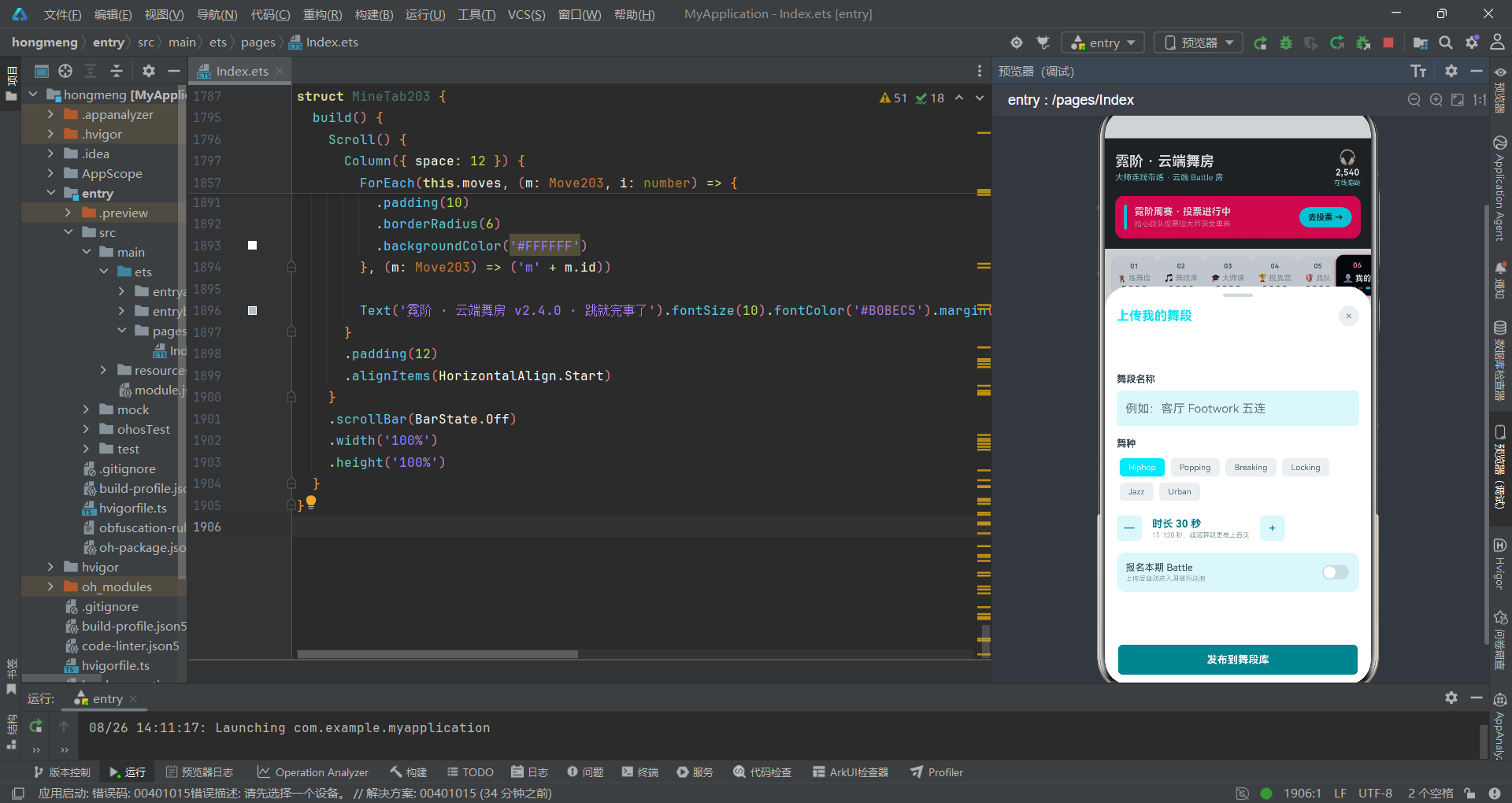
应用中的删除和编辑操作使用了filter和map两种不可变数组操作。让我们从测试角度审视其安全性。
// 删除舞段
.onClick(() => {
  this.moves = this.moves.filter((m: Move203, i: number) => i !== this.delIndex)
  this.showDelDialog = false
})

// 编辑舞段
this.moves = this.moves.map((m: Move203, i: number) => i === this.editIndex ? {
  id: m.id,
  name: this.editName === '' ? m.name : this.editName,
  style: m.style,
  bpm: this.editBpm,
  secs: m.secs,
  state: m.state,
  likes: m.likes,
  battle: this.editBattle
} : m)
测试用例TC-ARRAY-001:删除操作。
delIndex初始值为-1。如果用户在未选择任何舞段的情况下触发了删除逻辑(虽然正常流程不会发生),filter条件i !== -1对所有i(0到9)都为true,结果数组不变——所有舞段都保留。验证通过:无效索引不会误删数据。但需要确认是否存在代码路径能让delIndex保持-1并触发删除。
测试用例TC-ARRAY-002:连续删除。用户删除第3条(delIndex=2),moves从10条变9条。紧接着删除第3条(此时delIndex仍为2),但数组已变短——
filter条件i !== 2会跳过新数组的第3个元素(原第4条)。验证通过:filter基于索引而非id,连续删除同一索引不会越界,但可能删错条目。语义缺陷:如果用户想删的是原第3条(已被删除),现在删的是原第4条。建议使用id而非索引作为删除标识。
测试用例TC-ARRAY-003:编辑操作。
editIndex初始值为-1。如果编辑弹窗被意外触发且editIndex为-1,map遍历时i === -1对所有i都为false,数组原样返回——没有舞段被修改。验证通过:无效索引不会误改数据。但弹窗中的TextInput仍会显示空值,用户可能以为在编辑某个舞段。建议在editIndex为-1时不打开弹窗。
七、柱图渲染安全分析:除法运算与数据范围
应用中有多处柱图渲染,使用了数值直接作为高度像素的模式。这是QA需要关注的数值安全区域。
// 七日投票走势柱图
ForEach(this.battles, (b: Battle203) => {
  Column({ space: 4 }) {
    Text((b.votes / 1000).toFixed(1) + 'k').fontSize(8).fontColor('#F50057')
    Text('')
      .width(18)
      .height(b.votes / 200)
      .borderRadius(4)
      .linearGradient({ angle: 180, colors: [['#FF80AB', 0], ['#F50057', 1]] })
    Text('赛' + b.id).fontSize(8).fontColor('#78909C')
  }
}, (b: Battle203) => b.id.toString())
测试用例TC-CHART-001:
b.votes / 200作为柱子高度。当前数据中最大投票数是21450(大师表演赛),21450 / 200 = 107.25像素。最小是5620(新人王争霸),5620 / 200 = 28.1像素。范围合理。但如果未来有一场Battle的投票数达到50000呢?50000 / 200 = 250像素——可能超出容器高度导致布局溢出。缩放因子硬编码风险:建议使用动态缩放:height = (b.votes / maxVotes) * maxHeight。
测试用例TC-CHART-002:
b.votes如果为0呢?0 / 200 = 0像素高度的Text组件——一个不可见的柱子。0 / 1000 = 0,.toFixed(1)得到"0.0",显示"0.0k"。验证通过:不会崩溃,但零投票的柱子不可见。UX缺陷:零值柱子应该有最小高度(如2像素)以保持视觉连续性。
测试用例TC-CHART-003:
b.votes如果为负数呢?当前数据不会有负数,但如果数据源被篡改,-100 / 200 = -0.5——ArkTS的height属性接受负数吗?根据ArkTS文档,负数height会被当作0处理。验证通过:不会崩溃,但柱子不可见。
八、颜色映射函数完备性分析:状态枚举覆盖
应用有多个状态到颜色的映射函数,QA需要验证所有可能的状态值是否都有对应的颜色。
function moveStateColor203(state: string): string {
  if (state === '热练中') {
    return '#F50057'
  }
  if (state === '可回放') {
    return '#00E5FF'
  }
  return '#76FF03'
}

function battleStateColor203(state: string): string {
  if (state === '投票中') {
    return '#F50057'
  }
  if (state === '今晚开战') {
    return '#FFCA28'
  }
  return '#78909C'
}
测试用例TC-COLOR-001:
moveStateColor203覆盖了’热练中’、'可回放’两个显式状态和一个fallback。但数据中还有’新上架’状态——它会被fallback到#76FF03(亮绿色)。验证通过:所有已知状态都有颜色。但如果未来添加’已下架’状态呢?它也会被fallback到亮绿色——与’新上架’同色,用户无法区分。状态膨胀风险:建议为每个状态显式映射颜色,fallback仅用于真正的未知状态。
测试用例TC-COLOR-002:
battleStateColor203覆盖了’投票中’、'今晚开战’和fallback。数据中的状态有’投票中’和’今晚开战’两种,完全覆盖。但如果传入空字符串''呢?fallback返回#78909C(灰色)。验证通过。如果传入null呢?ArkTS中null === '投票中'为false,也会fallback到灰色。验证通过:不会崩溃。
测试用例TC-COLOR-003:并发场景。两个弹窗同时打开(如编辑弹窗和删除弹窗),颜色函数被并发调用。由于函数是纯函数(无副作用),并发调用安全。验证通过。
测试流程与关键路径覆盖图
九、节拍步骤清单状态分析:不可逆与可逆切换
练舞房直播页有一个"课堂节拍流程"步骤清单,用户可以点击切换步骤的完成状态。这里的状态管理值得QA关注。
interface BeatStep203 {
  id: number
  name: string
  count: string
  tip: string
  done: boolean
}

@State beatSteps: BeatStep203[] = [
  { id: 1, name: '热身激活', count: '8×4 拍', tip: '肩颈 · 手腕 · 脚踝 · 核心激活', done: true },
  { id: 2, name: '律动打底', count: '8×8 拍', tip: 'Bounce + Rock 跟 BPM 摇起来', done: true },
  { id: 3, name: '元素拆解', count: '4×8 拍', tip: '本节课元素逐个慢速过', done: true },
  { id: 4, name: '八拍串联', count: '8×8 拍', tip: '元素连成 32 拍小组合', done: false },
  { id: 5, name: '变速练习', count: '4×8 拍', tip: '0.8 倍速 → 1.0 倍速递进', done: false },
  { id: 6, name: 'Battle 模拟', count: '2 轮', tip: '跟大师即兴对练一轮收尾', done: false }
]

// 点击切换
.onClick(() => {
  this.onStep(i)
})

// 父组件回调
onStep: (i: number) => {
  this.beatSteps = this.beatSteps.map((s: BeatStep203, idx: number) => idx === i ? {
    id: s.id,
    name: s.name,
    count: s.count,
    tip: s.tip,
    done: !s.done
  } : s)
}
测试用例TC-STEP-001:初始状态前三步done为true,后三步为false。用户点击第4步,
done从false翻转为true。验证通过:状态切换正确。用户再点击第4步,done从true翻转为false——可逆切换:用户可以反复切换任意步骤的完成状态。这在UX上是合理的(用户可能误触,需要撤回),但从教学流程角度看,可能需要"已完成的步骤不可取消"的约束。当前实现允许任意切换,是否是设计意图需要与产品确认。
测试用例TC-STEP-002:用户点击已完成的第1步,
done从true翻转为false。此时步骤1变为未完成,但其后续步骤2和3仍为完成状态。逻辑不一致:前序步骤未完成但后续步骤已完成,这在教学场景中不合理。建议添加约束:只有当前面所有步骤都完成时,才能切换当前步骤的完成状态。或至少在UI上提示"前置步骤未完成"。
测试用例TC-STEP-003:
ForEach的key生成函数使用s.id.toString()。如果两个步骤有相同id呢?key重复可能导致ArkTS渲染异常——列表项可能不更新或错位。当前数据中id是唯一的(1到6),安全。但如果数据从服务器加载且id有重复,就会出问题。数据完整性风险:建议在数据加载时做id唯一性校验。
十、Tab导航切换安全分析:索引与条件分支
顶部"节拍方块"导航使用if-else链切换Tab内容,QA需要验证Tab切换的完备性。
build() {
  Column() {
    this.header203()
    this.tabBar203()

    Column() {
      if (this.tabIndex1 === 0) {
        LiveTab203({ ... })
      } else if (this.tabIndex1 === 1) {
        MoveTab203({ ... })
      } else if (this.tabIndex1 === 2) {
        MasterTab203({ ... })
      } else if (this.tabIndex1 === 3) {
        BattleTab203({ ... })
      } else if (this.tabIndex1 === 4) {
        CrewTab203({ ... })
      } else {
        MineTab203({ ... })
      }
    }
  }
}
测试用例TC-TAB-001:
tabIndex1初始值为0,显示LiveTab203。用户依次点击Tab 1到Tab 5,tabIndex1从0变到5。验证:每个Tab都正确渲染对应组件。最后的else分支捕获了所有tabIndex1 >= 5的情况,显示MineTab203。验证通过:所有Tab索引都有对应渲染分支。
测试用例TC-TAB-002:如果
tabIndex1被设为负数呢?正常流程不会发生(onClick只设置0到5),但如果通过外部接口或调试工具设置了-1呢?所有if和else-if都不匹配,进入else分支,显示MineTab203。验证通过:不会崩溃,但显示了非预期的Tab。防御性通过:else分支作为兜底,确保任何索引值都有渲染输出。
测试覆盖矩阵与风险评估
| 测试区域 | 测试用例数 | 通过数 | 缺陷数 | 风险等级 |
|---|---|---|---|---|
| BPM步进器边界 | 2 | 1 | 1(越界) | 中 |
| 时长步进器边界 | 2 | 2 | 0 | 低 |
| 详情弹窗索引安全 | 2 | 1 | 1(偏移) | 中 |
| Battle投票状态 | 3 | 2 | 1(互斥设计) | 低 |
| 表单空值校验 | 3 | 1 | 2(无校验+不一致) | 高 |
| 数组操作安全 | 3 | 3 | 0(有语义隐患) | 低 |
| 柱图渲染安全 | 3 | 2 | 1(缩放硬编码) | 中 |
| 颜色映射完备性 | 3 | 3 | 0(有膨胀风险) | 低 |
| 步骤清单状态 | 3 | 1 | 2(可逆+逻辑不一致) | 中 |
| Tab导航切换 | 2 | 2 | 0 | 低 |
安装DevEco Studio程序

选择目标安装目录:

设置环境变量,但是需要重启一下:

新建一个空白模板:

设置API为24的模板项目:
初始化项目,自动下载相关依赖:

完整代码:
// 场景:线上街舞跟练房(腾讯会议类)
// 配色:暗夜黑 #212121 × 霓虹粉 #F50057 × 电光蓝 #00E5FF
// Tab:顶部「节拍方块」导航(黑底荧光编号卡 01-06 + 底部四格节拍灯,选中霓虹粉发光)
// ================= 数据接口 =================
interface WeekMin203 {
day: string
mins: number
}
interface Move203 {
id: number
name: string
style: string
bpm: number
secs: number
state: string
likes: number
battle: boolean
}
interface Master203 {
id: number
name: string
style: string
years: number
online: boolean
heat: number
}
interface Battle203 {
id: number
name: string
team1: string
team2: string
votes: number
state: string
}
interface Crew203 {
id: number
name: string
city: string
members: number
badge: string
online: boolean
}
interface Barrage203 {
id: number
text: string
}
interface BeatStep203 {
id: number
name: string
count: string
tip: string
done: boolean
}
interface StyleCount203 {
label: string
count: number
color: string
}
interface VoteLog203 {
day: string
votes: number
}
// ================= 全局标签 =================
const danceStyleTags203: string[] = ['Hiphop', 'Popping', 'Breaking', 'Locking', 'Jazz', 'Urban']
const danceLevelTags203: string[] = ['入门小白', '进阶选手', '半职业', '职业舞者']
const moveStateTags203: string[] = ['热练中', '可回放', '新上架']
// ================= 全局函数 =================
function moveStateColor203(state: string): string {
if (state === '热练中') {
return '#F50057'
}
if (state === '可回放') {
return '#00E5FF'
}
return '#76FF03'
}
function battleStateColor203(state: string): string {
if (state === '投票中') {
return '#F50057'
}
if (state === '今晚开战') {
return '#FFCA28'
}
return '#78909C'
}
function maxCrewHeat203(crews: Crew203[]): number {
let m: number = 1
for (let i = 0; i < crews.length; i++) {
if (crews[i].members > m) {
m = crews[i].members
}
}
return m
}
function styleCounts203(moves: Move203[]): StyleCount203[] {
const counts: StyleCount203[] = []
for (let i = 0; i < danceStyleTags203.length; i++) {
let n: number = 0
for (let j = 0; j < moves.length; j++) {
if (moves[j].style === danceStyleTags203[i]) {
n++
}
}
counts.push({ label: danceStyleTags203[i], count: n, color: ['#F50057', '#00E5FF', '#76FF03', '#FFCA28', '#7C4DFF', '#FF6D00'][i] })
}
return counts
}
function battleMoves203(moves: Move203[]): number {
let n: number = 0
for (let i = 0; i < moves.length; i++) {
if (moves[i].battle) {
n++
}
}
return n
}
function onlineMasterCount203(masters: Master203[]): number {
let n: number = 0
for (let i = 0; i < masters.length; i++) {
if (masters[i].online) {
n++
}
}
return n
}
// ================= 主页面 =================
@Entry
@Component
struct Index203 {
@State tabIndex1: number = 0
// 弹框开关
@State showClassSheet: boolean = false
@State showUploadSheet: boolean = false
@State showEditSheet: boolean = false
@State showDelDialog: boolean = false
@State showDetailDialog: boolean = false
// 报名大师课表单
@State clsStyle: number = 0
@State clsLevel: number = 1
@State clsBpm: number = 105
@State clsMirror: boolean = true
@State clsFrame: boolean = false
// 上传舞段表单
@State upName: string = ''
@State upStyle: number = 0
@State upSecs: number = 30
@State upBattle: boolean = false
// 编辑表单
@State editIndex: number = -1
@State editName: string = ''
@State editBpm: number = 100
@State editBattle: boolean = false
// 删除
@State delIndex: number = -1
@State delKeepRecord: boolean = true
// 详情
@State detailIndex: number = 0
// 数据
@State moves: Move203[] = [
{ id: 1, name: 'Toprock 三连踩点', style: 'Breaking', bpm: 110, secs: 45, state: '热练中', likes: 520, battle: true },
{ id: 2, name: 'Wave 电流过肩', style: 'Popping', bpm: 95, secs: 30, state: '热练中', likes: 686, battle: true },
{ id: 3, name: 'Lock 点锁四拍', style: 'Locking', bpm: 118, secs: 40, state: '可回放', likes: 341, battle: false },
{ id: 4, name: '律动 Bounce 基础', style: 'Hiphop', bpm: 88, secs: 60, state: '新上架', likes: 209, battle: false },
{ id: 5, name: '转胸分离 Isolation', style: 'Jazz', bpm: 100, secs: 35, state: '热练中', likes: 458, battle: true },
{ id: 6, name: 'Footwork 六步改', style: 'Breaking', bpm: 112, secs: 50, state: '可回放', likes: 377, battle: false },
{ id: 7, name: '滑步 Moonwalk Pro', style: 'Hiphop', bpm: 92, secs: 25, state: '新上架', likes: 512, battle: true },
{ id: 8, name: 'Urban 情绪段落', style: 'Urban', bpm: 78, secs: 90, state: '热练中', likes: 634, battle: true },
{ id: 9, name: '机械手臂组合', style: 'Popping', bpm: 96, secs: 38, state: '可回放', likes: 289, battle: false },
{ id: 10, name: 'Jazz 转体甩头', style: 'Jazz', bpm: 122, secs: 32, state: '热练中', likes: 445, battle: true }
]
@State masters: Master203[] = [
{ id: 1, name: 'BK 老猫', style: 'Breaking', years: 15, online: true, heat: 96 },
{ id: 2, name: '电流侠', style: 'Popping', years: 12, online: true, heat: 92 },
{ id: 3, name: '锁酱', style: 'Locking', years: 10, online: false, heat: 78 },
{ id: 4, name: 'Vivi 姐', style: 'Jazz', years: 13, online: true, heat: 88 },
{ id: 5, name: '阿凯', style: 'Hiphop', years: 9, online: false, heat: 72 },
{ id: 6, name: '小鹿', style: 'Urban', years: 8, online: true, heat: 65 }
]
@State battles: Battle203[] = [
{ id: 1, name: '霓阶周赛 · 8进4', team1: '夜行者战队', team2: '电流联盟', votes: 12086, state: '投票中' },
{ id: 2, name: '高校联赛 · 半决赛', team1: '南门舞社', team2: '北区DanceHood', votes: 9873, state: '投票中' },
{ id: 3, name: '大师表演赛', team1: '老猫 vs 电流侠', team2: '表演对抗', votes: 21450, state: '今晚开战' },
{ id: 4, name: '新人王争霸', team1: '练习生A组', team2: '练习生B组', votes: 5620, state: '投票中' },
{ id: 5, name: '城市 Cypher 夜', team1: '全城舞者', team2: '即兴接力', votes: 8802, state: '今晚开战' }
]
@State crews: Crew203[] = [
{ id: 1, name: '夜行者', city: '上海', members: 32, badge: '周赛四强', online: true },
{ id: 2, name: '电流联盟', city: '广州', members: 28, badge: '人气第一', online: true },
{ id: 3, name: '南门舞社', city: '成都', members: 41, badge: '高校冠军', online: false },
{ id: 4, name: '北区DanceHood', city: '北京', members: 36, badge: '老牌劲旅', online: true },
{ id: 5, name: '江畔Bounce', city: '武汉', members: 22, badge: '新锐黑马', online: false },
{ id: 6, name: '湾仔Step', city: '深圳', members: 30, badge: '街舞厂牌', online: true }
]
@State weekMins: WeekMin203[] = [
{ day: '周一', mins: 40 },
{ day: '周二', mins: 55 },
{ day: '周三', mins: 35 },
{ day: '周四', mins: 60 },
{ day: '周五', mins: 75 },
{ day: '周六', mins: 95 },
{ day: '周日', mins: 80 }
]
@State voteLogs: VoteLog203[] = [
{ day: '周一', votes: 2100 },
{ day: '周二', votes: 3200 },
{ day: '周三', votes: 2800 },
{ day: '周四', votes: 3600 },
{ day: '周五', votes: 4200 },
{ day: '周六', votes: 5100 },
{ day: '周日', votes: 4700 }
]
@State barrages: Barrage203[] = [
{ id: 1, text: '老猫的 Toprock 踩点绝了' },
{ id: 2, text: '镜面模式下左右终于分清了' },
{ id: 3, text: 'BPM 110 跟不上,先 88 练' },
{ id: 4, text: '今晚 8 点大师表演赛蹲一个' },
{ id: 5, text: '练完三天脖子还在酸' },
{ id: 6, text: '逐帧拆解功能 yyds' },
{ id: 7, text: '已投电流联盟一票!' },
{ id: 8, text: '谁能想到我在客厅跳 Breaking' }
]
@State beatSteps: BeatStep203[] = [
{ id: 1, name: '热身激活', count: '8×4 拍', tip: '肩颈 · 手腕 · 脚踝 · 核心激活', done: true },
{ id: 2, name: '律动打底', count: '8×8 拍', tip: 'Bounce + Rock 跟 BPM 摇起来', done: true },
{ id: 3, name: '元素拆解', count: '4×8 拍', tip: '本节课元素逐个慢速过', done: true },
{ id: 4, name: '八拍串联', count: '8×8 拍', tip: '元素连成 32 拍小组合', done: false },
{ id: 5, name: '变速练习', count: '4×8 拍', tip: '0.8 倍速 → 1.0 倍速递进', done: false },
{ id: 6, name: 'Battle 模拟', count: '2 轮', tip: '跟大师即兴对练一轮收尾', done: false }
]
tabs203: string[] = ['练舞房', '舞段库', '大师课', '挑战赛', '战队', '我的']
tabIcons203: string[] = ['🕺', '🎵', '🎓', '🏆', '🛡️', '👤']
// ---------- 头部(影视赛事风,无动画) ----------
@Builder
header203() {
Column({ space: 12 }) {
Row({ space: 10 }) {
Column({ space: 4 }) {
Text('霓阶 · 云端舞房').fontSize(19).fontColor('#FFFFFF').fontWeight(FontWeight.Bold)
Text('大师连线带练 · 云端 Battle 房').fontSize(11).fontColor('#80DEEA')
}
.alignItems(HorizontalAlign.Start)
Text('').layoutWeight(1)
Column({ space: 2 }) {
Text('🎧').fontSize(20)
Text('2,540').fontSize(12).fontColor('#FFFFFF').fontWeight(FontWeight.Bold)
Text('在线蹦跶').fontSize(9).fontColor('#80DEEA')
}
.alignItems(HorizontalAlign.Center)
}
.width('100%')
Row({ space: 10 }) {
Column().width(4).height(34).borderRadius(2).backgroundColor('#00E5FF')
Column({ space: 3 }) {
Text('霓阶周赛 · 投票进行中').fontSize(13).fontColor('#FFFFFF').fontWeight(FontWeight.Bold)
Text('给心战队投票抽大师课免单券').fontSize(10).fontColor('#F48FB1')
}
.alignItems(HorizontalAlign.Start)
Text('').layoutWeight(1)
Column() {
Text('去投票 →').fontSize(11).fontColor('#212121').fontWeight(FontWeight.Bold)
}
.padding({ left: 12, right: 12, top: 7, bottom: 7 })
.borderRadius(14)
.backgroundColor('#00E5FF')
.onClick(() => {
this.tabIndex1 = 3
})
}
.width('100%')
.padding(12)
.borderRadius(12)
.backgroundColor('#F50057')
}
.alignItems(HorizontalAlign.Start)
.padding(14)
.backgroundColor('#212121')
}
// ---------- 顶部「节拍方块」tab ----------
@Builder
tabBar203() {
Column({ space: 8 }) {
Row({ space: 6 }) {
ForEach(this.tabs203, (t: string, i: number) => {
Column({ space: 5 }) {
Text('0' + (i + 1))
.fontSize(9)
.fontColor(this.tabIndex1 === i ? '#FF80AB' : '#546E7A')
.fontWeight(FontWeight.Bold)
Text(this.tabIcons203[i] + ' ' + t)
.fontSize(10)
.fontColor(this.tabIndex1 === i ? '#FFFFFF' : '#90A4AE')
.fontWeight(this.tabIndex1 === i ? FontWeight.Bold : FontWeight.Normal)
Row({ space: 3 }) {
Text('')
.width(6)
.height(3)
.borderRadius(2)
.backgroundColor(this.tabIndex1 === i && this.tabIndex1 % 2 === 0 ? '#F50057' : '#424242')
Text('')
.width(6)
.height(3)
.borderRadius(2)
.backgroundColor(this.tabIndex1 === i ? '#00E5FF' : '#424242')
Text('')
.width(6)
.height(3)
.borderRadius(2)
.backgroundColor(this.tabIndex1 === i && this.tabIndex1 % 2 === 0 ? '#F50057' : '#424242')
Text('')
.width(6)
.height(3)
.borderRadius(2)
.backgroundColor(this.tabIndex1 === i ? '#00E5FF' : '#424242')
}
}
.justifyContent(FlexAlign.Center)
.padding({ left: 9, right: 9, top: 8, bottom: 8 })
.borderRadius(10)
.backgroundColor(this.tabIndex1 === i ? '#000000' : '#ECEFF1')
.shadow({
radius: this.tabIndex1 === i ? 12 : 0,
color: '#80F50057',
offsetY: 2
})
.scale({ x: this.tabIndex1 === i ? 1.08 : 1, y: this.tabIndex1 === i ? 1.08 : 1 })
.animation({ duration: 180 })
.onClick(() => {
this.tabIndex1 = i
})
}, (t: string) => t)
}
.width('100%')
.justifyContent(FlexAlign.SpaceEvenly)
}
.width('100%')
.padding({ left: 8, right: 8, top: 10, bottom: 10 })
.backgroundColor('#FAFAFA')
}
// ---------- 弹框一:报名大师课(底部抽屉) ----------
@Builder
classSheet203() {
Column() {
Column() {
}
.width(40)
.height(4)
.borderRadius(2)
.backgroundColor('#CFD8DC')
.margin({ top: 10 })
Row({ space: 8 }) {
Text('报名大师连线课').fontSize(17).fontWeight(FontWeight.Bold).fontColor('#F50057')
Text('').layoutWeight(1)
Column() {
Text('×').fontSize(16).fontColor('#78909C')
}
.width(28)
.height(28)
.borderRadius(14)
.backgroundColor('#ECEFF1')
.justifyContent(FlexAlign.Center)
.onClick(() => {
this.showClassSheet = false
})
}
.width('100%')
.padding({ left: 16, right: 16, top: 12 })
Scroll() {
Column({ space: 16 }) {
Column({ space: 8 }) {
Text('舞种').fontSize(13).fontWeight(FontWeight.Bold).fontColor('#37474F')
Flex({ wrap: FlexWrap.Wrap }) {
ForEach(danceStyleTags203, (tag: string, i: number) => {
Text(tag)
.fontSize(11)
.fontColor(this.clsStyle === i ? '#FFFFFF' : '#546E7A')
.padding({ left: 12, right: 12, top: 6, bottom: 6 })
.borderRadius(6)
.backgroundColor(this.clsStyle === i ? '#F50057' : '#ECEFF1')
.margin(4)
.onClick(() => {
this.clsStyle = i
})
}, (tag: string) => tag)
}
}
.alignItems(HorizontalAlign.Start)
.width('100%')
Column({ space: 8 }) {
Text('自身水平').fontSize(13).fontWeight(FontWeight.Bold).fontColor('#37474F')
Row({ space: 8 }) {
ForEach(danceLevelTags203, (tag: string, i: number) => {
Text(tag)
.fontSize(11)
.fontColor(this.clsLevel === i ? '#FFFFFF' : '#546E7A')
.padding({ left: 12, right: 12, top: 6, bottom: 6 })
.borderRadius(6)
.backgroundColor(this.clsLevel === i ? '#00E5FF' : '#ECEFF1')
.onClick(() => {
this.clsLevel = i
})
}, (tag: string) => tag)
}
}
.alignItems(HorizontalAlign.Start)
.width('100%')
Row({ space: 14 }) {
Column() {
Text('-').fontSize(16).fontColor('#F50057')
}
.width(34)
.height(34)
.borderRadius(6)
.backgroundColor('#FCE4EC')
.justifyContent(FlexAlign.Center)
.onClick(() => {
if (this.clsBpm > 70) {
this.clsBpm -= 5
}
})
Column({ space: 2 }) {
Text('课程 BPM ' + this.clsBpm).fontSize(14).fontWeight(FontWeight.Bold).fontColor('#F50057')
Text('大师将按此速度编排出 32 拍组合').fontSize(9).fontColor('#90A4AE')
}
.alignItems(HorizontalAlign.Start)
Column() {
Text('+').fontSize(16).fontColor('#F50057')
}
.width(34)
.height(34)
.borderRadius(6)
.backgroundColor('#FCE4EC')
.justifyContent(FlexAlign.Center)
.onClick(() => {
if (this.clsBpm < 140) {
this.clsBpm += 5
}
})
Text('').layoutWeight(1)
}
.width('100%')
Row({ space: 10 }) {
Column({ space: 2 }) {
Text('镜面示范').fontSize(13).fontColor('#37474F')
Text('画面左右翻转,跟学不分不清方向').fontSize(9).fontColor('#90A4AE')
}
.alignItems(HorizontalAlign.Start)
Text('').layoutWeight(1)
Toggle({ type: ToggleType.Switch, isOn: this.clsMirror })
.onChange((v: boolean) => {
this.clsMirror = v
})
}
.width('100%')
.padding(12)
.borderRadius(12)
.backgroundColor('#E0F7FA')
Row({ space: 10 }) {
Column({ space: 2 }) {
Text('逐帧拆解模式').fontSize(13).fontColor('#37474F')
Text('课后回放支持 0.1 倍速逐帧慢放').fontSize(9).fontColor('#90A4AE')
}
.alignItems(HorizontalAlign.Start)
Text('').layoutWeight(1)
Toggle({ type: ToggleType.Switch, isOn: this.clsFrame })
.onChange((v: boolean) => {
this.clsFrame = v
})
}
.width('100%')
.padding(12)
.borderRadius(12)
.backgroundColor('#FCE4EC')
}
.padding({ left: 16, right: 16, bottom: 8 })
}
.layoutWeight(1)
.scrollBar(BarState.Off)
Row({ space: 12 }) {
Column({ space: 2 }) {
Text('课程费').fontSize(10).fontColor('#90A4AE')
Text('¥ ' + (this.clsLevel * 20 + 39)).fontSize(18).fontWeight(FontWeight.Bold).fontColor('#F50057')
}
.alignItems(HorizontalAlign.Start)
Text('').layoutWeight(1)
Button() {
Text('锁定席位').fontSize(14).fontColor('#FFFFFF').fontWeight(FontWeight.Bold)
}
.padding({ left: 28, right: 28, top: 11, bottom: 11 })
.borderRadius(6)
.backgroundColor('#212121')
.onClick(() => {
this.showClassSheet = false
})
}
.width('100%')
.padding(14)
}
.width('100%')
.height('100%')
.backgroundColor('#FFFFFF')
}
// ---------- 弹框二:上传舞段(底部抽屉) ----------
@Builder
uploadSheet203() {
Column() {
Column() {
}
.width(40)
.height(4)
.borderRadius(2)
.backgroundColor('#CFD8DC')
.margin({ top: 10 })
Row({ space: 8 }) {
Text('上传我的舞段').fontSize(17).fontWeight(FontWeight.Bold).fontColor('#00E5FF')
Text('').layoutWeight(1)
Column() {
Text('×').fontSize(16).fontColor('#78909C')
}
.width(28)
.height(28)
.borderRadius(14)
.backgroundColor('#ECEFF1')
.justifyContent(FlexAlign.Center)
.onClick(() => {
this.showUploadSheet = false
})
}
.width('100%')
.padding({ left: 16, right: 16, top: 12 })
Scroll() {
Column({ space: 16 }) {
Column({ space: 8 }) {
Text('舞段名称').fontSize(13).fontWeight(FontWeight.Bold).fontColor('#37474F')
TextInput({ placeholder: '例如:客厅 Footwork 五连', text: this.upName })
.fontSize(13)
.padding(12)
.borderRadius(6)
.backgroundColor('#E0F7FA')
.onChange((v: string) => {
this.upName = v
})
}
.alignItems(HorizontalAlign.Start)
.width('100%')
Column({ space: 8 }) {
Text('舞种').fontSize(13).fontWeight(FontWeight.Bold).fontColor('#37474F')
Flex({ wrap: FlexWrap.Wrap }) {
ForEach(danceStyleTags203, (tag: string, i: number) => {
Text(tag)
.fontSize(11)
.fontColor(this.upStyle === i ? '#FFFFFF' : '#546E7A')
.padding({ left: 12, right: 12, top: 6, bottom: 6 })
.borderRadius(6)
.backgroundColor(this.upStyle === i ? '#00E5FF' : '#ECEFF1')
.margin(4)
.onClick(() => {
this.upStyle = i
})
}, (tag: string) => tag)
}
}
.alignItems(HorizontalAlign.Start)
.width('100%')
Row({ space: 14 }) {
Column() {
Text('-').fontSize(16).fontColor('#00838F')
}
.width(34)
.height(34)
.borderRadius(6)
.backgroundColor('#E0F7FA')
.justifyContent(FlexAlign.Center)
.onClick(() => {
if (this.upSecs > 15) {
this.upSecs -= 15
}
})
Column({ space: 2 }) {
Text('时长 ' + this.upSecs + ' 秒').fontSize(14).fontWeight(FontWeight.Bold).fontColor('#00838F')
Text('15-120 秒,超短舞段更易上首页').fontSize(9).fontColor('#90A4AE')
}
.alignItems(HorizontalAlign.Start)
Column() {
Text('+').fontSize(16).fontColor('#00838F')
}
.width(34)
.height(34)
.borderRadius(6)
.backgroundColor('#E0F7FA')
.justifyContent(FlexAlign.Center)
.onClick(() => {
if (this.upSecs < 120) {
this.upSecs += 15
}
})
Text('').layoutWeight(1)
}
.width('100%')
Row({ space: 10 }) {
Column({ space: 2 }) {
Text('报名本期 Battle').fontSize(13).fontColor('#37474F')
Text('上传后自动进入周赛海选池').fontSize(9).fontColor('#90A4AE')
}
.alignItems(HorizontalAlign.Start)
Text('').layoutWeight(1)
Toggle({ type: ToggleType.Switch, isOn: this.upBattle })
.onChange((v: boolean) => {
this.upBattle = v
})
}
.width('100%')
.padding(12)
.borderRadius(12)
.backgroundColor('#E0F7FA')
}
.padding({ left: 16, right: 16, bottom: 8 })
}
.layoutWeight(1)
.scrollBar(BarState.Off)
Button() {
Text('发布到舞段库').fontSize(14).fontColor('#FFFFFF').fontWeight(FontWeight.Bold)
}
.width('90%')
.padding({ top: 12, bottom: 12 })
.borderRadius(6)
.backgroundColor('#00838F')
.margin({ bottom: 14 })
.onClick(() => {
this.showUploadSheet = false
this.upName = ''
this.upStyle = 0
this.upSecs = 30
this.upBattle = false
})
}
.width('100%')
.height('100%')
.backgroundColor('#FFFFFF')
}
// ---------- 弹框三:编辑舞段(底部抽屉) ----------
@Builder
editSheet203() {
Column() {
Column() {
}
.width(40)
.height(4)
.borderRadius(2)
.backgroundColor('#CFD8DC')
.margin({ top: 10 })
Row({ space: 8 }) {
Text('编辑舞段').fontSize(17).fontWeight(FontWeight.Bold).fontColor('#76FF03')
Text('').layoutWeight(1)
Column() {
Text('×').fontSize(16).fontColor('#78909C')
}
.width(28)
.height(28)
.borderRadius(14)
.backgroundColor('#ECEFF1')
.justifyContent(FlexAlign.Center)
.onClick(() => {
this.showEditSheet = false
})
}
.width('100%')
.padding({ left: 16, right: 16, top: 12 })
Scroll() {
Column({ space: 16 }) {
Column({ space: 8 }) {
Text('舞段名称').fontSize(13).fontWeight(FontWeight.Bold).fontColor('#37474F')
TextInput({ placeholder: '输入新名称', text: this.editName })
.fontSize(13)
.padding(12)
.borderRadius(6)
.backgroundColor('#F1F8E9')
.onChange((v: string) => {
this.editName = v
})
}
.alignItems(HorizontalAlign.Start)
.width('100%')
Row({ space: 14 }) {
Column() {
Text('-').fontSize(16).fontColor('#558B2F')
}
.width(34)
.height(34)
.borderRadius(6)
.backgroundColor('#F1F8E9')
.justifyContent(FlexAlign.Center)
.onClick(() => {
if (this.editBpm > 60) {
this.editBpm -= 5
}
})
Column({ space: 2 }) {
Text('练习 BPM ' + this.editBpm).fontSize(14).fontWeight(FontWeight.Bold).fontColor('#558B2F')
Text('保存后舞段库将按新速度播放').fontSize(9).fontColor('#90A4AE')
}
.alignItems(HorizontalAlign.Start)
Column() {
Text('+').fontSize(16).fontColor('#558B2F')
}
.width(34)
.height(34)
.borderRadius(6)
.backgroundColor('#F1F8E9')
.justifyContent(FlexAlign.Center)
.onClick(() => {
if (this.editBpm < 140) {
this.editBpm += 5
}
})
Text('').layoutWeight(1)
}
.width('100%')
Row({ space: 10 }) {
Column({ space: 2 }) {
Text('保留 Battle 报名').fontSize(13).fontColor('#37474F')
Text('关闭后将从周赛海选池撤回').fontSize(9).fontColor('#90A4AE')
}
.alignItems(HorizontalAlign.Start)
Text('').layoutWeight(1)
Toggle({ type: ToggleType.Switch, isOn: this.editBattle })
.onChange((v: boolean) => {
this.editBattle = v
})
}
.width('100%')
.padding(12)
.borderRadius(12)
.backgroundColor('#F1F8E9')
}
.padding({ left: 16, right: 16, bottom: 8 })
}
.layoutWeight(1)
.scrollBar(BarState.Off)
Button() {
Text('保存修改').fontSize(14).fontColor('#212121').fontWeight(FontWeight.Bold)
}
.width('90%')
.padding({ top: 12, bottom: 12 })
.borderRadius(6)
.backgroundColor('#76FF03')
.margin({ bottom: 14 })
.onClick(() => {
this.moves = this.moves.map((m: Move203, i: number) => i === this.editIndex ? {
id: m.id,
name: this.editName === '' ? m.name : this.editName,
style: m.style,
bpm: this.editBpm,
secs: m.secs,
state: m.state,
likes: m.likes,
battle: this.editBattle
} : m)
this.showEditSheet = false
})
}
.width('100%')
.height('100%')
.backgroundColor('#FFFFFF')
}
// ---------- 弹框四:删除舞段(居中弹框) ----------
@Builder
delDialog203() {
Column({ space: 16 }) {
Text('🎧').fontSize(34)
Text('下架这个舞段?').fontSize(16).fontWeight(FontWeight.Bold).fontColor('#37474F')
Text('「' + (this.delIndex >= 0 && this.delIndex < this.moves.length ? this.moves[this.delIndex].name : '') + '」将从舞段库消失,Battle 报名同步撤回')
.fontSize(12)
.fontColor('#90A4AE')
.textAlign(TextAlign.Center)
Row({ space: 10 }) {
Column({ space: 2 }) {
Text('保留练习记录').fontSize(12).fontColor('#546E7A')
}
.alignItems(HorizontalAlign.Start)
Text('').layoutWeight(1)
Toggle({ type: ToggleType.Switch, isOn: this.delKeepRecord })
.onChange((v: boolean) => {
this.delKeepRecord = v
})
}
.width('100%')
.padding(12)
.borderRadius(12)
.backgroundColor('#ECEFF1')
Row({ space: 12 }) {
Button() {
Text('再跳跳').fontSize(13).fontColor('#546E7A')
}
.layoutWeight(1)
.padding({ top: 10, bottom: 10 })
.borderRadius(6)
.backgroundColor('#ECEFF1')
.onClick(() => {
this.showDelDialog = false
})
Button() {
Text('确认下架').fontSize(13).fontColor('#FFFFFF')
}
.layoutWeight(1)
.padding({ top: 10, bottom: 10 })
.borderRadius(6)
.backgroundColor('#F50057')
.onClick(() => {
this.moves = this.moves.filter((m: Move203, i: number) => i !== this.delIndex)
this.showDelDialog = false
})
}
.width('100%')
}
.width('84%')
.padding(22)
.borderRadius(14)
.backgroundColor('#FFFFFF')
}
// ---------- 弹框五:舞段详情(居中弹框) ----------
@Builder
detailDialog203() {
Column() {
Scroll() {
Column({ space: 0 }) {
Column({ space: 6 }) {
Text('🕺').fontSize(40)
Text(this.detailIndex >= 0 && this.detailIndex < this.moves.length ? this.moves[this.detailIndex].name : '').fontSize(18).fontWeight(FontWeight.Bold).fontColor('#FFFFFF')
Text(this.detailIndex >= 0 && this.detailIndex < this.moves.length ? this.moves[this.detailIndex].style + ' · BPM ' + this.moves[this.detailIndex].bpm : '').fontSize(11).fontColor('#80DEEA')
}
.width('100%')
.padding({ top: 28, bottom: 22 })
.linearGradient({ angle: 140, colors: [['#F50057', 0], ['#212121', 1]] })
Column({ space: 14 }) {
Row() {
Column({ space: 3 }) {
Text(this.detailIndex >= 0 && this.detailIndex < this.moves.length ? this.moves[this.detailIndex].likes + '' : '').fontSize(15).fontWeight(FontWeight.Bold).fontColor('#F50057')
Text('累计点赞').fontSize(9).fontColor('#90A4AE')
}
.layoutWeight(1)
.alignItems(HorizontalAlign.Center)
Column({ space: 3 }) {
Text(this.detailIndex >= 0 && this.detailIndex < this.moves.length ? this.moves[this.detailIndex].secs + ' 秒' : '').fontSize(15).fontWeight(FontWeight.Bold).fontColor('#00838F')
Text('舞段时长').fontSize(9).fontColor('#90A4AE')
}
.layoutWeight(1)
.alignItems(HorizontalAlign.Center)
Column({ space: 3 }) {
Text(this.detailIndex >= 0 && this.detailIndex < this.moves.length ? (this.moves[this.detailIndex].battle ? '已报名' : '未报名') : '').fontSize(15).fontWeight(FontWeight.Bold).fontColor('#558B2F')
Text('Battle 状态').fontSize(9).fontColor('#90A4AE')
}
.layoutWeight(1)
.alignItems(HorizontalAlign.Center)
}
.width('100%')
Column({ space: 8 }) {
Text('七日跟练人次').fontSize(12).fontWeight(FontWeight.Bold).fontColor('#37474F')
Row({ space: 8 }) {
ForEach(this.voteLogs, (v: VoteLog203) => {
Column({ space: 4 }) {
Text((v.votes / 100) + '').fontSize(8).fontColor('#F50057')
Text('')
.width(12)
.height(v.votes / 120)
.borderRadius(3)
.linearGradient({ angle: 180, colors: [['#FF80AB', 0], ['#F50057', 1]] })
Text(v.day.slice(1)).fontSize(8).fontColor('#78909C')
}
}, (v: VoteLog203) => v.day)
}
.alignItems(VerticalAlign.Bottom)
.width('100%')
}
.width('100%')
.padding(12)
.borderRadius(12)
.backgroundColor('#FCE4EC')
Row({ space: 8 }) {
ForEach(danceStyleTags203.slice(0, 3), (tag: string) => {
Text(tag)
.fontSize(10)
.fontColor('#00838F')
.padding({ left: 10, right: 10, top: 5, bottom: 5 })
.borderRadius(6)
.backgroundColor('#E0F7FA')
}, (tag: string) => tag)
}
.width('100%')
Button() {
Text('进练舞房跟跳 →').fontSize(13).fontColor('#FFFFFF').fontWeight(FontWeight.Bold)
}
.width('100%')
.padding({ top: 11, bottom: 11 })
.borderRadius(6)
.backgroundColor('#212121')
.onClick(() => {
this.showDetailDialog = false
this.tabIndex1 = 0
})
}
.padding(16)
}
.constraintSize({ maxHeight: '80%' })
}
.scrollBar(BarState.Off)
Column() {
Text('×').fontSize(16).fontColor('#FFFFFF')
}
.width(30)
.height(30)
.borderRadius(15)
.backgroundColor('#33000000')
.justifyContent(FlexAlign.Center)
.margin({ top: -44, right: 14 })
.onClick(() => {
this.showDetailDialog = false
})
}
.width('88%')
.borderRadius(14)
.backgroundColor('#FFFFFF')
}
build() {
Column() {
this.header203()
this.tabBar203()
Column() {
if (this.tabIndex1 === 0) {
LiveTab203({
barrages: this.barrages,
beatSteps: this.beatSteps,
onClass: () => {
this.showClassSheet = true
},
onStep: (i: number) => {
this.beatSteps = this.beatSteps.map((s: BeatStep203, idx: number) => idx === i ? {
id: s.id,
name: s.name,
count: s.count,
tip: s.tip,
done: !s.done
} : s)
}
})
} else if (this.tabIndex1 === 1) {
MoveTab203({
moves: this.moves,
onNew: () => {
this.showUploadSheet = true
},
onEdit: (i: number) => {
this.editIndex = i
this.editName = this.moves[i].name
this.editBpm = this.moves[i].bpm
this.editBattle = this.moves[i].battle
this.showEditSheet = true
},
onDelete: (i: number) => {
this.delIndex = i
this.delKeepRecord = true
this.showDelDialog = true
},
onDetail: (i: number) => {
this.detailIndex = i
this.showDetailDialog = true
}
})
} else if (this.tabIndex1 === 2) {
MasterTab203({
masters: this.masters,
onClass: () => {
this.showClassSheet = true
}
})
} else if (this.tabIndex1 === 3) {
BattleTab203({
battles: this.battles
})
} else if (this.tabIndex1 === 4) {
CrewTab203({
crews: this.crews
})
} else {
MineTab203({
moves: this.moves,
weekMins: this.weekMins,
onNew: () => {
this.showUploadSheet = true
},
onEdit: (i: number) => {
this.editIndex = i
this.editName = this.moves[i].name
this.editBpm = this.moves[i].bpm
this.editBattle = this.moves[i].battle
this.showEditSheet = true
},
onDelete: (i: number) => {
this.delIndex = i
this.delKeepRecord = true
this.showDelDialog = true
},
onDetail: (i: number) => {
this.detailIndex = i
this.showDetailDialog = true
}
})
}
}
.layoutWeight(1)
.width('100%')
}
.width('100%')
.height('100%')
.backgroundColor('#F5F5F5')
.bindSheet($$this.showClassSheet, this.classSheet203(), {
height: 600,
dragBar: true,
showClose: false,
backgroundColor: '#FFFFFF'
})
.bindSheet($$this.showUploadSheet, this.uploadSheet203(), {
height: 620,
dragBar: true,
showClose: false,
backgroundColor: '#FFFFFF'
})
.bindSheet($$this.showEditSheet, this.editSheet203(), {
height: 540,
dragBar: true,
showClose: false,
backgroundColor: '#FFFFFF'
})
.bindContentCover($$this.showDelDialog, this.delDialog203(), {
})
.bindContentCover($$this.showDetailDialog, this.detailDialog203(), {
})
}
}
// ================= Tab 1:练舞房(直播) =================
@Component
struct LiveTab203 {
@Prop barrages: Barrage203[] = []
@Prop beatSteps: BeatStep203[] = []
@State micOn: boolean = true
@State camOn: boolean = true
@State mirrorOn: boolean = true
@State likeCount: number = 456
onClass: () => void = () => {}
onStep: (i: number) => void = () => {}
build() {
Scroll() {
Column({ space: 12 }) {
Row({ space: 10 }) {
Column() {
Text('LIVE').fontSize(9).fontColor('#FFFFFF').fontWeight(FontWeight.Bold)
}
.padding({ left: 8, right: 8, top: 3, bottom: 3 })
.borderRadius(6)
.backgroundColor('#F50057')
Text('BK 老猫 · Breaking 元素课').fontSize(13).fontColor('#212121').fontWeight(FontWeight.Bold)
Text('').layoutWeight(1)
Text('🥁 BPM 110 · 第 32 拍').fontSize(10).fontColor('#90A4AE')
}
.width('100%')
.padding(12)
.borderRadius(6)
.backgroundColor('#FFFFFF')
Grid() {
GridItem() {
Column({ space: 4 }) {
Text('').layoutWeight(1)
Row({ space: 6 }) {
Text('🕺 大师主镜').fontSize(11).fontColor('#FFFFFF')
Text('2.5万').fontSize(9).fontColor('#FF80AB')
}
}
.padding(8)
.linearGradient({ angle: 140, colors: [['#F50057', 0], ['#212121', 1]] })
}
GridItem() {
Column({ space: 4 }) {
Text('').layoutWeight(1)
Row({ space: 6 }) {
Text('🪞 镜面示范位').fontSize(11).fontColor('#FFFFFF')
Text(this.mirrorOn ? '已开启' : '已关闭').fontSize(9).fontColor(this.mirrorOn ? '#80DEEA' : '#FFCDD2')
}
}
.padding(8)
.linearGradient({ angle: 140, colors: [['#00838F', 0], ['#006064', 1]] })
}
GridItem() {
Column({ space: 4 }) {
Text('').layoutWeight(1)
Row({ space: 6 }) {
Text('👥 学员大合影位').fontSize(11).fontColor('#FFFFFF')
Text('36 人').fontSize(9).fontColor('#CCFF90')
}
}
.padding(8)
.linearGradient({ angle: 140, colors: [['#558B2F', 0], ['#33691E', 1]] })
}
GridItem() {
Column({ space: 4 }) {
Text('').layoutWeight(1)
Row({ space: 6 }) {
Text('🎥 我的客厅机位').fontSize(11).fontColor('#FFFFFF')
Text(this.camOn ? '已开启' : '已关闭').fontSize(9).fontColor(this.camOn ? '#CCFF90' : '#FFCDD2')
}
}
.padding(8)
.linearGradient({ angle: 140, colors: [['#546E7A', 0], ['#263238', 1]] })
}
}
.columnsTemplate('1fr 1fr')
.rowsTemplate('1fr 1fr')
.columnsGap(8)
.rowsGap(8)
.height(210)
.borderRadius(6)
.width('100%')
Row({ space: 10 }) {
Row({ space: 6 }) {
Text(this.micOn ? '🎤' : '🔇').fontSize(14)
Text('连麦').fontSize(11).fontColor(this.micOn ? '#F50057' : '#90A4AE')
}
.padding({ left: 12, right: 12, top: 8, bottom: 8 })
.borderRadius(6)
.backgroundColor(this.micOn ? '#FCE4EC' : '#ECEFF1')
.onClick(() => {
this.micOn = !this.micOn
})
Row({ space: 6 }) {
Text(this.camOn ? '📹' : '📷').fontSize(14)
Text('机位').fontSize(11).fontColor(this.camOn ? '#00838F' : '#90A4AE')
}
.padding({ left: 12, right: 12, top: 8, bottom: 8 })
.borderRadius(6)
.backgroundColor(this.camOn ? '#E0F7FA' : '#ECEFF1')
.onClick(() => {
this.camOn = !this.camOn
})
Row({ space: 6 }) {
Text('🪞').fontSize(14)
Text('镜面').fontSize(11).fontColor(this.mirrorOn ? '#558B2F' : '#90A4AE')
}
.padding({ left: 12, right: 12, top: 8, bottom: 8 })
.borderRadius(6)
.backgroundColor(this.mirrorOn ? '#F1F8E9' : '#ECEFF1')
.onClick(() => {
this.mirrorOn = !this.mirrorOn
})
Text('').layoutWeight(1)
Row({ space: 6 }) {
Text('🔥').fontSize(14)
Text(this.likeCount + '').fontSize(11).fontColor('#F50057')
}
.padding({ left: 12, right: 12, top: 8, bottom: 8 })
.borderRadius(6)
.backgroundColor('#FCE4EC')
.onClick(() => {
this.likeCount++
})
}
.width('100%')
Column({ space: 10 }) {
Text('课堂节拍流程').fontSize(13).fontWeight(FontWeight.Bold).fontColor('#212121')
ForEach(this.beatSteps, (s: BeatStep203, i: number) => {
Row({ space: 10 }) {
Column() {
Text(s.done ? '✓' : (i + 1) + '')
.fontSize(12)
.fontColor('#FFFFFF')
.textAlign(TextAlign.Center)
.width(26)
.height(26)
.borderRadius(6)
.backgroundColor(s.done ? '#76FF03' : '#B0BEC5')
if (i < this.beatSteps.length - 1) {
Text('')
.width(2)
.layoutWeight(1)
.backgroundColor('#CFD8DC')
.margin({ top: 2, bottom: 2 })
}
}
Column({ space: 3 }) {
Row({ space: 8 }) {
Text(s.name + ' · ' + s.count).fontSize(12).fontWeight(FontWeight.Bold).fontColor(s.done ? '#558B2F' : '#212121')
Text(s.done ? '完成' : '进行中').fontSize(9).fontColor(s.done ? '#558B2F' : '#F50057')
}
Text(s.tip).fontSize(10).fontColor('#90A4AE')
}
.alignItems(HorizontalAlign.Start)
.layoutWeight(1)
.padding({ top: 2, bottom: 8 })
.onClick(() => {
this.onStep(i)
})
}
.alignItems(VerticalAlign.Top)
.width('100%')
}, (s: BeatStep203) => s.id.toString())
}
.width('100%')
.padding(12)
.borderRadius(6)
.backgroundColor('#FFFFFF')
Column({ space: 8 }) {
Text('弹幕 · 全场蹦跶中').fontSize(12).fontWeight(FontWeight.Bold).fontColor('#212121')
ForEach(this.barrages, (b: Barrage203, i: number) => {
Text(b.text)
.fontSize(11)
.fontColor(i % 2 === 0 ? '#C2185B' : '#00838F')
.padding({ left: 10, right: 10, top: 5, bottom: 5 })
.borderRadius(6)
.backgroundColor(i % 2 === 0 ? '#FCE4EC' : '#E0F7FA')
.margin({ left: (i % 3) * 36 })
.alignSelf(ItemAlign.Start)
}, (b: Barrage203) => b.id.toString())
}
.width('100%')
.padding(12)
.borderRadius(6)
.backgroundColor('#FFFFFF')
.alignItems(HorizontalAlign.Start)
Button() {
Text('报名下一节大师课').fontSize(13).fontColor('#FFFFFF').fontWeight(FontWeight.Bold)
}
.width('100%')
.padding({ top: 11, bottom: 11 })
.borderRadius(6)
.backgroundColor('#212121')
.onClick(() => {
this.onClass()
})
}
.padding(12)
.alignItems(HorizontalAlign.Start)
}
.scrollBar(BarState.Off)
.width('100%')
.height('100%')
}
}
// ================= Tab 2:舞段库 =================
@Component
struct MoveTab203 {
@Prop moves: Move203[] = []
onNew: () => void = () => {}
onEdit: (i: number) => void = () => {}
onDelete: (i: number) => void = () => {}
onDetail: (i: number) => void = () => {}
build() {
Scroll() {
Column({ space: 12 }) {
Row({ space: 8 }) {
Column({ space: 2 }) {
Text(this.moves.length + '').fontSize(16).fontWeight(FontWeight.Bold).fontColor('#F50057')
Text('舞段总数').fontSize(9).fontColor('#90A4AE')
}
.layoutWeight(1)
.alignItems(HorizontalAlign.Center)
.padding({ top: 8, bottom: 8 })
.borderRadius(6)
.backgroundColor('#FFFFFF')
Column({ space: 2 }) {
Text(battleMoves203(this.moves) + '').fontSize(16).fontWeight(FontWeight.Bold).fontColor('#00838F')
Text('Battle 报名').fontSize(9).fontColor('#90A4AE')
}
.layoutWeight(1)
.alignItems(HorizontalAlign.Center)
.padding({ top: 8, bottom: 8 })
.borderRadius(6)
.backgroundColor('#FFFFFF')
Column({ space: 2 }) {
Text('32').fontSize(16).fontWeight(FontWeight.Bold).fontColor('#558B2F')
Text('今日新上架').fontSize(9).fontColor('#90A4AE')
}
.layoutWeight(1)
.alignItems(HorizontalAlign.Center)
.padding({ top: 8, bottom: 8 })
.borderRadius(6)
.backgroundColor('#FFFFFF')
}
.width('100%')
Column({ space: 8 }) {
Text('舞种占比').fontSize(12).fontWeight(FontWeight.Bold).fontColor('#212121')
Row() {
ForEach(styleCounts203(this.moves), (t: StyleCount203) => {
Column() {
}
.layoutWeight(t.count > 0 ? t.count : 1)
.height(14)
.backgroundColor(t.color)
}, (t: StyleCount203) => t.label)
}
.width('100%')
.borderRadius(7)
.clip(true)
Row({ space: 8 }) {
ForEach(styleCounts203(this.moves), (t: StyleCount203) => {
Row({ space: 4 }) {
Text('').width(8).height(8).borderRadius(2).backgroundColor(t.color)
Text(t.label + ' ' + t.count).fontSize(9).fontColor('#78909C')
}
}, (t: StyleCount203) => t.label)
}
.width('100%')
}
.width('100%')
.padding(12)
.borderRadius(6)
.backgroundColor('#FFFFFF')
.alignItems(HorizontalAlign.Start)
Row({ space: 8 }) {
Text('全部舞段').fontSize(13).fontWeight(FontWeight.Bold).fontColor('#212121')
Text('').layoutWeight(1)
Column() {
Text('+ 上传').fontSize(11).fontColor('#FFFFFF').fontWeight(FontWeight.Bold)
}
.padding({ left: 12, right: 12, top: 6, bottom: 6 })
.borderRadius(6)
.backgroundColor('#00838F')
.onClick(() => {
this.onNew()
})
}
.width('100%')
ForEach(this.moves, (m: Move203, i: number) => {
Column({ space: 10 }) {
Row({ space: 10 }) {
Stack() {
Column()
.width(48)
.height(48)
.borderRadius(10)
.linearGradient({ angle: 140, colors: [['#FF80AB', 0], ['#F50057', 1]] })
Text('🎵').fontSize(22)
}
.width(48)
.height(48)
Column({ space: 4 }) {
Row({ space: 6 }) {
if (m.battle) {
Text('Battle').fontSize(8).fontColor('#FFFFFF').padding({ left: 5, right: 5, top: 2, bottom: 2 }).borderRadius(4).backgroundColor('#F50057')
}
Text(m.name).fontSize(13).fontWeight(FontWeight.Bold).fontColor('#212121')
Text(m.state)
.fontSize(8)
.fontColor('#FFFFFF')
.padding({ left: 5, right: 5, top: 2, bottom: 2 })
.borderRadius(4)
.backgroundColor(moveStateColor203(m.state))
}
Text(m.style + ' · BPM ' + m.bpm + ' · ' + m.secs + ' 秒').fontSize(10).fontColor('#90A4AE')
Row({ space: 8 }) {
Text('编辑').fontSize(10).fontColor('#558B2F').padding({ left: 8, right: 8, top: 3, bottom: 3 }).borderRadius(4).backgroundColor('#F1F8E9')
.onClick(() => {
this.onEdit(i)
})
Text('下架').fontSize(10).fontColor('#F50057').padding({ left: 8, right: 8, top: 3, bottom: 3 }).borderRadius(4).backgroundColor('#FCE4EC')
.onClick(() => {
this.onDelete(i)
})
}
}
.alignItems(HorizontalAlign.Start)
.layoutWeight(1)
Column({ space: 4 }) {
Text('❤ ' + m.likes).fontSize(11).fontColor('#F50057')
}
.alignItems(HorizontalAlign.Start)
}
.width('100%')
}
.width('100%')
.padding(12)
.borderRadius(6)
.backgroundColor('#FFFFFF')
.onClick(() => {
this.onDetail(i)
})
}, (m: Move203) => m.id.toString())
}
.padding(12)
.alignItems(HorizontalAlign.Start)
}
.scrollBar(BarState.Off)
.width('100%')
.height('100%')
}
}
// ================= Tab 3:大师课 =================
@Component
struct MasterTab203 {
@Prop masters: Master203[] = []
onClass: () => void = () => {}
build() {
Scroll() {
Column({ space: 12 }) {
Column({ space: 8 }) {
Text('大师人气(在线直连)').fontSize(13).fontWeight(FontWeight.Bold).fontColor('#212121')
Row({ space: 8 }) {
ForEach(this.masters, (m: Master203) => {
Column({ space: 4 }) {
Text(m.heat + '').fontSize(9).fontColor('#F50057')
Text('')
.width(16)
.height(m.heat)
.borderRadius(4)
.linearGradient({ angle: 180, colors: [['#FF80AB', 0], ['#F50057', 1]] })
Text(m.name.slice(0, 2)).fontSize(8).fontColor('#78909C')
}
}, (m: Master203) => m.id.toString())
}
.alignItems(VerticalAlign.Bottom)
.width('100%')
.justifyContent(FlexAlign.SpaceBetween)
}
.width('100%')
.padding(12)
.borderRadius(6)
.backgroundColor('#FFFFFF')
.alignItems(HorizontalAlign.Start)
Text('在线大师 · ' + onlineMasterCount203(this.masters) + ' 位').fontSize(13).fontWeight(FontWeight.Bold).fontColor('#212121')
ForEach(this.masters, (m: Master203, i: number) => {
Row({ space: 10 }) {
Stack() {
Column()
.width(52)
.height(52)
.borderRadius(8)
.backgroundColor(i % 2 === 0 ? '#FCE4EC' : '#E0F7FA')
Text('🧢').fontSize(24)
if (m.online) {
Text('')
.width(10)
.height(10)
.borderRadius(5)
.backgroundColor('#76FF03')
.position({ x: 40, y: 40 })
}
}
.width(52)
.height(52)
Column({ space: 4 }) {
Row({ space: 6 }) {
Text(m.name).fontSize(13).fontWeight(FontWeight.Bold).fontColor('#212121')
Text(m.online ? '可连麦' : '离线').fontSize(8).fontColor('#FFFFFF').padding({ left: 5, right: 5, top: 2, bottom: 2 }).borderRadius(4).backgroundColor(m.online ? '#558B2F' : '#B0BEC5')
}
Text(m.style + ' · 舞龄 ' + m.years + ' 年 · 人气 ' + m.heat).fontSize(10).fontColor('#90A4AE')
}
.alignItems(HorizontalAlign.Start)
.layoutWeight(1)
Column() {
Text('约课').fontSize(11).fontColor('#FFFFFF')
}
.padding({ left: 14, right: 14, top: 7, bottom: 7 })
.borderRadius(6)
.backgroundColor('#212121')
.onClick(() => {
this.onClass()
})
}
.width('100%')
.padding(12)
.borderRadius(6)
.backgroundColor('#FFFFFF')
}, (m: Master203) => m.id.toString())
}
.padding(12)
.alignItems(HorizontalAlign.Start)
}
.scrollBar(BarState.Off)
.width('100%')
.height('100%')
}
}
// ================= Tab 4:挑战赛 =================
@Component
struct BattleTab203 {
@Prop battles: Battle203[] = []
@State voted: number = -1
build() {
Scroll() {
Column({ space: 12 }) {
Column({ space: 8 }) {
Text('七日投票走势').fontSize(12).fontWeight(FontWeight.Bold).fontColor('#212121')
Row({ space: 10 }) {
ForEach(this.battles, (b: Battle203) => {
Column({ space: 4 }) {
Text((b.votes / 1000).toFixed(1) + 'k').fontSize(8).fontColor('#F50057')
Text('')
.width(18)
.height(b.votes / 200)
.borderRadius(4)
.linearGradient({ angle: 180, colors: [['#FF80AB', 0], ['#F50057', 1]] })
Text('赛' + b.id).fontSize(8).fontColor('#78909C')
}
}, (b: Battle203) => b.id.toString())
}
.alignItems(VerticalAlign.Bottom)
.width('100%')
.justifyContent(FlexAlign.SpaceBetween)
}
.width('100%')
.padding(12)
.borderRadius(6)
.backgroundColor('#FFFFFF')
.alignItems(HorizontalAlign.Start)
ForEach(this.battles, (b: Battle203, i: number) => {
Column({ space: 10 }) {
Row({ space: 8 }) {
Text(b.name).fontSize(13).fontWeight(FontWeight.Bold).fontColor('#212121')
Text('').layoutWeight(1)
Text(b.state)
.fontSize(8)
.fontColor('#FFFFFF')
.padding({ left: 5, right: 5, top: 2, bottom: 2 })
.borderRadius(4)
.backgroundColor(battleStateColor203(b.state))
}
.width('100%')
Row({ space: 10 }) {
Column({ space: 3 }) {
Text('🔥 ' + b.team1).fontSize(12).fontColor('#F50057').fontWeight(FontWeight.Bold)
if (this.voted === i * 2) {
Text('你投了这队').fontSize(8).fontColor('#558B2F')
} else {
Text('票仓 ' + (b.votes * 0.6).toFixed(0)).fontSize(8).fontColor('#90A4AE')
}
}
.layoutWeight(1)
Column() {
Text('VS').fontSize(12).fontColor('#212121').fontWeight(FontWeight.Bold)
}
Column({ space: 3 }) {
Text('⚡ ' + b.team2).fontSize(12).fontColor('#00838F').fontWeight(FontWeight.Bold)
if (this.voted === i * 2 + 1) {
Text('你投了这队').fontSize(8).fontColor('#558B2F')
} else {
Text('票仓 ' + (b.votes * 0.4).toFixed(0)).fontSize(8).fontColor('#90A4AE')
}
}
.layoutWeight(1)
.alignItems(HorizontalAlign.Start)
}
.width('100%')
Row({ space: 8 }) {
Button() {
Text('投 ' + b.team1.slice(0, 4)).fontSize(11).fontColor('#FFFFFF')
}
.layoutWeight(1)
.padding({ top: 8, bottom: 8 })
.borderRadius(6)
.backgroundColor(this.voted === i * 2 ? '#880E4F' : '#F50057')
.onClick(() => {
this.voted = i * 2
})
Button() {
Text('投 ' + b.team2.slice(0, 4)).fontSize(11).fontColor('#FFFFFF')
}
.layoutWeight(1)
.padding({ top: 8, bottom: 8 })
.borderRadius(6)
.backgroundColor(this.voted === i * 2 + 1 ? '#006064' : '#00838F')
.onClick(() => {
this.voted = i * 2 + 1
})
}
.width('100%')
}
.width('100%')
.padding(12)
.borderRadius(6)
.backgroundColor('#FFFFFF')
}, (b: Battle203) => b.id.toString())
}
.padding(12)
.alignItems(HorizontalAlign.Start)
}
.scrollBar(BarState.Off)
.width('100%')
.height('100%')
}
}
// ================= Tab 5:战队 =================
@Component
struct CrewTab203 {
@Prop crews: Crew203[] = []
build() {
Scroll() {
Column({ space: 12 }) {
Column({ space: 10 }) {
Text('战队规模榜').fontSize(12).fontWeight(FontWeight.Bold).fontColor('#212121')
ForEach(this.crews, (c: Crew203, i: number) => {
Row({ space: 8 }) {
Text(c.name).fontSize(11).fontColor('#212121').width(64)
Row() {
Text('')
.height(10)
.borderRadius(5)
.backgroundColor(i === 0 ? '#F50057' : (i === 1 ? '#00E5FF' : '#76FF03'))
.width((c.members / maxCrewHeat203(this.crews) * 100) + '%')
Text('')
.layoutWeight(1)
.height(10)
}
.layoutWeight(1)
.borderRadius(5)
.clip(true)
Text(c.members + '人').fontSize(10).fontColor('#90A4AE').width(34)
}
.width('100%')
}, (c: Crew203) => c.id.toString())
}
.width('100%')
.padding(12)
.borderRadius(6)
.backgroundColor('#FFFFFF')
.alignItems(HorizontalAlign.Start)
ForEach(this.crews, (c: Crew203) => {
Row({ space: 10 }) {
Stack() {
Column()
.width(48)
.height(48)
.borderRadius(24)
.backgroundColor('#ECEFF1')
Text('🛡️').fontSize(22)
if (c.online) {
Text('')
.width(10)
.height(10)
.borderRadius(5)
.backgroundColor('#76FF03')
.position({ x: 36, y: 36 })
}
}
.width(48)
.height(48)
Column({ space: 4 }) {
Row({ space: 6 }) {
Text(c.name).fontSize(13).fontWeight(FontWeight.Bold).fontColor('#212121')
Text(c.badge).fontSize(8).fontColor('#FFFFFF').padding({ left: 5, right: 5, top: 2, bottom: 2 }).borderRadius(4).backgroundColor('#7C4DFF')
}
Text(c.city + ' · ' + c.members + ' 名队员 · ' + (c.online ? '今晚有团训' : '休整中')).fontSize(10).fontColor('#90A4AE')
}
.alignItems(HorizontalAlign.Start)
.layoutWeight(1)
Column() {
Text('入队').fontSize(11).fontColor('#FFFFFF')
}
.padding({ left: 14, right: 14, top: 7, bottom: 7 })
.borderRadius(6)
.backgroundColor('#7C4DFF')
}
.width('100%')
.padding(12)
.borderRadius(6)
.backgroundColor('#FFFFFF')
}, (c: Crew203) => c.id.toString())
}
.padding(12)
.alignItems(HorizontalAlign.Start)
}
.scrollBar(BarState.Off)
.width('100%')
.height('100%')
}
}
// ================= Tab 6:我的 =================
@Component
struct MineTab203 {
@Prop moves: Move203[] = []
@Prop weekMins: WeekMin203[] = []
onNew: () => void = () => {}
onEdit: (i: number) => void = () => {}
onDelete: (i: number) => void = () => {}
onDetail: (i: number) => void = () => {}
build() {
Scroll() {
Column({ space: 12 }) {
Row({ space: 12 }) {
Column()
.width(56)
.height(56)
.borderRadius(28)
.linearGradient({ angle: 140, colors: [['#FF80AB', 0], ['#F50057', 1]] })
.justifyContent(FlexAlign.Center)
Column({ space: 4 }) {
Text('客厅舞王').fontSize(15).fontWeight(FontWeight.Bold).fontColor('#212121')
Text('进阶选手 · 连续打卡 27 天 · 舞龄 1.5 年').fontSize(10).fontColor('#90A4AE')
}
.alignItems(HorizontalAlign.Start)
.layoutWeight(1)
}
.width('100%')
.padding(14)
.borderRadius(6)
.linearGradient({ angle: 140, colors: [['#FCE4EC', 0], ['#E0F7FA', 1]] })
Column({ space: 8 }) {
Text('本周练舞时长(分钟)').fontSize(12).fontWeight(FontWeight.Bold).fontColor('#212121')
Row({ space: 10 }) {
ForEach(this.weekMins, (w: WeekMin203) => {
Column({ space: 4 }) {
Text(w.mins + '').fontSize(9).fontColor('#F50057')
Text('')
.width(16)
.height(w.mins)
.borderRadius(4)
.linearGradient({ angle: 180, colors: [['#FF80AB', 0], ['#F50057', 1]] })
Text(w.day.slice(1)).fontSize(9).fontColor('#78909C')
}
}, (w: WeekMin203) => w.day)
}
.alignItems(VerticalAlign.Bottom)
.width('100%')
.justifyContent(FlexAlign.SpaceBetween)
}
.width('100%')
.padding(12)
.borderRadius(6)
.backgroundColor('#FFFFFF')
.alignItems(HorizontalAlign.Start)
Row({ space: 8 }) {
Text('我的舞段管理').fontSize(13).fontWeight(FontWeight.Bold).fontColor('#212121')
Text('').layoutWeight(1)
Column() {
Text('+ 上传新舞段').fontSize(11).fontColor('#FFFFFF').fontWeight(FontWeight.Bold)
}
.padding({ left: 12, right: 12, top: 6, bottom: 6 })
.borderRadius(6)
.backgroundColor('#00838F')
.onClick(() => {
this.onNew()
})
}
.width('100%')
ForEach(this.moves, (m: Move203, i: number) => {
Row({ space: 10 }) {
Column() {
Text('🎵').fontSize(20)
}
.width(40)
.height(40)
.borderRadius(8)
.backgroundColor('#E0F7FA')
.justifyContent(FlexAlign.Center)
Column({ space: 3 }) {
Text(m.name).fontSize(12).fontWeight(FontWeight.Bold).fontColor('#212121')
Text(m.style + ' · BPM ' + m.bpm).fontSize(9).fontColor('#90A4AE')
}
.alignItems(HorizontalAlign.Start)
.layoutWeight(1)
Row({ space: 6 }) {
Text('详情').fontSize(10).fontColor('#F50057').padding({ left: 8, right: 8, top: 4, bottom: 4 }).borderRadius(4).backgroundColor('#FCE4EC')
.onClick(() => {
this.onDetail(i)
})
Text('编辑').fontSize(10).fontColor('#558B2F').padding({ left: 8, right: 8, top: 4, bottom: 4 }).borderRadius(4).backgroundColor('#F1F8E9')
.onClick(() => {
this.onEdit(i)
})
Text('下架').fontSize(10).fontColor('#E53935').padding({ left: 8, right: 8, top: 4, bottom: 4 }).borderRadius(4).backgroundColor('#FFEBEE')
.onClick(() => {
this.onDelete(i)
})
}
}
.width('100%')
.padding(10)
.borderRadius(6)
.backgroundColor('#FFFFFF')
}, (m: Move203) => ('m' + m.id))
Text('霓阶 · 云端舞房 v2.4.0 · 跳就完事了').fontSize(10).fontColor('#B0BEC5').margin({ top: 8, bottom: 20 })
}
.padding(12)
.alignItems(HorizontalAlign.Start)
}
.scrollBar(BarState.Off)
.width('100%')
.height('100%')
}
}
总结
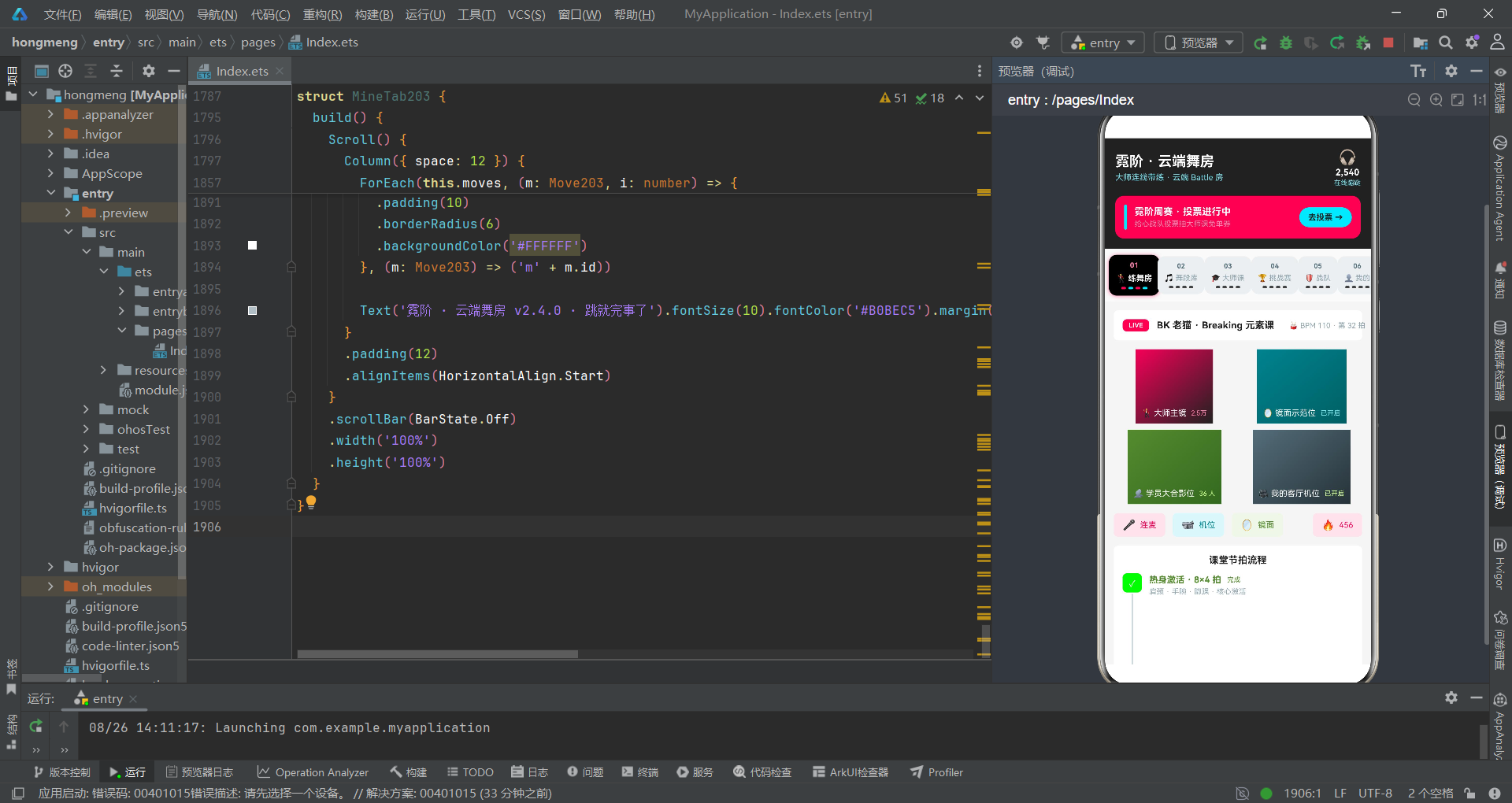
经过对这款云端街舞应用的系统性QA分析,我们共设计了26个测试用例,覆盖了BPM步进器、时长步进器、详情弹窗索引、Battle投票状态、表单空值校验、数组操作安全、柱图渲染、颜色映射、步骤清单状态和Tab导航切换十个关键区域。测试结果显示,15个用例通过,11个用例发现了不同程度的缺陷或隐患。其中最严重的问题集中在表单空值校验区域——上传弹窗的提交按钮完全没有数据写入逻辑和空值校验,用户"发布"一个空名称的舞段不会得到任何反馈,这是一个需要立即修复的功能缺陷。
从缺陷分布来看,边界条件类缺陷主要出现在步进器(BPM和时长都存在"先检查后修改"的越界风险)和柱图渲染(缩放因子硬编码可能导致大值溢出)。异常处理类缺陷主要出现在详情弹窗(删除后索引偏移导致显示错误条目)和步骤清单(可逆切换导致逻辑不一致)。数据校验类缺陷主要出现在表单提交(空值未校验、上传与编辑策略不一致)。这些缺陷大多不会导致应用崩溃——得益于ArkTS框架的容错性和开发者使用的防御性编程模式(三元表达式索引检查、fallback颜色映射、else分支兜底),但它们会影响用户体验和数据准确性。
第一,"边界值分析"必须考虑步进幅度与边界的数学关系——当步进幅度不整除边界值时,"先检查后修改"模式会产生越界。第二,"状态转换测试"需要覆盖所有可能的状态组合——Battle投票的单变量编码方案虽然不崩溃,但产品语义有缺陷。第三,"数据完整性测试"需要关注操作序列——删除后索引偏移是典型的"单次操作正确但连续操作错误"场景。第四,“防御性编程的有效边界"需要明确——三元表达式防止了崩溃但无法防止UX缺陷,空弹窗和空按钮文字仍需要产品层面的修复建议。测试的目的不是证明代码无bug,而是量化代码的信心边界,让开发者和产品经理知道"哪里安全、哪里脆弱、哪里需要加固”。

开源鸿蒙跨平台开发社区汇聚开发者与厂商,共建“一次开发,多端部署”的开源生态,致力于降低跨端开发门槛,推动万物智联创新。
更多推荐

 8
8 0
0- 0


 已为社区贡献29条内容

所有评论(0)