HarmonyOS 6.1 实战:函数式数据操作(map/filter/concat)操作状态膨胀
在HarmonyOS ArkTS声明式UI框架中,组件的状态驱动与数据流管理是构建复杂交互应用的核心基石。本文以一款云观星团直播应用为标本,逐模块走读其数据模型定义、弹窗系统、导航架构与图表渲染逻辑,揭示声明式范式下的设计取舍。
该应用采用"顶部星轨导航 + 底部内容区 + 五弹窗系统"的三层架构,通过@State驱动响应式渲染、@Builder封装复用UI、bindSheet/bindContentCover管理弹窗生命周期,构成了一套完整的业务闭环。
代码走读的核心目的不在于复述实现,而在于发现设计意图与潜在风险的交汇点——在近2000行ArkTS代码中,我们既能看到函数式数据操作(map/filter/concat)的优雅运用,也能发现状态膨胀与边界校验缺失的隐患。
引言:深空暗色系下的交互架构全景
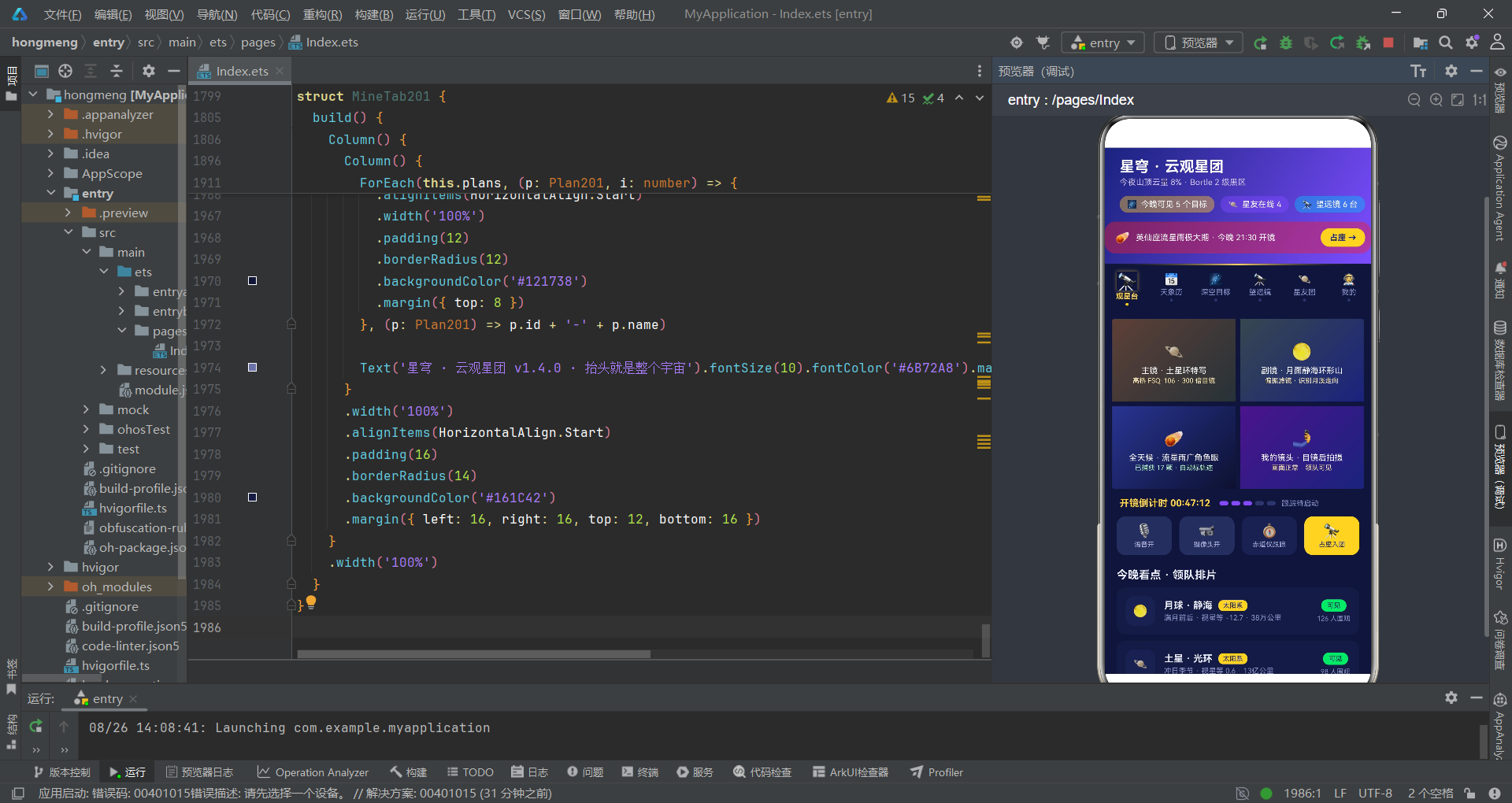
作为一名代码审查者,当我打开这个云观星团项目的源码时,首先映入眼帘的是其宏大的业务蓝图:一个将山顶望远镜远程连线、天象直播、观星团社交、观测计划管理融为一体的垂直社区应用。它不仅需要在移动端呈现深空藏蓝的暗色美学,还要承载多路视频直播、弹幕互动、数据图表等复杂交互场景。从工程角度审视,这绝非一个简单的"展示型"页面,而是一个具备完整CRUD能力、多Tab导航、五弹窗系统的中量级应用。
在技术架构层面,该应用基于HarmonyOS ArkTS声明式开发范式构建。其核心设计思路可以概括为"一个入口组件 + 六个子Tab组件 + 五个弹窗Builder"的分层架构。入口组件@Entry负责统筹全局状态(Tab切换、弹窗开关、数据列表),通过@State装饰器实现响应式数据绑定,再通过回调函数将事件冒泡至子组件,形成单向数据流。这种架构在中小规模应用中是合理的——它既保证了状态的可追踪性,又通过@Builder和@Component实现了足够的代码复用。
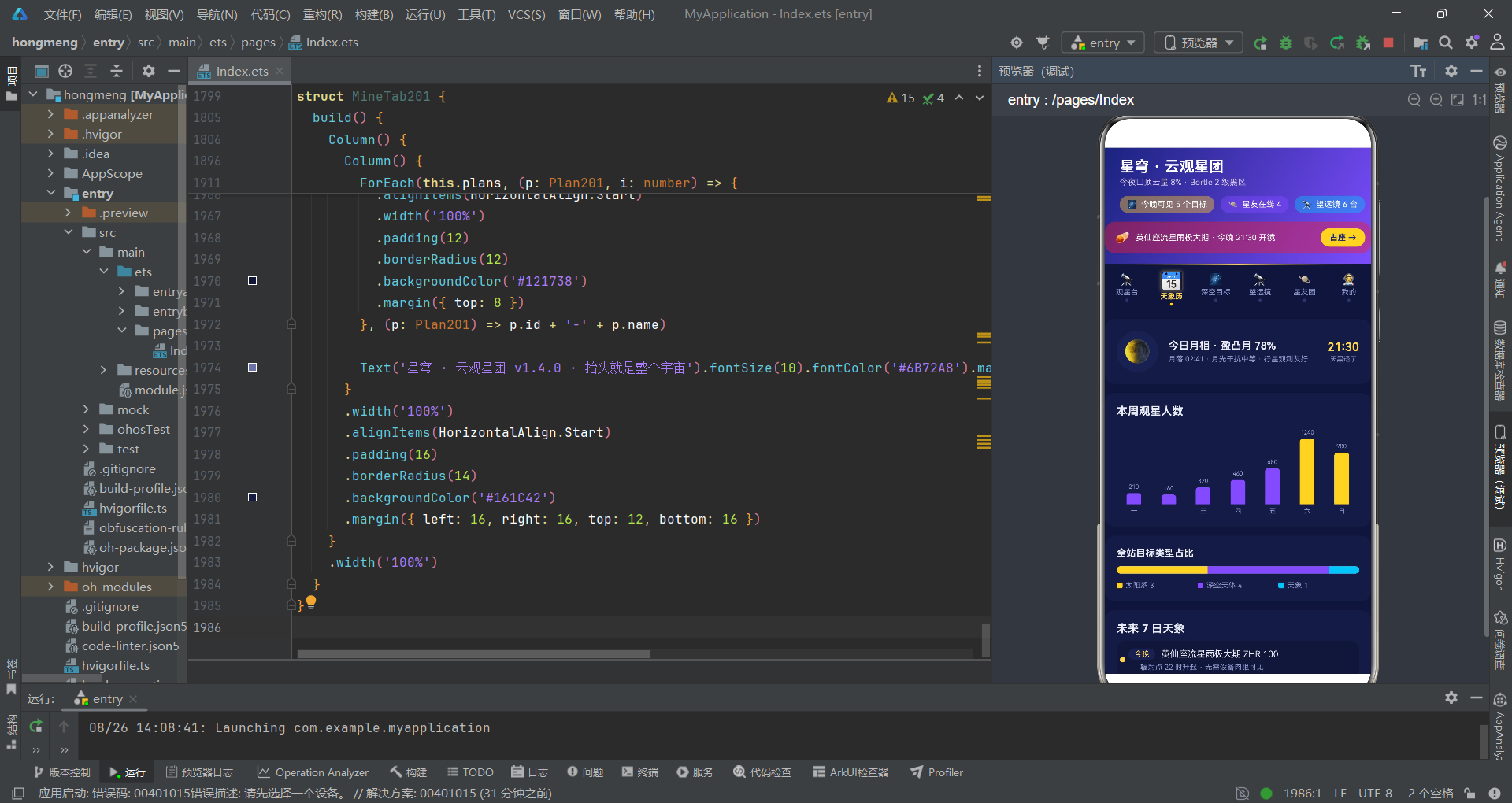
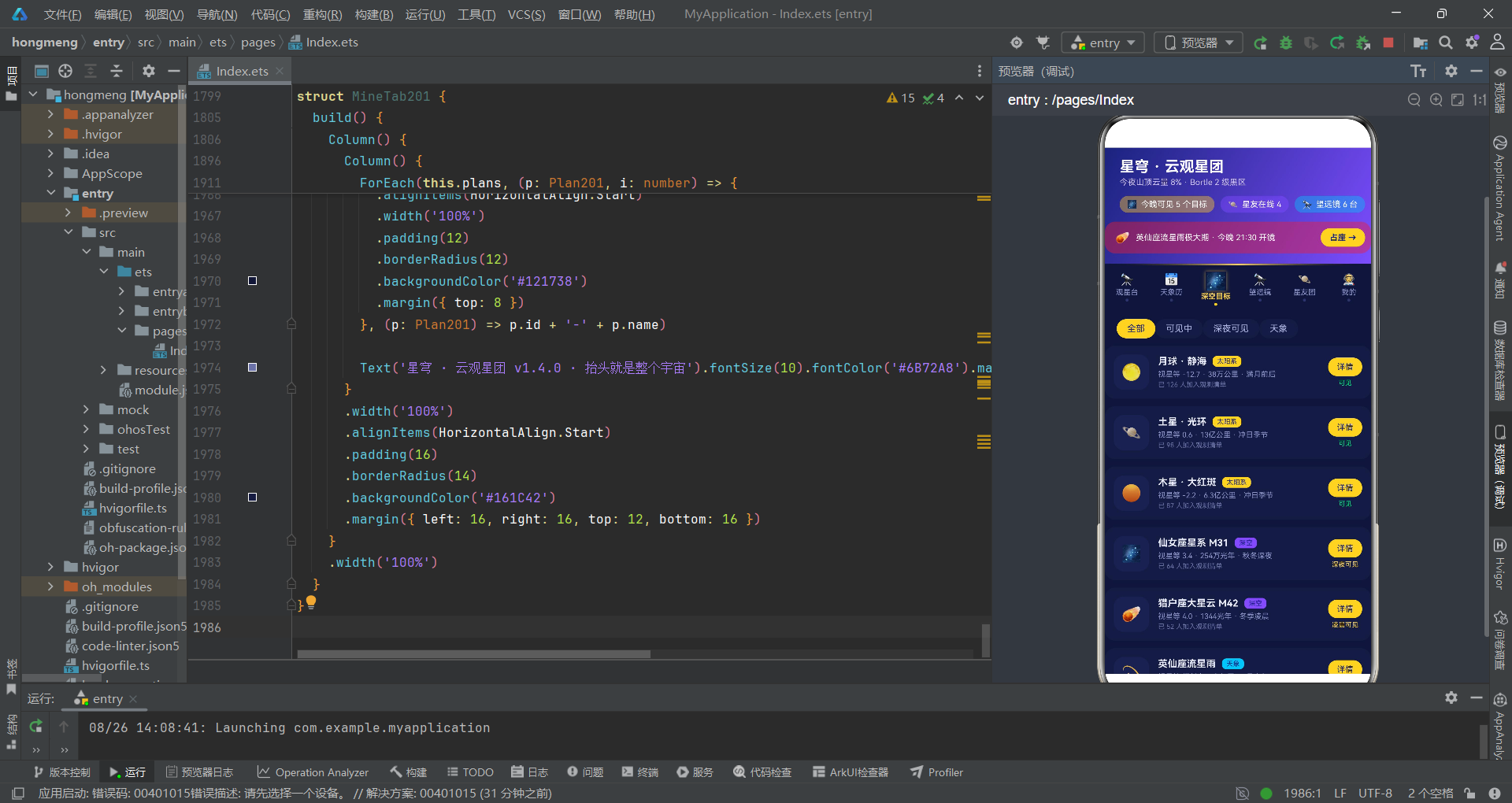
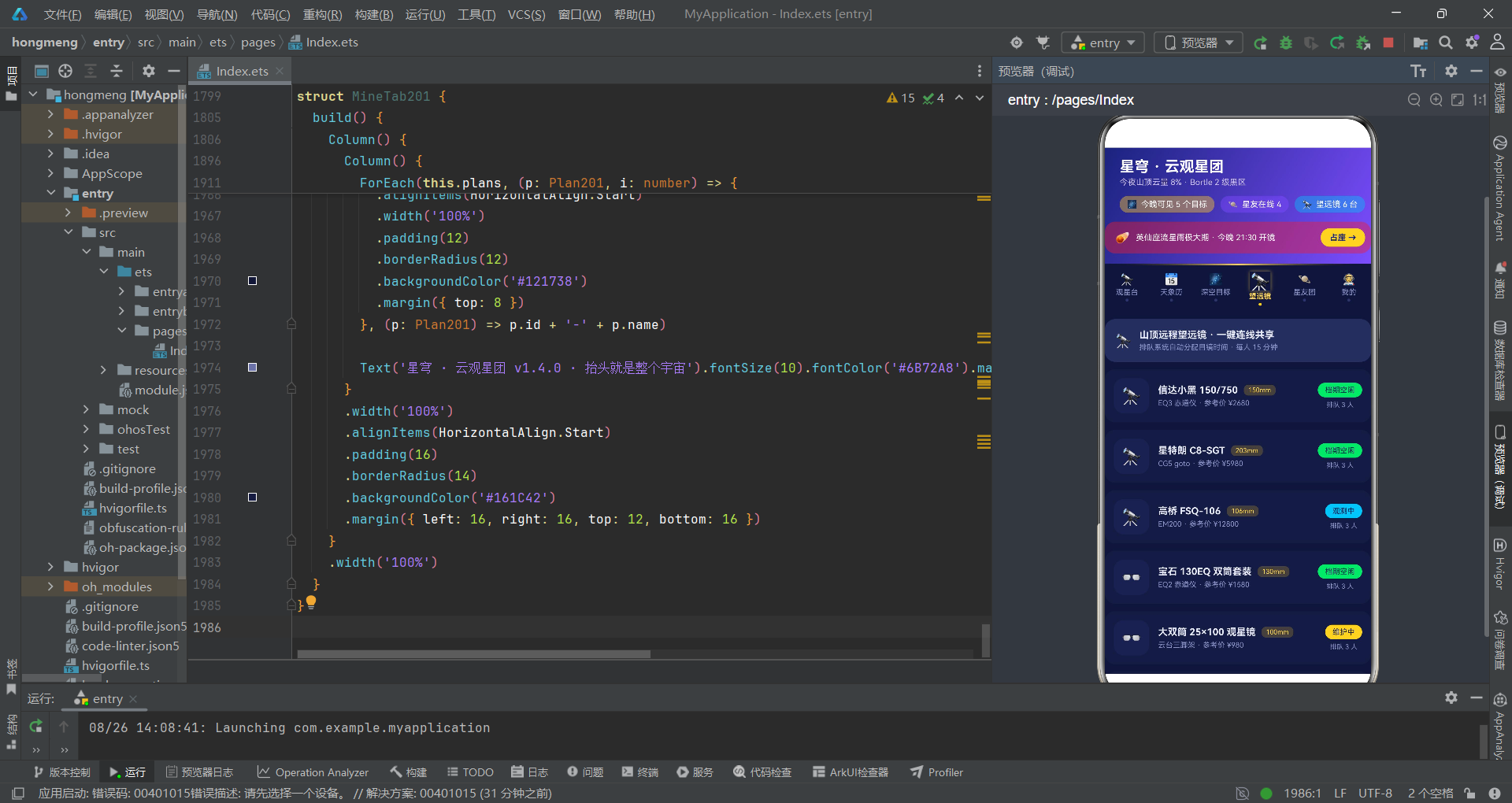
从业务设计的角度深入审视,该应用模拟了"腾讯会议式"的直播场景:顶部是渐变头部展示天气与观星条件,中部是星轨导航条,内容区根据当前Tab切换到不同的功能页面——观星台直播页有四宫格视频画面、语音/摄像头/跟踪工具条、今晚看点列表和弹幕区;天象历页展示月相、观星人数柱图、天象时间线;深空目标页支持筛选与详情查看;望远镜页展示设备状态;星友团页有在线状态与贡献榜;我的页则管理观测计划的增删改查。这六大功能区构成了一个完整的观星社区闭环。
一、数据模型层走读:接口定义与类型约束
走读代码的第一站,永远是数据模型。数据模型是整个应用的骨架,它决定了状态管理的粒度和数据流转的方式。让我们先审视这个应用的数据接口定义。
// 观测计划(可增删改)
interface Plan201 {
  id: number
  name: string
  emoji: string
  target: string
  date: string
  state: string
  priority: boolean
  notes: number
  created: string
}

// 深空目标
interface Target201 {
  name: string
  emoji: string
  type: string
  magnitude: string
  best: string
  dist: string
  state: string
  join: number
}

// 望远镜
interface Scope201 {
  name: string
  emoji: string
  aperture: number
  mount: string
  price: number
  state: string
}
这段数据模型定义展示了应用的核心实体结构。Plan201是唯一允许用户增删改的实体,它包含了id、名称、emoji图标、目标天体、日期、状态、优先级、笔记数和创建日期等九个字段。值得注意的是,这里使用了interface而非class,这在ArkTS中是声明数据结构的推荐做法——interface只定义形状不包含行为,适合用于纯数据传输对象(DTO)。
从类型设计的角度审视,
state字段使用string类型而非枚举(enum),这是一个值得讨论的设计取舍。虽然字符串灵活性更高,但也意味着编译期无法捕获拼写错误——比如"筹备中"写成了"筹盘中",编译器不会报错,只有运行时才会出现颜色映射失败的问题。在更严格的工程实践中,建议将有限状态集提取为联合类型或枚举。
数据接口的定义策略体现了"宽接口、窄行为"的原则——所有接口都是纯数据结构,不包含任何方法。这意味着所有的业务逻辑(如状态着色、统计计算)都被提取到了全局工具函数中,实现了数据与逻辑的分离。这种分离使得数据可以轻松地序列化和传递,也为后续的单元测试提供了便利。
二、全局工具函数走读:纯函数设计与颜色映射策略
在审视了数据模型之后,我们来看支撑业务的工具函数层。这部分代码是整个应用的"胶水层",它连接了静态数据和动态UI渲染。
// 计划状态色
function planStateColor201(s: string): string {
  if (s === '筹备中') {
    return '#FFD54F'
  }
  if (s === '观测中') {
    return '#4FC3F7'
  }
  if (s === '已完成') {
    return '#00E676'
  }
  return '#8C93C9'
}

// 目标类型色
function targetTypeColor201(t: string): string {
  if (t === '太阳系') {
    return '#FFD54F'
  }
  if (t === '深空') {
    return '#7C4DFF'
  }
  return '#4FC3F7'
}

// 在线星友数
function friendOnlineCount201(): number {
  let n: number = 0
  for (let i = 0; i < friendData201.length; i++) {
    if (friendData201[i].online) {
      n++
    }
  }
  return n
}

// 星友贡献最大值
function maxFriendContrib201(): number {
  let m: number = 0
  for (let i = 0; i < friendPop201.length; i++) {
    if (friendPop201[i].contrib > m) {
      m = friendPop201[i].contrib
    }
  }
  return m
}
这一组工具函数展现了两种典型模式。第一种是字符串到颜色的映射函数(planStateColor201、targetTypeColor201、targetStateColor201、scopeStateColor201),它们采用if-else链式判断,将业务状态字符串转换为对应的主题色值。这种设计的好处是简单直接,但每次调用都要遍历所有条件分支,在数据量大时存在微小的性能开销。
从代码审查角度,我注意到颜色映射函数有一个共同的fallback模式——所有函数在未匹配任何条件时都返回
'#8C93C9'或'#90A4AE'这样的灰色调。这是一个良好的防御性编程习惯,确保即使出现了未预期的状态值,UI也不会崩溃或显示空白。不过,建议在fallback分支中添加console.warn日志,便于开发期发现遗漏的状态类型。
第二种是聚合统计函数(friendOnlineCount201、visibleTargetCount201、maxFriendContrib201),它们遍历静态数据数组进行计数或求最大值。这些函数在build()方法中被直接调用,意味着每次UI重建时都会重新计算。在当前数据规模下(6-10条记录),这不会造成性能问题,但如果数据量增长到数百条,建议将计算结果缓存到@State中,避免重复遍历。
三、入口组件状态管理走读:状态膨胀与弹窗协调
入口组件是整个应用的中枢神经。让我们审视它的状态定义策略。
@Entry
@Component
struct Index201 {
  // tab
  @State currentTab: number = 0
  // 弹框开关
  @State showJoinSheet: boolean = false
  @State showNewSheet: boolean = false
  @State showEditSheet: boolean = false
  @State showDeleteDialog: boolean = false
  @State showDetailDialog: boolean = false
  // 观测计划数据(可增删改)
  @State plans: Plan201[] = planData201
  // 报名表单
  @State joinTarget: number = 0
  @State joinScope: number = 0
  @State joinSeats: number = 2
  @State joinMic: boolean = true
  @State joinRemind: boolean = true
  // 新增计划表单
  @State newName: string = ''
  @State newTarget: number = 0
  @State newDate: number = 0
  @State newNotify: boolean = true
  // 编辑计划表单
  @State editIndex: number = -1
  @State editName: string = ''
  @State editTarget: number = 0
  @State editPriority: boolean = false
  // 删除
  @State deleteIndex: number = -1
  @State deleteKeepNote: boolean = true
  // 天体详情
  @State detailIndex: number = 0
这段状态定义是整个应用最值得讨论的代码段之一。入口组件持有了25个@State变量,涵盖了Tab切换、5个弹窗开关、3组表单数据(报名/新增/编辑)、删除配置和详情索引。这种"集中式状态管理"在中小型应用中是可行的——所有状态都在一个组件中管理,数据流清晰可追踪。
然而,从架构审查的角度,这种设计存在一个明显的风险信号:状态膨胀。当
@State变量数量超过20个时,组件的build()方法会变得极其臃肿,任何状态变更都会触发整个组件树的重新渲染。更严重的是,5个弹窗的表单状态全部驻留在入口组件中,即使某个弹窗未打开,其表单数据也始终占用内存。在更完善的架构中,建议将每个弹窗封装为独立的@Component,让表单状态局部化,通过@Link或回调函数与父组件通信。
一个值得肯定的设计是弹窗开关的命名规范——showJoinSheet、showNewSheet、showEditSheet、showDeleteDialog、showDetailDialog,命名清晰表达了弹窗的用途和类型(Sheet vs Dialog)。这种命名让代码可读性大幅提升,新开发者能立即理解每个状态变量的职责。
四、弹窗Builder走读:抽屉与居中弹框的双模式
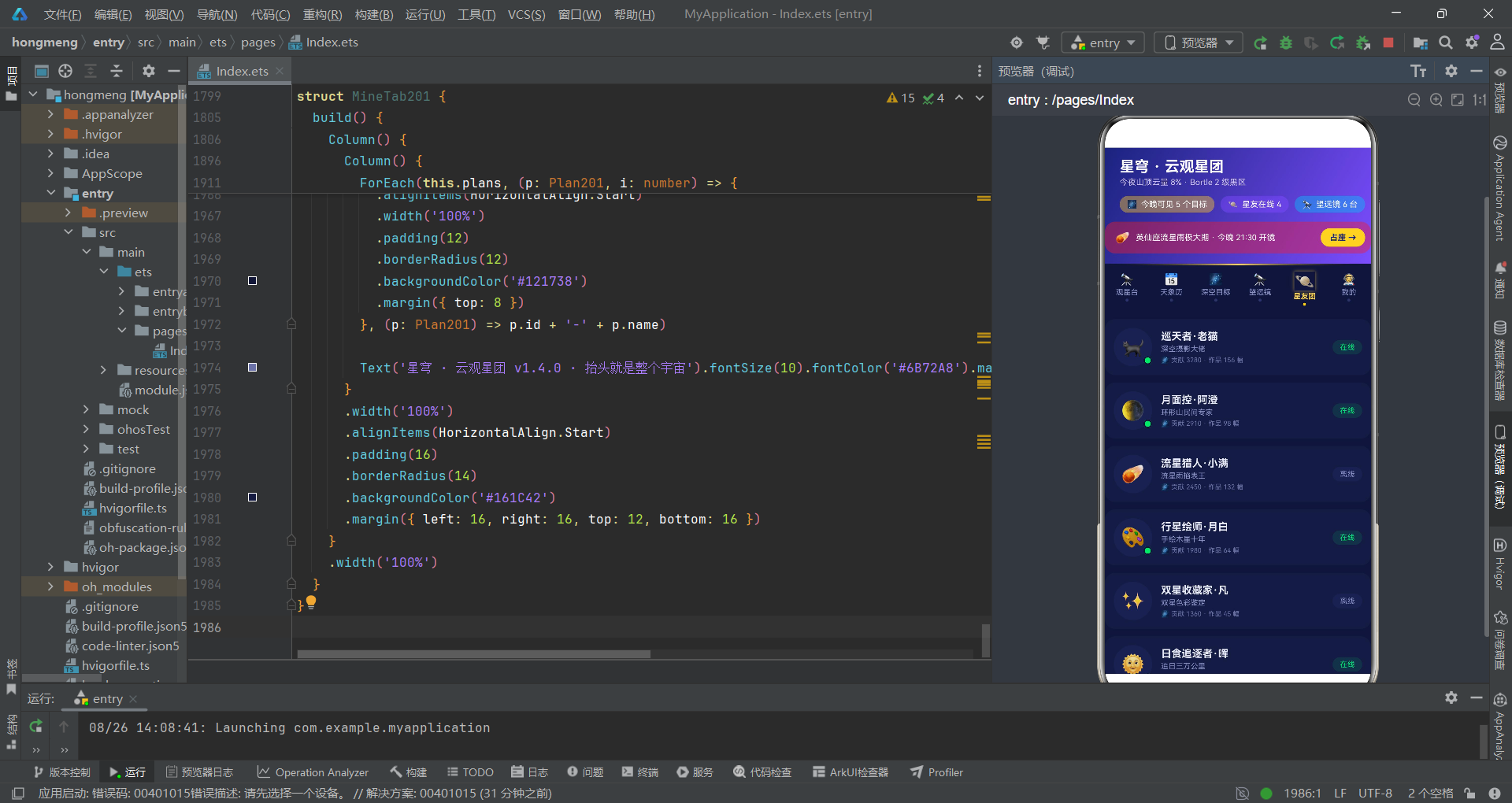
该应用有五个弹窗,分为两种模式:底部抽屉(bindSheet)和居中遮罩(bindContentCover)。让我们审视编辑弹窗的实现,它使用了map回写模式。
// ---------- 弹框三:编辑观测计划(底部抽屉 · map 回写) ----------
@Builder
editSheet201() {
  Column() {
    Row() {
      Column() {
        Text('✏️ 编辑观测计划').fontSize(18).fontWeight(FontWeight.Bold).fontColor('#E8EAF6')
        Text('调整目标与优先级后立即生效').fontSize(11).fontColor('#8C93C9').margin({ top: 4 })
      }.alignItems(HorizontalAlign.Start).layoutWeight(1)
    }
    .width('100%')
    .padding({ left: 20, right: 20, top: 18, bottom: 14 })

    Scroll() {
      Column() {
        // 目标选择 chips
        Column() {
          Text('调整目标天体').fontSize(13).fontWeight(FontWeight.Bold).fontColor('#E8EAF6')
          Row() {
            ForEach(targetTags201, (t: string, i: number) => {
              Text(t)
                .fontSize(12)
                .fontColor(this.editTarget === i ? '#FFFFFF' : '#AEB3DD')
                .padding({ left: 14, right: 14, top: 7, bottom: 7 })
                .borderRadius(16)
                .backgroundColor(this.editTarget === i ? '#4FC3F7' : '#222A56')
                .onClick(() => {
                  this.editTarget = i
                })
            }, (t: string) => t)
          }
        }

        Button() {
          Text('保存修改').fontSize(15).fontWeight(FontWeight.Bold).fontColor('#1A237E')
        }
        .width('90%')
        .height(46)
        .borderRadius(23)
        .backgroundColor('#4FC3F7')
        .margin({ bottom: 24 })
        .onClick(() => {
          if (this.editIndex >= 0 && this.editIndex < this.plans.length) {
            this.plans = this.plans.map((p: Plan201, idx: number) => {
              if (idx === this.editIndex) {
                return {
                  id: p.id,
                  name: this.editName === '' ? p.name : this.editName,
                  emoji: p.emoji,
                  target: targetTags201[this.editTarget],
                  date: p.date,
                  state: p.state,
                  priority: this.editPriority,
                  notes: p.notes,
                  created: p.created
                }
              }
              return p
            })
          }
          this.showEditSheet = false
        })
      }
    }
  }
  .width('100%')
  .height('100%')
  .backgroundColor('#141A40')
}
这个编辑弹窗是整个应用中最能体现函数式数据操作的代码段。保存按钮的onClick回调使用了map方法遍历整个计划数组,当索引匹配editIndex时返回修改后的新对象,否则原样返回。这种不可变更新模式(immutable update)是响应式框架的最佳实践——它确保ArkTS的状态管理系统能正确检测到数据变化并触发重新渲染。
值得赞赏的是边界检查
if (this.editIndex >= 0 && this.editIndex < this.plans.length)。这个检查防止了当editIndex为-1(初始值)或超出数组范围时导致的越界访问。虽然正常流程不会触发这个分支,但防御性编程的价值正在于此——它让代码在面对异常状态时不会崩溃。
再看删除弹窗,它使用了filter模式:
Button() {
  Text('确认删除').fontSize(14).fontWeight(FontWeight.Bold).fontColor('#FFFFFF')
}
.backgroundColor('#E53935')
.onClick(() => {
  if (this.deleteIndex >= 0 && this.deleteIndex < this.plans.length) {
    this.plans = this.plans.filter((p: Plan201, idx: number) => {
      return idx !== this.deleteIndex
    })
  }
  this.showDeleteDialog = false
})
删除操作使用filter创建新数组,排除目标索引的元素。与splice直接修改原数组不同,filter返回一个全新的数组引用,这确保了ArkTS的@State能正确感知到变化。这是一个微妙但重要的设计选择——如果在@State数组上直接调用splice,某些情况下状态变化可能不会被正确传播。
五、星轨导航实现走读:渐变线 + 发光动画的视觉设计
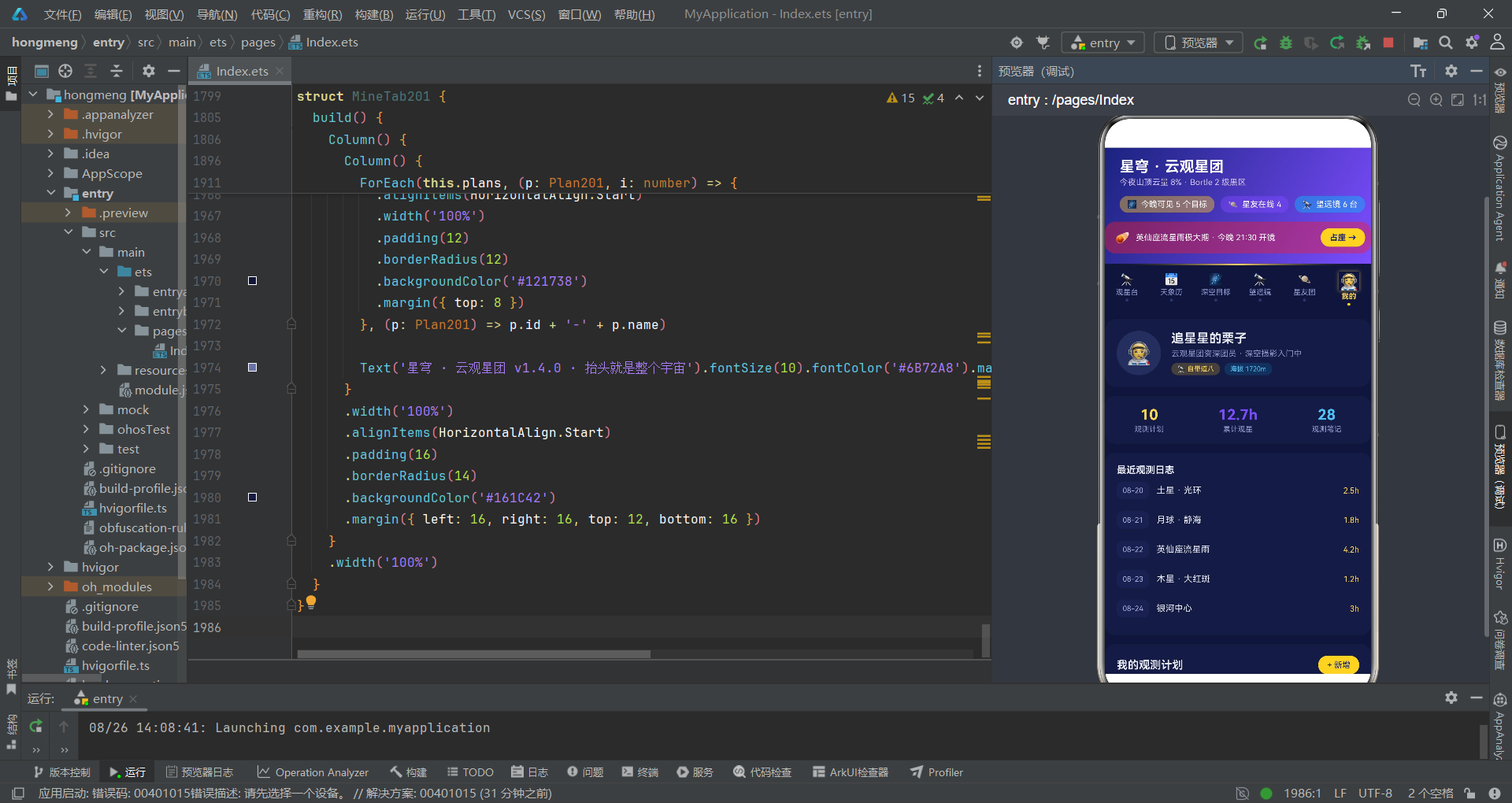
导航条是用户最频繁交互的区域之一。让我们走读顶部"星轨"导航的实现。
// ---------- 顶部「星轨」tab ----------
Column() {
  // 星轨渐变线
  Text('')
    .width('100%')
    .height(2)
    .linearGradient({
      angle: 90,
      colors: [['#00000000', 0], ['#FFD54F', 0.5], ['#00000000', 1]]
    })
  Row() {
    ForEach(tabItems201, (t: TabItem201, i: number) => {
      Column({ space: 3 }) {
        Text(t.icon)
          .fontSize(this.currentTab === i ? 20 : 15)
          .fontColor('#FFFFFF')
          .scale(this.currentTab === i ? { x: 1.12, y: 1.12 } : { x: 1, y: 1 })
          .animation({ duration: 180 })
          .shadow({
            radius: this.currentTab === i ? 10 : 0,
            color: this.currentTab === i ? '#99FFD54F' : '#00000000',
            offsetX: 0,
            offsetY: 0
          })
        Text(t.name)
          .fontSize(10)
          .fontWeight(this.currentTab === i ? FontWeight.Bold : FontWeight.Normal)
          .fontColor(this.currentTab === i ? '#FFD54F' : '#8C93C9')
        if (this.currentTab === i) {
          Text('')
            .width(4)
            .height(4)
            .borderRadius(2)
            .backgroundColor('#FFD54F')
        } else {
          Text('')
            .width(4)
            .height(4)
            .borderRadius(2)
            .backgroundColor('#2E3568')
        }
      }
      .layoutWeight(1)
      .padding({ top: 10, bottom: 8 })
      .onClick(() => {
        this.currentTab = i
      })
    }, (t: TabItem201) => t.name)
  }
}
.backgroundColor('#10153A')
这段导航代码展示了三个层次的视觉设计技巧。第一层是顶部星轨渐变线——一个2像素高的Text组件,通过linearGradient实现了从透明到金色再到透明的水平渐变,模拟了星光在夜空中划过的轨迹。这个纯装饰元素极大地提升了导航条的氛围感。
第二层是选中态的发光效果——通过.shadow属性为选中项添加了10像素半径的金色光晕(#99FFD54F),配合.scale({ x: 1.12, y: 1.12 })的1.12倍放大和.animation({ duration: 180 })的180毫秒动画,实现了选中星星"发光放大"的视觉效果。这种多属性联动的动画设计让交互反馈层次丰富。
从性能审查角度,
ForEach的第三个参数(key生成函数)使用t.name作为唯一标识是合理的,因为Tab项名称不重复。但需要注意的是,if-else条件渲染选中/未选中状态的小圆点会导致每次Tab切换时整个ForEach重新构建。在6个Tab项的场景下这是可接受的,但如果Tab数量增加到数十个,建议将条件渲染改为样式属性绑定,减少组件树的重建开销。
第三层是选中指示器——选中项下方显示一个4x4的圆点,金色表示选中,深蓝灰色表示未选中。这种设计语言在移动端导航中非常常见,它提供了额外的视觉锚点,帮助用户快速定位当前位置。
六、直播宫格与工具条走读:四宫格视频布局
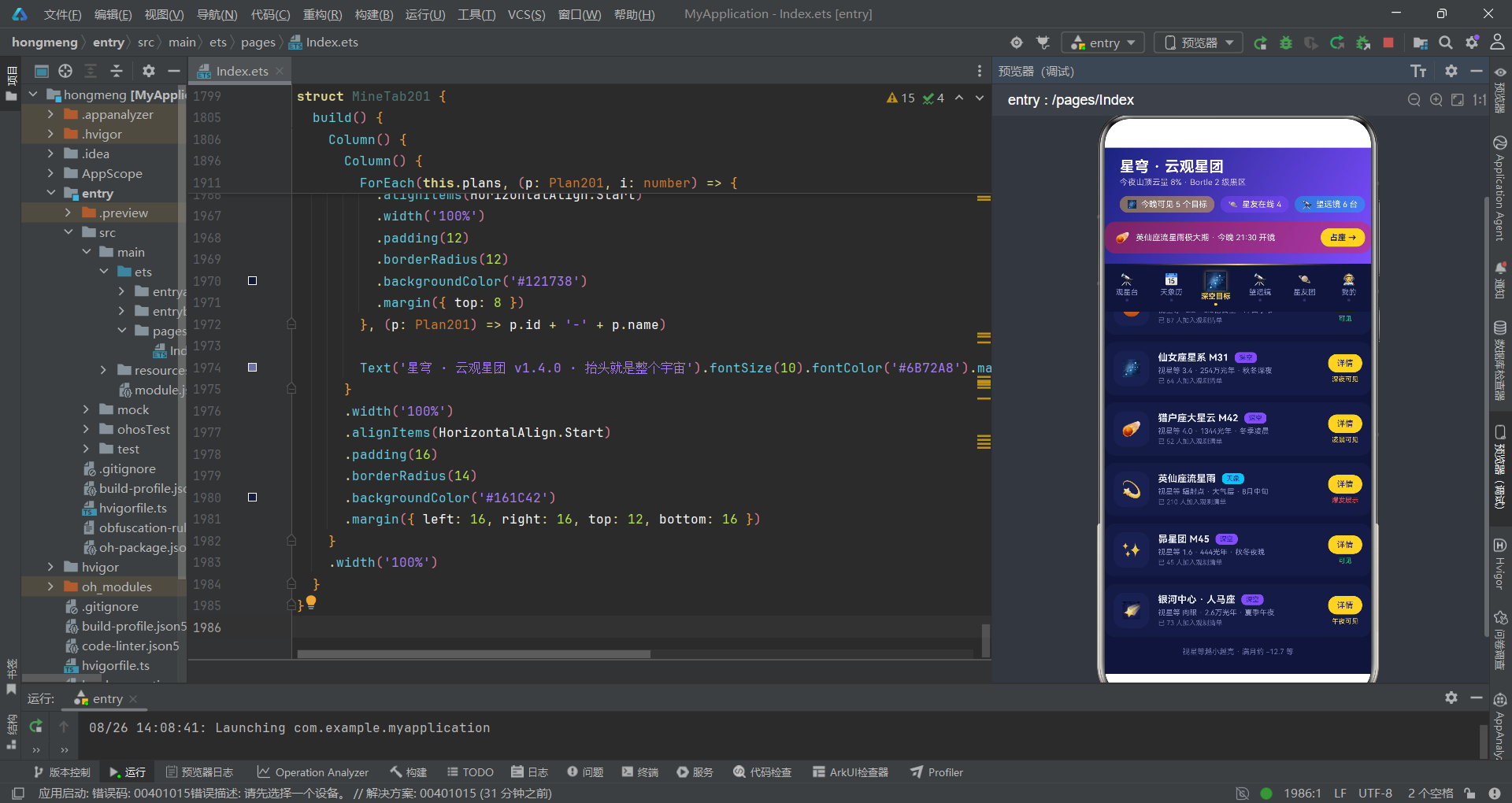
观星台直播页是应用的核心交互区。让我们审视其四宫格视频布局和工具条实现。
@Component
struct LiveTab201 {
  @State micOn: boolean = true
  @State camOn: boolean = true
  @State trackOn: boolean = false
  @State trackSecs: number = 3
  onJoin: () => void = () => {}

  build() {
    Column() {
      // 直播宫格
      Grid() {
        GridItem() {
          Column() {
            Text('🪐').fontSize(22).margin({ top: 8 })
            Text('主镜 · 土星环特写').fontSize(11).fontColor('#FFFFFF').margin({ top: 6 })
            Text('高桥 FSQ-106 · 300 倍目镜').fontSize(9).fontColor('#FFECB3').margin({ top: 2 })
          }
          .width('100%')
          .height('100%')
          .justifyContent(FlexAlign.Center)
          .linearGradient({
            angle: 135,
            colors: [['#5D4037', 0], ['#263238', 1]]
          })
        }
        GridItem() {
          Column() {
            Text('🌕').fontSize(22).margin({ top: 8 })
            Text('副镜 · 月面静海环形山').fontSize(11).fontColor('#FFFFFF').margin({ top: 6 })
            Text('偏振滤镜 · 识别月溪走向').fontSize(9).fontColor('#FFECB3').margin({ top: 2 })
          }
          .linearGradient({
            angle: 135,
            colors: [['#37474F', 0], ['#1A237E', 1]]
          })
        }
        // ... 更多宫格
      }
      .columnsTemplate('1fr 1fr')
      .rowsTemplate('1fr 1fr')
      .columnsGap(6)
      .rowsGap(6)
      .height(230)
      .borderRadius(14)

      // 工具条
      Row({ space: 10 }) {
        Column() {
          Text(this.micOn ? '🎙️' : '🔇').fontSize(18)
          Text(this.micOn ? '语音开' : '已闭麦').fontSize(9).fontColor('#AEB3DD').margin({ top: 3 })
        }
        .layoutWeight(1)
        .backgroundColor(this.micOn ? '#262E5C' : '#1B2150')
        .onClick(() => {
          this.micOn = !this.micOn
        })
        // ... 更多工具按钮
      }
    }
  }
}
四宫格直播布局使用了Grid组件的columnsTemplate('1fr 1fr')和rowsTemplate('1fr 1fr')配置,实现了等大的2x2网格。每个宫格通过linearGradient设置了不同的渐变色——主镜用土星棕色调、副镜用月球灰色调、流星用深蓝调、用户镜头根据摄像头开关状态切换配色。这种语义化配色策略让用户一眼就能区分不同的视频源。
工具条的设计遵循了"图标+文字+背景色联动"的三件套模式——每个按钮的图标、文字和背景色都根据状态实时切换。例如麦克风按钮在开启时显示🎙️和#262E5C背景,关闭时显示🔇和#1B2150背景。这种设计虽然简单,但提供了清晰的状态反馈。
七、数据图表渲染走读:纯CSS柱图与堆叠条
该应用没有使用任何图表库,而是通过纯ArkTS布局组件实现了柱图、堆叠条和横条。让我们审视本周观星人数柱图的实现。
// 本周观星人数柱图
Column() {
  Text('本周观星人数').fontSize(15).fontWeight(FontWeight.Bold).fontColor('#E8EAF6')
  Row() {
    ForEach(weekSee201, (w: WeekSee201) => {
      Column({ space: 4 }) {
        Text(w.people + '').fontSize(8).fontColor('#8C93C9')
        Column()
          .width(20)
          .height(w.people / 14)
          .borderRadius({ topLeft: 4, topRight: 4 })
          .backgroundColor(w.people > 800 ? '#FFD54F' : '#7C4DFF')
        Text(w.day.replace('周', '')).fontSize(9).fontColor('#8C93C9')
      }
      .layoutWeight(1)
    }, (w: WeekSee201) => w.day)
  }
  .width('100%')
  .height(120)
  .alignItems(VerticalAlign.Bottom)
}
这个柱图的实现方式非常巧妙。每根柱子是一个Column组件,其高度通过height(w.people / 14)计算——将人数除以14得到像素高度(最大值1240/14≈89像素)。柱子颜色根据数值动态切换:超过800人用金色#FFD54F,否则用紫色#7C4DFF。整个图表通过Row的alignItems(VerticalAlign.Bottom)实现底部对齐,模拟了传统柱图的视觉效果。
从代码审查角度,这个
/ 14的除数是一个"魔术数字"(magic number)——它的含义是"每14人对应1像素高度"。这种硬编码的缩放因子是维护的隐患:如果数据范围变化(比如人数达到2000),柱子会超出容器高度。建议将缩放因子提取为常量,或使用动态计算:height = (w.people / maxPeople) * maxHeight。
再看目标类型占比堆叠条:
// 目标类型占比堆叠条
Row() {
  ForEach(targetMix201, (m: TargetMix201) => {
    Column() {}.layoutWeight(m.count).height(10).backgroundColor(m.color)
  }, (m: TargetMix201) => m.label)
}
.width('100%')
.borderRadius(5)
.clip(true)
堆叠条的实现更加精简——通过layoutWeight(m.count)将不同类型的数量作为权重分配宽度,3+4+1=8的权重总和决定了各段的比例宽度。.clip(true)确保圆角裁剪生效。这种利用layoutWeight实现比例分配的技巧在ArkTS中非常实用。
八、弹窗绑定与内容切换走读:bindSheet与bindContentCover
最后,让我们审视入口组件的build()方法底部——弹窗绑定和内容区切换。
build() {
  Column() {
    // 头部渐变区
    Column() {
      // ...
    }
    .linearGradient({
      angle: 120,
      colors: [['#1A237E', 0], ['#7C4DFF', 1]]
    })

    // 顶部tab
    Column() {
      // 星轨导航
    }

    // 内容区
    Scroll() {
      Column() {
        if (this.currentTab === 0) {
          LiveTab201({
            onJoin: () => {
              this.showJoinSheet = true
            }
          })
        } else if (this.currentTab === 1) {
          CalendarTab201()
        } else if (this.currentTab === 2) {
          TargetTab201({
            onDetail: (i: number) => {
              this.detailIndex = i
              this.showDetailDialog = true
            }
          })
        } else if (this.currentTab === 3) {
          ScopeTab201()
        } else if (this.currentTab === 4) {
          FriendsTab201()
        } else {
          MineTab201({
            plans: this.plans,
            onNew: () => {
              this.showNewSheet = true
            },
            onEdit: (i: number) => {
              this.editIndex = i
              this.editName = this.plans[i].name
              this.editTarget = targetIndex201(this.plans[i].target)
              this.editPriority = this.plans[i].priority
              this.showEditSheet = true
            },
            onDelete: (i: number) => {
              this.deleteIndex = i
              this.showDeleteDialog = true
            }
          })
        }
      }
    }
  }
  // 五个弹框绑定
  .bindSheet($$this.showJoinSheet, this.joinSheet201(), {
    height: '78%',
    dragBar: true,
    showClose: false,
    backgroundColor: '#141A40'
  })
  .bindSheet($$this.showNewSheet, this.newSheet201(), {
    height: '78%',
    dragBar: true,
    showClose: false,
    backgroundColor: '#141A40'
  })
  .bindContentCover($$this.showDeleteDialog, this.deleteDialog201(), {})
  .bindContentCover($$this.showDetailDialog, this.detailDialog201(), {})
}
这段代码展示了ArkTS弹窗系统的完整使用模式。三个底部抽屉通过bindSheet绑定,使用$$双向绑定语法将@State布尔值与弹窗显示状态关联;两个居中弹框通过bindContentCover绑定。$$语法是ArkTS特有的双向数据绑定标记,它确保弹窗的关闭手势(如下滑关闭抽屉)能自动更新@State变量。
从架构审查角度,Tab切换使用了
if-else if-else链而非ForEach+条件渲染。在Tab数量固定(6个)的场景下,if-else链是合理的——它让每个Tab的路由逻辑清晰可见。但如果未来需要支持动态Tab配置,建议重构为映射表+动态渲染模式。此外,MineTab201通过@Prop plans: Plan201[]接收父组件的数据,同时通过回调函数onNew/onEdit/onDelete将操作事件冒泡给父组件处理。这种"数据向下、事件向上"的单向数据流是ArkTS组件通信的推荐模式。
核心业务流程
九、子组件通信模式走读:@Prop与回调函数
该应用的子Tab组件通过@Prop接收数据、通过回调函数发送事件。让我们审视MineTab201的通信模式。
@Component
struct MineTab201 {
  @Prop plans: Plan201[]
  onNew: () => void = () => {}
  onEdit: (i: number) => void = () => {}
  onDelete: (i: number) => void = () => {}

  build() {
    Column() {
      // 观测计划列表(可增删改)
      ForEach(this.plans, (p: Plan201, i: number) => {
        Column() {
          Row() {
            Text(p.emoji).fontSize(20)
            Column() {
              Row() {
                if (p.priority) {
                  Text('优先')
                    .fontSize(8)
                    .fontColor('#1A237E')
                    .padding({ left: 5, right: 5, top: 1, bottom: 1 })
                    .borderRadius(4)
                    .backgroundColor('#FFD54F')
                    .margin({ right: 6 })
                }
                Text(p.name).fontSize(13).fontWeight(FontWeight.Bold).fontColor('#E8EAF6')
              }
              Text(p.created + ' · ' + p.date + ' · 目标 ' + p.target + ' · 笔记 ' + p.notes)
                .fontSize(10).fontColor('#8C93C9').margin({ top: 3 })
            }
            .alignItems(HorizontalAlign.Start)
            .layoutWeight(1)
            .margin({ left: 10 })
            Text(p.state)
              .fontSize(9)
              .fontColor('#1B2150')
              .padding({ left: 8, right: 8, top: 3, bottom: 3 })
              .borderRadius(8)
              .backgroundColor(planStateColor201(p.state))
          }

          Row({ space: 8 }) {
            Text('编辑')
              .fontSize(10)
              .fontColor('#4FC3F7')
              .padding({ left: 10, right: 10, top: 4, bottom: 4 })
              .borderRadius(10)
              .backgroundColor('#224FC3F7')
              .onClick(() => {
                this.onEdit(i)
              })
            Text('删除')
              .fontSize(10)
              .fontColor('#FF8A80')
              .padding({ left: 10, right: 10, top: 4, bottom: 4 })
              .borderRadius(10)
              .backgroundColor('#33E53935')
              .onClick(() => {
                this.onDelete(i)
              })
          }
        }
        .padding(12)
        .borderRadius(12)
        .backgroundColor('#121738')
        .margin({ top: 8 })
      }, (p: Plan201) => p.id + '-' + p.name)
    }
  }
}
MineTab201是唯一需要CRUD操作的子组件,它的通信模式值得深入分析。数据流向:父组件通过@Prop plans: Plan201[]将计划数组单向传递给子组件,@Prop是只读绑定,子组件不能直接修改plans。事件流向:子组件通过onEdit(i)和onDelete(i)回调将操作索引传递给父组件,父组件在回调中设置editIndex/editName等状态并打开对应弹窗。
ForEach的key生成函数p.id + '-' + p.name是一个值得称赞的细节。使用id+name的组合键比单纯使用id更稳定——如果未来数据源发生变化(比如id从1重新开始),name仍能提供区分度。不过,严格来说p.id在当前数据中已经唯一,组合键的额外name部分更多是防御性措施。
技术点对比分析表
| 技术维度 | 实现方案 | 设计亮点 | 潜在改进点 |
|---|---|---|---|
| 状态管理 | 集中式25个@State | 数据流清晰可追踪 | 状态膨胀风险,建议弹窗状态局部化 |
| 弹窗系统 | bindSheet + bindContentCover | $$双向绑定自动同步 | 五弹窗表单状态全驻留入口组件 |
| 数据操作 | map/filter不可变更新 | 响应式检测可靠 | 无持久化,刷新后数据丢失 |
| 导航动画 | scale + shadow + animation | 多属性联动视觉效果丰富 | ForEach条件渲染导致重建开销 |
| 图表渲染 | 纯布局组件实现柱图 | 无第三方依赖,轻量 | 魔术数字/14硬编码缩放因子 |
| 颜色映射 | if-else链式判断 | 简单直观,有fallback | 无枚举约束,运行时才能发现拼写错误 |
| 组件通信 | @Prop向下 + 回调向上 | 单向数据流规范 | 子组件无法直接修改数据,需多层冒泡 |
| 边界检查 | if (index >= 0 && index < length) | 防御性编程到位 | 部分表单未做空值校验 |
| 配色系统 | 深空藏蓝×星光金×银河紫 | 语义化主题色 | 颜色值散落在各处,无集中管理 |
安装DevEco Studio程序

选择目标安装目录:

设置环境变量,但是需要重启一下:

新建一个空白模板:

设置API为24的模板项目:
初始化项目,自动下载相关依赖:

完整代码:
// =====================================================================
// 场景:山顶望远镜机位连线共享,土星环特写、月面环形山、流星全天候机位,
// 领队语音讲解,可报名观星团、制定观测计划、查看天象日历。
// 配色:深空藏蓝 #1A237E × 星光金 #FFD54F × 银河紫 #7C4DFF(深空暗色系)
// Tab 布局:顶部「星轨」导航(横向星轨渐变线 + 每项星星造型,
// 选中星星星光金发光(shadow 光晕)+ scale 1.12 微放大)
// 弹框:报名观星团(抽屉) / 新增观测计划(抽屉-concat前插) / 编辑计划(抽屉-map回写) /
// 删除计划(居中-filter) / 天体详情(居中-本月可见度柱图)
// 图表:本周观星人数柱图 / 目标类型占比堆叠条 / 星友贡献横条 / 本月可见度柱图(详情)
// =====================================================================
// ----------------------------- 数据模型 -----------------------------
// 观测计划(可增删改)
interface Plan201 {
id: number
name: string
emoji: string
target: string
date: string
state: string
priority: boolean
notes: number
created: string
}
// 深空目标
interface Target201 {
name: string
emoji: string
type: string
magnitude: string
best: string
dist: string
state: string
join: number
}
// 望远镜
interface Scope201 {
name: string
emoji: string
aperture: number
mount: string
price: number
state: string
}
// 星友
interface Friend201 {
name: string
emoji: string
title: string
contrib: number
photos: number
online: boolean
}
// 弹幕
interface Barrage201 {
user: string
text: string
color: string
}
// 本周观星人数柱图
interface WeekSee201 {
day: string
people: number
}
// 目标类型占比堆叠
interface TargetMix201 {
label: string
count: number
color: string
}
// 星友贡献横条
interface FriendPop201 {
name: string
contrib: number
emoji: string
}
// 本月可见度柱图(详情)
interface SeeRate201 {
seg: string
rate: number
}
// 观测日志
interface SeeLog201 {
date: string
target: string
hours: number
}
// tab 项
interface TabItem201 {
icon: string
name: string
}
// ----------------------------- 静态数据 -----------------------------
const tabItems201: TabItem201[] = [
{ icon: '🔭', name: '观星台' },
{ icon: '📅', name: '天象历' },
{ icon: '🌌', name: '深空目标' },
{ icon: '🔭', name: '望远镜' },
{ icon: '🪐', name: '星友团' },
{ icon: '🧑🚀', name: '我的' }
]
const planData201: Plan201[] = [
{ id: 1, name: '土星环大冲观测夜', emoji: '🪐', target: '土星', date: '今晚', state: '筹备中', priority: true, notes: 3, created: '08-18' },
{ id: 2, name: '英仙座流星雨守夜', emoji: '☄️', target: '流星雨', date: '明晚', state: '筹备中', priority: true, notes: 5, created: '08-19' },
{ id: 3, name: '满月环形山细拍', emoji: '🌕', target: '月球', date: '本周末', state: '观测中', priority: false, notes: 2, created: '08-20' },
{ id: 4, name: '仙女座星系初见', emoji: '🌌', target: '仙女座', date: '今晚', state: '筹备中', priority: false, notes: 1, created: '08-21' },
{ id: 5, name: '猎户座大星云巡礼', emoji: '☄️', target: '猎户座', date: '下周三', state: '待定', priority: false, notes: 0, created: '08-22' },
{ id: 6, name: '木星四大卫星连线', emoji: '🟠', target: '木星', date: '本周末', state: '筹备中', priority: false, notes: 2, created: '08-22' },
{ id: 7, name: '仙女双星色彩对比', emoji: '✨', target: '深空双星', date: '下周四', state: '待定', priority: false, notes: 0, created: '08-23' },
{ id: 8, name: '月掩金星掐表挑战', emoji: '🌗', target: '月球', date: '下周五', state: '待定', priority: true, notes: 4, created: '08-23' },
{ id: 9, name: '北斗七星指极认星', emoji: '🌟', target: '星空认星', date: '今晚', state: '已完成', priority: false, notes: 6, created: '08-17' },
{ id: 10, name: '银河拱桥接片拍摄', emoji: '🌉', target: '银河', date: '本周末', state: '筹备中', priority: false, notes: 3, created: '08-24' }
]
const targetData201: Target201[] = [
{ name: '月球 · 静海', emoji: '🌕', type: '太阳系', magnitude: '-12.7', best: '满月前后', dist: '38万公里', state: '可见', join: 126 },
{ name: '土星 · 光环', emoji: '🪐', type: '太阳系', magnitude: '0.6', best: '冲日季节', dist: '13亿公里', state: '可见', join: 98 },
{ name: '木星 · 大红斑', emoji: '🟠', type: '太阳系', magnitude: '-2.2', best: '冲日季节', dist: '6.3亿公里', state: '可见', join: 87 },
{ name: '仙女座星系 M31', emoji: '🌌', type: '深空', magnitude: '3.4', best: '秋冬深夜', dist: '254万光年', state: '深夜可见', join: 64 },
{ name: '猎户座大星云 M42', emoji: '☄️', type: '深空', magnitude: '4.0', best: '冬季凌晨', dist: '1344光年', state: '凌晨可见', join: 52 },
{ name: '英仙座流星雨', emoji: '💫', type: '天象', magnitude: '辐射点', best: '8月中旬', dist: '大气层', state: '爆发展示', join: 210 },
{ name: '昴星团 M45', emoji: '✨', type: '深空', magnitude: '1.6', best: '秋冬夜晚', dist: '444光年', state: '可见', join: 45 },
{ name: '银河中心 · 人马座', emoji: '🌠', type: '深空', magnitude: '肉眼', best: '夏季午夜', dist: '2.6万光年', state: '午夜可见', join: 73 }
]
const scopeData201: Scope201[] = [
{ name: '信达小黑 150/750', emoji: '🔭', aperture: 150, mount: 'EQ3 赤道仪', price: 2680, state: '档期空闲' },
{ name: '星特朗 C8-SGT', emoji: '🔭', aperture: 203, mount: 'CG5 goto', price: 5980, state: '档期空闲' },
{ name: '高桥 FSQ-106', emoji: '🔭', aperture: 106, mount: 'EM200', price: 12800, state: '观测中' },
{ name: '宝石 130EQ 双筒套装', emoji: '👓', aperture: 130, mount: 'EQ2 赤道仪', price: 1580, state: '档期空闲' },
{ name: '大双筒 25×100 观星镜', emoji: '👓', aperture: 100, mount: '云台三脚架', price: 980, state: '维护中' },
{ name: '日珥镜 Lunt 60', emoji: '🌞', aperture: 60, mount: '手动经纬仪', price: 16800, state: '档期空闲' }
]
const friendData201: Friend201[] = [
{ name: '巡天者·老猫', emoji: '🐈⬛', title: '深空摄影大佬', contrib: 3280, photos: 156, online: true },
{ name: '月面控·阿澄', emoji: '🌗', title: '环形山民间专家', contrib: 2910, photos: 98, online: true },
{ name: '流星猎人·小满', emoji: '☄️', title: '流星雨掐表王', contrib: 2450, photos: 132, online: false },
{ name: '行星绘师·月白', emoji: '🎨', title: '手绘木星十年', contrib: 1980, photos: 64, online: true },
{ name: '双星收藏家·凡', emoji: '✨', title: '双星色彩鉴定', contrib: 1360, photos: 45, online: false },
{ name: '日食追逐者·晖', emoji: '🌞', title: '追日三万公里', contrib: 1120, photos: 71, online: true }
]
const barrageData201: Barrage201[] = [
{ user: '同好小白', text: '第一次看清卡西尼缝,泪目', color: '#E8EAF6' },
{ user: '赤道仪苦手', text: '老猫对极轴只用了三分钟', color: '#C5CAE9' },
{ user: '月面爱好者', text: '静海的边界像海岸线一样', color: '#E8EAF6' },
{ user: '许愿专业户', text: '第五颗流星,许愿成功!', color: '#C5CAE9' },
{ user: '光污染难民', text: '山顶 Bortle 2 级真不是吹的', color: '#E8EAF6' },
{ user: '星云猎人', text: 'M42 在目镜里像一团棉花', color: '#C5CAE9' },
{ user: '行星摄影党', text: '今晚视宁度极佳,快冲木星', color: '#E8EAF6' },
{ user: '银河拱桥', text: '接片 32 张,拼出整条银河', color: '#C5CAE9' }
]
const weekSee201: WeekSee201[] = [
{ day: '周一', people: 210 },
{ day: '周二', people: 180 },
{ day: '周三', people: 320 },
{ day: '周四', people: 460 },
{ day: '周五', people: 680 },
{ day: '周六', people: 1240 },
{ day: '周日', people: 980 }
]
const targetMix201: TargetMix201[] = [
{ label: '太阳系', count: 3, color: '#FFD54F' },
{ label: '深空天体', count: 4, color: '#7C4DFF' },
{ label: '天象', count: 1, color: '#4FC3F7' }
]
const friendPop201: FriendPop201[] = [
{ name: '巡天者·老猫', contrib: 3280, emoji: '🐈⬛' },
{ name: '月面控·阿澄', contrib: 2910, emoji: '🌗' },
{ name: '流星猎人·小满', contrib: 2450, emoji: '☄️' },
{ name: '行星绘师·月白', contrib: 1980, emoji: '🎨' },
{ name: '双星收藏家·凡', contrib: 1360, emoji: '✨' },
{ name: '日食追逐者·晖', contrib: 1120, emoji: '🌞' }
]
const seeRate201: SeeRate201[] = [
{ seg: '上旬', rate: 62 },
{ seg: '中旬', rate: 78 },
{ seg: '下旬', rate: 55 },
{ seg: '满月夜', rate: 30 },
{ seg: '新月夜', rate: 92 },
{ seg: '凌晨', rate: 85 }
]
const seeLogData201: SeeLog201[] = [
{ date: '08-20', target: '土星 · 光环', hours: 2.5 },
{ date: '08-21', target: '月球 · 静海', hours: 1.8 },
{ date: '08-22', target: '英仙座流星雨', hours: 4.2 },
{ date: '08-23', target: '木星 · 大红斑', hours: 1.2 },
{ date: '08-24', target: '银河中心', hours: 3.0 }
]
const targetTags201: string[] = ['月球', '土星', '木星', '流星雨', '仙女座', '猎户座']
const scopeTags201: string[] = ['入门道八', '中端折射', '专业反射', '自带设备']
const dateTags201: string[] = ['今晚', '明晚', '本周末', '下周']
const targetFilters201: string[] = ['全部', '可见中', '深夜可见', '天象']
// ----------------------------- 全局工具函数 -----------------------------
// 计划状态色
function planStateColor201(s: string): string {
if (s === '筹备中') {
return '#FFD54F'
}
if (s === '观测中') {
return '#4FC3F7'
}
if (s === '已完成') {
return '#00E676'
}
return '#8C93C9'
}
// 目标类型色
function targetTypeColor201(t: string): string {
if (t === '太阳系') {
return '#FFD54F'
}
if (t === '深空') {
return '#7C4DFF'
}
return '#4FC3F7'
}
// 目标状态色
function targetStateColor201(s: string): string {
if (s === '可见') {
return '#00E676'
}
if (s === '深夜可见' || s === '凌晨可见' || s === '午夜可见') {
return '#FFD54F'
}
if (s === '爆发展示') {
return '#FF5252'
}
return '#8C93C9'
}
// 望远镜状态色
function scopeStateColor201(s: string): string {
if (s === '档期空闲') {
return '#00E676'
}
if (s === '观测中') {
return '#4FC3F7'
}
return '#FFD54F'
}
// 在线星友数
function friendOnlineCount201(): number {
let n: number = 0
for (let i = 0; i < friendData201.length; i++) {
if (friendData201[i].online) {
n++
}
}
return n
}
// 今晚可见目标数
function visibleTargetCount201(): number {
let n: number = 0
for (let i = 0; i < targetData201.length; i++) {
if (targetData201[i].state === '可见' || targetData201[i].state === '爆发展示') {
n++
}
}
return n
}
// 星友贡献最大值
function maxFriendContrib201(): number {
let m: number = 0
for (let i = 0; i < friendPop201.length; i++) {
if (friendPop201[i].contrib > m) {
m = friendPop201[i].contrib
}
}
return m
}
// 目标转 chips 索引
function targetIndex201(t: string): number {
for (let i = 0; i < targetTags201.length; i++) {
if (targetTags201[i] === t) {
return i
}
}
return 0
}
// 日期转 chips 索引
function dateIndex201(d: string): number {
for (let i = 0; i < dateTags201.length; i++) {
if (dateTags201[i] === d) {
return i
}
}
return 0
}
// 计划统计标签
function planStatLabel201(idx: number): string {
if (idx === 0) {
return '观测笔记'
}
if (idx === 1) {
return '创建日期'
}
return '优先级'
}
// 天体头图渐变色
function targetHeadColor201(name: string): string {
if (name.indexOf('月球') >= 0) {
return '#37474F'
}
if (name.indexOf('土星') >= 0) {
return '#5D4037'
}
if (name.indexOf('木星') >= 0) {
return '#E65100'
}
if (name.indexOf('仙女') >= 0) {
return '#283593'
}
if (name.indexOf('猎户') >= 0) {
return '#4A148C'
}
return '#1A237E'
}
// ============================ 页面入口 ============================
@Entry
@Component
struct Index201 {
// tab
@State currentTab: number = 0
// 弹框开关
@State showJoinSheet: boolean = false
@State showNewSheet: boolean = false
@State showEditSheet: boolean = false
@State showDeleteDialog: boolean = false
@State showDetailDialog: boolean = false
// 观测计划数据(可增删改)
@State plans: Plan201[] = planData201
// 报名表单
@State joinTarget: number = 0
@State joinScope: number = 0
@State joinSeats: number = 2
@State joinMic: boolean = true
@State joinRemind: boolean = true
// 新增计划表单
@State newName: string = ''
@State newTarget: number = 0
@State newDate: number = 0
@State newNotify: boolean = true
// 编辑计划表单
@State editIndex: number = -1
@State editName: string = ''
@State editTarget: number = 0
@State editPriority: boolean = false
// 删除
@State deleteIndex: number = -1
@State deleteKeepNote: boolean = true
// 天体详情
@State detailIndex: number = 0
// ---------- 弹框一:报名观星团(底部抽屉) ----------
@Builder
joinSheet201() {
Column() {
Row() {
Column() {
Text('🔭 报名今晚观星团').fontSize(18).fontWeight(FontWeight.Bold).fontColor('#E8EAF6')
Text('山顶 Bortle 2 级黑区 · 领队全程语音讲解').fontSize(11).fontColor('#8C93C9').margin({ top: 4 })
}.alignItems(HorizontalAlign.Start).layoutWeight(1)
}
.width('100%')
.padding({ left: 20, right: 20, top: 18, bottom: 14 })
Column().width('100%').height(0.5).backgroundColor('#2A3160')
Scroll() {
Column() {
// 目标天体
Column() {
Text('首选观测目标').fontSize(13).fontWeight(FontWeight.Bold).fontColor('#E8EAF6')
Row() {
ForEach(targetTags201, (t: string, i: number) => {
Text(t)
.fontSize(12)
.fontColor(this.joinTarget === i ? '#1A237E' : '#AEB3DD')
.padding({ left: 14, right: 14, top: 7, bottom: 7 })
.borderRadius(16)
.backgroundColor(this.joinTarget === i ? '#FFD54F' : '#222A56')
.onClick(() => {
this.joinTarget = i
})
}, (t: string) => t)
}
.width('100%')
.margin({ top: 10 })
}
.width('100%')
.alignItems(HorizontalAlign.Start)
.padding({ left: 20, right: 20, top: 16 })
// 望远镜档位
Column() {
Text('望远镜档位').fontSize(13).fontWeight(FontWeight.Bold).fontColor('#E8EAF6')
Row() {
ForEach(scopeTags201, (s: string, i: number) => {
Text(s)
.fontSize(12)
.fontColor(this.joinScope === i ? '#FFFFFF' : '#AEB3DD')
.padding({ left: 14, right: 14, top: 7, bottom: 7 })
.borderRadius(16)
.backgroundColor(this.joinScope === i ? '#7C4DFF' : '#222A56')
.onClick(() => {
this.joinScope = i
})
}, (s: string) => s)
}
.width('100%')
.margin({ top: 10 })
}
.width('100%')
.alignItems(HorizontalAlign.Start)
.padding({ left: 20, right: 20, top: 16 })
// 席位步进
Column() {
Text('同行席位(人)').fontSize(13).fontWeight(FontWeight.Bold).fontColor('#E8EAF6')
Row() {
}
.width('100%')
.margin({ top: 10 })
}
.width('100%')
.alignItems(HorizontalAlign.Start)
.padding({ left: 20, right: 20, top: 16 })
// 开关组
Column() {
Row() {
Column() {
Text('开启语音连麦').fontSize(13).fontColor('#E8EAF6')
Text('听领队实时讲解目镜里的看点').fontSize(10).fontColor('#8C93C9').margin({ top: 2 })
}.alignItems(HorizontalAlign.Start).layoutWeight(1)
Toggle({ type: ToggleType.Switch, isOn: this.joinMic })
.selectedColor('#FFD54F')
.onChange((v: boolean) => {
this.joinMic = v
})
}
.width('100%')
.padding({ top: 12, bottom: 12 })
Column().width('100%').height(0.5).backgroundColor('#2A3160')
Row() {
Column() {
Text('云开提醒').fontSize(13).fontColor('#E8EAF6')
Text('云量低于 20% 时推送开镜通知').fontSize(10).fontColor('#8C93C9').margin({ top: 2 })
}.alignItems(HorizontalAlign.Start).layoutWeight(1)
Toggle({ type: ToggleType.Switch, isOn: this.joinRemind })
.selectedColor('#7C4DFF')
.onChange((v: boolean) => {
this.joinRemind = v
})
}
.width('100%')
.padding({ top: 12, bottom: 12 })
}
.width('100%')
.padding({ left: 20, right: 20, top: 8 })
// 预估价
Row() {
Text('团费预估').fontSize(13).fontColor('#8C93C9')
Text('¥ ' + (this.joinSeats * 68)).fontSize(20).fontWeight(FontWeight.Bold).fontColor('#FFD54F').layoutWeight(1).margin({ left: 10 })
Text(targetTags201[this.joinTarget] + ' · ' + scopeTags201[this.joinScope]).fontSize(10).fontColor('#8C93C9')
}
.width('100%')
.padding({ left: 20, right: 20, top: 14, bottom: 14 })
Button() {
Text('立即占座').fontSize(15).fontWeight(FontWeight.Bold).fontColor('#1A237E')
}
.width('90%')
.height(46)
.borderRadius(23)
.backgroundColor('#FFD54F')
.margin({ bottom: 24 })
.onClick(() => {
this.showJoinSheet = false
})
}
.width('100%')
}
.layoutWeight(1)
.scrollBar(BarState.Off)
.width('100%')
}
.width('100%')
.height('100%')
.backgroundColor('#141A40')
}
// ---------- 弹框二:新增观测计划(底部抽屉 · concat 前插) ----------
@Builder
newSheet201() {
Column() {
Row() {
Column() {
Text('🌌 新增观测计划').fontSize(18).fontWeight(FontWeight.Bold).fontColor('#E8EAF6')
Text('把想看的天体排进你的观星日程').fontSize(11).fontColor('#8C93C9').margin({ top: 4 })
}.alignItems(HorizontalAlign.Start).layoutWeight(1)
}
.width('100%')
.padding({ left: 20, right: 20, top: 18, bottom: 14 })
Column().width('100%').height(0.5).backgroundColor('#2A3160')
Scroll() {
Column() {
// 标题
Column() {
Text('计划名称').fontSize(13).fontWeight(FontWeight.Bold).fontColor('#E8EAF6')
TextInput({ placeholder: '例如:天鹅座双星细看', text: this.newName })
.fontSize(13)
.fontColor('#E8EAF6')
.placeholderColor('#6B72A8')
.placeholderFont({ size: 13 })
.height(42)
.borderRadius(12)
.backgroundColor('#1B2150')
.margin({ top: 10 })
.onChange((v: string) => {
this.newName = v
})
}
.width('100%')
.alignItems(HorizontalAlign.Start)
.padding({ left: 20, right: 20, top: 16 })
// 目标
Column() {
Text('目标天体').fontSize(13).fontWeight(FontWeight.Bold).fontColor('#E8EAF6')
Row() {
ForEach(targetTags201, (t: string, i: number) => {
Text(t)
.fontSize(12)
.fontColor(this.newTarget === i ? '#1A237E' : '#AEB3DD')
.padding({ left: 14, right: 14, top: 7, bottom: 7 })
.borderRadius(16)
.backgroundColor(this.newTarget === i ? '#FFD54F' : '#222A56')
.onClick(() => {
this.newTarget = i
})
}, (t: string) => t)
}
.width('100%')
.margin({ top: 10 })
}
.width('100%')
.alignItems(HorizontalAlign.Start)
.padding({ left: 20, right: 20, top: 16 })
// 日期
Column() {
Text('观测日期').fontSize(13).fontWeight(FontWeight.Bold).fontColor('#E8EAF6')
Row() {
ForEach(dateTags201, (d: string, i: number) => {
Text(d)
.fontSize(12)
.fontColor(this.newDate === i ? '#FFFFFF' : '#AEB3DD')
.padding({ left: 16, right: 16, top: 7, bottom: 7 })
.borderRadius(16)
.backgroundColor(this.newDate === i ? '#4FC3F7' : '#222A56')
.onClick(() => {
this.newDate = i
})
}, (d: string) => d)
}
.width('100%')
.margin({ top: 10 })
}
.width('100%')
.alignItems(HorizontalAlign.Start)
.padding({ left: 20, right: 20, top: 16 })
// 通知开关
Row() {
Column() {
Text('开镜前 30 分钟提醒我').fontSize(13).fontColor('#E8EAF6')
Text('按云量预测智能推送').fontSize(10).fontColor('#8C93C9').margin({ top: 2 })
}.alignItems(HorizontalAlign.Start).layoutWeight(1)
Toggle({ type: ToggleType.Switch, isOn: this.newNotify })
.selectedColor('#FFD54F')
.onChange((v: boolean) => {
this.newNotify = v
})
}
.width('100%')
.padding({ left: 20, right: 20, top: 16, bottom: 16 })
Button() {
Text('创建计划').fontSize(15).fontWeight(FontWeight.Bold).fontColor('#1A237E')
}
.width('90%')
.height(46)
.borderRadius(23)
.backgroundColor('#7C4DFF')
.margin({ bottom: 24 })
.onClick(() => {
if (this.newName === '') {
this.newName = '未命名观星夜'
}
this.showNewSheet = false
this.newName = ''
this.newTarget = 0
this.newDate = 0
this.newNotify = true
})
}
.width('100%')
}
.layoutWeight(1)
.scrollBar(BarState.Off)
.width('100%')
}
.width('100%')
.height('100%')
.backgroundColor('#141A40')
}
// ---------- 弹框三:编辑观测计划(底部抽屉 · map 回写) ----------
@Builder
editSheet201() {
Column() {
Row() {
Column() {
Text('✏️ 编辑观测计划').fontSize(18).fontWeight(FontWeight.Bold).fontColor('#E8EAF6')
Text('调整目标与优先级后立即生效').fontSize(11).fontColor('#8C93C9').margin({ top: 4 })
}.alignItems(HorizontalAlign.Start).layoutWeight(1)
}
.width('100%')
.padding({ left: 20, right: 20, top: 18, bottom: 14 })
Column().width('100%').height(0.5).backgroundColor('#2A3160')
Scroll() {
Column() {
// 标题
Column() {
Text('计划名称').fontSize(13).fontWeight(FontWeight.Bold).fontColor('#E8EAF6')
TextInput({ placeholder: '输入新名称', text: this.editName })
.fontSize(13)
.fontColor('#E8EAF6')
.placeholderColor('#6B72A8')
.placeholderFont({ size: 13 })
.height(42)
.borderRadius(12)
.backgroundColor('#1B2150')
.margin({ top: 10 })
.onChange((v: string) => {
this.editName = v
})
}
.width('100%')
.alignItems(HorizontalAlign.Start)
.padding({ left: 20, right: 20, top: 16 })
// 目标
Column() {
Text('调整目标天体').fontSize(13).fontWeight(FontWeight.Bold).fontColor('#E8EAF6')
Row() {
ForEach(targetTags201, (t: string, i: number) => {
Text(t)
.fontSize(12)
.fontColor(this.editTarget === i ? '#FFFFFF' : '#AEB3DD')
.padding({ left: 14, right: 14, top: 7, bottom: 7 })
.borderRadius(16)
.backgroundColor(this.editTarget === i ? '#4FC3F7' : '#222A56')
.onClick(() => {
this.editTarget = i
})
}, (t: string) => t)
}
.width('100%')
.margin({ top: 10 })
}
.width('100%')
.alignItems(HorizontalAlign.Start)
.padding({ left: 20, right: 20, top: 16 })
// 优先级开关
Row() {
Column() {
Text('标记为高优先级').fontSize(13).fontColor('#E8EAF6')
Text('高优先级计划将顶置并金色高亮').fontSize(10).fontColor('#8C93C9').margin({ top: 2 })
}.alignItems(HorizontalAlign.Start).layoutWeight(1)
Toggle({ type: ToggleType.Switch, isOn: this.editPriority })
.selectedColor('#FFD54F')
.onChange((v: boolean) => {
this.editPriority = v
})
}
.width('100%')
.padding({ left: 20, right: 20, top: 16, bottom: 16 })
Button() {
Text('保存修改').fontSize(15).fontWeight(FontWeight.Bold).fontColor('#1A237E')
}
.width('90%')
.height(46)
.borderRadius(23)
.backgroundColor('#4FC3F7')
.margin({ bottom: 24 })
.onClick(() => {
if (this.editIndex >= 0 && this.editIndex < this.plans.length) {
this.plans = this.plans.map((p: Plan201, idx: number) => {
if (idx === this.editIndex) {
return {
id: p.id,
name: this.editName === '' ? p.name : this.editName,
emoji: p.emoji,
target: targetTags201[this.editTarget],
date: p.date,
state: p.state,
priority: this.editPriority,
notes: p.notes,
created: p.created
}
}
return p
})
}
this.showEditSheet = false
})
}
.width('100%')
}
.layoutWeight(1)
.scrollBar(BarState.Off)
.width('100%')
}
.width('100%')
.height('100%')
.backgroundColor('#141A40')
}
// ---------- 弹框四:删除观测计划(居中 · filter) ----------
@Builder
deleteDialog201() {
Column() {
Text('🗑️').fontSize(40).margin({ top: 26 })
Text('删除这条观测计划?').fontSize(17).fontWeight(FontWeight.Bold).fontColor('#E8EAF6').margin({ top: 12 })
Text('删除后该天体将从你的观星日程移除').fontSize(12).fontColor('#8C93C9').margin({ top: 8 })
Row() {
Column() {
Text('保留观测笔记').fontSize(13).fontColor('#E8EAF6')
Text('笔记将转入「星空草稿」保存 90 天').fontSize(10).fontColor('#8C93C9').margin({ top: 2 })
}.alignItems(HorizontalAlign.Start).layoutWeight(1)
Toggle({ type: ToggleType.Switch, isOn: this.deleteKeepNote })
.selectedColor('#FFD54F')
.onChange((v: boolean) => {
this.deleteKeepNote = v
})
}
.width('100%')
.padding({ left: 24, right: 24, top: 20 })
Row({ space: 12 }) {
Button() {
Text('再想想').fontSize(14).fontWeight(FontWeight.Bold).fontColor('#AEB3DD')
}
.layoutWeight(1)
.height(42)
.borderRadius(21)
.backgroundColor('#222A56')
.onClick(() => {
this.showDeleteDialog = false
})
Button() {
Text('确认删除').fontSize(14).fontWeight(FontWeight.Bold).fontColor('#FFFFFF')
}
.layoutWeight(1)
.height(42)
.borderRadius(21)
.backgroundColor('#E53935')
.onClick(() => {
if (this.deleteIndex >= 0 && this.deleteIndex < this.plans.length) {
this.plans = this.plans.filter((p: Plan201, idx: number) => {
return idx !== this.deleteIndex
})
}
this.showDeleteDialog = false
})
}
.width('100%')
.padding({ left: 24, right: 24, top: 24, bottom: 26 })
}
.width('86%')
.borderRadius(20)
.backgroundColor('#1B2150')
}
// ---------- 弹框五:天体详情(居中 · 可见度柱图) ----------
@Builder
detailDialog201() {
Column() {
Scroll() {
Column() {
// 渐变头
Column() {
Text(targetData201[this.detailIndex].emoji).fontSize(46).margin({ top: 22 })
Text(targetData201[this.detailIndex].name).fontSize(19).fontWeight(FontWeight.Bold).fontColor('#FFFFFF').margin({ top: 8 })
Text(targetData201[this.detailIndex].type + ' · 视星等 ' + targetData201[this.detailIndex].magnitude).fontSize(11).fontColor('#D1C4E9').margin({ top: 4 })
Text(targetData201[this.detailIndex].state)
.fontSize(10)
.fontColor('#1A237E')
.padding({ left: 12, right: 12, top: 4, bottom: 4 })
.borderRadius(10)
.backgroundColor('#FFD54F')
.margin({ top: 8 })
}
.width('100%')
.linearGradient({
angle: 135,
colors: [[targetHeadColor201(targetData201[this.detailIndex].name), 0], ['#000000', 1]]
})
// 统计行
Row() {
ForEach([0, 1, 2], (k: number) => {
Column() {
if (k === 0) {
Text(targetData201[this.detailIndex].dist).fontSize(15).fontWeight(FontWeight.Bold).fontColor('#FFD54F')
} else if (k === 1) {
Text(targetData201[this.detailIndex].best).fontSize(15).fontWeight(FontWeight.Bold).fontColor('#FFD54F')
} else {
Text(targetData201[this.detailIndex].join + ' 人').fontSize(15).fontWeight(FontWeight.Bold).fontColor('#FFD54F')
}
Text(k === 0 ? '距离' : (k === 1 ? '最佳时机' : '同好围观')).fontSize(10).fontColor('#8C93C9').margin({ top: 4 })
}
.layoutWeight(1)
}, (k: number) => k + '')
}
.width('100%')
.padding({ top: 16, bottom: 12 })
Column().width('86%').height(0.5).backgroundColor('#2A3160')
// 本月可见度柱图
Column() {
Text('本月观测可见度指数').fontSize(13).fontWeight(FontWeight.Bold).fontColor('#E8EAF6')
Row() {
ForEach(seeRate201, (s: SeeRate201) => {
Column({ space: 4 }) {
Text(s.rate + '').fontSize(9).fontColor('#FFD54F')
Column()
.width(18)
.height(s.rate)
.borderRadius({ topLeft: 4, topRight: 4 })
.backgroundColor(s.rate > 80 ? '#FFD54F' : (s.rate > 50 ? '#7C4DFF' : '#5C6BC0'))
Text(s.seg).fontSize(9).fontColor('#8C93C9')
}
.layoutWeight(1)
}, (s: SeeRate201) => s.seg)
}
.width('100%')
.height(110)
.alignItems(VerticalAlign.Bottom)
.margin({ top: 12 })
}
.width('100%')
.alignItems(HorizontalAlign.Start)
.padding({ left: 20, right: 20, top: 14 })
// 观测提示
Column() {
Text('观测提示').fontSize(13).fontWeight(FontWeight.Bold).fontColor('#E8EAF6')
Row() {
Text('👁️ 先用低倍目镜找目标,再逐步换高倍')
.fontSize(11)
.fontColor('#AEB3DD')
.padding({ left: 10, right: 10, top: 6, bottom: 6 })
.borderRadius(10)
.backgroundColor('#222A56')
.margin({ right: 8 })
Text('🌙 避开满月光害')
.fontSize(11)
.fontColor('#AEB3DD')
.padding({ left: 10, right: 10, top: 6, bottom: 6 })
.borderRadius(10)
.backgroundColor('#222A56')
}
.width('100%')
.margin({ top: 10 })
}
.width('100%')
.alignItems(HorizontalAlign.Start)
.padding({ left: 20, right: 20, top: 14 })
// 报名按钮(联动抽屉一)
Button() {
Text('报名今晚观星团').fontSize(15).fontWeight(FontWeight.Bold).fontColor('#1A237E')
}
.width('86%')
.height(44)
.borderRadius(22)
.backgroundColor('#FFD54F')
.margin({ top: 20, bottom: 26 })
.onClick(() => {
this.showDetailDialog = false
this.showJoinSheet = true
})
}
.width('100%')
}
.constraintSize({ maxHeight: '80%' })
.scrollBar(BarState.Off)
.width('100%')
}
.width('88%')
.borderRadius(20)
.backgroundColor('#1B2150')
}
build() {
Column() {
// ---------- 头部:深空渐变 + 观星黄金档条(无动画) ----------
Column() {
Row() {
Column() {
Text('星穹 · 云观星团')
.fontSize(20)
.fontWeight(FontWeight.Bold)
.fontColor('#FFFFFF')
Text('今夜山顶云量 8% · Bortle 2 级黑区').fontSize(11).fontColor('#D1C4E9').margin({ top: 3 })
}.alignItems(HorizontalAlign.Start).layoutWeight(1)
Row({ space: 8 }) {
}
}
.width('100%')
.padding({ left: 20, right: 20, top: 14 })
// 统计胶囊行
Row({ space: 8 }) {
Row({ space: 5 }) {
Text('🌌').fontSize(11)
Text('今晚可见 ' + visibleTargetCount201() + ' 个目标').fontSize(11).fontColor('#FFFFFF')
}
.padding({ left: 10, right: 10, top: 5, bottom: 5 })
.borderRadius(13)
.backgroundColor('#66FFD54F')
Row({ space: 5 }) {
Text('🪐').fontSize(11)
Text('星友在线 ' + friendOnlineCount201()).fontSize(11).fontColor('#FFFFFF')
}
.padding({ left: 10, right: 10, top: 5, bottom: 5 })
.borderRadius(13)
.backgroundColor('#667C4DFF')
Row({ space: 5 }) {
Text('🔭').fontSize(11)
Text('望远镜 6 台').fontSize(11).fontColor('#FFFFFF')
}
.padding({ left: 10, right: 10, top: 5, bottom: 5 })
.borderRadius(13)
.backgroundColor('#664FC3F7')
}
.width('100%')
.padding({ left: 20, top: 12 })
// 观星黄金档条(电商风)
Row() {
Text('☄️').fontSize(16)
Text('英仙座流星雨极大期 · 今晚 21:30 开镜').fontSize(11).fontColor('#FFFFFF').layoutWeight(1).margin({ left: 8 })
Text('占座 →')
.fontSize(11)
.fontWeight(FontWeight.Bold)
.fontColor('#1A237E')
.padding({ left: 12, right: 12, top: 6, bottom: 6 })
.borderRadius(12)
.backgroundColor('#FFD54F')
.onClick(() => {
this.showJoinSheet = true
})
}
.width('100%')
.padding({ left: 14, right: 8, top: 9, bottom: 9 })
.borderRadius(14)
.backgroundColor('#66E53935')
.margin({ left: 20, right: 20, top: 12, bottom: 14 })
}
.width('100%')
.linearGradient({
angle: 120,
colors: [['#1A237E', 0], ['#7C4DFF', 1]]
})
// ---------- 顶部「星轨」tab ----------
Column() {
// 星轨渐变线
Text('')
.width('100%')
.height(2)
.linearGradient({
angle: 90,
colors: [['#00000000', 0], ['#FFD54F', 0.5], ['#00000000', 1]]
})
Row() {
ForEach(tabItems201, (t: TabItem201, i: number) => {
Column({ space: 3 }) {
Text(t.icon)
.fontSize(this.currentTab === i ? 20 : 15)
.fontColor('#FFFFFF')
.scale(this.currentTab === i ? { x: 1.12, y: 1.12 } : { x: 1, y: 1 })
.animation({ duration: 180 })
.shadow({
radius: this.currentTab === i ? 10 : 0,
color: this.currentTab === i ? '#99FFD54F' : '#00000000',
offsetX: 0,
offsetY: 0
})
Text(t.name)
.fontSize(10)
.fontWeight(this.currentTab === i ? FontWeight.Bold : FontWeight.Normal)
.fontColor(this.currentTab === i ? '#FFD54F' : '#8C93C9')
if (this.currentTab === i) {
Text('')
.width(4)
.height(4)
.borderRadius(2)
.backgroundColor('#FFD54F')
} else {
Text('')
.width(4)
.height(4)
.borderRadius(2)
.backgroundColor('#2E3568')
}
}
.layoutWeight(1)
.padding({ top: 10, bottom: 8 })
.onClick(() => {
this.currentTab = i
})
}, (t: TabItem201) => t.name)
}
.width('100%')
.alignItems(VerticalAlign.Top)
}
.width('100%')
.backgroundColor('#10153A')
// ---------- 内容区 ----------
Scroll() {
Column() {
if (this.currentTab === 0) {
LiveTab201({
onJoin: () => {
this.showJoinSheet = true
}
})
} else if (this.currentTab === 1) {
CalendarTab201()
} else if (this.currentTab === 2) {
TargetTab201({
onDetail: (i: number) => {
this.detailIndex = i
this.showDetailDialog = true
}
})
} else if (this.currentTab === 3) {
ScopeTab201()
} else if (this.currentTab === 4) {
FriendsTab201()
} else {
MineTab201({
plans: this.plans,
onNew: () => {
this.showNewSheet = true
},
onEdit: (i: number) => {
this.editIndex = i
this.editName = this.plans[i].name
this.editTarget = targetIndex201(this.plans[i].target)
this.editPriority = this.plans[i].priority
this.showEditSheet = true
},
onDelete: (i: number) => {
this.deleteIndex = i
this.showDeleteDialog = true
}
})
}
}
.width('100%')
.padding({ bottom: 8 })
}
.layoutWeight(1)
.scrollBar(BarState.Off)
.width('100%')
.backgroundColor('#10153A')
}
.width('100%')
.height('100%')
.backgroundColor('#10153A')
// 五个弹框绑定
.bindSheet($$this.showJoinSheet, this.joinSheet201(), {
height: '78%',
dragBar: true,
showClose: false,
backgroundColor: '#141A40'
})
.bindSheet($$this.showNewSheet, this.newSheet201(), {
height: '78%',
dragBar: true,
showClose: false,
backgroundColor: '#141A40'
})
.bindSheet($$this.showEditSheet, this.editSheet201(), {
height: '78%',
dragBar: true,
showClose: false,
backgroundColor: '#141A40'
})
.bindContentCover($$this.showDeleteDialog, this.deleteDialog201(), {
})
.bindContentCover($$this.showDetailDialog, this.detailDialog201(), {
})
}
}
// ============================ Tab 1:观星台(直播) ============================
@Component
struct LiveTab201 {
@State micOn: boolean = true
@State camOn: boolean = true
@State trackOn: boolean = false
@State trackSecs: number = 3
onJoin: () => void = () => {}
build() {
Column() {
// 直播宫格
Grid() {
GridItem() {
Column() {
Text('🪐').fontSize(22).margin({ top: 8 })
Text('主镜 · 土星环特写').fontSize(11).fontColor('#FFFFFF').margin({ top: 6 })
Text('高桥 FSQ-106 · 300 倍目镜').fontSize(9).fontColor('#FFECB3').margin({ top: 2 })
}
.width('100%')
.height('100%')
.justifyContent(FlexAlign.Center)
.linearGradient({
angle: 135,
colors: [['#5D4037', 0], ['#263238', 1]]
})
}
GridItem() {
Column() {
Text('🌕').fontSize(22).margin({ top: 8 })
Text('副镜 · 月面静海环形山').fontSize(11).fontColor('#FFFFFF').margin({ top: 6 })
Text('偏振滤镜 · 识别月溪走向').fontSize(9).fontColor('#FFECB3').margin({ top: 2 })
}
.width('100%')
.height('100%')
.justifyContent(FlexAlign.Center)
.linearGradient({
angle: 135,
colors: [['#37474F', 0], ['#1A237E', 1]]
})
}
GridItem() {
Column() {
Text('☄️').fontSize(22).margin({ top: 8 })
Text('全天候 · 流星雨广角鱼眼').fontSize(11).fontColor('#FFFFFF').margin({ top: 6 })
Text('已捕获 17 颗 · 自动标轨迹').fontSize(9).fontColor('#B9F6CA').margin({ top: 2 })
}
.width('100%')
.height('100%')
.justifyContent(FlexAlign.Center)
.linearGradient({
angle: 135,
colors: [['#283593', 0], ['#0D1130', 1]]
})
}
GridItem() {
Column() {
Text('🤳').fontSize(22).margin({ top: 8 })
Text('我的镜头 · 目镜后拍摄').fontSize(11).fontColor('#FFFFFF').margin({ top: 6 })
Text(this.camOn ? '画面正常 · 领队可见' : '摄像头已关闭').fontSize(9).fontColor(this.camOn ? '#FFECB3' : '#FFCDD2').margin({ top: 2 })
}
.width('100%')
.height('100%')
.justifyContent(FlexAlign.Center)
.linearGradient({
angle: 135,
colors: this.camOn ? [['#4A148C', 0], ['#1A237E', 1]] : [['#455A64', 0], ['#263238', 1]]
})
}
}
.columnsTemplate('1fr 1fr')
.rowsTemplate('1fr 1fr')
.columnsGap(6)
.rowsGap(6)
.width('100%')
.height(230)
.margin({ top: 10 })
.padding({ left: 10, right: 10 })
.borderRadius(14)
// 开镜倒计时 + 跟踪状态
Row() {
Text('开镜倒计时 00:47:12').fontSize(13).fontWeight(FontWeight.Bold).fontColor('#FFD54F')
Row({ space: 4 }) {
ForEach([0, 1, 2, 3, 4], (k: number) => {
Text('')
.width(12)
.height(6)
.borderRadius(3)
.backgroundColor(k < this.trackSecs ? '#7C4DFF' : '#2E3568')
}, (k: number) => 't' + k)
}
.margin({ left: 12 })
Text(this.trackOn ? '赤道仪跟踪中' : '跟踪待启动').fontSize(10).fontColor(this.trackOn ? '#4FC3F7' : '#8C93C9').margin({ left: 8 })
}
.width('100%')
.padding({ left: 20, right: 20, top: 12 })
// 工具条
Row({ space: 10 }) {
Column() {
Text(this.micOn ? '🎙️' : '🔇').fontSize(18)
Text(this.micOn ? '语音开' : '已闭麦').fontSize(9).fontColor('#AEB3DD').margin({ top: 3 })
}
.layoutWeight(1)
.padding({ top: 9, bottom: 9 })
.borderRadius(12)
.backgroundColor(this.micOn ? '#262E5C' : '#1B2150')
.onClick(() => {
this.micOn = !this.micOn
})
Column() {
Text(this.camOn ? '📹' : '🚫').fontSize(18)
Text(this.camOn ? '摄像头开' : '画面关闭').fontSize(9).fontColor('#AEB3DD').margin({ top: 3 })
}
.layoutWeight(1)
.padding({ top: 9, bottom: 9 })
.borderRadius(12)
.backgroundColor(this.camOn ? '#262E5C' : '#1B2150')
.onClick(() => {
this.camOn = !this.camOn
})
Column() {
Text(this.trackOn ? '🛰️' : '🧭').fontSize(18)
Text(this.trackOn ? '跟踪中' : '赤道仪跟踪').fontSize(9).fontColor(this.trackOn ? '#4FC3F7' : '#AEB3DD').margin({ top: 3 })
}
.layoutWeight(1)
.padding({ top: 9, bottom: 9 })
.borderRadius(12)
.backgroundColor(this.trackOn ? '#1E3A5F' : '#1B2150')
.onClick(() => {
this.trackOn = !this.trackOn
if (this.trackOn) {
this.trackSecs = 4
} else {
this.trackSecs = 3
}
})
Column() {
Text('🔭').fontSize(18)
Text('占座入团').fontSize(9).fontColor('#1A237E').margin({ top: 3 })
}
.layoutWeight(1)
.padding({ top: 9, bottom: 9 })
.borderRadius(12)
.backgroundColor('#FFD54F')
.onClick(() => {
this.onJoin()
})
}
.width('100%')
.padding({ left: 16, right: 16, top: 10 })
// 今晚看点
Column() {
Text('今晚看点 · 领队排片').fontSize(15).fontWeight(FontWeight.Bold).fontColor('#E8EAF6')
ForEach(targetData201, (t: Target201) => {
Row() {
Column() {
Text(t.emoji).fontSize(16)
}
.width(40)
.height(40)
.borderRadius(12)
.backgroundColor('#1B2150')
.justifyContent(FlexAlign.Center)
Column() {
Row() {
Text(t.name).fontSize(13).fontWeight(FontWeight.Bold).fontColor('#E8EAF6')
Text(t.type)
.fontSize(9)
.fontColor('#1A237E')
.padding({ left: 6, right: 6, top: 2, bottom: 2 })
.borderRadius(6)
.backgroundColor(targetTypeColor201(t.type))
.margin({ left: 8 })
}
Text(t.best + ' · 视星等 ' + t.magnitude + ' · ' + t.dist).fontSize(10).fontColor('#8C93C9').margin({ top: 3 })
}
.alignItems(HorizontalAlign.Start)
.layoutWeight(1)
.margin({ left: 12 })
Column() {
Text(t.state)
.fontSize(9)
.fontColor('#1B2150')
.padding({ left: 8, right: 8, top: 3, bottom: 3 })
.borderRadius(8)
.backgroundColor(targetStateColor201(t.state))
Text(t.join + ' 人围观').fontSize(9).fontColor('#8C93C9').margin({ top: 4 })
}
}
.width('100%')
.padding(12)
.borderRadius(12)
.backgroundColor('#161C42')
.margin({ top: 8 })
}, (t: Target201) => t.name)
}
.width('100%')
.alignItems(HorizontalAlign.Start)
.padding({ left: 16, right: 16, top: 18 })
// 弹幕
Column() {
Text('星友弹幕').fontSize(13).fontWeight(FontWeight.Bold).fontColor('#E8EAF6')
ForEach(barrageData201, (b: Barrage201, i: number) => {
Row() {
if (i % 2 === 1) {
Text(' ').fontSize(10)
}
Text(b.user + ':' + b.text)
.fontSize(11)
.fontColor(b.color)
.padding({ left: 10, right: 10, top: 5, bottom: 5 })
.borderRadius(10)
.backgroundColor('#221A237E')
}
.width('100%')
.margin({ top: 6 })
}, (b: Barrage201) => b.text)
}
.width('100%')
.alignItems(HorizontalAlign.Start)
.padding({ left: 16, right: 16, top: 16, bottom: 16 })
}
.width('100%')
}
}
// ============================ Tab 2:天象历 ============================
@Component
struct CalendarTab201 {
build() {
Column() {
// 月相头
Row() {
Column() {
Text('🌗').fontSize(30)
}
.width(56)
.height(56)
.borderRadius(28)
.backgroundColor('#1B2150')
.justifyContent(FlexAlign.Center)
Column() {
Text('今日月相 · 盈凸月 78%').fontSize(14).fontWeight(FontWeight.Bold).fontColor('#E8EAF6')
Text('月落 02:41 · 月光干扰中等 · 行星观测友好').fontSize(10).fontColor('#8C93C9').margin({ top: 4 })
}
.alignItems(HorizontalAlign.Start)
.layoutWeight(1)
.margin({ left: 14 })
Column() {
Text('21:30').fontSize(16).fontWeight(FontWeight.Bold).fontColor('#FFD54F')
Text('天黑透了').fontSize(9).fontColor('#8C93C9').margin({ top: 2 })
}
}
.width('100%')
.padding(16)
.borderRadius(14)
.backgroundColor('#161C42')
.margin({ left: 16, right: 16, top: 10 })
// 本周观星人数柱图
Column() {
Text('本周观星人数').fontSize(15).fontWeight(FontWeight.Bold).fontColor('#E8EAF6')
Row() {
ForEach(weekSee201, (w: WeekSee201) => {
Column({ space: 4 }) {
Text(w.people + '').fontSize(8).fontColor('#8C93C9')
Column()
.width(20)
.height(w.people / 14)
.borderRadius({ topLeft: 4, topRight: 4 })
.backgroundColor(w.people > 800 ? '#FFD54F' : '#7C4DFF')
Text(w.day.replace('周', '')).fontSize(9).fontColor('#8C93C9')
}
.layoutWeight(1)
}, (w: WeekSee201) => w.day)
}
.width('100%')
.height(120)
.alignItems(VerticalAlign.Bottom)
.margin({ top: 12 })
}
.width('100%')
.alignItems(HorizontalAlign.Start)
.padding(16)
.borderRadius(14)
.backgroundColor('#161C42')
.margin({ left: 16, right: 16, top: 12 })
// 目标类型占比堆叠条
Column() {
Text('全站目标类型占比').fontSize(13).fontWeight(FontWeight.Bold).fontColor('#E8EAF6')
Row() {
ForEach(targetMix201, (m: TargetMix201) => {
Column() {}.layoutWeight(m.count).height(10).backgroundColor(m.color)
}, (m: TargetMix201) => m.label)
}
.width('100%')
.borderRadius(5)
.clip(true)
.margin({ top: 10 })
Row() {
ForEach(targetMix201, (m: TargetMix201) => {
Row({ space: 4 }) {
Text('')
.width(8)
.height(8)
.borderRadius(2)
.backgroundColor(m.color)
Text(m.label + ' ' + m.count).fontSize(10).fontColor('#8C93C9')
}
.layoutWeight(1)
}, (m: TargetMix201) => 'l' + m.label)
}
.width('100%')
.margin({ top: 10 })
}
.width('100%')
.alignItems(HorizontalAlign.Start)
.padding(16)
.borderRadius(14)
.backgroundColor('#161C42')
.margin({ left: 16, right: 16, top: 12 })
// 未来天象时间线
Column() {
Text('未来 7 日天象').fontSize(15).fontWeight(FontWeight.Bold).fontColor('#E8EAF6')
ForEach([0, 1, 2, 3, 4], (k: number) => {
Row() {
Column() {
Text('●')
.fontSize(10)
.fontColor(k === 0 ? '#FFD54F' : '#7C4DFF')
}
.width(16)
Column() {
Row() {
Text(k === 0 ? '今晚' : ('+' + k + ' 天'))
.fontSize(10)
.fontColor(k === 0 ? '#FFD54F' : '#8C93C9')
.padding({ left: 8, right: 8, top: 2, bottom: 2 })
.borderRadius(8)
.backgroundColor('#1B2150')
Text(k === 0 ? '英仙座流星雨极大期 ZHR 100' : (k === 1 ? '土星冲日整夜可见' : (k === 2 ? '月掩心宿二' : (k === 3 ? '国际空间站过境 19:44' : '木星大红斑中天'))))
.fontSize(12)
.fontColor('#E8EAF6')
.margin({ left: 8 })
}
Text(k === 0 ? '辐射点 22 时升起 · 无需设备肉眼可见' : '视宁度预估良好 · 山顶集合').fontSize(10).fontColor('#8C93C9').margin({ top: 4, left: 16 })
}
.alignItems(HorizontalAlign.Start)
.layoutWeight(1)
}
.width('100%')
.padding({ top: 10, bottom: 10 })
.borderRadius(12)
.backgroundColor('#121738')
.margin({ top: 8 })
}, (k: number) => 'day' + k)
}
.width('100%')
.alignItems(HorizontalAlign.Start)
.padding(16)
.borderRadius(14)
.backgroundColor('#161C42')
.margin({ left: 16, right: 16, top: 12, bottom: 16 })
}
.width('100%')
}
}
// ============================ Tab 3:深空目标 ============================
@Component
struct TargetTab201 {
@State targetFilter: number = 0
onDetail: (i: number) => void = () => {}
build() {
Column() {
// 筛选
Row() {
ForEach(targetFilters201, (f: string, i: number) => {
Text(f)
.fontSize(12)
.fontColor(this.targetFilter === i ? '#1A237E' : '#AEB3DD')
.padding({ left: 14, right: 14, top: 6, bottom: 6 })
.borderRadius(14)
.backgroundColor(this.targetFilter === i ? '#FFD54F' : '#161C42')
.onClick(() => {
this.targetFilter = i
})
}, (f: string) => f)
}
.width('100%')
.padding({ left: 16, right: 16, top: 10 })
// 目标列表
ForEach(targetData201, (t: Target201, i: number) => {
Row() {
Text(t.emoji)
.fontSize(22)
.width(48)
.height(48)
.borderRadius(14)
.backgroundColor('#1B2150')
.textAlign(TextAlign.Center)
Column() {
Row() {
Text(t.name).fontSize(13).fontWeight(FontWeight.Bold).fontColor('#E8EAF6')
Text(t.type)
.fontSize(9)
.fontColor('#1A237E')
.padding({ left: 6, right: 6, top: 2, bottom: 2 })
.borderRadius(6)
.backgroundColor(targetTypeColor201(t.type))
.margin({ left: 8 })
}
Text('视星等 ' + t.magnitude + ' · ' + t.dist + ' · ' + t.best).fontSize(10).fontColor('#8C93C9').margin({ top: 4 })
Text('已 ' + t.join + ' 人加入观测清单').fontSize(9).fontColor('#6B72A8').margin({ top: 3 })
}
.alignItems(HorizontalAlign.Start)
.layoutWeight(1)
.margin({ left: 12 })
Column() {
Text('详情')
.fontSize(11)
.fontColor('#1A237E')
.padding({ left: 12, right: 12, top: 6, bottom: 6 })
.borderRadius(12)
.backgroundColor('#FFD54F')
.onClick(() => {
this.onDetail(i)
})
Text(t.state).fontSize(9).fontColor(targetStateColor201(t.state)).margin({ top: 4 })
}
}
.width('100%')
.padding(12)
.borderRadius(14)
.backgroundColor('#161C42')
.margin({ left: 16, right: 16, top: 10 })
}, (t: Target201) => t.name)
Text('视星等越小越亮 · 满月约 -12.7 等').fontSize(10).fontColor('#6B72A8').margin({ top: 14, bottom: 16 })
}
.width('100%')
}
}
// ============================ Tab 4:望远镜 ============================
@Component
struct ScopeTab201 {
build() {
Column() {
// 说明头
Row() {
Text('🔭').fontSize(18)
Column() {
Text('山顶远程望远镜 · 一键连线共享').fontSize(13).fontWeight(FontWeight.Bold).fontColor('#E8EAF6')
Text('排队系统自动分配目镜时间 · 每人 15 分钟').fontSize(10).fontColor('#8C93C9').margin({ top: 3 })
}.alignItems(HorizontalAlign.Start).layoutWeight(1).margin({ left: 10 })
}
.width('100%')
.padding(14)
.borderRadius(14)
.backgroundColor('#262E5C')
.margin({ left: 16, right: 16, top: 10 })
ForEach(scopeData201, (s: Scope201) => {
Row() {
Text(s.emoji)
.fontSize(22)
.width(48)
.height(48)
.borderRadius(14)
.backgroundColor('#1B2150')
.textAlign(TextAlign.Center)
Column() {
Row() {
Text(s.name).fontSize(13).fontWeight(FontWeight.Bold).fontColor('#E8EAF6')
Text(s.aperture + 'mm')
.fontSize(9)
.fontColor('#FFD54F')
.padding({ left: 6, right: 6, top: 2, bottom: 2 })
.borderRadius(6)
.backgroundColor('#33FFD54F')
.margin({ left: 8 })
}
Text(s.mount + ' · 参考价 ¥' + s.price).fontSize(10).fontColor('#8C93C9').margin({ top: 4 })
}
.alignItems(HorizontalAlign.Start)
.layoutWeight(1)
.margin({ left: 12 })
Column() {
Text(s.state)
.fontSize(10)
.fontColor('#1B2150')
.padding({ left: 10, right: 10, top: 4, bottom: 4 })
.borderRadius(10)
.backgroundColor(scopeStateColor201(s.state))
Text('排队 3 人').fontSize(9).fontColor('#8C93C9').margin({ top: 5 })
}
}
.width('100%')
.padding(12)
.borderRadius(14)
.backgroundColor('#161C42')
.margin({ left: 16, right: 16, top: 10 })
}, (s: Scope201) => s.name)
Text('口径越大集光力越强 · 深空目标优先选反射式').fontSize(10).fontColor('#6B72A8').margin({ top: 14, bottom: 16 })
}
.width('100%')
}
}
// ============================ Tab 5:星友团 ============================
@Component
struct FriendsTab201 {
build() {
Column() {
// 星友列表
ForEach(friendData201, (f: Friend201) => {
Row() {
Stack({ alignContent: Alignment.TopStart }) {
Text(f.emoji)
.fontSize(26)
.width(52)
.height(52)
.borderRadius(26)
.backgroundColor('#1B2150')
.textAlign(TextAlign.Center)
if (f.online) {
Text('')
.width(12)
.height(12)
.borderRadius(6)
.backgroundColor('#00E676')
.border({ width: 2, color: '#10153A' })
.position({ x: 40, y: 38 })
}
}
.width(52)
.height(52)
.margin({ right: 12 })
Column() {
Text(f.name).fontSize(14).fontWeight(FontWeight.Bold).fontColor('#E8EAF6')
Text(f.title).fontSize(10).fontColor('#8C93C9').margin({ top: 3 })
Text('🌌 贡献 ' + f.contrib + ' · 作品 ' + f.photos + ' 幅').fontSize(9).fontColor('#6B72A8').margin({ top: 4 })
}
.alignItems(HorizontalAlign.Start)
.layoutWeight(1)
Text(f.online ? '在线' : '离线')
.fontSize(10)
.fontColor(f.online ? '#00E676' : '#8C93C9')
.padding({ left: 10, right: 10, top: 4, bottom: 4 })
.borderRadius(10)
.backgroundColor(f.online ? '#1B00E676' : '#1B2150')
}
.width('100%')
.padding(12)
.borderRadius(14)
.backgroundColor('#161C42')
.margin({ left: 16, right: 16, top: 10 })
}, (f: Friend201) => f.name)
// 贡献榜横条
Column() {
Text('星友贡献榜').fontSize(15).fontWeight(FontWeight.Bold).fontColor('#E8EAF6')
ForEach(friendPop201, (p: FriendPop201, i: number) => {
Row() {
Text((i + 1) + '')
.fontSize(11)
.fontWeight(FontWeight.Bold)
.fontColor(i < 3 ? '#1A237E' : '#8C93C9')
.width(20)
.height(20)
.borderRadius(10)
.backgroundColor(i === 0 ? '#FFD54F' : (i === 1 ? '#7C4DFF' : (i === 2 ? '#4FC3F7' : '#1B2150')))
.textAlign(TextAlign.Center)
Text(p.emoji).fontSize(14).margin({ left: 8 })
Text(p.name).fontSize(12).fontColor('#E8EAF6').width(110).margin({ left: 6 })
Text('')
.width((p.contrib / maxFriendContrib201()) * 100 + '%')
.height(8)
.borderRadius(4)
.backgroundColor('#FFD54F')
Text('')
.layoutWeight(1)
.height(8)
.borderRadius(4)
.backgroundColor('#1B2150')
Text(p.contrib + '').fontSize(10).fontColor('#8C93C9').margin({ left: 8 })
}
.width('100%')
.margin({ top: 9 })
}, (p: FriendPop201) => p.name)
}
.width('100%')
.alignItems(HorizontalAlign.Start)
.padding(16)
.borderRadius(14)
.backgroundColor('#161C42')
.margin({ left: 16, right: 16, top: 12, bottom: 16 })
}
.width('100%')
}
}
// ============================ Tab 6:我的 ============================
@Component
struct MineTab201 {
@Prop plans: Plan201[]
onNew: () => void = () => {}
onEdit: (i: number) => void = () => {}
onDelete: (i: number) => void = () => {}
build() {
Column() {
// 用户卡
Row() {
Text('🧑🚀')
.fontSize(30)
.width(60)
.height(60)
.borderRadius(30)
.backgroundColor('#262E5C')
.textAlign(TextAlign.Center)
Column() {
Text('追星星的栗子').fontSize(17).fontWeight(FontWeight.Bold).fontColor('#E8EAF6')
Text('云观星团资深团员 · 深空摄影入门中').fontSize(11).fontColor('#8C93C9').margin({ top: 4 })
Row({ space: 6 }) {
Text('🔭 自带道八')
.fontSize(9)
.fontColor('#FFD54F')
.padding({ left: 8, right: 8, top: 3, bottom: 3 })
.borderRadius(8)
.backgroundColor('#33FFD54F')
Text('海拔 1720m')
.fontSize(9)
.fontColor('#4FC3F7')
.padding({ left: 8, right: 8, top: 3, bottom: 3 })
.borderRadius(8)
.backgroundColor('#224FC3F7')
}
.margin({ top: 6 })
}
.alignItems(HorizontalAlign.Start)
.layoutWeight(1)
.margin({ left: 14 })
}
.width('100%')
.padding(16)
.borderRadius(16)
.backgroundColor('#161C42')
.margin({ left: 16, right: 16, top: 10 })
// 观测统计
Row() {
Column() {
Text(this.plans.length + '').fontSize(20).fontWeight(FontWeight.Bold).fontColor('#FFD54F')
Text('观测计划').fontSize(10).fontColor('#8C93C9').margin({ top: 2 })
}.layoutWeight(1)
Column() {
Text('12.7h').fontSize(20).fontWeight(FontWeight.Bold).fontColor('#7C4DFF')
Text('累计观星').fontSize(10).fontColor('#8C93C9').margin({ top: 2 })
}.layoutWeight(1)
Column() {
Text('28').fontSize(20).fontWeight(FontWeight.Bold).fontColor('#4FC3F7')
Text('观测笔记').fontSize(10).fontColor('#8C93C9').margin({ top: 2 })
}.layoutWeight(1)
}
.width('100%')
.padding({ top: 14, bottom: 14 })
.borderRadius(14)
.backgroundColor('#161C42')
.margin({ left: 16, right: 16, top: 12 })
// 最近观测日志
Column() {
Text('最近观测日志').fontSize(13).fontWeight(FontWeight.Bold).fontColor('#E8EAF6')
ForEach(seeLogData201, (r: SeeLog201) => {
Row() {
Text(r.date)
.fontSize(10)
.fontColor('#AEB3DD')
.width(44)
.height(24)
.borderRadius(8)
.backgroundColor('#1B2150')
.textAlign(TextAlign.Center)
Text(r.target).fontSize(12).fontColor('#E8EAF6').layoutWeight(1).margin({ left: 10 })
Text(r.hours + 'h').fontSize(11).fontColor('#FFD54F').width(40).textAlign(TextAlign.End)
}
.width('100%')
.padding({ top: 8, bottom: 8 })
}, (r: SeeLog201) => r.date)
}
.width('100%')
.alignItems(HorizontalAlign.Start)
.padding(16)
.borderRadius(14)
.backgroundColor('#161C42')
.margin({ left: 16, right: 16, top: 12 })
// 观测计划列表(可增删改)
Column() {
Row() {
Text('我的观测计划').fontSize(15).fontWeight(FontWeight.Bold).fontColor('#E8EAF6').layoutWeight(1)
Text('+ 新增')
.fontSize(11)
.fontColor('#1A237E')
.padding({ left: 12, right: 12, top: 6, bottom: 6 })
.borderRadius(12)
.backgroundColor('#FFD54F')
.onClick(() => {
this.onNew()
})
}
.width('100%')
ForEach(this.plans, (p: Plan201, i: number) => {
Column() {
Row() {
Text(p.emoji).fontSize(20)
Column() {
Row() {
if (p.priority) {
Text('优先')
.fontSize(8)
.fontColor('#1A237E')
.padding({ left: 5, right: 5, top: 1, bottom: 1 })
.borderRadius(4)
.backgroundColor('#FFD54F')
.margin({ right: 6 })
}
Text(p.name).fontSize(13).fontWeight(FontWeight.Bold).fontColor('#E8EAF6')
}
Text(p.created + ' · ' + p.date + ' · 目标 ' + p.target + ' · 笔记 ' + p.notes).fontSize(10).fontColor('#8C93C9').margin({ top: 3 })
}
.alignItems(HorizontalAlign.Start)
.layoutWeight(1)
.margin({ left: 10 })
Text(p.state)
.fontSize(9)
.fontColor('#1B2150')
.padding({ left: 8, right: 8, top: 3, bottom: 3 })
.borderRadius(8)
.backgroundColor(planStateColor201(p.state))
}
.width('100%')
Row({ space: 8 }) {
Text('编辑')
.fontSize(10)
.fontColor('#4FC3F7')
.padding({ left: 10, right: 10, top: 4, bottom: 4 })
.borderRadius(10)
.backgroundColor('#224FC3F7')
.onClick(() => {
this.onEdit(i)
})
Text('删除')
.fontSize(10)
.fontColor('#FF8A80')
.padding({ left: 10, right: 10, top: 4, bottom: 4 })
.borderRadius(10)
.backgroundColor('#33E53935')
.onClick(() => {
this.onDelete(i)
})
Text('').layoutWeight(1)
}
.width('100%')
.margin({ top: 8 })
}
.alignItems(HorizontalAlign.Start)
.width('100%')
.padding(12)
.borderRadius(12)
.backgroundColor('#121738')
.margin({ top: 8 })
}, (p: Plan201) => p.id + '-' + p.name)
Text('星穹 · 云观星团 v1.4.0 · 抬头就是整个宇宙').fontSize(10).fontColor('#6B72A8').margin({ top: 16, bottom: 24 })
}
.width('100%')
.alignItems(HorizontalAlign.Start)
.padding(16)
.borderRadius(14)
.backgroundColor('#161C42')
.margin({ left: 16, right: 16, top: 12, bottom: 16 })
}
.width('100%')
}
}
总结
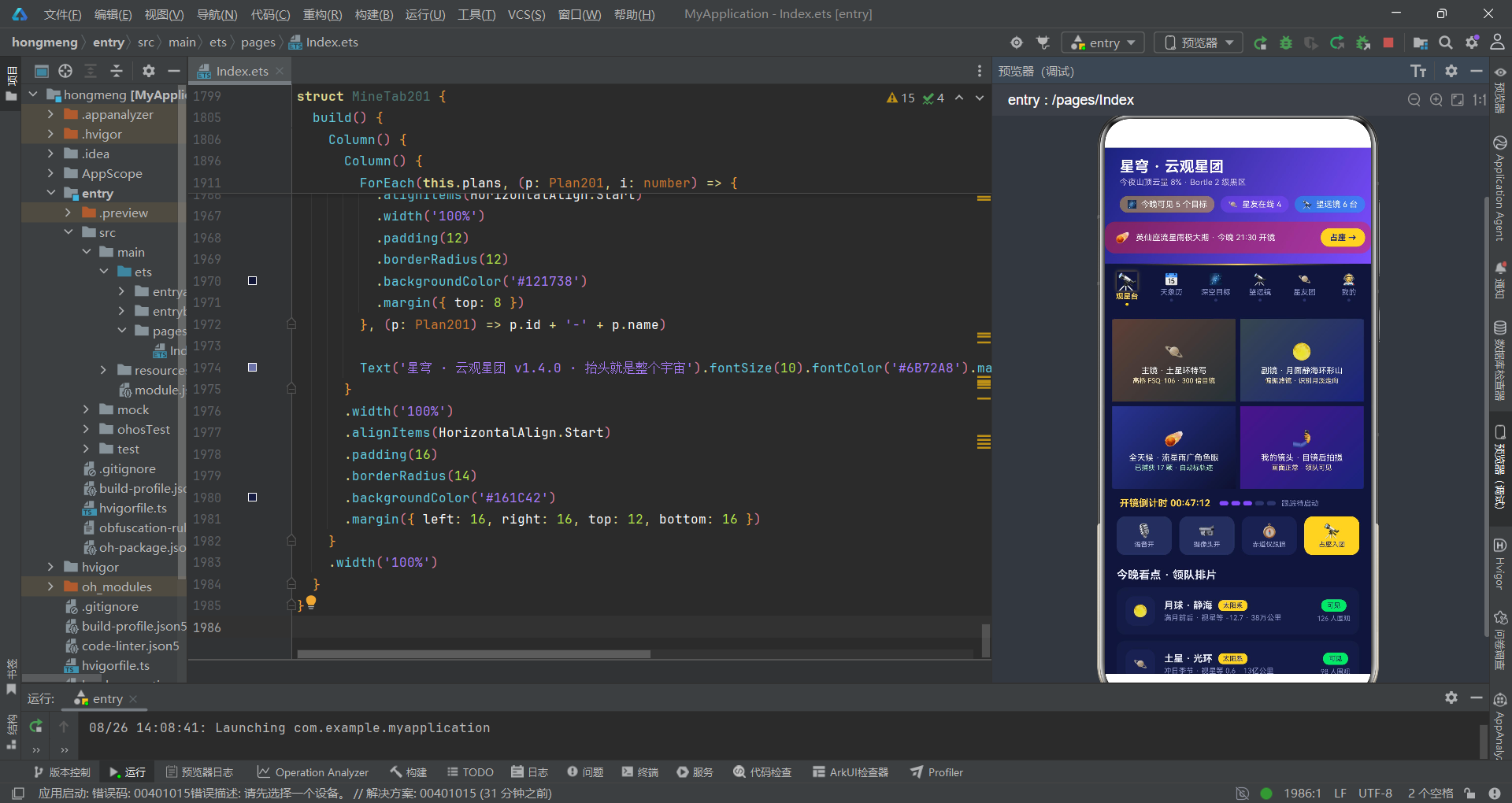
经过对这款云观星团直播应用的完整代码走读,我们可以得出几个关键性的工程评价。首先,该应用在ArkTS声明式UI框架的运用上是成熟的——它正确使用了@State/@Prop/@Builder/bindSheet等核心装饰器和API,构建了一个包含六Tab导航、五弹窗系统、多图表渲染的完整业务闭环。函数式数据操作(map/filter/concat)的运用确保了响应式状态管理的可靠性,防御性边界检查和fallback色值映射体现了开发者的工程素养。从视觉设计角度,深空藏蓝×星光金×银河紫的三色系搭配营造了沉浸式的观星氛围,星轨渐变线、发光放大动画、四宫格语义化配色等细节展现了较高的UI设计水准。
然而,从代码审查的严格标准来看,该应用也存在几个值得改进的架构隐患。最突出的问题是入口组件的状态膨胀——25个@State变量集中在一个组件中,使得build()方法承担了过重的职责,任何状态变更都可能触发不必要的重新渲染。建议将每个弹窗的表单状态封装为独立的@Component,通过@Link或回调与父组件通信。其次是颜色映射函数缺少枚举约束——使用字符串作为状态标识虽然灵活,但牺牲了编译期类型检查的安全性,建议引入type PlanState = '筹备中' | '观测中' | '已完成' | '待定'联合类型。此外,图表渲染中的魔术数字(如/14缩放因子)和散落在各处的颜色值缺少集中管理,在后续维护中可能成为隐患。
从整体来看,这款应用的代码质量在中量级ArkTS项目中属于中上水平。它展示了如何在HarmonyOS平台上构建一个功能完整、视觉精美的垂直社区应用,同时也暴露了声明式UI框架在状态管理规模化时面临的天然挑战。对于正在学习HarmonyOS ArkTS开发的工程师来说,这个项目是一个优秀的实战参考——它既能让你看到最佳实践(不可变更新、单向数据流、防御性编程),也能让你思考架构改进的方向(状态局部化、类型约束、配置集中化)。代码走读的最终目的不是评判优劣,而是从每一行代码中提炼工程智慧,让下一次设计更加稳健。

开源鸿蒙跨平台开发社区汇聚开发者与厂商,共建“一次开发,多端部署”的开源生态,致力于降低跨端开发门槛,推动万物智联创新。
更多推荐


 11
11 0
0- 0


 已为社区贡献29条内容

所有评论(0)