HarmonyOS 6.1 实战:如何用map/filter实现心动卡的增删改?如何用ForEach渲染柱状图和堆叠条?
想学会游泳就要下水,想掌握HarmonyOS ArkTS声明式UI就要动手写应用。本教程带你从零开始,一步步搭建一个完整的视频轮转云相亲应用,覆盖数据建模、组件拆分、弹窗交互、列表CRUD等核心技能点。
不要被"相亲应用"四个字误导——这其实是一个极佳的HarmonyOS实战项目。它包含多Tab导航、视频宫格、倒计时环、轮转配对表、弹幕流、柱状图、堆叠条、横条排行、抽屉弹窗、居中弹窗、表单输入、条件筛选等几乎所有移动端常见UI模式。学完这个项目,你就掌握了ArkTS开发的核心武器库。
本教程的每一个代码段都可以直接复制到DevEco Studio中运行。建议你跟着教程边读边敲,遇到不理解的地方先跑起来看效果,再回头理解原理。代码是最好的老师。
引言:我们要做什么
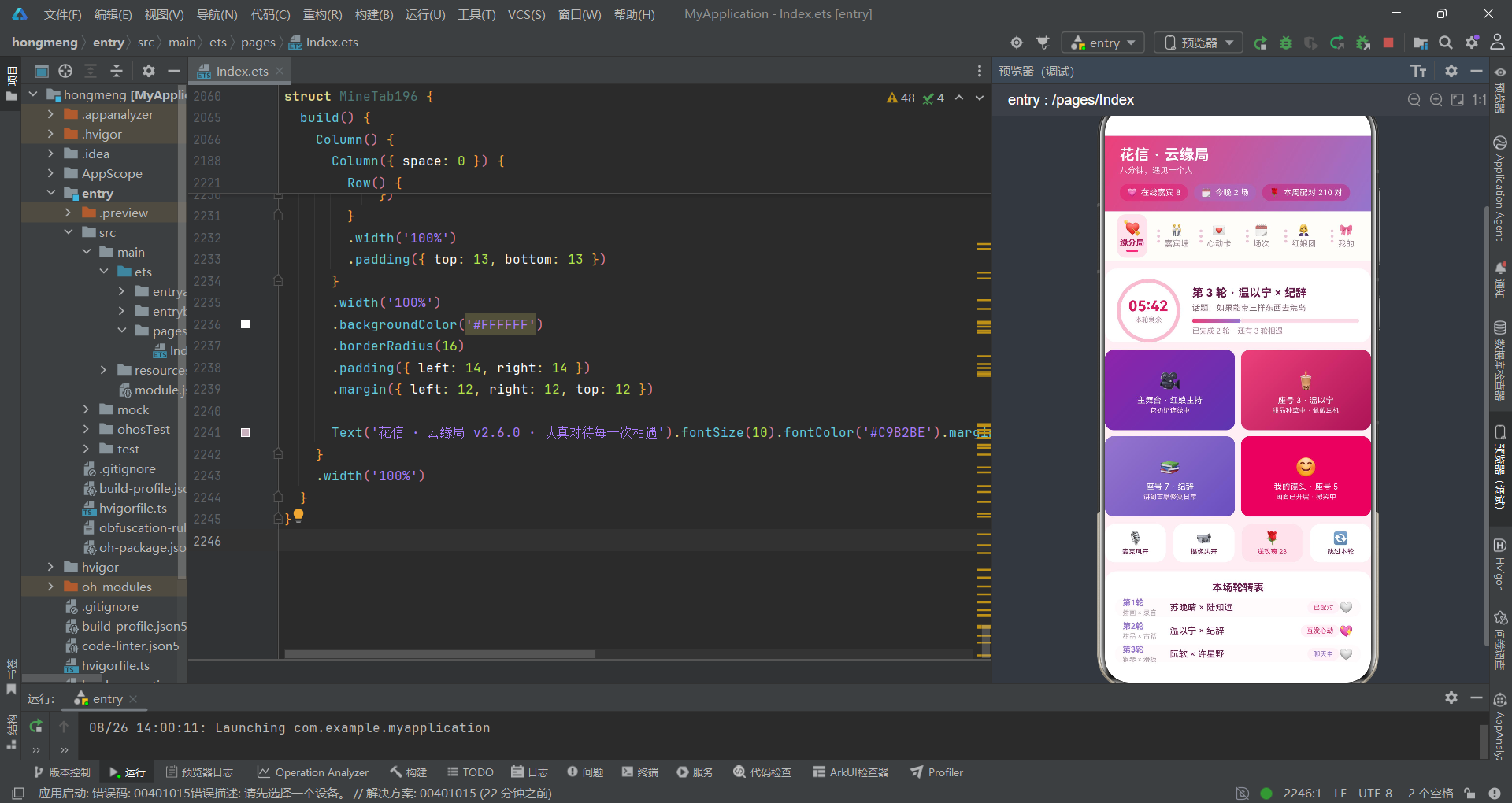
在开始写代码之前,先搞清楚我们要构建什么。花信·云缘局是一个腾讯会议式的线上相亲应用,核心场景是:红娘主持的直播间里,多位嘉宾通过视频连麦,每八分钟自动轮转配对,嘉宾之间可以发心动卡、送玫瑰,观众可以围观并弹幕互动。
这个应用需要六个功能页面:缘分局(直播轮转)、嘉宾墙(嘉宾列表)、心动卡(发卡管理)、场次(活动日程)、红娘团(红娘列表)、我的(个人中心)。每个页面都有独立的数据源和交互逻辑。页面之间通过Tab导航切换,每个Tab中的操作(发心动卡、编辑、删除等)通过弹窗完成。
从技术角度看,我们需要解决以下问题:如何定义十余种数据模型?如何用@State管理弹窗开关和表单数据?如何用@Builder构建五种不同类型的弹窗?如何用@Component拆分六个Tab子组件?如何用map/filter实现心动卡的增删改?如何用ForEach渲染柱状图和堆叠条?带着这些问题,我们开始一步步构建。
第一步:搭建数据模型
1.1 定义嘉宾模型
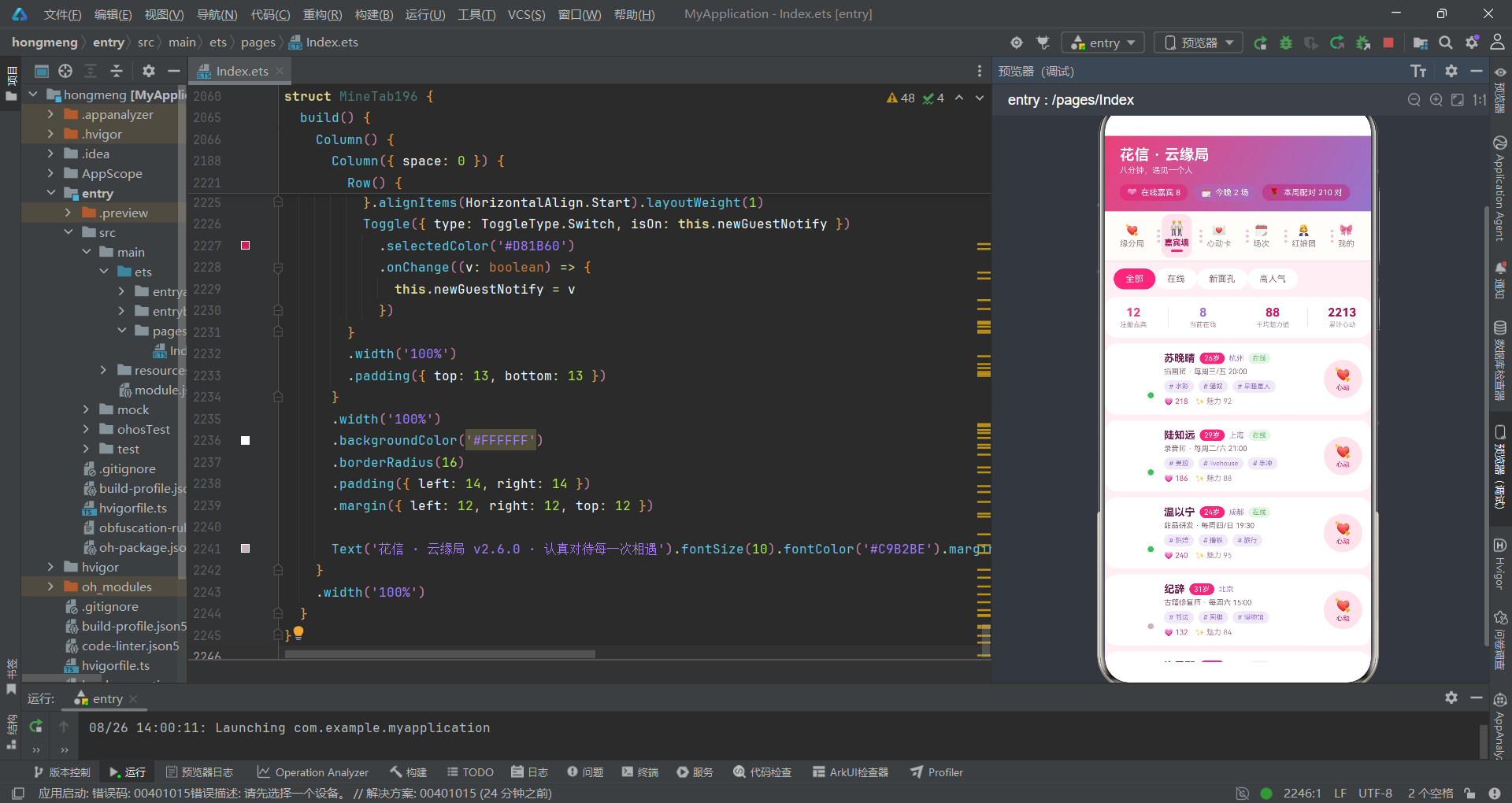
任何应用的第一步都是定义数据结构。在ArkTS中,我们用interface来定义数据模型。先从最核心的"嘉宾"模型开始:
// 嘉宾
interface Guest196 {
  name: string        // 嘉宾昵称
  emoji: string       // 头像emoji
  age: number         // 年龄
  city: string        // 城市
  job: string         // 职业
  tags: string[]      // 兴趣标签数组
  online: boolean     // 是否在线
  charm: number       // 魅力值(0-100)
  hearts: number      // 收到心动数
  intro: string       // 自我介绍
  slot: string        // 常驻时段
}
逐字段解释:tags是string数组类型,在ArkTS中完全支持数组作为interface字段。online使用boolean而非string,因为在线状态只有两种值,布尔类型更语义化。charm和hearts是number类型,后续在UI中会用来计算横条长度和柱体高度。
1.2 定义心动卡模型
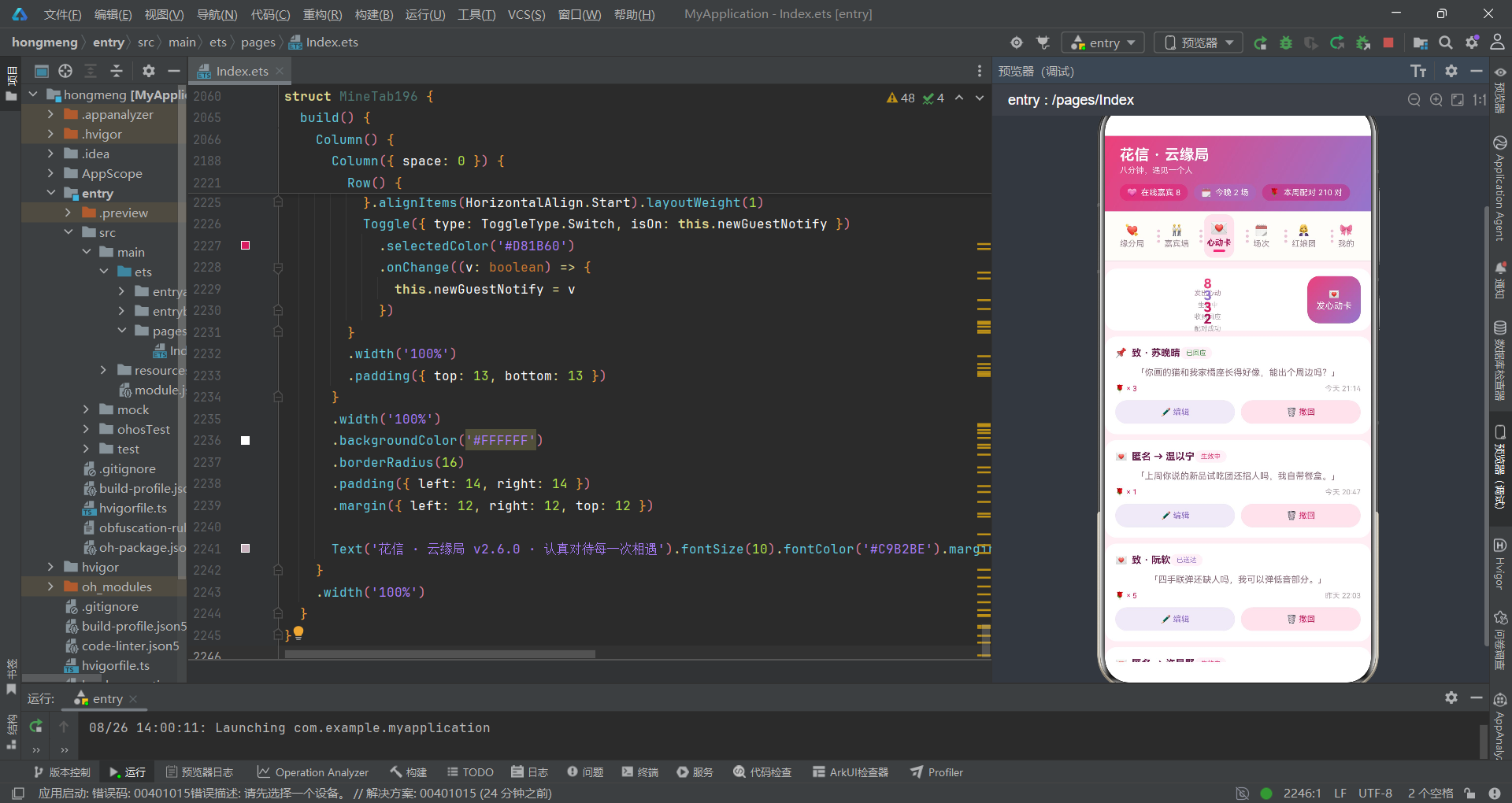
心动卡是这个应用中唯一需要增删改的数据实体,它的模型设计尤为关键:
// 心动卡
interface Card196 {
  id: number          // 唯一ID——用于ForEach的key
  target: string      // 心动对象名称
  msg: string         // 心动留言
  anon: boolean       // 是否匿名
  roses: number       // 附赠玫瑰数
  status: string      // 状态:生效中/已送达/已回应/已过期
  time: string        // 发送时间
  top: boolean        // 是否置顶
}
教学提示:
id使用number类型而非string,因为心动卡有删除和编辑操作,用数字ID在filter和map中更容易操作。top字段是一个布尔标记,用来在列表渲染时将置顶卡片排在前面或添加视觉标识。
1.3 定义其余数据模型
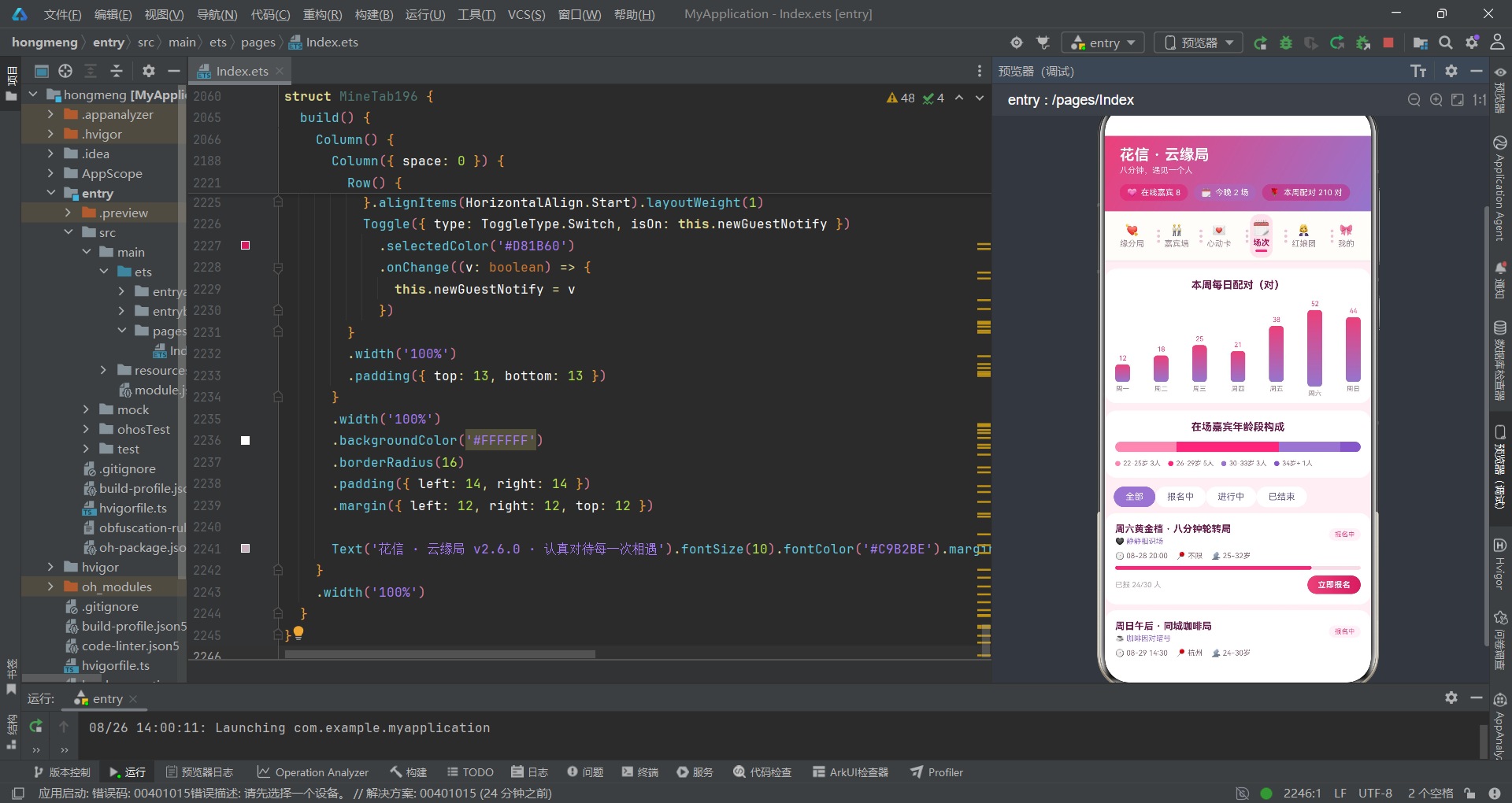
按照同样的方法,定义场次、红娘、轮转配对、缘分记录等模型。这里展示几个关键模型:
// 场次
interface Session196 {
  title: string       // 场次标题
  time: string        // 时间
  state: string       // 状态:报名中/进行中/已结束
  joined: number      // 已报名人数
  cap: number         // 容量上限
  ageRange: string    // 年龄段范围
  city: string        // 城市
  theme: string       // 主题
}

// 轮转配对表
interface Rotation196 {
  round: string       // 轮次:第1轮、第2轮...
  left: string        // 配对信息:苏晚晴 × 陆知远
  right: string      // 兴趣组合:插画 × 录音
  state: string       // 状态:已配对/互发心动/聊天中/等待轮转
  matched: boolean    // 是否配对成功
}

// 玫瑰流水柱图
interface RoseFlow196 {
  day: string         // 星期几
  roses: number       // 玫瑰数量
}
1.4 创建模拟数据
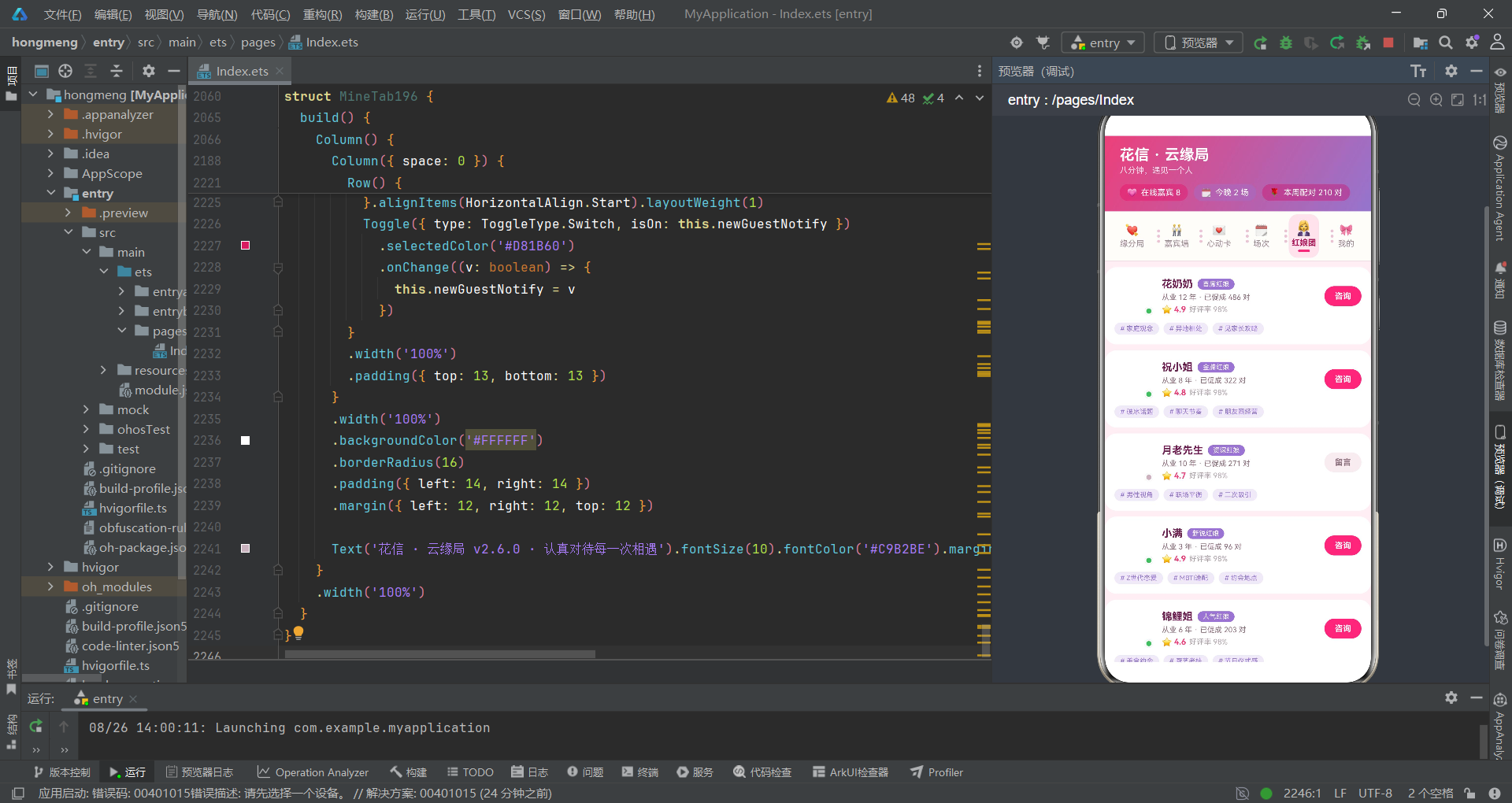
模型定义好后,创建一些模拟数据供UI渲染使用:
const guestData196: Guest196[] = [
  { name: '苏晚晴', emoji: '🌸', age: 26, city: '杭州', job: '插画师', tags: ['水彩', '猫奴', '早睡星人'], online: true, charm: 92, hearts: 218, intro: '画风偏治愈系,周末爱逛植物园,希望遇到能一起安静待着的人。', slot: '每周三/五 20:00' },
  { name: '陆知远', emoji: '🎧', age: 29, city: '上海', job: '录音师', tags: ['黑胶', 'livehouse', '手冲'], online: true, charm: 88, hearts: 186, intro: '白天录广播剧,晚上混livehouse,歌单从不重样。', slot: '每周二/六 21:00' },
  { name: '温以宁', emoji: '🧋', age: 24, city: '成都', job: '甜品研发', tags: ['烘焙', '撸铁', '旅行'], online: true, charm: 95, hearts: 240, intro: '把热量做给别人吃,把热量留在健身房,收支平衡。', slot: '每周四/日 19:30' },
  // ... 更多嘉宾数据
]

const cardData196: Card196[] = [
  { id: 1, target: '苏晚晴', msg: '你画的猫和我家橘座长得好像,能出个周边吗?', anon: false, roses: 3, status: '已回应', time: '今天 21:14', top: true },
  { id: 2, target: '温以宁', msg: '上周你说的新品试吃团还招人吗,我自带餐盒。', anon: true, roses: 1, status: '生效中', time: '今天 20:47', top: false },
  { id: 3, target: '阮软', msg: '四手联弹还缺人吗,我可以弹低音部分。', anon: false, roses: 5, status: '已送达', time: '昨天 22:03', top: false },
  // ... 更多心动卡数据
]
教学提示:模拟数据要尽量真实——包含各种状态组合(在线/离线、匿名/实名、不同状态值),这样在开发过程中能测试到各种UI分支。数据量也不宜太少,至少5-10条才能看出列表渲染和图表的效果。
第二步:编写工具函数
ArkTS中的工具函数是纯函数,不依赖组件状态,适合提前编写好供后续使用。
2.1 状态颜色映射函数
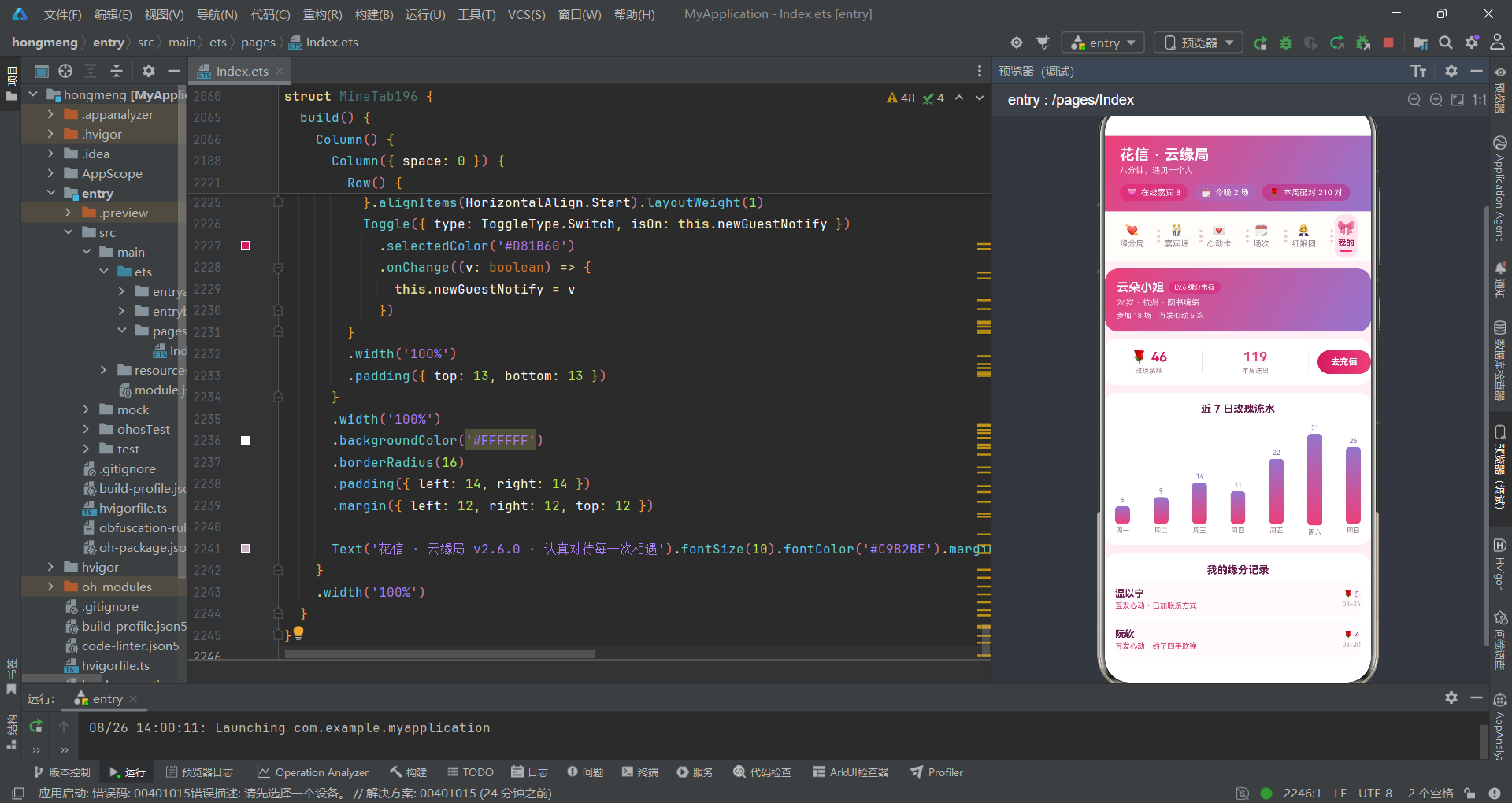
// 场次状态颜色
function sessionStateColor196(s: string): string {
  if (s === '报名中') {
    return '#EC407A'    // 蜜桃粉——活跃、可操作
  }
  if (s === '进行中') {
    return '#9575CD'    // 薰衣紫——正在进行
  }
  return '#B0A2AB'      // 灰粉——已结束
}

// 心动卡状态颜色
function cardStateColor196(s: string): string {
  if (s === '生效中') {
    return '#EC407A'    // 粉色——等待对方回应
  }
  if (s === '已送达') {
    return '#9575CD'    // 紫色——已送达未回应
  }
  if (s === '已回应') {
    return '#2E7D32'    // 绿色——好消息
  }
  return '#B0A2AB'      // 灰色——已过期
}

// 轮转状态颜色
function rotationStateColor196(s: string): string {
  if (s === '已配对') {
    return '#EC407A'
  }
  if (s === '互发心动') {
    return '#D81B60'    // 深粉——双倍心动
  }
  if (s === '聊天中') {
    return '#9575CD'
  }
  return '#B0A2AB'
}
这些函数的写法很简单:if判断状态字符串,返回对应的颜色值,最后兜底返回灰色。初学者容易犯的错误是忘记写兜底return,ArkTS编译器会报错提醒你。
2.2 统计计算函数
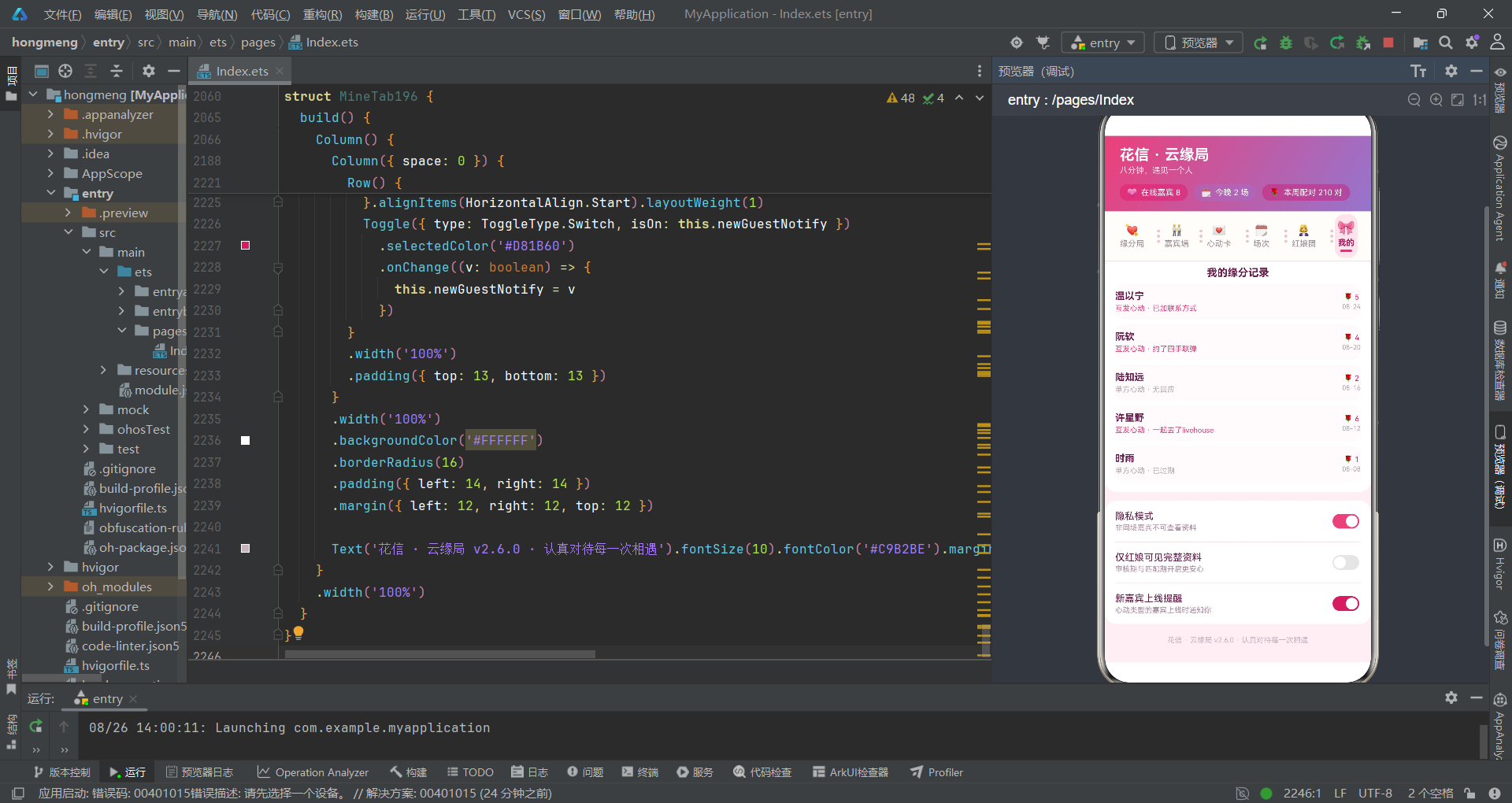
// 在线嘉宾数
function onlineGuestCount196(): number {
  let n: number = 0
  for (let i = 0; i < guestData196.length; i++) {
    if (guestData196[i].online) {
      n++
    }
  }
  return n
}

// 收到心动总数
function heartTotal196(): number {
  let n: number = 0
  for (let i = 0; i < guestData196.length; i++) {
    n += guestData196[i].hearts
  }
  return n
}

// 平均魅力值
function avgCharm196(): number {
  let sum: number = 0
  for (let i = 0; i < guestData196.length; i++) {
    sum += guestData196[i].charm
  }
  return Math.floor(sum / guestData196.length)
}

// 人气横条最大值
function maxHeart196(): number {
  let m: number = 0
  for (let i = 0; i < guestPop196.length; i++) {
    if (guestPop196[i].hearts > m) {
      m = guestPop196[i].hearts
    }
  }
  return m
}
教学提示:这些函数没有参数,直接读取全局const数组。在小型应用中这种写法完全没问题。如果数据来自网络请求,则需要将数组作为参数传入。注意
Math.floor的使用——除法结果可能是小数,用Math.floor取整后才能安全地用于UI渲染。
第三步:搭建根组件骨架
3.1 定义@State变量
现在进入最关键的部分——编写根组件。先声明所有需要的状态变量:
@Entry
@Component
struct Index196 {
  // tab
  @State currentTab: number = 0

  // 弹框开关——5个布尔值对应5个弹窗
  @State showSignupSheet: boolean = false
  @State showNewCardSheet: boolean = false
  @State showEditCardSheet: boolean = false
  @State showDeleteCardDialog: boolean = false
  @State showGuestDialog: boolean = false

  // 心动卡列表数据(可增删改)
  @State cards: Card196[] = cardData196

  // 报名弹框表单
  @State signupAge: number = 1
  @State signupCity: number = 0
  @State signupIntro: boolean = true
  @State signupAnon: boolean = false
  @State signupDeposit: number = 2

  // 新建心动卡表单
  @State cardTarget: number = 0
  @State cardMsg: string = ''
  @State cardRoses: number = 1
  @State cardAnon: boolean = false

  // 编辑心动卡表单
  @State editIndex: number = -1
  @State editTarget: number = 0
  @State editMsg: string = ''
  @State editRoses: number = 1
  @State editTop: boolean = false

  // 删除心动卡
  @State deleteIndex: number = -1
  @State deleteRefund: boolean = true

  // 嘉宾详情
  @State guestIdx: number = 0
}
初学者看到这么多@State可能会害怕,别担心,我们来分类理解:currentTab控制Tab切换,5个show开头的布尔值控制弹窗显隐,cards是可变数据列表,其余的是各种表单的输入值。每个@State变量都有明确的初始值——这是ArkTS的硬性要求。
教学提示:
cards的初始值赋为cardData196——这是将全局const数组赋给@State。赋值后,cards就是可变的了,后续的map/filter操作会生成新数组重新赋值给cards,触发UI更新。但cardData196本身不会改变。
3.2 编写build方法——头部区域
build() {
    Column() {
      // ---------- 头部:粉紫渐变 ----------
      Column() {
        // 标题行
        Row() {
          Column() {
            Text('花信 · 云缘局')
              .fontSize(20)
              .fontWeight(FontWeight.Bold)
              .fontColor('#FFFFFF')
            Text('八分钟,遇见一个人').fontSize(11).fontColor('#FFE3EF').margin({ top: 3 })
          }.alignItems(HorizontalAlign.Start).layoutWeight(1)

          Row({ space: 8 }) {
          }
        }
        .width('100%')
        .padding({ left: 20, right: 20, top: 14 })

        // 统计胶囊行
        Row({ space: 8 }) {
          Row({ space: 5 }) {
            Text('💗').fontSize(11)
            Text('在线嘉宾 ' + onlineGuestCount196()).fontSize(11).fontColor('#FFFFFF')
          }
          .padding({ left: 10, right: 10, top: 5, bottom: 5 })
          .borderRadius(13)
          .backgroundColor('#59D81B60')

          Row({ space: 5 }) {
            Text('🗓️').fontSize(11)
            Text('今晚 2 场').fontSize(11).fontColor('#FFFFFF')
          }
          .padding({ left: 10, right: 10, top: 5, bottom: 5 })
          .borderRadius(13)
          .backgroundColor('#599575CD')

          Row({ space: 5 }) {
            Text('🌹').fontSize(11)
            Text('本周配对 210 对').fontSize(11).fontColor('#FFFFFF')
          }
          .padding({ left: 10, right: 10, top: 5, bottom: 5 })
          .borderRadius(13)
          .backgroundColor('#59C2185B')
        }
        .width('100%')
        .padding({ left: 20, top: 12, bottom: 14 })
      }
      .width('100%')
      .linearGradient({
        angle: 120,
        colors: [['#EC407A', 0], ['#9575CD', 1]]
      })
教学讲解:头部使用linearGradient实现粉到紫的渐变背景。统计胶囊用嵌套Row实现——外层Row设置space和padding形成胶囊形状,内层Row放置emoji和文本。#59D81B60这种8位hex色值中,前缀59表示约35%的透明度,让胶囊在渐变背景上呈现半透明效果。
3.3 撕票根Tab导航
这是本应用最有创意的Tab设计——六段票券相连,段间打孔圆点分隔:
      // ---------- 顶部「撕票根」分段 tab ----------
      Column() {
        Row() {
          ForEach(tabItems196, (t: TabItem196, i: number) => {
            Row() {
              // 打孔圆点分隔(票券撕线)
              if (i > 0) {
                Column({ space: 3 }) {
                  Text('').width(4).height(4).borderRadius(2).backgroundColor('#E4C4D4')
                  Text('').width(4).height(4).borderRadius(2).backgroundColor('#E4C4D4')
                  Text('').width(4).height(4).borderRadius(2).backgroundColor('#E4C4D4')
                }
                .margin({ right: 2 })
              }
              // 票券段
              Column({ space: 3 }) {
                Text(t.icon)
                  .fontSize(this.currentTab === i ? 18 : 15)
                  .scale(this.currentTab === i ? { x: 1.08, y: 1.08 } : { x: 1, y: 1 })
                  .animation({ duration: 180 })
                Text(t.name)
                  .fontSize(11)
                  .fontWeight(this.currentTab === i ? FontWeight.Bold : FontWeight.Normal)
                  .fontColor(this.currentTab === i ? '#AD1457' : '#9E8A94')
                if (this.currentTab === i) {
                  Text('')
                    .width(16)
                    .height(3)
                    .borderRadius(2)
                    .backgroundColor('#EC407A')
                }
              }
              .padding({ top: 8, bottom: 8, left: 4, right: 4 })
              .borderRadius(12)
              .backgroundColor(this.currentTab === i ? '#FCE4EC' : Color.Transparent)
              .onClick(() => {
                this.currentTab = i
              })
            }
            .layoutWeight(1)
            .justifyContent(FlexAlign.Center)
          }, (t: TabItem196) => t.name)
        }
        .width('100%')
        .padding({ left: 8, right: 8, top: 4, bottom: 4 })

        Column().width('100%').height(0.5).backgroundColor('#F2DCE7')
      }
      .width('100%')
      .backgroundColor('#FFFDFA')
教学讲解:打孔圆点用3个4x4的小圆点(borderRadius(2))垂直排列模拟撕票线。选中态有三重反馈:icon放大1.08倍(scale + animation 180ms)、底部出现红色短线(条件渲染Text)、背景变为浅粉色。
.scale()配合.animation()实现了平滑的放大动画效果。
3.4 内容区与弹窗绑定
      // ---------- 内容区 ----------
      Scroll() {
        Column() {
          if (this.currentTab === 0) {
            LiveTab196()
          } else if (this.currentTab === 1) {
            WallTab196({
              onGuestTap: (i: number) => {
                this.guestIdx = i
                this.showGuestDialog = true
              }
            })
          } else if (this.currentTab === 2) {
            CardTab196({
              cards: this.cards,
              onNew: () => {
                this.showNewCardSheet = true
              },
              onEdit: (i: number) => {
                this.editIndex = i
                this.editTarget = cardTargets196.indexOf(this.cards[i].target)
                this.editMsg = this.cards[i].msg
                this.editRoses = this.cards[i].roses
                this.editTop = this.cards[i].top
                this.showEditCardSheet = true
              },
              onDelete: (i: number) => {
                this.deleteIndex = i
                this.showDeleteCardDialog = true
              }
            })
          } else if (this.currentTab === 3) {
            SessionTab196({
              onSignup: () => {
                this.showSignupSheet = true
              }
            })
          } else if (this.currentTab === 4) {
            MatchmakerTab196()
          } else {
            MineTab196()
          }
        }
        .width('100%')
      }
      .layoutWeight(1)
      .scrollBar(BarState.Off)
      .width('100%')
      .backgroundColor('#FFF0F5')
    }
    .width('100%')
    .height('100%')
    .backgroundColor('#FFF0F5')
    // 五个弹框绑定
    .bindSheet($$this.showSignupSheet, this.signupSheet196(), {
      height: '76%',
      dragBar: true,
      showClose: false,
      backgroundColor: '#FFFFFF'
    })
    .bindSheet($$this.showNewCardSheet, this.newCardSheet196(), {
      height: '78%',
      dragBar: true,
      showClose: false,
      backgroundColor: '#FFFFFF'
    })
    .bindSheet($$this.showEditCardSheet, this.editCardSheet196(), {
      height: '78%',
      dragBar: true,
      showClose: false,
      backgroundColor: '#FFFFFF'
    })
    .bindContentCover($$this.showDeleteCardDialog, this.deleteCardDialog196(), {
    })
    .bindContentCover($$this.showGuestDialog, this.guestDetailDialog196(), {
    })
  }
教学讲解:注意Tab 2(心动卡)的onEdit回调——它在打开编辑弹窗前,先把当前卡片的数据"灌入"编辑表单的状态变量中。这是一种"预填表单"模式:this.editTarget = cardTargets196.indexOf(this.cards[i].target)通过indexOf找到目标在选项列表中的索引,this.editMsg = this.cards[i].msg直接复制留言文本。这样用户打开编辑弹窗时看到的就是当前卡片的内容,而非空白表单。
弹窗绑定用了两种API:三个bindSheet用于底部抽屉弹窗(报名、发卡、编辑),两个bindContentCover用于居中弹窗(删除确认、嘉宾详情)。注意bindSheet的height用了百分比字符串(‘76%’、‘78%’)而非绝对像素值——这在不同屏幕尺寸上表现更好。
第四步:构建弹窗
4.1 报名弹窗——表单组件的组装
@Builder
signupSheet196() {
    Column() {
      // 抽屉头部
      Row() {
        Column() {
          Text('💌 报名下场缘分').fontSize(18).fontWeight(FontWeight.Bold).fontColor('#6A1B4D')
          Text('红娘将在 12 小时内审核你的报名资料').fontSize(11).fontColor('#B08CA0').margin({ top: 4 })
        }.alignItems(HorizontalAlign.Start).layoutWeight(1)
      }
      .width('100%')
      .padding({ left: 20, right: 20, top: 18, bottom: 14 })

      Column().width('100%').height(0.5).backgroundColor('#F6DEE9')

      Scroll() {
        Column() {
          // 期望年龄段——chips选择器
          Column() {
            Text('期望年龄段').fontSize(13).fontWeight(FontWeight.Bold).fontColor('#6A1B4D')
            Row() {
              ForEach(ageTags196, (a: string, i: number) => {
                Text(a)
                  .fontSize(12)
                  .fontColor(this.signupAge === i ? '#FFFFFF' : '#8A6B7A')
                  .padding({ left: 14, right: 14, top: 7, bottom: 7 })
                  .borderRadius(16)
                  .backgroundColor(this.signupAge === i ? '#EC407A' : '#FBEAF1')
                  .onClick(() => {
                    this.signupAge = i
                  })
              }, (a: string) => a)
            }
            .width('100%')
            .margin({ top: 10 })
          }
          .width('100%')
          .alignItems(HorizontalAlign.Start)
          .padding({ left: 20, right: 20, top: 16 })

          // 开关组
          Column({ space: 0 }) {
            Row() {
              Column() {
                Text('自动播放自我介绍视频').fontSize(13).fontColor('#6A1B4D')
                Text('轮转开始时向对方展示 30 秒介绍').fontSize(10).fontColor('#B08CA0').margin({ top: 2 })
              }.alignItems(HorizontalAlign.Start).layoutWeight(1)
              Toggle({ type: ToggleType.Switch, isOn: this.signupIntro })
                .selectedColor('#EC407A')
                .onChange((v: boolean) => {
                  this.signupIntro = v
                })
            }
            .width('100%')
            .padding({ top: 12, bottom: 12 })

            Column().width('100%').height(0.5).backgroundColor('#F6DEE9')

            Row() {
              Column() {
                Text('匿名参与本场').fontSize(13).fontColor('#6A1B4D')
                Text('昵称与头像将显示为「神秘嘉宾」').fontSize(10).fontColor('#B08CA0').margin({ top: 2 })
              }.alignItems(HorizontalAlign.Start).layoutWeight(1)
              Toggle({ type: ToggleType.Switch, isOn: this.signupAnon })
                .selectedColor('#9575CD')
                .onChange((v: boolean) => {
                  this.signupAnon = v
                })
            }
            .width('100%')
            .padding({ top: 12, bottom: 12 })
          }
          .width('100%')
          .borderRadius(14)
          .backgroundColor('#FFFAFC')
          .margin({ top: 18 })
          .padding({ left: 14, right: 14 })

          // 提交按钮
          Text('提交报名')
            .fontSize(15)
            .fontWeight(FontWeight.Bold)
            .fontColor('#FFFFFF')
            .width('90%')
            .height(46)
            .borderRadius(23)
            .textAlign(TextAlign.Center)
            .linearGradient({
              angle: 90,
              colors: [['#EC407A', 0], ['#9575CD', 1]]
            })
            .margin({ top: 24, bottom: 24 })
            .onClick(() => {
              this.showSignupSheet = false
            })
        }
        .width('100%')
      }
      .constraintSize({ maxHeight: '85%' })
      .layoutWeight(1)
    }
    .width('100%')
    .height('100%')
    .backgroundColor('#FFFFFF')
    .borderRadius({ topLeft: 22, topRight: 22 })
  }
教学讲解:Toggle组件的
selectedColor('#EC407A')设置了开关打开时的颜色为粉色——这比系统默认的蓝色更符合应用主题。两个Toggle之间用Column().height(0.5).backgroundColor('#F6DEE9')绘制了分隔线。提交按钮使用linearGradient做渐变背景,从粉到紫,与头部渐变呼应。
4.2 编辑心动卡——map回写的核心实现
这是整个应用中最值得学习的代码段之一——编辑操作如何通过map实现不可变更新:
@Builder
editCardSheet196() {
    Column() {
      // ... 表单内容(省略,与新建类似)...

          Text('保存修改')
            .fontSize(15)
            .fontWeight(FontWeight.Bold)
            .fontColor('#FFFFFF')
            .width('90%')
            .height(46)
            .borderRadius(23)
            .textAlign(TextAlign.Center)
            .linearGradient({
              angle: 90,
              colors: [['#9575CD', 0], ['#EC407A', 1]]
            })
            .margin({ top: 24, bottom: 24 })
            .onClick(() => {
              this.cards = this.cards.map((c: Card196, i: number) => {
                if (i === this.editIndex) {
                  return {
                    id: c.id,
                    target: cardTargets196[this.editTarget],
                    msg: this.editMsg,
                    anon: c.anon,
                    roses: this.editRoses,
                    status: '已送达',
                    time: '刚刚',
                    top: this.editTop
                  }
                }
                return c
              })
              this.showEditCardSheet = false
            })
        }
        .width('100%')
      }
      .constraintSize({ maxHeight: '85%' })
      .layoutWeight(1)
    }
    .width('100%')
    .height('100%')
    .backgroundColor('#FFFFFF')
    .borderRadius({ topLeft: 22, topRight: 22 })
  }
教学重点:map函数遍历cards数组的每一个元素。当索引i等于editIndex时,构造一个全新的Card196对象——这个对象的字段值来自编辑表单的状态变量(editTarget、editMsg、editRoses、editTop),同时保留了原对象的id和anon。对于不等于editIndex的元素,直接
return c原样返回。最终map返回一个新数组,赋值给this.cards,ArkTS检测到引用变化后自动触发列表重渲染。status被设为"已送达"、time被设为"刚刚"——这模拟了编辑后重新发送的效果。
4.3 删除心动卡——filter的简洁实现
@Builder
deleteCardDialog196() {
    Column() {
      Text('撤回这张心动卡?').fontSize(17).fontWeight(FontWeight.Bold).fontColor('#6A1B4D').margin({ top: 14 })
      Text('撤回后对方将无法再看到这条留言,历史记录会保留在你的「我的」页面。')
        .fontSize(12)
        .fontColor('#B08CA0')
        .textAlign(TextAlign.Center)
        .lineHeight(18)
        .margin({ top: 8, bottom: 4 })
        .padding({ left: 24, right: 24 })

      // 退还玫瑰开关
      Row() {
        Column() {
          Text('退还剩余玫瑰').fontSize(13).fontColor('#6A1B4D')
          Text('未读部分的玫瑰将退回余额').fontSize(10).fontColor('#B08CA0').margin({ top: 2 })
        }.alignItems(HorizontalAlign.Start).layoutWeight(1)
        Toggle({ type: ToggleType.Switch, isOn: this.deleteRefund })
          .selectedColor('#EC407A')
          .onChange((v: boolean) => {
            this.deleteRefund = v
          })
      }
      .width('86%')
      .borderRadius(14)
      .backgroundColor('#FFFAFC')
      .margin({ top: 14 })
      .padding({ left: 14, right: 14, top: 12, bottom: 12 })

      // 按钮组
      Row({ space: 12 }) {
        Text('再想想')
          .fontSize(14)
          .fontWeight(FontWeight.Bold)
          .fontColor('#8A6B7A')
          .layoutWeight(1)
          .height(44)
          .borderRadius(22)
          .textAlign(TextAlign.Center)
          .backgroundColor('#F6ECF1')
          .onClick(() => {
            this.showDeleteCardDialog = false
          })
        Text('确认撤回')
          .fontSize(14)
          .fontWeight(FontWeight.Bold)
          .fontColor('#FFFFFF')
          .layoutWeight(1)
          .height(44)
          .borderRadius(22)
          .textAlign(TextAlign.Center)
          .backgroundColor('#D81B60')
          .onClick(() => {
            this.cards = this.cards.filter((c: Card196, i: number) => {
              return i !== this.deleteIndex
            })
            this.showDeleteCardDialog = false
          })
      }
      .width('86%')
      .margin({ top: 22, bottom: 26 })
    }
    .width('86%')
    .borderRadius(22)
    .backgroundColor('#FFFFFF')
    .alignItems(HorizontalAlign.Center)
  }
教学重点:删除操作比编辑更简单。filter的回调函数
return i !== this.deleteIndex——当索引等于deleteIndex时返回false(排除该项),不等于时返回true(保留该项)。filter返回不含被删除项的新数组,赋值给this.cards后UI自动更新。注意两个按钮的对比设计:"再想想"用浅色背景+灰色文字(次要操作),"确认撤回"用深粉色背景+白色文字(主要操作),layoutWeight都是1实现等宽。
第五步:构建Tab子组件
5.1 缘分局——倒计时环与视频宫格
@Component
struct LiveTab196 {
  @State micOn: boolean = true
  @State camOn: boolean = true
  @State rosePulse: boolean = false
  @State roseCount: number = 28
  @State roundNo: number = 3
  @State likedRounds: boolean[] = [false, true, false, false, false, false]

  build() {
    Column() {
      // 倒计时环 + 本轮信息
      Row() {
        Stack() {
          Column()
            .width(86)
            .height(86)
            .borderRadius(43)
            .border({ width: 5, color: '#F8BBD0' })
          Column() {
            Text('05:42').fontSize(20).fontWeight(FontWeight.Bold).fontColor('#D81B60')
            Text('本轮剩余').fontSize(9).fontColor('#B08CA0').margin({ top: 2 })
          }
        }

        Column() {
          Text('第 ' + this.roundNo + ' 轮 · 温以宁 × 纪辞').fontSize(15).fontWeight(FontWeight.Bold).fontColor('#6A1B4D')
          Text('话题:如果能带三样东西去荒岛').fontSize(11).fontColor('#8A6B7A').margin({ top: 5 })
          // 轮转进度条
          Row() {
            Text('')
              .width('29%')
              .height(6)
              .borderRadius(3)
              .linearGradient({
                angle: 90,
                colors: [['#EC407A', 0], ['#9575CD', 1]]
              })
            Text('').layoutWeight(1).height(6).borderRadius(3).backgroundColor('#F3DCE6')
          }
          .width('100%')
          .margin({ top: 8 })
          Text('已完成 2 轮 · 还有 3 轮相遇').fontSize(10).fontColor('#B08CA0').margin({ top: 5 })
        }
        .alignItems(HorizontalAlign.Start)
        .layoutWeight(1)
        .padding({ left: 16 })
      }
      .width('100%')
      .alignItems(VerticalAlign.Center)
      .padding({ left: 16, right: 16, top: 14 })
      .backgroundColor('#FFFFFF')
      .borderRadius(16)
      .margin({ left: 12, right: 12, top: 10 })
教学讲解:倒计时环用Stack叠放两个组件——底层是一个86x86的圆环(border实现),上层是文字"05:42"。进度条用两个Text拼接:已完成部分(width: ‘29%’)用渐变色,剩余部分用layoutWeight(1)填充浅色。29%表示8分钟中已过约2分20秒。
5.2 送玫瑰的动画效果
        Column({ space: 3 }) {
          Text('🌹')
            .fontSize(this.rosePulse ? 21 : 17)
            .scale(this.rosePulse ? { x: 1.25, y: 1.25 } : { x: 1, y: 1 })
            .animation({ duration: 200 })
          Text('送玫瑰 ' + this.roseCount).fontSize(9).fontColor('#D81B60')
        }
        .layoutWeight(1)
        .height(52)
        .borderRadius(14)
        .backgroundColor('#FCE4EC')
        .justifyContent(FlexAlign.Center)
        .onClick(() => {
          this.rosePulse = !this.rosePulse
          this.roseCount += 1
        })
教学讲解:点击玫瑰按钮时,rosePulse在true/false间切换,触发emoji从17号放大到21号、scale从1.0放大到1.25,配合animation 200ms实现脉冲动画效果。同时roseCount加1,文字"送玫瑰 28"变为"送玫瑰 29"。这种简单的状态驱动动画是ArkTS中最容易实现的交互反馈。
5.3 轮转配对表——likedRounds数组的map更新
      // 本场轮转表
      Column() {
        Text('本场轮转表').fontSize(14).fontWeight(FontWeight.Bold).fontColor('#6A1B4D')
        ForEach(rotationData196, (r: Rotation196, i: number) => {
          Row() {
            Column() {
              Text(r.round).fontSize(11).fontWeight(FontWeight.Bold).fontColor('#9575CD')
              Text(r.right).fontSize(9).fontColor('#B0A2AB').margin({ top: 2 })
            }
            .alignItems(HorizontalAlign.Start)
            .width(64)

            Row({ space: 6 }) {
              Text(r.left).fontSize(12).fontColor('#6A1B4D').layoutWeight(1)
              Text(r.state)
                .fontSize(9)
                .fontColor(rotationStateColor196(r.state))
                .padding({ left: 8, right: 8, top: 3, bottom: 3 })
                .borderRadius(9)
                .backgroundColor('#FFF2F7')
            }
            .layoutWeight(1)
            .alignItems(VerticalAlign.Center)

            Text(this.likedRounds[i] ? '💖' : '🤍')
              .fontSize(15)
              .onClick(() => {
                this.likedRounds = this.likedRounds.map((v: boolean, j: number) => {
                  return j === i ? !v : v
                })
              })
          }
          .width('100%')
          .padding({ top: 9, bottom: 9 })
          .borderRadius(12)
          .backgroundColor(i % 2 === 0 ? '#FFFAFC' : '#FFFFFF')
          .margin({ top: 6 })
          .padding({ left: 10, right: 10 })
        }, (r: Rotation196) => r.round)
      }
教学讲解:点击心形按钮时,使用map更新likedRounds数组——只翻转被点击索引处的值,其余保持不变。这是处理布尔数组的经典模式:this.likedRounds.map((v, j) => j === i ? !v : v)。背景色交替使用i % 2 === 0判断,实现斑马纹效果。
5.4 嘉宾墙——统计行的四宫格布局
@Component
struct WallTab196 {
  @State filter: number = 0
  onGuestTap: (i: number) => void = () => {}

  build() {
    Column() {
      // 汇总行
      Row({ space: 8 }) {
        Column({ space: 2 }) {
          Text(guestData196.length + '').fontSize(16).fontWeight(FontWeight.Bold).fontColor('#EC407A')
          Text('注册嘉宾').fontSize(9).fontColor('#B08CA0')
        }.layoutWeight(1)
        Column().width(0.5).height(26).backgroundColor('#F2DCE7')
        Column({ space: 2 }) {
          Text(onlineGuestCount196() + '').fontSize(16).fontWeight(FontWeight.Bold).fontColor('#9575CD')
          Text('当前在线').fontSize(9).fontColor('#B08CA0')
        }.layoutWeight(1)
        Column().width(0.5).height(26).backgroundColor('#F2DCE7')
        Column({ space: 2 }) {
          Text(avgCharm196() + '').fontSize(16).fontWeight(FontWeight.Bold).fontColor('#D81B60')
          Text('平均魅力值').fontSize(9).fontColor('#B0A2AB')
        }.layoutWeight(1)
        Column().width(0.5).height(26).backgroundColor('#F2DCE7')
        Column({ space: 2 }) {
          Text(heartTotal196() + '').fontSize(16).fontWeight(FontWeight.Bold).fontColor('#AD1457')
          Text('累计心动').fontSize(9).fontColor('#B0A2AB')
        }.layoutWeight(1)
      }
      .width('100%')
      .backgroundColor('#FFFFFF')
      .borderRadius(16)
      .padding({ top: 12, bottom: 12 })
      .margin({ left: 12, right: 12, top: 10 })
教学讲解:四个统计项之间用Column().width(0.5).height(26)绘制竖向分隔线——0.5vp宽的细线模拟分隔效果。每个统计项用layoutWeight(1)等分宽度。数字使用不同的颜色(粉、紫、深粉、暗粉)形成视觉层次。
5.5 心动卡列表——@Prop数据传递
@Component
struct CardTab196 {
  @Prop cards: Card196[]
  onNew: () => void = () => {}
  onEdit: (i: number) => void = () => {}
  onDelete: (i: number) => void = () => {}

  build() {
    Column() {
      // 顶部统计 + 新建入口
      Row({ space: 10 }) {
        Column() {
          Column({ space: 2 }) {
            Text(this.cards.length + '').fontSize(18).fontWeight(FontWeight.Bold).fontColor('#EC407A')
            Text('发出心动').fontSize(9).fontColor('#B08CA0')
          }.layoutWeight(1)
          Column({ space: 2 }) {
            Text(activeCardCount196() + '').fontSize(18).fontWeight(FontWeight.Bold).fontColor('#9575CD')
            Text('生效中').fontSize(9).fontColor('#B0A2AB')
          }.layoutWeight(1)
          // ... 更多统计项
        }
        .layoutWeight(1)
        .height(64)
        .justifyContent(FlexAlign.Center)

        Text('💌\n发心动卡')
          .fontSize(12)
          .fontColor('#FFFFFF')
          .textAlign(TextAlign.Center)
          .lineHeight(16)
          .width(72)
          .height(64)
          .borderRadius(16)
          .linearGradient({
            angle: 135,
            colors: [['#EC407A', 0], ['#9575CD', 1]]
          })
          .onClick(() => {
            this.onNew()
          })
      }
      .width('100%')
      .backgroundColor('#FFFFFF')
      .borderRadius(16)
      .padding({ left: 14, right: 14, top: 10, bottom: 10 })
      .margin({ left: 12, right: 12, top: 10 })

      // 心动卡列表
      ForEach(this.cards, (c: Card196, i: number) => {
        Column() {
          Row() {
            Row({ space: 6 }) {
              Text(c.top ? '📌' : '💌').fontSize(13)
              Text(c.anon ? '匿名 → ' + c.target : '致 · ' + c.target)
                .fontSize(13)
                .fontWeight(FontWeight.Bold)
                .fontColor('#6A1B4D')
            }
            Text(c.status)
              .fontSize(9)
              .fontColor(cardStateColor196(c.status))
              .padding({ left: 8, right: 8, top: 3, bottom: 3 })
              .borderRadius(9)
              .backgroundColor('#FFF2F7')
          }
          .width('100%')

          Text('「' + c.msg + '」')
            .fontSize(12)
            .fontColor('#8A6B7A')
            .lineHeight(18)
            .margin({ top: 8 })

          Row() {
            Text('🌹 × ' + c.roses).fontSize(10).fontColor('#D81B60')
            Text(c.time).fontSize(10).fontColor('#B0A2AB').layoutWeight(1).textAlign(TextAlign.End)
          }
          .width('100%')
          .margin({ top: 8 })

          // 操作按钮
          Row({ space: 8 }) {
            Text('✏️ 编辑')
              .fontSize(11)
              .fontColor('#9575CD')
              .layoutWeight(1)
              .height(32)
              .borderRadius(16)
              .textAlign(TextAlign.Center)
              .backgroundColor('#EEE9F7')
              .onClick(() => {
                this.onEdit(i)
              })
            Text('🗑️ 撤回')
              .fontSize(11)
              .fontColor('#D81B60')
              .layoutWeight(1)
              .height(32)
              .borderRadius(16)
              .textAlign(TextAlign.Center)
              .backgroundColor('#FCE4EC')
              .onClick(() => {
                this.onDelete(i)
              })
          }
          .width('100%')
          .margin({ top: 10 })
        }
        .width('100%')
        .backgroundColor('#FFFFFF')
        .borderRadius(16)
        .padding(14)
        .margin({ left: 12, right: 12, top: 8 })
      }, (c: Card196) => c.id.toString() + c.status)
教学重点:这里使用了
@Prop cards: Card196[]而非普通的cards: Card196[] = []。@Prop是ArkTS的单向数据传递装饰器——当父组件的cards变化时,子组件的this.cards会自动同步更新。ForEach的key函数返回c.id.toString() + c.status——id和status拼接确保即使同一张卡的状态变化也能被检测到,触发正确的重渲染。
第六步:图表实现
6.1 每日配对柱图
Column() {
    Text('本周每日配对(对)').fontSize(14).fontWeight(FontWeight.Bold).fontColor('#6A1B4D')
    Row() {
      ForEach(weekPairs196, (d: WeekPair196) => {
        Column() {
          Text(d.pairs + '').fontSize(9).fontColor('#EC407A').margin({ bottom: 3 })
          Column()
            .width(20)
            .height(d.pairs * 2)
            .borderRadius(5)
            .linearGradient({
              angle: 180,
              colors: [['#EC407A', 0], ['#9575CD', 1]]
            })
          Text(d.day).fontSize(9).fontColor('#9E8A94').margin({ top: 4 })
        }
      }, (d: WeekPair196) => d.day)
    }
    .width('100%')
    .height(126)
    .alignItems(VerticalAlign.Bottom)
    .justifyContent(FlexAlign.SpaceBetween)
    .margin({ top: 12 })
  }
教学讲解:柱体高度是d.pairs * 2——pairs最大值52,乘以2得104vp,恰好不超过容器高度126vp。linearGradient的angle为180度(从下到上),底部是粉色、顶部是紫色,形成"从热情到优雅"的渐变。.alignItems(VerticalAlign.Bottom)确保柱体从底部对齐,.justifyContent(FlexAlign.SpaceBetween)让柱体均匀分布。
6.2 年龄段堆叠条
Column() {
    Text('在场嘉宾年龄段构成').fontSize(14).fontWeight(FontWeight.Bold).fontColor('#6A1B4D')
    Row() {
      ForEach(ageMix196, (a: AgeMix196) => {
        Column().layoutWeight(a.count).height(14).backgroundColor(a.color)
      }, (a: AgeMix196) => a.label)
    }
    .width('100%')
    .borderRadius(7)
    .clip(true)
    .margin({ top: 12 })

    Row() {
      ForEach(ageMix196, (a: AgeMix196) => {
        Row({ space: 4 }) {
          Column().width(7).height(7).borderRadius(4).backgroundColor(a.color).margin({ top: 2 })
          Text(a.label + ' ' + a.count + '人').fontSize(9).fontColor('#8A6B7A')
        }
        .margin({ right: 10 })
        .alignItems(VerticalAlign.Top)
      }, (a: AgeMix196) => a.label)
    }
    .width('100%')
    .margin({ top: 10 })
  }
教学讲解:堆叠条的核心是layoutWeight(a.count)——每个色块的宽度比例由count值决定。如果三个年龄段的count分别是3、5、3,总和11,那么色块宽度比例为3:5:3。.clip(true)配合borderRadius(7)让整条堆叠条有圆角效果,而内部色块不突出圆角。
技术对比表格
| 技术点 | 实现方式 | 教学要点 | 难度等级 |
|---|---|---|---|
| 数据建模 | interface定义十余种类型 | 字段类型选择、数组字段、布尔标记 | 入门 |
| 状态管理 | 17个@State集中根组件 | 状态分类、初始值、响应式原理 | 中级 |
| 弹窗交互 | bindSheet + bindContentCover双模式 | $$双向绑定、抽屉vs居中、Builder分离 | 中级 |
| 列表CRUD | map编辑 + filter删除 | 不可变更新、新数组引用、响应式触发 | 高级 |
| Tab导航 | 撕票根造型 + 条件渲染 | ForEach + if路由、视觉编码、animation | 中级 |
| 视频宫格 | Grid 2x2 + GridItem | columnsTemplate、rowsTemplate、动态内容 | 中级 |
| 倒计时环 | Stack叠放border圆环 + 文字 | 无动画方案、纯组件实现 | 入门 |
| 柱状图 | ForEach + height动态计算 | 数值映射、渐变色、底部对齐 | 入门 |
| 堆叠条 | ForEach + layoutWeight比例分配 | 权重分配、clip圆角、图例 | 入门 |
| 布尔数组更新 | map翻转指定索引 | 不可变数组更新、条件返回 | 高级 |
| @Prop传递 | @Prop cards单向同步 | 父到子数据流、自动更新 | 中级 |
| 脉冲动画 | scale + animation状态驱动 | 状态切换驱动动画、fontSize变化 | 入门 |
安装DevEco Studio程序

选择目标安装目录:

设置环境变量,但是需要重启一下:

新建一个空白模板:

设置API为24的模板项目:
初始化项目,自动下载相关依赖:

完整代码:
// =====================================================================
// 场景:红娘主持的线上缘分局,主舞台 + 我的镜头 + 心动速递席 + 红娘席,
// 每八分钟自动轮转配对,可发心动卡、送玫瑰、查看嘉宾墙与场次数据。
// 配色:蜜桃粉 #EC407A × 薰衣紫 #9575CD × 香槟白 #FFF0F5
// Tab 布局:顶部「撕票根」分段导航(6 段票券相连,段间打孔圆点分隔,
// 选中段粉底加深 + 底部粗短线,整排可横向语义理解为一张连座票)
// 弹框:报名下场缘分(抽屉) / 发心动卡(抽屉) / 编辑心动卡(抽屉-map回写) /
// 删除心动卡(居中-filter) / 嘉宾详情(居中)
// 图表:本周每日配对柱图 / 年龄段构成堆叠条 / 嘉宾人气横条 / 玫瑰流水柱图
// =====================================================================
// ----------------------------- 数据模型 -----------------------------
// 嘉宾
interface Guest196 {
name: string
emoji: string
age: number
city: string
job: string
tags: string[]
online: boolean
charm: number
hearts: number
intro: string
slot: string
}
// 心动卡
interface Card196 {
id: number
target: string
msg: string
anon: boolean
roses: number
status: string
time: string
top: boolean
}
// 场次
interface Session196 {
title: string
time: string
state: string
joined: number
cap: number
ageRange: string
city: string
theme: string
}
// 红娘
interface Matchmaker196 {
name: string
emoji: string
title: string
matched: number
rating: number
topics: string[]
online: boolean
years: number
}
// 每日配对柱图
interface WeekPair196 {
day: string
pairs: number
}
// 年龄段构成
interface AgeMix196 {
label: string
count: number
color: string
}
// 嘉宾人气横条
interface Pop196 {
name: string
hearts: number
emoji: string
}
// 玫瑰流水柱图
interface RoseFlow196 {
day: string
roses: number
}
// 弹幕
interface Barrage196 {
user: string
text: string
color: string
}
// 轮转配对表
interface Rotation196 {
round: string
left: string
right: string
state: string
matched: boolean
}
// 缘分记录
interface Fate196 {
name: string
emoji: string
date: string
result: string
roses: number
}
// 话题榜
interface Topic196 {
name: string
heat: number
tag: string
}
// tab 项
interface TabItem196 {
icon: string
name: string
}
// ----------------------------- 全局数据 -----------------------------
const tabItems196: TabItem196[] = [
{ icon: '💘', name: '缘分局' },
{ icon: '🧑🤝🧑', name: '嘉宾墙' },
{ icon: '💌', name: '心动卡' },
{ icon: '🗓️', name: '场次' },
{ icon: '👩💼', name: '红娘团' },
{ icon: '🎀', name: '我的' }
]
const guestData196: Guest196[] = [
{ name: '苏晚晴', emoji: '🌸', age: 26, city: '杭州', job: '插画师', tags: ['水彩', '猫奴', '早睡星人'], online: true, charm: 92, hearts: 218, intro: '画风偏治愈系,周末爱逛植物园,希望遇到能一起安静待着的人。', slot: '每周三/五 20:00' },
{ name: '陆知远', emoji: '🎧', age: 29, city: '上海', job: '录音师', tags: ['黑胶', 'livehouse', '手冲'], online: true, charm: 88, hearts: 186, intro: '白天录广播剧,晚上混livehouse,歌单从不重样。', slot: '每周二/六 21:00' },
{ name: '温以宁', emoji: '🧋', age: 24, city: '成都', job: '甜品研发', tags: ['烘焙', '撸铁', '旅行'], online: true, charm: 95, hearts: 240, intro: '把热量做给别人吃,把热量留在健身房,收支平衡。', slot: '每周四/日 19:30' },
{ name: '纪辞', emoji: '📚', age: 31, city: '北京', job: '古籍修复师', tags: ['书法', '围棋', '博物馆'], online: false, charm: 84, hearts: 132, intro: '职业是让旧书变新,爱好是让心情变旧。', slot: '每周六 15:00' },
{ name: '许星野', emoji: '🛹', age: 27, city: '广州', job: '滑板店主理人', tags: ['陆冲', '胶片', '露营'], online: true, charm: 90, hearts: 205, intro: '店里白天卖板,晚上变放映厅,欢迎来看老电影。', slot: '每周五/六 20:30' },
{ name: '姜屿', emoji: '🐠', age: 28, city: '厦门', job: '潜水教练', tags: ['自由潜', '摄影', '海鲜'], online: false, charm: 87, hearts: 174, intro: '水下世界很安静,上岸之后话很多。', slot: '每周日 10:00' },
{ name: '阮软', emoji: '🎹', age: 25, city: '南京', job: '钢琴老师', tags: ['四手联弹', '推理小说', '咖啡'], online: true, charm: 93, hearts: 226, intro: '能陪你从拜耳弹到肖邦,也能陪你从东野圭吾聊到阿加莎。', slot: '每周三/日 20:00' },
{ name: '霍云深', emoji: '☕️', age: 30, city: '苏州', job: '咖啡烘焙师', tags: ['SOE', '骑行', '菜谱'], online: false, charm: 82, hearts: 118, intro: '烘豆子和过日子一样,都要掌握火候。', slot: '每周二/四 19:00' },
{ name: '黎知夏', emoji: '🌿', age: 23, city: '长沙', job: '植物设计师', tags: ['苔藓缸', '市集', '爵士'], online: true, charm: 89, hearts: 197, intro: '把阳台改成了小森林,欢迎来云参观。', slot: '每周一/五 21:00' },
{ name: '秦朗', emoji: '🏔️', age: 32, city: '西安', job: '登山向导', tags: ['徒步', '星空', '无人机'], online: false, charm: 86, hearts: 160, intro: '常年在海拔四千米以上,心跳只为雪山和某个人加速。', slot: '每周六 09:00' },
{ name: '孟星辞', emoji: '🎬', age: 26, city: '重庆', job: '独立导演', tags: ['胶片', '话剧', '火锅'], online: true, charm: 91, hearts: 212, intro: '拍过七部短片,最想拍的是以后的日子。', slot: '每周四/六 20:00' },
{ name: '时雨', emoji: '🫖', age: 27, city: '昆明', job: '茶艺师', tags: ['普洱', '古琴', '慢生活'], online: true, charm: 85, hearts: 145, intro: '泡茶要等,等人也要等,我不急。', slot: '每周日 16:00' }
]
const cardData196: Card196[] = [
{ id: 1, target: '苏晚晴', msg: '你画的猫和我家橘座长得好像,能出个周边吗?', anon: false, roses: 3, status: '已回应', time: '今天 21:14', top: true },
{ id: 2, target: '温以宁', msg: '上周你说的新品试吃团还招人吗,我自带餐盒。', anon: true, roses: 1, status: '生效中', time: '今天 20:47', top: false },
{ id: 3, target: '阮软', msg: '四手联弹还缺人吗,我可以弹低音部分。', anon: false, roses: 5, status: '已送达', time: '昨天 22:03', top: false },
{ id: 4, target: '许星野', msg: '店里那块陆冲板还在吗,想去看看。', anon: true, roses: 2, status: '生效中', time: '昨天 19:31', top: false },
{ id: 5, target: '黎知夏', msg: '苔藓缸需要每天喷水吗?想入坑但怕养不活。', anon: false, roses: 1, status: '已过期', time: '08-23', top: false },
{ id: 6, target: '孟星辞', msg: '下一部短片如果缺群演,我可以演路人甲。', anon: false, roses: 4, status: '已送达', time: '08-22', top: false },
{ id: 7, target: '陆知远', msg: '歌单借我抄一份,最近歌荒。', anon: true, roses: 1, status: '已过期', time: '08-21', top: false },
{ id: 8, target: '时雨', msg: '想学泡茶,从哪款入门比较友好?', anon: false, roses: 2, status: '生效中', time: '08-21', top: false }
]
const sessionData196: Session196[] = [
{ title: '周六黄金档 · 八分钟轮转局', time: '08-28 20:00', state: '报名中', joined: 24, cap: 30, ageRange: '25-32岁', city: '不限', theme: '🖤 静静相识场' },
{ title: '周日午后 · 同城咖啡局', time: '08-29 14:30', state: '报名中', joined: 16, cap: 20, ageRange: '24-30岁', city: '杭州', theme: '☕️ 咖啡因对暗号' },
{ title: '周一夜话 · 读书主题局', time: '08-30 21:00', state: '报名中', joined: 11, cap: 24, ageRange: '26-34岁', city: '不限', theme: '📚 一本书换一个故事' },
{ title: '周五心动场 · 高人气嘉宾专场', time: '08-27 20:30', state: '进行中', joined: 30, cap: 30, ageRange: '23-29岁', city: '不限', theme: '🌹 玫瑰雨之夜' },
{ title: '周四小局 · 六人深度场', time: '08-26 19:30', state: '已结束', joined: 6, cap: 6, ageRange: '28-35岁', city: '上海', theme: '🌙 六个人的深夜食堂' },
{ title: '上周六 · 兴趣标签局', time: '08-21 20:00', state: '已结束', joined: 26, cap: 28, ageRange: '25-33岁', city: '不限', theme: '🎸 同好相认大会' },
{ title: '上周日 · 清晨慢生活局', time: '08-22 09:30', state: '已结束', joined: 14, cap: 16, ageRange: '24-31岁', city: '成都', theme: '🌅 早起的人先心动' }
]
const matchmakerData196: Matchmaker196[] = [
{ name: '花奶奶', emoji: '👵', title: '首席红娘', matched: 486, rating: 4.9, topics: ['家庭观念', '异地相处', '见家长攻略'], online: true, years: 12 },
{ name: '祝小姐', emoji: '👩💼', title: '金牌红娘', matched: 322, rating: 4.8, topics: ['破冰话题', '聊天节奏', '朋友圈经营'], online: true, years: 8 },
{ name: '月老先生', emoji: '🧑🦳', title: '资深红娘', matched: 271, rating: 4.7, topics: ['男性视角', '职场平衡', '二次吸引'], online: false, years: 10 },
{ name: '小满', emoji: '👩🎨', title: '新锐红娘', matched: 96, rating: 4.9, topics: ['Z世代恋爱', 'MBTI速配', '约会地点'], online: true, years: 3 },
{ name: '锦鲤姐', emoji: '👩🍳', title: '人气红娘', matched: 203, rating: 4.6, topics: ['美食约会', '厨艺考核', '节日仪式感'], online: true, years: 6 },
{ name: '知秋', emoji: '👩🏫', title: '情感顾问', matched: 158, rating: 4.8, topics: ['失恋修复', '边界感', '慢热相处'], online: false, years: 7 }
]
const weekPairs196: WeekPair196[] = [
{ day: '周一', pairs: 12 },
{ day: '周二', pairs: 18 },
{ day: '周三', pairs: 25 },
{ day: '周四', pairs: 21 },
{ day: '周五', pairs: 38 },
{ day: '周六', pairs: 52 },
{ day: '周日', pairs: 44 }
]
const ageMix196: AgeMix196[] = [
{ label: '22-25岁', count: 3, color: '#F48FB1' },
{ label: '26-29岁', count: 5, color: '#EC407A' },
{ label: '30-33岁', count: 3, color: '#9575CD' },
{ label: '34岁+', count: 1, color: '#7E57C2' }
]
const guestPop196: Pop196[] = [
{ name: '温以宁', hearts: 240, emoji: '🧋' },
{ name: '苏晚晴', hearts: 218, emoji: '🌸' },
{ name: '阮软', hearts: 226, emoji: '🎹' },
{ name: '孟星辞', hearts: 212, emoji: '🎬' },
{ name: '许星野', hearts: 205, emoji: '🛹' },
{ name: '黎知夏', hearts: 197, emoji: '🌿' }
]
const roseFlow196: RoseFlow196[] = [
{ day: '周一', roses: 6 },
{ day: '周二', roses: 9 },
{ day: '周三', roses: 14 },
{ day: '周四', roses: 11 },
{ day: '周五', roses: 22 },
{ day: '周六', roses: 31 },
{ day: '周日', roses: 26 }
]
const barrageData196: Barrage196[] = [
{ user: '芝士芋泥', text: '这一对聊得好自然,磕到了!', color: '#EC407A' },
{ user: '山月不知', text: '红娘奶奶的问题太扎心了哈哈哈', color: '#9575CD' },
{ user: '晚风信箱', text: '3号男嘉宾声音好苏', color: '#EC407A' },
{ user: '栗子壳', text: '已送出今日份玫瑰🌹', color: '#D81B60' },
{ user: '半糖去冰', text: '下一轮能不能轮到我啊喂', color: '#9575CD' },
{ user: '雾岛听风', text: '这个话题我能聊一晚上', color: '#EC407A' },
{ user: '椰椰拿铁', text: '心动卡已发货,坐等回应', color: '#7E57C2' },
{ user: '人间清醒', text: '八分钟真的好快,舍不得说再见', color: '#9575CD' }
]
const rotationData196: Rotation196[] = [
{ round: '第1轮', left: '苏晚晴 × 陆知远', right: '插画 × 录音', state: '已配对', matched: true },
{ round: '第2轮', left: '温以宁 × 纪辞', right: '甜品 × 古籍', state: '互发心动', matched: true },
{ round: '第3轮', left: '阮软 × 许星野', right: '钢琴 × 滑板', state: '聊天中', matched: false },
{ round: '第4轮', left: '黎知夏 × 霍云深', right: '植物 × 咖啡', state: '聊天中', matched: false },
{ round: '第5轮', left: '孟星辞 × 时雨', right: '导演 × 茶艺', state: '等待轮转', matched: false },
{ round: '第6轮', left: '姜屿 × 秦朗', right: '潜水 × 登山', state: '等待轮转', matched: false }
]
const fateData196: Fate196[] = [
{ name: '温以宁', emoji: '🧋', date: '08-24', result: '互发心动 · 已加联系方式', roses: 5 },
{ name: '阮软', emoji: '🎹', date: '08-20', result: '互发心动 · 约了四手联弹', roses: 4 },
{ name: '陆知远', emoji: '🎧', date: '08-16', result: '单方心动 · 无回应', roses: 2 },
{ name: '许星野', emoji: '🛹', date: '08-12', result: '互发心动 · 一起去了livehouse', roses: 6 },
{ name: '时雨', emoji: '🫖', date: '08-08', result: '单方心动 · 已过期', roses: 1 }
]
const topicData196: Topic196[] = [
{ name: '如果只能带三样东西去荒岛', heat: 98, tag: '破冰' },
{ name: '最近一次让你心动的瞬间', heat: 92, tag: '走心' },
{ name: '你的反差感的一面', heat: 87, tag: '快问快答' },
{ name: '理想周末的一天怎么过', heat: 81, tag: '日常' },
{ name: '旅行中最难忘的一顿饭', heat: 74, tag: '美食' }
]
const ageTags196: string[] = ['22-26岁', '27-31岁', '32-36岁', '不限制']
const cityTags196: string[] = ['不限', '杭州', '上海', '成都', '北京', '同城优先']
const cardTargets196: string[] = ['苏晚晴', '温以宁', '阮软', '孟星辞', '许星野', '黎知夏']
const wallFilters196: string[] = ['全部', '在线', '新面孔', '高人气']
const sessionFilters196: string[] = ['全部', '报名中', '进行中', '已结束']
// ----------------------------- 全局工具函数 -----------------------------
// 场次状态颜色
function sessionStateColor196(s: string): string {
if (s === '报名中') {
return '#EC407A'
}
if (s === '进行中') {
return '#9575CD'
}
return '#B0A2AB'
}
// 心动卡状态颜色
function cardStateColor196(s: string): string {
if (s === '生效中') {
return '#EC407A'
}
if (s === '已送达') {
return '#9575CD'
}
if (s === '已回应') {
return '#2E7D32'
}
return '#B0A2AB'
}
// 轮转状态颜色
function rotationStateColor196(s: string): string {
if (s === '已配对') {
return '#EC407A'
}
if (s === '互发心动') {
return '#D81B60'
}
if (s === '聊天中') {
return '#9575CD'
}
return '#B0A2AB'
}
// 在线嘉宾数
function onlineGuestCount196(): number {
let n: number = 0
for (let i = 0; i < guestData196.length; i++) {
if (guestData196[i].online) {
n++
}
}
return n
}
// 收到心动总数
function heartTotal196(): number {
let n: number = 0
for (let i = 0; i < guestData196.length; i++) {
n += guestData196[i].hearts
}
return n
}
// 我送出的玫瑰总数
function roseTotal196(): number {
let n: number = 0
for (let i = 0; i < roseFlow196.length; i++) {
n += roseFlow196[i].roses
}
return n
}
// 生效中的心动卡数量
function activeCardCount196(): number {
let n: number = 0
for (let i = 0; i < cardData196.length; i++) {
if (cardData196[i].status === '生效中') {
n++
}
}
return n
}
// 嘉宾年龄段分布(用于嘉宾墙统计行)
function avgCharm196(): number {
let sum: number = 0
for (let i = 0; i < guestData196.length; i++) {
sum += guestData196[i].charm
}
return Math.floor(sum / guestData196.length)
}
// 人气横条最大值
function maxHeart196(): number {
let m: number = 0
for (let i = 0; i < guestPop196.length; i++) {
if (guestPop196[i].hearts > m) {
m = guestPop196[i].hearts
}
}
return m
}
// 话题榜热度颜色
function topicTagColor196(tag: string): string {
if (tag === '破冰') {
return '#EC407A'
}
if (tag === '走心') {
return '#D81B60'
}
if (tag === '快问快答') {
return '#9575CD'
}
return '#7E57C2'
}
// 嘉宾详情弹窗里使用的统计标签行
function guestStatLabel196(idx: number): string {
if (idx === 0) {
return '魅力值'
}
if (idx === 1) {
return '收到心动'
}
return '常驻场次'
}
// ============================ 页面入口 ============================
@Entry
@Component
struct Index196 {
// tab
@State currentTab: number = 0
// 弹框开关
@State showSignupSheet: boolean = false
@State showNewCardSheet: boolean = false
@State showEditCardSheet: boolean = false
@State showDeleteCardDialog: boolean = false
@State showGuestDialog: boolean = false
// 列表数据(心动卡可增删改)
@State cards: Card196[] = cardData196
// 报名弹框表单
@State signupAge: number = 1
@State signupCity: number = 0
@State signupIntro: boolean = true
@State signupAnon: boolean = false
@State signupDeposit: number = 2
// 新建心动卡表单
@State cardTarget: number = 0
@State cardMsg: string = ''
@State cardRoses: number = 1
@State cardAnon: boolean = false
// 编辑心动卡表单
@State editIndex: number = -1
@State editTarget: number = 0
@State editMsg: string = ''
@State editRoses: number = 1
@State editTop: boolean = false
// 删除心动卡
@State deleteIndex: number = -1
@State deleteRefund: boolean = true
// 嘉宾详情
@State guestIdx: number = 0
// 送玫瑰特效
@State rosePulse: boolean = false
// ---------- 弹框一:报名下场缘分(底部抽屉) ----------
@Builder
signupSheet196() {
Column() {
// 抽屉头部
Row() {
Column() {
Text('💌 报名下场缘分').fontSize(18).fontWeight(FontWeight.Bold).fontColor('#6A1B4D')
Text('红娘将在 12 小时内审核你的报名资料').fontSize(11).fontColor('#B08CA0').margin({ top: 4 })
}.alignItems(HorizontalAlign.Start).layoutWeight(1)
}
.width('100%')
.padding({ left: 20, right: 20, top: 18, bottom: 14 })
Column().width('100%').height(0.5).backgroundColor('#F6DEE9')
Scroll() {
Column() {
// 期望年龄段
Column() {
Text('期望年龄段').fontSize(13).fontWeight(FontWeight.Bold).fontColor('#6A1B4D')
Row() {
ForEach(ageTags196, (a: string, i: number) => {
Text(a)
.fontSize(12)
.fontColor(this.signupAge === i ? '#FFFFFF' : '#8A6B7A')
.padding({ left: 14, right: 14, top: 7, bottom: 7 })
.borderRadius(16)
.backgroundColor(this.signupAge === i ? '#EC407A' : '#FBEAF1')
.onClick(() => {
this.signupAge = i
})
}, (a: string) => a)
}
.width('100%')
.margin({ top: 10 })
}
.width('100%')
.alignItems(HorizontalAlign.Start)
.padding({ left: 20, right: 20, top: 16 })
// 期望城市
Column() {
Text('期望城市').fontSize(13).fontWeight(FontWeight.Bold).fontColor('#6A1B4D')
Row() {
ForEach(cityTags196, (c: string, i: number) => {
Text(c)
.fontSize(12)
.fontColor(this.signupCity === i ? '#FFFFFF' : '#6B5E8C')
.padding({ left: 14, right: 14, top: 7, bottom: 7 })
.borderRadius(16)
.backgroundColor(this.signupCity === i ? '#9575CD' : '#EEE9F7')
.onClick(() => {
this.signupCity = i
})
}, (c: string) => c)
}
.width('100%')
.margin({ top: 10 })
}
.width('100%')
.alignItems(HorizontalAlign.Start)
.padding({ left: 20, right: 20, top: 16 })
// 诚意金
Column() {
Text('诚意金(支付认真程度,未配对全额退还)').fontSize(13).fontWeight(FontWeight.Bold).fontColor('#6A1B4D')
Row({ space: 0 }) {
}
.width('100%')
.margin({ top: 10 })
}
.width('100%')
.alignItems(HorizontalAlign.Start)
.padding({ left: 20, right: 20, top: 16 })
// 开关组
Column({ space: 0 }) {
Row() {
Column() {
Text('自动播放自我介绍视频').fontSize(13).fontColor('#6A1B4D')
Text('轮转开始时向对方展示 30 秒介绍').fontSize(10).fontColor('#B08CA0').margin({ top: 2 })
}.alignItems(HorizontalAlign.Start).layoutWeight(1)
Toggle({ type: ToggleType.Switch, isOn: this.signupIntro })
.selectedColor('#EC407A')
.onChange((v: boolean) => {
this.signupIntro = v
})
}
.width('100%')
.padding({ top: 12, bottom: 12 })
Column().width('100%').height(0.5).backgroundColor('#F6DEE9')
Row() {
Column() {
Text('匿名参与本场').fontSize(13).fontColor('#6A1B4D')
Text('昵称与头像将显示为「神秘嘉宾」').fontSize(10).fontColor('#B08CA0').margin({ top: 2 })
}.alignItems(HorizontalAlign.Start).layoutWeight(1)
Toggle({ type: ToggleType.Switch, isOn: this.signupAnon })
.selectedColor('#9575CD')
.onChange((v: boolean) => {
this.signupAnon = v
})
}
.width('100%')
.padding({ top: 12, bottom: 12 })
}
.width('100%')
.borderRadius(14)
.backgroundColor('#FFFAFC')
.margin({ top: 18 })
.padding({ left: 14, right: 14 })
// 提交按钮
Text('提交报名')
.fontSize(15)
.fontWeight(FontWeight.Bold)
.fontColor('#FFFFFF')
.width('90%')
.height(46)
.borderRadius(23)
.textAlign(TextAlign.Center)
.linearGradient({
angle: 90,
colors: [['#EC407A', 0], ['#9575CD', 1]]
})
.margin({ top: 24, bottom: 24 })
.onClick(() => {
this.showSignupSheet = false
})
}
.width('100%')
}
.constraintSize({ maxHeight: '85%' })
.layoutWeight(1)
}
.width('100%')
.height('100%')
.backgroundColor('#FFFFFF')
.borderRadius({ topLeft: 22, topRight: 22 })
}
// ---------- 弹框二:发心动卡(底部抽屉) ----------
@Builder
newCardSheet196() {
Column() {
Row() {
Column() {
Text('🌹 发心动卡').fontSize(18).fontWeight(FontWeight.Bold).fontColor('#6A1B4D')
Text('对方回应后双方将互换联系方式').fontSize(11).fontColor('#B08CA0').margin({ top: 4 })
}.alignItems(HorizontalAlign.Start).layoutWeight(1)
}
.width('100%')
.padding({ left: 20, right: 20, top: 18, bottom: 14 })
Column().width('100%').height(0.5).backgroundColor('#F6DEE9')
Scroll() {
Column() {
// 选择心动对象
Column() {
Text('选择心动对象').fontSize(13).fontWeight(FontWeight.Bold).fontColor('#6A1B4D')
Row() {
ForEach(cardTargets196, (t: string, i: number) => {
Text(t)
.fontSize(12)
.fontColor(this.cardTarget === i ? '#FFFFFF' : '#8A6B7A')
.padding({ left: 14, right: 14, top: 7, bottom: 7 })
.borderRadius(16)
.backgroundColor(this.cardTarget === i ? '#EC407A' : '#FBEAF1')
.onClick(() => {
this.cardTarget = i
})
}, (t: string) => t)
}
.width('100%')
.margin({ top: 10 })
}
.width('100%')
.alignItems(HorizontalAlign.Start)
.padding({ left: 20, right: 20, top: 16 })
// 心动留言
Column() {
Text('心动留言').fontSize(13).fontWeight(FontWeight.Bold).fontColor('#6A1B4D')
TextInput({ placeholder: '写下让你心动的瞬间(40 字以内)', text: this.cardMsg })
.placeholderColor('#C9B2BE')
.fontSize(13)
.fontColor('#6A1B4D')
.backgroundColor('#FFF6FA')
.borderRadius(12)
.height(44)
.margin({ top: 10 })
.onChange((v: string) => {
this.cardMsg = v
})
}
.width('100%')
.alignItems(HorizontalAlign.Start)
.padding({ left: 20, right: 20, top: 16 })
// 附赠玫瑰
Column() {
Text('附赠玫瑰(提升送达优先级)').fontSize(13).fontWeight(FontWeight.Bold).fontColor('#6A1B4D')
Row() {
}
.width('100%')
.margin({ top: 10 })
}
.width('100%')
.alignItems(HorizontalAlign.Start)
.padding({ left: 20, right: 20, top: 16 })
// 匿名开关
Row() {
Column() {
Text('匿名送达').fontSize(13).fontColor('#6A1B4D')
Text('对方回应后才展示你的昵称').fontSize(10).fontColor('#B08CA0').margin({ top: 2 })
}.alignItems(HorizontalAlign.Start).layoutWeight(1)
Toggle({ type: ToggleType.Switch, isOn: this.cardAnon })
.selectedColor('#EC407A')
.onChange((v: boolean) => {
this.cardAnon = v
})
}
.width('100%')
.borderRadius(14)
.backgroundColor('#FFFAFC')
.margin({ top: 18 })
.padding({ left: 14, right: 14, top: 12, bottom: 12 })
Text('送出心动卡')
.fontSize(15)
.fontWeight(FontWeight.Bold)
.fontColor('#FFFFFF')
.width('90%')
.height(46)
.borderRadius(23)
.textAlign(TextAlign.Center)
.linearGradient({
angle: 90,
colors: [['#D81B60', 0], ['#EC407A', 1]]
})
.margin({ top: 24, bottom: 24 })
.onClick(() => {
if (this.cardMsg.length > 0) {
this.cardMsg = ''
this.cardRoses = 1
this.cardAnon = false
}
this.showNewCardSheet = false
})
}
.width('100%')
}
.constraintSize({ maxHeight: '85%' })
.layoutWeight(1)
}
.width('100%')
.height('100%')
.backgroundColor('#FFFFFF')
.borderRadius({ topLeft: 22, topRight: 22 })
}
// ---------- 弹框三:编辑心动卡(底部抽屉,保存后 map 回写) ----------
@Builder
editCardSheet196() {
Column() {
Row() {
Column() {
Text('✏️ 编辑心动卡').fontSize(18).fontWeight(FontWeight.Bold).fontColor('#6A1B4D')
Text('修改后将重新送达,玫瑰数量不重复扣减').fontSize(11).fontColor('#B08CA0').margin({ top: 4 })
}.alignItems(HorizontalAlign.Start).layoutWeight(1)
}
.width('100%')
.padding({ left: 20, right: 20, top: 18, bottom: 14 })
Column().width('100%').height(0.5).backgroundColor('#F6DEE9')
Scroll() {
Column() {
// 调整对象
Column() {
Text('调整心动对象').fontSize(13).fontWeight(FontWeight.Bold).fontColor('#6A1B4D')
Row() {
ForEach(cardTargets196, (t: string, i: number) => {
Text(t)
.fontSize(12)
.fontColor(this.editTarget === i ? '#FFFFFF' : '#6B5E8C')
.padding({ left: 14, right: 14, top: 7, bottom: 7 })
.borderRadius(16)
.backgroundColor(this.editTarget === i ? '#9575CD' : '#EEE9F7')
.onClick(() => {
this.editTarget = i
})
}, (t: string) => t)
}
.width('100%')
.margin({ top: 10 })
}
.width('100%')
.alignItems(HorizontalAlign.Start)
.padding({ left: 20, right: 20, top: 16 })
// 留言
Column() {
Text('心动留言').fontSize(13).fontWeight(FontWeight.Bold).fontColor('#6A1B4D')
TextInput({ placeholder: '重新编辑你的心动留言', text: this.editMsg })
.placeholderColor('#C9B2BE')
.fontSize(13)
.fontColor('#6A1B4D')
.backgroundColor('#FFF6FA')
.borderRadius(12)
.height(44)
.margin({ top: 10 })
.onChange((v: string) => {
this.editMsg = v
})
}
.width('100%')
.alignItems(HorizontalAlign.Start)
.padding({ left: 20, right: 20, top: 16 })
// 玫瑰
Column() {
Text('附赠玫瑰').fontSize(13).fontWeight(FontWeight.Bold).fontColor('#6A1B4D')
Row() {
}
.width('100%')
.margin({ top: 10 })
}
// 置顶开关
Row() {
Column() {
Text('置顶这张心动卡').fontSize(13).fontColor('#6A1B4D')
Text('在对方心动卡收件箱中优先展示').fontSize(10).fontColor('#B08CA0').margin({ top: 2 })
}.alignItems(HorizontalAlign.Start).layoutWeight(1)
}
.width('100%')
.borderRadius(14)
.backgroundColor('#FFFAFC')
.margin({ top: 18 })
.padding({ left: 14, right: 14, top: 12, bottom: 12 })
Text('保存修改')
.fontSize(15)
.fontWeight(FontWeight.Bold)
.fontColor('#FFFFFF')
.width('90%')
.height(46)
.borderRadius(23)
.textAlign(TextAlign.Center)
.linearGradient({
angle: 90,
colors: [['#9575CD', 0], ['#EC407A', 1]]
})
.margin({ top: 24, bottom: 24 })
.onClick(() => {
this.cards = this.cards.map((c: Card196, i: number) => {
if (i === this.editIndex) {
return {
id: c.id,
target: cardTargets196[this.editTarget],
msg: this.editMsg,
anon: c.anon,
roses: this.editRoses,
status: '已送达',
time: '刚刚',
top: this.editTop
}
}
return c
})
this.showEditCardSheet = false
})
}
.width('100%')
}
.constraintSize({ maxHeight: '85%' })
.layoutWeight(1)
}
.width('100%')
.height('100%')
.backgroundColor('#FFFFFF')
.borderRadius({ topLeft: 22, topRight: 22 })
}
// ---------- 弹框四:删除心动卡(居中确认框) ----------
@Builder
deleteCardDialog196() {
Column() {
Text('撤回这张心动卡?').fontSize(17).fontWeight(FontWeight.Bold).fontColor('#6A1B4D').margin({ top: 14 })
Text('撤回后对方将无法再看到这条留言,历史记录会保留在你的「我的」页面。')
.fontSize(12)
.fontColor('#B08CA0')
.textAlign(TextAlign.Center)
.lineHeight(18)
.margin({ top: 8, bottom: 4 })
.padding({ left: 24, right: 24 })
// 退还玫瑰开关
Row() {
Column() {
Text('退还剩余玫瑰').fontSize(13).fontColor('#6A1B4D')
Text('未读部分的玫瑰将退回余额').fontSize(10).fontColor('#B08CA0').margin({ top: 2 })
}.alignItems(HorizontalAlign.Start).layoutWeight(1)
Toggle({ type: ToggleType.Switch, isOn: this.deleteRefund })
.selectedColor('#EC407A')
.onChange((v: boolean) => {
this.deleteRefund = v
})
}
.width('86%')
.borderRadius(14)
.backgroundColor('#FFFAFC')
.margin({ top: 14 })
.padding({ left: 14, right: 14, top: 12, bottom: 12 })
// 按钮组
Row({ space: 12 }) {
Text('再想想')
.fontSize(14)
.fontWeight(FontWeight.Bold)
.fontColor('#8A6B7A')
.layoutWeight(1)
.height(44)
.borderRadius(22)
.textAlign(TextAlign.Center)
.backgroundColor('#F6ECF1')
.onClick(() => {
this.showDeleteCardDialog = false
})
Text('确认撤回')
.fontSize(14)
.fontWeight(FontWeight.Bold)
.fontColor('#FFFFFF')
.layoutWeight(1)
.height(44)
.borderRadius(22)
.textAlign(TextAlign.Center)
.backgroundColor('#D81B60')
.onClick(() => {
this.cards = this.cards.filter((c: Card196, i: number) => {
return i !== this.deleteIndex
})
this.showDeleteCardDialog = false
})
}
.width('86%')
.margin({ top: 22, bottom: 26 })
}
.width('86%')
.borderRadius(22)
.backgroundColor('#FFFFFF')
.alignItems(HorizontalAlign.Center)
}
// ---------- 弹框五:嘉宾详情(居中展示框) ----------
@Builder
guestDetailDialog196() {
Column() {
// 渐变头部
Column() {
Row() {
Column() {
Text(guestData196[this.guestIdx].emoji)
.fontSize(34)
.width(64)
.height(64)
.borderRadius(32)
.backgroundColor('#FFFFFF')
.textAlign(TextAlign.Center)
Stack() {
Text(guestData196[this.guestIdx].name)
.fontSize(19)
.fontWeight(FontWeight.Bold)
.fontColor('#FFFFFF')
.margin({ top: 8 })
}
Text(guestData196[this.guestIdx].age + '岁 · ' + guestData196[this.guestIdx].city + ' · ' + guestData196[this.guestIdx].job)
.fontSize(12)
.fontColor('#FFE3EF')
.margin({ top: 4 })
}
.alignItems(HorizontalAlign.Center)
}
.width('100%')
.justifyContent(FlexAlign.Center)
.padding({ top: 26, bottom: 18 })
}
.width('100%')
.borderRadius({ topLeft: 22, topRight: 22 })
.linearGradient({
angle: 135,
colors: [['#EC407A', 0], ['#9575CD', 1]]
})
Scroll() {
Column() {
// 统计行
Row() {
ForEach(guestData196, (g: Guest196, i: number) => {
if (i === this.guestIdx) {
Column({ space: 2 }) {
Text(g.charm + '').fontSize(17).fontWeight(FontWeight.Bold).fontColor('#D81B60')
Text(guestStatLabel196(0)).fontSize(10).fontColor('#B08CA0')
}.layoutWeight(1)
Column({ space: 2 }) {
Text(g.hearts + '').fontSize(17).fontWeight(FontWeight.Bold).fontColor('#EC407A')
Text(guestStatLabel196(1)).fontSize(10).fontColor('#B08CA0')
}.layoutWeight(1)
Column({ space: 2 }) {
Text(g.online ? '在线' : '离线').fontSize(14).fontWeight(FontWeight.Bold).fontColor(g.online ? '#9575CD' : '#B0A2AB')
Text(guestStatLabel196(2)).fontSize(10).fontColor('#B08CA0')
}.layoutWeight(1)
}
}, (g: Guest196) => g.name + this.guestIdx)
}
.width('100%')
.padding({ top: 16, bottom: 14 })
// 自我介绍
Column() {
Text('自我介绍').fontSize(13).fontWeight(FontWeight.Bold).fontColor('#6A1B4D')
Text('「' + guestData196[this.guestIdx].intro + '」')
.fontSize(12)
.fontColor('#8A6B7A')
.lineHeight(19)
.margin({ top: 8 })
}
.width('100%')
.alignItems(HorizontalAlign.Start)
.borderRadius(14)
.backgroundColor('#FFF6FA')
.padding(14)
.margin({ top: 4 })
// 兴趣标签
Column() {
Text('兴趣标签').fontSize(13).fontWeight(FontWeight.Bold).fontColor('#6A1B4D')
Row() {
ForEach(guestData196[this.guestIdx].tags, (t: string) => {
Text('# ' + t)
.fontSize(11)
.fontColor('#9575CD')
.padding({ left: 10, right: 10, top: 5, bottom: 5 })
.borderRadius(12)
.backgroundColor('#EEE9F7')
.margin({ right: 8 })
}, (t: string) => t)
}
.width('100%')
.margin({ top: 10 })
}
.width('100%')
.alignItems(HorizontalAlign.Start)
.margin({ top: 16 })
// 常驻时段
Row() {
Text('🗓️ 常驻时段').fontSize(12).fontColor('#8A6B7A').layoutWeight(1)
Text(guestData196[this.guestIdx].slot).fontSize(12).fontWeight(FontWeight.Bold).fontColor('#EC407A')
}
.width('100%')
.borderRadius(12)
.backgroundColor('#FFFAFC')
.padding({ left: 14, right: 14, top: 12, bottom: 12 })
.margin({ top: 16 })
// 操作按钮
Row({ space: 12 }) {
Text('发心动卡')
.fontSize(14)
.fontWeight(FontWeight.Bold)
.fontColor('#FFFFFF')
.layoutWeight(1)
.height(44)
.borderRadius(22)
.textAlign(TextAlign.Center)
.linearGradient({
angle: 90,
colors: [['#EC407A', 0], ['#D81B60', 1]]
})
.onClick(() => {
this.showGuestDialog = false
this.showNewCardSheet = true
})
Text('关闭')
.fontSize(14)
.fontWeight(FontWeight.Bold)
.fontColor('#8A6B7A')
.width(84)
.height(44)
.borderRadius(22)
.textAlign(TextAlign.Center)
.backgroundColor('#F6ECF1')
.onClick(() => {
this.showGuestDialog = false
})
}
.width('100%')
.padding({ left: 20, right: 20, top: 20, bottom: 24 })
}
.width('100%')
}
.constraintSize({ maxHeight: '60%' })
}
.width('86%')
.borderRadius(22)
.backgroundColor('#FFFFFF')
}
// ============================ 主页面 ============================
build() {
Column() {
// ---------- 头部:粉紫渐变(无动画) ----------
Column() {
// 标题行
Row() {
Column() {
Text('花信 · 云缘局')
.fontSize(20)
.fontWeight(FontWeight.Bold)
.fontColor('#FFFFFF')
Text('八分钟,遇见一个人').fontSize(11).fontColor('#FFE3EF').margin({ top: 3 })
}.alignItems(HorizontalAlign.Start).layoutWeight(1)
Row({ space: 8 }) {
}
}
.width('100%')
.padding({ left: 20, right: 20, top: 14 })
// 统计胶囊行
Row({ space: 8 }) {
Row({ space: 5 }) {
Text('💗').fontSize(11)
Text('在线嘉宾 ' + onlineGuestCount196()).fontSize(11).fontColor('#FFFFFF')
}
.padding({ left: 10, right: 10, top: 5, bottom: 5 })
.borderRadius(13)
.backgroundColor('#59D81B60')
Row({ space: 5 }) {
Text('🗓️').fontSize(11)
Text('今晚 2 场').fontSize(11).fontColor('#FFFFFF')
}
.padding({ left: 10, right: 10, top: 5, bottom: 5 })
.borderRadius(13)
.backgroundColor('#599575CD')
Row({ space: 5 }) {
Text('🌹').fontSize(11)
Text('本周配对 210 对').fontSize(11).fontColor('#FFFFFF')
}
.padding({ left: 10, right: 10, top: 5, bottom: 5 })
.borderRadius(13)
.backgroundColor('#59C2185B')
}
.width('100%')
.padding({ left: 20, top: 12, bottom: 14 })
}
.width('100%')
.linearGradient({
angle: 120,
colors: [['#EC407A', 0], ['#9575CD', 1]]
})
// ---------- 顶部「撕票根」分段 tab ----------
Column() {
Row() {
ForEach(tabItems196, (t: TabItem196, i: number) => {
Row() {
// 打孔圆点分隔(票券撕线)
if (i > 0) {
Column({ space: 3 }) {
Text('').width(4).height(4).borderRadius(2).backgroundColor('#E4C4D4')
Text('').width(4).height(4).borderRadius(2).backgroundColor('#E4C4D4')
Text('').width(4).height(4).borderRadius(2).backgroundColor('#E4C4D4')
}
.margin({ right: 2 })
}
// 票券段
Column({ space: 3 }) {
Text(t.icon)
.fontSize(this.currentTab === i ? 18 : 15)
.scale(this.currentTab === i ? { x: 1.08, y: 1.08 } : { x: 1, y: 1 })
.animation({ duration: 180 })
Text(t.name)
.fontSize(11)
.fontWeight(this.currentTab === i ? FontWeight.Bold : FontWeight.Normal)
.fontColor(this.currentTab === i ? '#AD1457' : '#9E8A94')
if (this.currentTab === i) {
Text('')
.width(16)
.height(3)
.borderRadius(2)
.backgroundColor('#EC407A')
}
}
.padding({ top: 8, bottom: 8, left: 4, right: 4 })
.borderRadius(12)
.backgroundColor(this.currentTab === i ? '#FCE4EC' : Color.Transparent)
.onClick(() => {
this.currentTab = i
})
}
.layoutWeight(1)
.justifyContent(FlexAlign.Center)
}, (t: TabItem196) => t.name)
}
.width('100%')
.padding({ left: 8, right: 8, top: 4, bottom: 4 })
Column().width('100%').height(0.5).backgroundColor('#F2DCE7')
}
.width('100%')
.backgroundColor('#FFFDFA')
// ---------- 内容区 ----------
Scroll() {
Column() {
if (this.currentTab === 0) {
LiveTab196()
} else if (this.currentTab === 1) {
WallTab196({
onGuestTap: (i: number) => {
this.guestIdx = i
this.showGuestDialog = true
}
})
} else if (this.currentTab === 2) {
CardTab196({
cards: this.cards,
onNew: () => {
this.showNewCardSheet = true
},
onEdit: (i: number) => {
this.editIndex = i
this.editTarget = cardTargets196.indexOf(this.cards[i].target)
this.editMsg = this.cards[i].msg
this.editRoses = this.cards[i].roses
this.editTop = this.cards[i].top
this.showEditCardSheet = true
},
onDelete: (i: number) => {
this.deleteIndex = i
this.showDeleteCardDialog = true
}
})
} else if (this.currentTab === 3) {
SessionTab196({
onSignup: () => {
this.showSignupSheet = true
}
})
} else if (this.currentTab === 4) {
MatchmakerTab196()
} else {
MineTab196()
}
}
.width('100%')
}
.layoutWeight(1)
.scrollBar(BarState.Off)
.width('100%')
.backgroundColor('#FFF0F5')
}
.width('100%')
.height('100%')
.backgroundColor('#FFF0F5')
// 五个弹框绑定
.bindSheet($$this.showSignupSheet, this.signupSheet196(), {
height: '76%',
dragBar: true,
showClose: false,
backgroundColor: '#FFFFFF'
})
.bindSheet($$this.showNewCardSheet, this.newCardSheet196(), {
height: '78%',
dragBar: true,
showClose: false,
backgroundColor: '#FFFFFF'
})
.bindSheet($$this.showEditCardSheet, this.editCardSheet196(), {
height: '78%',
dragBar: true,
showClose: false,
backgroundColor: '#FFFFFF'
})
.bindContentCover($$this.showDeleteCardDialog, this.deleteCardDialog196(), {
})
.bindContentCover($$this.showGuestDialog, this.guestDetailDialog196(), {
})
}
}
// ============================ Tab 1:缘分局(直播轮转) ============================
@Component
struct LiveTab196 {
@State micOn: boolean = true
@State camOn: boolean = true
@State rosePulse: boolean = false
@State roseCount: number = 28
@State roundNo: number = 3
@State likedRounds: boolean[] = [false, true, false, false, false, false]
build() {
Column() {
// 倒计时环 + 本轮信息
Row() {
Stack() {
Column()
.width(86)
.height(86)
.borderRadius(43)
.border({ width: 5, color: '#F8BBD0' })
Column() {
Text('05:42').fontSize(20).fontWeight(FontWeight.Bold).fontColor('#D81B60')
Text('本轮剩余').fontSize(9).fontColor('#B08CA0').margin({ top: 2 })
}
}
Column() {
Text('第 ' + this.roundNo + ' 轮 · 温以宁 × 纪辞').fontSize(15).fontWeight(FontWeight.Bold).fontColor('#6A1B4D')
Text('话题:如果能带三样东西去荒岛').fontSize(11).fontColor('#8A6B7A').margin({ top: 5 })
// 轮转进度条
Row() {
Text('')
.width('29%')
.height(6)
.borderRadius(3)
.linearGradient({
angle: 90,
colors: [['#EC407A', 0], ['#9575CD', 1]]
})
Text('').layoutWeight(1).height(6).borderRadius(3).backgroundColor('#F3DCE6')
}
.width('100%')
.margin({ top: 8 })
Text('已完成 2 轮 · 还有 3 轮相遇').fontSize(10).fontColor('#B08CA0').margin({ top: 5 })
}
.alignItems(HorizontalAlign.Start)
.layoutWeight(1)
.padding({ left: 16 })
}
.width('100%')
.alignItems(VerticalAlign.Center)
.padding({ left: 16, right: 16, top: 14 })
.backgroundColor('#FFFFFF')
.borderRadius(16)
.margin({ left: 12, right: 12, top: 10 })
// 视频宫格 2×2
Grid() {
GridItem() {
Column() {
Text('🎥').fontSize(24).margin({ top: 6 })
Text('主舞台 · 红娘主持').fontSize(11).fontColor('#FFFFFF').margin({ top: 6 })
Text('花奶奶连线中').fontSize(9).fontColor('#FFE3EF').margin({ top: 2 })
}
.width('100%')
.height('100%')
.justifyContent(FlexAlign.Center)
.borderRadius(12)
.linearGradient({
angle: 135,
colors: [['#8E24AA', 0], ['#5E35B1', 1]]
})
}
GridItem() {
Column() {
Text('🧋').fontSize(24).margin({ top: 6 })
Text('座号 3 · 温以宁').fontSize(11).fontColor('#FFFFFF').margin({ top: 6 })
Text('甜品种草中 · 佩戴耳机').fontSize(9).fontColor('#FFE3EF').margin({ top: 2 })
}
.width('100%')
.height('100%')
.justifyContent(FlexAlign.Center)
.borderRadius(12)
.linearGradient({
angle: 135,
colors: [['#EC407A', 0], ['#AD1457', 1]]
})
}
GridItem() {
Column() {
Text('📚').fontSize(24).margin({ top: 6 })
Text('座号 7 · 纪辞').fontSize(11).fontColor('#FFFFFF').margin({ top: 6 })
Text('讲到古籍修复日常').fontSize(9).fontColor('#FFE3EF').margin({ top: 2 })
}
.width('100%')
.height('100%')
.justifyContent(FlexAlign.Center)
.borderRadius(12)
.linearGradient({
angle: 135,
colors: [['#9575CD', 0], ['#6A4FBF', 1]]
})
}
GridItem() {
Column() {
Text(this.camOn ? '😊' : '📷')
.fontSize(24)
.margin({ top: 6 })
Text('我的镜头 · 座号 5').fontSize(11).fontColor('#FFFFFF').margin({ top: 6 })
Text(this.camOn ? '画面已开启 · 微笑中' : '摄像头已关闭').fontSize(9).fontColor('#FFE3EF').margin({ top: 2 })
}
.width('100%')
.height('100%')
.justifyContent(FlexAlign.Center)
.borderRadius(12)
.backgroundColor(this.camOn ? '#D81B60' : '#6D5560')
}
}
.columnsTemplate('1fr 1fr')
.rowsTemplate('1fr 1fr')
.columnsGap(8)
.rowsGap(8)
.height(226)
.width('100%')
.margin({ left: 12, right: 12, top: 10 })
.padding(0)
// 工具条
Row({ space: 10 }) {
Column({ space: 3 }) {
Text(this.micOn ? '🎙️' : '🔇').fontSize(17)
Text(this.micOn ? '麦克风开' : '已静音').fontSize(9).fontColor(this.micOn ? '#6A1B4D' : '#B0A2AB')
}
.layoutWeight(1)
.height(52)
.borderRadius(14)
.backgroundColor('#FFFFFF')
.justifyContent(FlexAlign.Center)
.onClick(() => {
this.micOn = !this.micOn
})
Column({ space: 3 }) {
Text(this.camOn ? '📹' : '🚫').fontSize(17)
Text(this.camOn ? '摄像头开' : '已关闭').fontSize(9).fontColor(this.camOn ? '#6A1B4D' : '#B0A2AB')
}
.layoutWeight(1)
.height(52)
.borderRadius(14)
.backgroundColor('#FFFFFF')
.justifyContent(FlexAlign.Center)
.onClick(() => {
this.camOn = !this.camOn
})
Column({ space: 3 }) {
Text('🌹')
.fontSize(this.rosePulse ? 21 : 17)
.scale(this.rosePulse ? { x: 1.25, y: 1.25 } : { x: 1, y: 1 })
.animation({ duration: 200 })
Text('送玫瑰 ' + this.roseCount).fontSize(9).fontColor('#D81B60')
}
.layoutWeight(1)
.height(52)
.borderRadius(14)
.backgroundColor('#FCE4EC')
.justifyContent(FlexAlign.Center)
.onClick(() => {
this.rosePulse = !this.rosePulse
this.roseCount += 1
})
Column({ space: 3 }) {
Text('🔄').fontSize(17)
Text('跳过本轮').fontSize(9).fontColor('#6A1B4D')
}
.layoutWeight(1)
.height(52)
.borderRadius(14)
.backgroundColor('#FFFFFF')
.justifyContent(FlexAlign.Center)
.onClick(() => {
if (this.roundNo < 6) {
this.roundNo += 1
}
})
}
.width('100%')
.margin({ left: 12, right: 12, top: 10 })
// 本场轮转表
Column() {
Text('本场轮转表').fontSize(14).fontWeight(FontWeight.Bold).fontColor('#6A1B4D')
ForEach(rotationData196, (r: Rotation196, i: number) => {
Row() {
Column() {
Text(r.round).fontSize(11).fontWeight(FontWeight.Bold).fontColor('#9575CD')
Text(r.right).fontSize(9).fontColor('#B0A2AB').margin({ top: 2 })
}
.alignItems(HorizontalAlign.Start)
.width(64)
Row({ space: 6 }) {
Text(r.left).fontSize(12).fontColor('#6A1B4D').layoutWeight(1)
Text(r.state)
.fontSize(9)
.fontColor(rotationStateColor196(r.state))
.padding({ left: 8, right: 8, top: 3, bottom: 3 })
.borderRadius(9)
.backgroundColor('#FFF2F7')
}
.layoutWeight(1)
.alignItems(VerticalAlign.Center)
Text(this.likedRounds[i] ? '💖' : '🤍')
.fontSize(15)
.onClick(() => {
this.likedRounds = this.likedRounds.map((v: boolean, j: number) => {
return j === i ? !v : v
})
})
}
.width('100%')
.padding({ top: 9, bottom: 9 })
.borderRadius(12)
.backgroundColor(i % 2 === 0 ? '#FFFAFC' : '#FFFFFF')
.margin({ top: 6 })
.padding({ left: 10, right: 10 })
}, (r: Rotation196) => r.round)
}
.width('100%')
.borderRadius(16)
.backgroundColor('#FFFFFF')
.padding(14)
.margin({ left: 12, right: 12, top: 12 })
// 弹幕
Column() {
Text('实时弹幕').fontSize(14).fontWeight(FontWeight.Bold).fontColor('#6A1B4D')
ForEach(barrageData196, (b: Barrage196, i: number) => {
Row({ space: 6 }) {
Text(b.user).fontSize(10).fontColor('#9575CD')
Text(b.text).fontSize(11).fontColor(b.color).layoutWeight(1)
}
.width('100%')
.margin({ top: 7 })
.margin({ left: (i % 3) * 14 })
.opacity(i % 2 === 0 ? 1 : 0.75)
}, (b: Barrage196) => b.user)
}
.width('100%')
.borderRadius(16)
.backgroundColor('#FFFFFF')
.padding(14)
.margin({ left: 12, right: 12, top: 12, bottom: 20 })
}
.width('100%')
}
}
// ============================ Tab 2:嘉宾墙 ============================
@Component
struct WallTab196 {
@State filter: number = 0
onGuestTap: (i: number) => void = () => {}
build() {
Column() {
// 筛选 chips
Row() {
ForEach(wallFilters196, (f: string, i: number) => {
Text(f)
.fontSize(12)
.fontColor(this.filter === i ? '#FFFFFF' : '#8A6B7A')
.padding({ left: 16, right: 16, top: 7, bottom: 7 })
.borderRadius(16)
.backgroundColor(this.filter === i ? '#EC407A' : '#FFFFFF')
.onClick(() => {
this.filter = i
})
}, (f: string) => f)
}
.width('100%')
.padding({ left: 12, right: 12, top: 10 })
// 汇总行
Row({ space: 8 }) {
Column({ space: 2 }) {
Text(guestData196.length + '').fontSize(16).fontWeight(FontWeight.Bold).fontColor('#EC407A')
Text('注册嘉宾').fontSize(9).fontColor('#B08CA0')
}.layoutWeight(1)
Column().width(0.5).height(26).backgroundColor('#F2DCE7')
Column({ space: 2 }) {
Text(onlineGuestCount196() + '').fontSize(16).fontWeight(FontWeight.Bold).fontColor('#9575CD')
Text('当前在线').fontSize(9).fontColor('#B08CA0')
}.layoutWeight(1)
Column().width(0.5).height(26).backgroundColor('#F2DCE7')
Column({ space: 2 }) {
Text(avgCharm196() + '').fontSize(16).fontWeight(FontWeight.Bold).fontColor('#D81B60')
Text('平均魅力值').fontSize(9).fontColor('#B0A2AB')
}.layoutWeight(1)
Column().width(0.5).height(26).backgroundColor('#F2DCE7')
Column({ space: 2 }) {
Text(heartTotal196() + '').fontSize(16).fontWeight(FontWeight.Bold).fontColor('#AD1457')
Text('累计心动').fontSize(9).fontColor('#B0A2AB')
}.layoutWeight(1)
}
.width('100%')
.backgroundColor('#FFFFFF')
.borderRadius(16)
.padding({ top: 12, bottom: 12 })
.margin({ left: 12, right: 12, top: 10 })
// 嘉宾卡列表
ForEach(guestData196, (g: Guest196, i: number) => {
Row({ space: 12 }) {
Stack() {
// 在线状态小圆点
Column()
.width(12)
.height(12)
.borderRadius(6)
.backgroundColor(g.online ? '#66BB6A' : '#C9B2BE')
.position({ x: 44, y: 44 })
.border({ width: 2, color: '#FFFFFF' })
}
.width(56)
.height(56)
Column() {
Row({ space: 6 }) {
Text(g.name).fontSize(14).fontWeight(FontWeight.Bold).fontColor('#6A1B4D')
Text(g.age + '岁').fontSize(10).fontColor('#FFFFFF').padding({ left: 6, right: 6, top: 2, bottom: 2 }).borderRadius(8).backgroundColor('#EC407A')
Text(g.city).fontSize(10).fontColor('#9575CD')
if (g.online) {
Text('在线').fontSize(9).fontColor('#66BB6A').padding({ left: 6, right: 6, top: 2, bottom: 2 }).borderRadius(8).backgroundColor('#E8F5E9')
}
}
Text(g.job + ' · ' + g.slot).fontSize(10).fontColor('#8A6B7A').margin({ top: 4 })
Row({ space: 6 }) {
ForEach(g.tags, (t: string) => {
Text('# ' + t).fontSize(9).fontColor('#9575CD').padding({ left: 7, right: 7, top: 3, bottom: 3 }).borderRadius(9).backgroundColor('#EEE9F7')
}, (t: string) => t)
}
.margin({ top: 6 })
Row({ space: 10 }) {
Text('💗 ' + g.hearts).fontSize(10).fontColor('#EC407A')
Text('✨ 魅力 ' + g.charm).fontSize(10).fontColor('#B08CA0')
}
.margin({ top: 6 })
}
.alignItems(HorizontalAlign.Start)
.layoutWeight(1)
// 心动按钮
Column() {
Text('💘').fontSize(18)
Text('心动').fontSize(9).fontColor('#D81B60').margin({ top: 2 })
}
.width(52)
.height(52)
.borderRadius(26)
.backgroundColor('#FCE4EC')
.justifyContent(FlexAlign.Center)
.onClick(() => {
this.onGuestTap(i)
})
}
.width('100%')
.backgroundColor('#FFFFFF')
.borderRadius(16)
.padding(12)
.margin({ left: 12, right: 12, top: 8 })
}, (g: Guest196) => g.name)
Text('— 嘉宾资料均经红娘人工审核 —').fontSize(10).fontColor('#C9B2BE').margin({ top: 16, bottom: 20 })
}
.width('100%')
}
}
// ============================ Tab 3:心动卡 ============================
@Component
struct CardTab196 {
@Prop cards: Card196[]
onNew: () => void = () => {}
onEdit: (i: number) => void = () => {}
onDelete: (i: number) => void = () => {}
build() {
Column() {
// 顶部统计 + 新建入口
Row({ space: 10 }) {
Column() {
Column({ space: 2 }) {
Text(this.cards.length + '').fontSize(18).fontWeight(FontWeight.Bold).fontColor('#EC407A')
Text('发出心动').fontSize(9).fontColor('#B08CA0')
}.layoutWeight(1)
Column({ space: 2 }) {
Text(activeCardCount196() + '').fontSize(18).fontWeight(FontWeight.Bold).fontColor('#9575CD')
Text('生效中').fontSize(9).fontColor('#B0A2AB')
}.layoutWeight(1)
Column({ space: 2 }) {
Text('3').fontSize(18).fontWeight(FontWeight.Bold).fontColor('#D81B60')
Text('收到回应').fontSize(9).fontColor('#B0A2AB')
}.layoutWeight(1)
Column({ space: 2 }) {
Text('2').fontSize(18).fontWeight(FontWeight.Bold).fontColor('#AD1457')
Text('配对成功').fontSize(9).fontColor('#B0A2AB')
}.layoutWeight(1)
}
.layoutWeight(1)
.height(64)
.justifyContent(FlexAlign.Center)
Text('💌\n发心动卡')
.fontSize(12)
.fontColor('#FFFFFF')
.textAlign(TextAlign.Center)
.lineHeight(16)
.width(72)
.height(64)
.borderRadius(16)
.linearGradient({
angle: 135,
colors: [['#EC407A', 0], ['#9575CD', 1]]
})
.onClick(() => {
this.onNew()
})
}
.width('100%')
.backgroundColor('#FFFFFF')
.borderRadius(16)
.padding({ left: 14, right: 14, top: 10, bottom: 10 })
.margin({ left: 12, right: 12, top: 10 })
// 心动卡列表
ForEach(this.cards, (c: Card196, i: number) => {
Column() {
// 卡片头:对象 + 状态 + 置顶标
Row() {
Row({ space: 6 }) {
Text(c.top ? '📌' : '💌').fontSize(13)
Text(c.anon ? '匿名 → ' + c.target : '致 · ' + c.target)
.fontSize(13)
.fontWeight(FontWeight.Bold)
.fontColor('#6A1B4D')
}
Text(c.status)
.fontSize(9)
.fontColor(cardStateColor196(c.status))
.padding({ left: 8, right: 8, top: 3, bottom: 3 })
.borderRadius(9)
.backgroundColor('#FFF2F7')
}
.width('100%')
// 留言体
Text('「' + c.msg + '」')
.fontSize(12)
.fontColor('#8A6B7A')
.lineHeight(18)
.margin({ top: 8 })
// 玫瑰 + 时间
Row() {
Text('🌹 × ' + c.roses).fontSize(10).fontColor('#D81B60')
Text(c.time).fontSize(10).fontColor('#B0A2AB').layoutWeight(1).textAlign(TextAlign.End)
}
.width('100%')
.margin({ top: 8 })
// 操作按钮
Row({ space: 8 }) {
Text('✏️ 编辑')
.fontSize(11)
.fontColor('#9575CD')
.layoutWeight(1)
.height(32)
.borderRadius(16)
.textAlign(TextAlign.Center)
.backgroundColor('#EEE9F7')
.onClick(() => {
this.onEdit(i)
})
Text('🗑️ 撤回')
.fontSize(11)
.fontColor('#D81B60')
.layoutWeight(1)
.height(32)
.borderRadius(16)
.textAlign(TextAlign.Center)
.backgroundColor('#FCE4EC')
.onClick(() => {
this.onDelete(i)
})
}
.width('100%')
.margin({ top: 10 })
}
.width('100%')
.backgroundColor('#FFFFFF')
.borderRadius(16)
.padding(14)
.margin({ left: 12, right: 12, top: 8 })
}, (c: Card196) => c.id.toString() + c.status)
Text('— 心动卡保留 7 天,回应后互换联系方式 —').fontSize(10).fontColor('#C9B2BE').margin({ top: 16, bottom: 20 })
}
.width('100%')
}
}
// ============================ Tab 4:场次 ============================
@Component
struct SessionTab196 {
@State filter: number = 0
onSignup: () => void = () => {}
build() {
Column() {
// 本周每日配对柱图
Column() {
Text('本周每日配对(对)').fontSize(14).fontWeight(FontWeight.Bold).fontColor('#6A1B4D')
Row() {
ForEach(weekPairs196, (d: WeekPair196) => {
Column() {
Text(d.pairs + '').fontSize(9).fontColor('#EC407A').margin({ bottom: 3 })
Column()
.width(20)
.height(d.pairs * 2)
.borderRadius(5)
.linearGradient({
angle: 180,
colors: [['#EC407A', 0], ['#9575CD', 1]]
})
Text(d.day).fontSize(9).fontColor('#9E8A94').margin({ top: 4 })
}
}, (d: WeekPair196) => d.day)
}
.width('100%')
.height(126)
.alignItems(VerticalAlign.Bottom)
.justifyContent(FlexAlign.SpaceBetween)
.margin({ top: 12 })
}
.width('100%')
.backgroundColor('#FFFFFF')
.borderRadius(16)
.padding(14)
.margin({ left: 12, right: 12, top: 10 })
// 年龄段构成堆叠条
Column() {
Text('在场嘉宾年龄段构成').fontSize(14).fontWeight(FontWeight.Bold).fontColor('#6A1B4D')
Row() {
ForEach(ageMix196, (a: AgeMix196) => {
Column().layoutWeight(a.count).height(14).backgroundColor(a.color)
}, (a: AgeMix196) => a.label)
}
.width('100%')
.borderRadius(7)
.clip(true)
.margin({ top: 12 })
Row() {
ForEach(ageMix196, (a: AgeMix196) => {
Row({ space: 4 }) {
Column().width(7).height(7).borderRadius(4).backgroundColor(a.color).margin({ top: 2 })
Text(a.label + ' ' + a.count + '人').fontSize(9).fontColor('#8A6B7A')
}
.margin({ right: 10 })
.alignItems(VerticalAlign.Top)
}, (a: AgeMix196) => a.label)
}
.width('100%')
.margin({ top: 10 })
}
.width('100%')
.backgroundColor('#FFFFFF')
.borderRadius(16)
.padding(14)
.margin({ left: 12, right: 12, top: 10 })
// 筛选 chips
Row() {
ForEach(sessionFilters196, (f: string, i: number) => {
Text(f)
.fontSize(12)
.fontColor(this.filter === i ? '#FFFFFF' : '#6B5E8C')
.padding({ left: 16, right: 16, top: 7, bottom: 7 })
.borderRadius(16)
.backgroundColor(this.filter === i ? '#9575CD' : '#FFFFFF')
.onClick(() => {
this.filter = i
})
}, (f: string) => f)
}
.width('100%')
.padding({ left: 12, right: 12, top: 12 })
// 场次列表
ForEach(sessionData196, (s: Session196) => {
if (this.filter === 0 || sessionFilters196[this.filter] === s.state) {
Column() {
Row() {
Column() {
Text(s.title).fontSize(13).fontWeight(FontWeight.Bold).fontColor('#6A1B4D')
Text(s.theme).fontSize(10).fontColor('#9575CD').margin({ top: 3 })
}.alignItems(HorizontalAlign.Start).layoutWeight(1)
Text(s.state)
.fontSize(9)
.fontColor(sessionStateColor196(s.state))
.padding({ left: 8, right: 8, top: 3, bottom: 3 })
.borderRadius(9)
.backgroundColor('#FFF2F7')
}
.width('100%')
Row({ space: 12 }) {
Text('🕐 ' + s.time).fontSize(10).fontColor('#8A6B7A')
Text('📍 ' + s.city).fontSize(10).fontColor('#8A6B7A')
Text('👥 ' + s.ageRange).fontSize(10).fontColor('#8A6B7A')
}
.width('100%')
.margin({ top: 8 })
// 报名进度
Row() {
Text('')
.width((s.joined / s.cap * 100) + '%')
.height(5)
.borderRadius(3)
.backgroundColor('#EC407A')
Text('').layoutWeight(1).height(5).borderRadius(3).backgroundColor('#F3DCE6')
}
.width('100%')
.margin({ top: 8 })
Row() {
Text('已报 ' + s.joined + '/' + s.cap + ' 人').fontSize(10).fontColor('#B0A2AB').layoutWeight(1)
if (s.state === '报名中') {
Text('立即报名')
.fontSize(11)
.fontWeight(FontWeight.Bold)
.fontColor('#FFFFFF')
.padding({ left: 14, right: 14, top: 6, bottom: 6 })
.borderRadius(14)
.linearGradient({
angle: 90,
colors: [['#EC407A', 0], ['#D81B60', 1]]
})
.onClick(() => {
this.onSignup()
})
} else if (s.state === '进行中') {
Text('去围观 🔥')
.fontSize(11)
.fontWeight(FontWeight.Bold)
.fontColor('#9575CD')
.padding({ left: 14, right: 14, top: 6, bottom: 6 })
.borderRadius(14)
.backgroundColor('#EEE9F7')
} else {
Text('查看战报')
.fontSize(11)
.fontColor('#B0A2AB')
.padding({ left: 14, right: 14, top: 6, bottom: 6 })
.borderRadius(14)
.backgroundColor('#F6ECF1')
}
}
.width('100%')
.margin({ top: 8 })
}
.width('100%')
.backgroundColor('#FFFFFF')
.borderRadius(16)
.padding(14)
.margin({ left: 12, right: 12, top: 8 })
}
}, (s: Session196) => s.title + this.filter)
Text('— 所有场次均由红娘全程主持 —').fontSize(10).fontColor('#C9B2BE').margin({ top: 16, bottom: 20 })
}
.width('100%')
}
}
// ============================ Tab 5:红娘团 ============================
@Component
struct MatchmakerTab196 {
build() {
Column() {
// 红娘卡片列表
ForEach(matchmakerData196, (m: Matchmaker196) => {
Column() {
Row({ space: 12 }) {
Stack() {
Column()
.width(11)
.height(11)
.borderRadius(6)
.backgroundColor(m.online ? '#66BB6A' : '#C9B2BE')
.position({ x: 41, y: 41 })
.border({ width: 2, color: '#FFFFFF' })
}
.width(52)
.height(52)
Column() {
Row({ space: 6 }) {
Text(m.name).fontSize(14).fontWeight(FontWeight.Bold).fontColor('#6A1B4D')
Text(m.title).fontSize(9).fontColor('#FFFFFF').padding({ left: 7, right: 7, top: 2, bottom: 2 }).borderRadius(9).backgroundColor('#9575CD')
}
Text('从业 ' + m.years + ' 年 · 已促成 ' + m.matched + ' 对').fontSize(10).fontColor('#8A6B7A').margin({ top: 4 })
Row({ space: 4 }) {
Text('⭐ ' + m.rating).fontSize(11).fontWeight(FontWeight.Bold).fontColor('#EC407A')
Text('好评率 98%').fontSize(10).fontColor('#B0A2AB')
}
.margin({ top: 4 })
}
.alignItems(HorizontalAlign.Start)
.layoutWeight(1)
Text(m.online ? '咨询' : '留言')
.fontSize(11)
.fontWeight(FontWeight.Bold)
.fontColor(m.online ? '#FFFFFF' : '#8A6B7A')
.padding({ left: 14, right: 14, top: 7, bottom: 7 })
.borderRadius(14)
.backgroundColor(m.online ? '#EC407A' : '#F6ECF1')
}
.width('100%')
// 擅长话题
Row({ space: 6 }) {
ForEach(m.topics, (t: string) => {
Text('# ' + t).fontSize(9).fontColor('#9575CD').padding({ left: 8, right: 8, top: 3, bottom: 3 }).borderRadius(10).backgroundColor('#EEE9F7')
}, (t: string) => t)
}
.width('100%')
.margin({ top: 10 })
}
.width('100%')
.backgroundColor('#FFFFFF')
.borderRadius(16)
.padding(13)
.margin({ left: 12, right: 12, top: 8 })
}, (m: Matchmaker196) => m.name)
// 嘉宾人气横条
Column() {
Text('本周嘉宾人气榜(收到心动)').fontSize(14).fontWeight(FontWeight.Bold).fontColor('#6A1B4D')
ForEach(guestPop196, (p: Pop196) => {
Row({ space: 8 }) {
Text(p.emoji + ' ' + p.name).fontSize(11).fontColor('#6A1B4D').width(76)
Row() {
Text('')
.width((p.hearts / maxHeart196() * 100) + '%')
.height(10)
.borderRadius(5)
.linearGradient({
angle: 90,
colors: [['#EC407A', 0], ['#9575CD', 1]]
})
Text('').layoutWeight(1).height(10).borderRadius(5).backgroundColor('#F7E3EC')
}
.layoutWeight(1)
Text(p.hearts + '').fontSize(10).fontColor('#EC407A').width(28).textAlign(TextAlign.End)
}
.width('100%')
.margin({ bottom: 9 })
}, (p: Pop196) => p.name)
}
.width('100%')
.backgroundColor('#FFFFFF')
.borderRadius(16)
.padding(14)
.margin({ left: 12, right: 12, top: 12 })
// 话题榜
Column() {
Text('本周热议话题榜').fontSize(14).fontWeight(FontWeight.Bold).fontColor('#6A1B4D')
ForEach(topicData196, (t: Topic196, i: number) => {
Row() {
Text((i + 1) + '')
.fontSize(11)
.fontWeight(FontWeight.Bold)
.fontColor(i < 3 ? '#FFFFFF' : '#8A6B7A')
.width(20)
.height(20)
.borderRadius(10)
.textAlign(TextAlign.Center)
.backgroundColor(i < 3 ? '#EC407A' : '#F6ECF1')
Text(t.name).fontSize(12).fontColor('#6A1B4D').layoutWeight(1).margin({ left: 10 })
Text(t.tag)
.fontSize(9)
.fontColor(topicTagColor196(t.tag))
.padding({ left: 8, right: 8, top: 3, bottom: 3 })
.borderRadius(9)
.backgroundColor('#FFF2F7')
Text('🔥' + t.heat).fontSize(10).fontColor('#D81B60').margin({ left: 8 })
}
.width('100%')
.padding({ top: 8, bottom: 8 })
}, (t: Topic196) => t.name)
}
.width('100%')
.backgroundColor('#FFFFFF')
.borderRadius(16)
.padding(14)
.margin({ left: 12, right: 12, top: 12, bottom: 20 })
}
.width('100%')
}
}
// ============================ Tab 6:我的 ============================
@Component
struct MineTab196 {
@State privacyMode: boolean = true
@State redLadyOnly: boolean = false
@State newGuestNotify: boolean = true
build() {
Column() {
// 个人卡片
Row({ space: 14 }) {
Column() {
Row({ space: 6 }) {
Text('云朵小姐').fontSize(16).fontWeight(FontWeight.Bold).fontColor('#FFFFFF')
Text('LV.6 缘分常客').fontSize(9).fontColor('#FFFFFF').padding({ left: 8, right: 8, top: 3, bottom: 3 }).borderRadius(10).backgroundColor('#59D81B60')
}
Text('26岁 · 杭州 · 图书编辑').fontSize(11).fontColor('#FFE3EF').margin({ top: 5 })
Row({ space: 10 }) {
Text('参加 18 场').fontSize(10).fontColor('#FFE3EF')
Text('互发心动 5 次').fontSize(10).fontColor('#FFE3EF')
}
.margin({ top: 5 })
}
.alignItems(HorizontalAlign.Start)
.layoutWeight(1)
}
.width('100%')
.padding(16)
.borderRadius(18)
.linearGradient({
angle: 120,
colors: [['#EC407A', 0], ['#9575CD', 1]]
})
.margin({ left: 12, right: 12, top: 10 })
// 玫瑰余额
Row({ space: 12 }) {
Column({ space: 3 }) {
Text('🌹 ' + 46).fontSize(18).fontWeight(FontWeight.Bold).fontColor('#D81B60')
Text('玫瑰余额').fontSize(9).fontColor('#B08CA0')
}.layoutWeight(1).alignItems(HorizontalAlign.Center)
Column().width(0.5).height(30).backgroundColor('#F2DCE7')
Column({ space: 3 }) {
Text(roseTotal196() + '').fontSize(18).fontWeight(FontWeight.Bold).fontColor('#EC407A')
Text('本周送出').fontSize(9).fontColor('#B08CA0')
}.layoutWeight(1).alignItems(HorizontalAlign.Center)
Column().width(0.5).height(30).backgroundColor('#F2DCE7')
Text('去充值')
.fontSize(12)
.fontWeight(FontWeight.Bold)
.fontColor('#FFFFFF')
.padding({ left: 18, right: 18, top: 9, bottom: 9 })
.borderRadius(17)
.linearGradient({
angle: 90,
colors: [['#D81B60', 0], ['#EC407A', 1]]
})
}
.width('100%')
.backgroundColor('#FFFFFF')
.borderRadius(16)
.padding({ top: 14, bottom: 14 })
.margin({ left: 12, right: 12, top: 10 })
// 玫瑰流水柱图
Column() {
Text('近 7 日玫瑰流水').fontSize(14).fontWeight(FontWeight.Bold).fontColor('#6A1B4D')
Row() {
ForEach(roseFlow196, (d: RoseFlow196) => {
Column() {
Text(d.roses + '').fontSize(9).fontColor('#9575CD').margin({ bottom: 3 })
Column()
.width(20)
.height(d.roses * 4)
.borderRadius(5)
.linearGradient({
angle: 180,
colors: [['#9575CD', 0], ['#EC407A', 1]]
})
Text(d.day).fontSize(9).fontColor('#9E8A94').margin({ top: 4 })
}
}, (d: RoseFlow196) => d.day)
}
.width('100%')
.height(150)
.alignItems(VerticalAlign.Bottom)
.justifyContent(FlexAlign.SpaceBetween)
.margin({ top: 12 })
}
.width('100%')
.backgroundColor('#FFFFFF')
.borderRadius(16)
.padding(14)
.margin({ left: 12, right: 12, top: 10 })
// 我的缘分记录
Column() {
Text('我的缘分记录').fontSize(14).fontWeight(FontWeight.Bold).fontColor('#6A1B4D')
ForEach(fateData196, (f: Fate196) => {
Row({ space: 12 }) {
Column() {
Text(f.name).fontSize(13).fontWeight(FontWeight.Bold).fontColor('#6A1B4D')
Text(f.result).fontSize(10).fontColor(f.result.indexOf('互发') >= 0 ? '#EC407A' : '#B0A2AB').margin({ top: 3 })
}
.alignItems(HorizontalAlign.Start)
.layoutWeight(1)
Column({ space: 2 }) {
Text('🌹 ' + f.roses).fontSize(10).fontColor('#D81B60')
Text(f.date).fontSize(9).fontColor('#B0A2AB')
}
}
.width('100%')
.padding({ top: 9, bottom: 9 })
.borderRadius(12)
.backgroundColor('#FFFAFC')
.margin({ top: 7 })
}, (f: Fate196) => f.name)
}
.width('100%')
.backgroundColor('#FFFFFF')
.borderRadius(16)
.padding(14)
.margin({ left: 12, right: 12, top: 12 })
// 设置开关
Column({ space: 0 }) {
Row() {
Column() {
Text('隐私模式').fontSize(13).fontColor('#6A1B4D')
Text('非同场嘉宾不可查看资料').fontSize(10).fontColor('#B08CA0').margin({ top: 2 })
}.alignItems(HorizontalAlign.Start).layoutWeight(1)
Toggle({ type: ToggleType.Switch, isOn: this.privacyMode })
.selectedColor('#EC407A')
.onChange((v: boolean) => {
this.privacyMode = v
})
}
.width('100%')
.padding({ top: 13, bottom: 13 })
Column().width('100%').height(0.5).backgroundColor('#F6DEE9')
Row() {
Column() {
Text('仅红娘可见完整资料').fontSize(13).fontColor('#6A1B4D')
Text('审核期与匹配期开启更安心').fontSize(10).fontColor('#B08CA0').margin({ top: 2 })
}.alignItems(HorizontalAlign.Start).layoutWeight(1)
Toggle({ type: ToggleType.Switch, isOn: this.redLadyOnly })
.selectedColor('#9575CD')
.onChange((v: boolean) => {
this.redLadyOnly = v
})
}
.width('100%')
.padding({ top: 13, bottom: 13 })
Column().width('100%').height(0.5).backgroundColor('#F6DEE9')
Row() {
Column() {
Text('新嘉宾上线提醒').fontSize(13).fontColor('#6A1B4D')
Text('心动类型的嘉宾上线时通知你').fontSize(10).fontColor('#B08CA0').margin({ top: 2 })
}.alignItems(HorizontalAlign.Start).layoutWeight(1)
Toggle({ type: ToggleType.Switch, isOn: this.newGuestNotify })
.selectedColor('#D81B60')
.onChange((v: boolean) => {
this.newGuestNotify = v
})
}
.width('100%')
.padding({ top: 13, bottom: 13 })
}
.width('100%')
.backgroundColor('#FFFFFF')
.borderRadius(16)
.padding({ left: 14, right: 14 })
.margin({ left: 12, right: 12, top: 12 })
Text('花信 · 云缘局 v2.6.0 · 认真对待每一次相遇').fontSize(10).fontColor('#C9B2BE').margin({ top: 16, bottom: 24 })
}
.width('100%')
}
}
总结
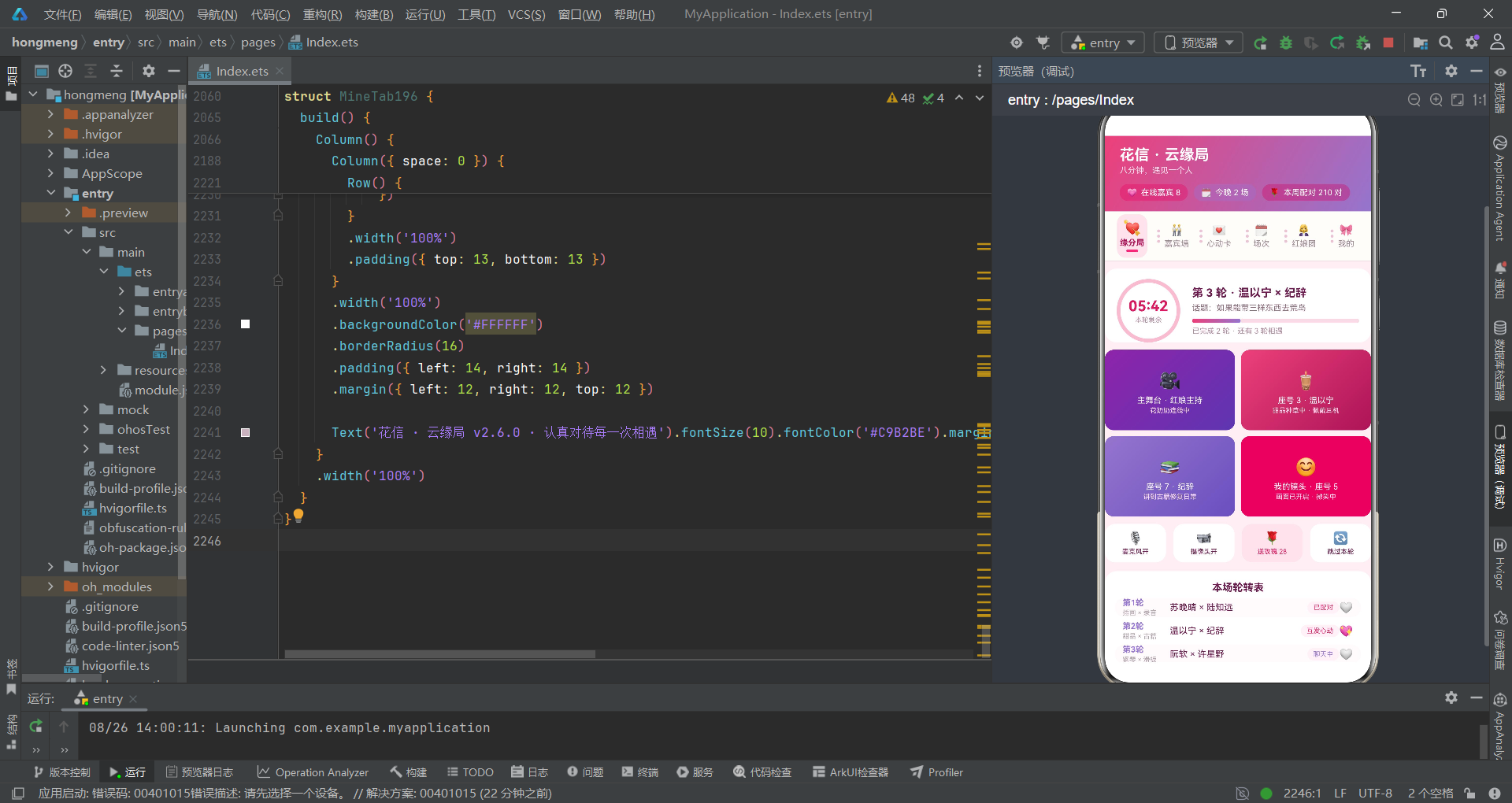
通过这个手把手教程,我们从零开始搭建了一个完整的HarmonyOS云相亲应用。整个过程分为六个步骤:第一步定义数据模型,用interface为应用建立类型安全基石;第二步编写工具函数,将状态颜色映射和统计计算逻辑抽取为可复用的纯函数;第三步搭建根组件骨架,用@State管理弹窗开关和表单数据,用bindSheet/bindContentCover绑定五种弹窗;第四步构建弹窗,学习表单组装、map编辑回写和filter删除的不可变更新模式;第五步构建Tab子组件,实现视频宫格、倒计时环、轮转配对表、嘉宾列表等核心UI;第六步实现声明式图表,用ForEach和layoutWeight构建柱状图和堆叠条。
这个教程中最值得反复练习的两个知识点是map/filter的不可变数据更新和@Builder的弹窗分离。map编辑回写模式是ArkTS中处理列表修改的标准做法——永远不要直接修改数组元素的属性,而是通过map生成全新的数组。filter删除模式同样如此——通过条件判断排除目标项,生成新数组。这两种模式确保了ArkTS响应式系统能可靠地检测到数据变化并触发UI更新。
对于初学者来说,最重要的建议是:不要只读不练。把教程中的代码复制到DevEco Studio中跑起来,修改一些数据和参数,观察UI的变化。比如试着把倒计时从"05:42"改成"00:30",看看进度条比例如何变化;把likedRounds的初始值改一改,看看心形emoji的显示效果;在cardData196中添加一条新数据,看看列表和图表是否自动更新。这种"改-看-理解"的循环是学习声明式UI最快的方式。HarmonyOS的ArkTS框架虽然API丰富,但核心思想很简单:状态驱动UI,数据变化时界面自动更新。掌握了这个思想,任何复杂应用都可以一步步拆解实现。

开源鸿蒙跨平台开发社区汇聚开发者与厂商,共建“一次开发,多端部署”的开源生态,致力于降低跨端开发门槛,推动万物智联创新。
更多推荐


 9
9 0
0- 0


 已为社区贡献29条内容

所有评论(0)