HarmonyOS 6效果实现:bindSheet的$$双向绑定、Toggle的onChange回调
阅读源码是理解框架设计哲学的最佳途径。每一行ArkTS代码背后,都蕴含着HarmonyOS声明式UI的运行机制与最佳实践。本文不谈架构蓝图,只做一件事:把代码掰开揉碎,逐段精读。
好的代码本身就是最好的文档。当变量命名准确、类型约束严格、状态流转清晰时,阅读代码如同阅读一篇结构严谨的技术论文——每一段都有明确的论点,每一行都有存在的理由。
在HarmonyOS声明式UI中,@State的响应式追踪、ForEach的key生成策略、bindSheet的$$双向绑定、Toggle的onChange回调,这些API的细节决定了代码的正确性。精读这些细节,是写出高质量ArkTS代码的前提。
引言
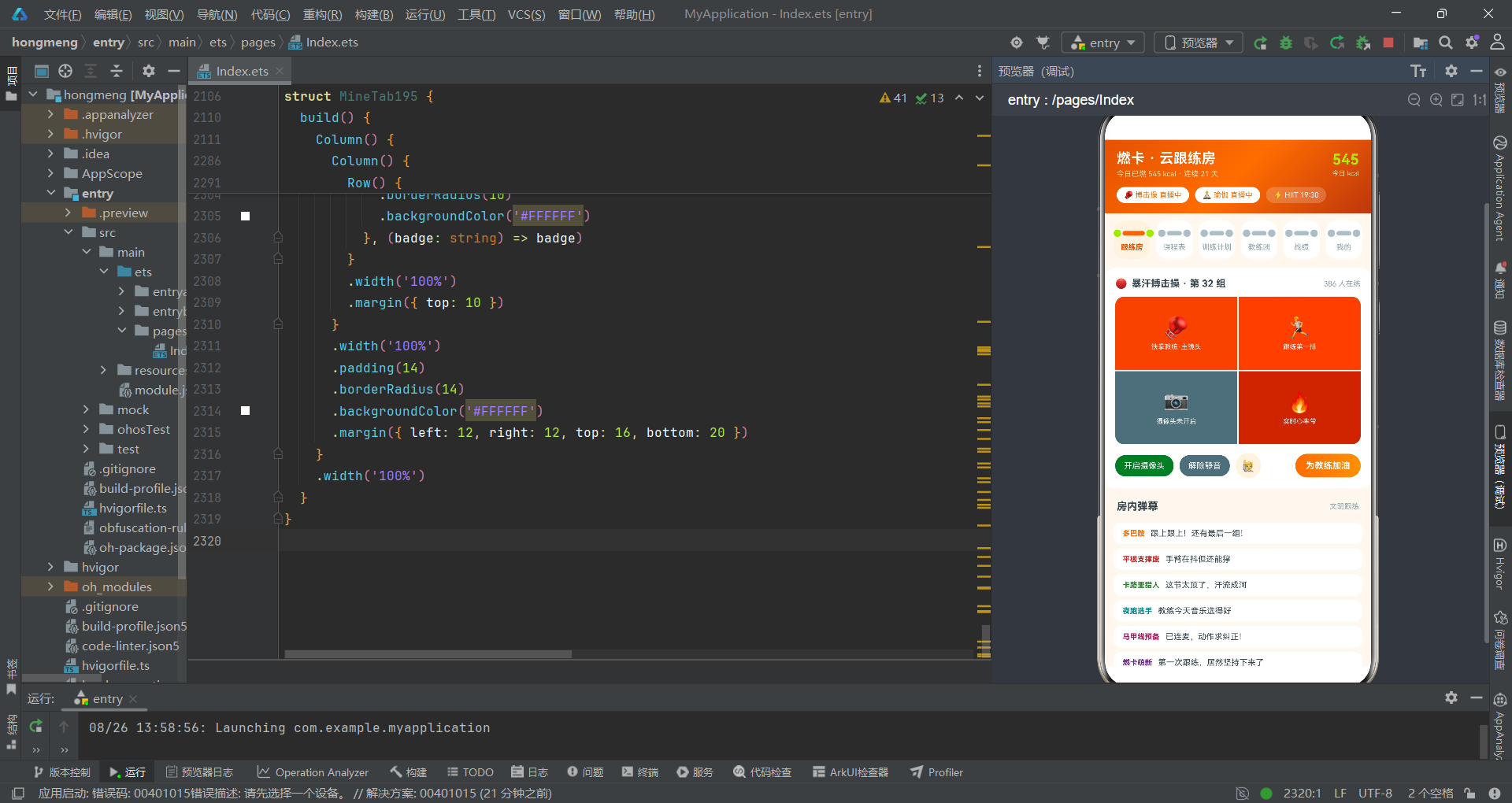
HarmonyOS 6.1.1的ArkTS语言为应用开发提供了一套完整的类型系统和声明式UI范式。然而,框架提供的API看似简单,实则暗藏诸多细节:@State的赋值何时触发重渲染?ForEach的key函数如何影响列表性能?bindSheet的$$语法与普通参数传递有何区别?Toggle组件的selectedColor属性在哪里设置才生效?这些问题只有通过逐行精读真实生产代码才能找到答案。
本文以一个多人健身跟练直播间的完整实现为研究对象,从源码的第一行到最后一行,逐段拆解每一个类型定义、每一个状态声明、每一个UI构建器、每一个事件回调,挖掘代码背后的设计意图和框架机制。这不是一篇泛泛而谈的架构文章,而是一份面向开发者的代码审查报告。
一、类型定义层精读
1.1 基础Tab模型——最简接口的范本
interface TabItem195 {
  name: string;
}
第一行代码就值得讨论。TabItem195只包含一个name字段,没有id、没有icon、没有color。这并非遗漏,而是刻意的精简设计——本应用的Tab使用哑铃造型而非图标,选中态通过字体粗细和颜色变化来体现,因此不需要icon字段。类型定义应当只包含UI渲染真正需要的字段,冗余字段不仅增加代码体积,还会在数据填充时产生不必要的认知负担。
精读要点:interface的字段定义应遵循YAGNI原则(You Aren’t Gonna Need It)。每多一个字段,就意味着数据源需要多提供一个值、ForEach需要多渲染一个属性。保持接口最小化是代码质量的第一步。
1.2 Course模型——多维度状态实体
interface Course195 {
  id: string;          // 唯一标识,用于ForEach的key
  name: string;        // 课程名称,显示在卡片标题
  type: string;        // 课程类型(搏击操/瑜伽/HIIT等),用于筛选和图标首字
  level: string;       // 难度等级(入门/中级/高级),影响卡片样式
  minutes: number;     // 时长(分钟),用于详情和预估消耗计算
  kcal: number;        // 预计消耗卡路里,核心展示数据
  coach: string;       // 教练名称,关联教练团数据
  joined: number;      // 已跟练人数,用于进度条计算
  seats: number;       // 总席位数,与joined计算报名率
  state: string;       // 状态(直播中/即将开练/可预约),驱动颜色映射
  color: string;       // 主题色,直接绑定到UI背景色
}
这11个字段覆盖了一门课程的全部展示维度。精读时需要注意几个设计细节:id是string类型而非number,这是因为ArkTS的ForEach key函数对string的哈希效率更优;joined和seats分开存储而非存储百分比,是因为原始数据更有价值——既能在UI中展示"386/500"的绝对数值,又能计算百分比进度条;color字段内联在数据中,避免了在视图层维护一个type到color的映射表,减少了间接引用。
1.3 RankRow模型——布尔标记的设计巧思
interface RankRow195 {
  id: string;
  name: string;
  kcal: number;
  streak: number;
  emoji: string;
  mine: boolean;    // 标记当前用户的数据行
}
mine: boolean这个字段值得逐字精读。在排行榜场景中,需要高亮显示"我"的那一行。如果不使用mine标记,就需要在渲染时用r.name === '我'做字符串比较——这种硬编码的判断方式脆弱且不可维护(万一有多个人叫"我"呢?)。通过布尔标记字段,渲染逻辑变为r.mine ? highlightStyle : normalStyle,既类型安全又语义清晰。
1.4 Action模型——数值映射难度的简洁方案
interface Action195 {
  id: string;
  name: string;
  times: string;   // "60 秒 × 2" —— 用string存储而非拆分为count和unit
  rest: string;    // "20 秒" 或 "—"
  hard: number;    // 1-5的整数,映射为🔥emoji数量
}
times和rest使用string而非结构化数字,这是一个有争议但合理的设计决策。在UI展示时,"60 秒 × 2"比count * 2 + " 秒 × " + sets的拼接更直观、更不易出错。而hard使用1-5的整数而非枚举字符串,配合'🔥'.repeat(hard)即可生成对应数量的火焰emoji——这是ArkTS中数值到视觉映射的最简路径。
二、常量数据层精读
2.1 课程数据——状态与颜色的映射约定
const COURSES195: Course195[] = [
  { id: 'c1', name: '暴汗搏击操·中级', type: '搏击操', level: '中级', minutes: 45, kcal: 520, coach: '铁拳教练', joined: 386, seats: 500, state: '直播中', color: '#FF6D00' },
  { id: 'c2', name: '晨间唤醒瑜伽', type: '瑜伽', level: '入门', minutes: 30, kcal: 160, coach: '莲花老师', joined: 298, seats: 400, state: '直播中', color: '#2E7D32' },
  { id: 'c3', name: 'HIIT 20 分钟燃脂', type: 'HIIT', level: '高级', minutes: 20, kcal: 380, coach: '闪电教练', joined: 445, seats: 500, state: '即将开练', color: '#C62828' },
  { id: 'c4', name: '帕梅拉腹部特训', type: '塑形', level: '中级', minutes: 15, kcal: 190, coach: '帕梅拉', joined: 512, seats: 600, state: '即将开练', color: '#AD1457' },
  { id: 'c5', name: '夜跑拉伸放松', type: '拉伸', level: '入门', minutes: 25, kcal: 110, coach: '莲花老师', joined: 187, seats: 300, state: '可预约', color: '#00838F' },
  { id: 'c6', name: '爵士舞基础套路', type: '舞蹈', level: '入门', minutes: 40, kcal: 300, coach: '律动小姐', joined: 231, seats: 350, state: '可预约', color: '#6A1B9A' },
  { id: 'c7', name: '壶铃全身循环', type: '力量', level: '高级', minutes: 35, kcal: 410, coach: '铁拳教练', joined: 156, seats: 200, state: '可预约', color: '#5D4037' }
];
精读这段数据可以发现一个隐含的约定:color字段的值与type字段存在固定映射关系——搏击操对应橙色、瑜伽对应绿色、HIIT对应红色等。这意味着当新增一种课程类型时,必须同时指定对应的color值。这种约定虽然不是编译期强制的,但在团队协作中应当通过文档或注释明确说明。
精读要点:const数组虽然不可变,但其中的对象属性是可变的。在ArkTS中,如果将const数组的元素赋值给@State变量并修改其属性,不会触发响应式更新。因此对于需要CRUD的数据,必须使用@State声明并在更新时使用map/filter生成新数组。
2.2 排行榜数据——emoji的语义编码
const RANKS195: RankRow195[] = [
  { id: 'r1', name: '卷腹小王子', kcal: 620, streak: 46, emoji: '🥇', mine: false },
  { id: 'r2', name: '大汗淋漓姐', kcal: 580, streak: 32, emoji: '🥈', mine: false },
  { id: 'r3', name: '我', kcal: 545, streak: 21, emoji: '🥉', mine: true },
  { id: 'r4', name: '腹肌最后一块', kcal: 490, streak: 18, emoji: '4', mine: false },
  { id: 'r5', name: '跳绳不绊脚', kcal: 465, streak: 15, emoji: '5', mine: false },
  { id: 'r6', name: '深蹲不眨眼', kcal: 430, streak: 12, emoji: '6', mine: false },
  { id: 'r7', name: '瑜伽垫常驻', kcal: 410, streak: 9, emoji: '7', mine: false }
];
前三名使用奖牌emoji(🥇🥈🥉),第四名及以后使用纯数字字符串(“4”、“5”)。这种设计使得在UI渲染时可以统一使用Text(r.emoji).fontSize(14),无需区分排名做条件判断。精读时注意mine: true只出现在r3,确保了"我"的高亮逻辑只有一个触发点。
三、工具函数层精读
3.1 状态颜色映射——三态函数的边界处理
function courseStateColor195(s: string): string {
  if (s === '直播中') {
    return '#C62828';      // 红色——正在进行,紧急感
  }
  if (s === '即将开练') {
    return '#FF6D00';      // 橙色——即将开始,提醒感
  }
  return '#2E7D32';        // 绿色——可预约,安全感(default分支)
}
逐行分析:这个函数处理三种状态,但只有两个if判断。第三个状态"可预约"落在default分支中,直接返回绿色。这种写法的好处是:即使传入了一个未预期的状态值(如空字符串或拼写错误),函数也不会返回undefined,而是返回安全的绿色。这是一种防御性编程的实践。
精读要点:在ArkTS中,函数返回值类型声明为string(非string | undefined),意味着所有代码路径都必须返回一个string值。如果遗漏了某个分支且没有default返回,编译器会报错。这体现了ArkTS严格类型检查的价值。
3.2 卡路里估算——参数化纯函数
function kcalEstimate195(minutes: number, intensity: number): number {
  let perMin: number = 8;    // 默认中等强度:8 kcal/min
  if (intensity === 0) {
    perMin = 5;              // 轻度:5 kcal/min
  } else if (intensity === 2) {
    perMin = 12;             // 高强度:12 kcal/min
  }
  return minutes * perMin;
}
这个函数在约战弹窗中被调用:kcalEstimate195(this.duration, this.intensityIdx)。精读时注意:intensity参数是索引值(0/1/2)而非字符串(“轻度”/“中等”/“高强度”),这是因为UI层的选中态本身就是索引。直接传索引避免了字符串到索引的转换,减少了出错可能。
3.3 难度可视化——repeat的妙用
function hardText195(h: number): string {
  return '🔥'.repeat(h);
}
一行代码完成难度可视化。String.repeat(n)是ES6标准方法,在ArkTS中完全支持。当h=1时返回"🔥",h=5时返回"🔥🔥🔥🔥🔥"。这种做法比维护一个['🔥','🔥🔥','🔥🔥🔥',...]的映射数组优雅得多。
3.4 计划统计函数——for循环的ArkTS规范
function activePlanCount195(plans: Plan195[]): number {
  let cnt: number = 0;
  for (let i = 0; i < plans.length; i++) {
    if (plans[i].state === '进行中') {
      cnt += 1;
    }
  }
  return cnt;
}
精读要点:这里使用传统的for循环而非plans.filter(p => p.state === '进行中').length。原因有二:第一,filter会创建一个临时数组,在数据量大时有内存开销;第二,for循环可以在找到目标后提前break(虽然这里没有用到),灵活性更高。在ArkTS的性能敏感场景中,for循环仍然是首选。
四、根组件Index195精读
4.1 @State声明——状态分类的代码审查
@Entry
@Component
struct Index195 {
  // 导航
  @State curTab: number = 0;

  // 弹窗开关——5个布尔值
  @State showBookSheet: boolean = false;
  @State showNewPlanSheet: boolean = false;
  @State showEditPlanSheet: boolean = false;
  @State showDelDialog: boolean = false;
  @State showDetailDialog: boolean = false;

  // 预约表单状态
  @State courseIdx: number = 0;
  @State intensityIdx: number = 1;
  @State goalIdx: number = 0;
  @State duration: number = 30;
  @State perWeek: number = 4;
  @State camOn: boolean = true;
  @State buddyOn: boolean = false;
  @State remindOn: boolean = true;
  @State keepLogOn: boolean = true;

  // 编辑上下文
  @State editIdx: number = 0;
  @State delIdx: number = 0;
  @State detailIdx: number = 0;

  // 可变数据
  @State myPlans: Plan195[] = [
    { id: 'mp1', name: '30 天减脂冲刺', goal: '减脂', weeks: 4, perWeek: 5, done: 12, state: '进行中', color: '#FF6D00' },
    { id: 'mp2', name: '马甲线养成', goal: '塑形', weeks: 6, perWeek: 4, done: 18, state: '进行中', color: '#AD1457' }
  ];
代码审查要点:总计17个@State变量,初始值全部在声明时给出。ArkTS要求@State必须有初始值,否则编译报错。注意intensityIdx初始值为1而非0——这对应"中等"强度,是用户最可能选择的默认值,体现了以用户为中心的默认值设计。
精读发现:camOn和buddyOn分别声明在根组件和子组件LiveRoomTab195中。根组件的camOn用于预约弹窗中的摄像头开关,子组件的camOn用于直播间的摄像头开关。两个同名变量互不影响——这是ArkTS组件作用域隔离的体现。
4.2 build方法——渐变头部的链式调用
build() {
    Column() {
      Column() {
        Row() {
          Column() {
            Text('燃卡 · 云跟练房')
              .fontSize(19)
              .fontWeight(FontWeight.Bold)
              .fontColor('#FFFFFF')
            Text('今日已燃 545 kcal · 连续 21 天')
              .fontSize(10)
              .fontColor('#FFE0B2')
              .margin({ top: 4 })
          }
          .alignItems(HorizontalAlign.Start)
          Text('')
            .layoutWeight(1)
          Column() {
            Text('545')
              .fontSize(20)
              .fontWeight(FontWeight.Bold)
              .fontColor('#AEEA00')
            Text('今日 kcal')
              .fontSize(9)
              .fontColor('#FFE0B2')
              .margin({ top: 2 })
          }
          .alignItems(HorizontalAlign.Center)
        }
        .width('100%')

        Row() {
          ForEach(['🥊 搏击操 直播中', '🧘 瑜伽 直播中', '⚡ HIIT 19:30'], (chip: string, i: number) => {
            Text(chip)
              .fontSize(10)
              .fontColor(i < 2 ? '#FF6D00' : '#FFFFFF')
              .padding({ left: 10, right: 10, top: 5, bottom: 5 })
              .borderRadius(12)
              .backgroundColor(i < 2 ? '#FFFFFF' : '#33FFFFFF')
              .margin({ right: 8 })
              .onClick(() => {
                this.showBookSheet = true;
              })
          }, (chip: string) => chip)
        }
        .width('100%')
        .margin({ top: 12 })
      }
      .width('100%')
      .padding({ left: 16, right: 16, top: 14, bottom: 14 })
      .linearGradient({
        angle: 135,
        colors: [['#E65100', 0], ['#FF6D00', 0.5], ['#BF360C', 1]]
      })
逐行精读渐变头部:linearGradient的angle为135度(从左上到右下),colors数组定义了三个色标——#E65100(深橙,位置0%)、#FF6D00(活力橙,位置50%)、#BF360C(暗红,位置100%)。这种三段式渐变比两段式更自然,中间的亮色让头部看起来有"光感"。
Text('').layoutWeight(1)这行代码值得注意——一个空Text组件充当弹性间隔,将标题和右侧统计卡推开。这是ArkTS中实现flex布局间隔的最简方式,比设置margin更可靠。
chip行的backgroundColor: '#33FFFFFF'——注意前缀33是alpha通道值(十六进制),表示20%透明度的白色。ArkTS支持8位hex色值(RRGGBBAA),这是实现半透明背景的简洁方式。
4.3 哑铃造型Tab——Row嵌套的视觉构建
Row() {
    ForEach(TABS195, (t: TabItem195, idx: number) => {
      Column() {
        Row() {
          // 左端圆块(哑铃左头)
          Text('')
            .width(10)
            .height(10)
            .borderRadius(5)
            .backgroundColor(idx === this.curTab ? '#AEEA00' : '#B0BEC5')
          // 中间短杆
          Column() {
            Text('')
              .width(idx === this.curTab ? 30 : 20)
              .height(6)
              .borderRadius(3)
              .backgroundColor(idx === this.curTab ? '#FF6D00' : '#B0BEC5')
          }
          .margin({ left: 2, right: 2 })
          // 右端圆块(哑铃右头)
          Text('')
            .width(10)
            .height(10)
            .borderRadius(5)
            .backgroundColor(idx === this.curTab ? '#AEEA00' : '#B0BEC5')
        }
        .height(14)
        .alignItems(VerticalAlign.Center)

        Text(t.name)
          .fontSize(10)
          .fontWeight(idx === this.curTab ? FontWeight.Bold : FontWeight.Normal)
          .fontColor(idx === this.curTab ? '#E65100' : '#90A4AE')
          .margin({ top: 6 })
      }
      .layoutWeight(1)
      .alignItems(HorizontalAlign.Center)
      .padding({ top: 10, bottom: 10 })
      .borderRadius(14)
      .backgroundColor(idx === this.curTab ? '#FFF3E0' : '#FFFFFF')
      .margin({ left: 4, right: 4 })
      .onClick(() => {
        this.curTab = idx;
      })
    }, (t: TabItem195, idx: number) => t.name + idx)
  }
  .width('100%')
  .padding({ left: 8, right: 8, top: 10 })
精读要点:哑铃造型由三个Text组件构成——两个10x10的圆块(borderRadius:5使其变为圆形)和中间一个宽度可变的短杆。选中时短杆变宽(30 vs 20)且两端圆块变青柠色,未选中时全灰。这种纯组件拼装的图标设计无需图片资源,完全矢量、完全响应式。
ForEach的key函数返回t.name + idx——name和index拼接,确保即使两个tab同名也能唯一标识。这是ForEach性能优化的关键:稳定的key让框架在列表更新时只重渲染变化的项。
4.4 条件渲染——if链的Tab路由
if (this.curTab === 0) {
    LiveRoomTab195({
      onBook: () => {
        this.showBookSheet = true;
      }
    })
  }
  if (this.curTab === 1) {
    CourseTab195({
      onBook: () => {
        this.showBookSheet = true;
      },
      onDetail: (idx: number) => {
        this.detailIdx = idx;
        this.showDetailDialog = true;
      }
    })
  }
  if (this.curTab === 2) {
    PlanTab195({
      plans: this.myPlans,
      onNew: () => {
        this.showNewPlanSheet = true;
      },
      onEdit: (idx: number) => {
        this.editIdx = idx;
        this.showEditPlanSheet = true;
      },
      onDel: (idx: number) => {
        this.delIdx = idx;
        this.showDelDialog = true;
      }
    })
  }
精读发现:这里使用独立的if语句而非if-else if链。在ArkTS的声明式UI中,每个if块独立判断,当curTab变化时只有匹配的if块渲染内容。使用if-else if在语义上等价,但独立if更清晰——每个Tab的路由配置完全对称,增删Tab时只需增删一个if块。
4.5 弹窗绑定——$$语法的双向绑定
.bindSheet($$this.showBookSheet, this.bookSheet195(), {
      height: 580,
      dragBar: true,
      showClose: false,
      backgroundColor: '#FFFFFF'
    })
    .bindSheet($$this.showNewPlanSheet, this.newPlanSheet195(), {
      height: 560,
      dragBar: true,
      showClose: false,
      backgroundColor: '#FFFFFF'
    })
    .bindSheet($$this.showEditPlanSheet, this.editPlanSheet195(), {
      height: 540,
      dragBar: true,
      showClose: false,
      backgroundColor: '#FFFFFF'
    })
    .bindContentCover($$this.showDelDialog, this.delDialog195(), {
    })
    .bindContentCover($$this.showDetailDialog, this.detailDialog195(), {
    })
逐行精读$$this.showBookSheet:$$是ArkTS的特殊语法,表示双向绑定。bindSheet不仅读取showBookSheet的值来决定弹窗显隐,还会在用户下滑关闭弹窗时自动将showBookSheet设为false。如果使用普通参数this.showBookSheet而非$$this.showBookSheet,用户手动下滑关闭弹窗后状态变量不会同步更新,导致再次点击按钮无法打开弹窗——这是一个常见的ArkTS陷阱。
bindSheet的配置对象中,height: 580使用绝对像素值而非百分比。在HarmonyOS中,bindSheet的height参数接受number(vp单位)或string(百分比)。使用绝对值确保弹窗高度在不同屏幕上表现一致,但可能在小屏设备上显示不全。constraintSize({ maxHeight: '85%' })在Builder内部做了兜底保护。
精读要点:bindContentCover的配置对象为空
{}——这意味着使用全屏覆盖的默认配置。与bindSheet不同,bindContentCover没有height参数,因为它本身就是全覆盖的。两种API的配置差异需要在代码审查中重点关注。
五、@Builder构建器精读
5.1 预约弹窗——步进器与Toggle的实现细节
@Builder
bookSheet195() {
    Column() {
      // 拖拽条——视觉提示用户可下滑关闭
      Row() {
        Text('')
          .width(36)
          .height(4)
          .borderRadius(2)
          .backgroundColor('#FFCC80')
      }
      .width('100%')
      .justifyContent(FlexAlign.Center)
      .margin({ top: 10 })

      Text('预约连麦跟练')
        .fontSize(17)
        .fontWeight(FontWeight.Bold)
        .fontColor('#37474F')
        .margin({ top: 12 })

      // 课程选择chips
      Column() {
        Text('选择课程')
          .fontSize(12)
          .fontColor('#90A4AE')
        Row() {
          ForEach(COURSE_CHIPS195, (c: string, i: number) => {
            Text(c)
              .fontSize(12)
              .fontColor(i === this.courseIdx ? '#FFFFFF' : '#E65100')
              .padding({ left: 14, right: 14, top: 7, bottom: 7 })
              .borderRadius(16)
              .backgroundColor(i === this.courseIdx ? '#FF6D00' : '#FFF3E0')
              .margin({ right: 8 })
              .onClick(() => {
                this.courseIdx = i;
              })
          }, (c: string) => c)
        }
        .margin({ top: 8 })
      }
      .width('100%')
      .margin({ top: 16 })
      .alignItems(HorizontalAlign.Start)
精读chips的实现模式:选中态fontColor为白色(#FFFFFF)+ backgroundColor为橙色(#FF6D00),未选中态fontColor为橙色(#E65100)+ backgroundColor为浅橙(#FFF3E0)。颜色反转是chip选中态的经典表达——选中时深底浅字,未选中时浅底深字,对比强烈。
      // 时长步进器
      Column() {
        Text('跟练时长(分钟)')
          .fontSize(12)
          .fontColor('#90A4AE')
        Row() {
          Text('−')
            .fontSize(18)
            .fontColor('#FF6D00')
            .width(34)
            .height(34)
            .textAlign(TextAlign.Center)
            .borderRadius(17)
            .backgroundColor('#FFF3E0')
            .onClick(() => {
              if (this.duration > 15) {
                this.duration -= 5;
              }
            })
          Text(this.duration + ' 分钟')
            .fontSize(16)
            .fontWeight(FontWeight.Bold)
            .fontColor('#37474F')
            .layoutWeight(1)
            .textAlign(TextAlign.Center)
          Text('+')
            .fontSize(18)
            .fontColor('#FF6D00')
            .width(34)
            .height(34)
            .textAlign(TextAlign.Center)
            .borderRadius(17)
            .backgroundColor('#FFF3E0')
            .onClick(() => {
              if (this.duration < 60) {
                this.duration += 5;
              }
            })
        }
        .width('100%')
        .margin({ top: 8 })
      }
精读步进器的边界保护:减号按钮的onClick中有if (this.duration > 15)检查,加号按钮有if (this.duration < 60)检查。这些边界值(15和60)是硬编码的业务常量,限制了用户可选的时长范围。步进值为5,因此可选值为15/20/25/30/35/40/45/50/55/60,共10个选项。这种设计比Slider更直观,也比下拉选择器更紧凑。
      // 卡路里预估——动态计算
      Row() {
        Text('预计消耗 ' + kcalEstimate195(this.duration, this.intensityIdx) + ' kcal')
          .fontSize(11)
          .fontColor('#FF6D00')
      }
      .width('100%')
      .margin({ top: 14 })
这行代码的精读价值在于:kcalEstimate195在每次UI重渲染时都会被调用。当duration或intensityIdx变化时,ArkTS自动重新执行build方法,Text的内容随之更新。这种"计算即渲染"的模式是声明式UI的核心特征——开发者不需要手动调用setText,只需改变状态变量。
5.2 编辑计划弹窗——map回写模式
@Builder
editPlanSheet195() {
    Column() {
      // ... 表单内容 ...

      Row() {
        Text('取消')
          .fontSize(14)
          .fontColor('#90A4AE')
          .textAlign(TextAlign.Center)
          .layoutWeight(1)
          .padding({ top: 13, bottom: 13 })
          .borderRadius(22)
          .backgroundColor('#FFF3E0')
        Text('保存修改')
          .fontSize(14)
          .fontWeight(FontWeight.Bold)
          .fontColor('#FFFFFF')
          .textAlign(TextAlign.Center)
          .layoutWeight(1.6)
          .padding({ top: 13, bottom: 13 })
          .borderRadius(22)
          .margin({ left: 10 })
          .linearGradient({
            angle: 90,
            colors: [['#FF6D00', 0], ['#FF9100', 1]]
          })
      }
      .width('100%')
      .margin({ top: 20 })
      .onClick(() => {
        this.myPlans = this.myPlans.map((p: Plan195, i: number) => {
          if (i === this.editIdx) {
            return {
              id: p.id, name: p.name, goal: GOALS195[this.goalIdx],
              weeks: p.weeks, perWeek: this.perWeek, done: p.done,
              state: p.state, color: p.color
            };
          }
          return p;
        });
        this.showEditPlanSheet = false;
      })
    }
    .width('100%')
    .padding({ left: 20, right: 20, bottom: 24 })
    .constraintSize({ maxHeight: '85%' })
  }
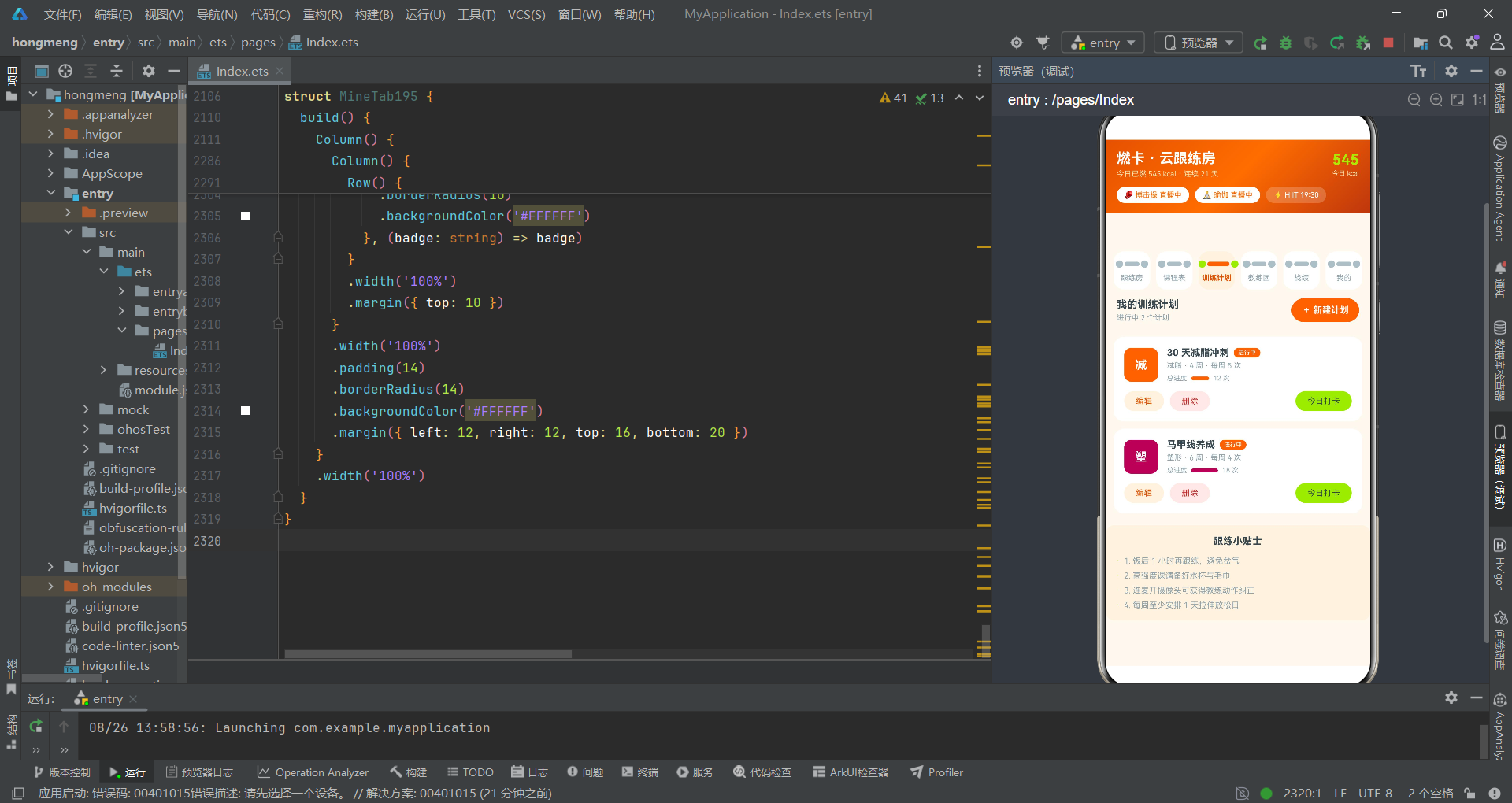
精读map回写:onClick回调中,map遍历myPlans数组。当索引等于editIdx时,构造一个新对象替换原对象——只修改goal和perWeek字段,其余字段从原对象p中复制。return p保留未修改的元素。最终将新数组赋值给this.myPlans,触发ArkTS响应式更新。这种模式的正确性依赖于@State对数组引用变化的检测——ArkTS使用引用比较,map返回的新数组引用不同,因此更新会被捕获。
5.3 删除确认弹窗——filter模式
@Builder
delDialog195() {
    Column() {
      Text('💪')
        .fontSize(34)
        .margin({ top: 22 })
      Text('删除训练计划')
        .fontSize(17)
        .fontWeight(FontWeight.Bold)
        .fontColor('#37474F')
        .margin({ top: 8 })
      Text('删除后已完成的训练记录不受影响,但计划进度将清零')
        .fontSize(12)
        .fontColor('#90A4AE')
        .textAlign(TextAlign.Center)
        .margin({ top: 8 })

      // 信息展示卡
      Row() {
        Column() {
          Text('计划名称')
            .fontSize(10)
            .fontColor('#90A4AE')
          Text(this.delIdx < this.myPlans.length ? this.myPlans[this.delIdx].name : '-')
            .fontSize(12)
            .fontWeight(FontWeight.Bold)
            .fontColor('#37474F')
            .margin({ top: 4 })
        }
        .alignItems(HorizontalAlign.Start)
        .layoutWeight(1)
        Column() {
          Text('已完成')
            .fontSize(10)
            .fontColor('#90A4AE')
          Text((this.delIdx < this.myPlans.length ? this.myPlans[this.delIdx].done : 0) + ' 次')
            .fontSize(12)
            .fontWeight(FontWeight.Bold)
            .fontColor('#FF6D00')
            .margin({ top: 4 })
        }
        .alignItems(HorizontalAlign.Start)
        .layoutWeight(1)
      }
      .width('100%')
      .padding(12)
      .borderRadius(12)
      .backgroundColor('#FFF3E0')
      .margin({ top: 16 })

      // 保留记录开关
      Row() {
        Text('保留历史训练记录')
          .fontSize(12)
          .fontColor('#37474F')
        Text('')
          .layoutWeight(1)
        Toggle({ type: ToggleType.Switch, isOn: this.keepLogOn })
          .onChange((on: boolean) => {
            this.keepLogOn = on;
          })
      }
      .width('100%')
      .margin({ top: 14 })

      // 按钮组
      Row() {
        Text('再想想')
          .fontSize(14)
          .fontColor('#90A4AE')
          .textAlign(TextAlign.Center)
          .layoutWeight(1)
          .padding({ top: 12, bottom: 12 })
          .borderRadius(20)
          .backgroundColor('#FFF3E0')
          .onClick(() => {
            this.showDelDialog = false;
          })
        Text('确认删除')
          .fontSize(14)
          .fontWeight(FontWeight.Bold)
          .fontColor('#FFFFFF')
          .textAlign(TextAlign.Center)
          .layoutWeight(1.4)
          .padding({ top: 12, bottom: 12 })
          .borderRadius(20)
          .margin({ left: 10 })
          .backgroundColor('#FF6D00')
          .onClick(() => {
            this.myPlans = this.myPlans.filter((p: Plan195, i: number) => i !== this.delIdx);
            this.showDelDialog = false;
          })
      }
      .width('100%')
      .margin({ top: 18 })
    }
    .width('86%')
    .padding({ left: 18, right: 18, bottom: 20 })
    .borderRadius(16)
    .backgroundColor('#FFFFFF')
  }
精读边界保护:this.delIdx < this.myPlans.length ? this.myPlans[this.delIdx].name : '-'。这个三元表达式防止了数组越界——当delIdx指向已被删除的索引时,显示’-'而非崩溃。虽然正常流程中不会出现越界(删除后弹窗立即关闭),但防御性编程要求考虑异常路径。
filter的回调(p: Plan195, i: number) => i !== this.delIdx保留所有索引不等于delIdx的元素,精准删除目标项。filter返回的新数组被赋值给this.myPlans,触发UI更新。
精读发现:删除弹窗的宽度为
86%,而bindSheet弹窗的宽度为100%。这是因为bindContentCover是全屏覆盖,弹窗内容自身需要设置合适的宽度(86%居中显示),而bindSheet的弹窗始终占据屏幕全宽,内容padding控制内边距。
六、子组件精读
6.1 LiveRoomTab195——Grid视频宫格
@Component
struct LiveRoomTab195 {
  onBook: () => void = () => {
  };
  @State camOn: boolean = false;
  @State micOn: boolean = false;
  @State likeOn: boolean = false;

  build() {
    Column() {
      Column() {
        Row() {
          Text('🔴')
            .fontSize(13)
          Text('暴汗搏击操 · 第 32 组')
            .fontSize(13)
            .fontWeight(FontWeight.Bold)
            .fontColor('#37474F')
            .margin({ left: 6 })
          Text('')
            .layoutWeight(1)
          Text('386 人在练')
            .fontSize(10)
            .fontColor('#90A4AE')
        }
        .width('100%')

        Grid() {
          GridItem() {
            Column() {
              Text('🥊')
                .fontSize(28)
              Text('铁拳教练·主镜头')
                .fontSize(9)
                .fontColor('#FFFFFF')
                .margin({ top: 4 })
            }
            .width('100%')
            .height('100%')
            .justifyContent(FlexAlign.Center)
            .backgroundColor('#E65100')
          }
          GridItem() {
            Column() {
              Text('🏃')
                .fontSize(28)
              Text('跟练第一排')
                .fontSize(9)
                .fontColor('#FFFFFF')
                .margin({ top: 4 })
            }
            .width('100%')
            .height('100%')
            .justifyContent(FlexAlign.Center)
            .backgroundColor('#F4511E')
          }
          GridItem() {
            Column() {
              Text(this.camOn ? '📹' : '📷')
                .fontSize(28)
              Text(this.camOn ? '我的摄像头' : '摄像头未开启')
                .fontSize(9)
                .fontColor('#FFFFFF')
                .margin({ top: 4 })
            }
            .width('100%')
            .height('100%')
            .justifyContent(FlexAlign.Center)
            .backgroundColor(this.camOn ? '#2E7D32' : '#546E7A')
          }
          GridItem() {
            Column() {
              Text('🔥')
                .fontSize(28)
              Text('实时心率带')
                .fontSize(9)
                .fontColor('#FFFFFF')
                .margin({ top: 4 })
            }
            .width('100%')
            .height('100%')
            .justifyContent(FlexAlign.Center)
            .backgroundColor('#BF360C')
          }
        }
        .columnsTemplate('1fr 1fr')
        .rowsTemplate('1fr 1fr')
        .width('100%')
        .height(200)
        .borderRadius(12)
        .columnsGap(2)
        .rowsGap(2)
        .margin({ top: 10 })
精读Grid配置:columnsTemplate('1fr 1fr')定义两列等宽,rowsTemplate('1fr 1fr')定义两行等高,形成2x2视频宫格。columnsGap(2)和rowsGap(2)设置2vp的间距——这个极小的间距创造了视频画面的"分隔线"效果。height固定为200vp,确保宫格不会因内容多少而改变高度。
第三个GridItem是动态的——当camOn为true时显示📹(摄像机)和绿色背景,为false时显示📷(相机)和灰色背景。这种通过状态变量驱动emoji和背景色变化的手法,在ArkTS中非常常见且高效。
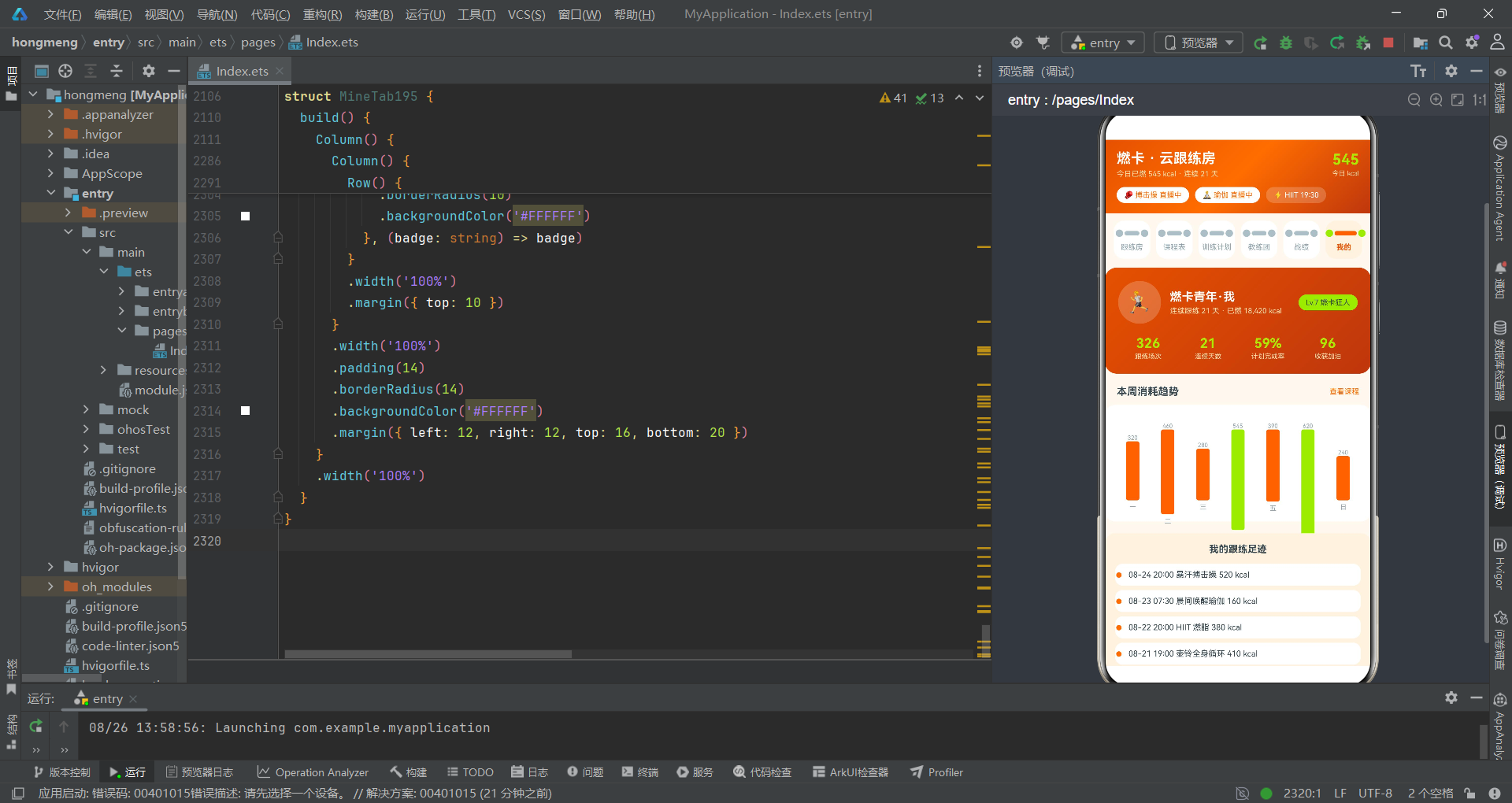
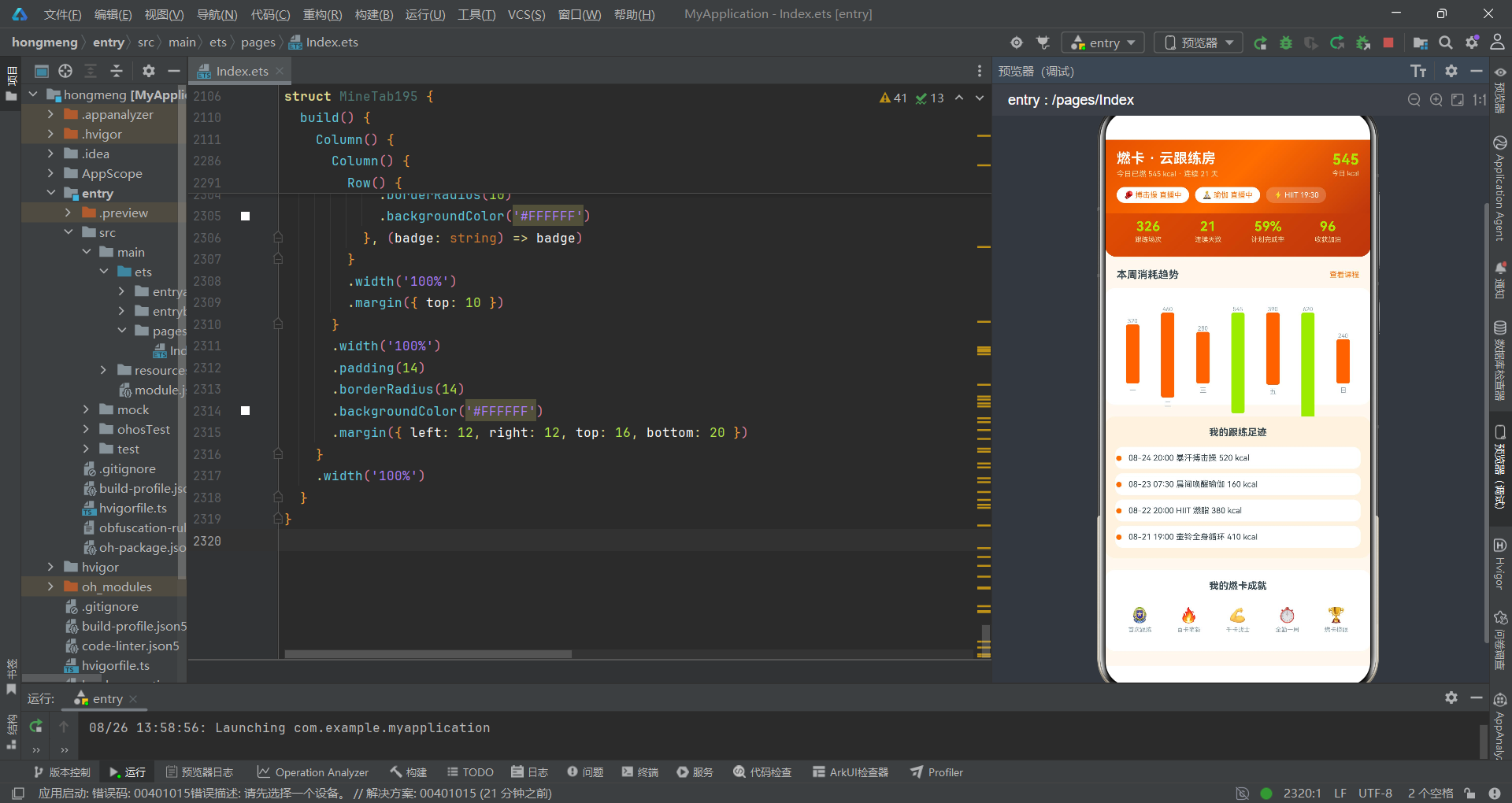
6.2 CourseTab195——进度条的数学计算
ForEach(COURSES195, (c: Course195, i: number) => {
    Column() {
      Row() {
        Column() {
          Text(c.type.charAt(0))
            .fontSize(16)
            .fontWeight(FontWeight.Bold)
            .fontColor('#FFFFFF')
        }
        .width(46)
        .height(46)
        .justifyContent(FlexAlign.Center)
        .borderRadius(10)
        .backgroundColor(c.color)

        Column() {
          Row() {
            Text(c.name)
              .fontSize(13)
              .fontWeight(FontWeight.Bold)
              .fontColor('#37474F')
              .maxLines(1)
              .textOverflow({ overflow: TextOverflow.Ellipsis })
            Text(c.state)
              .fontSize(8)
              .fontColor('#FFFFFF')
              .padding({ left: 6, right: 6, top: 2, bottom: 2 })
              .borderRadius(8)
              .backgroundColor(courseStateColor195(c.state))
              .margin({ left: 6 })
          }
          .width('100%')
          Text(c.level + ' · ' + c.minutes + ' 分钟 · ' + c.kcal + ' kcal')
            .fontSize(10)
            .fontColor('#90A4AE')
            .margin({ top: 4 })
          Row() {
            Text('')
              .width((c.joined / c.seats) * 100 + '%')
              .height(4)
              .borderRadius(2)
              .backgroundColor(c.color)
          }
          .width('100%')
          .margin({ top: 6 })
          Text(c.coach + ' · ' + c.joined + '/' + c.seats + ' 已跟练')
            .fontSize(9)
            .fontColor('#90A4AE')
            .margin({ top: 4 })
        }
        .layoutWeight(1)
        .margin({ left: 12 })
        .alignItems(HorizontalAlign.Start)
      }
      .width('100%')
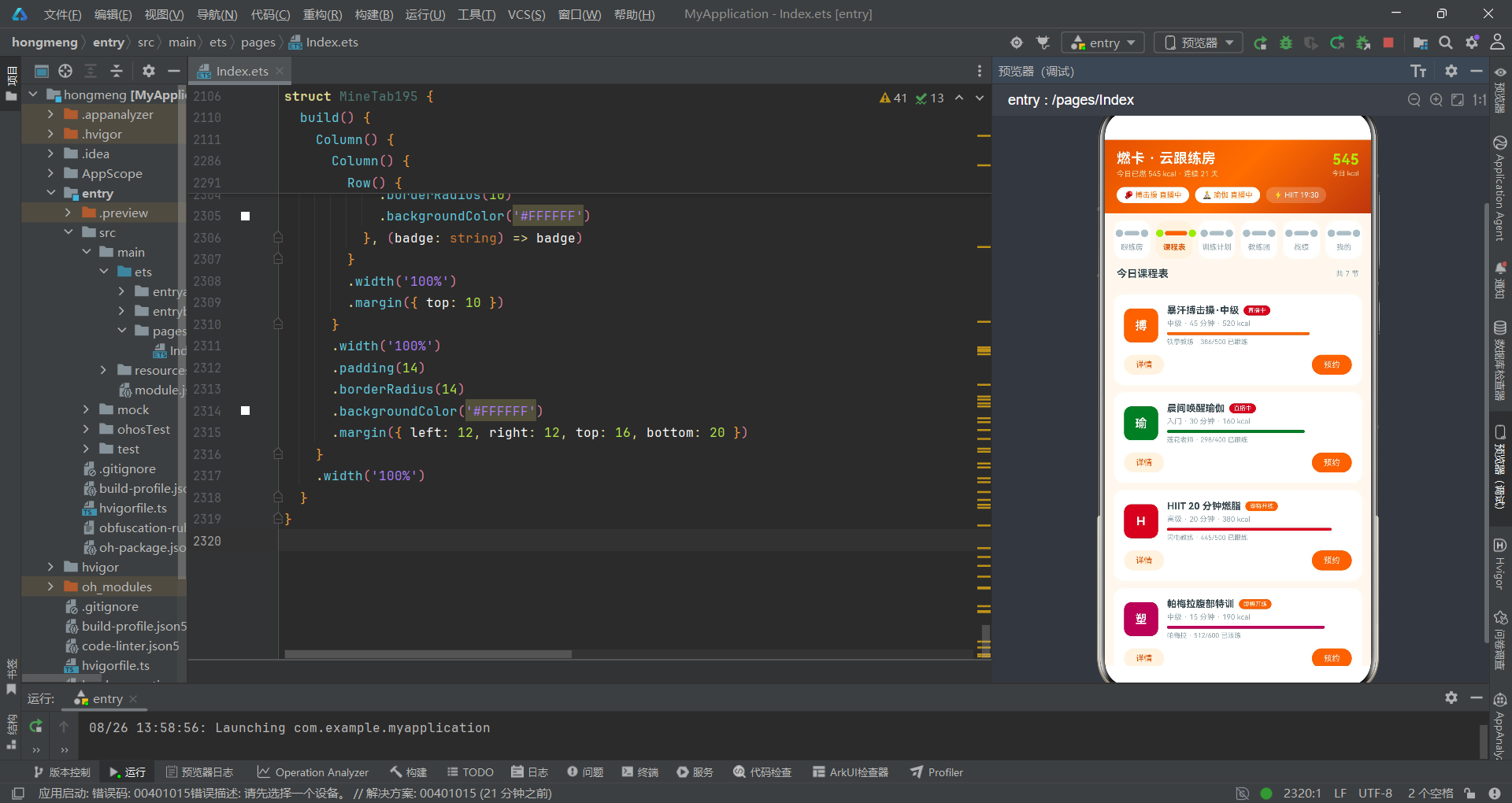
精读进度条计算:.width((c.joined / c.seats) * 100 + '%')。这是一个内联数学表达式——除法得到0-1之间的小数,乘以100转为百分比,再拼接’%'符号变成字符串。例如386/500=0.772,乘以100得77.2,拼接得"77.2%"。ArkTS的width方法接受百分比字符串,因此这种动态计算完全有效。
精读要点:
maxLines(1)和textOverflow({ overflow: TextOverflow.Ellipsis })配合使用,确保课程名称过长时显示省略号而非换行。这是ArkTS文本截断的标准模式,在卡片列表中必不可少。
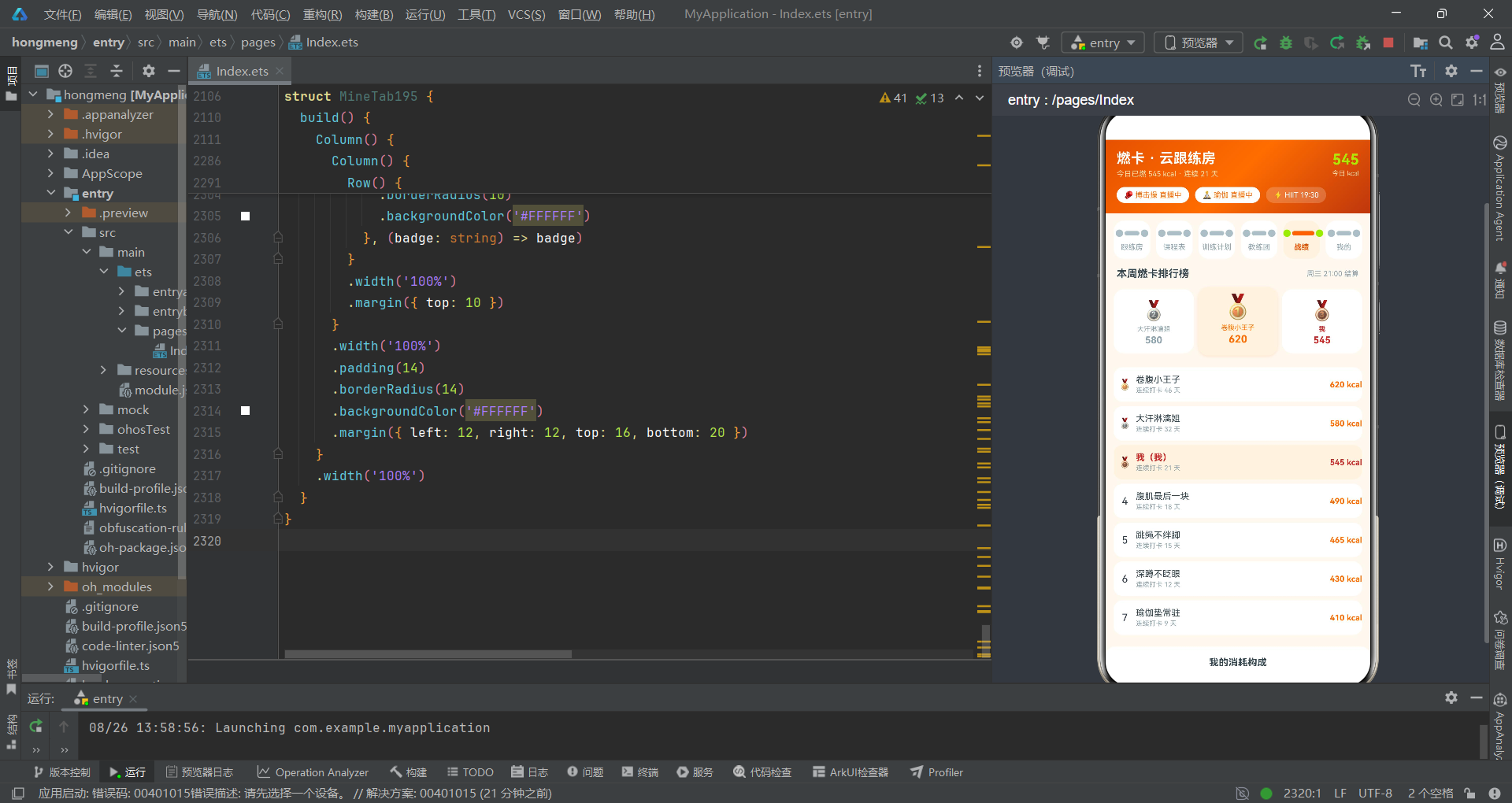
6.3 BattleTab195——领奖台的不对称布局
Row() {
    Column() {
      Text('🥈')
        .fontSize(26)
      Text('大汗淋漓姐')
        .fontSize(9)
        .fontColor('#90A4AE')
        .margin({ top: 4 })
      Text('580')
        .fontSize(13)
        .fontWeight(FontWeight.Bold)
        .fontColor('#90A4AE')
        .margin({ top: 2 })
    }
    .layoutWeight(1)
    .alignItems(HorizontalAlign.Center)
    .padding({ top: 14, bottom: 10 })
    .borderRadius(14)
    .backgroundColor('#FFFFFF')

    Column() {
      Text('🥇')
        .fontSize(32)
      Text('卷腹小王子')
        .fontSize(9)
        .fontColor('#FF6D00')
        .margin({ top: 4 })
      Text('620')
        .fontSize(14)
        .fontWeight(FontWeight.Bold)
        .fontColor('#FF6D00')
        .margin({ top: 2 })
    }
    .layoutWeight(1.1)
    .alignItems(HorizontalAlign.Center)
    .padding({ top: 8, bottom: 14 })
    .borderRadius(14)
    .backgroundColor('#FFF3E0')
    .shadow({
      radius: 10,
      color: '#26FF6D00',
      offsetY: 4
    })
    .margin({ left: 6, right: 6 })

    Column() {
      Text('🥉')
        .fontSize(26)
      Text('我')
        .fontSize(9)
        .fontColor('#C62828')
        .fontWeight(FontWeight.Bold)
        .margin({ top: 4 })
      Text('545')
        .fontSize(13)
        .fontWeight(FontWeight.Bold)
        .fontColor('#C62828')
        .margin({ top: 2 })
    }
    .layoutWeight(1)
    .alignItems(HorizontalAlign.Center)
    .padding({ top: 14, bottom: 10 })
    .borderRadius(14)
    .backgroundColor('#FFFFFF')
  }
  .width('100%')
  .padding({ left: 12, right: 12 })
  .margin({ top: 10 })
精读领奖台布局:三个Column分别代表第二、第一、第三名。第一名(中间)的layoutWeight为1.1(比两侧的1.0略大),使其视觉上更突出。第一名的emoji字号为32(比两侧的26更大),padding的top更小(8 vs 14)、bottom更大(14 vs 10),模拟了冠军站在更高领奖台上的视觉效果。shadow的color使用了#26FF6D00——前缀26是15%透明度的橙色,营造柔和的光晕效果。
七、技术对比表格
| 代码维度 | 实现方式 | 代码审查评价 | 改进建议 |
|---|---|---|---|
| 类型定义 | interface + 全字段string/number | 类型安全、字段语义清晰 | 可考虑联合类型替代string(如state: ‘直播中’ | ‘即将开练’) |
| 状态管理 | 17个@State集中根组件 | 状态可追溯、便于调试 | 超过20个时考虑拆分子组件状态 |
| 弹窗绑定 | $$双向绑定语法 | 正确使用$$避免状态不同步 | 无改进空间,这是最佳实践 |
| 列表更新 | map/filter不可变模式 | 响应式可靠、函数式风格 | 无改进空间,推荐保持 |
| 边界保护 | if判断 + 三元表达式防越界 | 防御性编程到位 | 可考虑抽取为工具函数减少重复 |
| 图表实现 | ForEach + layoutWeight | 零依赖、声明式 | 数据量大时考虑虚拟列表 |
| 步进器 | Text + onClick + if边界检查 | 自实现、无Slider依赖 | 可封装为可复用StepInput组件 |
| Toggle使用 | 未设置selectedColor | 功能正确但视觉一致性不足 | 应添加selectedColor匹配主题色 |
| Grid布局 | columnsTemplate/rowsTemplate | 2x2宫格标准实现 | 无改进空间 |
| 领奖台布局 | layoutWeight不对称 + padding差异 | 视觉效果出色 | 无改进空间 |
安装DevEco Studio程序

选择目标安装目录:

设置环境变量,但是需要重启一下:

新建一个空白模板:

设置API为24的模板项目:
初始化项目,自动下载相关依赖:

完整代码:
// 场景:教练视频会议室带操,学员连麦开摄像头跟练,实时卡路里与排行榜
// 配色:活力橙 #FF6D00 × 青柠 #AEEA00 × 炭灰 #263238
// Tab布局:顶部「哑铃」造型tab(两端圆块+中间短杆构成哑铃,选中橙色杆+青柠端块)
// 弹框:预约连麦跟练(抽屉)/新建训练计划(抽屉)/编辑计划(抽屉)/删除计划(居中)/课程详情(居中)
interface TabItem195 {
name: string;
}
interface Course195 {
id: string;
name: string;
type: string;
level: string;
minutes: number;
kcal: number;
coach: string;
joined: number;
seats: number;
state: string;
color: string;
}
interface Plan195 {
id: string;
name: string;
goal: string;
weeks: number;
perWeek: number;
done: number;
state: string;
color: string;
}
interface Coach195 {
id: string;
name: string;
field: string;
cert: string;
fans: number;
score: number;
emoji: string;
online: boolean;
}
interface RankRow195 {
id: string;
name: string;
kcal: number;
streak: number;
emoji: string;
mine: boolean;
}
interface Barrage195 {
id: string;
user: string;
text: string;
color: string;
}
interface KcalDay195 {
day: string;
kcal: number;
}
interface TypeShare195 {
label: string;
w: number;
c: string;
}
interface CoachPop195 {
name: string;
pct: number;
color: string;
}
interface Action195 {
id: string;
name: string;
times: string;
rest: string;
hard: number;
}
const TABS195: TabItem195[] = [
{ name: '跟练房' },
{ name: '课程表' },
{ name: '训练计划' },
{ name: '教练团' },
{ name: '战绩' },
{ name: '我的' }
];
const COURSES195: Course195[] = [
{ id: 'c1', name: '暴汗搏击操·中级', type: '搏击操', level: '中级', minutes: 45, kcal: 520, coach: '铁拳教练', joined: 386, seats: 500, state: '直播中', color: '#FF6D00' },
{ id: 'c2', name: '晨间唤醒瑜伽', type: '瑜伽', level: '入门', minutes: 30, kcal: 160, coach: '莲花老师', joined: 298, seats: 400, state: '直播中', color: '#2E7D32' },
{ id: 'c3', name: 'HIIT 20 分钟燃脂', type: 'HIIT', level: '高级', minutes: 20, kcal: 380, coach: '闪电教练', joined: 445, seats: 500, state: '即将开练', color: '#C62828' },
{ id: 'c4', name: '帕梅拉腹部特训', type: '塑形', level: '中级', minutes: 15, kcal: 190, coach: '帕梅拉', joined: 512, seats: 600, state: '即将开练', color: '#AD1457' },
{ id: 'c5', name: '夜跑拉伸放松', type: '拉伸', level: '入门', minutes: 25, kcal: 110, coach: '莲花老师', joined: 187, seats: 300, state: '可预约', color: '#00838F' },
{ id: 'c6', name: '爵士舞基础套路', type: '舞蹈', level: '入门', minutes: 40, kcal: 300, coach: '律动小姐', joined: 231, seats: 350, state: '可预约', color: '#6A1B9A' },
{ id: 'c7', name: '壶铃全身循环', type: '力量', level: '高级', minutes: 35, kcal: 410, coach: '铁拳教练', joined: 156, seats: 200, state: '可预约', color: '#5D4037' }
];
const PLANS195: Plan195[] = [
{ id: 'p1', name: '30 天减脂冲刺', goal: '减脂', weeks: 4, perWeek: 5, done: 12, state: '进行中', color: '#FF6D00' },
{ id: 'p2', name: '马甲线养成', goal: '塑形', weeks: 6, perWeek: 4, done: 18, state: '进行中', color: '#AD1457' },
{ id: 'p3', name: '体测达标训练', goal: '体能', weeks: 8, perWeek: 3, done: 21, state: '已完成', color: '#2E7D32' }
];
const COACHES195: Coach195[] = [
{ id: 't1', name: '铁拳教练', field: '搏击操', cert: 'ACE-CPT', fans: 86000, score: 4.9, emoji: '🥊', online: true },
{ id: 't2', name: '莲花老师', field: '瑜伽', cert: 'RYT-500', fans: 72000, score: 4.9, emoji: '🧘', online: true },
{ id: 't3', name: '闪电教练', field: 'HIIT', cert: 'NSCA-CSCS', fans: 54000, score: 4.8, emoji: '⚡', online: false },
{ id: 't4', name: '帕梅拉', field: '塑形', cert: '官方认证', fans: 128000, score: 5.0, emoji: '💪', online: true },
{ id: 't5', name: '律动小姐', field: '舞蹈', cert: 'CSTD', fans: 39000, score: 4.7, emoji: '💃', online: false }
];
const RANKS195: RankRow195[] = [
{ id: 'r1', name: '卷腹小王子', kcal: 620, streak: 46, emoji: '🥇', mine: false },
{ id: 'r2', name: '大汗淋漓姐', kcal: 580, streak: 32, emoji: '🥈', mine: false },
{ id: 'r3', name: '我', kcal: 545, streak: 21, emoji: '🥉', mine: true },
{ id: 'r4', name: '腹肌最后一块', kcal: 490, streak: 18, emoji: '4', mine: false },
{ id: 'r5', name: '跳绳不绊脚', kcal: 465, streak: 15, emoji: '5', mine: false },
{ id: 'r6', name: '深蹲不眨眼', kcal: 430, streak: 12, emoji: '6', mine: false },
{ id: 'r7', name: '瑜伽垫常驻', kcal: 410, streak: 9, emoji: '7', mine: false }
];
const BARRAGES195: Barrage195[] = [
{ id: 'b1', user: '多巴胺', text: '跟上跟上!还有最后一组!', color: '#FF6D00' },
{ id: 'b2', user: '平板支撑废', text: '手臂在抖但还能撑', color: '#C62828' },
{ id: 'b3', user: '卡路里猎人', text: '这节太顶了,汗流成河', color: '#2E7D32' },
{ id: 'b4', user: '夜跑选手', text: '教练今天音乐选得好', color: '#00838F' },
{ id: 'b5', user: '马甲线预备', text: '已连麦,动作求纠正!', color: '#AD1457' },
{ id: 'b6', user: '燃卡萌新', text: '第一次跟练,居然坚持下来了', color: '#6A1B9A' }
];
const KCALDAYS195: KcalDay195[] = [
{ day: '一', kcal: 320 },
{ day: '二', kcal: 460 },
{ day: '三', kcal: 280 },
{ day: '四', kcal: 545 },
{ day: '五', kcal: 390 },
{ day: '六', kcal: 620 },
{ day: '日', kcal: 240 }
];
const TYPESHARE195: TypeShare195[] = [
{ label: '有氧', w: 38, c: '#FF6D00' },
{ label: 'HIIT', w: 24, c: '#C62828' },
{ label: '力量', w: 20, c: '#5D4037' },
{ label: '拉伸', w: 18, c: '#2E7D32' }
];
const COACHPOPS195: CoachPop195[] = [
{ name: '帕梅拉', pct: 100, color: '#AD1457' },
{ name: '铁拳教练', pct: 86, color: '#FF6D00' },
{ name: '莲花老师', pct: 74, color: '#2E7D32' },
{ name: '闪电教练', pct: 61, color: '#C62828' },
{ name: '律动小姐', pct: 48, color: '#6A1B9A' }
];
const ACTIONS195: Action195[] = [
{ id: 'a1', name: '高抬腿热身', times: '60 秒 × 2', rest: '20 秒', hard: 2 },
{ id: 'a2', name: '直拳摆拳组合', times: '45 秒 × 4', rest: '15 秒', hard: 3 },
{ id: 'a3', name: '深蹲跳', times: '20 次 × 3', rest: '30 秒', hard: 4 },
{ id: 'a4', name: '平板支撑', times: '60 秒 × 2', rest: '30 秒', hard: 3 },
{ id: 'a5', name: '波比跳', times: '12 次 × 3', rest: '40 秒', hard: 5 },
{ id: 'a6', name: '放松拉伸', times: '5 分钟', rest: '—', hard: 1 }
];
const COURSE_CHIPS195: string[] = ['搏击操', '瑜伽', 'HIIT', '塑形', '拉伸', '舞蹈'];
const INTENSITY195: string[] = ['轻度', '中等', '高强度'];
const GOALS195: string[] = ['减脂', '增肌', '塑形', '体能'];
function courseStateColor195(s: string): string {
if (s === '直播中') {
return '#C62828';
}
if (s === '即将开练') {
return '#FF6D00';
}
return '#2E7D32';
}
function planStateColor195(s: string): string {
if (s === '进行中') {
return '#FF6D00';
}
return '#2E7D32';
}
function hardText195(h: number): string {
return '🔥'.repeat(h);
}
@Entry
@Component
struct Index195 {
@State curTab: number = 0;
@State showBookSheet: boolean = false;
@State showNewPlanSheet: boolean = false;
@State showEditPlanSheet: boolean = false;
@State showDelDialog: boolean = false;
@State showDetailDialog: boolean = false;
@State courseIdx: number = 0;
@State intensityIdx: number = 1;
@State goalIdx: number = 0;
@State duration: number = 30;
@State perWeek: number = 4;
@State camOn: boolean = true;
@State buddyOn: boolean = false;
@State remindOn: boolean = true;
@State keepLogOn: boolean = true;
@State editIdx: number = 0;
@State delIdx: number = 0;
@State detailIdx: number = 0;
@State myPlans: Plan195[] = [
{ id: 'mp1', name: '30 天减脂冲刺', goal: '减脂', weeks: 4, perWeek: 5, done: 12, state: '进行中', color: '#FF6D00' },
{ id: 'mp2', name: '马甲线养成', goal: '塑形', weeks: 6, perWeek: 4, done: 18, state: '进行中', color: '#AD1457' }
];
build() {
Column() {
Column() {
Row() {
Column() {
Text('燃卡 · 云跟练房')
.fontSize(19)
.fontWeight(FontWeight.Bold)
.fontColor('#FFFFFF')
Text('今日已燃 545 kcal · 连续 21 天')
.fontSize(10)
.fontColor('#FFE0B2')
.margin({ top: 4 })
}
.alignItems(HorizontalAlign.Start)
Text('')
.layoutWeight(1)
Column() {
Text('545')
.fontSize(20)
.fontWeight(FontWeight.Bold)
.fontColor('#AEEA00')
Text('今日 kcal')
.fontSize(9)
.fontColor('#FFE0B2')
.margin({ top: 2 })
}
.alignItems(HorizontalAlign.Center)
}
.width('100%')
Row() {
ForEach(['🥊 搏击操 直播中', '🧘 瑜伽 直播中', '⚡ HIIT 19:30'], (chip: string, i: number) => {
Text(chip)
.fontSize(10)
.fontColor(i < 2 ? '#FF6D00' : '#FFFFFF')
.padding({ left: 10, right: 10, top: 5, bottom: 5 })
.borderRadius(12)
.backgroundColor(i < 2 ? '#FFFFFF' : '#33FFFFFF')
.margin({ right: 8 })
.onClick(() => {
this.showBookSheet = true;
})
}, (chip: string) => chip)
}
.width('100%')
.margin({ top: 12 })
}
.width('100%')
.padding({ left: 16, right: 16, top: 14, bottom: 14 })
.linearGradient({
angle: 135,
colors: [['#E65100', 0], ['#FF6D00', 0.5], ['#BF360C', 1]]
})
Scroll() {
Column() {
Row() {
ForEach(TABS195, (t: TabItem195, idx: number) => {
Column() {
Row() {
Text('')
.width(10)
.height(10)
.borderRadius(5)
.backgroundColor(idx === this.curTab ? '#AEEA00' : '#B0BEC5')
Column() {
Text('')
.width(idx === this.curTab ? 30 : 20)
.height(6)
.borderRadius(3)
.backgroundColor(idx === this.curTab ? '#FF6D00' : '#B0BEC5')
}
.margin({ left: 2, right: 2 })
Text('')
.width(10)
.height(10)
.borderRadius(5)
.backgroundColor(idx === this.curTab ? '#AEEA00' : '#B0BEC5')
}
.height(14)
.alignItems(VerticalAlign.Center)
Text(t.name)
.fontSize(10)
.fontWeight(idx === this.curTab ? FontWeight.Bold : FontWeight.Normal)
.fontColor(idx === this.curTab ? '#E65100' : '#90A4AE')
.margin({ top: 6 })
}
.layoutWeight(1)
.alignItems(HorizontalAlign.Center)
.padding({ top: 10, bottom: 10 })
.borderRadius(14)
.backgroundColor(idx === this.curTab ? '#FFF3E0' : '#FFFFFF')
.margin({ left: 4, right: 4 })
.onClick(() => {
this.curTab = idx;
})
}, (t: TabItem195, idx: number) => t.name + idx)
}
.width('100%')
.padding({ left: 8, right: 8, top: 10 })
if (this.curTab === 0) {
LiveRoomTab195({
onBook: () => {
this.showBookSheet = true;
}
})
}
if (this.curTab === 1) {
CourseTab195({
onBook: () => {
this.showBookSheet = true;
},
onDetail: (idx: number) => {
this.detailIdx = idx;
this.showDetailDialog = true;
}
})
}
if (this.curTab === 2) {
PlanTab195({
plans: this.myPlans,
onNew: () => {
this.showNewPlanSheet = true;
},
onEdit: (idx: number) => {
this.editIdx = idx;
this.showEditPlanSheet = true;
},
onDel: (idx: number) => {
this.delIdx = idx;
this.showDelDialog = true;
}
})
}
if (this.curTab === 3) {
CoachTab195()
}
if (this.curTab === 4) {
BattleTab195()
}
if (this.curTab === 5) {
MineTab195({
onDetail: () => {
this.detailIdx = 0;
this.showDetailDialog = true;
}
})
}
}
.width('100%')
}
.layoutWeight(1)
.scrollBar(BarState.Off)
.backgroundColor('#FFF8F0')
}
.width('100%')
.height('100%')
.backgroundColor('#FFF8F0')
.bindSheet($$this.showBookSheet, this.bookSheet195(), {
height: 580,
dragBar: true,
showClose: false,
backgroundColor: '#FFFFFF'
})
.bindSheet($$this.showNewPlanSheet, this.newPlanSheet195(), {
height: 560,
dragBar: true,
showClose: false,
backgroundColor: '#FFFFFF'
})
.bindSheet($$this.showEditPlanSheet, this.editPlanSheet195(), {
height: 540,
dragBar: true,
showClose: false,
backgroundColor: '#FFFFFF'
})
.bindContentCover($$this.showDelDialog, this.delDialog195(), {
})
.bindContentCover($$this.showDetailDialog, this.detailDialog195(), {
})
}
@Builder
bookSheet195() {
Column() {
Row() {
Text('')
.width(36)
.height(4)
.borderRadius(2)
.backgroundColor('#FFCC80')
}
.width('100%')
.justifyContent(FlexAlign.Center)
.margin({ top: 10 })
Text('预约连麦跟练')
.fontSize(17)
.fontWeight(FontWeight.Bold)
.fontColor('#37474F')
.margin({ top: 12 })
Column() {
Text('选择课程')
.fontSize(12)
.fontColor('#90A4AE')
Row() {
ForEach(COURSE_CHIPS195, (c: string, i: number) => {
Text(c)
.fontSize(12)
.fontColor(i === this.courseIdx ? '#FFFFFF' : '#E65100')
.padding({ left: 14, right: 14, top: 7, bottom: 7 })
.borderRadius(16)
.backgroundColor(i === this.courseIdx ? '#FF6D00' : '#FFF3E0')
.margin({ right: 8 })
.onClick(() => {
this.courseIdx = i;
})
}, (c: string) => c)
}
.margin({ top: 8 })
}
.width('100%')
.margin({ top: 16 })
.alignItems(HorizontalAlign.Start)
Column() {
Text('训练强度')
.fontSize(12)
.fontColor('#90A4AE')
Row() {
ForEach(INTENSITY195, (l: string, i: number) => {
Text(l)
.fontSize(12)
.fontColor(i === this.intensityIdx ? '#37474F' : '#90A4AE')
.padding({ left: 14, right: 14, top: 7, bottom: 7 })
.borderRadius(16)
.backgroundColor(i === this.intensityIdx ? '#AEEA00' : '#FFF3E0')
.margin({ right: 8 })
.onClick(() => {
this.intensityIdx = i;
})
}, (l: string) => l)
}
.margin({ top: 8 })
}
.width('100%')
.margin({ top: 16 })
.alignItems(HorizontalAlign.Start)
Column() {
Text('跟练时长(分钟)')
.fontSize(12)
.fontColor('#90A4AE')
Row() {
Text('−')
.fontSize(18)
.fontColor('#FF6D00')
.width(34)
.height(34)
.textAlign(TextAlign.Center)
.borderRadius(17)
.backgroundColor('#FFF3E0')
.onClick(() => {
if (this.duration > 15) {
this.duration -= 5;
}
})
Text(this.duration + ' 分钟')
.fontSize(16)
.fontWeight(FontWeight.Bold)
.fontColor('#37474F')
.layoutWeight(1)
.textAlign(TextAlign.Center)
Text('+')
.fontSize(18)
.fontColor('#FF6D00')
.width(34)
.height(34)
.textAlign(TextAlign.Center)
.borderRadius(17)
.backgroundColor('#FFF3E0')
.onClick(() => {
if (this.duration < 60) {
this.duration += 5;
}
})
}
.width('100%')
.margin({ top: 8 })
}
.width('100%')
.margin({ top: 16 })
.alignItems(HorizontalAlign.Start)
Row() {
Column() {
Text('开启摄像头连麦')
.fontSize(13)
.fontColor('#37474F')
Text('教练可实时纠正你的动作')
.fontSize(10)
.fontColor('#90A4AE')
.margin({ top: 2 })
}
.alignItems(HorizontalAlign.Start)
Text('')
.layoutWeight(1)
Toggle({ type: ToggleType.Switch, isOn: this.camOn })
.onChange((on: boolean) => {
this.camOn = on;
})
}
.width('100%')
.margin({ top: 18 })
Row() {
Column() {
Text('好友监督模式')
.fontSize(13)
.fontColor('#37474F')
Text('偷懒时好友可弹幕点名')
.fontSize(10)
.fontColor('#90A4AE')
.margin({ top: 2 })
}
.alignItems(HorizontalAlign.Start)
Text('')
.layoutWeight(1)
Toggle({ type: ToggleType.Switch, isOn: this.buddyOn })
.onChange((on: boolean) => {
this.buddyOn = on;
})
}
.width('100%')
.margin({ top: 14 })
Row() {
Text('预计消耗 ' + kcalEstimate195(this.duration, this.intensityIdx) + ' kcal')
.fontSize(11)
.fontColor('#FF6D00')
}
.width('100%')
.margin({ top: 14 })
Row() {
Text('立即预约')
.fontSize(15)
.fontWeight(FontWeight.Bold)
.fontColor('#FFFFFF')
.textAlign(TextAlign.Center)
.width('100%')
.padding({ top: 13, bottom: 13 })
.borderRadius(22)
.linearGradient({
angle: 90,
colors: [['#FF6D00', 0], ['#FF9100', 1]]
})
}
.width('100%')
.margin({ top: 14 })
.onClick(() => {
this.showBookSheet = false;
})
}
.width('100%')
.padding({ left: 20, right: 20, bottom: 24 })
.constraintSize({ maxHeight: '85%' })
}
@Builder
newPlanSheet195() {
Column() {
Row() {
Text('')
.width(36)
.height(4)
.borderRadius(2)
.backgroundColor('#FFCC80')
}
.width('100%')
.justifyContent(FlexAlign.Center)
.margin({ top: 10 })
Text('新建训练计划')
.fontSize(17)
.fontWeight(FontWeight.Bold)
.fontColor('#37474F')
.margin({ top: 12 })
Column() {
Text('计划名称')
.fontSize(12)
.fontColor('#90A4AE')
Row() {
Text('如:夏末减脂冲刺')
.fontSize(13)
.fontColor('#B0BEC5')
Text('')
.layoutWeight(1)
}
.width('100%')
.padding(12)
.borderRadius(10)
.backgroundColor('#FFF3E0')
.margin({ top: 8 })
}
.width('100%')
.margin({ top: 16 })
.alignItems(HorizontalAlign.Start)
Column() {
Text('训练目标')
.fontSize(12)
.fontColor('#90A4AE')
Row() {
ForEach(GOALS195, (g: string, i: number) => {
Text(g)
.fontSize(12)
.fontColor(i === this.goalIdx ? '#FFFFFF' : '#E65100')
.padding({ left: 14, right: 14, top: 7, bottom: 7 })
.borderRadius(16)
.backgroundColor(i === this.goalIdx ? '#FF6D00' : '#FFF3E0')
.margin({ right: 8 })
.onClick(() => {
this.goalIdx = i;
})
}, (g: string) => g)
}
.margin({ top: 8 })
}
.width('100%')
.margin({ top: 16 })
.alignItems(HorizontalAlign.Start)
Column() {
Text('每周训练次数')
.fontSize(12)
.fontColor('#90A4AE')
Row() {
Text('−')
.fontSize(18)
.fontColor('#FF6D00')
.width(34)
.height(34)
.textAlign(TextAlign.Center)
.borderRadius(17)
.backgroundColor('#FFF3E0')
.onClick(() => {
if (this.perWeek > 2) {
this.perWeek -= 1;
}
})
Text('每周 ' + this.perWeek + ' 次')
.fontSize(16)
.fontWeight(FontWeight.Bold)
.fontColor('#37474F')
.layoutWeight(1)
.textAlign(TextAlign.Center)
Text('+')
.fontSize(18)
.fontColor('#FF6D00')
.width(34)
.height(34)
.textAlign(TextAlign.Center)
.borderRadius(17)
.backgroundColor('#FFF3E0')
.onClick(() => {
if (this.perWeek < 7) {
this.perWeek += 1;
}
})
}
.width('100%')
.margin({ top: 8 })
}
.width('100%')
.margin({ top: 16 })
.alignItems(HorizontalAlign.Start)
Row() {
Column() {
Text('开练前提醒')
.fontSize(13)
.fontColor('#37474F')
Text('提前 15 分钟推送通知')
.fontSize(10)
.fontColor('#90A4AE')
.margin({ top: 2 })
}
.alignItems(HorizontalAlign.Start)
Text('')
.layoutWeight(1)
Toggle({ type: ToggleType.Switch, isOn: this.remindOn })
.onChange((on: boolean) => {
this.remindOn = on;
})
}
.width('100%')
.margin({ top: 18 })
Row() {
Text('创建计划')
.fontSize(15)
.fontWeight(FontWeight.Bold)
.fontColor('#37474F')
.textAlign(TextAlign.Center)
.width('100%')
.padding({ top: 13, bottom: 13 })
.borderRadius(22)
.backgroundColor('#AEEA00')
}
.width('100%')
.margin({ top: 20 })
.onClick(() => {
this.showNewPlanSheet = false;
})
}
.width('100%')
.padding({ left: 20, right: 20, bottom: 24 })
.constraintSize({ maxHeight: '85%' })
}
@Builder
editPlanSheet195() {
Column() {
Row() {
Text('')
.width(36)
.height(4)
.borderRadius(2)
.backgroundColor('#FFCC80')
}
.width('100%')
.justifyContent(FlexAlign.Center)
.margin({ top: 10 })
Text('编辑训练计划')
.fontSize(17)
.fontWeight(FontWeight.Bold)
.fontColor('#37474F')
.margin({ top: 12 })
Column() {
Text('计划名称')
.fontSize(12)
.fontColor('#90A4AE')
Row() {
Text(this.editIdx < this.myPlans.length ? this.myPlans[this.editIdx].name : '-')
.fontSize(13)
.fontColor('#37474F')
Text('')
.layoutWeight(1)
}
.width('100%')
.padding(12)
.borderRadius(10)
.backgroundColor('#FFF3E0')
.margin({ top: 8 })
}
.width('100%')
.margin({ top: 16 })
.alignItems(HorizontalAlign.Start)
Column() {
Text('训练目标')
.fontSize(12)
.fontColor('#90A4AE')
Row() {
ForEach(GOALS195, (g: string, i: number) => {
Text(g)
.fontSize(12)
.fontColor(i === this.goalIdx ? '#FFFFFF' : '#E65100')
.padding({ left: 14, right: 14, top: 7, bottom: 7 })
.borderRadius(16)
.backgroundColor(i === this.goalIdx ? '#FF6D00' : '#FFF3E0')
.margin({ right: 8 })
.onClick(() => {
this.goalIdx = i;
})
}, (g: string) => g)
}
.margin({ top: 8 })
}
.width('100%')
.margin({ top: 16 })
.alignItems(HorizontalAlign.Start)
Column() {
Text('每周训练次数')
.fontSize(12)
.fontColor('#90A4AE')
Row() {
Text('−')
.fontSize(18)
.fontColor('#FF6D00')
.width(34)
.height(34)
.textAlign(TextAlign.Center)
.borderRadius(17)
.backgroundColor('#FFF3E0')
.onClick(() => {
if (this.perWeek > 2) {
this.perWeek -= 1;
}
})
Text('每周 ' + this.perWeek + ' 次')
.fontSize(16)
.fontWeight(FontWeight.Bold)
.fontColor('#37474F')
.layoutWeight(1)
.textAlign(TextAlign.Center)
Text('+')
.fontSize(18)
.fontColor('#FF6D00')
.width(34)
.height(34)
.textAlign(TextAlign.Center)
.borderRadius(17)
.backgroundColor('#FFF3E0')
.onClick(() => {
if (this.perWeek < 7) {
this.perWeek += 1;
}
})
}
.width('100%')
.margin({ top: 8 })
}
.width('100%')
.margin({ top: 16 })
.alignItems(HorizontalAlign.Start)
Row() {
Column() {
Text('开练前提醒')
.fontSize(13)
.fontColor('#37474F')
Text('提前 15 分钟推送通知')
.fontSize(10)
.fontColor('#90A4AE')
.margin({ top: 2 })
}
.alignItems(HorizontalAlign.Start)
Text('')
.layoutWeight(1)
Toggle({ type: ToggleType.Switch, isOn: this.remindOn })
.onChange((on: boolean) => {
this.remindOn = on;
})
}
.width('100%')
.margin({ top: 18 })
Row() {
Text('取消')
.fontSize(14)
.fontColor('#90A4AE')
.textAlign(TextAlign.Center)
.layoutWeight(1)
.padding({ top: 13, bottom: 13 })
.borderRadius(22)
.backgroundColor('#FFF3E0')
Text('保存修改')
.fontSize(14)
.fontWeight(FontWeight.Bold)
.fontColor('#FFFFFF')
.textAlign(TextAlign.Center)
.layoutWeight(1.6)
.padding({ top: 13, bottom: 13 })
.borderRadius(22)
.margin({ left: 10 })
.linearGradient({
angle: 90,
colors: [['#FF6D00', 0], ['#FF9100', 1]]
})
}
.width('100%')
.margin({ top: 20 })
.onClick(() => {
this.myPlans = this.myPlans.map((p: Plan195, i: number) => {
if (i === this.editIdx) {
return {
id: p.id, name: p.name, goal: GOALS195[this.goalIdx],
weeks: p.weeks, perWeek: this.perWeek, done: p.done,
state: p.state, color: p.color
};
}
return p;
});
this.showEditPlanSheet = false;
})
}
.width('100%')
.padding({ left: 20, right: 20, bottom: 24 })
.constraintSize({ maxHeight: '85%' })
}
@Builder
delDialog195() {
Column() {
Text('💪')
.fontSize(34)
.margin({ top: 22 })
Text('删除训练计划')
.fontSize(17)
.fontWeight(FontWeight.Bold)
.fontColor('#37474F')
.margin({ top: 8 })
Text('删除后已完成的训练记录不受影响,但计划进度将清零')
.fontSize(12)
.fontColor('#90A4AE')
.textAlign(TextAlign.Center)
.margin({ top: 8 })
Row() {
Column() {
Text('计划名称')
.fontSize(10)
.fontColor('#90A4AE')
Text(this.delIdx < this.myPlans.length ? this.myPlans[this.delIdx].name : '-')
.fontSize(12)
.fontWeight(FontWeight.Bold)
.fontColor('#37474F')
.margin({ top: 4 })
}
.alignItems(HorizontalAlign.Start)
.layoutWeight(1)
Column() {
Text('已完成')
.fontSize(10)
.fontColor('#90A4AE')
Text((this.delIdx < this.myPlans.length ? this.myPlans[this.delIdx].done : 0) + ' 次')
.fontSize(12)
.fontWeight(FontWeight.Bold)
.fontColor('#FF6D00')
.margin({ top: 4 })
}
.alignItems(HorizontalAlign.Start)
.layoutWeight(1)
}
.width('100%')
.padding(12)
.borderRadius(12)
.backgroundColor('#FFF3E0')
.margin({ top: 16 })
Row() {
Text('保留历史训练记录')
.fontSize(12)
.fontColor('#37474F')
Text('')
.layoutWeight(1)
Toggle({ type: ToggleType.Switch, isOn: this.keepLogOn })
.onChange((on: boolean) => {
this.keepLogOn = on;
})
}
.width('100%')
.margin({ top: 14 })
Row() {
Text('再想想')
.fontSize(14)
.fontColor('#90A4AE')
.textAlign(TextAlign.Center)
.layoutWeight(1)
.padding({ top: 12, bottom: 12 })
.borderRadius(20)
.backgroundColor('#FFF3E0')
.onClick(() => {
this.showDelDialog = false;
})
Text('确认删除')
.fontSize(14)
.fontWeight(FontWeight.Bold)
.fontColor('#FFFFFF')
.textAlign(TextAlign.Center)
.layoutWeight(1.4)
.padding({ top: 12, bottom: 12 })
.borderRadius(20)
.margin({ left: 10 })
.backgroundColor('#FF6D00')
.onClick(() => {
this.myPlans = this.myPlans.filter((p: Plan195, i: number) => i !== this.delIdx);
this.showDelDialog = false;
})
}
.width('100%')
.margin({ top: 18 })
}
.width('86%')
.padding({ left: 18, right: 18, bottom: 20 })
.borderRadius(16)
.backgroundColor('#FFFFFF')
}
@Builder
detailDialog195() {
Column() {
Column() {
Text('🔥')
.fontSize(40)
Text(this.detailIdx < COURSES195.length ? COURSES195[this.detailIdx].name : COURSES195[0].name)
.fontSize(17)
.fontWeight(FontWeight.Bold)
.fontColor('#FFFFFF')
.margin({ top: 6 })
Text((this.detailIdx < COURSES195.length ? COURSES195[this.detailIdx].type : COURSES195[0].type) + ' · ' + (this.detailIdx < COURSES195.length ? COURSES195[this.detailIdx].level : COURSES195[0].level))
.fontSize(11)
.fontColor('#FFE0B2')
.margin({ top: 4 })
}
.width('100%')
.padding({ top: 22, bottom: 18 })
.borderRadius({ topLeft: 16, topRight: 16 })
.linearGradient({
angle: 135,
colors: [['#E65100', 0], ['#BF360C', 1]]
})
Column() {
Row() {
Column() {
Text('时长')
.fontSize(10)
.fontColor('#90A4AE')
Text((this.detailIdx < COURSES195.length ? COURSES195[this.detailIdx].minutes : COURSES195[0].minutes) + '′')
.fontSize(15)
.fontWeight(FontWeight.Bold)
.fontColor('#37474F')
.margin({ top: 4 })
}
.layoutWeight(1)
Column() {
Text('预计消耗')
.fontSize(10)
.fontColor('#90A4AE')
Text((this.detailIdx < COURSES195.length ? COURSES195[this.detailIdx].kcal : COURSES195[0].kcal) + ' kcal')
.fontSize(13)
.fontWeight(FontWeight.Bold)
.fontColor('#FF6D00')
.margin({ top: 5 })
}
.layoutWeight(1)
Column() {
Text('教练')
.fontSize(10)
.fontColor('#90A4AE')
Text(this.detailIdx < COURSES195.length ? COURSES195[this.detailIdx].coach : COURSES195[0].coach)
.fontSize(12)
.fontWeight(FontWeight.Bold)
.fontColor('#37474F')
.margin({ top: 6 })
}
.layoutWeight(1)
Column() {
Text('状态')
.fontSize(10)
.fontColor('#90A4AE')
Text(this.detailIdx < COURSES195.length ? COURSES195[this.detailIdx].state : COURSES195[0].state)
.fontSize(12)
.fontWeight(FontWeight.Bold)
.fontColor(courseStateColor195(this.detailIdx < COURSES195.length ? COURSES195[this.detailIdx].state : COURSES195[0].state))
.margin({ top: 6 })
}
.layoutWeight(1)
}
.width('100%')
Text('动作清单')
.fontSize(12)
.fontWeight(FontWeight.Bold)
.fontColor('#37474F')
.margin({ top: 16 })
Column() {
ForEach(ACTIONS195, (a: Action195) => {
Row() {
Column() {
Text(a.name)
.fontSize(12)
.fontWeight(FontWeight.Bold)
.fontColor('#37474F')
Text(a.times + ' · 组间休息 ' + a.rest)
.fontSize(9)
.fontColor('#90A4AE')
.margin({ top: 2 })
}
.alignItems(HorizontalAlign.Start)
.layoutWeight(1)
Text(hardText195(a.hard))
.fontSize(9)
}
.width('100%')
.padding({ top: 8, bottom: 8 })
.borderRadius(10)
.backgroundColor(a.hard >= 4 ? '#FFF3E0' : '#FAFAFA')
.margin({ top: 6 })
}, (a: Action195) => a.id)
}
.width('100%')
.margin({ top: 6 })
}
.width('100%')
.padding({ left: 18, right: 18, top: 14, bottom: 18 })
Row() {
Text('关闭')
.fontSize(14)
.fontColor('#90A4AE')
.textAlign(TextAlign.Center)
.layoutWeight(1)
.padding({ top: 12, bottom: 12 })
.borderRadius(20)
.backgroundColor('#FFF3E0')
Text('预约跟练')
.fontSize(14)
.fontWeight(FontWeight.Bold)
.fontColor('#37474F')
.textAlign(TextAlign.Center)
.layoutWeight(1.4)
.padding({ top: 12, bottom: 12 })
.borderRadius(20)
.margin({ left: 10 })
.backgroundColor('#AEEA00')
}
.width('100%')
.padding({ left: 18, right: 18, bottom: 18 })
.onClick(() => {
this.showDetailDialog = false;
})
}
.width('86%')
.borderRadius(16)
.backgroundColor('#FFFFFF')
.constraintSize({ maxHeight: '85%' })
}
}
function kcalEstimate195(minutes: number, intensity: number): number {
let perMin: number = 8;
if (intensity === 0) {
perMin = 5;
} else if (intensity === 2) {
perMin = 12;
}
return minutes * perMin;
}
@Component
struct LiveRoomTab195 {
onBook: () => void = () => {
};
@State camOn: boolean = false;
@State micOn: boolean = false;
@State likeOn: boolean = false;
build() {
Column() {
Column() {
Row() {
Text('🔴')
.fontSize(13)
Text('暴汗搏击操 · 第 32 组')
.fontSize(13)
.fontWeight(FontWeight.Bold)
.fontColor('#37474F')
.margin({ left: 6 })
Text('')
.layoutWeight(1)
Text('386 人在练')
.fontSize(10)
.fontColor('#90A4AE')
}
.width('100%')
Grid() {
GridItem() {
Column() {
Text('🥊')
.fontSize(28)
Text('铁拳教练·主镜头')
.fontSize(9)
.fontColor('#FFFFFF')
.margin({ top: 4 })
}
.width('100%')
.height('100%')
.justifyContent(FlexAlign.Center)
.backgroundColor('#E65100')
}
GridItem() {
Column() {
Text('🏃')
.fontSize(28)
Text('跟练第一排')
.fontSize(9)
.fontColor('#FFFFFF')
.margin({ top: 4 })
}
.width('100%')
.height('100%')
.justifyContent(FlexAlign.Center)
.backgroundColor('#F4511E')
}
GridItem() {
Column() {
Text(this.camOn ? '📹' : '📷')
.fontSize(28)
Text(this.camOn ? '我的摄像头' : '摄像头未开启')
.fontSize(9)
.fontColor('#FFFFFF')
.margin({ top: 4 })
}
.width('100%')
.height('100%')
.justifyContent(FlexAlign.Center)
.backgroundColor(this.camOn ? '#2E7D32' : '#546E7A')
}
GridItem() {
Column() {
Text('🔥')
.fontSize(28)
Text('实时心率带')
.fontSize(9)
.fontColor('#FFFFFF')
.margin({ top: 4 })
}
.width('100%')
.height('100%')
.justifyContent(FlexAlign.Center)
.backgroundColor('#BF360C')
}
}
.columnsTemplate('1fr 1fr')
.rowsTemplate('1fr 1fr')
.width('100%')
.height(200)
.borderRadius(12)
.columnsGap(2)
.rowsGap(2)
.margin({ top: 10 })
Row() {
Text(this.camOn ? '关闭摄像头' : '开启摄像头')
.fontSize(11)
.fontColor(this.camOn ? '#546E7A' : '#FFFFFF')
.padding({ left: 12, right: 12, top: 8, bottom: 8 })
.borderRadius(14)
.backgroundColor(this.camOn ? '#ECEFF1' : '#2E7D32')
.onClick(() => {
this.camOn = !this.camOn;
})
Text(this.micOn ? '静音' : '解除静音')
.fontSize(11)
.fontColor(this.micOn ? '#546E7A' : '#FFFFFF')
.padding({ left: 12, right: 12, top: 8, bottom: 8 })
.borderRadius(14)
.backgroundColor(this.micOn ? '#ECEFF1' : '#546E7A')
.margin({ left: 8 })
.onClick(() => {
this.micOn = !this.micOn;
})
Text('🙋')
.fontSize(15)
.width(34)
.height(34)
.textAlign(TextAlign.Center)
.borderRadius(17)
.backgroundColor('#FFF3E0')
.margin({ left: 8 })
Text('')
.layoutWeight(1)
Text(this.likeOn ? '❤️ 已加油' : '为教练加油')
.fontSize(12)
.fontWeight(FontWeight.Bold)
.fontColor('#FFFFFF')
.padding({ left: 14, right: 14, top: 9, bottom: 9 })
.borderRadius(18)
.linearGradient({
angle: 90,
colors: [['#FF6D00', 0], ['#FF9100', 1]]
})
.onClick(() => {
this.likeOn = !this.likeOn;
})
}
.width('100%')
.margin({ top: 12 })
}
.width('100%')
.padding(14)
.borderRadius(14)
.backgroundColor('#FFFFFF')
.margin({ left: 12, right: 12, top: 12 })
Row() {
Text('房内弹幕')
.fontSize(14)
.fontWeight(FontWeight.Bold)
.fontColor('#37474F')
Text('')
.layoutWeight(1)
Text('文明跟练')
.fontSize(10)
.fontColor('#90A4AE')
}
.width('100%')
.padding({ left: 16, right: 16 })
.margin({ top: 16 })
Column() {
ForEach(BARRAGES195, (b: Barrage195) => {
Row() {
Text(b.user)
.fontSize(10)
.fontWeight(FontWeight.Bold)
.fontColor(b.color)
Text(b.text)
.fontSize(11)
.fontColor('#37474F')
.margin({ left: 8 })
.layoutWeight(1)
}
.width('100%')
.padding({ left: 12, right: 12, top: 8, bottom: 8 })
.borderRadius(10)
.backgroundColor('#FFFFFF')
.margin({ top: 6 })
}, (b: Barrage195) => b.id)
}
.width('100%')
.padding({ left: 12, right: 12 })
.margin({ top: 8 })
Column() {
Text('本周每日消耗(kcal)')
.fontSize(13)
.fontWeight(FontWeight.Bold)
.fontColor('#37474F')
Row() {
ForEach(KCALDAYS195, (d: KcalDay195) => {
Column() {
Text('')
.width(16)
.height(d.kcal / 4)
.borderRadius(3)
.backgroundColor(d.day === '四' ? '#AEEA00' : '#FF6D00')
Text(d.day)
.fontSize(9)
.fontColor('#90A4AE')
.margin({ top: 4 })
}
.layoutWeight(1)
.alignItems(HorizontalAlign.Center)
}, (d: KcalDay195) => d.day)
}
.width('100%')
.height(120)
.alignItems(VerticalAlign.Bottom)
.margin({ top: 10 })
}
.width('100%')
.padding(14)
.borderRadius(14)
.backgroundColor('#FFFFFF')
.margin({ left: 12, right: 12, top: 16 })
Column() {
Text('训练类型构成')
.fontSize(13)
.fontWeight(FontWeight.Bold)
.fontColor('#37474F')
Row() {
ForEach(TYPESHARE195, (s: TypeShare195) => {
Column() {
}
.layoutWeight(s.w)
.height(10)
.backgroundColor(s.c)
}, (s: TypeShare195) => s.label)
}
.width('100%')
.clip(true)
.borderRadius(5)
.margin({ top: 10 })
Row() {
ForEach(TYPESHARE195, (s: TypeShare195) => {
Row() {
Text('●')
.fontSize(8)
.fontColor(s.c)
Text(s.label + ' ' + s.w + '%')
.fontSize(9)
.fontColor('#90A4AE')
.margin({ left: 4 })
}
.margin({ right: 10 })
}, (s: TypeShare195) => 'lg' + s.label)
}
.width('100%')
.margin({ top: 8 })
}
.width('100%')
.padding(14)
.borderRadius(14)
.backgroundColor('#FFFFFF')
.margin({ left: 12, right: 12, top: 12 })
Row() {
Text('今晚还想练一场?')
.fontSize(12)
.fontColor('#90A4AE')
.layoutWeight(1)
Text('预约跟练')
.fontSize(13)
.fontWeight(FontWeight.Bold)
.fontColor('#FFFFFF')
.padding({ left: 18, right: 18, top: 10, bottom: 10 })
.borderRadius(18)
.backgroundColor('#FF6D00')
.onClick(() => {
this.onBook();
})
}
.width('100%')
.padding({ left: 14, right: 14, top: 12, bottom: 12 })
.borderRadius(14)
.backgroundColor('#FFF3E0')
.margin({ left: 12, right: 12, top: 12, bottom: 20 })
}
.width('100%')
}
}
@Component
struct CourseTab195 {
onBook: () => void = () => {
};
onDetail: (idx: number) => void = () => {
};
build() {
Column() {
Row() {
Text('今日课程表')
.fontSize(14)
.fontWeight(FontWeight.Bold)
.fontColor('#37474F')
Text('')
.layoutWeight(1)
Text('共 ' + COURSES195.length + ' 节')
.fontSize(10)
.fontColor('#90A4AE')
}
.width('100%')
.padding({ left: 16, right: 16 })
.margin({ top: 12 })
Column() {
ForEach(COURSES195, (c: Course195, i: number) => {
Column() {
Row() {
Column() {
Text(c.type.charAt(0))
.fontSize(16)
.fontWeight(FontWeight.Bold)
.fontColor('#FFFFFF')
}
.width(46)
.height(46)
.justifyContent(FlexAlign.Center)
.borderRadius(10)
.backgroundColor(c.color)
Column() {
Row() {
Text(c.name)
.fontSize(13)
.fontWeight(FontWeight.Bold)
.fontColor('#37474F')
.maxLines(1)
.textOverflow({ overflow: TextOverflow.Ellipsis })
Text(c.state)
.fontSize(8)
.fontColor('#FFFFFF')
.padding({ left: 6, right: 6, top: 2, bottom: 2 })
.borderRadius(8)
.backgroundColor(courseStateColor195(c.state))
.margin({ left: 6 })
}
.width('100%')
Text(c.level + ' · ' + c.minutes + ' 分钟 · ' + c.kcal + ' kcal')
.fontSize(10)
.fontColor('#90A4AE')
.margin({ top: 4 })
Row() {
Text('')
.width((c.joined / c.seats) * 100 + '%')
.height(4)
.borderRadius(2)
.backgroundColor(c.color)
}
.width('100%')
.margin({ top: 6 })
Text(c.coach + ' · ' + c.joined + '/' + c.seats + ' 已跟练')
.fontSize(9)
.fontColor('#90A4AE')
.margin({ top: 4 })
}
.layoutWeight(1)
.margin({ left: 12 })
.alignItems(HorizontalAlign.Start)
}
.width('100%')
Row() {
Text('详情')
.fontSize(11)
.fontColor('#E65100')
.padding({ left: 16, right: 16, top: 7, bottom: 7 })
.borderRadius(14)
.backgroundColor('#FFF3E0')
.onClick(() => {
this.onDetail(i);
})
Text('')
.layoutWeight(1)
Text('预约')
.fontSize(11)
.fontColor('#FFFFFF')
.padding({ left: 16, right: 16, top: 7, bottom: 7 })
.borderRadius(14)
.backgroundColor('#FF6D00')
.margin({ left: 8 })
.onClick(() => {
this.onBook();
})
}
.width('100%')
.margin({ top: 12 })
}
.width('100%')
.padding(14)
.borderRadius(14)
.backgroundColor('#FFFFFF')
.margin({ top: 10 })
}, (c: Course195) => c.id)
}
.width('100%')
.padding({ left: 12, right: 12 })
.margin({ top: 10 })
Column() {
Text('本周课程热度')
.fontSize(13)
.fontWeight(FontWeight.Bold)
.fontColor('#37474F')
Row() {
ForEach(KCALDAYS195, (d: KcalDay195) => {
Column() {
Text(Math.floor(d.kcal / 4) + '')
.fontSize(8)
.fontColor('#90A4AE')
Text('')
.width(16)
.height(d.kcal / 4)
.borderRadius(3)
.backgroundColor('#FF6D00')
Text(d.day)
.fontSize(9)
.fontColor('#90A4AE')
.margin({ top: 4 })
}
.layoutWeight(1)
.alignItems(HorizontalAlign.Center)
}, (d: KcalDay195) => 'ct' + d.day)
}
.width('100%')
.height(130)
.alignItems(VerticalAlign.Bottom)
.margin({ top: 10 })
}
.width('100%')
.padding(14)
.borderRadius(14)
.backgroundColor('#FFFFFF')
.margin({ left: 12, right: 12, top: 16, bottom: 20 })
}
.width('100%')
}
}
@Component
struct PlanTab195 {
plans: Plan195[] = [];
onNew: () => void = () => {
};
onEdit: (idx: number) => void = () => {
};
onDel: (idx: number) => void = () => {
};
build() {
Column() {
Row() {
Column() {
Text('我的训练计划')
.fontSize(14)
.fontWeight(FontWeight.Bold)
.fontColor('#37474F')
Text('进行中 ' + activePlanCount195(this.plans) + ' 个计划')
.fontSize(10)
.fontColor('#90A4AE')
.margin({ top: 4 })
}
.alignItems(HorizontalAlign.Start)
Text('')
.layoutWeight(1)
Text('+ 新建计划')
.fontSize(12)
.fontWeight(FontWeight.Bold)
.fontColor('#FFFFFF')
.padding({ left: 14, right: 14, top: 9, bottom: 9 })
.borderRadius(16)
.backgroundColor('#FF6D00')
.onClick(() => {
this.onNew();
})
}
.width('100%')
.padding({ left: 16, right: 16 })
.margin({ top: 12 })
Column() {
ForEach(this.plans, (p: Plan195, i: number) => {
Column() {
Row() {
Text(p.goal.charAt(0))
.fontSize(16)
.fontWeight(FontWeight.Bold)
.fontColor('#FFFFFF')
.width(46)
.height(46)
.textAlign(TextAlign.Center)
.borderRadius(10)
.backgroundColor(p.color)
Column() {
Row() {
Text(p.name)
.fontSize(13)
.fontWeight(FontWeight.Bold)
.fontColor('#37474F')
Text(p.state)
.fontSize(8)
.fontColor('#FFFFFF')
.padding({ left: 6, right: 6, top: 2, bottom: 2 })
.borderRadius(8)
.backgroundColor(planStateColor195(p.state))
.margin({ left: 6 })
}
Text(p.goal + ' · ' + p.weeks + ' 周 · 每周 ' + p.perWeek + ' 次')
.fontSize(10)
.fontColor('#90A4AE')
.margin({ top: 4 })
Row() {
Text('总进度')
.fontSize(9)
.fontColor('#90A4AE')
Text('')
.width(p.done * 2)
.height(5)
.borderRadius(3)
.backgroundColor(p.color)
.margin({ left: 6 })
Text(p.done + ' 次')
.fontSize(9)
.fontColor('#90A4AE')
.margin({ left: 6 })
Text('')
.layoutWeight(1)
}
.width('100%')
.margin({ top: 6 })
}
.layoutWeight(1)
.margin({ left: 12 })
.alignItems(HorizontalAlign.Start)
}
.width('100%')
Row() {
Text('编辑')
.fontSize(11)
.fontColor('#E65100')
.padding({ left: 16, right: 16, top: 7, bottom: 7 })
.borderRadius(14)
.backgroundColor('#FFF3E0')
.onClick(() => {
this.onEdit(i);
})
Text('删除')
.fontSize(11)
.fontColor('#C62828')
.padding({ left: 16, right: 16, top: 7, bottom: 7 })
.borderRadius(14)
.backgroundColor('#FBE9E7')
.margin({ left: 8 })
.onClick(() => {
this.onDel(i);
})
Text('')
.layoutWeight(1)
Text('今日打卡')
.fontSize(11)
.fontColor('#37474F')
.padding({ left: 16, right: 16, top: 7, bottom: 7 })
.borderRadius(14)
.backgroundColor('#AEEA00')
.margin({ left: 8 })
}
.width('100%')
.margin({ top: 12 })
}
.width('100%')
.padding(14)
.borderRadius(14)
.backgroundColor('#FFFFFF')
.margin({ top: 10 })
}, (p: Plan195) => p.id)
}
.width('100%')
.padding({ left: 12, right: 12 })
.margin({ top: 10 })
Column() {
Text('跟练小贴士')
.fontSize(13)
.fontWeight(FontWeight.Bold)
.fontColor('#37474F')
Column() {
ForEach(['1. 饭后 1 小时再跟练,避免岔气', '2. 高强度课请备好水杯与毛巾', '3. 连麦开摄像头可获得教练动作纠正', '4. 每周至少安排 1 天拉伸放松日'], (tip: string) => {
Row() {
Text('·')
.fontSize(12)
.fontColor('#AEEA00')
Text(tip)
.fontSize(11)
.fontColor('#90A4AE')
.margin({ left: 6 })
}
.width('100%')
.margin({ top: 6 })
}, (tip: string) => tip)
}
.width('100%')
.margin({ top: 6 })
}
.width('100%')
.padding(14)
.borderRadius(14)
.backgroundColor('#FFF3E0')
.margin({ left: 12, right: 12, top: 16, bottom: 20 })
}
.width('100%')
}
}
function activePlanCount195(plans: Plan195[]): number {
let cnt: number = 0;
for (let i = 0; i < plans.length; i++) {
if (plans[i].state === '进行中') {
cnt += 1;
}
}
return cnt;
}
@Component
struct CoachTab195 {
build() {
Column() {
Row() {
Text('明星教练团')
.fontSize(14)
.fontWeight(FontWeight.Bold)
.fontColor('#37474F')
Text('')
.layoutWeight(1)
Text('全部持证上岗')
.fontSize(10)
.fontColor('#90A4AE')
}
.width('100%')
.padding({ left: 16, right: 16 })
.margin({ top: 12 })
Column() {
ForEach(COACHES195, (c: Coach195) => {
Row() {
Stack() {
Text(c.emoji)
.fontSize(22)
.width(50)
.height(50)
.textAlign(TextAlign.Center)
.borderRadius(25)
.backgroundColor('#FFF3E0')
Text('●')
.fontSize(9)
.fontColor(c.online ? '#4CAF50' : '#BDBDBD')
.position({ x: 36, y: 34 })
}
.width(50)
.height(50)
Column() {
Row() {
Text(c.name)
.fontSize(13)
.fontWeight(FontWeight.Bold)
.fontColor('#37474F')
Text(c.field)
.fontSize(8)
.fontColor('#FFFFFF')
.padding({ left: 6, right: 6, top: 2, bottom: 2 })
.borderRadius(8)
.backgroundColor('#FF6D00')
.margin({ left: 6 })
Text('')
.layoutWeight(1)
Text(c.online ? '直播中' : '休息')
.fontSize(9)
.fontColor(c.online ? '#C62828' : '#BDBDBD')
}
.width('100%')
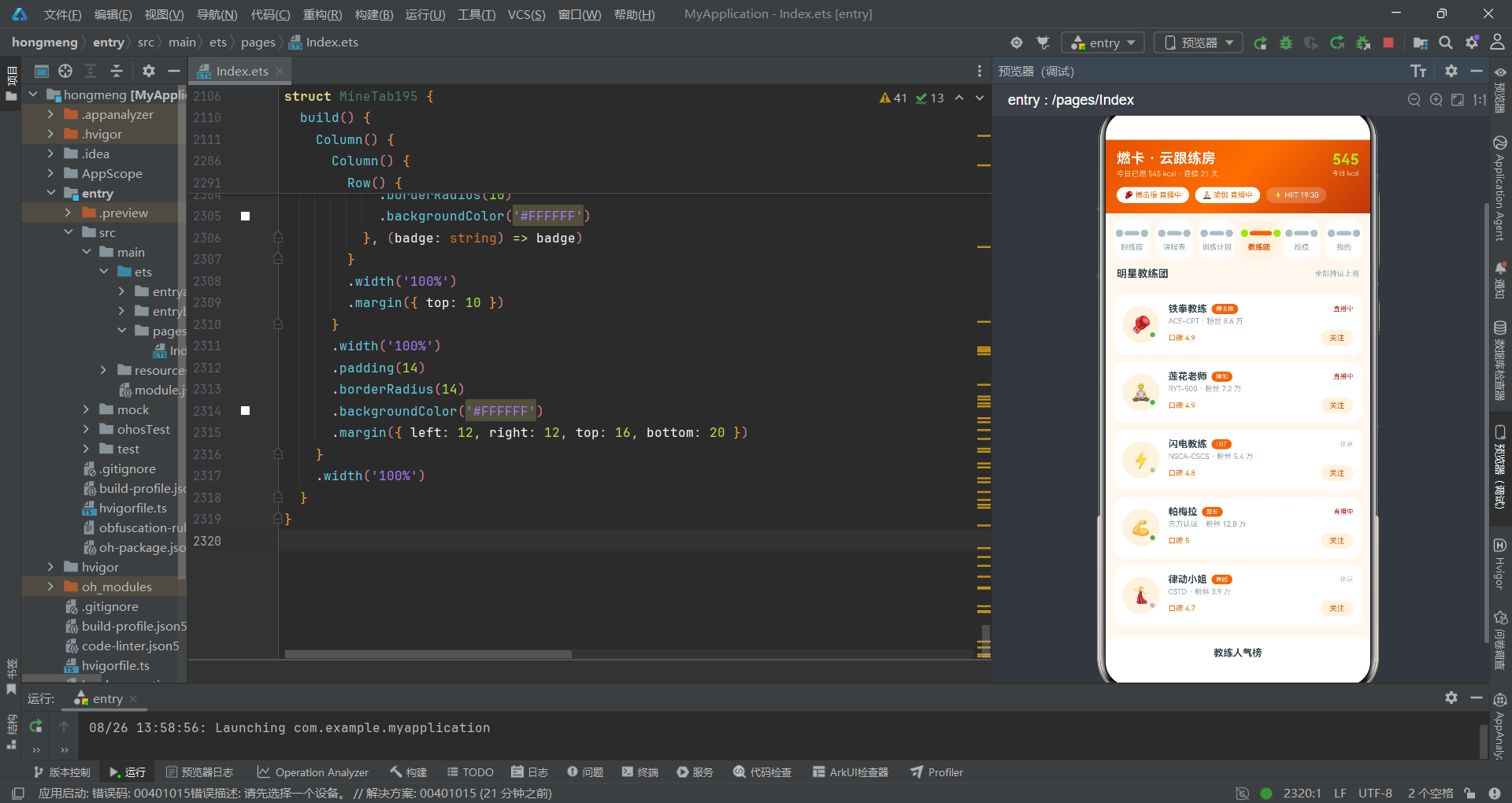
Text(c.cert + ' · 粉丝 ' + (c.fans / 10000).toFixed(1) + ' 万')
.fontSize(10)
.fontColor('#90A4AE')
.margin({ top: 3 })
Row() {
Text('口碑 ' + c.score)
.fontSize(10)
.fontColor('#FF6D00')
Text('')
.layoutWeight(1)
Text('关注')
.fontSize(10)
.fontColor('#E65100')
.padding({ left: 12, right: 12, top: 5, bottom: 5 })
.borderRadius(12)
.backgroundColor('#FFF3E0')
}
.width('100%')
.margin({ top: 6 })
}
.layoutWeight(1)
.margin({ left: 12 })
.alignItems(HorizontalAlign.Start)
}
.width('100%')
.padding(12)
.borderRadius(14)
.backgroundColor('#FFFFFF')
.margin({ top: 10 })
}, (c: Coach195) => c.id)
}
.width('100%')
.padding({ left: 12, right: 12 })
.margin({ top: 10 })
Column() {
Text('教练人气榜')
.fontSize(13)
.fontWeight(FontWeight.Bold)
.fontColor('#37474F')
Column() {
ForEach(COACHPOPS195, (p: CoachPop195) => {
Row() {
Text(p.name)
.fontSize(11)
.fontColor('#37474F')
.width(72)
Text('')
.width(p.pct + '%')
.height(8)
.borderRadius(4)
.backgroundColor(p.color)
Text('')
.layoutWeight(1)
}
.width('100%')
.margin({ top: 8 })
}, (p: CoachPop195) => p.name)
}
.width('100%')
.margin({ top: 6 })
}
.width('100%')
.padding(14)
.borderRadius(14)
.backgroundColor('#FFFFFF')
.margin({ left: 12, right: 12, top: 16, bottom: 20 })
}
.width('100%')
}
}
@Component
struct BattleTab195 {
build() {
Column() {
Row() {
Text('本周燃卡排行榜')
.fontSize(14)
.fontWeight(FontWeight.Bold)
.fontColor('#37474F')
Text('')
.layoutWeight(1)
Text('周三 21:00 结算')
.fontSize(10)
.fontColor('#90A4AE')
}
.width('100%')
.padding({ left: 16, right: 16 })
.margin({ top: 12 })
Row() {
Column() {
Text('🥈')
.fontSize(26)
Text('大汗淋漓姐')
.fontSize(9)
.fontColor('#90A4AE')
.margin({ top: 4 })
Text('580')
.fontSize(13)
.fontWeight(FontWeight.Bold)
.fontColor('#90A4AE')
.margin({ top: 2 })
}
.layoutWeight(1)
.alignItems(HorizontalAlign.Center)
.padding({ top: 14, bottom: 10 })
.borderRadius(14)
.backgroundColor('#FFFFFF')
Column() {
Text('🥇')
.fontSize(32)
Text('卷腹小王子')
.fontSize(9)
.fontColor('#FF6D00')
.margin({ top: 4 })
Text('620')
.fontSize(14)
.fontWeight(FontWeight.Bold)
.fontColor('#FF6D00')
.margin({ top: 2 })
}
.layoutWeight(1.1)
.alignItems(HorizontalAlign.Center)
.padding({ top: 8, bottom: 14 })
.borderRadius(14)
.backgroundColor('#FFF3E0')
.shadow({
radius: 10,
color: '#26FF6D00',
offsetY: 4
})
.margin({ left: 6, right: 6 })
Column() {
Text('🥉')
.fontSize(26)
Text('我')
.fontSize(9)
.fontColor('#C62828')
.fontWeight(FontWeight.Bold)
.margin({ top: 4 })
Text('545')
.fontSize(13)
.fontWeight(FontWeight.Bold)
.fontColor('#C62828')
.margin({ top: 2 })
}
.layoutWeight(1)
.alignItems(HorizontalAlign.Center)
.padding({ top: 14, bottom: 10 })
.borderRadius(14)
.backgroundColor('#FFFFFF')
}
.width('100%')
.padding({ left: 12, right: 12 })
.margin({ top: 10 })
Column() {
ForEach(RANKS195, (r: RankRow195, i: number) => {
Row() {
Text(r.emoji)
.fontSize(14)
.width(30)
.textAlign(TextAlign.Center)
Column() {
Text(r.name + (r.mine ? '(我)' : ''))
.fontSize(12)
.fontWeight(r.mine ? FontWeight.Bold : FontWeight.Normal)
.fontColor(r.mine ? '#C62828' : '#37474F')
Text('连续打卡 ' + r.streak + ' 天')
.fontSize(9)
.fontColor('#90A4AE')
.margin({ top: 2 })
}
.layoutWeight(1)
.alignItems(HorizontalAlign.Start)
Text(r.kcal + ' kcal')
.fontSize(11)
.fontWeight(FontWeight.Bold)
.fontColor(r.mine ? '#C62828' : '#FF6D00')
}
.width('100%')
.padding({ top: 10, bottom: 10 })
.borderRadius(12)
.backgroundColor(r.mine ? '#FFF3E0' : '#FFFFFF')
.margin({ top: 6 })
}, (r: RankRow195) => r.id)
}
.width('100%')
.padding({ left: 12, right: 12 })
.margin({ top: 10 })
Column() {
Text('我的消耗构成')
.fontSize(13)
.fontWeight(FontWeight.Bold)
.fontColor('#37474F')
Row() {
ForEach(TYPESHARE195, (s: TypeShare195) => {
Column() {
}
.layoutWeight(s.w)
.height(10)
.backgroundColor(s.c)
}, (s: TypeShare195) => 'bt' + s.label)
}
.width('100%')
.clip(true)
.borderRadius(5)
.margin({ top: 10 })
Row() {
ForEach(TYPESHARE195, (s: TypeShare195) => {
Row() {
Text('●')
.fontSize(8)
.fontColor(s.c)
Text(s.label + ' ' + s.w + '%')
.fontSize(9)
.fontColor('#90A4AE')
.margin({ left: 4 })
}
.margin({ right: 10 })
}, (s: TypeShare195) => 'bl' + s.label)
}
.width('100%')
.margin({ top: 8 })
}
.width('100%')
.padding(14)
.borderRadius(14)
.backgroundColor('#FFFFFF')
.margin({ left: 12, right: 12, top: 16, bottom: 20 })
}
.width('100%')
}
}
@Component
struct MineTab195 {
onDetail: () => void = () => {
};
build() {
Column() {
Column() {
Row() {
Text('🏃')
.fontSize(28)
.width(58)
.height(58)
.textAlign(TextAlign.Center)
.borderRadius(29)
.backgroundColor('#33FFFFFF')
Column() {
Text('燃卡青年·我')
.fontSize(16)
.fontWeight(FontWeight.Bold)
.fontColor('#FFFFFF')
Text('连续跟练 21 天 · 已燃 18,420 kcal')
.fontSize(10)
.fontColor('#FFE0B2')
.margin({ top: 4 })
}
.margin({ left: 12 })
.alignItems(HorizontalAlign.Start)
Text('')
.layoutWeight(1)
Text('Lv.7 燃卡狂人')
.fontSize(10)
.fontColor('#37474F')
.padding({ left: 10, right: 10, top: 5, bottom: 5 })
.borderRadius(12)
.backgroundColor('#AEEA00')
}
.width('100%')
Row() {
Column() {
Text('326')
.fontSize(18)
.fontWeight(FontWeight.Bold)
.fontColor('#AEEA00')
Text('跟练场次')
.fontSize(9)
.fontColor('#FFE0B2')
.margin({ top: 2 })
}
.layoutWeight(1)
Column() {
Text('21')
.fontSize(18)
.fontWeight(FontWeight.Bold)
.fontColor('#AEEA00')
Text('连续天数')
.fontSize(9)
.fontColor('#FFE0B2')
.margin({ top: 2 })
}
.layoutWeight(1)
Column() {
Text('59%')
.fontSize(18)
.fontWeight(FontWeight.Bold)
.fontColor('#AEEA00')
Text('计划完成率')
.fontSize(9)
.fontColor('#FFE0B2')
.margin({ top: 2 })
}
.layoutWeight(1)
Column() {
Text('96')
.fontSize(18)
.fontWeight(FontWeight.Bold)
.fontColor('#AEEA00')
Text('收获加油')
.fontSize(9)
.fontColor('#FFE0B2')
.margin({ top: 2 })
}
.layoutWeight(1)
}
.width('100%')
.margin({ top: 16 })
}
.width('100%')
.padding(18)
.borderRadius(16)
.linearGradient({
angle: 135,
colors: [['#E65100', 0], ['#BF360C', 1]]
})
.margin({ left: 12, right: 12, top: 12 })
Row() {
Text('本周消耗趋势')
.fontSize(14)
.fontWeight(FontWeight.Bold)
.fontColor('#37474F')
Text('')
.layoutWeight(1)
Text('查看课程')
.fontSize(10)
.fontColor('#FF6D00')
.onClick(() => {
this.onDetail();
})
}
.width('100%')
.padding({ left: 16, right: 16 })
.margin({ top: 16 })
Column() {
Row() {
ForEach(KCALDAYS195, (d: KcalDay195) => {
Column() {
Text(d.kcal + '')
.fontSize(8)
.fontColor('#90A4AE')
Text('')
.width(18)
.height(d.kcal / 4)
.borderRadius(3)
.backgroundColor(d.kcal > 500 ? '#AEEA00' : '#FF6D00')
Text(d.day)
.fontSize(9)
.fontColor('#90A4AE')
.margin({ top: 4 })
}
.layoutWeight(1)
.alignItems(HorizontalAlign.Center)
}, (d: KcalDay195) => 'mt' + d.day)
}
.width('100%')
.height(120)
.alignItems(VerticalAlign.Bottom)
.margin({ top: 10 })
}
.width('100%')
.padding(14)
.borderRadius(14)
.backgroundColor('#FFFFFF')
.margin({ left: 12, right: 12, top: 10 })
Column() {
Text('我的跟练足迹')
.fontSize(13)
.fontWeight(FontWeight.Bold)
.fontColor('#37474F')
Column() {
ForEach(['08-24 20:00 暴汗搏击操 520 kcal', '08-23 07:30 晨间唤醒瑜伽 160 kcal', '08-22 20:00 HIIT 燃脂 380 kcal', '08-21 19:00 壶铃全身循环 410 kcal'], (log: string) => {
Row() {
Text('●')
.fontSize(10)
.fontColor('#FF6D00')
.margin({ top: 2 })
Text(log)
.fontSize(11)
.fontColor('#37474F')
.margin({ left: 8 })
.layoutWeight(1)
}
.width('100%')
.padding({ top: 8, bottom: 8 })
.borderRadius(10)
.backgroundColor('#FFFFFF')
.margin({ top: 6 })
}, (log: string) => log)
}
.width('100%')
.margin({ top: 6 })
}
.width('100%')
.padding(14)
.borderRadius(14)
.backgroundColor('#FFF3E0')
.margin({ left: 12, right: 12, top: 16 })
Column() {
Text('我的燃卡成就')
.fontSize(13)
.fontWeight(FontWeight.Bold)
.fontColor('#37474F')
Row() {
ForEach(['🏅 首次跟练', '🔥 百卡萌新', '💪 千卡战士', '⏱️ 全勤一周', '🏆 燃卡榜眼'], (badge: string) => {
Column() {
Text(badge.split(' ')[0])
.fontSize(20)
Text(badge.split(' ')[1])
.fontSize(8)
.fontColor('#90A4AE')
.margin({ top: 4 })
}
.layoutWeight(1)
.alignItems(HorizontalAlign.Center)
.padding({ top: 10, bottom: 10 })
.borderRadius(10)
.backgroundColor('#FFFFFF')
}, (badge: string) => badge)
}
.width('100%')
.margin({ top: 10 })
}
.width('100%')
.padding(14)
.borderRadius(14)
.backgroundColor('#FFFFFF')
.margin({ left: 12, right: 12, top: 16, bottom: 20 })
}
.width('100%')
}
}
八、总结
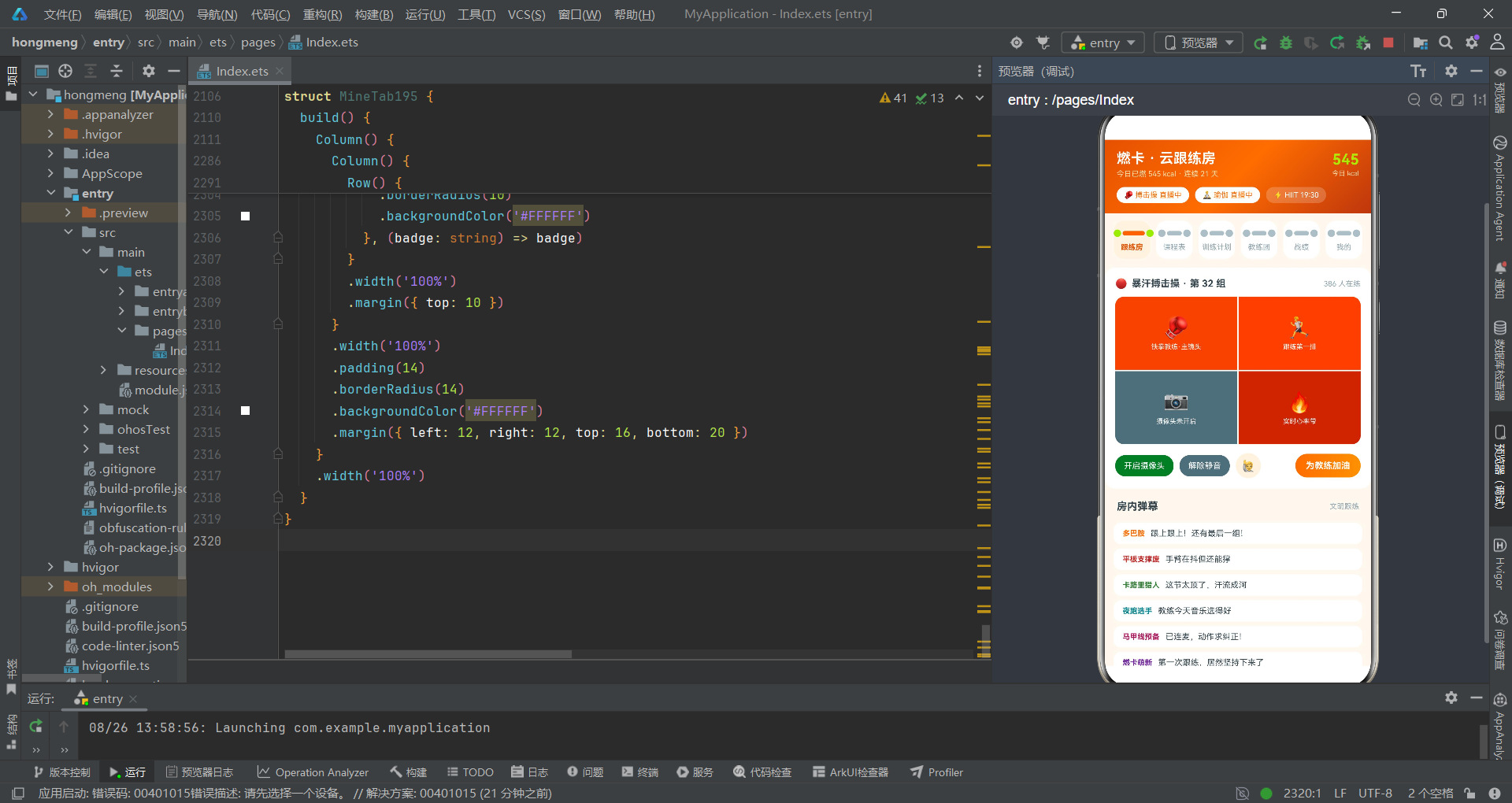
通过对这份ArkTS源码的逐行精读,我们看到了一个高质量HarmonyOS应用应有的代码面貌。从interface的最小化字段定义,到@State的集中式状态管理,再到$$双向绑定的正确使用,每一行代码都体现了对ArkTS框架机制的深入理解。
精读过程中发现的几个关键实践值得每位开发者铭记:bindSheet必须使用$$语法实现状态双向同步,否则用户手动关闭弹窗会导致状态不一致;列表CRUD必须使用map/filter返回新数组,直接修改原数组元素无法可靠触发响应式更新;ForEach的key函数应当返回稳定且唯一的值,避免使用数组索引作为key(除非列表不会重排)。这些细节决定了应用的稳定性和性能表现。
最后,代码审查不应只关注"能不能跑",更要关注"跑得好不好"。本应用中Toggle组件未设置selectedColor属性,导致开关颜色使用了系统默认蓝色而非主题橙色——这种细节不影响功能,但破坏了视觉一致性。优秀的ArkTS代码应当在类型安全、响应式正确、视觉一致三个维度同时达标。逐行精读的目的,正是发现这些隐藏在功能实现背后的品质提升空间。

开源鸿蒙跨平台开发社区汇聚开发者与厂商,共建“一次开发,多端部署”的开源生态,致力于降低跨端开发门槛,推动万物智联创新。
更多推荐


 9
9 0
0- 0


 已为社区贡献29条内容

所有评论(0)