基于HarmonyOS ArkTS API 24配合ForEach的keyGenerator使用.id.toString()生成唯一键,确保列表渲染的diff算法能正确识别增删改操作
一、HarmonyOS技术演进与户外社区数字化的融合趋势
HarmonyOS自诞生以来,始终以"万物互联"为核心愿景,通过分布式软总线、分布式数据管理和分布式任务调度三大核心能力,构建了覆盖手机、平板、穿戴、车机等多终端的统一操作系统底座。在HarmonyOS 6.1.1演进到当前阶段时,ArkTS语言已深度成熟,其声明式UI范式配合API 24的能力集,为开发者提供了从基础组件到高级图形、从状态管理到传感器接入的全栈开发能力。对于户外运动类社区应用而言,ArkTS的类型安全、响应式状态驱动和组件化UI构建能力,恰好满足了地理藏宝与定向越野这类需要融合GPS定位、社交动态、任务管理和装备商城等多维业务场景的复杂需求。
城市地理藏宝(Geocaching)是一种全球性的户外寻宝游戏,参与者使用GPS接收器隐藏和寻找藏点,截至2026年全球已有超过数百万个活跃藏点。定向越野(Orienteering)则是一种依靠地图和指北针导航的竞技运动,参与者需按顺序到访地图上标注的若干检查点。这两种运动在核心机制上有高度相似性——都依赖地理坐标导航、都强调户外探索体验、都具备社交竞技属性——但在具体玩法上各有侧重:地理藏宝偏向休闲探索和社区分享,定向越野偏向竞技计时和路线设计。将这两种运动融合到同一个社区应用中,既能覆盖休闲用户也能吸引竞技用户,实现用户群体的最大化覆盖。
在技术架构层面,ArkTS的@Observed装饰器为这种多实体场景提供了精确的数据建模能力。藏点、寻宝任务、装备和社区动态四种核心实体各自拥有独立的@Observed类,当它们被@State引用后,任何属性变化都会自动触发关联UI的局部刷新。这种"数据变化即UI更新"的响应式编程范式,使得开发者可以将精力集中在业务逻辑而非UI同步上。同时,ArkTS的@Builder装饰器支持将复杂界面拆分为独立的构建函数,每一个页面、每一个弹框、每一个导航条都可以封装为独立的@Builder方法,通过条件渲染和组件组合实现复杂的页面层次。
从业务价值角度来看,构建一款地理藏宝与定向越野社区应用需要同时解决三个核心问题。第一个问题是位置感知——用户需要实时知道自己的GPS坐标、距离藏点的方位和距离,这要求应用能够获取和展示地理坐标数据。第二个问题是任务管理——寻宝任务有"待出发、寻宝中、定向中、补给中、已找到"等多种状态,需要提供任务的创建、编辑、取消和进度跟踪功能。第三个问题是社区互动——用户需要发布动态分享寻宝心得、查看他人轨迹、参与寻友市集,这要求应用具备完整的社交动态流和内容发布机制。这三个问题分别对应了位置服务、任务引擎和社交平台三个技术域,ArkTS的组件化能力和状态管理能力使得它们可以在同一个应用中和谐共存。
本文将以一个完整的寻语城市地理藏宝与定向越野社区应用源码为蓝本,从色彩体系定义、数据模型建模、静态数据初始化、纯函数工具层、动画特效实现、@Builder组件化拆分、弹框交互逻辑到build主架构组装,进行逐段代码级的深度剖析。通过这篇文章,读者不仅能掌握HarmonyOS ArkTS API 24在户外社区场景中的开发技巧,更能理解如何将地理藏宝和定向越野两种运动的业务流融合为统一的移动应用体验。文章最后还将通过数据模型对比表格,清晰呈现各模型间的字段差异与适用场景。
二、色彩体系与ColorPalette接口的户外语义设计
户外运动类应用的色彩设计需要兼顾视觉识别度和户外环境适应性。在强光下阅读屏幕时,高饱和度的暖色调比冷色调更容易识别;在林间和草地环境中,绿色系色彩能与自然环境产生共鸣。因此本应用采用#D97C2E(寻宝橙)与#4A7C3F(定向绿)作为双主色,辅以#8B9D7E(罗盘灰绿)作为沉稳的辅助色,构成一套兼具活力与沉稳的户外色彩语言。
interface ColorPalette {
  primary: string;
  primaryLight: string;
  primaryDark: string;
  accent: string;
  accentLight: string;
  bg: string;
  cardBg: string;
  textPrimary: string;
  textSecondary: string;
  textHint: string;
  border: string;
  success: string;
  warning: string;
  danger: string;
  white: string;
  compass: string;
}

const COLORS: ColorPalette = {
  primary: '#D97C2E',
  primaryLight: '#FBE8D5',
  primaryDark: '#A85E1E',
  accent: '#4A7C3F',
  accentLight: '#E2EDDD',
  bg: '#EFF4ED',
  cardBg: '#FFFFFF',
  textPrimary: '#2E3A28',
  textSecondary: '#6A7A5E',
  textHint: '#B0BBA4',
  border: '#DEE7D8',
  success: '#6FAF8F',
  warning: '#D9973B',
  danger: '#C0503F',
  white: '#FFFFFF',
  compass: '#8B9D7E'
};
色彩接口定义了16个语义化字段,其中最值得关注的是compass字段——"compass"意为罗盘,这里用它来命名#8B9D7E这种灰绿色,在视觉上模拟了传统指北针金属外壳的色泽。这种命名方式与业务的户外属性紧密关联,使得开发者在引用COLORS.compass时能立即联想到其罗盘语义。主色primary为寻宝橙#D97C2E,高饱和度的橙色在户外强光下依然清晰可辨,用于头部挑战卡背景、主按钮和选中态Tab指示器;accent为定向绿#4A7C3F,用于"发布藏宝"按钮、信号脉冲特效和寻友圈互动入口。
三层文本色的设计也颇具匠心:textPrimary使用#2E3A28深绿黑而非纯黑,在浅绿背景上阅读时减少视觉疲劳;textSecondary使用#6A7A5E灰绿,用于副标题和正文内容;textHint使用#B0BBA4浅灰绿,用于占位提示和辅助信息。success/warning/danger三色用于状态语义——已找到用绿色、寻宝中用橙色、取消/退课用红色,这种语义色的一致使用确保了用户在不同页面看到相同颜色时能产生相同的认知预期。背景色bg使用#EFF4ED极浅绿,模拟了户外草地和林间的自然环境色温,让应用在视觉上与户外场景融为一体。
三、@Observed数据模型的户外实体建模
在地理藏宝与定向越野场景中,需要建模的核心实体包括寻友动态、藏点信息、寻宝任务和户外装备四类。与电商或社交应用不同,这些实体都有户外运动特有的字段——坐标、难度、打卡数、信号强度等——使得每个模型都承载着丰富的业务语义。
@Observed
export class PostItem {
  id: number = 0
  nick: string = ''
  avatar: string = ''
  text: string = ''
  time: string = ''
  likes: number = 0
  constructor(id: number, nick: string, avatar: string, text: string, time: string, likes: number) {
    this.id = id; this.nick = nick; this.avatar = avatar; this.text = text
    this.time = time; this.likes = likes
  }
}

@Observed
export class CacheItem {
  id: number = 0
  name: string = ''
  craft: string = ''
  price: string = ''
  level: string = ''
  hot: number = 0
  constructor(id: number, name: string, craft: string, price: string, level: string, hot: number) {
    this.id = id; this.name = name; this.craft = craft; this.price = price
    this.level = level; this.hot = hot
  }
}
PostItem是寻友社区的动态模型,包含id、昵称、emoji头像、正文、时间和点赞数六个字段。在户外社区中,动态正文往往包含坐标信息(如"坐标N31°14.521′·E121°30.108′“)、难度评价和寻宝心得,这些信息以自由文本形式存储在text字段中,由前端直接渲染。CacheItem是藏点模型,name字段包含藏点名称和位置描述(如"南山7号·树桩伪装藏点”),craft字段承载难度和类型信息(如"难度2星·传统箱"),price字段区分免费藏点和付费赛事(如"¥免费"或"¥28/人"),level字段标记藏点的运营级别(人气、限定、典藏、新品、入门),hot数值表示社区关注度。这些字段共同构成了一个藏点的完整数字画像。
@Observed
export class TrailItem {
  id: number = 0
  name: string = ''
  item: string = ''
  status: string = ''
  progress: number = 0
  constructor(id: number, name: string, item: string, status: string, progress: number) {
    this.id = id; this.name = name; this.item = item; this.status = status
    this.progress = progress
  }
}

@Observed
export class GearItem {
  id: number = 0
  name: string = ''
  desc: string = ''
  icon: string = ''
  constructor(id: number, name: string, desc: string, icon: string) {
    this.id = id; this.name = name; this.desc = desc; this.icon = icon
  }
}
TrailItem是寻宝任务模型,其中status字段取值"寻宝中"“定向中”“补给中”“已找到”“待出发"五种状态,是整个任务生命周期的核心驱动字段。item字段承载任务详情描述,如"GPS锁定·距离280m·方位SE"或"打卡7/11·剩4个点”,这些描述将GPS距离、方位、打卡进度等信息融合在一条可读文本中,兼顾了信息密度与可读性。GearItem是装备模型,包含名称、描述和emoji图标——在户外场景中,装备如手持GPS、指北针、头灯、藏点盒等都有标准化的emoji图标,使用emoji而非图片URL既能减小应用体积又能保证离线可用。
四个@Observed类的设计模式高度统一:所有属性都先设默认值确保对象创建安全,构造函数按位置参数逐个赋值。这种模式在ArkTS中是@Observed类的标准写法,配合ForEach的keyGenerator使用.id.toString()生成唯一键,确保列表渲染的diff算法能正确识别增删改操作。值得注意的是,CraftItem在942中被替换为TrailItem(寻宝任务),LacquerItem被替换为CacheItem(藏点),这种命名替换体现了同一套架构在不同业务域中的适配能力。
四、辅助接口定义与图表数据结构
除了四个核心@Observed类,应用还定义了四个interface用于图表和课程等辅助场景。这些接口是纯类型声明,不参与运行时实例化,但在静态数据数组和函数参数类型约束中发挥着关键作用。
interface WeekChartItem {
  label: string;
  value: number;
}

interface MatChartItem {
  label: string;
  value: number;
  color: string;
}

interface CourseItem {
  title: string;
  week: string;
  progress: number;
  color: string;
}

interface PlayTypeItem {
  name: string;
  desc: string;
  icon: string;
  hot: boolean;
}
WeekChartItem服务于每日寻宝出发次数柱状图,仅含label和value两个字段,是所有接口中最精简的——七个数据点分别对应周一到周日,value表示当日出发寻宝的次数。MatChartItem额外增加color字段,因为藏点类型分布横向条形图需要为每类藏点(传统箱、迷你盒、解谜卡、徽章套、电子点)指定独立颜色,这些颜色直接取自COLORS调色板。CourseItem包含课程标题、周次、进度和进度条颜色四个字段,用于越野课堂的五周课程进度列表,每个课程的颜色从橙色到金色渐变,视觉上传达从易到难的难度递增。PlayTypeItem用于首页玩法四格,hot布尔字段决定是否在卡片上显示"热门"角标——地理藏宝和定向越野标为热门,城市解谜和寻友市集不标热门,引导用户优先体验核心玩法。
五、静态数据数组的业务语义与角色设计
应用启动时需要预填充一批初始数据用于首屏渲染。这些数据以模块级常量数组的形式声明,在组件中通过@State引用后即可参与响应式更新。下面展示几个关键的数据数组。
const POST_LIST: PostItem[] = [
new PostItem(1, '南山藏宝王', '🗺️', '7号藏点找到了!伪装成树桩太绝了。', '4分钟前', 128),
new PostItem(2, '定向越野酱', '🧭', '今日5公里定向越野,打卡全部11个点。', '16分钟前', 102),
new PostItem(3, 'GPS老司机', '📍', '坐标N31°14.521′·E121°30.108′,信号满格。', '32分钟前', 93),
new PostItem(4, '寻语主理人', '🎒', '本周新藏5个点,难度从1星到4星全覆盖。', '1小时前', 85),
new PostItem(5, '徽章收集控', '🏅', '全勤打卡第28天,拿到「南山之星」徽章。', '2小时前', 76),
new PostItem(6, '轨迹分析师', '📊', '导入GPX轨迹到地图,爬升286米,均速5.2。', '4小时前', 64),
new PostItem(7, '夜寻小能手', '🔦', '头灯夜寻3号点,猫头鹰叫声有点渗人。', '6小时前', 55),
new PostItem(8, '亲子藏宝团', '👨👩👦', '孩子第一次找到藏点,开心到跳起来。', '昨天', 48)
];
POST_LIST数组的8条动态覆盖了地理藏宝、定向越野、GPS技术、社区运营、徽章收集、轨迹分析、夜寻体验和亲子参与等多种用户角色。每个昵称都富有角色感——"南山藏宝王"代表资深寻宝玩家、"定向越野酱"代表竞技型定向选手、"GPS老司机"代表技术型户外爱好者、"轨迹分析师"代表数据型运动者、"夜寻小能手"代表夜间探险爱好者、"亲子藏宝团"代表家庭用户群体。这种角色分布设计确保了社区内容的多样性和真实感,让不同类型的用户都能在动态流中找到与自己相似的角色。动态正文中嵌入了坐标(N31°14.521′)、距离(5公里)、打卡数(11个点)、爬升(286米)等户外运动特有的数据,增强了内容的真实感。
const CACHE_LIST: CacheItem[] = [
  new CacheItem(1, '南山7号·树桩伪装藏点', '难度2星 · 传统箱', '¥免费', '人气', 96),
  new CacheItem(2, '滨江步道·定向赛段A', '5km · 11个打卡点', '¥28/人', '限定', 91),
  new CacheItem(3, '古寺后山·密林藏点', '难度3星 · 迷你盒', '¥免费', '典藏', 87),
  new CacheItem(4, '城市坐标·建筑系列', '12栋 · 解谜打卡', '¥18/套', '新品', 82),
  new CacheItem(5, '夜寻专场·3号线', '难度4星 · 头灯', '¥38/人', '限定', 77),
  new CacheItem(6, '亲子寻宝·植物园篇', '难度1星 · 大盒', '¥免费', '入门', 70),
  new CacheItem(7, '湖岛环线·定向赛段B', '8km · 15个打卡点', '¥38/人', '人气', 84),
  new CacheItem(8, '山顶日落·观景藏点', '难度3星 · 日落', '¥免费', '典藏', 58)
];
CACHE_LIST是藏宝地图页面的藏点数据,8个藏点覆盖了伪装藏点、定向赛段、密林藏点、城市解谜、夜寻专场、亲子寻宝、环线赛段和观景藏点等多种类型。每个藏点的craft字段精确描述了其特征——"难度2星·传统箱"说明是中等难度的传统藏点盒,"5km·11个打卡点"说明是5公里定向赛含11个检查点,"难度4星·头灯"说明是高难度夜间寻宝需要头灯装备。price字段区分免费藏点(社区维护)和付费赛事(专业运营),level字段的六个取值(人气、限定、典藏、新品、入门)将在levelColor函数中映射为从橙色到金色的渐变色系。hot数值表示社区关注度,在藏点卡片中以横向进度条形式可视化呈现,数值越高条越长。
任务和装备数据数组同样遵循类似的语义设计。TRAIL_LIST的8条任务覆盖了从"待出发"到"已找到"的完整生命周期,GEAR_LIST的8条装备从手持GPS、指北针到藏点盒、头灯再到轨迹笔、徽章收藏板,构成了一套完整的户外寻宝装备体系。此外还有图表数据WEEK_CHART(周一到周日的出发次数,周末22和17次明显高于工作日)、MAT_CHART(五类藏点的分布占比)、TYPE_LIST(四种玩法类型)和COURSE_LIST(五周越野课程进度),它们共同构成了首页精选Tab的丰富数据底座。
六、纯函数工具层的函数式设计
在ArkTS中,UI组件内的逻辑应当尽量精简,而将可复用的计算逻辑抽取为顶层纯函数。纯函数无副作用、输入决定输出,非常适合用于颜色映射、尺寸计算和动画坐标推导。本应用在模块顶层定义了一组纯函数,构成了整个应用的工具层。
function barH(v: number, max: number): number {
  return Math.round(118 * v / max);
}

function ccColor(v: number): string {
  if (v > 13) {
    return '#D97C2E';
  } else if (v > 8) {
    return '#4A7C3F';
  }
  return '#8B9D7E';
}

function ringS(i: number): number {
  return 26 + i * 16;
}

function ringA(tick: number, i: number): number {
  return 0.72 - ((tick + i * 3) % 8) * 0.08;
}
barH函数将数值映射为柱状图高度像素值,基准最大值118像素对应max参数(本应用中周末最高22次设为max),通过Math.round四舍五入确保渲染像素为整数。ccColor函数根据出发次数返回对应颜色——超过13次用寻宝橙、超过8次用定向绿、其余用罗盘灰,这种三档色阶设计让柱状图在视觉上自然传达"活跃程度"的信息。ringS和ringA服务于信号脉冲扩散特效——ringS根据索引i计算脉冲环的尺寸,四个环从26像素递增到74像素(26+016, 26+116, 26+216, 26+316),ringA根据tick和i计算透明度,从0.72递减到0.08,模拟信号波从中心向外扩散并逐渐衰减的物理过程。
function trailX(tick: number, i: number): number {
  return 30 + ((tick * 5 + i * 251) % 610);
}

function trailY(tick: number, i: number): number {
  return 60 + ((tick * 4 + i * 167) % 610);
}

function trailA(tick: number, i: number): number {
  if ((tick + i * 2) % 5 === 0) {
    return 0.85;
  }
  return 0.2;
}

function statusColor(s: string): string {
  if (s === '已找到') {
    return '#6FAF8F';
  } else if (s === '寻宝中') {
    return '#D97C2E';
  } else if (s === '定向中') {
    return '#4A7C3F';
  } else if (s === '补给中') {
    return '#8B9D7E';
  }
  return '#D9973B';
}
trailX、trailY、trailA服务于轨迹光点游走特效。trailX和trailY使用(tick * n + i * m) % range的取模运算生成伪随机轨迹——tick递增驱动运动,i区分不同光点,251和167两个质数系数确保各光点的轨迹不会同步重叠,一个在水平方向运动更快(系数5),一个在垂直方向运动稍慢(系数4),模拟了不同寻宝者在地形中以不同速度行走的轨迹差异。trailA通过(tick + i * 2) % 5 === 0判断让每五个tick中有一次高亮闪烁,模拟GPS信号点的脉冲效果。statusColor函数是任务状态到颜色的映射器——已找到绿色、寻宝中橙色、定向中绿色、补给中灰绿、待出发金色,这五种颜色在整个应用中保持一致语义。此外还有statusProgress(状态到进度百分比映射)、cacheTagColor(藏点名称到标签色的智能匹配)和levelColor(级别到标签色的映射)等函数,它们共同构成了应用的"业务规则引擎"。
七、组件状态定义与生命周期管理
@Entry @Component struct PageGeoCaching是应用的入口组件。它定义了丰富的状态变量来管理Tab切换、弹框开关、编辑索引、表单内容和定时器等多个维度的状态。
@Entry
@Component
struct PageGeoCaching {
  @State mainTab: number = 0
  @State subTab: number = 0
  @State tick: number = 0
  @State glow: number = 0
  @State addOpen: boolean = false
  @State editOpen: boolean = false
  @State delOpen: boolean = false
  @State huntOpen: boolean = false
  @State editIdx: number = 0
  @State delTarget: string = 'task'
  @State editName: string = ''
  @State editStyle: string = ''
  @State editNote: string = ''
  @State addTitle: string = ''
  @State addContent: string = ''
  @State huntName: string = ''
  @State huntCoord: string = ''
  @State postList: PostItem[] = POST_LIST
  @State trailList: TrailItem[] = TRAIL_LIST
  @State fxTimer: number = -1
状态变量分为四组:第一组是导航状态——mainTab控制底部四大Tab(0首页/1藏点/2课堂/3我的),subTab控制首页内七个内容Tab(0精选到6装备库);第二组是动画状态——tick是全局时钟计数器,每90毫秒递增1,驱动所有特效函数,glow是0/1交替的闪烁开关;第三组是弹框状态——四个布尔变量addOpen/editOpen/delOpen/huntOpen分别控制"发寻语"“编辑寻宝单”“取消寻宝·退课”"藏宝任务发布"四个弹框的显隐;第四组是表单状态——editIdx记录被编辑的任务索引,editName/editStyle/editNote是编辑表单的三个输入值,addTitle/addContent是发布表单的输入值,huntName/huntCoord是藏宝任务发布表单的两个输入值。两个@Observed数组postList和trailList是可变数据源,通过@State引用后变化即触发UI刷新。fxTimer存储定时器ID用于销毁时清理。
  aboutToAppear(): void {
    this.fxTimer = setInterval(() => {
      this.tick = this.tick + 1;
      this.glow = (this.glow + 1) % 2;
    }, 90);
  }

  aboutToDisappear(): void {
    if (this.fxTimer > 0) {
      clearInterval(this.fxTimer);
      this.fxTimer = -1;
    }
  }
aboutToAppear和aboutToDisappear是ArkTS组件的两个关键生命周期回调。aboutToAppear在组件创建后、build执行前调用,这里使用setInterval启动一个90毫秒间隔的定时器,每次回调将tick加1、glow在0和1间切换。这两个状态变化会触发fxLayer特效层的ForEach重新计算坐标和透明度,从而产生信号脉冲扩散和轨迹光点游走的动态效果。aboutToDisappear在组件销毁前调用,检查定时器ID是否有效后调用clearInterval清理定时器,防止组件销毁后定时器继续运行导致的内存泄漏。这种"创建时启动、销毁时清理"的模式是ArkTS中管理定时资源的标准范式,确保了组件生命周期与资源生命周期的严格对齐。
八、弹框操作方法与数据增删改逻辑
应用提供了四个弹框操作——发布寻语(新增)、编辑寻宝单(修改)、取消寻宝/退课(删除)、藏宝任务发布(委托)。每个操作都由一对方法构成:openXxx负责打开弹框并初始化表单数据,doXxx负责执行业务逻辑并关闭弹框。
  openAdd(): void {
    this.addTitle = '';
    this.addContent = '';
    this.addOpen = true;
  }

  openEdit(index: number): void {
    if (index >= 0 && index < this.trailList.length) {
      this.editIdx = index;
      this.editName = this.trailList[index].name;
      this.editStyle = this.trailList[index].status;
      this.editNote = this.trailList[index].item;
    }
    this.editOpen = true;
  }

  openDelA(): void {
    this.delTarget = 'task';
    this.delOpen = true;
  }

  openDelB(): void {
    this.delTarget = 'course';
    this.delOpen = true;
  }

  openHunt(): void {
    this.huntName = '';
    this.huntCoord = '';
    this.huntOpen = true;
  }
五个open方法的设计模式高度一致:先清空或回填表单字段,再设置弹框状态为true。openAdd清空发布表单的两个输入字段后打开弹框。openEdit接收任务索引参数,先通过index >= 0 && index < this.trailList.length进行边界保护防止越界访问,然后将对应任务的name、status、item三个字段回填到编辑表单中,实现"编辑即回显"的用户体验。openDelA和openDelB共享同一个删除弹框,通过delTarget区分删除对象——'task'表示取消首个寻宝任务,'course'表示退课,这种"一框两用"的设计减少了弹框数量。openHunt用于藏宝任务发布,清空藏点名称和坐标两个输入字段后打开弹框。
  doAdd(): void {
    if (this.addTitle.length > 0) {
      this.postList.unshift(new PostItem(999, '我的寻语', '🗺️', this.addTitle, '刚刚', 0));
    }
    this.addOpen = false;
  }

  doEdit(): void {
    if (this.editIdx >= 0 && this.editIdx < this.trailList.length) {
      this.trailList.splice(this.editIdx, 1, new TrailItem(this.trailList[this.editIdx].id, this.editName, this.editNote, this.editStyle, 40));
    }
    this.editOpen = false;
  }

  doDel(): void {
    if (this.delTarget === 'task' && this.trailList.length > 0) {
      this.trailList.splice(0, 1);
    } else if (this.delTarget === 'course' && this.postList.length > 0) {
      this.postList.splice(0, 1);
    }
    this.delOpen = false;
  }

  doHunt(): void {
    if (this.huntName.length > 0) {
      this.postList.unshift(new PostItem(998, '我的寻语', '🧭', `已发布藏宝任务:${this.huntName}`, '刚刚', 0));
    }
    this.huntOpen = false;
  }
四个do方法分别执行增、改、删、发布四种操作。doAdd在标题非空时调用postList.unshift在数组头部插入新动态,id固定为999,头像使用🗺️地图emoji,时间为"刚刚",点赞数从0开始。doEdit使用splice(editIdx, 1, newItem)实现原地替换——保留原始id但更新name、status、item三个字段,进度固定为40,模拟了"编辑后重置进度"的任务管理逻辑。doDel根据delTarget决定删除哪个数组的首元素,splice(0, 1)精确移除索引0的元素。doHunt将藏宝任务发布信息拼装成一条新动态插入社区流,使用模板字符串已发布藏宝任务:${this.huntName}生成动态正文,头像使用🧭指北针emoji。所有do方法的最后一行都是将对应的弹框状态设为false,实现"操作完成即关闭"的流畅体验。
九、fxLayer动画特效层的信号脉冲与轨迹光点
特效层是应用视觉差异化的重要环节。在地理藏宝场景中,特效设计为"信号脉冲扩散 + 轨迹光点游走"——四个同心圆环从中心向外扩散模拟GPS信号脉冲,六个光点在屏幕上随机游走模拟寻宝者的轨迹移动。这套特效通过一个@Builder方法实现,位于底层不遮挡用户点击。
  @Builder
  fxLayer() {
    Stack({ alignContent: Alignment.TopStart }) {
      ForEach([0, 1, 2, 3], (i: number) => {
        Column()
          .width(ringS(i))
          .height(ringS(i))
          .borderRadius(ringS(i) / 2)
          .border({ width: 1, color: COLORS.accent, radius: ringS(i) / 2 })
          .opacity(ringA(this.tick, i))
          .translate({ x: 280 - ringS(i) / 2, y: 300 - ringS(i) / 2 })
      }, (i: number) => i.toString())
      ForEach([0, 1, 2, 3, 4, 5], (i: number) => {
        Column()
          .width(4)
          .height(4)
          .borderRadius(2)
          .backgroundColor(i % 2 === 0 ? COLORS.accent : COLORS.compass)
          .opacity(trailA(this.tick, i))
          .translate({ x: trailX(this.tick, i), y: trailY(this.tick, i) })
      }, (i: number) => i.toString())
    }
    .width('100%')
    .height('100%')
    .hitTestBehavior(HitTestMode.None)
  }
这段代码是特效层的完整实现。外层使用Stack容器铺满全屏,alignContent: Alignment.TopStart设置子元素从左上角开始定位。第一个ForEach渲染4个脉冲环——每个环是一个正方形的Column,宽高等于ringS(i)(26/42/58/74像素),通过borderRadius(ringS(i) / 2)将正方形变为圆形,使用border({ width: 1, color: COLORS.accent })绘制1像素定向绿描边而非填充背景色,实现空心圆环效果。透明度由ringA(this.tick, i)计算——从0.72递减到0.08,越外层的环越透明,模拟信号从中心向外扩散并衰减。位置通过translate({ x: 280 - ringS(i) / 2, y: 300 - ringS(i) / 2 })将所有环的圆心对齐到坐标(280, 300),这是屏幕中心偏上的位置,对应GPS信号源的概念位置。由于this.tick每90毫秒递增1,ringA的返回值在0.72到0.08之间循环变化,四个环便呈现出一波一波向外扩散的脉冲动画。
第二个ForEach渲染6个轨迹光点——每个是4像素的正方形小点,颜色交替使用COLORS.accent定向绿和COLORS.compass罗盘灰绿,透明度由trailA计算,位置由trailX和trailY计算。trailX和trailY使用了251和167两个质数系数配合tick和i做取模运算,生成看似随机但确定性的运动轨迹,模拟不同寻宝者在地形中以不同速度和方向行走的GPS轨迹。trailA通过(tick + i * 2) % 5 === 0让每五个tick中有一次高亮闪烁,模拟GPS定位点的脉冲信号。最关键的是容器的.hitTestBehavior(HitTestMode.None)——这一属性让特效层完全透传点击事件,即使用户看到信号脉冲和轨迹光点在屏幕上运动,点击下方的内容区域也不会被特效层拦截。这种"视觉在场、交互缺席"的设计是ArkTS中实现装饰性特效的标准做法。
十、header头部构建器与GPS挑战卡设计
头部区域是用户进入首页后看到的第一屏,需要承载品牌定位、寻宝挑战、新手教学和数据指标四个层次的信息。通过@Builder方法将头部封装为独立单元,既保证了代码的可读性,又使得头部可以在不同Tab中复用。
  @Builder
  header() {
    Column({ space: 10 }) {
      Row({ space: 10 }) {
        Text('📍')
          .fontSize(16)
        Text('南山森林公园 · 5个新藏点 · GPS信号良好')
          .fontSize(13)
          .fontWeight(FontWeight.Bold)
          .fontColor(COLORS.textPrimary)
          .layoutWeight(1)
        Text('📡')
          .fontSize(18)
      }
      .width('100%')
      .padding({ left: 14, right: 14, top: 8, bottom: 8 })
      .backgroundColor(COLORS.cardBg)
      .borderRadius(14)
头部第一行是品牌定位条,使用白色卡片承载。左侧📍定位emoji配合"南山森林公园·5个新藏点·GPS信号良好"的定位文本,将当前所在区域、新增藏点数量和GPS信号状态三条信息融合在一条紧凑文本中。右侧📡信号emoji作为状态指示器,与文本中的"GPS信号良好"形成视觉呼应。这种品牌条设计让用户一打开应用就能立即知道当前所在位置和可用资源状态,是户外运动类应用的核心信息呈现模式。
      Row({ space: 12 }) {
        Column({ space: 4 }) {
          Text('N31°14.521′ · E121°30.108′')
            .fontSize(15)
            .fontWeight(FontWeight.Bold)
            .fontColor(COLORS.white)
          Text('南山7号 · 距离 280m · 方位 SE · 寻宝中')
            .fontSize(10)
            .fontColor('#FBE8D5')
          Row({ space: 6 }) {
            Text('寻宝中')
              .fontSize(9)
              .fontWeight(FontWeight.Bold)
              .fontColor(COLORS.primaryDark)
              .padding({ left: 6, right: 6, top: 2, bottom: 2 })
              .backgroundColor(COLORS.accent)
              .borderRadius(6)
            Text('本周新藏 · 余 4 个')
              .fontSize(9)
              .fontColor('#FBE8D5')
          }
        }
        .alignItems(HorizontalAlign.Start)
        .layoutWeight(1)
        Text('发布藏宝')
          .fontSize(12)
          .fontWeight(FontWeight.Bold)
          .fontColor(COLORS.white)
          .padding({ left: 12, right: 12, top: 8, bottom: 8 })
          .backgroundColor(COLORS.accent)
          .borderRadius(14)
          .onClick(() => {
            this.openHunt();
          })
      }
      .width('100%')
      .padding(14)
      .backgroundColor(COLORS.primary)
      .borderRadius(16)
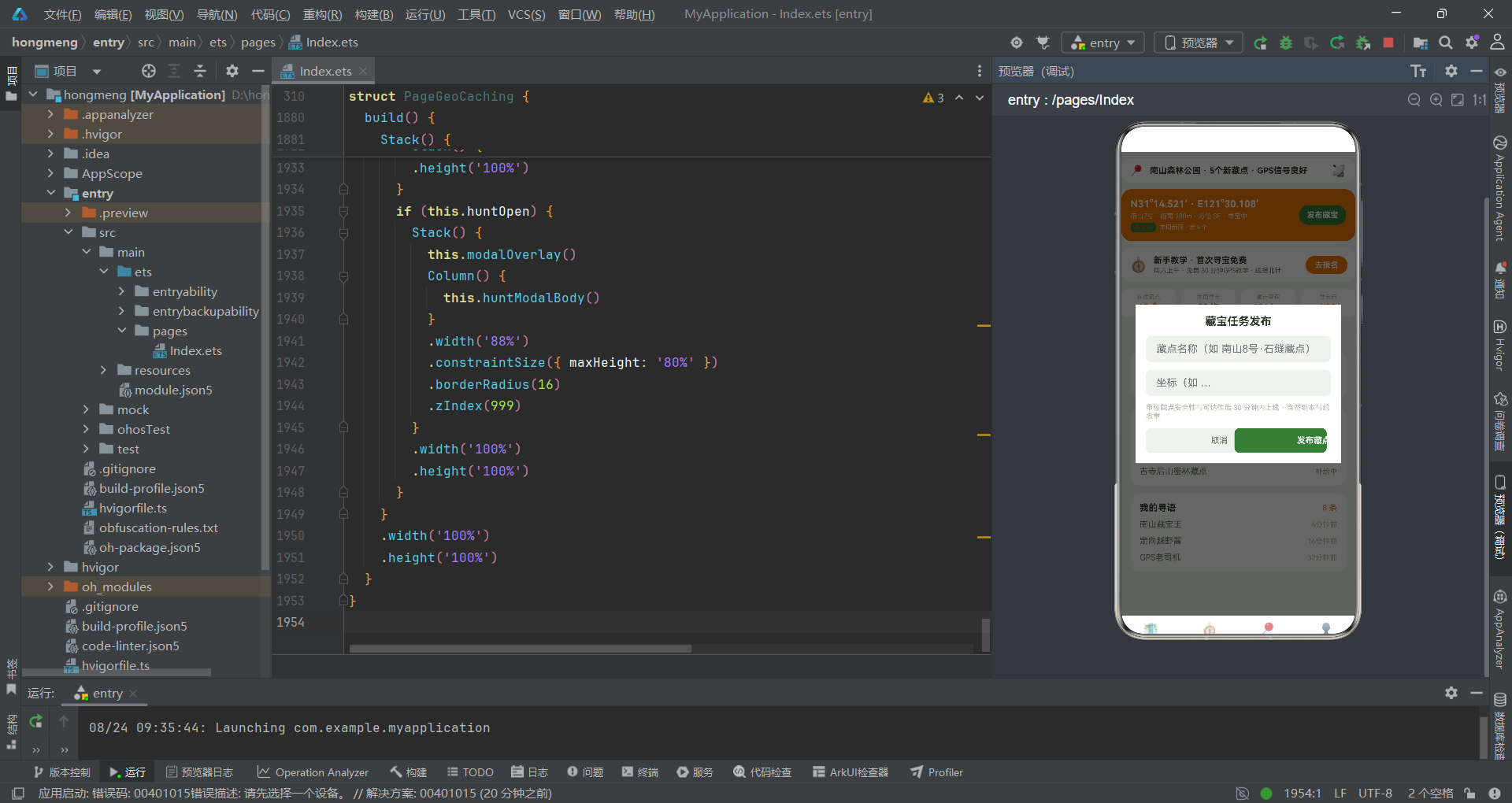
头部第二块是GPS寻宝挑战卡,这是整个头部最核心的信息区。卡片使用COLORS.primary寻宝橙作为背景色,文字用白色和浅橙色(#FBE8D5),形成强烈的暖色对比视觉冲击。左侧Column显示三行信息——第一行是精确的GPS坐标"N31°14.521′·E121°30.108′“,使用度分格式(DDM)呈现纬度和经度,这是户外运动中最常用的坐标格式;第二行是"南山7号·距离280m·方位SE·寻宝中”,将藏点编号、直线距离、方位角和寻宝状态四条信息融合在一条文本中,让用户一目了然地知道目标在哪、多远、什么方向、什么状态;底部一行是两个标签——"寻宝中"使用绿色底深橙字,"本周新藏·余4个"用浅橙色文字提示藏点余量。右侧是"发布藏宝"按钮,使用定向绿底白字,点击触发openHunt()打开藏宝任务发布弹框。整个卡片通过borderRadius(16)和padding(14)营造圆润饱满的卡片质感,橙绿配色在视觉上呼应了应用的双主色定位。
头部还包含新手教学横幅和数据四格两个模块。新手教学横幅以白色卡片承载,推广"首次寻宝免费"的新手教学活动,承诺周六上午免费30分钟GPS教学并赠送指北针,点击"去报名"按钮触发openHunt()。数据四格以四个等宽Column展示在线藏点数(42个橙色)、本周寻宝次数(38次绿色)、累计里程(126km灰绿)和寻宝币余额(¥88金色)四项核心指标,每格使用不同颜色区分数据维度。整个header方法通过Column({ space: 10 })统一管理间距,构建出一个层次分明、信息丰富的首屏头部。
十一、subNav内容Tab导航的罗盘指针式设计
首页的七个内容Tab采用横向滚动的Sub Nav形式。在地理藏宝场景中,这七个Tab被命名为"精选、藏宝地图、我的寻宝、定向工坊、越野课堂、寻友圈、装备库",每个Tab对应一个独立的页面构建器。
  @Builder
  subNav() {
    Scroll() {
      Row({ space: 10 }) {
        ForEach(SUB_NAV_LIST, (item: string, idx: number) => {
          Column({ space: 3 }) {
            Row({ space: 0 }) {
              Column()
                .width(7)
                .height(4)
                .backgroundColor(this.subTab === idx ? COLORS.accent : '#00000000')
              Column()
                .width(7)
                .height(4)
                .backgroundColor(this.subTab === idx ? COLORS.primary : '#00000000')
            }
            Text(item)
              .fontSize(this.subTab === idx ? 13 : 11)
              .fontWeight(this.subTab === idx ? FontWeight.Bold : FontWeight.Normal)
              .fontColor(this.subTab === idx ? COLORS.primaryDark : COLORS.textSecondary)
          }
          .padding({ left: 10, right: 10, top: 6, bottom: 6 })
          .onClick(() => {
            this.subTab = idx;
          })
        }, (item: string) => item)
      }
      .width('100%')
      .alignItems(VerticalAlign.Center)
    }
    .scrollable(ScrollDirection.Horizontal)
    .scrollBar(BarState.Off)
    .padding({ top: 6, bottom: 10 })
  }
subNav的核心设计是"罗盘指针式"的选中态视觉反馈。每个Tab上方有一个由两个7x4像素小色块组成的指示器——选中时左块为定向绿(COLORS.accent)右块为寻宝橙(COLORS.primary),模拟罗盘指针的双色配色;未选中时两块都设为#00000000完全透明,不占据视觉空间。这种"双色指针"设计灵感来自传统指北针的红色北端和白色南端,在视觉上传达了"指向"的语义,与户外导航的主题高度契合。文字层面通过三元运算符在三个维度上区分选中与未选中:字号(13 vs 11)、字重(Bold vs Normal)、颜色(primaryDark深橙 vs textSecondary灰绿)。当用户点击某个Tab时,onClick回调将this.subTab设为对应索引,触发ForEach重新渲染,所有Tab的视觉状态立即更新。外层使用Scroll容器并设置scrollable(ScrollDirection.Horizontal)实现横向滚动,scrollBar(BarState.Off)隐藏滚动条保持视觉整洁。
十二、pageFeatured精选页面的多模块组合
精选页面是首页默认展示的内容区,它融合了玩法四格、柱状图、藏点类型构成、人气橱窗和寻友动态五个模块,通过Column({ space: 12 })统一管理模块间距,构建出一个信息密度高但层次清晰的聚合页面。
  @Builder
  pageFeatured() {
    Column({ space: 12 }) {
      Column() {
        Text('在寻语能玩什么')
          .fontSize(16)
          .fontWeight(FontWeight.Bold)
          .fontColor(COLORS.textPrimary)
          .width('100%')
          .margin({ bottom: 10 })
        Row({ space: 8 }) {
          ForEach(TYPE_LIST, (it: PlayTypeItem) => {
            Column({ space: 4 }) {
              Text(it.icon)
                .fontSize(24)
              Text(it.name)
                .fontSize(11)
                .fontWeight(FontWeight.Bold)
                .fontColor(COLORS.textPrimary)
              Text(it.desc)
                .fontSize(9)
                .fontColor(COLORS.textHint)
                .maxLines(1)
                .textOverflow({ overflow: TextOverflow.Ellipsis })
              Text(it.hot ? '热门' : ' ')
                .fontSize(9)
                .fontWeight(FontWeight.Bold)
                .fontColor(it.hot ? COLORS.danger : COLORS.border)
            }
            .layoutWeight(1)
            .padding({ top: 10, bottom: 8, left: 4, right: 4 })
            .backgroundColor(COLORS.cardBg)
            .borderRadius(12)
            .alignItems(HorizontalAlign.Center)
          }, (it: PlayTypeItem) => it.name)
        }
        .width('100%')
      }
      .width('100%')
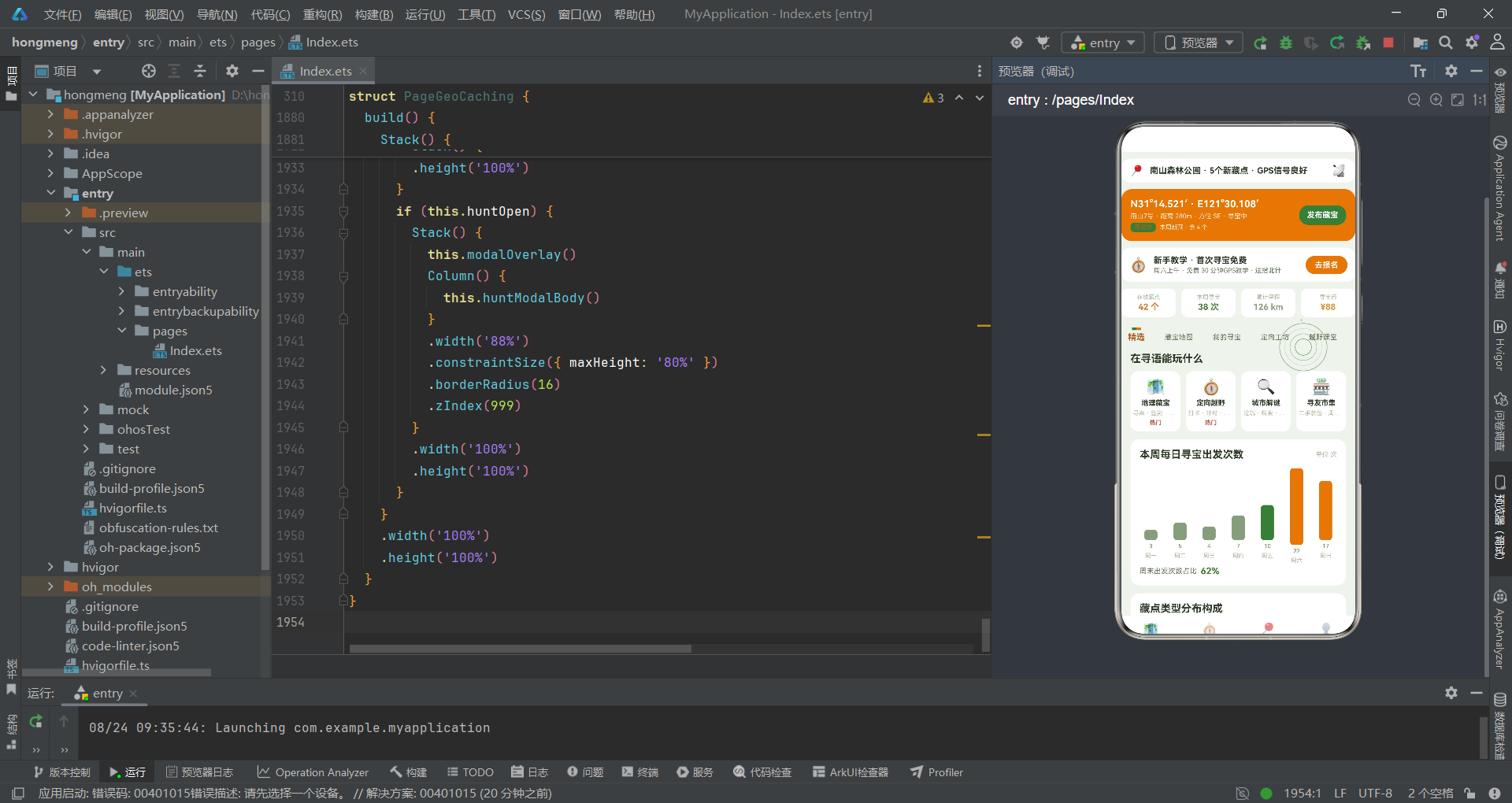
玩法四格模块使用ForEach(TYPE_LIST)渲染四种玩法类型——地理藏宝(🗺️热门)、定向越野(🧭热门)、城市解谜(🔍)、寻友市集(🏪)。每个卡片包含emoji图标(24号字)、名称(11号加粗)、描述(9号灰色,设置maxLines(1)和textOverflow(Ellipsis)确保单行省略)和热门标签(it.hot为true时显示红色"热门",否则显示空格占位)。四个卡片通过layoutWeight(1)等分宽度,白色背景圆角12呈现卡片质感。地理藏宝和定向越野标记为热门,引导用户优先体验核心玩法;城市解谜和寻友市集不标热门,作为延伸玩法供进阶用户探索。这种四格布局是移动端入口导航的经典模式。
柱状图模块使用ForEach(WEEK_CHART)渲染七根柱子,每根柱子是一个Column包含柱体、数值和标签三层,柱体高度由barH(it.value, 22)计算(最大值22对应周末最高出发次数),颜色由ccColor(it.value)映射——超过13次用橙色、超过8次用绿色、其余用灰绿。底部附有"周末出发次数占比62%"的总结行,用COLORS.accent绿色加粗显示比例值。藏点类型构成模块使用横向条形图,ForEach(MAT_CHART)渲染五类藏点(传统箱36%、迷你盒24%、解谜卡18%、徽章套12%、电子点10%),每条使用Stack叠加灰色底条和彩色进度条,进度条宽度设为${it.value}%,配合右侧百分比数值形成直观的占比可视化。人气藏点橱窗模块采用双列布局,通过if (idx % 2 === 0)判断将相邻两个藏点配对成一行,每张卡片包含emoji图标、级别标签、名称和价格关注度信息。寻友动态模块取postList.slice(0, 3)展示前三条动态,右上方"发寻语"按钮点击触发openAdd()。
十三、pageMarket藏宝地图与pageCrafts我的寻宝
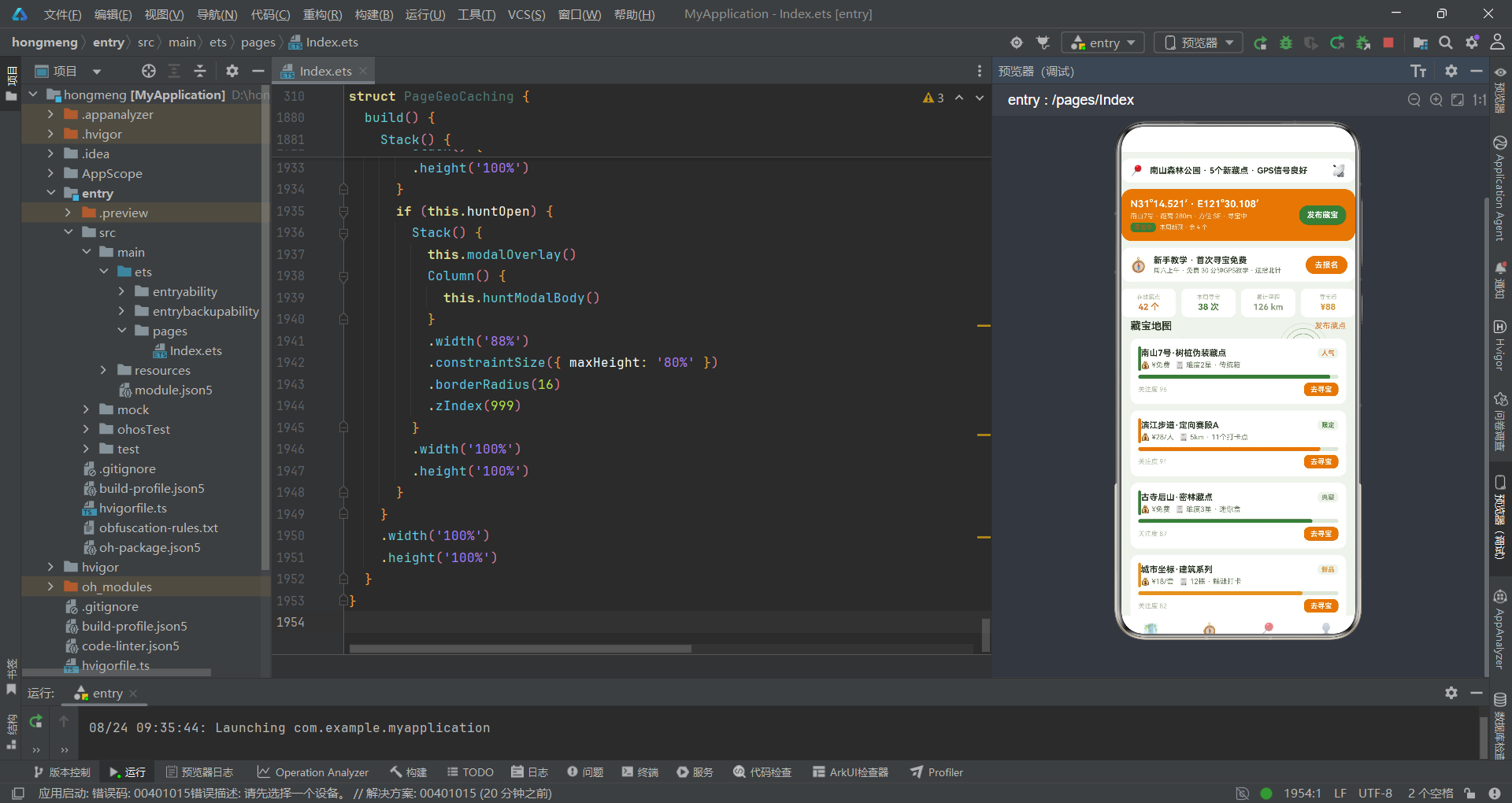
藏宝地图页面以列表形式展示全部藏点信息,每张卡片展示藏点名称、难度类型、价格、关注度进度条和去寻宝按钮。
  @Builder
  pageMarket() {
    Column({ space: 10 }) {
      Row() {
        Text('藏宝地图')
          .fontSize(16)
          .fontWeight(FontWeight.Bold)
          .fontColor(COLORS.textPrimary)
          .layoutWeight(1)
        Text('发布藏点')
          .fontSize(12)
          .fontColor(COLORS.primary)
          .onClick(() => {
            this.openAdd();
          })
      }
      .width('100%')
      ForEach(CACHE_LIST, (it: CacheItem) => {
        Column({ space: 6 }) {
          Row() {
            Column()
              .width(4)
              .height(38)
              .borderRadius(2)
              .backgroundColor(cacheTagColor(it.name))
            Column({ space: 4 }) {
              Row() {
                Text(it.name)
                  .fontSize(13)
                  .fontWeight(FontWeight.Bold)
                  .fontColor(COLORS.textPrimary)
                  .layoutWeight(1)
                Text(it.level)
                  .fontSize(10)
                  .fontWeight(FontWeight.Bold)
                  .fontColor(levelColor(it.level))
                  .padding({ left: 6, right: 6, top: 2, bottom: 2 })
                  .backgroundColor(COLORS.bg)
                  .borderRadius(6)
              }
              .width('100%')
              Row({ space: 8 }) {
                Text(`💰 ${it.price}`)
                  .fontSize(11)
                  .fontColor(COLORS.textSecondary)
                Text(`🧾 ${it.craft}`)
                  .fontSize(11)
                  .fontColor(COLORS.textSecondary)
              }
              .width('100%')
            }
            .layoutWeight(1)
            .alignItems(HorizontalAlign.Start)
          }
          .width('100%')
藏宝地图页面每张卡片左侧有一条4像素宽的彩色标签条,颜色由cacheTagColor(it.name)根据藏点名称中的关键词智能匹配——包含"树桩"或"密林"返回定向绿,包含"定向"或"环线"返回寻宝橙,包含"夜寻"或"山顶"返回罗盘灰绿。这种通过字符串关键词匹配颜色的设计让每个藏点都获得与场景语义一致的标签色——林间藏点用绿色、赛道藏点用橙色、夜间或山顶藏点用灰绿色,提升了视觉识别效率。卡片右侧的"去寻宝"按钮点击触发openHunt()打开藏宝任务发布弹框——在户外场景中,发起寻宝不仅需要选择藏点,还需要设置藏点名称和坐标等信息,因此去寻宝按钮直接打开了藏宝任务发布弹框。
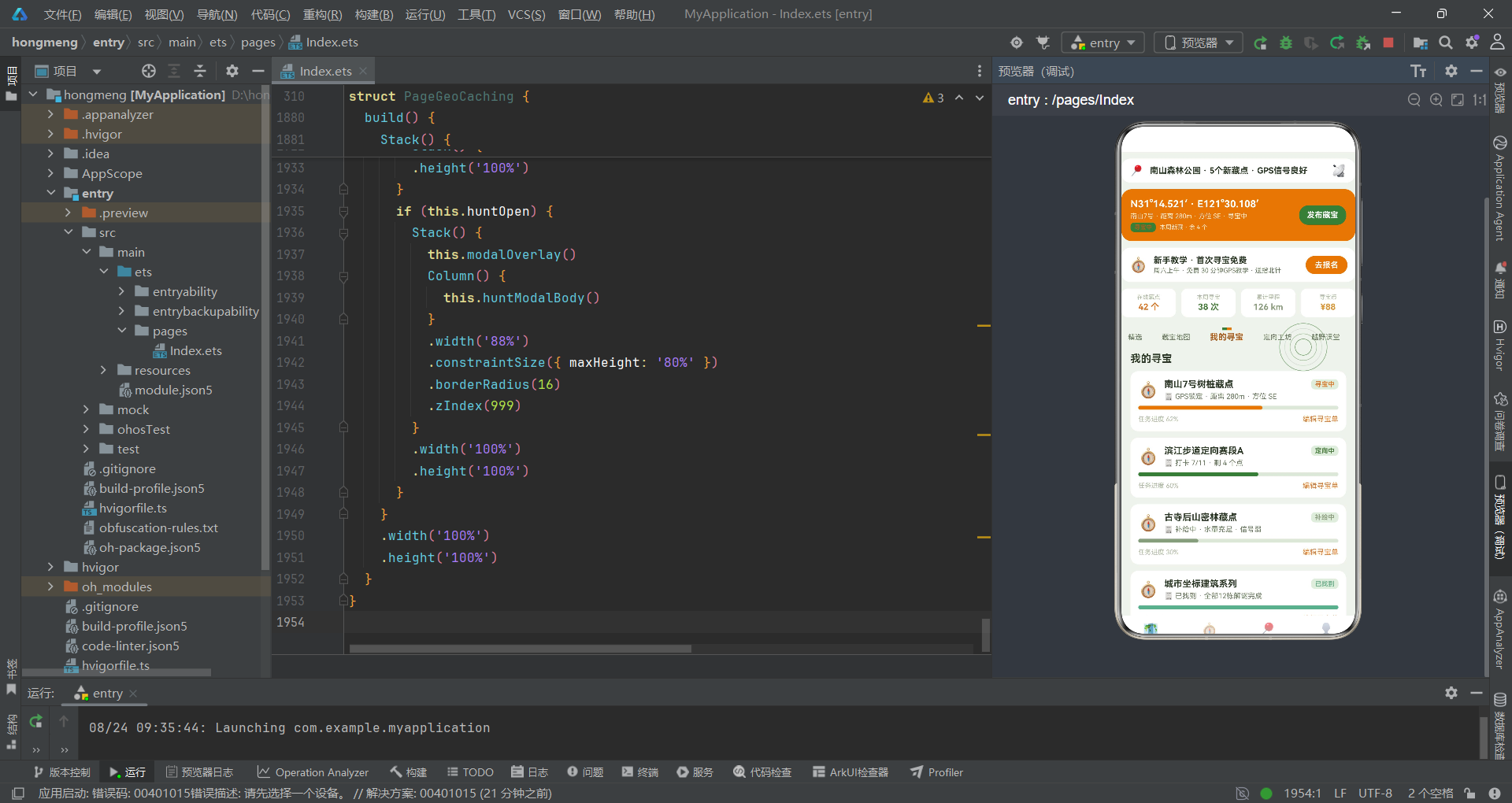
我的寻宝页面pageCrafts以列表形式展示this.trailList,每张任务卡片包含任务名称、状态标签、详情描述、进度条和编辑按钮。状态标签颜色由statusColor(it.status)映射——寻宝中橙色、定向中绿色、补给中灰绿、已找到绿色、待出发金色。进度条进度由statusProgress(it.status)映射——寻宝中62%、定向中60%、补给中30%、已找到100%、待出发0%。每张卡片底部的"编辑寻宝单"按钮点击触发openEdit(idx)打开编辑弹框,实现了任务列表与编辑弹框的索引关联。
          Row() {
            Text(`任务进度 ${statusProgress(it.status)}%`)
              .fontSize(10)
              .fontColor(COLORS.textHint)
              .layoutWeight(1)
            Text('编辑寻宝单')
              .fontSize(11)
              .fontColor(COLORS.primary)
              .onClick(() => {
                this.openEdit(idx);
              })
          }
          .width('100%')
这段代码展示了任务卡片底部的进度文本和编辑按钮。statusProgress(it.status)将状态文本映射为进度百分比数字,与状态颜色函数形成配套使用——同一个status字段同时驱动颜色和进度两个维度的可视化。编辑按钮使用COLORS.primary橙色文字而非按钮形态,符合列表项内联操作的视觉惯例——在列表中,主要的操作入口通常是文字链接而非按钮组件,减少视觉噪音。
十四、pageWorkshop定向工坊与pageCourse越野课堂
定向工坊页面是户外应用的核心功能区,它包含实时数据监控、人气藏点排行和装备速购三个模块,面向资深玩家提供精准的户外数据支持。
  @Builder
  pageWorkshop() {
    Column({ space: 10 }) {
      Text('定向工坊')
        .fontSize(16)
        .fontWeight(FontWeight.Bold)
        .fontColor(COLORS.textPrimary)
        .width('100%')
      Row({ space: 8 }) {
        Column({ space: 2 }) {
          Text('GPS精度')
            .fontSize(10)
            .fontColor(COLORS.textHint)
          Text('3m')
            .fontSize(11)
            .fontWeight(FontWeight.Bold)
            .fontColor(COLORS.primary)
        }
        .layoutWeight(1)
        .padding(8)
        .backgroundColor(COLORS.cardBg)
        .borderRadius(10)
        .alignItems(HorizontalAlign.Center)
        Column({ space: 2 }) {
          Text('信号强度')
            .fontSize(10)
            .fontColor(COLORS.textHint)
          Text('满格')
            .fontSize(11)
            .fontWeight(FontWeight.Bold)
            .fontColor(COLORS.accent)
        }
        .layoutWeight(1)
        .padding(8)
        .backgroundColor(COLORS.cardBg)
        .borderRadius(10)
        .alignItems(HorizontalAlign.Center)
        // ... 今日寻宝 5.2km、找到率 92.5%
      }
      .width('100%')
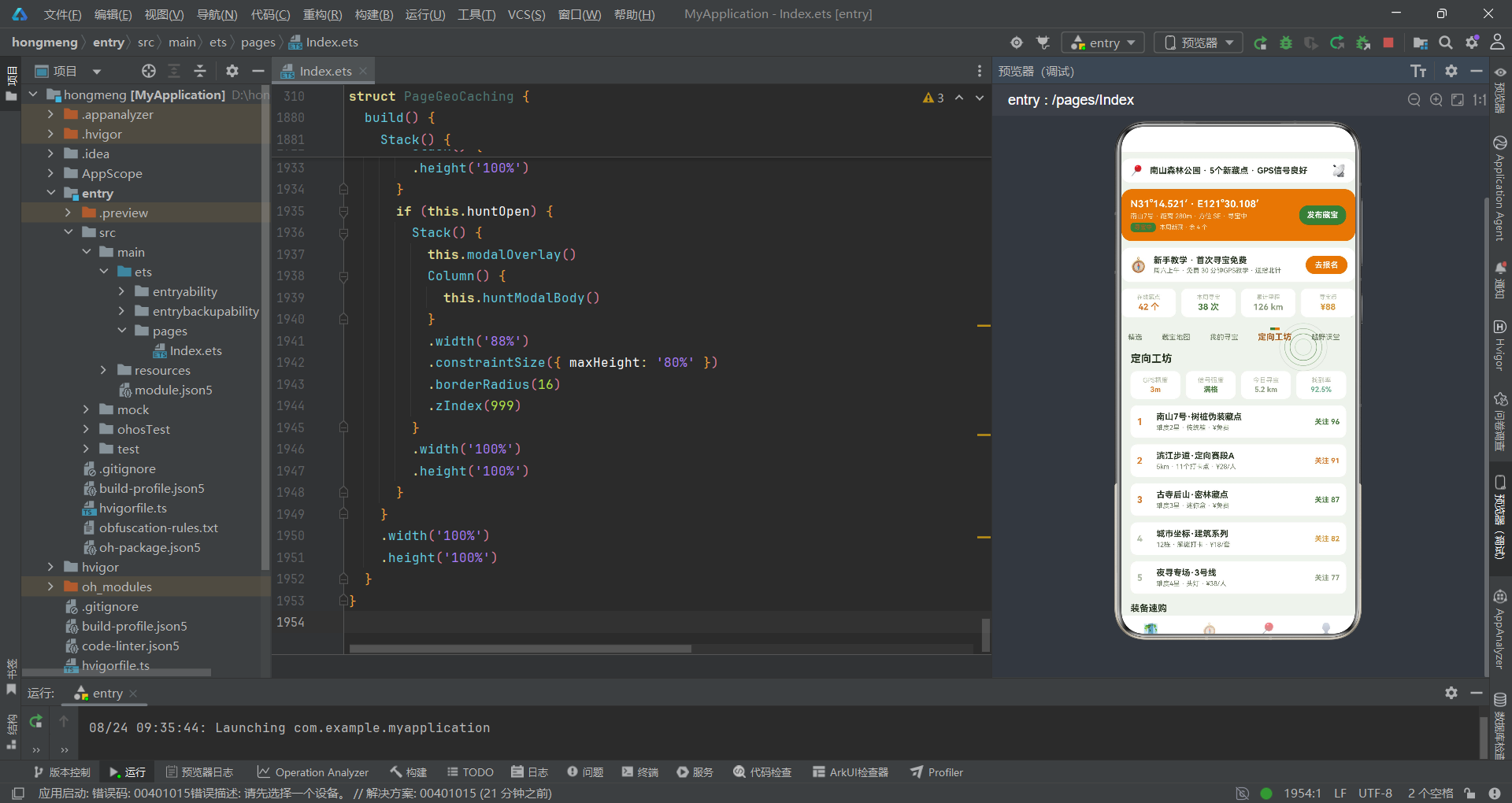
工坊页面的数据四格展示GPS精度(3m橙色)、信号强度(满格绿色)、今日寻宝里程(5.2km灰绿)和找到率(92.5%绿色)四项实时指标。这些数据精确对应户外寻宝的关键控制参数——GPS精度3米意味着定位误差在3米以内,信号强度满格确保坐标可信,今日寻宝里程反映运动量,找到率反映技术水平。人气排行区取CACHE_LIST.slice(0, 5)展示前五名藏点,排名前三使用COLORS.primary橙色编号高亮,每项包含名称、类型价格和关注度数值。装备速购区以双列布局展示GEAR_LIST中的八种装备,每种装备卡片包含大号emoji图标、名称、描述和"加购"链接。
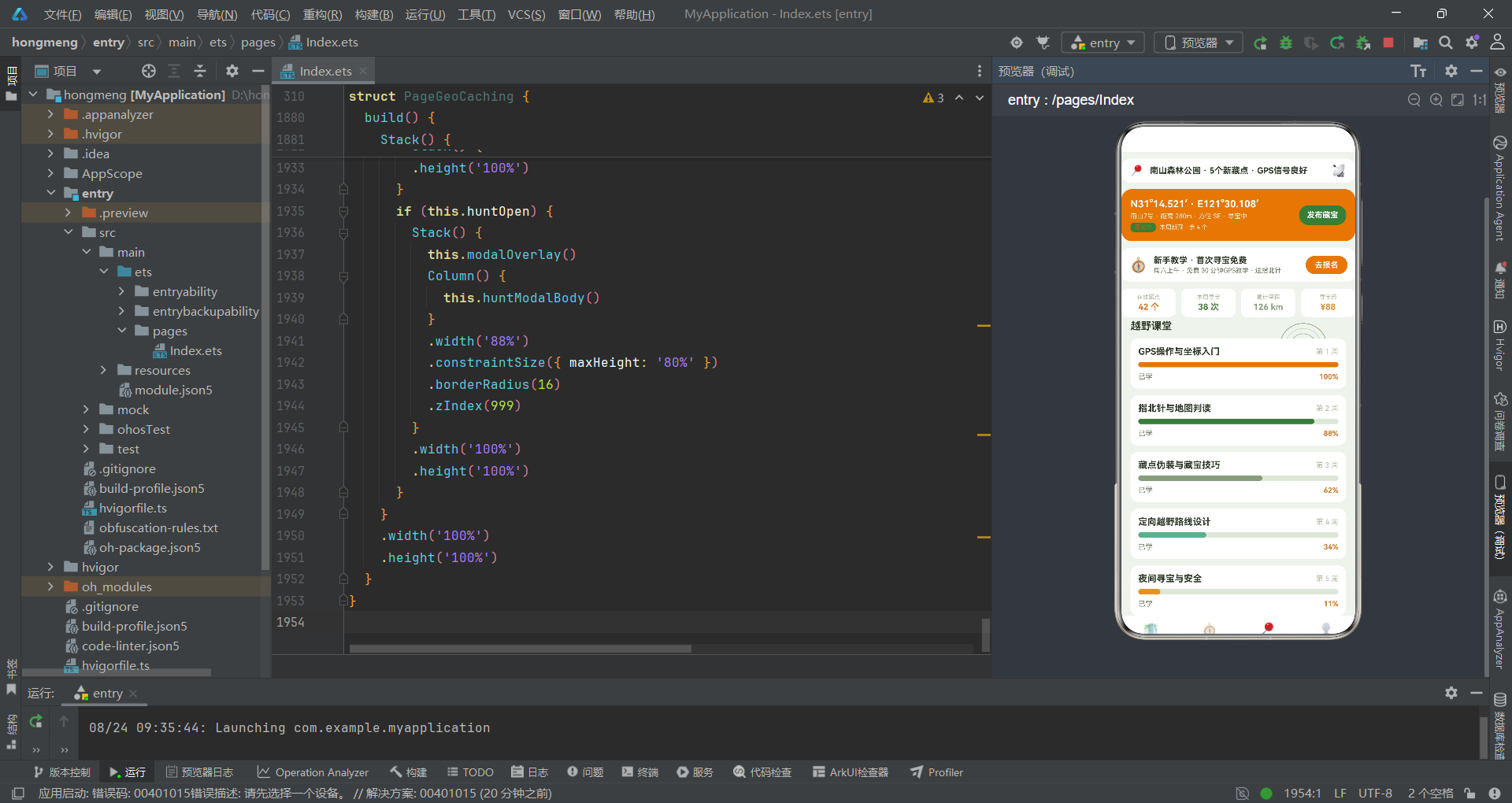
越野课堂页面pageCourse使用ForEach(COURSE_LIST)渲染五周课程进度——从第一周"GPS操作与坐标入门"100%到第五周"夜间寻宝与安全"11%,每门课程包含标题、周次、进度条和进度百分比。进度条颜色使用课程自身的it.color字段,从第一周的寻宝橙到第五周的金色,形成从已完成到未开始的渐变可视化。
  @Builder
  pageCourse() {
    Column({ space: 10 }) {
      Text('越野课堂')
        .fontSize(16)
        .fontWeight(FontWeight.Bold)
        .fontColor(COLORS.textPrimary)
        .width('100%')
      ForEach(COURSE_LIST, (it: CourseItem) => {
        Column({ space: 8 }) {
          Row() {
            Text(it.title)
              .fontSize(14)
              .fontWeight(FontWeight.Bold)
              .fontColor(COLORS.textPrimary)
              .layoutWeight(1)
            Text(it.week)
              .fontSize(11)
              .fontColor(COLORS.textHint)
          }
          .width('100%')
          Stack({ alignContent: Alignment.Start }) {
            Row()
              .width('100%')
              .height(8)
              .borderRadius(4)
              .backgroundColor(COLORS.border)
            Row()
              .width(`${it.progress}%`)
              .height(8)
              .borderRadius(4)
              .backgroundColor(it.color)
          }
          .width('100%')
          Row() {
            Text('已学')
              .fontSize(11)
              .fontColor(COLORS.textSecondary)
              .layoutWeight(1)
            Text(`${it.progress}%`)
              .fontSize(11)
              .fontWeight(FontWeight.Bold)
              .fontColor(COLORS.primary)
          }
          .width('100%')
        }
        .width('100%')
        .padding(12)
        .backgroundColor(COLORS.cardBg)
        .borderRadius(12)
      }, (it: CourseItem) => it.title)
课程进度卡片使用Stack叠加灰色底条和彩色进度条,进度条宽度设为${it.progress}%,颜色使用课程自身的color字段。底部一行显示"已学"文字和百分比数值,百分比用COLORS.primary橙色加粗强调。页面底部的退课按钮同样使用Button+Text叠加模式,点击触发openDelB(),设置delTarget = 'course'后打开删除确认弹框。
十五、pageCircle寻友圈与pageGear装备库
寻友圈页面是社区动态的全量展示区,通过ForEach(this.postList)渲染全部动态。
  @Builder
  pageCircle() {
    Column({ space: 10 }) {
      Row() {
        Text('寻友圈')
          .fontSize(16)
          .fontWeight(FontWeight.Bold)
          .fontColor(COLORS.textPrimary)
          .layoutWeight(1)
        Text('发寻语')
          .fontSize(12)
          .fontColor(COLORS.primary)
          .onClick(() => {
            this.openAdd();
          })
      }
      .width('100%')
      ForEach(this.postList, (it: PostItem) => {
        Row({ space: 10 }) {
          Text(it.avatar)
            .fontSize(26)
          Column({ space: 4 }) {
            Row() {
              Text(it.nick)
                .fontSize(14)
                .fontWeight(FontWeight.Bold)
                .fontColor(COLORS.textPrimary)
                .layoutWeight(1)
              Text(it.time)
                .fontSize(10)
                .fontColor(COLORS.textHint)
            }
            .width('100%')
            Text(it.text)
              .fontSize(13)
              .fontColor(COLORS.textSecondary)
            Text(`🗺️ ${it.likes} · 💬 回复`)
              .fontSize(11)
              .fontColor(COLORS.textHint)
          }
          .layoutWeight(1)
          .alignItems(HorizontalAlign.Start)
        }
        .width('100%')
        .padding(12)
        .backgroundColor(COLORS.cardBg)
        .borderRadius(12)
      }, (it: PostItem) => it.id.toString())
    }
    .width('100%')
  }
与精选页面中仅展示前三条不同,这里渲染全部动态,每条动态的卡片更宽更大——头像emoji使用26号字,正文使用13号字,底部增加"🗺️点赞数·💬回复"的互动指标行。互动指标行使用地图emoji作为点赞图标,与寻宝主题一致——在户外社区中,点赞行为被赋予了"在地图上标记"的语义,一个赞就是地图上的一个标记点。页面顶部的"发寻语"按钮点击触发openAdd(),用户发布的新动态会通过unshift插入到列表头部,实现新内容即时可见。
装备库页面pageGear顶部是三个大分类入口——GPS区(📡)、导航区(🧭)、夜寻区(🔦),每个入口使用28号大emoji图标,下方是分类名称和子类型描述。中部是ForEach(GEAR_LIST)渲染的八种装备详细列表,每行包含20号emoji图标、名称描述和"加购"按钮。页面底部的"取消首个寻宝任务"按钮点击触发openDelA(),设置delTarget = 'task'后打开删除确认弹框,用于取消排在首位的寻宝任务。
  @Builder
  pageGear() {
    Column({ space: 10 }) {
      Text('装备库')
        .fontSize(16)
        .fontWeight(FontWeight.Bold)
        .fontColor(COLORS.textPrimary)
        .width('100%')
      Row({ space: 8 }) {
        Column({ space: 4 }) {
          Text('📡')
            .fontSize(28)
          Text('GPS区')
            .fontSize(13)
            .fontWeight(FontWeight.Bold)
            .fontColor(COLORS.textPrimary)
          Text('手持 · 腕表')
            .fontSize(10)
            .fontColor(COLORS.textSecondary)
        }
        .layoutWeight(1)
        .padding(12)
        .backgroundColor(COLORS.cardBg)
        .borderRadius(12)
        .alignItems(HorizontalAlign.Center)
        // ... 导航区、夜寻区
      }
      .width('100%')
装备库的分类入口设计——GPS区涵盖手持和腕表型GPS设备,导航区涵盖指北针和地图,夜寻区涵盖头灯和反光装备——这种分类方式对应了户外寻宝的三大核心需求:定位、导航和照明。每种装备的描述信息如"精度3m·防水IPX7"(手持GPS)、“透明底板”(指北针)、“红光模式”(头灯)都是户外装备的专业参数,使得装备库不仅是购物列表,更是装备知识库。
十六、pageMine个人中心与用户画像
个人中心页面展示用户的完整画像,包含会员信息卡、寻宝档案和寻语档案三个模块。
  @Builder
  pageMine() {
    Column({ space: 12 }) {
      Row({ space: 12 }) {
        Text('🗺️')
          .fontSize(40)
        Column({ space: 4 }) {
          Text('南山藏宝王')
            .fontSize(18)
            .fontWeight(FontWeight.Bold)
            .fontColor(COLORS.textPrimary)
          Text('金层会员 · 寻宝 58 次 · 找到 42 点 · 陪伴 120 天')
            .fontSize(11)
            .fontColor(COLORS.textSecondary)
        }
        .alignItems(HorizontalAlign.Start)
        .layoutWeight(1)
      }
      .width('100%')
      .padding(14)
      .backgroundColor(COLORS.cardBg)
      .borderRadius(14)
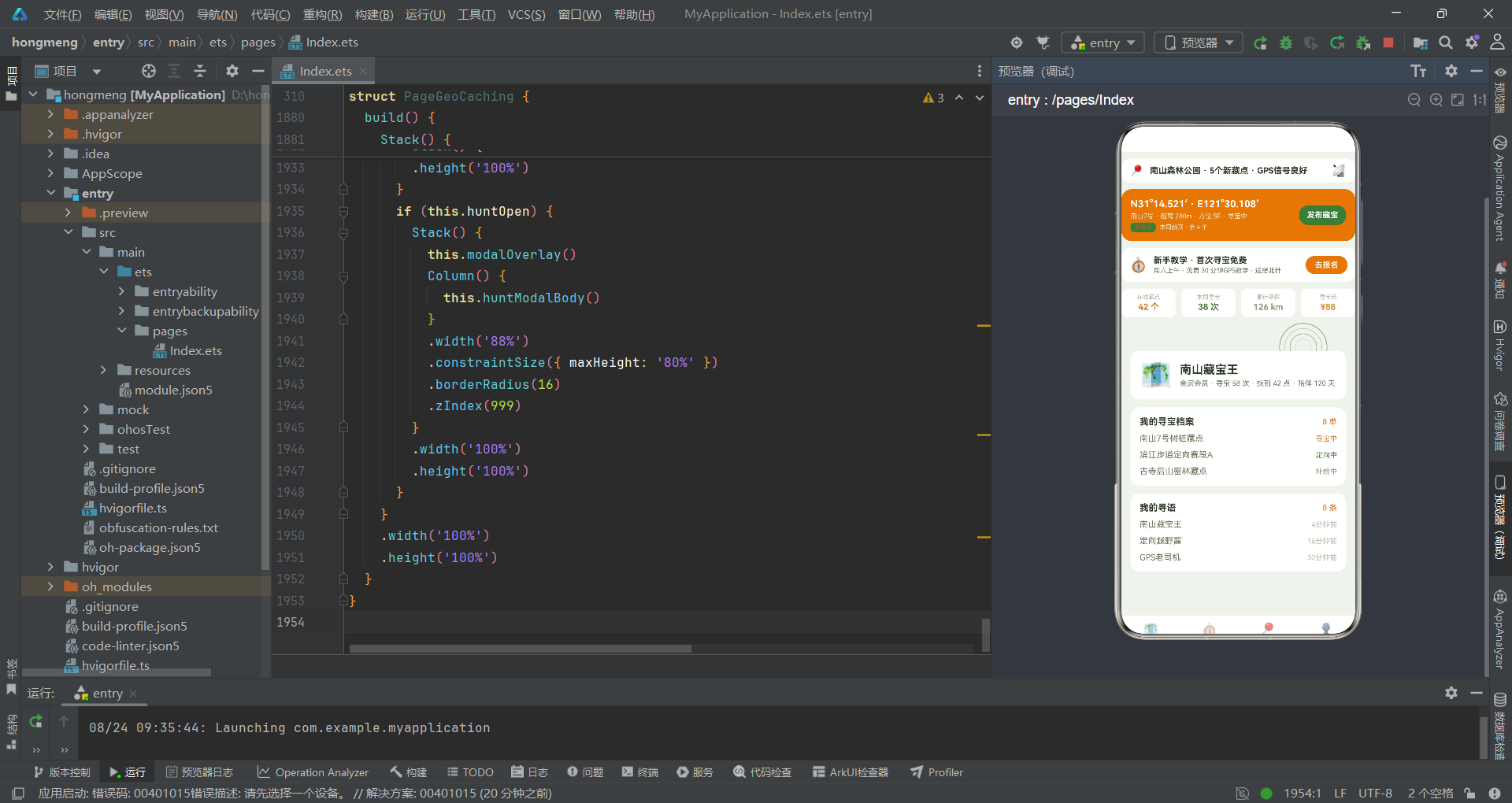
会员信息卡使用40号大emoji头像配合18号昵称和11号会员描述,描述文本"金层会员·寻宝58次·找到42点·陪伴120天"融合了会员等级、寻宝次数、找到点数和陪伴天数四个维度的用户数据,这种"一行四数据"的紧凑设计让用户一目了然自己的户外成就。寻宝档案区通过ForEach(this.trailList.slice(0, 3))展示前三条任务的名称和状态,状态颜色由statusColor映射。寻语档案区同样取前三条动态展示昵称和时间。两个档案卡片顶部都有标题行,右侧以COLORS.primary橙色显示总数统计(如"8单"“8条”),让用户一目了然自己的数据资产规模。
十七、modalOverlay遮罩层与四个弹框组件
弹框是应用交互的重要环节。本应用实现了四个弹框——发布寻语、编辑寻宝单、取消/退课确认、藏宝任务发布,它们共享一个遮罩层和相同的弹框结构模式。
  @Builder
  modalOverlay() {
    Stack() {
      Column()
        .width('100%')
        .height('100%')
        .backgroundColor('#000000')
        .opacity(0.6)
        .onClick(() => {
          this.addOpen = false;
          this.editOpen = false;
          this.delOpen = false;
          this.huntOpen = false;
        })
    }
    .width('100%')
    .height('100%')
  }
modalOverlay是遮罩层构建器,使用一个铺满全屏的Column,背景色为黑色透明度0.6,点击时将四个弹框状态全部设为false实现"点击遮罩关闭弹框"的通用交互。这种统一遮罩层的设计确保了所有弹框的视觉一致性和交互一致性。
发布寻语弹框addModalBody包含标题、TextInput(一句话记录)、TextArea(补充细节)和取消/发布双按钮。编辑寻宝单弹框editModalBody包含任务名称、状态、参数备注三个输入框。删除确认弹框delModalBody根据delTarget动态显示不同的标题和提示文本——'task'显示"取消首个寻宝任务"和"将取消首个寻宝任务并清除已走轨迹",'course'显示"退出越野课堂"和"将退出首门进行中的课程"。藏宝任务发布弹框huntModalBody是最具户外特色的弹框:
  @Builder
  huntModalBody() {
    Column({ space: 12 }) {
      Text('藏宝任务发布')
        .fontSize(17)
        .fontWeight(FontWeight.Bold)
        .fontColor(COLORS.textPrimary)
      TextInput({ placeholder: '藏点名称(如 南山8号·石缝藏点)', text: this.huntName })
        .fontSize(13)
        .fontColor(COLORS.textPrimary)
        .backgroundColor(COLORS.bg)
        .borderRadius(8)
        .height(40)
        .onChange((v: string) => {
          this.huntName = v;
        })
      TextInput({ placeholder: '坐标(如 N31°14.521′·E121°30.108′)', text: this.huntCoord })
        .fontSize(13)
        .fontColor(COLORS.textPrimary)
        .backgroundColor(COLORS.bg)
        .borderRadius(8)
        .height(40)
        .onChange((v: string) => {
          this.huntCoord = v;
        })
      Text('审核藏点安全性与可达性后 30 分钟内上线 · 含签到本与纪念章')
        .fontSize(11)
        .fontColor(COLORS.textHint)
        .width('100%')
藏宝任务发布弹框的设计体现了地理藏宝的定制化特性——用户需要输入藏点名称和GPS坐标(如"N31°14.521′·E121°30.108′"),系统会提示审核藏点安全性与可达性后30分钟内上线,并说明包含签到本与纪念章。这种将藏宝流程融入弹框提示的设计,使得应用不仅是工具,更承担了藏宝规范教育功能。底部使用COLORS.accent定向绿按钮而非红色,体现了发布类操作不同于删除类操作的语义区分。所有弹框的TextInput都通过onChange回调实时更新对应的状态变量,实现了双向数据绑定。
十八、bottomBar底部导航与mainContent主内容路由
底部导航栏是应用的主导航入口,通过四个Tab实现首页、藏点、课堂和我的之间的快速切换。
  @Builder
  bottomBar() {
    Row() {
      ForEach(NAV_LIST, (it: NavItem, idx: number) => {
        Column({ space: 2 }) {
          Text(it.icon)
            .fontSize(20)
            .opacity(this.mainTab === idx ? 1 : 0.55)
          Text(it.label)
            .fontSize(10)
            .fontWeight(this.mainTab === idx ? FontWeight.Bold : FontWeight.Normal)
            .fontColor(this.mainTab === idx ? COLORS.primary : COLORS.textHint)
        }
        .layoutWeight(1)
        .alignItems(HorizontalAlign.Center)
        .onClick(() => {
          this.mainTab = idx;
        })
      }, (it: NavItem) => it.label)
    }
    .width('100%')
    .height(56)
    .backgroundColor(COLORS.cardBg)
    .borderRadius({ topLeft: 16, topRight: 16 })
  }
底部导航使用ForEach(NAV_LIST)渲染四个Tab项——首页(🗺️)、藏点(🧭)、课堂(📍)、我的(👤)。选中态通过两个维度区分:图标透明度(1 vs 0.55)和标签颜色加粗(primary橙色加粗 vs textHint灰绿常规)。导航栏使用白色背景配合顶部16像素圆角,营造出浮于内容上方的视觉效果。onClick回调将mainTab设为被点击的索引,触发主内容区的条件渲染切换。
mainContent方法根据mainTab的值路由到不同的页面组合。当mainTab === 0时,渲染header + subNav + 根据subTab路由七个内容页之一;当mainTab === 1时直接渲染pageMarket;mainTab === 2渲染pageCourse;mainTab === 3渲染pageMine。
  @Builder
  mainContent() {
    Column() {
      this.header()
      if (this.mainTab === 0) {
        this.subNav()
        Scroll() {
          Column() {
            if (this.subTab === 0) {
              this.pageFeatured()
            } else if (this.subTab === 1) {
              this.pageMarket()
            } else if (this.subTab === 2) {
              this.pageCrafts()
            } else if (this.subTab === 3) {
              this.pageWorkshop()
            } else if (this.subTab === 4) {
              this.pageCourse()
            } else if (this.subTab === 5) {
              this.pageCircle()
            } else {
              this.pageGear()
            }
          }
          .width('100%')
        }
        .scrollable(ScrollDirection.Vertical)
        .scrollBar(BarState.Off)
        .layoutWeight(1)
        .padding({ left: 14, right: 14, bottom: 20 })
      } else if (this.mainTab === 1) {
        Scroll() {
          Column() {
            this.pageMarket()
          }
          .width('100%')
        }
        .scrollable(ScrollDirection.Vertical)
        .scrollBar(BarState.Off)
        .layoutWeight(1)
        .padding({ left: 14, right: 14, bottom: 20 })
      } else if (this.mainTab === 2) {
        Scroll() {
          Column() {
            this.pageCourse()
          }
          .width('100%')
        }
        .scrollable(ScrollDirection.Vertical)
        .scrollBar(BarState.Off)
        .layoutWeight(1)
        .padding({ left: 14, right: 14, bottom: 20 })
      } else {
        Scroll() {
          Column() {
            this.pageMine()
          }
          .width('100%')
        }
        .scrollable(ScrollDirection.Vertical)
        .scrollBar(BarState.Off)
        .layoutWeight(1)
        .padding({ left: 14, right: 14, bottom: 20 })
      }
    }
    .width('100%')
    .height('100%')
  }
这种"if-else链式路由"虽然不如Switch优雅,但在ArkTS中是组件条件渲染的惯用模式。每个Tab的内容都包裹在Scroll容器中,设置scrollable(ScrollDirection.Vertical)和scrollBar(BarState.Off)实现纵向滚动且隐藏滚动条。只有mainTab === 0的首页会额外渲染subNav()并支持七个子Tab切换,其他三个Tab直接渲染单一页面,形成了"首页聚合+三Tab专精"的信息架构。
十九、build主架构与弹框叠加渲染
build方法是组件的入口构建器,它将背景层、特效层、主内容层和弹框层通过Stack叠加组装成最终的UI。
  build() {
    Stack() {
      Column()
        .width('100%')
        .height('100%')
        .backgroundColor(COLORS.bg)
      this.fxLayer()
      Column() {
        this.mainContent()
        this.bottomBar()
      }
      .width('100%')
      .height('100%')
      if (this.addOpen) {
        Stack() {
          this.modalOverlay()
          Column() {
            this.addModalBody()
          }
          .width('88%')
          .constraintSize({ maxHeight: '80%' })
          .borderRadius(16)
          .zIndex(999)
        }
        .width('100%')
        .height('100%')
      }
      if (this.editOpen) {
        Stack() {
          this.modalOverlay()
          Column() {
            this.editModalBody()
          }
          .width('88%')
          .constraintSize({ maxHeight: '80%' })
          .borderRadius(16)
          .zIndex(999)
        }
        .width('100%')
        .height('100%')
      }
      if (this.delOpen) {
        Stack() {
          this.modalOverlay()
          Column() {
            this.delModalBody()
          }
          .width('88%')
          .constraintSize({ maxHeight: '80%' })
          .borderRadius(16)
          .zIndex(999)
        }
        .width('100%')
        .height('100%')
      }
      if (this.huntOpen) {
        Stack() {
          this.modalOverlay()
          Column() {
            this.huntModalBody()
          }
          .width('88%')
          .constraintSize({ maxHeight: '80%' })
          .borderRadius(16)
          .zIndex(999)
        }
        .width('100%')
        .height('100%')
      }
    }
    .width('100%')
    .height('100%')
  }
build方法的最外层是一个Stack,内部按顺序叠加了多层内容:第一层是全屏背景色Column(COLORS.bg浅绿背景);第二层是this.fxLayer()特效层,由于设置了hitTestBehavior(HitTestMode.None),它不会拦截下方层的点击事件;第三层是主内容Column,包含mainContent()和bottomBar(),占据全屏高度;第四层及之后是四个弹框层,通过if条件控制显隐。每个弹框层都是一个Stack,内含modalOverlay()遮罩层和居中的弹框内容Column,弹框内容宽度88%、最大高度80%、圆角16、zIndex设为999确保浮于最上层。当addOpen等状态变为true时,对应的if分支被激活,弹框层渲染出来覆盖在主内容上方;变为false时弹框层消失,露出下方主内容。这种"条件渲染+Stack叠加"的模式是ArkTS中实现弹框的标准做法,无需引入额外的弹框管理框架即可实现复杂的弹框交互。
二十、架构流程图
上图清晰地展示了应用从build入口到各功能模块的完整架构流转。背景层、特效层、主内容层和弹框层在Stack中自下而上叠加,特效层通过hitTestBehavior(None)实现点击透传。主内容层内部通过mainTab实现四大Tab路由,首页Tab内部再通过subTab实现七个内容页的二级路由。四个弹框层各自通过独立的状态变量控制显隐,操作完成后通过do方法执行数据变更并自动关闭。
二十一、数据模型与组件对比表格
下表对应用中四个核心数据模型进行对比,帮助开发者理解各模型的字段构成、业务语义和适用场景。
| 模型 | 装饰器 | 核心字段 | 业务语义 | 关联状态变量 | 适用页面 | 关键纯函数 |
|---|---|---|---|---|---|---|
| PostItem | @Observed | id, nick, avatar, text, time, likes | 寻友社区动态,支持发布新增和删除 | postList | pageFeatured, pageCircle, pageMine | 无(直接渲染) |
| CacheItem | @Observed | id, name, craft, price, level, hot | 藏点信息,含难度类型和级别热度 | 无(静态常量) | pageMarket, pageFeatured, pageWorkshop | cacheTagColor, levelColor |
| TrailItem | @Observed | id, name, item, status, progress | 寻宝任务,状态驱动进度和颜色 | trailList | pageCrafts, pageMine | statusColor, statusProgress |
| GearItem | @Observed | id, name, desc, icon | 户外装备,用于工坊速购和装备库 | 无(静态常量) | pageWorkshop, pageGear | 无(直接渲染) |
下表对比四个弹框组件的设计差异,展示了"同构不同义"的弹框架构模式。
| 弹框 | 触发方法 | 状态变量 | 表单字段 | 提交方法 | 数据操作 | 按钮颜色 |
|---|---|---|---|---|---|---|
| 发寻语 | openAdd | addOpen | addTitle, addContent | doAdd | postList.unshift | primary 寻宝橙 |
| 编辑寻宝单 | openEdit | editOpen | editName, editStyle, editNote | doEdit | trailList.splice 替换 | primary 寻宝橙 |
| 取消/退课 | openDelA/B | delOpen | delTarget | doDel | splice 删除首元素 | danger 红 |
| 藏宝发布 | openHunt | huntOpen | huntName, huntCoord | doHunt | postList.unshift 发布 | accent 定向绿 |
安装DevEco Studio程序

选择目标安装目录:

设置环境变量,但是需要重启一下:

新建一个空白模板:

设置API为24的模板项目:

初始化项目,自动下载相关依赖:

完整代码:
// 场景:地理藏宝 / 定向越野 / GPS打卡 / 寻友社区
// 底部4主tab(首页/藏点/课堂/我的)+ 首页7内容tab(罗盘指针式)
// 特效:信号脉冲扩散 + 轨迹光点游走(特效层位于底层,不遮挡点击)
// 弹框:新增(发寻语) / 编辑(编辑寻宝单) / 删除(取消寻宝·退课) / 发布(藏宝任务发布)
interface ColorPalette {
primary: string;
primaryLight: string;
primaryDark: string;
accent: string;
accentLight: string;
bg: string;
cardBg: string;
textPrimary: string;
textSecondary: string;
textHint: string;
border: string;
success: string;
warning: string;
danger: string;
white: string;
compass: string;
}
const COLORS: ColorPalette = {
primary: '#D97C2E',
primaryLight: '#FBE8D5',
primaryDark: '#A85E1E',
accent: '#4A7C3F',
accentLight: '#E2EDDD',
bg: '#EFF4ED',
cardBg: '#FFFFFF',
textPrimary: '#2E3A28',
textSecondary: '#6A7A5E',
textHint: '#B0BBA4',
border: '#DEE7D8',
success: '#6FAF8F',
warning: '#D9973B',
danger: '#C0503F',
white: '#FFFFFF',
compass: '#8B9D7E'
};
// ============ 寻友动态数据模型 ============
@Observed
export class PostItem {
id: number = 0
nick: string = ''
avatar: string = ''
text: string = ''
time: string = ''
likes: number = 0
constructor(id: number, nick: string, avatar: string, text: string, time: string, likes: number) {
this.id = id; this.nick = nick; this.avatar = avatar; this.text = text
this.time = time; this.likes = likes
}
}
// ============ 藏点数据模型 ============
@Observed
export class CacheItem {
id: number = 0
name: string = ''
craft: string = ''
price: string = ''
level: string = ''
hot: number = 0
constructor(id: number, name: string, craft: string, price: string, level: string, hot: number) {
this.id = id; this.name = name; this.craft = craft; this.price = price
this.level = level; this.hot = hot
}
}
// ============ 寻宝任务数据模型 ============
@Observed
export class TrailItem {
id: number = 0
name: string = ''
item: string = ''
status: string = ''
progress: number = 0
constructor(id: number, name: string, item: string, status: string, progress: number) {
this.id = id; this.name = name; this.item = item; this.status = status
this.progress = progress
}
}
// ============ 装备数据模型 ============
@Observed
export class GearItem {
id: number = 0
name: string = ''
desc: string = ''
icon: string = ''
constructor(id: number, name: string, desc: string, icon: string) {
this.id = id; this.name = name; this.desc = desc; this.icon = icon
}
}
// ============ 图表与课程接口 ============
interface WeekChartItem {
label: string;
value: number;
}
interface MatChartItem {
label: string;
value: number;
color: string;
}
interface CourseItem {
title: string;
week: string;
progress: number;
color: string;
}
interface PlayTypeItem {
name: string;
desc: string;
icon: string;
hot: boolean;
}
// ============ 顶层静态数据 ============
const POST_LIST: PostItem[] = [
new PostItem(1, '南山藏宝王', '🗺️', '7号藏点找到了!伪装成树桩太绝了。', '4分钟前', 128),
new PostItem(2, '定向越野酱', '🧭', '今日5公里定向越野,打卡全部11个点。', '16分钟前', 102),
new PostItem(3, 'GPS老司机', '📍', '坐标N31°14.521′·E121°30.108′,信号满格。', '32分钟前', 93),
new PostItem(4, '寻语主理人', '🎒', '本周新藏5个点,难度从1星到4星全覆盖。', '1小时前', 85),
new PostItem(5, '徽章收集控', '🏅', '全勤打卡第28天,拿到「南山之星」徽章。', '2小时前', 76),
new PostItem(6, '轨迹分析师', '📊', '导入GPX轨迹到地图,爬升286米,均速5.2。', '4小时前', 64),
new PostItem(7, '夜寻小能手', '🔦', '头灯夜寻3号点,猫头鹰叫声有点渗人。', '6小时前', 55),
new PostItem(8, '亲子藏宝团', '👨👩👦', '孩子第一次找到藏点,开心到跳起来。', '昨天', 48)
];
const CACHE_LIST: CacheItem[] = [
new CacheItem(1, '南山7号·树桩伪装藏点', '难度2星 · 传统箱', '¥免费', '人气', 96),
new CacheItem(2, '滨江步道·定向赛段A', '5km · 11个打卡点', '¥28/人', '限定', 91),
new CacheItem(3, '古寺后山·密林藏点', '难度3星 · 迷你盒', '¥免费', '典藏', 87),
new CacheItem(4, '城市坐标·建筑系列', '12栋 · 解谜打卡', '¥18/套', '新品', 82),
new CacheItem(5, '夜寻专场·3号线', '难度4星 · 头灯', '¥38/人', '限定', 77),
new CacheItem(6, '亲子寻宝·植物园篇', '难度1星 · 大盒', '¥免费', '入门', 70),
new CacheItem(7, '湖岛环线·定向赛段B', '8km · 15个打卡点', '¥38/人', '人气', 84),
new CacheItem(8, '山顶日落·观景藏点', '难度3星 · 日落', '¥免费', '典藏', 58)
];
const TRAIL_LIST: TrailItem[] = [
new TrailItem(1, '南山7号树桩藏点', 'GPS锁定 · 距离 280m · 方位 SE', '寻宝中', 62),
new TrailItem(2, '滨江步道定向赛段A', '打卡 7/11 · 剩 4 个点', '定向中', 64),
new TrailItem(3, '古寺后山密林藏点', '补给中 · 水量充足 · 信号弱', '补给中', 30),
new TrailItem(4, '城市坐标建筑系列', '已找到 · 全部12栋解谜完成', '已找到', 100),
new TrailItem(5, '夜寻专场3号线', '待出发 · 集合时间 19:30', '待出发', 0),
new TrailItem(6, '亲子植物园藏点', '已找到 · 小朋友找到的', '已找到', 100),
new TrailItem(7, '湖岛环线赛段B', '定向中 · 打卡 9/15', '定向中', 60),
new TrailItem(8, '山顶日落观景藏点', '已找到 · 日落 18:42 拍照', '已找到', 100)
];
const GEAR_LIST: GearItem[] = [
new GearItem(1, '手持GPS · 户外版', '精度3m · 防水IPX7', '📡'),
new GearItem(2, '指北针 · 液态阻尼', '定向专用 · 透明底板', '🧭'),
new GearItem(3, '藏点盒 · 迷你款', '防水盒 · 内含签到本', '📦'),
new GearItem(4, '头灯 · 400流明', '夜寻专用 · 红光模式', '🔦'),
new GearItem(5, '轨迹笔 · 速干', '签到本 · 多色可选', '🖊️'),
new GearItem(6, '徽章 · 收藏板', '展示 · 磁吸背', '🏅'),
new GearItem(7, '腰包 · 5L 户外', '多袋 · 水壶位', '🎒'),
new GearItem(8, '对讲机 · 双台装', '0.5W · 16频道', '📡')
];
const WEEK_CHART: WeekChartItem[] = [
{ label: '周一', value: 3 },
{ label: '周二', value: 5 },
{ label: '周三', value: 4 },
{ label: '周四', value: 7 },
{ label: '周五', value: 10 },
{ label: '周六', value: 22 },
{ label: '周日', value: 17 }
];
const MAT_CHART: MatChartItem[] = [
{ label: '传统箱', value: 36, color: '#D97C2E' },
{ label: '迷你盒', value: 24, color: '#4A7C3F' },
{ label: '解谜卡', value: 18, color: '#8B9D7E' },
{ label: '徽章套', value: 12, color: '#D9973B' },
{ label: '电子点', value: 10, color: '#6FAF8F' }
];
const TYPE_LIST: PlayTypeItem[] = [
{ name: '地理藏宝', desc: '寻点 · 签到 · 换物', icon: '🗺️', hot: true },
{ name: '定向越野', desc: '打卡 · 计时 · 排名', icon: '🧭', hot: true },
{ name: '城市解谜', desc: '建筑 · 线索 · 拼图', icon: '🔍', hot: false },
{ name: '寻友市集', desc: '二手装备 · 周末开市', icon: '🏪', hot: false }
];
const COURSE_LIST: CourseItem[] = [
{ title: 'GPS操作与坐标入门', week: '第 1 周', progress: 100, color: '#D97C2E' },
{ title: '指北针与地图判读', week: '第 2 周', progress: 88, color: '#4A7C3F' },
{ title: '藏点伪装与藏宝技巧', week: '第 3 周', progress: 62, color: '#8B9D7E' },
{ title: '定向越野路线设计', week: '第 4 周', progress: 34, color: '#6FAF8F' },
{ title: '夜间寻宝与安全', week: '第 5 周', progress: 11, color: '#D9973B' }
];
// ============ 导航配置 ============
interface NavItem {
icon: string;
label: string;
}
const NAV_LIST: NavItem[] = [
{ icon: '🗺️', label: '首页' },
{ icon: '🧭', label: '藏点' },
{ icon: '📍', label: '课堂' },
{ icon: '👤', label: '我的' }
];
const SUB_NAV_LIST: string[] = ['精选', '藏宝地图', '我的寻宝', '定向工坊', '越野课堂', '寻友圈', '装备库'];
// ============ 顶层纯函数 ============
function barH(v: number, max: number): number {
return Math.round(118 * v / max);
}
function ccColor(v: number): string {
if (v > 13) {
return '#D97C2E';
} else if (v > 8) {
return '#4A7C3F';
}
return '#8B9D7E';
}
function ringS(i: number): number {
return 26 + i * 16;
}
function ringA(tick: number, i: number): number {
return 0.72 - ((tick + i * 3) % 8) * 0.08;
}
function trailX(tick: number, i: number): number {
return 30 + ((tick * 5 + i * 251) % 610);
}
function trailY(tick: number, i: number): number {
return 60 + ((tick * 4 + i * 167) % 610);
}
function trailA(tick: number, i: number): number {
if ((tick + i * 2) % 5 === 0) {
return 0.85;
}
return 0.2;
}
function statusColor(s: string): string {
if (s === '已找到') {
return '#6FAF8F';
} else if (s === '寻宝中') {
return '#D97C2E';
} else if (s === '定向中') {
return '#4A7C3F';
} else if (s === '补给中') {
return '#8B9D7E';
}
return '#D9973B';
}
function statusProgress(s: string): number {
if (s === '已找到') {
return 100;
} else if (s === '寻宝中') {
return 62;
} else if (s === '定向中') {
return 60;
} else if (s === '补给中') {
return 30;
}
return 0;
}
function cacheTagColor(g: string): string {
if (g.indexOf('树桩') >= 0 || g.indexOf('密林') >= 0) {
return '#4A7C3F';
} else if (g.indexOf('定向') >= 0 || g.indexOf('环线') >= 0) {
return '#D97C2E';
} else if (g.indexOf('夜寻') >= 0 || g.indexOf('山顶') >= 0) {
return '#8B9D7E';
}
return '#D9973B';
}
function levelColor(s: string): string {
if (s === '入门') {
return '#6FAF8F';
} else if (s === '人气') {
return '#D97C2E';
} else if (s === '限定') {
return '#4A7C3F';
} else if (s === '典藏') {
return '#8B9D7E';
} else if (s === '新品') {
return '#D9973B';
}
return '#C0503F';
}
@Entry
@Component
struct PageGeoCaching {
@State mainTab: number = 0
@State subTab: number = 0
@State tick: number = 0
@State glow: number = 0
@State addOpen: boolean = false
@State editOpen: boolean = false
@State delOpen: boolean = false
@State huntOpen: boolean = false
@State editIdx: number = 0
@State delTarget: string = 'task'
@State editName: string = ''
@State editStyle: string = ''
@State editNote: string = ''
@State addTitle: string = ''
@State addContent: string = ''
@State huntName: string = ''
@State huntCoord: string = ''
@State postList: PostItem[] = POST_LIST
@State trailList: TrailItem[] = TRAIL_LIST
@State fxTimer: number = -1
aboutToAppear(): void {
this.fxTimer = setInterval(() => {
this.tick = this.tick + 1;
this.glow = (this.glow + 1) % 2;
}, 90);
}
aboutToDisappear(): void {
if (this.fxTimer > 0) {
clearInterval(this.fxTimer);
this.fxTimer = -1;
}
}
openAdd(): void {
this.addTitle = '';
this.addContent = '';
this.addOpen = true;
}
openEdit(index: number): void {
if (index >= 0 && index < this.trailList.length) {
this.editIdx = index;
this.editName = this.trailList[index].name;
this.editStyle = this.trailList[index].status;
this.editNote = this.trailList[index].item;
}
this.editOpen = true;
}
openDelA(): void {
this.delTarget = 'task';
this.delOpen = true;
}
openDelB(): void {
this.delTarget = 'course';
this.delOpen = true;
}
openHunt(): void {
this.huntName = '';
this.huntCoord = '';
this.huntOpen = true;
}
doAdd(): void {
if (this.addTitle.length > 0) {
this.postList.unshift(new PostItem(999, '我的寻语', '🗺️', this.addTitle, '刚刚', 0));
}
this.addOpen = false;
}
doEdit(): void {
if (this.editIdx >= 0 && this.editIdx < this.trailList.length) {
this.trailList.splice(this.editIdx, 1, new TrailItem(this.trailList[this.editIdx].id, this.editName, this.editNote, this.editStyle, 40));
}
this.editOpen = false;
}
doDel(): void {
if (this.delTarget === 'task' && this.trailList.length > 0) {
this.trailList.splice(0, 1);
} else if (this.delTarget === 'course' && this.postList.length > 0) {
this.postList.splice(0, 1);
}
this.delOpen = false;
}
doHunt(): void {
if (this.huntName.length > 0) {
this.postList.unshift(new PostItem(998, '我的寻语', '🧭', `已发布藏宝任务:${this.huntName}`, '刚刚', 0));
}
this.huntOpen = false;
}
@Builder
fxLayer() {
Stack({ alignContent: Alignment.TopStart }) {
ForEach([0, 1, 2, 3], (i: number) => {
Column()
.width(ringS(i))
.height(ringS(i))
.borderRadius(ringS(i) / 2)
.border({ width: 1, color: COLORS.accent, radius: ringS(i) / 2 })
.opacity(ringA(this.tick, i))
.translate({ x: 280 - ringS(i) / 2, y: 300 - ringS(i) / 2 })
}, (i: number) => i.toString())
ForEach([0, 1, 2, 3, 4, 5], (i: number) => {
Column()
.width(4)
.height(4)
.borderRadius(2)
.backgroundColor(i % 2 === 0 ? COLORS.accent : COLORS.compass)
.opacity(trailA(this.tick, i))
.translate({ x: trailX(this.tick, i), y: trailY(this.tick, i) })
}, (i: number) => i.toString())
}
.width('100%')
.height('100%')
.hitTestBehavior(HitTestMode.None)
}
@Builder
header() {
Column({ space: 10 }) {
// 品牌行
Row({ space: 10 }) {
Text('📍')
.fontSize(16)
Text('南山森林公园 · 5个新藏点 · GPS信号良好')
.fontSize(13)
.fontWeight(FontWeight.Bold)
.fontColor(COLORS.textPrimary)
.layoutWeight(1)
Text('📡')
.fontSize(18)
}
.width('100%')
.padding({ left: 14, right: 14, top: 8, bottom: 8 })
.backgroundColor(COLORS.cardBg)
.borderRadius(14)
// 寻宝挑战卡
Row({ space: 12 }) {
Column({ space: 4 }) {
Text('N31°14.521′ · E121°30.108′')
.fontSize(15)
.fontWeight(FontWeight.Bold)
.fontColor(COLORS.white)
Text('南山7号 · 距离 280m · 方位 SE · 寻宝中')
.fontSize(10)
.fontColor('#FBE8D5')
Row({ space: 6 }) {
Text('寻宝中')
.fontSize(9)
.fontWeight(FontWeight.Bold)
.fontColor(COLORS.primaryDark)
.padding({ left: 6, right: 6, top: 2, bottom: 2 })
.backgroundColor(COLORS.accent)
.borderRadius(6)
Text('本周新藏 · 余 4 个')
.fontSize(9)
.fontColor('#FBE8D5')
}
}
.alignItems(HorizontalAlign.Start)
.layoutWeight(1)
Text('发布藏宝')
.fontSize(12)
.fontWeight(FontWeight.Bold)
.fontColor(COLORS.white)
.padding({ left: 12, right: 12, top: 8, bottom: 8 })
.backgroundColor(COLORS.accent)
.borderRadius(14)
.onClick(() => {
this.openHunt();
})
}
.width('100%')
.padding(14)
.backgroundColor(COLORS.primary)
.borderRadius(16)
// 新手教学横幅
Row({ space: 10 }) {
Text('🧭')
.fontSize(22)
Column({ space: 2 }) {
Text('新手教学 · 首次寻宝免费')
.fontSize(13)
.fontWeight(FontWeight.Bold)
.fontColor(COLORS.textPrimary)
Text('周六上午 · 免费 30 分钟GPS教学 · 送指北针')
.fontSize(10)
.fontColor(COLORS.textSecondary)
}
.alignItems(HorizontalAlign.Start)
.layoutWeight(1)
Text('去报名')
.fontSize(12)
.fontWeight(FontWeight.Bold)
.fontColor(COLORS.white)
.padding({ left: 14, right: 14, top: 7, bottom: 7 })
.backgroundColor(COLORS.primary)
.borderRadius(14)
.onClick(() => {
this.openHunt();
})
}
.width('100%')
.padding(12)
.backgroundColor(COLORS.cardBg)
.borderRadius(14)
// 数据四格
Row({ space: 8 }) {
Column({ space: 2 }) {
Text('在线藏点')
.fontSize(9)
.fontColor(COLORS.textHint)
Text('42 个')
.fontSize(13)
.fontWeight(FontWeight.Bold)
.fontColor(COLORS.primary)
}
.layoutWeight(1)
.padding(8)
.backgroundColor(COLORS.cardBg)
.borderRadius(10)
.alignItems(HorizontalAlign.Center)
Column({ space: 2 }) {
Text('本周寻宝')
.fontSize(9)
.fontColor(COLORS.textHint)
Text('38 次')
.fontSize(13)
.fontWeight(FontWeight.Bold)
.fontColor(COLORS.accent)
}
.layoutWeight(1)
.padding(8)
.backgroundColor(COLORS.cardBg)
.borderRadius(10)
.alignItems(HorizontalAlign.Center)
Column({ space: 2 }) {
Text('累计里程')
.fontSize(9)
.fontColor(COLORS.textHint)
Text('126 km')
.fontSize(13)
.fontWeight(FontWeight.Bold)
.fontColor(COLORS.compass)
}
.layoutWeight(1)
.padding(8)
.backgroundColor(COLORS.cardBg)
.borderRadius(10)
.alignItems(HorizontalAlign.Center)
Column({ space: 2 }) {
Text('寻宝币')
.fontSize(9)
.fontColor(COLORS.textHint)
Text('¥88')
.fontSize(13)
.fontWeight(FontWeight.Bold)
.fontColor(COLORS.warning)
}
.layoutWeight(1)
.padding(8)
.backgroundColor(COLORS.cardBg)
.borderRadius(10)
.alignItems(HorizontalAlign.Center)
}
.width('100%')
}
.width('100%')
.padding({ top: 10, bottom: 4 })
}
@Builder
subNav() {
Scroll() {
Row({ space: 10 }) {
ForEach(SUB_NAV_LIST, (item: string, idx: number) => {
Column({ space: 3 }) {
Row({ space: 0 }) {
Column()
.width(7)
.height(4)
.backgroundColor(this.subTab === idx ? COLORS.accent : '#00000000')
Column()
.width(7)
.height(4)
.backgroundColor(this.subTab === idx ? COLORS.primary : '#00000000')
}
Text(item)
.fontSize(this.subTab === idx ? 13 : 11)
.fontWeight(this.subTab === idx ? FontWeight.Bold : FontWeight.Normal)
.fontColor(this.subTab === idx ? COLORS.primaryDark : COLORS.textSecondary)
}
.padding({ left: 10, right: 10, top: 6, bottom: 6 })
.onClick(() => {
this.subTab = idx;
})
}, (item: string) => item)
}
.width('100%')
.alignItems(VerticalAlign.Center)
}
.scrollable(ScrollDirection.Horizontal)
.scrollBar(BarState.Off)
.padding({ top: 6, bottom: 10 })
}
@Builder
pageFeatured() {
Column({ space: 12 }) {
// 玩法四格
Column() {
Text('在寻语能玩什么')
.fontSize(16)
.fontWeight(FontWeight.Bold)
.fontColor(COLORS.textPrimary)
.width('100%')
.margin({ bottom: 10 })
Row({ space: 8 }) {
ForEach(TYPE_LIST, (it: PlayTypeItem) => {
Column({ space: 4 }) {
Text(it.icon)
.fontSize(24)
Text(it.name)
.fontSize(11)
.fontWeight(FontWeight.Bold)
.fontColor(COLORS.textPrimary)
Text(it.desc)
.fontSize(9)
.fontColor(COLORS.textHint)
.maxLines(1)
.textOverflow({ overflow: TextOverflow.Ellipsis })
Text(it.hot ? '热门' : ' ')
.fontSize(9)
.fontWeight(FontWeight.Bold)
.fontColor(it.hot ? COLORS.danger : COLORS.border)
}
.layoutWeight(1)
.padding({ top: 10, bottom: 8, left: 4, right: 4 })
.backgroundColor(COLORS.cardBg)
.borderRadius(12)
.alignItems(HorizontalAlign.Center)
}, (it: PlayTypeItem) => it.name)
}
.width('100%')
}
.width('100%')
// 本周寻宝柱状图
Column() {
Row() {
Text('本周每日寻宝出发次数')
.fontSize(16)
.fontWeight(FontWeight.Bold)
.fontColor(COLORS.textPrimary)
.layoutWeight(1)
Text('单位 次')
.fontSize(10)
.fontColor(COLORS.textHint)
}
.width('100%')
Row({ space: 10 }) {
ForEach(WEEK_CHART, (it: WeekChartItem) => {
Column({ space: 4 }) {
Column()
.width(20)
.height(barH(it.value, 22))
.borderRadius(5)
.backgroundColor(ccColor(it.value))
Text(`${it.value}`)
.fontSize(9)
.fontColor(COLORS.textSecondary)
Text(it.label)
.fontSize(9)
.fontColor(COLORS.textHint)
}
.layoutWeight(1)
.alignItems(HorizontalAlign.Center)
}, (it: WeekChartItem) => it.label + it.value.toString())
}
.width('100%')
.alignItems(VerticalAlign.Bottom)
.height(140)
.margin({ top: 12 })
Row({ space: 6 }) {
Text('周末出发次数占比')
.fontSize(11)
.fontColor(COLORS.textSecondary)
Text('62%')
.fontSize(14)
.fontWeight(FontWeight.Bold)
.fontColor(COLORS.accent)
}
.width('100%')
.margin({ top: 10 })
}
.width('100%')
.padding(14)
.backgroundColor(COLORS.cardBg)
.borderRadius(14)
// 藏点类型构成
Column() {
Text('藏点类型分布构成')
.fontSize(16)
.fontWeight(FontWeight.Bold)
.fontColor(COLORS.textPrimary)
.width('100%')
ForEach(MAT_CHART, (it: MatChartItem) => {
Row({ space: 8 }) {
Text(it.label)
.fontSize(12)
.fontColor(COLORS.textSecondary)
.width(76)
Stack({ alignContent: Alignment.Start }) {
Row()
.width('100%')
.height(8)
.borderRadius(4)
.backgroundColor(COLORS.border)
Row()
.width(`${it.value}%`)
.height(8)
.borderRadius(4)
.backgroundColor(it.color)
}
.layoutWeight(1)
Text(`${it.value}%`)
.fontSize(11)
.fontWeight(FontWeight.Bold)
.fontColor(COLORS.textPrimary)
.width(44)
.textAlign(TextAlign.End)
}
.width('100%')
.margin({ top: 8 })
}, (it: MatChartItem) => it.label)
}
.width('100%')
.padding(14)
.backgroundColor(COLORS.cardBg)
.borderRadius(14)
// 人气藏点双列
Column() {
Row() {
Text('人气藏点橱窗')
.fontSize(16)
.fontWeight(FontWeight.Bold)
.fontColor(COLORS.textPrimary)
.layoutWeight(1)
Text('查看全部')
.fontSize(11)
.fontColor(COLORS.primary)
}
.width('100%')
.margin({ bottom: 10 })
ForEach(CACHE_LIST, (it: CacheItem, idx: number) => {
if (idx % 2 === 0) {
Row({ space: 10 }) {
if (idx < CACHE_LIST.length) {
Column({ space: 6 }) {
Row() {
Text('🗺️')
.fontSize(22)
.layoutWeight(1)
Text(CACHE_LIST[idx].level)
.fontSize(10)
.fontWeight(FontWeight.Bold)
.fontColor(levelColor(CACHE_LIST[idx].level))
.padding({ left: 6, right: 6, top: 2, bottom: 2 })
.backgroundColor(COLORS.accentLight)
.borderRadius(6)
}
.width('100%')
Text(CACHE_LIST[idx].name)
.fontSize(13)
.fontWeight(FontWeight.Bold)
.fontColor(COLORS.textPrimary)
Text(`${CACHE_LIST[idx].price} · 关注 ${CACHE_LIST[idx].hot}`)
.fontSize(11)
.fontColor(COLORS.textSecondary)
}
.layoutWeight(1)
.alignItems(HorizontalAlign.Start)
.padding(12)
.backgroundColor(COLORS.cardBg)
.borderRadius(12)
}
if (idx + 1 < CACHE_LIST.length) {
Column({ space: 6 }) {
Row() {
Text('🧭')
.fontSize(22)
.layoutWeight(1)
Text(CACHE_LIST[idx + 1].level)
.fontSize(10)
.fontWeight(FontWeight.Bold)
.fontColor(levelColor(CACHE_LIST[idx + 1].level))
.padding({ left: 6, right: 6, top: 2, bottom: 2 })
.backgroundColor(COLORS.accentLight)
.borderRadius(6)
}
.width('100%')
Text(CACHE_LIST[idx + 1].name)
.fontSize(13)
.fontWeight(FontWeight.Bold)
.fontColor(COLORS.textPrimary)
Text(`${CACHE_LIST[idx + 1].price} · 关注 ${CACHE_LIST[idx + 1].hot}`)
.fontSize(11)
.fontColor(COLORS.textSecondary)
}
.layoutWeight(1)
.alignItems(HorizontalAlign.Start)
.padding(12)
.backgroundColor(COLORS.cardBg)
.borderRadius(12)
}
}
.width('100%')
}
}, (it: CacheItem) => it.id.toString())
}
.width('100%')
// 寻友动态
Column({ space: 10 }) {
Row() {
Text('寻友动态')
.fontSize(16)
.fontWeight(FontWeight.Bold)
.fontColor(COLORS.textPrimary)
.layoutWeight(1)
Text('发寻语')
.fontSize(12)
.fontColor(COLORS.primary)
.onClick(() => {
this.openAdd();
})
}
.width('100%')
ForEach(this.postList.slice(0, 3), (it: PostItem) => {
Row({ space: 10 }) {
Text(it.avatar)
.fontSize(22)
Column({ space: 3 }) {
Row() {
Text(it.nick)
.fontSize(13)
.fontWeight(FontWeight.Bold)
.fontColor(COLORS.textPrimary)
.layoutWeight(1)
Text(it.time)
.fontSize(10)
.fontColor(COLORS.textHint)
}
.width('100%')
Text(it.text)
.fontSize(12)
.fontColor(COLORS.textSecondary)
.maxLines(2)
.textOverflow({ overflow: TextOverflow.Ellipsis })
Text(`🗺️ ${it.likes}`)
.fontSize(11)
.fontColor(COLORS.textHint)
}
.layoutWeight(1)
.alignItems(HorizontalAlign.Start)
}
.width('100%')
.padding(12)
.backgroundColor(COLORS.cardBg)
.borderRadius(12)
}, (it: PostItem) => it.id.toString())
}
.width('100%')
}
.width('100%')
}
@Builder
pageMarket() {
Column({ space: 10 }) {
Row() {
Text('藏宝地图')
.fontSize(16)
.fontWeight(FontWeight.Bold)
.fontColor(COLORS.textPrimary)
.layoutWeight(1)
Text('发布藏点')
.fontSize(12)
.fontColor(COLORS.primary)
.onClick(() => {
this.openAdd();
})
}
.width('100%')
ForEach(CACHE_LIST, (it: CacheItem) => {
Column({ space: 6 }) {
Row() {
Column()
.width(4)
.height(38)
.borderRadius(2)
.backgroundColor(cacheTagColor(it.name))
Column({ space: 4 }) {
Row() {
Text(it.name)
.fontSize(13)
.fontWeight(FontWeight.Bold)
.fontColor(COLORS.textPrimary)
.layoutWeight(1)
Text(it.level)
.fontSize(10)
.fontWeight(FontWeight.Bold)
.fontColor(levelColor(it.level))
.padding({ left: 6, right: 6, top: 2, bottom: 2 })
.backgroundColor(COLORS.bg)
.borderRadius(6)
}
.width('100%')
Row({ space: 8 }) {
Text(`💰 ${it.price}`)
.fontSize(11)
.fontColor(COLORS.textSecondary)
Text(`🧾 ${it.craft}`)
.fontSize(11)
.fontColor(COLORS.textSecondary)
}
.width('100%')
}
.layoutWeight(1)
.alignItems(HorizontalAlign.Start)
}
.width('100%')
Stack({ alignContent: Alignment.Start }) {
Row()
.width('100%')
.height(6)
.borderRadius(3)
.backgroundColor(COLORS.border)
Row()
.width(`${it.hot}%`)
.height(6)
.borderRadius(3)
.backgroundColor(cacheTagColor(it.name))
}
.width('100%')
Row({ space: 10 }) {
Text(`关注度 ${it.hot}`)
.fontSize(10)
.fontColor(COLORS.textHint)
.layoutWeight(1)
Text('去寻宝')
.fontSize(11)
.fontWeight(FontWeight.Bold)
.fontColor(COLORS.white)
.padding({ left: 10, right: 10, top: 4, bottom: 4 })
.backgroundColor(COLORS.primary)
.borderRadius(8)
.onClick(() => {
this.openHunt();
})
}
.width('100%')
}
.width('100%')
.padding(12)
.backgroundColor(COLORS.cardBg)
.borderRadius(12)
}, (it: CacheItem) => it.id.toString())
}
.width('100%')
}
@Builder
pageCrafts() {
Column({ space: 10 }) {
Text('我的寻宝')
.fontSize(16)
.fontWeight(FontWeight.Bold)
.fontColor(COLORS.textPrimary)
.width('100%')
ForEach(this.trailList, (it: TrailItem, idx: number) => {
Column({ space: 8 }) {
Row({ space: 10 }) {
Text('🧭')
.fontSize(24)
Column({ space: 4 }) {
Row() {
Text(it.name)
.fontSize(14)
.fontWeight(FontWeight.Bold)
.fontColor(COLORS.textPrimary)
.layoutWeight(1)
Text(it.status)
.fontSize(10)
.fontWeight(FontWeight.Bold)
.fontColor(statusColor(it.status))
.padding({ left: 6, right: 6, top: 2, bottom: 2 })
.backgroundColor(COLORS.accentLight)
.borderRadius(6)
}
.width('100%')
Text(`🧾 ${it.item}`)
.fontSize(11)
.fontColor(COLORS.textSecondary)
}
.layoutWeight(1)
.alignItems(HorizontalAlign.Start)
}
.width('100%')
Stack({ alignContent: Alignment.Start }) {
Row()
.width('100%')
.height(6)
.borderRadius(3)
.backgroundColor(COLORS.border)
Row()
.width(`${statusProgress(it.status)}%`)
.height(6)
.borderRadius(3)
.backgroundColor(statusColor(it.status))
}
.width('100%')
Row() {
Text(`任务进度 ${statusProgress(it.status)}%`)
.fontSize(10)
.fontColor(COLORS.textHint)
.layoutWeight(1)
Text('编辑寻宝单')
.fontSize(11)
.fontColor(COLORS.primary)
.onClick(() => {
this.openEdit(idx);
})
}
.width('100%')
}
.width('100%')
.padding(12)
.backgroundColor(COLORS.cardBg)
.borderRadius(12)
}, (it: TrailItem) => it.id.toString())
}
.width('100%')
}
@Builder
pageWorkshop() {
Column({ space: 10 }) {
Text('定向工坊')
.fontSize(16)
.fontWeight(FontWeight.Bold)
.fontColor(COLORS.textPrimary)
.width('100%')
Row({ space: 8 }) {
Column({ space: 2 }) {
Text('GPS精度')
.fontSize(10)
.fontColor(COLORS.textHint)
Text('3m')
.fontSize(11)
.fontWeight(FontWeight.Bold)
.fontColor(COLORS.primary)
}
.layoutWeight(1)
.padding(8)
.backgroundColor(COLORS.cardBg)
.borderRadius(10)
.alignItems(HorizontalAlign.Center)
Column({ space: 2 }) {
Text('信号强度')
.fontSize(10)
.fontColor(COLORS.textHint)
Text('满格')
.fontSize(11)
.fontWeight(FontWeight.Bold)
.fontColor(COLORS.accent)
}
.layoutWeight(1)
.padding(8)
.backgroundColor(COLORS.cardBg)
.borderRadius(10)
.alignItems(HorizontalAlign.Center)
Column({ space: 2 }) {
Text('今日寻宝')
.fontSize(10)
.fontColor(COLORS.textHint)
Text('5.2 km')
.fontSize(11)
.fontWeight(FontWeight.Bold)
.fontColor(COLORS.compass)
}
.layoutWeight(1)
.padding(8)
.backgroundColor(COLORS.cardBg)
.borderRadius(10)
.alignItems(HorizontalAlign.Center)
Column({ space: 2 }) {
Text('找到率')
.fontSize(10)
.fontColor(COLORS.textHint)
Text('92.5%')
.fontSize(11)
.fontWeight(FontWeight.Bold)
.fontColor(COLORS.success)
}
.layoutWeight(1)
.padding(8)
.backgroundColor(COLORS.cardBg)
.borderRadius(10)
.alignItems(HorizontalAlign.Center)
}
.width('100%')
ForEach(CACHE_LIST.slice(0, 5), (it: CacheItem, idx: number) => {
Row({ space: 10 }) {
Text(`${idx + 1}`)
.fontSize(14)
.fontWeight(FontWeight.Bold)
.fontColor(idx < 3 ? COLORS.primary : COLORS.textHint)
.width(20)
Column({ space: 3 }) {
Text(it.name)
.fontSize(13)
.fontWeight(FontWeight.Bold)
.fontColor(COLORS.textPrimary)
Text(`${it.craft} · ${it.price}`)
.fontSize(10)
.fontColor(COLORS.textSecondary)
}
.layoutWeight(1)
.alignItems(HorizontalAlign.Start)
Text(`关注 ${it.hot}`)
.fontSize(11)
.fontWeight(FontWeight.Bold)
.fontColor(cacheTagColor(it.name))
}
.width('100%')
.padding(10)
.backgroundColor(COLORS.cardBg)
.borderRadius(10)
}, (it: CacheItem) => it.id.toString())
Text('装备速购')
.fontSize(14)
.fontWeight(FontWeight.Bold)
.fontColor(COLORS.textPrimary)
.width('100%')
.margin({ top: 4 })
ForEach(GEAR_LIST, (it: GearItem, idx: number) => {
if (idx % 2 === 0) {
Row({ space: 10 }) {
if (idx < GEAR_LIST.length) {
Column({ space: 6 }) {
Text(GEAR_LIST[idx].icon)
.fontSize(26)
Text(GEAR_LIST[idx].name)
.fontSize(13)
.fontWeight(FontWeight.Bold)
.fontColor(COLORS.textPrimary)
Text(GEAR_LIST[idx].desc)
.fontSize(11)
.fontColor(COLORS.textSecondary)
Text('加购')
.fontSize(11)
.fontColor(COLORS.primary)
.margin({ top: 4 })
}
.layoutWeight(1)
.alignItems(HorizontalAlign.Start)
.padding(12)
.backgroundColor(COLORS.cardBg)
.borderRadius(12)
}
if (idx + 1 < GEAR_LIST.length) {
Column({ space: 6 }) {
Text(GEAR_LIST[idx + 1].icon)
.fontSize(26)
Text(GEAR_LIST[idx + 1].name)
.fontSize(13)
.fontWeight(FontWeight.Bold)
.fontColor(COLORS.textPrimary)
Text(GEAR_LIST[idx + 1].desc)
.fontSize(11)
.fontColor(COLORS.textSecondary)
Text('加购')
.fontSize(11)
.fontColor(COLORS.primary)
.margin({ top: 4 })
}
.layoutWeight(1)
.alignItems(HorizontalAlign.Start)
.padding(12)
.backgroundColor(COLORS.cardBg)
.borderRadius(12)
}
}
.width('100%')
}
}, (it: GearItem) => it.id.toString())
}
.width('100%')
}
@Builder
pageCourse() {
Column({ space: 10 }) {
Text('越野课堂')
.fontSize(16)
.fontWeight(FontWeight.Bold)
.fontColor(COLORS.textPrimary)
.width('100%')
ForEach(COURSE_LIST, (it: CourseItem) => {
Column({ space: 8 }) {
Row() {
Text(it.title)
.fontSize(14)
.fontWeight(FontWeight.Bold)
.fontColor(COLORS.textPrimary)
.layoutWeight(1)
Text(it.week)
.fontSize(11)
.fontColor(COLORS.textHint)
}
.width('100%')
Stack({ alignContent: Alignment.Start }) {
Row()
.width('100%')
.height(8)
.borderRadius(4)
.backgroundColor(COLORS.border)
Row()
.width(`${it.progress}%`)
.height(8)
.borderRadius(4)
.backgroundColor(it.color)
}
.width('100%')
Row() {
Text('已学')
.fontSize(11)
.fontColor(COLORS.textSecondary)
.layoutWeight(1)
Text(`${it.progress}%`)
.fontSize(11)
.fontWeight(FontWeight.Bold)
.fontColor(COLORS.primary)
}
.width('100%')
}
.width('100%')
.padding(12)
.backgroundColor(COLORS.cardBg)
.borderRadius(12)
}, (it: CourseItem) => it.title)
Button()
.width('100%')
.height(42)
.backgroundColor(COLORS.danger)
.borderRadius(10)
.opacity(0.9)
.onClick(() => {
this.openDelB();
})
Text('退课')
.fontSize(14)
.fontColor(COLORS.white)
.margin({ left: -28, top: -32 })
}
.width('100%')
}
@Builder
pageCircle() {
Column({ space: 10 }) {
Row() {
Text('寻友圈')
.fontSize(16)
.fontWeight(FontWeight.Bold)
.fontColor(COLORS.textPrimary)
.layoutWeight(1)
Text('发寻语')
.fontSize(12)
.fontColor(COLORS.primary)
.onClick(() => {
this.openAdd();
})
}
.width('100%')
ForEach(this.postList, (it: PostItem) => {
Row({ space: 10 }) {
Text(it.avatar)
.fontSize(26)
Column({ space: 4 }) {
Row() {
Text(it.nick)
.fontSize(14)
.fontWeight(FontWeight.Bold)
.fontColor(COLORS.textPrimary)
.layoutWeight(1)
Text(it.time)
.fontSize(10)
.fontColor(COLORS.textHint)
}
.width('100%')
Text(it.text)
.fontSize(13)
.fontColor(COLORS.textSecondary)
Text(`🗺️ ${it.likes} · 💬 回复`)
.fontSize(11)
.fontColor(COLORS.textHint)
}
.layoutWeight(1)
.alignItems(HorizontalAlign.Start)
}
.width('100%')
.padding(12)
.backgroundColor(COLORS.cardBg)
.borderRadius(12)
}, (it: PostItem) => it.id.toString())
}
.width('100%')
}
@Builder
pageGear() {
Column({ space: 10 }) {
Text('装备库')
.fontSize(16)
.fontWeight(FontWeight.Bold)
.fontColor(COLORS.textPrimary)
.width('100%')
Row({ space: 8 }) {
Column({ space: 4 }) {
Text('📡')
.fontSize(28)
Text('GPS区')
.fontSize(13)
.fontWeight(FontWeight.Bold)
.fontColor(COLORS.textPrimary)
Text('手持 · 腕表')
.fontSize(10)
.fontColor(COLORS.textSecondary)
}
.layoutWeight(1)
.padding(12)
.backgroundColor(COLORS.cardBg)
.borderRadius(12)
.alignItems(HorizontalAlign.Center)
Column({ space: 4 }) {
Text('🧭')
.fontSize(28)
Text('导航区')
.fontSize(13)
.fontWeight(FontWeight.Bold)
.fontColor(COLORS.textPrimary)
Text('指北针 · 地图')
.fontSize(10)
.fontColor(COLORS.textSecondary)
}
.layoutWeight(1)
.padding(12)
.backgroundColor(COLORS.cardBg)
.borderRadius(12)
.alignItems(HorizontalAlign.Center)
Column({ space: 4 }) {
Text('🔦')
.fontSize(28)
Text('夜寻区')
.fontSize(13)
.fontWeight(FontWeight.Bold)
.fontColor(COLORS.textPrimary)
Text('头灯 · 反光')
.fontSize(10)
.fontColor(COLORS.textSecondary)
}
.layoutWeight(1)
.padding(12)
.backgroundColor(COLORS.cardBg)
.borderRadius(12)
.alignItems(HorizontalAlign.Center)
}
.width('100%')
ForEach(GEAR_LIST, (it: GearItem) => {
Row({ space: 10 }) {
Text(it.icon)
.fontSize(20)
Column({ space: 3 }) {
Text(it.name)
.fontSize(13)
.fontWeight(FontWeight.Bold)
.fontColor(COLORS.textPrimary)
Text(it.desc)
.fontSize(10)
.fontColor(COLORS.textSecondary)
}
.layoutWeight(1)
.alignItems(HorizontalAlign.Start)
Text('加购')
.fontSize(11)
.fontWeight(FontWeight.Bold)
.fontColor(COLORS.white)
.padding({ left: 8, right: 8, top: 3, bottom: 3 })
.backgroundColor(COLORS.primary)
.borderRadius(8)
}
.width('100%')
.padding(10)
.backgroundColor(COLORS.cardBg)
.borderRadius(10)
}, (it: GearItem) => it.id.toString())
Button()
.width('100%')
.height(42)
.backgroundColor(COLORS.danger)
.borderRadius(10)
.opacity(0.9)
.onClick(() => {
this.openDelA();
})
Text('取消首个寻宝任务')
.fontSize(14)
.fontColor(COLORS.white)
.margin({ left: -120, top: -32 })
}
.width('100%')
}
@Builder
pageMine() {
Column({ space: 12 }) {
Row({ space: 12 }) {
Text('🗺️')
.fontSize(40)
Column({ space: 4 }) {
Text('南山藏宝王')
.fontSize(18)
.fontWeight(FontWeight.Bold)
.fontColor(COLORS.textPrimary)
Text('金层会员 · 寻宝 58 次 · 找到 42 点 · 陪伴 120 天')
.fontSize(11)
.fontColor(COLORS.textSecondary)
}
.alignItems(HorizontalAlign.Start)
.layoutWeight(1)
}
.width('100%')
.padding(14)
.backgroundColor(COLORS.cardBg)
.borderRadius(14)
Column({ space: 10 }) {
Row() {
Text('我的寻宝档案')
.fontSize(14)
.fontWeight(FontWeight.Bold)
.fontColor(COLORS.textPrimary)
.layoutWeight(1)
Text(`${this.trailList.length} 单`)
.fontSize(12)
.fontColor(COLORS.primary)
}
.width('100%')
ForEach(this.trailList.slice(0, 3), (it: TrailItem) => {
Row() {
Text(it.name)
.fontSize(13)
.fontColor(COLORS.textSecondary)
.layoutWeight(1)
Text(it.status)
.fontSize(11)
.fontColor(statusColor(it.status))
}
.width('100%')
}, (it: TrailItem) => it.id.toString())
}
.width('100%')
.padding(14)
.backgroundColor(COLORS.cardBg)
.borderRadius(14)
Column({ space: 10 }) {
Row() {
Text('我的寻语')
.fontSize(14)
.fontWeight(FontWeight.Bold)
.fontColor(COLORS.textPrimary)
.layoutWeight(1)
Text(`${this.postList.length} 条`)
.fontSize(12)
.fontColor(COLORS.primary)
}
.width('100%')
ForEach(this.postList.slice(0, 3), (it: PostItem) => {
Row() {
Text(it.nick)
.fontSize(13)
.fontColor(COLORS.textSecondary)
.layoutWeight(1)
Text(it.time)
.fontSize(11)
.fontColor(COLORS.textHint)
}
.width('100%')
}, (it: PostItem) => it.id.toString())
}
.width('100%')
.padding(14)
.backgroundColor(COLORS.cardBg)
.borderRadius(14)
}
.width('100%')
}
@Builder
modalOverlay() {
Stack() {
Column()
.width('100%')
.height('100%')
.backgroundColor('#000000')
.opacity(0.6)
.onClick(() => {
this.addOpen = false;
this.editOpen = false;
this.delOpen = false;
this.huntOpen = false;
})
}
.width('100%')
.height('100%')
}
@Builder
addModalBody() {
Column({ space: 12 }) {
Text('发布寻语')
.fontSize(17)
.fontWeight(FontWeight.Bold)
.fontColor(COLORS.textPrimary)
TextInput({ placeholder: '一句话记录寻宝日常…', text: this.addTitle })
.fontSize(13)
.fontColor(COLORS.textPrimary)
.backgroundColor(COLORS.bg)
.borderRadius(8)
.height(40)
.onChange((v: string) => {
this.addTitle = v;
})
TextArea({ placeholder: '补充细节:坐标、难度、寻宝心得…', text: this.addContent })
.fontSize(13)
.fontColor(COLORS.textPrimary)
.backgroundColor(COLORS.bg)
.borderRadius(8)
.height(90)
.onChange((v: string) => {
this.addContent = v;
})
Row({ space: 10 }) {
Button()
.layoutWeight(1)
.height(38)
.backgroundColor(COLORS.bg)
.borderRadius(8)
.onClick(() => {
this.addOpen = false;
})
Text('取消')
.fontSize(13)
.fontColor(COLORS.textSecondary)
.margin({ left: -52 })
Button()
.layoutWeight(1)
.height(38)
.backgroundColor(COLORS.primary)
.borderRadius(8)
.onClick(() => {
this.doAdd();
})
Text('发布')
.fontSize(13)
.fontWeight(FontWeight.Bold)
.fontColor(COLORS.white)
.margin({ left: -44 })
}
.width('100%')
}
.width('100%')
.padding(16)
.backgroundColor(COLORS.cardBg)
}
@Builder
editModalBody() {
Column({ space: 12 }) {
Text('编辑寻宝单')
.fontSize(17)
.fontWeight(FontWeight.Bold)
.fontColor(COLORS.textPrimary)
TextInput({ placeholder: '任务名称', text: this.editName })
.fontSize(13)
.fontColor(COLORS.textPrimary)
.backgroundColor(COLORS.bg)
.borderRadius(8)
.height(40)
.onChange((v: string) => {
this.editName = v;
})
TextInput({ placeholder: '状态(如 寻宝中)', text: this.editStyle })
.fontSize(13)
.fontColor(COLORS.textPrimary)
.backgroundColor(COLORS.bg)
.borderRadius(8)
.height(40)
.onChange((v: string) => {
this.editStyle = v;
})
TextArea({ placeholder: '寻宝参数与备注', text: this.editNote })
.fontSize(13)
.fontColor(COLORS.textPrimary)
.backgroundColor(COLORS.bg)
.borderRadius(8)
.height(70)
.onChange((v: string) => {
this.editNote = v;
})
Row({ space: 10 }) {
Button()
.layoutWeight(1)
.height(38)
.backgroundColor(COLORS.bg)
.borderRadius(8)
.onClick(() => {
this.editOpen = false;
})
Text('取消')
.fontSize(13)
.fontColor(COLORS.textSecondary)
.margin({ left: -52 })
Button()
.layoutWeight(1)
.height(38)
.backgroundColor(COLORS.primary)
.borderRadius(8)
.onClick(() => {
this.doEdit();
})
Text('保存')
.fontSize(13)
.fontWeight(FontWeight.Bold)
.fontColor(COLORS.white)
.margin({ left: -44 })
}
.width('100%')
}
.width('100%')
.padding(16)
.backgroundColor(COLORS.cardBg)
}
@Builder
delModalBody() {
Column({ space: 12 }) {
Text(this.delTarget === 'task' ? '取消首个寻宝任务' : '退出越野课堂')
.fontSize(17)
.fontWeight(FontWeight.Bold)
.fontColor(COLORS.textPrimary)
Text(this.delTarget === 'task' ? '将取消首个寻宝任务并清除已走轨迹,确认执行?' : '将退出首门进行中的课程,确认执行?')
.fontSize(13)
.fontColor(COLORS.textSecondary)
Row({ space: 10 }) {
Button()
.layoutWeight(1)
.height(38)
.backgroundColor(COLORS.bg)
.borderRadius(8)
.onClick(() => {
this.delOpen = false;
})
Text('取消')
.fontSize(13)
.fontColor(COLORS.textSecondary)
.margin({ left: -52 })
Button()
.layoutWeight(1)
.height(38)
.backgroundColor(COLORS.danger)
.borderRadius(8)
.onClick(() => {
this.doDel();
})
Text('确认')
.fontSize(13)
.fontWeight(FontWeight.Bold)
.fontColor(COLORS.white)
.margin({ left: -44 })
}
.width('100%')
}
.width('100%')
.padding(16)
.backgroundColor(COLORS.cardBg)
}
@Builder
huntModalBody() {
Column({ space: 12 }) {
Text('藏宝任务发布')
.fontSize(17)
.fontWeight(FontWeight.Bold)
.fontColor(COLORS.textPrimary)
TextInput({ placeholder: '藏点名称(如 南山8号·石缝藏点)', text: this.huntName })
.fontSize(13)
.fontColor(COLORS.textPrimary)
.backgroundColor(COLORS.bg)
.borderRadius(8)
.height(40)
.onChange((v: string) => {
this.huntName = v;
})
TextInput({ placeholder: '坐标(如 N31°14.521′·E121°30.108′)', text: this.huntCoord })
.fontSize(13)
.fontColor(COLORS.textPrimary)
.backgroundColor(COLORS.bg)
.borderRadius(8)
.height(40)
.onChange((v: string) => {
this.huntCoord = v;
})
Text('审核藏点安全性与可达性后 30 分钟内上线 · 含签到本与纪念章')
.fontSize(11)
.fontColor(COLORS.textHint)
.width('100%')
Row({ space: 10 }) {
Button()
.layoutWeight(1)
.height(38)
.backgroundColor(COLORS.bg)
.borderRadius(8)
.onClick(() => {
this.huntOpen = false;
})
Text('取消')
.fontSize(13)
.fontColor(COLORS.textSecondary)
.margin({ left: -52 })
Button()
.layoutWeight(1)
.height(38)
.backgroundColor(COLORS.accent)
.borderRadius(8)
.onClick(() => {
this.doHunt();
})
Text('发布藏点')
.fontSize(13)
.fontWeight(FontWeight.Bold)
.fontColor(COLORS.white)
.margin({ left: -56 })
}
.width('100%')
}
.width('100%')
.padding(16)
.backgroundColor(COLORS.cardBg)
}
@Builder
bottomBar() {
Row() {
ForEach(NAV_LIST, (it: NavItem, idx: number) => {
Column({ space: 2 }) {
Text(it.icon)
.fontSize(20)
.opacity(this.mainTab === idx ? 1 : 0.55)
Text(it.label)
.fontSize(10)
.fontWeight(this.mainTab === idx ? FontWeight.Bold : FontWeight.Normal)
.fontColor(this.mainTab === idx ? COLORS.primary : COLORS.textHint)
}
.layoutWeight(1)
.alignItems(HorizontalAlign.Center)
.onClick(() => {
this.mainTab = idx;
})
}, (it: NavItem) => it.label)
}
.width('100%')
.height(56)
.backgroundColor(COLORS.cardBg)
.borderRadius({ topLeft: 16, topRight: 16 })
}
@Builder
mainContent() {
Column() {
this.header()
if (this.mainTab === 0) {
this.subNav()
Scroll() {
Column() {
if (this.subTab === 0) {
this.pageFeatured()
} else if (this.subTab === 1) {
this.pageMarket()
} else if (this.subTab === 2) {
this.pageCrafts()
} else if (this.subTab === 3) {
this.pageWorkshop()
} else if (this.subTab === 4) {
this.pageCourse()
} else if (this.subTab === 5) {
this.pageCircle()
} else {
this.pageGear()
}
}
.width('100%')
}
.scrollable(ScrollDirection.Vertical)
.scrollBar(BarState.Off)
.layoutWeight(1)
.padding({ left: 14, right: 14, bottom: 20 })
} else if (this.mainTab === 1) {
Scroll() {
Column() {
this.pageMarket()
}
.width('100%')
}
.scrollable(ScrollDirection.Vertical)
.scrollBar(BarState.Off)
.layoutWeight(1)
.padding({ left: 14, right: 14, bottom: 20 })
} else if (this.mainTab === 2) {
Scroll() {
Column() {
this.pageCourse()
}
.width('100%')
}
.scrollable(ScrollDirection.Vertical)
.scrollBar(BarState.Off)
.layoutWeight(1)
.padding({ left: 14, right: 14, bottom: 20 })
} else {
Scroll() {
Column() {
this.pageMine()
}
.width('100%')
}
.scrollable(ScrollDirection.Vertical)
.scrollBar(BarState.Off)
.layoutWeight(1)
.padding({ left: 14, right: 14, bottom: 20 })
}
}
.width('100%')
.height('100%')
}
build() {
Stack() {
Column()
.width('100%')
.height('100%')
.backgroundColor(COLORS.bg)
this.fxLayer()
Column() {
this.mainContent()
this.bottomBar()
}
.width('100%')
.height('100%')
if (this.addOpen) {
Stack() {
this.modalOverlay()
Column() {
this.addModalBody()
}
.width('88%')
.constraintSize({ maxHeight: '80%' })
.borderRadius(16)
.zIndex(999)
}
.width('100%')
.height('100%')
}
if (this.editOpen) {
Stack() {
this.modalOverlay()
Column() {
this.editModalBody()
}
.width('88%')
.constraintSize({ maxHeight: '80%' })
.borderRadius(16)
.zIndex(999)
}
.width('100%')
.height('100%')
}
if (this.delOpen) {
Stack() {
this.modalOverlay()
Column() {
this.delModalBody()
}
.width('88%')
.constraintSize({ maxHeight: '80%' })
.borderRadius(16)
.zIndex(999)
}
.width('100%')
.height('100%')
}
if (this.huntOpen) {
Stack() {
this.modalOverlay()
Column() {
this.huntModalBody()
}
.width('88%')
.constraintSize({ maxHeight: '80%' })
.borderRadius(16)
.zIndex(999)
}
.width('100%')
.height('100%')
}
}
.width('100%')
.height('100%')
}
}
二十二、总结
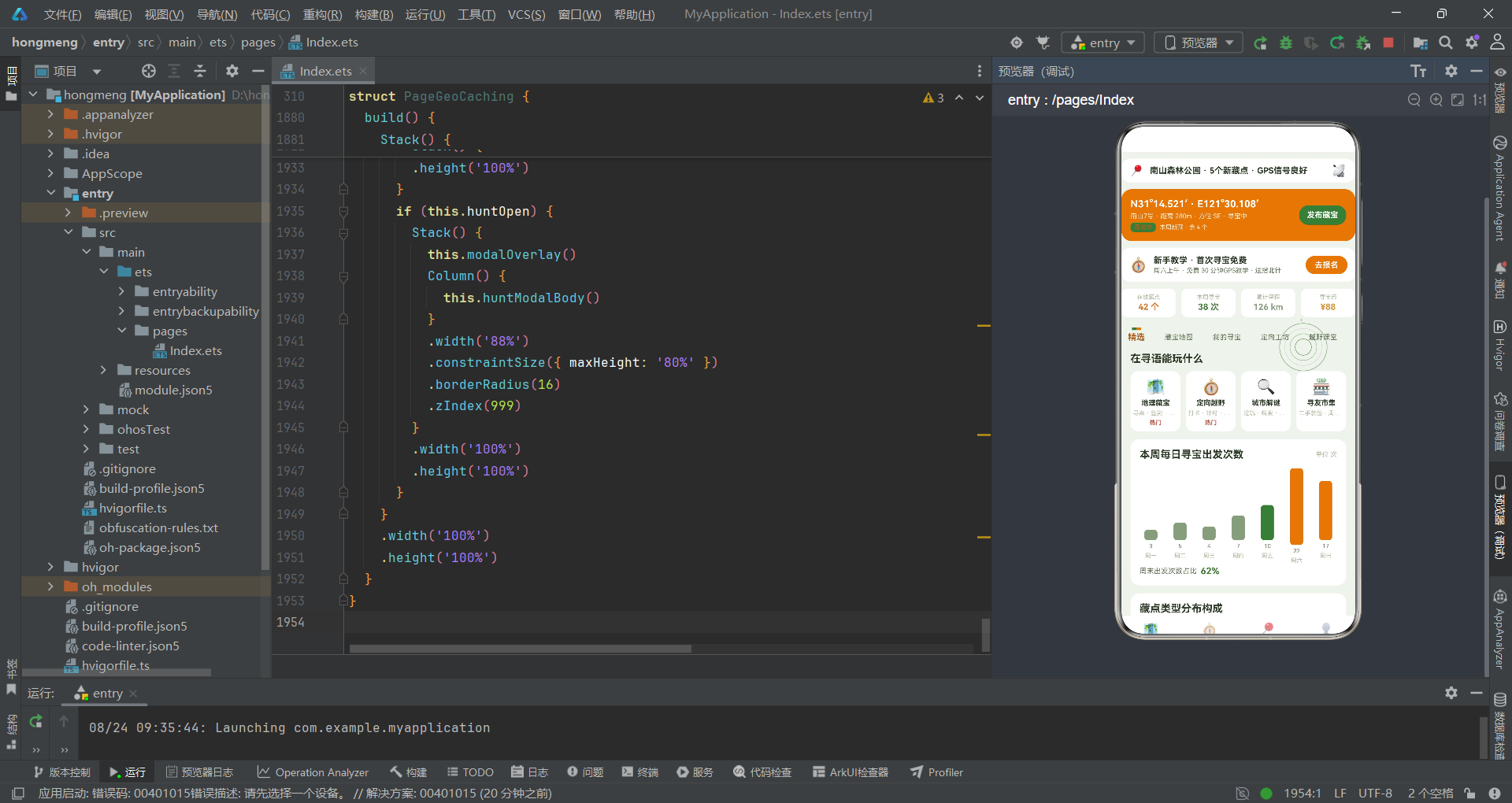
本文以一个完整的城市地理藏宝与定向越野社区应用为案例,系统性地解析了基于HarmonyOS 6.1.1 ArkTS API 24开发户外运动类社区应用的完整技术链路。从ColorPalette色彩接口定义到@Observed数据模型建模,从静态数据数组初始化到纯函数工具层设计,从fxLayer动画特效实现到多页面@Builder组件化拆分,从弹框交互逻辑到build主架构组装,每一层都体现了ArkTS声明式UI编程的核心优势和户外运动场景的业务特性。
在色彩体系层面,应用采用"接口约束+常量注入"的模式,通过16个语义化字段构建了一套完整的户外色彩语言。寻宝橙、定向绿、罗盘灰绿三色不仅兼顾了户外强光下的视觉识别度,更在功能层面承担着状态区分和层级强调的职责。compass字段的命名将罗盘这一户外导航核心工具的语义注入到色彩常量中,使色彩体系从技术工具升级为场景符号。背景色使用极浅绿模拟户外草地和林间的自然环境色温,让应用在视觉上与户外场景融为一体。这种将领域语义融入代码命名的设计哲学,值得在其他户外运动类项目中推广。
在数据模型层面,四个@Observed类精确映射了地理藏宝场景的四类核心实体——PostItem承载社区动态流,CacheItem承载藏点信息,TrailItem承载寻宝任务,GearItem承载户外装备。每个模型都采用"默认值初始化+构造函数赋值"的标准模式,确保对象创建时不会出现undefined属性。@Observed装饰器使得模型实例被@State引用后自动具备响应式能力,开发者无需手动调用refresh方法即可实现数据变化到UI更新的自动同步。辅助接口(WeekChartItem、MatChartItem、CourseItem、PlayTypeItem)保持了最小化设计,为图表和列表场景提供了轻量级的数据形状约束。任务状态字段status的五种取值(寻宝中、定向中、补给中、已找到、待出发)精确覆盖了寻宝任务的完整生命周期,通过statusColor和statusProgress两个函数分别映射为颜色和进度百分比,实现了"一字段驱动双维度可视化"的设计。
在动画特效层面,fxLayer通过三层Stack叠加实现了"信号脉冲扩散+轨迹光点游走"的动态视觉。四个脉冲环以26到74像素递增的尺寸,通过ringS和ringA两个纯函数计算尺寸和透明度,在90毫秒tick驱动下从屏幕中心向外一波一波扩散并逐渐衰减,模拟GPS信号从信号源向外辐射的物理过程。六个轨迹光点以4像素小方点的形态,通过trailX和trailY计算出的伪随机轨迹在屏幕上游走,颜色交替使用定向绿和罗盘灰绿,trailA函数让每五个tick中有一次高亮闪烁,模拟GPS定位点的脉冲信号。hitTestBehavior(HitTestMode.None)确保特效层完全透传点击事件,实现了"视觉在场、交互缺席"的装饰性特效标准模式。这种基于定时器驱动纯函数计算坐标的动画方案,无需依赖复杂的动画API即可实现流畅的动态效果,在性能和可维护性之间取得了良好平衡。
在组件化架构层面,应用通过十余个@Builder方法将复杂UI拆分为可复用的构建单元。header承载品牌定位条、GPS挑战卡、教学横幅和数据四格四个模块;subNav实现七Tab横向滚动导航,采用罗盘指针式的双色指示器设计;pageFeatured到pageGear七个页面构建器分别承载精选、藏宝地图、我的寻宝、定向工坊、越野课堂、寻友圈和装备库七个内容区;四个modalBody构建器实现发布、编辑、删除和藏宝发布弹框;bottomBar实现四Tab底部导航。mainContent通过if-else链式路由将mainTab和subTab映射到对应页面,build方法最终通过Stack将背景层、特效层、主内容层和弹框层叠加组装。这种"Builder拆分+条件路由+Stack叠加"的三段式架构,在保持代码可维护性的同时实现了丰富的页面层次。

开源鸿蒙跨平台开发社区汇聚开发者与厂商,共建“一次开发,多端部署”的开源生态,致力于降低跨端开发门槛,推动万物智联创新。
更多推荐
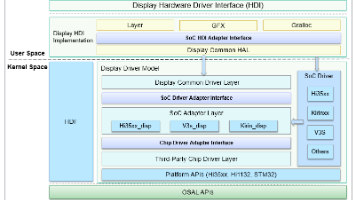
 7
7 0
0- 0


 已为社区贡献45条内容

所有评论(0)