HarmonyOS 6三种粒子在同一Stack容器中分层渲染,通过hitTestBehavior(HitTestMode.None)确保不干扰用户交互
一、技术背景与开发理念
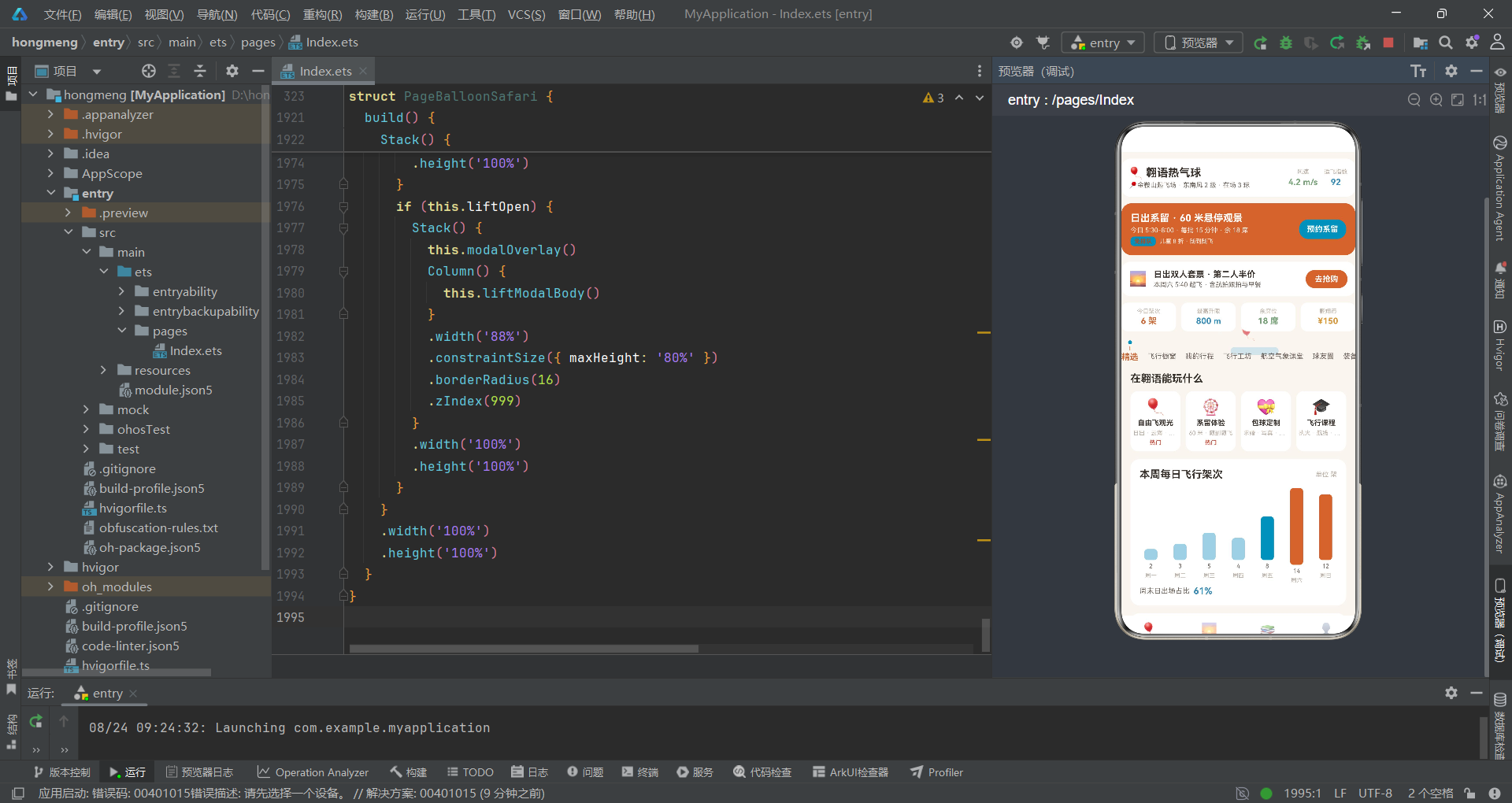
HarmonyOS 6.1.1标志着华为全场景智慧生活操作系统进入了全新的发展阶段,在开发者工具链、UI渲染引擎和分布式能力上实现了全面升级。基于HarmonyOS ArkTS API 24,开发者能够利用更加成熟的声明式UI框架构建出兼具性能与美观的跨设备应用。ArkTS作为HarmonyOS应用开发的主力语言,在TypeScript的基础上进行了深度的静态类型强化和编译期优化,不仅保留了TypeScript的类型安全优势,还通过@Entry、@Component、@State、@Observed、@Builder等装饰器体系提供了一套完整的响应式编程模型。在HarmonyOS 6.1.1的开发环境中,这套模型已经经过了大量真实应用的验证,其稳定性和可靠性达到了生产级标准。
声明式UI的核心理念在于"状态即视图"——开发者通过@State等装饰器声明响应式变量,在build方法中描述这些变量如何映射为UI组件,框架自动处理状态变化时的UI更新。这一理念在HarmonyOS ArkTS API 24中得到了进一步完善,@State变量的变化检测更加精细,只有真正被UI引用的属性变化才会触发重新渲染,避免了不必要的性能开销。在翱语热气球观光俱乐部这样一个包含多层级导航、三种粒子动效、四种模态弹窗和多个数据驱动列表的应用场景中,这种精细化的状态检测机制尤为重要——它确保了setInterval驱动的动效粒子更新不会导致整个页面的重新渲染,只有fxLayer构建器内部的组件会随之更新。
热气球观光与系留飞行俱乐部是一个融合了旅游、航空、教育和社区的综合业务场景。在这个场景中,用户既是热气球飞行的体验者,也是飞行社区的参与者——他们需要浏览飞行套件、管理飞行行程、学习航空气象知识、与球友互动交流,还需要预约系留体验。这种多元化的业务需求对应用的信息架构提出了很高要求。基于HarmonyOS API 24的ArkTS开发模式,通过底部4主Tab+首页7内容子Tab的双层导航架构,将丰富的功能模块组织在清晰的层级结构中。底部Tab包括首页、橱窗、课堂和我的,首页内部则通过精选、飞行橱窗、我的行程、飞行工坊、航空气象课堂、球友圈和装备库7个子Tab实现内容的精细分发。
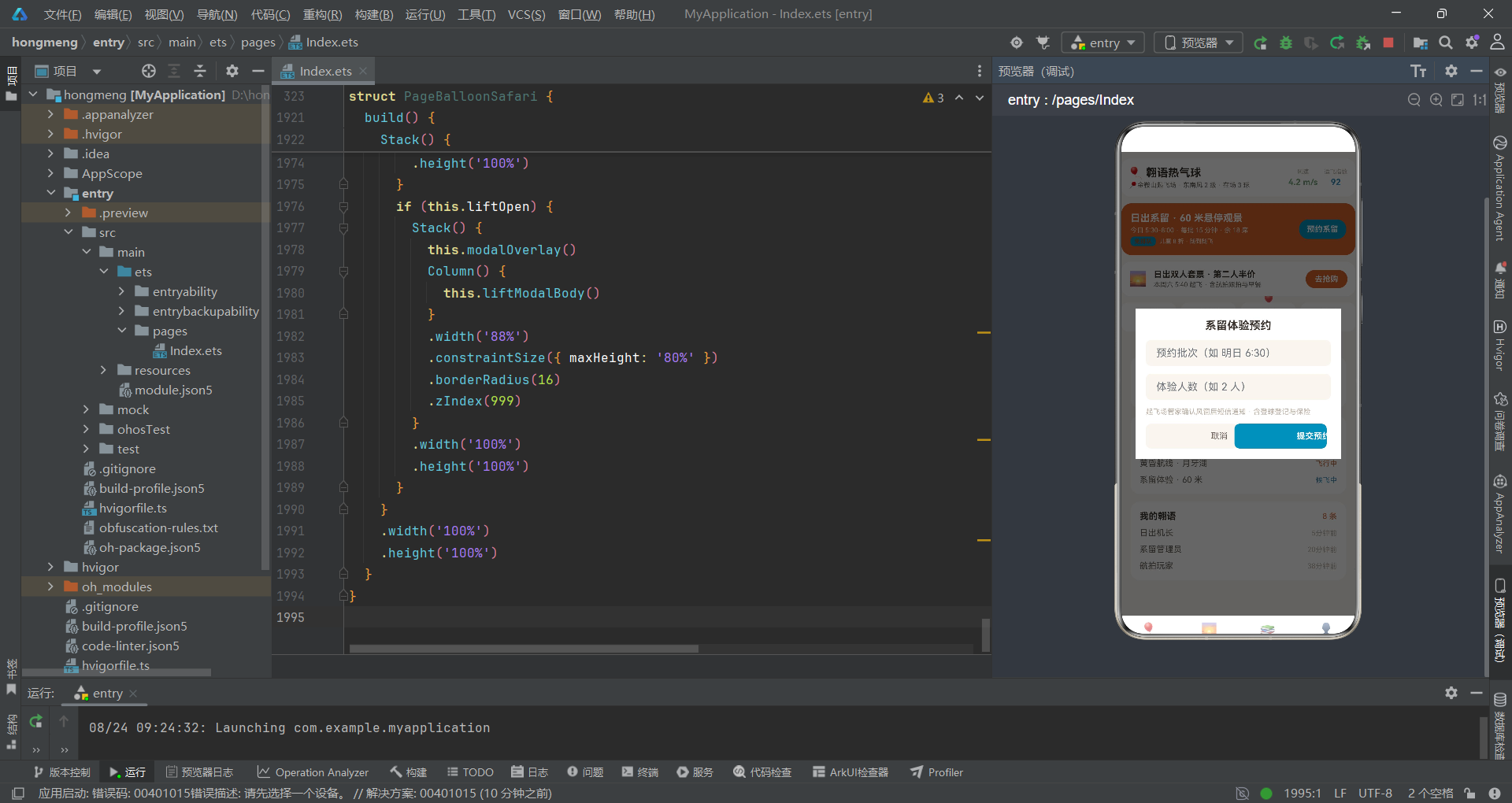
从技术架构的角度来看,本应用的动效系统是其最具特色的部分。与单一粒子动效的应用不同,翱语热气球应用实现了三种独立的粒子效果:气球升空、云絮漂移和天光光点。这三种粒子效果通过同一个fxLayer构建器统一管理,使用不同的纯函数组计算各自的位置、旋转、透明度等属性。气球粒子通过Text组件渲染emoji图标并添加旋转效果,模拟热气球在空中摇摆的姿态;云絮粒子通过Row组件模拟横向飘移的云带;天光光点通过Column组件模拟阳光在高空的闪烁。三种粒子在同一Stack容器中分层渲染,通过hitTestBehavior(HitTestMode.None)确保不干扰用户交互。
本应用的色彩系统以橙色(#C96A3B)和蓝色(#3E8FB8)为双主色调。橙色代表热气球的火焰与日出,蓝色代表天空与自由,这种配色方案在视觉上完美呼应了热气球飞行的主题意境。辅助色包括天空蓝(#A8CFE3)用于云絮粒子和部分状态标签,以及成功绿(#7BA37B)、警告橙(#D9973B)和危险红(#C0503F)等语义色。整个色彩系统通过ColorPalette接口进行类型约束,以COLORS常量统一管理,确保了全应用色彩使用的一致性和可维护性。这种将品牌色彩语义化的设计方法,是HarmonyOS应用视觉设计中的优秀实践。
二、色彩系统与接口定义
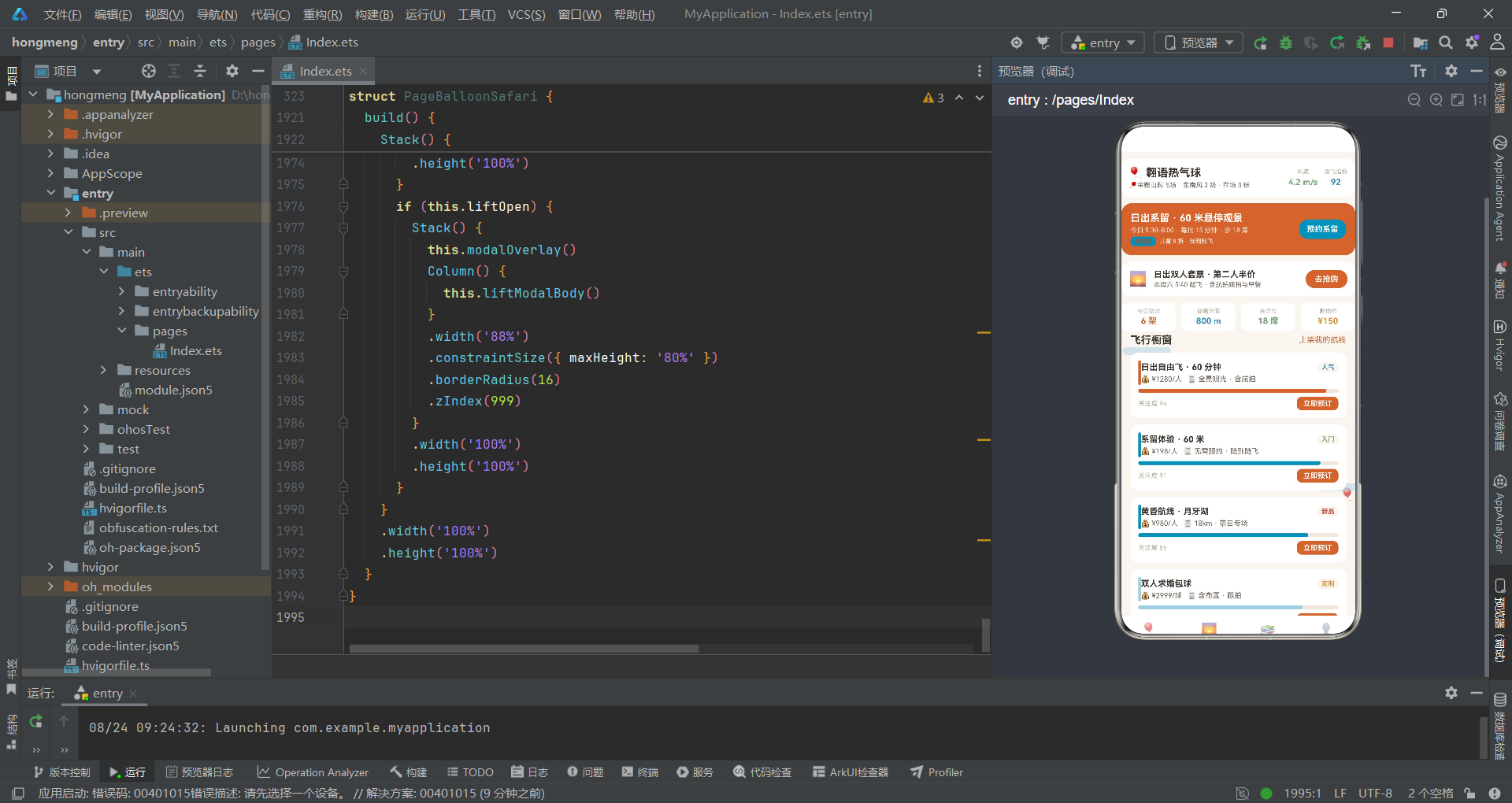
2.1 ColorPalette接口与COLORS常量
翱语热气球应用的色彩系统与前一应用保持了相同的架构模式,但在具体色值上完全围绕热气球飞行主题进行设计。
interface ColorPalette {
  primary: string;
  primaryLight: string;
  primaryDark: string;
  accent: string;
  accentLight: string;
  bg: string;
  cardBg: string;
  textPrimary: string;
  textSecondary: string;
  textHint: string;
  border: string;
  success: string;
  warning: string;
  danger: string;
  white: string;
  sky: string;
}

const COLORS: ColorPalette = {
  primary: '#C96A3B',
  primaryLight: '#F9EDE4',
  primaryDark: '#A34F28',
  accent: '#3E8FB8',
  accentLight: '#E3F0F6',
  bg: '#FAF5F0',
  cardBg: '#FFFFFF',
  textPrimary: '#3B332E',
  textSecondary: '#6F655D',
  textHint: '#BCB0A5',
  border: '#EFE6DD',
  success: '#7BA37B',
  warning: '#D9973B',
  danger: '#C0503F',
  white: '#FFFFFF',
  sky: '#A8CFE3'
};
ColorPalette接口定义了16个颜色字段。与晶语应用不同的是,翱语应用将glitter(粉色点缀)字段替换为了sky(天空蓝)字段,值为#A8CFE3。这个天空蓝色在应用中有两个用途:一是作为云絮粒子的背景色,模拟高空云层的淡蓝色;二是作为部分飞行状态的标签颜色,如"备航中"状态使用天空蓝来表示准备中的温和语义。primary字段为橙色#C96A3B,这是热气球的经典色彩——既代表了燃烧器的火焰,也代表了日出的温暖。accent字段为蓝色#3E8FB8,代表了飞行时的天空背景。
textPrimary为深棕色#3B332E,textSecondary为中棕色#6F655D,textHint为浅棕色#BCB0A5,这三级文本色构成了一个温暖的棕色系文本层次,与橙色主色调和谐统一。bg背景色为#FAF5F0,是一种带有暖色调的浅米色,比纯白色更加柔和,适合长时间阅读。cardBg卡片背景为纯白色#FFFFFF,与bg背景形成微妙的层次差。border边框色为#EFE6DD,是一种接近背景色的浅暖灰,确保边框存在但不突兀。
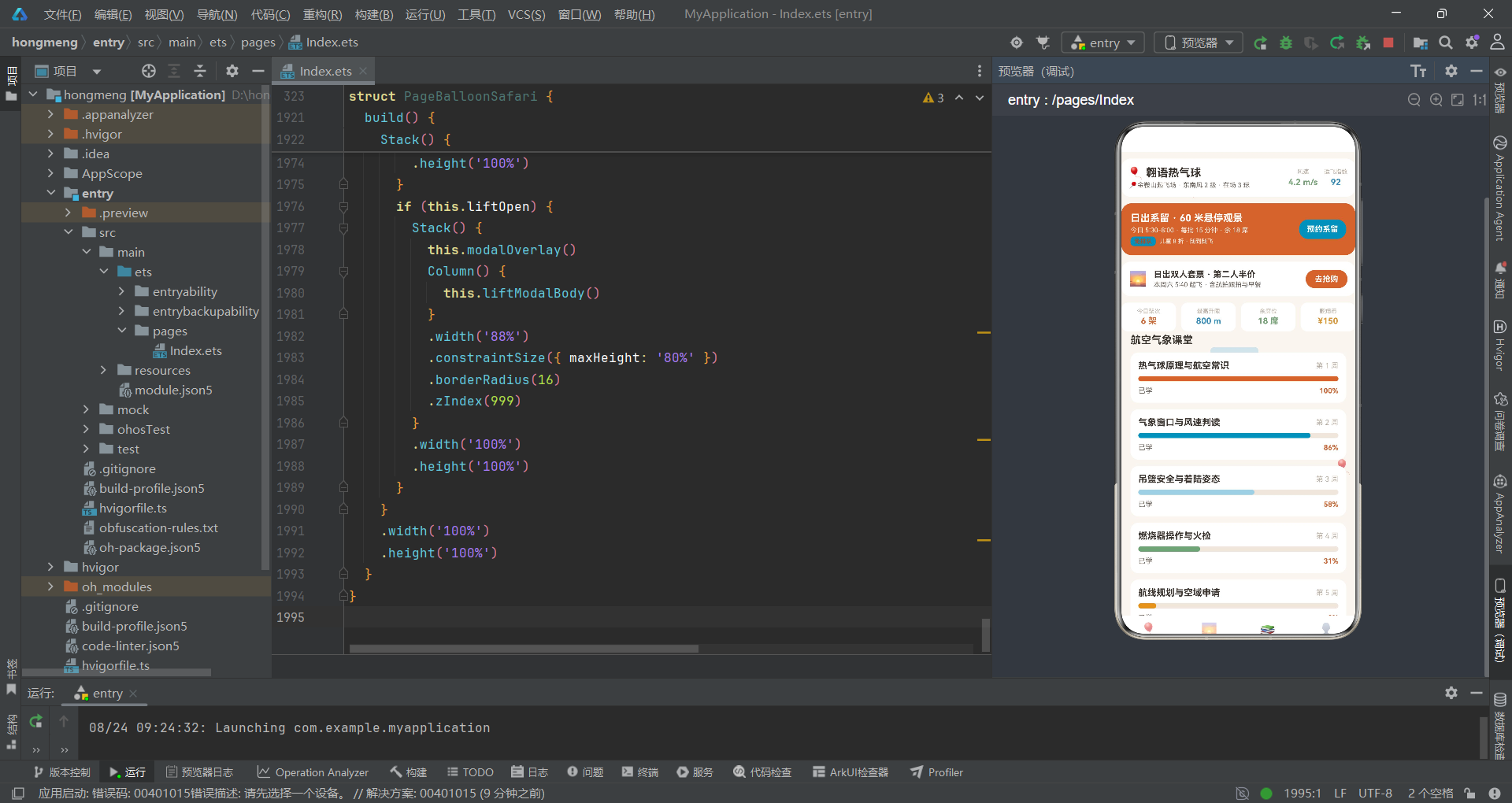
2.2 图表与课程接口
interface WeekChartItem {
  label: string;
  value: number;
}

interface FlyChartItem {
  label: string;
  value: number;
  color: string;
}

interface CourseItem {
  title: string;
  week: string;
  progress: number;
  color: string;
}

interface PlayTypeItem {
  name: string;
  desc: string;
  icon: string;
  hot: boolean;
}
FlyChartItem接口用于飞行类型构成图的展示,与ResinChartItem结构相同,包含label、value和color三个字段。在本应用中,FlyChartItem被用于展示"我的行程飞行类型构成",五种飞行类型(日出自由飞、系留体验、黄昏航线、包球定制、课程写真)各有不同的占比和颜色。CourseItem接口用于航空气象课堂的课程进度展示,五门课程分别对应不同的颜色。PlayTypeItem接口用于首页的玩法四格,四种玩法(自由飞观光、系留体验、包球定制、飞行课程)各有热门标记。
三、@Observed数据模型类深度分析
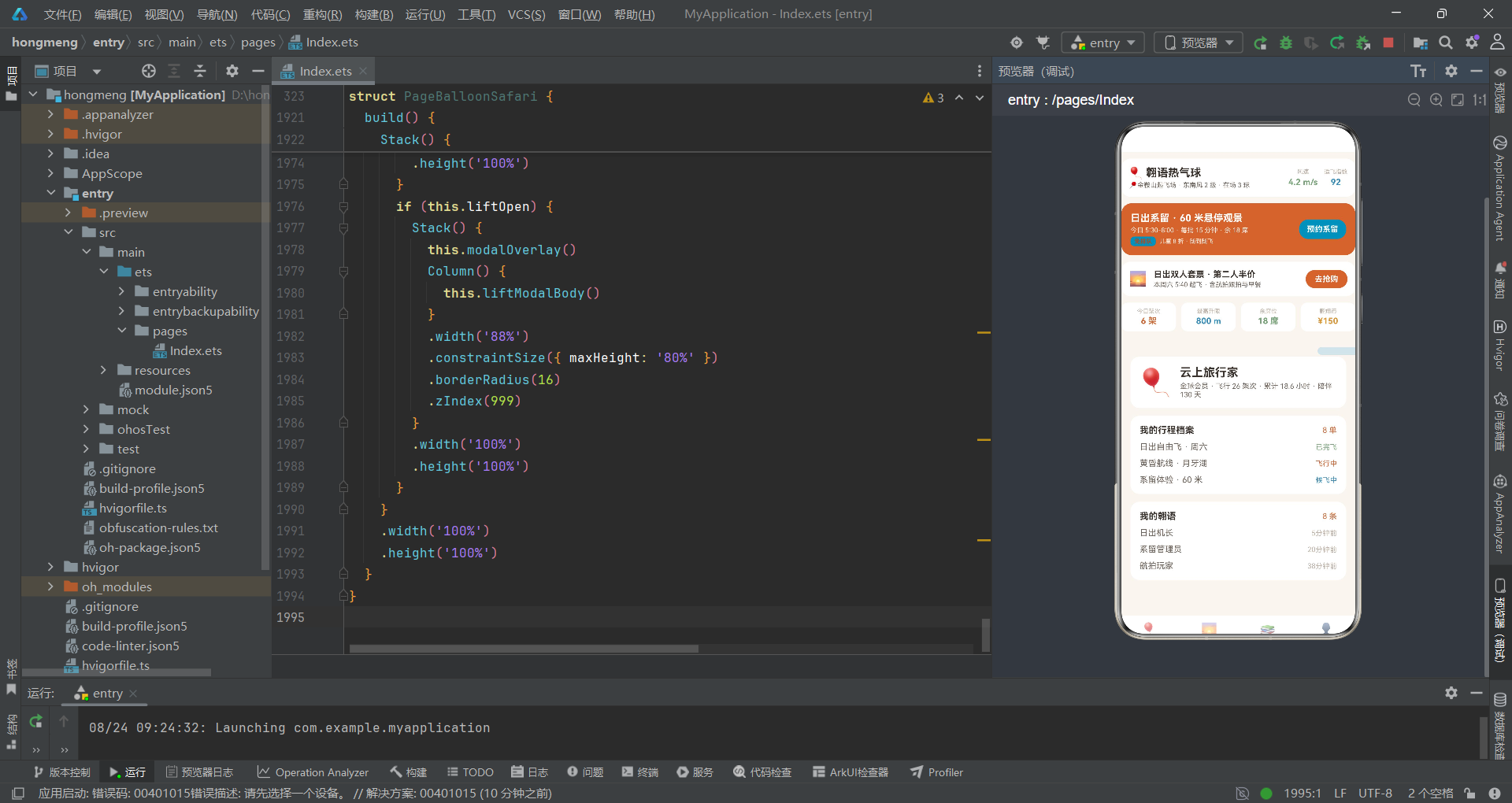
3.1 PostItem——球友动态数据模型
@Observed
export class PostItem {
  id: number = 0
  nick: string = ''
  avatar: string = ''
  text: string = ''
  time: string = ''
  likes: number = 0
  constructor(id: number, nick: string, avatar: string, text: string, time: string, likes: number) {
    this.id = id; this.nick = nick; this.avatar = avatar; this.text = text
    this.time = time; this.likes = likes
  }
}
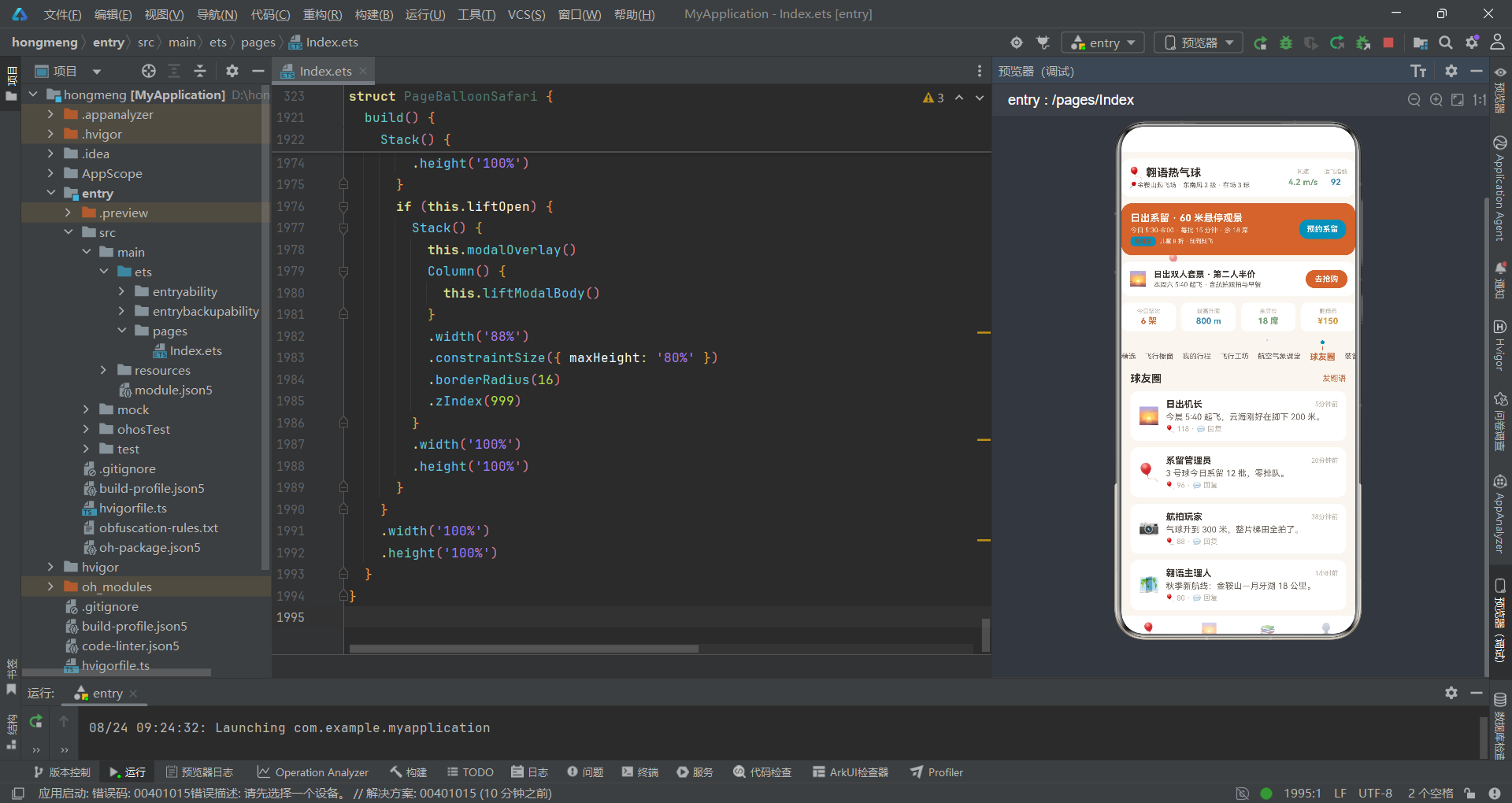
PostItem的结构与晶语应用中的PostItem完全一致,包含id、nick、avatar、text、time、likes六个属性。在翱语应用中,PostItem的实例数据更加贴近飞行场景——"日出机长"分享的是清晨起飞的体验,"系留管理员"发布的是系留飞行的排期信息,"航拍玩家"展示的是高空航拍的成果。当用户发布新的翱语动态时,系统创建id为999的PostItem实例,avatar设置为🎈气球emoji,插入到postList头部。当用户预约系留体验后,系统创建id为998的PostItem实例,text字段包含预约信息,同样插入到postList头部,实现操作反馈。
3.2 FlyItem——飞行套件数据模型
@Observed
export class FlyItem {
  id: number = 0
  name: string = ''
  craft: string = ''
  price: string = ''
  level: string = ''
  hot: number = 0
  constructor(id: number, name: string, craft: string, price: string, level: string, hot: number) {
    this.id = id; this.name = name; this.craft = craft; this.price = price
    this.level = level; this.hot = hot
  }
}
FlyItem是飞行套件展示的核心数据模型。name字段存储套件名称(如"日出自由飞·60分钟"),craft字段存储工艺/服务描述(如"全景观光·含航拍"),price字段以字符串形式存储价格(如"¥1280/人"),level字段存储分类标签(如"人气"、“入门”、“新品”、“定制”、“限定”、“亲子”、“进阶”),hot字段为关注度数值。FlyItem的数据设计充分考虑了热气球飞行服务的多样性——从入门级的系留体验到高端的包球定制,从单人观光到亲子家庭球,各种飞行需求都有对应的套件。
3.3 TripItem与GearItem——行程与装备数据模型
@Observed
export class TripItem {
  id: number = 0
  name: string = ''
  item: string = ''
  status: string = ''
  progress: number = 0
  constructor(id: number, name: string, item: string, status: string, progress: number) {
    this.id = id; this.name = name; this.item = item; this.status = status
    this.progress = progress
  }
}

@Observed
export class GearItem {
  id: number = 0
  name: string = ''
  desc: string = ''
  icon: string = ''
  constructor(id: number, name: string, desc: string, icon: string) {
    this.id = id; this.name = name; this.desc = desc; this.icon = icon
  }
}
TripItem的status字段使用"已完飞"、“飞行中”、“候飞中”、“备航中”、"待排期"五种状态值来描述飞行行程的当前阶段。这些状态值通过statusColor和statusProgress函数映射为不同的颜色和进度百分比,用户可以在"我的行程"页面直观地了解每笔行程的执行状态。GearItem的结构与晶语应用一致,但在数据内容上完全围绕飞行装备展开——防火飞行服、护目镜、对讲机、隔热手套、高度计、保温毯、防滑靴和晕飞贴,涵盖了热气球飞行的全套安全装备。
四、静态数据数组与导航配置
4.1 顶层静态数据
const POST_LIST: PostItem[] = [
new PostItem(1, '日出机长', '🌅', '今晨5:40起飞,云海刚好在脚下200米。', '5分钟前', 118),
new PostItem(2, '系留管理员', '🎈', '3号球今日系留12批,零排队。', '20分钟前', 96),
new PostItem(3, '航拍玩家', '📷', '气球升到300米,整片梯田全拍了。', '38分钟前', 88),
new PostItem(4, '翱语主理人', '🗺️', '秋季新航线:金鞍山—月牙湖18公里。', '1小时前', 80),
new PostItem(5, '追风少年', '💨', '风窗条件完美,横飞体验太爽。', '2小时前', 71),
new PostItem(6, '地勤老周', '🧯', '今晨完成3球火检,全部合格。', '3小时前', 62),
new PostItem(7, '双人首飞', '💑', '女朋友在吊篮里看日出哭了。', '5小时前', 55),
new PostItem(8, '亲子飞行团', '👨👩👧', '孩子说像坐上了会飞的篮子。', '昨天', 48)
];
POST_LIST数组中的8条动态涵盖了热气球飞行的各个方面——机长分享起飞体验、管理员发布系留排期、航拍玩家展示高空摄影、主理人宣布新航线、追风少年评价飞行条件、地勤人员汇报安全检查、情侣记录浪漫时刻、亲子团分享家庭乐趣。这些贴近真实场景的动态数据使得应用在演示时具有极强的代入感。
const FLY_LIST: FlyItem[] = [
  new FlyItem(1, '日出自由飞 · 60 分钟', '全景观光 · 含航拍', '¥1280/人', '人气', 94),
  new FlyItem(2, '系留体验 · 60 米', '无需预约 · 随到随飞', '¥198/人', '入门', 91),
  new FlyItem(3, '黄昏航线 · 月牙湖', '18km · 落日专场', '¥980/人', '新品', 85),
  new FlyItem(4, '双人求婚包球', '含布置 · 跟拍', '¥2999/球', '定制', 82),
  new FlyItem(5, '秋季梯田横飞', '云海季 · 限席', '¥1480/人', '限定', 76),
  new FlyItem(6, '亲子家庭球 · 4 人', '儿童安全座椅', '¥2680/球', '亲子', 70),
  new FlyItem(7, '飞行员体验课程', '4 学时 · 可执火', '¥860/课', '进阶', 64),
  new FlyItem(8, '气球主题写真跟拍', '1h · 40 张精修', '¥599/次', '定制', 58)
];
FLY_LIST数组展示了8种飞行套件,覆盖了从入门到高端、从个人到团体、从观光到教育的全谱系需求。level字段的多样性(人气、入门、新品、定制、限定、亲子、进阶)使得levelColor函数需要处理更多分支,体现了业务复杂度对技术实现的直接影响。
4.2 导航配置
const NAV_LIST: NavItem[] = [
  { icon: '🎈', label: '首页' },
  { icon: '🌅', label: '橱窗' },
  { icon: '📚', label: '课堂' },
  { icon: '👤', label: '我的' }
];

const SUB_NAV_LIST: string[] = ['精选', '飞行橱窗', '我的行程', '飞行工坊', '航空气象课堂', '球友圈', '装备库'];
NAV_LIST和SUB_NAV_LIST的定义方式与晶语应用一致,但在具体内容上完全围绕热气球飞行展开。底部4个主Tab的图标分别使用气球、日出、书本和人像emoji,首页7个子Tab则覆盖了飞行体验的完整流程——从精选推荐到飞行橱窗浏览,从行程管理到工坊监控,从课堂学习到社区互动,最后到装备准备。
五、纯函数体系深度解析
5.1 柱状图与颜色映射函数
function barH(v: number, max: number): number {
  return Math.round(118 * v / max);
}

function fcColor(v: number): string {
  if (v > 9) {
    return '#C96A3B';
  } else if (v > 6) {
    return '#3E8FB8';
  }
  return '#A8CFE3';
}
barH函数与晶语应用中的实现完全一致,根据数值和最大值计算柱状图高度。fcColor函数是翱语应用特有的颜色映射函数,根据飞行架次返回不同颜色——超过9架返回橙色主色,超过6架返回蓝色辅色,其余返回天空蓝。这种基于阈值的颜色分级在柱状图中形成了三色渐变效果,用户可以通过颜色快速识别出高峰日和低谷日。
5.2 气球升空动效函数
气球升空动效是翱语应用最具特色的视觉元素,通过四个纯函数共同控制气球粒子的运动。
function balloonX(tick: number, i: number): number {
  return 50 + ((tick * 2 + i * 241) % 580);
}

function balloonY(tick: number, i: number): number {
  return 640 - ((tick * 6 + i * 197) % 620);
}

function balloonR(tick: number, i: number): number {
  return ((tick * 4 + i * 50) % 20) - 10;
}

function balloonA(tick: number, i: number): number {
  return 0.5 + ((tick + i) % 4) * 0.1;
}
balloonX函数使用tick2+i241的取模运算计算x坐标,系数2使得气球水平移动较慢,模拟随风飘移的效果。balloonY函数使用640减去取模值,这意味着气球的y坐标从底部向上移动,模拟热气球升空的运动轨迹。balloonR函数计算旋转角度,结果范围为-10到10度,模拟气球在空中轻微摇摆的姿态。balloonA函数计算透明度,范围为0.5到0.8,保持气球始终可见但带有轻微的呼吸感。四个函数的系数设计各不相同(2、6、4、1),确保了每个气球在位置、旋转和透明度上都有独立的运动模式。
5.3 云絮漂移与天光光点函数
function cloudX(tick: number, i: number): number {
  return ((tick * 3 + i * 300) % 760) - 80;
}

function cloudY(i: number): number {
  return 90 + i * 210;
}

function dotX(tick: number, i: number): number {
  return 30 + ((tick * 5 + i * 257) % 610);
}

function dotY(tick: number, i: number): number {
  return 60 + ((tick * 4 + i * 163) % 610);
}

function dotA(tick: number, i: number): number {
  return 0.1 + ((tick + i * 2) % 5) * 0.06;
}
cloudX函数计算云絮的x坐标,使用tick3+i300的取模运算产生从左到右的连续移动,减去80的偏移量使得云絮可以从屏幕左侧外移入。cloudY函数是唯一一个不依赖tick的动效函数,云絮的y坐标仅由索引i决定,固定在90、300、510三个高度,模拟了天空中不同高度的云层。dotX、dotY、dotA三个函数控制天光光点的位置和透明度,dotA函数的透明度范围为0.1到0.34,通过(tick+i*2)%5产生0-4的循环值,使得光点呈现闪烁效果但始终保持较低的不透明度,模拟高空阳光的柔和反射。
5.4 状态映射函数
function statusColor(s: string): string {
  if (s === '已完飞') {
    return '#7BA37B';
  } else if (s === '飞行中') {
    return '#C96A3B';
  } else if (s === '候飞中') {
    return '#3E8FB8';
  } else if (s === '备航中') {
    return '#A8CFE3';
  }
  return '#BCB0A5';
}

function statusProgress(s: string): number {
  if (s === '已完飞') {
    return 100;
  } else if (s === '飞行中') {
    return 72;
  } else if (s === '候飞中') {
    return 40;
  } else if (s === '备航中') {
    return 25;
  }
  return 10;
}
statusColor和statusProgress函数将飞行行程状态映射为颜色和进度。已完飞对应绿色和100%进度,飞行中对应橙色和72%进度,候飞中对应蓝色和40%进度,备航中对应天空蓝和25%进度,待排期对应灰色和10%进度。这种从"待排期"到"备航中"到"候飞中"到"飞行中"到"已完飞"的五阶段状态机,完整覆盖了热气球飞行的全生命周期,每个阶段的颜色和进度都在视觉上传达了清晰的阶段信息。
5.5 标签颜色映射函数
function flyTagColor(g: string): string {
  if (g.indexOf('日出') >= 0 || g.indexOf('横飞') >= 0) {
    return '#C96A3B';
  } else if (g.indexOf('系留') >= 0 || g.indexOf('黄昏') >= 0) {
    return '#3E8FB8';
  } else if (g.indexOf('包球') >= 0 || g.indexOf('写真') >= 0) {
    return '#A8CFE3';
  }
  return '#D9973B';
}

function levelColor(s: string): string {
  if (s === '入门') {
    return '#7BA37B';
  } else if (s === '亲子') {
    return '#C96A3B';
  } else if (s === '人气') {
    return '#3E8FB8';
  } else if (s === '定制') {
    return '#D9973B';
  } else if (s === '限定') {
    return '#A8CFE3';
  }
  return '#C0503F';
}
flyTagColor函数通过字符串搜索(indexOf)为飞行套件分配颜色——包含"日出"或"横飞"的返回橙色,包含"系留"或"黄昏"的返回蓝色,包含"包球"或"写真"的返回天空蓝,其余返回警告橙色。levelColor函数处理7种level标签的颜色映射——入门对应绿色(安全易达)、亲子对应橙色(温暖家庭)、人气对应蓝色(受欢迎)、定制对应警告橙(高端专属)、限定对应天空蓝(稀缺),其余对应红色。这种细粒度的颜色映射体系使得每个飞行套件在视觉上都能快速传达其类别信息。
六、组件状态与生命周期
6.1 @State变量声明
@Entry
@Component
struct PageBalloonSafari {
  @State mainTab: number = 0
  @State subTab: number = 0
  @State tick: number = 0
  @State glow: number = 0
  @State addOpen: boolean = false
  @State editOpen: boolean = false
  @State delOpen: boolean = false
  @State liftOpen: boolean = false
  @State editIdx: number = 0
  @State delTarget: string = 'trip'
  @State editName: string = ''
  @State editStyle: string = ''
  @State editNote: string = ''
  @State addTitle: string = ''
  @State addContent: string = ''
  @State liftSlot: string = ''
  @State liftNum: string = ''
  @State postList: PostItem[] = POST_LIST
  @State tripList: TripItem[] = TRIP_LIST
  @State fxTimer: number = -1
PageBalloonSafari组件的@State变量与晶语应用的结构基本一致,但在具体字段上有所不同。liftOpen替代了cureOpen,liftSlot和liftNum替代了cureStyle和cureQty,delTarget的默认值为’trip’而非’work’,tripList替代了workList。这些差异反映了两个应用在业务场景上的区别——翱语应用管理的是飞行行程而非作品单,弹窗操作是系留预约而非定制下单。
6.2 生命周期与弹窗操作
aboutToAppear(): void {
  this.fxTimer = setInterval(() => {
    this.tick = this.tick + 1;
    this.glow = (this.glow + 1) % 2;
  }, 90);
}

aboutToDisappear(): void {
  if (this.fxTimer > 0) {
    clearInterval(this.fxTimer);
    this.fxTimer = -1;
  }
}

openAdd(): void {
  this.addTitle = '';
  this.addContent = '';
  this.addOpen = true;
}

openEdit(index: number): void {
  if (index >= 0 && index < this.tripList.length) {
    this.editIdx = index;
    this.editName = this.tripList[index].name;
    this.editStyle = this.tripList[index].status;
    this.editNote = this.tripList[index].item;
  }
  this.editOpen = true;
}

openLift(): void {
  this.liftSlot = '';
  this.liftNum = '';
  this.liftOpen = true;
}
生命周期管理与晶语应用完全一致——aboutToAppear启动90ms间隔的定时器,aboutToDisappear清除定时器。openAdd方法在打开翱语发布弹窗前清空表单。openEdit方法从tripList中读取指定索引的行程数据并预填到表单字段。openLift方法在打开系留预约弹窗前清空批次和人数字段。这些方法的核心逻辑与晶语应用高度一致,体现了两个应用在架构模式上的统一性。
6.3 业务执行方法
doAdd(): void {
  if (this.addTitle.length > 0) {
    this.postList.unshift(new PostItem(999, '我的翱语', '🎈', this.addTitle, '刚刚', 0));
  }
  this.addOpen = false;
}

doEdit(): void {
  if (this.editIdx >= 0 && this.editIdx < this.tripList.length) {
    this.tripList.splice(this.editIdx, 1, new TripItem(this.tripList[this.editIdx].id, this.editName, this.editNote, this.editStyle, 40));
  }
  this.editOpen = false;
}

doDel(): void {
  if (this.delTarget === 'trip' && this.tripList.length > 0) {
    this.tripList.splice(0, 1);
  } else if (this.delTarget === 'course' && this.postList.length > 0) {
    this.postList.splice(0, 1);
  }
  this.delOpen = false;
}

doLift(): void {
  if (this.liftSlot.length > 0) {
    this.postList.unshift(new PostItem(998, '我的翱语', '🎡', `已预约系留体验:${this.liftSlot}`, '刚刚', 0));
  }
  this.liftOpen = false;
}
doAdd方法将新翱语以🎈emoji为头像插入postList头部。doEdit方法使用splice替换模式更新tripList中指定索引的行程单。doDel方法根据delTarget决定删除tripList或postList的首个元素。doLift方法在提交系留预约后,将预约信息以🎡摩天轮emoji为头像插入postList,形成操作反馈。doEdit方法中新建的TripItem的progress硬编码为40,这表示编辑后的行程进度重置为40%——这是一个业务设计决策,将编辑操作视为行程状态的重新评估。
七、fxLayer三粒子动效系统
fxLayer构建器是翱语应用视觉系统的核心,集成了气球升空、云絮漂移和天光光点三种粒子效果。
@Builder
fxLayer() {
  Stack({ alignContent: Alignment.TopStart }) {
    ForEach([0, 1, 2, 3], (i: number) => {
      Text('🎈')
        .fontSize(20)
        .rotate({ angle: balloonR(this.tick, i) })
        .opacity(balloonA(this.tick, i))
        .translate({ x: balloonX(this.tick, i), y: balloonY(this.tick, i) })
    }, (i: number) => i.toString())
    ForEach([0, 1, 2], (i: number) => {
      Row()
        .width(74)
        .height(12)
        .borderRadius(6)
        .backgroundColor(COLORS.sky)
        .opacity(0.45)
        .translate({ x: cloudX(this.tick, i), y: cloudY(i) })
    }, (i: number) => i.toString())
    ForEach([0, 1, 2, 3, 4, 5], (i: number) => {
      Column()
        .width(3)
        .height(3)
        .borderRadius(2)
        .backgroundColor(COLORS.accent)
        .opacity(dotA(this.tick, i))
        .translate({ x: dotX(this.tick, i), y: dotY(this.tick, i) })
    }, (i: number) => i.toString())
  }
  .width('100%')
  .height('100%')
  .hitTestBehavior(HitTestMode.None)
}
fxLayer使用Stack容器从底到顶依次渲染三组粒子。第一组是4个气球粒子,使用Text组件渲染🎈emoji,通过rotate属性添加旋转角度(balloonR函数计算-10到10度的摇摆),通过opacity属性控制透明度(balloonA函数计算0.5到0.8的呼吸效果),通过translate属性控制位置(balloonX和balloonY函数计算从底部向上的升空轨迹)。气球粒子的emoji渲染方式比纯几何图形更加生动,🎈emoji自带的热气球造型省去了复杂的自定义绘制。
第二组是3个云絮粒子,使用Row组件模拟横向飘移的云带。每个云絮的宽度为74px、高度为12px、圆角6px,背景色为sky天空蓝#A8CFE3,透明度固定为0.45。云絮的x坐标由cloudX函数计算(从左到右连续移动),y坐标由cloudY函数固定在三个不同高度(90、300、510),模拟了天空中分层飘移的云带效果。
第三组是6个天光光点,使用3x3px的小型Column组件模拟高空阳光的闪烁。光点的背景色为accent蓝色#3E8FB8,透明度由dotA函数计算(0.1到0.34的闪烁范围),位置由dotX和dotY函数动态计算。三组粒子共13个元素,每90ms全部重新计算位置和属性,在HarmonyOS ArkTS API 24的渲染引擎下能够保持流畅的帧率。
八、header头部构建器分析
8.1 品牌行与场况信息
翱语应用的header构建器与晶语应用有显著不同,它以品牌行+场况信息取代了搜索条+购物车的组合。
@Builder
header() {
  Column({ space: 10 }) {
    Row({ space: 10 }) {
      Column({ space: 3 }) {
        Text('🎈 翱语热气球')
          .fontSize(17)
          .fontWeight(FontWeight.Bold)
          .fontColor(COLORS.textPrimary)
        Text('📍金鞍山起飞场 · 东南风 2 级 · 在场 3 球')
          .fontSize(10)
          .fontColor(COLORS.textSecondary)
      }
      .alignItems(HorizontalAlign.Start)
      .layoutWeight(1)
      Column({ space: 3 }) {
        Text('风速')
          .fontSize(9)
          .fontColor(COLORS.textHint)
        Text('4.2 m/s')
          .fontSize(13)
          .fontWeight(FontWeight.Bold)
          .fontColor(COLORS.success)
      }
      .alignItems(HorizontalAlign.Center)
      Column({ space: 3 }) {
        Text('适飞指数')
          .fontSize(9)
          .fontColor(COLORS.textHint)
        Text('92')
          .fontSize(13)
          .fontWeight(FontWeight.Bold)
          .fontColor(COLORS.accent)
      }
      .alignItems(HorizontalAlign.Center)
    }
    .width('100%')
    .padding(12)
    .backgroundColor(COLORS.cardBg)
    .borderRadius(14)
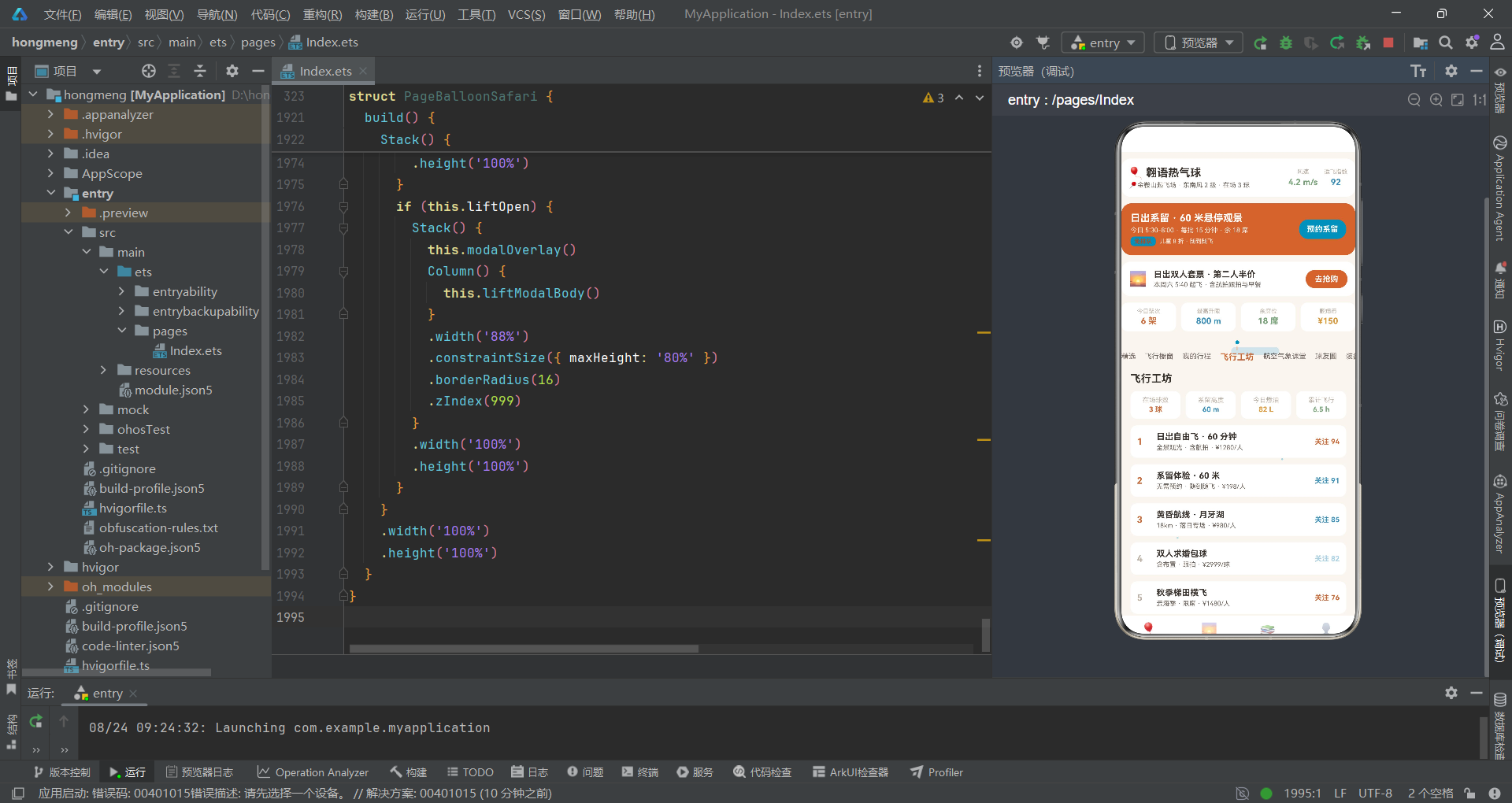
品牌行左侧展示应用名称和起飞场信息,右侧以两列数据展示当前风速和适飞指数。风速4.2m/s使用success绿色显示,表示风力条件良好;适飞指数92使用accent蓝色显示,表示高度适合飞行。这种将实时场况数据嵌入头部的设计,使得用户打开应用就能获取最关键的飞行决策信息,是热气球飞行场景下的优秀信息架构。
8.2 系留飞行卡
    Row({ space: 12 }) {
      Column({ space: 4 }) {
        Text('日出系留 · 60 米悬停观景')
          .fontSize(15)
          .fontWeight(FontWeight.Bold)
          .fontColor(COLORS.white)
        Text('今日 5:30-8:00 · 每批 15 分钟 · 余 18 席')
          .fontSize(10)
          .fontColor('#F9EFE7')
        Row({ space: 6 }) {
          Text('免排队')
            .fontSize(9)
            .fontWeight(FontWeight.Bold)
            .fontColor(COLORS.primaryDark)
            .padding({ left: 6, right: 6, top: 2, bottom: 2 })
            .backgroundColor(COLORS.accent)
            .borderRadius(6)
          Text('儿童 8 折 · 随到随飞')
            .fontSize(9)
            .fontColor('#F9EFE7')
        }
      }
      .alignItems(HorizontalAlign.Start)
      .layoutWeight(1)
      Text('预约系留')
        .fontSize(12)
        .fontWeight(FontWeight.Bold)
        .fontColor(COLORS.white)
        .padding({ left: 12, right: 12, top: 8, bottom: 8 })
        .backgroundColor(COLORS.accent)
        .borderRadius(14)
        .onClick(() => {
          this.openLift();
        })
    }
    .width('100%')
    .padding(14)
    .backgroundColor(COLORS.primary)
    .borderRadius(16)
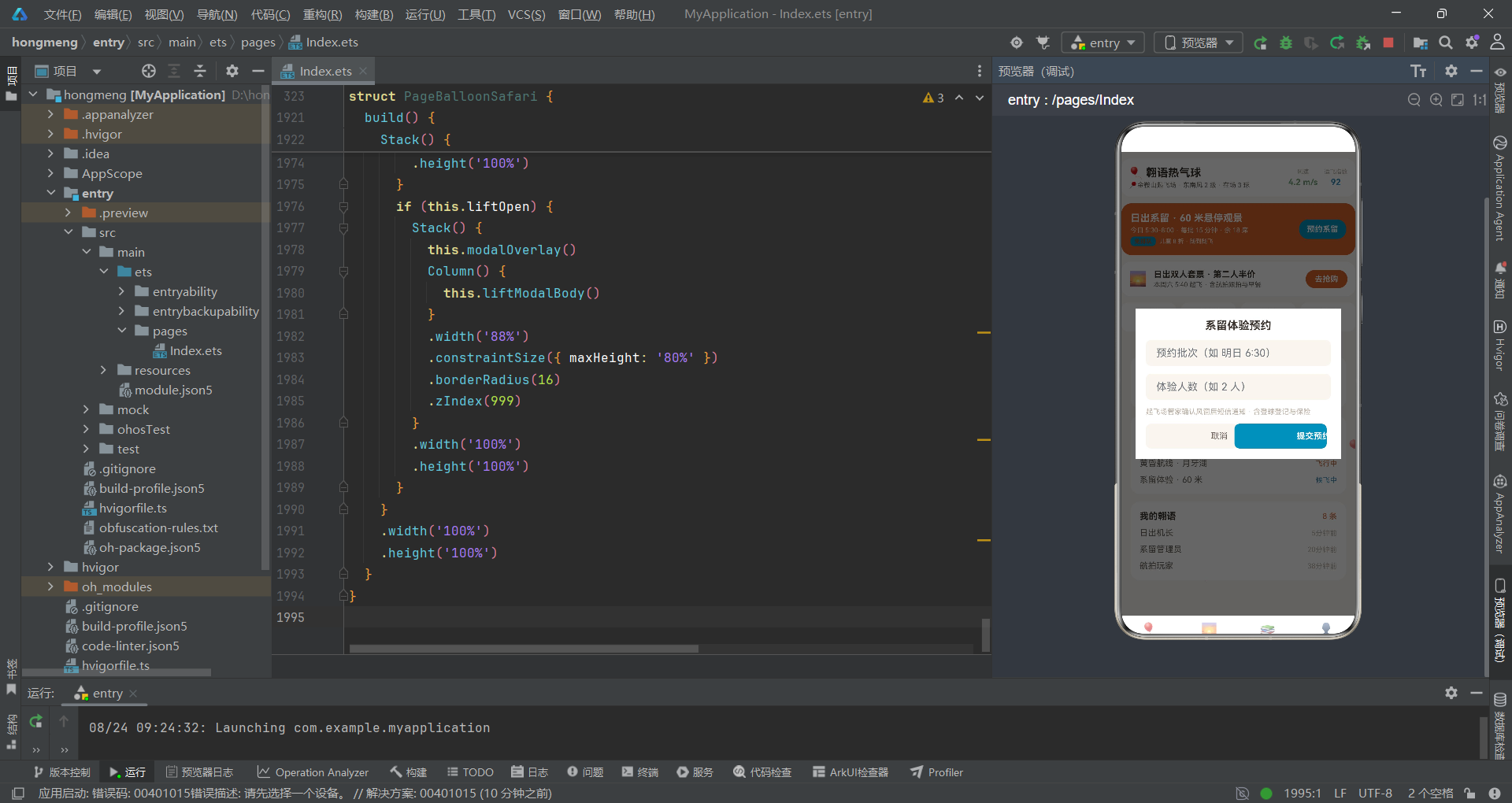
系留飞行卡使用primary橙色为背景,白色文字确保对比度。卡片左侧展示系留飞行的时间、批次和余席信息,标签"免排队"使用accent蓝色背景+primaryDark深橙色文字的组合,在橙色卡片上形成醒目的对比。"预约系留"按钮使用accent蓝色背景,点击后调用openLift方法打开系留预约弹窗。
8.3 数据四格
    Row({ space: 8 }) {
      Column({ space: 2 }) {
        Text('今日架次')
          .fontSize(9)
          .fontColor(COLORS.textHint)
        Text('6 架')
          .fontSize(13)
          .fontWeight(FontWeight.Bold)
          .fontColor(COLORS.primary)
      }
      .layoutWeight(1)
      .padding(8)
      .backgroundColor(COLORS.cardBg)
      .borderRadius(10)
      .alignItems(HorizontalAlign.Center)
      Column({ space: 2 }) {
        Text('最高升限')
          .fontSize(9)
          .fontColor(COLORS.textHint)
        Text('800 m')
          .fontSize(13)
          .fontWeight(FontWeight.Bold)
          .fontColor(COLORS.accent)
      }
      .layoutWeight(1)
      .padding(8)
      .backgroundColor(COLORS.cardBg)
      .borderRadius(10)
      .alignItems(HorizontalAlign.Center)
      Column({ space: 2 }) {
        Text('余席位')
          .fontSize(9)
          .fontColor(COLORS.textHint)
        Text('18 席')
          .fontSize(13)
          .fontWeight(FontWeight.Bold)
          .fontColor(COLORS.success)
      }
      .layoutWeight(1)
      .padding(8)
      .backgroundColor(COLORS.cardBg)
      .borderRadius(10)
      .alignItems(HorizontalAlign.Center)
      Column({ space: 2 }) {
        Text('翱翔币')
          .fontSize(9)
          .fontColor(COLORS.textHint)
        Text('¥150')
          .fontSize(13)
          .fontWeight(FontWeight.Bold)
          .fontColor(COLORS.warning)
      }
      .layoutWeight(1)
      .padding(8)
      .backgroundColor(COLORS.cardBg)
      .borderRadius(10)
      .alignItems(HorizontalAlign.Center)
    }
    .width('100%')
数据四格分别展示今日架次(6架,primary橙色)、最高升限(800m,accent蓝色)、余席位(18席,success绿色)和翱翔币余额(¥150,warning橙色)。四格数据的颜色选择与其语义紧密关联——架次用主色表示核心运营数据,升限用辅色表示技术指标,余席用成功色表示可预订状态,余额用警告色表示财务信息。这种语义化的颜色选择使得四格数据在不读文字的情况下也能快速理解其含义。
九、subNav子导航——吊篮圆点竖线式设计
翱语应用的subNav构建器采用了独特的"吊篮圆点竖线式"设计,与晶语应用的"圆盘序号式"形成鲜明对比。
@Builder
subNav() {
  Scroll() {
    Row({ space: 14 }) {
      ForEach(SUB_NAV_LIST, (item: string, idx: number) => {
        Column({ space: 3 }) {
          Column()
            .width(6)
            .height(6)
            .borderRadius(3)
            .backgroundColor(this.subTab === idx ? COLORS.accent : '#00000000')
          Column()
            .width(1)
            .height(6)
            .backgroundColor(this.subTab === idx ? COLORS.primary : '#00000000')
          Text(item)
            .fontSize(this.subTab === idx ? 13 : 11)
            .fontWeight(this.subTab === idx ? FontWeight.Bold : FontWeight.Normal)
            .fontColor(this.subTab === idx ? COLORS.primary : COLORS.textSecondary)
        }
        .padding({ top: 4, bottom: 6 })
        .onClick(() => {
          this.subTab = idx;
        })
      }, (item: string) => item)
    }
    .width('100%')
    .alignItems(VerticalAlign.Top)
  }
  .scrollable(ScrollDirection.Horizontal)
  .scrollBar(BarState.Off)
  .padding({ top: 6, bottom: 10 })
}
每个子Tab项由一个Column容器构成,内部从上到下依次是:一个6x6的圆点(borderRadius(3)形成圆形)、一根1x6的竖线、以及文字标签。选中状态下圆点显示accent蓝色、竖线显示primary橙色;非选中状态下圆点和竖线的背景色均为’#00000000’(完全透明),视觉上不可见。这种设计灵感来源于热气球吊篮的视觉元素——圆点代表吊篮顶部的连接环,竖线代表吊篮的悬挂绳索,文字标签代表吊篮内的标识。选中状态通过"圆点+竖线"的出现来标识,形成了一个简洁而富有场景特色的选择指示器。
文字标签的字号和字重同样根据选中状态变化——选中时字号13加粗,非选中时字号11常规。整个子导航包裹在横向Scroll中,alignItems(VerticalAlign.Top)确保所有子Tab项顶部对齐,使得圆点处于同一水平线上。
十、pageFeatured精选页面深度分析
10.1 玩法四格
@Builder
pageFeatured() {
  Column({ space: 12 }) {
    Column() {
      Text('在翱语能玩什么')
        .fontSize(16)
        .fontWeight(FontWeight.Bold)
        .fontColor(COLORS.textPrimary)
        .width('100%')
        .margin({ bottom: 10 })
      Row({ space: 8 }) {
        ForEach(TYPE_LIST, (it: PlayTypeItem) => {
          Column({ space: 4 }) {
            Text(it.icon)
              .fontSize(24)
            Text(it.name)
              .fontSize(11)
              .fontWeight(FontWeight.Bold)
              .fontColor(COLORS.textPrimary)
            Text(it.desc)
              .fontSize(9)
              .fontColor(COLORS.textHint)
              .maxLines(1)
              .textOverflow({ overflow: TextOverflow.Ellipsis })
            Text(it.hot ? '热门' : ' ')
              .fontSize(9)
              .fontWeight(FontWeight.Bold)
              .fontColor(it.hot ? COLORS.danger : COLORS.border)
          }
          .layoutWeight(1)
          .padding({ top: 10, bottom: 8, left: 4, right: 4 })
          .backgroundColor(COLORS.cardBg)
          .borderRadius(12)
          .alignItems(HorizontalAlign.Center)
        }, (it: PlayTypeItem) => it.name)
      }
      .width('100%')
    }
    .width('100%')
玩法四格展示四种热气球玩法:自由飞观光(🎈热门)、系留体验(🎡热门)、包球定制(💝)和飞行课程(🎓)。每个格子包含emoji图标、玩法名称、描述文字和热门标签,通过layoutWeight(1)等分宽度。maxLines(1)配合textOverflow确保描述文字不会换行溢出。热门标签使用danger红色显示,非热门时显示空白以保持布局高度一致。
10.2 本周飞行柱状图
    Column() {
      Row() {
        Text('本周每日飞行架次')
          .fontSize(16)
          .fontWeight(FontWeight.Bold)
          .fontColor(COLORS.textPrimary)
          .layoutWeight(1)
        Text('单位 架')
          .fontSize(10)
          .fontColor(COLORS.textHint)
      }
      .width('100%')
      Row({ space: 10 }) {
        ForEach(WEEK_CHART, (it: WeekChartItem) => {
          Column({ space: 4 }) {
            Column()
              .width(20)
              .height(barH(it.value, 14))
              .borderRadius(5)
              .backgroundColor(fcColor(it.value))
            Text(`${it.value}`)
              .fontSize(9)
              .fontColor(COLORS.textSecondary)
            Text(it.label)
              .fontSize(9)
              .fontColor(COLORS.textHint)
          }
          .layoutWeight(1)
          .alignItems(HorizontalAlign.Center)
        }, (it: WeekChartItem) => it.label + it.value.toString())
      }
      .width('100%')
      .alignItems(VerticalAlign.Bottom)
      .height(140)
      .margin({ top: 12 })
      Row({ space: 6 }) {
        Text('周末日出场占比')
          .fontSize(11)
          .fontColor(COLORS.textSecondary)
        Text('61%')
          .fontSize(14)
          .fontWeight(FontWeight.Bold)
          .fontColor(COLORS.accent)
      }
      .width('100%')
      .margin({ top: 10 })
    }
    .width('100%')
    .padding(14)
    .backgroundColor(COLORS.cardBg)
    .borderRadius(14)
本周飞行柱状图使用ForEach遍历WEEK_CHART数组,为7天数据各渲染一个柱子。柱子高度由barH函数计算(最大值14架对应118px),颜色由fcColor函数根据架次决定。整个柱状图区域height(140)配合alignItems(VerticalAlign.Bottom)确保柱子底部对齐。柱状图下方展示"周末日出场占比61%"的统计数据,使用accent蓝色高亮显示。从数据来看,周六14架和周日12架是明显的周末高峰,这与热气球飞行作为休闲活动的特性高度吻合。
10.3 飞行类型构成与人气套件双列
飞行类型构成图使用ForEach遍历FLY_CHART数组,通过Stack+双层Row构建水平进度条展示五种飞行类型的占比。日出自由飞占34%(橙色)、系留体验占27%(蓝色)、黄昏航线占18%(天空蓝)、包球定制占13%(警告橙)、课程写真占8%(成功绿)。每个进度条项包含标签、进度条和百分比三部分,通过Row的space属性统一间距。
人气飞行套件双列使用ForEach遍历FLY_LIST数组,通过idx%2===0的条件判断实现双列布局。每行包含两个套件卡片,每个卡片展示emoji图标、level标签、套件名称和价格关注度信息。level标签的颜色由levelColor函数动态决定,如"人气"标签为蓝色、"入门"标签为绿色、"定制"标签为橙色。这种双列布局在HarmonyOS ArkTS中是一种常见的列表展示模式,通过索引取模实现行列映射。
十一、模态弹窗系统分析
11.1 modalOverlay遮罩层
@Builder
modalOverlay() {
  Stack() {
    Column()
      .width('100%')
      .height('100%')
      .backgroundColor('#000000')
      .opacity(0.6)
      .onClick(() => {
        this.addOpen = false;
        this.editOpen = false;
        this.delOpen = false;
        this.liftOpen = false;
      })
  }
  .width('100%')
  .height('100%')
}
modalOverlay遮罩层与晶语应用的实现方式一致,但onClick回调中关闭的弹窗列表增加了liftOpen。黑色半透明遮罩覆盖全屏,点击任意位置关闭所有弹窗。这种统一的遮罩层设计简化了弹窗管理——四个弹窗共享同一个遮罩,无需为每个弹窗单独编写遮罩逻辑。
11.2 liftModalBody系留体验预约弹窗
@Builder
liftModalBody() {
  Column({ space: 12 }) {
    Text('系留体验预约')
      .fontSize(17)
      .fontWeight(FontWeight.Bold)
      .fontColor(COLORS.textPrimary)
    TextInput({ placeholder: '预约批次(如 明日 6:30)', text: this.liftSlot })
      .fontSize(13)
      .fontColor(COLORS.textPrimary)
      .backgroundColor(COLORS.bg)
      .borderRadius(8)
      .height(40)
      .onChange((v: string) => {
        this.liftSlot = v;
      })
    TextInput({ placeholder: '体验人数(如 2 人)', text: this.liftNum })
      .fontSize(13)
      .fontColor(COLORS.textPrimary)
      .backgroundColor(COLORS.bg)
      .borderRadius(8)
      .height(40)
      .onChange((v: string) => {
        this.liftNum = v;
      })
    Text('起飞场管家确认风窗后短信通知 · 含登球登记与保险')
      .fontSize(11)
      .fontColor(COLORS.textHint)
      .width('100%')
    Row({ space: 10 }) {
      Button()
        .layoutWeight(1)
        .height(38)
        .backgroundColor(COLORS.bg)
        .borderRadius(8)
        .onClick(() => {
          this.liftOpen = false;
        })
      Text('取消')
        .fontSize(13)
        .fontColor(COLORS.textSecondary)
        .margin({ left: -52 })
      Button()
        .layoutWeight(1)
        .height(38)
        .backgroundColor(COLORS.accent)
        .borderRadius(8)
        .onClick(() => {
          this.doLift();
        })
      Text('提交预约')
        .fontSize(13)
        .fontWeight(FontWeight.Bold)
        .fontColor(COLORS.white)
        .margin({ left: -56 })
    }
    .width('100%')
  }
  .width('100%')
  .padding(16)
  .backgroundColor(COLORS.cardBg)
}
liftModalBody弹窗包含批次输入、人数输入和说明文字。批次输入的placeholder为"预约批次(如明日6:30)“,人数输入的placeholder为"体验人数(如2人)”。说明文字"起飞场管家确认风窗后短信通知·含登球登记与保险"使用textHint浅色显示,传达了预约确认流程和安全保障信息。提交按钮使用accent蓝色背景,与header中"预约系留"按钮的颜色一致,形成了操作色彩的一致性。这种色彩一致性设计使得用户在不同入口触发同一操作时,能够通过颜色识别操作的类型。
11.3 delModalBody删除弹窗
@Builder
delModalBody() {
  Column({ space: 12 }) {
    Text(this.delTarget === 'trip' ? '取消飞行行程' : '退出航空气象课堂')
      .fontSize(17)
      .fontWeight(FontWeight.Bold)
      .fontColor(COLORS.textPrimary)
    Text(this.delTarget === 'trip' ? '将取消首笔行程并按规则退费,确认执行?' : '将退出首门进行中的课程,确认执行?')
      .fontSize(13)
      .fontColor(COLORS.textSecondary)
    Row({ space: 10 }) {
      Button()
        .layoutWeight(1)
        .height(38)
        .backgroundColor(COLORS.bg)
        .borderRadius(8)
        .onClick(() => {
          this.delOpen = false;
        })
      Text('取消')
        .fontSize(13)
        .fontColor(COLORS.textSecondary)
        .margin({ left: -52 })
      Button()
        .layoutWeight(1)
        .height(38)
        .backgroundColor(COLORS.danger)
        .borderRadius(8)
        .onClick(() => {
          this.doDel();
        })
      Text('确认')
        .fontSize(13)
        .fontWeight(FontWeight.Bold)
        .fontColor(COLORS.white)
        .margin({ left: -44 })
    }
    .width('100%')
  }
  .width('100%')
  .padding(16)
  .backgroundColor(COLORS.cardBg)
}
delModalBody弹窗通过delTarget变量区分两种删除场景——delTarget为’trip’时显示"取消飞行行程"和退费说明,为’course’时显示"退出航空气象课堂"和退课说明。确认按钮使用danger红色背景,传达破坏性操作的视觉警示。这种"一个弹窗服务多种删除场景"的设计通过条件渲染实现了UI复用,减少了代码量。
十二、build主架构与弹窗条件渲染
build() {
  Stack() {
    Column()
      .width('100%')
      .height('100%')
      .backgroundColor(COLORS.bg)
    this.fxLayer()
    Column() {
      this.mainContent()
      this.bottomBar()
    }
    .width('100%')
    .height('100%')
    if (this.addOpen) {
      Stack() {
        this.modalOverlay()
        Column() {
          this.addModalBody()
        }
        .width('88%')
        .constraintSize({ maxHeight: '80%' })
        .borderRadius(16)
        .zIndex(999)
      }
      .width('100%')
      .height('100%')
    }
    if (this.editOpen) {
      Stack() {
        this.modalOverlay()
        Column() {
          this.editModalBody()
        }
        .width('88%')
        .constraintSize({ maxHeight: '80%' })
        .borderRadius(16)
        .zIndex(999)
      }
      .width('100%')
      .height('100%')
    }
    if (this.delOpen) {
      Stack() {
        this.modalOverlay()
        Column() {
          this.delModalBody()
        }
        .width('88%')
        .constraintSize({ maxHeight: '80%' })
        .borderRadius(16)
        .zIndex(999)
      }
      .width('100%')
      .height('100%')
    }
    if (this.liftOpen) {
      Stack() {
        this.modalOverlay()
        Column() {
          this.liftModalBody()
        }
        .width('88%')
        .constraintSize({ maxHeight: '80%' })
        .borderRadius(16)
        .zIndex(999)
      }
      .width('100%')
      .height('100%')
    }
  }
  .width('100%')
  .height('100%')
}
build方法的结构与晶语应用完全一致——Stack根容器从底到顶依次堆叠背景层、fxLayer特效层、mainContent+bottomBar内容层和四个条件渲染的弹窗层。每个弹窗通过if语句配合对应的@State布尔变量进行条件渲染,弹窗容器宽度88%、最大高度80%、圆角16、zIndex(999)。liftOpen弹窗的条件渲染与addOpen、editOpen、delOpen并列,四种弹窗互斥显示(虽然技术上可以同时为true,但应用逻辑确保同一时刻只有一个弹窗打开)。
mainContent构建器的内容路由逻辑也与晶语应用一致——mainTab为0时渲染subNav+7个子页面之一,mainTab为1渲染pageMarket,mainTab为2渲染pageCourse,mainTab为3渲染pageMine。所有内容区域统一使用垂直Scroll容器,隐藏滚动条,左右padding 14。
十三、Mermaid架构流程图
上图完整展示了PageBalloonSafari组件的架构。与晶语应用相比,最显著的差异在于fxLayer特效层——翱语应用的特效层包含三组粒子(气球4个+云絮3个+光点6个共13个元素),而晶语应用只有两组(气泡5个+星芒6个共11个元素)。三粒子系统的协同工作模拟了热气球飞行的完整视觉环境——升空的气球、飘移的云絮和闪烁的天光共同构成了一个动态的天空场景。数据流方面,四种弹窗的操作最终都归结为对postList和tripList的增删改,这些数据变化自动驱动UI更新。
十四、数据模型与组件对比表格
| 维度 | PostItem | FlyItem | TripItem | GearItem |
|---|---|---|---|---|
| 业务语义 | 球友社区动态 | 飞行套件商品 | 飞行行程进度单 | 飞行装备物资 |
| 属性数量 | 6个 | 6个 | 5个 | 4个 |
| 核心字段 | nick, text, likes | name, price, level | status, progress | name, desc, icon |
| 装饰器 | @Observed | @Observed | @Observed | @Observed |
| 可变性 | 可增(unshift) | 只读展示 | 可改(splice替换) | 只读展示 |
| 使用页面 | pageCircle, pageFeatured | pageMarket, pageWorkshop | pageCrafts, pageMine | pageGear, pageWorkshop |
| 颜色映射 | 无 | levelColor, flyTagColor | statusColor, statusProgress | 无 |
| 弹窗关联 | addModalBody, liftModalBody | 无 | editModalBody, delModalBody | 无 |
| 状态枚举 | 无 | 人气/入门/新品/定制/限定/亲子/进阶 | 已完飞/飞行中/候飞中/备航中/待排期 | 无 |
| 维度 | fxLayer三粒子 | header头部 | subNav子导航 | bottomBar底部导航 |
|---|---|---|---|---|
| 构建器类型 | @Builder | @Builder | @Builder | @Builder |
| 核心功能 | 气球升空+云絮漂移+天光光点 | 品牌行+场况+系留卡+数据四格 | 7子Tab吊篮圆点竖线式 | 4主Tab底部导航 |
| 粒子数量 | 气球4+云絮3+光点6=13 | 无 | 无 | 无 |
| 交互行为 | HitTestMode.None(穿透) | 可点击(预约系留) | 可点击(切换subTab) | 可点击(切换mainTab) |
| 状态依赖 | tick, glow | 无(静态) | subTab | mainTab |
| 动效驱动 | setInterval 90ms | 无 | 无 | 无 |
| 设计特色 | emoji气球+旋转摇摆 | 风速+适飞指数实时场况 | 圆点+竖线吊篮元素 | opacity透明度选中态 |
十五、总结与展望
本文对基于HarmonyOS 6.1.1和ArkTS API 24的翱语热气球观光与系留飞行俱乐部应用进行了系统性的架构解析。从ColorPalette色彩系统中橙色与蓝色的双主色设计,到@Observed数据模型类PostItem、FlyItem、TripItem、GearItem的业务实体映射,从纯函数体系balloonX/Y/R/A、cloudX/Y、dotX/Y/A的数学动效计算,到fxLayer三粒子动效系统的协同渲染,从header头部品牌行+场况信息+系留卡+数据四格的信息架构,到subNav吊篮圆点竖线式的场景化导航设计,从四种模态弹窗的条件渲染架构,到build方法的Stack分层组织,我们全面深入地剖析了每一个技术实现细节。
从动效系统的角度来看,翱语应用的三粒子动效系统是本文最核心的技术亮点。与单一粒子动效不同,气球升空、云絮漂移和天光光点三种粒子在同一Stack容器中分层渲染,各自拥有独立的位置计算函数和属性控制函数。气球粒子通过emoji渲染+旋转角度模拟热气球的升空摇摆,云絮粒子通过固定高度+横向移动模拟分层云带,天光光点通过低透明度闪烁模拟高空阳光。三种粒子的运动参数(速度系数、位置范围、透明度范围)各不相同,但都由同一个tick变量驱动,确保了动效的同步性和一致性。这种多粒子协同动效系统的设计思路,可以广泛应用于任何需要复杂背景动效的HarmonyOS应用场景。
安装DevEco Studio程序

选择目标安装目录:

设置环境变量,但是需要重启一下:

新建一个空白模板:

设置API为24的模板项目:

初始化项目,自动下载相关依赖:

完整代码:
// 场景:热气球观光 / 系留体验 / 日出飞行 / 球友社区
// 底部4主tab(首页/橱窗/课堂/我的)+ 首页7内容tab(吊篮圆点竖线式)
// 特效:气球升空 + 云絮漂移 + 天光光点(特效层位于底层,不遮挡点击)
// 弹框:新增(发翱语) / 编辑(编辑飞行单) / 删除(取消飞行单·退课) / 系留(系留体验预约)
interface ColorPalette {
primary: string;
primaryLight: string;
primaryDark: string;
accent: string;
accentLight: string;
bg: string;
cardBg: string;
textPrimary: string;
textSecondary: string;
textHint: string;
border: string;
success: string;
warning: string;
danger: string;
white: string;
sky: string;
}
const COLORS: ColorPalette = {
primary: '#C96A3B',
primaryLight: '#F9EDE4',
primaryDark: '#A34F28',
accent: '#3E8FB8',
accentLight: '#E3F0F6',
bg: '#FAF5F0',
cardBg: '#FFFFFF',
textPrimary: '#3B332E',
textSecondary: '#6F655D',
textHint: '#BCB0A5',
border: '#EFE6DD',
success: '#7BA37B',
warning: '#D9973B',
danger: '#C0503F',
white: '#FFFFFF',
sky: '#A8CFE3'
};
// ============ 球友动态数据模型 ============
@Observed
export class PostItem {
id: number = 0
nick: string = ''
avatar: string = ''
text: string = ''
time: string = ''
likes: number = 0
constructor(id: number, nick: string, avatar: string, text: string, time: string, likes: number) {
this.id = id; this.nick = nick; this.avatar = avatar; this.text = text
this.time = time; this.likes = likes
}
}
// ============ 飞行套件数据模型 ============
@Observed
export class FlyItem {
id: number = 0
name: string = ''
craft: string = ''
price: string = ''
level: string = ''
hot: number = 0
constructor(id: number, name: string, craft: string, price: string, level: string, hot: number) {
this.id = id; this.name = name; this.craft = craft; this.price = price
this.level = level; this.hot = hot
}
}
// ============ 飞行行程数据模型 ============
@Observed
export class TripItem {
id: number = 0
name: string = ''
item: string = ''
status: string = ''
progress: number = 0
constructor(id: number, name: string, item: string, status: string, progress: number) {
this.id = id; this.name = name; this.item = item; this.status = status
this.progress = progress
}
}
// ============ 装备数据模型 ============
@Observed
export class GearItem {
id: number = 0
name: string = ''
desc: string = ''
icon: string = ''
constructor(id: number, name: string, desc: string, icon: string) {
this.id = id; this.name = name; this.desc = desc; this.icon = icon
}
}
// ============ 图表与课程接口 ============
interface WeekChartItem {
label: string;
value: number;
}
interface FlyChartItem {
label: string;
value: number;
color: string;
}
interface CourseItem {
title: string;
week: string;
progress: number;
color: string;
}
interface PlayTypeItem {
name: string;
desc: string;
icon: string;
hot: boolean;
}
// ============ 顶层静态数据 ============
const POST_LIST: PostItem[] = [
new PostItem(1, '日出机长', '🌅', '今晨 5:40 起飞,云海刚好在脚下 200 米。', '5分钟前', 118),
new PostItem(2, '系留管理员', '🎈', '3 号球今日系留 12 批,零排队。', '20分钟前', 96),
new PostItem(3, '航拍玩家', '📷', '气球升到 300 米,整片梯田全拍了。', '38分钟前', 88),
new PostItem(4, '翱语主理人', '🗺️', '秋季新航线:金鞍山—月牙湖 18 公里。', '1小时前', 80),
new PostItem(5, '追风少年', '💨', '风窗条件完美,横飞体验太爽。', '2小时前', 71),
new PostItem(6, '地勤老周', '🧯', '今晨完成 3 球火检,全部合格。', '3小时前', 62),
new PostItem(7, '双人首飞', '💑', '女朋友在吊篮里看日出哭了。', '5小时前', 55),
new PostItem(8, '亲子飞行团', '👨👩👧', '孩子说像坐上了会飞的篮子。', '昨天', 48)
];
const FLY_LIST: FlyItem[] = [
new FlyItem(1, '日出自由飞 · 60 分钟', '全景观光 · 含航拍', '¥1280/人', '人气', 94),
new FlyItem(2, '系留体验 · 60 米', '无需预约 · 随到随飞', '¥198/人', '入门', 91),
new FlyItem(3, '黄昏航线 · 月牙湖', '18km · 落日专场', '¥980/人', '新品', 85),
new FlyItem(4, '双人求婚包球', '含布置 · 跟拍', '¥2999/球', '定制', 82),
new FlyItem(5, '秋季梯田横飞', '云海季 · 限席', '¥1480/人', '限定', 76),
new FlyItem(6, '亲子家庭球 · 4 人', '儿童安全座椅', '¥2680/球', '亲子', 70),
new FlyItem(7, '飞行员体验课程', '4 学时 · 可执火', '¥860/课', '进阶', 64),
new FlyItem(8, '气球主题写真跟拍', '1h · 40 张精修', '¥599/次', '定制', 58)
];
const TRIP_LIST: TripItem[] = [
new TripItem(1, '日出自由飞 · 周六', '5:40 起飞 · 60 分钟', '已完飞', 100),
new TripItem(2, '黄昏航线 · 月牙湖', '17:30 · 18km', '飞行中', 68),
new TripItem(3, '系留体验 · 60 米', '3 号球 · 第 8 批', '候飞中', 40),
new TripItem(4, '秋季梯田横飞', '云海季 · 候补中', '备航中', 25),
new TripItem(5, '双人求婚包球', '10 月 · 已付定金', '待排期', 15),
new TripItem(6, '飞行员体验课程', '第 3 学时 · 执火', '备航中', 30),
new TripItem(7, '亲子家庭球', '上周日 · 4 人', '已完飞', 100),
new TripItem(8, '写真跟拍', '气球 + 吊篮双机位', '飞行中', 80)
];
const GEAR_LIST: GearItem[] = [
new GearItem(1, '防火飞行服', '阻燃 · 连体', '🧥'),
new GearItem(2, '护目镜 · 防风', '高清 · 防雾', '🕶️'),
new GearItem(3, '对讲机 · 双频', '地空通话', '📻'),
new GearItem(4, '手套 · 隔热', '执火必备', '🧤'),
new GearItem(5, '高度计 · 电子', '升降提醒', '⌚'),
new GearItem(6, '保温毯 · 铝膜', '高空御寒', '🛡️'),
new GearItem(7, '防滑靴 · 高帮', '着陆缓冲', '🥾'),
new GearItem(8, '晕飞贴 · 耳后', '60 分钟有效', '💊')
];
const WEEK_CHART: WeekChartItem[] = [
{ label: '周一', value: 2 },
{ label: '周二', value: 3 },
{ label: '周三', value: 5 },
{ label: '周四', value: 4 },
{ label: '周五', value: 8 },
{ label: '周六', value: 14 },
{ label: '周日', value: 12 }
];
const FLY_CHART: FlyChartItem[] = [
{ label: '日出自由飞', value: 34, color: '#C96A3B' },
{ label: '系留体验', value: 27, color: '#3E8FB8' },
{ label: '黄昏航线', value: 18, color: '#A8CFE3' },
{ label: '包球定制', value: 13, color: '#D9973B' },
{ label: '课程写真', value: 8, color: '#7BA37B' }
];
const TYPE_LIST: PlayTypeItem[] = [
{ name: '自由飞观光', desc: '日出 · 云海 · 梯田', icon: '🎈', hot: true },
{ name: '系留体验', desc: '60 米 · 随到随飞', icon: '🎡', hot: true },
{ name: '包球定制', desc: '求婚 · 写真 · 团建', icon: '💝', hot: false },
{ name: '飞行课程', desc: '执火 · 航线 · 执照', icon: '🎓', hot: false }
];
const COURSE_LIST: CourseItem[] = [
{ title: '热气球原理与航空常识', week: '第 1 周', progress: 100, color: '#C96A3B' },
{ title: '气象窗口与风速判读', week: '第 2 周', progress: 86, color: '#3E8FB8' },
{ title: '吊篮安全与着陆姿态', week: '第 3 周', progress: 58, color: '#A8CFE3' },
{ title: '燃烧器操作与火检', week: '第 4 周', progress: 31, color: '#7BA37B' },
{ title: '航线规划与空域申请', week: '第 5 周', progress: 9, color: '#D9973B' }
];
// ============ 导航配置 ============
interface NavItem {
icon: string;
label: string;
}
const NAV_LIST: NavItem[] = [
{ icon: '🎈', label: '首页' },
{ icon: '🌅', label: '橱窗' },
{ icon: '📚', label: '课堂' },
{ icon: '👤', label: '我的' }
];
const SUB_NAV_LIST: string[] = ['精选', '飞行橱窗', '我的行程', '飞行工坊', '航空气象课堂', '球友圈', '装备库'];
// ============ 顶层纯函数 ============
function barH(v: number, max: number): number {
return Math.round(118 * v / max);
}
function fcColor(v: number): string {
if (v > 9) {
return '#C96A3B';
} else if (v > 6) {
return '#3E8FB8';
}
return '#A8CFE3';
}
function balloonX(tick: number, i: number): number {
return 50 + ((tick * 2 + i * 241) % 580);
}
function balloonY(tick: number, i: number): number {
return 640 - ((tick * 6 + i * 197) % 620);
}
function balloonR(tick: number, i: number): number {
return ((tick * 4 + i * 50) % 20) - 10;
}
function balloonA(tick: number, i: number): number {
return 0.5 + ((tick + i) % 4) * 0.1;
}
function cloudX(tick: number, i: number): number {
return ((tick * 3 + i * 300) % 760) - 80;
}
function cloudY(i: number): number {
return 90 + i * 210;
}
function dotX(tick: number, i: number): number {
return 30 + ((tick * 5 + i * 257) % 610);
}
function dotY(tick: number, i: number): number {
return 60 + ((tick * 4 + i * 163) % 610);
}
function dotA(tick: number, i: number): number {
return 0.1 + ((tick + i * 2) % 5) * 0.06;
}
function statusColor(s: string): string {
if (s === '已完飞') {
return '#7BA37B';
} else if (s === '飞行中') {
return '#C96A3B';
} else if (s === '候飞中') {
return '#3E8FB8';
} else if (s === '备航中') {
return '#A8CFE3';
}
return '#BCB0A5';
}
function statusProgress(s: string): number {
if (s === '已完飞') {
return 100;
} else if (s === '飞行中') {
return 72;
} else if (s === '候飞中') {
return 40;
} else if (s === '备航中') {
return 25;
}
return 10;
}
function flyTagColor(g: string): string {
if (g.indexOf('日出') >= 0 || g.indexOf('横飞') >= 0) {
return '#C96A3B';
} else if (g.indexOf('系留') >= 0 || g.indexOf('黄昏') >= 0) {
return '#3E8FB8';
} else if (g.indexOf('包球') >= 0 || g.indexOf('写真') >= 0) {
return '#A8CFE3';
}
return '#D9973B';
}
function levelColor(s: string): string {
if (s === '入门') {
return '#7BA37B';
} else if (s === '亲子') {
return '#C96A3B';
} else if (s === '人气') {
return '#3E8FB8';
} else if (s === '定制') {
return '#D9973B';
} else if (s === '限定') {
return '#A8CFE3';
}
return '#C0503F';
}
@Entry
@Component
struct PageBalloonSafari {
@State mainTab: number = 0
@State subTab: number = 0
@State tick: number = 0
@State glow: number = 0
@State addOpen: boolean = false
@State editOpen: boolean = false
@State delOpen: boolean = false
@State liftOpen: boolean = false
@State editIdx: number = 0
@State delTarget: string = 'trip'
@State editName: string = ''
@State editStyle: string = ''
@State editNote: string = ''
@State addTitle: string = ''
@State addContent: string = ''
@State liftSlot: string = ''
@State liftNum: string = ''
@State postList: PostItem[] = POST_LIST
@State tripList: TripItem[] = TRIP_LIST
@State fxTimer: number = -1
aboutToAppear(): void {
this.fxTimer = setInterval(() => {
this.tick = this.tick + 1;
this.glow = (this.glow + 1) % 2;
}, 90);
}
aboutToDisappear(): void {
if (this.fxTimer > 0) {
clearInterval(this.fxTimer);
this.fxTimer = -1;
}
}
openAdd(): void {
this.addTitle = '';
this.addContent = '';
this.addOpen = true;
}
openEdit(index: number): void {
if (index >= 0 && index < this.tripList.length) {
this.editIdx = index;
this.editName = this.tripList[index].name;
this.editStyle = this.tripList[index].status;
this.editNote = this.tripList[index].item;
}
this.editOpen = true;
}
openDelA(): void {
this.delTarget = 'trip';
this.delOpen = true;
}
openDelB(): void {
this.delTarget = 'course';
this.delOpen = true;
}
openLift(): void {
this.liftSlot = '';
this.liftNum = '';
this.liftOpen = true;
}
doAdd(): void {
if (this.addTitle.length > 0) {
this.postList.unshift(new PostItem(999, '我的翱语', '🎈', this.addTitle, '刚刚', 0));
}
this.addOpen = false;
}
doEdit(): void {
if (this.editIdx >= 0 && this.editIdx < this.tripList.length) {
this.tripList.splice(this.editIdx, 1, new TripItem(this.tripList[this.editIdx].id, this.editName, this.editNote, this.editStyle, 40));
}
this.editOpen = false;
}
doDel(): void {
if (this.delTarget === 'trip' && this.tripList.length > 0) {
this.tripList.splice(0, 1);
} else if (this.delTarget === 'course' && this.postList.length > 0) {
this.postList.splice(0, 1);
}
this.delOpen = false;
}
doLift(): void {
if (this.liftSlot.length > 0) {
this.postList.unshift(new PostItem(998, '我的翱语', '🎡', `已预约系留体验:${this.liftSlot}`, '刚刚', 0));
}
this.liftOpen = false;
}
@Builder
fxLayer() {
Stack({ alignContent: Alignment.TopStart }) {
ForEach([0, 1, 2, 3], (i: number) => {
Text('🎈')
.fontSize(20)
.rotate({ angle: balloonR(this.tick, i) })
.opacity(balloonA(this.tick, i))
.translate({ x: balloonX(this.tick, i), y: balloonY(this.tick, i) })
}, (i: number) => i.toString())
ForEach([0, 1, 2], (i: number) => {
Row()
.width(74)
.height(12)
.borderRadius(6)
.backgroundColor(COLORS.sky)
.opacity(0.45)
.translate({ x: cloudX(this.tick, i), y: cloudY(i) })
}, (i: number) => i.toString())
ForEach([0, 1, 2, 3, 4, 5], (i: number) => {
Column()
.width(3)
.height(3)
.borderRadius(2)
.backgroundColor(COLORS.accent)
.opacity(dotA(this.tick, i))
.translate({ x: dotX(this.tick, i), y: dotY(this.tick, i) })
}, (i: number) => i.toString())
}
.width('100%')
.height('100%')
.hitTestBehavior(HitTestMode.None)
}
@Builder
header() {
Column({ space: 10 }) {
// 品牌行 + 场况
Row({ space: 10 }) {
Column({ space: 3 }) {
Text('🎈 翱语热气球')
.fontSize(17)
.fontWeight(FontWeight.Bold)
.fontColor(COLORS.textPrimary)
Text('📍金鞍山起飞场 · 东南风 2 级 · 在场 3 球')
.fontSize(10)
.fontColor(COLORS.textSecondary)
}
.alignItems(HorizontalAlign.Start)
.layoutWeight(1)
Column({ space: 3 }) {
Text('风速')
.fontSize(9)
.fontColor(COLORS.textHint)
Text('4.2 m/s')
.fontSize(13)
.fontWeight(FontWeight.Bold)
.fontColor(COLORS.success)
}
.alignItems(HorizontalAlign.Center)
Column({ space: 3 }) {
Text('适飞指数')
.fontSize(9)
.fontColor(COLORS.textHint)
Text('92')
.fontSize(13)
.fontWeight(FontWeight.Bold)
.fontColor(COLORS.accent)
}
.alignItems(HorizontalAlign.Center)
}
.width('100%')
.padding(12)
.backgroundColor(COLORS.cardBg)
.borderRadius(14)
// 系留飞行卡
Row({ space: 12 }) {
Column({ space: 4 }) {
Text('日出系留 · 60 米悬停观景')
.fontSize(15)
.fontWeight(FontWeight.Bold)
.fontColor(COLORS.white)
Text('今日 5:30-8:00 · 每批 15 分钟 · 余 18 席')
.fontSize(10)
.fontColor('#F9EFE7')
Row({ space: 6 }) {
Text('免排队')
.fontSize(9)
.fontWeight(FontWeight.Bold)
.fontColor(COLORS.primaryDark)
.padding({ left: 6, right: 6, top: 2, bottom: 2 })
.backgroundColor(COLORS.accent)
.borderRadius(6)
Text('儿童 8 折 · 随到随飞')
.fontSize(9)
.fontColor('#F9EFE7')
}
}
.alignItems(HorizontalAlign.Start)
.layoutWeight(1)
Text('预约系留')
.fontSize(12)
.fontWeight(FontWeight.Bold)
.fontColor(COLORS.white)
.padding({ left: 12, right: 12, top: 8, bottom: 8 })
.backgroundColor(COLORS.accent)
.borderRadius(14)
.onClick(() => {
this.openLift();
})
}
.width('100%')
.padding(14)
.backgroundColor(COLORS.primary)
.borderRadius(16)
// 双人套票横幅
Row({ space: 10 }) {
Text('🌅')
.fontSize(22)
Column({ space: 2 }) {
Text('日出双人套票 · 第二人半价')
.fontSize(13)
.fontWeight(FontWeight.Bold)
.fontColor(COLORS.textPrimary)
Text('本周六 5:40 起飞 · 含航拍跟拍与早餐')
.fontSize(10)
.fontColor(COLORS.textSecondary)
}
.alignItems(HorizontalAlign.Start)
.layoutWeight(1)
Text('去抢购')
.fontSize(12)
.fontWeight(FontWeight.Bold)
.fontColor(COLORS.white)
.padding({ left: 14, right: 14, top: 7, bottom: 7 })
.backgroundColor(COLORS.primary)
.borderRadius(14)
.onClick(() => {
this.openLift();
})
}
.width('100%')
.padding(12)
.backgroundColor(COLORS.cardBg)
.borderRadius(14)
// 数据四格
Row({ space: 8 }) {
Column({ space: 2 }) {
Text('今日架次')
.fontSize(9)
.fontColor(COLORS.textHint)
Text('6 架')
.fontSize(13)
.fontWeight(FontWeight.Bold)
.fontColor(COLORS.primary)
}
.layoutWeight(1)
.padding(8)
.backgroundColor(COLORS.cardBg)
.borderRadius(10)
.alignItems(HorizontalAlign.Center)
Column({ space: 2 }) {
Text('最高升限')
.fontSize(9)
.fontColor(COLORS.textHint)
Text('800 m')
.fontSize(13)
.fontWeight(FontWeight.Bold)
.fontColor(COLORS.accent)
}
.layoutWeight(1)
.padding(8)
.backgroundColor(COLORS.cardBg)
.borderRadius(10)
.alignItems(HorizontalAlign.Center)
Column({ space: 2 }) {
Text('余席位')
.fontSize(9)
.fontColor(COLORS.textHint)
Text('18 席')
.fontSize(13)
.fontWeight(FontWeight.Bold)
.fontColor(COLORS.success)
}
.layoutWeight(1)
.padding(8)
.backgroundColor(COLORS.cardBg)
.borderRadius(10)
.alignItems(HorizontalAlign.Center)
Column({ space: 2 }) {
Text('翱翔币')
.fontSize(9)
.fontColor(COLORS.textHint)
Text('¥150')
.fontSize(13)
.fontWeight(FontWeight.Bold)
.fontColor(COLORS.warning)
}
.layoutWeight(1)
.padding(8)
.backgroundColor(COLORS.cardBg)
.borderRadius(10)
.alignItems(HorizontalAlign.Center)
}
.width('100%')
}
.width('100%')
.padding({ top: 10, bottom: 4 })
}
@Builder
subNav() {
Scroll() {
Row({ space: 14 }) {
ForEach(SUB_NAV_LIST, (item: string, idx: number) => {
Column({ space: 3 }) {
Column()
.width(6)
.height(6)
.borderRadius(3)
.backgroundColor(this.subTab === idx ? COLORS.accent : '#00000000')
Column()
.width(1)
.height(6)
.backgroundColor(this.subTab === idx ? COLORS.primary : '#00000000')
Text(item)
.fontSize(this.subTab === idx ? 13 : 11)
.fontWeight(this.subTab === idx ? FontWeight.Bold : FontWeight.Normal)
.fontColor(this.subTab === idx ? COLORS.primary : COLORS.textSecondary)
}
.padding({ top: 4, bottom: 6 })
.onClick(() => {
this.subTab = idx;
})
}, (item: string) => item)
}
.width('100%')
.alignItems(VerticalAlign.Top)
}
.scrollable(ScrollDirection.Horizontal)
.scrollBar(BarState.Off)
.padding({ top: 6, bottom: 10 })
}
@Builder
pageFeatured() {
Column({ space: 12 }) {
// 玩法四格
Column() {
Text('在翱语能玩什么')
.fontSize(16)
.fontWeight(FontWeight.Bold)
.fontColor(COLORS.textPrimary)
.width('100%')
.margin({ bottom: 10 })
Row({ space: 8 }) {
ForEach(TYPE_LIST, (it: PlayTypeItem) => {
Column({ space: 4 }) {
Text(it.icon)
.fontSize(24)
Text(it.name)
.fontSize(11)
.fontWeight(FontWeight.Bold)
.fontColor(COLORS.textPrimary)
Text(it.desc)
.fontSize(9)
.fontColor(COLORS.textHint)
.maxLines(1)
.textOverflow({ overflow: TextOverflow.Ellipsis })
Text(it.hot ? '热门' : ' ')
.fontSize(9)
.fontWeight(FontWeight.Bold)
.fontColor(it.hot ? COLORS.danger : COLORS.border)
}
.layoutWeight(1)
.padding({ top: 10, bottom: 8, left: 4, right: 4 })
.backgroundColor(COLORS.cardBg)
.borderRadius(12)
.alignItems(HorizontalAlign.Center)
}, (it: PlayTypeItem) => it.name)
}
.width('100%')
}
.width('100%')
// 本周飞行柱状图
Column() {
Row() {
Text('本周每日飞行架次')
.fontSize(16)
.fontWeight(FontWeight.Bold)
.fontColor(COLORS.textPrimary)
.layoutWeight(1)
Text('单位 架')
.fontSize(10)
.fontColor(COLORS.textHint)
}
.width('100%')
Row({ space: 10 }) {
ForEach(WEEK_CHART, (it: WeekChartItem) => {
Column({ space: 4 }) {
Column()
.width(20)
.height(barH(it.value, 14))
.borderRadius(5)
.backgroundColor(fcColor(it.value))
Text(`${it.value}`)
.fontSize(9)
.fontColor(COLORS.textSecondary)
Text(it.label)
.fontSize(9)
.fontColor(COLORS.textHint)
}
.layoutWeight(1)
.alignItems(HorizontalAlign.Center)
}, (it: WeekChartItem) => it.label + it.value.toString())
}
.width('100%')
.alignItems(VerticalAlign.Bottom)
.height(140)
.margin({ top: 12 })
Row({ space: 6 }) {
Text('周末日出场占比')
.fontSize(11)
.fontColor(COLORS.textSecondary)
Text('61%')
.fontSize(14)
.fontWeight(FontWeight.Bold)
.fontColor(COLORS.accent)
}
.width('100%')
.margin({ top: 10 })
}
.width('100%')
.padding(14)
.backgroundColor(COLORS.cardBg)
.borderRadius(14)
// 飞行构成
Column() {
Text('我的行程飞行类型构成')
.fontSize(16)
.fontWeight(FontWeight.Bold)
.fontColor(COLORS.textPrimary)
.width('100%')
ForEach(FLY_CHART, (it: FlyChartItem) => {
Row({ space: 8 }) {
Text(it.label)
.fontSize(12)
.fontColor(COLORS.textSecondary)
.width(82)
Stack({ alignContent: Alignment.Start }) {
Row()
.width('100%')
.height(8)
.borderRadius(4)
.backgroundColor(COLORS.border)
Row()
.width(`${it.value}%`)
.height(8)
.borderRadius(4)
.backgroundColor(it.color)
}
.layoutWeight(1)
Text(`${it.value}%`)
.fontSize(11)
.fontWeight(FontWeight.Bold)
.fontColor(COLORS.textPrimary)
.width(44)
.textAlign(TextAlign.End)
}
.width('100%')
.margin({ top: 8 })
}, (it: FlyChartItem) => it.label)
}
.width('100%')
.padding(14)
.backgroundColor(COLORS.cardBg)
.borderRadius(14)
// 人气飞行双列
Column() {
Row() {
Text('人气飞行套件')
.fontSize(16)
.fontWeight(FontWeight.Bold)
.fontColor(COLORS.textPrimary)
.layoutWeight(1)
Text('查看全部')
.fontSize(11)
.fontColor(COLORS.primary)
}
.width('100%')
.margin({ bottom: 10 })
ForEach(FLY_LIST, (it: FlyItem, idx: number) => {
if (idx % 2 === 0) {
Row({ space: 10 }) {
if (idx < FLY_LIST.length) {
Column({ space: 6 }) {
Row() {
Text('🎈')
.fontSize(22)
.layoutWeight(1)
Text(FLY_LIST[idx].level)
.fontSize(10)
.fontWeight(FontWeight.Bold)
.fontColor(levelColor(FLY_LIST[idx].level))
.padding({ left: 6, right: 6, top: 2, bottom: 2 })
.backgroundColor(COLORS.accentLight)
.borderRadius(6)
}
.width('100%')
Text(FLY_LIST[idx].name)
.fontSize(13)
.fontWeight(FontWeight.Bold)
.fontColor(COLORS.textPrimary)
Text(`${FLY_LIST[idx].price} · 关注 ${FLY_LIST[idx].hot}`)
.fontSize(11)
.fontColor(COLORS.textSecondary)
}
.layoutWeight(1)
.alignItems(HorizontalAlign.Start)
.padding(12)
.backgroundColor(COLORS.cardBg)
.borderRadius(12)
}
if (idx + 1 < FLY_LIST.length) {
Column({ space: 6 }) {
Row() {
Text('🌅')
.fontSize(22)
.layoutWeight(1)
Text(FLY_LIST[idx + 1].level)
.fontSize(10)
.fontWeight(FontWeight.Bold)
.fontColor(levelColor(FLY_LIST[idx + 1].level))
.padding({ left: 6, right: 6, top: 2, bottom: 2 })
.backgroundColor(COLORS.accentLight)
.borderRadius(6)
}
.width('100%')
Text(FLY_LIST[idx + 1].name)
.fontSize(13)
.fontWeight(FontWeight.Bold)
.fontColor(COLORS.textPrimary)
Text(`${FLY_LIST[idx + 1].price} · 关注 ${FLY_LIST[idx + 1].hot}`)
.fontSize(11)
.fontColor(COLORS.textSecondary)
}
.layoutWeight(1)
.alignItems(HorizontalAlign.Start)
.padding(12)
.backgroundColor(COLORS.cardBg)
.borderRadius(12)
}
}
.width('100%')
}
}, (it: FlyItem) => it.id.toString())
}
.width('100%')
// 球友动态
Column({ space: 10 }) {
Row() {
Text('球友动态')
.fontSize(16)
.fontWeight(FontWeight.Bold)
.fontColor(COLORS.textPrimary)
.layoutWeight(1)
Text('发翱语')
.fontSize(12)
.fontColor(COLORS.primary)
.onClick(() => {
this.openAdd();
})
}
.width('100%')
ForEach(this.postList.slice(0, 3), (it: PostItem) => {
Row({ space: 10 }) {
Text(it.avatar)
.fontSize(22)
Column({ space: 3 }) {
Row() {
Text(it.nick)
.fontSize(13)
.fontWeight(FontWeight.Bold)
.fontColor(COLORS.textPrimary)
.layoutWeight(1)
Text(it.time)
.fontSize(10)
.fontColor(COLORS.textHint)
}
.width('100%')
Text(it.text)
.fontSize(12)
.fontColor(COLORS.textSecondary)
.maxLines(2)
.textOverflow({ overflow: TextOverflow.Ellipsis })
Text(`🎈 ${it.likes}`)
.fontSize(11)
.fontColor(COLORS.textHint)
}
.layoutWeight(1)
.alignItems(HorizontalAlign.Start)
}
.width('100%')
.padding(12)
.backgroundColor(COLORS.cardBg)
.borderRadius(12)
}, (it: PostItem) => it.id.toString())
}
.width('100%')
}
.width('100%')
}
@Builder
pageMarket() {
Column({ space: 10 }) {
Row() {
Text('飞行橱窗')
.fontSize(16)
.fontWeight(FontWeight.Bold)
.fontColor(COLORS.textPrimary)
.layoutWeight(1)
Text('上架我的航线')
.fontSize(12)
.fontColor(COLORS.primary)
.onClick(() => {
this.openAdd();
})
}
.width('100%')
ForEach(FLY_LIST, (it: FlyItem) => {
Column({ space: 6 }) {
Row() {
Column()
.width(4)
.height(38)
.borderRadius(2)
.backgroundColor(flyTagColor(it.name))
Column({ space: 4 }) {
Row() {
Text(it.name)
.fontSize(13)
.fontWeight(FontWeight.Bold)
.fontColor(COLORS.textPrimary)
.layoutWeight(1)
Text(it.level)
.fontSize(10)
.fontWeight(FontWeight.Bold)
.fontColor(levelColor(it.level))
.padding({ left: 6, right: 6, top: 2, bottom: 2 })
.backgroundColor(COLORS.bg)
.borderRadius(6)
}
.width('100%')
Row({ space: 8 }) {
Text(`💰 ${it.price}`)
.fontSize(11)
.fontColor(COLORS.textSecondary)
Text(`🧾 ${it.craft}`)
.fontSize(11)
.fontColor(COLORS.textSecondary)
}
.width('100%')
}
.layoutWeight(1)
.alignItems(HorizontalAlign.Start)
}
.width('100%')
Stack({ alignContent: Alignment.Start }) {
Row()
.width('100%')
.height(6)
.borderRadius(3)
.backgroundColor(COLORS.border)
Row()
.width(`${it.hot}%`)
.height(6)
.borderRadius(3)
.backgroundColor(flyTagColor(it.name))
}
.width('100%')
Row({ space: 10 }) {
Text(`关注度 ${it.hot}`)
.fontSize(10)
.fontColor(COLORS.textHint)
.layoutWeight(1)
Text('立即预订')
.fontSize(11)
.fontWeight(FontWeight.Bold)
.fontColor(COLORS.white)
.padding({ left: 10, right: 10, top: 4, bottom: 4 })
.backgroundColor(COLORS.primary)
.borderRadius(8)
.onClick(() => {
this.openLift();
})
}
.width('100%')
}
.width('100%')
.padding(12)
.backgroundColor(COLORS.cardBg)
.borderRadius(12)
}, (it: FlyItem) => it.id.toString())
}
.width('100%')
}
@Builder
pageCrafts() {
Column({ space: 10 }) {
Text('我的行程')
.fontSize(16)
.fontWeight(FontWeight.Bold)
.fontColor(COLORS.textPrimary)
.width('100%')
ForEach(this.tripList, (it: TripItem, idx: number) => {
Column({ space: 8 }) {
Row({ space: 10 }) {
Text('🎈')
.fontSize(24)
Column({ space: 4 }) {
Row() {
Text(it.name)
.fontSize(14)
.fontWeight(FontWeight.Bold)
.fontColor(COLORS.textPrimary)
.layoutWeight(1)
Text(it.status)
.fontSize(10)
.fontWeight(FontWeight.Bold)
.fontColor(statusColor(it.status))
.padding({ left: 6, right: 6, top: 2, bottom: 2 })
.backgroundColor(COLORS.accentLight)
.borderRadius(6)
}
.width('100%')
Text(`🧾 ${it.item}`)
.fontSize(11)
.fontColor(COLORS.textSecondary)
}
.layoutWeight(1)
.alignItems(HorizontalAlign.Start)
}
.width('100%')
Stack({ alignContent: Alignment.Start }) {
Row()
.width('100%')
.height(6)
.borderRadius(3)
.backgroundColor(COLORS.border)
Row()
.width(`${statusProgress(it.status)}%`)
.height(6)
.borderRadius(3)
.backgroundColor(statusColor(it.status))
}
.width('100%')
Row() {
Text(`行程进度 ${statusProgress(it.status)}%`)
.fontSize(10)
.fontColor(COLORS.textHint)
.layoutWeight(1)
Text('编辑行程单')
.fontSize(11)
.fontColor(COLORS.primary)
.onClick(() => {
this.openEdit(idx);
})
}
.width('100%')
}
.width('100%')
.padding(12)
.backgroundColor(COLORS.cardBg)
.borderRadius(12)
}, (it: TripItem) => it.id.toString())
}
.width('100%')
}
@Builder
pageWorkshop() {
Column({ space: 10 }) {
Text('飞行工坊')
.fontSize(16)
.fontWeight(FontWeight.Bold)
.fontColor(COLORS.textPrimary)
.width('100%')
Row({ space: 8 }) {
Column({ space: 2 }) {
Text('在场球数')
.fontSize(10)
.fontColor(COLORS.textHint)
Text('3 球')
.fontSize(11)
.fontWeight(FontWeight.Bold)
.fontColor(COLORS.primary)
}
.layoutWeight(1)
.padding(8)
.backgroundColor(COLORS.cardBg)
.borderRadius(10)
.alignItems(HorizontalAlign.Center)
Column({ space: 2 }) {
Text('系留高度')
.fontSize(10)
.fontColor(COLORS.textHint)
Text('60 m')
.fontSize(11)
.fontWeight(FontWeight.Bold)
.fontColor(COLORS.accent)
}
.layoutWeight(1)
.padding(8)
.backgroundColor(COLORS.cardBg)
.borderRadius(10)
.alignItems(HorizontalAlign.Center)
Column({ space: 2 }) {
Text('今日燃油')
.fontSize(10)
.fontColor(COLORS.textHint)
Text('82 L')
.fontSize(11)
.fontWeight(FontWeight.Bold)
.fontColor(COLORS.warning)
}
.layoutWeight(1)
.padding(8)
.backgroundColor(COLORS.cardBg)
.borderRadius(10)
.alignItems(HorizontalAlign.Center)
Column({ space: 2 }) {
Text('累计飞行')
.fontSize(10)
.fontColor(COLORS.textHint)
Text('6.5 h')
.fontSize(11)
.fontWeight(FontWeight.Bold)
.fontColor(COLORS.success)
}
.layoutWeight(1)
.padding(8)
.backgroundColor(COLORS.cardBg)
.borderRadius(10)
.alignItems(HorizontalAlign.Center)
}
.width('100%')
ForEach(FLY_LIST.slice(0, 5), (it: FlyItem, idx: number) => {
Row({ space: 10 }) {
Text(`${idx + 1}`)
.fontSize(14)
.fontWeight(FontWeight.Bold)
.fontColor(idx < 3 ? COLORS.primary : COLORS.textHint)
.width(20)
Column({ space: 3 }) {
Text(it.name)
.fontSize(13)
.fontWeight(FontWeight.Bold)
.fontColor(COLORS.textPrimary)
Text(`${it.craft} · ${it.price}`)
.fontSize(10)
.fontColor(COLORS.textSecondary)
}
.layoutWeight(1)
.alignItems(HorizontalAlign.Start)
Text(`关注 ${it.hot}`)
.fontSize(11)
.fontWeight(FontWeight.Bold)
.fontColor(flyTagColor(it.name))
}
.width('100%')
.padding(10)
.backgroundColor(COLORS.cardBg)
.borderRadius(10)
}, (it: FlyItem) => it.id.toString())
Text('装备速购')
.fontSize(14)
.fontWeight(FontWeight.Bold)
.fontColor(COLORS.textPrimary)
.width('100%')
.margin({ top: 4 })
ForEach(GEAR_LIST, (it: GearItem, idx: number) => {
if (idx % 2 === 0) {
Row({ space: 10 }) {
if (idx < GEAR_LIST.length) {
Column({ space: 6 }) {
Text(GEAR_LIST[idx].icon)
.fontSize(26)
Text(GEAR_LIST[idx].name)
.fontSize(13)
.fontWeight(FontWeight.Bold)
.fontColor(COLORS.textPrimary)
Text(GEAR_LIST[idx].desc)
.fontSize(11)
.fontColor(COLORS.textSecondary)
Text('加购')
.fontSize(11)
.fontColor(COLORS.primary)
.margin({ top: 4 })
}
.layoutWeight(1)
.alignItems(HorizontalAlign.Start)
.padding(12)
.backgroundColor(COLORS.cardBg)
.borderRadius(12)
}
if (idx + 1 < GEAR_LIST.length) {
Column({ space: 6 }) {
Text(GEAR_LIST[idx + 1].icon)
.fontSize(26)
Text(GEAR_LIST[idx + 1].name)
.fontSize(13)
.fontWeight(FontWeight.Bold)
.fontColor(COLORS.textPrimary)
Text(GEAR_LIST[idx + 1].desc)
.fontSize(11)
.fontColor(COLORS.textSecondary)
Text('加购')
.fontSize(11)
.fontColor(COLORS.primary)
.margin({ top: 4 })
}
.layoutWeight(1)
.alignItems(HorizontalAlign.Start)
.padding(12)
.backgroundColor(COLORS.cardBg)
.borderRadius(12)
}
}
.width('100%')
}
}, (it: GearItem) => it.id.toString())
}
.width('100%')
}
@Builder
pageCourse() {
Column({ space: 10 }) {
Text('航空气象课堂')
.fontSize(16)
.fontWeight(FontWeight.Bold)
.fontColor(COLORS.textPrimary)
.width('100%')
ForEach(COURSE_LIST, (it: CourseItem) => {
Column({ space: 8 }) {
Row() {
Text(it.title)
.fontSize(14)
.fontWeight(FontWeight.Bold)
.fontColor(COLORS.textPrimary)
.layoutWeight(1)
Text(it.week)
.fontSize(11)
.fontColor(COLORS.textHint)
}
.width('100%')
Stack({ alignContent: Alignment.Start }) {
Row()
.width('100%')
.height(8)
.borderRadius(4)
.backgroundColor(COLORS.border)
Row()
.width(`${it.progress}%`)
.height(8)
.borderRadius(4)
.backgroundColor(it.color)
}
.width('100%')
Row() {
Text('已学')
.fontSize(11)
.fontColor(COLORS.textSecondary)
.layoutWeight(1)
Text(`${it.progress}%`)
.fontSize(11)
.fontWeight(FontWeight.Bold)
.fontColor(COLORS.primary)
}
.width('100%')
}
.width('100%')
.padding(12)
.backgroundColor(COLORS.cardBg)
.borderRadius(12)
}, (it: CourseItem) => it.title)
Button()
.width('100%')
.height(42)
.backgroundColor(COLORS.danger)
.borderRadius(10)
.opacity(0.9)
.onClick(() => {
this.openDelB();
})
Text('退课')
.fontSize(14)
.fontColor(COLORS.white)
.margin({ left: -28, top: -32 })
}
.width('100%')
}
@Builder
pageCircle() {
Column({ space: 10 }) {
Row() {
Text('球友圈')
.fontSize(16)
.fontWeight(FontWeight.Bold)
.fontColor(COLORS.textPrimary)
.layoutWeight(1)
Text('发翱语')
.fontSize(12)
.fontColor(COLORS.primary)
.onClick(() => {
this.openAdd();
})
}
.width('100%')
ForEach(this.postList, (it: PostItem) => {
Row({ space: 10 }) {
Text(it.avatar)
.fontSize(26)
Column({ space: 4 }) {
Row() {
Text(it.nick)
.fontSize(14)
.fontWeight(FontWeight.Bold)
.fontColor(COLORS.textPrimary)
.layoutWeight(1)
Text(it.time)
.fontSize(10)
.fontColor(COLORS.textHint)
}
.width('100%')
Text(it.text)
.fontSize(13)
.fontColor(COLORS.textSecondary)
Text(`🎈 ${it.likes} · 💬 回复`)
.fontSize(11)
.fontColor(COLORS.textHint)
}
.layoutWeight(1)
.alignItems(HorizontalAlign.Start)
}
.width('100%')
.padding(12)
.backgroundColor(COLORS.cardBg)
.borderRadius(12)
}, (it: PostItem) => it.id.toString())
}
.width('100%')
}
@Builder
pageGear() {
Column({ space: 10 }) {
Text('装备库')
.fontSize(16)
.fontWeight(FontWeight.Bold)
.fontColor(COLORS.textPrimary)
.width('100%')
Row({ space: 8 }) {
Column({ space: 4 }) {
Text('🧥')
.fontSize(28)
Text('防护区')
.fontSize(13)
.fontWeight(FontWeight.Bold)
.fontColor(COLORS.textPrimary)
Text('飞行服 · 手套')
.fontSize(10)
.fontColor(COLORS.textSecondary)
}
.layoutWeight(1)
.padding(12)
.backgroundColor(COLORS.cardBg)
.borderRadius(12)
.alignItems(HorizontalAlign.Center)
Column({ space: 4 }) {
Text('📻')
.fontSize(28)
Text('通讯区')
.fontSize(13)
.fontWeight(FontWeight.Bold)
.fontColor(COLORS.textPrimary)
Text('对讲机 · 高度计')
.fontSize(10)
.fontColor(COLORS.textSecondary)
}
.layoutWeight(1)
.padding(12)
.backgroundColor(COLORS.cardBg)
.borderRadius(12)
.alignItems(HorizontalAlign.Center)
Column({ space: 4 }) {
Text('💊')
.fontSize(28)
Text('随行区')
.fontSize(13)
.fontWeight(FontWeight.Bold)
.fontColor(COLORS.textPrimary)
Text('晕飞贴 · 保温毯')
.fontSize(10)
.fontColor(COLORS.textSecondary)
}
.layoutWeight(1)
.padding(12)
.backgroundColor(COLORS.cardBg)
.borderRadius(12)
.alignItems(HorizontalAlign.Center)
}
.width('100%')
ForEach(GEAR_LIST, (it: GearItem) => {
Row({ space: 10 }) {
Text(it.icon)
.fontSize(20)
Column({ space: 3 }) {
Text(it.name)
.fontSize(13)
.fontWeight(FontWeight.Bold)
.fontColor(COLORS.textPrimary)
Text(it.desc)
.fontSize(10)
.fontColor(COLORS.textSecondary)
}
.layoutWeight(1)
.alignItems(HorizontalAlign.Start)
Text('加购')
.fontSize(11)
.fontWeight(FontWeight.Bold)
.fontColor(COLORS.white)
.padding({ left: 8, right: 8, top: 3, bottom: 3 })
.backgroundColor(COLORS.primary)
.borderRadius(8)
}
.width('100%')
.padding(10)
.backgroundColor(COLORS.cardBg)
.borderRadius(10)
}, (it: GearItem) => it.id.toString())
Button()
.width('100%')
.height(42)
.backgroundColor(COLORS.danger)
.borderRadius(10)
.opacity(0.9)
.onClick(() => {
this.openDelA();
})
Text('取消飞行行程')
.fontSize(14)
.fontColor(COLORS.white)
.margin({ left: -84, top: -32 })
}
.width('100%')
}
@Builder
pageMine() {
Column({ space: 12 }) {
Row({ space: 12 }) {
Text('🎈')
.fontSize(40)
Column({ space: 4 }) {
Text('云上旅行家')
.fontSize(18)
.fontWeight(FontWeight.Bold)
.fontColor(COLORS.textPrimary)
Text('金球会员 · 飞行 26 架次 · 累计 18.6 小时 · 陪伴 130 天')
.fontSize(11)
.fontColor(COLORS.textSecondary)
}
.alignItems(HorizontalAlign.Start)
.layoutWeight(1)
}
.width('100%')
.padding(14)
.backgroundColor(COLORS.cardBg)
.borderRadius(14)
Column({ space: 10 }) {
Row() {
Text('我的行程档案')
.fontSize(14)
.fontWeight(FontWeight.Bold)
.fontColor(COLORS.textPrimary)
.layoutWeight(1)
Text(`${this.tripList.length} 单`)
.fontSize(12)
.fontColor(COLORS.primary)
}
.width('100%')
ForEach(this.tripList.slice(0, 3), (it: TripItem) => {
Row() {
Text(it.name)
.fontSize(13)
.fontColor(COLORS.textSecondary)
.layoutWeight(1)
Text(it.status)
.fontSize(11)
.fontColor(statusColor(it.status))
}
.width('100%')
}, (it: TripItem) => it.id.toString())
}
.width('100%')
.padding(14)
.backgroundColor(COLORS.cardBg)
.borderRadius(14)
Column({ space: 10 }) {
Row() {
Text('我的翱语')
.fontSize(14)
.fontWeight(FontWeight.Bold)
.fontColor(COLORS.textPrimary)
.layoutWeight(1)
Text(`${this.postList.length} 条`)
.fontSize(12)
.fontColor(COLORS.primary)
}
.width('100%')
ForEach(this.postList.slice(0, 3), (it: PostItem) => {
Row() {
Text(it.nick)
.fontSize(13)
.fontColor(COLORS.textSecondary)
.layoutWeight(1)
Text(it.time)
.fontSize(11)
.fontColor(COLORS.textHint)
}
.width('100%')
}, (it: PostItem) => it.id.toString())
}
.width('100%')
.padding(14)
.backgroundColor(COLORS.cardBg)
.borderRadius(14)
}
.width('100%')
}
@Builder
modalOverlay() {
Stack() {
Column()
.width('100%')
.height('100%')
.backgroundColor('#000000')
.opacity(0.6)
.onClick(() => {
this.addOpen = false;
this.editOpen = false;
this.delOpen = false;
this.liftOpen = false;
})
}
.width('100%')
.height('100%')
}
@Builder
addModalBody() {
Column({ space: 12 }) {
Text('发布翱语')
.fontSize(17)
.fontWeight(FontWeight.Bold)
.fontColor(COLORS.textPrimary)
TextInput({ placeholder: '一句话飞行日常…', text: this.addTitle })
.fontSize(13)
.fontColor(COLORS.textPrimary)
.backgroundColor(COLORS.bg)
.borderRadius(8)
.height(40)
.onChange((v: string) => {
this.addTitle = v;
})
TextArea({ placeholder: '补充细节:航线、高度、观景心得…', text: this.addContent })
.fontSize(13)
.fontColor(COLORS.textPrimary)
.backgroundColor(COLORS.bg)
.borderRadius(8)
.height(90)
.onChange((v: string) => {
this.addContent = v;
})
Row({ space: 10 }) {
Button()
.layoutWeight(1)
.height(38)
.backgroundColor(COLORS.bg)
.borderRadius(8)
.onClick(() => {
this.addOpen = false;
})
Text('取消')
.fontSize(13)
.fontColor(COLORS.textSecondary)
.margin({ left: -52 })
Button()
.layoutWeight(1)
.height(38)
.backgroundColor(COLORS.primary)
.borderRadius(8)
.onClick(() => {
this.doAdd();
})
Text('发布')
.fontSize(13)
.fontWeight(FontWeight.Bold)
.fontColor(COLORS.white)
.margin({ left: -44 })
}
.width('100%')
}
.width('100%')
.padding(16)
.backgroundColor(COLORS.cardBg)
}
@Builder
editModalBody() {
Column({ space: 12 }) {
Text('编辑行程单')
.fontSize(17)
.fontWeight(FontWeight.Bold)
.fontColor(COLORS.textPrimary)
TextInput({ placeholder: '行程名称', text: this.editName })
.fontSize(13)
.fontColor(COLORS.textPrimary)
.backgroundColor(COLORS.bg)
.borderRadius(8)
.height(40)
.onChange((v: string) => {
this.editName = v;
})
TextInput({ placeholder: '状态(如 飞行中)', text: this.editStyle })
.fontSize(13)
.fontColor(COLORS.textPrimary)
.backgroundColor(COLORS.bg)
.borderRadius(8)
.height(40)
.onChange((v: string) => {
this.editStyle = v;
})
TextArea({ placeholder: '行程内容与备注', text: this.editNote })
.fontSize(13)
.fontColor(COLORS.textPrimary)
.backgroundColor(COLORS.bg)
.borderRadius(8)
.height(70)
.onChange((v: string) => {
this.editNote = v;
})
Row({ space: 10 }) {
Button()
.layoutWeight(1)
.height(38)
.backgroundColor(COLORS.bg)
.borderRadius(8)
.onClick(() => {
this.editOpen = false;
})
Text('取消')
.fontSize(13)
.fontColor(COLORS.textSecondary)
.margin({ left: -52 })
Button()
.layoutWeight(1)
.height(38)
.backgroundColor(COLORS.primary)
.borderRadius(8)
.onClick(() => {
this.doEdit();
})
Text('保存')
.fontSize(13)
.fontWeight(FontWeight.Bold)
.fontColor(COLORS.white)
.margin({ left: -44 })
}
.width('100%')
}
.width('100%')
.padding(16)
.backgroundColor(COLORS.cardBg)
}
@Builder
delModalBody() {
Column({ space: 12 }) {
Text(this.delTarget === 'trip' ? '取消飞行行程' : '退出航空气象课堂')
.fontSize(17)
.fontWeight(FontWeight.Bold)
.fontColor(COLORS.textPrimary)
Text(this.delTarget === 'trip' ? '将取消首笔行程并按规则退费,确认执行?' : '将退出首门进行中的课程,确认执行?')
.fontSize(13)
.fontColor(COLORS.textSecondary)
Row({ space: 10 }) {
Button()
.layoutWeight(1)
.height(38)
.backgroundColor(COLORS.bg)
.borderRadius(8)
.onClick(() => {
this.delOpen = false;
})
Text('取消')
.fontSize(13)
.fontColor(COLORS.textSecondary)
.margin({ left: -52 })
Button()
.layoutWeight(1)
.height(38)
.backgroundColor(COLORS.danger)
.borderRadius(8)
.onClick(() => {
this.doDel();
})
Text('确认')
.fontSize(13)
.fontWeight(FontWeight.Bold)
.fontColor(COLORS.white)
.margin({ left: -44 })
}
.width('100%')
}
.width('100%')
.padding(16)
.backgroundColor(COLORS.cardBg)
}
@Builder
liftModalBody() {
Column({ space: 12 }) {
Text('系留体验预约')
.fontSize(17)
.fontWeight(FontWeight.Bold)
.fontColor(COLORS.textPrimary)
TextInput({ placeholder: '预约批次(如 明日 6:30)', text: this.liftSlot })
.fontSize(13)
.fontColor(COLORS.textPrimary)
.backgroundColor(COLORS.bg)
.borderRadius(8)
.height(40)
.onChange((v: string) => {
this.liftSlot = v;
})
TextInput({ placeholder: '体验人数(如 2 人)', text: this.liftNum })
.fontSize(13)
.fontColor(COLORS.textPrimary)
.backgroundColor(COLORS.bg)
.borderRadius(8)
.height(40)
.onChange((v: string) => {
this.liftNum = v;
})
Text('起飞场管家确认风窗后短信通知 · 含登球登记与保险')
.fontSize(11)
.fontColor(COLORS.textHint)
.width('100%')
Row({ space: 10 }) {
Button()
.layoutWeight(1)
.height(38)
.backgroundColor(COLORS.bg)
.borderRadius(8)
.onClick(() => {
this.liftOpen = false;
})
Text('取消')
.fontSize(13)
.fontColor(COLORS.textSecondary)
.margin({ left: -52 })
Button()
.layoutWeight(1)
.height(38)
.backgroundColor(COLORS.accent)
.borderRadius(8)
.onClick(() => {
this.doLift();
})
Text('提交预约')
.fontSize(13)
.fontWeight(FontWeight.Bold)
.fontColor(COLORS.white)
.margin({ left: -56 })
}
.width('100%')
}
.width('100%')
.padding(16)
.backgroundColor(COLORS.cardBg)
}
@Builder
bottomBar() {
Row() {
ForEach(NAV_LIST, (it: NavItem, idx: number) => {
Column({ space: 2 }) {
Text(it.icon)
.fontSize(20)
.opacity(this.mainTab === idx ? 1 : 0.55)
Text(it.label)
.fontSize(10)
.fontWeight(this.mainTab === idx ? FontWeight.Bold : FontWeight.Normal)
.fontColor(this.mainTab === idx ? COLORS.primary : COLORS.textHint)
}
.layoutWeight(1)
.alignItems(HorizontalAlign.Center)
.onClick(() => {
this.mainTab = idx;
})
}, (it: NavItem) => it.label)
}
.width('100%')
.height(56)
.backgroundColor(COLORS.cardBg)
.borderRadius({ topLeft: 16, topRight: 16 })
}
@Builder
mainContent() {
Column() {
this.header()
if (this.mainTab === 0) {
this.subNav()
Scroll() {
Column() {
if (this.subTab === 0) {
this.pageFeatured()
} else if (this.subTab === 1) {
this.pageMarket()
} else if (this.subTab === 2) {
this.pageCrafts()
} else if (this.subTab === 3) {
this.pageWorkshop()
} else if (this.subTab === 4) {
this.pageCourse()
} else if (this.subTab === 5) {
this.pageCircle()
} else {
this.pageGear()
}
}
.width('100%')
}
.scrollable(ScrollDirection.Vertical)
.scrollBar(BarState.Off)
.layoutWeight(1)
.padding({ left: 14, right: 14, bottom: 20 })
} else if (this.mainTab === 1) {
Scroll() {
Column() {
this.pageMarket()
}
.width('100%')
}
.scrollable(ScrollDirection.Vertical)
.scrollBar(BarState.Off)
.layoutWeight(1)
.padding({ left: 14, right: 14, bottom: 20 })
} else if (this.mainTab === 2) {
Scroll() {
Column() {
this.pageCourse()
}
.width('100%')
}
.scrollable(ScrollDirection.Vertical)
.scrollBar(BarState.Off)
.layoutWeight(1)
.padding({ left: 14, right: 14, bottom: 20 })
} else {
Scroll() {
Column() {
this.pageMine()
}
.width('100%')
}
.scrollable(ScrollDirection.Vertical)
.scrollBar(BarState.Off)
.layoutWeight(1)
.padding({ left: 14, right: 14, bottom: 20 })
}
}
.width('100%')
.height('100%')
}
build() {
Stack() {
Column()
.width('100%')
.height('100%')
.backgroundColor(COLORS.bg)
this.fxLayer()
Column() {
this.mainContent()
this.bottomBar()
}
.width('100%')
.height('100%')
if (this.addOpen) {
Stack() {
this.modalOverlay()
Column() {
this.addModalBody()
}
.width('88%')
.constraintSize({ maxHeight: '80%' })
.borderRadius(16)
.zIndex(999)
}
.width('100%')
.height('100%')
}
if (this.editOpen) {
Stack() {
this.modalOverlay()
Column() {
this.editModalBody()
}
.width('88%')
.constraintSize({ maxHeight: '80%' })
.borderRadius(16)
.zIndex(999)
}
.width('100%')
.height('100%')
}
if (this.delOpen) {
Stack() {
this.modalOverlay()
Column() {
this.delModalBody()
}
.width('88%')
.constraintSize({ maxHeight: '80%' })
.borderRadius(16)
.zIndex(999)
}
.width('100%')
.height('100%')
}
if (this.liftOpen) {
Stack() {
this.modalOverlay()
Column() {
this.liftModalBody()
}
.width('88%')
.constraintSize({ maxHeight: '80%' })
.borderRadius(16)
.zIndex(999)
}
.width('100%')
.height('100%')
}
}
.width('100%')
.height('100%')
}
}
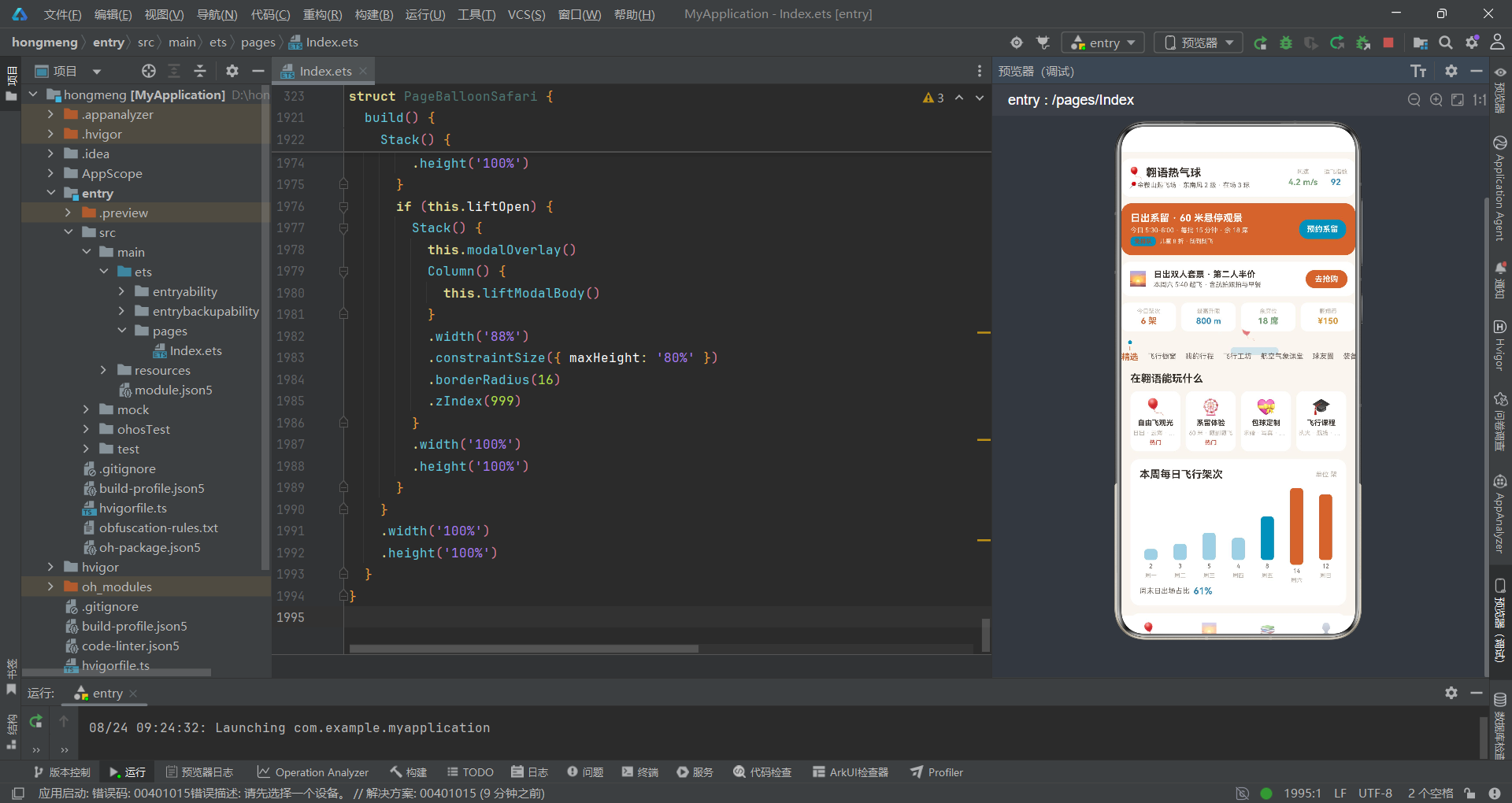
从信息架构的角度来看,翱语应用的header设计值得特别关注。与晶语应用的搜索条+购物车组合不同,翱语应用将品牌行、实时场况(风速、适飞指数)、系留飞行卡和数据四格整合在header中,使得用户打开应用首页就能获取飞行决策所需的关键信息。风速4.2m/s和适飞指数92的实时展示,系留飞行卡的时间批次和余席信息,数据四格的今日架次和最高升限,这些信息的层级排列遵循了"从决策到操作到统计"的认知流程,是信息密集型header的优秀设计范例。
从子导航设计的角度来看,翱语应用的"吊篮圆点竖线式"subNav是一个将业务元素融入UI细节的精彩案例。圆点代表吊篮连接环,竖线代表悬挂绳索,这种将热气球吊篮的视觉元素抽象为导航指示器的设计,使得子导航不仅是一个功能组件,更是一个场景化的视觉符号。选中状态通过圆点和竖线的"出现"来标识,而非传统的颜色变化或下划线,这种设计在HarmonyOS应用中具有独特的创新性。对比晶语应用的"圆盘序号式"和后续应用的"花盆方块式",三种子导航设计分别呼应了各自场景的核心视觉元素,体现了"形式追随内容"的设计哲学。

开源鸿蒙跨平台开发社区汇聚开发者与厂商,共建“一次开发,多端部署”的开源生态,致力于降低跨端开发门槛,推动万物智联创新。
更多推荐
 4
4 0
0- 0


 已为社区贡献45条内容

所有评论(0)