HarmonyOS ArkTS API 24 @Observed/@State 双向数据流机制和 @Builder 组件化构建器
HarmonyOS 6.1.1 作为华为全场景智能操作系统的最新演进版本,在 ArkTS 语言和 ArkUI 声明式框架层面实现了深层次的能力跃升。ArkTS 语言在 TypeScript 基础上引入了更严格的类型约束系统和状态管理模型,使应用运行时具备了更强的静态检查能力和更高的执行效率。对于露天汽车影院这一融合复古文化与现代社交的垂直场景而言,操作系统的暗色主题渲染支持、动画管线的流畅度以及组件状态响应的实时性,直接决定了幕友(影院用户)在夜间观影环境下能否通过移动终端获得舒适的车位预订、片单浏览和社区互动体验。HarmonyOS ArkTS API 24 提供了完整的 @Observed/@State 双向数据流机制和 @Builder 组件化构建器,使开发者能够在统一的暗色主题体系下构建从片单管理到车位预订的全流程应用。
ArkTS 的声明式开发理念在 HarmonyOS 6.1.1 框架中得到了更深层次的体现。传统命令式开发要求开发者手动管理视图节点的增删改查,而 ArkTS 的声明式模型允许开发者通过 @Builder 装饰器将复杂的 UI 结构拆分为可复用的构建函数,并通过 @State 装饰器自动追踪状态变量的变化,触发依赖该状态的 UI 片段进行精准的局部刷新。在幕语汽车影院平台中,星光闪烁和探照灯光锥摆动特效每 90 毫秒更新一次 tick 值,系统自动识别依赖 tick 的 @Builder fxLayer 进行重绘,而不会影响其他无关组件的渲染性能。这种精准的依赖追踪和局部重绘机制,在暗色主题环境下尤为重要——因为暗色背景下的动画元素需要更高的帧率稳定性才能避免视觉闪烁感。
露天汽车影院复兴计划的业务价值在于将这一逐渐式微的复古文化形式通过数字化手段重新激活。汽车影院作为 20 世纪中叶的标志性娱乐方式,在当代城市夜经济复兴的背景下具有独特的文化吸引力。幕语平台通过暗蓝夜色调(#7FA8D9)和粉霓虹强调色(#E86FA4)构建了沉浸式的夜间观影视觉体系,背景色采用 #1A1E2E 深夜蓝黑色,模拟真实汽车影院的夜空环境。平台将精选、片单橱窗、我的票夹、车位工坊、放映课堂、幕友圈和小卖部七大功能模块有机整合在统一的内容容器中,底部四主 tab(首页、片单、课堂、我的)提供快速场景切换,形成了"四主+七子"的双层导航架构。
从技术架构维度来看,幕语平台的特效系统采用了星光闪烁与探照灯光锥摆动的双粒子层设计。星光闪烁通过 6 个白色微型粒子模拟夜空中星点的明暗变化,透明度在 0.25 到 0.9 之间跳变;探照灯光锥通过 3 个 neon 色长条组件模拟影院现场的探照灯扫射效果,以 -25 到 +25 度的角度范围摆动。此外还有 6 个 accent 粉色霓虹光斑粒子在整个屏幕范围内飘浮,营造出霓虹灯反射的氛围。所有特效参数均由纯函数根据 tick 时间步长和粒子索引计算,特效层通过 hitTestBehavior(HitTestMode.None) 设置为不拦截触摸事件。
在状态管理层面,幕语平台定义了 @Observed 装饰的数据模型类 PostItem、FilmItem、TicketItem 和 GearItem,分别对应幕友动态、片单数据、票夹数据和小卖部商品。@Observed 装饰器使得这些类的实例在 splice 或 unshift 操作时能够被框架自动追踪,触发 ForEach 列表的精准更新。组件内部的 @State 变量管理着弹窗开关、编辑索引、用户输入文本和定时器引用等运行时状态,形成了"数据模型持久层 + 组件状态响应层"的双层架构。在 HarmonyOS 6.1.1 的运行时环境中,暗色主题的特殊之处在于需要为每个组件明确指定前景色和背景色,因为系统默认的浅色主题不适合夜间使用场景,这种色彩管理需求使得 ColorPalette 接口的设计更加关键。
一、ColorPalette 接口与暗色主题色彩体系
幕语平台的色彩体系是三个平台中唯一采用暗色主题的设计,通过 ColorPalette 接口定义了 15 个色彩属性,构建了完整的夜间视觉语言系统。暗蓝夜色(#7FA8D9)作为主色调传达夜空与银幕的意象,粉霓虹色(#E86FA4)作为强调色用于车位预订按钮和热度指标,neon 色(#B8C6E8)专门用于探照灯光锥特效的渲染。
interface ColorPalette {
  primary: string;
  primaryLight: string;
  primaryDark: string;
  accent: string;
  accentLight: string;
  bg: string;
  cardBg: string;
  textPrimary: string;
  textSecondary: string;
  textHint: string;
  border: string;
  success: string;
  warning: string;
  danger: string;
  white: string;
  neon: string;
}

const COLORS: ColorPalette = {
  primary: '#7FA8D9',
  primaryLight: '#243149',
  primaryDark: '#5D84B4',
  accent: '#E86FA4',
  accentLight: '#3A2432',
  bg: '#1A1E2E',
  cardBg: '#252B40',
  textPrimary: '#EDF1F8',
  textSecondary: '#A6B0C4',
  textHint: '#68728A',
  border: '#333B54',
  success: '#6BC5A0',
  warning: '#F2C14E',
  danger: '#E86A6A',
  white: '#FFFFFF',
  neon: '#B8C6E8'
};
ColorPalette 接口定义了 16 个色彩属性,其中 bg(#1A1E2E)是深夜蓝黑色背景,模拟汽车影院的夜空环境;cardBg(#252B40)是卡片背景色,比全局背景稍亮以便区分内容区域;textPrimary(#EDF1F8)是近白色前景文字,在暗色背景上具有高对比度可读性;textSecondary(#A6B0C4)是中灰蓝色辅助文字;textHint(#68728A)是深灰提示文字。primary(#7FA8D9)是暗蓝色主色调,传达夜空与银幕的视觉意象;accent(#E86FA4)是粉霓虹色强调色,用于突出车位预订和热度指标;neon(#B8C6E8)是淡蓝白色,专门用于探照灯光锥特效。
与檐语平台和蝶语平台的亮色主题不同,幕语平台的 primaryLight(#243149)和 accentLight(#3A2432)实际上是深色而非浅色——这些"Light"命名的属性在暗色主题语境下指的是"在暗色背景上使用的浅化版本",实际上是较深的色调用于标签背景等需要与主背景区分的场景。这种命名约定虽然与传统的亮色主题色彩体系不同,但在暗色主题设计中是合理的做法。状态色包括 success(#6BC5A0)薄荷绿、warning(#F2C14E)琥珀黄和 danger(#E86A6A)珊瑚红,在暗色背景上具有较高的辨识度。在 HarmonyOS ArkTS API 24 的类型系统中,COLORS 常量通过 ColorPalette 接口进行严格约束,确保了暗色主题色彩管理的类型安全性。
二、@Observed 数据模型类与影院领域建模
幕语平台定义了四个 @Observed 装饰的数据模型类,分别承载幕友动态、片单数据、票夹数据和小卖部商品。这些类的设计直接映射汽车影院业务领域的核心概念。
@Observed
export class PostItem {
  id: number = 0
  nick: string = ''
  avatar: string = ''
  text: string = ''
  time: string = ''
  likes: number = 0
  constructor(id: number, nick: string, avatar: string,
              text: string, time: string, likes: number) {
    this.id = id; this.nick = nick; this.avatar = avatar; this.text = text
    this.time = time; this.likes = likes
  }
}

@Observed
export class FilmItem {
  id: number = 0
  name: string = ''
  craft: string = ''
  price: string = ''
  level: string = ''
  hot: number = 0
  constructor(id: number, name: string, craft: string,
              price: string, level: string, hot: number) {
    this.id = id; this.name = name; this.craft = craft; this.price = price
    this.level = level; this.hot = hot
  }
}

@Observed
export class TicketItem {
  id: number = 0
  name: string = ''
  item: string = ''
  status: string = ''
  progress: number = 0
  constructor(id: number, name: string, item: string,
              status: string, progress: number) {
    this.id = id; this.name = name; this.item = item; this.status = status
    this.progress = progress
  }
}

@Observed
export class GearItem {
  id: number = 0
  name: string = ''
  desc: string = ''
  icon: string = ''
  constructor(id: number, name: string, desc: string, icon: string) {
    this.id = id; this.name = name; this.desc = desc; this.icon = icon
  }
}
PostItem 类封装幕友社区动态信息,包含用户昵称、emoji 头像、动态文本、发布时间和点赞数。FilmItem 描述片单数据,包括影片名称(如"《午夜慢车》胶片场")、工艺描述(如"1972 · 4K 修复")、价格(如"¥88/车")、等级标签(复古、连映、稀有、亲子、热门、深夜、专场)和热度值。TicketItem 对应票夹数据,记录票夹名称、场次信息、状态(已出票、待取票、已观影、已退票)和进度百分比。GearItem 定义了小卖部商品的名称、描述和图标标识。
在 HarmonyOS 6.1.1 的运行时环境中,@Observed 装饰器为类实例的属性安装了 Proxy 代理。当 this.ticketList.splice(this.editIdx, 1, new TicketItem(...)) 这样的数组替换操作发生时,框架能够自动检测到数组元素的变化,并通知所有通过 ForEach 依赖该数组的列表组件进行精准的局部重渲染。@Observed 装饰器是 ArkTS 响应式系统的核心——它使得对象级别的属性变更和数组级别的元素变更都能被自动追踪,开发者无需手动调用任何刷新方法。
三、静态数据数组与影院导航配置
幕语平台在模块顶层定义了多组静态数据数组,通过 @Observed 类的构造函数实例化,覆盖了幕友动态、片单目录、票夹列表、小卖部商品、图表数据和课程信息等多个业务维度。
const POST_LIST: PostItem[] = [
  new PostItem(1, '复古片迷', '🎬', '《午夜慢车》胶片版,颗粒感绝了。', '6分钟前', 129),
  new PostItem(2, '皮卡后箱座', '🛻', '后箱铺毯子加抱枕,全场最佳包厢。', '19分钟前', 112),
  new PostItem(3, '放映员老周', '📽️', '今晚换碳弧灯,亮度提升一档。', '33分钟前', 98),
  new PostItem(4, '幕语经理', '🎟️', '复古周双片连映,车位已订出七成。', '1小时前', 87),
  new PostItem(5, '爆米花头号', '🍿', '焦糖双份加海盐,观影标配。', '2小时前', 76),
  new PostItem(6, '调频达人', '📻', '87.7 调频音效,比影院还带感。', '3小时前', 68),
  new PostItem(7, '夜航情侣', '🌙', '第一次约会就来这,氛围满分。', '5小时前', 59),
  new PostItem(8, '老车主', '🚗', '老爷车专场,车比电影还好看。', '昨天', 52)
];

const FILM_LIST: FilmItem[] = [
  new FilmItem(1, '《午夜慢车》胶片场', '1972 · 4K 修复', '¥88/车', '复古', 96),
  new FilmItem(2, '《星际回声》双片连映', '科幻 · 141 分钟', '¥118/车', '连映', 92),
  new FilmItem(3, '《雨夜黑局》noir 专场', '黑色电影 · 35mm', '¥78/车', '稀有', 88),
  new FilmItem(4, '《公路与仙人掌》', '公路片 · 日落场', '¥68/车', '亲子', 80),
  new FilmItem(5, '《霓虹舞步》音乐片', '杜比调频 · 合唱场', '¥72/车', '热门', 84),
  new FilmItem(6, '《老宅低语》恐怖夜', '深夜场 · 限 16+', '¥92/车', '深夜', 78),
  new FilmItem(7, '老爷车展 + 短片集', '车友 · 双单元', '¥128/车', '专场', 71),
  new FilmItem(8, '《童梦飞屋》亲子场', '动画 · 有奖问答', '¥58/车', '亲子', 66)
];

const TICKET_LIST: TicketItem[] = [
  new TicketItem(1, '周六双人票 · A 区', '《午夜慢车》· 22:00', '已出票', 100),
  new TicketItem(2, '复古周双片连映', 'C 区 · 两车同行', '待取票', 62),
  new TicketItem(3, '老爷车专场票', 'D 区 · 含展位', '待取票', 48),
  new TicketItem(4, '亲子场 · 三人套', '《童梦飞屋》· 日落场', '已观影', 100),
  new TicketItem(5, '恐怖夜深夜场', 'B 区 · 限 16+', '待取票', 35),
  new TicketItem(6, '音乐片合唱场', 'A 区 · 荧光棒', '已观影', 100),
  new TicketItem(7, 'noir 专场 · 单人', 'E 区 · 35mm', '待取票', 20),
  new TicketItem(8, '公路片日落场', 'C 区 · 双车', '已退票', 0)
];

const GEAR_LIST: GearItem[] = [
  new GearItem(1, '复古爆米花桶', '焦糖 · 双份装', '🍿'),
  new GearItem(2, '车载调频音箱', '87.7 专用', '📻'),
  new GearItem(3, '后箱观影视毯', '加厚防潮', '🧺'),
  new GearItem(4, '复古霓虹灯串', '车厢氛围', '💡'),
  new GearItem(5, '驱蚊喷雾', '户外必备', '🦟'),
  new GearItem(6, '保温壶 · 热可可', '深夜场神器', '🥤'),
  new GearItem(7, '车载手机支架', '字幕辅助', '📱'),
  new GearItem(8, '复古票根收藏册', '全年集章', '🎫')
];
POST_LIST 包含 8 条幕友动态,从胶片版影片评论到后箱观影视毯改装,从碳弧灯更换到调频音效讨论,生动还原了汽车影院社区的复古文化生态。FILM_LIST 定义了 8 部影片,涵盖了从《午夜慢车》胶片场到《童梦飞屋》亲子场的多样化片单,价格区间从 ¥58 到 ¥128/车,等级标签包括复古、连映、稀有、亲子、热门、深夜和专场。TICKET_LIST 模拟了 8 张影票,状态涵盖已出票、待取票、已观影和已退票,进度从 0% 到 100% 不等。GEAR_LIST 列举了 8 件小卖部商品,从复古爆米花桶到票根收藏册。
导航配置中,NAV_LIST 定义了底部四个主标签(首页、片单、课堂、我的),SUB_NAV_LIST 定义了首页内的七个内容子标签(精选、片单橱窗、我的票夹、车位工坊、放映课堂、幕友圈、小卖部),构成了"四主+七子"的双层导航架构。
const NAV_LIST: NavItem[] = [
  { icon: '🎬', label: '首页' },
  { icon: '🎞️', label: '片单' },
  { icon: '📚', label: '课堂' },
  { icon: '👤', label: '我的' }
];

const SUB_NAV_LIST: string[] = ['精选', '片单橱窗', '我的票夹', '车位工坊', '放映课堂', '幕友圈', '小卖部'];

const WEEK_CHART: WeekChartItem[] = [
  { label: '周一', value: 18 },
  { label: '周二', value: 15 },
  { label: '周三', value: 20 },
  { label: '周四', value: 24 },
  { label: '周五', value: 42 },
  { label: '周六', value: 66 },
  { label: '周日', value: 51 }
];

const FILM_CHART: FilmChartItem[] = [
  { label: '复古科幻', value: 28, color: '#7FA8D9' },
  { label: '黑色电影', value: 22, color: '#E86FA4' },
  { label: '公路片', value: 18, color: '#B8C6E8' },
  { label: '音乐剧', value: 16, color: '#F2C14E' },
  { label: '恐怖深夜', value: 16, color: '#6BC5A0' }
];
WEEK_CHART 展示了一周内每日上座车位数量,周末(周六 66 车、周日 51 车)远高于工作日,反映了汽车影院在周末黄金时段的高上座率。FILM_CHART 则展示了观影片型构成比例,复古科幻占 28% 居首,黑色电影 22% 次之,恐怖深夜和音乐剧各占 16%。每个片型都有独立的颜色标识,与 COLORS 体系中的色彩保持一致。
四、纯函数驱动的星光闪烁与探照灯动画
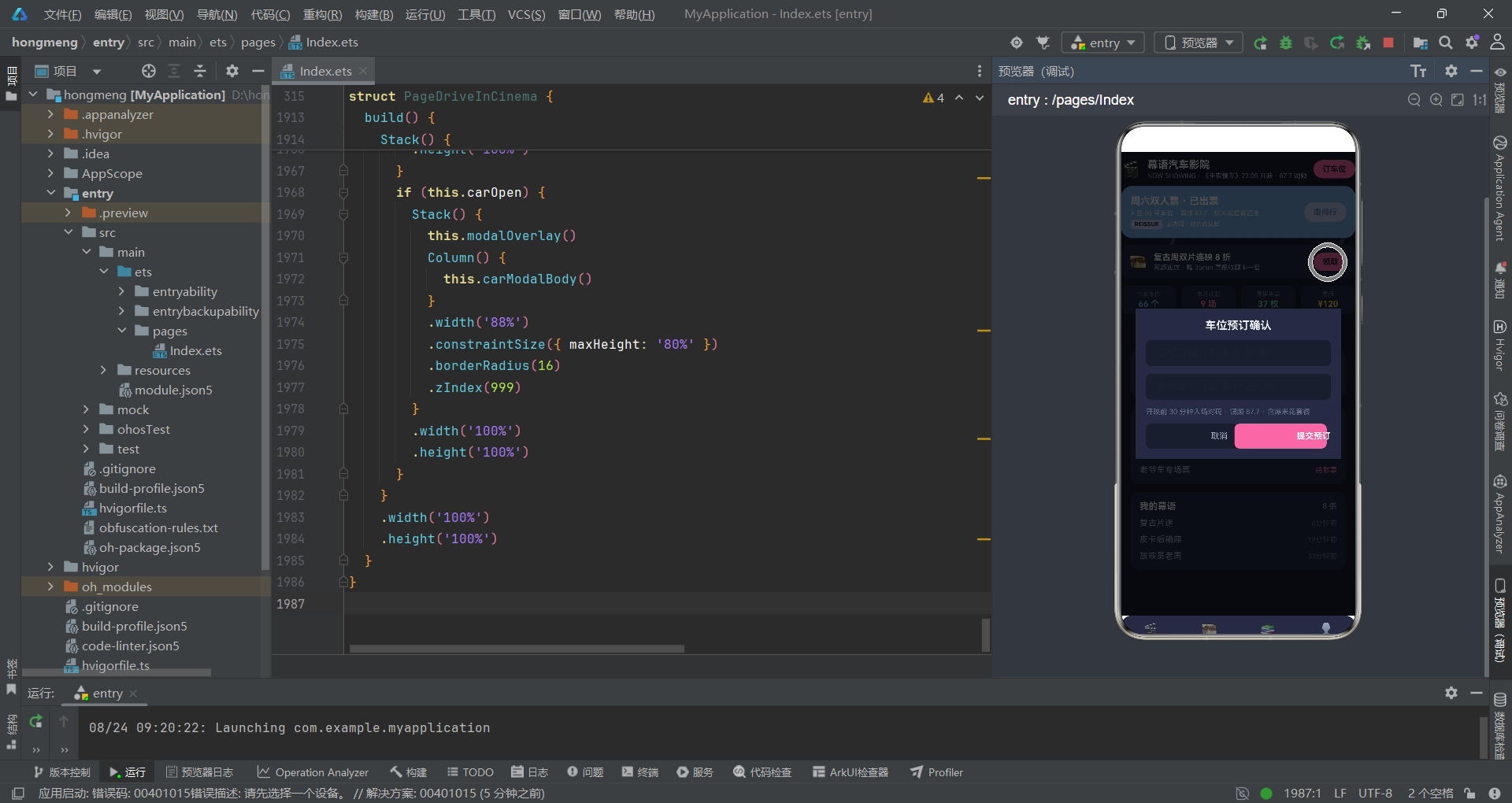
幕语平台的动画特效系统是 HarmonyOS ArkTS API 24 框架下纯函数驱动动画的典型范例。星光闪烁通过白色粒子的透明度跳变实现,探照灯光锥通过长条组件的角度旋转模拟,霓虹光斑通过粉色粒子的位移和透明度变化实现,三者的运动参数完全由无副作用的纯函数根据 tick 和索引计算。
function starA(tick: number, i: number): number {
  return ((tick + i * 2) % 6 === 0) ? 0.9 : 0.25;
}

function starX(tick: number, i: number): number {
  return 30 + ((i * 173 + tick * 2) % 610);
}

function starY(tick: number, i: number): number {
  return 40 + ((i * 211 + tick * 3) % 600);
}

function beamA(tick: number, i: number): number {
  return ((tick * 4 + i * 50) % 50) - 25;
}

function beamX(tick: number, i: number): number {
  return 90 + i * 260;
}

function flashA(tick: number, i: number): number {
  return 0.12 + ((tick + i * 2) % 5) * 0.06;
}

function flashX(tick: number, i: number): number {
  return 30 + ((tick * 5 + i * 247) % 610);
}

function flashY(tick: number, i: number): number {
  return 60 + ((tick * 4 + i * 167) % 610);
}

function statusColor(s: string): string {
  if (s === '已观影') {
    return '#68728A';
  } else if (s === '已出票') {
    return '#7FA8D9';
  } else if (s === '待取票') {
    return '#E86FA4';
  } else if (s === '已退票') {
    return '#E86A6A';
  }
  return '#68728A';
}

function statusProgress(s: string): number {
  if (s === '已观影') {
    return 100;
  } else if (s === '已出票') {
    return 80;
  } else if (s === '待取票') {
    return 40;
  }
  return 0;
}
starA 函数是星光闪烁的核心算法,使用取模运算判断当前 tick 是否为 6 的倍数(((tick + i * 2) % 6 === 0)),如果是则返回 0.9 的高透明度(闪烁峰值),否则返回 0.25 的低透明度。这种基于取模的闪烁算法确保了每颗星在不同时间点达到亮度峰值,6 颗星以错开的相位闪烁,模拟了夜空中星点明暗变化的自然效果。starX 和 starY 函数使用质数系数(173、211)计算星光位置,确保星点分布均匀且不重复。
beamA 函数计算探照灯光锥的摆动角度,范围在 -25 到 +25 度之间,以 50 为周期实现来回摆动。beamX 函数固定探照灯的水平位置(90 + i * 260),三盏探照灯以 260 像素间距分布在屏幕上方。flashA、flashX 和 flashY 函数控制霓虹光斑粒子的透明度和位置,6 个粉色粒子在 610 像素范围内随机分布,透明度在 0.12 到 0.36 之间变化,使用质数系数(247、167)避免运动规律重复。
statusColor 和 statusProgress 函数是票夹状态映射器。已观影状态使用 hint 灰色(#68728A)和 100% 进度,已出票使用 primary 蓝(#7FA8D9)和 80% 进度,待取票使用 accent 粉(#E86FA4)和 40% 进度,已退票使用 danger 红(#E86A6A)和 0% 进度。filmTagColor 函数根据影片名称关键词(胶片、连映、noir、恐怖、亲子、老爷车)返回对应色彩值。levelColor 函数将等级标签(亲子、复古、连映、稀有)映射为不同颜色。这些纯函数在 HarmonyOS 6.1.1 的运行时中具有极低的计算开销,每 90 毫秒的 tick 更新只需执行简单的算术运算和取模判断。
五、@Entry 组件状态管理与暗色主题生命周期
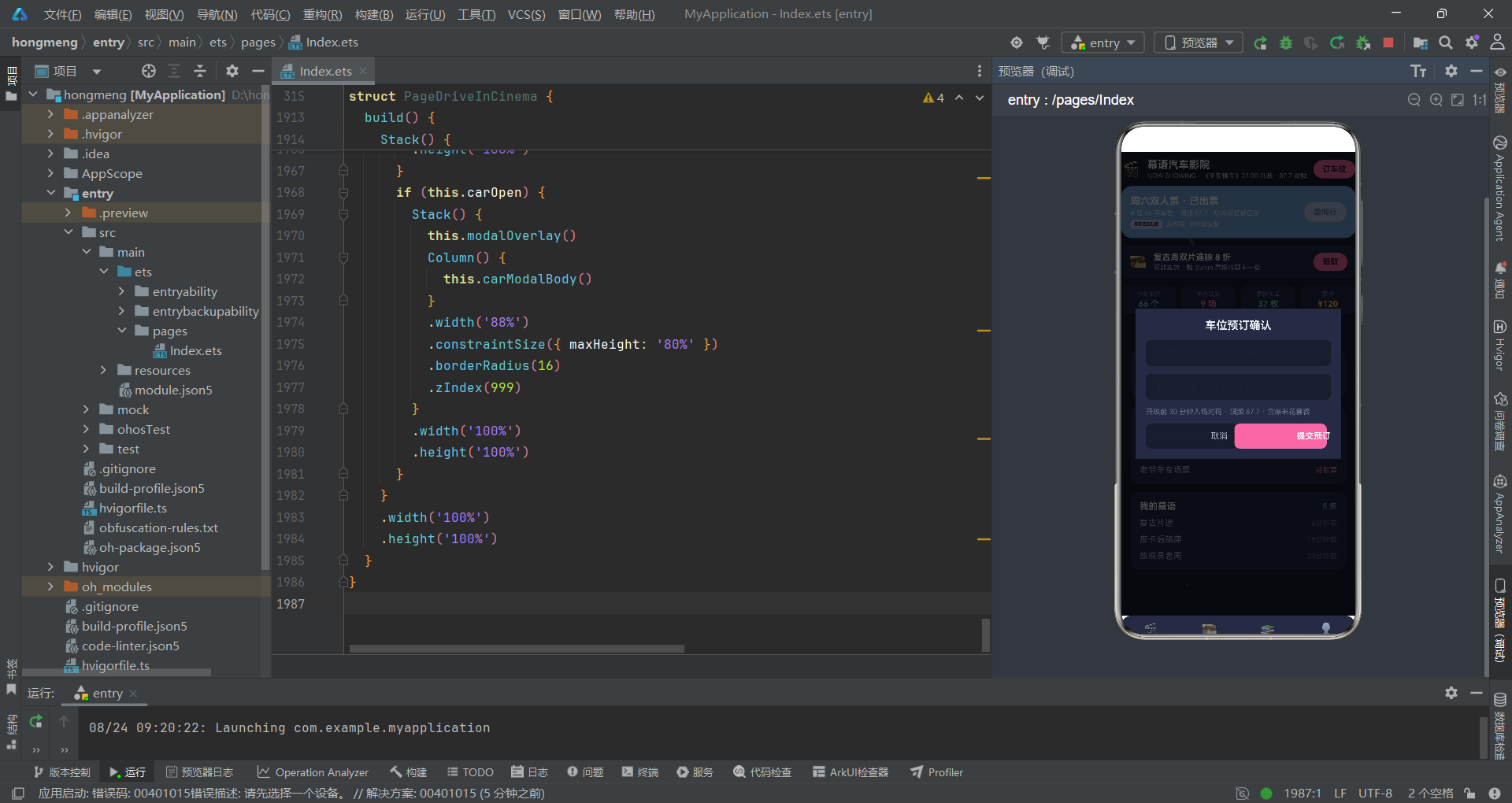
幕语平台的核心组件 PageDriveInCinema 通过 @Entry 和 @Component 装饰器声明为应用入口。组件内部定义了 17 个 @State 装饰的状态变量,覆盖导航控制、动画驱动、弹窗管理和用户输入等全部运行时状态。
@Entry
@Component
struct PageDriveInCinema {
  @State mainTab: number = 0
  @State subTab: number = 0
  @State tick: number = 0
  @State glow: number = 0
  @State addOpen: boolean = false
  @State editOpen: boolean = false
  @State delOpen: boolean = false
  @State carOpen: boolean = false
  @State editIdx: number = 0
  @State delTarget: string = 'ticket'
  @State editName: string = ''
  @State editStyle: string = ''
  @State editNote: string = ''
  @State addTitle: string = ''
  @State addContent: string = ''
  @State carRow: string = ''
  @State carFilm: string = ''
  @State postList: PostItem[] = POST_LIST
  @State ticketList: TicketItem[] = TICKET_LIST
  @State fxTimer: number = -1

  aboutToAppear(): void {
    this.fxTimer = setInterval(() => {
      this.tick = this.tick + 1;
      this.glow = (this.glow + 1) % 2;
    }, 90);
  }

  aboutToDisappear(): void {
    if (this.fxTimer > 0) {
      clearInterval(this.fxTimer);
      this.fxTimer = -1;
    }
  }
}
@State carOpen 是幕语平台特有的弹窗状态变量,控制车位预订确认弹窗的显隐。@State carRow 和 @State carFilm 分别存储车位区域和观影场次的输入值,是车位预订表单的核心数据。@State delTarget 的默认值为 'ticket'(对应票夹数据),反映了汽车影院场景下删除操作的首选目标是影票记录。@State postList 和 @State ticketList 分别管理幕友动态列表和票夹列表。
aboutToAppear 生命周期回调中启动 90 毫秒间隔的定时器,每次回调递增 tick 并切换 glow 的 0/1 状态。aboutToDisappear 回调中通过 clearInterval 清除定时器并将 fxTimer 重置为 -1。在暗色主题环境下,定时器的精确管理尤为重要——因为暗色背景上的动画闪烁更容易被用户感知,如果定时器未被正确清除导致页面切换后仍在后台运行动画,不仅浪费 CPU 资源,还可能在用户返回页面时造成不连贯的视觉跳变。HarmonyOS ArkTS API 24 的生命周期回调机制为这种资源管理提供了可靠的保障。
六、弹窗操作方法与车位预订业务流程
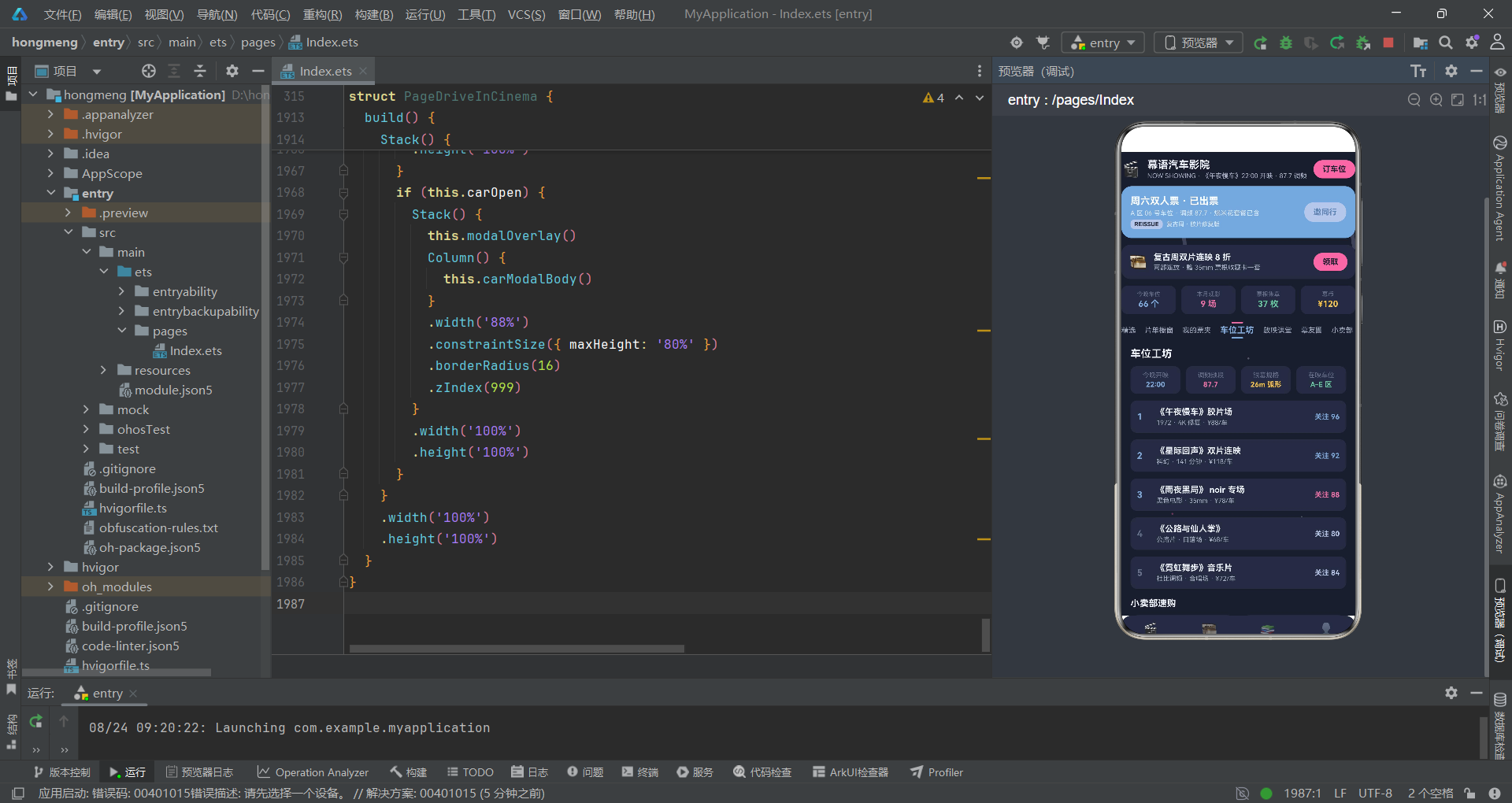
幕语平台定义了五个弹窗操作方法,其中车位预订确认是核心业务特色。通过 openCar 和 doCar 方法实现了从车位选择到动态发布的完整数据流。
openAdd(): void {
  this.addTitle = '';
  this.addContent = '';
  this.addOpen = true;
}

openEdit(index: number): void {
  if (index >= 0 && index < this.ticketList.length) {
    this.editIdx = index;
    this.editName = this.ticketList[index].name;
    this.editStyle = this.ticketList[index].status;
    this.editNote = this.ticketList[index].item;
  }
  this.editOpen = true;
}

openCar(): void {
  this.carRow = '';
  this.carFilm = '';
  this.carOpen = true;
}

doAdd(): void {
  if (this.addTitle.length > 0) {
    this.postList.unshift(new PostItem(999, '我的幕语', '🎬', this.addTitle, '刚刚', 0));
  }
  this.addOpen = false;
}

doEdit(): void {
  if (this.editIdx >= 0 && this.editIdx < this.ticketList.length) {
    this.ticketList.splice(this.editIdx, 1,
      new TicketItem(this.ticketList[this.editIdx].id,
        this.editName, this.editNote, this.editStyle, 40));
  }
  this.editOpen = false;
}

doDel(): void {
  if (this.delTarget === 'ticket' && this.ticketList.length > 0) {
    this.ticketList.splice(0, 1);
  } else if (this.delTarget === 'course' && this.postList.length > 0) {
    this.postList.splice(0, 1);
  }
  this.delOpen = false;
}

doCar(): void {
  if (this.carRow.length > 0) {
    this.postList.unshift(new PostItem(998, '我的幕语', '🚗',
      `已预订观影车位:${this.carRow}`, '刚刚', 0));
  }
  this.carOpen = false;
}
openCar 方法在打开车位预订弹窗前清空 carRow 和 carFilm 两个输入字段。doCar 方法在用户提交时,将车位信息以新幕语动态的形式插入到幕友圈列表头部。这种将车位预订操作与社区动态联动的设计,使得用户预订车位后能在社区中看到操作反馈,实现了业务操作与社交互动的融合。
doEdit 方法使用 this.ticketList.splice(this.editIdx, 1, new TicketItem(...)) 替换指定索引的票夹数据。doDel 方法根据 delTarget 的值决定删除票夹(ticket)还是动态(course),通过 splice(0, 1) 移除首条记录。在 HarmonyOS 6.1.1 的 ArkTS 响应式系统中,splice 操作被精确追踪,框架只会更新被替换或删除的那一个列表项组件,而不会触发整个列表的重绘,保证了暗色主题环境下列表更新的视觉流畅性。
七、fxLayer 星光闪烁与探照灯光锥特效层
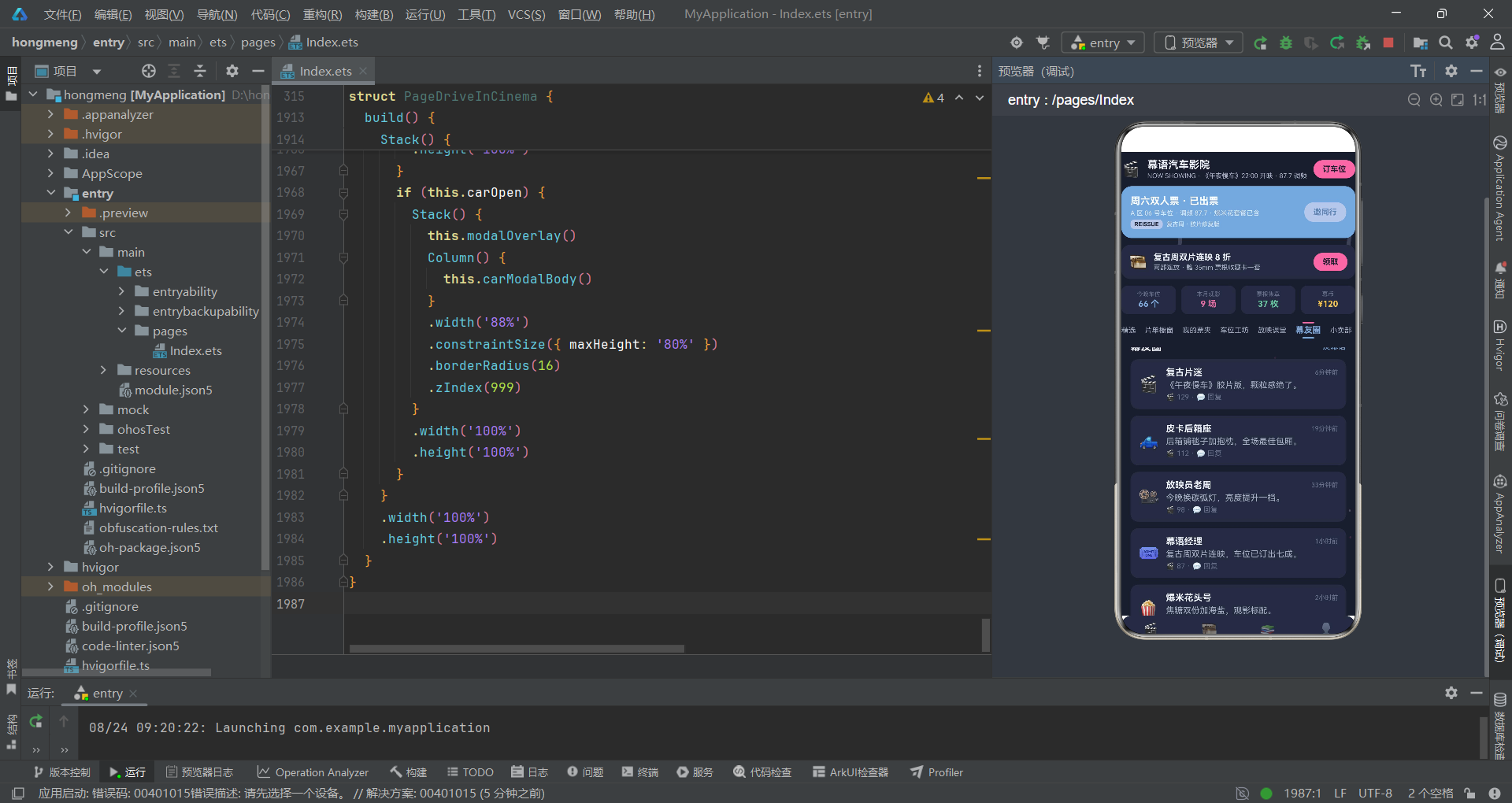
fxLayer 是幕语平台的特效渲染层,包含三组动画元素:探照灯光锥、星光闪烁和霓虹光斑,所有位置和透明度参数由纯函数根据 tick 和索引计算。
@Builder
fxLayer() {
  Stack({ alignContent: Alignment.TopStart }) {
    ForEach([0, 1, 2], (i: number) => {
      Column()
        .width(6)
        .height(90)
        .borderRadius(3)
        .backgroundColor(COLORS.neon)
        .opacity(0.22)
        .rotate({ angle: beamA(this.tick, i) })
        .translate({ x: beamX(this.tick, i), y: 60 })
    }, (i: number) => i.toString())
    ForEach([0, 1, 2, 3, 4, 5], (i: number) => {
      Column()
        .width(3)
        .height(3)
        .borderRadius(2)
        .backgroundColor(COLORS.white)
        .opacity(starA(this.tick, i))
        .translate({ x: starX(this.tick, i), y: starY(this.tick, i) })
    }, (i: number) => i.toString())
    ForEach([0, 1, 2, 3, 4, 5], (i: number) => {
      Column()
        .width(3)
        .height(3)
        .borderRadius(2)
        .backgroundColor(COLORS.accent)
        .opacity(flashA(this.tick, i))
        .translate({ x: flashX(this.tick, i), y: flashY(this.tick, i) })
    }, (i: number) => i.toString())
  }
  .width('100%')
  .height('100%')
  .hitTestBehavior(HitTestMode.None)
}
第一组 ForEach 生成 3 束探照灯光锥(Column 组件,宽 6 像素、高 90 像素),使用 COLORS.neon 颜色(#B8C6E8 淡蓝白)和 0.22 的低透明度。每束光锥通过 .rotate({ angle: beamA(this.tick, i) }) 实现角度摆动,摆动范围在 -25 到 +25 度之间,通过 .translate({ x: beamX(this.tick, i), y: 60 }) 固定在屏幕顶部 60 像素处,水平位置以 260 像素间距分布。低透明度和细长的形态使得光锥在暗色背景上呈现出探照灯扫射夜空的视觉效果。
第二组 ForEach 生成 6 颗星光(3x3 像素的白色 Column),使用 COLORS.white 颜色,透明度由 starA(this.tick, i) 函数在 0.25 到 0.9 之间跳变。星光位置由 starX 和 starY 函数计算,使用质数系数(173、211)确保分布均匀。透明度的跳变式变化(而非渐变)模拟了星点明灭的自然效果——当 (tick + i * 2) % 6 === 0 时,星点突然变亮,然后迅速恢复暗淡,形成闪烁感。
第三组 ForEach 生成 6 个霓虹光斑(3x3 像素的粉色 Column),使用 COLORS.accent 颜色(#E86FA4 粉霓虹),透明度在 0.12 到 0.36 之间变化,在整个屏幕范围内飘浮,营造出霓虹灯反射在空气中的氛围效果。整个特效层通过 .hitTestBehavior(HitTestMode.None) 设置为完全不拦截触摸事件。
八、header 头部组件与放映牌设计
幕语平台的 header 组件采用了影视风放映牌的设计,包含品牌信息行、票夹进度卡、复古周横幅和数据四格统计区。在暗色主题环境下,header 的视觉设计需要特别注意前景色与背景色的对比度。
@Builder
header() {
  Column({ space: 10 }) {
    Row({ space: 10 }) {
      Text('🎬')
        .fontSize(24)
      Column({ space: 2 }) {
        Text('幕语汽车影院')
          .fontSize(16)
          .fontWeight(FontWeight.Bold)
          .fontColor(COLORS.textPrimary)
        Text('NOW SHOWING · 《午夜慢车》22:00 开映 · 87.7 调频')
          .fontSize(10)
          .fontColor(COLORS.textSecondary)
      }
      .alignItems(HorizontalAlign.Start)
      .layoutWeight(1)
      Text('订车位')
        .fontSize(12)
        .fontWeight(FontWeight.Bold)
        .fontColor(COLORS.bg)
        .padding({ left: 14, right: 14, top: 7, bottom: 7 })
        .backgroundColor(COLORS.accent)
        .borderRadius(14)
        .onClick(() => {
          this.openCar();
        })
    }
    .width('100%')

    Row({ space: 12 }) {
      Column({ space: 4 }) {
        Text('周六双人票 · 已出票')
          .fontSize(15)
          .fontWeight(FontWeight.Bold)
          .fontColor(COLORS.white)
        Text('A 区 06 号车位 · 调频 87.7 · 爆米花套餐已含')
          .fontSize(10)
          .fontColor('#DCE7F5')
        Row({ space: 6 }) {
          Text('REISSUE')
            .fontSize(9)
            .fontWeight(FontWeight.Bold)
            .fontColor(COLORS.bg)
            .padding({ left: 6, right: 6, top: 2, bottom: 2 })
            .backgroundColor(COLORS.neon)
            .borderRadius(6)
          Text('复古周 · 胶片修复版')
            .fontSize(9)
            .fontColor('#DCE7F5')
        }
      }
      .alignItems(HorizontalAlign.Start)
      .layoutWeight(1)
      Text('邀同行')
        .fontSize(12)
        .fontWeight(FontWeight.Bold)
        .fontColor(COLORS.primaryDark)
        .padding({ left: 14, right: 14, top: 8, bottom: 8 })
        .backgroundColor(COLORS.neon)
        .borderRadius(14)
        .onClick(() => {
          this.openCar();
        })
    }
    .width('100%')
    .padding(14)
    .backgroundColor(COLORS.primary)
    .borderRadius(16)
  }
  .width('100%')
  .padding({ top: 10, bottom: 4 })
}
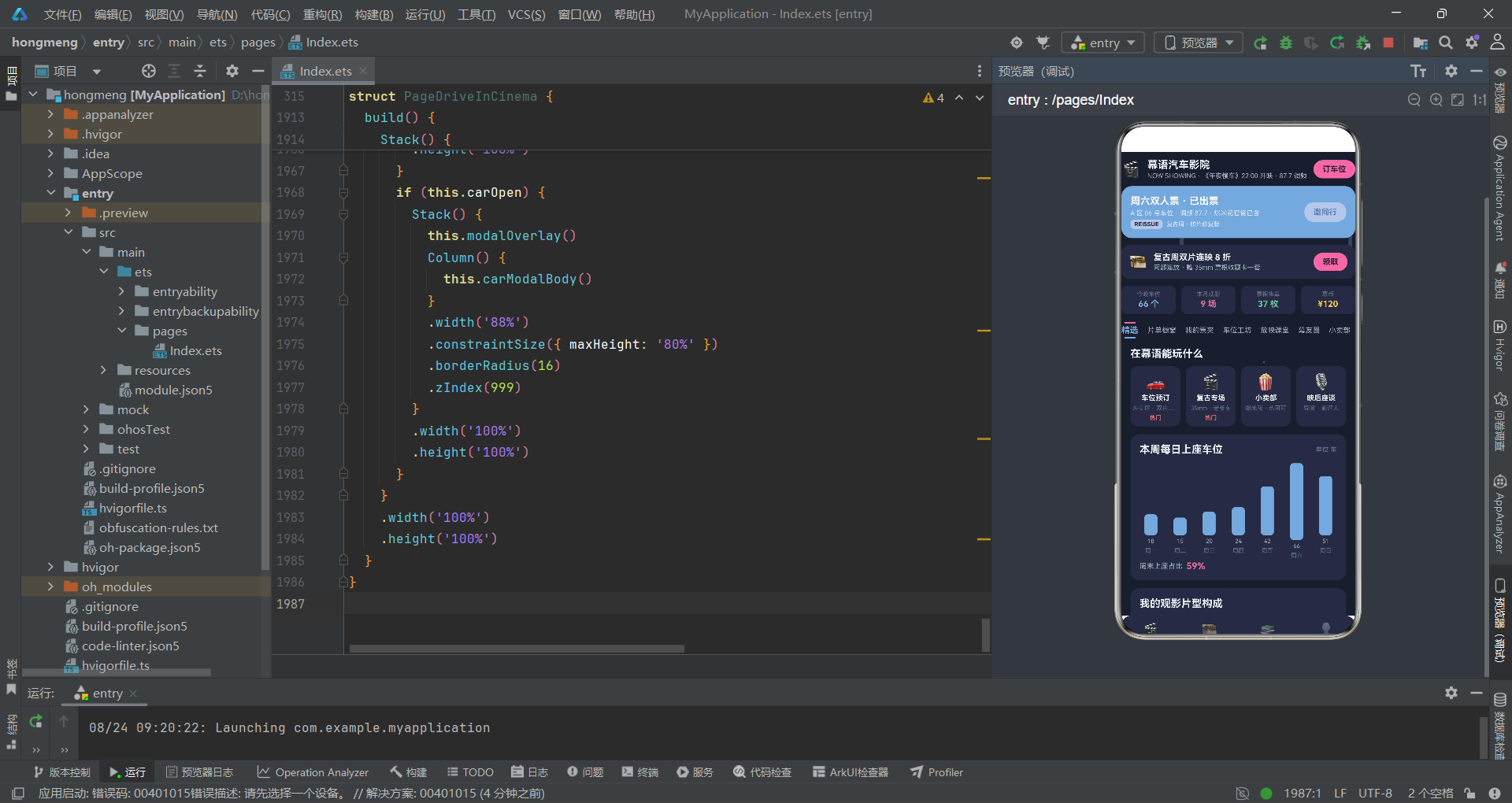
品牌信息行使用 Row 水平布局,左侧是 🎬 图标和品牌标题"幕语汽车影院",下方副标题使用英文"NOW SHOWING"增强复古影院氛围。右侧"订车位"按钮使用 COLORS.accent 粉霓虹色背景和 COLORS.bg 深色文字(而非白色文字),这是暗色主题设计的特殊处理——在粉色背景上使用深色文字比白色文字具有更好的可读性。
票夹进度卡以 COLORS.primary 暗蓝色为背景,白色文字展示当前票夹状态。标签"REISSUE"使用 COLORS.neon 淡蓝白色背景和 COLORS.bg 深色文字,强调复古周胶片修复版的特殊属性。右侧"邀同行"按钮同样使用 neon 色背景和深色文字,触发 openCar 方法。数据四格分别展示今晚车位(66 个)、本月观影(9 场)、票根集章(37 枚)和幕币(¥120),使用 primary、accent、success 和 warning 色进行视觉区分,在暗色背景上形成了清晰的数据层级。
九、subNav 上下夹条式子导航
幕语平台的子导航采用了"上下夹条式"设计,这是其区别于檐语平台(左圆环锚点式)和蝶语平台(左右对称短翼式)的重要视觉特征。每个子标签项由上方横条、文字和下方横条三部分组成,形成上下夹持的视觉结构。
@Builder
subNav() {
  Scroll() {
    Row({ space: 14 }) {
      ForEach(SUB_NAV_LIST, (item: string, idx: number) => {
        Column({ space: 3 }) {
          Row()
            .width(18)
            .height(2)
            .borderRadius(1)
            .backgroundColor(this.subTab === idx ? COLORS.accent : '#00000000')
          Text(item)
            .fontSize(this.subTab === idx ? 13 : 11)
            .fontWeight(this.subTab === idx ? FontWeight.Bold : FontWeight.Normal)
            .fontColor(this.subTab === idx ? COLORS.primary : COLORS.textSecondary)
          Row()
            .width(18)
            .height(2)
            .borderRadius(1)
            .backgroundColor(this.subTab === idx ? COLORS.primary : '#00000000')
        }
        .padding({ top: 2, bottom: 4 })
        .alignItems(HorizontalAlign.Center)
        .onClick(() => {
          this.subTab = idx;
        })
      }, (item: string) => item)
    }
    .width('100%')
    .alignItems(VerticalAlign.Center)
  }
  .scrollable(ScrollDirection.Horizontal)
  .scrollBar(BarState.Off)
  .padding({ top: 6, bottom: 10 })
}
每个子标签项是一个 Column 容器(垂直排列),内含三个元素:上方横条(18x2 像素的 Row,选中时 accent 粉色,未选中透明)、文字标签和下方横条(18x2 像素的 Row,选中时 primary 蓝色,未选中透明)。这种上下夹持的设计形成了横条夹持文字的视觉效果——选中状态下,上方横条为粉色、下方横条为蓝色,形成 accent 与 primary 的上下呼应;未选中状态下,上下横条均为透明,只有文字显示。
文字标签的字体大小在选中时为 13px Bold primary 蓝色,未选中时为 11px Normal textSecondary 灰色。整个子导航包裹在水平可滚动的 Scroll 组件中。点击事件更新 this.subTab = idx,触发 ArkTS 框架自动重绘子导航和对应内容页。这种上下夹条式设计与暗色主题的搭配效果尤为突出——在深夜色背景上,选中的粉蓝双色横条提供了强烈的视觉指引,同时不破坏整体的夜间氛围。
十、pageFeatured 精选页与暗色柱状图
pageFeatured 是幕语平台首页"精选"子标签对应的内容页,集成了玩法四格、本周上座柱状图、片型构成进度条和人气片单双列卡片。在暗色主题环境下,柱状图和进度条的色彩选择需要特别注意与暗色背景的对比度。
@Builder
pageFeatured() {
  Column({ space: 12 }) {
    Column() {
      Text('在幕语能玩什么')
        .fontSize(16)
        .fontWeight(FontWeight.Bold)
        .fontColor(COLORS.textPrimary)
        .width('100%')
        .margin({ bottom: 10 })
      Row({ space: 8 }) {
        ForEach(TYPE_LIST, (it: PlayTypeItem) => {
          Column({ space: 4 }) {
            Text(it.icon)
              .fontSize(24)
            Text(it.name)
              .fontSize(11)
              .fontWeight(FontWeight.Bold)
              .fontColor(COLORS.textPrimary)
            Text(it.desc)
              .fontSize(9)
              .fontColor(COLORS.textHint)
              .maxLines(1)
              .textOverflow({ overflow: TextOverflow.Ellipsis })
            Text(it.hot ? '热门' : ' ')
              .fontSize(9)
              .fontWeight(FontWeight.Bold)
              .fontColor(it.hot ? COLORS.danger : COLORS.border)
          }
          .layoutWeight(1)
          .padding({ top: 10, bottom: 8, left: 4, right: 4 })
          .backgroundColor(COLORS.cardBg)
          .borderRadius(12)
          .alignItems(HorizontalAlign.Center)
        }, (it: PlayTypeItem) => it.name)
      }
      .width('100%')
    }
    .width('100%')

    Column() {
      Row() {
        Text('本周每日上座车位')
          .fontSize(16)
          .fontWeight(FontWeight.Bold)
          .fontColor(COLORS.textPrimary)
          .layoutWeight(1)
        Text('单位 车')
          .fontSize(10)
          .fontColor(COLORS.textHint)
      }
      .width('100%')
      Row({ space: 10 }) {
        ForEach(WEEK_CHART, (it: WeekChartItem) => {
          Column({ space: 4 }) {
            Column()
              .width(20)
              .height(barH(it.value, 66))
              .borderRadius(5)
              .backgroundColor(filmColor(it.value))
            Text(`${it.value}`)
              .fontSize(9)
              .fontColor(COLORS.textSecondary)
            Text(it.label)
              .fontSize(9)
              .fontColor(COLORS.textHint)
          }
          .layoutWeight(1)
          .alignItems(HorizontalAlign.Center)
        }, (it: WeekChartItem) => it.label + it.value.toString())
      }
      .width('100%')
      .alignItems(VerticalAlign.Bottom)
      .height(140)
      .margin({ top: 12 })
      Row({ space: 6 }) {
        Text('周末上座占比')
          .fontSize(11)
          .fontColor(COLORS.textSecondary)
        Text('59%')
          .fontSize(14)
          .fontWeight(FontWeight.Bold)
          .fontColor(COLORS.accent)
      }
      .width('100%')
      .margin({ top: 10 })
    }
    .width('100%')
    .padding(14)
    .backgroundColor(COLORS.cardBg)
    .borderRadius(14)
  }
  .width('100%')
}
玩法四格遍历 TYPE_LIST 数组,展示四种业务入口(车位预订、复古专场、小卖部、映后座谈),每个卡片使用 COLORS.cardBg 深色卡片背景(#252B40),在 COLORS.bg 全局背景(#1A1E2E)上通过微妙的色差区分。卡片内文字使用 textPrimary 近白色和 textHint 深灰色,热度标签使用 danger 珊瑚红色。
本周上座柱状图遍历 WEEK_CHART 的 7 天数据,每根柱子宽度固定 20 像素,高度由 barH(it.value, 66) 函数计算(最大值 66 对应 118 像素高度)。柱子颜色由 filmColor(it.value) 函数动态分配:大于 9 使用 primary 蓝、大于 6 使用 accent 粉、其余使用 neon 淡蓝白。在暗色背景上,蓝色和粉色的柱子具有很高的辨识度。底部展示"周末上座占比 59%"的汇总信息,使用 accent 粉色突出关键数据。片型构成进度条遍历 FILM_CHART 的 5 种片型数据,通过 Stack 叠加实现彩色填充进度条。
十一、pageMarket 片单橱窗与 pageCrafts 票夹管理
pageMarket 是片单橱窗页面,以列表形式展示所有影片,每个影片项包含色条指示器、片名、等级标签、价格和热度进度条。pageCrafts 管理用户的票夹列表。
@Builder
pageMarket() {
  Column({ space: 10 }) {
    Row() {
      Text('片单橱窗')
        .fontSize(16)
        .fontWeight(FontWeight.Bold)
        .fontColor(COLORS.textPrimary)
        .layoutWeight(1)
      Text('发布我的专场')
        .fontSize(12)
        .fontColor(COLORS.primary)
        .onClick(() => {
          this.openAdd();
        })
    }
    .width('100%')
    ForEach(FILM_LIST, (it: FilmItem) => {
      Column({ space: 6 }) {
        Row() {
          Column()
            .width(4)
            .height(38)
            .borderRadius(2)
            .backgroundColor(filmTagColor(it.name))
          Column({ space: 4 }) {
            Row() {
              Text(it.name)
                .fontSize(13)
                .fontWeight(FontWeight.Bold)
                .fontColor(COLORS.textPrimary)
                .layoutWeight(1)
              Text(it.level)
                .fontSize(10)
                .fontWeight(FontWeight.Bold)
                .fontColor(levelColor(it.level))
                .padding({ left: 6, right: 6, top: 2, bottom: 2 })
                .backgroundColor(COLORS.bg)
                .borderRadius(6)
            }
            .width('100%')
            Row({ space: 8 }) {
              Text(`💰 ${it.price}`)
                .fontSize(11)
                .fontColor(COLORS.textSecondary)
              Text(`📽️ ${it.craft}`)
                .fontSize(11)
                .fontColor(COLORS.textSecondary)
            }
            .width('100%')
          }
          .layoutWeight(1)
          .alignItems(HorizontalAlign.Start)
        }
        .width('100%')
        Stack({ alignContent: Alignment.Start }) {
          Row()
            .width('100%')
            .height(6)
            .borderRadius(3)
            .backgroundColor(COLORS.border)
          Row()
            .width(`${it.hot}%`)
            .height(6)
            .borderRadius(3)
            .backgroundColor(filmTagColor(it.name))
        }
        .width('100%')
        Row({ space: 10 }) {
          Text(`关注度 ${it.hot}`)
            .fontSize(10)
            .fontColor(COLORS.textHint)
            .layoutWeight(1)
          Text('预订车位')
            .fontSize(11)
            .fontWeight(FontWeight.Bold)
            .fontColor(COLORS.white)
            .padding({ left: 10, right: 10, top: 4, bottom: 4 })
            .backgroundColor(COLORS.primary)
            .borderRadius(8)
            .onClick(() => {
              this.openCar();
            })
        }
        .width('100%')
      }
      .width('100%')
      .padding(12)
      .backgroundColor(COLORS.cardBg)
      .borderRadius(12)
    }, (it: FilmItem) => it.id.toString())
  }
  .width('100%')
}
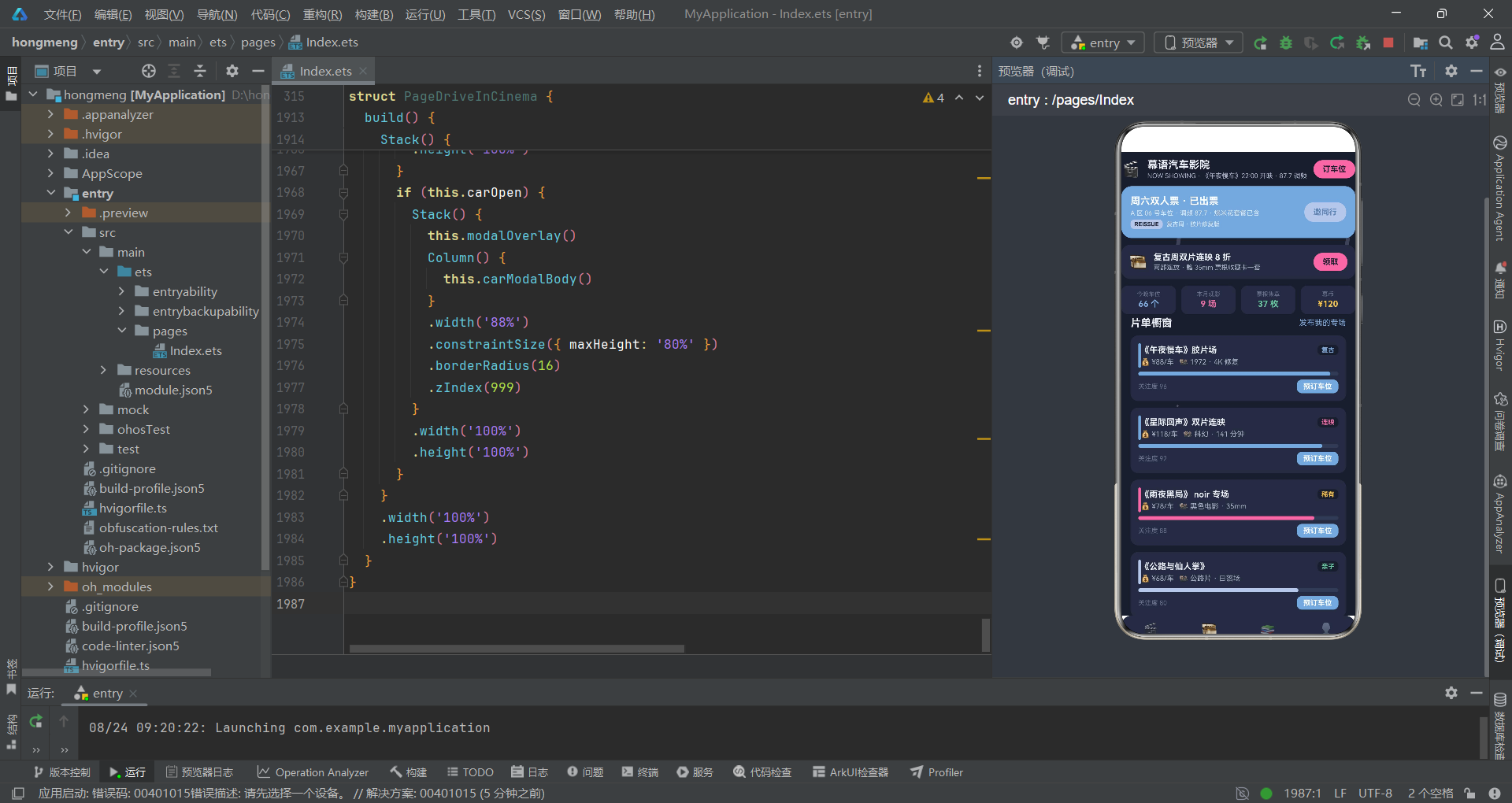
每个影片项左侧有 4x38 像素的色条指示器,颜色由 filmTagColor(it.name) 函数根据影片名称关键词动态分配。等级标签背景使用 COLORS.bg 深色(而非其他平台的浅色 accentLight),这是暗色主题下的特殊处理——在暗色卡片背景上,使用更深的背景色来区分标签。关注度进度条使用 Stack 叠加方式实现。右侧"预订车位"按钮使用 primary 蓝色,点击后触发 openCar 打开车位预订弹窗。
pageCrafts 票夹管理页面遍历 this.ticketList 数组(而非静态 TICKET_LIST),因为票夹支持编辑和删除操作。每个票夹项展示票夹名称、状态标签(颜色由 statusColor 函数映射)、场次信息和进度条。状态标签背景使用 COLORS.primaryLight 深色,与暗色卡片背景形成微妙色差。右侧"编辑票夹单"文字按钮触发 openEdit 打开编辑弹窗。
十二、弹框组件体系(四弹窗架构)
幕语平台定义了四个弹窗组件:发幕语(addModalBody)、编辑票夹单(editModalBody)、取消观影/退课(delModalBody)和车位预订确认(carModalBody)。所有弹窗共享 modalOverlay 遮罩层,遮罩层使用 0.7 的透明度(比其他平台的 0.6 更暗),增强了暗色主题下弹窗的聚焦效果。
@Builder
modalOverlay() {
  Stack() {
    Column()
      .width('100%')
      .height('100%')
      .backgroundColor('#000000')
      .opacity(0.7)
      .onClick(() => {
        this.addOpen = false;
        this.editOpen = false;
        this.delOpen = false;
        this.carOpen = false;
      })
  }
  .width('100%')
  .height('100%')
}

@Builder
addModalBody() {
  Column({ space: 12 }) {
    Text('发布幕语')
      .fontSize(17)
      .fontWeight(FontWeight.Bold)
      .fontColor(COLORS.textPrimary)
    TextInput({ placeholder: '一句话观影日常…', text: this.addTitle })
      .fontSize(13)
      .fontColor(COLORS.textPrimary)
      .backgroundColor(COLORS.bg)
      .borderRadius(8)
      .height(40)
      .onChange((v: string) => {
        this.addTitle = v;
      })
    TextArea({ placeholder: '补充细节:片名、车位、观后感…', text: this.addContent })
      .fontSize(13)
      .fontColor(COLORS.textPrimary)
      .backgroundColor(COLORS.bg)
      .borderRadius(8)
      .height(90)
      .onChange((v: string) => {
        this.addContent = v;
      })
    Row({ space: 10 }) {
      Button()
        .layoutWeight(1)
        .height(38)
        .backgroundColor(COLORS.bg)
        .borderRadius(8)
        .onClick(() => {
          this.addOpen = false;
        })
      Text('取消')
        .fontSize(13)
        .fontColor(COLORS.textSecondary)
        .margin({ left: -52 })
      Button()
        .layoutWeight(1)
        .height(38)
        .backgroundColor(COLORS.primary)
        .borderRadius(8)
        .onClick(() => {
          this.doAdd();
        })
      Text('发布')
        .fontSize(13)
        .fontWeight(FontWeight.Bold)
        .fontColor(COLORS.white)
        .margin({ left: -44 })
    }
    .width('100%')
  }
  .width('100%')
  .padding(16)
  .backgroundColor(COLORS.cardBg)
}
modalOverlay 遮罩层使用 0.7 的不透明度(比檐语和蝶语平台的 0.6 更暗),在暗色主题下提供了更强的视觉聚焦效果。addModalBody 是发幕语弹窗,包含标题、TextInput 单行输入框、TextArea 多行输入框和双按钮行。TextInput 和 TextArea 的背景色使用 COLORS.bg(#1A1E2E 深夜蓝黑色),在 COLORS.cardBg(#252B40 卡片色)的弹窗背景上形成了微妙的色差,使输入区域清晰可辨。取消按钮使用 COLORS.bg 背景色(与弹窗内输入框同色),发布按钮使用 COLORS.primary 蓝色。
@Builder
carModalBody() {
  Column({ space: 12 }) {
    Text('车位预订确认')
      .fontSize(17)
      .fontWeight(FontWeight.Bold)
      .fontColor(COLORS.textPrimary)
    TextInput({ placeholder: '车位区域(如 A 区 06 号)', text: this.carRow })
      .fontSize(13)
      .fontColor(COLORS.textPrimary)
      .backgroundColor(COLORS.bg)
      .borderRadius(8)
      .height(40)
      .onChange((v: string) => {
        this.carRow = v;
      })
    TextInput({ placeholder: '观影场次(如 周六 22:00)', text: this.carFilm })
      .fontSize(13)
      .fontColor(COLORS.textPrimary)
      .backgroundColor(COLORS.bg)
      .borderRadius(8)
      .height(40)
      .onChange((v: string) => {
        this.carFilm = v;
      })
    Text('开映前 30 分钟入场对码 · 调频 87.7 · 含爆米花套餐')
      .fontSize(11)
      .fontColor(COLORS.textHint)
      .width('100%')
    Row({ space: 10 }) {
      Button()
        .layoutWeight(1)
        .height(38)
        .backgroundColor(COLORS.bg)
        .borderRadius(8)
        .onClick(() => {
          this.carOpen = false;
        })
      Text('取消')
        .fontSize(13)
        .fontColor(COLORS.textSecondary)
        .margin({ left: -52 })
      Button()
        .layoutWeight(1)
        .height(38)
        .backgroundColor(COLORS.accent)
        .borderRadius(8)
        .onClick(() => {
          this.doCar();
        })
      Text('提交预订')
        .fontSize(13)
        .fontWeight(FontWeight.Bold)
        .fontColor(COLORS.white)
        .margin({ left: -56 })
    }
    .width('100%')
  }
  .width('100%')
  .padding(16)
  .backgroundColor(COLORS.cardBg)
}
carModalBody 车位预订确认弹窗是幕语平台的核心业务弹窗,包含两个 TextInput(车位区域和观影场次)和一条提示文字"开映前 30 分钟入场对码 · 调频 87.7 · 含爆米花套餐"。提交按钮使用 COLORS.accent 粉霓虹色,在暗色弹窗背景上具有极高的视觉吸引力,体现了车位预订作为核心业务操作的视觉优先级。提示文字使用 textHint 深灰色,在暗色背景下以低对比度呈现辅助信息,不干扰主要操作流程。这条提示文字包含了汽车影院的核心运营信息——入场时间(开映前 30 分钟)、调频频段(87.7)和附加服务(爆米花套餐),使得用户在预订时即可获取完整的观影须知。
十三、build 方法与暗色主题整体架构
build 方法是 HarmonyOS ArkTS API 24 组件渲染的入口,幕语平台通过 Stack 布局将暗色背景层、特效层、主内容层和弹窗层有序叠加。
build() {
  Stack() {
    Column()
      .width('100%')
      .height('100%')
      .backgroundColor(COLORS.bg)
    this.fxLayer()
    Column() {
      this.mainContent()
      this.bottomBar()
    }
    .width('100%')
    .height('100%')
    if (this.addOpen) {
      Stack() {
        this.modalOverlay()
        Column() {
          this.addModalBody()
        }
        .width('88%')
        .constraintSize({ maxHeight: '80%' })
        .borderRadius(16)
        .zIndex(999)
      }
      .width('100%')
      .height('100%')
    }
    if (this.editOpen) {
      Stack() {
        this.modalOverlay()
        Column() {
          this.editModalBody()
        }
        .width('88%')
        .constraintSize({ maxHeight: '80%' })
        .borderRadius(16)
        .zIndex(999)
      }
      .width('100%')
      .height('100%')
    }
    if (this.delOpen) {
      Stack() {
        this.modalOverlay()
        Column() {
          this.delModalBody()
        }
        .width('88%')
        .constraintSize({ maxHeight: '80%' })
        .borderRadius(16)
        .zIndex(999)
      }
      .width('100%')
      .height('100%')
    }
    if (this.carOpen) {
      Stack() {
        this.modalOverlay()
        Column() {
          this.carModalBody()
        }
        .width('88%')
        .constraintSize({ maxHeight: '80%' })
        .borderRadius(16)
        .zIndex(999)
      }
      .width('100%')
      .height('100%')
    }
  }
  .width('100%')
  .height('100%')
}
Stack 的层叠顺序从底到顶依次为:暗色背景层(COLORS.bg #1A1E2E 深夜蓝黑色)、特效层(fxLayer 星光闪烁+探照灯光锥+霓虹光斑)、主内容层(mainContent + bottomBar)和条件渲染的弹窗层。四个弹窗分别通过 if (this.addOpen)、if (this.editOpen)、if (this.delOpen) 和 if (this.carOpen) 条件判断决定是否渲染。
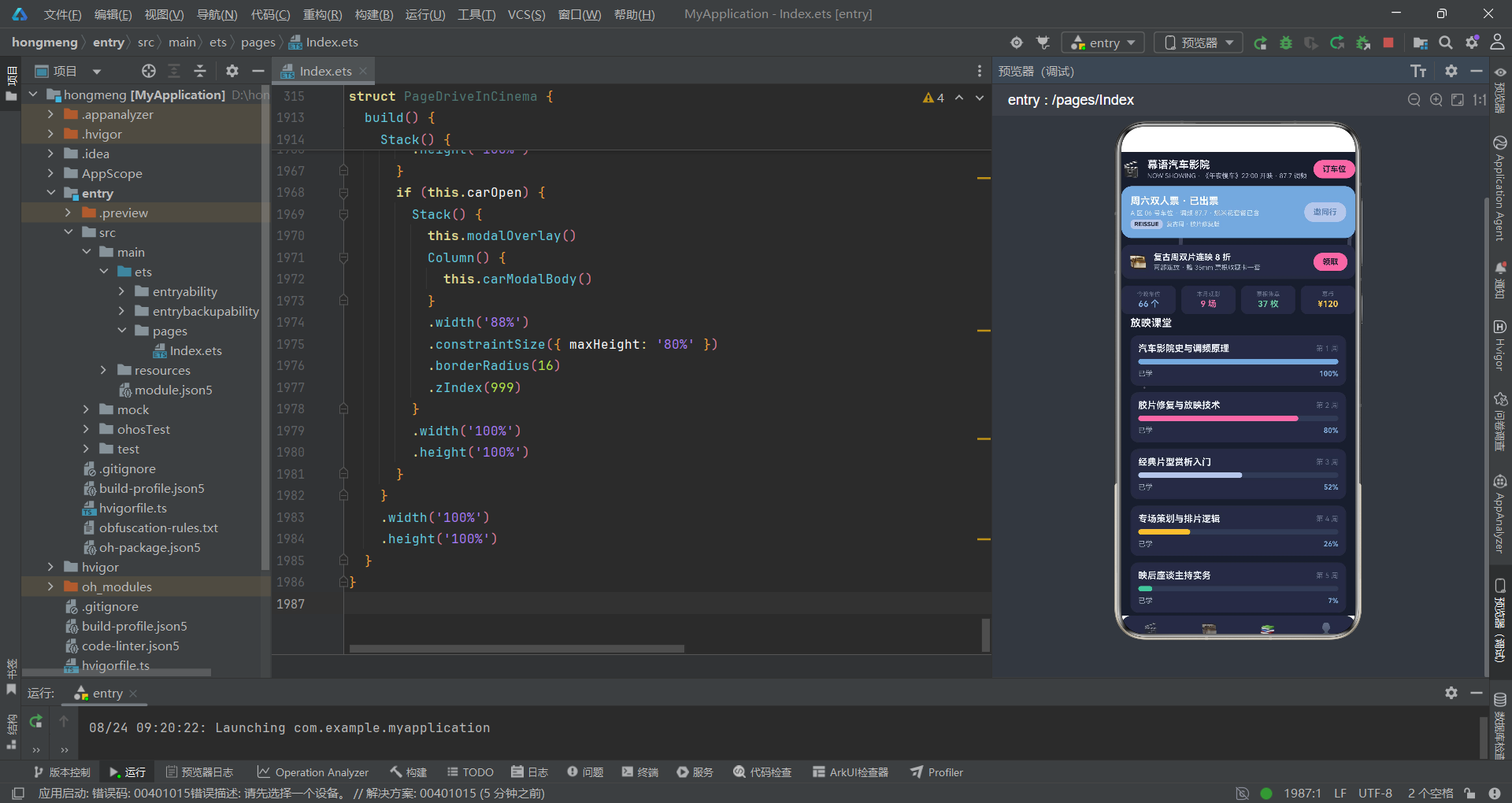
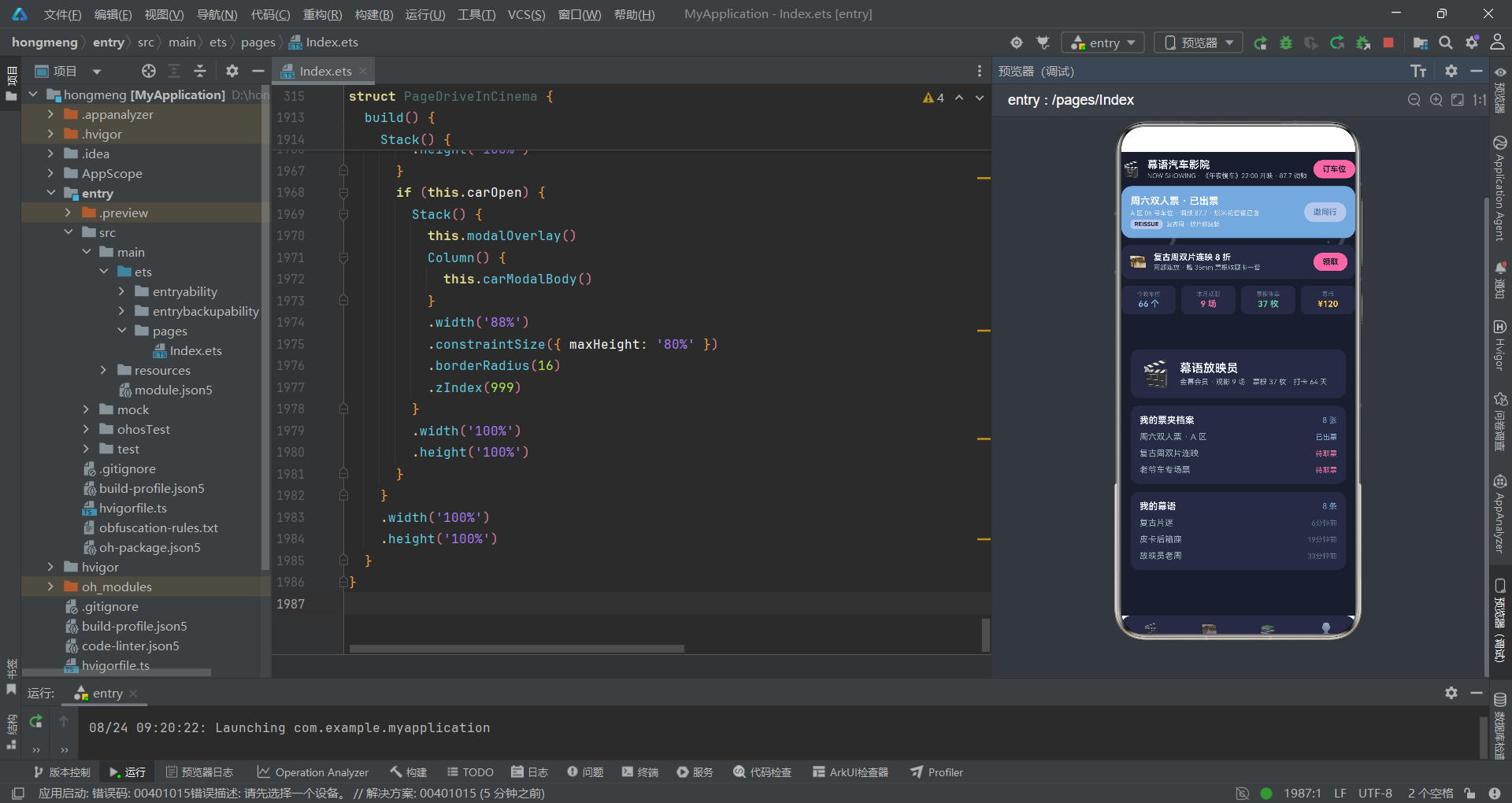
mainContent 方法根据 mainTab 的值切换不同主页面,当 mainTab 为 0 时嵌套 subTab 的七子标签切换逻辑。每个内容页都包裹在 .scrollable(ScrollDirection.Vertical) 的 Scroll 组件中。bottomBar 底部导航栏使用 Row 布局均匀排列四个主标签,选中项通过 opacity(1) 和 FontWeight.Bold 突出,在暗色主题下通过 COLORS.cardBg 深色背景和 COLORS.primary 蓝色选中色形成清晰的导航反馈。
组件架构与数据流 Mermaid 流程图
数据模型与组件对比表格
| 维度 | PostItem 幕友动态 | FilmItem 片单数据 | TicketItem 票夹数据 | GearItem 小卖部商品 |
|---|---|---|---|---|
| 用途 | 社区动态信息流 | 片单产品展示 | 票夹进度管理 | 小卖部商品目录 |
| 核心字段 | nick, avatar, text, likes | name, craft, price, level, hot | name, item, status, progress | name, desc, icon |
| 响应式装饰 | @Observed | @Observed | @Observed | @Observed |
| 静态数据源 | POST_LIST (8条) | FILM_LIST (8条) | TICKET_LIST (8条) | GEAR_LIST (8条) |
| 操作方法 | doAdd (unshift) | 无(只读展示) | doEdit (splice替换), doDel (splice删除) | 无(只读展示) |
| 展示组件 | pageCircle, pageFeatured, pageMine | pageMarket, pageFeatured, pageWorkshop | pageCrafts, pageMine | pageGear, pageWorkshop |
| 状态映射函数 | 无 | filmTagColor, levelColor | statusColor, statusProgress | 无 |
| 弹窗关联 | addModalBody 发幕语 | 无 | editModalBody 编辑, delModalBody 取消 | 无 |
| 弹窗组件 | 触发方法 | 提交方法 | 输入字段 | 提交按钮颜色 | 遮罩透明度 | 业务说明 |
|---|---|---|---|---|---|---|
| addModalBody | openAdd | doAdd | addTitle, addContent | primary 蓝 | 0.7 | 发布幕友动态 |
| editModalBody | openEdit | doEdit | editName, editStyle, editNote | primary 蓝 | 0.7 | 编辑票夹单 |
| delModalBody | openDelA/openDelB | doDel | delTarget | danger 红 | 0.7 | 取消观影或退课 |
| carModalBody | openCar | doCar | carRow, carFilm | accent 粉 | 0.7 | 车位预订确认 |
安装DevEco Studio程序

选择目标安装目录:

设置环境变量,但是需要重启一下:

新建一个空白模板:

设置API为24的模板项目:
初始化项目,自动下载相关依赖:

完整代码:
// 场景:露天汽车影院 / 车位预订 / 复古片单 / 幕友社区
// 底部4主tab(首页/片单/课堂/我的)+ 首页7内容tab(上下夹条式)
// 特效:星光闪烁 + 探照灯光锥摆动(特效层位于底层,不遮挡点击)
// 弹框:新增(发幕语) / 编辑(编辑票夹单) / 删除(取消观影·退课) / 车位(车位预订确认)
interface ColorPalette {
primary: string;
primaryLight: string;
primaryDark: string;
accent: string;
accentLight: string;
bg: string;
cardBg: string;
textPrimary: string;
textSecondary: string;
textHint: string;
border: string;
success: string;
warning: string;
danger: string;
white: string;
neon: string;
}
const COLORS: ColorPalette = {
primary: '#7FA8D9',
primaryLight: '#243149',
primaryDark: '#5D84B4',
accent: '#E86FA4',
accentLight: '#3A2432',
bg: '#1A1E2E',
cardBg: '#252B40',
textPrimary: '#EDF1F8',
textSecondary: '#A6B0C4',
textHint: '#68728A',
border: '#333B54',
success: '#6BC5A0',
warning: '#F2C14E',
danger: '#E86A6A',
white: '#FFFFFF',
neon: '#B8C6E8'
};
// ============ 幕友动态数据模型 ============
@Observed
export class PostItem {
id: number = 0
nick: string = ''
avatar: string = ''
text: string = ''
time: string = ''
likes: number = 0
constructor(id: number, nick: string, avatar: string, text: string, time: string, likes: number) {
this.id = id; this.nick = nick; this.avatar = avatar; this.text = text
this.time = time; this.likes = likes
}
}
// ============ 片单数据模型 ============
@Observed
export class FilmItem {
id: number = 0
name: string = ''
craft: string = ''
price: string = ''
level: string = ''
hot: number = 0
constructor(id: number, name: string, craft: string, price: string, level: string, hot: number) {
this.id = id; this.name = name; this.craft = craft; this.price = price
this.level = level; this.hot = hot
}
}
// ============ 票夹数据模型 ============
@Observed
export class TicketItem {
id: number = 0
name: string = ''
item: string = ''
status: string = ''
progress: number = 0
constructor(id: number, name: string, item: string, status: string, progress: number) {
this.id = id; this.name = name; this.item = item; this.status = status
this.progress = progress
}
}
// ============ 小卖部数据模型 ============
@Observed
export class GearItem {
id: number = 0
name: string = ''
desc: string = ''
icon: string = ''
constructor(id: number, name: string, desc: string, icon: string) {
this.id = id; this.name = name; this.desc = desc; this.icon = icon
}
}
// ============ 图表与课程接口 ============
interface WeekChartItem {
label: string;
value: number;
}
interface FilmChartItem {
label: string;
value: number;
color: string;
}
interface CourseItem {
title: string;
week: string;
progress: number;
color: string;
}
interface PlayTypeItem {
name: string;
desc: string;
icon: string;
hot: boolean;
}
// ============ 顶层静态数据 ============
const POST_LIST: PostItem[] = [
new PostItem(1, '复古片迷', '🎬', '《午夜慢车》胶片版,颗粒感绝了。', '6分钟前', 129),
new PostItem(2, '皮卡后箱座', '🛻', '后箱铺毯子加抱枕,全场最佳包厢。', '19分钟前', 112),
new PostItem(3, '放映员老周', '📽️', '今晚换碳弧灯,亮度提升一档。', '33分钟前', 98),
new PostItem(4, '幕语经理', '🎟️', '复古周双片连映,车位已订出七成。', '1小时前', 87),
new PostItem(5, '爆米花头号', '🍿', '焦糖双份加海盐,观影标配。', '2小时前', 76),
new PostItem(6, '调频达人', '📻', '87.7 调频音效,比影院还带感。', '3小时前', 68),
new PostItem(7, '夜航情侣', '🌙', '第一次约会就来这,氛围满分。', '5小时前', 59),
new PostItem(8, '老车主', '🚗', '老爷车专场,车比电影还好看。', '昨天', 52)
];
const FILM_LIST: FilmItem[] = [
new FilmItem(1, '《午夜慢车》胶片场', '1972 · 4K 修复', '¥88/车', '复古', 96),
new FilmItem(2, '《星际回声》双片连映', '科幻 · 141 分钟', '¥118/车', '连映', 92),
new FilmItem(3, '《雨夜黑局》 noir 专场', '黑色电影 · 35mm', '¥78/车', '稀有', 88),
new FilmItem(4, '《公路与仙人掌》', '公路片 · 日落场', '¥68/车', '亲子', 80),
new FilmItem(5, '《霓虹舞步》音乐片', '杜比调频 · 合唱场', '¥72/车', '热门', 84),
new FilmItem(6, '《老宅低语》恐怖夜', '深夜场 · 限 16+', '¥92/车', '深夜', 78),
new FilmItem(7, '老爷车展 + 短片集', '车友 · 双单元', '¥128/车', '专场', 71),
new FilmItem(8, '《童梦飞屋》亲子场', '动画 · 有奖问答', '¥58/车', '亲子', 66)
];
const TICKET_LIST: TicketItem[] = [
new TicketItem(1, '周六双人票 · A 区', '《午夜慢车》· 22:00', '已出票', 100),
new TicketItem(2, '复古周双片连映', 'C 区 · 两车同行', '待取票', 62),
new TicketItem(3, '老爷车专场票', 'D 区 · 含展位', '待取票', 48),
new TicketItem(4, '亲子场 · 三人套', '《童梦飞屋》· 日落场', '已观影', 100),
new TicketItem(5, '恐怖夜深夜场', 'B 区 · 限 16+', '待取票', 35),
new TicketItem(6, '音乐片合唱场', 'A 区 · 荧光棒', '已观影', 100),
new TicketItem(7, 'noir 专场 · 单人', 'E 区 · 35mm', '待取票', 20),
new TicketItem(8, '公路片日落场', 'C 区 · 双车', '已退票', 0)
];
const GEAR_LIST: GearItem[] = [
new GearItem(1, '复古爆米花桶', '焦糖 · 双份装', '🍿'),
new GearItem(2, '车载调频音箱', '87.7 专用', '📻'),
new GearItem(3, '后箱观影视毯', '加厚防潮', '🧺'),
new GearItem(4, '复古霓虹灯串', '车厢氛围', '💡'),
new GearItem(5, '驱蚊喷雾', '户外必备', '🦟'),
new GearItem(6, '保温壶 · 热可可', '深夜场神器', '🥤'),
new GearItem(7, '车载手机支架', '字幕辅助', '📱'),
new GearItem(8, '复古票根收藏册', '全年集章', '🎫')
];
const WEEK_CHART: WeekChartItem[] = [
{ label: '周一', value: 18 },
{ label: '周二', value: 15 },
{ label: '周三', value: 20 },
{ label: '周四', value: 24 },
{ label: '周五', value: 42 },
{ label: '周六', value: 66 },
{ label: '周日', value: 51 }
];
const FILM_CHART: FilmChartItem[] = [
{ label: '复古科幻', value: 28, color: '#7FA8D9' },
{ label: '黑色电影', value: 22, color: '#E86FA4' },
{ label: '公路片', value: 18, color: '#B8C6E8' },
{ label: '音乐剧', value: 16, color: '#F2C14E' },
{ label: '恐怖深夜', value: 16, color: '#6BC5A0' }
];
const TYPE_LIST: PlayTypeItem[] = [
{ name: '车位预订', desc: 'A-E 区 · 双片连映', icon: '🚗', hot: true },
{ name: '复古专场', desc: '35mm · 老爷车', icon: '🎬', hot: true },
{ name: '小卖部', desc: '爆米花 · 热可可', icon: '🍿', hot: false },
{ name: '映后座谈', desc: '导演 · 影评人', icon: '🎙️', hot: false }
];
const COURSE_LIST: CourseItem[] = [
{ title: '汽车影院史与调频原理', week: '第 1 周', progress: 100, color: '#7FA8D9' },
{ title: '胶片修复与放映技术', week: '第 2 周', progress: 80, color: '#E86FA4' },
{ title: '经典片型赏析入门', week: '第 3 周', progress: 52, color: '#B8C6E8' },
{ title: '专场策划与排片逻辑', week: '第 4 周', progress: 26, color: '#F2C14E' },
{ title: '映后座谈主持实务', week: '第 5 周', progress: 7, color: '#6BC5A0' }
];
// ============ 导航配置 ============
interface NavItem {
icon: string;
label: string;
}
const NAV_LIST: NavItem[] = [
{ icon: '🎬', label: '首页' },
{ icon: '🎞️', label: '片单' },
{ icon: '📚', label: '课堂' },
{ icon: '👤', label: '我的' }
];
const SUB_NAV_LIST: string[] = ['精选', '片单橱窗', '我的票夹', '车位工坊', '放映课堂', '幕友圈', '小卖部'];
// ============ 顶层纯函数 ============
function barH(v: number, max: number): number {
return Math.round(118 * v / max);
}
function filmColor(v: number): string {
if (v > 9) {
return '#7FA8D9';
} else if (v > 6) {
return '#E86FA4';
}
return '#B8C6E8';
}
function starA(tick: number, i: number): number {
return ((tick + i * 2) % 6 === 0) ? 0.9 : 0.25;
}
function starX(tick: number, i: number): number {
return 30 + ((i * 173 + tick * 2) % 610);
}
function starY(tick: number, i: number): number {
return 40 + ((i * 211 + tick * 3) % 600);
}
function beamA(tick: number, i: number): number {
return ((tick * 4 + i * 50) % 50) - 25;
}
function beamX(tick: number, i: number): number {
return 90 + i * 260;
}
function flashA(tick: number, i: number): number {
return 0.12 + ((tick + i * 2) % 5) * 0.06;
}
function flashX(tick: number, i: number): number {
return 30 + ((tick * 5 + i * 247) % 610);
}
function flashY(tick: number, i: number): number {
return 60 + ((tick * 4 + i * 167) % 610);
}
function statusColor(s: string): string {
if (s === '已观影') {
return '#68728A';
} else if (s === '已出票') {
return '#7FA8D9';
} else if (s === '待取票') {
return '#E86FA4';
} else if (s === '已退票') {
return '#E86A6A';
}
return '#68728A';
}
function statusProgress(s: string): number {
if (s === '已观影') {
return 100;
} else if (s === '已出票') {
return 80;
} else if (s === '待取票') {
return 40;
}
return 0;
}
function filmTagColor(g: string): string {
if (g.indexOf('胶片') >= 0 || g.indexOf('连映') >= 0) {
return '#7FA8D9';
} else if (g.indexOf('noir') >= 0 || g.indexOf('恐怖') >= 0) {
return '#E86FA4';
} else if (g.indexOf('亲子') >= 0 || g.indexOf('老爷车') >= 0) {
return '#F2C14E';
}
return '#B8C6E8';
}
function levelColor(s: string): string {
if (s === '亲子') {
return '#6BC5A0';
} else if (s === '复古') {
return '#7FA8D9';
} else if (s === '连映') {
return '#E86FA4';
} else if (s === '稀有') {
return '#F2C14E';
}
return '#E86A6A';
}
@Entry
@Component
struct PageDriveInCinema {
@State mainTab: number = 0
@State subTab: number = 0
@State tick: number = 0
@State glow: number = 0
@State addOpen: boolean = false
@State editOpen: boolean = false
@State delOpen: boolean = false
@State carOpen: boolean = false
@State editIdx: number = 0
@State delTarget: string = 'ticket'
@State editName: string = ''
@State editStyle: string = ''
@State editNote: string = ''
@State addTitle: string = ''
@State addContent: string = ''
@State carRow: string = ''
@State carFilm: string = ''
@State postList: PostItem[] = POST_LIST
@State ticketList: TicketItem[] = TICKET_LIST
@State fxTimer: number = -1
aboutToAppear(): void {
this.fxTimer = setInterval(() => {
this.tick = this.tick + 1;
this.glow = (this.glow + 1) % 2;
}, 90);
}
aboutToDisappear(): void {
if (this.fxTimer > 0) {
clearInterval(this.fxTimer);
this.fxTimer = -1;
}
}
openAdd(): void {
this.addTitle = '';
this.addContent = '';
this.addOpen = true;
}
openEdit(index: number): void {
if (index >= 0 && index < this.ticketList.length) {
this.editIdx = index;
this.editName = this.ticketList[index].name;
this.editStyle = this.ticketList[index].status;
this.editNote = this.ticketList[index].item;
}
this.editOpen = true;
}
openDelA(): void {
this.delTarget = 'ticket';
this.delOpen = true;
}
openDelB(): void {
this.delTarget = 'course';
this.delOpen = true;
}
openCar(): void {
this.carRow = '';
this.carFilm = '';
this.carOpen = true;
}
doAdd(): void {
if (this.addTitle.length > 0) {
this.postList.unshift(new PostItem(999, '我的幕语', '🎬', this.addTitle, '刚刚', 0));
}
this.addOpen = false;
}
doEdit(): void {
if (this.editIdx >= 0 && this.editIdx < this.ticketList.length) {
this.ticketList.splice(this.editIdx, 1, new TicketItem(this.ticketList[this.editIdx].id, this.editName, this.editNote, this.editStyle, 40));
}
this.editOpen = false;
}
doDel(): void {
if (this.delTarget === 'ticket' && this.ticketList.length > 0) {
this.ticketList.splice(0, 1);
} else if (this.delTarget === 'course' && this.postList.length > 0) {
this.postList.splice(0, 1);
}
this.delOpen = false;
}
doCar(): void {
if (this.carRow.length > 0) {
this.postList.unshift(new PostItem(998, '我的幕语', '🚗', `已预订观影车位:${this.carRow}`, '刚刚', 0));
}
this.carOpen = false;
}
@Builder
fxLayer() {
Stack({ alignContent: Alignment.TopStart }) {
ForEach([0, 1, 2], (i: number) => {
Column()
.width(6)
.height(90)
.borderRadius(3)
.backgroundColor(COLORS.neon)
.opacity(0.22)
.rotate({ angle: beamA(this.tick, i) })
.translate({ x: beamX(this.tick, i), y: 60 })
}, (i: number) => i.toString())
ForEach([0, 1, 2, 3, 4, 5], (i: number) => {
Column()
.width(3)
.height(3)
.borderRadius(2)
.backgroundColor(COLORS.white)
.opacity(starA(this.tick, i))
.translate({ x: starX(this.tick, i), y: starY(this.tick, i) })
}, (i: number) => i.toString())
ForEach([0, 1, 2, 3, 4, 5], (i: number) => {
Column()
.width(3)
.height(3)
.borderRadius(2)
.backgroundColor(COLORS.accent)
.opacity(flashA(this.tick, i))
.translate({ x: flashX(this.tick, i), y: flashY(this.tick, i) })
}, (i: number) => i.toString())
}
.width('100%')
.height('100%')
.hitTestBehavior(HitTestMode.None)
}
@Builder
header() {
Column({ space: 10 }) {
// 影视风放映牌
Row({ space: 10 }) {
Text('🎬')
.fontSize(24)
Column({ space: 2 }) {
Text('幕语汽车影院')
.fontSize(16)
.fontWeight(FontWeight.Bold)
.fontColor(COLORS.textPrimary)
Text('NOW SHOWING · 《午夜慢车》22:00 开映 · 87.7 调频')
.fontSize(10)
.fontColor(COLORS.textSecondary)
}
.alignItems(HorizontalAlign.Start)
.layoutWeight(1)
Text('订车位')
.fontSize(12)
.fontWeight(FontWeight.Bold)
.fontColor(COLORS.bg)
.padding({ left: 14, right: 14, top: 7, bottom: 7 })
.backgroundColor(COLORS.accent)
.borderRadius(14)
.onClick(() => {
this.openCar();
})
}
.width('100%')
// 票夹进度卡
Row({ space: 12 }) {
Column({ space: 4 }) {
Text('周六双人票 · 已出票')
.fontSize(15)
.fontWeight(FontWeight.Bold)
.fontColor(COLORS.white)
Text('A 区 06 号车位 · 调频 87.7 · 爆米花套餐已含')
.fontSize(10)
.fontColor('#DCE7F5')
Row({ space: 6 }) {
Text('REISSUE')
.fontSize(9)
.fontWeight(FontWeight.Bold)
.fontColor(COLORS.bg)
.padding({ left: 6, right: 6, top: 2, bottom: 2 })
.backgroundColor(COLORS.neon)
.borderRadius(6)
Text('复古周 · 胶片修复版')
.fontSize(9)
.fontColor('#DCE7F5')
}
}
.alignItems(HorizontalAlign.Start)
.layoutWeight(1)
Text('邀同行')
.fontSize(12)
.fontWeight(FontWeight.Bold)
.fontColor(COLORS.primaryDark)
.padding({ left: 14, right: 14, top: 8, bottom: 8 })
.backgroundColor(COLORS.neon)
.borderRadius(14)
.onClick(() => {
this.openCar();
})
}
.width('100%')
.padding(14)
.backgroundColor(COLORS.primary)
.borderRadius(16)
// 复古周横幅
Row({ space: 10 }) {
Text('🎞️')
.fontSize(22)
Column({ space: 2 }) {
Text('复古周双片连映 8 折')
.fontSize(13)
.fontWeight(FontWeight.Bold)
.fontColor(COLORS.textPrimary)
Text('两部连放 · 赠 35mm 票根收藏卡一套')
.fontSize(10)
.fontColor(COLORS.textSecondary)
}
.alignItems(HorizontalAlign.Start)
.layoutWeight(1)
Text('领取')
.fontSize(12)
.fontWeight(FontWeight.Bold)
.fontColor(COLORS.bg)
.padding({ left: 14, right: 14, top: 7, bottom: 7 })
.backgroundColor(COLORS.accent)
.borderRadius(14)
.onClick(() => {
this.openCar();
})
}
.width('100%')
.padding(12)
.backgroundColor(COLORS.cardBg)
.borderRadius(14)
// 数据四格
Row({ space: 8 }) {
Column({ space: 2 }) {
Text('今晚车位')
.fontSize(9)
.fontColor(COLORS.textHint)
Text('66 个'
)
.fontSize(13)
.fontWeight(FontWeight.Bold)
.fontColor(COLORS.primary)
}
.layoutWeight(1)
.padding(8)
.backgroundColor(COLORS.cardBg)
.borderRadius(10)
.alignItems(HorizontalAlign.Center)
Column({ space: 2 }) {
Text('本月观影')
.fontSize(9)
.fontColor(COLORS.textHint)
Text('9 场')
.fontSize(13)
.fontWeight(FontWeight.Bold)
.fontColor(COLORS.accent)
}
.layoutWeight(1)
.padding(8)
.backgroundColor(COLORS.cardBg)
.borderRadius(10)
.alignItems(HorizontalAlign.Center)
Column({ space: 2 }) {
Text('票根集章')
.fontSize(9)
.fontColor(COLORS.textHint)
Text('37 枚'
)
.fontSize(13)
.fontWeight(FontWeight.Bold)
.fontColor(COLORS.success)
}
.layoutWeight(1)
.padding(8)
.backgroundColor(COLORS.cardBg)
.borderRadius(10)
.alignItems(HorizontalAlign.Center)
Column({ space: 2 }) {
Text('幕币')
.fontSize(9)
.fontColor(COLORS.textHint)
Text('¥120')
.fontSize(13)
.fontWeight(FontWeight.Bold)
.fontColor(COLORS.warning)
}
.layoutWeight(1)
.padding(8)
.backgroundColor(COLORS.cardBg)
.borderRadius(10)
.alignItems(HorizontalAlign.Center)
}
.width('100%')
}
.width('100%')
.padding({ top: 10, bottom: 4 })
}
@Builder
subNav() {
Scroll() {
Row({ space: 14 }) {
ForEach(SUB_NAV_LIST, (item: string, idx: number) => {
Column({ space: 3 }) {
Row()
.width(18)
.height(2)
.borderRadius(1)
.backgroundColor(this.subTab === idx ? COLORS.accent : '#00000000')
Text(item)
.fontSize(this.subTab === idx ? 13 : 11)
.fontWeight(this.subTab === idx ? FontWeight.Bold : FontWeight.Normal)
.fontColor(this.subTab === idx ? COLORS.primary : COLORS.textSecondary)
Row()
.width(18)
.height(2)
.borderRadius(1)
.backgroundColor(this.subTab === idx ? COLORS.primary : '#00000000')
}
.padding({ top: 2, bottom: 4 })
.alignItems(HorizontalAlign.Center)
.onClick(() => {
this.subTab = idx;
})
}, (item: string) => item)
}
.width('100%')
.alignItems(VerticalAlign.Center)
}
.scrollable(ScrollDirection.Horizontal)
.scrollBar(BarState.Off)
.padding({ top: 6, bottom: 10 })
}
@Builder
pageFeatured() {
Column({ space: 12 }) {
// 玩法四格
Column() {
Text('在幕语能玩什么')
.fontSize(16)
.fontWeight(FontWeight.Bold)
.fontColor(COLORS.textPrimary)
.width('100%')
.margin({ bottom: 10 })
Row({ space: 8 }) {
ForEach(TYPE_LIST, (it: PlayTypeItem) => {
Column({ space: 4 }) {
Text(it.icon)
.fontSize(24)
Text(it.name)
.fontSize(11)
.fontWeight(FontWeight.Bold)
.fontColor(COLORS.textPrimary)
Text(it.desc)
.fontSize(9)
.fontColor(COLORS.textHint)
.maxLines(1)
.textOverflow({ overflow: TextOverflow.Ellipsis })
Text(it.hot ? '热门' : ' ')
.fontSize(9)
.fontWeight(FontWeight.Bold)
.fontColor(it.hot ? COLORS.danger : COLORS.border)
}
.layoutWeight(1)
.padding({ top: 10, bottom: 8, left: 4, right: 4 })
.backgroundColor(COLORS.cardBg)
.borderRadius(12)
.alignItems(HorizontalAlign.Center)
}, (it: PlayTypeItem) => it.name)
}
.width('100%')
}
.width('100%')
// 本周上座柱状图
Column() {
Row() {
Text('本周每日上座车位')
.fontSize(16)
.fontWeight(FontWeight.Bold)
.fontColor(COLORS.textPrimary)
.layoutWeight(1)
Text('单位 车'
)
.fontSize(10)
.fontColor(COLORS.textHint)
}
.width('100%')
Row({ space: 10 }) {
ForEach(WEEK_CHART, (it: WeekChartItem) => {
Column({ space: 4 }) {
Column()
.width(20)
.height(barH(it.value, 66))
.borderRadius(5)
.backgroundColor(filmColor(it.value))
Text(`${it.value}`)
.fontSize(9)
.fontColor(COLORS.textSecondary)
Text(it.label)
.fontSize(9)
.fontColor(COLORS.textHint)
}
.layoutWeight(1)
.alignItems(HorizontalAlign.Center)
}, (it: WeekChartItem) => it.label + it.value.toString())
}
.width('100%')
.alignItems(VerticalAlign.Bottom)
.height(140)
.margin({ top: 12 })
Row({ space: 6 }) {
Text('周末上座占比')
.fontSize(11)
.fontColor(COLORS.textSecondary)
Text('59%'
)
.fontSize(14)
.fontWeight(FontWeight.Bold)
.fontColor(COLORS.accent)
}
.width('100%')
.margin({ top: 10 })
}
.width('100%')
.padding(14)
.backgroundColor(COLORS.cardBg)
.borderRadius(14)
// 片型构成
Column() {
Text('我的观影片型构成')
.fontSize(16)
.fontWeight(FontWeight.Bold)
.fontColor(COLORS.textPrimary)
.width('100%')
ForEach(FILM_CHART, (it: FilmChartItem) => {
Row({ space: 8 }) {
Text(it.label)
.fontSize(12)
.fontColor(COLORS.textSecondary)
.width(70)
Stack({ alignContent: Alignment.Start }) {
Row()
.width('100%')
.height(8)
.borderRadius(4)
.backgroundColor(COLORS.border)
Row()
.width(`${it.value}%`)
.height(8)
.borderRadius(4)
.backgroundColor(it.color)
}
.layoutWeight(1)
Text(`${it.value}%`)
.fontSize(11)
.fontWeight(FontWeight.Bold)
.fontColor(COLORS.textPrimary)
.width(44)
.textAlign(TextAlign.End)
}
.width('100%')
.margin({ top: 8 })
}, (it: FilmChartItem) => it.label)
}
.width('100%')
.padding(14)
.backgroundColor(COLORS.cardBg)
.borderRadius(14)
// 人影片单双列
Column() {
Row() {
Text('人气片单橱窗')
.fontSize(16)
.fontWeight(FontWeight.Bold)
.fontColor(COLORS.textPrimary)
.layoutWeight(1)
Text('查看全部')
.fontSize(11)
.fontColor(COLORS.primary)
}
.width('100%')
.margin({ bottom: 10 })
ForEach(FILM_LIST, (it: FilmItem, idx: number) => {
if (idx % 2 === 0) {
Row({ space: 10 }) {
if (idx < FILM_LIST.length) {
Column({ space: 6 }) {
Row() {
Text('🎬')
.fontSize(22)
.layoutWeight(1)
Text(FILM_LIST[idx].level)
.fontSize(10)
.fontWeight(FontWeight.Bold)
.fontColor(levelColor(FILM_LIST[idx].level))
.padding({ left: 6, right: 6, top: 2, bottom: 2 })
.backgroundColor(COLORS.primaryLight)
.borderRadius(6)
}
.width('100%')
Text(FILM_LIST[idx].name)
.fontSize(13)
.fontWeight(FontWeight.Bold)
.fontColor(COLORS.textPrimary)
Text(`${FILM_LIST[idx].price} · 关注 ${FILM_LIST[idx].hot}`)
.fontSize(11)
.fontColor(COLORS.textSecondary)
}
.layoutWeight(1)
.alignItems(HorizontalAlign.Start)
.padding(12)
.backgroundColor(COLORS.cardBg)
.borderRadius(12)
}
if (idx + 1 < FILM_LIST.length) {
Column({ space: 6 }) {
Row() {
Text('🎞️')
.fontSize(22)
.layoutWeight(1)
Text(FILM_LIST[idx + 1].level)
.fontSize(10)
.fontWeight(FontWeight.Bold)
.fontColor(levelColor(FILM_LIST[idx + 1].level))
.padding({ left: 6, right: 6, top: 2, bottom: 2 })
.backgroundColor(COLORS.primaryLight)
.borderRadius(6)
}
.width('100%')
Text(FILM_LIST[idx + 1].name)
.fontSize(13)
.fontWeight(FontWeight.Bold)
.fontColor(COLORS.textPrimary)
Text(`${FILM_LIST[idx + 1].price} · 关注 ${FILM_LIST[idx + 1].hot}`)
.fontSize(11)
.fontColor(COLORS.textSecondary)
}
.layoutWeight(1)
.alignItems(HorizontalAlign.Start)
.padding(12)
.backgroundColor(COLORS.cardBg)
.borderRadius(12)
}
}
.width('100%')
}
}, (it: FilmItem) => it.id.toString())
}
.width('100%')
// 幕友动态
Column({ space: 10 }) {
Row() {
Text('幕友动态')
.fontSize(16)
.fontWeight(FontWeight.Bold)
.fontColor(COLORS.textPrimary)
.layoutWeight(1)
Text('发幕语')
.fontSize(12)
.fontColor(COLORS.primary)
.onClick(() => {
this.openAdd();
})
}
.width('100%')
ForEach(this.postList.slice(0, 3), (it: PostItem) => {
Row({ space: 10 }) {
Text(it.avatar)
.fontSize(22)
Column({ space: 3 }) {
Row() {
Text(it.nick)
.fontSize(13)
.fontWeight(FontWeight.Bold)
.fontColor(COLORS.textPrimary)
.layoutWeight(1)
Text(it.time)
.fontSize(10)
.fontColor(COLORS.textHint)
}
.width('100%')
Text(it.text)
.fontSize(12)
.fontColor(COLORS.textSecondary)
.maxLines(2)
.textOverflow({ overflow: TextOverflow.Ellipsis })
Text(`🎬 ${it.likes}`)
.fontSize(11)
.fontColor(COLORS.textHint)
}
.layoutWeight(1)
.alignItems(HorizontalAlign.Start)
}
.width('100%')
.padding(12)
.backgroundColor(COLORS.cardBg)
.borderRadius(12)
}, (it: PostItem) => it.id.toString())
}
.width('100%')
}
.width('100%')
}
@Builder
pageMarket() {
Column({ space: 10 }) {
Row() {
Text('片单橱窗')
.fontSize(16)
.fontWeight(FontWeight.Bold)
.fontColor(COLORS.textPrimary)
.layoutWeight(1)
Text('发布我的专场')
.fontSize(12)
.fontColor(COLORS.primary)
.onClick(() => {
this.openAdd();
})
}
.width('100%')
ForEach(FILM_LIST, (it: FilmItem) => {
Column({ space: 6 }) {
Row() {
Column()
.width(4)
.height(38)
.borderRadius(2)
.backgroundColor(filmTagColor(it.name))
Column({ space: 4 }) {
Row() {
Text(it.name)
.fontSize(13)
.fontWeight(FontWeight.Bold)
.fontColor(COLORS.textPrimary)
.layoutWeight(1)
Text(it.level)
.fontSize(10)
.fontWeight(FontWeight.Bold)
.fontColor(levelColor(it.level))
.padding({ left: 6, right: 6, top: 2, bottom: 2 })
.backgroundColor(COLORS.bg)
.borderRadius(6)
}
.width('100%')
Row({ space: 8 }) {
Text(`💰 ${it.price}`)
.fontSize(11)
.fontColor(COLORS.textSecondary)
Text(`📽️ ${it.craft}`)
.fontSize(11)
.fontColor(COLORS.textSecondary)
}
.width('100%')
}
.layoutWeight(1)
.alignItems(HorizontalAlign.Start)
}
.width('100%')
Stack({ alignContent: Alignment.Start }) {
Row()
.width('100%')
.height(6)
.borderRadius(3)
.backgroundColor(COLORS.border)
Row()
.width(`${it.hot}%`)
.height(6)
.borderRadius(3)
.backgroundColor(filmTagColor(it.name))
}
.width('100%')
Row({ space: 10 }) {
Text(`关注度 ${it.hot}`)
.fontSize(10)
.fontColor(COLORS.textHint)
.layoutWeight(1)
Text('预订车位')
.fontSize(11)
.fontWeight(FontWeight.Bold)
.fontColor(COLORS.white)
.padding({ left: 10, right: 10, top: 4, bottom: 4 })
.backgroundColor(COLORS.primary)
.borderRadius(8)
.onClick(() => {
this.openCar();
})
}
.width('100%')
}
.width('100%')
.padding(12)
.backgroundColor(COLORS.cardBg)
.borderRadius(12)
}, (it: FilmItem) => it.id.toString())
}
.width('100%')
}
@Builder
pageCrafts() {
Column({ space: 10 }) {
Text('我的票夹')
.fontSize(16)
.fontWeight(FontWeight.Bold)
.fontColor(COLORS.textPrimary)
.width('100%')
ForEach(this.ticketList, (it: TicketItem, idx: number) => {
Column({ space: 8 }) {
Row({ space: 10 }) {
Text('🎟️')
.fontSize(24)
Column({ space: 4 }) {
Row() {
Text(it.name)
.fontSize(14)
.fontWeight(FontWeight.Bold)
.fontColor(COLORS.textPrimary)
.layoutWeight(1)
Text(it.status)
.fontSize(10)
.fontWeight(FontWeight.Bold)
.fontColor(statusColor(it.status))
.padding({ left: 6, right: 6, top: 2, bottom: 2 })
.backgroundColor(COLORS.primaryLight)
.borderRadius(6)
}
.width('100%')
Text(`🧾 ${it.item}`)
.fontSize(11)
.fontColor(COLORS.textSecondary)
}
.layoutWeight(1)
.alignItems(HorizontalAlign.Start)
}
.width('100%')
Stack({ alignContent: Alignment.Start }) {
Row()
.width('100%')
.height(6)
.borderRadius(3)
.backgroundColor(COLORS.border)
Row()
.width(`${statusProgress(it.status)}%`)
.height(6)
.borderRadius(3)
.backgroundColor(statusColor(it.status))
}
.width('100%')
Row() {
Text(`票夹进度 ${statusProgress(it.status)}%`)
.fontSize(10)
.fontColor(COLORS.textHint)
.layoutWeight(1)
Text('编辑票夹单')
.fontSize(11)
.fontColor(COLORS.primary)
.onClick(() => {
this.openEdit(idx);
})
}
.width('100%')
}
.width('100%')
.padding(12)
.backgroundColor(COLORS.cardBg)
.borderRadius(12)
}, (it: TicketItem) => it.id.toString())
}
.width('100%')
}
@Builder
pageWorkshop() {
Column({ space: 10 }) {
Text('车位工坊')
.fontSize(16)
.fontWeight(FontWeight.Bold)
.fontColor(COLORS.textPrimary)
.width('100%')
Row({ space: 8 }) {
Column({ space: 2 }) {
Text('今晚开映')
.fontSize(10)
.fontColor(COLORS.textHint)
Text('22:00')
.fontSize(11)
.fontWeight(FontWeight.Bold)
.fontColor(COLORS.primary)
}
.layoutWeight(1)
.padding(8)
.backgroundColor(COLORS.cardBg)
.borderRadius(10)
.alignItems(HorizontalAlign.Center)
Column({ space: 2 }) {
Text('调频频段')
.fontSize(10)
.fontColor(COLORS.textHint)
Text('87.7')
.fontSize(11)
.fontWeight(FontWeight.Bold)
.fontColor(COLORS.accent)
}
.layoutWeight(1)
.padding(8)
.backgroundColor(COLORS.cardBg)
.borderRadius(10)
.alignItems(HorizontalAlign.Center)
Column({ space: 2 }) {
Text('银幕规格')
.fontSize(10)
.fontColor(COLORS.textHint)
Text('26m 弧形')
.fontSize(11)
.fontWeight(FontWeight.Bold)
.fontColor(COLORS.warning)
}
.layoutWeight(1)
.padding(8)
.backgroundColor(COLORS.cardBg)
.borderRadius(10)
.alignItems(HorizontalAlign.Center)
Column({ space: 2 }) {
Text('在映车位')
.fontSize(10)
.fontColor(COLORS.textHint)
Text('A-E 区'
)
.fontSize(11)
.fontWeight(FontWeight.Bold)
.fontColor(COLORS.success)
}
.layoutWeight(1)
.padding(8)
.backgroundColor(COLORS.cardBg)
.borderRadius(10)
.alignItems(HorizontalAlign.Center)
}
.width('100%')
ForEach(FILM_LIST.slice(0, 5), (it: FilmItem, idx: number) => {
Row({ space: 10 }) {
Text(`${idx + 1}`)
.fontSize(14)
.fontWeight(FontWeight.Bold)
.fontColor(idx < 3 ? COLORS.primary : COLORS.textHint)
.width(20)
Column({ space: 3 }) {
Text(it.name)
.fontSize(13)
.fontWeight(FontWeight.Bold)
.fontColor(COLORS.textPrimary)
Text(`${it.craft} · ${it.price}`)
.fontSize(10)
.fontColor(COLORS.textSecondary)
}
.layoutWeight(1)
.alignItems(HorizontalAlign.Start)
Text(`关注 ${it.hot}`)
.fontSize(11)
.fontWeight(FontWeight.Bold)
.fontColor(filmTagColor(it.name))
}
.width('100%')
.padding(10)
.backgroundColor(COLORS.cardBg)
.borderRadius(10)
}, (it: FilmItem) => it.id.toString())
Text('小卖部速购')
.fontSize(14)
.fontWeight(FontWeight.Bold)
.fontColor(COLORS.textPrimary)
.width('100%')
.margin({ top: 4 })
ForEach(GEAR_LIST, (it: GearItem, idx: number) => {
if (idx % 2 === 0) {
Row({ space: 10 }) {
if (idx < GEAR_LIST.length) {
Column({ space: 6 }) {
Text(GEAR_LIST[idx].icon)
.fontSize(26)
Text(GEAR_LIST[idx].name)
.fontSize(13)
.fontWeight(FontWeight.Bold)
.fontColor(COLORS.textPrimary)
Text(GEAR_LIST[idx].desc)
.fontSize(11)
.fontColor(COLORS.textSecondary)
Text('加购')
.fontSize(11)
.fontColor(COLORS.primary)
.margin({ top: 4 })
}
.layoutWeight(1)
.alignItems(HorizontalAlign.Start)
.padding(12)
.backgroundColor(COLORS.cardBg)
.borderRadius(12)
}
if (idx + 1 < GEAR_LIST.length) {
Column({ space: 6 }) {
Text(GEAR_LIST[idx + 1].icon)
.fontSize(26)
Text(GEAR_LIST[idx + 1].name)
.fontSize(13)
.fontWeight(FontWeight.Bold)
.fontColor(COLORS.textPrimary)
Text(GEAR_LIST[idx + 1].desc)
.fontSize(11)
.fontColor(COLORS.textSecondary)
Text('加购')
.fontSize(11)
.fontColor(COLORS.primary)
.margin({ top: 4 })
}
.layoutWeight(1)
.alignItems(HorizontalAlign.Start)
.padding(12)
.backgroundColor(COLORS.cardBg)
.borderRadius(12)
}
}
.width('100%')
}
}, (it: GearItem) => it.id.toString())
}
.width('100%')
}
@Builder
pageCourse() {
Column({ space: 10 }) {
Text('放映课堂')
.fontSize(16)
.fontWeight(FontWeight.Bold)
.fontColor(COLORS.textPrimary)
.width('100%')
ForEach(COURSE_LIST, (it: CourseItem) => {
Column({ space: 8 }) {
Row() {
Text(it.title)
.fontSize(14)
.fontWeight(FontWeight.Bold)
.fontColor(COLORS.textPrimary)
.layoutWeight(1)
Text(it.week)
.fontSize(11)
.fontColor(COLORS.textHint)
}
.width('100%')
Stack({ alignContent: Alignment.Start }) {
Row()
.width('100%')
.height(8)
.borderRadius(4)
.backgroundColor(COLORS.border)
Row()
.width(`${it.progress}%`)
.height(8)
.borderRadius(4)
.backgroundColor(it.color)
}
.width('100%')
Row() {
Text('已学')
.fontSize(11)
.fontColor(COLORS.textSecondary)
.layoutWeight(1)
Text(`${it.progress}%`)
.fontSize(11)
.fontWeight(FontWeight.Bold)
.fontColor(COLORS.primary)
}
.width('100%')
}
.width('100%')
.padding(12)
.backgroundColor(COLORS.cardBg)
.borderRadius(12)
}, (it: CourseItem) => it.title)
Button()
.width('100%')
.height(42)
.backgroundColor(COLORS.danger)
.borderRadius(10)
.opacity(0.9)
.onClick(() => {
this.openDelB();
})
Text('退课')
.fontSize(14)
.fontColor(COLORS.white)
.margin({ left: -28, top: -32 })
}
.width('100%')
}
@Builder
pageCircle() {
Column({ space: 10 }) {
Row() {
Text('幕友圈')
.fontSize(16)
.fontWeight(FontWeight.Bold)
.fontColor(COLORS.textPrimary)
.layoutWeight(1)
Text('发幕语')
.fontSize(12)
.fontColor(COLORS.primary)
.onClick(() => {
this.openAdd();
})
}
.width('100%')
ForEach(this.postList, (it: PostItem) => {
Row({ space: 10 }) {
Text(it.avatar)
.fontSize(26)
Column({ space: 4 }) {
Row() {
Text(it.nick)
.fontSize(14)
.fontWeight(FontWeight.Bold)
.fontColor(COLORS.textPrimary)
.layoutWeight(1)
Text(it.time)
.fontSize(10)
.fontColor(COLORS.textHint)
}
.width('100%')
Text(it.text)
.fontSize(13)
.fontColor(COLORS.textSecondary)
Text(`🎬 ${it.likes} · 💬 回复`)
.fontSize(11)
.fontColor(COLORS.textHint)
}
.layoutWeight(1)
.alignItems(HorizontalAlign.Start)
}
.width('100%')
.padding(12)
.backgroundColor(COLORS.cardBg)
.borderRadius(12)
}, (it: PostItem) => it.id.toString())
}
.width('100%')
}
@Builder
pageGear() {
Column({ space: 10 }) {
Text('小卖部')
.fontSize(16)
.fontWeight(FontWeight.Bold)
.fontColor(COLORS.textPrimary)
.width('100%')
Row({ space: 8 }) {
Column({ space: 4 }) {
Text('🍿')
.fontSize(28)
Text('零食区')
.fontSize(13)
.fontWeight(FontWeight.Bold)
.fontColor(COLORS.textPrimary)
Text('爆米花 · 热可可')
.fontSize(10)
.fontColor(COLORS.textSecondary)
}
.layoutWeight(1)
.padding(12)
.backgroundColor(COLORS.cardBg)
.borderRadius(12)
.alignItems(HorizontalAlign.Center)
Column({ space: 4 }) {
Text('📻')
.fontSize(28)
Text('车载区')
.fontSize(13)
.fontWeight(FontWeight.Bold)
.fontColor(COLORS.textPrimary)
Text('调频音箱 · 支架')
.fontSize(10)
.fontColor(COLORS.textSecondary)
}
.layoutWeight(1)
.padding(12)
.backgroundColor(COLORS.cardBg)
.borderRadius(12)
.alignItems(HorizontalAlign.Center)
Column({ space: 4 }) {
Text('🧺')
.fontSize(28)
Text('氛围区')
.fontSize(13)
.fontWeight(FontWeight.Bold)
.fontColor(COLORS.textPrimary)
Text('视毯 · 灯串'
)
.fontSize(10)
.fontColor(COLORS.textSecondary)
}
.layoutWeight(1)
.padding(12)
.backgroundColor(COLORS.cardBg)
.borderRadius(12)
.alignItems(HorizontalAlign.Center)
}
.width('100%')
ForEach(GEAR_LIST, (it: GearItem) => {
Row({ space: 10 }) {
Text(it.icon)
.fontSize(20)
Column({ space: 3 }) {
Text(it.name)
.fontSize(13)
.fontWeight(FontWeight.Bold)
.fontColor(COLORS.textPrimary)
Text(it.desc)
.fontSize(10)
.fontColor(COLORS.textSecondary)
}
.layoutWeight(1)
.alignItems(HorizontalAlign.Start)
Text('加购')
.fontSize(11)
.fontWeight(FontWeight.Bold)
.fontColor(COLORS.white)
.padding({ left: 8, right: 8, top: 3, bottom: 3 })
.backgroundColor(COLORS.primary)
.borderRadius(8)
}
.width('100%')
.padding(10)
.backgroundColor(COLORS.cardBg)
.borderRadius(10)
}, (it: GearItem) => it.id.toString())
Button()
.width('100%')
.height(42)
.backgroundColor(COLORS.danger)
.borderRadius(10)
.opacity(0.9)
.onClick(() => {
this.openDelA();
})
Text('取消观影订单')
.fontSize(14)
.fontColor(COLORS.white)
.margin({ left: -84, top: -32 })
}
.width('100%')
}
@Builder
pageMine() {
Column({ space: 12 }) {
Row({ space: 12 }) {
Text('🎬')
.fontSize(40)
Column({ space: 4 }) {
Text('幕语放映员')
.fontSize(18)
.fontWeight(FontWeight.Bold)
.fontColor(COLORS.textPrimary)
Text('金幕会员 · 观影 9 场 · 票根 37 枚 · 打卡 64 天')
.fontSize(11)
.fontColor(COLORS.textSecondary)
}
.alignItems(HorizontalAlign.Start)
.layoutWeight(1)
}
.width('100%')
.padding(14)
.backgroundColor(COLORS.cardBg)
.borderRadius(14)
Column({ space: 10 }) {
Row() {
Text('我的票夹档案')
.fontSize(14)
.fontWeight(FontWeight.Bold)
.fontColor(COLORS.textPrimary)
.layoutWeight(1)
Text(`${this.ticketList.length} 张`)
.fontSize(12)
.fontColor(COLORS.primary)
}
.width('100%')
ForEach(this.ticketList.slice(0, 3), (it: TicketItem) => {
Row() {
Text(it.name)
.fontSize(13)
.fontColor(COLORS.textSecondary)
.layoutWeight(1)
Text(it.status)
.fontSize(11)
.fontColor(statusColor(it.status))
}
.width('100%')
}, (it: TicketItem) => it.id.toString())
}
.width('100%')
.padding(14)
.backgroundColor(COLORS.cardBg)
.borderRadius(14)
Column({ space: 10 }) {
Row() {
Text('我的幕语')
.fontSize(14)
.fontWeight(FontWeight.Bold)
.fontColor(COLORS.textPrimary)
.layoutWeight(1)
Text(`${this.postList.length} 条`)
.fontSize(12)
.fontColor(COLORS.primary)
}
.width('100%')
ForEach(this.postList.slice(0, 3), (it: PostItem) => {
Row() {
Text(it.nick)
.fontSize(13)
.fontColor(COLORS.textSecondary)
.layoutWeight(1)
Text(it.time)
.fontSize(11)
.fontColor(COLORS.textHint)
}
.width('100%')
}, (it: PostItem) => it.id.toString())
}
.width('100%')
.padding(14)
.backgroundColor(COLORS.cardBg)
.borderRadius(14)
}
.width('100%')
}
@Builder
modalOverlay() {
Stack() {
Column()
.width('100%')
.height('100%')
.backgroundColor('#000000')
.opacity(0.7)
.onClick(() => {
this.addOpen = false;
this.editOpen = false;
this.delOpen = false;
this.carOpen = false;
})
}
.width('100%')
.height('100%')
}
@Builder
addModalBody() {
Column({ space: 12 }) {
Text('发布幕语')
.fontSize(17)
.fontWeight(FontWeight.Bold)
.fontColor(COLORS.textPrimary)
TextInput({ placeholder: '一句话观影日常…', text: this.addTitle })
.fontSize(13)
.fontColor(COLORS.textPrimary)
.backgroundColor(COLORS.bg)
.borderRadius(8)
.height(40)
.onChange((v: string) => {
this.addTitle = v;
})
TextArea({ placeholder: '补充细节:片名、车位、观后感…', text: this.addContent })
.fontSize(13)
.fontColor(COLORS.textPrimary)
.backgroundColor(COLORS.bg)
.borderRadius(8)
.height(90)
.onChange((v: string) => {
this.addContent = v;
})
Row({ space: 10 }) {
Button()
.layoutWeight(1)
.height(38)
.backgroundColor(COLORS.bg)
.borderRadius(8)
.onClick(() => {
this.addOpen = false;
})
Text('取消')
.fontSize(13)
.fontColor(COLORS.textSecondary)
.margin({ left: -52 })
Button()
.layoutWeight(1)
.height(38)
.backgroundColor(COLORS.primary)
.borderRadius(8)
.onClick(() => {
this.doAdd();
})
Text('发布')
.fontSize(13)
.fontWeight(FontWeight.Bold)
.fontColor(COLORS.white)
.margin({ left: -44 })
}
.width('100%')
}
.width('100%')
.padding(16)
.backgroundColor(COLORS.cardBg)
}
@Builder
editModalBody() {
Column({ space: 12 }) {
Text('编辑票夹单')
.fontSize(17)
.fontWeight(FontWeight.Bold)
.fontColor(COLORS.textPrimary)
TextInput({ placeholder: '票夹名称', text: this.editName })
.fontSize(13)
.fontColor(COLORS.textPrimary)
.backgroundColor(COLORS.bg)
.borderRadius(8)
.height(40)
.onChange((v: string) => {
this.editName = v;
})
TextInput({ placeholder: '状态(如 待取票)', text: this.editStyle })
.fontSize(13)
.fontColor(COLORS.textPrimary)
.backgroundColor(COLORS.bg)
.borderRadius(8)
.height(40)
.onChange((v: string) => {
this.editStyle = v;
})
TextArea({ placeholder: '场次信息与同行备注', text: this.editNote })
.fontSize(13)
.fontColor(COLORS.textPrimary)
.backgroundColor(COLORS.bg)
.borderRadius(8)
.height(70)
.onChange((v: string) => {
this.editNote = v;
})
Row({ space: 10 }) {
Button()
.layoutWeight(1)
.height(38)
.backgroundColor(COLORS.bg)
.borderRadius(8)
.onClick(() => {
this.editOpen = false;
})
Text('取消')
.fontSize(13)
.fontColor(COLORS.textSecondary)
.margin({ left: -52 })
Button()
.layoutWeight(1)
.height(38)
.backgroundColor(COLORS.primary)
.borderRadius(8)
.onClick(() => {
this.doEdit();
})
Text('保存')
.fontSize(13)
.fontWeight(FontWeight.Bold)
.fontColor(COLORS.white)
.margin({ left: -44 })
}
.width('100%')
}
.width('100%')
.padding(16)
.backgroundColor(COLORS.cardBg)
}
@Builder
delModalBody() {
Column({ space: 12 }) {
Text(this.delTarget === 'ticket' ? '取消观影订单' : '退出放映课堂')
.fontSize(17)
.fontWeight(FontWeight.Bold)
.fontColor(COLORS.textPrimary)
Text(this.delTarget === 'ticket' ? '将取消首张待取票影票并释放车位,确认执行?' : '将退出首门进行中的课程,确认执行?')
.fontSize(13)
.fontColor(COLORS.textSecondary)
Row({ space: 10 }) {
Button()
.layoutWeight(1)
.height(38)
.backgroundColor(COLORS.bg)
.borderRadius(8)
.onClick(() => {
this.delOpen = false;
})
Text('取消')
.fontSize(13)
.fontColor(COLORS.textSecondary)
.margin({ left: -52 })
Button()
.layoutWeight(1)
.height(38)
.backgroundColor(COLORS.danger)
.borderRadius(8)
.onClick(() => {
this.doDel();
})
Text('确认')
.fontSize(13)
.fontWeight(FontWeight.Bold)
.fontColor(COLORS.white)
.margin({ left: -44 })
}
.width('100%')
}
.width('100%')
.padding(16)
.backgroundColor(COLORS.cardBg)
}
@Builder
carModalBody() {
Column({ space: 12 }) {
Text('车位预订确认')
.fontSize(17)
.fontWeight(FontWeight.Bold)
.fontColor(COLORS.textPrimary)
TextInput({ placeholder: '车位区域(如 A 区 06 号)', text: this.carRow })
.fontSize(13)
.fontColor(COLORS.textPrimary)
.backgroundColor(COLORS.bg)
.borderRadius(8)
.height(40)
.onChange((v: string) => {
this.carRow = v;
})
TextInput({ placeholder: '观影场次(如 周六 22:00)', text: this.carFilm })
.fontSize(13)
.fontColor(COLORS.textPrimary)
.backgroundColor(COLORS.bg)
.borderRadius(8)
.height(40)
.onChange((v: string) => {
this.carFilm = v;
})
Text('开映前 30 分钟入场对码 · 调频 87.7 · 含爆米花套餐')
.fontSize(11)
.fontColor(COLORS.textHint)
.width('100%')
Row({ space: 10 }) {
Button()
.layoutWeight(1)
.height(38)
.backgroundColor(COLORS.bg)
.borderRadius(8)
.onClick(() => {
this.carOpen = false;
})
Text('取消')
.fontSize(13)
.fontColor(COLORS.textSecondary)
.margin({ left: -52 })
Button()
.layoutWeight(1)
.height(38)
.backgroundColor(COLORS.accent)
.borderRadius(8)
.onClick(() => {
this.doCar();
})
Text('提交预订')
.fontSize(13)
.fontWeight(FontWeight.Bold)
.fontColor(COLORS.white)
.margin({ left: -56 })
}
.width('100%')
}
.width('100%')
.padding(16)
.backgroundColor(COLORS.cardBg)
}
@Builder
bottomBar() {
Row() {
ForEach(NAV_LIST, (it: NavItem, idx: number) => {
Column({ space: 2 }) {
Text(it.icon)
.fontSize(20)
.opacity(this.mainTab === idx ? 1 : 0.55)
Text(it.label)
.fontSize(10)
.fontWeight(this.mainTab === idx ? FontWeight.Bold : FontWeight.Normal)
.fontColor(this.mainTab === idx ? COLORS.primary : COLORS.textHint)
}
.layoutWeight(1)
.alignItems(HorizontalAlign.Center)
.onClick(() => {
this.mainTab = idx;
})
}, (it: NavItem) => it.label)
}
.width('100%')
.height(56)
.backgroundColor(COLORS.cardBg)
.borderRadius({ topLeft: 16, topRight: 16 })
}
@Builder
mainContent() {
Column() {
this.header()
if (this.mainTab === 0) {
this.subNav()
Scroll() {
Column() {
if (this.subTab === 0) {
this.pageFeatured()
} else if (this.subTab === 1) {
this.pageMarket()
} else if (this.subTab === 2) {
this.pageCrafts()
} else if (this.subTab === 3) {
this.pageWorkshop()
} else if (this.subTab === 4) {
this.pageCourse()
} else if (this.subTab === 5) {
this.pageCircle()
} else {
this.pageGear()
}
}
.width('100%')
}
.scrollable(ScrollDirection.Vertical)
.scrollBar(BarState.Off)
.layoutWeight(1)
.padding({ left: 14, right: 14, bottom: 20 })
} else if (this.mainTab === 1) {
Scroll() {
Column() {
this.pageMarket()
}
.width('100%')
}
.scrollable(ScrollDirection.Vertical)
.scrollBar(BarState.Off)
.layoutWeight(1)
.padding({ left: 14, right: 14, bottom: 20 })
} else if (this.mainTab === 2) {
Scroll() {
Column() {
this.pageCourse()
}
.width('100%')
}
.scrollable(ScrollDirection.Vertical)
.scrollBar(BarState.Off)
.layoutWeight(1)
.padding({ left: 14, right: 14, bottom: 20 })
} else {
Scroll() {
Column() {
this.pageMine()
}
.width('100%')
}
.scrollable(ScrollDirection.Vertical)
.scrollBar(BarState.Off)
.layoutWeight(1)
.padding({ left: 14, right: 14, bottom: 20 })
}
}
.width('100%')
.height('100%')
}
build() {
Stack() {
Column()
.width('100%')
.height('100%')
.backgroundColor(COLORS.bg)
this.fxLayer()
Column() {
this.mainContent()
this.bottomBar()
}
.width('100%')
.height('100%')
if (this.addOpen) {
Stack() {
this.modalOverlay()
Column() {
this.addModalBody()
}
.width('88%')
.constraintSize({ maxHeight: '80%' })
.borderRadius(16)
.zIndex(999)
}
.width('100%')
.height('100%')
}
if (this.editOpen) {
Stack() {
this.modalOverlay()
Column() {
this.editModalBody()
}
.width('88%')
.constraintSize({ maxHeight: '80%' })
.borderRadius(16)
.zIndex(999)
}
.width('100%')
.height('100%')
}
if (this.delOpen) {
Stack() {
this.modalOverlay()
Column() {
this.delModalBody()
}
.width('88%')
.constraintSize({ maxHeight: '80%' })
.borderRadius(16)
.zIndex(999)
}
.width('100%')
.height('100%')
}
if (this.carOpen) {
Stack() {
this.modalOverlay()
Column() {
this.carModalBody()
}
.width('88%')
.constraintSize({ maxHeight: '80%' })
.borderRadius(16)
.zIndex(999)
}
.width('100%')
.height('100%')
}
}
.width('100%')
.height('100%')
}
}
总结
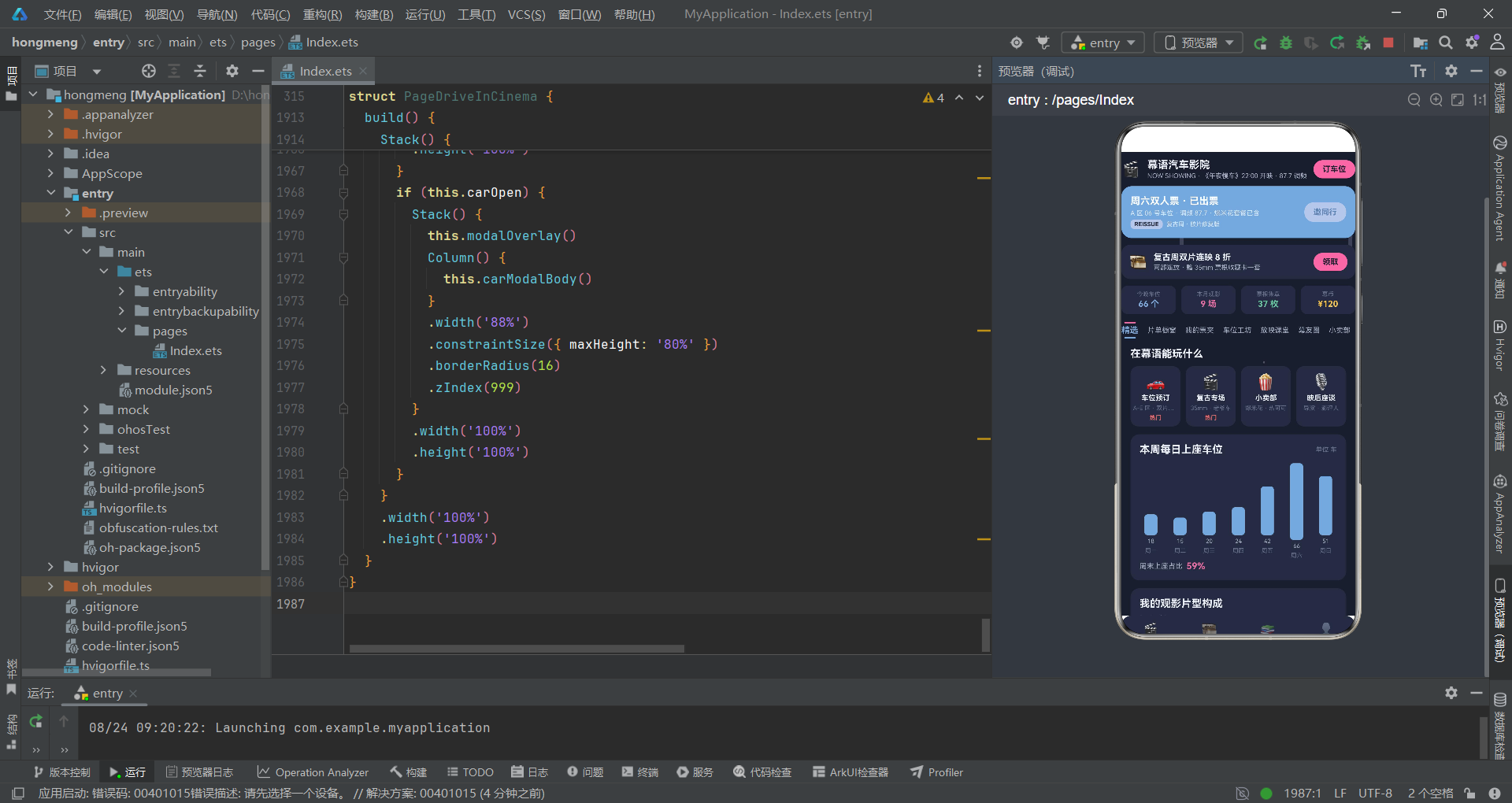
通过对幕语露天汽车影院复兴计划源码的逐段深度剖析,我们全面展现了 HarmonyOS 6.1.1 与 ArkTS API 24 在暗色主题应用开发中的技术能力。从 ColorPalette 暗色色彩体系到 @Observed 数据模型,从纯函数驱动的星光闪烁和探照灯光锥动画到 @Builder 组件化构建器,从 @State 状态管理到条件渲染弹窗架构,每一个技术环节都体现了声明式 UI 范式在夜间使用场景下的特殊考量。幕语平台不仅实现了片单管理、票夹调度、车位预订和小卖部商品管理等核心业务功能,更通过星光闪烁、探照灯光锥和霓虹光斑三重特效营造出了沉浸式的露天汽车影院夜间氛围。
在架构设计层面,幕语平台的"上下夹条式"子导航是其区别于檐语平台(左圆环锚点式)和蝶语平台(左右对称短翼式)的重要视觉创新。每个子标签由上下两侧的横条夹持文字组成,选中时上方横条为 accent 粉色、下方横条为 primary 蓝色,形成了强调色与主色在垂直方向上的对称呼应。这种设计在暗色主题环境下尤为出色——在深夜色背景上,选中的粉蓝双色横条提供了强烈的视觉指引,同时不破坏整体的夜间氛围。双层导航结构通过条件渲染机制实现了高效的内容切换,每个内容页通过 @Builder 装饰器封装为独立的构建函数,使框架能够精准识别需要重绘的组件子树。
从数据流的角度来看,幕语平台的 @Observed + @State 双层数据管理架构展现了 ArkTS 响应式编程在暗色主题场景下的完整实践。@Observed 装饰的 PostItem 和 TicketItem 实例在数组操作时被自动追踪,@State 装饰的 postList 和 ticketList 数组作为响应式容器将变更通知传递给 ForEach 列表组件。车位预订的完整流程——从 openCar 打开弹窗、用户填写 carRow 和 carFilm、doCar 提交后通过 postList.unshift 将预订信息以社区动态形式展示——体现了"用户交互 -> 状态更新 -> 数据变更 -> UI 刷新"的完整闭环。暗色主题下弹窗遮罩使用 0.7 的更高透明度,增强了弹窗的视觉聚焦效果,这是暗色主题设计中对遮罩层参数的特殊优化。

开源鸿蒙跨平台开发社区汇聚开发者与厂商,共建“一次开发,多端部署”的开源生态,致力于降低跨端开发门槛,推动万物智联创新。
更多推荐


 6
6 0
0- 0


 已为社区贡献44条内容

所有评论(0)