基于HarmonyOS API 24 React Native跨平台鸿蒙开发实战系列:TextInput表单事件绑定
本文是基于HarmonyOS API 24的进行的React Native跨平台技术实战项目
React Native 跨端鸿蒙开发,行业简称 RNOH(React Native OpenHarmony),是社区 + 华为共建的适配层方案:把 Meta 的 React Native 框架完整移植到鸿蒙(HarmonyOS NEXT / OpenHarmony),让一套 React/JS/TS 代码,同时运行在Android、iOS、鸿蒙手机 / 平板 / PC多端,属于原生级跨端方案,区别于 WebView 套壳网页方案。
简单一句话:前端工程师不用学 ArkTS,用熟悉的 React 语法写业务,底层自动映射成鸿蒙 ArkUI 原生控件,打包成鸿蒙标准 hap 应用上架应用市场。
它的核心定位可以概括为:不改变 React/TypeScript 前端研发习惯,复用现有 RN 业务代码资产,依托鸿蒙系统底层接口做一层高性能中间适配层,将 JSX 组件、JS 业务逻辑映射为鸿蒙原生 ArkUI 控件,最终构建可在手机、平板、车机、智慧屏、PC 等全鸿蒙设备运行、支持上架华为应用市场的原生级应用。和 UniApp、WebView 套壳等网页类跨端方案有本质区别,RNOH 不依赖浏览器内核渲染页面,所有 UI 渲染、手势交互、视图层级全部交给鸿蒙系统原生图形引擎处理,不存在网页性能瓶颈、样式兼容偏差等问题。
兼容完整 React 生态、Hooks、JSX、RN 标准组件,前端工程师无需学习 ArkTS、ArkUI 声明式语法,仅需少量平台兼容代码即可完成多端适配;底层打通鸿蒙 NAPI、ArkUI C 底层接口,兼顾代码复用性与鸿蒙原生能力调用,核心面向存量 RN App 快速新增鸿蒙渠道,是前端团队切入鸿蒙生态最低成本的技术路线。
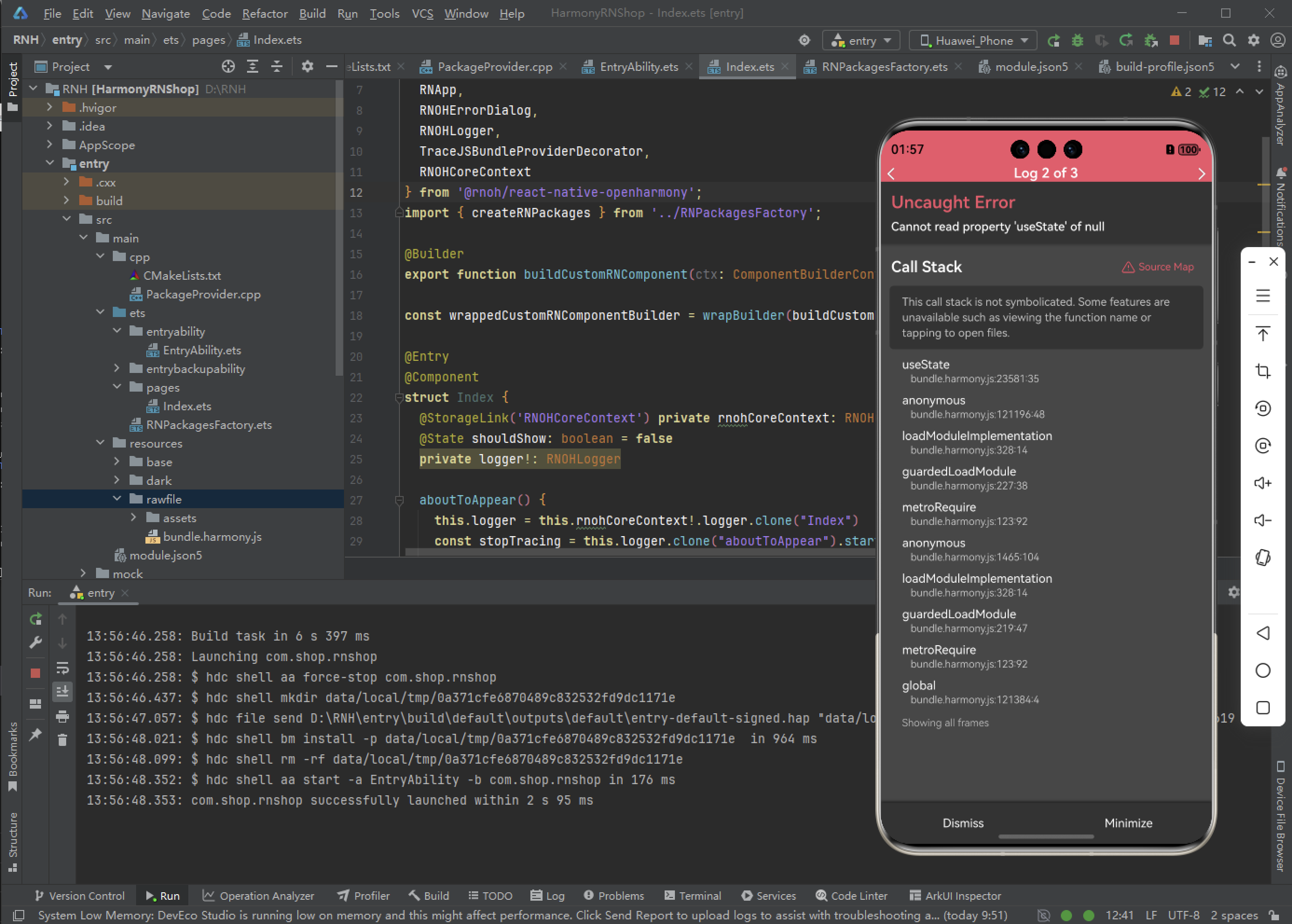
Uncaught Error
cannot read propertry 'useState' of null
这个错误通常是因为在React组件中尝试访问值为null的对象的useState属性。以下是常见的解决方案:
主要原因和解决方法
1. React导入问题
确保在文件顶部正确导入React:
import React from 'react';
2. 组件使用位置错误
useState只能在函数组件内部使用,不能在类组件、普通函数或组件外部使用 =》 检查到这里
3. React版本冲突
如果是本地调试时出现,可能是React版本冲突导致,可以尝试:
- 统一项目中的React版本
- 检查是否有多个React实例
import React from 'react';
import { View, Text, Dimensions, StyleSheet, Image, TextInput, AppRegistry } from 'react-native';

//获取屏幕的宽高
const screenWidth =Math.round( Dimensions.get('window').width);
const screenHight =Math.round( Dimensions.get('window').height);

const [phone, onChangePhone] = React.useState('');

const AppStyles = StyleSheet.create({
  wrap: {
    width: '100%',
    height: screenHight,
    backgroundColor: '#85BDFF'
  },
  title: {
    width: '100%',
    height: 72,
    fontFamily: 'OPPOSans, OPPOSans',
    fontWeight: 'normal',
    paddingTop: 50,
    fontSize: 36,
    color: '#304057',
    lineHeight: 72,
    textAlign: 'center',
    fontStyle: 'normal'
  },
  banner: {
    paddingTop: 50,
    paddingRight: 32,
    paddingLeft: 32,
  },
  bannerItem: {
    paddingTop: 10,
    display: 'flex',
    flexDirection:'row',
    alignItems: 'center',
    justifyContent: 'center',
    width: '50%',
  },
  loginBox: {
    width: '100%',
    paddingTop: 29,
    paddingLeft: 20,
    paddingRight: 20,
    borderTopRightRadius: 30,
    borderTopLeftRadius: 30,
    backgroundColor: '#F2F8FF',
    flex: 1
  }
})
function App() {
  return (
    <View style={AppStyles.wrap}>
      <Text style={AppStyles.title}>鸿蒙ReactNative系统</Text>
      <View style={AppStyles.banner}>
        <View style={{display:'flex',flexDirection:'row',justifyContent:'space-between'}}>
          <View style={AppStyles.bannerItem}>
            <Image style={{width:27,height:27}} source={require('./images/checked.png')}></Image>
            <Text style={{paddingLeft: 4}}>实时业绩便捷查询</Text>
          </View>
          <View style={AppStyles.bannerItem}>
            <Image style={{width:27,height:27}} source={require('./images/checked.png')}></Image>
            <Text style={{paddingLeft: 4}}>订单状态轻松把控</Text>
          </View>
        </View>
        <View style={{display:'flex',flexDirection:'row',justifyContent:'space-between'}}>
          <View style={AppStyles.bannerItem}>
            <Image style={{width:27,height:27}} source={require('./images/checked.png')}></Image>
            <Text style={{paddingLeft: 4}}>宣传数据全程管理</Text>
          </View>
          <View style={AppStyles.bannerItem}>
            <Image style={{width:27,height:27}} source={require('./images/checked.png')}></Image>
            <Text style={{paddingLeft: 4}}>海量素材一站转发</Text>
          </View>
        </View>
      </View>

      <Image style={{width:289, height: 182, display: 'flex', alignSelf: 'center', margin: 20}} source={require('./images/login-bg.png')}></Image>

      <View style={AppStyles.loginBox}>
        <TextInput style={{width: '100%', height: 48, borderRadius: 10, backgroundColor: '#FFFFFF', paddingLeft: 16, paddingRight: 16, fontSize: 14, color: '#304057'}}
         placeholder="请输入手机号" onChangeText={onChangePhone} value={phone}></TextInput>
      </View>
    </View>
  );
}

export default App;
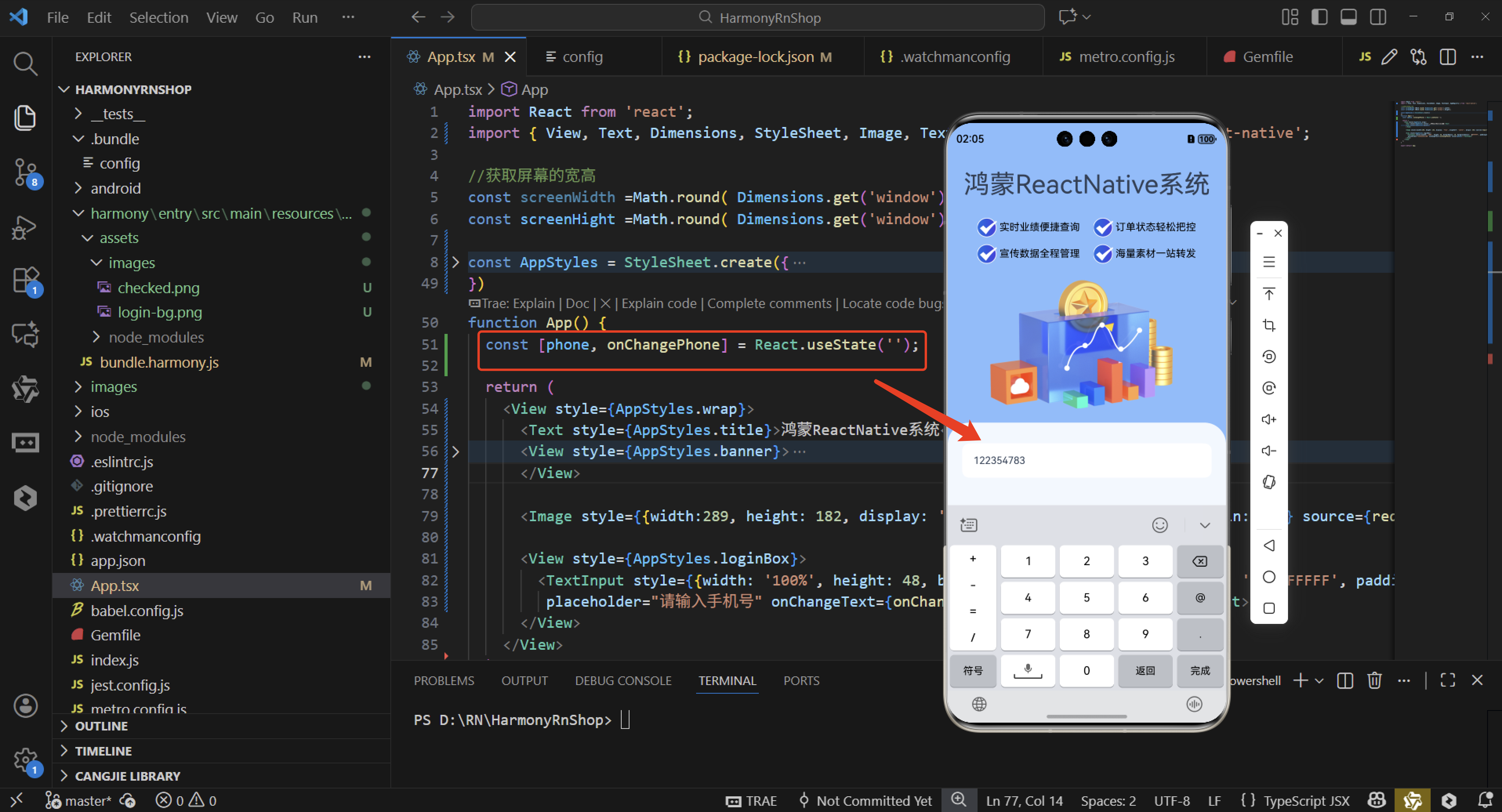
经过上面的代码检查,根据useState只能在函数组件内部使用,不能在类组件、普通函数或组件外部使用,发现const [phone, onChangePhone] = React.useState(‘’);代码写错了位置。
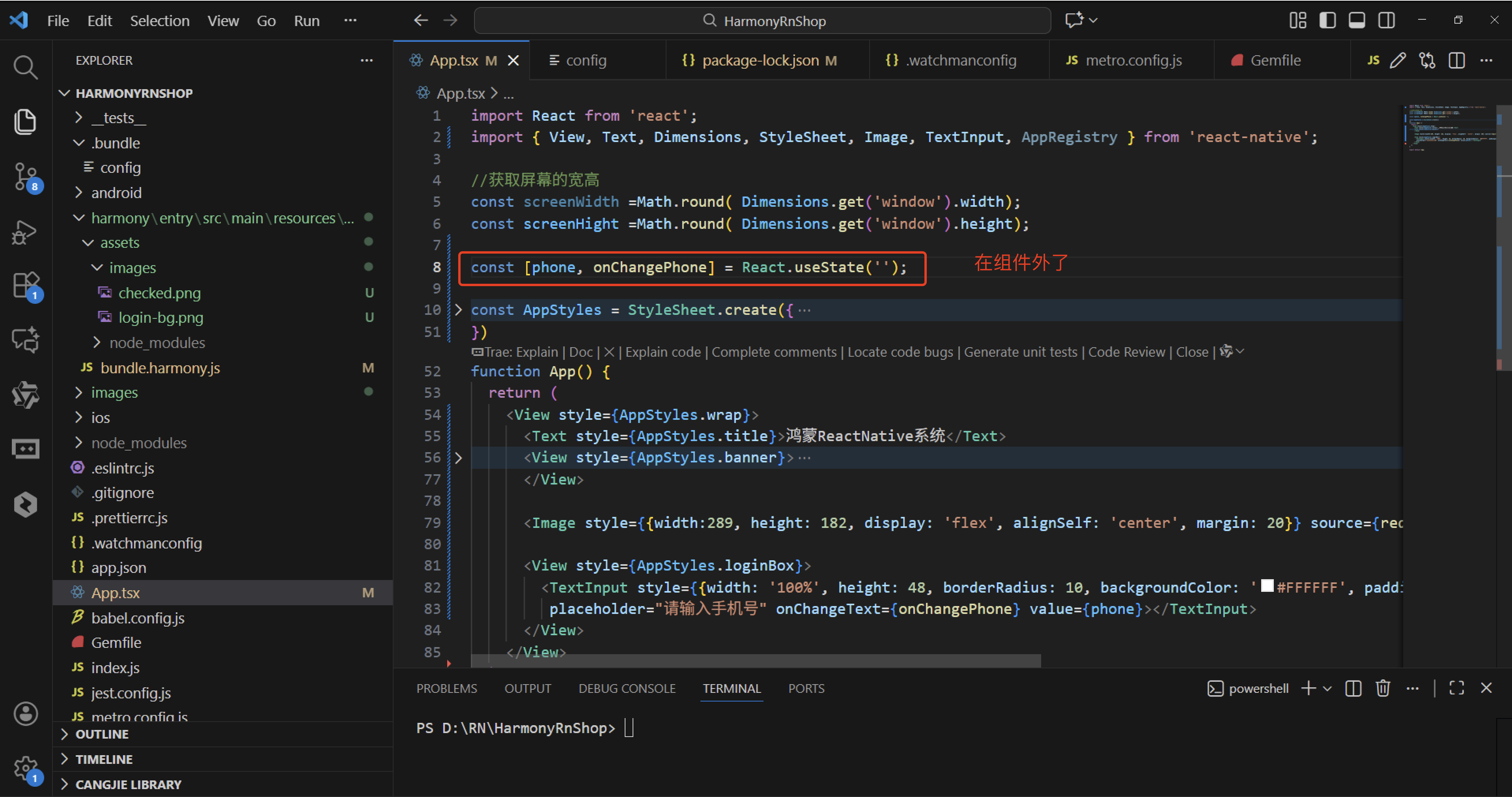
当你在 JavaScript 中遇到错误 “Uncaught Error: Cannot read property ‘useState’ of null” 时,这通常意味着你尝试访问一个不存在的属性。在这种情况下,属性是 useState,它应该是从 React 的库中导入的。这个错误最常见的原因是没有正确导入 React 或者导入的 React 对象为 null。或者,如果你使用的是函数组件,确保你的文件扩展名是 .jsx 并且你的项目配置了支持 JSX。useState只能在函数组件内部使用,不能在类组件、普通函数或组件外部使用,
安装DevEco Studio程序

选择目标安装目录:

设置环境变量,但是需要重启一下:

新建一个空白模板:

设置API为24的模板项目:

初始化项目,自动下载相关依赖:

完整代码:
import React from 'react';
import { View, Text, Dimensions, StyleSheet, Image, TextInput, AppRegistry } from 'react-native';

//获取屏幕的宽高
const screenWidth =Math.round( Dimensions.get('window').width);
const screenHight =Math.round( Dimensions.get('window').height);

const [phone, onChangePhone] = React.useState('');

const AppStyles = StyleSheet.create({
  wrap: {
    width: '100%',
    height: screenHight,
    backgroundColor: '#85BDFF'
  },
  title: {
    width: '100%',
    height: 72,
    fontFamily: 'OPPOSans, OPPOSans',
    fontWeight: 'normal',
    paddingTop: 50,
    fontSize: 36,
    color: '#304057',
    lineHeight: 72,
    textAlign: 'center',
    fontStyle: 'normal'
  },
  banner: {
    paddingTop: 50,
    paddingRight: 32,
    paddingLeft: 32,
  },
  bannerItem: {
    paddingTop: 10,
    display: 'flex',
    flexDirection:'row',
    alignItems: 'center',
    justifyContent: 'center',
    width: '50%',
  },
  loginBox: {
    width: '100%',
    paddingTop: 29,
    paddingLeft: 20,
    paddingRight: 20,
    borderTopRightRadius: 30,
    borderTopLeftRadius: 30,
    backgroundColor: '#F2F8FF',
    flex: 1
  }
})
function App() {
  return (
    <View style={AppStyles.wrap}>
      <Text style={AppStyles.title}>鸿蒙ReactNative系统</Text>
      <View style={AppStyles.banner}>
        <View style={{display:'flex',flexDirection:'row',justifyContent:'space-between'}}>
          <View style={AppStyles.bannerItem}>
            <Image style={{width:27,height:27}} source={require('./images/checked.png')}></Image>
            <Text style={{paddingLeft: 4}}>实时业绩便捷查询</Text>
          </View>
          <View style={AppStyles.bannerItem}>
            <Image style={{width:27,height:27}} source={require('./images/checked.png')}></Image>
            <Text style={{paddingLeft: 4}}>订单状态轻松把控</Text>
          </View>
        </View>
        <View style={{display:'flex',flexDirection:'row',justifyContent:'space-between'}}>
          <View style={AppStyles.bannerItem}>
            <Image style={{width:27,height:27}} source={require('./images/checked.png')}></Image>
            <Text style={{paddingLeft: 4}}>宣传数据全程管理</Text>
          </View>
          <View style={AppStyles.bannerItem}>
            <Image style={{width:27,height:27}} source={require('./images/checked.png')}></Image>
            <Text style={{paddingLeft: 4}}>海量素材一站转发</Text>
          </View>
        </View>
      </View>

      <Image style={{width:289, height: 182, display: 'flex', alignSelf: 'center', margin: 20}} source={require('./images/login-bg.png')}></Image>

      <View style={AppStyles.loginBox}>
        <TextInput style={{width: '100%', height: 48, borderRadius: 10, backgroundColor: '#FFFFFF', paddingLeft: 16, paddingRight: 16, fontSize: 14, color: '#304057'}}
         placeholder="请输入手机号" onChangeText={onChangePhone} value={phone}></TextInput>
      </View>
    </View>
  );
}

export default App;
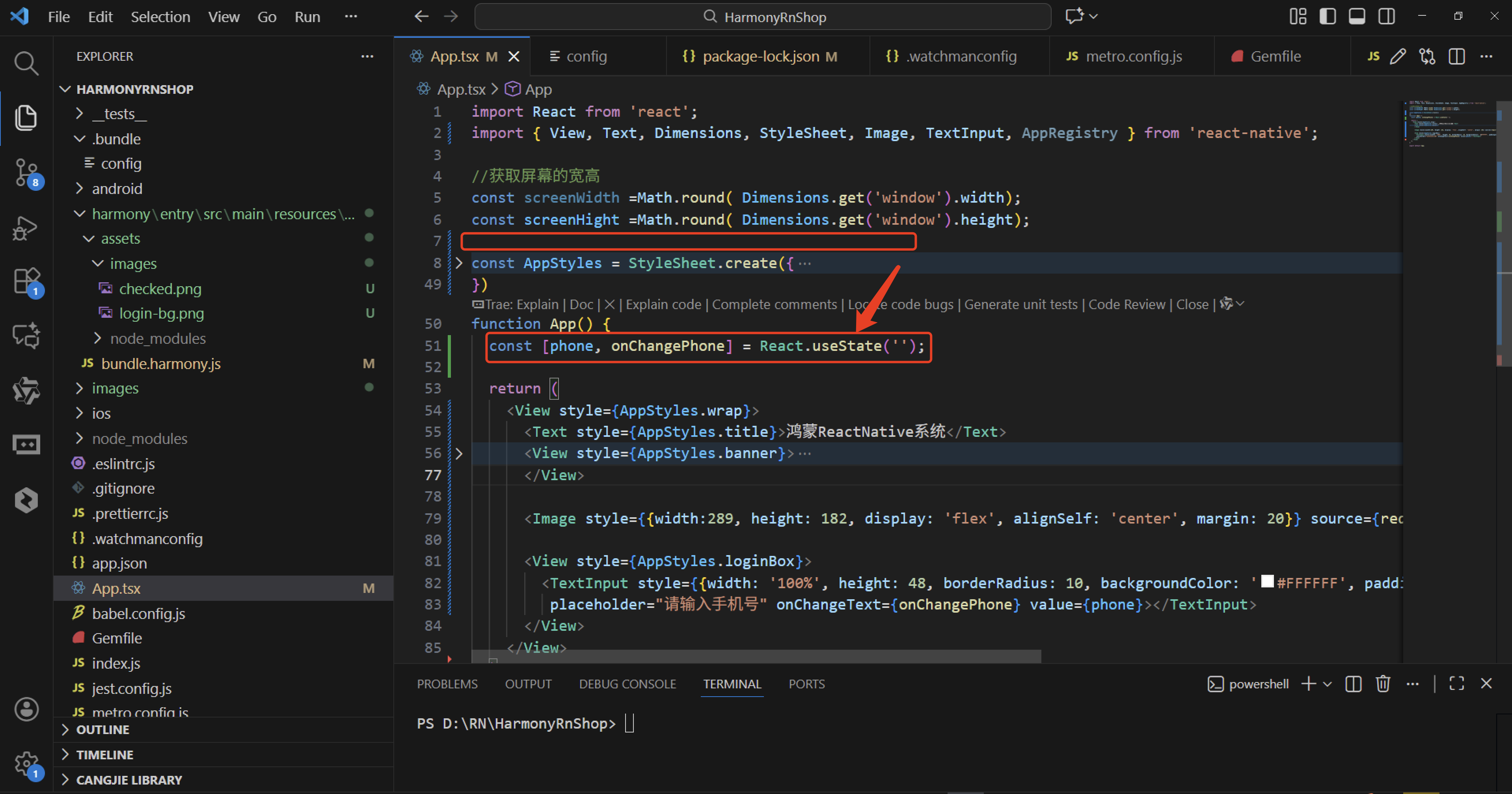
这个错误表明你尝试在React组件外部或类组件中使用了useState Hook,但React无法识别它。以下是关键点:
Hook的定位限制
useState是React Hooks API的一部分,必须在函数组件顶层调用。它不能出现在:
类组件中(应使用this.state)
普通函数或条件语句内部
任何React组件外部
错误本质
当React在非函数组件环境(如全局作用域)遇到useState时,会因找不到React上下文而抛出"null"错误。这类似于尝试在未初始化的对象上访问属性。
与类组件的区别
类组件通过this.state管理状态,而函数组件必须使用Hooks。两者不能混用状态管理方式。
解决方案方向
检查代码中所有使用useState的位置,确保它们:
- 位于function Component() {…}内部
- 不在条件/循环中
- 没有意外在全局作用域调用
这种设计是React Hooks的核心规则,确保状态与组件生命周期正确绑定。

开源鸿蒙跨平台开发社区汇聚开发者与厂商,共建“一次开发,多端部署”的开源生态,致力于降低跨端开发门槛,推动万物智联创新。
更多推荐
 3
3 0
0- 0



 已为社区贡献143条内容

所有评论(0)