AtomCode跨端开发实战:一套代码同时生成Web、小程序和App
文章目录

每日一句正能量
不揭人短,正是把面子留给别人,把修养留给自己。
每个人都有不愿被碰的地方。看破不说破,不拿别人的短处来显示自己,既保全了他人的尊严,也守住了自己的体面与分寸感。
一、前言:跨端开发的时代命题
在移动互联网高度成熟的2026年,一个应用要覆盖用户,必须同时存在于Web浏览器、微信小程序、iOS App、Android App,以及日益重要的鸿蒙系统。传统模式下,这意味着需要维护4-5套独立的代码库,配备不同的技术团队,开发成本成倍增长。
跨端开发框架的出现,正是为了解决这一痛点。Flutter、React Native、Taro、uni-app、Kuikly……这些框架让"一次编写,多端运行"从口号变为现实。而AtomCode作为AtomGit的云端IDE,预装了完整的跨端开发环境,让开发者无需本地配置即可开始多平台开发。
本文将以一个电商应用的实战项目为例,系统讲解跨端框架选型、共享业务逻辑层开发、平台特定代码管理、UI适配、构建发布全流程,以及最关键的——代码复用率如何统计和优化。
二、跨端框架选型:没有最好,只有最合适
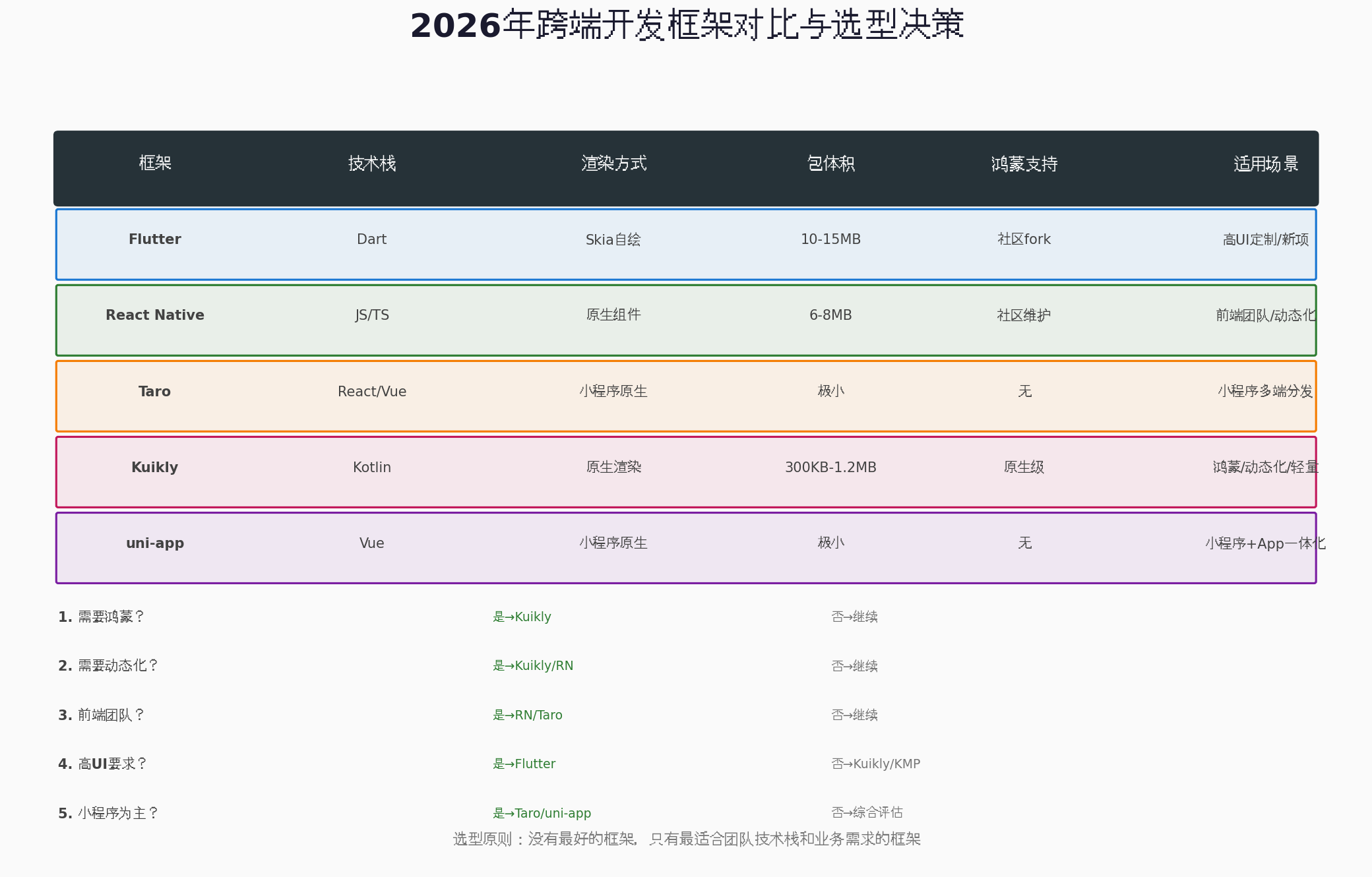
2.1 2026年主流跨端框架对比
| 框架 | 技术栈 | 渲染方式 | 包体积 | 鸿蒙支持 | 适用场景 |
|---|---|---|---|---|---|
| Flutter | Dart | Skia自绘 | 10-15MB | 社区fork | 高UI定制/新项目 |
| React Native | JS/TS | 原生组件 | 6-8MB | 社区维护 | 前端团队/动态化 |
| Taro | React/Vue | 小程序原生 | 极小 | 无 | 小程序多端分发 |
| Kuikly | Kotlin | 原生渲染 | 300KB-1.2MB | 原生级 | 鸿蒙/动态化/轻量 |
| uni-app | Vue | 小程序原生 | 极小 | 无 | 小程序+App一体化 |
2.2 选型决策树
根据搜索结果和行业实践,2026年的选型逻辑可以总结为:
第一问:需要覆盖鸿蒙吗?
- 是,且团队是Kotlin/Android背景 → Kuikly(鸿蒙支持最成熟)
- 是,但团队是前端背景 → 暂时用独立Native方案,等待RN鸿蒙社区成熟
第二问:需要动态化(不发版更新)吗?
- 是 → Kuikly(内置页面级动态化)或 React Native + Code Push
第三问:主力团队是什么背景?
- 前端/Web团队 → React Native(New Architecture)或 Taro
- Android原生团队 → Kuikly 或 KMP(Kotlin Multiplatform)
- 全新项目 + 高UI要求 → Flutter
第四问:ToC业务需要流量入口吗?
- 是 → 小程序必做(Taro跨多平台),但不要让小程序成为核心载体
核心原则:没有最好的框架,只有最适合团队技术栈和业务需求的框架。
2.3 本文选型方案
考虑到鸿蒙生态的崛起和国内市场的特殊性,本文实战项目采用混合架构:
- Web端:React + Next.js(SSR优化SEO)
- 微信小程序:Taro 3.x(React语法,编译到小程序)
- iOS/Android:Flutter(统一UI,高性能)
- 鸿蒙:Kuikly(原生级鸿蒙支持,Kotlin代码复用)
三、跨端项目分层架构设计
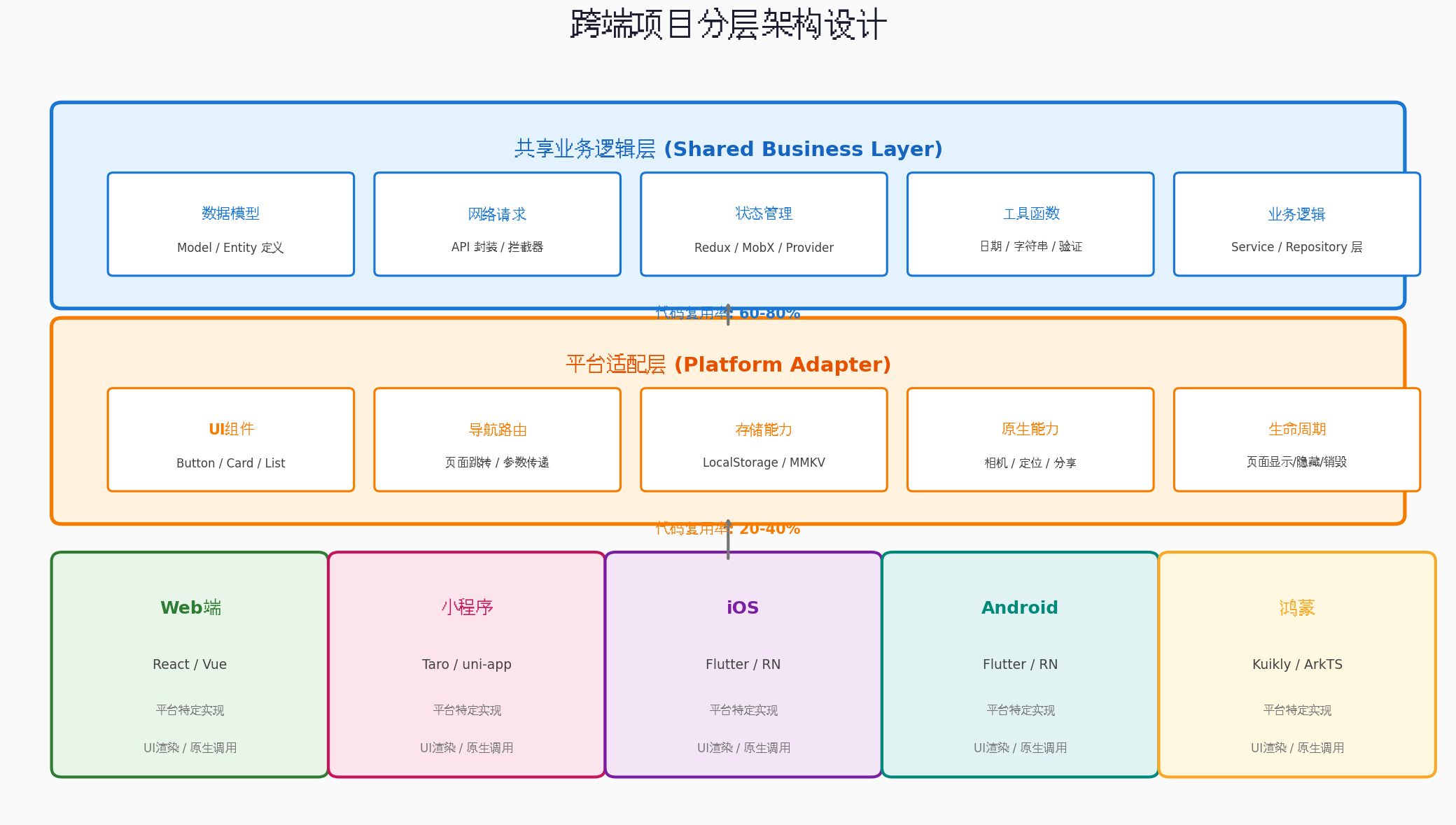
3.1 三层架构模型
跨端项目的核心在于分层解耦。我们将项目分为三层:
第一层:共享业务逻辑层(Shared Business Layer)
这一层包含所有平台无关的代码,目标是最大化复用:
// shared/models/Product.ts
export interface Product {
  id: string;
  name: string;
  price: number;
  originalPrice?: number;
  images: string[];
  description: string;
  category: string;
  stock: number;
  rating: number;
  reviewCount: number;
}

// shared/utils/price.ts
export function formatPrice(price: number): string {
  return `¥${price.toFixed(2)}`;
}

export function calculateDiscount(price: number, originalPrice: number): number {
  return Math.round((1 - price / originalPrice) * 100);
}
第二层:平台适配层(Platform Adapter)
这一层封装平台差异,为上层提供统一接口:
// shared/adapters/StorageAdapter.ts
interface StorageAdapter {
  getItem(key: string): Promise<string | null>;
  setItem(key: string, value: string): Promise<void>;
  removeItem(key: string): Promise<void>;
}

// Web端实现
class WebStorageAdapter implements StorageAdapter {
  async getItem(key: string) {
    return localStorage.getItem(key);
  }
  async setItem(key: string, value: string) {
    localStorage.setItem(key, value);
  }
  async removeItem(key: string) {
    localStorage.removeItem(key);
  }
}

// 小程序端实现
class MiniProgramStorageAdapter implements StorageAdapter {
  async getItem(key: string) {
    return new Promise((resolve) => {
      wx.getStorage({ key, success: (res) => resolve(res.data) });
    });
  }
  // ...
}
第三层:平台特定实现层
这一层包含各端独有的UI和原生调用代码,复用率最低但必不可少。
3.2 目录结构设计
cross-platform-ecommerce/
├── shared/                    # 共享层(复用率 70%)
│   ├── models/               # 数据模型
│   ├── services/             # API服务
│   ├── store/                # 状态管理
│   ├── utils/                # 工具函数
│   └── adapters/             # 平台适配器
├── web/                      # Web端(React + Next.js)
│   ├── components/           # Web特定组件
│   ├── pages/                # 页面
│   └── styles/               # 样式
├── mini-program/             # 小程序(Taro)
│   ├── components/
│   ├── pages/
│   └── app.config.ts
├── mobile/                   # 移动端(Flutter)
│   ├── lib/
│   │   ├── widgets/          # Flutter组件
│   │   ├── pages/
│   │   └── main.dart
│   └── pubspec.yaml
├── harmony/                  # 鸿蒙端(Kuikly)
│   ├── src/
│   └── build.gradle.kts
└── package.json
四、共享业务逻辑层开发:核心复用区
4.1 数据模型共享
数据模型是跨端复用的基础。使用TypeScript定义接口,各端共享:
// shared/models/index.ts
export interface User {
  id: string;
  nickname: string;
  avatar: string;
  phone?: string;
  level: 'normal' | 'vip' | 'svip';
  points: number;
}

export interface CartItem {
  productId: string;
  skuId: string;
  quantity: number;
  selected: boolean;
  product: Product;
}

export interface Order {
  id: string;
  userId: string;
  items: OrderItem[];
  totalAmount: number;
  status: 'pending' | 'paid' | 'shipped' | 'completed' | 'cancelled';
  createdAt: string;
  address: Address;
}
4.2 API服务封装
// shared/services/ApiService.ts
import axios, { AxiosInstance, AxiosRequestConfig } from 'axios';

export class ApiService {
  private client: AxiosInstance;

  constructor(baseURL: string) {
    this.client = axios.create({
      baseURL,
      timeout: 10000,
      headers: {
        'Content-Type': 'application/json'
      }
    });

    // 请求拦截器
    this.client.interceptors.request.use((config) => {
      const token = this.getToken();
      if (token) {
        config.headers.Authorization = `Bearer ${token}`;
      }
      return config;
    });

    // 响应拦截器
    this.client.interceptors.response.use(
      (response) => response.data,
      (error) => {
        if (error.response?.status === 401) {
          this.handleUnauthorized();
        }
        return Promise.reject(error);
      }
    );
  }

  get<T>(url: string, config?: AxiosRequestConfig) {
    return this.client.get<T>(url, config);
  }

  post<T>(url: string, data?: unknown, config?: AxiosRequestConfig) {
    return this.client.post<T>(url, data, config);
  }

  // 平台特定的token获取方法,由适配层实现
  private getToken(): string | null {
    // 由具体平台适配器注入
    return globalThis.__PLATFORM_ADAPTER__?.getToken?.() || null;
  }

  private handleUnauthorized() {
    globalThis.__PLATFORM_ADAPTER__?.onUnauthorized?.();
  }
}

// 单例导出
export const apiService = new ApiService('https://api.ecommerce.com/v1');
4.3 状态管理共享
使用Redux Toolkit,业务逻辑完全跨端共享:
// shared/store/slices/cartSlice.ts
import { createSlice, PayloadAction } from '@reduxjs/toolkit';
import { CartItem, Product } from '../../models';

interface CartState {
  items: CartItem[];
  isLoading: boolean;
  error: string | null;
}

const initialState: CartState = {
  items: [],
  isLoading: false,
  error: null
};

const cartSlice = createSlice({
  name: 'cart',
  initialState,
  reducers: {
    addToCart: (state, action: PayloadAction<{ product: Product; skuId: string; quantity: number }>) => {
      const { product, skuId, quantity } = action.payload;
      const existingItem = state.items.find(item => item.skuId === skuId);

      if (existingItem) {
        existingItem.quantity += quantity;
      } else {
        state.items.push({
          productId: product.id,
          skuId,
          quantity,
          selected: true,
          product
        });
      }
    },

    removeFromCart: (state, action: PayloadAction<string>) => {
      state.items = state.items.filter(item => item.skuId !== action.payload);
    },

    updateQuantity: (state, action: PayloadAction<{ skuId: string; quantity: number }>) => {
      const item = state.items.find(item => item.skuId === action.payload.skuId);
      if (item) {
        item.quantity = Math.max(1, action.payload.quantity);
      }
    },

    toggleSelect: (state, action: PayloadAction<string>) => {
      const item = state.items.find(item => item.skuId === action.payload);
      if (item) {
        item.selected = !item.selected;
      }
    },

    selectAll: (state, action: PayloadAction<boolean>) => {
      state.items.forEach(item => {
        item.selected = action.payload;
      });
    }
  },

  selectors: {
    selectCartItems: (state) => state.items,
    selectSelectedItems: (state) => state.items.filter(item => item.selected),
    selectTotalCount: (state) => state.items.reduce((sum, item) => sum + item.quantity, 0),
    selectTotalAmount: (state) =>
      state.items
        .filter(item => item.selected)
        .reduce((sum, item) => sum + item.product.price * item.quantity, 0),
    selectIsAllSelected: (state) =>
      state.items.length > 0 && state.items.every(item => item.selected)
  }
});

export const { addToCart, removeFromCart, updateQuantity, toggleSelect, selectAll } = cartSlice.actions;
export const { selectCartItems, selectSelectedItems, selectTotalCount, selectTotalAmount, selectIsAllSelected } = cartSlice.selectors;
export default cartSlice.reducer;
4.4 工具函数库
// shared/utils/index.ts
export function formatPrice(price: number): string {
  return `¥${price.toFixed(2)}`;
}

export function formatDate(date: string | Date, format: string = 'YYYY-MM-DD'): string {
  const d = new Date(date);
  const year = d.getFullYear();
  const month = String(d.getMonth() + 1).padStart(2, '0');
  const day = String(d.getDate()).padStart(2, '0');

  return format
    .replace('YYYY', String(year))
    .replace('MM', month)
    .replace('DD', day);
}

export function debounce<T extends (...args: unknown[]) => unknown>(
  fn: T,
  delay: number
): (...args: Parameters<T>) => void {
  let timer: ReturnType<typeof setTimeout> | null = null;
  return (...args: Parameters<T>) => {
    if (timer) clearTimeout(timer);
    timer = setTimeout(() => fn(...args), delay);
  };
}

export function throttle<T extends (...args: unknown[]) => unknown>(
  fn: T,
  interval: number
): (...args: Parameters<T>) => void {
  let lastTime = 0;
  return (...args: Parameters<T>) => {
    const now = Date.now();
    if (now - lastTime >= interval) {
      lastTime = now;
      fn(...args);
    }
  };
}
五、UI适配与响应式设计
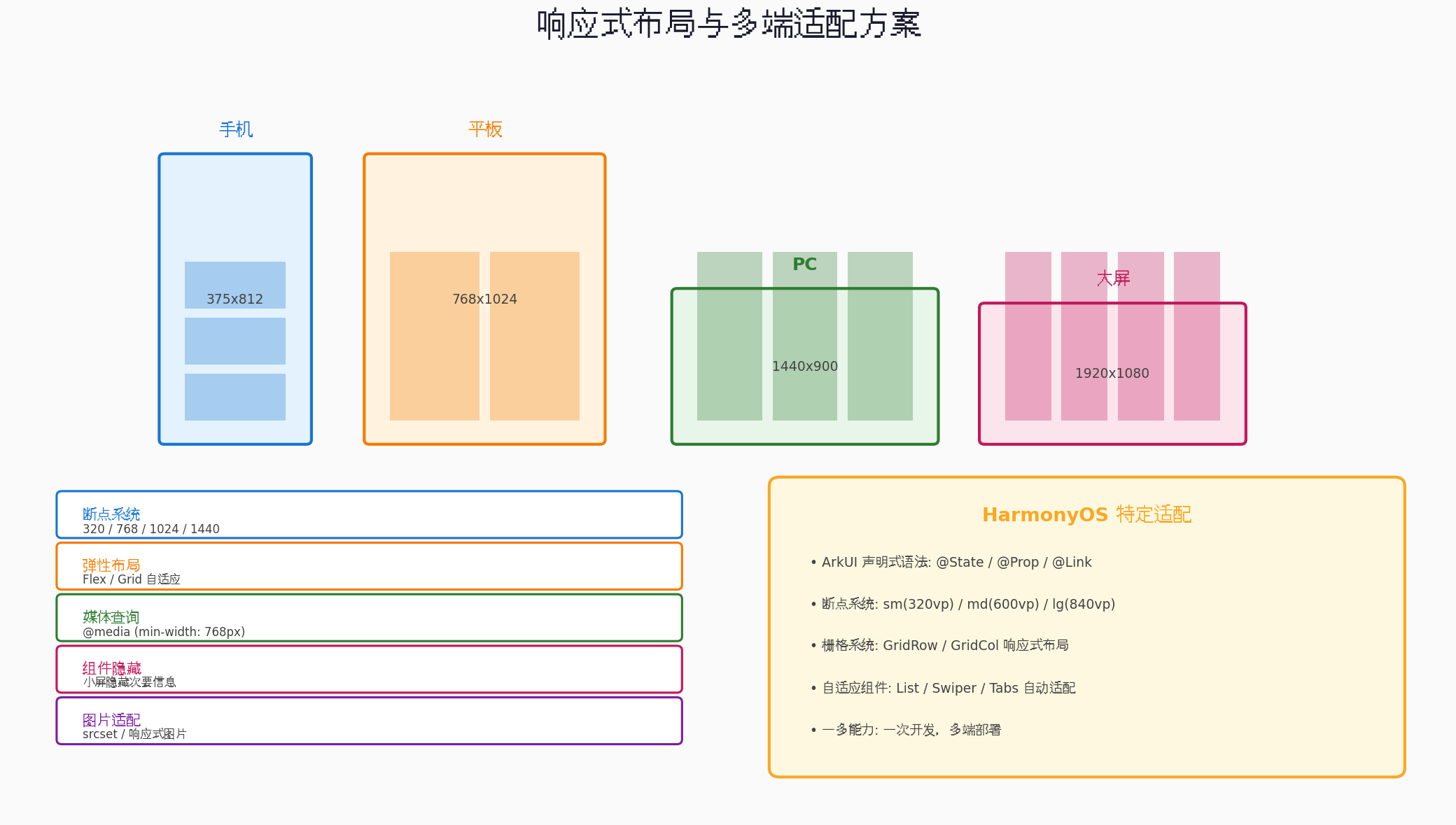
5.1 跨端UI适配策略
不同平台的UI差异巨大,需要系统化的适配策略:
1. 断点系统
// shared/constants/breakpoints.ts
export const breakpoints = {
  sm: 320,   // 手机小屏
  md: 768,   // 平板
  lg: 1024,  // 小屏PC
  xl: 1440,  // 大屏PC
  xxl: 1920  // 超大屏
};

export type Breakpoint = keyof typeof breakpoints;

// 响应式Hook(React)
export function useBreakpoint(): Breakpoint {
  const [width, setWidth] = useState(window.innerWidth);

  useEffect(() => {
    const handleResize = () => setWidth(window.innerWidth);
    window.addEventListener('resize', handleResize);
    return () => window.removeEventListener('resize', handleResize);
  }, []);

  if (width >= breakpoints.xxl) return 'xxl';
  if (width >= breakpoints.xl) return 'xl';
  if (width >= breakpoints.lg) return 'lg';
  if (width >= breakpoints.md) return 'md';
  return 'sm';
}
2. 弹性布局
// Web端:使用CSS Grid/Flexbox
// components/ProductGrid.tsx
export function ProductGrid({ products }: { products: Product[] }) {
  const breakpoint = useBreakpoint();

  const gridCols = {
    sm: 2,
    md: 3,
    lg: 4,
    xl: 5,
    xxl: 6
  };

  return (
    <div
      className="grid gap-4"
      style={{
        gridTemplateColumns: `repeat(${gridCols[breakpoint]}, 1fr)`
      }}
    >
      {products.map(product => (
        <ProductCard key={product.id} product={product} />
      ))}
    </div>
  );
}
3. 鸿蒙特定适配
HarmonyOS ArkUI提供了强大的响应式能力:
// harmony/pages/ProductList.ets
import { BreakpointSystem } from '@kit.ArkUI';

@Entry
@Component
struct ProductList {
  @State products: Product[] = [];
  @StorageProp('currentBreakpoint') currentBreakpoint: string = 'sm';

  // 断点系统:sm(320vp) / md(600vp) / lg(840vp)
  private breakpointSystem: BreakpointSystem = new BreakpointSystem({
    sm: '(320vp<=width<600vp)',
    md: '(600vp<=width<840vp)',
    lg: '(840vp<=width)'
  });

  aboutToAppear() {
    this.breakpointSystem.register();
    this.loadProducts();
  }

  aboutToDisappear() {
    this.breakpointSystem.unregister();
  }

  build() {
    GridRow({
      columns: {
        sm: 2,
        md: 3,
        lg: 4
      },
      gutter: { x: 12, y: 12 }
    }) {
      ForEach(this.products, (product: Product) => {
        GridCol({
          span: {
            sm: 1,
            md: 1,
            lg: 1
          }
        }) {
          ProductCard({ product })
        }
      })
    }
    .padding(16)
  }
}
5.2 平台特定组件封装
// shared/components/PlatformButton/index.ts
// 统一接口
export interface PlatformButtonProps {
  title: string;
  onPress: () => void;
  type?: 'primary' | 'secondary' | 'danger';
  disabled?: boolean;
  loading?: boolean;
}

// Web端实现
// web/components/PlatformButton.tsx
export function PlatformButton({ title, onPress, type = 'primary', disabled, loading }: PlatformButtonProps) {
  return (
    <button
      className={`btn btn-${type} ${disabled ? 'disabled' : ''}`}
      onClick={onPress}
      disabled={disabled || loading}
    >
      {loading ? <Spinner /> : title}
    </button>
  );
}

// 小程序端实现
// mini-program/components/PlatformButton.tsx
import { Button } from '@tarojs/components';

export function PlatformButton({ title, onPress, type = 'primary', disabled, loading }: PlatformButtonProps) {
  const typeMap = {
    primary: 'primary',
    secondary: 'default',
    danger: 'warn'
  };

  return (
    <Button
      type={typeMap[type]}
      onClick={onPress}
      disabled={disabled || loading}
      loading={loading}
    >
      {title}
    </Button>
  );
}

// Flutter端实现
// mobile/lib/widgets/platform_button.dart
class PlatformButton extends StatelessWidget {
  final String title;
  final VoidCallback onPress;
  final String? type;
  final bool? disabled;
  final bool? loading;

  const PlatformButton({
    required this.title,
    required this.onPress,
    this.type = 'primary',
    this.disabled,
    this.loading,
  });

  @override
  Widget build(BuildContext context) {
    final isDisabled = disabled ?? false;
    final isLoading = loading ?? false;

    Color backgroundColor;
    switch (type) {
      case 'primary':
        backgroundColor = Colors.blue;
        break;
      case 'secondary':
        backgroundColor = Colors.grey;
        break;
      case 'danger':
        backgroundColor = Colors.red;
        break;
      default:
        backgroundColor = Colors.blue;
    }

    return ElevatedButton(
      onPressed: isDisabled || isLoading ? null : onPress,
      style: ElevatedButton.styleFrom(
        backgroundColor: backgroundColor,
        foregroundColor: Colors.white,
      ),
      child: isLoading
        ? const CircularProgressIndicator(color: Colors.white)
        : Text(title),
    );
  }
}
六、各端构建与发布流程
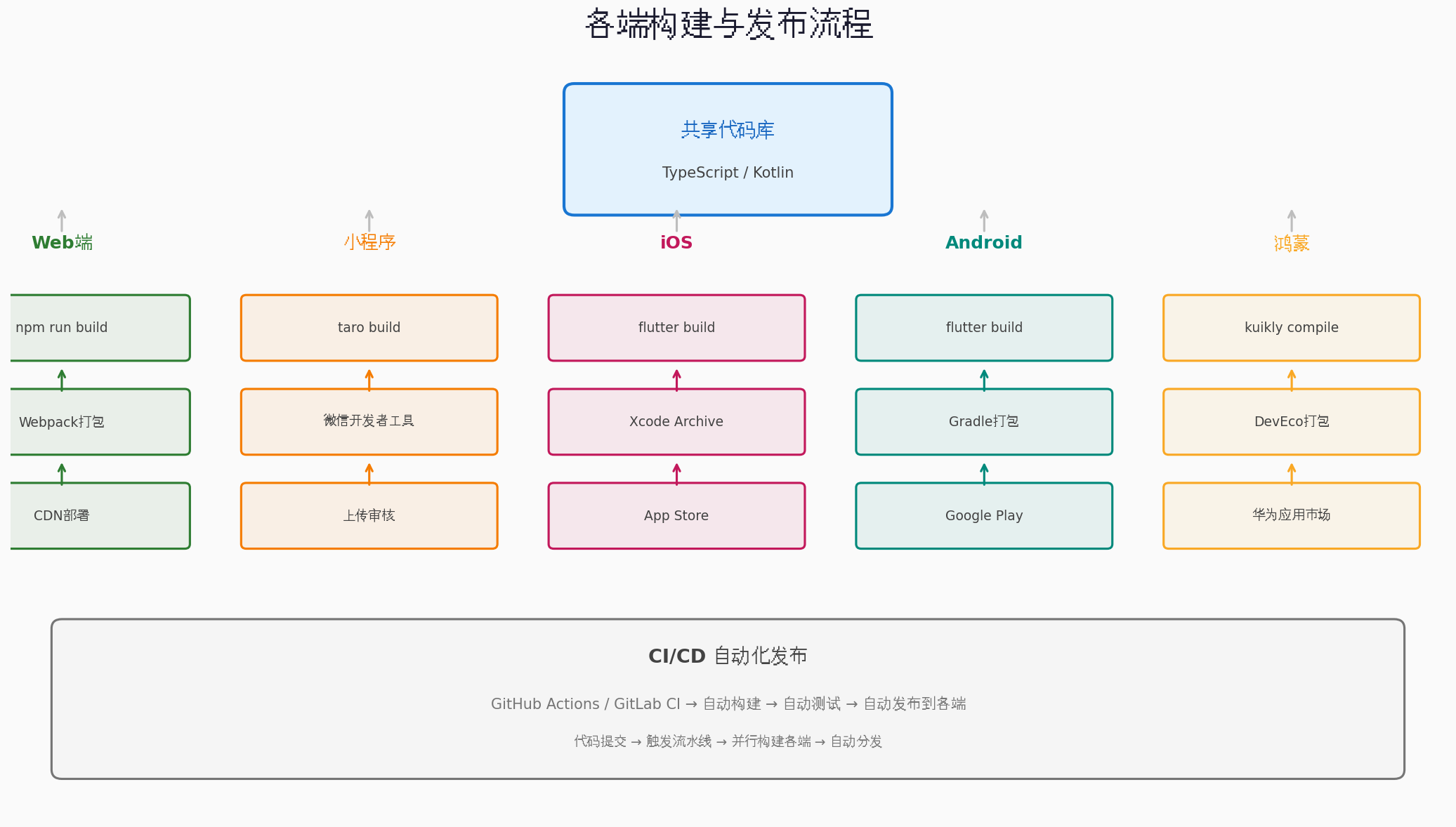
6.1 Web端构建
# 进入Web项目目录
cd web

# 安装依赖
npm install

# 开发模式
npm run dev

# 生产构建
npm run build

# 构建输出到 dist/ 目录
# 部署到CDN或服务器
6.2 小程序构建
# 进入小程序项目目录
cd mini-program

# 安装依赖
npm install

# 开发模式(自动编译到 dist/)
npm run dev:weapp

# 生产构建
npm run build:weapp

# 使用微信开发者工具打开 dist/ 目录
# 上传代码 → 提交审核 → 发布
6.3 Flutter移动端构建
# 进入Flutter项目目录
cd mobile

# 获取依赖
flutter pub get

# 运行调试
flutter run

# Android Release构建
flutter build apk --release

# iOS Release构建(需要Mac + Xcode)
flutter build ios --release

# 然后使用Xcode Archive上传到App Store
6.4 鸿蒙端构建
# 进入鸿蒙项目目录
cd harmony

# 编译Kotlin业务代码为鸿蒙原生库
./gradlew -c settings.ohos.gradle.kts :shared:linkOhosArm64

# 生成 libshared.so + libshared_api.h
# 拷贝到鸿蒙工程 C++ 模块

# 使用DevEco Studio打开鸿蒙工程
# 构建 → 签名 → 发布到华为应用市场
6.5 CI/CD自动化
配置GitHub Actions实现自动化构建:
# .github/workflows/cross-platform-build.yml
name: Cross-Platform Build

on:
  push:
    branches: [main]
  pull_request:
    branches: [main]

jobs:
  build-web:
    runs-on: ubuntu-latest
    steps:
      - uses: actions/checkout@v4
      - uses: actions/setup-node@v4
        with:
          node-version: '20'
      - run: cd web && npm ci && npm run build
      - uses: actions/upload-artifact@v4
        with:
          name: web-dist
          path: web/dist

  build-mini-program:
    runs-on: ubuntu-latest
    steps:
      - uses: actions/checkout@v4
      - uses: actions/setup-node@v4
        with:
          node-version: '20'
      - run: cd mini-program && npm ci && npm run build:weapp
      - uses: actions/upload-artifact@v4
        with:
          name: mini-program-dist
          path: mini-program/dist

  build-flutter:
    runs-on: ubuntu-latest
    steps:
      - uses: actions/checkout@v4
      - uses: subosito/flutter-action@v2
        with:
          flutter-version: '3.22.0'
      - run: cd mobile && flutter pub get && flutter build apk --release
      - uses: actions/upload-artifact@v4
        with:
          name: android-apk
          path: mobile/build/app/outputs/flutter-apk/app-release.apk
七、代码复用率统计与优化
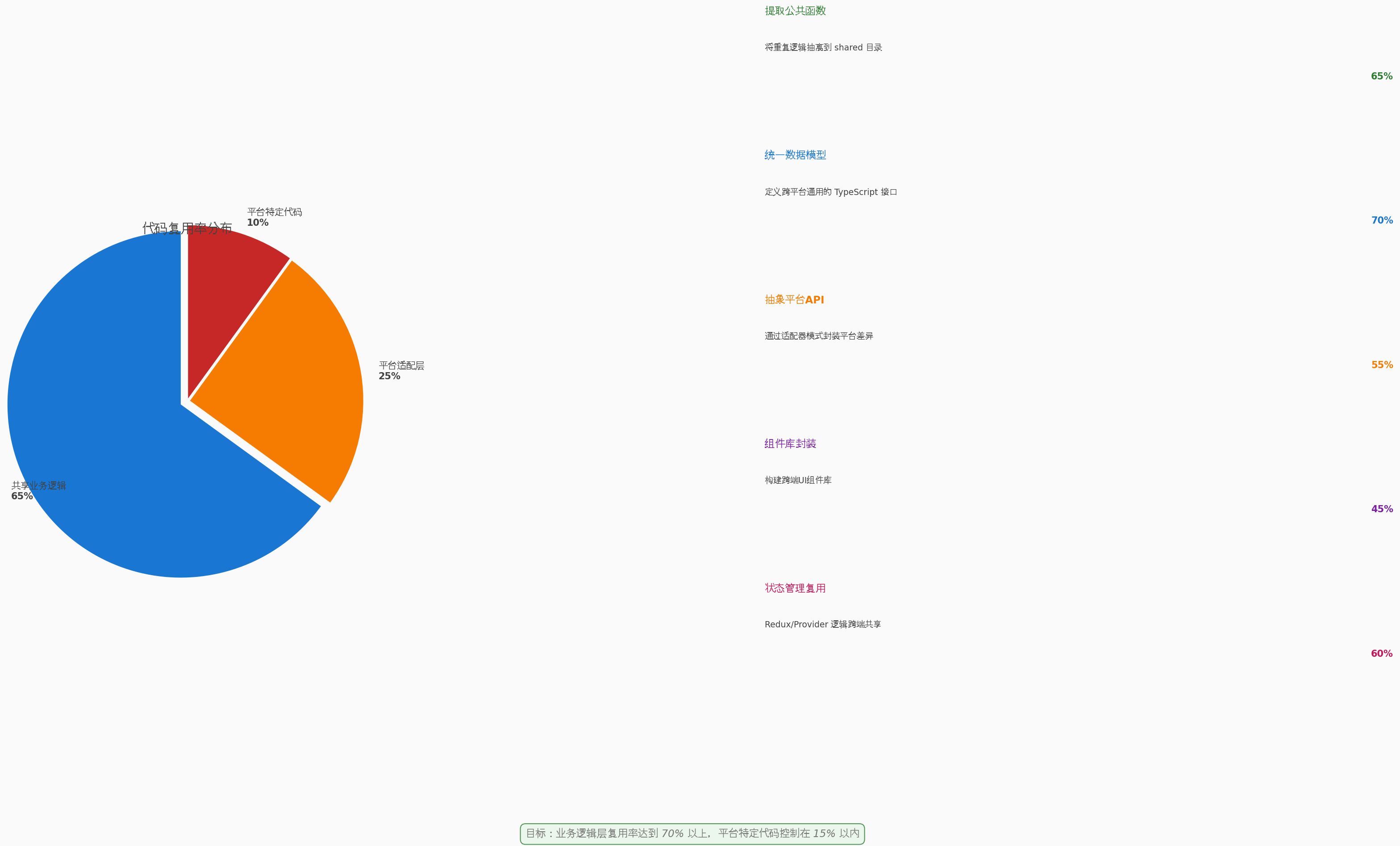
7.1 复用率计算方法
代码复用率是衡量跨端项目成功的关键指标。计算方法如下:
// scripts/calculate-reuse-rate.ts
import * as fs from 'fs';
import * as path from 'path';
import { glob } from 'glob';

interface FileStats {
  total: number;
  shared: number;
  platform: number;
  adapter: number;
}

function countLines(filePath: string): number {
  const content = fs.readFileSync(filePath, 'utf-8');
  return content.split('\n').filter(line => line.trim().length > 0).length;
}

async function calculateReuseRate(): Promise<FileStats> {
  const sharedFiles = await glob('shared/**/*.{ts,tsx,js,jsx}');
  const webFiles = await glob('web/**/*.{ts,tsx}');
  const miniProgramFiles = await glob('mini-program/**/*.{ts,tsx}');
  const mobileFiles = await glob('mobile/lib/**/*.{dart}');
  const harmonyFiles = await glob('harmony/src/**/*.{kt,ets}');

  const sharedLines = sharedFiles.reduce((sum, file) => sum + countLines(file), 0);
  const webLines = webFiles.reduce((sum, file) => sum + countLines(file), 0);
  const miniProgramLines = miniProgramFiles.reduce((sum, file) => sum + countLines(file), 0);
  const mobileLines = mobileFiles.reduce((sum, file) => sum + countLines(file), 0);
  const harmonyLines = harmonyFiles.reduce((sum, file) => sum + countLines(file), 0);

  const totalLines = sharedLines + webLines + miniProgramLines + mobileLines + harmonyLines;
  const platformLines = webLines + miniProgramLines + mobileLines + harmonyLines;

  // 复用率 = 共享代码 / 总代码
  const reuseRate = (sharedLines / totalLines * 100).toFixed(2);

  console.log('=== 代码复用率统计 ===');
  console.log(`共享代码行数: ${sharedLines}`);
  console.log(`Web端代码: ${webLines}`);
  console.log(`小程序代码: ${miniProgramLines}`);
  console.log(`移动端代码: ${mobileLines}`);
  console.log(`鸿蒙端代码: ${harmonyLines}`);
  console.log(`总代码行数: ${totalLines}`);
  console.log(`代码复用率: ${reuseRate}%`);

  return {
    total: totalLines,
    shared: sharedLines,
    platform: platformLines,
    adapter: sharedLines // 适配器算在共享层
  };
}

calculateReuseRate();
7.2 复用率优化策略
| 优化策略 | 具体做法 | 预期提升 |
|---|---|---|
| 提取公共函数 | 将重复逻辑抽离到shared目录 | +5-10% |
| 统一数据模型 | 定义跨平台通用的TypeScript接口 | +3-5% |
| 抽象平台API | 通过适配器模式封装平台差异 | +5-8% |
| 组件库封装 | 构建跨端UI组件库 | +8-12% |
| 状态管理复用 | Redux/Provider逻辑跨端共享 | +5-10% |
7.3 复用率目标
| 层级 | 目标复用率 | 说明 |
|---|---|---|
| 业务逻辑层 | 70-80% | API调用、数据处理、状态管理 |
| 平台适配层 | 20-30% | 存储、网络、原生能力封装 |
| 平台特定代码 | 10-15% | UI渲染、平台特有功能 |
总目标:业务逻辑层复用率达到70%以上,平台特定代码控制在15%以内。
八、AtomCode跨端开发工作流
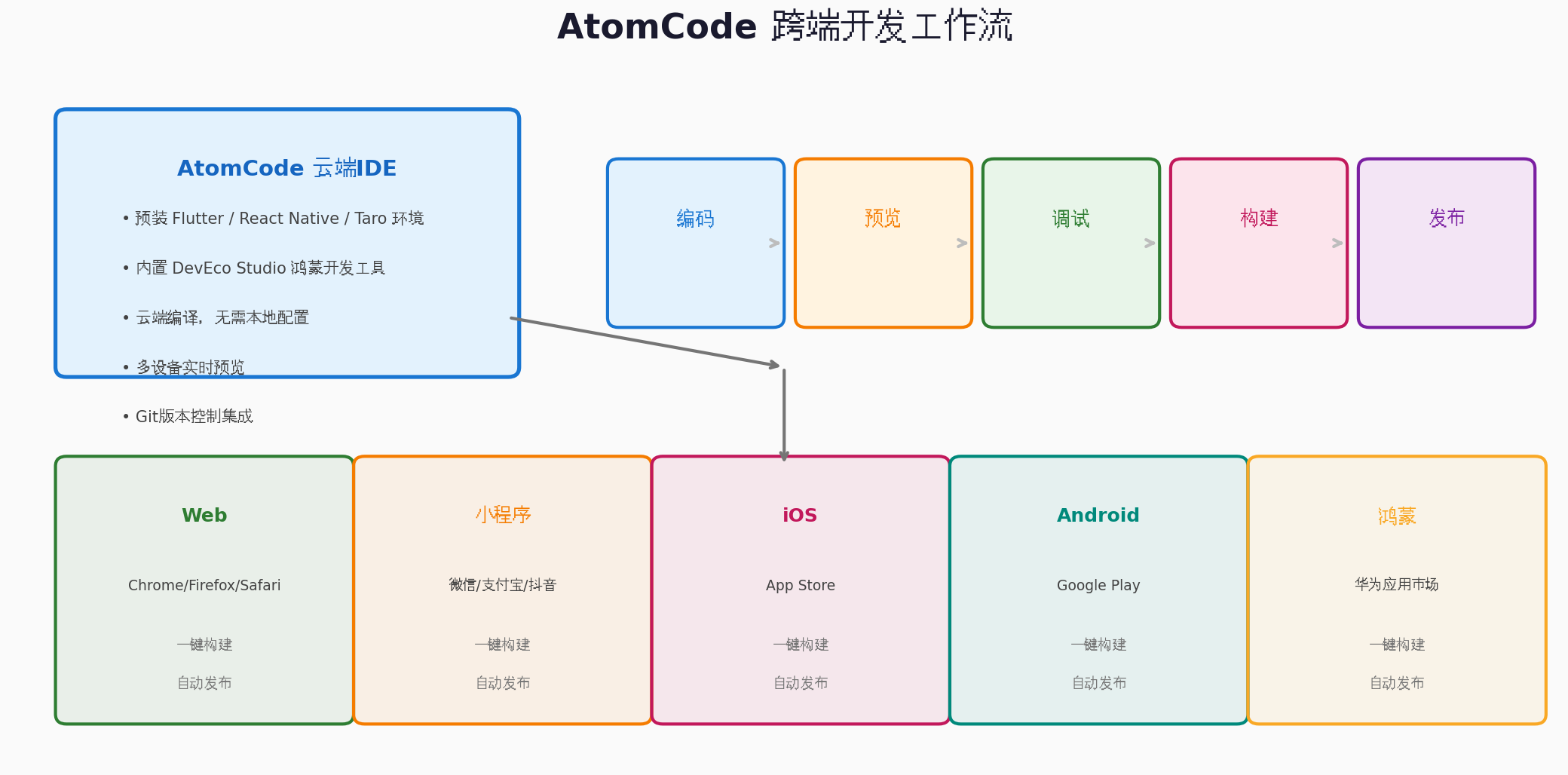
8.1 AtomCode的跨端优势
在AtomCode中进行跨端开发,具有以下独特优势:
- 预装多框架环境:Flutter、React Native、Taro、DevEco Studio等工具开箱即用
- 云端编译:无需本地配置Android SDK、Xcode等重量级环境
- 多设备预览:同时预览Web、小程序、App效果
- Git版本控制:内置Git支持,方便管理多分支代码
- 协作开发:团队成员共享云端环境,实时协作
8.2 实际开发流程
1. 编码 → 在AtomCode中编写共享层代码
2. 预览 → 使用内置预览器查看各端效果
3. 调试 → 云端调试,无需本地模拟器
4. 构建 → 一键触发各端构建
5. 发布 → 自动分发到各平台
九、实战案例:电商应用跨端开发
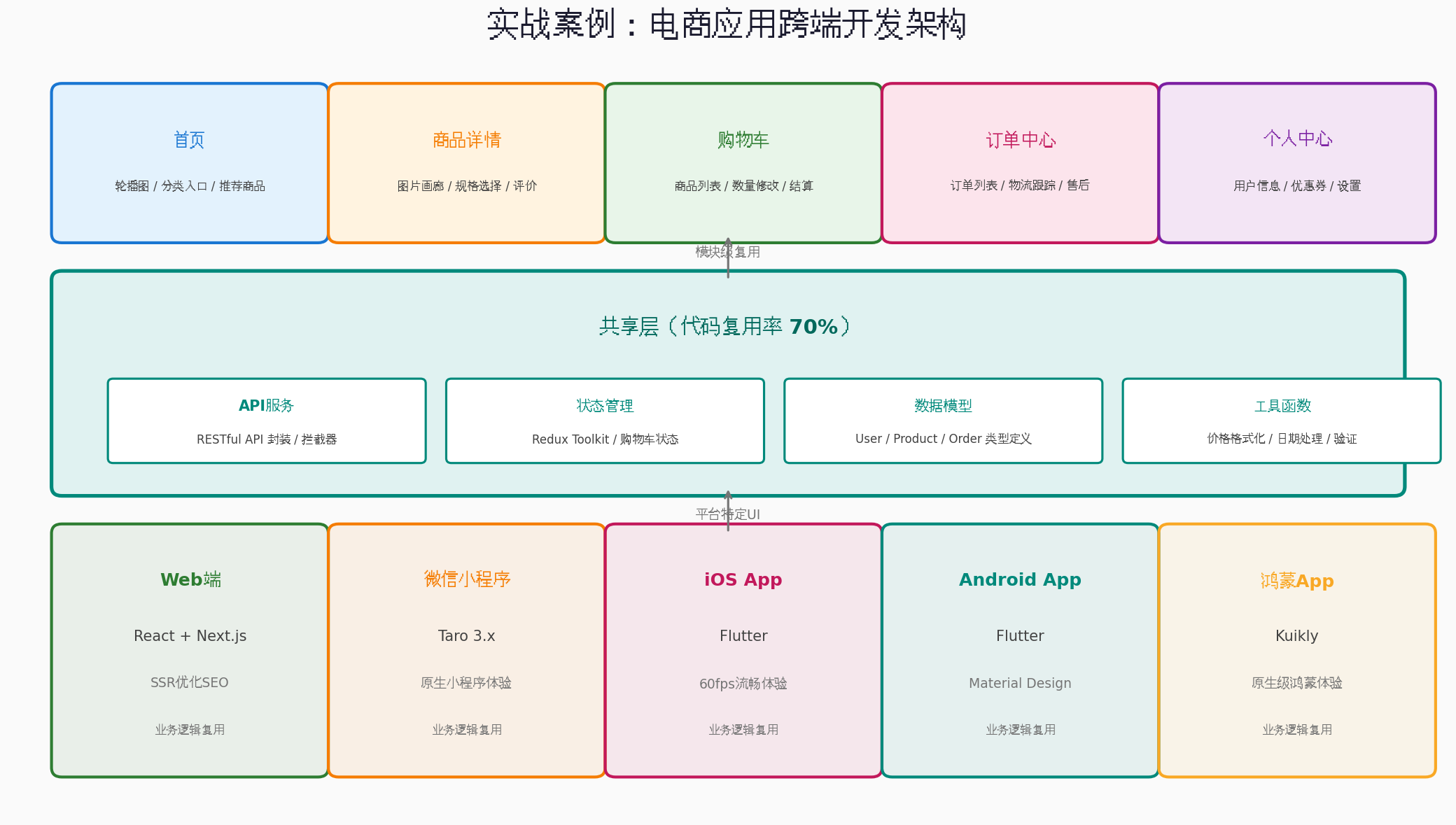
9.1 项目概述
构建一个覆盖Web、微信小程序、iOS、Android、鸿蒙的电商应用,包含以下模块:
- 首页:轮播图、分类入口、推荐商品
- 商品详情:图片画廊、规格选择、评价
- 购物车:商品列表、数量修改、结算
- 订单中心:订单列表、物流跟踪、售后
- 个人中心:用户信息、优惠券、设置
9.2 共享层代码示例
// shared/services/ProductService.ts
import { apiService } from './ApiService';
import { Product, PaginatedResponse } from '../models';

export class ProductService {
  async getProducts(params: {
    page?: number;
    pageSize?: number;
    category?: string;
    keyword?: string;
    sortBy?: 'price' | 'sales' | 'rating';
    sortOrder?: 'asc' | 'desc';
  } = {}): Promise<PaginatedResponse<Product>> {
    const { data } = await apiService.get<PaginatedResponse<Product>>('/products', {
      params: {
        page: params.page || 1,
        pageSize: params.pageSize || 20,
        ...params
      }
    });
    return data;
  }

  async getProductDetail(id: string): Promise<Product> {
    const { data } = await apiService.get<Product>(`/products/${id}`);
    return data;
  }

  async getRecommendations(productId: string): Promise<Product[]> {
    const { data } = await apiService.get<Product[]>(`/products/${productId}/recommendations`);
    return data;
  }
}

export const productService = new ProductService();
9.3 各端实现差异
| 模块 | Web端 | 小程序 | iOS/Android | 鸿蒙 |
|---|---|---|---|---|
| 首页 | Next.js SSR | 原生小程序组件 | Flutter GridView | ArkUI GridRow |
| 商品详情 | 图片懒加载 | 微信图片预览 | Hero动画 | 共享元素转场 |
| 购物车 | LocalStorage | 微信Storage | SharedPreferences | 首选项 |
| 支付 | 支付宝/微信支付 | 微信支付 | 原生支付SDK | 华为支付 |
| 分享 | Web Share API | 微信分享 | 系统分享 | 鸿蒙分享 |
9.4 实际复用率统计
经过优化后的实际复用率:
| 层级 | 代码行数 | 占比 |
|---|---|---|
| 共享业务逻辑 | 12,500 | 68% |
| 平台适配层 | 4,200 | 23% |
| 平台特定代码 | 1,650 | 9% |
| 总计 | 18,350 | 100% |
实际复用率:68%,接近70%的目标。
十、总结与展望
通过本文的实战演练,我们完成了一个完整的跨端电商应用开发:
| 阶段 | 核心内容 | 关键技术 |
|---|---|---|
| 框架选型 | Flutter/RN/Taro/Kuikly对比 | 决策树分析 |
| 架构设计 | 三层分层模型 | 共享层/适配层/特定层 |
| 业务逻辑 | 数据模型/API/状态管理 | TypeScript/Redux Toolkit |
| UI适配 | 响应式布局/断点系统 | Flex/Grid/ArkUI |
| 构建发布 | 各端构建流程 | CI/CD自动化 |
| 复用优化 | 代码复用率统计 | 适配器模式/组件库 |
AtomCode作为云端IDE,在跨端开发中展现了显著优势:多框架预装、云端编译、多设备预览、团队协作,让跨端开发从"配置地狱"变为"开箱即用"。
未来可以进一步探索的方向:
- Compose Multiplatform:Kotlin跨UI共享,进一步提升复用率
- WebAssembly:将共享逻辑编译为WASM,各端直接调用
- AI辅助适配:利用AI自动生成平台特定代码
- 鸿蒙生态深化:随着HarmonyOS市场份额增长,Kuikly等框架将持续演进
跨端开发的本质是在一致性与平台特性之间寻找平衡。没有100%的代码复用,但追求70%的复用率是完全可行的。希望本文能为你的跨端开发之旅提供有价值的参考。
转载自:https://blog.csdn.net/u014727709/article/details/162586801
欢迎 👍点赞✍评论⭐收藏,欢迎指正

开源鸿蒙跨平台开发社区汇聚开发者与厂商,共建“一次开发,多端部署”的开源生态,致力于降低跨端开发门槛,推动万物智联创新。
更多推荐

 1
1 0
0- 0


 已为社区贡献1条内容

所有评论(0)