OpenHarmony 英语学习 App 实战:学习成就系统与数据可视化面板设计
OpenHarmony 英语学习 App 实战:学习成就系统与数据可视化面板设计
摘要
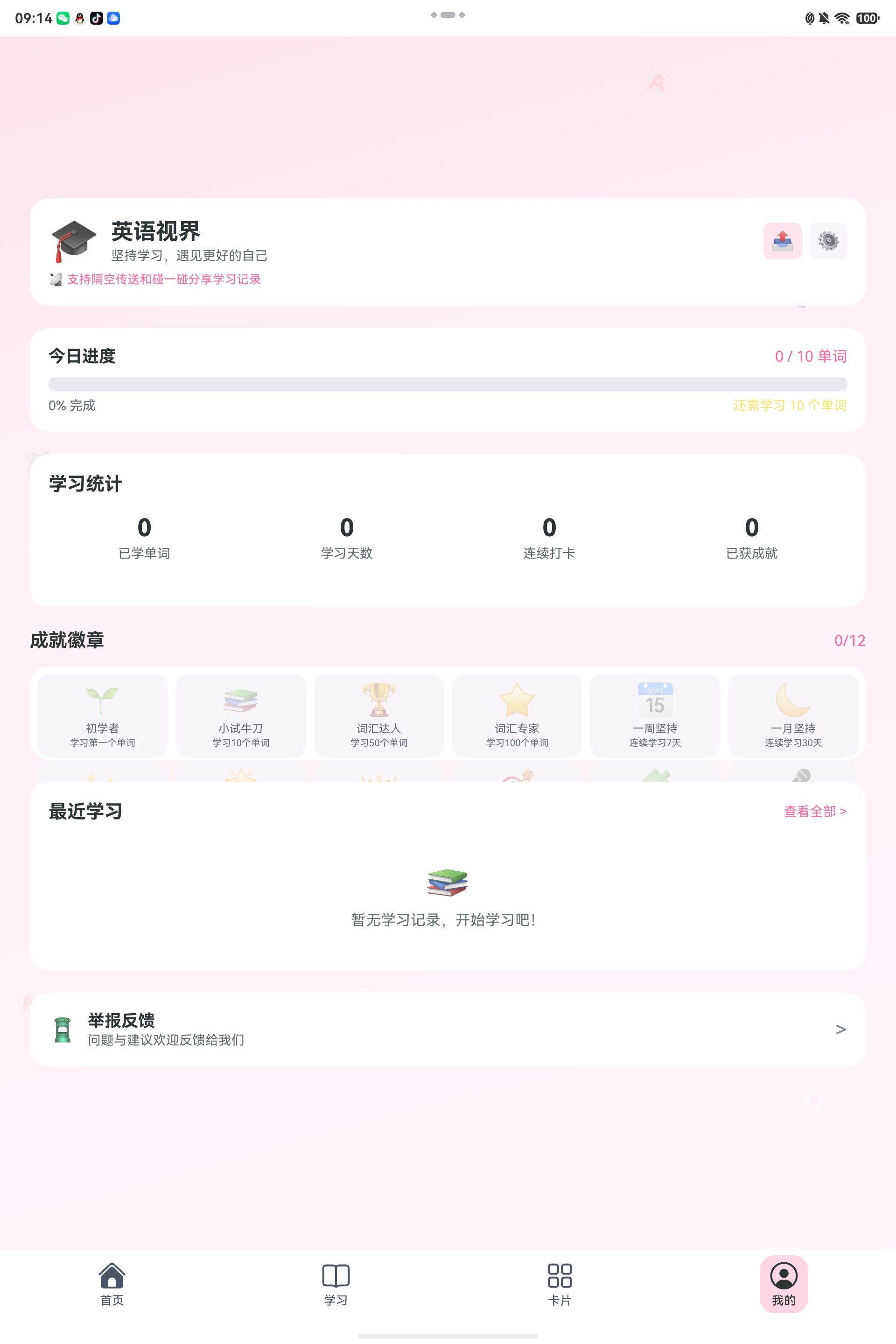
学习 App 要让用户坚持,除了内容本身,还需要持续反馈。用户今天学了多少、连续坚持了几天、解锁了哪些成就,这些都能形成正向激励。本文以「英语视界 YingYu」项目为例,分享如何在 OpenHarmony/HarmonyOS 中设计学习成就系统和数据可视化面板。🏆
相关文件包括:
entry/src/main/ets/utils/UserDataManager.ts
entry/src/main/ets/pages/ProfileContent.ets
entry/src/main/ets/model/DataModels.ts
一、为什么需要成就系统?
英语学习是长期任务,很难每天都有明显进步。成就系统的价值在于:
- 给用户阶段性反馈;
- 强化连续学习行为;
- 让学习数据更可见;
- 提升打卡动力;
- 鼓励探索不同功能模块。
「英语视界」中的成就覆盖多个维度:
- 第一个单词;
- 10 个、50 个、100 个单词;
- 连续学习;
- 连续打卡;
- 完成每日目标;
- 趣味英语探索。
二、成就数据模型
项目中使用 Achievement 描述成就:
export interface Achievement {
  id: string
  title: string
  description: string
  icon: string
  unlocked: boolean
  unlockedDate?: string
}
字段含义:
id:唯一标识;title:成就名称;description:解锁条件;icon:展示图标;unlocked:是否解锁;unlockedDate:解锁日期。
这个模型很轻量,但足够支撑列表、徽章墙、个人中心统计等展示。
三、默认成就列表
项目在 UserDataManager.ts 中定义默认成就:
const defaultAchievements: Achievement[] = [
  { id: 'first_word', title: '初学者', description: '学习第一个单词', icon: '🌱', unlocked: false },
  { id: 'ten_words', title: '小试牛刀', description: '学习10个单词', icon: '📚', unlocked: false },
  { id: 'fifty_words', title: '词汇达人', description: '学习50个单词', icon: '🏆', unlocked: false },
  { id: 'hundred_words', title: '词汇专家', description: '学习100个单词', icon: '⭐', unlocked: false },
  { id: 'first_week', title: '一周坚持', description: '连续学习7天', icon: '📅', unlocked: false },
  { id: 'first_month', title: '一月坚持', description: '连续学习30天', icon: '🌙', unlocked: false },
  { id: 'daily_streak_3', title: '学习新星', description: '连续3天打卡', icon: '✨', unlocked: false },
  { id: 'daily_streak_7', title: '学习达人', description: '连续7天打卡', icon: '🌟', unlocked: false },
  { id: 'daily_streak_30', title: '学习传奇', description: '连续30天打卡', icon: '👑', unlocked: false },
  { id: 'perfect_day', title: '完美一天', description: '完成每日学习目标', icon: '🎯', unlocked: false }
]
成就命名不只是技术问题,也影响用户感受。对于学生用户,文案要积极、轻松、有鼓励感。
四、合并默认成就和本地存储
应用升级后,可能会新增成就。如果直接读取旧数据,新增成就可能丢失。因此项目使用 mergeAchievementsFromStorage() 合并默认成就和本地成就状态。
function mergeAchievementsFromStorage(): Achievement[] {
  const byId = new Map<string, Achievement>()

  const stored = yingyuPrefGet(STORAGE_KEY_ACHIEVEMENTS)
  if (stored) {
    const parsed = JSON.parse(stored) as Achievement[]
    for (let i = 0; i < parsed.length; i++) {
      byId.set(parsed[i].id, parsed[i])
    }
  }

  const result: Achievement[] = []
  for (let i = 0; i < defaultAchievements.length; i++) {
    const def = defaultAchievements[i]
    const existing = byId.get(def.id)
    result.push({
      id: def.id,
      title: def.title,
      description: def.description,
      icon: def.icon,
      unlocked: existing ? existing.unlocked : false,
      unlockedDate: existing?.unlockedDate
    })
  }
  return result
}
这个设计非常实用:默认配置可以升级,用户解锁状态不会丢。
五、解锁成就
解锁逻辑封装为 unlockAchievement():
export function unlockAchievement(achievementId: string): boolean {
  try {
    const achievements = mergeAchievementsFromStorage()
    const achievement = achievements.find(a => a.id === achievementId)
    if (achievement && !achievement.unlocked) {
      achievement.unlocked = true
      achievement.unlockedDate = getTodayDateKey()
      persistAchievements(achievements)
      return true
    }
  } catch (e) {
    console.error('Failed to unlock achievement:', e)
  }
  return false
}
函数返回 boolean,页面可以据此决定是否弹出“新成就解锁”的提示。
六、词汇数量成就
当用户学习新单词时,会检查词汇成就:
function checkWordAchievements(learnedCount: number): void {
  if (learnedCount >= 1) {
    unlockAchievement('first_word')
  }
  if (learnedCount >= 10) {
    unlockAchievement('ten_words')
  }
  if (learnedCount >= 50) {
    unlockAchievement('fifty_words')
  }
  if (learnedCount >= 100) {
    unlockAchievement('hundred_words')
  }
}
对应调用点:
export function addLearnedWord(wordId: number): boolean {
  const learned = getLearnedWords()
  if (!learned.includes(wordId)) {
    learned.push(wordId)
    yingyuPrefSet(STORAGE_KEY_LEARNED_WORDS, JSON.stringify(learned))
    checkWordAchievements(learned.length)
    return true
  }
  return false
}
这样用户每学一个新词,系统都会自动判断是否达到里程碑。
七、连续学习和打卡成就
项目中区分了两种连续性:
- 学习连续:当天学过单词;
- 打卡连续:当天完成目标。
连续学习天数计算:
function getLearningStreakDays(): number {
  const map = buildProgressDateMap()
  let streak = 0
  const check = new Date()
  check.setHours(0, 0, 0, 0)

  while (true) {
    const key = `${check.getFullYear()}-${(check.getMonth() + 1).toString().padStart(2, '0')}-${check.getDate().toString().padStart(2, '0')}`
    const rec = map.get(key)
    if (rec && rec.wordsLearned > 0) {
      streak++
      check.setDate(check.getDate() - 1)
    } else {
      break
    }
  }
  return streak
}
成就同步:
function syncStreakAndMiscAchievements(): void {
  const learnStreak = getLearningStreakDays()
  if (learnStreak >= 7) {
    unlockAchievement('first_week')
  }
  if (learnStreak >= 30) {
    unlockAchievement('first_month')
  }

  const checkStreak = getCheckInStreakDays()
  if (checkStreak >= 3) {
    unlockAchievement('daily_streak_3')
  }
  if (checkStreak >= 7) {
    unlockAchievement('daily_streak_7')
  }
}
这种设计让“学习过”和“完成目标”都有激励。
八、记录今日学习
当用户完成学习行为后,调用 recordTodayLearning():
export function recordTodayLearning(wordsLearned: number): void {
  const progress = getLearningProgress()
  const today = getTodayDateKey()
  const settings = getUserSettings()
  const goal = settings.dailyGoal
  const todayRecord = progress.find(p => p.date === today)

  if (todayRecord) {
    todayRecord.wordsLearned += wordsLearned
    todayRecord.completed = goal > 0 && todayRecord.wordsLearned >= goal
  } else {
    progress.push({
      date: today,
      wordsLearned: wordsLearned,
      minutesSpent: 0,
      completed: goal > 0 && wordsLearned >= goal
    })
  }

  saveProgressList(progress)
  syncStreakAndMiscAchievements()
}
这个函数同时完成:
- 今日学习数累加;
- 判断是否完成每日目标;
- 保存进度;
- 同步连续学习成就。
九、个人中心数据面板
ProfileContent.ets 中展示用户学习数据:
loadData() {
  this.achievements = getAchievements()
  this.progress = getLearningProgress()
  const stats = getStatistics()
  this.totalWords = stats.totalWords
  this.totalDays = stats.totalDays
  this.consecutiveDays = stats.consecutiveDays
  this.achievementsCount = stats.achievementsCount

  const settings = getUserSettings()
  this.dailyGoal = settings.dailyGoal
  this.recentProgress = getRecentProgressSorted(7)
}
页面层只获取统计结果,不直接计算所有业务逻辑。
十、今日进度卡片
个人中心展示今日目标进度:
getProgressPercentage(): number {
  if (this.dailyGoal === 0) return 0
  return Math.min(100, Math.round((this.todayProgress / this.dailyGoal) * 100))
}
进度条:
Row() {
  Column()
    .width(this.getProgressPercentage().toString() + '%')
    .height(this.isTabletDevice ? 14 : 12)
    .backgroundColor($r('app.color.primary_color'))
    .borderRadius(6)
}
.width('100%')
.backgroundColor($r('app.color.divider_color'))
.borderRadius(6)
这类进度条比单纯数字更直观,适合个人中心和首页。
十一、学习统计卡片
统计卡展示四个核心数字:
this.StatColumn(this.totalWords.toString(), '已学单词')
this.StatColumn(this.totalDays.toString(), '学习天数')
this.StatColumn(this.consecutiveDays.toString(), '连续打卡')
this.StatColumn(this.achievementsCount.toString(), '已获成就')
对学习 App 来说,这四个指标很有代表性:
- 总量;
- 时间;
- 连续性;
- 成就。
十二、小结
本文结合「英语视界 YingYu」项目,拆解了学习成就系统和数据面板:
- 使用
Achievement表示成就; - 默认成就和本地状态合并,支持后续升级;
- 词汇数量、连续学习、每日目标都能触发成就;
recordTodayLearning()统一记录学习行为;- 个人中心展示今日进度、学习统计和成就数量;
- 通过进度条和卡片提升数据可读性。
学习坚持需要反馈,反馈需要数据,数据需要被设计成用户愿意看的样子。成就系统不是花哨功能,而是长期学习产品的激励引擎。🌟

开源鸿蒙跨平台开发社区汇聚开发者与厂商,共建“一次开发,多端部署”的开源生态,致力于降低跨端开发门槛,推动万物智联创新。
更多推荐

 1
1 0
0- 0


 已为社区贡献178条内容

所有评论(0)