RNOH 拉起 HarmonyOS 小艺智能体:商品运营助手真机实践
系列第 6 篇:基于 React Native OpenHarmony(RNOH)探索 HarmonyOS 原生创新能力。
本篇在 React Native 页面中封装“小艺商品运营助手”,通过 RNOH TurboModule 调用 ArkTS 的 Agent Framework Kit,并在 HarmonyOS 真机上完成参数传递、独立 Ability 承载和系统小艺对话拉起。
1. 本篇完成了什么?
我们要实现的不是一个只打印日志的 Mock,而是一条可以在真机运行的完整链路:
React Native 商品运营页面
    ↓
NativeXiaoyiAgentModule.openAgent(params)
    ↓
RNOH C++ TurboModule 元数据桥接
    ↓
ArkTS XiaoyiAgentModule
    ↓
FunctionController.isAgentSupport()
    ↓
启动 XiaoyiAgentAbility
    ↓
FunctionComponent 携带 queryText 拉起系统小艺对话
业务场景是跨境电商 SKU 运营。RN 侧把商品标题、类目、售价、毛利率、库存、广告占比、退款率和卖点组织成上下文,再交给小艺进行 Listing 标题优化、五点描述生成和风险分析。
本文对应的验证环境:
| 项目 | 实际环境 |
|---|---|
| 真机型号 | EMA-AL00U |
| 系统 SDK | OpenHarmony 6.1.1.125 |
| React Native | 0.84.1 |
| RNOH | 0.84.1 |
| Agent Kit | @kit.AgentFrameworkKit |
| 验证日期 | 2026-06-23 |
2. 真机效果
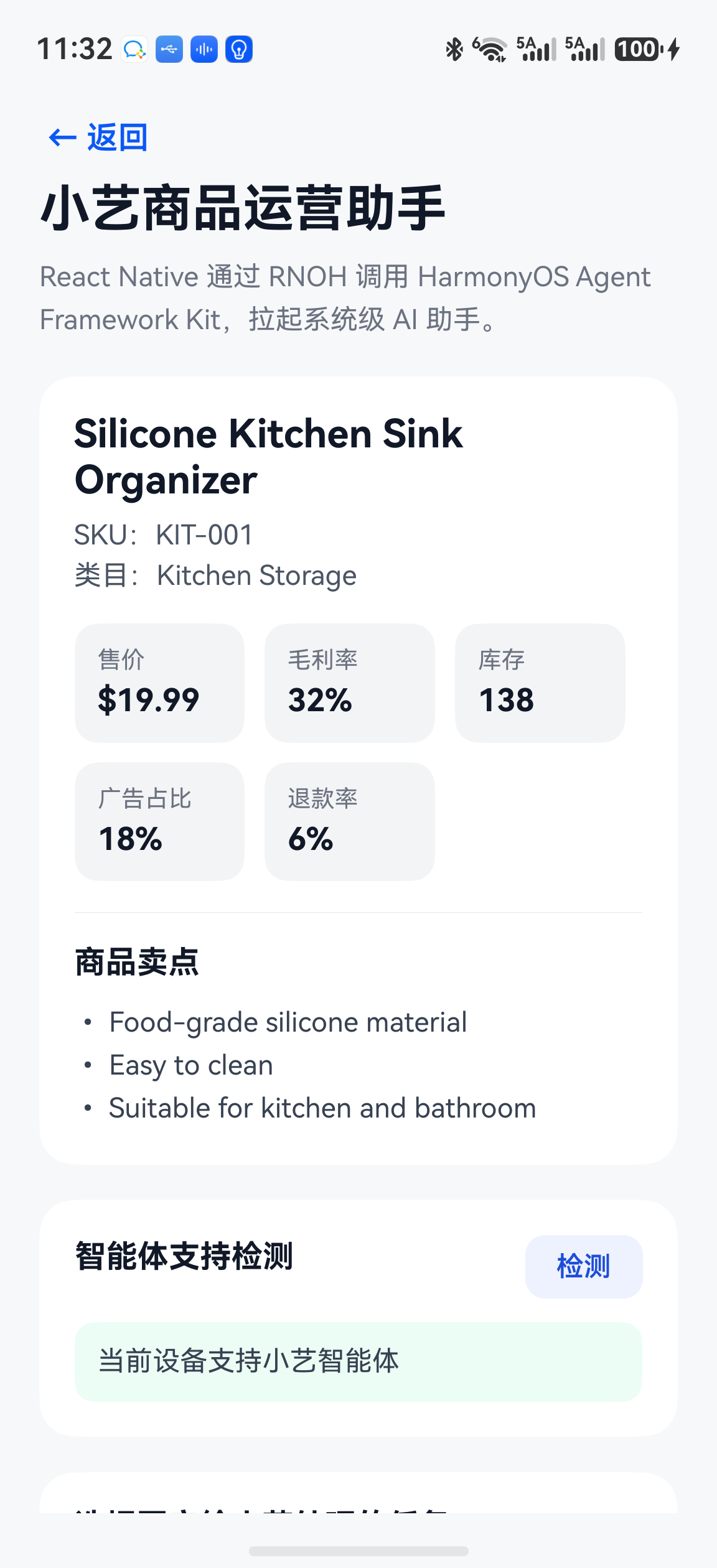
2.1 商品运营页面
RN 页面展示商品基础信息和运营指标。
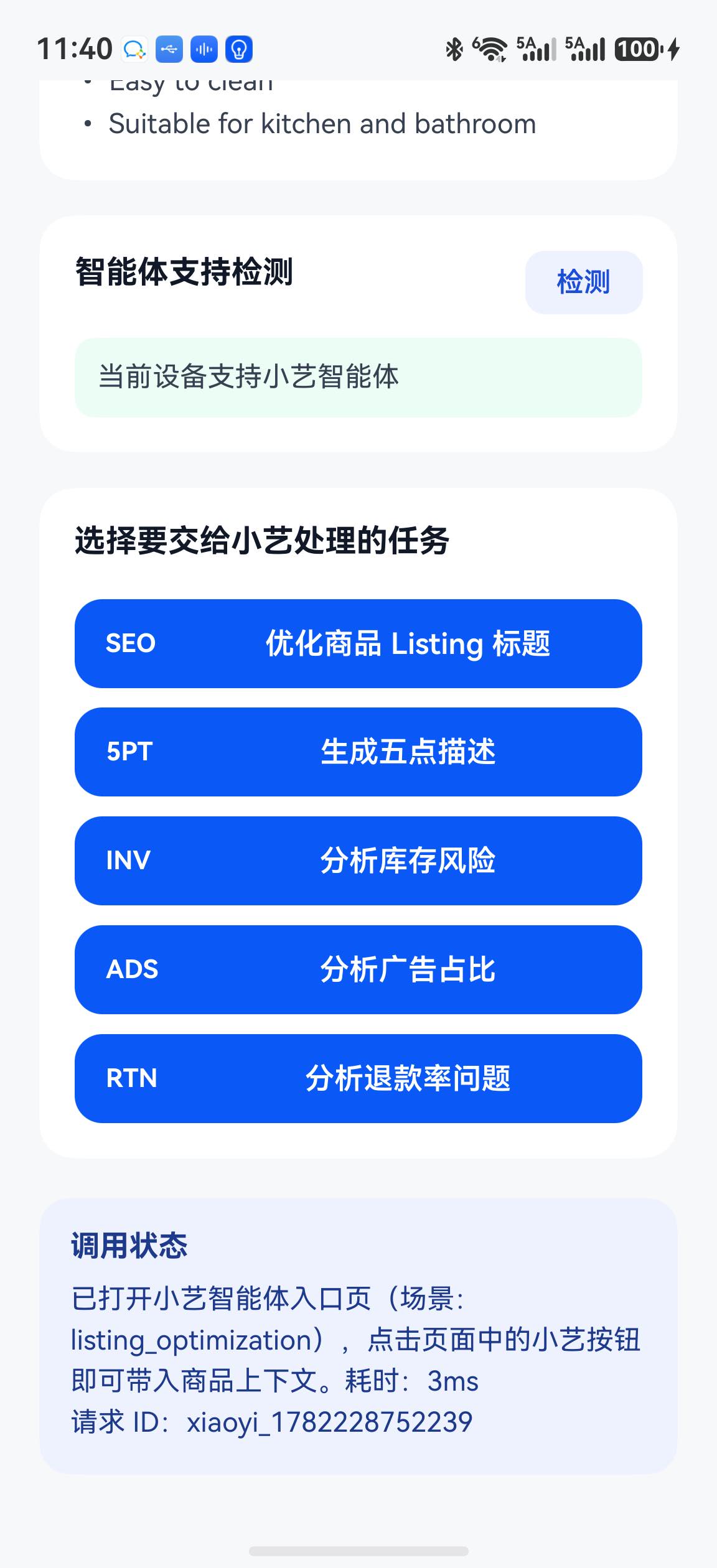
2.2 支持检测与任务入口
向上滚动后可以看到智能体支持检测和五类运营任务。真机预检查返回 true,页面明确显示“当前设备支持小智能体”。后文会解释:这个布尔值同时受到智能体发布、应用关联和设备能力影响,不能只凭它判断桥接代码是否失败。
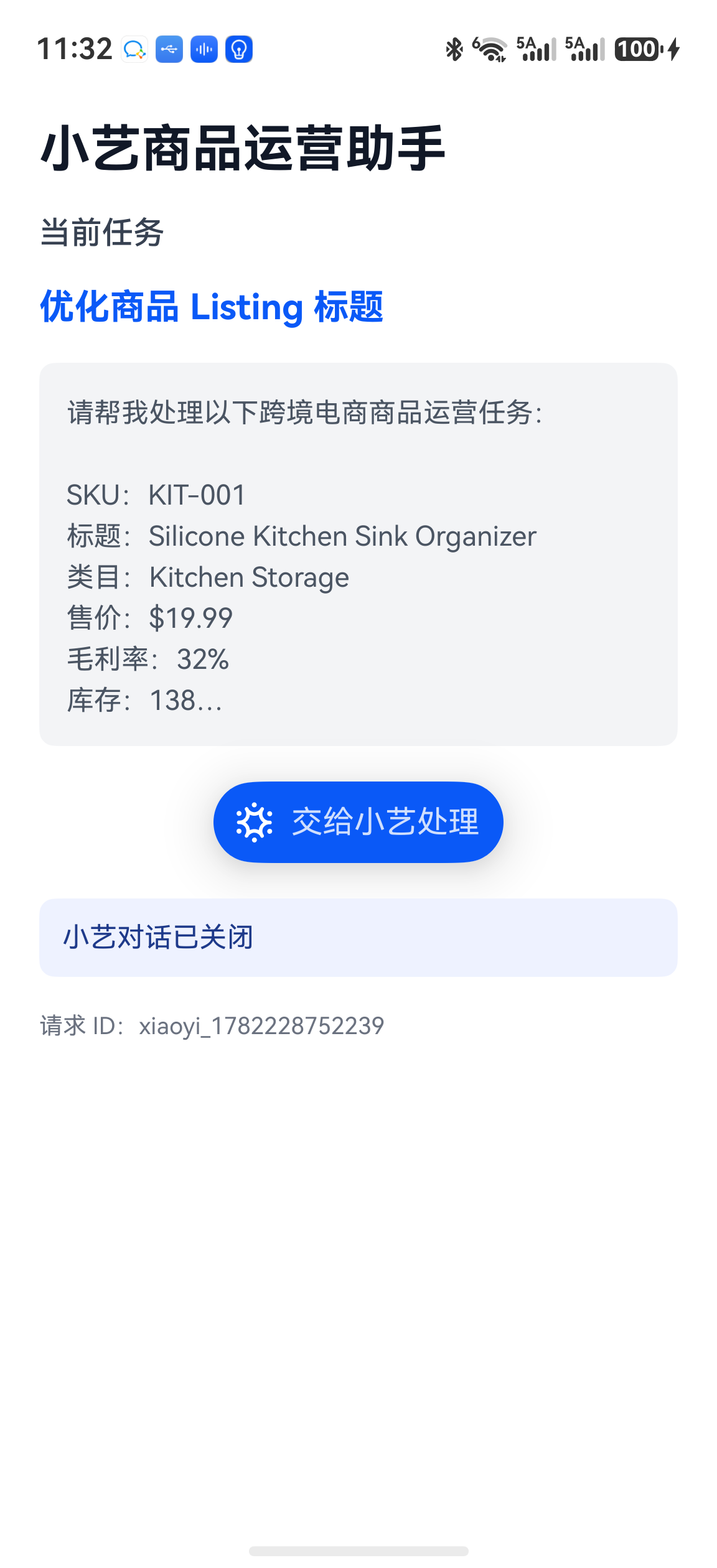
2.3 ArkUI 承载页收到完整上下文
点击“优化商品 Listing 标题”后,RN 参数通过 TurboModule 进入 ArkTS,并启动独立的 XiaoyiAgentAbility。承载页已经拿到完整商品上下文和任务描述。
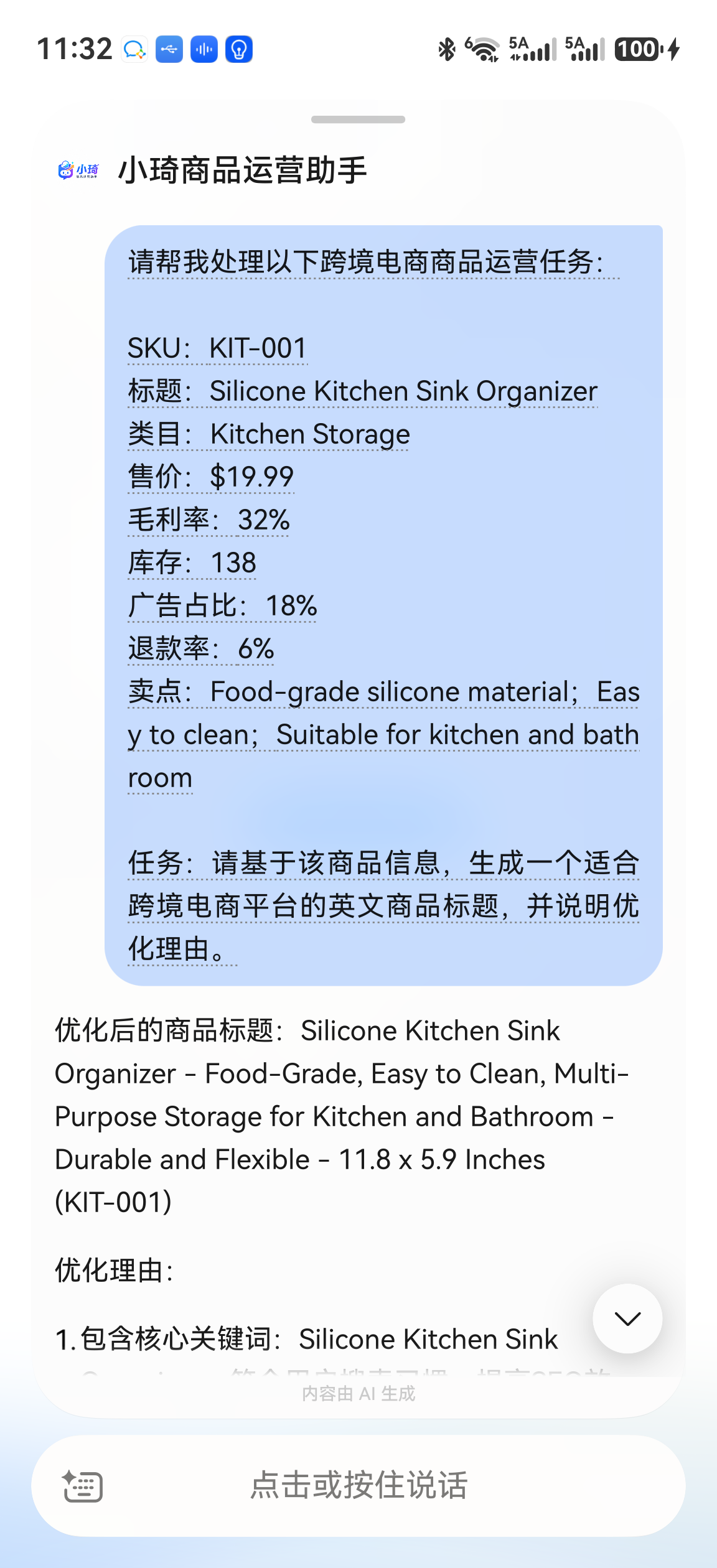
2.4 系统小艺对话浮层
点击“交给小艺处理”,FunctionComponent 成功打开系统小艺对话浮层,页面状态同步变为“小艺对话已打开”,并调用小艺智能体做了回复。
3. 业务数据与参数设计
示例商品如下:
export const demoProduct = {
  sku: 'KIT-001',
  title: 'Silicone Kitchen Sink Organizer',
  category: 'Kitchen Storage',
  price: 19.99,
  grossMargin: 0.32,
  stock: 138,
  adRatio: 0.18,
  refundRate: 0.06,
  sellingPoints: [
    'Food-grade silicone material',
    'Easy to clean',
    'Suitable for kitchen and bathroom',
  ],
};
不要只给智能体传一句“帮我优化标题”。本例传递稳定的结构化字段,再由 ArkTS 拼成自然语言上下文:
export type XiaoyiAgentParams = {
  agentId?: string;
  scene: AgentScene;
  sku: string;
  title: string;
  category: string;
  price?: number;
  grossMargin?: number;
  stock?: number;
  adRatio?: number;
  refundRate?: number;
  sellingPoints?: string[];
  prompt?: string;
};
这样做有三个好处:
- RN 页面保留清晰的业务数据结构;
- ArkTS 可以根据系统组件的输入方式统一构造
queryText; - 后续增加埋点、服务端请求或更多智能体场景时,不必推翻接口。
4. 工程结构
最终涉及的主要文件如下:
RNHarmonySkuAssistant
├── src
│   ├── native/NativeXiaoyiAgentModule.ts
│   ├── pages/XiaoyiAgentPage.tsx
│   └── types/product.ts
└── harmony/entry/src/main
    ├── cpp
    │   ├── XiaoyiAgentPackage.h
    │   └── turbomodule
    │       ├── XiaoyiAgentModule.h
    │       └── XiaoyiAgentModule.cpp
    ├── ets
    │   ├── entryability/XiaoyiAgentAbility.ets
    │   ├── pages/XiaoyiAgentEntry.ets
    │   └── turbomodule/XiaoyiAgentModule.ets
    └── module.json5
这里同时存在 C++ 和 ArkTS 注册层。C++ 层告诉 RNOH 方法名和参数数量;ArkTS UITurboModule 承担真正的 Agent Framework Kit 调用。
5. React Native 接口声明
src/native/NativeXiaoyiAgentModule.ts:
import type { TurboModule } from 'react-native';
import { TurboModuleRegistry } from 'react-native';

export type AgentScene =
  | 'listing_optimization'
  | 'stock_risk_analysis'
  | 'bullet_points_generation'
  | 'ad_cost_analysis'
  | 'refund_rate_analysis';

export type XiaoyiAgentResult = {
  success: boolean;
  code: string;
  message: string;
  requestId?: string;
};

export interface Spec extends TurboModule {
  isAgentSupported(agentId: string): Promise<boolean>;
  openAgent(params: XiaoyiAgentParams): Promise<XiaoyiAgentResult>;
}

export default TurboModuleRegistry.get<Spec>(
  'XiaoyiAgentModule',
) as Spec | null;
这里使用 get 而不是 getEnforcing,页面可以在模块未注册时显示可读的降级提示,而不是启动即崩溃。
6. RN 页面统一智能体 ID
支持检测和真正拉起必须使用同一个智能体 ID。建议在页面顶部只保留一个常量:
const AGENT_ID = 'YOUR_AGENT_ID';
支持检测:
const checkAgentSupport = async () => {
  if (!NativeXiaoyiAgentModule) {
    setAgentSupported(false);
    setLastMessage('XiaoyiAgentModule 不可用');
    return;
  }

  const supported = await NativeXiaoyiAgentModule.isAgentSupported(AGENT_ID);
  setAgentSupported(supported);
  setLastMessage(
    supported ? '当前设备支持小艺智能体' : '当前设备不支持小艺智能体',
  );
};
真正拉起时也显式传入相同 ID:
const params: XiaoyiAgentParams = {
  ...baseParams,
  agentId: AGENT_ID,
  scene,
  prompt: buildPrompt(scene),
};

const result = await NativeXiaoyiAgentModule.openAgent(params);
本项目曾经踩过一个很隐蔽的坑:检测接口传的是硬编码 demo_sku_assistant,拉起接口却走 ArkTS 默认 ID。结果页面一直提示不支持,即便正确 ID 已经写入原生代码。统一常量并显式传参后,真机日志确认检测与拉起使用的是同一个 ID。
7. C++ TurboModule 桥接
RNOH C++ 模块只声明两个异步方法:
XiaoyiAgentModule::XiaoyiAgentModule(
    const ArkTSTurboModule::Context ctx,
    const std::string name)
    : ArkTSTurboModule(ctx, name) {
  methodMap_ = {
      ARK_ASYNC_METHOD_METADATA(isAgentSupported, 1),
      ARK_ASYNC_METHOD_METADATA(openAgent, 1),
  };
}
在 XiaoyiAgentPackage.h 中按模块名创建实例:
if (name == "XiaoyiAgentModule") {
  return std::make_shared<XiaoyiAgentModule>(ctx, name);
}
最后把 XiaoyiAgentPackage 加入 PackageProvider::getPackages()。如果漏掉任意一层,RN 侧拿到的模块都会是 null。
8. ArkTS:检测设备和智能体可用性
ArkTS 模块继承 UITurboModule:
import { UITurboModule, UITurboModuleContext } from
  '@rnoh/react-native-openharmony';
import { FunctionController } from '@kit.AgentFrameworkKit';
import { BusinessError } from '@kit.BasicServicesKit';

export class XiaoyiAgentModule extends UITurboModule {
  static readonly NAME = 'XiaoyiAgentModule';
  private functionController: FunctionController | null = null;

  constructor(ctx: UITurboModuleContext) {
    super(ctx);
  }

  async isAgentSupported(agentId: string): Promise<boolean> {
    try {
      const controller = this.getOrCreateController();
      const supported = await controller.isAgentSupport(
        this.ctx.uiAbilityContext,
        agentId,
      );
      console.info(
        `[XiaoyiAgentModule] isAgentSupported: ${supported}, agentId: ${agentId}`,
      );
      return supported;
    } catch (err) {
      const error = err as BusinessError;
      console.warn(
        `[XiaoyiAgentModule] support check failed: ${error.code} ${error.message}`,
      );
      return false;
    }
  }
}
isAgentSupport() 返回 false 的原因不只一种:
- 当前设备或系统版本不具备对应系统能力;
- 智能体尚未发布到可调用状态;
- 智能体没有与当前应用的包名、签名或 AppGallery Connect 项目关联;
- 当前华为账号不在灰度或测试范围;
- 智能体 ID 错误。
因此 UI 文案使用“设备不支持或未配置智能体”比简单写“设备不支持”更准确。
9. ArkTS:构造完整 queryText
系统 FunctionComponent 接收的是 queryText。本例在 ArkTS 侧把结构化字段转成可读文本:
const contextBlock = [
  `SKU:${product.sku}`,
  `标题:${product.title}`,
  `类目:${product.category}`,
  `售价:$${product.price ?? '未知'}`,
  `毛利率:${marginStr}`,
  `库存:${product.stock ?? '未知'}`,
  `广告占比:${adStr}`,
  `退款率:${refundStr}`,
  `卖点:${pointsStr}`,
].join('\n');

return `请帮我处理以下跨境电商商品运营任务:\n\n` +
  `${contextBlock}\n\n任务:${params.prompt}`;
这样即使系统入口暂时不支持自定义 JSON payload,小艺仍能收到完整业务上下文。
10. 为什么需要独立 Ability?
FunctionComponent 是 ArkUI 组件,不能直接在 TurboModule 方法里渲染。因此 openAgent() 的职责分成两步:
- 在 TurboModule 中检查参数、构造
queryText; - 启动一个独立的
XiaoyiAgentAbility,由它加载 ArkUI 承载页。
启动代码:
const want: Want = {
  bundleName: this.ctx.uiAbilityContext.abilityInfo.bundleName,
  abilityName: 'XiaoyiAgentAbility',
  parameters: {
    agentId,
    queryText: fullPrompt,
    requestId,
    scene: params.scene,
  },
};

await this.ctx.uiAbilityContext.startAbility(want);
在 module.json5 注册 Ability:
{
  "name": "XiaoyiAgentAbility",
  "srcEntry": "./ets/entryability/XiaoyiAgentAbility.ets",
  "exported": false
}
exported: false 很重要:这个页面只供应用内部调用,没有必要暴露给其他应用。
11. Ability 与 ArkUI 承载页
XiaoyiAgentAbility 从 Want 读取参数并写入 AppStorage:
private applyWant(want: Want): void {
  AppStorage.setOrCreate<string>(
    'xiaoyiAgentId',
    this.readString(want, 'agentId', DEFAULT_AGENT_ID),
  );
  AppStorage.setOrCreate<string>(
    'xiaoyiQueryText',
    this.readString(want, 'queryText', ''),
  );
  AppStorage.setOrCreate<string>(
    'xiaoyiRequestId',
    this.readString(want, 'requestId', ''),
  );
}
页面用 FunctionComponent 呈现系统入口:
FunctionComponent({
  agentId: this.agentId,
  controller: this.controller,
  options: {
    title: '交给小艺处理',
    queryText: this.queryText,
    buttonType: ButtonType.CAPSULE,
    isShowShadow: true,
  },
  onError: (err: BusinessError) => {
    this.statusText = `小艺组件异常:${err.code} ${err.message}`;
  },
})
同时监听系统对话打开和关闭事件:
this.controller.on('agentDialogOpened', this.onDialogOpened);
this.controller.on('agentDialogClosed', this.onDialogClosed);
离开页面时必须用同一个函数引用取消监听,不能传新的匿名函数。
12. 构建、安装与真机运行
先生成最新 RN bundle:
npm run harmony
然后注意:Hvigor 必须在 harmony 目录执行,否则会去仓库根目录查找不存在的 hvigor/hvigor-config.json5。
cd harmony

env -u OHOS_SDK -u OHOS_SDK_PATH \
  DEVECO_SDK_HOME=/Applications/DevEco-Studio.app/Contents/sdk/default \
  PATH="/Applications/DevEco-Studio.app/Contents/tools/node/bin:\
/Applications/DevEco-Studio.app/Contents/tools/hvigor/bin:\
/Applications/DevEco-Studio.app/Contents/tools/ohpm/bin:\
/Applications/DevEco-Studio.app/Contents/sdk/default/openharmony/toolchains:$PATH" \
  /Applications/DevEco-Studio.app/Contents/tools/hvigor/bin/hvigorw \
  assembleHap --mode module -p module=entry --no-daemon --stacktrace
本次构建结果:
BUILD SUCCESSFUL
entry/build/default/outputs/default/entry-default-signed.hap
覆盖安装并启动:
HDC=/Applications/DevEco-Studio.app/Contents/sdk/default/openharmony/toolchains/hdc

$HDC install -r entry/build/default/outputs/default/entry-default-signed.hap
$HDC shell aa start -a EntryAbility -b host.huqi.sku_assistant
13. 真机日志与结果分析
支持检测使用了统一后的真实 ID,日志如下:
[XiaoyiAgentModule] isAgentSupported: false,
agentId: agent4c0d03a4786f4adc90775f1cef30ac8c
点击 Listing 优化后,RN 参数成功进入 ArkTS:
[XiaoyiAgentModule] openAgent params:
scene=listing_optimization,
sku=KIT-001,
title=Silicone Kitchen Sink Organizer

[XiaoyiAgentModule] openAgent prompt:
请基于该商品信息,生成一个适合跨境电商平台的英文商品标题,并说明优化理由。

[XiaoyiAgentModule] Agent not supported by preflight,
still opening component page for system feedback.
随后系统确认加载独立承载页:
SetUIContentInner: pages/XiaoyiAgentEntry
Initialize: pages/XiaoyiAgentEntry
main name [XiaoyiAgentAbility]
state #FOREGROUND
最终 FunctionComponent 打开了系统小艺对话,页面收到 agentDialogOpened 并显示“小艺对话已打开”。这证明以下链路已在真机跑通:
RN UI → RNOH → ArkTS → Ability → FunctionComponent → 系统小艺对话
不过预检查仍为 false,系统浮层也没有展示智能体业务回复。因此本文不能把结果描述为“智能体已正式可用”。准确结论是:
应用侧集成与系统对话拉起已经成功;智能体本身还需继续核对发布状态、应用包名/签名关联、测试账号范围和设备侧开放条件。
14. 常见问题
14.1 页面一直显示“不支持或未配置”
先看日志中的 agentId。检测和拉起很容易误用两个不同的 ID。统一常量后,再依次核对:
- 智能体是否已发布;
- 是否关联当前 HarmonyOS 应用;
- 包名、签名和 AGC 项目是否匹配;
- 当前账号是否在测试范围;
- 真机系统版本是否支持 Agent Framework Kit。
14.2 修改 RN 代码后真机还是旧效果
HarmonyOS HAP 使用的是 rawfile/bundle.harmony.js。只修改 TSX 不够,还要执行:
npm run harmony
然后重新构建并安装 HAP。
14.3 XiaoyiAgentModule 为 null
检查四层名称是否完全一致:
TurboModuleRegistry 名称
ArkTS XiaoyiAgentModule.NAME
C++ XiaoyiAgentPackage 工厂判断
PackageProvider 注册
14.4 为什么预检查 false 仍然打开承载页?
这是有意设计的降级路径。预检查失败时仍打开 ArkUI 页,让 FunctionComponent 给出系统侧真实反馈,同时保留业务上下文和 requestId,便于调试。正式产品可以根据业务要求改成直接阻止进入。
15. 本篇小结
本篇完成了小艺智能体入口从 React Native 到 HarmonyOS 系统组件的真机闭环:
React Native 负责业务 UI 与结构化商品数据
RNOH 负责 JS、C++、ArkTS 三层桥接
ArkTS 负责构造 queryText 和启动独立 Ability
FunctionComponent 负责拉起系统小艺对话
实践中最值得记住的不是某一段 API,而是三个工程经验:
- 支持检测和拉起必须显式使用同一个智能体 ID;
- ArkUI 系统组件需要由 Ability 页面承载,不能塞进 TurboModule 方法;
- “系统对话能打开”和“智能体已正式可用”是两个不同的验收结论。
下一步应在小艺开放平台和应用配置侧完成发布、关联与测试账号校验,让系统浮层真正展示商品运营智能体的业务回复。
16. 下一篇预告
下一篇将实践 React Native × HarmonyOS 近场分享:
RN 商品详情页
    ↓
构造 SKU 分享数据
    ↓
调用 ArkTS 原生分享模块
    ↓
触发 HarmonyOS 近场分享能力
    ↓
另一台设备接收商品信息

开源鸿蒙跨平台开发社区汇聚开发者与厂商,共建“一次开发,多端部署”的开源生态,致力于降低跨端开发门槛,推动万物智联创新。
更多推荐
 4
4 0
0- 0


 已为社区贡献12条内容

所有评论(0)