鸿蒙南向开发教程 Day 4:OpenHarmony 软件定时器
本文介绍了在OpenHarmony轻量系统中使用CMSIS-RTOS2接口实现软件定时器的完整流程。主要内容包括:通过osTimerNew创建周期性定时器,osTimerStart启动定时器,osTimerStop停止定时器,osTimerDelete删除定时器;重点说明定时器回调函数需保持简短且不能阻塞;对比了定时器与线程延时的区别,并指出CMSIS接口在LiteOS-M中的底层映射关系。通过全
·
目标:掌握 OpenHarmony 轻量系统的软件定时器创建、启动、停止和删除
前置条件:已完成 Day 3 的线程管理教程
一、工程结构
app/
├── BUILD.gn
└── 02_timer/                   # 模块目录
    ├── BUILD.gn
    └── demo.c                  # 定时器测试代码
1.1 app/BUILD.gn
import("//build/lite/config/component/lite_component.gni")

lite_component("app") {
  features = [
    "02_timer:timer_demo",       # 引用 02_timer 模块
  ]
}
1.2 02_timer/BUILD.gn
static_library("timer_demo") {
    sources = [
        "demo.c"
    ]

    include_dirs = [
        "//utils/native/lite/include",
        "//kernel/liteos_m/components/cmsis/2.0",  # CMSIS-RTOS2 头文件
    ]
}
二、完整代码详解
2.1 头文件
#include <stdio.h>      // 标准输入输出
#include <unistd.h>     // UNIX 标准函数
#include "ohos_init.h"  // OpenHarmony 系统初始化
#include "cmsis_os2.h"  // CMSIS-RTOS2 接口
2.2 宏定义
#define STACK_SIZE      (1024)   // 线程栈大小
#define DELAY_TICKS_100 (100)    // 100 个 tick 延时
#define TEST_TIMES      (3)      // 定时器触发次数上限
static int times = 0;             // 全局计数器,记录定时器触发次数
2.3 定时器回调函数
void cb_timeout_periodic(void)
{
    times++;                      // 每次触发,计数器 +1
}
重要:定时器回调函数不能阻塞,不能调用
osDelay()等阻塞操作。回调函数在中断上下文或定时器线程中执行,应保持简短快速。
2.4 周期性定时器测试
void timer_periodic(void)
{
    // 1. 创建周期性定时器
    osTimerId_t periodic_tid = osTimerNew(
        cb_timeout_periodic,      // 回调函数
        osTimerPeriodic,          // 定时器类型:周期性
        NULL,                     // 回调参数(无)
        NULL                      // 定时器属性(默认)
    );

    if (periodic_tid == NULL) {
        printf("[Timer Test] osTimerNew(periodic timer) failed.\r\n");
        return;
    } else {
        printf("[Timer Test] osTimerNew(periodic timer) success, tid: %p.\r\n", periodic_tid);
    }

    // 2. 启动定时器,周期 100 tick
    osStatus_t status = osTimerStart(periodic_tid, DELAY_TICKS_100);
    if (status != osOK) {
        printf("[Timer Test] osTimerStart(periodic timer) failed.\r\n");
        return;
    } else {
        printf("[Timer Test] osTimerStart(periodic timer) success, wait a while and stop.\r\n");
    }

    // 3. 等待定时器触发 TEST_TIMES 次
    while (times < TEST_TIMES) {
        printf("[Timer Test] times:%d.\r\n", times);
        osDelay(DELAY_TICKS_100);   // 主线程延时,让出 CPU
    }

    // 4. 停止定时器
    status = osTimerStop(periodic_tid);
    printf("[Timer Test] stop periodic timer, status :%d.\r\n", status);

    // 5. 删除定时器,释放资源
    status = osTimerDelete(periodic_tid);
    printf("[Timer Test] kill periodic timer, status :%d.\r\n", status);
}
2.5 系统入口
static void TimerTestTask(void)
{
    osThreadAttr_t attr = {
        .name = "timer_periodic",
        .attr_bits = 0U,
        .cb_mem = NULL,
        .cb_size = 0U,
        .stack_mem = NULL,
        .stack_size = STACK_SIZE,
        .priority = osPriorityNormal,
    };

    if (osThreadNew((osThreadFunc_t)timer_periodic, NULL, &attr) == NULL) {
        printf("[TimerTestTask] Failed to create timer_periodic!\n");
    }
}

APP_FEATURE_INIT(TimerTestTask);   // 应用初始化入口
三、CMSIS-RTOS2 定时器 API 详解
3.1 osTimerNew — 创建定时器
osTimerId_t osTimerNew(
    osTimerFunc_t func,      // 回调函数
    osTimerType_t type,      // 定时器类型
    void *argument,          // 传给回调函数的参数
    const osTimerAttr_t *attr // 定时器属性(NULL 为默认)
);
定时器类型:
| 类型 | 值 | 说明 |
|---|---|---|
osTimerOnce |
0 | 一次性定时器,触发一次后自动停止 |
osTimerPeriodic |
1 | 周期性定时器,触发后自动重启,循环执行 |
3.2 osTimerStart — 启动定时器
osStatus_t osTimerStart(osTimerId_t timer_id, uint32_t ticks);
| 参数 | 说明 |
|---|---|
timer_id |
osTimerNew 返回的定时器 ID |
ticks |
定时周期,单位 tick(由 osKernelGetTickFreq() 决定,通常 1 tick = 1ms) |
3.3 osTimerStop — 停止定时器
osStatus_t osTimerStop(osTimerId_t timer_id);
停止后定时器不再触发,但资源未释放,可重新 osTimerStart 启动。
3.4 osTimerDelete — 删除定时器
osStatus_t osTimerDelete(osTimerId_t timer_id);
释放定时器资源,删除后 timer_id 失效。
3.5 返回值状态码
| 状态码 | 值 | 含义 |
|---|---|---|
osOK |
0 | 成功 |
osError |
-1 | 未指定的错误 |
osErrorTimeout |
-2 | 超时 |
osErrorResource |
-3 | 资源不足 |
osErrorParameter |
-4 | 参数错误 |
osErrorNoMemory |
-5 | 内存不足 |
osErrorISR |
-6 | 不允许在中断中调用 |
四、定时器 vs 线程延时的区别
| 特性 | 软件定时器 (osTimer) |
线程延时 (osDelay) |
|---|---|---|
| 执行方式 | 回调函数,异步触发 | 当前线程阻塞等待 |
| 资源占用 | 轻量,不占用独立线程栈 | 占用当前线程资源 |
| 适用场景 | 周期性任务、超时检测、心跳包 | 简单延时、任务调度 |
| 精度 | 受系统 tick 频率影响 | 同左 |
| 阻塞风险 | 回调函数不能阻塞 | 线程本身就在阻塞 |
五、底层实现:LiteOS 原生定时器
CMSIS-RTOS2 的 osTimerXxx 在 LiteOS-M 中的映射:
| CMSIS-RTOS2 | LiteOS-M 原生 |
|---|---|
osTimerNew |
LOS_SwtmrCreate |
osTimerStart |
LOS_SwtmrStart |
osTimerStop |
LOS_SwtmrStop |
osTimerDelete |
LOS_SwtmrDelete |
LiteOS-M 使用**软件定时器(Swtmr)**实现,基于 tick 中断驱动,不依赖硬件定时器。
六、编译与验证
6.1 编译烧录
VSCode 点击 Build → Upload,串口波特率 115200。
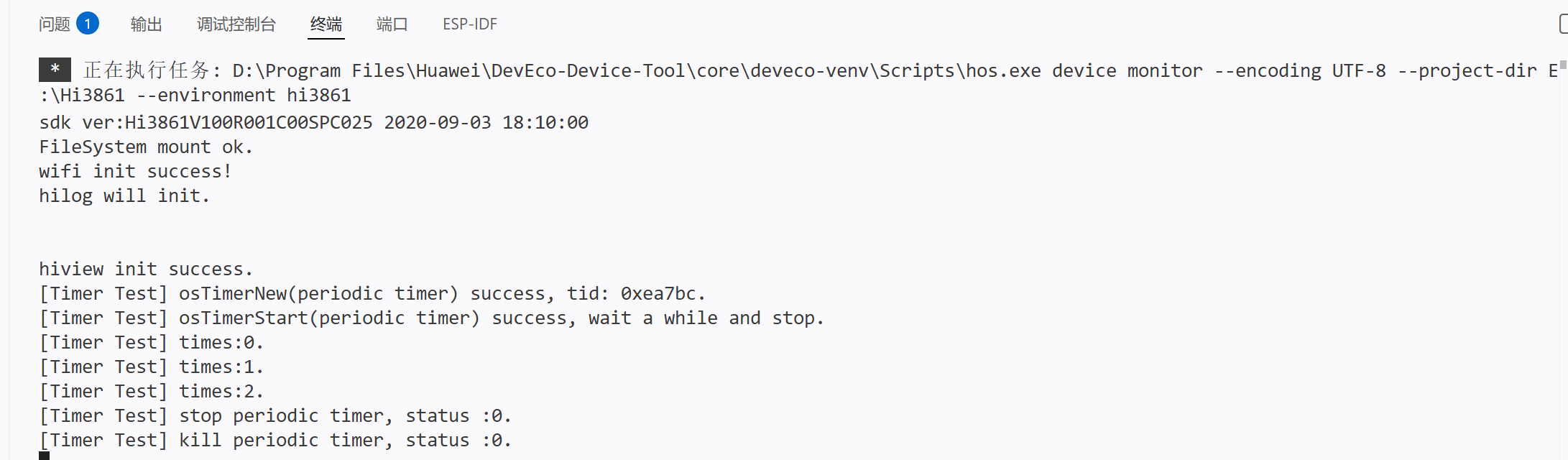
6.2 预期输出
[Timer Test] osTimerNew(periodic timer) success, tid: 0x20001xxx.
[Timer Test] osTimerStart(periodic timer) success, wait a while and stop.
[Timer Test] times:0.
[Timer Test] times:1.
[Timer Test] times:2.
[Timer Test] times:3.
[Timer Test] stop periodic timer, status :0.
[Timer Test] kill periodic timer, status :0.
七、总结
| 要点 | 内容 |
|---|---|
| 定时器类型 | osTimerOnce(一次性)和 osTimerPeriodic(周期性) |
| 生命周期 | 创建 → 启动 → (运行)→ 停止 → 删除 |
| 回调限制 | 不能阻塞,不能调用 osDelay |
| 底层映射 | LiteOS-M LOS_SwtmrXxx 软件定时器 |
| 与线程区别 | 定时器是异步回调,线程延时是同步阻塞 |
八、下一步
Day 5 预告:互斥锁(Mutex) —— 多线程共享资源保护。
需要继续 Day 5 的内容吗?

开源鸿蒙跨平台开发社区汇聚开发者与厂商,共建“一次开发,多端部署”的开源生态,致力于降低跨端开发门槛,推动万物智联创新。
更多推荐
 0
0 0
0- 0


 已为社区贡献6条内容

所有评论(0)