Flutter 框架跨平台鸿蒙开发 - 家庭健康档案云应用
欢迎加入开源鸿蒙跨平台社区:
https://openharmonycrossplatform.csdn.net
一、项目概述
运行效果图
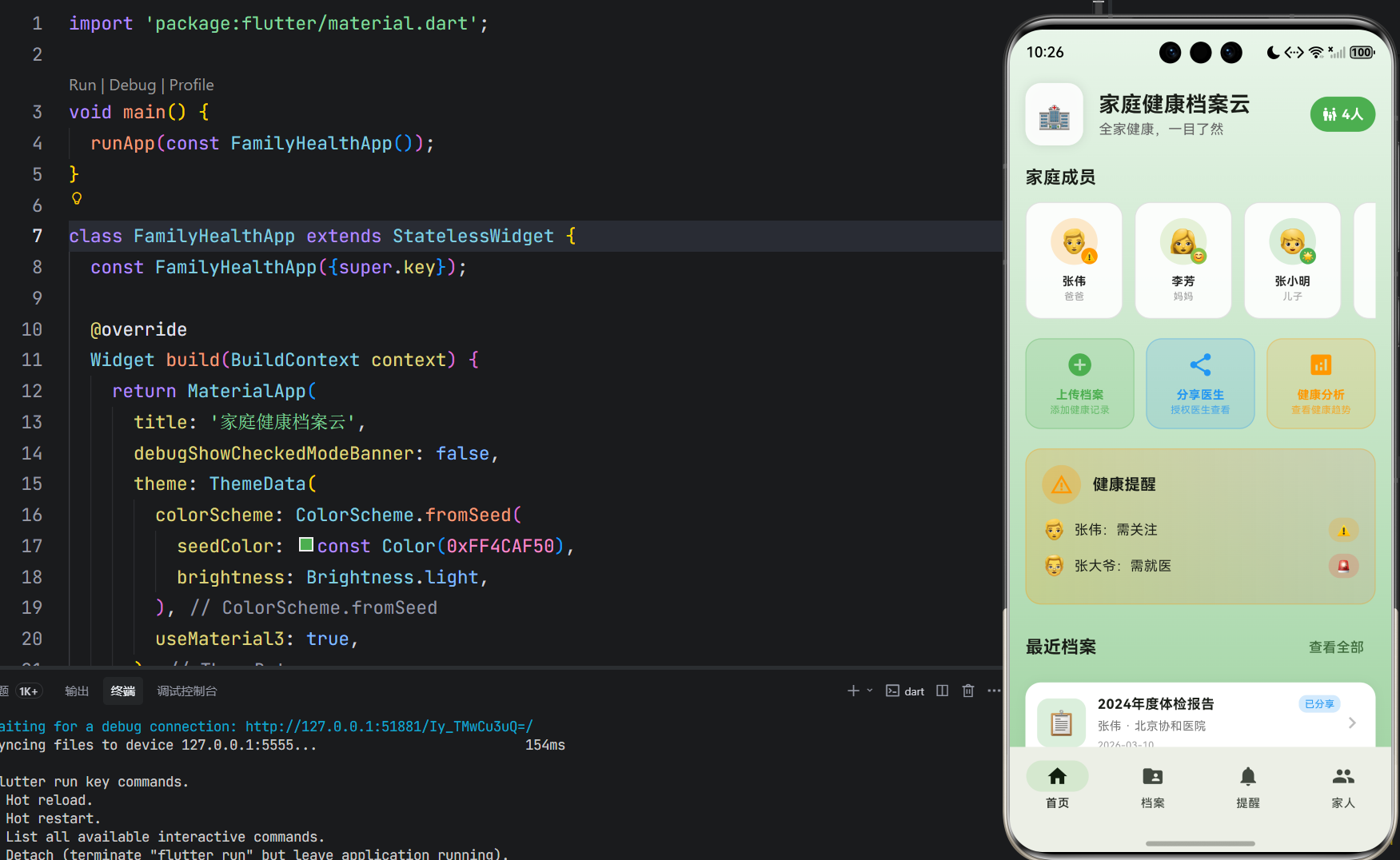
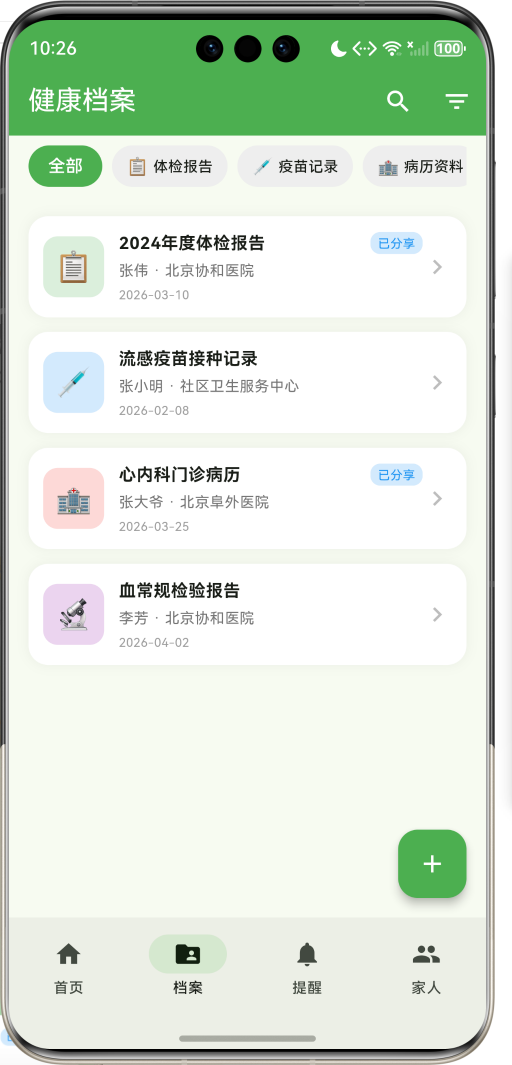
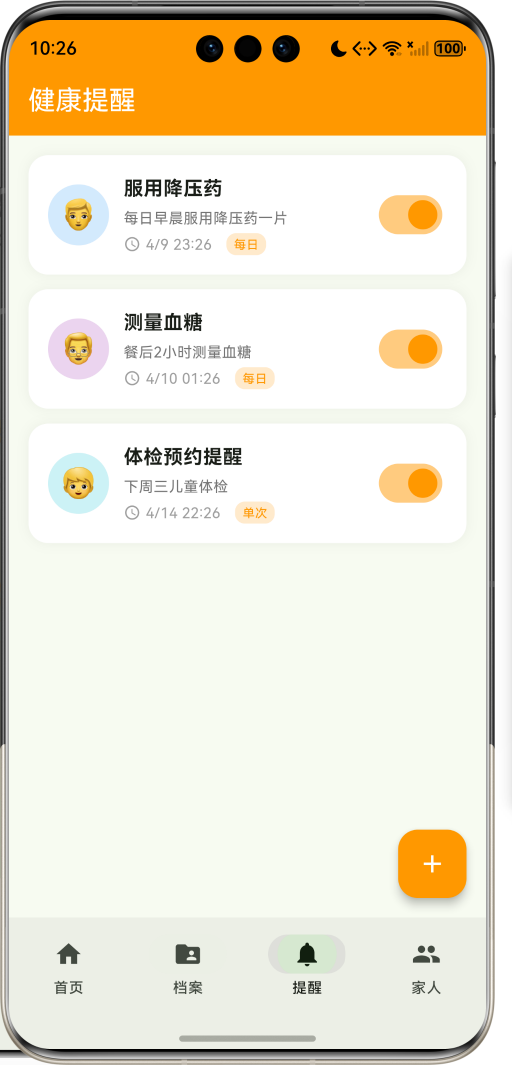
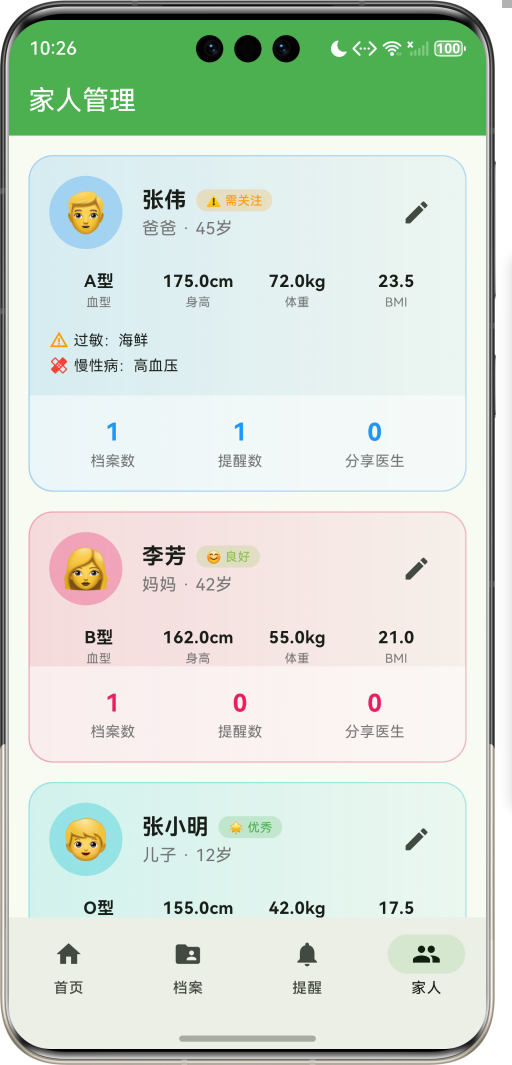
1.1 应用简介
家庭健康档案云是一款健康管理类应用,致力于为家庭提供统一的健康档案管理平台。支持全家成员健康档案集中管理,包括体检报告、疫苗记录、病历资料、处方药单、检验报告、影像资料等多种类型。通过医生授权分享功能,让医生随时查看健康档案,看病更方便、更高效。
应用以健康的绿色为主色调,象征生命与活力。涵盖首页导航、档案管理、健康提醒、家人管理四大模块。用户可以添加家庭成员、上传健康档案、设置健康提醒、授权医生查看,全方位守护家人健康。
1.2 核心功能
| 功能模块 | 功能描述 | 实现方式 |
|---|---|---|
| 成员管理 | 6种家庭角色管理 | 枚举定义 |
| 档案分类 | 6种健康档案类型 | 分类管理 |
| 档案上传 | 多种格式档案上传 | 表单提交 |
| 医生分享 | 授权医生查看档案 | 分享对话框 |
| 健康提醒 | 用药/体检提醒 | 定时提醒 |
| 健康分析 | 家庭健康概况统计 | 数据分析 |
1.3 家庭角色定义
| 序号 | 角色名称 | Emoji | 色值 |
|---|---|---|---|
| 1 | 爸爸 | 👨 | #2196F3 |
| 2 | 妈妈 | 👩 | #E91E63 |
| 3 | 爷爷 | 👴 | #9C27B0 |
| 4 | 奶奶 | 👵 | #FF5722 |
| 5 | 儿子 | 👦 | #00BCD4 |
| 6 | 女儿 | 👧 | #FF9800 |
1.4 档案类型定义
| 序号 | 类型名称 | Emoji | 色值 |
|---|---|---|---|
| 1 | 体检报告 | 📋 | #4CAF50 |
| 2 | 疫苗记录 | 💉 | #2196F3 |
| 3 | 病历资料 | 🏥 | #F44336 |
| 4 | 处方药单 | 💊 | #FF9800 |
| 5 | 检验报告 | 🔬 | #9C27B0 |
| 6 | 影像资料 | 📷 | #00BCD4 |
1.5 健康状态定义
| 序号 | 状态名称 | Emoji | 色值 |
|---|---|---|---|
| 1 | 优秀 | 🌟 | #4CAF50 |
| 2 | 良好 | 😊 | #8BC34A |
| 3 | 一般 | 😐 | #FFC107 |
| 4 | 需关注 | ⚠️ | #FF9800 |
| 5 | 需就医 | 🚨 | #F44336 |
1.6 技术栈
| 技术领域 | 技术选型 | 版本要求 |
|---|---|---|
| 开发框架 | Flutter | >= 3.0.0 |
| 编程语言 | Dart | >= 2.17.0 |
| 设计规范 | Material Design 3 | - |
| 动画控制 | AnimationController | - |
| 状态管理 | setState | - |
| 目标平台 | 鸿蒙OS / Web | API 21+ |
1.7 项目结构
lib/
└── main_family_health.dart
    ├── FamilyHealthApp              # 应用入口
    ├── FamilyRole                   # 家庭角色枚举
    ├── RecordType                   # 档案类型枚举
    ├── HealthStatus                 # 健康状态枚举
    ├── FamilyMember                 # 家庭成员模型
    ├── HealthRecord                 # 健康档案模型
    ├── HealthReminder               # 健康提醒模型
    ├── FamilyHealthHomePage         # 主页面(底部导航)
    ├── _buildHomePage               # 首页模块
    ├── _buildRecordsPage            # 档案页模块
    ├── _buildRemindersPage          # 提醒页模块
    ├── _buildProfilePage            # 家人页模块
    ├── RecordDetailPage             # 档案详情页面
    ├── AddMemberSheet               # 添加成员弹窗
    ├── AddRecordSheet               # 上传档案弹窗
    └── AddReminderSheet             # 添加提醒弹窗
二、系统架构
2.1 整体架构图
2.2 类图设计
2.3 页面导航流程
2.4 档案管理流程
三、核心模块设计
3.1 数据模型设计
3.1.1 家庭角色枚举 (FamilyRole)
enum FamilyRole {
  father('爸爸', '👨', Color(0xFF2196F3)),
  mother('妈妈', '👩', Color(0xFFE91E63)),
  grandpa('爷爷', '👴', Color(0xFF9C27B0)),
  grandma('奶奶', '👵', Color(0xFFFF5722)),
  son('儿子', '👦', Color(0xFF00BCD4)),
  daughter('女儿', '👧', Color(0xFFFF9800));

  final String label;
  final String emoji;
  final Color color;

  const FamilyRole(this.label, this.emoji, this.color);
}
3.1.2 档案类型枚举 (RecordType)
enum RecordType {
  checkup('体检报告', '📋', Color(0xFF4CAF50)),
  vaccine('疫苗记录', '💉', Color(0xFF2196F3)),
  medical('病历资料', '🏥', Color(0xFFF44336)),
  prescription('处方药单', '💊', Color(0xFFFF9800)),
  test('检验报告', '🔬', Color(0xFF9C27B0)),
  image('影像资料', '📷', Color(0xFF00BCD4));

  final String label;
  final String emoji;
  final Color color;

  const RecordType(this.label, this.emoji, this.color);
}
3.1.3 家庭成员模型 (FamilyMember)
class FamilyMember {
  final String id;              // 成员ID
  final String name;            // 姓名
  final FamilyRole role;        // 家庭角色
  final int age;                // 年龄
  final String bloodType;       // 血型
  final double height;          // 身高(cm)
  final double weight;          // 体重(kg)
  final List<String> allergies; // 过敏史
  final List<String> chronicDiseases; // 慢性病
  final HealthStatus healthStatus; // 健康状态
  final String avatar;          // 头像

  double get bmi => weight / ((height / 100) * (height / 100));
}
3.1.4 健康档案模型 (HealthRecord)
class HealthRecord {
  final String id;              // 档案ID
  final String memberId;        // 成员ID
  final RecordType type;        // 档案类型
  final String title;           // 档案标题
  final String hospital;        // 医院名称
  final String doctor;          // 医生姓名
  final DateTime date;          // 就诊日期
  final String summary;         // 档案摘要
  final String? filePath;       // 文件路径
  final List<String> tags;      // 标签
  final bool isShared;          // 是否已分享
}
3.1.5 健康提醒模型 (HealthReminder)
class HealthReminder {
  final String id;              // 提醒ID
  final String memberId;        // 成员ID
  final String title;           // 提醒标题
  final String description;     // 提醒描述
  final DateTime time;          // 提醒时间
  final String frequency;       // 重复频率
  final bool isActive;          // 是否启用
}
3.1.6 家庭健康状态分布
3.2 页面结构设计
3.2.1 主页面布局
3.2.2 首页结构
3.2.3 档案详情页结构
3.2.4 家人管理页结构
3.3 健康预警逻辑
3.4 档案分享逻辑
四、UI设计规范
4.1 配色方案
应用以健康的绿色为主色调,象征生命与活力:
| 颜色类型 | 色值 | 用途 |
|---|---|---|
| 主色 | #4CAF50 (Green) | 导航、主题元素 |
| 辅助色 | #81C784 | 次要元素 |
| 强调色 | #A5D6A7 | 背景渐变 |
| 背景色 | #E8F5E9 → #A5D6A7 | 首页渐变背景 |
| 卡片背景 | #FFFFFF | 内容卡片 |
4.2 家庭角色配色
| 角色 | 色值 | 视觉效果 |
|---|---|---|
| 爸爸 | #2196F3 | 稳重蓝色 |
| 妈妈 | #E91E63 | 温馨粉色 |
| 爷爷 | #9C27B0 | 睿智紫色 |
| 奶奶 | #FF5722 | 温暖橙色 |
| 儿子 | #00BCD4 | 活力青色 |
| 女儿 | #FF9800 | 可爱橙色 |
4.3 字体规范
| 元素 | 字号 | 字重 | 颜色 |
|---|---|---|---|
| 页面标题 | 22px | Bold | #000000 |
| 成员名称 | 18px | Bold | 角色色 |
| 档案标题 | 14px | Bold | #000000 |
| 摘要文字 | 14px | Regular | #424242 |
| 统计数字 | 20px | Bold | 角色色 |
4.4 组件规范
4.4.1 家庭成员卡片
┌─────────────────────────────────────┐
│  家庭成员                            │
│                                     │
│  ┌────┐ ┌────┐ ┌────┐ ┌────┐ ┌──┐ │
│  │ 👨 │ │ 👩 │ │ 👴 │ │ 👵 │ │ + │ │
│  │张伟│ │李芳│ │张老│ │王老│ │添加│ │
│  │爸爸│ │妈妈│ │爷爷│ │奶奶│ │成员│ │
│  └────┘ └────┘ └────┘ └────┘ └──┘ │
└─────────────────────────────────────┘
4.4.2 健康预警卡片
┌─────────────────────────────────────┐
│  ⚠️ 健康提醒                        │
│                                     │
│  👨 张伟:需关注               ⚠️   │
│  👴 张大爷:需就医             🚨   │
└─────────────────────────────────────┘
4.4.3 档案卡片
┌─────────────────────────────────────┐
│  ┌────┐  2024年度体检报告    [已分享]│
│  │ 📋 │  张伟 · 北京协和医院        │
│  │    │  2024-01-15              >  │
│  └────┘                             │
└─────────────────────────────────────┘
4.4.4 健康提醒卡片
┌─────────────────────────────────────┐
│  ┌────┐  服用降压药            [开关]│
│  │ 👨 │  每日早晨服用降压药一片      │
│  │    │  1/20 08:00    [每日]       │
│  └────┘                             │
└─────────────────────────────────────┘
4.4.5 成员详情卡片
┌─────────────────────────────────────┐
│  ┌────┐  张伟 [🌟 优秀]        [编辑]│
│  │ 👨 │  爸爸 · 45岁                │
│  └────┘                             │
│                                     │
│  A型    175cm   72kg    23.5 BMI   │
│                                     │
│  ⚠️ 过敏:海鲜                       │
│  💊 慢性病:高血压                   │
│                                     │
│  ┌──────────────────────────────┐  │
│  │  3档案    1提醒    0分享医生  │  │
│  └──────────────────────────────┘  │
└─────────────────────────────────────┘
五、核心功能实现
5.1 家庭成员卡片实现
Widget _buildMemberCard(FamilyMember member) {
  final isSelected = _selectedMember?.id == member.id;
  return GestureDetector(
    onTap: () {
      setState(() {
        _selectedMember = isSelected ? null : member;
      });
    },
    child: Container(
      width: 100,
      margin: const EdgeInsets.only(right: 12),
      decoration: BoxDecoration(
        gradient: isSelected
            ? LinearGradient(colors: [member.role.color, member.role.color.withValues(alpha: 0.7)])
            : null,
        color: isSelected ? null : Colors.white.withValues(alpha: 0.9),
        borderRadius: BorderRadius.circular(16),
      ),
      child: Column(
        mainAxisAlignment: MainAxisAlignment.center,
        children: [
          Stack(
            children: [
              Container(
                width: 48,
                height: 48,
                decoration: BoxDecoration(
                  color: member.healthStatus.color.withValues(alpha: 0.2),
                  shape: BoxShape.circle,
                ),
                child: Center(child: Text(member.avatar, style: const TextStyle(fontSize: 24))),
              ),
              Positioned(
                right: 0,
                bottom: 0,
                child: Container(
                  padding: const EdgeInsets.all(2),
                  decoration: BoxDecoration(
                    color: member.healthStatus.color,
                    shape: BoxShape.circle,
                  ),
                  child: Text(member.healthStatus.emoji, style: const TextStyle(fontSize: 10)),
                ),
              ),
            ],
          ),
          const SizedBox(height: 8),
          Text(member.name, style: const TextStyle(fontSize: 12, fontWeight: FontWeight.bold)),
          Text(member.role.label, style: const TextStyle(fontSize: 10)),
        ],
      ),
    ),
  );
}
5.2 健康预警实现
Widget _buildHealthAlerts() {
  final warningMembers = _members.where((m) =>
      m.healthStatus == HealthStatus.warning ||
      m.healthStatus == HealthStatus.attention).toList();

  if (warningMembers.isEmpty) return const SizedBox();

  return Container(
    padding: const EdgeInsets.all(16),
    decoration: BoxDecoration(
      gradient: LinearGradient(
        colors: [Colors.orange.withValues(alpha: 0.2), Colors.red.withValues(alpha: 0.1)],
      ),
      borderRadius: BorderRadius.circular(16),
      border: Border.all(color: Colors.orange.withValues(alpha: 0.3)),
    ),
    child: Column(
      crossAxisAlignment: CrossAxisAlignment.start,
      children: [
        Row(
          children: [
            AnimatedBuilder(
              animation: _pulseController,
              builder: (context, child) {
                return Container(
                  padding: const EdgeInsets.all(8),
                  decoration: BoxDecoration(
                    color: Colors.orange.withValues(alpha: 0.2 + _pulseController.value * 0.1),
                    shape: BoxShape.circle,
                  ),
                  child: const Icon(Icons.warning_amber, color: Colors.orange),
                );
              },
            ),
            const SizedBox(width: 12),
            const Text('健康提醒', style: TextStyle(fontSize: 16, fontWeight: FontWeight.bold)),
          ],
        ),
        ...warningMembers.map((member) => Padding(
          padding: const EdgeInsets.only(bottom: 8),
          child: Row(
            children: [
              Text(member.avatar, style: const TextStyle(fontSize: 20)),
              const SizedBox(width: 8),
              Expanded(child: Text('${member.name}:${member.healthStatus.label}')),
              Container(
                padding: const EdgeInsets.symmetric(horizontal: 8, vertical: 4),
                decoration: BoxDecoration(
                  color: member.healthStatus.color.withValues(alpha: 0.2),
                  borderRadius: BorderRadius.circular(12),
                ),
                child: Text(member.healthStatus.emoji, style: const TextStyle(fontSize: 12)),
              ),
            ],
          ),
        )),
      ],
    ),
  );
}
5.3 档案详情实现
Widget _buildInfoCard(FamilyMember member) {
  return Container(
    padding: const EdgeInsets.all(16),
    decoration: BoxDecoration(
      color: record.type.color.withValues(alpha: 0.1),
      borderRadius: BorderRadius.circular(16),
    ),
    child: Column(
      children: [
        Row(
          children: [
            Text(member.avatar, style: const TextStyle(fontSize: 24)),
            const SizedBox(width: 8),
            Text(member.name, style: const TextStyle(fontWeight: FontWeight.bold)),
            const Spacer(),
            Container(
              padding: const EdgeInsets.symmetric(horizontal: 8, vertical: 4),
              decoration: BoxDecoration(
                color: record.type.color,
                borderRadius: BorderRadius.circular(12),
              ),
              child: Text(record.type.label, style: const TextStyle(color: Colors.white, fontSize: 12)),
            ),
          ],
        ),
        const SizedBox(height: 16),
        Row(
          mainAxisAlignment: MainAxisAlignment.spaceAround,
          children: [
            _buildInfoItem(Icons.local_hospital, record.hospital, '医院'),
            _buildInfoItem(Icons.person, record.doctor, '医生'),
            _buildInfoItem(Icons.calendar_today, _formatDate(record.date), '日期'),
          ],
        ),
      ],
    ),
  );
}
5.4 成员详情实现
Widget _buildMemberDetailCard(FamilyMember member) {
  final memberRecords = _records.where((r) => r.memberId == member.id).length;
  final memberReminders = _reminders.where((r) => r.memberId == member.id).length;

  return Container(
    margin: const EdgeInsets.only(bottom: 16),
    decoration: BoxDecoration(
      gradient: LinearGradient(
        colors: [member.role.color.withValues(alpha: 0.15), member.role.color.withValues(alpha: 0.05)],
      ),
      borderRadius: BorderRadius.circular(20),
      border: Border.all(color: member.role.color.withValues(alpha: 0.3)),
    ),
    child: Column(
      children: [
        Padding(
          padding: const EdgeInsets.all(16),
          child: Row(
            children: [
              Container(
                width: 60,
                height: 60,
                decoration: BoxDecoration(
                  color: member.role.color.withValues(alpha: 0.3),
                  shape: BoxShape.circle,
                ),
                child: Center(child: Text(member.avatar, style: const TextStyle(fontSize: 32))),
              ),
              const SizedBox(width: 16),
              Expanded(
                child: Column(
                  crossAxisAlignment: CrossAxisAlignment.start,
                  children: [
                    Row(
                      children: [
                        Text(member.name, style: const TextStyle(fontSize: 18, fontWeight: FontWeight.bold)),
                        const SizedBox(width: 8),
                        Container(
                          padding: const EdgeInsets.symmetric(horizontal: 8, vertical: 2),
                          decoration: BoxDecoration(
                            color: member.healthStatus.color.withValues(alpha: 0.2),
                            borderRadius: BorderRadius.circular(12),
                          ),
                          child: Text(
                            '${member.healthStatus.emoji} ${member.healthStatus.label}',
                            style: TextStyle(fontSize: 10, color: member.healthStatus.color),
                          ),
                        ),
                      ],
                    ),
                    Text('${member.role.label} · ${member.age}岁', style: TextStyle(color: Colors.grey[600])),
                  ],
                ),
              ),
            ],
          ),
        ),
        Padding(
          padding: const EdgeInsets.symmetric(horizontal: 16),
          child: Row(
            children: [
              _buildInfoItem('血型', member.bloodType),
              _buildInfoItem('身高', '${member.height}cm'),
              _buildInfoItem('体重', '${member.weight}kg'),
              _buildInfoItem('BMI', member.bmi.toStringAsFixed(1)),
            ],
          ),
        ),
      ],
    ),
  );
}
5.5 健康提醒实现
Widget _buildReminderCard(HealthReminder reminder) {
  final member = _members.firstWhere((m) => m.id == reminder.memberId);
  return Container(
    margin: const EdgeInsets.only(bottom: 12),
    padding: const EdgeInsets.all(16),
    decoration: BoxDecoration(
      color: Colors.white,
      borderRadius: BorderRadius.circular(16),
      boxShadow: [BoxShadow(color: Colors.black.withValues(alpha: 0.05), blurRadius: 8)],
    ),
    child: Row(
      children: [
        Container(
          width: 50,
          height: 50,
          decoration: BoxDecoration(
            color: member.role.color.withValues(alpha: 0.2),
            shape: BoxShape.circle,
          ),
          child: Center(child: Text(member.avatar, style: const TextStyle(fontSize: 24))),
        ),
        const SizedBox(width: 12),
        Expanded(
          child: Column(
            crossAxisAlignment: CrossAxisAlignment.start,
            children: [
              Text(reminder.title, style: const TextStyle(fontSize: 16, fontWeight: FontWeight.bold)),
              const SizedBox(height: 4),
              Text(reminder.description, style: TextStyle(fontSize: 12, color: Colors.grey[600])),
              const SizedBox(height: 4),
              Row(
                children: [
                  Icon(Icons.access_time, size: 14, color: Colors.grey[500]),
                  const SizedBox(width: 4),
                  Text(_formatDateTime(reminder.time), style: TextStyle(fontSize: 12, color: Colors.grey[500])),
                  const SizedBox(width: 12),
                  Container(
                    padding: const EdgeInsets.symmetric(horizontal: 6, vertical: 2),
                    decoration: BoxDecoration(
                      color: Colors.orange.withValues(alpha: 0.2),
                      borderRadius: BorderRadius.circular(8),
                    ),
                    child: Text(reminder.frequency, style: const TextStyle(fontSize: 10, color: Colors.orange)),
                  ),
                ],
              ),
            ],
          ),
        ),
        Switch(value: reminder.isActive, onChanged: (value) {}, activeColor: Colors.orange),
      ],
    ),
  );
}
六、交互设计
6.1 档案浏览流程
6.2 健康提醒流程
6.3 医生分享流程
七、扩展功能规划
7.1 后续版本规划
7.2 功能扩展建议
7.2.1 云端同步
同步功能:
- 多设备数据同步
- 数据备份恢复
- 家庭成员共享
- 隐私加密保护
7.2.2 OCR识别
识别功能:
- 拍照识别体检报告
- 自动提取关键指标
- 智能分类归档
- 异常指标提醒
7.2.3 AI健康分析
AI功能:
- 健康趋势分析
- 异常预警
- 用药建议
- 就医推荐
八、注意事项
8.1 开发注意事项
-
数据安全:健康档案涉及隐私,需加密存储
-
权限管理:分享功能需严格控制访问权限
-
文件处理:档案文件可能较大,需压缩和分片上传
-
动画控制:AnimationController需正确释放
-
状态管理:成员选择状态需及时同步
8.2 常见问题
| 问题 | 原因 | 解决方案 |
|---|---|---|
| 档案上传失败 | 文件过大 | 压缩后上传 |
| 分享链接失效 | 权限过期 | 重新授权 |
| 提醒不生效 | 系统权限问题 | 检查通知权限 |
| 成员状态错误 | 数据未同步 | 刷新数据 |
| BMI计算异常 | 身高体重缺失 | 检查数据完整性 |
8.3 使用技巧
🏥 家庭健康管理技巧 🏥
档案管理
- 定期上传体检报告,建立健康档案库
- 按时间顺序整理,便于追踪健康变化
- 重要档案标记分享,方便就医时查看
健康提醒
- 设置用药提醒,避免漏服药物
- 定期体检提醒,早发现早治疗
- 疫苗接种提醒,保护家人健康
医生分享
- 就诊前分享相关档案给医生
- 授权时选择必要档案,保护隐私
- 及时撤销过期授权,确保安全
九、运行说明
9.1 环境要求
| 环境 | 版本要求 |
|---|---|
| Flutter SDK | >= 3.0.0 |
| Dart SDK | >= 2.17.0 |
| 鸿蒙OS | API 21+ |
| Web浏览器 | Chrome 90+ |
9.2 运行命令
# 查看可用设备
flutter devices

# 运行到Web服务器
flutter run -d web-server -t lib/main_family_health.dart --web-port 8142

# 运行到鸿蒙设备
flutter run -d 127.0.0.1:5555 lib/main_family_health.dart

# 代码分析
flutter analyze lib/main_family_health.dart
十、总结
家庭健康档案云通过首页导航、档案管理、健康提醒、家人管理四大模块,为家庭提供了一个统一的健康档案管理平台。应用支持6种家庭角色、6种档案类型、5种健康状态,让全家健康一目了然。
核心功能涵盖成员管理、档案分类、医生分享、健康提醒、健康分析五大模块。成员管理支持爸爸、妈妈、爷爷、奶奶、儿子、女儿六种角色;档案分类包括体检报告、疫苗记录、病历资料、处方药单、检验报告、影像资料;医生分享功能让医生随时查看健康档案;健康提醒支持用药、体检等多种提醒类型;健康分析提供家庭健康概况统计。
应用采用 Material Design 3 设计规范,以健康的绿色为主色调,象征生命与活力。通过本应用,希望能够帮助家庭更好地管理健康档案,守护家人健康,让看病更方便、更高效。
家庭健康档案云——全家健康,一目了然

开源鸿蒙跨平台开发社区汇聚开发者与厂商,共建“一次开发,多端部署”的开源生态,致力于降低跨端开发门槛,推动万物智联创新。
更多推荐
 7
7 0
0- 0


 已为社区贡献31条内容

所有评论(0)