开源鸿蒙跨平台Flutter开发:密码生成器应用
·
欢迎加入开源鸿蒙跨平台社区:
https://openharmonycrossplatform.csdn.net
一、项目概述
运行效果图
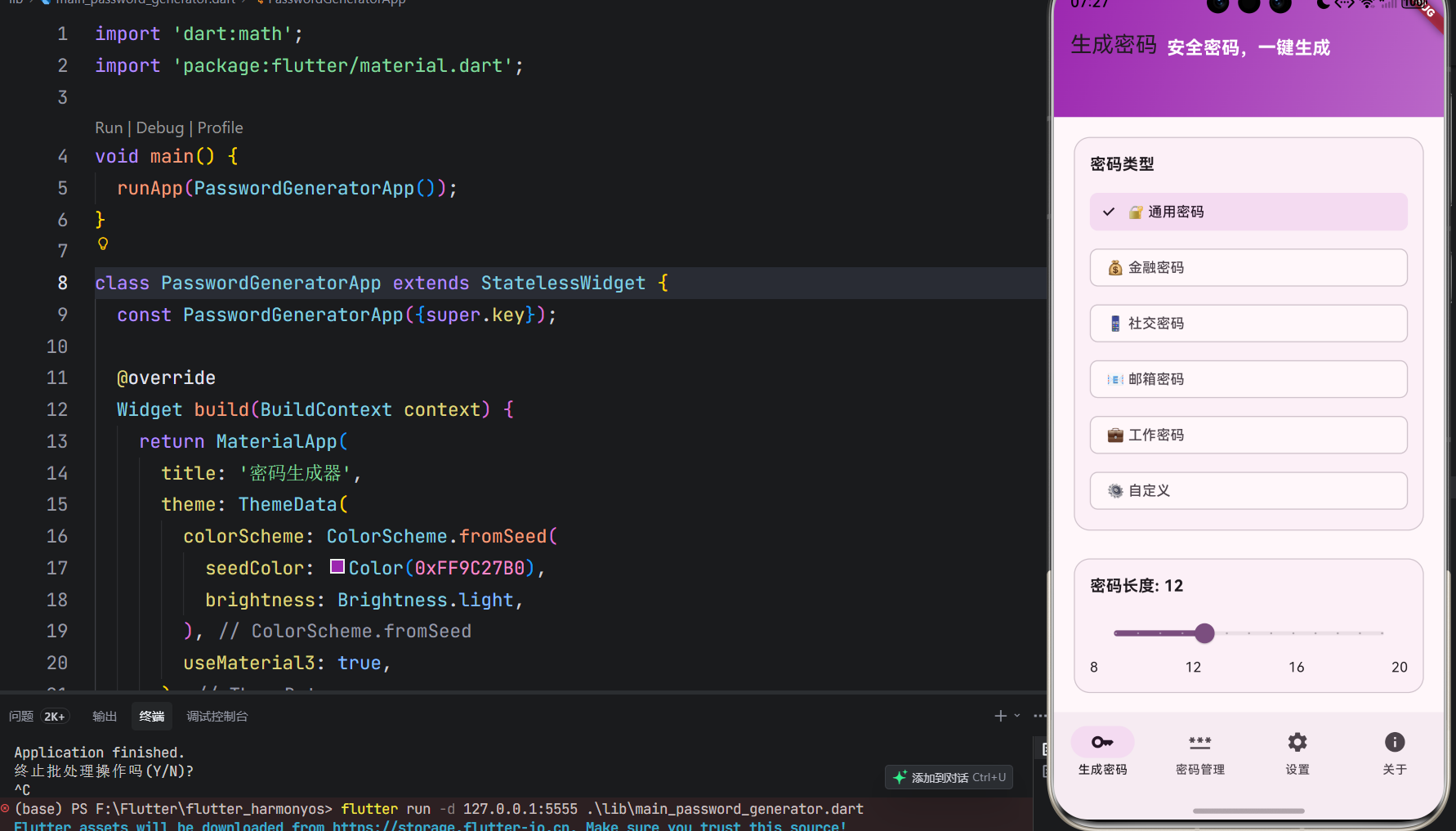
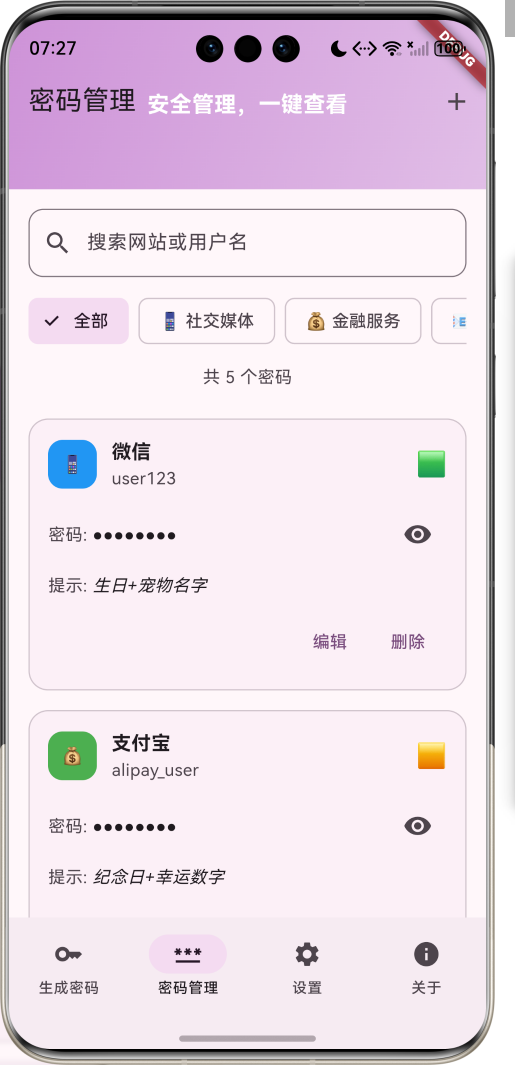
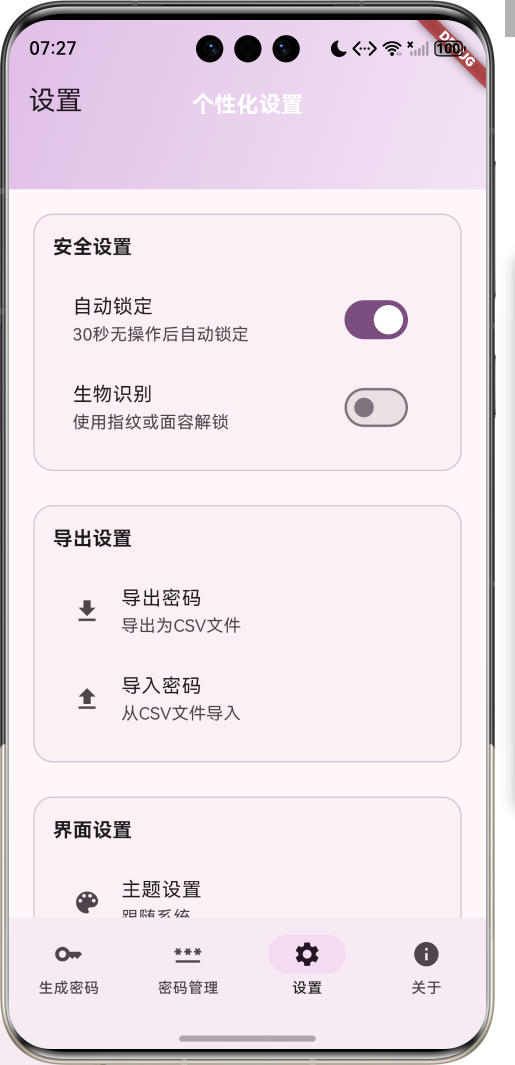
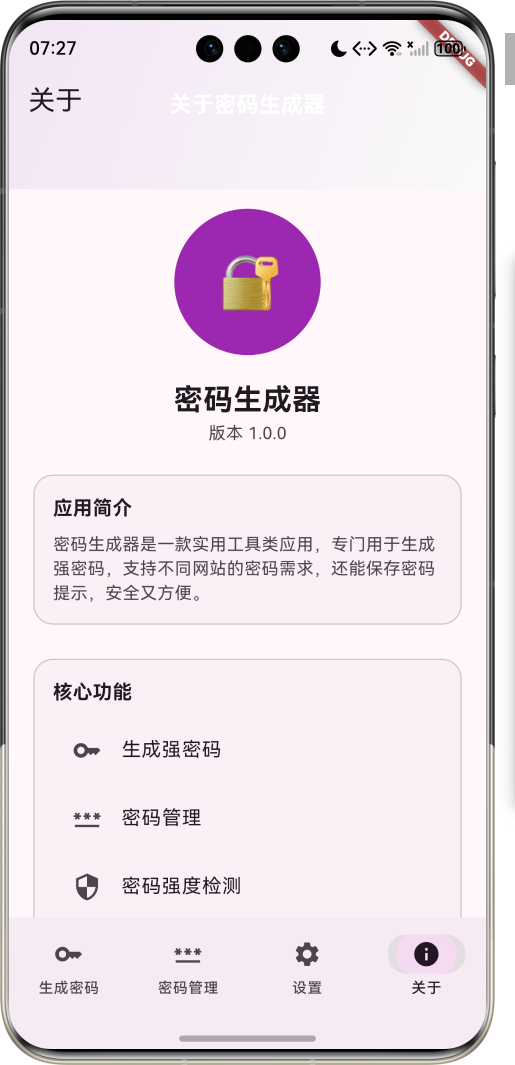
1.1 应用简介
密码生成器是一款实用工具类应用,专门用于生成强密码,支持不同网站的密码需求,还能保存密码提示,安全又方便。应用以科技感的紫色为主色调,象征安全与创新。涵盖密码生成、密码管理、设置三大模块,帮助用户轻松管理各类账号密码,提升网络安全。
1.2 核心功能
| 功能模块 | 功能描述 | 实现方式 |
|---|---|---|
| 密码生成 | 生成强密码 | 随机算法 |
| 密码强度检测 | 评估密码强度 | 强度分析 |
| 密码管理 | 保存密码提示 | 本地存储 |
| 网站分类 | 按网站类型分类 | 分类管理 |
| 复制功能 | 一键复制密码 | 剪贴板操作 |
| 导出功能 | 导出密码列表 | 文件导出 |
1.3 密码类型定义
| 序号 | 类型名称 | Emoji | 描述 |
|---|---|---|---|
| 1 | 通用密码 | 🔐 | 适用于一般网站 |
| 2 | 金融密码 | 💰 | 适用于银行、支付网站 |
| 3 | 社交密码 | 📱 | 适用于社交媒体 |
| 4 | 邮箱密码 | 📧 | 适用于邮箱账号 |
| 5 | 工作密码 | 💼 | 适用于工作相关账号 |
| 6 | 自定义 | ⚙️ | 自定义密码规则 |
1.4 密码强度定义
| 序号 | 强度等级 | Emoji | 描述 |
|---|---|---|---|
| 1 | 弱 | 🟥 | 容易被破解 |
| 2 | 中 | 🟨 | 有一定安全性 |
| 3 | 强 | 🟩 | 安全性较高 |
| 4 | 非常强 | 🟪 | 安全性极高 |
1.5 密码规则定义
| 序号 | 规则名称 | Emoji | 描述 |
|---|---|---|---|
| 1 | 包含大写字母 | 🔠 | 包含A-Z |
| 2 | 包含小写字母 | 🔡 | 包含a-z |
| 3 | 包含数字 | 🔢 | 包含0-9 |
| 4 | 包含特殊字符 | 🎭 | 包含!@#$%^&* |
| 5 | 避免相似字符 | 🚫 | 避免1,l,I,0,O等 |
| 6 | 避免连续字符 | 🔄 | 避免123,abc等 |
1.6 技术栈
| 技术领域 | 技术选型 | 版本要求 |
|---|---|---|
| 开发框架 | Flutter | >= 3.0.0 |
| 编程语言 | Dart | >= 2.17.0 |
| 设计规范 | Material Design 3 | - |
| 本地存储 | SharedPreferences | - |
| 剪贴板 | clipboard | - |
| 加密 | crypto | - |
| 目标平台 | 鸿蒙OS / Web | API 21+ |
1.7 项目结构
lib/
└── main_password_generator.dart
    ├── PasswordGeneratorApp         # 应用入口
    ├── PasswordType                  # 密码类型枚举
    ├── PasswordStrength              # 密码强度枚举
    ├── PasswordRule                  # 密码规则枚举
    ├── Password                     # 密码模型
    ├── WebsiteCategory               # 网站分类枚举
    ├── PasswordGeneratorHomePage     # 主页面(底部导航)
    ├── _buildGeneratePage            # 生成密码页面
    ├── _buildManagePage              # 密码管理页面
    ├── _buildSettingsPage            # 设置页面
    ├── _buildAboutPage               # 关于页面
    ├── PasswordCard                  # 密码卡片组件
    ├── StrengthIndicator            # 强度指示器组件
    └── RuleSelector                 # 规则选择器组件
二、系统架构
2.1 整体架构图
2.2 类图设计
2.3 页面导航流程
2.4 密码生成流程
三、核心模块设计
3.1 数据模型设计
3.1.1 密码类型枚举 (PasswordType)
enum PasswordType {
  general(label: '通用密码', emoji: '🔐', description: '适用于一般网站'),
  financial(label: '金融密码', emoji: '💰', description: '适用于银行、支付网站'),
  social(label: '社交密码', emoji: '📱', description: '适用于社交媒体'),
  email(label: '邮箱密码', emoji: '📧', description: '适用于邮箱账号'),
  work(label: '工作密码', emoji: '💼', description: '适用于工作相关账号'),
  custom(label: '自定义', emoji: '⚙️', description: '自定义密码规则');

  final String label;
  final String emoji;
  final String description;
}
3.1.2 密码强度枚举 (PasswordStrength)
enum PasswordStrength {
  weak(label: '弱', emoji: '🟥', color: '#F44336'),
  medium(label: '中', emoji: '🟨', color: '#FF9800'),
  strong(label: '强', emoji: '🟩', color: '#4CAF50'),
  veryStrong(label: '非常强', emoji: '🟪', color: '#9C27B0');

  final String label;
  final String emoji;
  final String color;
}
3.1.3 密码模型 (Password)
class Password {
  final String id;              // 密码ID
  final String website;         // 网站名称
  final String username;        // 用户名
  final String password;        // 密码
  final String hint;            // 密码提示
  final PasswordType type;      // 密码类型
  final WebsiteCategory category; // 网站分类
  final PasswordStrength strength; // 密码强度
  final DateTime createdAt;     // 创建时间
  final DateTime updatedAt;     // 更新时间
}
3.1.4 网站分类枚举 (WebsiteCategory)
enum WebsiteCategory {
  socialMedia(label: '社交媒体', emoji: '📱', color: '#2196F3'),
  financial(label: '金融服务', emoji: '💰', color: '#4CAF50'),
  email(label: '电子邮箱', emoji: '📧', color: '#FF9800'),
  work(label: '工作相关', emoji: '💼', color: '#9C27B0'),
  shopping(label: '购物网站', emoji: '🛒', color: '#F44336'),
  entertainment(label: '娱乐休闲', emoji: '🎮', color: '#673AB7');

  final String label;
  final String emoji;
  final String color;
}
3.1.5 密码强度分布
3.2 页面结构设计
3.2.1 主页面布局
3.2.2 生成密码页结构
3.2.3 密码管理页结构
3.2.4 设置页结构
3.3 密码生成逻辑
3.4 密码强度检测逻辑
四、UI设计规范
4.1 配色方案
应用以科技感的紫色为主色调,象征安全与创新:
| 颜色类型 | 色值 | 用途 |
|---|---|---|
| 主色 | #9C27B0 (Purple) | 导航、主题元素 |
| 辅助色 | #BA68C8 | 生成密码页面 |
| 第三色 | #CE93D8 | 密码管理页面 |
| 强调色 | #E1BEE7 | 设置页面 |
| 背景色 | #FAFAFA | 页面背景 |
| 卡片背景 | #FFFFFF | 密码卡片 |
| 成功色 | #4CAF50 | 复制成功 |
| 警告色 | #FF9800 | 强度警告 |
4.2 密码强度颜色定义
| 强度 | 色值 | 视觉效果 |
|---|---|---|
| 弱 | #F44336 | 红色,不安全 |
| 中 | #FF9800 | 黄色,一般安全 |
| 强 | #4CAF50 | 绿色,安全 |
| 非常强 | #9C27B0 | 紫色,非常安全 |
4.3 字体规范
| 元素 | 字号 | 字重 | 颜色 |
|---|---|---|---|
| 页面标题 | 24px | Bold | 主色 |
| 密码文本 | 18px | Medium | #000000 |
| 网站名称 | 16px | Bold | #000000 |
| 用户名 | 14px | Regular | 灰色 |
| 强度标签 | 14px | Regular | 对应强度颜色 |
4.4 组件规范
4.4.1 密码生成卡片
┌─────────────────────────────────────┐
│  🔐  通用密码                      │
│                                     │
│  长度: 12                           │
│  规则: 大写字母、小写字母、数字、特殊字符 │
│                                     │
│  ┌─────────────────────────────┐   │
│  │  A7$b9@C3!d5#E7            │   │
│  └─────────────────────────────┘   │
│                                     │
│  🟪  非常强                          │
│                                     │
│  [复制] [生成] [保存]                │
└─────────────────────────────────────┘
4.4.2 密码卡片
┌─────────────────────────────────────┐
│  📱  社交媒体                      │
│                                     │
│  网站: 微信                          │
│  用户名: user123                    │
│  密码: ********                      │
│  提示: 生日+宠物名字                  │
│                                     │
│  🟩  强                              │
│                                     │
│  [查看] [编辑] [删除]                │
└─────────────────────────────────────┘
4.4.3 强度指示器
┌─────────────────────────────────────┐
│  密码强度                            │
│                                     │
│  ┌─────────────────────────────┐   │
│  │▓▓▓▓▓▓▓▓░░░░░░  75%          │   │
│  └─────────────────────────────┘   │
│                                     │
│  🟪  非常强                          │
└─────────────────────────────────────┘
4.4.4 规则选择器
┌─────────────────────────────────────┐
│  密码规则                            │
│                                     │
│  □ 🔠 包含大写字母                    │
│  □ 🔡 包含小写字母                    │
│  □ 🔢 包含数字                      │
│  □ 🎭 包含特殊字符                    │
│  □ 🚫 避免相似字符                    │
│  □ 🔄 避免连续字符                    │
└─────────────────────────────────────┘
4.4.5 密码长度滑块
┌─────────────────────────────────────┐
│  密码长度: 12                        │
│                                     │
│  ┌─────────────────────────────┐   │
│  │▓▓▓▓▓▓░░░░░░░░░░░░         │   │
│  └─────────────────────────────┘   │
│  8       12       16       20      │
└─────────────────────────────────────┘
五、核心功能实现
5.1 密码生成页面实现
class GeneratePage extends StatefulWidget {
State<GeneratePage> createState() => _GeneratePageState();
}
class _GeneratePageState extends State<GeneratePage> {
int _passwordLength = 12;
PasswordType _selectedType = PasswordType.general;
bool _includeUppercase = true;
bool _includeLowercase = true;
bool _includeNumbers = true;
bool _includeSpecial = true;
String _generatedPassword = '';
PasswordStrength _strength = PasswordStrength.weak;
void initState() {
super.initState();
_generatePassword();
}
Widget build(BuildContext context) {
return CustomScrollView(
slivers: [
SliverAppBar(
title: Text('生成密码'),
),
SliverToBoxAdapter(
child: Padding(
padding: const EdgeInsets.all(16),
child: Column(
crossAxisAlignment: CrossAxisAlignment.start,
children: [
_buildPasswordTypeSelector(),
_buildPasswordLengthSlider(),
_buildPasswordRules(),
_buildPasswordDisplay(),
_buildStrengthIndicator(),
_buildActionButtons(),
],
),
),
),
],
);
}
void _generatePassword() {
final generator = PasswordGenerator();
_generatedPassword = generator.generate(
length: _passwordLength,
includeUppercase: _includeUppercase,
includeLowercase: _includeLowercase,
includeNumbers: _includeNumbers,
includeSpecial: _includeSpecial,
);
_strength = PasswordStrengthDetector.detect(_generatedPassword);
setState(() {});
}
void _copyPassword() {
Clipboard.setData(ClipboardData(text: _generatedPassword));
ScaffoldMessenger.of(context).showSnackBar(
SnackBar(content: Text('密码已复制到剪贴板')),
);
}
}
5.2 密码管理页面实现
class ManagePage extends StatefulWidget {
State<ManagePage> createState() => _ManagePageState();
}
class _ManagePageState extends State<ManagePage> {
List<Password> _passwords = [];
WebsiteCategory? _selectedCategory;
void initState() {
super.initState();
_loadPasswords();
}
void _loadPasswords() {
_passwords = [
Password(
id: '1',
website: '微信',
username: 'user123',
password: 'A7$b9@C3!d5#',
hint: '生日+宠物名字',
type: PasswordType.social,
category: WebsiteCategory.socialMedia,
strength: PasswordStrength.strong,
createdAt: DateTime.now().subtract(Duration(days: 30)),
updatedAt: DateTime.now().subtract(Duration(days: 10)),
),
Password(
id: '2',
website: '支付宝',
username: 'alipay_user',
password: 'P@ssw0rd!2024',
hint: '纪念日+幸运数字',
type: PasswordType.financial,
category: WebsiteCategory.financial,
strength: PasswordStrength.medium,
createdAt: DateTime.now().subtract(Duration(days: 60)),
updatedAt: DateTime.now().subtract(Duration(days: 5)),
),
];
}
Widget build(BuildContext context) {
return CustomScrollView(
slivers: [
SliverAppBar(
title: Text('密码管理'),
actions: [
IconButton(
icon: Icon(Icons.add),
onPressed: () => _addPassword(),
),
],
),
SliverToBoxAdapter(
child: _buildCategoryFilter(),
),
SliverList(
delegate: SliverChildBuilderDelegate(
(context, index) => PasswordCard(password: _passwords[index]),
childCount: _passwords.length,
),
),
],
);
}
void _addPassword() {
// 添加密码逻辑
}
}
5.3 密码生成器实现
class PasswordGenerator {
  static const String _uppercase = 'ABCDEFGHIJKLMNOPQRSTUVWXYZ';
  static const String _lowercase = 'abcdefghijklmnopqrstuvwxyz';
  static const String _numbers = '0123456789';
  static const String _special = '!@#%^&*()_+-=[]{}|;:,.<>?';
  static const String _similar = '1lI0O';

  String generate({
    required int length,
    required bool includeUppercase,
    required bool includeLowercase,
    required bool includeNumbers,
    required bool includeSpecial,
    bool avoidSimilar = false,
    bool avoidConsecutive = false,
  }) {
    String chars = '';
    if (includeUppercase) chars += _uppercase;
    if (includeLowercase) chars += _lowercase;
    if (includeNumbers) chars += _numbers;
    if (includeSpecial) chars += _special;

    if (avoidSimilar) {
      for (var char in _similar.split('')) {
        chars = chars.replaceAll(char, '');
      }
    }

    final random = Random();
    String password = '';
    String lastChar = '';

    for (int i = 0; i < length; i++) {
      String char;
      do {
        char = chars[random.nextInt(chars.length)];
      } while (avoidConsecutive && char == lastChar);
      password += char;
      lastChar = char;
    }

    return password;
  }
}
5.4 密码强度检测器实现
class PasswordStrengthDetector {
  static PasswordStrength detect(String password) {
    int score = 0;

    // 长度得分
    if (password.length >= 8) score += 20;
    if (password.length >= 12) score += 10;
    if (password.length >= 16) score += 10;

    // 字符类型得分
    if (RegExp(r'[A-Z]').hasMatch(password)) score += 15;
    if (RegExp(r'[a-z]').hasMatch(password)) score += 15;
    if (RegExp(r'[0-9]').hasMatch(password)) score += 15;
    if (RegExp(r'[!@#$%^&*(),.?":{}|<>]').hasMatch(password)) score += 15;

    // 复杂度得分
    if (password.length >= 10 &&
        RegExp(r'[A-Z]').hasMatch(password) &&
        RegExp(r'[a-z]').hasMatch(password) &&
        RegExp(r'[0-9]').hasMatch(password) &&
        RegExp(r'[!@#$%^&*(),.?":{}|<>]').hasMatch(password)) {
      score += 10;
    }

    if (score <= 25) return PasswordStrength.weak;
    if (score <= 50) return PasswordStrength.medium;
    if (score <= 75) return PasswordStrength.strong;
    return PasswordStrength.veryStrong;
  }
}
5.5 密码管理器实现
class PasswordManager {
  static Future<void> savePassword(Password password) async {
    final prefs = await SharedPreferences.getInstance();
    final passwords = prefs.getStringList('passwords') ?? [];
    passwords.add(jsonEncode(password.toJson()));
    await prefs.setStringList('passwords', passwords);
  }

  static Future<List<Password>> getPasswords() async {
    final prefs = await SharedPreferences.getInstance();
    final passwords = prefs.getStringList('passwords') ?? [];
    return passwords
        .map((p) => Password.fromJson(jsonDecode(p)))
        .toList();
  }

  static Future<void> deletePassword(String id) async {
    final prefs = await SharedPreferences.getInstance();
    final passwords = prefs.getStringList('passwords') ?? [];
    passwords.removeWhere((p) => jsonDecode(p)['id'] == id);
    await prefs.setStringList('passwords', passwords);
  }
}
六、交互设计
6.1 密码生成流程
6.2 密码管理流程
6.3 密码强度检测流程
七、扩展功能规划
7.1 后续版本规划
7.2 功能扩展建议
7.2.1 云同步功能
云同步功能:
- 密码数据云端备份
- 多设备同步
- 加密传输
- 恢复功能
7.2.2 密码健康检查
健康检查功能:
- 检测弱密码
- 检测重复密码
- 检测过期密码
- 提供改进建议
7.2.3 批量操作功能
批量操作功能:
- 批量导出密码
- 批量删除密码
- 批量更新密码
- 批量分类管理
八、注意事项
8.1 开发注意事项
-
数据安全:密码数据需加密存储,确保安全
-
权限管理:剪贴板操作需注意权限申请
-
用户体验:密码显示需支持明文/密文切换
-
性能优化:密码生成算法需高效,避免卡顿
-
隐私保护:本地存储需加密,防止数据泄露
8.2 常见问题
| 问题 | 原因 | 解决方案 |
|---|---|---|
| 密码生成失败 | 规则冲突 | 检查密码规则设置 |
| 密码强度低 | 规则设置简单 | 增加密码长度和规则 |
| 复制失败 | 权限不足 | 引导用户开启权限 |
| 数据丢失 | 未备份 | 定期导出备份 |
| 同步失败 | 网络问题 | 检查网络连接 |
8.3 使用技巧
🔐 密码安全使用技巧 🔐
密码设置建议
- 不同网站使用不同密码
- 密码长度至少12位
- 包含大小写字母、数字和特殊字符
- 避免使用个人信息
密码管理技巧
- 使用密码管理器存储密码
- 定期更新重要密码
- 启用双因素认证
- 不要在不安全的设备上输入密码
安全习惯
- 不要将密码告诉他人
- 不要在公共场合输入密码
- 定期检查账户活动
- 及时更新密码
紧急情况处理
- 如果密码泄露,立即修改
- 启用账户保护
- 联系网站客服
- 监控账户活动
九、运行说明
9.1 环境要求
| 环境 | 版本要求 |
|---|---|
| Flutter SDK | >= 3.0.0 |
| Dart SDK | >= 2.17.0 |
| 鸿蒙OS | API 21+ |
| Web浏览器 | Chrome 90+ |
| 存储权限 | 读写权限 |
9.2 运行命令
# 查看可用设备
flutter devices

# 运行到Web服务器
flutter run -d web-server -t lib/main_password_generator.dart --web-port 8150

# 运行到鸿蒙设备
flutter run -d 127.0.0.1:5555 lib/main_password_generator.dart

# 代码分析
flutter analyze lib/main_password_generator.dart
十、总结
密码生成器应用通过生成密码、密码管理、设置三大模块,为用户提供了一个安全、便捷的密码管理工具。应用支持生成强密码、检测密码强度、管理密码信息等功能,帮助用户提升网络安全。
核心功能涵盖密码生成、密码强度检测、密码管理、网站分类四大模块。密码生成支持自定义长度和规则;密码强度检测评估密码安全性;密码管理支持添加、编辑、删除密码;网站分类方便用户按类别管理密码。
应用采用 Material Design 3 设计规范,以科技感的紫色为主色调,象征安全与创新。通过本应用,希望能够帮助用户轻松管理各类账号密码,提升网络安全意识,保护个人信息安全。
密码生成器——安全密码,一键生成

开源鸿蒙跨平台开发社区汇聚开发者与厂商,共建“一次开发,多端部署”的开源生态,致力于降低跨端开发门槛,推动万物智联创新。
更多推荐
 10
10 0
0- 0


 已为社区贡献42条内容

所有评论(0)