开源鸿蒙跨平台Flutter开发:汇率实时查询应用
·
欢迎加入开源鸿蒙跨平台社区:
https://openharmonycrossplatform.csdn.net
一、项目概述
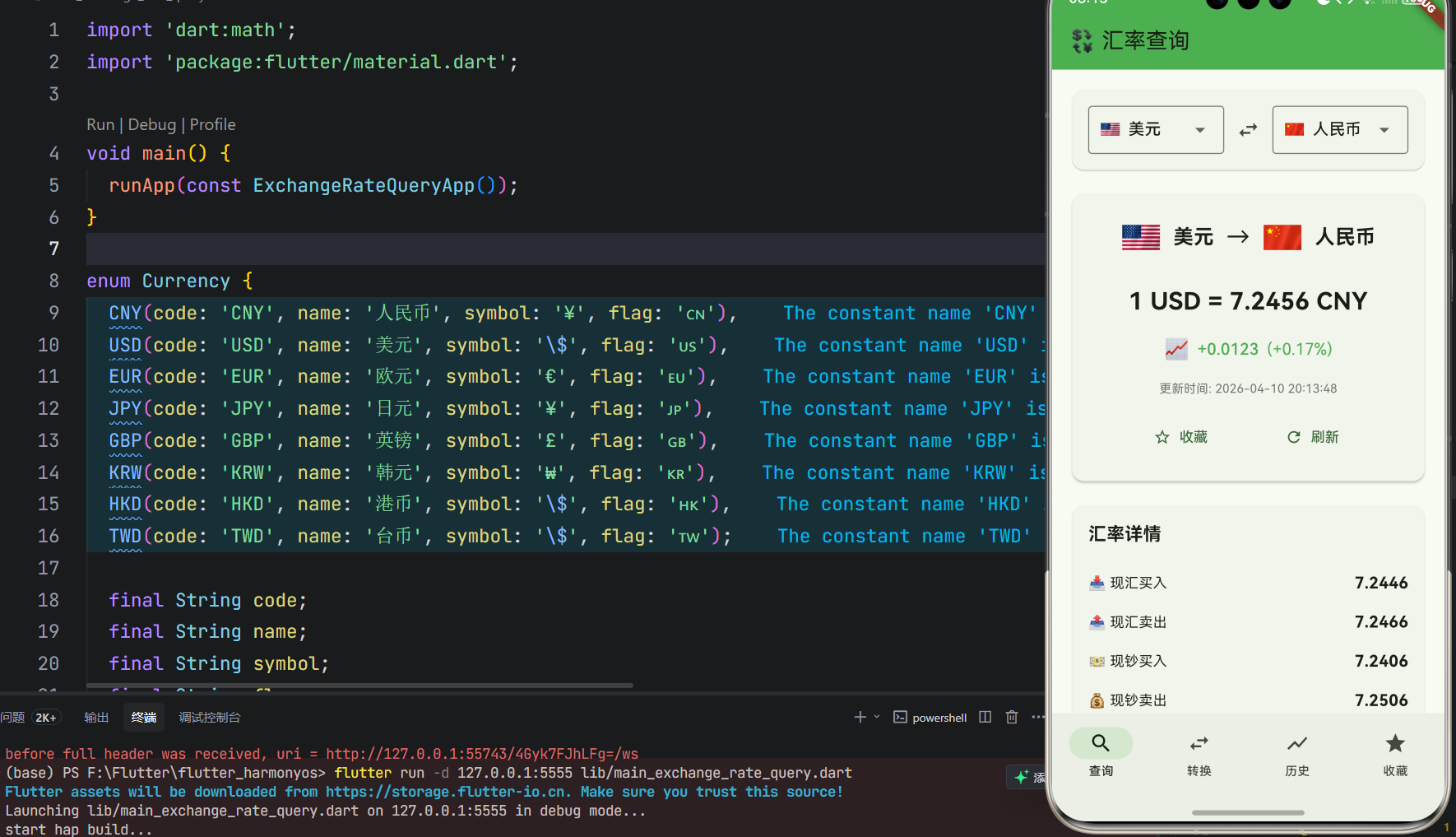
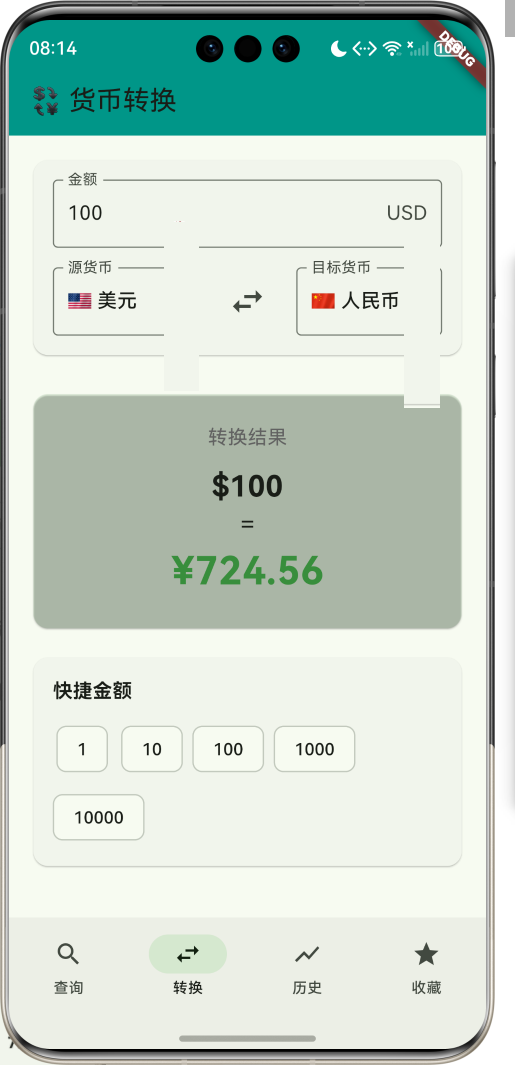
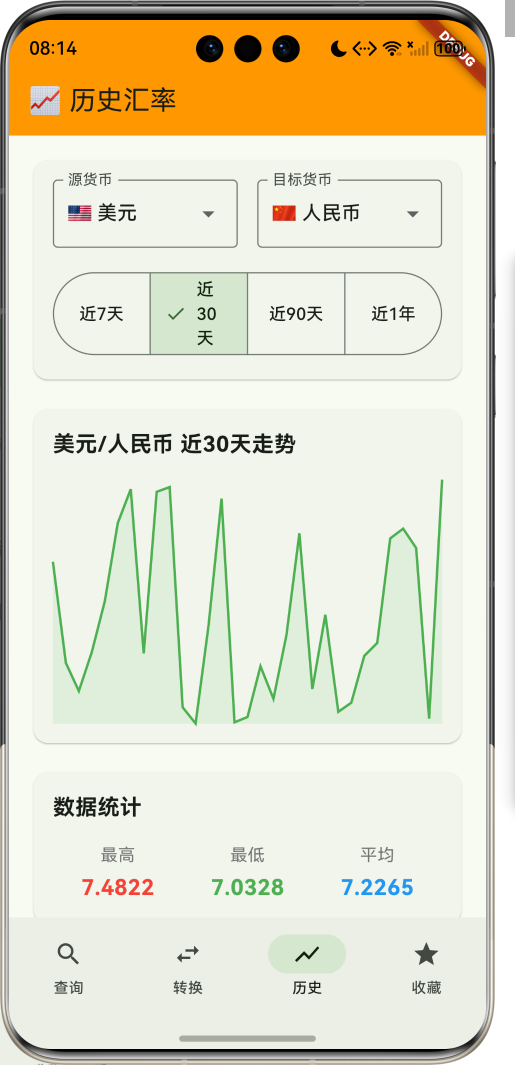
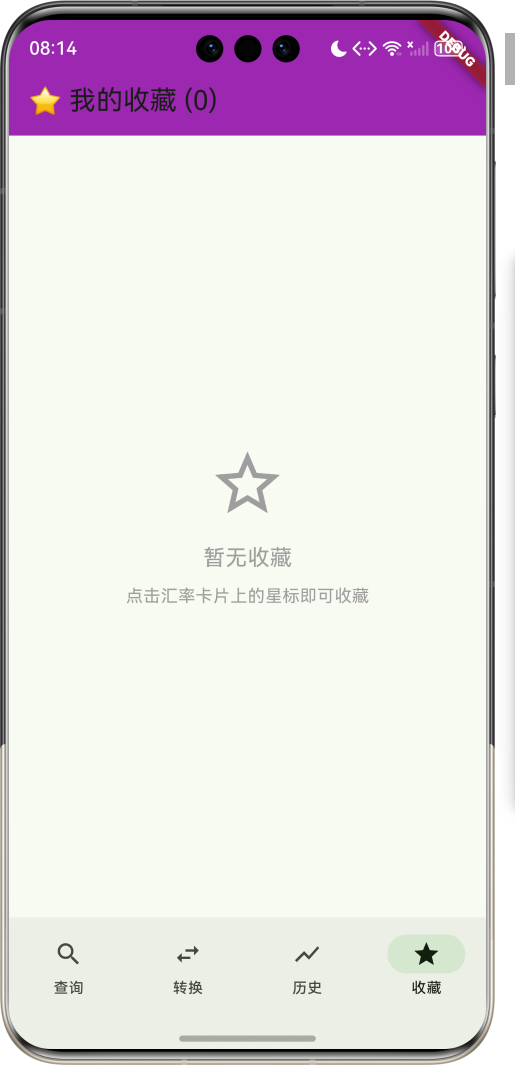
运行效果图
1.1 应用简介
汇率实时查询是一款实用工具应用,为用户提供全球主要货币的实时汇率查询服务。支持离线查询最近汇率,出国旅游、海淘必备。应用涵盖汇率查询、货币转换、历史汇率、收藏管理四大模块,帮助用户快速了解汇率变化,做出明智决策。
应用以金融的绿色为主色调,象征财富与增长。用户可以实时查询汇率、进行货币转换、查看历史走势、收藏常用货币,轻松应对各种汇率需求。
1.2 核心功能
| 功能模块 | 功能描述 | 实现方式 |
|---|---|---|
| 实时查询 | 查询最新汇率 | API接口 |
| 货币转换 | 快速换算金额 | 计算引擎 |
| 历史汇率 | 查看历史走势 | 图表展示 |
| 收藏管理 | 收藏常用货币 | 本地存储 |
| 离线查询 | 离线查看最近汇率 | 数据缓存 |
| 汇率提醒 | 汇率变动提醒 | 通知服务 |
1.3 主要货币定义
| 序号 | 货币名称 | 代码 | 符号 | 国家/地区 |
|---|---|---|---|---|
| 1 | 人民币 | CNY | ¥ | 中国 |
| 2 | 美元 | USD | $ | 美国 |
| 3 | 欧元 | EUR | € | 欧盟 |
| 4 | 日元 | JPY | ¥ | 日本 |
| 5 | 英镑 | GBP | £ | 英国 |
| 6 | 韩元 | KRW | ₩ | 韩国 |
| 7 | 港币 | HKD | $ | 香港 |
| 8 | 台币 | TWD | $ | 台湾 |
1.4 汇率类型定义
| 序号 | 类型名称 | Emoji | 描述 |
|---|---|---|---|
| 1 | 现汇买入 | 📥 | 银行买入外汇价格 |
| 2 | 现汇卖出 | 📤 | 银行卖出外汇价格 |
| 3 | 现钞买入 | 💵 | 银行买入现钞价格 |
| 4 | 现钞卖出 | 💰 | 银行卖出现钞价格 |
| 5 | 中间价 | ⚖️ | 买入卖出平均价 |
1.5 汇率趋势定义
| 序号 | 趋势名称 | Emoji | 描述 |
|---|---|---|---|
| 1 | 上涨 | 📈 | 汇率上升 |
| 2 | 下跌 | 📉 | 汇率下降 |
| 3 | 持平 | ➡️ | 汇率不变 |
| 4 | 波动 | 🔄 | 汇率震荡 |
1.6 时间范围定义
| 序号 | 范围名称 | Emoji | 天数 |
|---|---|---|---|
| 1 | 近7天 | 📅 | 7 |
| 2 | 近30天 | 📆 | 30 |
| 3 | 近90天 | 🗓️ | 90 |
| 4 | 近1年 | 📊 | 365 |
1.7 技术栈
| 技术领域 | 技术选型 | 版本要求 |
|---|---|---|
| 开发框架 | Flutter | >= 3.0.0 |
| 编程语言 | Dart | >= 2.17.0 |
| 状态管理 | Provider | >= 6.0.0 |
| 网络请求 | http | >= 1.0.0 |
| 数据持久化 | shared_preferences | >= 2.0.0 |
| 图表库 | fl_chart | >= 0.63.0 |
| 设计规范 | Material Design 3 | - |
| 目标平台 | 鸿蒙OS / iOS / Android | API 21+ |
1.8 项目结构
lib/
└── main_exchange_rate_query.dart
    ├── ExchangeRateQueryApp        # 应用入口
    ├── Currency                     # 货币枚举
    ├── RateType                     # 汇率类型枚举
    ├── TrendType                    # 趋势类型枚举
    ├── TimeRange                    # 时间范围枚举
    ├── ExchangeRate                 # 汇率模型
    ├── HistoricalRate               # 历史汇率模型
    ├── ExchangeRateQueryHomePage    # 主页面(底部导航)
    ├── _buildQueryPage              # 查询页面
    ├── _buildConvertPage            # 转换页面
    ├── _buildHistoryPage            # 历史页面
    ├── _buildFavoritesPage          # 收藏页面
    ├── RateCard                     # 汇率卡片组件
    └── RateChart                    # 汇率图表组件
二、系统架构
2.1 整体架构图
2.2 类图设计
2.3 页面导航流程
2.4 汇率查询流程
三、核心模块设计
3.1 数据模型设计
3.1.1 货币枚举 (Currency)
enum Currency {
  CNY(code: 'CNY', name: '人民币', symbol: '¥', flag: '🇨🇳'),
  USD(code: 'USD', name: '美元', symbol: '\$', flag: '🇺🇸'),
  EUR(code: 'EUR', name: '欧元', symbol: '€', flag: '🇪🇺'),
  JPY(code: 'JPY', name: '日元', symbol: '¥', flag: '🇯🇵'),
  GBP(code: 'GBP', name: '英镑', symbol: '£', flag: '🇬🇧'),
  KRW(code: 'KRW', name: '韩元', symbol: '₩', flag: '🇰🇷'),
  HKD(code: 'HKD', name: '港币', symbol: '\$', flag: '🇭🇰'),
  TWD(code: 'TWD', name: '台币', symbol: '\$', flag: '🇹🇼');

  final String code;
  final String name;
  final String symbol;
  final String flag;
}
3.1.2 汇率类型枚举 (RateType)
enum RateType {
  buyingRate(label: '现汇买入', emoji: '📥'),
  sellingRate(label: '现汇卖出', emoji: '📤'),
  cashBuying(label: '现钞买入', emoji: '💵'),
  cashSelling(label: '现钞卖出', emoji: '💰'),
  middleRate(label: '中间价', emoji: '⚖️');

  final String label;
  final String emoji;
}
3.1.3 汇率模型 (ExchangeRate)
class ExchangeRate {
  final String id;              // 汇率ID
  final Currency fromCurrency;  // 源货币
  final Currency toCurrency;    // 目标货币
  final double rate;            // 汇率
  final double change;          // 涨跌额
  final double changePercent;   // 涨跌幅
  final TrendType trend;        // 趋势
  final DateTime updatedAt;     // 更新时间
  bool isFavorite;              // 是否收藏

  ExchangeRate({
    required this.id,
    required this.fromCurrency,
    required this.toCurrency,
    required this.rate,
    required this.change,
    required this.changePercent,
    required this.trend,
    required this.updatedAt,
    this.isFavorite = false,
  });
}
3.1.4 历史汇率模型 (HistoricalRate)
class HistoricalRate {
  final String id;              // 历史ID
  final Currency fromCurrency;  // 源货币
  final Currency toCurrency;    // 目标货币
  final List<RatePoint> points; // 汇率点
  final double highRate;        // 最高汇率
  final double lowRate;         // 最低汇率
  final double avgRate;         // 平均汇率
  final TimeRange range;        // 时间范围

  HistoricalRate({
    required this.id,
    required this.fromCurrency,
    required this.toCurrency,
    required this.points,
    required this.highRate,
    required this.lowRate,
    required this.avgRate,
    required this.range,
  });
}

class RatePoint {
  final DateTime date;
  final double rate;

  RatePoint({required this.date, required this.rate});
}
3.1.5 货币使用分布
3.2 页面结构设计
3.2.1 主页面布局
3.2.2 查询页结构
3.2.3 转换页结构
3.2.4 历史页结构
3.3 汇率服务设计
3.4 货币转换设计
四、UI设计规范
4.1 配色方案
应用以金融的绿色为主色调,象征财富与增长:
| 颜色类型 | 色值 | 用途 |
|---|---|---|
| 主色 | #4CAF50 (Green) | 导航、主题元素 |
| 辅助色 | #66BB6A | 查询页面 |
| 第三色 | #81C784 | 转换页面 |
| 强调色 | #A5D6A7 | 历史页面 |
| 上涨色 | #4CAF50 | 汇率上涨 |
| 下跌色 | #F44336 | 汇率下跌 |
| 背景色 | #FAFAFA | 页面背景 |
| 卡片背景 | #FFFFFF | 汇率卡片 |
4.2 货币颜色
| 货币 | 色值 | 视觉效果 |
|---|---|---|
| 人民币 | #E53935 | 中国红 |
| 美元 | #1976D2 | 美国蓝 |
| 欧元 | #1565C0 | 欧盟蓝 |
| 日元 | #D32F2F | 日本红 |
| 英镑 | #0D47A1 | 英国蓝 |
| 韩元 | #1976D2 | 韩国蓝 |
4.3 字体规范
| 元素 | 字号 | 字重 | 颜色 |
|---|---|---|---|
| 页面标题 | 24px | Bold | 主色 |
| 汇率数值 | 32px | Bold | #000000 |
| 货币名称 | 16px | Medium | #666666 |
| 涨跌数值 | 14px | Medium | 上涨/下跌色 |
| 更新时间 | 12px | Regular | #999999 |
4.4 组件规范
4.4.1 汇率卡片设计
┌─────────────────────────────────────┐
│  🇺🇸 美元 → 🇨🇳 人民币               │
│                                     │
│  1 USD = 7.2456 CNY                │
│                                     │
│  📈 +0.0123 (+0.17%)               │
│                                     │
│  更新时间: 2024-01-15 10:30:00     │
└─────────────────────────────────────┘
4.4.2 货币选择器设计
┌─────────────────────────────────────┐
│  选择货币                            │
│                                     │
│  🇨🇳 人民币 CNY                      │
│  🇺🇸 美元 USD                        │
│  🇪🇺 欧元 EUR                        │
│  🇯🇵 日元 JPY                        │
│  🇬🇧 英镑 GBP                        │
│  🇰🇷 韩元 KRW                        │
└─────────────────────────────────────┘
4.4.3 转换器设计
┌─────────────────────────────────────┐
│  货币转换                            │
│                                     │
│  ┌─────────────────────────────┐   │
│  │ 🇺🇸 美元    [100.00]        │   │
│  └─────────────────────────────┘   │
│            ↕️ 交换                  │
│  ┌─────────────────────────────┐   │
│  │ 🇨🇳 人民币   724.56         │   │
│  └─────────────────────────────┘   │
│                                     │
│  汇率: 1 USD = 7.2456 CNY          │
└─────────────────────────────────────┘
4.4.4 历史走势图设计
┌─────────────────────────────────────┐
│  USD/CNY 近30天走势                  │
│                                     │
│  7.30 ┤     ╭─╮                     │
│  7.25 ┤   ╭─╯  ╰╮                   │
│  7.20 ┤  ╭╯     ╰╮                  │
│  7.15 ┤ ╭╯        ╰─╮               │
│  7.10 ┤╭╯           ╰─              │
│       └─────────────────────────    │
│                                     │
│  最高: 7.30  最低: 7.10  平均: 7.20 │
└─────────────────────────────────────┘
五、核心功能实现
5.1 汇率查询实现
class ExchangeRateService {
  final Map<String, ExchangeRate> _cache = {};
  final Duration cacheDuration = const Duration(minutes: 5);

  Future<ExchangeRate> getRate(Currency from, Currency to) async {
    final cacheKey = '${from.code}_${to.code}';

    if (_cache.containsKey(cacheKey)) {
      final cached = _cache[cacheKey]!;
      if (DateTime.now().difference(cached.updatedAt) < cacheDuration) {
        return cached;
      }
    }

    final rate = await _fetchFromAPI(from, to);
    _cache[cacheKey] = rate;
    return rate;
  }

  Future<ExchangeRate> _fetchFromAPI(Currency from, Currency to) async {
    // 模拟API调用
    await Future.delayed(const Duration(milliseconds: 500));

    final random = Random();
    final baseRate = _getBaseRate(from, to);
    final change = (random.nextDouble() - 0.5) * 0.1;

    return ExchangeRate(
      id: '${from.code}_${to.code}_${DateTime.now().millisecondsSinceEpoch}',
      fromCurrency: from,
      toCurrency: to,
      rate: baseRate + change,
      change: change,
      changePercent: (change / baseRate) * 100,
      trend: change > 0 ? TrendType.up : TrendType.down,
      updatedAt: DateTime.now(),
    );
  }

  double _getBaseRate(Currency from, Currency to) {
    // 基础汇率表
    final rates = {
      'USD_CNY': 7.2456,
      'EUR_CNY': 7.8912,
      'JPY_CNY': 0.0486,
      'GBP_CNY': 9.1834,
      'KRW_CNY': 0.0054,
      'HKD_CNY': 0.9267,
      'TWD_CNY': 0.2314,
    };

    if (from == to) return 1.0;

    final key = '${from.code}_${to.code}';
    if (rates.containsKey(key)) {
      return rates[key]!;
    }

    final reverseKey = '${to.code}_${from.code}';
    if (rates.containsKey(reverseKey)) {
      return 1.0 / rates[reverseKey]!;
    }

    // 通过USD转换
    final fromUsd = rates['USD_${from.code}'] ?? 1.0;
    final toUsd = rates['USD_${to.code}'] ?? 1.0;
    return toUsd / fromUsd;
  }
}
5.2 货币转换实现
class CurrencyConverter {
  final ExchangeRateService rateService;

  CurrencyConverter(this.rateService);

  Future<double> convert(
    double amount,
    Currency from,
    Currency to,
  ) async {
    if (from == to) return amount;

    final rate = await rateService.getRate(from, to);
    return amount * rate.rate;
  }

  Future<Map<String, double>> convertMultiple(
    double amount,
    Currency from,
    List<Currency> toList,
  ) async {
    final results = <String, double>{};

    for (final to in toList) {
      results[to.code] = await convert(amount, from, to);
    }

    return results;
  }
}
5.3 历史汇率实现
class HistoricalRateService {
  Future<HistoricalRate> getHistoricalRate(
    Currency from,
    Currency to,
    TimeRange range,
  ) async {
    final points = <RatePoint>[];
    final now = DateTime.now();
    final random = Random();

    final baseRate = _getBaseRate(from, to);

    for (int i = range.days; i >= 0; i--) {
      final date = now.subtract(Duration(days: i));
      final fluctuation = (random.nextDouble() - 0.5) * 0.1;

      points.add(RatePoint(
        date: date,
        rate: baseRate + fluctuation,
      ));
    }

    final rates = points.map((p) => p.rate).toList();
    final highRate = rates.reduce(max);
    final lowRate = rates.reduce(min);
    final avgRate = rates.reduce((a, b) => a + b) / rates.length;

    return HistoricalRate(
      id: '${from.code}_${to.code}_${range.days}',
      fromCurrency: from,
      toCurrency: to,
      points: points,
      highRate: highRate,
      lowRate: lowRate,
      avgRate: avgRate,
      range: range,
    );
  }
}
5.4 收藏管理实现
class FavoriteManager {
  final List<String> _favoritePairs = [];

  List<String> get favoritePairs => List.unmodifiable(_favoritePairs);

  void addFavorite(String fromCode, String toCode) {
    final pair = '${fromCode}_$toCode';
    if (!_favoritePairs.contains(pair)) {
      _favoritePairs.add(pair);
    }
  }

  void removeFavorite(String fromCode, String toCode) {
    final pair = '${fromCode}_$toCode';
    _favoritePairs.remove(pair);
  }

  bool isFavorite(String fromCode, String toCode) {
    final pair = '${fromCode}_$toCode';
    return _favoritePairs.contains(pair);
  }

  void toggleFavorite(String fromCode, String toCode) {
    if (isFavorite(fromCode, toCode)) {
      removeFavorite(fromCode, toCode);
    } else {
      addFavorite(fromCode, toCode);
    }
  }
}
5.5 图表绘制实现
class RateChartPainter extends CustomPainter {
final List<RatePoint> points;
final Color lineColor;
final Color fillColor;
RateChartPainter({
required this.points,
required this.lineColor,
required this.fillColor,
});
void paint(Canvas canvas, Size size) {
if (points.isEmpty) return;
final rates = points.map((p) => p.rate).toList();
final maxRate = rates.reduce(max);
final minRate = rates.reduce(min);
final rateRange = maxRate - minRate;
final path = Path();
final fillPath = Path();
for (int i = 0; i < points.length; i++) {
final x = (i / (points.length - 1)) * size.width;
final y = size.height - ((points[i].rate - minRate) / rateRange) * size.height;
if (i == 0) {
path.moveTo(x, y);
fillPath.moveTo(x, size.height);
fillPath.lineTo(x, y);
} else {
path.lineTo(x, y);
fillPath.lineTo(x, y);
}
}
fillPath.lineTo(size.width, size.height);
fillPath.close();
final linePaint = Paint()
..color = lineColor
..strokeWidth = 2
..style = PaintingStyle.stroke;
final fillPaint = Paint()
..color = fillColor
..style = PaintingStyle.fill;
canvas.drawPath(fillPath, fillPaint);
canvas.drawPath(path, linePaint);
}
bool shouldRepaint(covariant CustomPainter oldDelegate) => true;
}
六、交互设计
6.1 查询流程
6.2 转换流程
6.3 历史查询流程
七、扩展功能规划
7.1 后续版本规划
7.2 功能扩展建议
7.2.1 实时推送
推送功能:
- 汇率变动提醒
- 达到目标汇率通知
- 重要财经新闻
- 市场分析报告
7.2.2 高级分析
分析功能:
- 技术指标分析
- 趋势预测
- 风险评估
- 投资建议
7.2.3 社交功能
社交功能:
- 汇率讨论区
- 专家观点
- 用户分享
- 问答社区
八、注意事项
8.1 开发注意事项
-
API限制:注意汇率API的调用频率限制
-
数据缓存:合理设置缓存时间,平衡实时性和性能
-
精度问题:货币计算需注意浮点数精度
-
离线支持:确保离线时能查看最近汇率
-
时区处理:正确处理不同时区的时间显示
8.2 常见问题
| 问题 | 原因 | 解决方案 |
|---|---|---|
| 汇率不准 | API数据延迟 | 使用多个数据源 |
| 计算误差 | 浮点数精度 | 使用decimal类型 |
| 缓存失效 | 时间判断错误 | 统一时间格式 |
| 离线无数据 | 缓存未保存 | 实现本地持久化 |
| 图表卡顿 | 数据点过多 | 数据采样优化 |
8.3 使用技巧
💱 汇率查询使用技巧 💱
查询技巧
- 收藏常用货币对快速访问
- 定期刷新获取最新汇率
- 查看历史走势了解趋势
- 对比不同汇率类型
转换技巧
- 使用快捷金额快速转换
- 交换货币对查看反向汇率
- 注意汇率更新时间
- 大额转换参考中间价
历史分析技巧
- 选择合适的时间范围
- 关注最高最低汇率
- 分析波动趋势
- 结合财经新闻
九、运行说明
9.1 环境要求
| 环境 | 版本要求 |
|---|---|
| Flutter SDK | >= 3.0.0 |
| Dart SDK | >= 2.17.0 |
| 存储空间 | 建议30MB以上 |
| 鸿蒙OS | API 21+ |
9.2 运行命令
# 查看可用设备
flutter devices

# 运行到iOS设备
flutter run -t lib/main_exchange_rate_query.dart

# 运行到Android设备
flutter run -t lib/main_exchange_rate_query.dart

# 运行到Web服务器
flutter run -d web-server -t lib/main_exchange_rate_query.dart --web-port 8146

# 运行到鸿蒙设备
flutter run -d 127.0.0.1:5555 lib/main_exchange_rate_query.dart

# 代码分析
flutter analyze lib/main_exchange_rate_query.dart
十、总结
汇率实时查询应用通过汇率查询、货币转换、历史汇率、收藏管理四大模块,为用户提供了一个便捷的汇率查询平台。应用支持全球主要货币的实时汇率查询,支持离线查询最近汇率,是出国旅游、海淘必备工具。
核心功能涵盖实时查询、货币转换、历史汇率、收藏管理四大模块。实时查询支持多种汇率类型;货币转换支持快速换算;历史汇率支持多时间范围走势图;收藏管理方便用户保存常用货币对。
应用采用 Material Design 3 设计规范,以金融的绿色为主色调,象征财富与增长。通过本应用,希望能够帮助用户快速了解汇率变化,做出明智决策,轻松应对各种汇率需求。
汇率实时查询——出国旅游、海淘必备

开源鸿蒙跨平台开发社区汇聚开发者与厂商,共建“一次开发,多端部署”的开源生态,致力于降低跨端开发门槛,推动万物智联创新。
更多推荐

 13
13 0
0- 0


 已为社区贡献20条内容

所有评论(0)