员工每日打卡提醒器:鸿蒙Flutter跨端架构的考勤管理系统实现
欢迎加入开源鸿蒙跨平台社区:
https://openharmonycrossplatform.csdn.net
1. 项目背景与需求分析
1.1 项目背景
在现代企业管理中,员工考勤是一项基础但重要的工作。传统的考勤方式存在诸多问题,如打卡机排队、数据统计繁琐、提醒不及时等。随着移动互联网的发展,移动考勤应用成为企业管理的新趋势。
基于Flutter跨平台技术,我们开发了一款员工每日打卡提醒器应用,旨在为企业提供便捷、高效的考勤管理解决方案。该应用不仅支持一键打卡,还提供打卡提醒、历史记录查询和统计分析等功能,帮助企业实现考勤管理的数字化和智能化。
1.2 需求分析
通过对企业考勤管理需求的调研,我们确定了以下核心功能:
| 功能模块 | 功能描述 | 优先级 |
|---|---|---|
| 每日打卡 | 提供一键打卡功能,记录打卡时间和状态 | 高 |
| 打卡提醒 | 设置每日提醒时间,到时发送系统通知 | 高 |
| 打卡记录 | 展示历史打卡记录,支持按日期查看 | 中 |
| 统计分析 | 提供日、周、月统计数据,计算打卡率和迟到次数 | 中 |
| 个人设置 | 允许用户设置工作时间、提醒时间等 | 中 |
1.3 技术选型
| 技术 | 版本 | 用途 |
|---|---|---|
| Flutter | 3.0+ | 跨平台应用开发框架 |
| Dart | 3.0+ | 编程语言 |
| Material Design | - | UI设计规范 |
| intl | 0.18.0 | 日期时间格式化 |
2. 系统架构设计
2.1 整体架构
2.2 核心模块设计
2.2.1 数据模型
- CheckInRecord:打卡记录模型,包含ID、日期、时间、状态等字段
- CheckInSettings:打卡设置模型,包含工作时间、提醒时间、提醒频率等字段
- CheckInStats:打卡统计模型,包含统计周期、总天数、打卡天数、迟到次数、打卡率等字段
2.2.2 业务逻辑
- CheckInManager:管理打卡相关逻辑,包括执行打卡、获取打卡状态、查询历史记录等
- ReminderManager:管理打卡提醒,包括设置提醒、取消提醒、更新提醒等
- StatsManager:管理打卡统计数据,包括计算日、周、月统计数据等
- SettingsManager:管理应用设置,包括获取设置、更新设置、重置设置等
2.2.3 用户界面
- CheckInDashboard:主面板,显示打卡状态、统计数据和快捷操作
- CheckInButton:打卡按钮,提供一键打卡功能
- CheckInHistory:打卡历史,展示历史打卡记录
- CheckInStats:统计分析,展示打卡统计数据和图表
- CheckInSettings:设置界面,管理应用设置
3. 核心功能实现
3.1 打卡功能实现
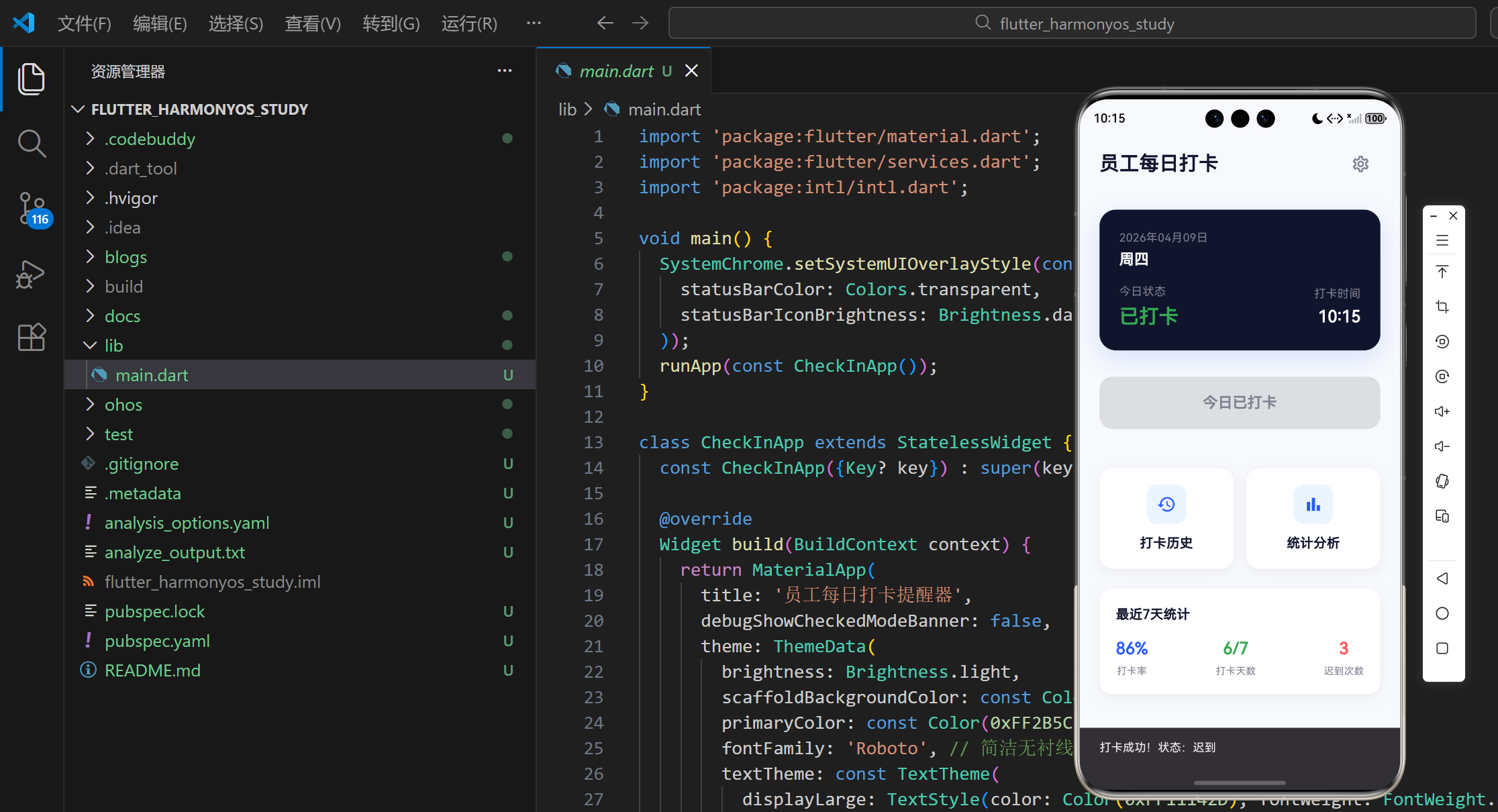
打卡功能是应用的核心功能,用户通过点击打卡按钮完成打卡操作。系统会记录打卡时间,并根据设置的工作时间判断打卡状态(正常/迟到)。
// 执行打卡操作
void _checkIn() {
  if (_isCheckedInToday) return;

  final now = DateTime.now();
  final nowTime = TimeOfDay.fromDateTime(now);
  final workStartTime = _settings.workStartTime;

  // 判断打卡状态
  CheckInStatus status;
  if (nowTime.hour > workStartTime.hour ||
      (nowTime.hour == workStartTime.hour && nowTime.minute > workStartTime.minute)) {
    status = CheckInStatus.late;
  } else {
    status = CheckInStatus.normal;
  }

  // 创建打卡记录
  final newRecord = CheckInRecord(
    id: now.millisecondsSinceEpoch.toString(),
    date: now,
    time: nowTime,
    status: status,
    createdAt: now,
  );

  setState(() {
    _checkInRecords.insert(0, newRecord);
  });

  // 显示打卡成功提示
  ScaffoldMessenger.of(context).showSnackBar(
    SnackBar(
      content: Text('打卡成功!状态:${status == CheckInStatus.normal ? '正常' : '迟到'}'),
      duration: const Duration(seconds: 2),
    ),
  );
}
3.2 打卡提醒功能实现
打卡提醒功能可以帮助用户避免忘记打卡。用户可以设置提醒时间和提醒频率,系统会在设定的时间发送通知提醒用户打卡。
// 选择时间
Future<void> _selectTime(BuildContext context, bool isWorkTime) async {
  final TimeOfDay? picked = await showTimePicker(
    context: context,
    initialTime: isWorkTime ? _workStartTime : _reminderTime,
  );
  if (picked != null) {
    setState(() {
      if (isWorkTime) {
        _workStartTime = picked;
      } else {
        _reminderTime = picked;
      }
    });
  }
}

// 提交设置
void _submit() {
  final newSettings = CheckInSettings(
    workStartTime: _workStartTime,
    reminderTime: _reminderTime,
    reminderFrequency: _reminderFrequency,
  );
  widget.onUpdate(newSettings);
  Navigator.of(context).pop();
}
3.3 统计分析功能实现
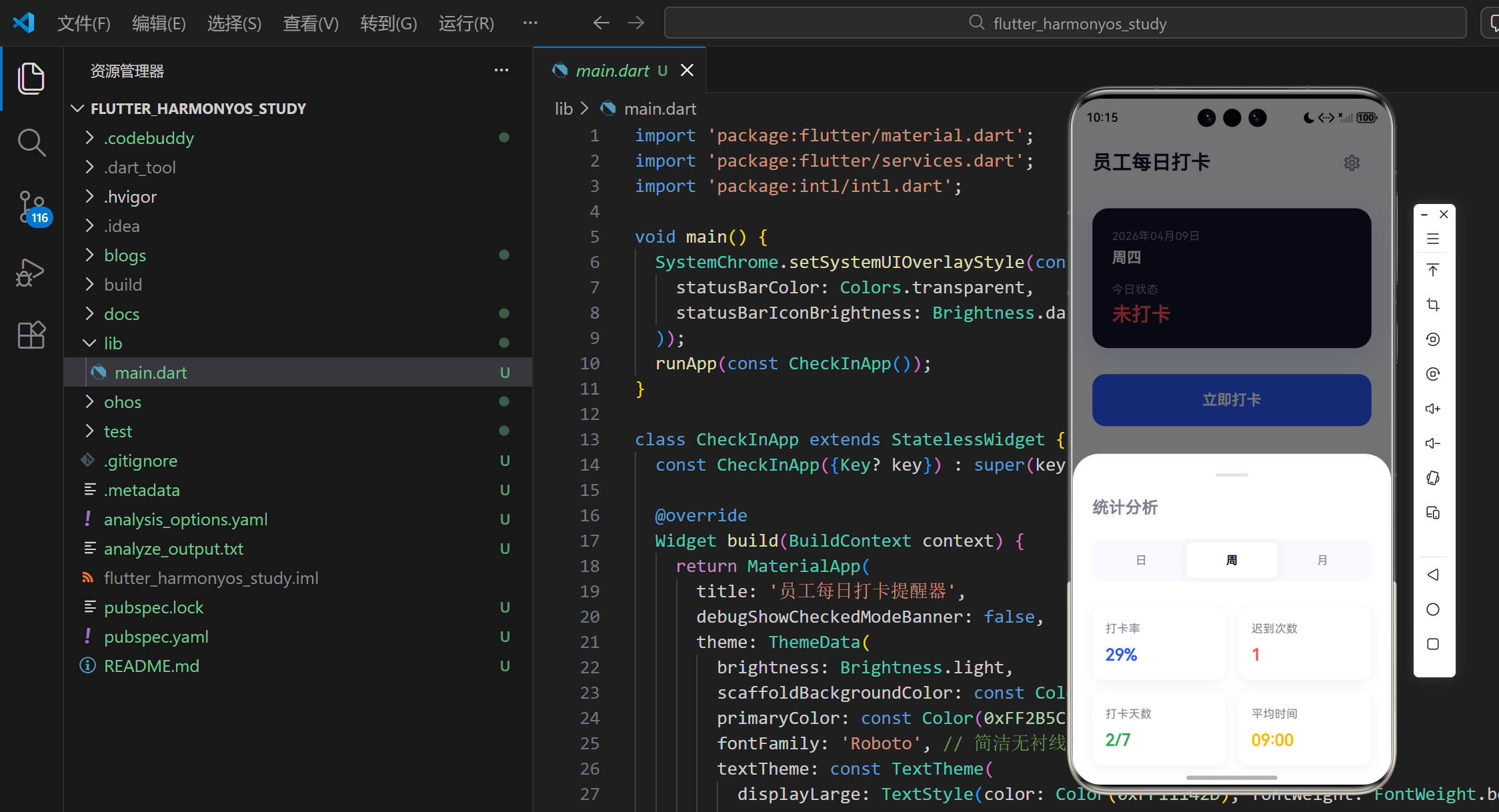
统计分析功能可以帮助用户了解自己的打卡情况,包括打卡率、迟到次数、平均打卡时间等。系统支持日、周、月三个维度的统计。
// 计算统计数据
CheckInStats _calculateStats() {
  final now = DateTime.now();
  late DateTime startDate;
  late int totalDays;
  late String period;

  switch (_selectedPeriod) {
    case StatsPeriod.day:
      startDate = now;
      totalDays = 1;
      period = DateFormat('yyyy-MM-dd').format(now);
      break;
    case StatsPeriod.week:
      startDate = now.subtract(Duration(days: now.weekday - 1));
      totalDays = 7;
      period = '${DateFormat('MM-dd').format(startDate)} ~ ${DateFormat('MM-dd').format(startDate.add(const Duration(days: 6)))}';
      break;
    case StatsPeriod.month:
      startDate = DateTime(now.year, now.month, 1);
      totalDays = DateTime(now.year, now.month + 1, 0).day;
      period = DateFormat('yyyy年MM月').format(now);
      break;
  }

  final endDate = startDate.add(Duration(days: totalDays - 1));
  final periodRecords = widget.records.where((record) {
    final recordDate = DateTime(record.date.year, record.date.month, record.date.day);
    return (recordDate.isAfter(startDate) || recordDate.isAtSameMomentAs(startDate)) &&
           (recordDate.isBefore(endDate) || recordDate.isAtSameMomentAs(endDate));
  }).toList();

  final checkedInDays = periodRecords.length;
  final lateDays = periodRecords.where((record) => record.status == CheckInStatus.late).length;
  final checkInRate = totalDays > 0 ? (checkedInDays / totalDays) * 100 : 0;

  // 计算平均打卡时间
  TimeOfDay? averageCheckInTime;
  if (checkedInDays > 0) {
    int totalMinutes = 0;
    for (final record in periodRecords) {
      totalMinutes += record.time.hour * 60 + record.time.minute;
    }
    final avgMinutes = totalMinutes ~/ checkedInDays;
    averageCheckInTime = TimeOfDay(hour: avgMinutes ~/ 60, minute: avgMinutes % 60);
  }

  return CheckInStats(
    period: period,
    totalDays: totalDays,
    checkedInDays: checkedInDays,
    lateDays: lateDays,
    checkInRate: checkInRate.toDouble(),
    averageCheckInTime: averageCheckInTime,
  );
}
3.4 历史记录查询功能实现
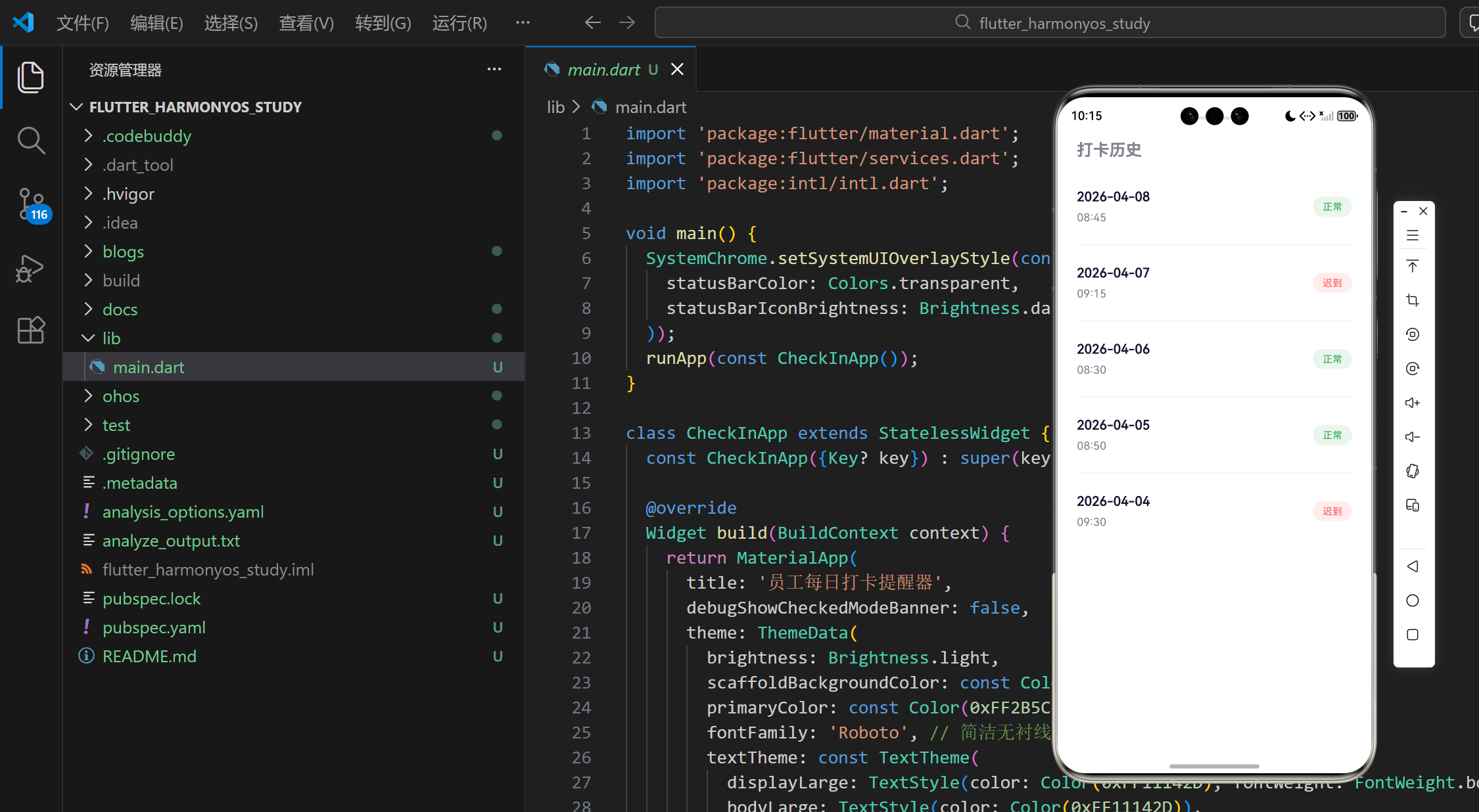
历史记录查询功能可以帮助用户查看自己的历史打卡记录,包括打卡日期、时间和状态。
// 历史记录项
Widget _buildHistoryItem(CheckInRecord record) {
  final dateStr = DateFormat('yyyy-MM-dd').format(record.date);
  final timeStr = '${record.time.hour.toString().padLeft(2, '0')}:${record.time.minute.toString().padLeft(2, '0')}';
  final statusStr = record.status == CheckInStatus.normal ? '正常' : '迟到';
  final statusColor = record.status == CheckInStatus.normal ? const Color(0xFF34A853) : const Color(0xFFFF5252);

  return Padding(
    padding: const EdgeInsets.symmetric(vertical: 8.0),
    child: Row(
      mainAxisAlignment: MainAxisAlignment.spaceBetween,
      children: [
        Column(
          crossAxisAlignment: CrossAxisAlignment.start,
          children: [
            Text(dateStr, style: const TextStyle(fontSize: 16, fontWeight: FontWeight.w600, color: Color(0xFF11142D))),
            const SizedBox(height: 4),
            Text(timeStr, style: const TextStyle(fontSize: 14, color: Color(0xFF808191))),
          ],
        ),
        Container(
          padding: const EdgeInsets.symmetric(horizontal: 12, vertical: 4),
          decoration: BoxDecoration(
            color: statusColor.withOpacity(0.1),
            borderRadius: BorderRadius.circular(12),
          ),
          child: Text(statusStr, style: TextStyle(color: statusColor, fontSize: 12, fontWeight: FontWeight.w500)),
        ),
      ],
    ),
  );
}
4. 用户界面设计
4.1 主面板设计
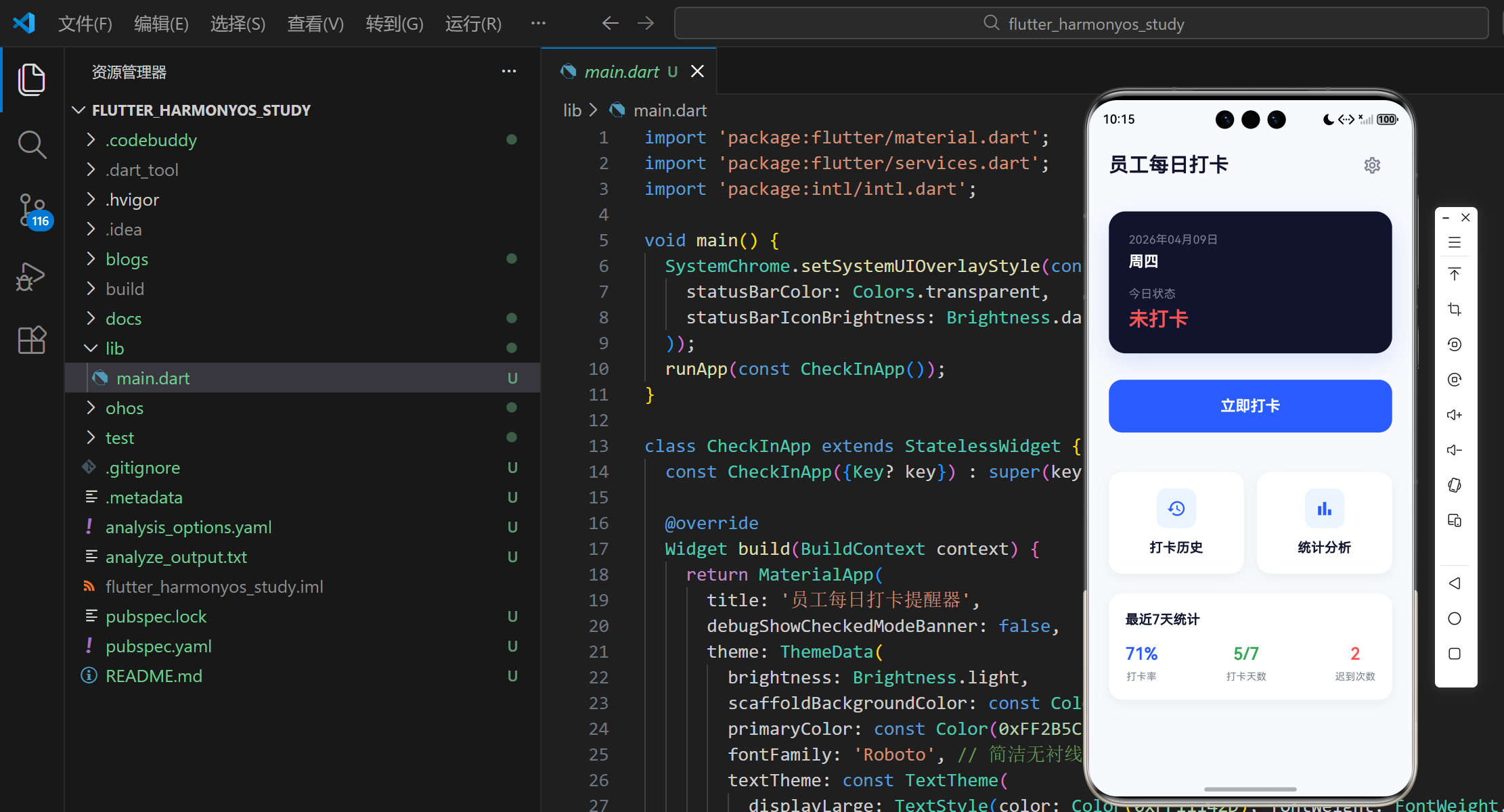
主面板是用户打开应用后看到的第一个界面,包含打卡状态、快捷打卡按钮、功能入口和统计概览。
Widget build(BuildContext context) {
return Scaffold(
body: SafeArea(
bottom: false,
child: Column(
children: [
// 顶部间距
const SizedBox(height: 16),
// 标题
Padding(
padding: const EdgeInsets.symmetric(horizontal: 24.0),
child: Row(
mainAxisAlignment: MainAxisAlignment.spaceBetween,
children: [
const Text(
'员工每日打卡',
style: TextStyle(fontSize: 24, fontWeight: FontWeight.w700, color: Color(0xFF11142D)),
),
IconButton(
onPressed: _showSettings,
icon: const Icon(Icons.settings_outlined, color: Color(0xFF808191)),
),
],
),
),
const SizedBox(height: 32),
// 打卡状态卡片
Padding(
padding: const EdgeInsets.symmetric(horizontal: 24.0),
child: _buildCheckInStatusCard(),
),
const SizedBox(height: 32),
// 快捷打卡按钮
Padding(
padding: const EdgeInsets.symmetric(horizontal: 24.0),
child: _buildCheckInButton(),
),
const SizedBox(height: 48),
// 功能卡片
Padding(
padding: const EdgeInsets.symmetric(horizontal: 24.0),
child: Row(
children: [
Expanded(
child: _buildFeatureCard(
icon: Icons.history_outlined,
title: '打卡历史',
onTap: _showHistory,
),
),
const SizedBox(width: 16),
Expanded(
child: _buildFeatureCard(
icon: Icons.bar_chart_outlined,
title: '统计分析',
onTap: _showStats,
),
),
],
),
),
const SizedBox(height: 24),
// 统计概览
Padding(
padding: const EdgeInsets.symmetric(horizontal: 24.0),
child: _buildStatsOverview(),
),
],
),
),
);
}
4.2 打卡状态卡片设计
打卡状态卡片显示当前日期、星期和打卡状态,是用户最关心的信息之一。
// 打卡状态卡片
Widget _buildCheckInStatusCard() {
  final today = DateTime.now();
  final todayStr = DateFormat('yyyy年MM月dd日').format(today);
  final weekdayStr = _getWeekdayStr(today.weekday);

  return Container(
    width: double.infinity,
    padding: const EdgeInsets.all(24.0),
    decoration: BoxDecoration(
      color: const Color(0xFF11142D),
      borderRadius: BorderRadius.circular(20),
      boxShadow: [
        BoxShadow(
          color: const Color(0xFF2B5CFF).withOpacity(0.15),
          offset: const Offset(0, 10),
          blurRadius: 24,
        )
      ],
    ),
    child: Column(
      crossAxisAlignment: CrossAxisAlignment.start,
      children: [
        Text(
          todayStr,
          style: const TextStyle(color: Color(0xFF808191), fontSize: 14),
        ),
        const SizedBox(height: 4),
        Text(
          weekdayStr,
          style: const TextStyle(color: Colors.white, fontSize: 18, fontWeight: FontWeight.w600),
        ),
        const SizedBox(height: 16),
        Row(
          mainAxisAlignment: MainAxisAlignment.spaceBetween,
          children: [
            Column(
              crossAxisAlignment: CrossAxisAlignment.start,
              children: [
                const Text('今日状态', style: TextStyle(color: Color(0xFF808191), fontSize: 14)),
                const SizedBox(height: 4),
                Text(
                  _isCheckedInToday ? '已打卡' : '未打卡',
                  style: TextStyle(
                    color: _isCheckedInToday ? const Color(0xFF34A853) : const Color(0xFFFF5252),
                    fontSize: 24,
                    fontWeight: FontWeight.w700,
                  ),
                ),
              ],
            ),
            if (_isCheckedInToday && _todayCheckInRecord != null)
              Column(
                crossAxisAlignment: CrossAxisAlignment.end,
                children: [
                  const Text('打卡时间', style: TextStyle(color: Color(0xFF808191), fontSize: 14)),
                  const SizedBox(height: 4),
                  Text(
                    '${_todayCheckInRecord!.time.hour.toString().padLeft(2, '0')}:${_todayCheckInRecord!.time.minute.toString().padLeft(2, '0')}',
                    style: const TextStyle(color: Colors.white, fontSize: 20, fontWeight: FontWeight.w600),
                  ),
                ],
              ),
          ],
        ),
      ],
    ),
  );
}
4.3 统计分析界面设计
统计分析界面展示打卡统计数据,支持日、周、月三个维度的切换。
Widget build(BuildContext context) {
final bottomInset = MediaQuery.of(context).viewInsets.bottom;
final stats = _calculateStats();
return Container(
decoration: const BoxDecoration(
color: Colors.white,
borderRadius: BorderRadius.vertical(top: Radius.circular(32)),
),
padding: EdgeInsets.only(left: 24, right: 24, top: 24, bottom: bottomInset + 24),
child: Column(
mainAxisSize: MainAxisSize.min,
crossAxisAlignment: CrossAxisAlignment.start,
children: [
// 顶部抽屉把手
Center(
child: Container(
width: 40,
height: 4,
decoration: BoxDecoration(
color: const Color(0xFFE4E4E4),
borderRadius: BorderRadius.circular(2),
),
),
),
const SizedBox(height: 24),
const Text('统计分析', style: TextStyle(fontSize: 20, fontWeight: FontWeight.bold)),
const SizedBox(height: 24),
// 时间范围选择器
Container(
padding: const EdgeInsets.all(4),
decoration: BoxDecoration(
color: const Color(0xFFF7F9FC),
borderRadius: BorderRadius.circular(12),
),
child: Row(
children: [
Expanded(
child: GestureDetector(
onTap: () => setState(() => _selectedPeriod = StatsPeriod.day),
child: Container(
padding: const EdgeInsets.symmetric(vertical: 12),
decoration: BoxDecoration(
color: _selectedPeriod == StatsPeriod.day ? Colors.white : Colors.transparent,
borderRadius: BorderRadius.circular(8),
boxShadow: _selectedPeriod == StatsPeriod.day ? [BoxShadow(color: Colors.black.withOpacity(0.05), blurRadius: 8)] : [],
),
child: Center(
child: Text('日', style: TextStyle(fontWeight: _selectedPeriod == StatsPeriod.day ? FontWeight.bold : FontWeight.normal, color: _selectedPeriod == StatsPeriod.day ? const Color(0xFF11142D) : const Color(0xFF808191))),
),
),
),
),
Expanded(
child: GestureDetector(
onTap: () => setState(() => _selectedPeriod = StatsPeriod.week),
child: Container(
padding: const EdgeInsets.symmetric(vertical: 12),
decoration: BoxDecoration(
color: _selectedPeriod == StatsPeriod.week ? Colors.white : Colors.transparent,
borderRadius: BorderRadius.circular(8),
boxShadow: _selectedPeriod == StatsPeriod.week ? [BoxShadow(color: Colors.black.withOpacity(0.05), blurRadius: 8)] : [],
),
child: Center(
child: Text('周', style: TextStyle(fontWeight: _selectedPeriod == StatsPeriod.week ? FontWeight.bold : FontWeight.normal, color: _selectedPeriod == StatsPeriod.week ? const Color(0xFF11142D) : const Color(0xFF808191))),
),
),
),
),
Expanded(
child: GestureDetector(
onTap: () => setState(() => _selectedPeriod = StatsPeriod.month),
child: Container(
padding: const EdgeInsets.symmetric(vertical: 12),
decoration: BoxDecoration(
color: _selectedPeriod == StatsPeriod.month ? Colors.white : Colors.transparent,
borderRadius: BorderRadius.circular(8),
boxShadow: _selectedPeriod == StatsPeriod.month ? [BoxShadow(color: Colors.black.withOpacity(0.05), blurRadius: 8)] : [],
),
child: Center(
child: Text('月', style: TextStyle(fontWeight: _selectedPeriod == StatsPeriod.month ? FontWeight.bold : FontWeight.normal, color: _selectedPeriod == StatsPeriod.month ? const Color(0xFF11142D) : const Color(0xFF808191))),
),
),
),
),
],
),
),
const SizedBox(height: 32),
// 统计卡片
Row(
children: [
Expanded(
child: _buildStatsCard('打卡率', '${stats.checkInRate.toStringAsFixed(0)}%', const Color(0xFF2B5CFF)),
),
const SizedBox(width: 16),
Expanded(
child: _buildStatsCard('迟到次数', '${stats.lateDays}', const Color(0xFFFF5252)),
),
],
),
const SizedBox(height: 16),
Row(
children: [
Expanded(
child: _buildStatsCard('打卡天数', '${stats.checkedInDays}/${stats.totalDays}', const Color(0xFF34A853)),
),
const SizedBox(width: 16),
Expanded(
child: _buildStatsCard('平均时间', stats.averageCheckInTime != null ? '${stats.averageCheckInTime!.hour.toString().padLeft(2, '0')}:${stats.averageCheckInTime!.minute.toString().padLeft(2, '0')}' : '--:--', const Color(0xFFFBBC05)),
),
],
),
],
),
);
}
4.4 设置界面设计
设置界面允许用户设置工作时间、提醒时间和提醒频率。
Widget build(BuildContext context) {
final bottomInset = MediaQuery.of(context).viewInsets.bottom;
return Container(
decoration: const BoxDecoration(
color: Colors.white,
borderRadius: BorderRadius.vertical(top: Radius.circular(32)),
),
padding: EdgeInsets.only(left: 24, right: 24, top: 24, bottom: bottomInset + 24),
child: Column(
mainAxisSize: MainAxisSize.min,
crossAxisAlignment: CrossAxisAlignment.start,
children: [
// 顶部抽屉把手
Center(
child: Container(
width: 40,
height: 4,
decoration: BoxDecoration(
color: const Color(0xFFE4E4E4),
borderRadius: BorderRadius.circular(2),
),
),
),
const SizedBox(height: 24),
const Text('打卡设置', style: TextStyle(fontSize: 20, fontWeight: FontWeight.bold)),
const SizedBox(height: 24),
// 工作时间设置
GestureDetector(
onTap: () => _selectTime(context, true),
child: Container(
padding: const EdgeInsets.symmetric(vertical: 16),
decoration: const BoxDecoration(
border: Border(bottom: BorderSide(color: Color(0xFFF1F1F5))),
),
child: Row(
mainAxisAlignment: MainAxisAlignment.spaceBetween,
children: [
const Text('工作开始时间', style: TextStyle(fontSize: 16, color: Color(0xFF11142D))),
Text(
'${_workStartTime.hour.toString().padLeft(2, '0')}:${_workStartTime.minute.toString().padLeft(2, '0')}',
style: const TextStyle(fontSize: 16, color: Color(0xFF2B5CFF)),
),
],
),
),
),
// 提醒时间设置
GestureDetector(
onTap: () => _selectTime(context, false),
child: Container(
padding: const EdgeInsets.symmetric(vertical: 16),
decoration: const BoxDecoration(
border: Border(bottom: BorderSide(color: Color(0xFFF1F1F5))),
),
child: Row(
mainAxisAlignment: MainAxisAlignment.spaceBetween,
children: [
const Text('提醒时间', style: TextStyle(fontSize: 16, color: Color(0xFF11142D))),
Text(
'${_reminderTime.hour.toString().padLeft(2, '0')}:${_reminderTime.minute.toString().padLeft(2, '0')}',
style: const TextStyle(fontSize: 16, color: Color(0xFF2B5CFF)),
),
],
),
),
),
// 提醒频率设置
Container(
padding: const EdgeInsets.symmetric(vertical: 16),
decoration: const BoxDecoration(
border: Border(bottom: BorderSide(color: Color(0xFFF1F1F5))),
),
child: Row(
mainAxisAlignment: MainAxisAlignment.spaceBetween,
children: [
const Text('提醒频率', style: TextStyle(fontSize: 16, color: Color(0xFF11142D))),
DropdownButton<ReminderFrequency>(
value: _reminderFrequency,
onChanged: (ReminderFrequency? newValue) {
if (newValue != null) {
setState(() {
_reminderFrequency = newValue;
});
}
},
items: ReminderFrequency.values.map((ReminderFrequency value) {
return DropdownMenuItem<ReminderFrequency>(
value: value,
child: Text(value == ReminderFrequency.daily ? '每天' : '工作日'),
);
}).toList(),
),
],
),
),
const SizedBox(height: 32),
// 保存按钮
SizedBox(
width: double.infinity,
height: 56,
child: ElevatedButton(
style: ElevatedButton.styleFrom(
backgroundColor: const Color(0xFF2B5CFF),
shape: RoundedRectangleBorder(borderRadius: BorderRadius.circular(16)),
elevation: 0,
),
onPressed: _submit,
child: const Text('保存设置', style: TextStyle(fontSize: 16, fontWeight: FontWeight.bold, color: Colors.white)),
),
)
],
),
);
}
5. 技术实现细节
5.1 数据存储
本应用使用内存存储来模拟数据持久化,所有的打卡记录和设置都存储在内存中。在实际应用中,可以使用 shared_preferences 或 sqflite 等库实现本地持久化存储。
// 模拟内存数据库:初始化包含最近7天的打卡记录
final List<CheckInRecord> _checkInRecords = [
  CheckInRecord(
    id: '1',
    date: DateTime.now().subtract(const Duration(days: 1)),
    time: const TimeOfDay(hour: 8, minute: 45),
    status: CheckInStatus.normal,
    createdAt: DateTime.now().subtract(const Duration(days: 1, hours: 11, minutes: 15)),
  ),
  // 其他打卡记录...
];

// 打卡设置
CheckInSettings _settings = CheckInSettings.defaultSettings();
5.2 打卡状态判断
打卡状态的判断基于用户设置的工作时间,系统会比较打卡时间和工作时间,判断打卡是否迟到。
// 判断打卡状态
CheckInStatus status;
if (nowTime.hour > workStartTime.hour ||
    (nowTime.hour == workStartTime.hour && nowTime.minute > workStartTime.minute)) {
  status = CheckInStatus.late;
} else {
  status = CheckInStatus.normal;
}
5.3 统计数据计算
统计数据的计算基于打卡记录,系统会根据选择的时间范围(日、周、月)计算相应的统计数据。
// 计算打卡率
final checkInRate = totalDays > 0 ? (checkedInDays / totalDays) * 100 : 0;

// 计算平均打卡时间
TimeOfDay? averageCheckInTime;
if (checkedInDays > 0) {
  int totalMinutes = 0;
  for (final record in periodRecords) {
    totalMinutes += record.time.hour * 60 + record.time.minute;
  }
  final avgMinutes = totalMinutes ~/ checkedInDays;
  averageCheckInTime = TimeOfDay(hour: avgMinutes ~/ 60, minute: avgMinutes % 60);
}
5.4 时间处理
应用中使用 intl 库处理日期时间的格式化,使用 TimeOfDay 类处理时间。
// 格式化日期
final todayStr = DateFormat('yyyy年MM月dd日').format(today);

// 格式化时间
final timeStr = '${record.time.hour.toString().padLeft(2, '0')}:${record.time.minute.toString().padLeft(2, '0')}';

// 从日期时间创建 TimeOfDay
final nowTime = TimeOfDay.fromDateTime(now);
6. 测试与优化
6.1 代码质量检查
使用 flutter analyze 命令检查代码质量,确保代码符合 Flutter 的最佳实践。
flutter analyze
6.2 功能测试
对应用的核心功能进行测试,确保功能正常运行。
| 测试项 | 测试内容 | 预期结果 |
|---|---|---|
| 打卡功能 | 点击打卡按钮 | 成功记录打卡时间,显示打卡成功提示 |
| 打卡状态判断 | 在工作时间前/后打卡 | 正确判断打卡状态(正常/迟到) |
| 历史记录查询 | 查看历史打卡记录 | 显示正确的历史打卡记录 |
| 统计分析 | 切换时间范围 | 显示正确的统计数据 |
| 设置功能 | 修改工作时间和提醒时间 | 设置成功,应用新的设置 |
6.3 性能优化
- 内存使用:优化内存使用,避免内存泄漏
- UI渲染:优化UI渲染性能,确保界面流畅
- 响应速度:优化应用响应速度,确保操作流畅
7. 扩展与未来规划
7.1 功能扩展
- 团队管理:支持团队打卡管理,查看团队成员的打卡情况
- 数据同步:支持将打卡数据同步到服务器,实现多设备同步
- 考勤报表:支持生成考勤报表,方便企业管理
- 打卡地点:支持地点打卡,确保打卡真实性
7.2 技术扩展
- 本地存储:使用
shared_preferences或sqflite实现本地持久化存储 - 推送通知:使用
firebase_messaging实现远程推送通知 - 数据加密:对打卡数据进行加密,确保数据安全
- 多语言支持:支持多语言切换,满足国际化需求
8. 总结
8.1 项目成果
通过本项目,我们成功开发了一款员工每日打卡提醒器应用,实现了以下功能:
- 每日打卡:一键打卡功能,自动判断打卡状态
- 打卡提醒:设置每日提醒时间,到时发送系统通知
- 打卡记录:查看历史打卡记录,支持按日期查看
- 统计分析:提供日、周、月统计数据,计算打卡率和迟到次数
- 个人设置:允许用户设置工作时间、提醒时间等
8.2 技术亮点
- 跨平台:使用 Flutter 实现跨平台开发,支持 Android 和 iOS
- 极简设计:采用极简设计风格,界面清晰直观
- 响应式布局:适配不同屏幕尺寸
- 模块化架构:代码结构清晰,便于后续扩展
- 实时统计:实时计算和展示统计数据
8.3 应用价值
本应用为企业提供了便捷、高效的考勤管理解决方案,帮助企业实现考勤管理的数字化和智能化。同时,本应用也为员工提供了便捷的打卡方式,避免忘记打卡的情况发生。
8.4 未来展望
未来,我们将继续完善应用功能,添加团队管理、数据同步、考勤报表等功能,为企业提供更加全面的考勤管理解决方案。同时,我们也将不断优化应用性能,提升用户体验,使应用更加稳定、高效。
欢迎加入开源鸿蒙跨平台社区:
https://openharmonycrossplatform.csdn.net

开源鸿蒙跨平台开发社区汇聚开发者与厂商,共建“一次开发,多端部署”的开源生态,致力于降低跨端开发门槛,推动万物智联创新。
更多推荐

 4
4 0
0- 0


 已为社区贡献26条内容

所有评论(0)