Flutter 框架跨平台鸿蒙开发 - 鸿蒙打地鼠游戏应用
欢迎加入开源鸿蒙跨平台社区:
https://openharmonycrossplatform.csdn.net
一、项目概述
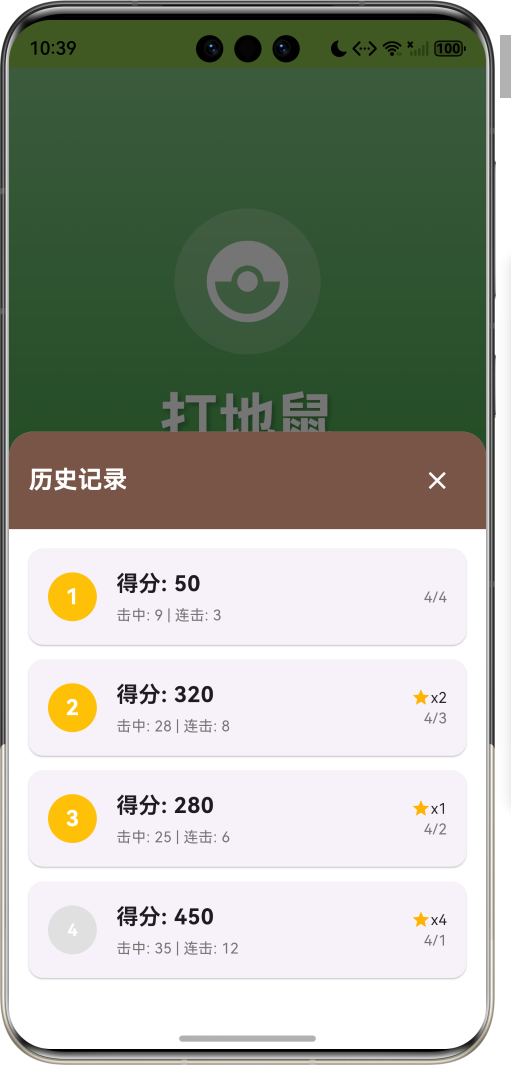
运行效果图
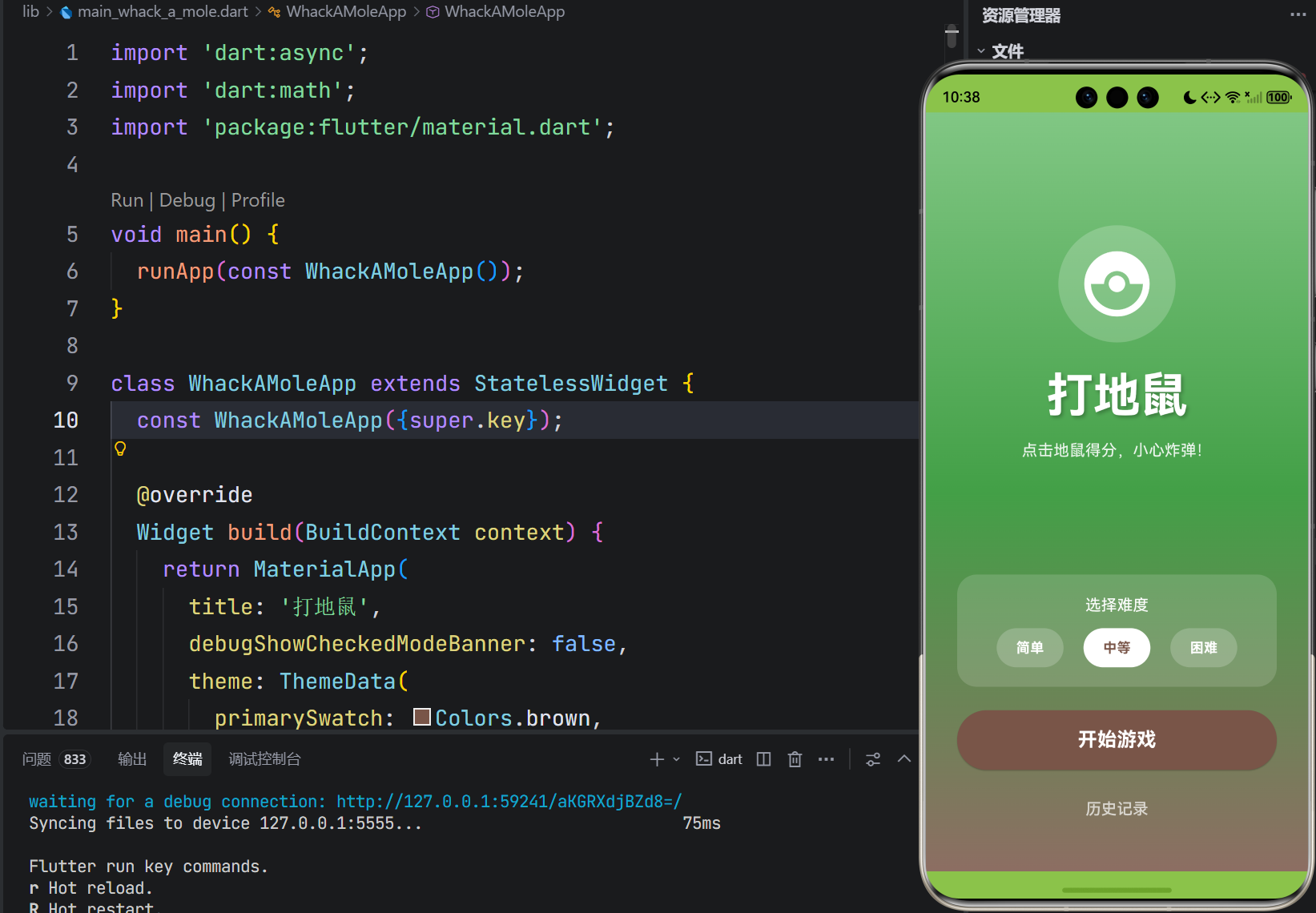
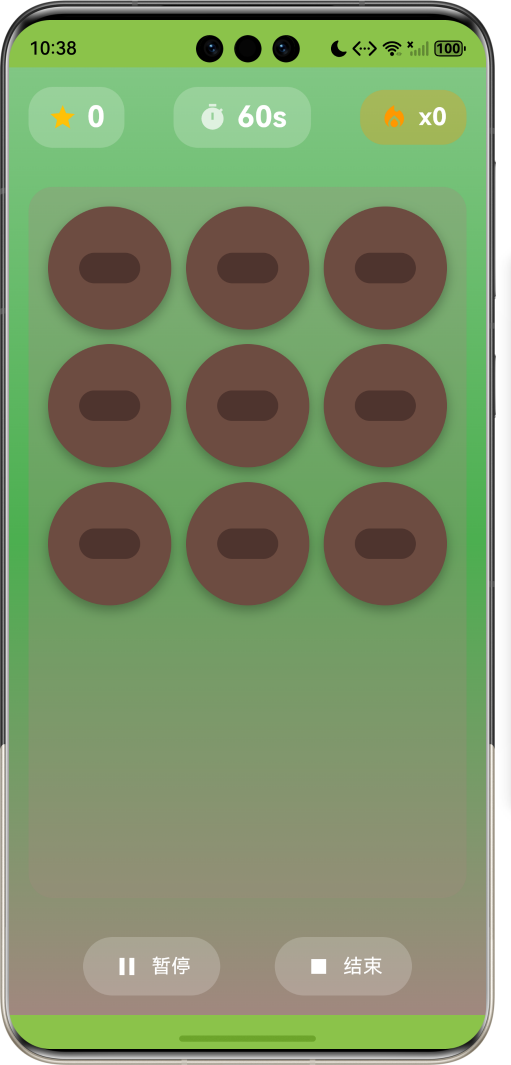
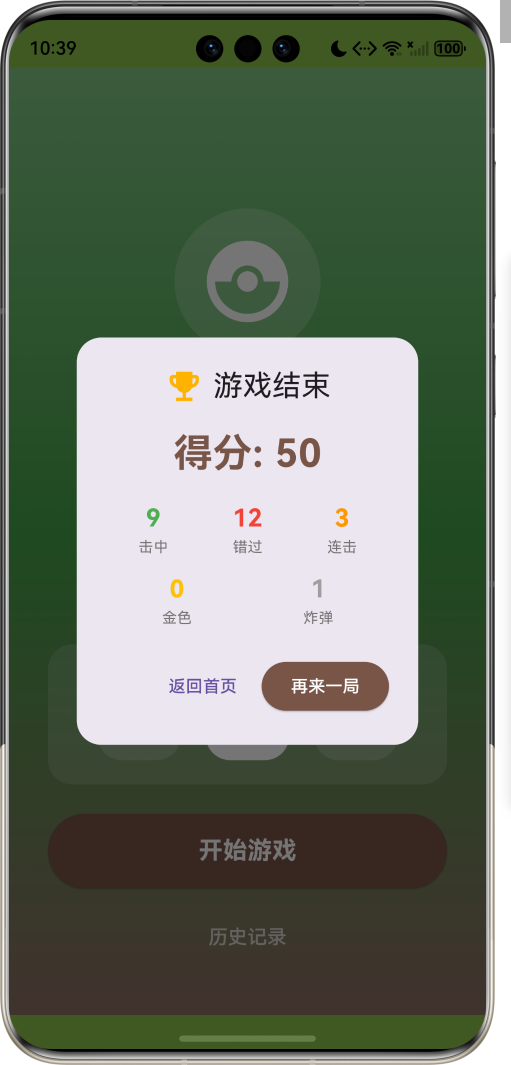
1.1 应用简介
打地鼠是一款经典的休闲益智游戏,考验玩家的反应速度和手眼协调能力。游戏采用清新的绿色草地主题,配合可爱的地鼠形象,为玩家带来轻松愉快的游戏体验。无论是打发碎片时间,还是挑战高分记录,这款游戏都能让玩家沉浸其中。
游戏设有三种地鼠类型:普通地鼠、金色地鼠和炸弹。普通地鼠击中得10分,金色地鼠击中得50分但出现时间短,炸弹击中扣30分需要避开。配合连击系统和三种难度选择,让游戏既有休闲性又有挑战性。60秒限时模式让每一局都紧张刺激,历史记录功能帮助玩家追踪自己的进步。
1.2 核心功能
| 功能模块 | 功能描述 | 实现方式 |
|---|---|---|
| 游戏主体 | 60秒限时打地鼠 | Timer定时器 |
| 三种地鼠 | 普通/金色/炸弹 | MoleType枚举 |
| 难度选择 | 简单/中等/困难 | Difficulty枚举 |
| 连击系统 | 连续击中奖励 | combo计数器 |
| 历史记录 | 游戏成绩排行 | GameResult模型 |
| 暂停继续 | 游戏状态管理 | GameState枚举 |
1.3 地鼠类型概览
| 地鼠类型 | 英文标识 | 分值 | 出现概率 | 停留时间 |
|---|---|---|---|---|
| 普通地鼠 | normal | +10 | 80% | 1.5秒 |
| 金色地鼠 | golden | +50 | 10% | 0.8秒 |
| 炸弹 | bomb | -30 | 10% | 2.0秒 |
1.4 难度设置
| 难度 | 英文标识 | 地鼠出现间隔 |
|---|---|---|
| 简单 | easy | 1200毫秒 |
| 中等 | medium | 800毫秒 |
| 困难 | hard | 500毫秒 |
1.5 技术栈
| 技术领域 | 技术选型 | 版本要求 |
|---|---|---|
| 开发框架 | Flutter | >= 3.0.0 |
| 编程语言 | Dart | >= 2.17.0 |
| 设计规范 | Material Design 3 | - |
| 状态管理 | setState + Timer | - |
| 目标平台 | 鸿蒙OS | API 21+ |
1.6 项目结构
lib/
└── main_whack_a_mole.dart
    ├── WhackAMoleApp          # 应用入口
    ├── GameState              # 游戏状态枚举
    ├── Difficulty             # 难度枚举
    ├── MoleType               # 地鼠类型枚举
    ├── Mole                   # 地鼠模型
    ├── GameResult             # 游戏结果模型
    ├── HomePage               # 主页面
    │   ├── _buildStartScreen()  # 开始界面
    │   ├── _buildGameScreen()   # 游戏界面
    │   └── _buildGameField()    # 游戏区域
    └── 动画控制器             # 击中动画效果
二、系统架构
2.1 整体架构图
2.2 类图设计
2.3 数据流程图
2.4 游戏流程
三、核心模块设计
3.1 数据模型设计
3.1.1 地鼠模型 (Mole)
class Mole {
  final int holeIndex;       // 所在洞口索引(0-8)
  final MoleType type;       // 地鼠类型
  final DateTime appearTime; // 出现时间
  bool isHit;                // 是否被击中

  int get score;             // 得分(根据类型)
  int get duration;          // 停留时间(毫秒)
}
3.1.2 游戏结果模型 (GameResult)
class GameResult {
  final int score;           // 总得分
  final int hits;            // 击中次数
  final int misses;          // 错过次数
  final int goldenHits;      // 金色地鼠击中数
  final int bombHits;        // 炸弹击中数
  final int combo;           // 最大连击
  final DateTime date;       // 游戏日期
}
3.1.3 游戏状态枚举 (GameState)
3.2 游戏逻辑设计
3.2.1 地鼠生成算法
3.2.2 地鼠类型概率
3.2.3 得分计算规则
| 情况 | 分数变化 | 连击变化 |
|---|---|---|
| 击中普通地鼠 | +10 | +1 |
| 击中金色地鼠 | +50 | +1 |
| 击中炸弹 | -30 | 重置为0 |
| 错过普通地鼠 | 0 | 重置为0 |
| 连击达到5的倍数 | +连击数×5 | - |
3.3 页面结构设计
3.3.1 开始界面
3.3.2 游戏界面
3.4 状态管理
3.4.1 核心状态变量
class _HomePageState extends State<HomePage> with TickerProviderStateMixin {
  GameState _gameState = GameState.idle;      // 游戏状态
  Difficulty _difficulty = Difficulty.medium; // 难度
  int _score = 0;                              // 当前分数
  int _timeLeft = 60;                          // 剩余时间
  int _combo = 0;                              // 当前连击
  int _maxCombo = 0;                           // 最大连击
  int _hits = 0;                               // 击中数
  int _misses = 0;                             // 错过数
  int _goldenHits = 0;                         // 金色击中数
  int _bombHits = 0;                           // 炸弹击中数
  final List<Mole?> _moles = List.filled(9, null); // 9个洞口
  final List<GameResult> _history = [];        // 历史记录
}
3.4.2 计时器管理
void _startGame() {
  // 初始化状态
  _score = 0;
  _timeLeft = 60;
  _combo = 0;

  // 启动倒计时
  _countdownTimer = Timer.periodic(const Duration(seconds: 1), (timer) {
    _timeLeft--;
    if (_timeLeft <= 0) _endGame();
  });

  // 启动地鼠生成
  _moleTimer = Timer.periodic(Duration(milliseconds: _getSpawnInterval()), (timer) {
    _spawnMole();
  });
}
四、UI设计规范
4.1 配色方案
游戏采用草地主题配色:
| 颜色类型 | 色值 | 用途 |
|---|---|---|
| 主色 | Brown (Material) | 按钮、标题 |
| 草地绿 | Green.shade300-600 | 背景渐变 |
| 泥土棕 | Brown.shade300-600 | 洞口、地鼠 |
| 金色 | Amber | 金色地鼠、星星 |
| 炸弹灰 | Grey.shade700 | 炸弹 |
4.2 字体规范
| 元素 | 字号 | 字重 | 颜色 |
|---|---|---|---|
| 游戏标题 | 48px | Bold | #FFFFFF |
| 分数数字 | 24px | Bold | #FFFFFF |
| 倒计时 | 24px | Bold | #FFFFFF |
| 连击数 | 20px | Bold | #FFFFFF |
| 按钮文字 | 16-20px | Bold | #FFFFFF |
4.3 组件规范
4.3.1 开始界面
┌─────────────────────────────────────────────────┐
│                                                 │
│                   🐹                            │
│                                                 │
│                 打地鼠                          │
│           点击地鼠得分,小心炸弹!              │
│                                                 │
│         ┌─────────────────────────┐            │
│         │    选择难度              │            │
│         │  简单   中等   困难      │            │
│         └─────────────────────────┘            │
│                                                 │
│         ┌─────────────────────────┐            │
│         │       开始游戏          │            │
│         └─────────────────────────┘            │
│                                                 │
│               历史记录                         │
│                                                 │
└─────────────────────────────────────────────────┘
4.3.2 游戏界面
┌─────────────────────────────────────────────────┐
│  ⭐ 320              ⏱ 45s             🔥 x5   │
├─────────────────────────────────────────────────┤
│                                                 │
│   ┌───┐    ┌───┐    ┌───┐                     │
│   │ 🐹 │    │   │    │ ⭐ │                     │
│   └───┘    └───┘    └───┘                     │
│                                                 │
│   ┌───┐    ┌───┐    ┌───┐                     │
│   │   │    │ 💣 │    │   │                     │
│   └───┘    └───┘    └───┘                     │
│                                                 │
│   ┌───┐    ┌───┐    ┌───┐                     │
│   │ 🐹 │    │   │    │ 🐹 │                     │
│   └───┘    └───┘    └───┘                     │
│                                                 │
├─────────────────────────────────────────────────┤
│         ⏸ 暂停          ⏹ 结束                 │
└─────────────────────────────────────────────────┘
4.3.3 地鼠类型
┌─────────────┐  ┌─────────────┐  ┌─────────────┐
│             │  │             │  │             │
│     🐹      │  │     ⭐      │  │     💣      │
│             │  │    +50      │  │    -30      │
│   普通+10   │  │   金色+50   │  │   炸弹-30   │
└─────────────┘  └─────────────┘  └─────────────┘
4.4 动画效果
4.4.1 击中动画
_hitAnimationController = AnimationController(
  duration: const Duration(milliseconds: 200),
  vsync: this,
);
_hitAnimation = Tween<double>(begin: 1.0, end: 0.5).animate(
  CurvedAnimation(parent: _hitAnimationController, curve: Curves.easeOut),
);
4.4.2 动画时序图
五、核心功能实现
5.1 地鼠生成
void _spawnMole() {
  if (_gameState != GameState.playing) return;

  // 获取空闲洞口
  final availableHoles = <int>[];
  for (int i = 0; i < _moles.length; i++) {
    if (_moles[i] == null) {
      availableHoles.add(i);
    }
  }

  if (availableHoles.isEmpty) return;

  // 随机选择洞口和类型
  final holeIndex = availableHoles[_random.nextInt(availableHoles.length)];
  final moleType = _getRandomMoleType();

  setState(() {
    _moles[holeIndex] = Mole(
      holeIndex: holeIndex,
      type: moleType,
      appearTime: DateTime.now(),
    );
  });

  // 设置消失定时器
  Future.delayed(Duration(milliseconds: _moles[holeIndex]!.duration), () {
    if (_moles[holeIndex] != null && !_moles[holeIndex]!.isHit) {
      setState(() {
        if (_moles[holeIndex]!.type != MoleType.bomb) {
          _misses++;
          _combo = 0;
        }
        _moles[holeIndex] = null;
      });
    }
  });
}
5.2 击中判定
void _hitMole(int index) {
  if (_gameState != GameState.playing) return;
  if (_moles[index] == null || _moles[index]!.isHit) return;

  final mole = _moles[index]!;
  _hitAnimationController.forward(from: 0);

  setState(() {
    mole.isHit = true;
    _score += mole.score;
    _hits++;

    if (mole.type == MoleType.golden) {
      _goldenHits++;
    } else if (mole.type == MoleType.bomb) {
      _bombHits++;
      _combo = 0;
    } else {
      _combo++;
      if (_combo > _maxCombo) {
        _maxCombo = _combo;
      }
      // 连击奖励
      if (_combo > 0 && _combo % 5 == 0) {
        _score += _combo * 5;
      }
    }
  });

  // 延迟移除
  Future.delayed(const Duration(milliseconds: 200), () {
    setState(() {
      _moles[index] = null;
    });
  });
}
5.3 难度控制
int _getSpawnInterval() {
  switch (_difficulty) {
    case Difficulty.easy:
      return 1200;    // 简单:1.2秒
    case Difficulty.medium:
      return 800;     // 中等:0.8秒
    case Difficulty.hard:
      return 500;     // 困难:0.5秒
  }
}
5.4 游戏结束处理
void _endGame() {
  _gameTimer?.cancel();
  _moleTimer?.cancel();
  _countdownTimer?.cancel();

  final result = GameResult(
    score: _score,
    hits: _hits,
    misses: _misses,
    goldenHits: _goldenHits,
    bombHits: _bombHits,
    combo: _maxCombo,
    date: DateTime.now(),
  );

  setState(() {
    _history.insert(0, result);
    _gameState = GameState.finished;
  });

  _showResultDialog();
}
六、游戏设计知识
6.1 游戏平衡性设计
6.1.1 得分平衡
期望得分计算:
E = 0.8 × 10 + 0.1 × 50 + 0.1 × ( − 30 ) = 8 + 5 − 3 = 10 E = 0.8 \times 10 + 0.1 \times 50 + 0.1 \times (-30) = 8 + 5 - 3 = 10 E=0.8×10+0.1×50+0.1×(−30)=8+5−3=10
6.1.2 难度曲线
| 难度 | 地鼠间隔 | 预期击中率 | 60秒预期得分 |
|---|---|---|---|
| 简单 | 1.2秒 | 70% | ~350分 |
| 中等 | 0.8秒 | 55% | ~400分 |
| 困难 | 0.5秒 | 40% | ~450分 |
6.2 反应时间分析
6.2.1 人类反应时间
平均反应时间:约300ms
6.2.2 地鼠停留时间设计
| 地鼠类型 | 停留时间 | 设计考量 |
|---|---|---|
| 普通 | 1500ms | 允许1-2次点击尝试 |
| 金色 | 800ms | 需要快速反应 |
| 炸弹 | 2000ms | 有足够时间识别躲避 |
6.3 连击系统设计
6.3.1 连击奖励机制
6.3.2 连击中断条件
| 条件 | 连击变化 | 设计目的 |
|---|---|---|
| 击中普通地鼠 | +1 | 鼓励持续击中 |
| 击中金色地鼠 | +1 | 高价值奖励 |
| 击中炸弹 | 重置为0 | 惩罚误操作 |
| 错过地鼠 | 重置为0 | 惩罚反应慢 |
七、扩展功能规划
7.1 后续版本规划
7.2 功能扩展建议
7.2.1 道具系统
| 道具 | 效果 | 持续时间 |
|---|---|---|
| 时间冻结 | 暂停倒计时 | 5秒 |
| 双倍得分 | 得分翻倍 | 10秒 |
| 慢动作 | 地鼠停留时间加倍 | 8秒 |
| 护盾 | 免疫炸弹伤害 | 15秒 |
7.2.2 成就系统
class Achievement {
  final String id;
  final String name;
  final String description;
  final int reward;
  final bool isUnlocked;
}
7.2.3 多人对战
| 模式 | 说明 |
|---|---|
| 同时对战 | 两人同时游戏比分数 |
| 轮流挑战 | 轮流挑战高分 |
| 合作模式 | 共同击中目标数量 |
八、注意事项
8.1 开发注意事项
-
计时器管理:页面销毁时必须取消所有Timer,避免内存泄漏
-
状态同步:地鼠出现和消失需要正确同步UI状态
-
触摸响应:确保点击区域足够大,提升用户体验
-
动画流畅:击中动画不应影响游戏性能
8.2 游戏体验优化
🎮 游戏体验建议 🎮
- 提供清晰的视觉反馈
- 音效增强打击感
- 合理的难度曲线
- 适时的奖励激励
8.3 常见问题
| 问题 | 原因 | 解决方案 |
|---|---|---|
| 地鼠重叠 | 生成逻辑问题 | 检查空闲洞口 |
| 计时不准 | Timer精度 | 使用Stopwatch |
| 点击无响应 | 状态未更新 | 检查游戏状态 |
| 内存泄漏 | Timer未取消 | dispose中取消 |
九、运行说明
9.1 环境要求
| 环境 | 版本要求 |
|---|---|
| Flutter SDK | >= 3.0.0 |
| Dart SDK | >= 2.17.0 |
| 鸿蒙OS | API 21+ |
9.2 运行命令
# 查看可用设备
flutter devices

# 运行到鸿蒙设备
flutter run -d 127.0.0.1:5555 lib/main_whack_a_mole.dart

# 运行到Windows
flutter run -d windows -t lib/main_whack_a_mole.dart

# 代码分析
flutter analyze lib/main_whack_a_mole.dart
十、总结
打地鼠游戏通过经典的玩法设计和丰富的游戏元素,为玩家提供了轻松愉快的休闲体验。游戏采用清新的草地主题,配合可爱的地鼠形象,营造出轻松愉快的游戏氛围;代码结构清晰,遵循Flutter最佳实践;游戏逻辑设计合理,难度曲线平滑。
核心玩法涵盖三种地鼠类型、三种难度选择、连击奖励系统和历史记录功能,满足不同玩家的游戏需求。特别值得一提的是金色地鼠和炸弹的设计,金色地鼠高分快速消失考验反应,炸弹扣分需要躲避增加策略性,让游戏既有休闲性又有挑战性。
连击系统是游戏的一大亮点,连续击中地鼠可以获得额外奖励,激励玩家保持专注和快速反应。60秒限时模式让每一局都紧张刺激,历史记录功能帮助玩家追踪自己的进步,不断挑战更高分数。
快速反应,精准打击,挑战高分!

开源鸿蒙跨平台开发社区汇聚开发者与厂商,共建“一次开发,多端部署”的开源生态,致力于降低跨端开发门槛,推动万物智联创新。
更多推荐
 17
17 0
0- 0


 已为社区贡献17条内容

所有评论(0)