Flutter 框架跨平台鸿蒙开发 - 历史人物对话
历史人物对话应用
欢迎加入开源鸿蒙跨平台社区:
https://openharmonycrossplatform.csdn.net
一、项目概述
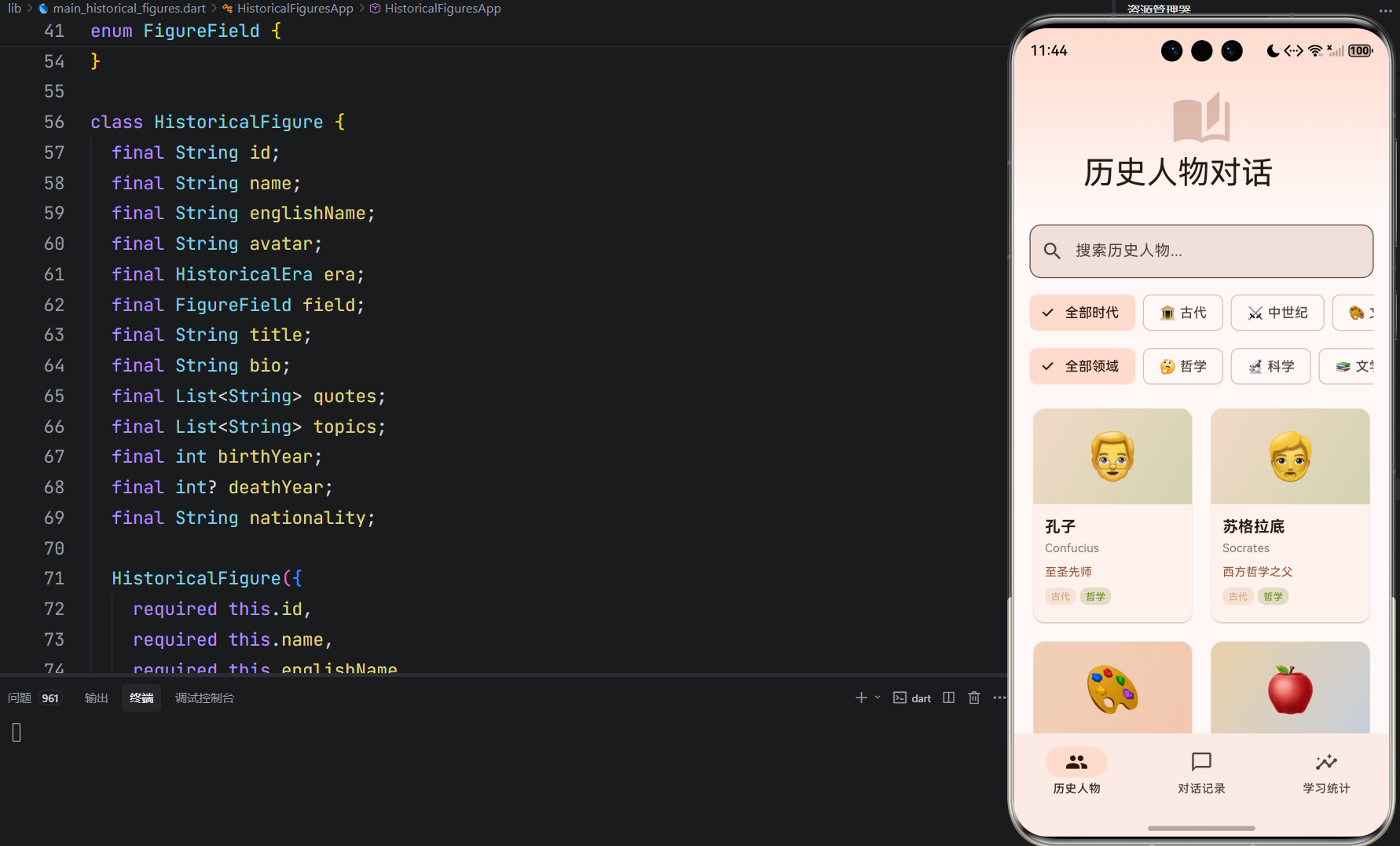
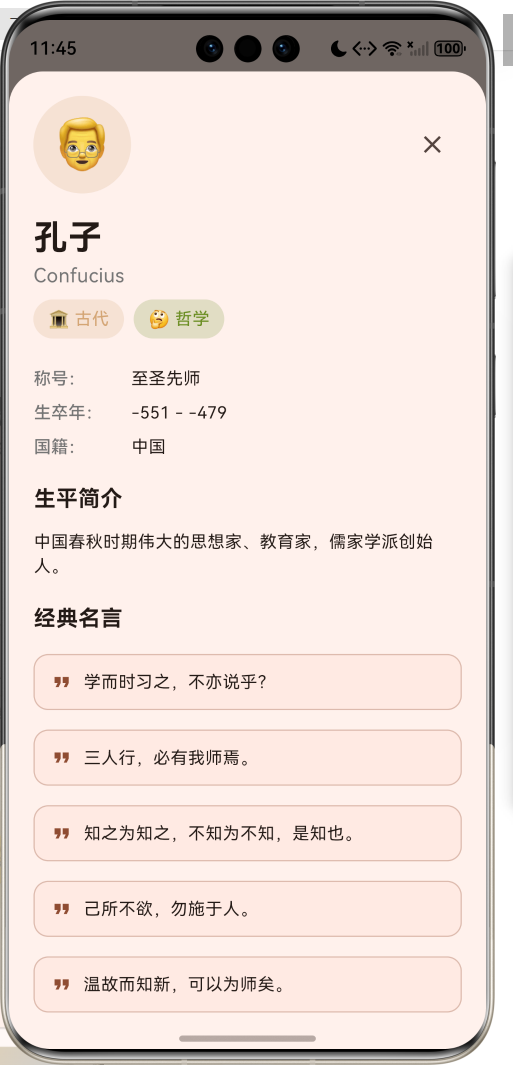
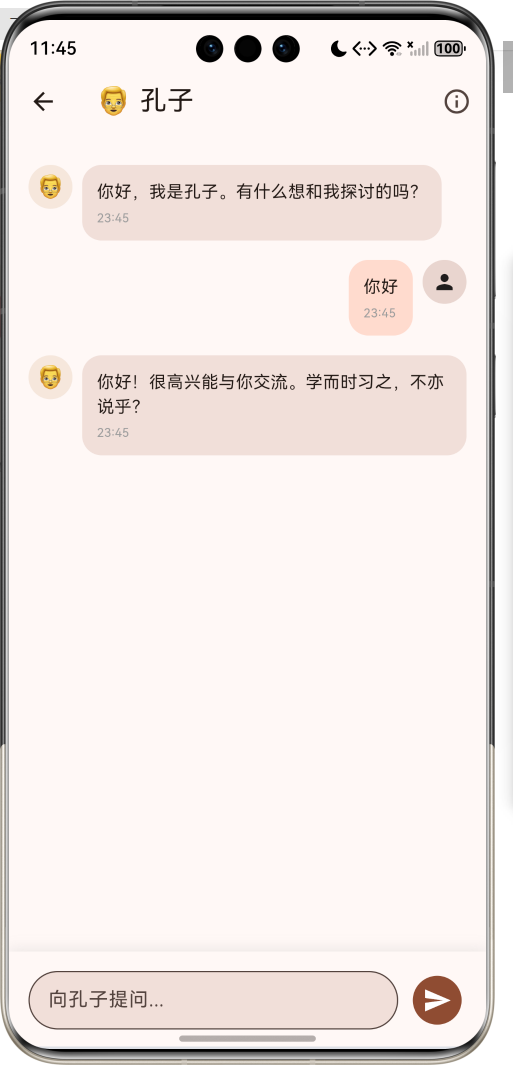
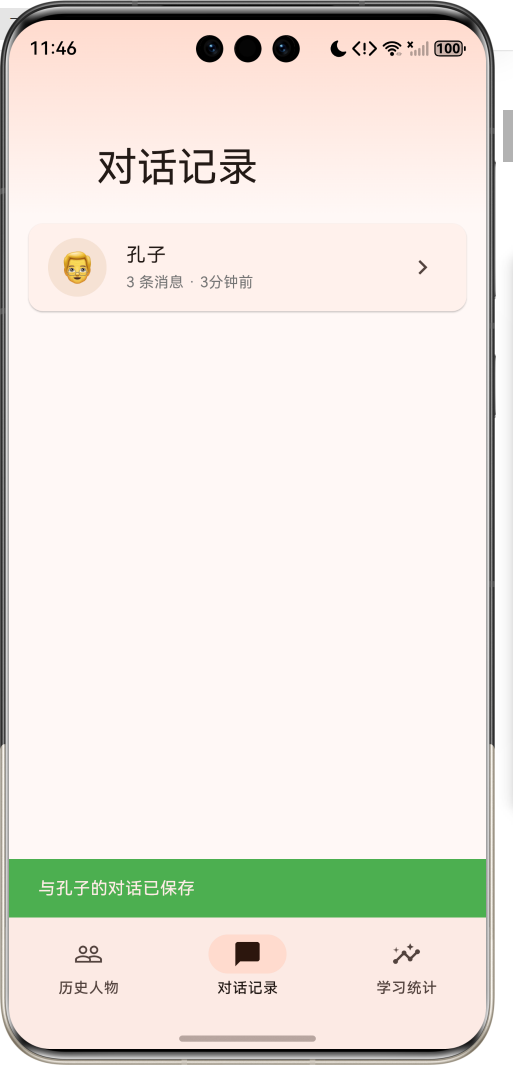
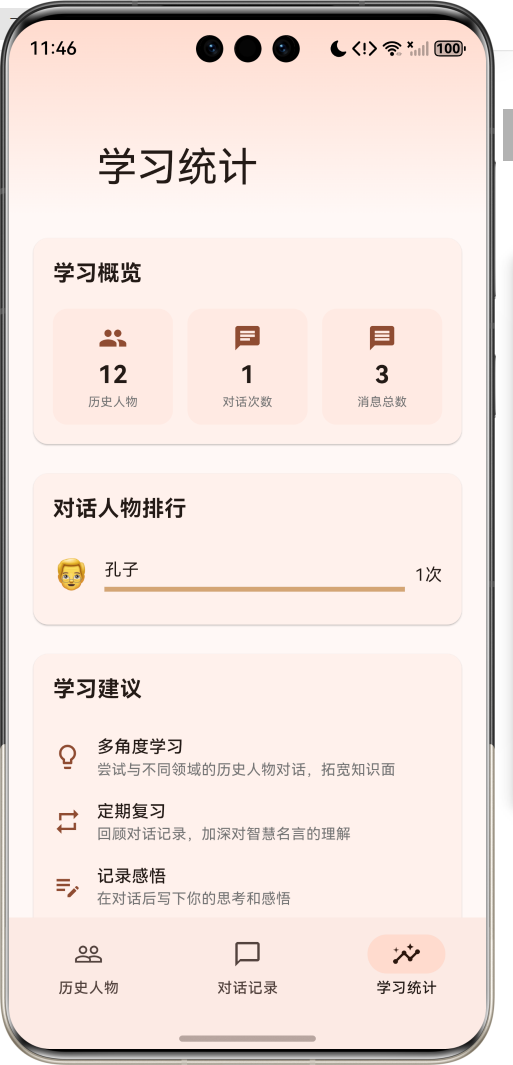
运行效果图
1.1 应用简介
历史人物对话应用是一款独特的教育类应用,让用户能够与历史名人进行"对话",学习他们的智慧。应用收录了来自不同时代、不同领域的杰出历史人物,每位人物都有详细的生平介绍、经典名言和擅长话题。用户可以选择感兴趣的历史人物进行模拟对话,在互动中汲取智慧。
应用以古铜色为主色调,营造历史感和文化氛围。涵盖人物浏览、对话互动、记录管理、学习统计四大模块,支持按时代和领域筛选人物,通过智能匹配名言库实现对话功能。
1.2 核心功能
| 功能模块 | 功能描述 | 实现方式 |
|---|---|---|
| 人物浏览 | 浏览历史人物列表 | 网格布局 + 筛选 |
| 人物详情 | 查看人物生平和名言 | 底部弹窗 + 滚动 |
| 对话互动 | 与历史人物对话 | 聊天界面 + 智能匹配 |
| 对话记录 | 保存和查看对话历史 | 列表展示 + 详情页 |
| 学习统计 | 分析学习数据 | 图表可视化 |
| 智能推荐 | 根据话题匹配名言 | 关键词识别 |
1.3 历史时代定义
| 序号 | 时代名称 | Emoji | 主题色 | 时间范围 |
|---|---|---|---|---|
| 1 | 古代 | 🏛️ | #D4A574 | 公元前 - 公元5世纪 |
| 2 | 中世纪 | ⚔️ | #8B7355 | 5世纪 - 15世纪 |
| 3 | 文艺复兴 | 🎨 | #CD853F | 14世纪 - 17世纪 |
| 4 | 近现代 | 💡 | #B8860B | 17世纪 - 至今 |
1.4 人物领域定义
| 序号 | 领域名称 | Emoji | 主题色 | 代表人物 |
|---|---|---|---|---|
| 1 | 哲学 | 🤔 | #6B8E23 | 孔子、苏格拉底、老子 |
| 2 | 科学 | 🔬 | #4682B4 | 牛顿、爱因斯坦、达尔文 |
| 3 | 文学 | 📚 | #8B4513 | 莎士比亚 |
| 4 | 艺术 | 🎨 | #D2691E | 达·芬奇 |
| 5 | 政治 | ⚖️ | #708090 | - |
| 6 | 军事 | ⚔️ | #8B0000 | 拿破仑、诸葛亮 |
1.5 收录人物列表
| 人物 | 英文名 | 时代 | 领域 | 称号 |
|---|---|---|---|---|
| 孔子 | Confucius | 古代 | 哲学 | 至圣先师 |
| 苏格拉底 | Socrates | 古代 | 哲学 | 西方哲学之父 |
| 老子 | Laozi | 古代 | 哲学 | 道家始祖 |
| 亚里士多德 | Aristotle | 古代 | 哲学 | 百科全书式学者 |
| 诸葛亮 | Zhuge Liang | 中世纪 | 军事 | 卧龙先生 |
| 达·芬奇 | Leonardo da Vinci | 文艺复兴 | 艺术 | 文艺复兴全才 |
| 莎士比亚 | William Shakespeare | 文艺复兴 | 文学 | 文学巨匠 |
| 牛顿 | Isaac Newton | 近现代 | 科学 | 现代科学之父 |
| 拿破仑 | Napoleon Bonaparte | 近现代 | 军事 | 法兰西皇帝 |
| 达尔文 | Charles Darwin | 近现代 | 科学 | 进化论之父 |
| 居里夫人 | Marie Curie | 近现代 | 科学 | 放射性研究先驱 |
| 爱因斯坦 | Albert Einstein | 近现代 | 科学 | 相对论之父 |
1.6 技术栈
| 技术领域 | 技术选型 | 版本要求 |
|---|---|---|
| 开发框架 | Flutter | >= 3.0.0 |
| 编程语言 | Dart | >= 2.17.0 |
| 设计规范 | Material Design 3 | - |
| 状态管理 | setState | - |
| 数据存储 | 内存列表 | - |
| 目标平台 | 鸿蒙OS / Web | API 21+ |
1.7 项目结构
lib/
└── main_historical_figures.dart
    ├── HistoricalFiguresApp         # 应用入口
    ├── HistoricalEra                # 历史时代枚举
    ├── FigureField                  # 人物领域枚举
    ├── HistoricalFigure             # 历史人物模型
    ├── ConversationMessage          # 对话消息模型
    ├── Conversation                 # 对话会话模型
    ├── HistoricalFiguresHomePage    # 主页面(底部导航)
    ├── _buildFiguresPage            # 人物浏览页面
    ├── _buildConversationsPage      # 对话记录页面
    ├── _buildStatsPage              # 学习统计页面
    ├── ConversationPage             # 对话互动页面
    └── ConversationDetailPage       # 对话详情页面
二、系统架构
2.1 整体架构图
2.2 类图设计
2.3 页面导航流程
2.4 对话流程
三、核心模块设计
3.1 数据模型设计
3.1.1 历史时代枚举 (HistoricalEra)
enum HistoricalEra {
  ancient('古代', '🏛️', Color(0xFFD4A574)),
  medieval('中世纪', '⚔️', Color(0xFF8B7355)),
  renaissance('文艺复兴', '🎨', Color(0xFFCD853F)),
  modern('近现代', '💡', Color(0xFFB8860B));

  final String label;
  final String emoji;
  final Color color;

  const HistoricalEra(this.label, this.emoji, this.color);
}
3.1.2 人物领域枚举 (FigureField)
enum FigureField {
  philosophy('哲学', '🤔', Color(0xFF6B8E23)),
  science('科学', '🔬', Color(0xFF4682B4)),
  literature('文学', '📚', Color(0xFF8B4513)),
  art('艺术', '🎨', Color(0xFFD2691E)),
  politics('政治', '⚖️', Color(0xFF708090)),
  military('军事', '⚔️', Color(0xFF8B0000));

  final String label;
  final String emoji;
  final Color color;

  const FigureField(this.label, this.emoji, this.color);
}
3.1.3 历史人物模型 (HistoricalFigure)
class HistoricalFigure {
  final String id;                    // 唯一标识
  final String name;                  // 中文名
  final String englishName;           // 英文名
  final String avatar;                // 头像Emoji
  final HistoricalEra era;            // 历史时代
  final FigureField field;            // 人物领域
  final String title;                 // 称号
  final String bio;                   // 生平简介
  final List<String> quotes;          // 经典名言
  final List<String> topics;          // 擅长话题
  final int birthYear;                // 出生年份
  final int? deathYear;               // 去世年份
  final String nationality;           // 国籍

  String get lifespan {
    if (deathYear != null) {
      return '$birthYear - $deathYear';
    }
    return '$birthYear - 至今';
  }
}
3.1.4 对话消息模型 (ConversationMessage)
class ConversationMessage {
  final String id;              // 唯一标识
  final String content;         // 消息内容
  final bool isUser;            // 是否为用户消息
  final DateTime timestamp;     // 时间戳
  final String? topic;          // 话题标签
}
3.1.5 对话会话模型 (Conversation)
class Conversation {
  final String id;                          // 唯一标识
  final HistoricalFigure figure;            // 对话人物
  final List<ConversationMessage> messages; // 消息列表
  final DateTime startTime;                 // 开始时间
  final String? summary;                    // 对话摘要
}
3.1.6 人物领域分布
3.2 页面结构设计
3.2.1 主页面布局
3.2.2 人物浏览页面结构
3.2.3 对话页面结构
3.2.4 人物详情弹窗结构
3.3 智能回复算法
3.4 筛选功能流程
四、UI设计规范
4.1 配色方案
应用以古铜色为主色调,营造历史感和文化氛围:
| 颜色类型 | 色值 | 用途 |
|---|---|---|
| 主色 | #8D6E63 (Brown 300) | 导航、强调元素 |
| 古代色 | #D4A574 | 古代时代标识 |
| 中世纪色 | #8B7355 | 中世纪时代标识 |
| 文艺复兴色 | #CD853F | 文艺复兴时代标识 |
| 近现代色 | #B8860B | 近现代时代标识 |
| 哲学色 | #6B8E23 | 哲学领域标识 |
| 科学色 | #4682B4 | 科学领域标识 |
| 文学色 | #8B4513 | 文学领域标识 |
| 艺术色 | #D2691E | 艺术领域标识 |
| 政治色 | #708090 | 政治领域标识 |
| 军事色 | #8B0000 | 军事领域标识 |
4.2 字体规范
| 元素 | 字号 | 字重 | 颜色 |
|---|---|---|---|
| 页面标题 | 24px | Bold | 主色 |
| 人物姓名 | 16px | Bold | 黑色 |
| 英文名 | 12px | Regular | 灰色 |
| 称号 | 12px | Regular | 主色 |
| 名言内容 | 14px | Regular | 黑色 |
| 标签文字 | 10px | Regular | 类型色 |
4.3 组件规范
4.3.1 人物卡片布局
┌─────────────────────────────────┐
│                                 │
│         ┌───────────┐           │
│         │     👴     │           │
│         │           │           │
│         └───────────┘           │
│                                 │
│  孔子                            │
│  Confucius                       │
│                                 │
│  至圣先师                         │
│                                 │
│  [古代] [哲学]                   │
│                                 │
└─────────────────────────────────┘
4.3.2 对话消息气泡
用户消息:
                    ┌──────────────┐
                    │ 你好,孔子!  │
                    │              │
                    └──────────────┘
                              [👤]

人物回复:
[👴] ┌──────────────────────┐
    │ 你好!很高兴能与你交流。│
    │ 三人行,必有我师焉。   │
    └──────────────────────┘
4.3.3 名言卡片
┌─────────────────────────────────────┐
│  ❝ 学而时习之,不亦说乎?           │
│                                     │
└─────────────────────────────────────┘
4.3.4 统计卡片
┌─────────────────────────────────────┐
│           学习概览                  │
│                                     │
│  ┌──────┐  ┌──────┐  ┌──────┐    │
│  │ 👥   │  │ 💬   │  │ 📝   │    │
│  │  12  │  │   5  │  │  23  │    │
│  │历史人物│  │对话次数│  │消息总数│    │
│  └──────┘  └──────┘  └──────┘    │
└─────────────────────────────────────┘
五、核心功能实现
5.1 人物数据加载
void _loadHistoricalFigures() {
  _figures.addAll([
    HistoricalFigure(
      id: 'confucius',
      name: '孔子',
      englishName: 'Confucius',
      avatar: '👴',
      era: HistoricalEra.ancient,
      field: FigureField.philosophy,
      title: '至圣先师',
      bio: '中国春秋时期伟大的思想家、教育家,儒家学派创始人。',
      quotes: [
        '学而时习之,不亦说乎?',
        '三人行,必有我师焉。',
        // ...更多名言
      ],
      topics: ['教育', '仁义', '礼仪', '修身', '治国'],
      birthYear: -551,
      deathYear: -479,
      nationality: '中国',
    ),
    // ...更多人物
  ]);
}
5.2 智能回复生成
void _generateResponse(String userMessage) {
  String response;

  if (userMessage.contains('智慧') || userMessage.contains('人生')) {
    response = widget.figure.quotes[_random.nextInt(widget.figure.quotes.length)];
  } else if (userMessage.contains('你好') || userMessage.contains('您好')) {
    response = '你好!很高兴能与你交流。${widget.figure.quotes[_random.nextInt(widget.figure.quotes.length)]}';
  } else if (userMessage.contains('建议') || userMessage.contains('意见')) {
    response = '关于这个问题,我想说:${widget.figure.quotes[_random.nextInt(widget.figure.quotes.length)]}';
  } else {
    final topics = widget.figure.topics;
    final randomTopic = topics[_random.nextInt(topics.length)];
    response = '关于$randomTopic,我有这样的想法:${widget.figure.quotes[_random.nextInt(widget.figure.quotes.length)]}';
  }

  setState(() {
    _messages.add(ConversationMessage(
      id: DateTime.now().millisecondsSinceEpoch.toString(),
      content: response,
      isUser: false,
      timestamp: DateTime.now(),
    ));
  });
}
5.3 人物筛选实现
Widget _buildFiguresPage() {
  final filteredFigures = _figures.where((f) {
    final matchesSearch = f.name.contains(_searchQuery) ||
        f.englishName.toLowerCase().contains(_searchQuery.toLowerCase());
    final matchesEra = _filterEra == null || f.era == _filterEra;
    final matchesField = _filterField == null || f.field == _filterField;
    return matchesSearch && matchesEra && matchesField;
  }).toList();

  return CustomScrollView(
    slivers: [
      // ...AppBar和筛选器
      SliverPadding(
        padding: const EdgeInsets.symmetric(horizontal: 16),
        sliver: SliverGrid(
          delegate: SliverChildBuilderDelegate(
            (context, index) => _buildFigureCard(filteredFigures[index]),
            childCount: filteredFigures.length,
          ),
          gridDelegate: const SliverGridDelegateWithFixedCrossAxisCount(
            crossAxisCount: 2,
            childAspectRatio: 0.75,
          ),
        ),
      ),
    ],
  );
}
5.4 对话保存实现
void _endConversation() {
  if (_messages.length <= 1) {
    Navigator.pop(context);
    return;
  }

  final conversation = Conversation(
    id: DateTime.now().millisecondsSinceEpoch.toString(),
    figure: widget.figure,
    messages: List.from(_messages),
    startTime: DateTime.now().subtract(Duration(minutes: _messages.length)),
  );

  widget.onSave(conversation);
  Navigator.pop(context);

  ScaffoldMessenger.of(context).showSnackBar(
    SnackBar(
      content: Text('与${widget.figure.name}的对话已保存'),
      backgroundColor: Colors.green,
    ),
  );
}
5.5 统计计算实现
Widget _buildStatsPage() {
  final totalMessages = _conversations.fold<int>(0, (sum, c) => sum + c.messages.length);
  final figureStats = <String, int>{};

  for (var conv in _conversations) {
    figureStats[conv.figure.name] = (figureStats[conv.figure.name] ?? 0) + 1;
  }

  return CustomScrollView(
    slivers: [
      // ...AppBar
      SliverToBoxAdapter(
        child: Column(
          children: [
            _buildOverviewStats(totalMessages),
            if (figureStats.isNotEmpty) _buildFigureStats(figureStats),
            _buildLearningTips(),
          ],
        ),
      ),
    ],
  );
}
六、交互设计
6.1 对话流程
6.2 筛选流程
6.3 学习流程
七、扩展功能规划
7.1 后续版本规划
7.2 功能扩展建议
7.2.1 AI对话优化
增强对话智能:
- 接入大语言模型API
- 上下文理解
- 个性化回复
- 多轮对话
7.2.2 学习笔记
记录学习心得:
- 对话笔记
- 感悟记录
- 知识卡片
- 导出功能
7.2.3 社交功能
分享学习成果:
- 分享名言
- 学习打卡
- 排行榜
- 学习小组
八、注意事项
8.1 开发注意事项
-
数据准确性:历史人物的生平、名言需要准确无误
-
文化尊重:尊重不同文化背景的历史人物
-
智能回复:回复内容要符合人物特点和历史背景
-
用户体验:对话流程要流畅自然
-
数据持久化:对话记录需要本地存储
8.2 常见问题
| 问题 | 原因 | 解决方案 |
|---|---|---|
| 筛选无结果 | 条件过于严格 | 提示用户调整筛选 |
| 回复不相关 | 关键词匹配失败 | 优化匹配算法 |
| 对话未保存 | 用户直接返回 | 添加保存提示 |
| 人物信息错误 | 数据录入错误 | 核实历史资料 |
8.3 设计理念
📚 历史人物对话理念 📚
历史是最好的老师,
历史人物是智慧的化身。
通过对话,
我们穿越时空,
与先贤交流,
汲取千年智慧。
不是简单的问答,
而是思想的碰撞,
智慧的传承,
文化的延续。
让历史活在当下,
让智慧照亮未来。
与历史对话,学习先贤智慧
九、运行说明
9.1 环境要求
| 环境 | 版本要求 |
|---|---|
| Flutter SDK | >= 3.0.0 |
| Dart SDK | >= 2.17.0 |
| 鸿蒙OS | API 21+ |
9.2 运行命令
# 查看可用设备
flutter devices

# 运行到Web服务器
flutter run -d web-server -t lib/main_historical_figures.dart --web-port 8122

# 运行到鸿蒙设备
flutter run -d 127.0.0.1:5555 lib/main_historical_figures.dart

# 运行到Windows
flutter run -d windows -t lib/main_historical_figures.dart

# 代码分析
flutter analyze lib/main_historical_figures.dart
十、总结
历史人物对话应用通过人物浏览、对话互动、记录管理、学习统计四大模块,为用户提供了一个独特的历史学习平台。应用收录了12位来自不同时代、不同领域的杰出历史人物,每位人物都有详细的生平介绍和经典名言。
核心功能涵盖人物浏览、智能对话、对话记录、学习统计四大模块。人物浏览支持按时代和领域筛选,提供详细的生平介绍和名言展示;智能对话通过关键词匹配和名言库实现,让用户仿佛真的在与历史人物交流;对话记录完整保存每次对话内容,便于回顾学习;学习统计提供数据分析和学习建议,帮助用户持续进步。
应用采用Material Design 3设计规范,以古铜色为主色调,营造历史感和文化氛围。通过本应用,希望能够帮助用户穿越时空,与历史先贤对话,汲取千年智慧。

开源鸿蒙跨平台开发社区汇聚开发者与厂商,共建“一次开发,多端部署”的开源生态,致力于降低跨端开发门槛,推动万物智联创新。
更多推荐
 9
9 0
0- 0


 已为社区贡献28条内容

所有评论(0)