【Flutter for OpenHarmony】实战 - Day 2(2):课表页面完善
·
从零搭建课表列表视图,实现日期选择与课程卡片展示
欢迎加入开源鸿蒙跨平台社区: https://openharmonycrossplatform.csdn.net
一、本日目标
- 实现课表列表视图
- 添加日期选择器组件
- 创建课程卡片组件
- 整合静态课程数据
二、文件结构
lib/
├── data/
│   └── mock_course_data.dart      # 静态课程数据
├── models/
│   └── course.dart                # 课程数据模型
├── widgets/
│   ├── course_card.dart           # 课程卡片组件
│   └── date_selector.dart         # 日期选择器组件
└── pages/
    └── home_page.dart             # 课表主页(含列表视图)
三、核心代码实现
3.1 课程数据模型 (lib/models/course.dart)
class Course {
  final String id;
  final String name;        // 课程名称
  final String teacher;     // 授课教师
  final String location;    // 上课地点
  final int weekday;        // 周几 (1-7,周一为1)
  final int startWeek;      // 起始周
  final int endWeek;        // 结束周
  final int startSection;   // 开始节次
  final int endSection;     // 结束节次
  final String colorHex;    // 课程颜色

  Course({
    required this.id,
    required this.name,
    required this.teacher,
    required this.location,
    required this.weekday,
    required this.startWeek,
    required this.endWeek,
    required this.startSection,
    required this.endSection,
    required this.colorHex,
  });
}
3.2 静态课程数据 (lib/data/mock_course_data.dart)
后续可改为动态数据,通过读取图片或用户手动的方式输入
import '../models/course.dart';

class MockCourseData {
  static final List<Course> courses = [
    Course(
      id: '1',
      name: '高等数学',
      teacher: '张教授',
      location: '教学楼A101',
      weekday: 1,
      startWeek: 1,
      endWeek: 16,
      startSection: 1,
      endSection: 2,
      colorHex: '#4A6FA5',
    ),
    Course(
      id: '2',
      name: '大学英语',
      teacher: '李老师',
      location: '教学楼B202',
      weekday: 1,
      startWeek: 1,
      endWeek: 16,
      startSection: 3,
      endSection: 4,
      colorHex: '#67B7DC',
    ),
    Course(
      id: '3',
      name: '程序设计',
      teacher: '王教授',
      location: '实验楼C301',
      weekday: 2,
      startWeek: 1,
      endWeek: 16,
      startSection: 1,
      endSection: 3,
      colorHex: '#FF9800',
    ),
    // ... 周一至周五均有课程数据
  ];
}
3.3 课程卡片组件 (lib/widgets/course_card.dart)
class CourseCard extends StatelessWidget {
final Course course;
const CourseCard({super.key, required this.course});
Widget build(BuildContext context) {
return Container(
margin: const EdgeInsets.only(bottom: 12),
decoration: BoxDecoration(
color: Colors.white,
borderRadius: BorderRadius.circular(12),
boxShadow: [BoxShadow(color: Colors.grey.withOpacity(0.1), blurRadius: 8)],
),
child: Material(
borderRadius: BorderRadius.circular(12),
child: InkWell(
onTap: () {}, // 后续实现课程详情
child: Container(
padding: const EdgeInsets.all(12),
decoration: BoxDecoration(
borderRadius: BorderRadius.circular(12),
border: Border(
left: BorderSide(
color: Color(int.parse(course.colorHex.replaceFirst('#', '0xFF'))),
width: 4,
),
),
),
child: Column(
crossAxisAlignment: CrossAxisAlignment.start,
children: [
Text(course.name, style: const TextStyle(fontSize: 16, fontWeight: FontWeight.bold)),
const SizedBox(height: 4),
Row(
children: [
Icon(Icons.person_outline, size: 14, color: Colors.grey[600]),
const SizedBox(width: 4),
Text(course.teacher, style: TextStyle(fontSize: 13, color: Colors.grey[700])),
const SizedBox(width: 12),
Icon(Icons.room_outlined, size: 14, color: Colors.grey[600]),
const SizedBox(width: 4),
Text(course.location, style: TextStyle(fontSize: 13, color: Colors.grey[700])),
],
),
const SizedBox(height: 4),
Text('第${course.startWeek}-${course.endWeek}周 第${course.startSection}-${course.endSection}节',
style: TextStyle(fontSize: 12, color: Colors.grey[500])),
],
),
),
),
),
);
}
}
3.4 日期选择器组件 (lib/widgets/date_selector.dart)
class DateSelector extends StatelessWidget {
final int selectedWeekday;
final Function(int) onWeekdaySelected;
const DateSelector({
super.key,
required this.selectedWeekday,
required this.onWeekdaySelected,
});
Widget build(BuildContext context) {
final weekdays = ['一', '二', '三', '四', '五', '六', '日'];
return Container(
padding: const EdgeInsets.symmetric(vertical: 12),
child: Row(
mainAxisAlignment: MainAxisAlignment.spaceEvenly,
children: List.generate(7, (index) {
final weekday = index + 1;
final isSelected = selectedWeekday == weekday;
return GestureDetector(
onTap: () => onWeekdaySelected(weekday),
child: Container(
width: 42,
height: 42,
decoration: BoxDecoration(
shape: BoxShape.circle,
color: isSelected ? Colors.blue : Colors.transparent,
),
child: Center(
child: Text(
weekdays[index],
style: TextStyle(
fontSize: 18,
fontWeight: isSelected ? FontWeight.bold : FontWeight.normal,
color: isSelected ? Colors.white : Colors.grey[800],
),
),
),
),
);
}),
),
);
}
}
3.5 课表主页 (lib/pages/home_page.dart)
class HomePage extends StatefulWidget {
const HomePage({super.key});
State<HomePage> createState() => _HomePageState();
}
class _HomePageState extends State<HomePage> {
int _currentIndex = 0;
Widget build(BuildContext context) {
return Scaffold(
appBar: AppBar(title: Text(['课表', '作业', '我的'][_currentIndex])),
body: _buildBody(),
bottomNavigationBar: BottomNavigationBar(
currentIndex: _currentIndex,
onTap: (index) => setState(() => _currentIndex = index),
items: const [
BottomNavigationBarItem(icon: Icon(Icons.calendar_today), label: '课表'),
BottomNavigationBarItem(icon: Icon(Icons.assignment), label: '作业'),
BottomNavigationBarItem(icon: Icon(Icons.person), label: '我的'),
],
),
);
}
Widget _buildBody() {
switch (_currentIndex) {
case 0:
return const _CourseContent();
case 1:
return const HomeworkPage();
case 2:
return const ProfilePage();
default:
return const _CourseContent();
}
}
}
// 课表列表视图组件
class _CourseContent extends StatefulWidget {
const _CourseContent();
State<_CourseContent> createState() => _CourseContentState();
}
class _CourseContentState extends State<_CourseContent> {
int _selectedWeekday = DateTime.now().weekday;
Widget build(BuildContext context) {
final filteredCourses = MockCourseData.courses
.where((course) => course.weekday == _selectedWeekday)
.toList();
return Column(
children: [
DateSelector(
selectedWeekday: _selectedWeekday,
onWeekdaySelected: (weekday) => setState(() => _selectedWeekday = weekday),
),
Expanded(
child: filteredCourses.isEmpty
? const Center(child: Column(
mainAxisAlignment: MainAxisAlignment.center,
children: [Icon(Icons.free_breakfast, size: 64, color: Colors.grey), Text('今天没有课程安排')],
))
: ListView.builder(
padding: const EdgeInsets.all(16),
itemCount: filteredCourses.length,
itemBuilder: (context, index) => CourseCard(course: filteredCourses[index]),
),
),
],
);
}
}
四、本日成果
| 成果 | 说明 |
|---|---|
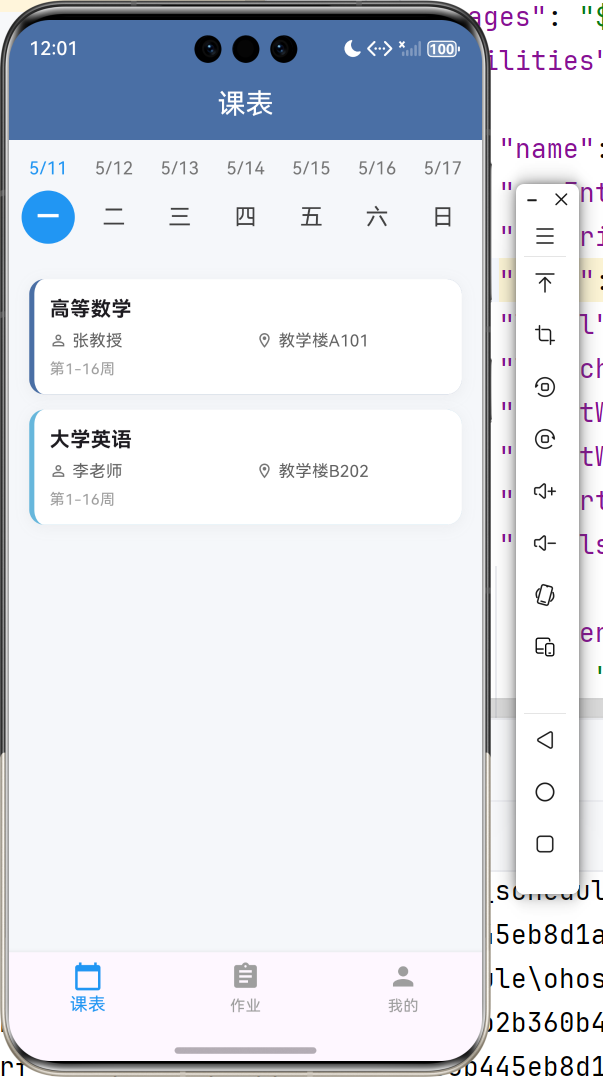
| ✅ 课程数据模型 | 定义 Course 类,包含课程名称、教师、地点、节次等字段 |
| ✅ 静态课程数据 | mock_course_data.dart 包含周一至周五课程 |
| ✅ 课程卡片组件 | 展示课程详情,左侧彩色边框 |
| ❗ 日期选择器 | 横向滚动星期选择,选中高亮 |
| ✅ 课表列表视图 | 按选中日期筛选并展示课程卡片 |
五、运行验证
flutter run
| 预期效果 | 状态 |
|---|---|
| 顶部显示星期选择器 | ❗ |
| 默认选中当前星期 | ✅ |
| 点击日期切换课程列表 | ✅ |
| 课程卡片完整展示信息 | ✅ |
| 无课日期显示提示 | ✅ |
六、下一步计划
| 任务 | 优先级 |
|---|---|
| 优化日期选择,增加星期切换 | 高 |
| 添加课程功能(弹窗表单) | 高 |
| 编辑/删除课程 | 高 |
| 本地存储(shared_preferences) | 中 |
| 课程详情页 | 中 |
| 作业管理页面 | 中 |
本日完成:课表列表视图完整实现,支持日期切换和课程卡片展示。下一步将实现添加课程功能。剩下的明天再说,好困。

开源鸿蒙跨平台开发社区汇聚开发者与厂商,共建“一次开发,多端部署”的开源生态,致力于降低跨端开发门槛,推动万物智联创新。
更多推荐

 4
4 0
0- 0


 已为社区贡献9条内容

所有评论(0)