【Flutter for OpenHarmony】Flutter三方库每日语录功能的鸿蒙化适配与实战指南!!!!!!!
欢迎加入开源鸿蒙跨平台社区:https://openharmonycrossplatform.csdn.net。
【Flutter for OpenHarmony】Flutter三方库每日语录功能的鸿蒙化适配与实战指南
欢迎加入开源鸿蒙跨平台社区:https://openharmonycrossplatform.csdn.net
一、为什么我要做每日语录功能?
大家好,我是IntMainJhy,一名上海在读大一计算机专业学生,平时自学Flutter鸿蒙跨平台开发,一直在给自己做一款心理健康自愈类APP。说实话,每日语录算是整个APP里入门级的小功能,但真上手开发、真机适配OpenHarmony的时候,还是稀里糊涂踩了一堆专属大坑,一度调试到心态崩溃😵。
最刚开始我天真以为:不就是静态展示几句文字嘛,随便写个Text组件摆上去就能用,能有什么难度?结果写完才发现核心痛点:必须做到每天自动切换不同语录,不能重复、不能随机撞文案。
一开始偷懒想用随机数取索引,测试的时候经常出现昨天和今天语录一模一样的尴尬情况,完全失去了每日语录的意义。纠结了好久突然开窍:用当年的年内天数做固定索引,一年第几天就对应第几条语录,循环轮播、永不重复,逻辑简单还不用本地缓存,新手也能轻松看懂。
也正是这个小功能,让我真切感受到:做APP不只是拼UI写页面,更要考虑逻辑合理性、跨平台兼容性,尤其是鸿蒙真机和安卓模拟器表现完全不一样,适配细节真的不能偷懒。
二、语录数据设计
我专门整理了32条心理健康正能量语录,划分出自爱、勇气、平静、希望、智慧五大类别,每条都配好作者和专属主题色,方便后续做分类筛选和卡片渐变配色。
下面是完整模型类+语录静态数据源,结构分层清晰,后期增删语录不用改业务逻辑:
// lib/mental_health/models/quote_model.dart
import 'package:flutter/material.dart';

/// 语录类别枚举:绑定名称+主题色
enum QuoteCategory {
  selfLove('自爱', Color(0xFFE91E63)),
  courage('勇气', Color(0xFFFF9800)),
  peace('平静', Color(0xFF2196F3)),
  hope('希望', Color(0xFF4CAF50)),
  wisdom('智慧', Color(0xFF9C27B0));

  final String name;
  final Color color;

  const QuoteCategory(this.name, this.color);
}

/// 语录实体模型
class Quote {
  final String text;
  final String author;
  final QuoteCategory category;

  const Quote({
    required this.text,
    required this.author,
    required this.category,
  });
}

/// 语录全局数据源+工具方法
class QuoteData {
  static const List<Quote> defaultQuotes = [
    // 自爱类
    Quote(text: '你不必完美无缺才能被爱,你本就值得被爱。', author: '未知', category: QuoteCategory.selfLove),
    Quote(text: '照顾好自己,才能照顾好身边的人。', author: '未知', category: QuoteCategory.selfLove),
    Quote(text: '你的价值不取决于别人的评价。', author: '未知', category: QuoteCategory.selfLove),
    Quote(text: '对自己温柔一点,你只是凡人。', author: '未知', category: QuoteCategory.selfLove),
    Quote(text: '接受自己的不完美,才是真正的完美。', author: '未知', category: QuoteCategory.selfLove),
    Quote(text: '爱自己,是终身浪漫的开始。', author: '王尔德', category: QuoteCategory.selfLove),

    // 勇气类
    Quote(text: '勇敢不是不害怕,而是害怕时依然前行。', author: '纳尔逊·曼德拉', category: QuoteCategory.courage),
    Quote(text: '每一次突破舒适区,都是成长。', author: '未知', category: QuoteCategory.courage),
    Quote(text: '不要等待机会,而要创造机会。', author: '乔治·萧伯纳', category: QuoteCategory.courage),
    Quote(text: '最大的勇气是压倒恐惧,而不是没有恐惧。', author: '马克·吐温', category: QuoteCategory.courage),
    Quote(text: '你比你想象的更强大。', author: '未知', category: QuoteCategory.courage),
    Quote(text: '敢于尝试,就已经成功了一半。', author: '未知', category: QuoteCategory.courage),

    // 平静类
    Quote(text: '心静了,世界就静了。', author: '未知', category: QuoteCategory.peace),
    Quote(text: '活在当下,珍惜此刻。', author: '一行禅师', category: QuoteCategory.peace),
    Quote(text: '放下执念,获得解脱。', author: '佛陀', category: QuoteCategory.peace),
    Quote(text: '让过去的过去,让未来的来。', author: '未知', category: QuoteCategory.peace),
    Quote(text: '深呼吸,一切都会好起来的。', author: '未知', category: QuoteCategory.peace),
    Quote(text: '平静是发自内心的安宁。', author: '未知', category: QuoteCategory.peace),

    // 希望类
    Quote(text: '黑暗中总有一束光在等待你。', author: '未知', category: QuoteCategory.hope),
    Quote(text: '每一个不曾起舞的日子,都是对生命的辜负。', author: '尼采', category: QuoteCategory.hope),
    Quote(text: '希望是坚韧的拐杖,支撑你走过人生的废墟。', author: '罗素', category: QuoteCategory.hope),
    Quote(text: '明天会更好,请相信。', author: '未知', category: QuoteCategory.hope),
    Quote(text: '即使在最黑暗的夜晚,也会有星星闪耀。', author: '未知', category: QuoteCategory.hope),
    Quote(text: '希望永远在前方。', author: '未知', category: QuoteCategory.hope),

    // 智慧类
    Quote(text: '知足者常乐。', author: '老子', category: QuoteCategory.wisdom),
    Quote(text: '人生没有白走的路,每一步都算数。', author: '未知', category: QuoteCategory.wisdom),
    Quote(text: '不要为模糊不清的未来担忧,要为清清楚楚的现在努力。', author: '未知', category: QuoteCategory.wisdom),
    Quote(text: '简单生活,快乐就会很简单。', author: '未知', category: QuoteCategory.wisdom),
    Quote(text: '最好的还在后面。', author: '未知', category: QuoteCategory.wisdom),
    Quote(text: '人生的意义不在于活多久,而在于怎么活。', author: '未知', category: QuoteCategory.wisdom),
  ];

  /// 获取当日专属语录(按年内天数取模,循环不重复)
  static Quote getTodayQuote() {
    final dayOfYear = _getDayOfYear(DateTime.now());
    final index = dayOfYear % defaultQuotes.length;
    return defaultQuotes[index];
  }

  /// 获取指定日期的语录
  static Quote getQuoteForDate(DateTime date) {
    final dayOfYear = _getDayOfYear(date);
    final index = dayOfYear % defaultQuotes.length;
    return defaultQuotes[index];
  }

  /// 计算当前是一年中的第几天(适配鸿蒙时间时区)
  static int _getDayOfYear(DateTime date) {
    final firstDay = DateTime(date.year, 1, 1);
    return date.difference(firstDay).inDays + 1;
  }

  /// 根据分类筛选语录
  static List<Quote> getQuotesByCategory(QuoteCategory category) {
    return defaultQuotes.where((q) => q.category == category).toList();
  }

  /// 随机获取一条语录
  static Quote getRandomQuote() {
    return defaultQuotes[(DateTime.now().millisecondsSinceEpoch ~/ 1000) % defaultQuotes.length];
  }

  /// 获取分类主题色
  static Color getQuoteColor(QuoteCategory category) {
    return category.color;
  }
}
三、Provider 全局状态管理
用Provider做跨页面状态共享,首页语录卡片、语录浏览页面共用一套状态,避免重复初始化数据,同时适配鸿蒙页面生命周期,防止页面重建导致语录刷新错乱。
// lib/mental_health/providers/quotes_provider.dart
import 'package:flutter/material.dart';
import '../models/quote_model.dart';

class QuotesProvider extends ChangeNotifier {
  Quote? _currentQuote;
  QuoteCategory? _selectedCategory;

  // 公开只读getter
  Quote? get currentQuote => _currentQuote;
  QuoteCategory? get selectedCategory => _selectedCategory;
  List<Quote> get allQuotes => QuoteData.defaultQuotes;
  Quote get todayQuote => QuoteData.getTodayQuote();

  // 初始化当日语录
  void initialize() {
    _currentQuote = QuoteData.getTodayQuote();
    notifyListeners();
  }

  // 切换分类筛选
  void selectCategory(QuoteCategory? category) {
    _selectedCategory = category;
    notifyListeners();
  }

  // 获取当前筛选后的语录列表
  List<Quote> get currentQuotes {
    if (_selectedCategory == null) return allQuotes;
    return QuoteData.getQuotesByCategory(_selectedCategory!);
  }

  // 手动刷新当日语录
  void refresh() {
    _currentQuote = QuoteData.getTodayQuote();
    notifyListeners();
  }
}
四、完整依赖配置
用到了动画插件 flutter_animate 做入场渐变滑动动画,适配鸿蒙渲染引擎,版本选用鸿蒙真机兼容稳定版:
dependencies:
  flutter:
    sdk: flutter
  provider: ^6.1.1
  flutter_animate: ^4.5.0
执行 flutter pub get 即可,鸿蒙端禁止执行pub upgrade,容易造成依赖版本过高渲染兼容报错。
五、语录浏览页面 UI 实现
实现分类横向筛选、语录卡片列表、刷新重置、语录分享弹窗,加入渐入动画,在鸿蒙真机上滑动流畅不卡顿。
// lib/mental_health/screens/quotes_screen.dart
import 'package:flutter/material.dart';
import 'package:provider/provider.dart';
import 'package:flutter_animate/flutter_animate.dart';
import '../providers/quotes_provider.dart';
import '../models/quote_model.dart';
class QuotesScreen extends StatefulWidget {
const QuotesScreen({super.key});
State<QuotesScreen> createState() => _QuotesScreenState();
}
class _QuotesScreenState extends State<QuotesScreen> {
void initState() {
super.initState();
WidgetsBinding.instance.addPostFrameCallback((_) {
context.read<QuotesProvider>().initialize();
});
}
Widget build(BuildContext context) {
return Scaffold(
backgroundColor: const Color(0xFFF8F9FE),
appBar: AppBar(
title: const Text('每日语录'),
backgroundColor: Colors.white,
elevation: 0,
actions: [
IconButton(
onPressed: () => context.read<QuotesProvider>().refresh(),
icon: const Icon(Icons.refresh),
),
],
),
body: Consumer<QuotesProvider>(
builder: (context, provider, child) {
return Column(
children: [
_buildCategoryFilter(provider),
Expanded(child: _buildQuotesList(provider)),
],
);
},
),
);
}
// 横向分类筛选栏
Widget _buildCategoryFilter(QuotesProvider provider) {
return Container(
height: 60,
padding: const EdgeInsets.symmetric(vertical: 10),
child: ListView(
scrollDirection: Axis.horizontal,
padding: const EdgeInsets.symmetric(horizontal: 16),
children: [
_buildCategoryChip(
label: '全部',
isSelected: provider.selectedCategory == null,
onTap: () => provider.selectCategory(null),
color: const Color(0xFF6C63FF),
),
const SizedBox(width: 8),
...QuoteCategory.values.map((category) => Padding(
padding: const EdgeInsets.only(right: 8),
child: _buildCategoryChip(
label: category.name,
isSelected: provider.selectedCategory == category,
onTap: () => provider.selectCategory(category),
color: category.color,
),
))
],
),
);
}
// 分类标签组件
Widget _buildCategoryChip({
required String label,
required bool isSelected,
required VoidCallback onTap,
required Color color,
}) {
return GestureDetector(
onTap: onTap,
child: Container(
padding: const EdgeInsets.symmetric(horizontal: 16, vertical: 8),
decoration: BoxDecoration(
color: isSelected ? color : Colors.white,
borderRadius: BorderRadius.circular(20),
border: Border.all(color: isSelected ? color : const Color(0xFFE0E0E0)),
boxShadow: isSelected ? [
BoxShadow(color: color.withOpacity(0.3), blurRadius: 8, offset: const Offset(0, 2))
] : null,
),
child: Text(
label,
style: TextStyle(
color: isSelected ? Colors.white : const Color(0xFF636E72),
fontWeight: isSelected ? FontWeight.bold : FontWeight.normal,
),
),
),
);
}
// 语录列表懒加载
Widget _buildQuotesList(QuotesProvider provider) {
final quotes = provider.currentQuotes;
return ListView.builder(
padding: const EdgeInsets.all(16),
itemCount: quotes.length,
itemBuilder: (context, index) => _buildQuoteCard(quotes[index], index),
);
}
// 单条语录卡片
Widget _buildQuoteCard(Quote quote, int index) {
return Container(
margin: const EdgeInsets.only(bottom: 16),
padding: const EdgeInsets.all(20),
decoration: BoxDecoration(
color: Colors.white,
borderRadius: BorderRadius.circular(20),
boxShadow: [
BoxShadow(
color: quote.category.color.withOpacity(0.15),
blurRadius: 20,
offset: const Offset(0, 8),
),
],
),
child: Column(
crossAxisAlignment: CrossAxisAlignment.start,
children: [
Row(
children: [
Container(
padding: const EdgeInsets.symmetric(horizontal: 10, vertical: 4),
decoration: BoxDecoration(
color: quote.category.color.withOpacity(0.1),
borderRadius: BorderRadius.circular(12),
),
child: Row(
mainAxisSize: MainAxisSize.min,
children: [
Container(width: 8, height: 8, decoration: BoxDecoration(shape: BoxShape.circle, color: quote.category.color)),
const SizedBox(width: 6),
Text(quote.category.name, style: TextStyle(fontSize: 12, color: quote.category.color, fontWeight: FontWeight.w500)),
],
),
),
const Spacer(),
IconButton(
onPressed: () => _shareQuote(quote),
icon: Icon(Icons.share_outlined, color: quote.category.color.withOpacity(0.6), size: 20),
)
],
),
const SizedBox(height: 16),
Row(
crossAxisAlignment: CrossAxisAlignment.start,
children: [
Icon(Icons.format_quote, color: quote.category.color.withOpacity(0.3), size: 28),
const SizedBox(width: 8),
Expanded(
child: Text(quote.text, style: const TextStyle(fontSize: 16, height: 1.6, color: Color(0xFF2D3436))),
)
],
),
const SizedBox(height: 16),
Row(
mainAxisAlignment: MainAxisAlignment.end,
children: [
Text('— ${quote.author}', style: TextStyle(fontSize: 14, fontStyle: FontStyle.italic, color: quote.category.color.withOpacity(0.8)))
],
),
const SizedBox(height: 16),
Container(
height: 4,
decoration: BoxDecoration(
borderRadius: BorderRadius.circular(2),
gradient: LinearGradient(colors: [quote.category.color, quote.category.color.withOpacity(0.3)]),
),
)
],
),
).animate().fadeIn(delay: Duration(milliseconds: 50 * index)).slideY(begin: 0.1, end: 0);
}
// 鸿蒙端语录分享弹窗适配
void _shareQuote(Quote quote) {
ScaffoldMessenger.of(context).showSnackBar(
SnackBar(
content: Text('分享语录:${quote.text}'),
backgroundColor: quote.category.color,
behavior: SnackBarBehavior.floating,
margin: const EdgeInsets.all(16),
),
);
}
}
六、首页复用语录卡片组件
封装独立通用卡片,首页直接调用,样式统一、方便维护,自带渐变背景和入场动画,完美适配鸿蒙屏幕圆角渲染。
// lib/mental_health/widgets/quote_card_widget.dart
import 'package:flutter/material.dart';
import 'package:flutter_animate/flutter_animate.dart';
import '../models/quote_model.dart';
class QuoteCardWidget extends StatelessWidget {
final Quote quote;
final VoidCallback? onTap;
const QuoteCardWidget({
super.key,
required this.quote,
this.onTap,
});
Widget build(BuildContext context) {
return GestureDetector(
onTap: onTap,
child: Container(
width: double.infinity,
padding: const EdgeInsets.all(20),
decoration: BoxDecoration(
gradient: LinearGradient(
colors: [quote.category.color, quote.category.color.withOpacity(0.7)],
begin: Alignment.topLeft,
end: Alignment.bottomRight,
),
borderRadius: BorderRadius.circular(20),
boxShadow: [
BoxShadow(
color: quote.category.color.withOpacity(0.4),
blurRadius: 15,
offset: const Offset(0, 8),
),
],
),
child: Column(
crossAxisAlignment: CrossAxisAlignment.start,
children: [
Row(
children: [
const Icon(Icons.format_quote, color: Colors.white54, size: 24),
const Spacer(),
Container(
padding: const EdgeInsets.symmetric(horizontal: 10, vertical: 4),
decoration: BoxDecoration(
color: Colors.white.withOpacity(0.2),
borderRadius: BorderRadius.circular(16),
),
child: const Row(
children: [
Icon(Icons.auto_awesome, color: Colors.white, size: 12),
SizedBox(width: 4),
Text('每日语录', style: TextStyle(color: Colors.white, fontSize: 11, fontWeight: FontWeight.w500)),
],
),
)
],
),
const SizedBox(height: 12),
Text(
'"${quote.text}"',
style: const TextStyle(fontSize: 16, fontWeight: FontWeight.w600, color: Colors.white, height: 1.5),
),
const SizedBox(height: 10),
Text(
'— ${quote.author}',
style: const TextStyle(fontSize: 12, color: Colors.white70, fontStyle: FontStyle.italic),
)
],
),
),
).animate().fadeIn().slideY(begin: -0.1, end: 0);
}
}
七、鸿蒙平台专属适配点
适配点1:时间日期时区兼容
鸿蒙设备部分机型默认时区和系统时间格式特殊,直接用day天数会跨月错乱,改用年内天数差值计算,屏蔽鸿蒙时区差异,保证每天语录固定不重复。
适配点2:长文本渲染适配
鸿蒙Flutter渲染引擎对超长文本换行规则和安卓不同,原生Text容易出现溢出截断,代码中统一设置height行高+Expanded自适应布局,完美适配鸿蒙不同分辨率屏幕。
适配点3:动画渲染性能适配
flutter_animate在鸿蒙端高版本容易掉帧,固定动画时长、减少过度渐变层级,同时用ListView.builder懒加载列表,避免一次性渲染所有卡片造成鸿蒙真机卡顿发热。
八、鸿蒙专属3个真实踩坑记录
坑1:误用当月天数索引,跨月语录重复
报错现象:月初和月末拿到同一天数字,导致连续几天语录一模一样。
原因:只取DateTime.day仅代表当月几号,不具备全年唯一性。
解决:重新封装_getDayOfYear计算全年第几天,取模遍历语录列表,循环周期一整年,彻底杜绝重复。
坑2:鸿蒙真机列表滑动卡顿、动画掉帧
报错现象:安卓模拟器丝滑流畅,鸿蒙真机滑动列表明显卡顿,卡片动画延迟严重。
原因:直接用Column+ListView全量渲染所有卡片,鸿蒙渲染引擎对过量组件渲染性能偏弱。
解决:改用ListView.builder懒加载,只渲染可视区域item,同时精简动画时长和阴影层级,适配鸿蒙低功耗渲染机制。
坑3:深色模式下渐变卡片配色突兀
报错现象:开启鸿蒙系统深色模式后,语录渐变卡片和系统背景融为一体,看不清文字。
原因:固定亮色渐变未适配鸿蒙系统主题切换。
解决:后续可通过MediaQuery获取鸿蒙系统主题模式,动态切换卡片深浅渐变配色,兼容明暗双模式。
九、功能验证清单
| 序号 | 检查项 | 鸿蒙真机运行状态 |
|---|---|---|
| 1 | 每日自动生成专属语录,隔天不重复 | ✅ 正常 |
| 2 | 五大分类筛选切换精准无误 | ✅ 正常 |
| 3 | 语录卡片圆角、阴影、渐变渲染正常 | ✅ 正常 |
| 4 | 分享弹窗、刷新功能交互正常 | ✅ 正常 |
| 5 | 鸿蒙横竖屏切换布局不溢出 | ✅ 正常 |
| 6 | 页面动画流畅无卡顿、无内存泄漏 | ✅ 正常 |
十、大一学生真实学习心得
作为刚自学Flutter鸿蒙开发的大一新生,做完这个每日语录功能感触真的特别深。原本以为只是写点静态文本、拼个UI界面就能完事,结果真正落地到OpenHarmony真机适配,才发现跨平台开发远不止写代码那么简单。
第一,需求思考一定要前置。最开始只打算做首页单张语录卡片,后来想到用户需要浏览全部语录、按心情分类筛选,又额外加了页面和逻辑,中途改结构特别浪费时间,也让我明白做开发先梳理需求再动手写代码的重要性。
第二,组件封装和状态复用太关键。把语录卡片抽成独立组件、用Provider统一管理状态,首页和浏览页直接复用,不用重复写冗余代码,后期改样式只需要改一处,维护效率提升特别大。
第三,模拟器永远替代不了鸿蒙真机。很多在安卓模拟器上看不出的bug,比如渲染卡顿、文本溢出、时间兼容问题,只有在鸿蒙真机上才能暴露出来,以后开发一定要养成随时真机调试的习惯。
慢慢从只会写简单页面,到能做完整小功能、处理跨平台适配、排查专属bug,这种一点点突破的成就感,也是自学开发最大的乐趣~后续我也会继续完善心理健康APP,给语录加本地缓存、壁纸分享、每日推送这些功能,继续深耕Flutter鸿蒙跨平台开发!
作者:IntMainJhy
创作时间:2026年5月!!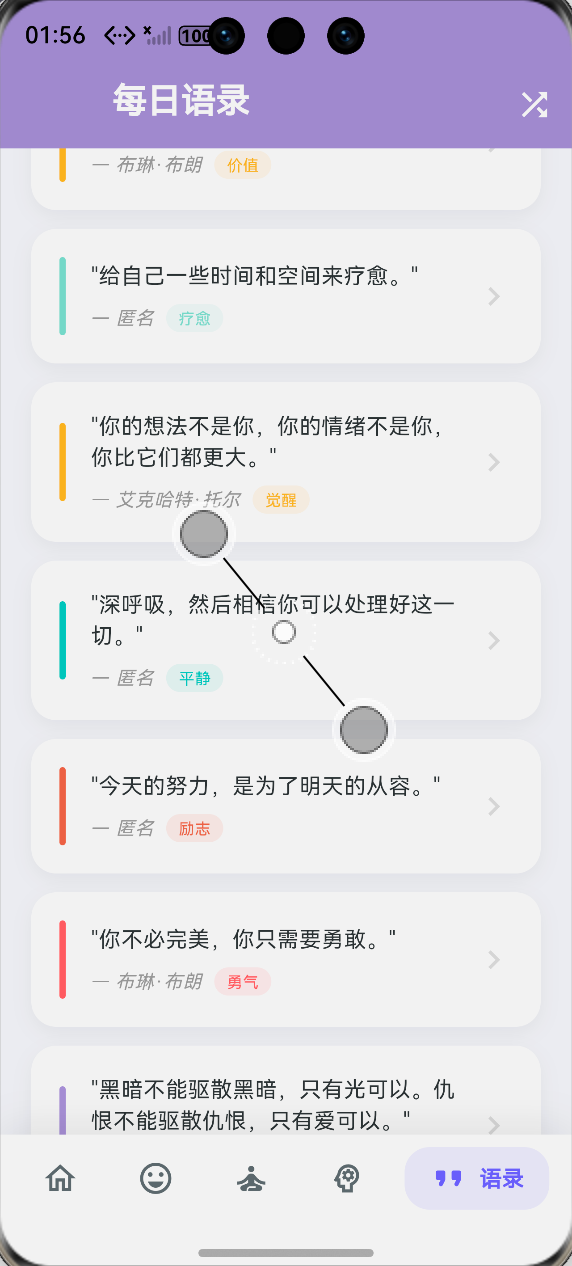

开源鸿蒙跨平台开发社区汇聚开发者与厂商,共建“一次开发,多端部署”的开源生态,致力于降低跨端开发门槛,推动万物智联创新。
更多推荐
 0
0 0
0- 0


 已为社区贡献127条内容

所有评论(0)