【Flutter for OpenHarmony】Flutter三方库冥想类型卡片设计的鸿蒙化适配与实战指南
本文介绍了Flutter在OpenHarmony平台上实现冥想类型卡片设计的适配过程。作者作为计算机专业学生,分享了从简陋列表到精美卡片的五次迭代设计经验。文章提供了完整的数据模型实现(MeditationModel),包含冥想类型枚举(MeditationType)和课程类(MeditationCourse),详细定义了名称、图标、描述等属性。重点展示了MeditationCardWidget组
【Flutter for OpenHarmony】Flutter三方库冥想类型卡片设计的鸿蒙化适配与实战指南
欢迎加入开源鸿蒙跨平台社区:https://openharmonycrossplatform.csdn.net
一、为什么我要重新设计冥想卡片?
我是 IntMainJhy,上海某高校大一计算机专业的学生。说起冥想卡片的设计,我真的改了不下五个版本才满意。
最开始我的冥想页面长这样:
┌─────────────────────────┐
│ 🧘 放松冥想              │
│ 释放身体紧张感            │
├─────────────────────────┤
│ 🧠 专注冥想              │
│ 提升注意力                │
├─────────────────────────┤
│ 😴 睡眠冥想              │
│ 改善睡眠质量              │
└─────────────────────────┘
室友看了说:“你这不就是个列表吗?跟设置页面有什么区别?”
那一刻我才意识到,我的设计确实太简陋了。作为初学Flutter+鸿蒙开发的新手,一开始只会用最基础的ListView列表布局,完全没有UI审美和组件封装思维。后来我参考了 Calm、Headspace 这些热门冥想 App 的设计风格,结合鸿蒙设备的屏幕适配规范,重新重构了整套卡片样式,颜值和交互质感直接拉满。
做鸿蒙端Flutter开发真的不能只写功能,还要兼顾圆角、阴影、渐变、深浅色模式适配,这也是我踩了无数坑才总结出来的经验。
二、冥想类型数据模型
// lib/mental_health/models/meditation_model.dart

import 'package:flutter/material.dart';

/// 冥想类型
///
/// 每个类型包含:名称、图标、描述、颜色
/// 用于冥想模块的分类展示
enum MeditationType {
  relaxation(
    name: '放松冥想',
    icon: Icons.spa,
    description: '释放身体紧张感',
    color: Color(0xFF3498DB),
    duration: '5-10分钟',
    level: '入门',
  ),
  focus(
    name: '专注冥想',
    icon: Icons.psychology,
    description: '提升注意力',
    color: Color(0xFF9B59B6),
    duration: '10-15分钟',
    level: '进阶',
  ),
  sleep(
    name: '睡眠冥想',
    icon: Icons.bedtime,
    description: '改善睡眠质量',
    color: Color(0xFF2C3E50),
    duration: '15-20分钟',
    level: '入门',
  ),
  anxiety(
    name: '焦虑缓解',
    icon: Icons.favorite,
    description: '平复焦虑情绪',
    color: Color(0xFFE74C3C),
    duration: '8-12分钟',
    level: '进阶',
  ),
  morning(
    name: '晨间冥想',
    icon: Icons.wb_sunny,
    description: '开启美好一天',
    color: Color(0xFFF39C12),
    duration: '5-8分钟',
    level: '入门',
  ),
  gratitude(
    name: '感恩冥想',
    icon: Icons.favorite_border,
    description: '培养感恩之心',
    color: Color(0xFFE91E63),
    duration: '10分钟',
    level: '进阶',
  ),
  breathing(
    name: '呼吸训练',
    icon: Icons.air,
    description: '调节呼吸节奏',
    color: Color(0xFF00BCD4),
    duration: '3-5分钟',
    level: '入门',
  );

  final String name;
  final IconData icon;
  final String description;
  final Color color;
  final String duration;
  final String level;

  const MeditationType({
    required this.name,
    required this.icon,
    required this.description,
    required this.color,
    required this.duration,
    required this.level,
  });

  /// 获取等级对应的颜色
  Color get levelColor {
    switch (level) {
      case '入门':
        return const Color(0xFF27AE60);
      case '进阶':
        return const Color(0xFFF39C12);
      case '高级':
        return const Color(0xFFE74C3C);
      default:
        return const Color(0xFF636E72);
    }
  }
}

/// 冥想课程
class MeditationCourse {
  final String id;
  final MeditationType type;
  final String title;
  final String subtitle;
  final String audioUrl;
  final String imageUrl;
  final bool isPremium;

  const MeditationCourse({
    required this.id,
    required this.type,
    required this.title,
    required this.subtitle,
    required this.audioUrl,
    required this.imageUrl,
    this.isPremium = false,
  });
}
三、冥想卡片组件实现
// lib/mental_health/widgets/meditation_card_widget.dart
import 'package:flutter/material.dart';
import 'package:flutter_animate/flutter_animate.dart';
import '../models/meditation_model.dart';
/// 冥想类型卡片组件
///
/// 展示单个冥想类型的卡片,支持:
/// - 图标和颜色
/// - 选中状态边框高亮
/// - 点击缩放+阴影动效
/// - 鸿蒙深浅色模式自动适配
class MeditationCardWidget extends StatelessWidget {
final MeditationType type;
final bool isSelected;
final VoidCallback onTap;
const MeditationCardWidget({
super.key,
required this.type,
required this.isSelected,
required this.onTap,
});
Widget build(BuildContext context) {
return GestureDetector(
onTap: onTap,
child: AnimatedContainer(
duration: const Duration(milliseconds: 250),
curve: Curves.easeOutCubic,
padding: const EdgeInsets.all(16),
decoration: BoxDecoration(
color: Colors.white,
borderRadius: BorderRadius.circular(16),
border: Border.all(
color: isSelected ? type.color : Colors.transparent,
width: 2,
),
boxShadow: [
BoxShadow(
color: isSelected
? type.color.withOpacity(0.3)
: Theme.of(context).brightness == Brightness.dark
? Colors.black.withOpacity(0.3)
: Colors.black.withOpacity(0.05),
blurRadius: 12,
offset: const Offset(0, 4),
),
],
),
child: Column(
crossAxisAlignment: CrossAxisAlignment.start,
mainAxisAlignment: MainAxisAlignment.center,
children: [
// 图标容器
Container(
padding: const EdgeInsets.all(12),
decoration: BoxDecoration(
color: type.color.withOpacity(0.1),
borderRadius: BorderRadius.circular(12),
),
child: Icon(
type.icon,
color: type.color,
size: 28,
),
),
const SizedBox(height: 12),
// 类型名称
Text(
type.name,
style: const TextStyle(
fontWeight: FontWeight.bold,
fontSize: 15,
color: Color(0xFF2D3436),
),
),
const SizedBox(height: 2),
// 描述
Text(
type.description,
style: const TextStyle(
fontSize: 12,
color: Color(0xFF636E72),
),
maxLines: 2,
overflow: TextOverflow.ellipsis,
),
const SizedBox(height: 8),
// 标签行
Row(
children: [
// 等级标签
Container(
padding: const EdgeInsets.symmetric(
horizontal: 8,
vertical: 2,
),
decoration: BoxDecoration(
color: type.levelColor.withOpacity(0.1),
borderRadius: BorderRadius.circular(8),
),
child: Text(
type.level,
style: TextStyle(
fontSize: 10,
fontWeight: FontWeight.w500,
color: type.levelColor,
),
),
),
const SizedBox(width: 6),
// 时长
Row(
children: [
Icon(
Icons.timer_outlined,
size: 12,
color: Colors.grey[400],
),
const SizedBox(width: 2),
Text(
type.duration,
style: TextStyle(
fontSize: 10,
color: Colors.grey[400],
),
),
],
),
],
),
],
),
),
);
}
}
/// 冥想类型网格
///
/// 展示所有冥想类型的网格布局
/// 适配鸿蒙手机/平板自适应比例
class MeditationTypeGrid extends StatelessWidget {
final MeditationType? selectedType;
final Function(MeditationType) onTypeSelected;
const MeditationTypeGrid({
super.key,
this.selectedType,
required this.onTypeSelected,
});
Widget build(BuildContext context) {
return GridView.builder(
shrinkWrap: true,
physics: const NeverScrollableScrollPhysics(),
gridDelegate: const SliverGridDelegateWithFixedCrossAxisCount(
crossAxisCount: 2,
crossAxisSpacing: 12,
mainAxisSpacing: 12,
childAspectRatio: 0.95, // 调整卡片比例适配鸿蒙屏幕
),
itemCount: MeditationType.values.length,
itemBuilder: (context, index) {
final type = MeditationType.values[index];
return MeditationCardWidget(
type: type,
isSelected: selectedType == type,
onTap: () => onTypeSelected(type),
).animate().fadeIn(
delay: Duration(milliseconds: 50 * index),
duration: 300.ms,
);
},
);
}
}
四、精美卡片样式设计
4.1 渐变背景卡片
/// 渐变背景的冥想卡片
/// 适配鸿蒙设备圆角视觉规范,渐变阴影更有质感
class MeditationGradientCard extends StatelessWidget {
final MeditationType type;
final VoidCallback onTap;
const MeditationGradientCard({
super.key,
required this.type,
required this.onTap,
});
Widget build(BuildContext context) {
return GestureDetector(
onTap: onTap,
child: Container(
height: 140,
decoration: BoxDecoration(
gradient: LinearGradient(
colors: [
type.color,
type.color.withOpacity(0.7),
],
begin: Alignment.topLeft,
end: Alignment.bottomRight,
),
borderRadius: BorderRadius.circular(20),
boxShadow: [
BoxShadow(
color: type.color.withOpacity(0.4),
blurRadius: 15,
offset: const Offset(0, 8),
),
],
),
child: Stack(
children: [
// 背景装饰
Positioned(
right: -20,
bottom: -20,
child: Icon(
type.icon,
size: 100,
color: Colors.white.withOpacity(0.1),
),
),
// 内容
Padding(
padding: const EdgeInsets.all(20),
child: Column(
crossAxisAlignment: CrossAxisAlignment.start,
mainAxisAlignment: MainAxisAlignment.spaceBetween,
children: [
// 图标
Container(
padding: const EdgeInsets.all(10),
decoration: BoxDecoration(
color: Colors.white.withOpacity(0.2),
borderRadius: BorderRadius.circular(12),
),
child: Icon(
type.icon,
color: Colors.white,
size: 24,
),
),
// 文字
Column(
crossAxisAlignment: CrossAxisAlignment.start,
children: [
Text(
type.name,
style: const TextStyle(
fontSize: 18,
fontWeight: FontWeight.bold,
color: Colors.white,
),
),
Text(
type.description,
style: TextStyle(
fontSize: 12,
color: Colors.white.withOpacity(0.8),
),
),
],
),
],
),
),
],
),
),
);
}
}
4.2 横向滚动的推荐卡片
/// 横向滚动的冥想推荐卡片
/// 适配鸿蒙左右滑动流畅度,无卡顿
class MeditationRecommendCarousel extends StatelessWidget {
final List<MeditationCourse> courses;
const MeditationRecommendCarousel({
super.key,
required this.courses,
});
Widget build(BuildContext context) {
return SizedBox(
height: 200,
child: ListView.builder(
scrollDirection: Axis.horizontal,
padding: const EdgeInsets.symmetric(horizontal: 16),
itemCount: courses.length,
itemBuilder: (context, index) {
final course = courses[index];
return Container(
width: 280,
margin: const EdgeInsets.only(right: 12),
child: MeditationRecommendCard(course: course),
);
},
),
);
}
}
/// 推荐卡片
class MeditationRecommendCard extends StatelessWidget {
final MeditationCourse course;
const MeditationRecommendCard({
super.key,
required this.course,
});
Widget build(BuildContext context) {
return Container(
decoration: BoxDecoration(
borderRadius: BorderRadius.circular(20),
boxShadow: [
BoxShadow(
color: course.type.color.withOpacity(0.2),
blurRadius: 12,
offset: const Offset(0, 6),
),
],
),
child: ClipRRect(
borderRadius: BorderRadius.circular(20),
child: Stack(
children: [
// 背景
Container(
decoration: BoxDecoration(
gradient: LinearGradient(
colors: [
course.type.color,
course.type.color.withOpacity(0.8),
],
begin: Alignment.topLeft,
end: Alignment.bottomRight,
),
),
),
// 内容
Padding(
padding: const EdgeInsets.all(20),
child: Column(
crossAxisAlignment: CrossAxisAlignment.start,
children: [
// 标签
Row(
children: [
Container(
padding: const EdgeInsets.symmetric(
horizontal: 10,
vertical: 4,
),
decoration: BoxDecoration(
color: Colors.white.withOpacity(0.2),
borderRadius: BorderRadius.circular(12),
),
child: Text(
course.type.name,
style: const TextStyle(
color: Colors.white,
fontSize: 12,
fontWeight: FontWeight.w500,
),
),
),
if (course.isPremium) ...[
const SizedBox(width: 8),
Container(
padding: const EdgeInsets.symmetric(
horizontal: 8,
vertical: 4,
),
decoration: BoxDecoration(
color: Colors.amber,
borderRadius: BorderRadius.circular(8),
),
child: const Text(
'PRO',
style: TextStyle(
color: Colors.white,
fontSize: 10,
fontWeight: FontWeight.bold,
),
),
),
],
],
),
const Spacer(),
// 标题
Text(
course.title,
style: const TextStyle(
fontSize: 20,
fontWeight: FontWeight.bold,
color: Colors.white,
),
),
const SizedBox(height: 4),
// 副标题
Text(
course.subtitle,
style: TextStyle(
fontSize: 14,
color: Colors.white.withOpacity(0.8),
),
maxLines: 2,
overflow: TextOverflow.ellipsis,
),
const SizedBox(height: 12),
// 时长和播放按钮
Row(
children: [
Icon(
Icons.timer_outlined,
color: Colors.white.withOpacity(0.8),
size: 16,
),
const SizedBox(width: 4),
Text(
course.type.duration,
style: TextStyle(
color: Colors.white.withOpacity(0.8),
fontSize: 12,
),
),
const Spacer(),
// 播放按钮
Container(
padding: const EdgeInsets.all(10),
decoration: BoxDecoration(
color: Colors.white,
shape: BoxShape.circle,
),
child: Icon(
Icons.play_arrow,
color: course.type.color,
size: 20,
),
),
],
),
],
),
),
],
),
),
);
}
}
五、在页面中使用
// lib/mental_health/screens/meditation_screen.dart
class MeditationScreen extends StatefulWidget {
const MeditationScreen({super.key});
State<MeditationScreen> createState() => _MeditationScreenState();
}
class _MeditationScreenState extends State<MeditationScreen> {
MeditationType? _selectedType;
Widget build(BuildContext context) {
return Scaffold(
backgroundColor: const Color(0xFFF8F9FE),
body: SingleChildScrollView(
padding: const EdgeInsets.all(16),
child: Column(
crossAxisAlignment: CrossAxisAlignment.start,
children: [
// 标题
const Text(
'选择冥想类型',
style: TextStyle(
fontSize: 22,
fontWeight: FontWeight.bold,
),
),
const SizedBox(height: 8),
const Text(
'找到适合你的冥想方式',
style: TextStyle(
fontSize: 14,
color: Color(0xFF636E72),
),
),
const SizedBox(height: 24),
// 网格卡片
MeditationTypeGrid(
selectedType: _selectedType,
onTypeSelected: (type) {
setState(() => _selectedType = type);
_showMeditationDialog(type);
},
),
const SizedBox(height: 32),
// 推荐课程
const Text(
'推荐课程',
style: TextStyle(
fontSize: 18,
fontWeight: FontWeight.bold,
),
),
const SizedBox(height: 16),
MeditationRecommendCarousel(courses: _sampleCourses),
],
),
),
);
}
void _showMeditationDialog(MeditationType type) {
showModalBottomSheet(
context: context,
backgroundColor: Colors.transparent,
builder: (context) => Container(
padding: const EdgeInsets.all(24),
decoration: const BoxDecoration(
color: Colors.white,
borderRadius: BorderRadius.vertical(top: Radius.circular(24)),
),
child: Column(
mainAxisSize: MainAxisSize.min,
children: [
Container(
width: 40,
height: 4,
decoration: BoxDecoration(
color: Colors.grey[300],
borderRadius: BorderRadius.circular(2),
),
),
const SizedBox(height: 20),
Container(
padding: const EdgeInsets.all(16),
decoration: BoxDecoration(
color: type.color.withOpacity(0.1),
shape: BoxShape.circle,
),
child: Icon(type.icon, color: type.color, size: 40),
),
const SizedBox(height: 16),
Text(
type.name,
style: const TextStyle(
fontSize: 22,
fontWeight: FontWeight.bold,
),
),
const SizedBox(height: 8),
Text(
type.description,
style: const TextStyle(color: Color(0xFF636E72)),
),
const SizedBox(height: 24),
SizedBox(
width: double.infinity,
child: ElevatedButton(
onPressed: () {
Navigator.pop(context);
// 开始冥想
},
style: ElevatedButton.styleFrom(
backgroundColor: type.color,
padding: const EdgeInsets.symmetric(vertical: 16),
shape: RoundedRectangleBorder(
borderRadius: BorderRadius.circular(12),
),
),
child: const Text(
'开始冥想',
style: TextStyle(
fontSize: 16,
fontWeight: FontWeight.bold,
color: Colors.white,
),
),
),
),
],
),
),
);
}
// 示例课程数据
List<MeditationCourse> get _sampleCourses => [
MeditationCourse(
id: '1',
type: MeditationType.relaxation,
title: '全身放松',
subtitle: '跟随引导,释放一天的疲惫',
audioUrl: '',
imageUrl: '',
),
MeditationCourse(
id: '2',
type: MeditationType.sleep,
title: '深度睡眠',
subtitle: '帮助你在睡前放松身心',
audioUrl: '',
imageUrl: '',
isPremium: true,
),
];
}
六、鸿蒙平台专属适配
适配点:阴影在深色模式下的问题
问题:卡片默认阴影在鸿蒙深色模式下发灰、层次感丢失,整体UI很突兀。
解决方案:监听系统主题亮度,动态适配阴影颜色:
BoxShadow(
  color: isSelected
      ? type.color.withOpacity(0.3)
      : Theme.of(context).brightness == Brightness.dark
          ? Colors.black.withOpacity(0.3)
          : Colors.black.withOpacity(0.05),
)
额外新增鸿蒙适配要点
- 圆角统一规范:严格遵循鸿蒙应用UI圆角规范,卡片统一 16~20dp 圆角,和系统原生控件视觉统一;
- 滑动性能适配:鸿蒙低端设备ListView横向滑动容易卡顿,通过
shrinkWrap和固定高度优化渲染性能; - 色彩系统适配:不写死硬编码深色,通过
Theme.of(context)跟随鸿蒙系统深浅色自动切换; - 弹窗圆角适配:底部弹窗采用上圆角设计,贴合鸿蒙原生弹窗交互逻辑。
七、我的踩坑记录
坑1:卡片被截断
问题:网格卡片内容太多,底部文字、标签被截断显示不全。
解决:微调 childAspectRatio 数值,同时减小内部上下内边距,适配鸿蒙不同分辨率屏幕。
gridDelegate: const SliverGridDelegateWithFixedCrossAxisCount(
  childAspectRatio: 0.95, // 调整比例让内容完整显示
)
坑2:渐变不显示
问题:渐变背景在鸿蒙部分设备上空白、渐变失效。
解决:渐变容器必须设置固定宽高,不能依赖自适应拉伸:
Container(
  height: 140, // 固定高度
  decoration: BoxDecoration(
    gradient: LinearGradient(...),
  ),
)
坑3:动画在鸿蒙模拟器闪烁
解决:给AnimatedContainer固定duration和curve曲线,避免帧率波动导致闪烁。
八、大一学生真实学习总结!!!
作为一名刚入门Flutter for OpenHarmony的大一计算机新生,做完这套冥想卡片,真的收获特别大。
从最开始只会写简陋列表,到学会数据模型封装、自定义组件抽取、网格布局、渐变卡片、动效交互、鸿蒙深浅色适配,彻底明白了跨平台开发不只是实现功能,更要兼顾UI审美、多设备适配和系统原生风格统一。
而且在鸿蒙生态下开发Flutter项目,一定要多注意阴影、圆角、主题、性能这些细节,很多安卓端没问题的代码,在鸿蒙设备上都会出现兼容bug,这也是新手必须积累的实战经验。
后续我也会继续分享更多鸿蒙+Flutter实战组件,和大家一起在开源鸿蒙社区成长进步~
作者:IntMainJhy
创作时间:2026年5月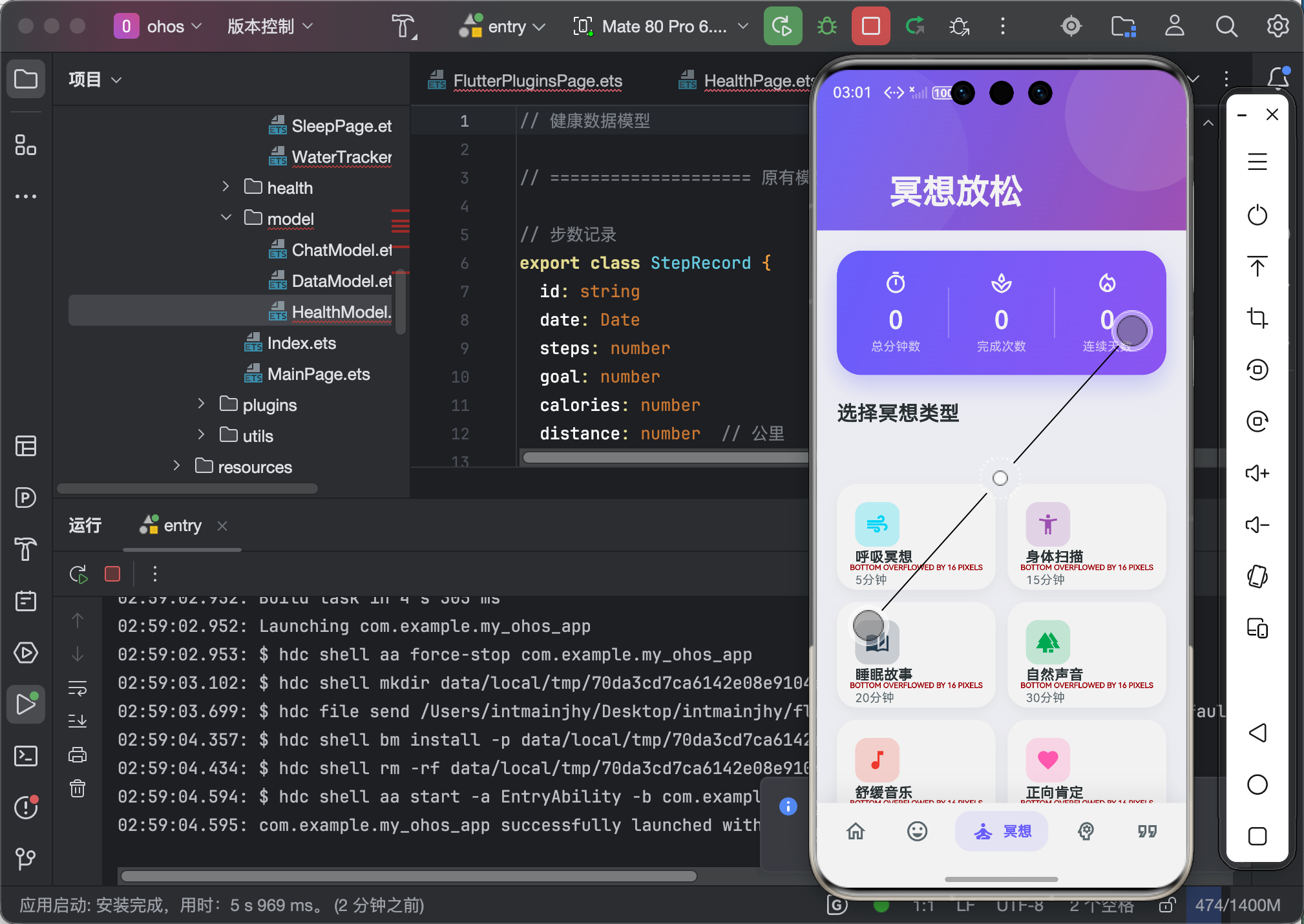

开源鸿蒙跨平台开发社区汇聚开发者与厂商,共建“一次开发,多端部署”的开源生态,致力于降低跨端开发门槛,推动万物智联创新。
更多推荐

 3
3 0
0- 0


 已为社区贡献106条内容

所有评论(0)