OpenHarmony:使用 flutter_easyloading 构建资料上传状态反馈应用
欢迎加入开源鸿蒙跨平台社区:
https://openharmonycrossplatform.csdn.net
项目效果
本文实现的是一个基于 Flutter for OpenHarmony 的资料上传状态反馈应用。项目中使用 Flutter 第三方库 flutter_easyloading 实现加载提示、上传进度提示、成功提示、失败提示和 Toast 提示。
最终运行效果如下:
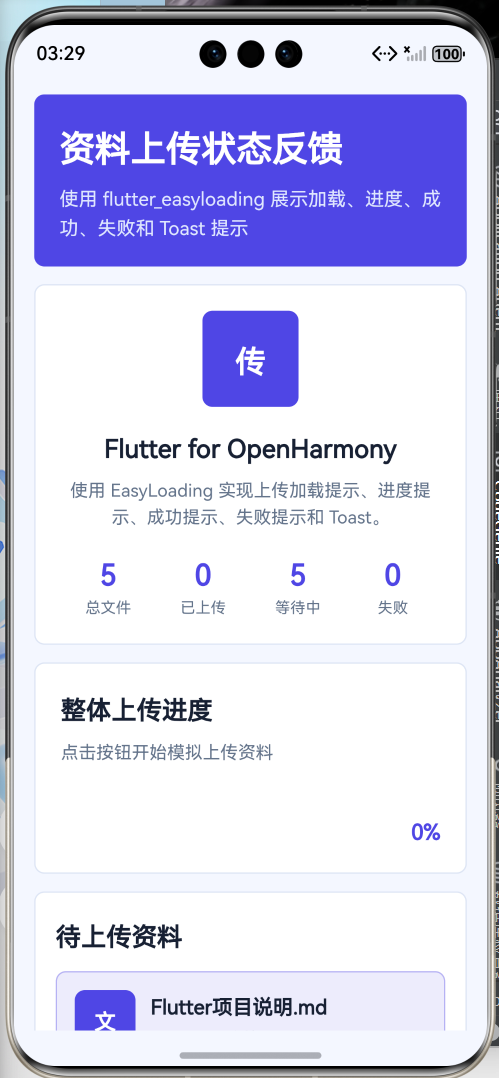
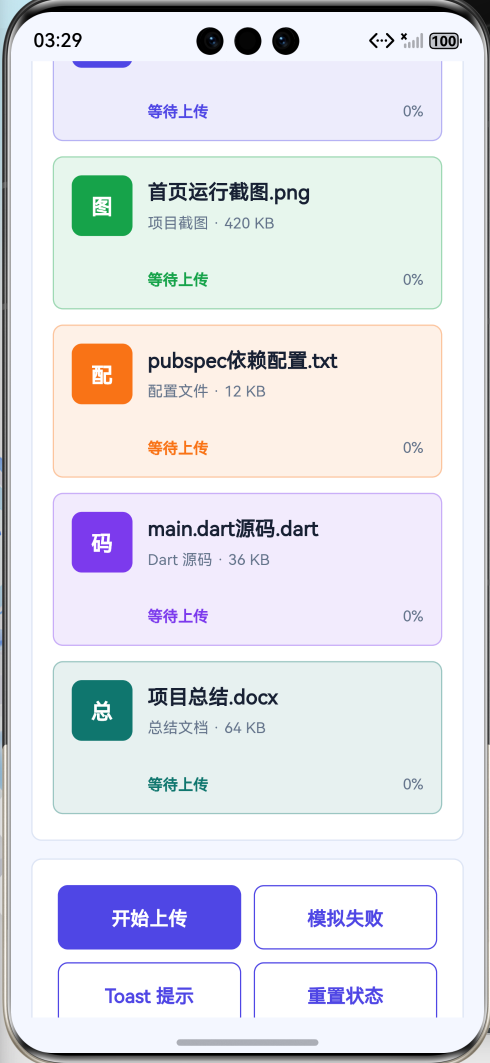
页面主要包含以下内容:
- 顶部标题栏;
- 上传任务概览卡片;
- 资料文件列表;
- 文件上传进度展示;
- 一键模拟上传;
- 模拟失败提示;
- 重置上传状态;
- 第三方库使用说明;
- 页面整体采用 Flutter Material 风格布局。
本文重点是演示如何在 Flutter for OpenHarmony 项目中使用 Flutter 第三方库 flutter_easyloading。项目代码写在 lib/main.dart 中,依赖配置写在 pubspec.yaml 中,符合 Flutter for OpenHarmony 第三方库实践方向。
前言
在移动应用开发中,状态反馈非常重要。用户点击按钮后,应用需要告诉用户当前操作是否正在进行、是否成功、是否失败,否则用户只能盯着屏幕怀疑人生。
常见状态反馈包括:
- 加载中;
- 上传中;
- 上传进度;
- 操作成功;
- 操作失败;
- 简短提示 Toast。
如果每个页面都自己写一套 loading 弹窗、进度层、成功提示和失败提示,代码会变得很重复。重复代码多了以后,项目就会从“应用开发”变成“复制粘贴行为艺术”。
因此本文选择使用 Flutter 第三方库 flutter_easyloading 来完成状态反馈。它可以比较方便地显示 Loading、Progress、Success、Error 和 Toast,适合用于上传、下载、登录、保存、提交表单等操作场景。
本项目以“资料上传状态反馈应用”为例,模拟多个文件依次上传,并在上传过程中使用 flutter_easyloading 展示进度提示。
一、项目目标
本次实践主要实现以下目标:
- 创建 Flutter for OpenHarmony 项目;
- 在
pubspec.yaml中添加第三方库flutter_easyloading; - 使用
flutter pub get获取依赖; - 在
lib/main.dart中引入flutter_easyloading; - 在
MaterialApp中配置EasyLoading.init(); - 使用
EasyLoading.show()显示加载提示; - 使用
EasyLoading.showProgress()显示上传进度; - 使用
EasyLoading.showSuccess()显示成功提示; - 使用
EasyLoading.showError()显示失败提示; - 使用
EasyLoading.showToast()显示简短提示; - 使用 Flutter Material 组件构建完整页面;
- 将应用运行到 OpenHarmony 设备或模拟器中。
二、技术栈
| 类型 | 内容 |
|---|---|
| 开发方向 | Flutter for OpenHarmony |
| 开发语言 | Dart |
| UI 框架 | Flutter |
| 第三方库 | flutter_easyloading |
| 功能场景 | 加载提示 / 进度提示 / Toast 提示 |
| 核心组件 | EasyLoading |
| 项目入口 | lib/main.dart |
| 依赖配置 | pubspec.yaml |
| 运行平台 | OpenHarmony 设备或模拟器 |
三、为什么选择 flutter_easyloading
在实际开发中,很多操作都需要状态反馈。例如:
- 登录账号;
- 上传资料;
- 下载文件;
- 保存表单;
- 提交订单;
- 加载数据;
- 删除记录;
- 同步信息;
- 网络请求失败提示。
如果没有状态反馈,用户点击按钮后不知道应用有没有反应。尤其是网络请求较慢时,用户可能会连续点击按钮,最后把一个简单请求变成重复提交事故。人类手指很勤快,程序员只能提前防着。
flutter_easyloading 可以帮助开发者快速实现全局 Loading 和 Toast 提示,不需要在每个页面里单独写弹窗组件。
在本项目中,flutter_easyloading 主要完成以下工作:
- 显示上传准备中的加载提示;
- 显示文件上传进度;
- 显示全部上传成功提示;
- 显示模拟上传失败提示;
- 显示简短 Toast 提示;
- 提升页面交互反馈效果。
四、创建 Flutter for OpenHarmony 项目
在已经配置好 Flutter for OpenHarmony 开发环境的前提下,可以创建一个 Flutter 项目。
示例项目名称:
flutter create easyloading_upload_demo
进入项目目录:
cd easyloading_upload_demo
项目创建完成后,主要关注两个文件:
easyloading_upload_demo
 ├── pubspec.yaml
 └── lib
     └── main.dart
其中:
| 文件 | 作用 |
|---|---|
| pubspec.yaml | 配置 Flutter 项目依赖 |
| lib/main.dart | 编写 Flutter 页面和业务逻辑 |
五、添加 flutter_easyloading 第三方库
打开项目根目录下的 pubspec.yaml 文件,在 dependencies 中添加 flutter_easyloading。
示例配置如下:
dependencies:
  flutter:
    sdk: flutter

  flutter_easyloading: ^3.0.5
完整结构大致如下:
name: easyloading_upload_demo
description: A Flutter for OpenHarmony easy loading demo.
publish_to: 'none'

version: 1.0.0+1

environment:
  sdk: '>=3.4.0 <4.0.0'

dependencies:
  flutter:
    sdk: flutter

  flutter_easyloading: ^3.0.5

dev_dependencies:
  flutter_test:
    sdk: flutter

flutter:
  uses-material-design: true
添加完成后,在终端执行:
flutter pub get
执行成功后,就可以在 Dart 代码中使用 flutter_easyloading 了。
六、项目结构
本项目主要修改 lib/main.dart 文件:
lib
 └── main.dart
本项目不需要编写 OpenHarmony 原生 ArkTS 页面,也不需要修改 Index.ets。
因为这是 Flutter for OpenHarmony 项目,页面主体应该是 Flutter 代码。审核重点会看:
- 是否使用
pubspec.yaml添加 Flutter 第三方库; - 是否在 Dart 文件中
import package; - 是否在
lib/main.dart中实际调用第三方库; - 是否属于 Flutter for OpenHarmony 项目。
看到 pubspec.yaml、lib/main.dart、import 'package:flutter_easyloading/flutter_easyloading.dart';,这才是正确方向。别再把原生鸿蒙页面塞进来硬说 Flutter,审核不是睁眼睡觉。
七、核心实现思路
本项目的核心流程如下:
- 在
pubspec.yaml中添加flutter_easyloading; - 在
main.dart中引入第三方库; - 在
main()中配置 EasyLoading; - 在
MaterialApp中添加builder: EasyLoading.init(); - 定义资料文件数据模型;
- 使用列表展示多个待上传文件;
- 点击“开始上传”后模拟文件依次上传;
- 上传过程中调用
EasyLoading.showProgress()展示进度; - 上传完成后调用
EasyLoading.showSuccess(); - 上传失败时调用
EasyLoading.showError(); - 普通提示使用
EasyLoading.showToast()。
第三方库引入代码如下:
import 'package:flutter_easyloading/flutter_easyloading.dart';
MaterialApp 配置代码如下:
MaterialApp(
  builder: EasyLoading.init(),
)
上传进度提示核心代码如下:
EasyLoading.showProgress(
  progress,
  status: '正在上传资料...',
);
成功提示核心代码如下:
EasyLoading.showSuccess('上传完成');
失败提示核心代码如下:
EasyLoading.showError('上传失败');
这几段代码是本文的重点,说明项目确实使用了 Flutter 第三方库实现状态反馈。
八、main.dart 完整代码
打开文件:
lib/main.dart
将其中内容替换为下面代码:
import 'dart:async';
import 'dart:math';
import 'package:flutter/material.dart';
import 'package:flutter_easyloading/flutter_easyloading.dart';
void main() {
WidgetsFlutterBinding.ensureInitialized();
configEasyLoading();
runApp(const EasyLoadingUploadApp());
}
void configEasyLoading() {
  EasyLoading.instance
    ..displayDuration = const Duration(milliseconds: 1600)
    ..indicatorType = EasyLoadingIndicatorType.fadingCircle
    ..loadingStyle = EasyLoadingStyle.light
    ..indicatorSize = 42
    ..radius = 12
    ..userInteractions = false
    ..dismissOnTap = false;
}
class EasyLoadingUploadApp extends StatelessWidget {
const EasyLoadingUploadApp({super.key});
Widget build(BuildContext context) {
return MaterialApp(
title: 'EasyLoading Upload Demo',
debugShowCheckedModeBanner: false,
builder: EasyLoading.init(),
theme: ThemeData(
colorScheme: ColorScheme.fromSeed(
seedColor: Colors.indigo,
brightness: Brightness.light,
),
useMaterial3: true,
),
home: const UploadHomePage(),
);
}
}
enum UploadStatus {
waiting,
uploading,
success,
failed,
}
class UploadFileItem {
UploadFileItem({
required this.name,
required this.type,
required this.size,
required this.icon,
required this.color,
this.progress = 0,
this.status = UploadStatus.waiting,
});
final String name;
final String type;
final String size;
final IconData icon;
final Color color;
double progress;
UploadStatus status;
}
class UploadHomePage extends StatefulWidget {
const UploadHomePage({super.key});
State<UploadHomePage> createState() => _UploadHomePageState();
}
class _UploadHomePageState extends State<UploadHomePage> {
final List<UploadFileItem> _files = [
UploadFileItem(
name: 'Flutter项目说明.md',
type: 'Markdown 文档',
size: '28 KB',
icon: Icons.article,
color: Colors.indigo,
),
UploadFileItem(
name: '首页运行截图.png',
type: '项目截图',
size: '420 KB',
icon: Icons.image,
color: Colors.green,
),
UploadFileItem(
name: 'pubspec依赖配置.txt',
type: '配置文件',
size: '12 KB',
icon: Icons.settings,
color: Colors.orange,
),
UploadFileItem(
name: 'main.dart源码.dart',
type: 'Dart 源码',
size: '36 KB',
icon: Icons.code,
color: Colors.deepPurple,
),
UploadFileItem(
name: '项目总结.docx',
type: '总结文档',
size: '64 KB',
icon: Icons.description,
color: Colors.teal,
),
];
Timer? _uploadTimer;
int _currentUploadIndex = -1;
bool _isUploading = false;
int get _successCount {
return _files.where((file) => file.status == UploadStatus.success).length;
}
int get _failedCount {
return _files.where((file) => file.status == UploadStatus.failed).length;
}
int get _waitingCount {
return _files.where((file) => file.status == UploadStatus.waiting).length;
}
double get _totalProgress {
if (_files.isEmpty) {
return 0;
}
double total = 0;
for (final UploadFileItem file in _files) {
total += file.progress;
}
return total / _files.length;
}
String get _uploadSummaryText {
if (_isUploading) {
return '正在上传第 ${_currentUploadIndex + 1} 个文件';
}
if (_successCount == _files.length) {
return '全部资料已经上传完成';
}
if (_failedCount > 0) {
return '存在上传失败的资料,需要重新处理';
}
return '点击按钮开始模拟上传资料';
}
void _startUpload() {
if (_isUploading) {
EasyLoading.showToast(
'当前正在上传,请不要重复点击',
toastPosition: EasyLoadingToastPosition.bottom,
);
return;
}
_uploadTimer?.cancel();
setState(() {
_isUploading = true;
_currentUploadIndex = 0;
for (final UploadFileItem file in _files) {
file.progress = 0;
file.status = UploadStatus.waiting;
}
});
EasyLoading.show(
status: '准备上传资料...',
maskType: EasyLoadingMaskType.black,
);
Future.delayed(const Duration(milliseconds: 500), () {
if (!mounted) {
return;
}
_uploadCurrentFile();
});
}
void _uploadCurrentFile() {
if (!mounted) {
return;
}
if (_currentUploadIndex >= _files.length) {
setState(() {
_isUploading = false;
_currentUploadIndex = -1;
});
EasyLoading.showSuccess('全部资料上传完成');
return;
}
final UploadFileItem file = _files[_currentUploadIndex];
setState(() {
file.status = UploadStatus.uploading;
file.progress = 0;
});
_uploadTimer?.cancel();
_uploadTimer = Timer.periodic(const Duration(milliseconds: 260), (timer) {
if (!mounted) {
timer.cancel();
return;
}
final UploadFileItem currentFile = _files[_currentUploadIndex];
final double nextProgress = min(1, currentFile.progress + 0.12);
setState(() {
currentFile.progress = nextProgress;
});
EasyLoading.showProgress(
nextProgress,
status:
'正在上传:${currentFile.name}\n${(nextProgress * 100).toStringAsFixed(0)}%',
maskType: EasyLoadingMaskType.black,
);
if (nextProgress >= 1) {
timer.cancel();
setState(() {
currentFile.status = UploadStatus.success;
currentFile.progress = 1;
});
EasyLoading.showToast(
'${currentFile.name} 上传完成',
toastPosition: EasyLoadingToastPosition.bottom,
);
Future.delayed(const Duration(milliseconds: 420), () {
if (!mounted) {
return;
}
setState(() {
_currentUploadIndex++;
});
_uploadCurrentFile();
});
}
});
}
void _simulateError() {
_uploadTimer?.cancel();
setState(() {
_isUploading = false;
_currentUploadIndex = -1;
for (final UploadFileItem file in _files) {
file.status = UploadStatus.waiting;
file.progress = 0;
}
_files.first.status = UploadStatus.failed;
});
EasyLoading.showError('网络异常,资料上传失败');
}
void _resetUpload() {
_uploadTimer?.cancel();
setState(() {
_isUploading = false;
_currentUploadIndex = -1;
for (final UploadFileItem file in _files) {
file.status = UploadStatus.waiting;
file.progress = 0;
}
});
EasyLoading.dismiss();
EasyLoading.showToast(
'上传状态已重置',
toastPosition: EasyLoadingToastPosition.bottom,
);
}
void _copyLinkToast() {
EasyLoading.showToast(
'资料链接已复制',
toastPosition: EasyLoadingToastPosition.bottom,
);
}
void dispose() {
_uploadTimer?.cancel();
EasyLoading.dismiss();
super.dispose();
}
Widget build(BuildContext context) {
final ThemeData theme = Theme.of(context);
return Scaffold(
appBar: AppBar(
title: const Text('资料上传反馈'),
centerTitle: true,
),
body: SafeArea(
child: ListView(
padding: const EdgeInsets.all(16),
children: [
_buildOverviewCard(theme),
const SizedBox(height: 16),
_buildProgressCard(theme),
const SizedBox(height: 16),
_buildFileListCard(theme),
const SizedBox(height: 16),
_buildActionCard(theme),
const SizedBox(height: 16),
_buildLibraryCard(theme),
],
),
),
);
}
Widget _buildOverviewCard(ThemeData theme) {
return Card(
elevation: 3,
shape: RoundedRectangleBorder(
borderRadius: BorderRadius.circular(22),
),
child: Padding(
padding: const EdgeInsets.all(24),
child: Column(
children: [
Container(
width: 76,
height: 76,
decoration: BoxDecoration(
color: theme.colorScheme.primaryContainer,
borderRadius: BorderRadius.circular(24),
),
child: Icon(
Icons.cloud_upload,
size: 42,
color: theme.colorScheme.onPrimaryContainer,
),
),
const SizedBox(height: 18),
Text(
'Flutter for OpenHarmony',
style: theme.textTheme.headlineSmall?.copyWith(
fontWeight: FontWeight.bold,
),
textAlign: TextAlign.center,
),
const SizedBox(height: 8),
Text(
'使用 flutter_easyloading 构建上传加载、进度、成功、失败和 Toast 提示',
style: theme.textTheme.bodyMedium?.copyWith(
color: theme.colorScheme.onSurfaceVariant,
height: 1.5,
),
textAlign: TextAlign.center,
),
const SizedBox(height: 20),
Row(
children: [
_buildStatItem(
theme,
title: '总文件',
value: '${_files.length}',
icon: Icons.folder,
),
_buildStatItem(
theme,
title: '已上传',
value: '$_successCount',
icon: Icons.check_circle,
),
_buildStatItem(
theme,
title: '等待中',
value: '$_waitingCount',
icon: Icons.schedule,
),
_buildStatItem(
theme,
title: '失败',
value: '$_failedCount',
icon: Icons.error,
),
],
),
],
),
),
);
}
Widget _buildStatItem(
ThemeData theme, {
required String title,
required String value,
required IconData icon,
}) {
return Expanded(
child: Column(
children: [
Icon(
icon,
color: theme.colorScheme.primary,
),
const SizedBox(height: 6),
Text(
value,
style: theme.textTheme.titleLarge?.copyWith(
fontWeight: FontWeight.bold,
color: theme.colorScheme.primary,
),
),
const SizedBox(height: 2),
Text(
title,
style: theme.textTheme.bodySmall?.copyWith(
color: theme.colorScheme.onSurfaceVariant,
),
),
],
),
);
}
Widget _buildProgressCard(ThemeData theme) {
final double progress = _totalProgress;
return Card(
elevation: 2,
shape: RoundedRectangleBorder(
borderRadius: BorderRadius.circular(18),
),
child: Padding(
padding: const EdgeInsets.all(20),
child: Column(
crossAxisAlignment: CrossAxisAlignment.start,
children: [
Text(
'整体上传进度',
style: theme.textTheme.titleLarge?.copyWith(
fontWeight: FontWeight.bold,
),
),
const SizedBox(height: 10),
Text(
_uploadSummaryText,
style: theme.textTheme.bodyMedium?.copyWith(
color: theme.colorScheme.onSurfaceVariant,
),
),
const SizedBox(height: 16),
LinearProgressIndicator(
value: progress,
minHeight: 12,
borderRadius: BorderRadius.circular(10),
),
const SizedBox(height: 10),
Align(
alignment: Alignment.centerRight,
child: Text(
'${(progress * 100).toStringAsFixed(0)}%',
style: theme.textTheme.titleMedium?.copyWith(
fontWeight: FontWeight.bold,
color: theme.colorScheme.primary,
),
),
),
],
),
),
);
}
Widget _buildFileListCard(ThemeData theme) {
return Card(
elevation: 2,
shape: RoundedRectangleBorder(
borderRadius: BorderRadius.circular(18),
),
child: Padding(
padding: const EdgeInsets.fromLTRB(20, 20, 20, 8),
child: Column(
crossAxisAlignment: CrossAxisAlignment.start,
children: [
Text(
'待上传资料',
style: theme.textTheme.titleLarge?.copyWith(
fontWeight: FontWeight.bold,
),
),
const SizedBox(height: 14),
..._files.map((file) {
return Container(
margin: const EdgeInsets.only(bottom: 12),
padding: const EdgeInsets.all(14),
decoration: BoxDecoration(
color: file.color.withOpacity(0.10),
borderRadius: BorderRadius.circular(16),
border: Border.all(
color: _statusColor(file.status, file.color).withOpacity(0.35),
),
),
child: Row(
crossAxisAlignment: CrossAxisAlignment.start,
children: [
Container(
width: 48,
height: 48,
decoration: BoxDecoration(
color: file.color.withOpacity(0.16),
borderRadius: BorderRadius.circular(16),
),
child: Icon(
file.icon,
color: file.color,
),
),
const SizedBox(width: 14),
Expanded(
child: Column(
crossAxisAlignment: CrossAxisAlignment.start,
children: [
Text(
file.name,
style: theme.textTheme.titleMedium?.copyWith(
fontWeight: FontWeight.bold,
),
),
const SizedBox(height: 5),
Text(
'${file.type} · ${file.size}',
style: theme.textTheme.bodySmall?.copyWith(
color: theme.colorScheme.onSurfaceVariant,
),
),
const SizedBox(height: 10),
LinearProgressIndicator(
value: file.progress,
minHeight: 8,
borderRadius: BorderRadius.circular(8),
color: _statusColor(file.status, file.color),
backgroundColor:
theme.colorScheme.surfaceContainerHighest,
),
const SizedBox(height: 8),
Row(
children: [
Icon(
_statusIcon(file.status),
size: 18,
color: _statusColor(file.status, file.color),
),
const SizedBox(width: 6),
Text(
_statusText(file.status),
style: theme.textTheme.bodySmall?.copyWith(
color: _statusColor(file.status, file.color),
fontWeight: FontWeight.w600,
),
),
const Spacer(),
Text(
'${(file.progress * 100).toStringAsFixed(0)}%',
style: theme.textTheme.bodySmall?.copyWith(
color: theme.colorScheme.onSurfaceVariant,
),
),
],
),
],
),
),
],
),
);
}),
],
),
),
);
}
Widget _buildActionCard(ThemeData theme) {
return Card(
elevation: 2,
shape: RoundedRectangleBorder(
borderRadius: BorderRadius.circular(18),
),
child: Padding(
padding: const EdgeInsets.all(20),
child: Column(
children: [
Row(
children: [
Expanded(
child: ElevatedButton.icon(
onPressed: _startUpload,
icon: const Icon(Icons.upload),
label: const Text('开始上传'),
),
),
const SizedBox(width: 12),
Expanded(
child: OutlinedButton.icon(
onPressed: _simulateError,
icon: const Icon(Icons.warning),
label: const Text('模拟失败'),
),
),
],
),
const SizedBox(height: 12),
Row(
children: [
Expanded(
child: OutlinedButton.icon(
onPressed: _copyLinkToast,
icon: const Icon(Icons.link),
label: const Text('Toast 提示'),
),
),
const SizedBox(width: 12),
Expanded(
child: OutlinedButton.icon(
onPressed: _resetUpload,
icon: const Icon(Icons.refresh),
label: const Text('重置状态'),
),
),
],
),
],
),
),
);
}
Widget _buildLibraryCard(ThemeData theme) {
return Card(
elevation: 2,
shape: RoundedRectangleBorder(
borderRadius: BorderRadius.circular(18),
),
child: Padding(
padding: const EdgeInsets.all(20),
child: Column(
crossAxisAlignment: CrossAxisAlignment.start,
children: [
Text(
'第三方库说明',
style: theme.textTheme.titleLarge?.copyWith(
fontWeight: FontWeight.bold,
),
),
const SizedBox(height: 12),
_buildInfoRow(
theme,
title: '库名称',
value: 'flutter_easyloading',
),
_buildInfoRow(
theme,
title: '配置文件',
value: 'pubspec.yaml',
),
_buildInfoRow(
theme,
title: '导入方式',
value: "import 'package:flutter_easyloading/flutter_easyloading.dart';",
),
_buildInfoRow(
theme,
title: '核心对象',
value: 'EasyLoading',
),
_buildInfoRow(
theme,
title: '核心方法',
value: 'show / showProgress / showSuccess / showError / showToast',
),
_buildInfoRow(
theme,
title: '应用场景',
value: '上传资料、提交表单、登录请求、保存数据、网络加载反馈',
),
],
),
),
);
}
Widget _buildInfoRow(
ThemeData theme, {
required String title,
required String value,
}) {
return Padding(
padding: const EdgeInsets.only(bottom: 10),
child: Row(
crossAxisAlignment: CrossAxisAlignment.start,
children: [
SizedBox(
width: 82,
child: Text(
title,
style: theme.textTheme.bodyMedium?.copyWith(
fontWeight: FontWeight.bold,
),
),
),
Expanded(
child: Text(
value,
style: theme.textTheme.bodyMedium?.copyWith(
color: theme.colorScheme.onSurfaceVariant,
),
),
),
],
),
);
}
String _statusText(UploadStatus status) {
switch (status) {
case UploadStatus.waiting:
return '等待上传';
case UploadStatus.uploading:
return '上传中';
case UploadStatus.success:
return '上传成功';
case UploadStatus.failed:
return '上传失败';
}
}
IconData _statusIcon(UploadStatus status) {
switch (status) {
case UploadStatus.waiting:
return Icons.schedule;
case UploadStatus.uploading:
return Icons.cloud_upload;
case UploadStatus.success:
return Icons.check_circle;
case UploadStatus.failed:
return Icons.error;
}
}
Color _statusColor(UploadStatus status, Color defaultColor) {
switch (status) {
case UploadStatus.waiting:
return defaultColor;
case UploadStatus.uploading:
return Colors.blue;
case UploadStatus.success:
return Colors.green;
case UploadStatus.failed:
return Colors.redAccent;
}
}
}
九、代码实现说明
1. 引入 flutter_easyloading 第三方库
代码开头引入第三方库:
import 'package:flutter_easyloading/flutter_easyloading.dart';
这说明项目确实使用了 Flutter 第三方库,而不是 OpenHarmony 原生库。
本项目中主要使用:
EasyLoading
它用于显示全局加载提示、进度提示、成功提示、失败提示和 Toast 提示。
2. 配置 EasyLoading
项目中定义了配置方法:
void configEasyLoading() {
EasyLoading.instance
..displayDuration = const Duration(milliseconds: 1600)
..indicatorType = EasyLoadingIndicatorType.fadingCircle
..loadingStyle = EasyLoadingStyle.light
..indicatorSize = 42
..radius = 12
..userInteractions = false
..dismissOnTap = false;
}
这些配置主要控制 Loading 的展示样式,例如:
| 配置 | 作用 |
|---|---|
| displayDuration | 提示显示时长 |
| indicatorType | 加载动画类型 |
| loadingStyle | 加载框样式 |
| indicatorSize | 加载动画大小 |
| radius | 圆角大小 |
| userInteractions | Loading 时是否允许用户继续操作 |
| dismissOnTap | 点击是否关闭提示 |
在上传过程中,设置 userInteractions = false 可以避免用户重复点击按钮导致状态混乱。
3. 在 MaterialApp 中初始化 EasyLoading
使用 flutter_easyloading 时,需要在 MaterialApp 中配置:
builder: EasyLoading.init(),
完整写法如下:
MaterialApp(
  builder: EasyLoading.init(),
)
如果忘记这一步,后面调用 EasyLoading.show() 可能无法正常显示。第三方库不是许愿机,依赖加了还得初始化,省一步就翻车,很公平。
4. 定义上传文件数据模型
项目中定义了资料文件模型:
class UploadFileItem {
  UploadFileItem({
    required this.name,
    required this.type,
    required this.size,
    required this.icon,
    required this.color,
    this.progress = 0,
    this.status = UploadStatus.waiting,
  });

  final String name;
  final String type;
  final String size;
  final IconData icon;
  final Color color;
  double progress;
  UploadStatus status;
}
字段说明如下:
| 字段 | 作用 |
|---|---|
| name | 文件名称 |
| type | 文件类型 |
| size | 文件大小 |
| icon | 文件图标 |
| color | 文件主题色 |
| progress | 上传进度 |
| status | 上传状态 |
其中 progress 和 status 是可变化状态,用于更新页面中的进度条和状态文字。
5. 定义上传状态枚举
项目中定义了上传状态:
enum UploadStatus {
  waiting,
  uploading,
  success,
  failed,
}

开源鸿蒙跨平台开发社区汇聚开发者与厂商,共建“一次开发,多端部署”的开源生态,致力于降低跨端开发门槛,推动万物智联创新。
更多推荐
 9
9 0
0- 0


 已为社区贡献12条内容

所有评论(0)