02数据模型与单词仓库-鸿蒙PC端Electron开发
欢迎加入开源鸿蒙PC社区
源码仓库
https://atomgit.com/qq_33247427/englishProject.git
效果截图
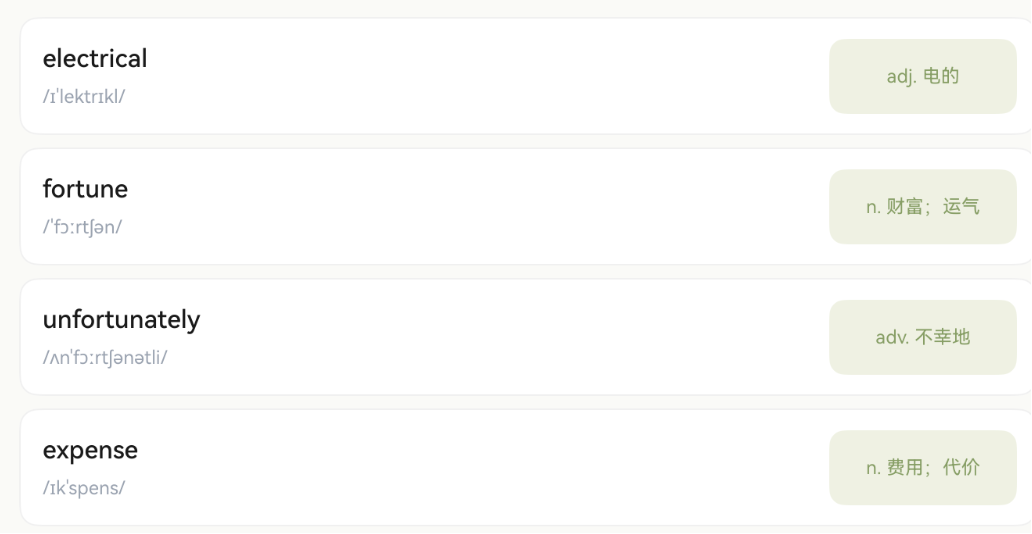
第2篇:数据模型与单词仓库
系列教程导航
|
篇号 |
标题 |
状态 |
|
01 |
✅ 已完成 |
|
|
02 |
数据模型与单词仓库 |
本篇 |
|
03 |
主入口页面与导航结构 |
下一篇 |
|
04 |
极速划词页面实现 |
|
|
05 |
手写画布实现 |
|
|
06 |
百度 OCR 手写识别接入 |
|
|
07 |
答案比对与反馈 UI |
|
|
08 |
单词切换与底部导航 |
|
|
09 |
词根分解与水印展示 |
|
|
10 |
项目总结与优化方向 |
一、为什么要先设计数据模型
在动手写 UI 之前,先把数据结构想清楚,有几个好处:
- UI 和数据解耦 — 页面只关心"拿到什么数据",不关心"数据从哪来"
- 方便后续扩展 — 今天用硬编码数据,明天换数据库或网络接口,UI 层不用改
- 团队协作 — 前端和后端可以基于同一份接口定义并行开发
- 类型安全 — ArkTS 是强类型语言,定义好接口后编译器帮你检查
我们的单词学习 App 需要管理以下信息:
- 单词本身(英文、释义、音标)
- 词根词缀分解(帮助记忆)
- 学习分组(按日期)
- 唯一标识(列表渲染需要)
二、定义 VocabularyWord 数据模型
2.1 创建模型文件
在 electron/src/main/ets/models/ 目录下创建 VocabularyWord.ets:
/**
 * 词根/词缀分解项
 * 用于展示单词的构词法,帮助用户理解和记忆
 */
export interface WordPart {
  /** 词根/词缀文本,如 "electr" */
  text: string;
  /** 含义,如 "电" */
  meaning: string;
  /** 类型:prefix(前缀)| root(词根)| suffix(后缀) */
  type: string;
}

/**
 * 单词详情信息
 * 包含词根分解等扩展信息
 */
export interface WordDetail {
  /** 词根词缀分解列表 */
  parts: WordPart[];
}

/**
 * 单词数据模型
 * 这是整个应用最核心的数据结构
 */
export interface VocabularyWord {
  /** 唯一标识符,用于列表渲染的 key */
  id: string;
  /** 英文单词 */
  english: string;
  /** 中文释义 */
  meaning: string;
  /** 音标,如 /ɪˈlektrɪkl/ */
  phonetic: string;
  /** 音译(可选),如 "伊莱克特瑞克" */
  transliteration?: string;
  /** 词根分解详情(可选) */
  detail?: WordDetail;
  /** 所属日期分组,如 "3/12" */
  date?: string;
}
2.2 设计思路详解
为什么 id 用 string 而不是 number?
ArkUI 的 ForEach 和 LazyForEach 需要一个唯一的 key 来标识列表项。用 string 类型更灵活,可以是数据库主键、UUID、或者简单的序号字符串。
为什么 detail 和 transliteration 是可选的?
不是所有单词都有词根分解信息,也不是所有单词都需要音译。用 ? 标记为可选字段,避免强制填充无意义的空值。
为什么 type 用 string 而不是 enum?
ArkTS 对 enum 的支持有一些限制(特别是在 UI 描述中使用时)。用 string 字面量('prefix' | 'root' | 'suffix')更简单直接,也方便从 JSON 数据源加载。
2.3 WordPart 的颜色编码设计
在后续的 UI 中,不同类型的词根词缀会用不同颜色展示:
|
type 值 |
含义 |
背景色 |
文字色 |
示例 |
|
|
前缀 |
#FFEBEE(浅红) |
#E57373 |
trans-(跨越) |
|
|
词根 |
#EEF1E4(浅绿) |
#8B9D6B |
-form(形式) |
|
|
后缀 |
#DBEAFE(浅蓝) |
#64B5F6 |
-tion(名词后缀) |
这种颜色编码让用户一眼就能区分词根词缀的类型,提升学习效率。
三、创建单词数据仓库
3.1 Repository 模式介绍
Repository(仓库)模式是一种常见的数据层设计模式:
┌──────────────┐     ┌──────────────┐     ┌──────────────┐
│   UI 页面     │ ──→ │  Repository  │ ──→ │   数据源      │
│  (只管展示)   │     │  (统一接口)   │     │ (本地/网络)   │
└──────────────┘     └──────────────┘     └──────────────┘
好处:
- UI 层不需要知道数据来自哪里
- 切换数据源(本地 → 网络)只需修改 Repository 内部实现
- 方便做缓存、数据转换等中间处理
3.2 创建 SpeedWordRepository
在 electron/src/main/ets/data/ 目录下创建 SpeedWordRepository.ets:
import { VocabularyWord } from '../models/VocabularyWord';

/**
 * 极速划词 & 默写单词的数据仓库
 * 当前使用硬编码数据,后续可替换为数据库或网络接口
 */
export class SpeedWordRepository {
  private words: VocabularyWord[] = [
    {
      id: '1',
      english: 'electrical',
      meaning: 'adj. 电的;与电有关的',
      phonetic: '/ɪˈlektrɪkl/',
      date: '3/12',
      detail: {
        parts: [
          { text: 'electr', meaning: '电', type: 'root' },
          { text: 'ical', meaning: '形容词后缀', type: 'suffix' }
        ]
      }
    },
    {
      id: '2',
      english: 'transform',
      meaning: 'v. 使转变;使改观',
      phonetic: '/trænsˈfɔːrm/',
      date: '3/12',
      detail: {
        parts: [
          { text: 'trans', meaning: '跨越、转变', type: 'prefix' },
          { text: 'form', meaning: '形式、形状', type: 'root' }
        ]
      }
    },
    {
      id: '3',
      english: 'international',
      meaning: 'adj. 国际的',
      phonetic: '/ˌɪntərˈnæʃənl/',
      date: '3/12',
      detail: {
        parts: [
          { text: 'inter', meaning: '在…之间', type: 'prefix' },
          { text: 'nation', meaning: '国家', type: 'root' },
          { text: 'al', meaning: '形容词后缀', type: 'suffix' }
        ]
      }
    },
    {
      id: '4',
      english: 'uncomfortable',
      meaning: 'adj. 不舒服的;不自在的',
      phonetic: '/ʌnˈkʌmftəbl/',
      date: '3/12',
      detail: {
        parts: [
          { text: 'un', meaning: '不、否定', type: 'prefix' },
          { text: 'comfort', meaning: '舒适', type: 'root' },
          { text: 'able', meaning: '能…的', type: 'suffix' }
        ]
      }
    },
    {
      id: '5',
      english: 'transportation',
      meaning: 'n. 运输;交通工具',
      phonetic: '/ˌtrænspɔːrˈteɪʃn/',
      date: '3/12',
      detail: {
        parts: [
          { text: 'trans', meaning: '跨越', type: 'prefix' },
          { text: 'port', meaning: '搬运', type: 'root' },
          { text: 'ation', meaning: '名词后缀', type: 'suffix' }
        ]
      }
    },
    {
      id: '6',
      english: 'environment',
      meaning: 'n. 环境;周围的事物',
      phonetic: '/ɪnˈvaɪrənmənt/',
      date: '3/11',
      detail: {
        parts: [
          { text: 'en', meaning: '使…', type: 'prefix' },
          { text: 'viron', meaning: '周围', type: 'root' },
          { text: 'ment', meaning: '名词后缀', type: 'suffix' }
        ]
      }
    },
    {
      id: '7',
      english: 'independent',
      meaning: 'adj. 独立的;自主的',
      phonetic: '/ˌɪndɪˈpendənt/',
      date: '3/11',
      detail: {
        parts: [
          { text: 'in', meaning: '不、否定', type: 'prefix' },
          { text: 'depend', meaning: '依赖', type: 'root' },
          { text: 'ent', meaning: '形容词后缀', type: 'suffix' }
        ]
      }
    },
    // ... 更多单词数据
  ];

  /**
   * 按日期获取单词列表
   * @param date 日期字符串,如 "3/12"
   * @returns 该日期下的所有单词
   */
  getWordsByDate(date: string): VocabularyWord[] {
    return this.words.filter((w: VocabularyWord) => w.date === date);
  }

  /**
   * 获取所有单词
   * @returns 完整单词列表
   */
  getAllWords(): VocabularyWord[] {
    return this.words;
  }

  /**
   * 根据 ID 获取单个单词
   * @param id 单词唯一标识
   * @returns 匹配的单词,未找到返回 undefined
   */
  getWordById(id: string): VocabularyWord | undefined {
    return this.words.find((w: VocabularyWord) => w.id === id);
  }

  /**
   * 获取所有可用的日期分组
   * @returns 去重后的日期列表
   */
  getAvailableDates(): string[] {
    const dateSet = new Set<string>();
    for (const word of this.words) {
      if (word.date) {
        dateSet.add(word.date);
      }
    }
    return Array.from(dateSet).sort();
  }
}
3.3 方法设计说明
|
方法 |
用途 |
使用场景 |
|
|
按日期筛选 |
极速划词页面按天显示 |
|
|
获取全部 |
搜索功能、统计 |
|
|
精确查找 |
跳转到单词详情 |
|
|
获取日期列表 |
日期选择器 |
四、创建 HandwritingWordRepository
除了极速划词的数据源,手写练习页面也需要一个独立的数据仓库。创建 electron/src/main/ets/data/HandwritingWordRepository.ets:
import { VocabularyWord } from '../models/VocabularyWord';

/**
 * 手写练习专用数据仓库
 * 提供随机顺序的单词,适合默写测试场景
 */
export class HandwritingWordRepository {
  private words: VocabularyWord[] = [
    {
      id: 'hw-1',
      english: 'appreciate',
      meaning: 'v. 欣赏;感激;理解',
      phonetic: '/əˈpriːʃieɪt/',
      transliteration: '阿普瑞希艾特'
    },
    {
      id: 'hw-2',
      english: 'communicate',
      meaning: 'v. 交流;传达',
      phonetic: '/kəˈmjuːnɪkeɪt/',
      transliteration: '克缪尼凯特'
    },
    {
      id: 'hw-3',
      english: 'demonstrate',
      meaning: 'v. 证明;演示;示威',
      phonetic: '/ˈdemənstreɪt/',
      transliteration: '戴蒙斯特瑞特'
    },
    // ... 更多单词
  ];

  /**
   * 获取所有手写练习单词
   */
  getAllWords(): VocabularyWord[] {
    return this.words;
  }

  /**
   * 获取单词总数
   */
  getWordCount(): number {
    return this.words.length;
  }
}
4.1 两个 Repository 的区别
|
对比项 |
SpeedWordRepository |
HandwritingWordRepository |
|
用途 |
极速划词 + 默写 |
独立手写练习 |
|
分组方式 |
按日期 |
无分组 |
|
词根分解 |
有 |
可选 |
|
音译 |
无 |
有 |
|
数据量 |
每天 15-20 个 |
全量词库 |
五、在页面中使用数据仓库
5.1 基本用法
import { SpeedWordRepository } from '../data/SpeedWordRepository';
import { VocabularyWord } from '../models/VocabularyWord';

@Entry
@Component
struct MyPage {
  // 创建仓库实例(私有,不需要响应式)
  private repository: SpeedWordRepository = new SpeedWordRepository();

  // 状态变量(UI 会响应变化)
  @State words: VocabularyWord[] = [];
  @State selectedDate: string = '3/12';

  aboutToAppear() {
    // 页面创建时加载数据
    this.words = this.repository.getWordsByDate(this.selectedDate);
  }

  build() {
    Column() {
      // 使用 ForEach 渲染列表
      ForEach(this.words, (word: VocabularyWord) => {
        Row() {
          Text(word.english)
            .fontSize(16)
            .fontWeight(FontWeight.Medium)
          Text(word.meaning)
            .fontSize(14)
            .fontColor('#6B7280')
        }
        .width('100%')
        .padding(12)
      }, (word: VocabularyWord) => word.id)  // key 函数
    }
  }
}
5.2 关键点解析
private vs @State:
// ❌ 不需要 @State,仓库实例不会变化
@State repository: SpeedWordRepository = new SpeedWordRepository();

// ✅ 正确:仓库是私有的,不触发 UI 刷新
private repository: SpeedWordRepository = new SpeedWordRepository();

// ✅ 正确:单词列表需要 @State,因为切换日期时会变化
@State words: VocabularyWord[] = [];
ForEach 的 key 函数:
// ForEach 第三个参数是 key 生成函数
// 用于标识每个列表项,帮助框架做最小化 DOM diff
ForEach(this.words, (word: VocabularyWord) => {
  // 渲染逻辑
}, (word: VocabularyWord) => word.id)  // ← 用 id 作为 key
如果不提供 key 函数,ArkUI 会用数组索引作为 key,在数据变化时可能导致不必要的重渲染。
5.3 切换日期加载数据
selectDate(date: string) {
  this.selectedDate = date;
  // 重新从仓库获取数据,赋值给 @State 变量触发 UI 刷新
  this.words = this.repository.getWordsByDate(date);
}
六、ArkTS 中数组状态的注意事项
6.1 数组变更必须创建新引用
ArkTS 的 @State 检测的是引用变化,不是内容变化:
// ❌ 错误:push 不会触发 UI 刷新(引用没变)
this.words.push(newWord);

// ✅ 正确:创建新数组
this.words = [...this.words, newWord];

// ❌ 错误:splice 不会触发 UI 刷新
this.words.splice(index, 1);

// ✅ 正确:filter 返回新数组
this.words = this.words.filter((w: VocabularyWord) => w.id !== targetId);
6.2 对象属性变更
如果 @State 是一个对象,修改其属性也需要创建新对象:
@State currentWord: VocabularyWord | null = null;

// ❌ 不会触发刷新
this.currentWord.meaning = '新释义';

// ✅ 创建新对象
this.currentWord = { ...this.currentWord, meaning: '新释义' };
七、数据层的后续扩展方向
当前我们使用硬编码数据,这在开发初期是最简单高效的方式。后续可以按需升级:
7.1 从 JSON 文件加载
将单词数据放在 resources/rawfile/words.json 中:
import { resourceManager } from '@kit.LocalizationKit';

async loadWordsFromFile(): Promise<VocabularyWord[]> {
  const context = getContext(this);
  const mgr = context.resourceManager;
  const data = await mgr.getRawFileContent('words.json');
  const text = new TextDecoder().decode(data);
  return JSON.parse(text) as VocabularyWord[];
}
7.2 使用 Preferences 持久化学习记录
import { preferences } from '@kit.ArkData';

// 保存已学习的单词 ID
async saveLearnedWords(wordIds: string[]) {
  const store = await preferences.getPreferences(getContext(this), 'learning');
  await store.put('learnedIds', JSON.stringify(wordIds));
  await store.flush();
}
7.3 接入网络 API
import { http } from '@kit.NetworkKit';

async fetchWordsFromServer(): Promise<VocabularyWord[]> {
  const req = http.createHttp();
  try {
    const resp = await req.request('https://api.example.com/words', {
      method: http.RequestMethod.GET
    });
    return JSON.parse(resp.result as string) as VocabularyWord[];
  } finally {
    req.destroy();
  }
}
这些扩展都不需要修改 UI 层代码,只需要修改 Repository 内部实现。
八、本篇完整文件清单
本篇新增的文件:
electron/src/main/ets/
├── models/
│   └── VocabularyWord.ets          ← 新增:数据模型定义
└── data/
    ├── SpeedWordRepository.ets     ← 新增:极速划词数据仓库
    └── HandwritingWordRepository.ets ← 新增:手写练习数据仓库
九、本篇小结
通过本篇教程,我们完成了:
- 设计了
VocabularyWord核心数据模型(含词根分解) - 理解了 Repository 模式的优势
- 创建了
SpeedWordRepository(按日期分组) - 创建了
HandwritingWordRepository(手写练习专用) - 掌握了在页面中使用数据仓库的方法
- 了解了 ArkTS 数组状态变更的注意事项
- 规划了数据层的后续扩展方向
下一篇预告
第 3 篇:主入口页面与导航结构 — 我们将创建应用的主入口列表页(NativeListPage),实现功能入口卡片和页面路由跳转,让用户能够进入极速划词和默写单词功能。

开源鸿蒙跨平台开发社区汇聚开发者与厂商,共建“一次开发,多端部署”的开源生态,致力于降低跨端开发门槛,推动万物智联创新。
更多推荐
 0
0 0
0- 0


 已为社区贡献15条内容

所有评论(0)