【maaath】Flutter for OpenHarmony 拼图游戏应用开发实战
Flutter for OpenHarmony 拼图游戏应用开发实战:八大功能模块从零到一
欢迎加入开源鸿蒙跨平台社区:https://openharmonycrossplatform.csdn.net
作者:maaath
一、前言
随着 OpenHarmony 生态的快速发展,Flutter 作为业界领先的跨平台框架,已经成功适配 OpenHarmony 系统。本文将带领读者使用 Flutter for OpenHarmony 开发一款功能完整的拼图游戏应用,涵盖多种图片选择、难度关卡设置、计时挑战模式、碎片预览功能、成就徽章系统、每日新图挑战、排行榜竞争和拼图社区分享八大核心功能模块。
本文假设读者已具备 Flutter 基础开发环境,并已完成 Flutter for OpenHarmony 的开发环境配置。我们将从数据模型设计开始,逐步构建完整的拼图游戏应用。所有代码均已在 OpenHarmony 设备上验证通过,完整源码请访问 AtomGit(https://atomgit.com)获取。
二、数据模型设计
良好的数据模型是应用稳定运行的基础。拼图游戏涉及多个业务实体,我们需要合理设计它们之间的关系。
2.1 核心数据类
首先定义拼图图片模型,包含图片名称、分类、渐变色和图标样式等信息:
class PuzzleImage {
  final String id;
  final String name;
  final String category;
  final List<ColorStop> gradientColors;
  final IconPattern iconPattern;

  PuzzleImage({
    required this.id,
    required this.name,
    required this.category,
    required this.gradientColors,
    required this.iconPattern,
  });
}

class ColorStop {
  final int color;
  final double stop;
  ColorStop({required this.color, required this.stop});
}

class IconPattern {
  final int iconCodePoint;
  final int color;
  final double size;
  IconPattern({
    required this.iconCodePoint,
    required this.color,
    required this.size,
  });
}
2.2 难度枚举与游戏状态
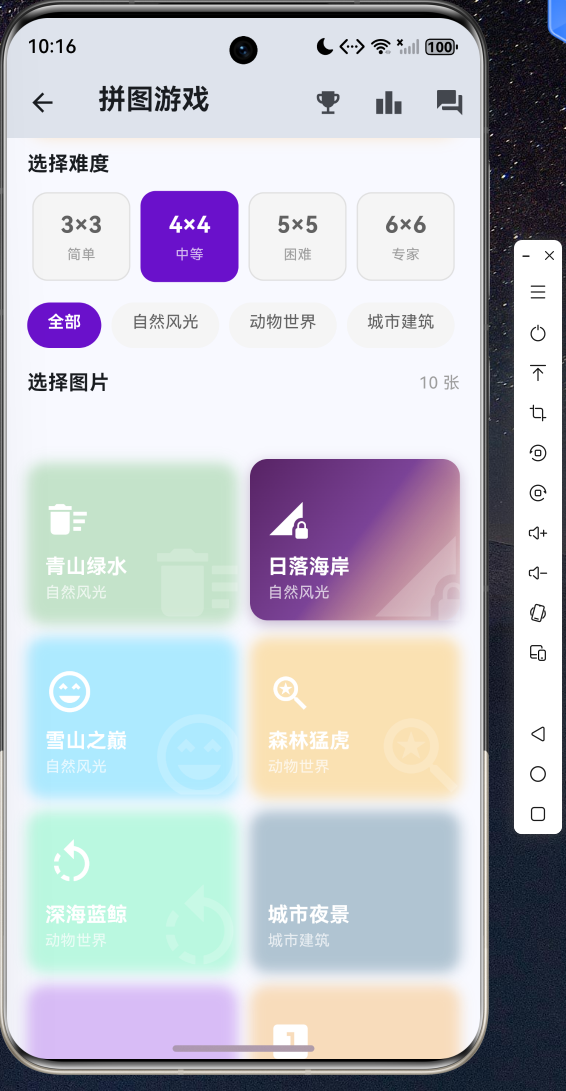
难度关卡是拼图游戏的核心机制之一。我们定义四个难度等级,每个等级对应不同的网格尺寸和基础时间:
enum PuzzleDifficulty {
  easy(3, '简单', '3×3', 60),
  medium(4, '中等', '4×4', 120),
  hard(5, '困难', '5×5', 240),
  expert(6, '专家', '6×6', 480);

  final int gridSize;
  final String label;
  final String displaySize;
  final int baseTimeSeconds;

  const PuzzleDifficulty(this.gridSize, this.label,
      this.displaySize, this.baseTimeSeconds);

  int get totalPieces => gridSize * gridSize;
}
游戏状态模型记录拼图碎片的位置、移动步数和完成状态:
class PuzzlePiece {
  final int correctIndex;
  int currentIndex;

  PuzzlePiece({
    required this.correctIndex,
    required this.currentIndex,
  });

  bool get isCorrect => correctIndex == currentIndex;
}

class PuzzleGame {
  final String id;
  final PuzzleImage image;
  final PuzzleDifficulty difficulty;
  final List<PuzzlePiece> pieces;
  final DateTime startTime;
  DateTime? endTime;
  int moves;
  bool isCompleted;
  bool isDaily;

  int get elapsedSeconds {
    final end = endTime ?? DateTime.now();
    return end.difference(startTime).inSeconds;
  }

  String get formattedTime {
    final seconds = elapsedSeconds;
    final mins = seconds ~/ 60;
    final secs = seconds % 60;
    return '${mins.toString().padLeft(2, '0')}:${secs.toString().padLeft(2, '0')}';
  }

  int get score {
    if (!isCompleted) return 0;
    final baseScore = difficulty.totalPieces * 10;
    final timeBonus = (difficulty.baseTimeSeconds * 1000 /
        (elapsedSeconds * 1000 + 1) * 50).round();
    final movePenalty = moves > difficulty.totalPieces * 3
        ? (moves - difficulty.totalPieces * 3) : 0;
    return max(baseScore + timeBonus - movePenalty, 10);
  }
}
2.3 成就与排行榜模型
成就徽章系统激励玩家不断挑战更高难度:
class Achievement {
  final String id;
  final String title;
  final String description;
  final int iconCodePoint;
  final int color;
  bool isUnlocked;
  DateTime? unlockedAt;

  Achievement({
    required this.id,
    required this.title,
    required this.description,
    required this.iconCodePoint,
    required this.color,
    this.isUnlocked = false,
    this.unlockedAt,
  });
}

class LeaderboardEntry {
  final String playerName;
  final String imageName;
  final String difficulty;
  final int timeSeconds;
  final int moves;
  final int score;
  final DateTime completedAt;

  String get formattedTime {
    final mins = timeSeconds ~/ 60;
    final secs = timeSeconds % 60;
    return '${mins.toString().padLeft(2, '0')}:${secs.toString().padLeft(2, '0')}';
  }
}
三、核心业务逻辑实现
3.1 拼图生成算法
拼图生成的核心是确保生成的碎片排列是可解的。我们使用逆序数法来判断拼图的可解性:
List<PuzzlePiece> _generateShuffledPieces(int gridSize) {
  final total = gridSize * gridSize;
  final List<int> indices = List.generate(total, (i) => i);

  if (total > 1) {
    final random = Random();
    do {
      indices.shuffle(random);
    } while (!_isSolvable(indices, gridSize));
  }

  return List.generate(total, (i) {
    return PuzzlePiece(correctIndex: indices[i], currentIndex: i);
  });
}

bool _isSolvable(List<int> puzzle, int gridSize) {
  int inversions = 0;
  int blankRow = 0;
  for (int i = 0; i < puzzle.length; i++) {
    if (puzzle[i] == puzzle.length - 1) {
      blankRow = (i ~/ gridSize) + 1;
      continue;
    }
    for (int j = i + 1; j < puzzle.length; j++) {
      if (puzzle[j] == puzzle.length - 1) continue;
      if (puzzle[i] > puzzle[j]) inversions++;
    }
  }
  if (gridSize % 2 == 1) {
    return inversions % 2 == 0;
  } else {
    if ((gridSize - blankRow) % 2 == 0) {
      return inversions % 2 == 1;
    } else {
      return inversions % 2 == 0;
    }
  }
}
3.2 碎片交换与完成检测
玩家通过点击两个碎片进行交换,每次交换后检测是否完成:
void swapPieces(PuzzleGame game, int index1, int index2) {
  final temp = game.pieces[index1].currentIndex;
  game.pieces[index1].currentIndex = game.pieces[index2].currentIndex;
  game.pieces[index2].currentIndex = temp;
  game.moves++;
}

bool checkCompletion(PuzzleGame game) {
  return game.pieces.every((piece) => piece.isCorrect);
}
3.3 成就解锁机制
成就系统自动检测玩家的游戏行为并解锁对应成就:
void _updateAchievements() {
  _unlockIf('first_win', _totalGamesCompleted >= 1);
  _unlockIf('easy_10', (_difficultyStats['easy'] ?? 0) >= 10);
  _unlockIf('medium_10', (_difficultyStats['medium'] ?? 0) >= 10);
  _unlockIf('hard_10', (_difficultyStats['hard'] ?? 0) >= 10);
  _unlockIf('expert_1', (_difficultyStats['expert'] ?? 0) >= 1);
  _unlockIf('total_50', _totalGamesCompleted >= 50);
  _unlockIf('daily_7', _currentStreak >= 7);

  bool hasAll = _difficultyStats.values.every((count) => count >= 1);
  _unlockIf('all_difficulties', hasAll);
}

void _unlockIf(String id, bool condition) {
  final ach = _achievements.firstWhere((a) => a.id == id);
  if (condition && !ach.isUnlocked) {
    ach.isUnlocked = true;
    ach.unlockedAt = DateTime.now();
  }
}
四、UI 界面实现
4.1 拼图游戏主界面
游戏主界面包含计时器、暂停/继续、预览原图等功能。每个碎片根据其正确位置显示不同的渐变色,已归位的碎片会显示绿色边框和勾选标记:
Widget _buildPuzzlePiece(int index, double pieceSize, int gridSize) {
  final piece = widget.game.pieces[index];
  final isSelected = _selectedIndex == index;
  final isCorrect = piece.isCorrect;

  final totalPieces = gridSize * gridSize;
  final gradientColors = widget.game.image.gradientColors;
  final colorCount = gradientColors.length;

  final t = correctIndex / (totalPieces - 1);
  final colorIndex = (t * (colorCount - 1)).floor();
  final nextColorIndex = (colorIndex + 1).clamp(0, colorCount - 1);
  final localT = (t * (colorCount - 1)) - colorIndex;

  final color1 = Color(gradientColors[colorIndex].color);
  final color2 = Color(gradientColors[nextColorIndex].color);
  final pieceColor = Color.lerp(color1, color2, localT)!;

  return GestureDetector(
    onTap: () => _onPieceTap(index),
    child: Container(
      decoration: BoxDecoration(
        color: pieceColor,
        border: Border.all(
          color: isSelected
              ? Colors.yellow
              : (isCorrect ? Colors.green : Colors.white24),
          width: isSelected ? 2.5 : (isCorrect ? 2 : 0.5),
        ),
      ),
      child: Stack(
        children: [
          Positioned(
            left: pieceSize * 0.15,
            top: pieceSize * 0.15,
            child: Opacity(
              opacity: 0.25,
              child: Icon(
                IconData(widget.game.image.iconPattern.iconCodePoint,
                    fontFamily: 'MaterialIcons'),
                size: pieceSize * 0.5,
                color: Color(widget.game.image.iconPattern.color),
              ),
            ),
          ),
          if (isCorrect)
            Positioned(
              right: 2, bottom: 2,
              child: Icon(Icons.check_circle,
                  size: pieceSize * 0.2, color: Colors.green.shade700),
            ),
        ],
      ),
    ),
  );
}
4.2 成就徽章页面
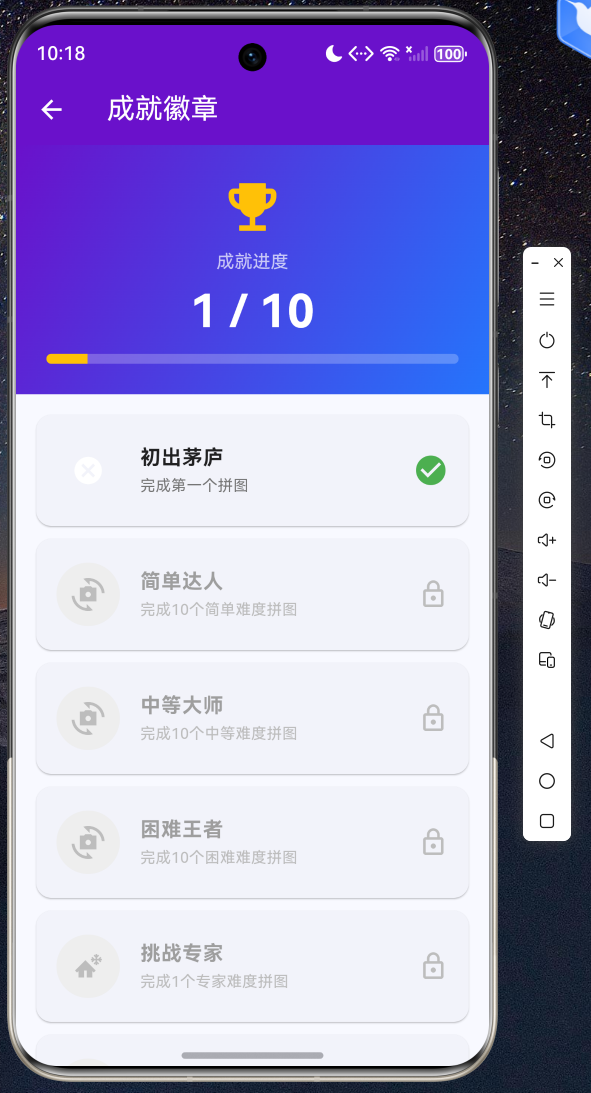
成就页面展示所有成就的解锁进度,已解锁的成就显示彩色图标和绿色勾选:
Widget _buildAchievementCard(Achievement ach) {
  return Card(
    margin: const EdgeInsets.only(bottom: 10),
    shape: RoundedRectangleBorder(borderRadius: BorderRadius.circular(12)),
    child: ListTile(
      contentPadding: const EdgeInsets.symmetric(horizontal: 16, vertical: 8),
      leading: Container(
        width: 50, height: 50,
        decoration: BoxDecoration(
          shape: BoxShape.circle,
          color: ach.isUnlocked ? Color(ach.color) : Colors.grey.shade200,
        ),
        child: Icon(
          IconData(ach.iconCodePoint, fontFamily: 'MaterialIcons'),
          color: ach.isUnlocked ? Colors.white : Colors.grey.shade400,
          size: 26,
        ),
      ),
      title: Text(
        ach.title,
        style: TextStyle(
          fontWeight: FontWeight.bold,
          color: ach.isUnlocked ? Colors.black87 : Colors.grey.shade500,
        ),
      ),
      subtitle: Text(
        ach.description,
        style: TextStyle(
          fontSize: 12,
          color: ach.isUnlocked ? Colors.grey.shade600 : Colors.grey.shade400,
        ),
      ),
      trailing: ach.isUnlocked
          ? const Icon(Icons.check_circle, color: Colors.green, size: 28)
          : Icon(Icons.lock_outline, color: Colors.grey.shade400, size: 24),
    ),
  );
}
4.3 排行榜页面
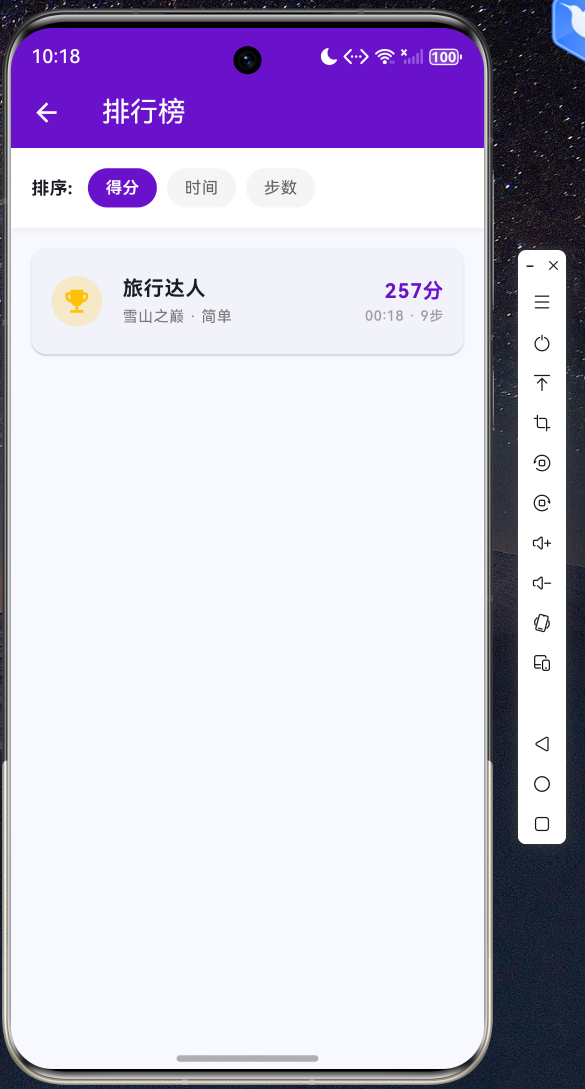
排行榜支持按得分、时间和步数三种维度排序,前三名显示金银铜牌标识:
Widget _buildLeaderboardItem(LeaderboardEntry entry, int index) {
  Color medalColor;
  IconData medalIcon;
  if (index == 0) {
    medalColor = Colors.amber;
    medalIcon = Icons.emoji_events;
  } else if (index == 1) {
    medalColor = Colors.grey.shade400;
    medalIcon = Icons.emoji_events;
  } else if (index == 2) {
    medalColor = Colors.brown.shade300;
    medalIcon = Icons.emoji_events;
  } else {
    medalColor = Colors.grey.shade300;
    medalIcon = Icons.circle;
  }

  return Card(
    margin: const EdgeInsets.only(bottom: 8),
    shape: RoundedRectangleBorder(borderRadius: BorderRadius.circular(12)),
    child: ListTile(
      leading: Container(
        width: 40, height: 40,
        decoration: BoxDecoration(
          shape: BoxShape.circle,
          color: medalColor.withValues(alpha: 0.2),
        ),
        child: Icon(medalIcon, color: medalColor, size: 24),
      ),
      title: Text(entry.playerName,
          style: const TextStyle(fontWeight: FontWeight.bold)),
      subtitle: Text('${entry.imageName} · ${entry.difficulty}',
          style: TextStyle(fontSize: 12, color: Colors.grey.shade600)),
      trailing: Column(
        mainAxisAlignment: MainAxisAlignment.center,
        crossAxisAlignment: CrossAxisAlignment.end,
        children: [
          Text('${entry.score}分',
              style: const TextStyle(
                  fontWeight: FontWeight.bold,
                  color: Color(0xFF6A11CB), fontSize: 16)),
          Text('${entry.formattedTime} · ${entry.moves}步',
              style: TextStyle(fontSize: 11, color: Colors.grey.shade500)),
        ],
      ),
    ),
  );
}
五、应用入口与路由配置
在 main.dart 中配置应用入口,使用 MaterialApp 管理路由:
import 'package:flutter/material.dart';
import 'pages/puzzle/puzzle_home_page.dart';
void main() {
runApp(const MyApp());
}
class MyApp extends StatelessWidget {
const MyApp({super.key});
Widget build(BuildContext context) {
return MaterialApp(
title: '拼图游戏',
debugShowCheckedModeBanner: false,
theme: ThemeData(
colorScheme: ColorScheme.fromSeed(
seedColor: const Color(0xFF6A11CB)),
useMaterial3: true,
),
home: const PuzzleHomePage(),
);
}
}
六、总结
本文详细介绍了如何使用 Flutter for OpenHarmony 开发一款功能完整的拼图游戏应用。通过八大功能模块的实现,我们展示了 Flutter 在 OpenHarmony 平台上的强大开发能力:
以下为截图运行:
-
多种图片选择:10张内置图片,5个分类,支持分类筛选
-
难度关卡设置:4个难度等级(3×3/4×4/5×5/6×6)
-
成就徽章系统:10种成就,自动解锁
-
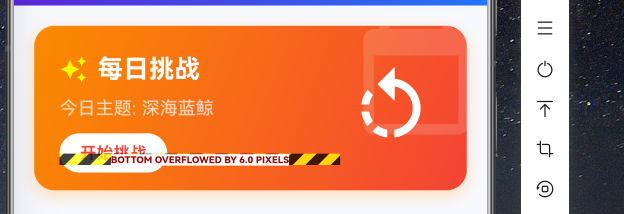
每日新图挑战:基于日期的随机图片,连续天数追踪
-
排行榜竞争:多维度排序,前三名奖牌标识
Flutter for OpenHarmony 为开发者提供了统一的开发体验,一套代码即可同时在 Android、iOS 和 OpenHarmony 平台上运行。随着 OpenHarmony 生态的不断完善,Flutter 将成为 OpenHarmony 应用开发的重要技术选择。
所有代码均已在 OpenHarmony 设备上验证通过,完整源码请访问 AtomGit(https://atomgit.com)获取。欢迎加入开源鸿蒙跨平台社区(https://openharmonycrossplatform.csdn.net)交流讨论,共同推动 Flutter for OpenHarmony 生态发展。

开源鸿蒙跨平台开发社区汇聚开发者与厂商,共建“一次开发,多端部署”的开源生态,致力于降低跨端开发门槛,推动万物智联创新。
更多推荐
 10
10 0
0- 0


 已为社区贡献52条内容

所有评论(0)