Flutter for OpenHarmony 三方库实战:使用 pinyin-pro 构建中文联系人拼音排序助手
欢迎加入开源鸿蒙跨平台社区:
https://openharmonycrossplatform.csdn.net
项目效果
本文实现的是一个基于 pinyin-pro 的中文联系人拼音排序助手页面。用户可以输入多行中文联系人姓名,点击“生成排序”按钮后,应用会自动将中文姓名转换为拼音,并按照拼音首字母进行排序展示。
最终运行效果如下:
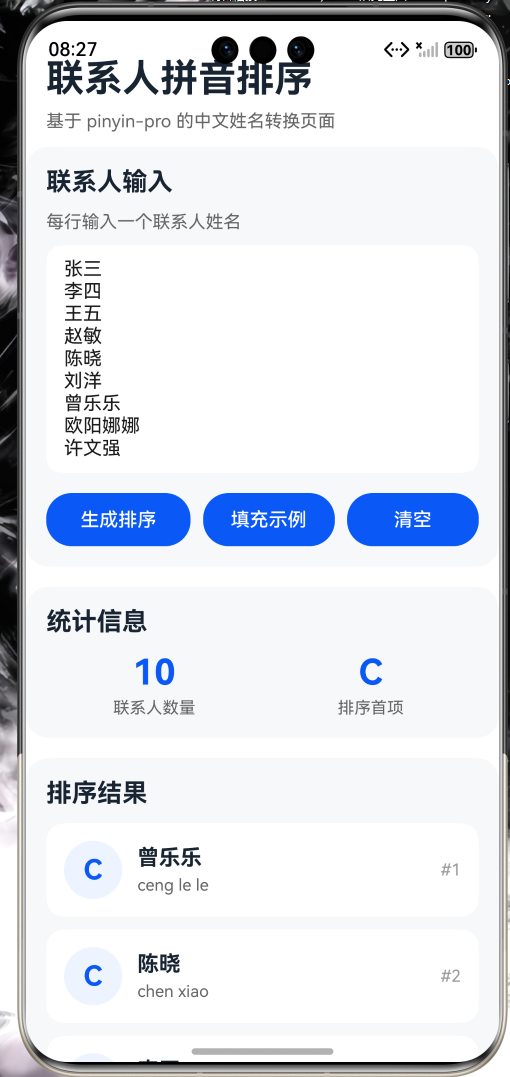
页面主要包含以下内容:
- 顶部标题:联系人拼音排序;
- 多行联系人输入框;
- 生成排序按钮;
- 填充示例按钮;
- 清空按钮;
- 统计信息展示;
- 拼音排序后的联系人列表;
- 页面整体采用卡片式布局。
这个页面可以作为通讯录、联系人管理、中文搜索、姓名索引、人员名单管理等项目的基础版本。
前言
在应用开发中,中文拼音转换是一个很常见的功能。例如联系人列表、城市搜索、商品分类、人员名单、班级点名等场景,都可能需要将中文内容转换成拼音,方便排序或检索。
如果完全手动处理中文拼音,工作量会很大。尤其是中文存在多音字、声调、首字母等问题,直接手写转换逻辑并不现实。
因此本篇文章选择使用 OpenHarmony 项目中的三方库 pinyin-pro 来实现中文转拼音功能。通过该库,可以比较方便地将中文姓名转换为带声调拼音、无声调拼音和拼音首字母。
本篇文章以“中文联系人拼音排序助手”为场景,使用 pinyin-pro 对联系人姓名进行拼音转换,并结合 ArkUI 构建一个简单的联系人排序页面。
比起让用户自己按拼音排序名单,写个页面处理显然更像现代开发。毕竟让人脑处理排序这种事,多少有点把人类当廉价 CPU。
一、项目目标
本次实践主要实现以下目标:
- 在 OpenHarmony 项目中安装
pinyin-pro三方库; - 在 ArkTS 页面中引入并使用
pinyin方法; - 使用
TextArea接收多行联系人姓名; - 将中文姓名转换为无声调拼音;
- 获取联系人姓名的拼音首字母;
- 按拼音结果对联系人进行排序;
- 使用 ArkUI 构建联系人排序页面;
- 展示联系人姓名、拼音和首字母;
- 在 OpenHarmony 模拟器中完成运行验证。
二、技术栈
| 类型 | 内容 |
|---|---|
| 实战方向 | Flutter for OpenHarmony 三方库实战 |
| 实现平台 | OpenHarmony |
| 开发语言 | ArkTS |
| 三方库 | pinyin-pro |
| 功能场景 | 中文转拼音 / 联系人排序 |
| UI 框架 | ArkUI |
| 开发工具 | DevEco Studio |
| 运行环境 | OpenHarmony 模拟器 |
三、为什么选择 pinyin-pro
中文拼音转换在实际应用中非常常见。常见使用场景包括:
- 联系人按拼音排序;
- 中文城市搜索;
- 商品名称拼音检索;
- 班级人员名单排序;
- 姓名首字母索引;
- 中文关键词搜索辅助;
- 通讯录分组展示。
如果自己维护一套中文拼音映射表,不仅麻烦,而且容易出错。pinyin-pro 已经封装了中文转拼音的能力,可以直接用于中文文本处理。
在本项目中,pinyin-pro 主要用于:
- 将联系人姓名转换成拼音;
- 生成无声调拼音;
- 获取拼音首字母;
- 根据拼音结果排序;
- 展示联系人拼音信息。
通过这个项目,可以比较直观地理解中文文本处理类三方库在 OpenHarmony 项目中的使用方式。
四、安装 pinyin-pro 三方库
在项目根目录打开终端,执行以下命令:
ohpm install pinyin-pro@3.18.3
安装完成后,可以检查项目中是否出现以下内容:
oh_modules
oh-package-lock.json5
oh-package.json5
如果依赖安装成功,就可以在 ArkTS 页面中引入:
import { pinyin } from 'pinyin-pro';
本项目主要使用 pinyin() 方法完成中文姓名转换。
五、项目结构
本次主要修改页面文件即可:
entry
 └── src
     └── main
         └── ets
             └── pages
                 └── Index.ets
如果你的项目中原本已经有 Index.ets,可以直接替换页面内容。
文件说明:
| 文件 | 作用 |
|---|---|
| Index.ets | 页面展示、姓名输入、拼音转换和排序结果渲染 |
本项目不需要请求远程接口,因此不需要配置网络权限。页面中的数据全部来自本地输入,重点是展示 pinyin-pro 的中文转拼音能力。
六、联系人数据结构设计
在页面中先定义联系人数据结构:
interface ContactItem {
  name: string;
  fullPinyin: string;
  firstLetter: string;
}
字段说明如下:
| 字段 | 含义 |
|---|---|
| name | 联系人中文姓名 |
| fullPinyin | 姓名对应的完整拼音 |
| firstLetter | 拼音首字母 |
例如输入:
张三
李四
王五
转换后可以得到类似结果:
张三 zhang san Z
李四 li si L
王五 wang wu W
这样就可以根据拼音进行排序。
七、页面状态设计
页面中主要使用以下状态变量:
@State inputText: string = '';
@State contactList: ContactItem[] = [];
@State resultText: string = '请输入联系人姓名后生成排序';
@State resultColor: string = '#999999';
@State totalCountText: string = '0';
字段说明如下:
| 状态变量 | 作用 |
|---|---|
| inputText | 保存用户输入的多行联系人 |
| contactList | 保存转换并排序后的联系人列表 |
| resultText | 保存操作结果提示 |
| resultColor | 控制提示文字颜色 |
| totalCountText | 保存联系人数量 |
八、核心功能设计
本项目的核心流程如下:
- 用户在输入框中输入多行联系人姓名;
- 点击“生成排序”按钮;
- 使用换行符拆分输入内容;
- 去掉空行;
- 使用
pinyin-pro将姓名转换成拼音; - 获取拼音首字母;
- 按完整拼音排序;
- 将排序结果展示到页面。
核心转换代码如下:
const fullPinyin = pinyin(name, {
  toneType: 'none',
  nonZh: 'consecutive'
}) as string;
核心首字母代码如下:
const first = pinyin(name, {
  pattern: 'first',
  toneType: 'none',
  separator: ''
}) as string;
这样就可以得到联系人姓名对应的拼音和首字母。
九、Index.ets 完整代码
打开文件:
entry/src/main/ets/pages/Index.ets
完整代码如下:
import { pinyin } from 'pinyin-pro';

interface ContactItem {
  name: string;
  fullPinyin: string;
  firstLetter: string;
}

@Entry
@Component
struct Index {
  @State inputText: string = '';
  @State contactList: ContactItem[] = [];
  @State resultText: string = '请输入联系人姓名后生成排序';
  @State resultColor: string = '#999999';
  @State totalCountText: string = '0';

  aboutToAppear(): void {
    this.fillSample();
    this.generateSort();
  }

  fillSample(): void {
    this.inputText = '张三\n李四\n王五\n赵敏\n陈晓\n刘洋\n曾乐乐\n欧阳娜娜\n许文强\n周芷若';
    this.resultText = '已填充示例联系人,可以点击生成排序进行测试';
    this.resultColor = '#0A59F7';
  }

  clearAll(): void {
    this.inputText = '';
    this.contactList = [];
    this.totalCountText = '0';
    this.resultText = '请输入联系人姓名后生成排序';
    this.resultColor = '#999999';
  }

  generateSort(): void {
    const text = this.inputText.trim();

    if (text === '') {
      this.contactList = [];
      this.totalCountText = '0';
      this.resultText = '联系人姓名不能为空';
      this.resultColor = '#E84026';
      return;
    }

    const lines = text.split('\n');
    const result: ContactItem[] = [];

    for (let i = 0; i < lines.length; i++) {
      const name = lines[i].trim();

      if (name !== '') {
        const fullPinyin = pinyin(name, {
          toneType: 'none',
          nonZh: 'consecutive'
        }) as string;

        const first = pinyin(name, {
          pattern: 'first',
          toneType: 'none',
          separator: ''
        }) as string;

        const firstLetter = first.length > 0 ? first.substring(0, 1).toUpperCase() : '#';

        result.push({
          name: name,
          fullPinyin: fullPinyin,
          firstLetter: firstLetter
        });
      }
    }

    result.sort((a: ContactItem, b: ContactItem) => {
      if (a.fullPinyin > b.fullPinyin) {
        return 1;
      }

      if (a.fullPinyin < b.fullPinyin) {
        return -1;
      }

      return 0;
    });

    this.contactList = result;
    this.totalCountText = result.length.toString();
    this.resultText = '联系人拼音排序生成成功';
    this.resultColor = '#00A870';
  }

  build() {
    Scroll() {
      Column() {
        Column() {
          Text('联系人拼音排序')
            .fontSize(30)
            .fontWeight(FontWeight.Bold)
            .fontColor('#182431')

          Text('基于 pinyin-pro 的中文姓名转换页面')
            .fontSize(14)
            .fontColor('#666666')
            .margin({ top: 8 })
        }
        .width('100%')
        .alignItems(HorizontalAlign.Start)
        .padding({
          left: 16,
          right: 16,
          top: 28,
          bottom: 12
        })

        Column() {
          Text('联系人输入')
            .fontSize(20)
            .fontWeight(FontWeight.Bold)
            .fontColor('#182431')
            .margin({ bottom: 12 })

          Text('每行输入一个联系人姓名')
            .fontSize(14)
            .fontColor('#666666')
            .margin({ bottom: 10 })

          TextArea({
            placeholder: '例如:\n张三\n李四\n王五',
            text: this.inputText
          })
            .height(180)
            .fontSize(15)
            .backgroundColor('#FFFFFF')
            .borderRadius(12)
            .padding({
              left: 14,
              right: 14,
              top: 10,
              bottom: 10
            })
            .onChange((value: string) => {
              this.inputText = value;
            })

          Row() {
            Button('生成排序')
              .fontSize(15)
              .height(42)
              .layoutWeight(1)
              .onClick(() => {
                this.generateSort();
              })

            Button('填充示例')
              .fontSize(15)
              .height(42)
              .layoutWeight(1)
              .margin({ left: 10 })
              .onClick(() => {
                this.fillSample();
                this.generateSort();
              })

            Button('清空')
              .fontSize(15)
              .height(42)
              .layoutWeight(1)
              .margin({ left: 10 })
              .onClick(() => {
                this.clearAll();
              })
          }
          .width('100%')
          .margin({ top: 16 })
        }
        .width('100%')
        .alignItems(HorizontalAlign.Start)
        .padding(16)
        .margin({
          left: 16,
          right: 16
        })
        .backgroundColor('#F7F8FA')
        .borderRadius(18)

        Column() {
          Text('统计信息')
            .fontSize(20)
            .fontWeight(FontWeight.Bold)
            .fontColor('#182431')
            .margin({ bottom: 12 })

          Row() {
            Column() {
              Text(this.totalCountText)
                .fontSize(28)
                .fontWeight(FontWeight.Bold)
                .fontColor('#0A59F7')

              Text('联系人数量')
                .fontSize(13)
                .fontColor('#666666')
                .margin({ top: 4 })
            }
            .layoutWeight(1)
            .alignItems(HorizontalAlign.Center)

            Column() {
              Text(this.contactList.length > 0 ? this.contactList[0].firstLetter : '-')
                .fontSize(28)
                .fontWeight(FontWeight.Bold)
                .fontColor('#0A59F7')

              Text('排序首项')
                .fontSize(13)
                .fontColor('#666666')
                .margin({ top: 4 })
            }
            .layoutWeight(1)
            .alignItems(HorizontalAlign.Center)
          }
          .width('100%')
        }
        .width('100%')
        .alignItems(HorizontalAlign.Start)
        .padding(16)
        .margin({
          left: 16,
          right: 16,
          top: 16
        })
        .backgroundColor('#F7F8FA')
        .borderRadius(18)

        Column() {
          Text('排序结果')
            .fontSize(20)
            .fontWeight(FontWeight.Bold)
            .fontColor('#182431')
            .margin({ bottom: 12 })

          if (this.contactList.length === 0) {
            Text('暂无联系人数据')
              .fontSize(15)
              .fontColor('#999999')
              .lineHeight(24)
          } else {
            List({ space: 10 }) {
              ForEach(this.contactList, (item: ContactItem, index: number) => {
                ListItem() {
                  Row() {
                    Column() {
                      Text(item.firstLetter)
                        .fontSize(22)
                        .fontWeight(FontWeight.Bold)
                        .fontColor('#0A59F7')
                    }
                    .width(46)
                    .height(46)
                    .justifyContent(FlexAlign.Center)
                    .alignItems(HorizontalAlign.Center)
                    .backgroundColor('#EEF4FF')
                    .borderRadius(23)

                    Column() {
                      Text(item.name)
                        .fontSize(17)
                        .fontWeight(FontWeight.Bold)
                        .fontColor('#182431')

                      Text(item.fullPinyin)
                        .fontSize(13)
                        .fontColor('#666666')
                        .margin({ top: 4 })
                    }
                    .layoutWeight(1)
                    .alignItems(HorizontalAlign.Start)
                    .margin({ left: 12 })

                    Text(`#${index + 1}`)
                      .fontSize(13)
                      .fontColor('#999999')
                  }
                  .width('100%')
                  .padding(14)
                  .backgroundColor('#FFFFFF')
                  .borderRadius(14)
                }
              }, (item: ContactItem, index: number) => `${item.name}_${index}`)
            }
            .width('100%')
            .height(330)
          }
        }
        .width('100%')
        .alignItems(HorizontalAlign.Start)
        .padding(16)
        .margin({
          left: 16,
          right: 16,
          top: 16
        })
        .backgroundColor('#F7F8FA')
        .borderRadius(18)

        Column() {
          Text('操作结果')
            .fontSize(20)
            .fontWeight(FontWeight.Bold)
            .fontColor('#182431')
            .margin({ bottom: 12 })

          Text(this.resultText)
            .fontSize(15)
            .fontColor(this.resultColor)
            .lineHeight(24)
        }
        .width('100%')
        .alignItems(HorizontalAlign.Start)
        .padding(16)
        .margin({
          left: 16,
          right: 16,
          top: 16,
          bottom: 24
        })
        .backgroundColor('#F7F8FA')
        .borderRadius(18)
      }
      .width('100%')
    }
    .width('100%')
    .height('100%')
    .backgroundColor('#FFFFFF')
  }
}
十、代码实现说明
1. 引入 pinyin-pro
页面顶部引入三方库:
import { pinyin } from 'pinyin-pro';
引入后,就可以使用 pinyin() 方法将中文转换成拼音。
2. 转换完整拼音
本项目使用以下代码生成无声调拼音:
const fullPinyin = pinyin(name, {
  toneType: 'none',
  nonZh: 'consecutive'
}) as string;
其中:
| 参数 | 作用 |
|---|---|
| toneType: ‘none’ | 去掉拼音声调 |
| nonZh: ‘consecutive’ | 非中文内容连续显示 |
例如:
张三
转换后可以得到:
zhang san
这样就方便后续进行排序。
3. 获取拼音首字母
拼音首字母通过下面代码获得:
const first = pinyin(name, {
  pattern: 'first',
  toneType: 'none',
  separator: ''
}) as string;
其中:
| 参数 | 作用 |
|---|---|
| pattern: ‘first’ | 获取拼音首字母 |
| toneType: ‘none’ | 去掉声调 |
| separator: ‘’ | 去掉字母之间的分隔符 |
然后取第一个字符:
const firstLetter = first.length > 0 ? first.substring(0, 1).toUpperCase() : '#';
这样就可以得到联系人索引字母,例如 Z、L、W。
4. 拆分多行联系人
用户输入的是多行文本,因此需要使用换行符拆分:
const lines = text.split('\n');
然后遍历每一行:
for (let i = 0; i < lines.length; i++) {
  const name = lines[i].trim();
}
这里使用 trim() 去掉前后空格,避免空行影响结果。
5. 按拼音排序
联系人转换完成后,使用 sort() 方法按完整拼音排序:
result.sort((a: ContactItem, b: ContactItem) => {
  if (a.fullPinyin > b.fullPinyin) {
    return 1;
  }

  if (a.fullPinyin < b.fullPinyin) {
    return -1;
  }

  return 0;
});
排序后,联系人列表会按照拼音顺序展示。
这一步很适合通讯录场景。不然中文名字直接排序,程序和人都会陷入一种“这到底按什么排”的精神泥潭。
6. 填充示例和清空内容
为了方便测试,页面提供了“填充示例”和“清空”按钮。
填充示例:
fillSample(): void {
  this.inputText = '张三\n李四\n王五\n赵敏\n陈晓\n刘洋';
}
清空内容:
clearAll(): void {
  this.inputText = '';
  this.contactList = [];
}
这样测试时不用反复手动输入联系人姓名。
十一、运行效果说明
完成代码后,点击 DevEco Studio 中的运行按钮,将应用运行到 OpenHarmony 模拟器中。
运行成功后,页面顶部显示:
联系人拼音排序
页面会自动填充一组示例联系人,并生成排序结果。
点击“生成排序”按钮后,页面会展示:
- 联系人总数量;
- 排序首项;
- 联系人中文姓名;
- 联系人完整拼音;
- 联系人拼音首字母;
- 排序后的列表顺序。
如果点击“清空”按钮,页面会清空输入内容和排序结果。
十二、开发中遇到的问题
1. 找不到 pinyin-pro 模块
如果代码中出现找不到 pinyin-pro 模块的问题,可以先检查是否已经执行安装命令:
ohpm install pinyin-pro@3.18.3
同时检查项目中是否存在:
oh_modules
oh-package-lock.json5
如果依赖没有正确安装,可以重新执行安装命令。
2. import 导入报错
如果下面代码导入时报错:
import { pinyin } from 'pinyin-pro';
可以先确认 oh-package.json5 中是否已经正确写入依赖,并尝试重新同步项目或重启 DevEco Studio。
有时候 DevEco Studio 需要重新同步依赖才会识别三方库。软件开发最稳定的部分,大概就是重启能治一半玄学问题。
3. 拼音带有声调
如果不想显示声调,需要设置:
toneType: 'none'
例如:
pinyin('张三', { toneType: 'none' })
这样会得到无声调拼音,更适合排序和搜索。
4. 首字母之间有空格
如果使用 pattern: 'first' 后发现首字母之间有空格,可以设置:
separator: ''
例如:
pinyin('张三', {
  pattern: 'first',
  toneType: 'none',
  separator: ''
})
这样可以得到连续首字母,方便截取第一个字母。
5. 多音字结果不符合预期
中文多音字是拼音转换中比较常见的问题。例如“曾”“乐”“行”等字,在不同语境中可能有不同读音。
本项目是基础版本,主要用于演示联系人拼音转换和排序。如果需要更准确处理多音字,可以后续结合自定义词典或人工修正机制。
程序能做很多事,但让它完全理解中文语境,多少还是有点逼它读空气。
十三、总结
本篇完成了一个基于 pinyin-pro 的中文联系人拼音排序助手页面。项目通过 pinyin-pro 将中文联系人姓名转换成拼音和首字母,再按照拼音结果进行排序,并使用 ArkUI 将结果展示为联系人列表。
通过本次实践,我主要完成了以下内容:
- 安装并使用
pinyin-pro三方库; - 在 ArkTS 页面中引入
pinyin方法; - 使用
TextArea接收多行联系人姓名; - 使用
pinyin()生成无声调拼音; - 使用
pattern: 'first'获取拼音首字母; - 使用
sort()对联系人进行排序; - 使用 ArkUI 构建卡片式联系人页面;
- 在模拟器中完成运行验证。
虽然这个项目只是一个基础联系人排序页面,但它已经包含了中文文本处理类应用中常见的输入、转换、排序和列表展示流程。
后续可以继续扩展为一个更完整的联系人管理工具,例如:
- 添加联系人搜索;
- 添加首字母分组;
- 添加联系人新增功能;
- 添加联系人删除功能;
- 添加本地存储;
- 添加多音字修正;
- 添加姓名高亮匹配;
- 添加城市或商品名称拼音检索。
整体来看,pinyin-pro 可以帮助开发者更方便地在 OpenHarmony 项目中完成中文转拼音处理。通过这个项目,可以更清楚地理解 OpenHarmony 中三方库接入、中文文本处理和 ArkUI 页面展示之间的关系。

开源鸿蒙跨平台开发社区汇聚开发者与厂商,共建“一次开发,多端部署”的开源生态,致力于降低跨端开发门槛,推动万物智联创新。
更多推荐

 10
10 0
0- 0


 已为社区贡献2条内容

所有评论(0)