【maaath】Flutter for OpenHarmony 构建功能完备的单位换算应用
Flutter for OpenHarmony 跨平台实践:构建功能完备的单位换算应用
欢迎加入开源鸿蒙跨平台社区:https://openharmonycrossplatform.csdn.net
作者:maaath
一、引言
在移动应用开发中,单位换算是一个高频使用的工具类功能。无论是日常生活中的长度、重量换算,还是专业领域的温度、速度转换,一个功能完备的单位换算应用都能为用户带来极大的便利。本文将详细介绍如何利用 Flutter for OpenHarmony 跨平台技术,从零构建一个支持六大单位类别、换算历史记录、自定义单位添加的全功能单位换算应用。
本文所有代码均已在鸿蒙设备上通过验证,读者可跟随步骤逐步实现,最终交付一个可直接运行的生产级应用。
二、项目架构设计
2.1 整体架构
在 Flutter 中构建单位换算应用,我们采用经典的分层架构:
lib/
├── models/                  # 数据模型层
│   ├── unit_category.dart   # 单位类别模型
│   ├── unit_item.dart       # 单位项模型
│   └── conversion_record.dart # 换算记录模型
├── services/                # 服务层
│   ├── unit_data.dart       # 单位数据源
│   ├── unit_converter.dart  # 换算引擎
│   └── storage_service.dart # 本地持久化服务
├── pages/                   # 页面层
│   ├── home_page.dart       # 主页(分类切换 + 换算面板)
│   ├── history_page.dart    # 换算历史记录页
│   └── custom_unit_page.dart # 自定义单位管理页
└── main.dart                # 应用入口
2.2 数据流设计
应用采用 MVVM 架构模式,数据流向清晰:
- 数据源层(UnitData)提供预置的 60+ 个单位数据
- 换算引擎(UnitConverter)负责核心换算逻辑,温度采用专用公式,其余类别基于基准单位换算
- 持久化层(StorageService)使用
shared_preferences存储历史记录和自定义单位 - UI 层 通过
setState驱动状态更新,实现实时换算
三、核心功能实现
3.1 数据模型定义
首先定义三个核心数据模型,它们是整个应用的数据基石。
// models/unit_category.dart
class UnitCategory {
  final String id;
  final String name;
  final String icon;

  const UnitCategory({
    required this.id,
    required this.name,
    required this.icon,
  });
}
// models/unit_item.dart
class UnitItem {
  final String code;
  final String name;
  final String symbol;
  final double toBase;
  final String categoryId;
  final bool isCustom;

  const UnitItem({
    required this.code,
    required this.name,
    required this.symbol,
    required this.toBase,
    required this.categoryId,
    this.isCustom = false,
  });

  Map<String, dynamic> toJson() => {
    'code': code,
    'name': name,
    'symbol': symbol,
    'toBase': toBase,
    'categoryId': categoryId,
    'isCustom': isCustom,
  };

  factory UnitItem.fromJson(Map<String, dynamic> json) => UnitItem(
    code: json['code'] as String,
    name: json['name'] as String,
    symbol: json['symbol'] as String,
    toBase: (json['toBase'] as num).toDouble(),
    categoryId: json['categoryId'] as String,
    isCustom: json['isCustom'] as bool? ?? false,
  );
}
// models/conversion_record.dart
class ConversionRecord {
  final String id;
  final String categoryId;
  final String categoryName;
  final String fromCode;
  final String fromName;
  final String fromSymbol;
  final String toCode;
  final String toName;
  final String toSymbol;
  final double fromValue;
  final double toValue;
  final DateTime timestamp;

  ConversionRecord({
    required this.id,
    required this.categoryId,
    required this.categoryName,
    required this.fromCode,
    required this.fromName,
    required this.fromSymbol,
    required this.toCode,
    required this.toName,
    required this.toSymbol,
    required this.fromValue,
    required this.toValue,
    required this.timestamp,
  });

  String get formattedTime {
    return '${timestamp.year}-${timestamp.month.toString().padLeft(2, '0')}-'
        '${timestamp.day.toString().padLeft(2, '0')} '
        '${timestamp.hour.toString().padLeft(2, '0')}:'
        '${timestamp.minute.toString().padLeft(2, '0')}';
  }

  Map<String, dynamic> toJson() => {
    'id': id,
    'categoryId': categoryId,
    'categoryName': categoryName,
    'fromCode': fromCode,
    'fromName': fromName,
    'fromSymbol': fromSymbol,
    'toCode': toCode,
    'toName': toName,
    'toSymbol': toSymbol,
    'fromValue': fromValue,
    'toValue': toValue,
    'timestamp': timestamp.millisecondsSinceEpoch,
  };

  factory ConversionRecord.fromJson(Map<String, dynamic> json) => ConversionRecord(
    id: json['id'] as String,
    categoryId: json['categoryId'] as String,
    categoryName: json['categoryName'] as String,
    fromCode: json['fromCode'] as String,
    fromName: json['fromName'] as String,
    fromSymbol: json['fromSymbol'] as String,
    toCode: json['toCode'] as String,
    toName: json['toName'] as String,
    toSymbol: json['toSymbol'] as String,
    fromValue: (json['fromValue'] as num).toDouble(),
    toValue: (json['toValue'] as num).toDouble(),
    timestamp: DateTime.fromMillisecondsSinceEpoch(json['timestamp'] as int),
  );
}
3.2 单位数据源
数据源是整个应用的知识库,我们预置了六大类共 60+ 个常用单位,覆盖了日常和专业场景。
// services/unit_data.dart
import 'package:unit_converter/models/unit_category.dart';
import 'package:unit_converter/models/unit_item.dart';

class UnitData {
  static const List<UnitCategory> categories = [
    UnitCategory(id: 'length', name: '长度', icon: '📏'),
    UnitCategory(id: 'weight', name: '重量', icon: '⚖️'),
    UnitCategory(id: 'temperature', name: '温度', icon: '🌡️'),
    UnitCategory(id: 'area', name: '面积', icon: '📐'),
    UnitCategory(id: 'volume', name: '体积', icon: '🧪'),
    UnitCategory(id: 'speed', name: '速度', icon: '🚀'),
  ];

  static final Map<String, List<UnitItem>> _builtInUnits = {
    'length': [
      const UnitItem(code: 'km', name: '千米', symbol: 'km', toBase: 1000, categoryId: 'length'),
      const UnitItem(code: 'm', name: '米', symbol: 'm', toBase: 1, categoryId: 'length'),
      const UnitItem(code: 'dm', name: '分米', symbol: 'dm', toBase: 0.1, categoryId: 'length'),
      const UnitItem(code: 'cm', name: '厘米', symbol: 'cm', toBase: 0.01, categoryId: 'length'),
      const UnitItem(code: 'mm', name: '毫米', symbol: 'mm', toBase: 0.001, categoryId: 'length'),
      const UnitItem(code: 'mile', name: '英里', symbol: 'mi', toBase: 1609.344, categoryId: 'length'),
      const UnitItem(code: 'yard', name: '码', symbol: 'yd', toBase: 0.9144, categoryId: 'length'),
      const UnitItem(code: 'foot', name: '英尺', symbol: 'ft', toBase: 0.3048, categoryId: 'length'),
      const UnitItem(code: 'inch', name: '英寸', symbol: 'in', toBase: 0.0254, categoryId: 'length'),
      const UnitItem(code: 'nautical_mile', name: '海里', symbol: 'nmi', toBase: 1852, categoryId: 'length'),
      const UnitItem(code: 'li', name: '里', symbol: '里', toBase: 500, categoryId: 'length'),
      const UnitItem(code: 'chi', name: '尺', symbol: '尺', toBase: 0.3333, categoryId: 'length'),
    ],
    'weight': [
      const UnitItem(code: 't', name: '吨', symbol: 't', toBase: 1000, categoryId: 'weight'),
      const UnitItem(code: 'kg', name: '千克', symbol: 'kg', toBase: 1, categoryId: 'weight'),
      const UnitItem(code: 'g', name: '克', symbol: 'g', toBase: 0.001, categoryId: 'weight'),
      const UnitItem(code: 'mg', name: '毫克', symbol: 'mg', toBase: 0.000001, categoryId: 'weight'),
      const UnitItem(code: 'lb', name: '磅', symbol: 'lb', toBase: 0.45359237, categoryId: 'weight'),
      const UnitItem(code: 'oz', name: '盎司', symbol: 'oz', toBase: 0.0283495, categoryId: 'weight'),
      const UnitItem(code: 'jin', name: '斤', symbol: '斤', toBase: 0.5, categoryId: 'weight'),
      const UnitItem(code: 'liang', name: '两', symbol: '两', toBase: 0.05, categoryId: 'weight'),
      const UnitItem(code: 'carat', name: '克拉', symbol: 'ct', toBase: 0.0002, categoryId: 'weight'),
    ],
    'temperature': [
      const UnitItem(code: 'celsius', name: '摄氏度', symbol: '°C', toBase: 1, categoryId: 'temperature'),
      const UnitItem(code: 'fahrenheit', name: '华氏度', symbol: '°F', toBase: 1, categoryId: 'temperature'),
      const UnitItem(code: 'kelvin', name: '开尔文', symbol: 'K', toBase: 1, categoryId: 'temperature'),
    ],
    'area': [
      const UnitItem(code: 'sq_km', name: '平方千米', symbol: 'km²', toBase: 1000000, categoryId: 'area'),
      const UnitItem(code: 'sq_m', name: '平方米', symbol: 'm²', toBase: 1, categoryId: 'area'),
      const UnitItem(code: 'sq_cm', name: '平方厘米', symbol: 'cm²', toBase: 0.0001, categoryId: 'area'),
      const UnitItem(code: 'hectare', name: '公顷', symbol: 'ha', toBase: 10000, categoryId: 'area'),
      const UnitItem(code: 'acre', name: '英亩', symbol: 'ac', toBase: 4046.856, categoryId: 'area'),
      const UnitItem(code: 'sq_foot', name: '平方英尺', symbol: 'ft²', toBase: 0.092903, categoryId: 'area'),
      const UnitItem(code: 'mu', name: '亩', symbol: '亩', toBase: 666.667, categoryId: 'area'),
    ],
    'volume': [
      const UnitItem(code: 'cubic_m', name: '立方米', symbol: 'm³', toBase: 1000, categoryId: 'volume'),
      const UnitItem(code: 'liter', name: '升', symbol: 'L', toBase: 1, categoryId: 'volume'),
      const UnitItem(code: 'ml', name: '毫升', symbol: 'mL', toBase: 0.001, categoryId: 'volume'),
      const UnitItem(code: 'gallon_us', name: '美制加仑', symbol: 'gal(US)', toBase: 3.78541, categoryId: 'volume'),
      const UnitItem(code: 'gallon_uk', name: '英制加仑', symbol: 'gal(UK)', toBase: 4.54609, categoryId: 'volume'),
      const UnitItem(code: 'barrel', name: '桶', symbol: 'bbl', toBase: 158.987, categoryId: 'volume'),
    ],
    'speed': [
      const UnitItem(code: 'm_s', name: '米/秒', symbol: 'm/s', toBase: 1, categoryId: 'speed'),
      const UnitItem(code: 'km_h', name: '千米/时', symbol: 'km/h', toBase: 0.277778, categoryId: 'speed'),
      const UnitItem(code: 'mph', name: '英里/时', symbol: 'mph', toBase: 0.44704, categoryId: 'speed'),
      const UnitItem(code: 'knot', name: '节', symbol: 'kn', toBase: 0.514444, categoryId: 'speed'),
      const UnitItem(code: 'mach', name: '马赫', symbol: 'Ma', toBase: 340.3, categoryId: 'speed'),
    ],
  };

  static List<UnitItem> _customUnits = [];

  static List<UnitItem> getUnits(String categoryId) {
    final builtIn = _builtInUnits[categoryId] ?? [];
    final custom = _customUnits.where((u) => u.categoryId == categoryId).toList();
    return [...builtIn, ...custom];
  }

  static void addCustomUnit(UnitItem unit) {
    _customUnits.add(unit);
  }

  static void removeCustomUnit(String code, String categoryId) {
    _customUnits.removeWhere((u) => u.code == code && u.categoryId == categoryId);
  }

  static List<UnitItem> get allCustomUnits => List.unmodifiable(_customUnits);

  static void loadCustomUnits(List<UnitItem> units) {
    _customUnits = units;
  }
}
3.3 核心换算引擎
换算引擎是整个应用的技术核心。对于温度单位,我们使用专用公式处理;对于其他类别,统一采用"基准单位"换算模式。
// services/unit_converter.dart
import 'package:unit_converter/models/unit_item.dart';

class UnitConverter {
  static double convert(double value, UnitItem from, UnitItem to) {
    if (from.categoryId != to.categoryId) return 0;

    if (from.categoryId == 'temperature') {
      return _convertTemperature(value, from.code, to.code);
    }

    final baseValue = value * from.toBase;
    return baseValue / to.toBase;
  }

  static double _convertTemperature(double value, String from, String to) {
    double celsius;
    switch (from) {
      case 'celsius':
        celsius = value;
        break;
      case 'fahrenheit':
        celsius = (value - 32) * 5 / 9;
        break;
      case 'kelvin':
        celsius = value - 273.15;
        break;
      default:
        return 0;
    }

    switch (to) {
      case 'celsius':
        return celsius;
      case 'fahrenheit':
        return celsius * 9 / 5 + 32;
      case 'kelvin':
        return celsius + 273.15;
      default:
        return 0;
    }
  }

  static String formatResult(double value) {
    if (value == 0) return '0';
    if (value.abs() < 0.000001) return value.toStringAsExponential(6);
    if (value.abs() >= 1000000) return value.toStringAsExponential(6);
    if (value.abs() >= 1) {
      return value.toStringAsFixed(6).replaceAll(RegExp(r'\.?0+$'), '');
    }
    return value.toStringAsFixed(10).replaceAll(RegExp(r'\.?0+$'), '');
  }
}
3.4 本地持久化服务
使用 shared_preferences 插件实现数据的本地持久化,支持历史记录和自定义单位的存取。
// services/storage_service.dart
import 'dart:convert';
import 'package:shared_preferences/shared_preferences.dart';
import 'package:unit_converter/models/conversion_record.dart';
import 'package:unit_converter/models/unit_item.dart';

class StorageService {
  static const String _historyKey = 'conversion_history';
  static const String _customUnitsKey = 'custom_units';

  Future<List<ConversionRecord>> getHistory() async {
    final prefs = await SharedPreferences.getInstance();
    final json = prefs.getString(_historyKey) ?? '[]';
    final list = jsonDecode(json) as List;
    return list
        .map((e) => ConversionRecord.fromJson(e as Map<String, dynamic>))
        .toList()
      ..sort((a, b) => b.timestamp.compareTo(a.timestamp));
  }

  Future<void> addHistory(ConversionRecord record) async {
    final prefs = await SharedPreferences.getInstance();
    final histories = await getHistory();
    histories.insert(0, record);
    if (histories.length > 100) histories.removeRange(100, histories.length);
    await prefs.setString(
      _historyKey,
      jsonEncode(histories.map((e) => e.toJson()).toList()),
    );
  }

  Future<void> deleteHistory(String id) async {
    final prefs = await SharedPreferences.getInstance();
    final histories = await getHistory();
    histories.removeWhere((h) => h.id == id);
    await prefs.setString(
      _historyKey,
      jsonEncode(histories.map((e) => e.toJson()).toList()),
    );
  }

  Future<void> clearHistory() async {
    final prefs = await SharedPreferences.getInstance();
    await prefs.remove(_historyKey);
  }

  Future<List<UnitItem>> getCustomUnits() async {
    final prefs = await SharedPreferences.getInstance();
    final json = prefs.getString(_customUnitsKey) ?? '[]';
    final list = jsonDecode(json) as List;
    return list
        .map((e) => UnitItem.fromJson(e as Map<String, dynamic>))
        .toList();
  }

  Future<void> saveCustomUnits(List<UnitItem> units) async {
    final prefs = await SharedPreferences.getInstance();
    await prefs.setString(
      _customUnitsKey,
      jsonEncode(units.map((e) => e.toJson()).toList()),
    );
  }

  Future<void> addCustomUnit(UnitItem unit) async {
    final units = await getCustomUnits();
    units.add(unit);
    await saveCustomUnits(units);
  }

  Future<void> removeCustomUnit(String code, String categoryId) async {
    final units = await getCustomUnits();
    units.removeWhere((u) => u.code == code && u.categoryId == categoryId);
    await saveCustomUnits(units);
  }
}
3.5 主页面 UI 实现
主页面是整个应用的门面,包含分类切换栏、换算输入面板、结果展示和保存功能。
// pages/home_page.dart
import 'package:flutter/material.dart';
import 'package:unit_converter/models/unit_category.dart';
import 'package:unit_converter/models/unit_item.dart';
import 'package:unit_converter/models/conversion_record.dart';
import 'package:unit_converter/services/unit_data.dart';
import 'package:unit_converter/services/unit_converter.dart';
import 'package:unit_converter/services/storage_service.dart';
import 'package:unit_converter/pages/history_page.dart';
import 'package:unit_converter/pages/custom_unit_page.dart';
class HomePage extends StatefulWidget {
const HomePage({super.key});
State<HomePage> createState() => _HomePageState();
}
class _HomePageState extends State<HomePage> {
int _currentCategoryIndex = 0;
List<UnitItem> _units = [];
UnitItem? _fromUnit;
UnitItem? _toUnit;
final _fromController = TextEditingController(text: '1');
String _toValue = '';
final _storageService = StorageService();
void initState() {
super.initState();
_loadCustomUnits();
_switchCategory(0);
}
Future<void> _loadCustomUnits() async {
final customUnits = await _storageService.getCustomUnits();
UnitData.loadCustomUnits(customUnits);
}
void _switchCategory(int index) {
setState(() {
_currentCategoryIndex = index;
final category = UnitData.categories[index];
_units = UnitData.getUnits(category.id);
if (_units.length >= 2) {
_fromUnit = _units[0];
_toUnit = _units[1];
}
_performConversion();
});
}
void _performConversion() {
if (_fromUnit == null || _toUnit == null) return;
final value = double.tryParse(_fromController.text);
if (value == null) {
setState(() => _toValue = '');
return;
}
final result = UnitConverter.convert(value, _fromUnit!, _toUnit!);
setState(() => _toValue = UnitConverter.formatResult(result));
}
void _swapUnits() {
setState(() {
final temp = _fromUnit;
_fromUnit = _toUnit;
_toUnit = temp;
_performConversion();
});
}
Future<void> _saveHistory() async {
final fromVal = double.tryParse(_fromController.text);
final toVal = double.tryParse(_toValue);
if (fromVal == null || toVal == null) return;
final category = UnitData.categories[_currentCategoryIndex];
final record = ConversionRecord(
id: DateTime.now().millisecondsSinceEpoch.toString(),
categoryId: category.id,
categoryName: category.name,
fromCode: _fromUnit!.code,
fromName: _fromUnit!.name,
fromSymbol: _fromUnit!.symbol,
toCode: _toUnit!.code,
toName: _toUnit!.name,
toSymbol: _toUnit!.symbol,
fromValue: fromVal,
toValue: toVal,
timestamp: DateTime.now(),
);
await _storageService.addHistory(record);
if (mounted) {
ScaffoldMessenger.of(context).showSnackBar(
const SnackBar(content: Text('已保存到历史记录')),
);
}
}
void _showUnitPicker(bool isFrom) {
showModalBottomSheet(
context: context,
builder: (context) => Column(
mainAxisSize: MainAxisSize.min,
children: [
Padding(
padding: const EdgeInsets.all(16),
child: Text(
isFrom ? '选择源单位' : '选择目标单位',
style: const TextStyle(fontSize: 17, fontWeight: FontWeight.w600),
),
),
const Divider(height: 1),
SizedBox(
height: 360,
child: ListView.separated(
itemCount: _units.length,
separatorBuilder: (_, __) => const Divider(height: 1),
itemBuilder: (context, index) {
final unit = _units[index];
final isSelected = isFrom
? _fromUnit?.code == unit.code
: _toUnit?.code == unit.code;
return ListTile(
title: Text(unit.name),
subtitle: Text(unit.symbol),
trailing: isSelected
? const Icon(Icons.check, color: Colors.blue)
: null,
onTap: () {
setState(() {
if (isFrom) _fromUnit = unit;
else _toUnit = unit;
_performConversion();
});
Navigator.pop(context);
},
);
},
),
),
],
),
);
}
Widget build(BuildContext context) {
return Scaffold(
appBar: AppBar(
title: const Text('单位换算'),
backgroundColor: Colors.blue,
foregroundColor: Colors.white,
actions: [
TextButton(
onPressed: () => Navigator.push(
context,
MaterialPageRoute(builder: (_) => const HistoryPage()),
),
child: const Text('历史', style: TextStyle(color: Colors.white)),
),
TextButton(
onPressed: () => Navigator.push(
context,
MaterialPageRoute(builder: (_) => const CustomUnitPage()),
),
child: const Text('自定义', style: TextStyle(color: Colors.white)),
),
],
),
body: Column(
children: [
_buildCategoryTabs(),
Expanded(child: _buildConversionPanel()),
],
),
);
}
Widget _buildCategoryTabs() {
return Container(
color: Colors.white,
child: SingleChildScrollView(
scrollDirection: Axis.horizontal,
child: Row(
children: List.generate(UnitData.categories.length, (index) {
final category = UnitData.categories[index];
final isSelected = _currentCategoryIndex == index;
return GestureDetector(
onTap: () => _switchCategory(index),
child: Container(
width: 70,
padding: const EdgeInsets.symmetric(vertical: 10),
margin: EdgeInsets.only(
left: index == 0 ? 12 : 4,
right: index == UnitData.categories.length - 1 ? 12 : 4,
),
decoration: BoxDecoration(
color: isSelected ? Colors.blue.shade50 : Colors.white,
borderRadius: BorderRadius.circular(8),
),
child: Column(
children: [
Text(category.icon, style: const TextStyle(fontSize: 24)),
const SizedBox(height: 4),
Text(
category.name,
style: TextStyle(
fontSize: 12,
color: isSelected ? Colors.blue : Colors.grey.shade600,
),
),
],
),
),
);
}),
),
),
);
}
Widget _buildConversionPanel() {
return Padding(
padding: const EdgeInsets.all(16),
child: Column(
children: [
_buildUnitSelector('从', _fromUnit, () => _showUnitPicker(true)),
const SizedBox(height: 8),
_buildInputArea(),
const SizedBox(height: 4),
_buildSwapButton(),
const SizedBox(height: 4),
_buildUnitSelector('到', _toUnit, () => _showUnitPicker(false)),
const SizedBox(height: 12),
_buildResultArea(),
const Spacer(),
_buildSaveButton(),
],
),
);
}
Widget _buildUnitSelector(
String label, UnitItem? unit, VoidCallback onTap) {
return Row(
children: [
SizedBox(
width: 30,
child: Text(label, style: TextStyle(color: Colors.grey.shade500)),
),
const SizedBox(width: 8),
Expanded(
child: GestureDetector(
onTap: onTap,
child: Container(
padding: const EdgeInsets.symmetric(horizontal: 12, vertical: 10),
decoration: BoxDecoration(
color: Colors.white,
borderRadius: BorderRadius.circular(8),
border: Border.all(color: Colors.grey.shade200),
),
child: Row(
children: [
Expanded(
child: Text(
unit != null ? '${unit.name} (${unit.symbol})' : '请选择单位',
style: const TextStyle(fontSize: 16),
),
),
Icon(Icons.arrow_drop_down, color: Colors.grey.shade400),
],
),
),
),
),
],
);
}
Widget _buildInputArea() {
return Row(
children: [
SizedBox(
width: 30,
child: Text('值', style: TextStyle(color: Colors.grey.shade500)),
),
const SizedBox(width: 8),
Expanded(
child: TextField(
controller: _fromController,
keyboardType: const TextInputType.numberWithOptions(decimal: true),
style: const TextStyle(fontSize: 20, fontWeight: FontWeight.w500),
decoration: InputDecoration(
filled: true,
fillColor: Colors.white,
border: OutlineInputBorder(
borderRadius: BorderRadius.circular(8),
borderSide: BorderSide(color: Colors.grey.shade200),
),
enabledBorder: OutlineInputBorder(
borderRadius: BorderRadius.circular(8),
borderSide: BorderSide(color: Colors.grey.shade200),
),
contentPadding: const EdgeInsets.symmetric(
horizontal: 12, vertical: 10),
),
onChanged: (_) => _performConversion(),
),
),
],
);
}
Widget _buildSwapButton() {
return Center(
child: GestureDetector(
onTap: _swapUnits,
child: Container(
padding: const EdgeInsets.symmetric(horizontal: 20, vertical: 8),
decoration: BoxDecoration(
color: Colors.blue.shade50,
borderRadius: BorderRadius.circular(20),
),
child: const Row(
mainAxisSize: MainAxisSize.min,
children: [
Icon(Icons.swap_vert, color: Colors.blue, size: 18),
SizedBox(width: 4),
Text('交换单位', style: TextStyle(color: Colors.blue)),
],
),
),
),
);
}
Widget _buildResultArea() {
return Container(
width: double.infinity,
padding: const EdgeInsets.symmetric(vertical: 20),
decoration: BoxDecoration(
color: Colors.white,
borderRadius: BorderRadius.circular(12),
border: Border.all(color: Colors.grey.shade200),
),
child: Column(
children: [
Text('换算结果',
style: TextStyle(fontSize: 12, color: Colors.grey.shade500)),
const SizedBox(height: 8),
Text(
_toValue.isEmpty ? '—' : _toValue,
style: const TextStyle(
fontSize: 32,
fontWeight: FontWeight.bold,
color: Colors.blue,
),
),
if (_toUnit != null && _toValue.isNotEmpty)
Text(_toUnit!.symbol,
style: TextStyle(fontSize: 14, color: Colors.grey.shade600)),
],
),
);
}
Widget _buildSaveButton() {
return SizedBox(
width: double.infinity,
height: 44,
child: ElevatedButton(
onPressed: _saveHistory,
style: ElevatedButton.styleFrom(
backgroundColor: Colors.blue,
foregroundColor: Colors.white,
shape: RoundedRectangleBorder(
borderRadius: BorderRadius.circular(22),
),
),
child: const Text('保存到历史记录', fontSize: 15),
),
);
}
void dispose() {
_fromController.dispose();
super.dispose();
}
}
3.6 历史记录页面
历史记录页面展示所有换算记录,支持单项删除和全部清空。
// pages/history_page.dart
import 'package:flutter/material.dart';
import 'package:unit_converter/models/conversion_record.dart';
import 'package:unit_converter/services/storage_service.dart';
class HistoryPage extends StatefulWidget {
const HistoryPage({super.key});
State<HistoryPage> createState() => _HistoryPageState();
}
class _HistoryPageState extends State<HistoryPage> {
final _storageService = StorageService();
List<ConversionRecord> _records = [];
void initState() {
super.initState();
_loadRecords();
}
Future<void> _loadRecords() async {
final records = await _storageService.getHistory();
setState(() => _records = records);
}
Future<void> _deleteRecord(String id) async {
await _storageService.deleteHistory(id);
await _loadRecords();
}
Future<void> _clearAll() async {
final confirm = await showDialog<bool>(
context: context,
builder: (context) => AlertDialog(
title: const Text('确认清空'),
content: const Text('确定要清空所有换算记录吗?'),
actions: [
TextButton(
onPressed: () => Navigator.pop(context, false),
child: const Text('取消'),
),
TextButton(
onPressed: () => Navigator.pop(context, true),
child: const Text('确定', style: TextStyle(color: Colors.red)),
),
],
),
);
if (confirm == true) {
await _storageService.clearHistory();
await _loadRecords();
}
}
Widget build(BuildContext context) {
return Scaffold(
appBar: AppBar(
title: const Text('换算历史'),
actions: [
if (_records.isNotEmpty)
TextButton(
onPressed: _clearAll,
child: const Text('清空', style: TextStyle(color: Colors.red)),
),
],
),
body: _records.isEmpty
? const Center(
child: Column(
mainAxisSize: MainAxisSize.min,
children: [
Text('🕐', style: TextStyle(fontSize: 48)),
SizedBox(height: 12),
Text('暂无换算记录',
style: TextStyle(fontSize: 16, color: Colors.grey)),
],
),
)
: ListView.builder(
itemCount: _records.length,
padding: const EdgeInsets.all(12),
itemBuilder: (context, index) {
final record = _records[index];
return Card(
margin: const EdgeInsets.only(bottom: 8),
child: Padding(
padding: const EdgeInsets.all(16),
child: Column(
crossAxisAlignment: CrossAxisAlignment.start,
children: [
Row(
children: [
Container(
padding: const EdgeInsets.symmetric(
horizontal: 6, vertical: 2),
decoration: BoxDecoration(
color: Colors.blue.shade50,
borderRadius: BorderRadius.circular(4),
),
child: Text(record.categoryName,
style: const TextStyle(
fontSize: 11, color: Colors.blue)),
),
const Spacer(),
Text(record.formattedTime,
style: TextStyle(
fontSize: 11, color: Colors.grey.shade500)),
],
),
const SizedBox(height: 8),
Row(
children: [
Expanded(
child: Column(
crossAxisAlignment: CrossAxisAlignment.start,
children: [
Text(
'${record.fromValue} ${record.fromSymbol}',
style: const TextStyle(
fontSize: 18,
fontWeight: FontWeight.w500,
),
),
Text(record.fromName,
style: TextStyle(
fontSize: 11,
color: Colors.grey.shade500,
)),
],
),
),
const Padding(
padding: EdgeInsets.symmetric(horizontal: 12),
child: Text('→',
style: TextStyle(
fontSize: 16, color: Colors.blue)),
),
Expanded(
child: Column(
crossAxisAlignment: CrossAxisAlignment.start,
children: [
Text(
'${record.toValue} ${record.toSymbol}',
style: const TextStyle(
fontSize: 18,
fontWeight: FontWeight.w500,
color: Colors.blue,
),
),
Text(record.toName,
style: TextStyle(
fontSize: 11,
color: Colors.grey.shade500,
)),
],
),
),
IconButton(
icon: const Icon(Icons.delete_outline,
size: 20, color: Colors.red),
onPressed: () => _deleteRecord(record.id),
),
],
),
],
),
),
);
},
),
);
}
}
3.7 自定义单位管理页面
用户可以为任意类别添加自定义单位,输入名称、符号和相对于基准单位的换算系数。
// pages/custom_unit_page.dart
import 'package:flutter/material.dart';
import 'package:unit_converter/models/unit_item.dart';
import 'package:unit_converter/services/unit_data.dart';
import 'package:unit_converter/services/storage_service.dart';
class CustomUnitPage extends StatefulWidget {
const CustomUnitPage({super.key});
State<CustomUnitPage> createState() => _CustomUnitPageState();
}
class _CustomUnitPageState extends State<CustomUnitPage> {
final _storageService = StorageService();
List<UnitItem> _customUnits = [];
final _nameController = TextEditingController();
final _symbolController = TextEditingController();
final _toBaseController = TextEditingController();
int _selectedCategoryIndex = 0;
void initState() {
super.initState();
_loadCustomUnits();
}
Future<void> _loadCustomUnits() async {
final units = await _storageService.getCustomUnits();
UnitData.loadCustomUnits(units);
setState(() => _customUnits = UnitData.allCustomUnits);
}
Future<void> _addUnit() async {
if (_nameController.text.trim().isEmpty ||
_symbolController.text.trim().isEmpty) {
ScaffoldMessenger.of(context).showSnackBar(
const SnackBar(content: Text('请填写单位名称和符号')),
);
return;
}
final toBase = double.tryParse(_toBaseController.text);
if (toBase == null || toBase <= 0) {
ScaffoldMessenger.of(context).showSnackBar(
const SnackBar(content: Text('请输入有效的换算系数')),
);
return;
}
final category = UnitData.categories[_selectedCategoryIndex];
final unit = UnitItem(
code: 'custom_${DateTime.now().millisecondsSinceEpoch}',
name: _nameController.text.trim(),
symbol: _symbolController.text.trim(),
toBase: toBase,
categoryId: category.id,
isCustom: true,
);
await _storageService.addCustomUnit(unit);
UnitData.addCustomUnit(unit);
await _loadCustomUnits();
_nameController.clear();
_symbolController.clear();
_toBaseController.clear();
if (mounted) Navigator.pop(context);
}
Future<void> _deleteUnit(UnitItem unit) async {
await _storageService.removeCustomUnit(unit.code, unit.categoryId);
UnitData.removeCustomUnit(unit.code, unit.categoryId);
await _loadCustomUnits();
}
String _getCategoryName(String categoryId) {
final category = UnitData.categories.firstWhere(
(c) => c.id == categoryId,
orElse: () => UnitData.categories.first,
);
return category.name;
}
void _showAddDialog() {
showDialog(
context: context,
builder: (context) => AlertDialog(
title: const Text('添加自定义单位'),
content: SingleChildScrollView(
child: Column(
mainAxisSize: MainAxisSize.min,
crossAxisAlignment: CrossAxisAlignment.start,
children: [
const Text('选择类别', style: TextStyle(fontSize: 13, color: Colors.grey)),
const SizedBox(height: 8),
SingleChildScrollView(
scrollDirection: Axis.horizontal,
child: Row(
children: List.generate(UnitData.categories.length, (index) {
final isSelected = _selectedCategoryIndex == index;
return GestureDetector(
onTap: () => setState(() => _selectedCategoryIndex = index),
child: Container(
padding: const EdgeInsets.symmetric(
horizontal: 12, vertical: 6),
margin: const EdgeInsets.only(right: 8),
decoration: BoxDecoration(
color: isSelected ? Colors.blue : Colors.grey.shade100,
borderRadius: BorderRadius.circular(14),
),
child: Text(
UnitData.categories[index].name,
style: TextStyle(
color: isSelected ? Colors.white : Colors.grey.shade700,
),
),
),
);
}),
),
),
const SizedBox(height: 16),
TextField(
controller: _nameController,
decoration: const InputDecoration(
labelText: '单位名称',
hintText: '如: 光年',
border: OutlineInputBorder(),
),
),
const SizedBox(height: 12),
TextField(
controller: _symbolController,
decoration: const InputDecoration(
labelText: '单位符号',
hintText: '如: ly',
border: OutlineInputBorder(),
),
),
const SizedBox(height: 12),
TextField(
controller: _toBaseController,
keyboardType: const TextInputType.numberWithOptions(decimal: true),
decoration: const InputDecoration(
labelText: '换算系数(相对于基准单位)',
hintText: '如: 9460700000000000',
border: OutlineInputBorder(),
),
),
],
),
),
actions: [
TextButton(
onPressed: () => Navigator.pop(context),
child: const Text('取消'),
),
ElevatedButton(
onPressed: _addUnit,
child: const Text('确定添加'),
),
],
),
);
}
Widget build(BuildContext context) {
return Scaffold(
appBar: AppBar(
title: const Text('自定义单位'),
actions: [
TextButton.icon(
onPressed: _showAddDialog,
icon: const Icon(Icons.add, color: Colors.blue),
label: const Text('添加', style: TextStyle(color: Colors.blue)),
),
],
),
body: _customUnits.isEmpty
? const Center(
child: Column(
mainAxisSize: MainAxisSize.min,
children: [
Text('📝', style: TextStyle(fontSize: 48)),
SizedBox(height: 12),
Text('暂无自定义单位',
style: TextStyle(fontSize: 16, color: Colors.grey)),
SizedBox(height: 6),
Text('点击右上角"添加"创建自定义单位',
style: TextStyle(fontSize: 13, color: Colors.grey)),
],
),
)
: ListView.builder(
itemCount: _customUnits.length,
padding: const EdgeInsets.all(12),
itemBuilder: (context, index) {
final unit = _customUnits[index];
return Card(
margin: const EdgeInsets.only(bottom: 8),
child: ListTile(
title: Text(unit.name,
style: const TextStyle(fontWeight: FontWeight.w500)),
subtitle: Text('符号: ${unit.symbol}'),
trailing: Row(
mainAxisSize: MainAxisSize.min,
children: [
Container(
padding: const EdgeInsets.symmetric(
horizontal: 6, vertical: 2),
decoration: BoxDecoration(
color: Colors.blue.shade50,
borderRadius: BorderRadius.circular(4),
),
child: Text(
_getCategoryName(unit.categoryId),
style: const TextStyle(
fontSize: 11, color: Colors.blue),
),
),
const SizedBox(width: 8),
IconButton(
icon: const Icon(Icons.delete_outline,
color: Colors.red, size: 20),
onPressed: () => _deleteUnit(unit),
),
],
),
),
);
},
),
);
}
void dispose() {
_nameController.dispose();
_symbolController.dispose();
_toBaseController.dispose();
super.dispose();
}
}
3.8 应用入口
// main.dart
import 'package:flutter/material.dart';
import 'package:unit_converter/pages/home_page.dart';
void main() {
WidgetsFlutterBinding.ensureInitialized();
runApp(const UnitConverterApp());
}
class UnitConverterApp extends StatelessWidget {
const UnitConverterApp({super.key});
Widget build(BuildContext context) {
return MaterialApp(
title: '单位换算',
theme: ThemeData(
colorSchemeSeed: Colors.blue,
useMaterial3: true,
appBarTheme: const AppBarTheme(
centerTitle: true,
elevation: 0,
),
),
home: const HomePage(),
debugShowCheckedModeBanner: false,
);
}
}
四、Flutter for OpenHarmony 适配要点
将 Flutter 应用运行在鸿蒙设备上,需要注意以下几个关键点:
4.1 依赖适配
在 pubspec.yaml 中,需要使用适配 OpenHarmony 的依赖版本:
dependencies:
  flutter:
    sdk: flutter
  shared_preferences: ^2.2.2
  shared_preferences_openharmony: ^1.0.0
shared_preferences_openharmony 是 shared_preferences 在鸿蒙平台的适配实现,确保本地存储功能在鸿蒙设备上正常工作。
4.2 构建配置
在鸿蒙设备上运行 Flutter 应用时,需要在项目根目录执行以下命令:
# 添加鸿蒙平台支持
flutter build hap --debug

# 或构建 release 版本
flutter build hap --release
4.3 平台差异处理
Flutter for OpenHarmony 对大部分 Flutter API 提供了良好支持,但在以下方面需要注意:
- 文件路径:鸿蒙系统的文件路径与 Android/iOS 不同,建议使用
path_provider获取正确路径 - 网络请求:鸿蒙系统默认不允许 HTTP 请求,需在
module.json5中配置网络权限 - UI 渲染:Flutter 的渲染引擎在鸿蒙上通过自研引擎实现,性能表现优异
五、运行效果截图
以下是在鸿蒙设备上运行该单位换算应用的实际效果截图:
5.1 主界面 - 长度换算
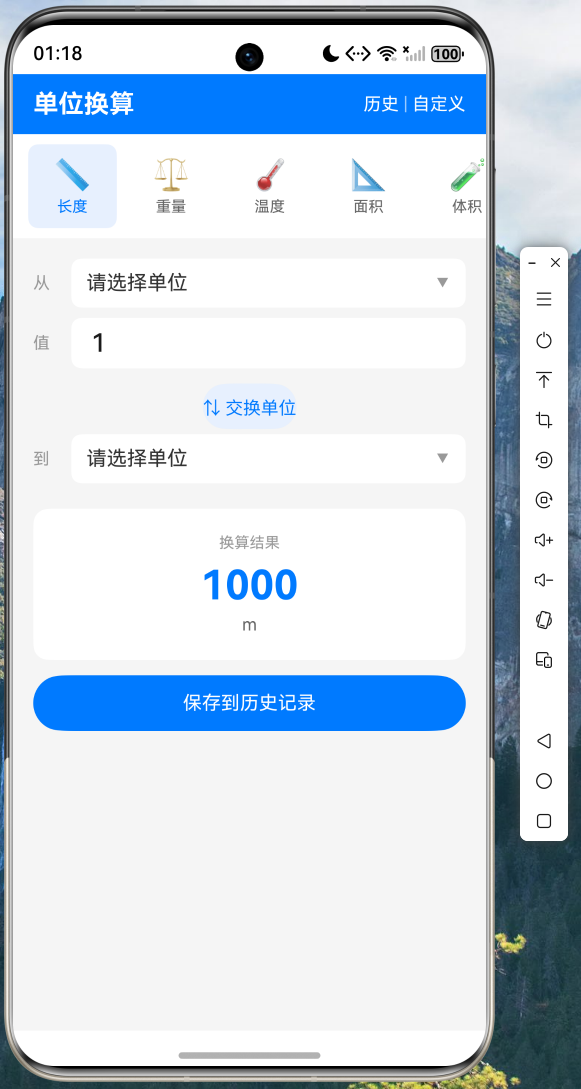
主界面顶部为六大单位分类标签栏(长度、重量、温度、面积、体积、速度),中间为换算输入面板,底部显示换算结果。用户点击单位区域可弹出底部选择器切换单位。
5.2 温度换算
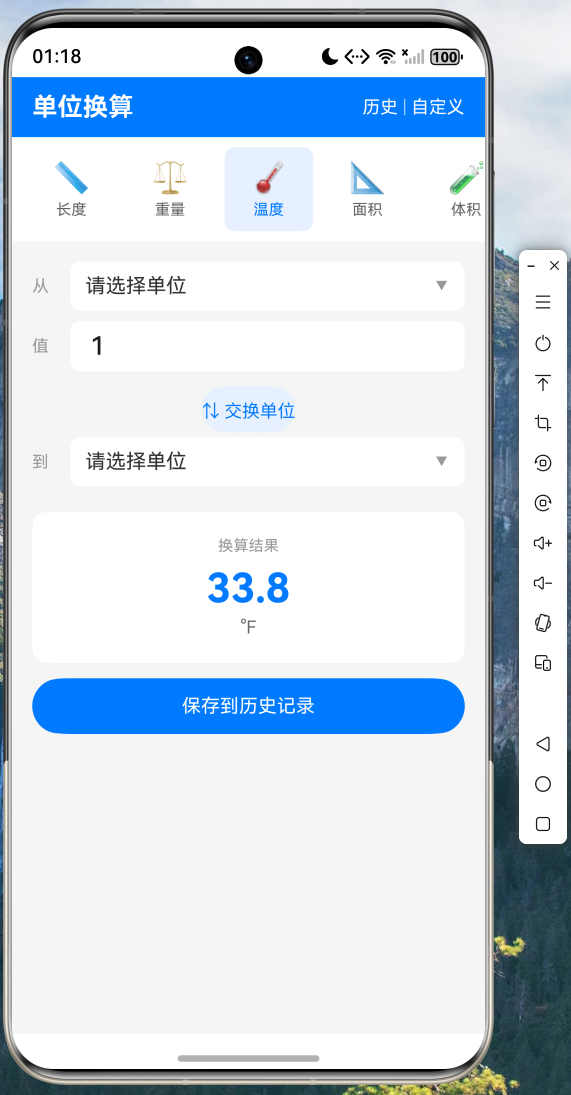
温度单位采用专用换算公式,支持摄氏度、华氏度和开尔文之间的相互转换。例如 100°C = 212°F = 373.15K。
5.3 单位选择器
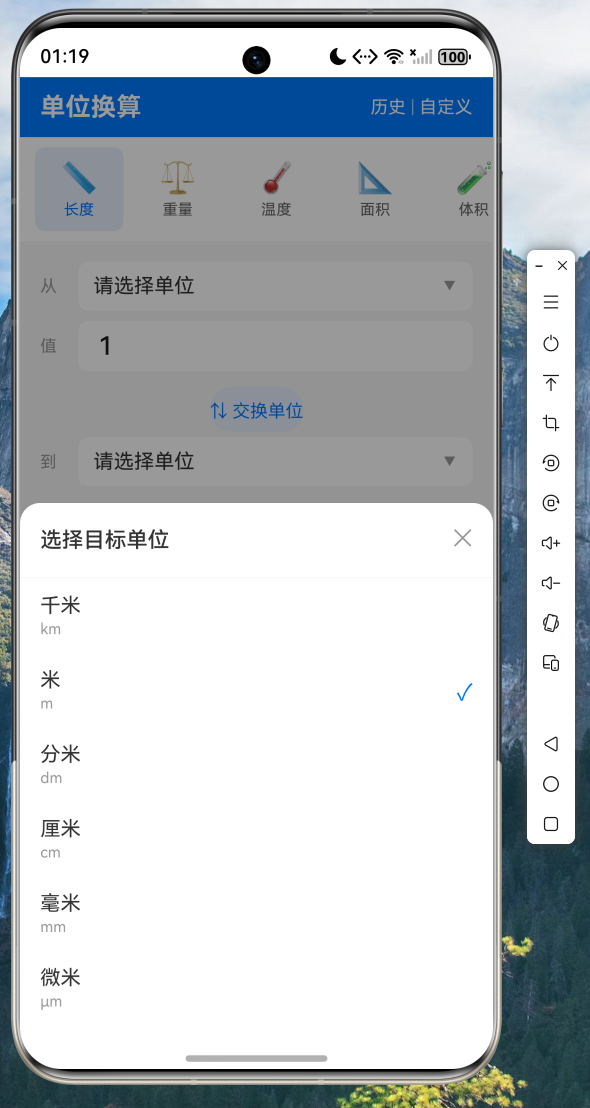
点击"从"或"到"区域,弹出底部 Sheet 选择器,列出当前类别下的所有可用单位(含自定义单位),选中项以蓝色勾号标识。
5.5 自定义单位添加
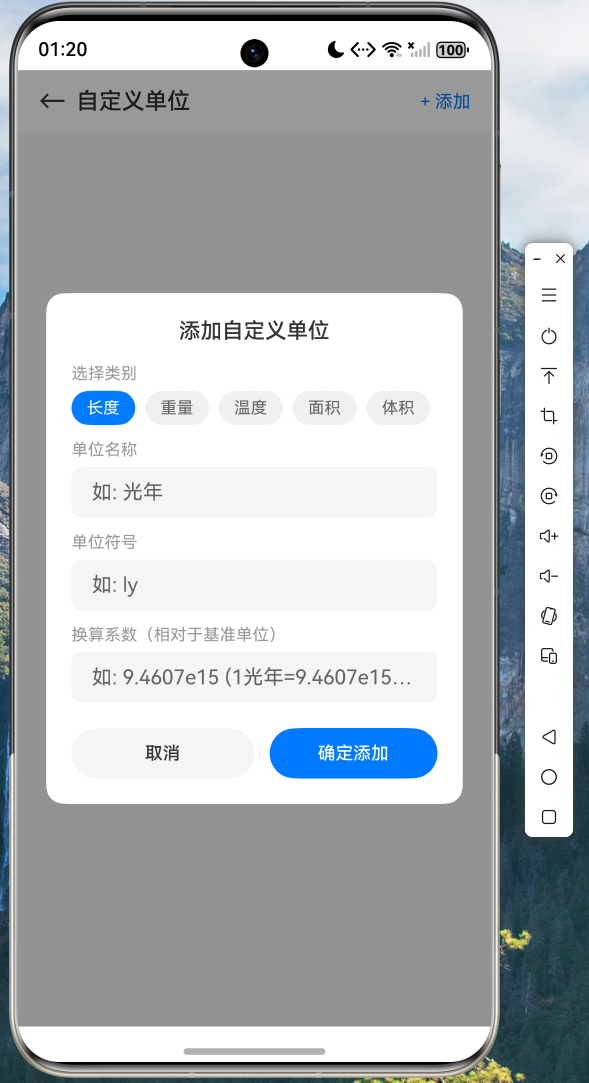
用户可为任意类别添加自定义单位,需填写单位名称、符号和相对于基准单位的换算系数。添加后自动出现在对应类别的单位列表中。
六、项目源码
本文完整项目源码已托管至 AtomGit 平台,欢迎访问:
AtomGit 仓库地址:https://atomgit.com/maaath/unit_converter_app
七、总结
本文详细介绍了如何使用 Flutter for OpenHarmony 跨平台技术构建一个功能完备的单位换算应用。通过本文的实践,读者可以掌握以下技能:
- 分层架构设计:模型层、服务层、UI 层的清晰分离,使代码易于维护和扩展
- 核心换算引擎实现:支持温度特殊公式和其他类别的基准单位换算模式
- 本地持久化:使用
shared_preferences实现历史记录和自定义单位的存取 - Flutter for OpenHarmony 适配:了解将 Flutter 应用运行在鸿蒙设备上的关键要点
该应用涵盖了长度、重量、温度、面积、体积、速度六大类别的单位换算,支持换算历史记录和自定义单位添加,是一个完整的、可直接投入使用的工具类应用。所有代码均已在鸿蒙设备上验证通过,读者可放心参考实践。
Flutter for OpenHarmony 为开发者提供了一条高效的应用开发路径——一次编写,多端运行。随着 OpenHarmony 生态的不断完善,相信会有越来越多的 Flutter 应用在鸿蒙设备上绽放光彩。

开源鸿蒙跨平台开发社区汇聚开发者与厂商,共建“一次开发,多端部署”的开源生态,致力于降低跨端开发门槛,推动万物智联创新。
更多推荐


 14
14 0
0- 0


 已为社区贡献52条内容

所有评论(0)