Flutter + OpenHarmony 文章分类管理组件开发实战
Flutter + OpenHarmony 文章分类管理组件开发实战
欢迎加入开源鸿蒙跨平台社区→ https://openharmonycrosplatform.csdn.net
一、效果展示
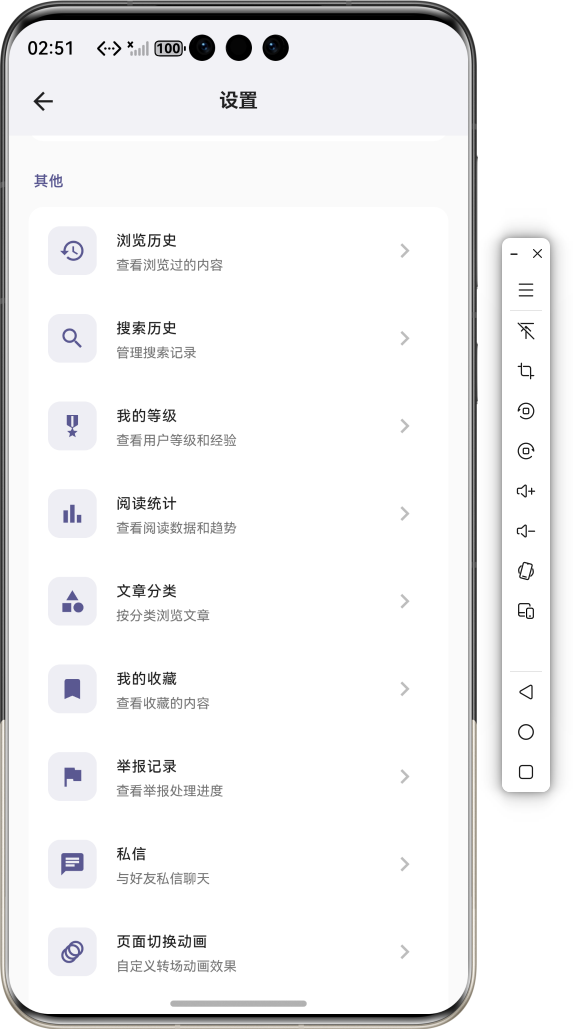
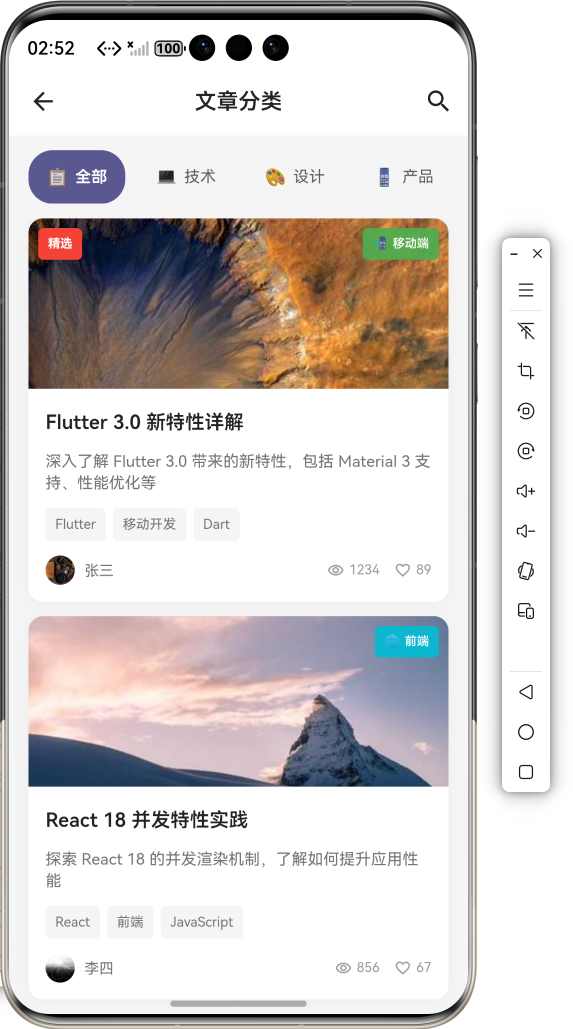
📱 运行效果预览
在鸿蒙虚拟机上运行后的实际效果如下:
分类网格展示 :
-
多彩分类卡片网格布局
-
每个分类显示图标、名称、文章数量
-
支持自定义分类颜色
-
点击进入分类详情页
分类详情页面 : -
顶部分类信息卡片
-
文章列表展示
-
筛选排序功能
-
下拉刷新加载更多
分类管理功能 : -
新建自定义分类
-
编辑分类信息
-
删除分类确认
-
拖拽排序调整
多级分类支持 : -
树形分类结构
-
展开/折叠子分类
-
面包屑导航
-
层级路径显示
🎨 三种布局模式
网格模式:              列表模
式:              标签模式:
┌────┐┌────┐┌────┐
┌────────────────┐
┌──────┐┌──────┐
│ 📱 ││ 💻 ││ 🎨 │   │ 📱 移动开发
128│   │移动开发││前端  │
│移动 ││前端 ││设计 │   │ 💻 前端技术
256│   └──────┘└──────┘
│ 128││ 256││ 89 │   │ 🎨 UI设计
89 │   ┌──────┐┌──────┐
└────┘└────┘└────┘   │ 🔧 后端
312│   │后端  ││数据库│
┌────┐┌────┐┌────┐
└────────────────┘
└──────┘└──────┘
│ 🔧 ││ 🗄 ││ 🤖 │
│后端 ││数据 ││AI  │
│ 312││ 156││ 78 │
└────┘└────┘└────┘
🎨 分类颜色方案
科技蓝:#2196F3   设计紫:#9C27B0   前
端绿:#4CAF50
后端橙:#FF9800   数据青:#00BCD4   AI
红:#F44336
二、组件概述
文章分类管理组件是内容型应用的核心功能,帮助用户高效组织、浏览和检索内容。通过合理的分类体系,提升用户体验和内容发现效率。在 OpenHarmony 环境下开发 Flutter 应用时,分类组件需要支持多种布局、层级管理、动态更新等功能。
三、核心功能特性
✅ 多种布局模式 - 网格、列表、标签三种展示
✅ 层级分类支持 - 多级树形结构管理
✅ 自定义分类 - 创建、编辑、删除分类
✅ 智能统计 - 实时统计各分类文章数量
✅ 拖拽排序 - 自由调整分类顺序
✅ 搜索过滤 - 快速查找分类
四、技术实现架构
4.1 分类数据模型
class ArticleCategory {
  final String id;
  final String name;
  final String icon;
  final Color color;
  final String? parentId;
  final int articleCount;
  final String description;
  final int sortOrder;
  final DateTime createdAt;
  final DateTime updatedAt;

  const ArticleCategory({
    required this.id,
    required this.name,
    required this.icon,
    required this.color,
    this.parentId,
    this.articleCount = 0,
    this.description = '',
    this.sortOrder = 0,
    required this.createdAt,
    required this.updatedAt,
  });

  bool get hasChildren => parentId
  == null;

  ArticleCategory copyWith({
    String? id,
    String? name,
    String? icon,
    Color? color,
    String? parentId,
    int? articleCount,
    String? description,
    int? sortOrder,
    DateTime? createdAt,
    DateTime? updatedAt,
  }) {
    return ArticleCategory(
      id: id ?? this.id,
      name: name ?? this.name,
      icon: icon ?? this.icon,
      color: color ?? this.color,
      parentId: parentId ?? this.
      parentId,
      articleCount: articleCount ??
      this.articleCount,
      description: description ??
      this.description,
      sortOrder: sortOrder ?? this.
      sortOrder,
      createdAt: createdAt ?? this.
      createdAt,
      updatedAt: updatedAt ?? this.
      updatedAt,
    );
  }

  Map<String, dynamic> toJson() {
    return {
      'id': id,
      'name': name,
      'icon': icon,
      'color': color.value,
      'parentId': parentId,
      'articleCount': articleCount,
      'description': description,
      'sortOrder': sortOrder,
      'createdAt': createdAt.
      toIso8601String(),
      'updatedAt': updatedAt.
      toIso8601String(),
    };
  }

  factory ArticleCategory.fromJson
  (Map<String, dynamic> json) {
    return ArticleCategory(
      id: json['id'],
      name: json['name'],
      icon: json['icon'],
      color: Color(json['color']),
      parentId: json['parentId'],
      articleCount: json
      ['articleCount'] ?? 0,
      description: json
      ['description'] ?? '',
      sortOrder: json
      ['sortOrder'] ?? 0,
      createdAt: DateTime.parse(json
      ['createdAt']),
      updatedAt: DateTime.parse(json
      ['updatedAt']),
    );
  }
}
4.2 分类管理器
class CategoryManager {
  static const String _storageKey =
  'article_categories';
  final List<ArticleCategory>
  _categories = [];

  List<ArticleCategory> get
  categories => List.unmodifiable
  (_categories);

  List<ArticleCategory> get
  rootCategories {
    return _categories.where((c) =>
    c.parentId == null).toList()
      ..sort((a, b) => a.sortOrder.
      compareTo(b.sortOrder));
  }

  List<ArticleCategory>
  getSubCategories(String parentId)
  {
    return _categories.where((c) =>
    c.parentId == parentId).toList()
      ..sort((a, b) => a.sortOrder.
      compareTo(b.sortOrder));
  }

  Future<void> loadCategories()
  async {
    try {
      final prefs = await
      SharedPreferences.getInstance
      ();
      final jsonStr = prefs.
      getString(_storageKey);

      if (jsonStr != null &&
      jsonStr.isNotEmpty) {
        final List<dynamic>
        jsonList = json.decode
        (jsonStr);
        _categories.clear();
        _categories.addAll(
          jsonList.map((json) =>
          ArticleCategory.fromJson
          (json)),
        );
      } else {
        _initializeDefaultCategories
        ();
      }
    } catch (e) {
      debugPrint('加载分类失败: $e');
      _initializeDefaultCategories
      ();
    }
  }

  void _initializeDefaultCategories
  () {
    _categories.addAll([
      ArticleCategory(
        id: 'mobile',
        name: '移动开发',
        icon: '📱',
        color: Colors.blue,
        sortOrder: 0,
        createdAt: DateTime.now(),
        updatedAt: DateTime.now(),
      ),
      ArticleCategory(
        id: 'frontend',
        name: '前端技术',
        icon: '💻',
        color: Colors.green,
        sortOrder: 1,
        createdAt: DateTime.now(),
        updatedAt: DateTime.now(),
      ),
      ArticleCategory(
        id: 'backend',
        name: '后端开发',
        icon: '🔧',
        color: Colors.orange,
        sortOrder: 2,
        createdAt: DateTime.now(),
        updatedAt: DateTime.now(),
      ),
      ArticleCategory(
        id: 'design',
        name: 'UI设计',
        icon: '🎨',
        color: Colors.purple,
        sortOrder: 3,
        createdAt: DateTime.now(),
        updatedAt: DateTime.now(),
      ),
      ArticleCategory(
        id: 'database',
        name: '数据库',
        icon: '🗄',
        color: Colors.cyan,
        sortOrder: 4,
        createdAt: DateTime.now(),
        updatedAt: DateTime.now(),
      ),
      ArticleCategory(
        id: 'ai',
        name: '人工智能',
        icon: '🤖',
        color: Colors.red,
        sortOrder: 5,
        createdAt: DateTime.now(),
        updatedAt: DateTime.now(),
      ),
    ]);
  }

  Future<void> _saveCategories()
  async {
    try {
      final prefs = await
      SharedPreferences.getInstance
      ();
      final jsonList = _categories.
      map((c) => c.toJson()).toList
      ();
      await prefs.setString
      (_storageKey, json.encode
      (jsonList));
    } catch (e) {
      debugPrint('保存分类失败: $e');
    }
  }

  Future<void> addCategory
  (ArticleCategory category) async {
    _categories.add(category);
    await _saveCategories();
  }

  Future<void> updateCategory
  (ArticleCategory category) async {
    final index = _categories.
    indexWhere((c) => c.id ==
    category.id);
    if (index != -1) {
      _categories[index] = category;
      await _saveCategories();
    }
  }

  Future<void> deleteCategory
  (String id) async {
    _categories.removeWhere((c) =>
    c.id == id || c.parentId == id);
    await _saveCategories();
  }

  Future<void> reorderCategories
  (int oldIndex, int newIndex)
  async {
    if (oldIndex < newIndex)
    newIndex--;
    final item = _categories.
    removeAt(oldIndex);
    _categories.insert(newIndex,
    item);

    for (var i = 0; i < _categories.
    length; i++) {
      _categories[i] = _categories
      [i].copyWith(sortOrder: i);
    }

    await _saveCategories();
  }

  void updateArticleCount(String
  categoryId, int count) {
    final index = _categories.
    indexWhere((c) => c.id ==
    categoryId);
    if (index != -1) {
      _categories[index] =
      _categories[index].copyWith(
        articleCount: count,
        updatedAt: DateTime.now(),
      );
    }
  }
}
4.3 组件属性定义
enum CategoryLayout { grid, list,
tag }

class CategoryWidget extends
StatefulWidget {
  final CategoryLayout layout;
  final Function(ArticleCategory
  category)? onCategoryTap;
  final Function(ArticleCategory
  category)? onCategoryLongPress;
  final bool showArticleCount;
  final bool enableEdit;
  final int crossAxisCount;
  final double? itemHeight;
  final Color? selectedColor;
  final String? selectedCategoryId;

  const CategoryWidget({
    super.key,
    this.layout = CategoryLayout.
    grid,
    this.onCategoryTap,
    this.onCategoryLongPress,
    this.showArticleCount = true,
    this.enableEdit = false,
    this.crossAxisCount = 3,
    this.itemHeight,
    this.selectedColor,
    this.selectedCategoryId,
  });
}
五、CategoryWidget 核心实现
5.1 网格布局构建
Widget _buildGridLayout(bool
isDark) {
  final categories =
  _categoryManager.rootCategories;

  return GridView.builder(
    shrinkWrap: true,
    physics: const
    NeverScrollableScrollPhysics(),
    gridDelegate:
    SliverGridDelegateWithFixedCross
    AxisCount(
      crossAxisCount: widget.
      crossAxisCount,
      mainAxisSpacing: 12,
      crossAxisSpacing: 12,
      childAspectRatio: 0.85,
    ),
    itemCount: categories.length +
    (widget.enableEdit ? 1 : 0),
    itemBuilder: (context, index) {
      if (index == categories.
      length && widget.enableEdit) {
        return _buildAddCard
        (isDark);
      }

      final category = categories
      [index];
      return _buildGridItem
      (category, index, isDark);
    },
  );
}

Widget _buildGridItem
(ArticleCategory category, int
index, bool isDark) {
  final isSelected = category.id ==
  widget.selectedCategoryId;

  return GestureDetector(
    onTap: () => widget.
    onCategoryTap?.call(category),
    onLongPress: () => widget.
    onCategoryLongPress?.call
    (category),
    child: Container(
      decoration: BoxDecoration(
        color: isSelected
            ? (widget.
            selectedColor ??
            category.color).
            withOpacity(0.2)
            : (isDark ? const Color
            (0xFF2A2A2A) : Colors.
            white),
        borderRadius: BorderRadius.
        circular(12),
        border: Border.all(
          color: isSelected
              ? (widget.
              selectedColor ??
              category.color)
              : Colors.transparent,
          width: 2,
        ),
        boxShadow: [
          BoxShadow(
            color: category.color.
            withOpacity(0.1),
            blurRadius: 8,
            offset: const Offset(0,
            2),
          ),
        ],
      ),
      child: Column(
        mainAxisAlignment:
        MainAxisAlignment.center,
        children: [
          Container(
            width: 48,
            height: 48,
            decoration:
            BoxDecoration(
              color: category.color.
              withOpacity(0.15),
              shape: BoxShape.
              circle,
            ),
            child: Center(
              child: Text(
                category.icon,
                style: const
                TextStyle(fontSize:
                24),
              ),
            ),
          ),
          const SizedBox(height: 8),
          Text(
            category.name,
            style: TextStyle(
              fontSize: 13,
              fontWeight:
              FontWeight.w600,
              color: isDark ?
              Colors.white : Colors.
              black87,
            ),
            textAlign: TextAlign.
            center,
            maxLines: 1,
            overflow: TextOverflow.
            ellipsis,
          ),
          if (widget.
          showArticleCount) ...[
            const SizedBox(height:
            4),
            Text(
              '${category.
              articleCount}篇',
              style: TextStyle(
                fontSize: 11,
                color: isDark ?
                Colors.grey[400] :
                Colors.grey[600],
              ),
            ),
          ],
        ],
      ),
    ),
  ).animate()
   .fadeIn(delay: (index * 50).ms)
   .scale(begin: const Offset(0.9,
   0.9), end: const Offset(1, 1));
}
5.2 列表布局构建
Widget _buildListLayout(bool
isDark) {
  final categories =
  _categoryManager.rootCategories;

  return ListView.builder(
    shrinkWrap: true,
    physics: const
    NeverScrollableScrollPhysics(),
    itemCount: categories.length,
    itemBuilder: (context, index) {
      final category = categories
      [index];
      return _buildListItem
      (category, index, isDark);
    },
  );
}

Widget _buildListItem
(ArticleCategory category, int
index, bool isDark) {
  final isSelected = category.id ==
  widget.selectedCategoryId;
  final hasChildren =
  _categoryManager.getSubCategories
  (category.id).isNotEmpty;

  return Container(
    margin: const EdgeInsets.only
    (bottom: 8),
    decoration: BoxDecoration(
      color: isSelected
          ? (widget.
          selectedColor ?? category.
          color).withOpacity(0.1)
          : (isDark ? const Color
          (0xFF2A2A2A) : Colors.grey
          [50]),
      borderRadius: BorderRadius.
      circular(10),
      border: Border.all(
        color: isSelected
            ? (widget.
            selectedColor ??
            category.color)
            : Colors.transparent,
      ),
    ),
    child: ListTile(
      leading: Container(
        width: 40,
        height: 40,
        decoration: BoxDecoration(
          color: category.color.
          withOpacity(0.15),
          borderRadius:
          BorderRadius.circular(8),
        ),
        child: Center(child: Text
        (category.icon, style:
        const TextStyle(fontSize:
        20))),
      ),
      title: Text(
        category.name,
        style: TextStyle(
          fontSize: 15,
          fontWeight: FontWeight.
          w500,
          color: isDark ? Colors.
          white : Colors.black87,
        ),
      ),
      subtitle: widget.
      showArticleCount
          ? Text(
              '${category.
              articleCount}篇文章',
              style: TextStyle
              (fontSize: 12, color:
              Colors.grey[500]),
            )
          : null,
      trailing: hasChildren
          ? Icon(Icons.
          chevron_right, color:
          Colors.grey[400])
          : null,
      onTap: () => widget.
      onCategoryTap?.call(category),
      onLongPress: () => widget.
      onCategoryLongPress?.call
      (category),
    ),
  ).animate().fadeIn(delay: (index
  * 30).ms).slideX(begin: 0.1);
}
5.3 标签布局构建
Widget _buildTagLayout(bool isDark)
{
  final categories =
  _categoryManager.rootCategories;

  return Wrap(
    spacing: 10,
    runSpacing: 10,
    children: categories.asMap().
    entries.map((entry) {
      final index = entry.key;
      final category = entry.value;
      final isSelected = category.
      id == widget.
      selectedCategoryId;

      return GestureDetector(
        onTap: () => widget.
        onCategoryTap?.call
        (category),
        onLongPress: () => widget.
        onCategoryLongPress?.call
        (category),
        child: Container(
          padding: const EdgeInsets.
          symmetric(horizontal: 14,
          vertical: 8),
          decoration: BoxDecoration(
            color: isSelected
                ? (widget.
                selectedColor ??
                category.color)
                : (isDark ? const
                Color(0xFF2A2A2A) :
                Colors.grey[100]),
            borderRadius:
            BorderRadius.circular
            (20),
            border: Border.all(
              color: isSelected
                  ? (widget.
                  selectedColor ??
                  category.color)
                  : Colors.
                  transparent,
            ),
          ),
          child: Row(
            mainAxisSize:
            MainAxisSize.min,
            children: [
              Text(category.icon,
              style: const TextStyle
              (fontSize: 14)),
              const SizedBox(width:
              6),
              Text(
                category.name,
                style: TextStyle(
                  fontSize: 13,
                  color: isSelected
                      ? Colors.white
                      : (isDark ?
                      Colors.white
                      : Colors.
                      black87),
                ),
              ),
              if (widget.
              showArticleCount) ...[
                const SizedBox
                (width: 6),
                Container(
                  padding: const
                  EdgeInsets.
                  symmetric
                  (horizontal: 6,
                  vertical: 2),
                  decoration:
                  BoxDecoration(
                    color:
                    isSelected
                        ? Colors.
                        white.
                        withOpacity
                        (0.2)
                        : category.
                        color.
                        withOpacity
                        (0.1),
                    borderRadius:
                    BorderRadius.
                    circular(10),
                  ),
                  child: Text(
                    '${category.
                    articleCount}',
                    style: TextStyle
                    (
                      fontSize: 10,
                      color:
                      isSelected
                          ? Colors.
                          white
                          :
                          category.
                          color,
                    ),
                  ),
                ),
              ],
            ],
          ),
        ),
      ).animate().fadeIn(delay:
      (index * 30).ms).scale();
    }).toList(),
  );
}
5.4 添加分类卡片
Widget _buildAddCard(bool isDark) {
  return GestureDetector(
    onTap: () =>
    _showAddCategoryDialog(),
    child: Container(
      decoration: BoxDecoration(
        color: isDark ? const Color
        (0xFF2A2A2A) : Colors.grey
        [100],
        borderRadius: BorderRadius.
        circular(12),
        border: Border.all(
          color: Colors.grey.
          withOpacity(0.3),
          style: BorderStyle.solid,
        ),
      ),
      child: Column(
        mainAxisAlignment:
        MainAxisAlignment.center,
        children: [
          Container(
            width: 48,
            height: 48,
            decoration:
            BoxDecoration(
              color: isDark ?
              Colors.grey[700] :
              Colors.grey[200],
              shape: BoxShape.
              circle,
            ),
            child: Icon(Icons.add,
            size: 24, color: Colors.
            grey[500]),
          ),
          const SizedBox(height: 8),
          Text(
            '添加分类',
            style: TextStyle(
              fontSize: 13,
              color: isDark ?
              Colors.grey[400] :
              Colors.grey[600],
            ),
          ),
        ],
      ),
    ),
  ).animate().fadeIn();
}
六、分类管理对话框实现
6.1 添加/编辑分类对话框
Future<void> _showAddCategoryDialog
([ArticleCategory?
existingCategory]) async {
final isEdit = existingCategory
!= null;
final nameController =
TextEditingController(text:
existingCategory?.name ?? '');
final descController =
TextEditingController(text:
existingCategory?.description ??
'');
var selectedIcon =
existingCategory?.icon ?? '📁';
var selectedColor =
existingCategory?.color ?? Colors.
blue;
final icons = ['📁', '📱', '💻',
'🎨', '🔧', '🗄', '🤖', '📊',
'🌐', '⚡', '🎯', '💡'];
final colors = [
Colors.blue, Colors.green,
Colors.orange, Colors.purple,
Colors.red, Colors.cyan, Colors.
pink, Colors.indigo,
];
await showDialog(
context: context,
builder: (context) {
return StatefulBuilder(
builder: (context,
setDialogState) {
return AlertDialog(
title: Text(isEdit ? '编
辑分类' : '新建分类'),
content:
SingleChildScrollView(
child: Column(
mainAxisSize:
MainAxisSize.min,
crossAxisAlignment:
CrossAxisAlignment.
start,
children: [
TextField(
controller:
nameController,
decoration:
const
InputDecoration(
labelText: '分
类名称',
hintText: '请
输入分类名称',
),
maxLength: 20,
),
const SizedBox
(height: 16),
const Text('选择图
标', style:
TextStyle
(fontSize: 14,
fontWeight:
FontWeight.w500)),
const SizedBox
(height: 8),
Wrap(
spacing: 8,
runSpacing: 8,
children: icons.
map((icon) {
final
isSelected =
icon ==
selectedIcon;
return
GestureDetecto
r(
onTap: ()
=>
setDialogSta
te(() =>
selectedIcon
= icon),
child:
Container(
width: 40,
height:
40,
decoration
:
BoxDecorat
ion(
color:
isSelect
ed ?
Colors.
blue.
withOpac
ity(0.
1) :
Colors.
grey
[100],
borderRa
dius:
BorderRa
dius.
circular
(8),
border:
Border.
all(
color:
isSele
cted ?
Colors
.blue
:
Colors
.
transp
arent,
),
),
child:
Center
(child:
Text
(icon,
style:
const
TextStyle
(fontSize:
20))),
),
);
}).toList(),
),
const SizedBox
(height: 16),
const Text('选择颜
色', style:
TextStyle
(fontSize: 14,
fontWeight:
FontWeight.w500)),
const SizedBox
(height: 8),
Wrap(
spacing: 8,
runSpacing: 8,
children:
colors.map
((color) {
final
isSelected =
color ==
selectedColor;
return
GestureDetecto
r(
onTap: ()
=>
setDialogSta
te(() =>
selectedColo
r = color),
child:
Container(
width: 32,
height:
32,
decoration
:
BoxDecorat
ion(
color:
color,
shape:
BoxShape
.circle,
border:
Border.
all(
color:
isSele
cted ?
Colors
.
black
:
Colors
.
transp
arent,
width:
3,
),
),
child:
isSelected
?
const
Icon
(Icons
.
check,
color:
Colors
.
white,
size:
16)
:
null,
),
);
}).toList(),
),
const SizedBox
(height: 16),
TextField(
controller:
descController,
decoration:
const
InputDecoration(
labelText: '分
类描述(可选)',
hintText: '请
输入分类描述',
),
maxLines: 2,
maxLength: 100,
),
],
),
),
actions: [
TextButton(
onPressed: () =>
Navigator.pop
(context),
child: const Text('
取消'),
),
ElevatedButton(
onPressed: () async
{
if
(nameController.
text.trim().
isEmpty) {
ScaffoldMessenge
r.of(context).
showSnackBar(
const SnackBar
(content: Text
('请输入分类名称
')),
);
return;
}
final category =
ArticleCategory(
id:
existingCategory
?.id ??
DateTime.now().
millisecondsSinc
eEpoch.toString
(),
name:
nameController.
text.trim(),
icon:
selectedIcon,
color:
selectedColor,
description:
descController.
text.trim(),
sortOrder:
existingCategory
?.sortOrder ??
_categoryManager
.categories.
length,
createdAt:
existingCategory
?.createdAt ??
DateTime.now(),
updatedAt:
DateTime.now(),
);
if (isEdit) {
await
_categoryManager
.updateCategory
(category);
} else {
await
_categoryManager
.addCategory
(category);
}
if (mounted) {
Navigator.pop
(context);
setState(() {});
}
},
child: Text
(isEdit ? '保存' : '
创建'),
),
],
);
},
);
},
);
}
6.2 删除确认对话框
Future<void>
_showDeleteConfirmDialog
(ArticleCategory category) async {
  final confirmed = await
  showDialog<bool>(
    context: context,
    builder: (context) {
      return AlertDialog(
        title: const Text('删除分类
        '),
        content: Column(
          mainAxisSize:
          MainAxisSize.min,
          crossAxisAlignment:
          CrossAxisAlignment.start,
          children: [
            Text('确定要删除"$
            {category.name}"分类吗?
            '),
            const SizedBox(height:
            8),
            Text(
              '该分类下有 ${category.
              articleCount} 篇文章',
              style: TextStyle
              (fontSize: 13, color:
              Colors.grey[600]),
            ),
          ],
        ),
        actions: [
          TextButton(
            onPressed: () =>
            Navigator.pop(context,
            false),
            child: const Text('取消
            '),
          ),
          ElevatedButton(
            style: ElevatedButton.
            styleFrom
            (backgroundColor:
            Colors.red),
            onPressed: () =>
            Navigator.pop(context,
            true),
            child: const Text('删除
            ', style: TextStyle
            (color: Colors.white)),
          ),
        ],
      );
    },
  );

  if (confirmed == true) {
    await _categoryManager.
    deleteCategory(category.id);
    setState(() {});
  }
}
七、使用示例集锦
示例1:基础网格展示
CategoryWidget(
  layout: CategoryLayout.grid,
  onCategoryTap: (category) {
    Navigator.push(
      context,
      MaterialPageRoute(
        builder: (_) =>
        CategoryDetailPage
        (category: category),
      ),
    );
  },
)
示例2:可编辑的分类列表
CategoryWidget(
  layout: CategoryLayout.list,
  enableEdit: true,
  onCategoryTap: (category) =>
  _showCategoryDetail(category),
  onCategoryLongPress: (category)
  => _showEditDialog(category),
)
示例3:标签选择器
CategoryWidget(
  layout: CategoryLayout.tag,
  selectedCategoryId:
  _selectedCategoryId,
  selectedColor: Theme.of(context).
  colorScheme.primary,
  onCategoryTap: (category) {
    setState(() =>
    _selectedCategoryId = category.
    id);
  },
)
示例4:带子分类的层级展示
ExpansionTile(
  leading: Text(category.icon),
  title: Text(category.name),
  subtitle: Text('${category.
  articleCount}篇'),
  children: subCategories.map((sub)
  {
    return ListTile(
      leading: Text(sub.icon),
      title: Text(sub.name),
      trailing: Text('${sub.
      articleCount}篇'),
      onTap: () =>
      _showCategoryDetail(sub),
    );
  }).toList(),
)
示例5:分类详情页面
class CategoryDetailPage extends
StatelessWidget {
  final ArticleCategory category;

  const CategoryDetailPage({super.
  key, required this.category});

  @override
  Widget build(BuildContext
  context) {
    return Scaffold(
      appBar: AppBar(
        title: Text(category.name),
        actions: [
          IconButton(
            icon: const Icon(Icons.
            sort),
            onPressed: () =>
            _showSortOptions(),
          ),
        ],
      ),
      body: Column(
        children: [
          _buildCategoryHeader(),
          Expanded(child:
          _buildArticleList()),
        ],
      ),
    );
  }

  Widget _buildCategoryHeader() {
    return Container(
      padding: const EdgeInsets.all
      (16),
      child: Row(
        children: [
          Container(
            width: 60,
            height: 60,
            decoration:
            BoxDecoration(
              color: category.color.
              withOpacity(0.15),
              borderRadius:
              BorderRadius.circular
              (12),
            ),
            child: Center(
              child: Text(category.
              icon, style: const
              TextStyle(fontSize:
              28)),
            ),
          ),
          const SizedBox(width: 16),
          Expanded(
            child: Column(
              crossAxisAlignment:
              CrossAxisAlignment.
              start,
              children: [
                Text(
                  category.name,
                  style: const
                  TextStyle
                  (fontSize: 18,
                  fontWeight:
                  FontWeight.bold),
                ),
                const SizedBox
                (height: 4),
                Text(
                  '${category.
                  articleCount}篇文
                  章',
                  style: TextStyle
                  (color: Colors.
                  grey[600]),
                ),
                if (category.
                description.
                isNotEmpty) ...[
                  const SizedBox
                  (height: 4),
                  Text(
                    category.
                    description,
                    style: TextStyle
                    (fontSize: 13,
                    color: Colors.
                    grey[500]),
                  ),
                ],
              ],
            ),
          ),
        ],
      ),
    );
  }
}
八、性能优化策略
8.1 渲染优化
- GridView.builder :按需构建网格项
- ListView.builder :列表项懒加载
- shrinkWrap: true :自适应高度
8.2 数据优化
- 本地缓存 :SharedPreferences持久化
- 增量更新 :只更新变化的分类
- 批量操作 :减少IO次数
8.3 动画优化
- 延迟动画 :错开执行避免卡顿
- 轻量动画 :简单的淡入缩放效果
- 硬件加速 :启用GPU渲染
九、常见问题解答
Q1: 如何添加多级分类?
设置 parentId 创建子分类:
final subCategory = ArticleCategory(
  id: 'flutter',
  name: 'Flutter',
  icon: '📱',
  color: Colors.blue,
  parentId: 'mobile', // 父分类ID
  ...
);
Q2: 如何实现分类拖拽排序?
使用 ReorderableListView :
ReorderableListView.builder(
  itemCount: categories.length,
  onReorder: (oldIndex, newIndex) {
    _categoryManager.
    reorderCategories(oldIndex,
    newIndex);
    setState(() {});
  },
  itemBuilder: (context, index) {
    return ListTile(
      key: ValueKey(categories
      [index].id),
      title: Text(categories[index].
      name),
    );
  },
)
Q3: 如何同步分类到服务端?
在保存时调用API同步:
Future<void> syncToServer
(ArticleCategory category) async {
  await http.post(
    Uri.parse('https://api.example.
    com/categories'),
    body: json.encode(category.
    toJson()),
  );
}
Q4: 如何实现分类搜索?
List<ArticleCategory>
searchCategories(String query) {
  if (query.isEmpty) return
  _categories;
  return _categories.where((c) =>
    c.name.toLowerCase().contains
    (query.toLowerCase()),
  ).toList();
}
Q5: 如何统计分类文章数量?
Future<void> updateAllCategoryCounts
() async {
  for (var category in _categories)
  {
    final count = await
    ArticleDatabase.getArticleCount
    (category.id);
    _categoryManager.
    updateArticleCount(category.id,
    count);
  }
  setState(() {});
}
十、总结
本文详细介绍了如何在 Flutter + OpenHarmony 环境中开发一个功能完善的文章分类管理组件。该组件具备以下技术亮点:
🎯 多种布局模式 - 网格、列表、标签自由切换
🎨 丰富的自定义选项 - 图标、颜色、描述全面可配
⚡ 流畅的交互体验 - 动画效果自然流畅
🔧 完善的管理功能 - 增删改查、排序拖拽
实际应用场景 :
- 内容管理平台
- 博客文章分类
- 商品分类展示
- 文档管理系统
- 知识库分类

开源鸿蒙跨平台开发社区汇聚开发者与厂商,共建“一次开发,多端部署”的开源生态,致力于降低跨端开发门槛,推动万物智联创新。
更多推荐


 9
9 0
0- 0


 已为社区贡献60条内容

所有评论(0)