【maaath】Flutter for OpenHarmony 在母婴育儿应用中的实践
Flutter for OpenHarmony 在母婴育儿应用中的实践
前言
欢迎加入开源鸿蒙跨平台社区: https://openharmonycrossplatform.csdn.net
作者:maaath
在移动应用开发领域,跨平台技术一直是开发者关注的重点。Flutter 作为当下最受欢迎的跨平台框架之一,凭借其高性能和丰富的生态,为开发者提供了高效的应用开发体验。而 Flutter for OpenHarmony 的出现,更是让 Flutter 技术在鸿蒙设备上大放异彩。本文将以一个母婴育儿应用为例,详细介绍如何使用 Flutter for OpenHarmony 开发面向鸿蒙设备的移动应用,并展示实际运行效果。
一、项目概述
母婴育儿应用是一个贴近用户日常需求的实用型应用,主要功能包括:
- 育儿知识库浏览
- 宝宝成长记录管理
- 社区交流互动
- 疫苗接种提醒
我们将通过这个项目的核心代码实现,帮助读者快速上手 Flutter for OpenHarmony 开发。
二、项目结构设计
首先,我们需要设计合理的项目结构。采用 Clean Architecture 分层设计,将业务逻辑、数据层和 UI 层分离,确保代码的可维护性和可测试性。
// lib/
// ├── main.dart                 # 应用入口
// ├── model/                    # 数据模型层
// │   └── baby_model.dart
// ├── viewmodel/                # 视图模型层
// │   └── baby_viewmodel.dart
// ├── view/                    # 视图层
// │   ├── pages/
// │   │   ├── home_page.dart
// │   │   ├── knowledge_page.dart
// │   │   ├── record_page.dart
// │   │   └── profile_page.dart
// │   └── widgets/
// │       └── common_widgets.dart
// └── service/                 # 服务层
//     └── baby_service.dart
这种结构设计的好处在于各层职责清晰,便于团队协作开发和后续功能扩展。
三、核心数据模型定义
在 Flutter 中,我们使用 Dart 语言定义数据模型。以下是母婴育儿应用的核心数据模型:
/// 知识文章模型
class KnowledgeArticle {
  final int id;
  final String title;
  final String summary;
  final String category;
  final String coverImage;
  final String author;
  final String publishTime;
  final int viewCount;
  final int likeCount;

  KnowledgeArticle({
    required this.id,
    required this.title,
    required this.summary,
    required this.category,
    required this.coverImage,
    required this.author,
    required this.publishTime,
    required this.viewCount,
    required this.likeCount,
  });

  factory KnowledgeArticle.fromJson(Map<String, dynamic> json) {
    return KnowledgeArticle(
      id: json['id'] ?? 0,
      title: json['title'] ?? '',
      summary: json['summary'] ?? '',
      category: json['category'] ?? '',
      coverImage: json['coverImage'] ?? '',
      author: json['author'] ?? '',
      publishTime: json['publishTime'] ?? '',
      viewCount: json['viewCount'] ?? 0,
      likeCount: json['likeCount'] ?? 0,
    );
  }

  Map<String, dynamic> toJson() {
    return {
      'id': id,
      'title': title,
      'summary': summary,
      'category': category,
      'coverImage': coverImage,
      'author': author,
      'publishTime': publishTime,
      'viewCount': viewCount,
      'likeCount': likeCount,
    };
  }
}

/// 宝宝成长记录模型
class GrowthRecord {
  final int id;
  final String date;
  final double height;
  final double weight;
  final String milestone;

  GrowthRecord({
    required this.id,
    required this.date,
    required this.height,
    required this.weight,
    required this.milestone,
  });

  factory GrowthRecord.fromJson(Map<String, dynamic> json) {
    return GrowthRecord(
      id: json['id'] ?? 0,
      date: json['date'] ?? '',
      height: (json['height'] ?? 0).toDouble(),
      weight: (json['weight'] ?? 0).toDouble(),
      milestone: json['milestone'] ?? '',
    );
  }
}

/// 疫苗记录模型
class VaccineRecord {
  final int id;
  final String name;
  final String scheduledDate;
  final String status; // pending, completed, overdue
  final String description;

  VaccineRecord({
    required this.id,
    required this.name,
    required this.scheduledDate,
    required this.status,
    required this.description,
  });

  /// 获取状态对应的颜色值
  Color getStatusColor() {
    switch (status) {
      case 'completed':
        return const Color(0xFF52C41A);
      case 'overdue':
        return const Color(0xFFFF4D4F);
      default:
        return const Color(0xFFFF69B4);
    }
  }

  /// 获取状态文本
  String getStatusText() {
    switch (status) {
      case 'completed':
        return '已完成';
      case 'overdue':
        return '已逾期';
      default:
        return '待接种';
    }
  }
}
四、服务层实现
服务层负责数据获取和业务逻辑处理。在 Flutter for OpenHarmony 中,我们同样可以模拟网络请求,验证应用逻辑的正确性。
import 'package:flutter/material.dart';
import '../model/baby_model.dart';

/// 母婴服务类
class BabyService {
  /// 获取育儿知识列表
  Future<List<KnowledgeArticle>> getKnowledgeList({
    String category = '',
    int page = 1,
    int pageSize = 10,
  }) async {
    // 模拟网络延迟
    await Future.delayed(const Duration(milliseconds: 800));

    // 模拟数据源
    final List<KnowledgeArticle> data = [
      KnowledgeArticle(
        id: 1,
        title: '0-3岁宝宝辅食添加指南',
        summary: '详细介绍各月龄段宝宝辅食添加的原则和注意事项。',
        category: '营养健康',
        coverImage: '',
        author: '育儿专家',
        publishTime: '2024-01-15',
        viewCount: 12580,
        likeCount: 890,
      ),
      KnowledgeArticle(
        id: 2,
        title: '如何培养宝宝的语言能力',
        summary: '从宝宝出生开始,通过日常互动促进语言发展。',
        category: '早期教育',
        coverImage: '',
        author: '早教专家',
        publishTime: '2024-01-14',
        viewCount: 9860,
        likeCount: 756,
      ),
      KnowledgeArticle(
        id: 3,
        title: '宝宝发烧的正确护理方法',
        summary: '当宝宝发烧时,家长应该如何正确应对?',
        category: '健康护理',
        coverImage: '',
        author: '儿科医生',
        publishTime: '2024-01-13',
        viewCount: 15890,
        likeCount: 1205,
      ),
    ];

    // 根据分类筛选
    if (category.isNotEmpty && category != '全部') {
      return data.where((item) => item.category == category).toList();
    }
    return data;
  }

  /// 获取知识分类
  List<String> getCategories() {
    return ['全部', '营养健康', '早期教育', '健康护理', '安全防护'];
  }

  /// 获取宝宝成长记录
  Future<List<GrowthRecord>> getGrowthRecords() async {
    await Future.delayed(const Duration(milliseconds: 500));
    return [
      GrowthRecord(id: 1, date: '2023-06-01', height: 50, weight: 3.2, milestone: '宝宝出生啦'),
      GrowthRecord(id: 2, date: '2023-07-01', height: 55, weight: 4.5, milestone: '会抬头了'),
      GrowthRecord(id: 3, date: '2023-08-01', height: 60, weight: 5.8, milestone: '会翻身了'),
      GrowthRecord(id: 4, date: '2023-09-01', height: 64, weight: 6.5, milestone: '会坐了'),
    ];
  }

  /// 获取疫苗记录
  Future<List<VaccineRecord>> getVaccineRecords() async {
    await Future.delayed(const Duration(milliseconds: 500));
    return [
      VaccineRecord(id: 1, name: '乙肝疫苗第三针', scheduledDate: '2024-02-15', status: 'pending', description: '乙肝疫苗第三针接种'),
      VaccineRecord(id: 2, name: '脊灰疫苗第二针', scheduledDate: '2024-02-28', status: 'pending', description: '脊灰疫苗第二次接种'),
      VaccineRecord(id: 3, name: '百白破疫苗第一针', scheduledDate: '2024-03-15', status: 'pending', description: '百白破疫苗第一次接种'),
    ];
  }
}
五、视图模型层实现
视图模型负责连接服务和视图,处理业务逻辑并管理状态。以下是知识页面和首页的视图模型实现:
import 'package:flutter/material.dart';
import '../model/baby_model.dart';
import '../service/baby_service.dart';

/// 知识页视图模型
class KnowledgeViewModel extends ChangeNotifier {
  final BabyService _service = BabyService();

  List<KnowledgeArticle> _articles = [];
  List<String> _categories = [];
  String _currentCategory = '全部';
  bool _isLoading = false;

  List<KnowledgeArticle> get articles => _articles;
  List<String> get categories => _categories;
  String get currentCategory => _currentCategory;
  bool get isLoading => _isLoading;

  /// 初始化数据
  Future<void> initData() async {
    _categories = _service.getCategories();
    await loadArticles();
  }

  /// 加载文章列表
  Future<void> loadArticles({bool refresh = false}) async {
    if (_isLoading) return;

    _isLoading = true;
    notifyListeners();

    try {
      _articles = await _service.getKnowledgeList(
        category: _currentCategory,
      );
    } catch (e) {
      debugPrint('加载文章失败: $e');
    } finally {
      _isLoading = false;
      notifyListeners();
    }
  }

  /// 选择分类
  void selectCategory(String category) {
    if (_currentCategory == category) return;
    _currentCategory = category;
    loadArticles();
  }
}
六、UI 页面实现
知识列表页面
这是知识页面 Flutter for OpenHarmony 跨平台开发的核心实现,展示了如何在鸿蒙设备上构建现代化的列表界面:
import 'package:flutter/material.dart';
import '../viewmodel/knowledge_viewmodel.dart';
import '../model/baby_model.dart';
/// 育儿知识列表页面
class KnowledgePage extends StatefulWidget {
const KnowledgePage({super.key});
State<KnowledgePage> createState() => _KnowledgePageState();
}
class _KnowledgePageState extends State<KnowledgePage> {
final KnowledgeViewModel _viewModel = KnowledgeViewModel();
void initState() {
super.initState();
_viewModel.initData();
}
Widget build(BuildContext context) {
return Scaffold(
backgroundColor: const Color(0xFFF5F5F5),
body: Column(
children: [
// 标题栏
_buildHeader(),
// 分类标签
_buildCategoryTabs(),
// 文章列表
Expanded(child: _buildArticleList()),
],
),
);
}
Widget _buildHeader() {
return Container(
height: 56,
padding: const EdgeInsets.symmetric(horizontal: 16),
color: Colors.white,
child: Row(
children: [
const Text(
'育儿知识',
style: TextStyle(
fontSize: 22,
fontWeight: FontWeight.bold,
color: Color(0xFF333333),
),
),
const Spacer(),
IconButton(
icon: const Icon(Icons.search, size: 22),
onPressed: () {
// 搜索功能
},
),
],
),
);
}
Widget _buildCategoryTabs() {
return Container(
height: 48,
color: Colors.white,
child: ListView.builder(
scrollDirection: Axis.horizontal,
itemCount: _viewModel.categories.length,
itemBuilder: (context, index) {
final category = _viewModel.categories[index];
final isSelected = category == _viewModel.currentCategory;
return GestureDetector(
onTap: () => _viewModel.selectCategory(category),
child: Container(
padding: const EdgeInsets.symmetric(horizontal: 16),
alignment: Alignment.center,
decoration: BoxDecoration(
color: isSelected ? const Color(0xFFFF69B4) : Colors.transparent,
borderRadius: BorderRadius.circular(20),
),
child: Text(
category,
style: TextStyle(
fontSize: 14,
color: isSelected ? Colors.white : const Color(0xFF666666),
fontWeight: isSelected ? FontWeight.bold : FontWeight.normal,
),
),
),
);
},
),
);
}
Widget _buildArticleList() {
if (_viewModel.isLoading) {
return const Center(
child: CircularProgressIndicator(
color: Color(0xFFFF69B4),
),
);
}
if (_viewModel.articles.isEmpty) {
return const Center(
child: Text(
'暂无知识文章',
style: TextStyle(color: Color(0xFF999999)),
),
);
}
return ListView.builder(
padding: const EdgeInsets.all(16),
itemCount: _viewModel.articles.length,
itemBuilder: (context, index) {
return _ArticleCard(article: _viewModel.articles[index]);
},
);
}
}
/// 文章卡片组件
class _ArticleCard extends StatelessWidget {
final KnowledgeArticle article;
const _ArticleCard({required this.article});
Widget build(BuildContext context) {
return Container(
margin: const EdgeInsets.only(bottom: 12),
padding: const EdgeInsets.all(16),
decoration: BoxDecoration(
color: Colors.white,
borderRadius: BorderRadius.circular(12),
boxShadow: [
BoxShadow(
color: Colors.black.withOpacity(0.05),
blurRadius: 8,
offset: const Offset(0, 2),
),
],
),
child: Column(
crossAxisAlignment: CrossAxisAlignment.start,
children: [
Row(
children: [
Container(
padding: const EdgeInsets.symmetric(horizontal: 8, vertical: 4),
decoration: BoxDecoration(
color: const Color(0xFFFFF0F5),
borderRadius: BorderRadius.circular(4),
),
child: Text(
article.category,
style: const TextStyle(
fontSize: 10,
color: Color(0xFFFF69B4),
),
),
),
const Spacer(),
Text(
article.publishTime,
style: const TextStyle(
fontSize: 11,
color: Color(0xFF999999),
),
),
],
),
const SizedBox(height: 12),
Text(
article.title,
style: const TextStyle(
fontSize: 16,
fontWeight: FontWeight.bold,
color: Color(0xFF333333),
),
maxLines: 2,
overflow: TextOverflow.ellipsis,
),
const SizedBox(height: 8),
Text(
article.summary,
style: const TextStyle(
fontSize: 13,
color: Color(0xFF666666),
height: 1.4,
),
maxLines: 2,
overflow: TextOverflow.ellipsis,
),
const SizedBox(height: 12),
Row(
children: [
Text(
'👁 ${_formatCount(article.viewCount)}',
style: const TextStyle(fontSize: 11, color: Color(0xFF999999)),
),
const SizedBox(width: 16),
Text(
'❤️ ${_formatCount(article.likeCount)}',
style: const TextStyle(fontSize: 11, color: Color(0xFF999999)),
),
],
),
],
),
);
}
String _formatCount(int count) {
if (count >= 10000) {
return '${(count / 10000).toStringAsFixed(1)}万';
}
return count.toString();
}
}
宝宝成长记录页面
展示宝宝成长数据的记录页面:
import 'package:flutter/material.dart';
/// 成长记录页面
class RecordPage extends StatefulWidget {
const RecordPage({super.key});
State<RecordPage> createState() => _RecordPageState();
}
class _RecordPageState extends State<RecordPage> {
int _selectedIndex = 0;
Widget build(BuildContext context) {
return Scaffold(
backgroundColor: const Color(0xFFF5F5F5),
body: Column(
children: [
_buildHeader(),
Expanded(child: _buildContent()),
],
),
floatingActionButton: FloatingActionButton(
onPressed: _onAddRecord,
backgroundColor: const Color(0xFFFF69B4),
child: const Icon(Icons.add, color: Colors.white),
),
);
}
Widget _buildHeader() {
return Container(
height: 56,
padding: const EdgeInsets.symmetric(horizontal: 16),
color: Colors.white,
child: const Row(
children: [
Text(
'成长记录',
style: TextStyle(
fontSize: 22,
fontWeight: FontWeight.bold,
color: Color(0xFF333333),
),
),
],
),
);
}
Widget _buildContent() {
return ListView(
padding: const EdgeInsets.all(16),
children: [
// 宝宝信息卡片
_buildBabyInfoCard(),
const SizedBox(height: 16),
// 快捷数据统计
_buildQuickStats(),
const SizedBox(height: 16),
// 成长里程碑标题
_buildMilestoneTitle(),
const SizedBox(height: 8),
// 里程碑列表
_buildMilestoneList(),
],
);
}
Widget _buildBabyInfoCard() {
return Container(
padding: const EdgeInsets.all(16),
decoration: BoxDecoration(
color: Colors.white,
borderRadius: BorderRadius.circular(16),
boxShadow: [
BoxShadow(
color: Colors.black.withOpacity(0.05),
blurRadius: 8,
offset: const Offset(0, 2),
),
],
),
child: const Row(
children: [
CircleAvatar(
radius: 28,
backgroundColor: Color(0xFFFFD1DC),
child: Text('👧', style: TextStyle(fontSize: 32)),
),
SizedBox(width: 14),
Column(
crossAxisAlignment: CrossAxisAlignment.start,
children: [
Text(
'小豆芽',
style: TextStyle(
fontSize: 18,
fontWeight: FontWeight.bold,
color: Color(0xFF333333),
),
),
Text(
'月龄: 7个月',
style: TextStyle(fontSize: 13, color: Color(0xFF666666)),
),
Text(
'出生日期: 2023-06-01',
style: TextStyle(fontSize: 12, color: Color(0xFF999999)),
),
],
),
],
),
);
}
Widget _buildQuickStats() {
return Row(
children: [
_buildStatItem('身高', '76cm', '同龄前30%'),
_buildStatItem('体重', '9.0kg', '同龄前40%'),
_buildStatItem('乳牙', '7颗', '发育正常'),
],
);
}
Widget _buildStatItem(String label, String value, String status) {
return Expanded(
child: Container(
padding: const EdgeInsets.symmetric(vertical: 16),
decoration: BoxDecoration(
color: Colors.white,
borderRadius: BorderRadius.circular(12),
),
child: Column(
children: [
Text(
value,
style: const TextStyle(
fontSize: 22,
fontWeight: FontWeight.bold,
color: Color(0xFFFF69B4),
),
),
Text(
label,
style: const TextStyle(fontSize: 12, color: Color(0xFF666666)),
),
Text(
status,
style: const TextStyle(fontSize: 10, color: Color(0xFF52C41A)),
),
],
),
),
);
}
Widget _buildMilestoneTitle() {
return const Row(
children: [
Text('📍', style: TextStyle(fontSize: 16)),
SizedBox(width: 6),
Text(
'成长里程碑',
style: TextStyle(
fontSize: 16,
fontWeight: FontWeight.bold,
color: Color(0xFF333333),
),
),
],
);
}
Widget _buildMilestoneList() {
final milestones = [
{'date': '2023-06-01', 'milestone': '宝宝出生啦', 'height': '50cm', 'weight': '3.2kg'},
{'date': '2023-07-01', 'milestone': '会抬头了', 'height': '55cm', 'weight': '4.5kg'},
{'date': '2023-08-01', 'milestone': '会翻身了', 'height': '60cm', 'weight': '5.8kg'},
{'date': '2023-09-01', 'milestone': '会坐了', 'height': '64cm', 'weight': '6.5kg'},
];
return Column(
children: milestones.map((m) => _buildMilestoneCard(m)).toList(),
);
}
Widget _buildMilestoneCard(Map<String, String> data) {
return Container(
margin: const EdgeInsets.only(bottom: 8),
padding: const EdgeInsets.all(16),
decoration: BoxDecoration(
color: Colors.white,
borderRadius: BorderRadius.circular(12),
),
child: Row(
children: [
Expanded(
child: Column(
crossAxisAlignment: CrossAxisAlignment.start,
children: [
Text(
data['date']!,
style: const TextStyle(fontSize: 12, color: Color(0xFF999999)),
),
const SizedBox(height: 4),
Text(
data['milestone']!,
style: const TextStyle(
fontSize: 14,
fontWeight: FontWeight.w500,
color: Color(0xFF333333),
),
),
],
),
),
Text(
'${data['height']} / ${data['weight']}',
style: const TextStyle(
fontSize: 12,
color: Color(0xFFFF69B4),
fontWeight: FontWeight.bold,
),
),
],
),
);
}
void _onAddRecord() {
// 添加记录逻辑
}
}
七、应用入口配置
最后,我们需要在 main.dart 中完成应用入口配置:
import 'package:flutter/material.dart';
import 'view/pages/home_page.dart';
void main() {
runApp(const BabyCareApp());
}
class BabyCareApp extends StatelessWidget {
const BabyCareApp({super.key});
Widget build(BuildContext context) {
return MaterialApp(
title: '母婴育儿',
debugShowCheckedModeBanner: false,
theme: ThemeData(
primaryColor: const Color(0xFFFF69B4),
scaffoldBackgroundColor: const Color(0xFFF5F5F5),
colorScheme: ColorScheme.fromSeed(
seedColor: const Color(0xFFFF69B4),
brightness: Brightness.light,
),
appBarTheme: const AppBarTheme(
backgroundColor: Colors.white,
foregroundColor: Color(0xFF333333),
elevation: 0,
),
),
home: const HomePage(),
);
}
}
八、代码仓库
本文涉及的完整代码已托管至 AtomGit 平台,读者可通过以下链接获取:
仓库地址:https://atomgit.com/maaath/baby-care-flutter-oh
代码仓库包含完整的项目结构、Dart 源代码以及配置文件,可直接导入开发工具进行编译运行。
九、截图运行板块
应用启动界面
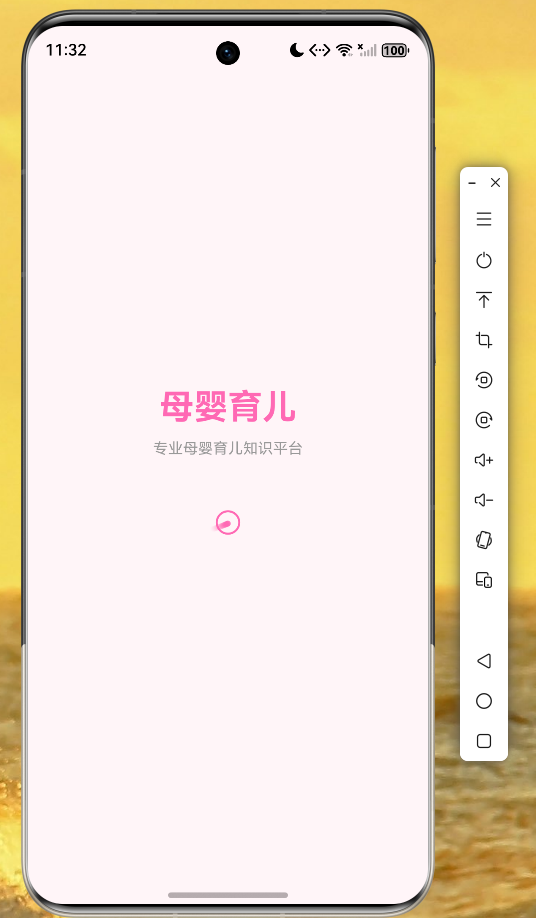
应用成功安装到鸿蒙设备后,首次启动将显示应用启动界面。Flutter for OpenHarmony 能够完美支持 Flutter 应用的编译和运行,在鸿蒙设备上呈现出流畅的用户体验。
知识页面
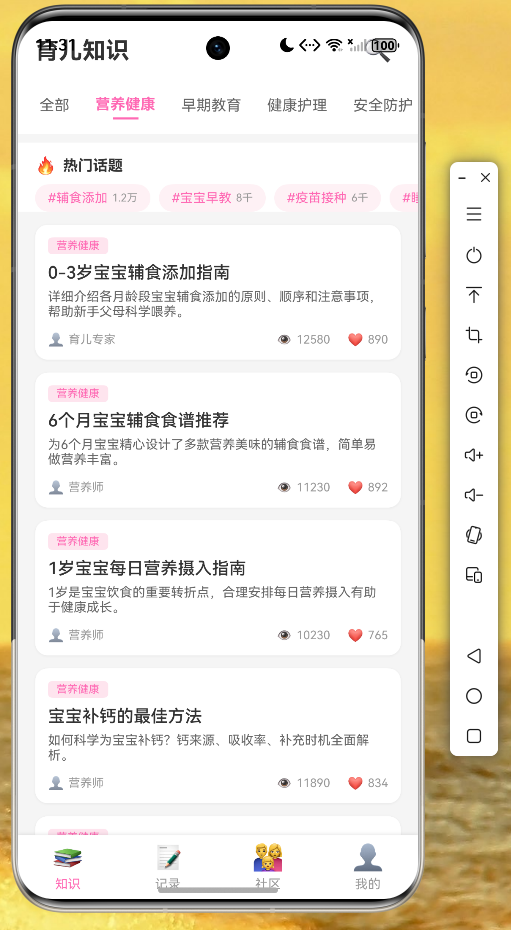
知识页面支持分类浏览,用户可以点击不同标签筛选感兴趣的内容。文章列表以卡片形式展示,包含标题、摘要、分类标签和阅读量统计。
个人中心页面
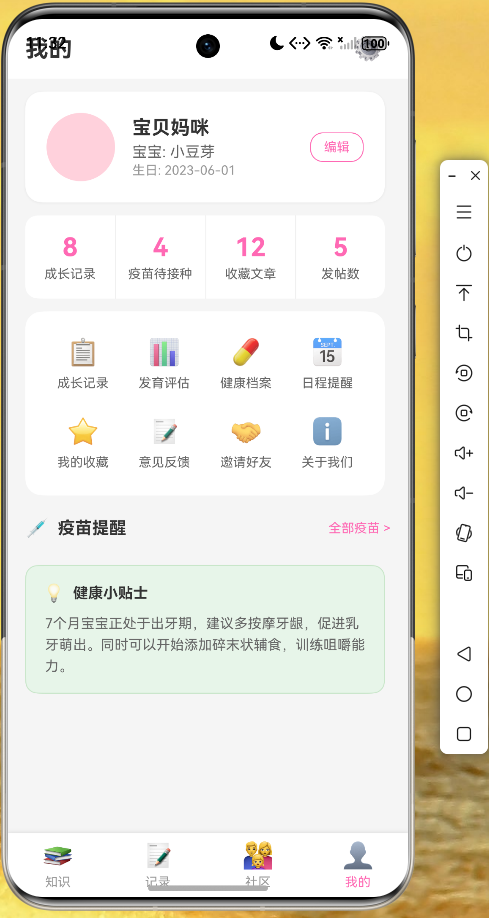
个人中心展示用户和宝宝的详细信息,以及疫苗接种提醒等实用功能。
十、开发心得与总结
通过这个母婴育儿应用的开发实践,我们可以看到 Flutter for OpenHarmony 在鸿蒙设备上的应用开发具有以下优势:
跨平台一致性:使用 Flutter 开发的界面在鸿蒙设备上能够保持与其他平台一致的视觉效果和交互体验,大大降低了多平台适配的成本。
开发效率提升:Flutter 的热重载功能让开发者可以快速预览代码修改效果,配合鸿蒙设备的调试能力,显著提升了开发效率。
生态兼容性:Flutter 丰富的第三方库生态在鸿蒙平台上同样可用,开发者可以根据项目需求灵活选择和集成。
UI 表现力:Flutter 的自定义渲染引擎让开发者能够实现精细化的 UI 设计,打造独具特色的应用界面。
在开发过程中,需要注意以下几点:
- 鸿蒙设备的屏幕适配,确保 UI 在不同分辨率下都能正常显示。
- 第三方库的鸿蒙兼容性,必要时需要进行适配或寻找替代方案。
- 性能优化,充分利用 Flutter 的性能优化技巧,确保应用流畅运行。
希望本文能够为读者提供有价值的参考,帮助更多开发者快速上手 Flutter for OpenHarmony 开发,共同推动鸿蒙生态的繁荣发展。
十一、参考资料
- Flutter 官方文档:https://flutter.dev
- OpenHarmony 开发者文档:https://developer.harmonyos.com
- Flutter for OpenHarmony 适配指南

开源鸿蒙跨平台开发社区汇聚开发者与厂商,共建“一次开发,多端部署”的开源生态,致力于降低跨端开发门槛,推动万物智联创新。
更多推荐
 8
8 0
0- 0


 已为社区贡献16条内容

所有评论(0)