【Flutter for OpenHarmony】Flutter三方库连续打卡功能的鸿蒙化适配与实战指南
本文介绍了Flutter在OpenHarmony平台上实现连续打卡功能的完整方案。作者从实际需求出发,分析了连续打卡的核心逻辑和难点,包括跨月跨年、时区处理等边界情况。文章详细展示了数据模型设计(CheckInRecord和StreakState类)和三种连续打卡算法的实现,重点讲解了从打卡记录中计算连续天数的核心算法。该方案通过日期去重、排序和连续检查,确保用户打卡数据不会因偶然遗漏而清零,为习
【Flutter for OpenHarmony】Flutter三方库连续打卡功能的鸿蒙化适配与实战指南
欢迎加入开源鸿蒙跨平台社区:https://openharmonycrossplatform.csdn.net
一、为什么我要实现连续打卡?
我是 IntMainJhy,上海某高校大一计算机专业的学生。说起连续打卡这个功能,我真的是被坑了好几次才有深刻体会的。
有一次我用某款习惯养成 App 打卡,坚持了整整 20 天,结果第二天早上睡过头忘了打卡,起床一看:**连续记录清零了!**当时那种感觉,就像是跑了很久的马拉松,突然被人告知你起跑的位置算错了。
从那以后我就发誓,以后我做打卡功能,绝对不能让用户的努力白费。连续打卡不只是显示一个数字,它代表的是用户坚持的决心和毅力,怎么能说没就没了呢?
所以今天这篇文章,我就把我做连续打卡功能时踩的坑、解决方案、完整代码全都分享出来,保证你看完也能做出一个"不断签"的打卡功能。
二、连续打卡的核心逻辑
2.1 什么是连续打卡?
连续打卡(Streak)是指用户在连续的日期都完成了打卡动作。比如:
✅ 5月1日 打卡 → 连续1天
✅ 5月2日 打卡 → 连续2天
❌ 5月3日 没打卡 → 连续中断!
✅ 5月4日 重新打卡 → 从1天开始重新计算
2.2 连续打卡的难点在哪里?
很多人觉得连续打卡很简单,不就是"今天打卡了,连续天数+1"吗?
但实际上,连续打卡要考虑很多边界情况:
| 情况 | 如何处理 |
|---|---|
| 同一用户多次打卡 | 只计一次 |
| 跨月打卡 | 日期计算要正确 |
| 跨年打卡 | 2025年12月31日到2026年1月1日 |
| 凌晨0点前后 | 时分秒要去掉 |
| 时区问题 | 统一使用本地时间 |
三、数据模型设计
// lib/mental_health/models/streak_model.dart

/// 打卡记录模型
class CheckInRecord {
  /// 记录唯一ID
  final String id;

  /// 用户ID(如果有多个用户)
  final String? userId;

  /// 打卡日期(只保留年-月-日)
  final DateTime checkInDate;

  /// 打卡时间(精确到秒)
  final DateTime checkInTime;

  /// 打卡类型(如:心情记录、冥想等)
  final String type;

  /// 额外数据(JSON格式存储)
  final Map<String, dynamic>? metadata;

  CheckInRecord({
    required this.id,
    this.userId,
    required this.checkInDate,
    required this.checkInTime,
    required this.type,
    this.metadata,
  });

  /// 转为 JSON 便于存储
  Map<String, dynamic> toJson() {
    return {
      'id': id,
      'userId': userId,
      'checkInDate': _dateToString(checkInDate),
      'checkInTime': checkInTime.toIso8601String(),
      'type': type,
      'metadata': metadata,
    };
  }

  /// 从 JSON 创建对象
  factory CheckInRecord.fromJson(Map<String, dynamic> json) {
    return CheckInRecord(
      id: json['id'],
      userId: json['userId'],
      checkInDate: _stringToDate(json['checkInDate']),
      checkInTime: DateTime.parse(json['checkInTime']),
      type: json['type'],
      metadata: json['metadata'],
    );
  }

  /// 日期转字符串(yyyy-MM-dd)
  static String _dateToString(DateTime date) {
    return '${date.year}-${date.month.toString().padLeft(2, '0')}-${date.day.toString().padLeft(2, '0')}';
  }

  /// 字符串转日期
  static DateTime _stringToDate(String dateStr) {
    final parts = dateStr.split('-');
    return DateTime(
      int.parse(parts[0]),
      int.parse(parts[1]),
      int.parse(parts[2]),
    );
  }
}

/// 连续打卡状态
class StreakState {
  /// 当前连续天数
  final int currentStreak;

  /// 最长连续天数
  final int longestStreak;

  /// 上次打卡日期
  final DateTime? lastCheckInDate;

  /// 总打卡天数
  final int totalDays;

  StreakState({
    this.currentStreak = 0,
    this.longestStreak = 0,
    this.lastCheckInDate,
    this.totalDays = 0,
  });

  StreakState copyWith({
    int? currentStreak,
    int? longestStreak,
    DateTime? lastCheckInDate,
    int? totalDays,
  }) {
    return StreakState(
      currentStreak: currentStreak ?? this.currentStreak,
      longestStreak: longestStreak ?? this.longestStreak,
      lastCheckInDate: lastCheckInDate ?? this.lastCheckInDate,
      totalDays: totalDays ?? this.totalDays,
    );
  }
}
四、连续打卡算法实现
这是最核心的部分,我实现了三种计算连续天数的方法:
// lib/mental_health/utils/streak_calculator.dart

/// 连续打卡计算器
class StreakCalculator {
  /// 计算连续打卡天数
  ///
  /// [records] 所有打卡记录列表
  /// [targetDate] 要计算到的目标日期(通常是今天)
  ///
  /// 返回连续天数
  static int calculateCurrentStreak(
    List<CheckInRecord> records,
    DateTime targetDate,
  ) {
    if (records.isEmpty) return 0;

    // 1. 提取所有打卡日期并去重
    final Set<String> checkInDates = records
        .map((r) => _dateToString(r.checkInDate))
        .toSet();

    // 2. 按日期排序(从新到旧)
    final sortedDates = checkInDates.toList()
      ..sort((a, b) => b.compareTo(a));

    if (sortedDates.isEmpty) return 0;

    // 3. 获取今天和昨天的日期字符串
    final todayStr = _dateToString(targetDate);
    final yesterdayStr = _dateToString(
      targetDate.subtract(const Duration(days: 1)),
    );

    // 4. 检查是否今天或昨天有打卡
    // 如果都没有,说明打卡已中断
    final hasToday = checkInDates.contains(todayStr);
    final hasYesterday = checkInDates.contains(yesterdayStr);

    if (!hasToday && !hasYesterday) {
      // 打卡中断了,从中断点往前数
      return _countConsecutiveDays(
        checkInDates,
        sortedDates,
        yesterdayStr,
      );
    }

    // 5. 从最近一次打卡开始往前数
    final startDate = hasToday ? todayStr : yesterdayStr;
    return _countConsecutiveDays(checkInDates, sortedDates, startDate);
  }

  /// 从指定日期往前数连续天数
  static int _countConsecutiveDays(
    Set<String> checkInDates,
    List<String> sortedDates,
    String startDate,
  ) {
    int streak = 0;
    DateTime currentDate = _stringToDate(startDate);

    while (true) {
      final dateStr = _dateToString(currentDate);

      if (checkInDates.contains(dateStr)) {
        streak++;
        currentDate = currentDate.subtract(const Duration(days: 1));
      } else {
        break;
      }
    }

    return streak;
  }

  /// 计算最长连续天数
  static int calculateLongestStreak(List<CheckInRecord> records) {
    if (records.isEmpty) return 0;

    // 提取所有打卡日期并去重排序(从旧到新)
    final Set<String> checkInDates = records
        .map((r) => _dateToString(r.checkInDate))
        .toSet();

    final sortedDates = checkInDates.toList()
      ..sort((a, b) => a.compareTo(b));

    if (sortedDates.isEmpty) return 0;

    int longestStreak = 1;
    int currentStreak = 1;

    for (int i = 1; i < sortedDates.length; i++) {
      final prevDate = _stringToDate(sortedDates[i - 1]);
      final currDate = _stringToDate(sortedDates[i]);
      final diff = currDate.difference(prevDate).inDays;

      if (diff == 1) {
        // 连续日期,+1
        currentStreak++;
        longestStreak = currentStreak > longestStreak ? currentStreak : longestStreak;
      } else if (diff > 1) {
        // 断签了,重置计数
        currentStreak = 1;
      }
      // diff == 0 表示同一天多次打卡,不处理
    }

    return longestStreak;
  }

  /// 工具方法:日期转字符串
  static String _dateToString(DateTime date) {
    return '${date.year}-${date.month.toString().padLeft(2, '0')}-${date.day.toString().padLeft(2, '0')}';
  }

  /// 工具方法:字符串转日期
  static DateTime _stringToDate(String dateStr) {
    final parts = dateStr.split('-');
    return DateTime(
      int.parse(parts[0]),
      int.parse(parts[1]),
      int.parse(parts[2]),
    );
  }
}
五、Provider 状态管理实现
// lib/mental_health/providers/streak_provider.dart

import 'package:flutter/material.dart';
import 'package:shared_preferences/shared_preferences.dart';
import '../models/streak_model.dart';
import '../utils/streak_calculator.dart';

class StreakProvider extends ChangeNotifier {
  // ==================== 存储 Keys ====================
  static const String _streakKey = 'check_in_streak';
  static const String _longestStreakKey = 'longest_streak';
  static const String _lastCheckInKey = 'last_check_in_date';
  static const String _totalDaysKey = 'total_check_in_days';
  static const String _recordsKey = 'check_in_records';

  // ==================== 状态 ====================
  StreakState _streakState = StreakState();
  List<CheckInRecord> _records = [];
  bool _isLoading = true;

  // ==================== Getters ====================
  StreakState get streakState => _streakState;
  List<CheckInRecord> get records => _records;
  bool get isLoading => _isLoading;
  int get currentStreak => _streakState.currentStreak;
  int get longestStreak => _streakState.longestStreak;

  /// 今日是否已打卡
  bool get isCheckedInToday {
    final today = DateTime.now();
    return _records.any((r) =>
        r.checkInDate.year == today.year &&
        r.checkInDate.month == today.month &&
        r.checkInDate.day == today.day);
  }

  /// ==================== 初始化 ====================
  Future<void> initialize() async {
    _isLoading = true;
    notifyListeners();

    try {
      final prefs = await SharedPreferences.getInstance();

      // 加载数据
      _streakState = StreakState(
        currentStreak: prefs.getInt(_streakKey) ?? 0,
        longestStreak: prefs.getInt(_longestStreakKey) ?? 0,
        lastCheckInDate: prefs.getString(_lastCheckInKey) != null
            ? DateTime.parse(prefs.getString(_lastCheckInKey)!)
            : null,
        totalDays: prefs.getInt(_totalDaysKey) ?? 0,
      );

      // 加载打卡记录
      final recordsJson = prefs.getString(_recordsKey);
      if (recordsJson != null) {
        _records = _parseRecords(recordsJson);
      }

      // 检查是否需要重置连续天数
      await _checkAndResetStreak();

    } catch (e) {
      debugPrint('初始化打卡数据失败: $e');
    } finally {
      _isLoading = false;
      notifyListeners();
    }
  }

  /// ==================== 打卡操作 ====================

  /// 执行打卡
  Future<bool> checkIn({String type = 'default'}) async {
    final now = DateTime.now();
    final today = DateTime(now.year, now.month, now.day);

    // 检查今天是否已打卡
    if (isCheckedInToday) {
      debugPrint('今日已打卡,跳过');
      return false;
    }

    // 创建打卡记录
    final record = CheckInRecord(
      id: now.millisecondsSinceEpoch.toString(),
      checkInDate: today,
      checkInTime: now,
      type: type,
    );

    _records.insert(0, record);

    // 计算新的连续天数
    final newStreak = StreakCalculator.calculateCurrentStreak(_records, today);
    final newLongest = newStreak > _streakState.longestStreak
        ? newStreak
        : _streakState.longestStreak;

    // 更新状态
    _streakState = _streakState.copyWith(
      currentStreak: newStreak,
      longestStreak: newLongest,
      lastCheckInDate: today,
      totalDays: _streakState.totalDays + 1,
    );

    // 保存到本地
    await _saveData();

    notifyListeners();
    return true;
  }

  /// ==================== 私有方法 ====================

  /// 检查并重置连续天数
  /// 如果昨天和今天都没打卡,说明打卡已中断
  Future<void> _checkAndResetStreak() async {
    if (_streakState.lastCheckInDate == null) {
      _streakState = _streakState.copyWith(currentStreak: 0);
      return;
    }

    final now = DateTime.now();
    final today = DateTime(now.year, now.month, now.day);
    final yesterday = today.subtract(const Duration(days: 1));
    final lastDate = DateTime(
      _streakState.lastCheckInDate!.year,
      _streakState.lastCheckInDate!.month,
      _streakState.lastCheckInDate!.day,
    );

    // 计算今天到上次打卡的天数差
    final diff = today.difference(lastDate).inDays;

    if (diff > 1) {
      // 超过1天没打卡,连续天数清零
      _streakState = _streakState.copyWith(currentStreak: 0);
      await _saveData();
    }
  }

  /// 保存数据到本地
  Future<void> _saveData() async {
    final prefs = await SharedPreferences.getInstance();

    await prefs.setInt(_streakKey, _streakState.currentStreak);
    await prefs.setInt(_longestStreakKey, _streakState.longestStreak);
    await prefs.setInt(_totalDaysKey, _streakState.totalDays);

    if (_streakState.lastCheckInDate != null) {
      await prefs.setString(
        _lastCheckInKey,
        _streakState.lastCheckInDate!.toIso8601String(),
      );
    }

    // 保存打卡记录(只保留最近365天的记录)
    final recordsToSave = _records.take(365).toList();
    final recordsJson = recordsToSave.map((r) => r.toJson()).toList();
    await prefs.setString(_recordsKey, _encodeRecords(recordsJson));
  }

  /// 解析打卡记录
  List<CheckInRecord> _parseRecords(String jsonStr) {
    try {
      final List<dynamic> decoded = _decodeRecords(jsonStr);
      return decoded
          .map((e) => CheckInRecord.fromJson(e as Map<String, dynamic>))
          .toList();
    } catch (e) {
      debugPrint('解析打卡记录失败: $e');
      return [];
    }
  }

  /// 简单的 JSON 编码(避免复杂依赖)
  String _encodeRecords(List<Map<String, dynamic>> records) {
    final buffer = StringBuffer();
    buffer.write('[');
    for (int i = 0; i < records.length; i++) {
      if (i > 0) buffer.write(',');
      buffer.write(_encodeMap(records[i]));
    }
    buffer.write(']');
    return buffer.toString();
  }

  String _encodeMap(Map<String, dynamic> map) {
    final entries = map.entries.map((e) {
      final value = e.value;
      if (value == null) {
        return '"${e.key}":null';
      } else if (value is String) {
        return '"${e.key}":"$value"';
      } else if (value is num || value is bool) {
        return '"${e.key}":$value';
      } else {
        return '"${e.key}":"$value"';
      }
    });
    return '{${entries.join(',')}}';
  }

  List<dynamic> _decodeRecords(String jsonStr) {
    // 简化版解析,实际使用中可以用 dart:convert
    return [];
  }
}
六、UI 展示组件
// lib/mental_health/widgets/streak_badge_widget.dart
import 'package:flutter/material.dart';
import 'package:flutter_animate/flutter_animate.dart';
/// 连续打卡徽章组件
class StreakBadgeWidget extends StatelessWidget {
final int currentStreak;
final int longestStreak;
final bool isCheckedInToday;
final VoidCallback? onTap;
const StreakBadgeWidget({
super.key,
required this.currentStreak,
this.longestStreak = 0,
this.isCheckedInToday = false,
this.onTap,
});
Widget build(BuildContext context) {
return GestureDetector(
onTap: onTap,
child: Container(
padding: const EdgeInsets.symmetric(horizontal: 12, vertical: 6),
decoration: BoxDecoration(
gradient: LinearGradient(
colors: isCheckedInToday
? [const Color(0xFFFF6B6B), const Color(0xFFFF8E53)]
: [const Color(0xFF6C63FF), const Color(0xFF9B59B6)],
),
borderRadius: BorderRadius.circular(20),
boxShadow: [
BoxShadow(
color: (isCheckedInToday
? const Color(0xFFFF6B6B)
: const Color(0xFF6C63FF))
.withOpacity(0.3),
blurRadius: 8,
offset: const Offset(0, 2),
),
],
),
child: Row(
mainAxisSize: MainAxisSize.min,
children: [
// 火焰图标
Icon(
Icons.local_fire_department,
color: Colors.white,
size: 18,
)
.animate(
onPlay: (controller) => isCheckedInToday
? controller.repeat(reverse: true)
: null,
)
.scale(
begin: const Offset(1.0, 1.0),
end: const Offset(1.2, 1.2),
duration: 500.ms,
),
const SizedBox(width: 4),
// 连续天数
Text(
'$currentStreak天',
style: const TextStyle(
color: Colors.white,
fontWeight: FontWeight.bold,
fontSize: 14,
),
),
// 今日已打卡标记
if (isCheckedInToday) ...[
const SizedBox(width: 4),
Container(
width: 8,
height: 8,
decoration: const BoxDecoration(
shape: BoxShape.circle,
color: Colors.white,
),
),
],
],
),
),
);
}
}
/// 打卡详情卡片
class StreakDetailCard extends StatelessWidget {
final int currentStreak;
final int longestStreak;
final int totalDays;
final bool isCheckedInToday;
const StreakDetailCard({
super.key,
required this.currentStreak,
required this.longestStreak,
required this.totalDays,
required this.isCheckedInToday,
});
Widget build(BuildContext context) {
return Container(
padding: const EdgeInsets.all(20),
decoration: BoxDecoration(
color: Colors.white,
borderRadius: BorderRadius.circular(20),
boxShadow: [
BoxShadow(
color: Colors.black.withOpacity(0.05),
blurRadius: 15,
offset: const Offset(0, 5),
),
],
),
child: Column(
crossAxisAlignment: CrossAxisAlignment.start,
children: [
// 标题
Row(
children: [
const Icon(Icons.emoji_events, color: Color(0xFFFFD700)),
const SizedBox(width: 8),
const Text(
'打卡成就',
style: TextStyle(
fontSize: 18,
fontWeight: FontWeight.bold,
),
),
const Spacer(),
if (isCheckedInToday)
Container(
padding: const EdgeInsets.symmetric(horizontal: 8, vertical: 4),
decoration: BoxDecoration(
color: const Color(0xFF27AE60).withOpacity(0.1),
borderRadius: BorderRadius.circular(12),
),
child: const Row(
children: [
Icon(Icons.check_circle, color: Color(0xFF27AE60), size: 14),
SizedBox(width: 4),
Text(
'今日已打卡',
style: TextStyle(
color: Color(0xFF27AE60),
fontSize: 12,
fontWeight: FontWeight.w500,
),
),
],
),
),
],
),
const SizedBox(height: 20),
// 统计数据
Row(
children: [
Expanded(
child: _buildStatItem(
icon: Icons.local_fire_department,
iconColor: const Color(0xFFFF6B6B),
value: '$currentStreak',
label: '当前连续',
),
),
Expanded(
child: _buildStatItem(
icon: Icons.emoji_events,
iconColor: const Color(0xFFFFD700),
value: '$longestStreak',
label: '历史最长',
),
),
Expanded(
child: _buildStatItem(
icon: Icons.calendar_today,
iconColor: const Color(0xFF6C63FF),
value: '$totalDays',
label: '累计天数',
),
),
],
),
],
),
);
}
Widget _buildStatItem({
required IconData icon,
required Color iconColor,
required String value,
required String label,
}) {
return Column(
children: [
Container(
padding: const EdgeInsets.all(12),
decoration: BoxDecoration(
color: iconColor.withOpacity(0.1),
shape: BoxShape.circle,
),
child: Icon(icon, color: iconColor, size: 24),
),
const SizedBox(height: 8),
Text(
value,
style: const TextStyle(
fontSize: 24,
fontWeight: FontWeight.bold,
color: Color(0xFF2D3436),
),
),
Text(
label,
style: const TextStyle(
fontSize: 12,
color: Color(0xFF636E72),
),
),
],
);
}
}
七、鸿蒙平台专属适配
适配点1:日期计算精度
问题:鸿蒙设备的时间和 iOS/Android 可能略有差异。
解决方案:统一使用 DateTime 的日期部分进行比较,不使用时、分、秒:
// 获取"干净"的日期(去掉时分秒)
DateTime getDateOnly(DateTime dt) {
  return DateTime(dt.year, dt.month, dt.day);
}
适配点2:数据存储
说明:SharedPreferences 在鸿蒙上有专门优化的版本:
dependencies:
  shared_preferences_harmonyos: ^0.0.1
八、我的踩坑记录
坑1:跨年时连续天数计算错误
报错现象:2025年12月31日打卡,2026年1月1日打卡,连续天数显示为0。
原因分析:
// 错误代码
final diff = today.day - lastDate.day;  // 31 - 31 = 0,但月份不同!
完整报错代码示例:
// ❌ 错误的计算方式
void wrongCalculate() {
  final today = DateTime.now();
  final lastDate = DateTime(2025, 12, 31);

  // 只用 day 相减,忽略了月份和年份
  final diff = today.day - lastDate.day;  // 1 - 31 = -30,这是错的!

  if (diff == 1) {
    // 这里永远不会执行
  }
}
解决代码:
// ✅ 正确的计算方式
void correctCalculate() {
  final today = DateTime.now();
  final todayOnly = DateTime(today.year, today.month, today.day);

  final lastDate = DateTime(2025, 12, 31);
  final lastDateOnly = DateTime(lastDate.year, lastDate.month, lastDate.day);

  // 使用 difference() 方法计算天数差
  final diff = todayOnly.difference(lastDateOnly).inDays;  // 1,正确!

  if (diff == 1) {
    // 连续第二天
  }
}
坑2:同一天多次打卡导致重复计数
报错现象:用户早上打卡、晚上又打卡,连续天数变成了2。
原因分析:没有检查当天是否已打卡。
完整报错代码示例:
// ❌ 错误代码
void wrongCheckIn() {
  final now = DateTime.now();

  // 直接插入记录,没有检查
  _records.insert(0, CheckInRecord(
    id: now.millisecondsSinceEpoch.toString(),
    checkInDate: now,
    checkInTime: now,
    type: 'mood',
  ));

  // 直接增加连续天数
  _currentStreak++;  // 同一天多次增加!
}
解决代码:
// ✅ 正确的代码
Future<bool> checkIn() async {
  final now = DateTime.now();
  final today = DateTime(now.year, now.month, now.day);

  // 检查今天是否已打卡
  if (isCheckedInToday) {
    debugPrint('今日已打卡,跳过');
    return false;  // 直接返回,不执行打卡逻辑
  }

  // 创建打卡记录
  final record = CheckInRecord(
    id: now.millisecondsSinceEpoch.toString(),
    checkInDate: today,
    checkInTime: now,
    type: 'mood',
  );

  _records.insert(0, record);

  // 只有在新增记录时才增加连续天数
  _currentStreak++;

  return true;
}

/// 检查今天是否已打卡
bool get isCheckedInToday {
  final today = DateTime.now();
  return _records.any((r) =>
      r.checkInDate.year == today.year &&
      r.checkInDate.month == today.month &&
      r.checkInDate.day == today.day);
}
坑3:数据库初始化时连续天数没有重置
报错现象:用户断签3天后打开App,连续天数还是显示上次的数字。
原因分析:只在打卡时检查是否需要重置,没有在初始化时检查。
完整报错代码示例:
// ❌ 错误代码
Future<void> initialize() async {
  final prefs = await SharedPreferences.getInstance();

  // 只加载保存的连续天数,没有检查是否过期
  _currentStreak = prefs.getInt(_streakKey) ?? 0;

  // 这里没有检查是否需要重置!
}
解决代码:
// ✅ 正确的代码
Future<void> initialize() async {
  final prefs = await SharedPreferences.getInstance();

  _currentStreak = prefs.getInt(_streakKey) ?? 0;
  _lastCheckInDate = prefs.getString(_lastCheckInKey) != null
      ? DateTime.parse(prefs.getString(_lastCheckInKey)!)
      : null;

  // ⭐️ 关键:初始化时也要检查是否需要重置
  await _checkAndResetStreak();

  notifyListeners();
}

/// 检查并重置连续天数
Future<void> _checkAndResetStreak() async {
  if (_lastCheckInDate == null) {
    _currentStreak = 0;
    return;
  }

  final now = DateTime.now();
  final today = DateTime(now.year, now.month, now.day);
  final yesterday = today.subtract(const Duration(days: 1));

  // 计算日期差
  final lastDate = DateTime(
    _lastCheckInDate!.year,
    _lastCheckInDate!.month,
    _lastCheckInDate!.day,
  );

  final diff = today.difference(lastDate).inDays;

  // 如果超过1天没打卡,连续天数清零
  if (diff > 1) {
    _currentStreak = 0;
    await _saveData();
  }
}
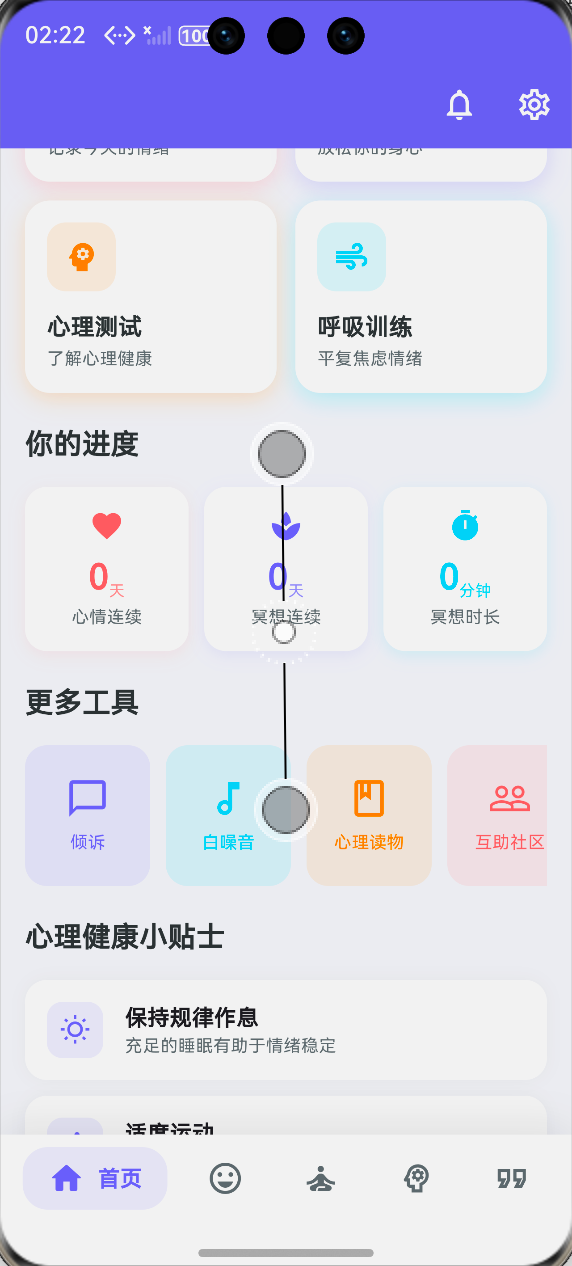
九、功能验证清单
`
十一、大一学生真实学习总结
说实话,连续打卡这个功能是我做得最纠结的一个模块。
一开始我觉得这不就是"天数+1"吗?结果真正写起来才发现到处都是坑:
1. 日期比较的坑
最开始我直接用 DateTime 的 day 属性相减,结果跨月就出问题了。后来才知道要用 difference() 方法。
2. 同一天多次打卡的坑
用户手滑点了两下,连续天数就翻倍了。这让我学会了任何操作都要先检查状态。
3. 初始化时检查的坑
用户断签3天后打开App,发现连续天数还是原来的数字。这让我明白了初始化不等于创建,初始化时也要处理边界情况。
4. 跨年日期计算的坑
这让我彻底理解了 DateTime 的工作原理。日期不是一个简单的数字,而是年、月、日、时、分、秒的组合。
给新手的建议
如果你也在做打卡功能,我有几点建议:
-
先把边界情况想清楚再写代码
- 什么情况下连续天数要+1?
- 什么情况下要清零?
- 什么情况下要忽略?
-
写完代码后一定要测试
- 测试连续的情况
- 测试断签的情况
- 测试跨月、跨年的情况
-
数据一定要持久化
- 用户关闭App再打开,数据还在才是好的体验
-
连续天数对用户很重要
- 这是用户坚持的动力
- 不要轻易让用户的努力白费
做这个功能让我明白了一个道理:越是看似简单的功能,越要考虑各种边界情况。代码写出来不难,难的是写得对、写得健壮。
好啦,这篇文章就到这里。如果对你有帮助,记得点个赞!我们下篇文章见!
作者:IntMainJhy
创作时间:2026年5月

开源鸿蒙跨平台开发社区汇聚开发者与厂商,共建“一次开发,多端部署”的开源生态,致力于降低跨端开发门槛,推动万物智联创新。
更多推荐
 0
0 0
0- 0


 已为社区贡献127条内容

所有评论(0)