Flutter for OpenHarmony三方库适配实战:audioplayers 音频播放
欢迎加入开源鸿蒙跨平台社区:https://openharmonycrossplatform.csdn.net
本文基于flutter3.27.5开发
一、audioplayers 库概述
音频播放是移动应用的核心功能之一,用于游戏音效、音乐播放器、语音提示、通知声音等场景。在 Flutter for OpenHarmony 应用开发中,audioplayers 是一个轻量级的音频播放插件,提供了简单易用的跨平台音频播放能力。
audioplayers 库特点
audioplayers 库基于 Flutter 平台接口实现,提供了以下核心特性:
多音频源支持:支持从 URL、本地文件、Asset、字节流等多种来源播放音频。
多实例播放:支持同时创建多个播放器实例,实现多音频同时播放。
播放控制:支持播放、暂停、停止、跳转、音量调节、播放速度控制等。
循环模式:支持单曲循环、列表循环、不循环等多种播放模式。
状态监听:提供播放状态、播放位置、音频时长等实时监听。
低延迟播放:支持低延迟模式,适合游戏音效场景。
播放模式对比
| 模式 | 说明 | 适用场景 |
|---|---|---|
| mediaPlayer | 媒体播放器模式,支持所有功能 | 音乐播放器、播客 |
| lowLatency | 低延迟模式,适合短音效 | 游戏音效、通知声音 |
音频格式支持对比
| 音频格式 | Android | iOS | OpenHarmony |
|---|---|---|---|
| MP3 | ✅ | ✅ | ✅ |
| AAC | ✅ | ✅ | ✅ |
| WAV | ✅ | ✅ | ✅ |
| OGG | ✅ | ✅ | ✅ |
| FLAC | ✅ | ✅ | ✅ |
使用场景:游戏音效、音乐播放器、语音提示、通知声音、按钮音效、背景音乐等。
二、安装与配置
2.1 添加依赖
在项目的 pubspec.yaml 文件中添加 audioplayers 依赖:
dependencies:
  audioplayers:
    git:
      url: https://atomgit.com/openharmony-sig/flutter_audioplayers.git
      path: packages/audioplayers
然后执行以下命令获取依赖:
flutter pub get
2.2 权限配置
如果需要播放网络音频,需要在 OpenHarmony 项目中配置网络权限。打开 ohos/entry/src/main/module.json5 文件,添加以下权限:
{
  "module": {
    "requestPermissions": [
      {
        "name": "ohos.permission.INTERNET",
        "reason": "$string:reason_internet",
        "usedScene": {
          "abilities": ["EntryAbility"],
          "when": "inuse"
        }
      }
    ]
  }
}
三、核心 API 详解
3.1 AudioPlayer 播放器
AudioPlayer 是音频播放的核心类,每个实例可以播放一个音频。
| 属性/方法 | 类型 | 说明 |
|---|---|---|
| state | PlayerState | 当前播放状态 |
| source | Source? | 当前音频源 |
| mode | PlayerMode | 播放模式 |
| releaseMode | ReleaseMode | 释放模式 |
| playerId | String | 播放器唯一 ID |
3.2 PlayerState 播放状态
| 状态 | 说明 |
|---|---|
| stopped | 已停止 |
| playing | 正在播放 |
| paused | 已暂停 |
| completed | 播放完成 |
| disposed | 已释放 |
3.3 PlayerMode 播放模式
| 模式 | 说明 |
|---|---|
| mediaPlayer | 媒体播放器模式,功能完整 |
| lowLatency | 低延迟模式,适合短音效 |
3.4 ReleaseMode 释放模式
| 模式 | 说明 |
|---|---|
| release | 播放完成后释放资源 |
| loop | 循环播放 |
| stop | 播放完成后停止但不释放 |
3.5 Source 音频源
| 类型 | 说明 |
|---|---|
| UrlSource | 从 URL 加载音频 |
| DeviceFileSource | 从本地文件加载音频 |
| AssetSource | 从 Asset 加载音频 |
| BytesSource | 从字节流加载音频 |
四、播放器 API 详解
4.1 play 方法
播放音频,支持同时设置多个参数。
Future<void> play(
  Source source, {
  double? volume,
  double? balance,
  AudioContext? ctx,
  Duration? position,
  PlayerMode? mode,
})
参数说明:
| 参数 | 类型 | 说明 |
|---|---|---|
| source | Source | 音频源 |
| volume | double? | 音量 (0.0 ~ 1.0) |
| balance | double? | 平衡 (-1.0 ~ 1.0) |
| ctx | AudioContext? | 音频上下文 |
| position | Duration? | 起始位置 |
| mode | PlayerMode? | 播放模式 |
使用示例:
final player = AudioPlayer();
await player.play(UrlSource('https://example.com/audio.mp3'));
await player.play(AssetSource('sounds/click.mp3'));
await player.play(DeviceFileSource('/path/to/audio.mp3'));
4.2 pause 方法
暂停播放。
Future<void> pause()
使用示例:
await player.pause();
4.3 resume 方法
恢复播放。
Future<void> resume()
使用示例:
await player.resume();
4.4 stop 方法
停止播放,位置重置到开头。
Future<void> stop()
使用示例:
await player.stop();
4.5 release 方法
释放播放器资源。
Future<void> release()
使用示例:
await player.release();
4.6 seek 方法
跳转到指定位置。
Future<void> seek(Duration position)
参数说明:
| 参数 | 类型 | 说明 |
|---|---|---|
| position | Duration | 目标位置 |
使用示例:
await player.seek(Duration(seconds: 30));
await player.seek(Duration(minutes: 2));
4.7 setVolume 方法
设置音量。
Future<void> setVolume(double volume)
参数说明:
| 参数 | 类型 | 说明 |
|---|---|---|
| volume | double | 音量值,范围 0.0 ~ 1.0 |
使用示例:
await player.setVolume(0.5);
await player.setVolume(0.0);
4.8 setBalance 方法
设置左右声道平衡。
Future<void> setBalance(double balance)
参数说明:
| 参数 | 类型 | 说明 |
|---|---|---|
| balance | double | 平衡值,-1.0 (左) ~ 1.0 (右) |
使用示例:
await player.setBalance(-1.0);
await player.setBalance(1.0);
await player.setBalance(0.0);
4.9 setPlaybackRate 方法
设置播放速度。
Future<void> setPlaybackRate(double playbackRate)
参数说明:
| 参数 | 类型 | 说明 |
|---|---|---|
| playbackRate | double | 播放速度倍率 |
使用示例:
await player.setPlaybackRate(1.5);
await player.setPlaybackRate(0.5);
4.10 setReleaseMode 方法
设置释放模式。
Future<void> setReleaseMode(ReleaseMode releaseMode)
参数说明:
| 参数 | 类型 | 说明 |
|---|---|---|
| releaseMode | ReleaseMode | 释放模式 |
使用示例:
await player.setReleaseMode(ReleaseMode.loop);
await player.setReleaseMode(ReleaseMode.release);
await player.setReleaseMode(ReleaseMode.stop);
4.11 setPlayerMode 方法
设置播放模式。
Future<void> setPlayerMode(PlayerMode mode)
使用示例:
await player.setPlayerMode(PlayerMode.lowLatency);
await player.setPlayerMode(PlayerMode.mediaPlayer);
4.12 getDuration 方法
获取音频总时长。
Future<Duration?> getDuration()
返回值:返回音频总时长。
使用示例:
final duration = await player.getDuration();
print('时长: $duration');
4.13 getCurrentPosition 方法
获取当前播放位置。
Future<Duration?> getCurrentPosition()
返回值:返回当前播放位置。
使用示例:
final position = await player.getCurrentPosition();
print('位置: $position');
4.14 dispose 方法
释放播放器并关闭所有流。
Future<void> dispose()
使用示例:
await player.dispose();
五、流式 API 详解
5.1 onPlayerStateChanged 属性
播放状态变化流。
Stream<PlayerState> get onPlayerStateChanged
使用示例:
player.onPlayerStateChanged.listen((state) {
  print('状态: $state');
  if (state == PlayerState.completed) {
    print('播放完成');
  }
});
5.2 onPositionChanged 属性
播放位置变化流,约每 200 毫秒更新一次。
Stream<Duration> get onPositionChanged
使用示例:
player.onPositionChanged.listen((position) {
  print('位置: $position');
});
5.3 onDurationChanged 属性
音频时长变化流,音频加载完成后触发。
Stream<Duration> get onDurationChanged
使用示例:
player.onDurationChanged.listen((duration) {
  print('时长: $duration');
});
5.4 onPlayerComplete 属性
播放完成事件流。
Stream<void> get onPlayerComplete
使用示例:
player.onPlayerComplete.listen((_) {
  print('播放完成');
});
5.5 onSeekComplete 属性
跳转完成事件流。
Stream<void> get onSeekComplete
使用示例:
player.onSeekComplete.listen((_) {
  print('跳转完成');
});
5.6 onLog 属性
日志事件流。
Stream<String> get onLog
使用示例:
player.onLog.listen((log) {
  print('日志: $log');
});
六、音频源 API 详解
6.1 UrlSource
从 URL 加载音频。
UrlSource(String url)
使用示例:
await player.setSource(UrlSource('https://example.com/audio.mp3'));
await player.play(UrlSource('https://example.com/audio.mp3'));
6.2 DeviceFileSource
从本地文件加载音频。
DeviceFileSource(String path)
使用示例:
await player.setSource(DeviceFileSource('/path/to/audio.mp3'));
await player.play(DeviceFileSource('/path/to/audio.mp3'));
6.3 AssetSource
从 Asset 加载音频。
AssetSource(String path)
使用示例:
await player.setSource(AssetSource('sounds/click.mp3'));
await player.play(AssetSource('sounds/click.mp3'));
6.4 BytesSource
从字节流加载音频。
BytesSource(Uint8List bytes)
使用示例:
final bytes = await File('/path/to/audio.mp3').readAsBytes();
await player.setSource(BytesSource(bytes));
await player.play(BytesSource(bytes));
七、OpenHarmony 平台实现原理
7.1 原生 API 映射
| Flutter API | OpenHarmony API |
|---|---|
| 媒体播放器 | media.AVPlayer |
| 低延迟播放 | audio.SoundPool |
| 网络播放 | AVPlayer.url = “http://…” |
| 本地播放 | AVPlayer.url = “fd://” + fd |
| 播放控制 | AVPlayer.play/pause/stop |
| 跳转 | AVPlayer.seek() |
| 音量 | AVPlayer.setVolume() |
| 速度 | AVPlayer.setSpeed() |
7.2 播放器实现
OpenHarmony 使用 AVPlayer 实现媒体播放,使用 SoundPool 实现低延迟播放:
export default class WrappedPlayer {
  private avPlayer: media.AVPlayer | null = null;
  private soundPool: audio.SoundPool | null = null;
  private source: Source | null = null;
  private releaseMode: ReleaseMode = ReleaseMode.release;
  private playerMode: PlayerMode = PlayerMode.mediaPlayer;

  async setSource(source: Source) {
    this.source = source;
    if (this.playerMode === PlayerMode.lowLatency) {
      await this.prepareSoundPool(source);
    } else {
      await this.prepareAVPlayer(source);
    }
  }

  async prepareAVPlayer(source: Source) {
    this.avPlayer = await media.createAVPlayer();
    this.setAVPlayerCallback();

    if (source instanceof UrlSource) {
      if (source.isLocal) {
        let file = fs.openSync(source.url, fs.OpenMode.READ_ONLY);
        this.avPlayer.url = "fd://" + file.fd;
      } else {
        this.avPlayer.url = source.url;
      }
    } else if (source instanceof BytesSource) {
      this.avPlayer.url = "data://audio/mp3;base64," + this.bytesToBase64(source.bytes);
    }
  }

  setAVPlayerCallback() {
    this.avPlayer?.on('stateChange', async (state: string) => {
      switch (state) {
        case 'initialized':
          await this.avPlayer?.prepare();
          break;
        case 'prepared':
          this.plugin.handlePrepared(this, true);
          break;
        case 'playing':
          this.plugin.handleIsPlaying();
          break;
        case 'completed':
          if (this.releaseMode === ReleaseMode.loop) {
            await this.avPlayer?.seek(0);
            await this.avPlayer?.play();
          } else {
            this.plugin.handleComplete(this);
          }
          break;
      }
    });
  }

  play() {
    this.avPlayer?.play();
  }

  pause() {
    this.avPlayer?.pause();
  }

  stop() {
    this.avPlayer?.stop();
  }

  seek(position: number) {
    this.avPlayer?.seek(position);
  }

  setVolume(volume: number) {
    this.avPlayer?.setVolume(volume);
  }

  setRate(rate: number) {
    this.avPlayer?.setSpeed(rate);
  }
}
7.3 后台播放支持
async startContinuousTask() {
  let context = this.abilityBinding!.getAbility().context;
  let type: AVSessionManager.AVSessionType = 'audio';
  this.session = await AVSessionManager.createAVSession(context, 'audioplayers', type);
  await this.session?.activate();

  let wantAgentInfo: wantAgent.WantAgentInfo = {
    wants: [{
      bundleName: context?.abilityInfo.bundleName,
      abilityName: context?.abilityInfo.name
    }],
    actionType: wantAgent.OperationType.START_ABILITY,
    requestCode: 0,
    wantAgentFlags: [wantAgent.WantAgentFlags.UPDATE_PRESENT_FLAG]
  };

  let wantAgentObj = await wantAgent.getWantAgent(wantAgentInfo);
  await backgroundTaskManager.startBackgroundRunning(
    context,
    backgroundTaskManager.BackgroundMode.AUDIO_PLAYBACK,
    wantAgentObj
  );
}
八、MethodChannel 通信协议
8.1 Channel 名称
const MethodChannel _channel = MethodChannel('xyz.luan/audioplayers');
const MethodChannel _globalChannel = MethodChannel('xyz.luan/audioplayers.global');
8.2 方法列表
| 方法 | 参数 | 返回值 |
|---|---|---|
| create | playerId | void |
| setSourceUrl | playerId, url, isLocal | void |
| setSourceBytes | playerId, bytes | void |
| resume | playerId | void |
| pause | playerId | void |
| stop | playerId | void |
| release | playerId | void |
| seek | playerId, position | void |
| setVolume | playerId, volume | void |
| setBalance | playerId, balance | void |
| setPlaybackRate | playerId, playbackRate | void |
| getDuration | playerId | int |
| getCurrentPosition | playerId | int |
| setReleaseMode | playerId, releaseMode | void |
| setPlayerMode | playerId, playerMode | void |
| setAudioContext | playerId, ctx | void |
| dispose | playerId | void |
九、实战案例
9.1 准备音频资源
在运行示例之前,需要准备音频文件并配置 asset:
-
在项目根目录创建
assets/audio/文件夹 -
放入以下音频文件:
bgm.mp3- 背景音乐click.mp3- 点击音效success.mp3- 成功音效error.mp3- 错误音效
⚠️ 重要提示:音频文件命名规范
在 OpenHarmony 平台上,音频资源文件名必须使用英文字符,不支持中文文件名。使用中文文件名会导致音频无法正常加载和播放。
错误示例:
晴天.mp3❌稻香.mp3❌告白气球.mp3❌正确示例:
qingtian.mp3✅daoxiang.mp3✅gaobaiqiqiu.mp3✅这是因为 OpenHarmony 的 AudioCache 在加载 asset 时,对中文路径的编码处理存在问题。建议在项目开发中统一使用英文或拼音命名音频资源文件。
- 在
pubspec.yaml中配置:
flutter:
  assets:
    - assets/audio/
9.2 完整多音频播放器示例
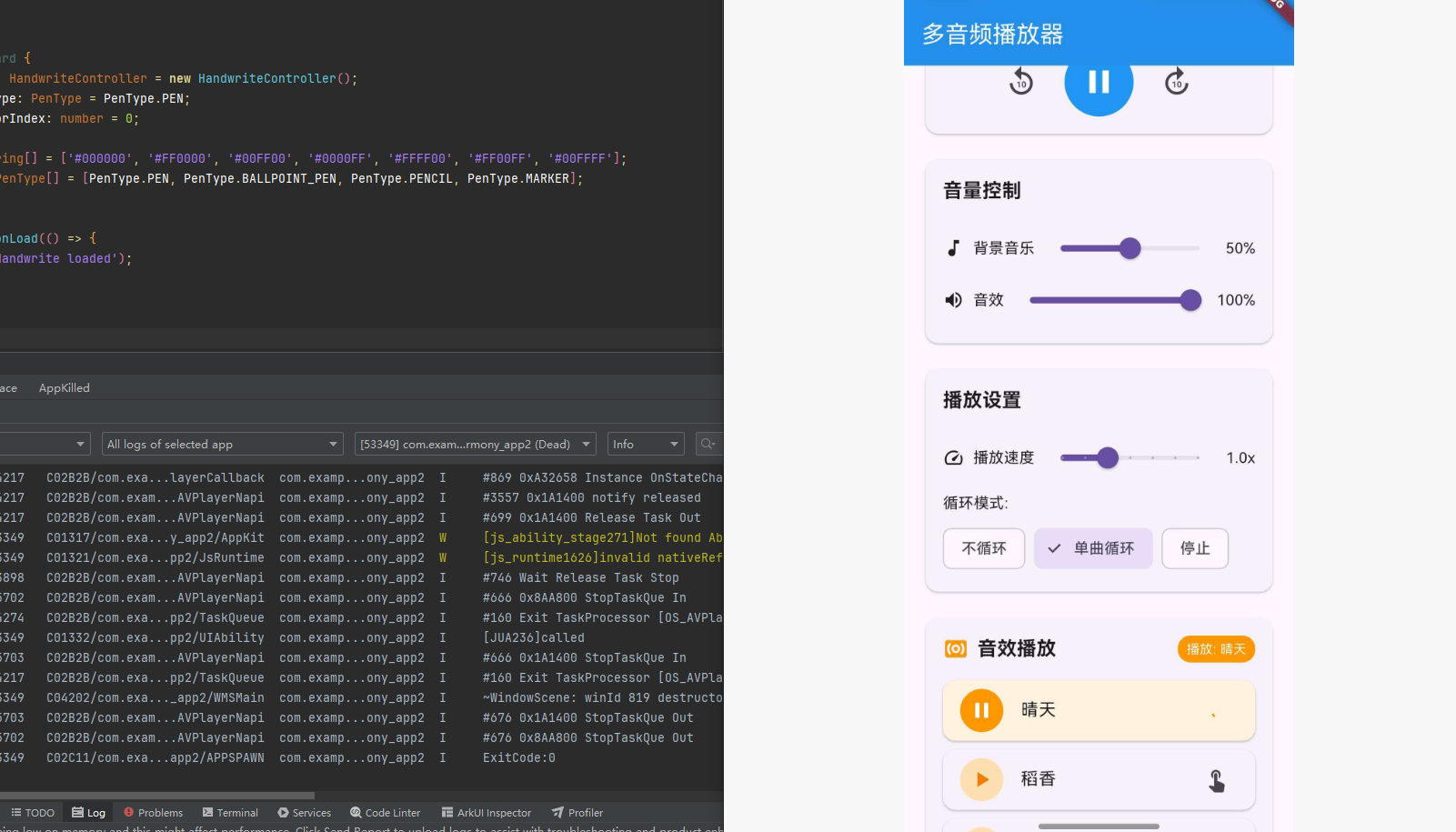
import 'dart:async';
import 'package:flutter/material.dart';
import 'package:audioplayers/audioplayers.dart';
void main() {
runApp(const MaterialApp(home: MultiAudioPlayerPage()));
}
class MultiAudioPlayerPage extends StatefulWidget {
const MultiAudioPlayerPage({super.key});
State<MultiAudioPlayerPage> createState() => _MultiAudioPlayerPageState();
}
class _MultiAudioPlayerPageState extends State<MultiAudioPlayerPage> {
final AudioPlayer _bgmPlayer = AudioPlayer();
final AudioPlayer _sfxPlayer = AudioPlayer();
bool _isBgmPlaying = false;
bool _isSfxPlaying = false;
Duration _bgmDuration = Duration.zero;
Duration _bgmPosition = Duration.zero;
double _bgmVolume = 0.5;
double _sfxVolume = 1.0;
double _playbackRate = 1.0;
ReleaseMode _releaseMode = ReleaseMode.loop;
StreamSubscription? _bgmStateSubscription;
StreamSubscription? _bgmPositionSubscription;
StreamSubscription? _bgmDurationSubscription;
StreamSubscription? _sfxStateSubscription;
final String _bgmAsset = 'audio/bgm.mp3';
final List<Map<String, String>> _soundEffects = [
{'name': '点击音效', 'asset': 'audio/click.mp3'},
{'name': '成功音效', 'asset': 'audio/success.mp3'},
{'name': '错误音效', 'asset': 'audio/error.mp3'},
];
void initState() {
super.initState();
_initPlayers();
}
Future<void> _initPlayers() async {
_bgmStateSubscription = _bgmPlayer.onPlayerStateChanged.listen((state) {
setState(() {
_isBgmPlaying = state == PlayerState.playing;
});
});
_bgmPositionSubscription = _bgmPlayer.onPositionChanged.listen((position) {
setState(() {
_bgmPosition = position;
});
});
_bgmDurationSubscription = _bgmPlayer.onDurationChanged.listen((duration) {
setState(() {
_bgmDuration = duration;
});
});
_sfxStateSubscription = _sfxPlayer.onPlayerStateChanged.listen((state) {
setState(() {
_isSfxPlaying = state == PlayerState.playing;
});
});
await _bgmPlayer.setReleaseMode(ReleaseMode.loop);
await _bgmPlayer.setVolume(_bgmVolume);
await _sfxPlayer.setVolume(_sfxVolume);
}
void dispose() {
_bgmStateSubscription?.cancel();
_bgmPositionSubscription?.cancel();
_bgmDurationSubscription?.cancel();
_sfxStateSubscription?.cancel();
_bgmPlayer.dispose();
_sfxPlayer.dispose();
super.dispose();
}
Future<void> _toggleBgm() async {
if (_isBgmPlaying) {
await _bgmPlayer.pause();
} else {
if (_bgmPlayer.state == PlayerState.stopped ||
_bgmPlayer.state == PlayerState.completed) {
await _bgmPlayer.play(AssetSource(_bgmAsset));
} else {
await _bgmPlayer.resume();
}
}
}
Future<void> _playSfx(String asset) async {
await _sfxPlayer.stop();
await _sfxPlayer.play(AssetSource(asset), mode: PlayerMode.lowLatency);
}
Future<void> _setBgmVolume(double volume) async {
await _bgmPlayer.setVolume(volume);
setState(() {
_bgmVolume = volume;
});
}
Future<void> _setSfxVolume(double volume) async {
await _sfxPlayer.setVolume(volume);
setState(() {
_sfxVolume = volume;
});
}
Future<void> _setPlaybackRate(double rate) async {
await _bgmPlayer.setPlaybackRate(rate);
setState(() {
_playbackRate = rate;
});
}
Future<void> _setReleaseMode(ReleaseMode mode) async {
await _bgmPlayer.setReleaseMode(mode);
setState(() {
_releaseMode = mode;
});
}
Future<void> _seekBgm(Duration position) async {
await _bgmPlayer.seek(position);
}
String _formatDuration(Duration duration) {
String twoDigits(int n) => n.toString().padLeft(2, '0');
final minutes = twoDigits(duration.inMinutes.remainder(60));
final seconds = twoDigits(duration.inSeconds.remainder(60));
return '$minutes:$seconds';
}
Widget build(BuildContext context) {
return Scaffold(
appBar: AppBar(
title: const Text('多音频播放器'),
backgroundColor: Colors.blue,
foregroundColor: Colors.white,
),
body: SingleChildScrollView(
padding: const EdgeInsets.all(16),
child: Column(
crossAxisAlignment: CrossAxisAlignment.start,
children: [
Card(
child: Padding(
padding: const EdgeInsets.all(16),
child: Column(
crossAxisAlignment: CrossAxisAlignment.start,
children: [
Row(
children: [
const Icon(Icons.music_note, color: Colors.blue),
const SizedBox(width: 8),
const Text(
'背景音乐',
style: TextStyle(
fontSize: 18,
fontWeight: FontWeight.bold,
),
),
const Spacer(),
Container(
padding: const EdgeInsets.symmetric(horizontal: 8, vertical: 4),
decoration: BoxDecoration(
color: _isBgmPlaying ? Colors.green : Colors.grey,
borderRadius: BorderRadius.circular(12),
),
child: Text(
_isBgmPlaying ? '播放中' : '已暂停',
style: const TextStyle(color: Colors.white, fontSize: 12),
),
),
],
),
const SizedBox(height: 16),
SliderTheme(
data: SliderTheme.of(context).copyWith(
trackHeight: 4,
thumbShape: const RoundSliderThumbShape(enabledThumbRadius: 8),
),
child: Slider(
value: _bgmPosition.inMilliseconds.toDouble(),
max: _bgmDuration.inMilliseconds.toDouble() > 0
? _bgmDuration.inMilliseconds.toDouble()
: 1.0,
onChanged: (value) {
_seekBgm(Duration(milliseconds: value.toInt()));
},
),
),
Padding(
padding: const EdgeInsets.symmetric(horizontal: 8),
child: Row(
mainAxisAlignment: MainAxisAlignment.spaceBetween,
children: [
Text(_formatDuration(_bgmPosition)),
Text(_formatDuration(_bgmDuration)),
],
),
),
const SizedBox(height: 16),
Row(
mainAxisAlignment: MainAxisAlignment.center,
children: [
IconButton(
icon: const Icon(Icons.replay_10),
iconSize: 32,
onPressed: () {
final newPosition = _bgmPosition - const Duration(seconds: 10);
_seekBgm(newPosition.isNegative ? Duration.zero : newPosition);
},
),
const SizedBox(width: 16),
Container(
width: 64,
height: 64,
decoration: BoxDecoration(
color: Colors.blue,
borderRadius: BorderRadius.circular(32),
),
child: IconButton(
icon: Icon(
_isBgmPlaying ? Icons.pause : Icons.play_arrow,
color: Colors.white,
),
iconSize: 36,
onPressed: _toggleBgm,
),
),
const SizedBox(width: 16),
IconButton(
icon: const Icon(Icons.forward_10),
iconSize: 32,
onPressed: () {
final newPosition = _bgmPosition + const Duration(seconds: 10);
if (newPosition < _bgmDuration) {
_seekBgm(newPosition);
}
},
),
],
),
],
),
),
),
const SizedBox(height: 16),
Card(
child: Padding(
padding: const EdgeInsets.all(16),
child: Column(
crossAxisAlignment: CrossAxisAlignment.start,
children: [
const Text(
'音量控制',
style: TextStyle(
fontSize: 18,
fontWeight: FontWeight.bold,
),
),
const SizedBox(height: 16),
Row(
children: [
const Icon(Icons.music_note, size: 20),
const SizedBox(width: 8),
const Text('背景音乐'),
Expanded(
child: Slider(
value: _bgmVolume,
onChanged: _setBgmVolume,
),
),
Text('${(_bgmVolume * 100).toInt()}%'),
],
),
Row(
children: [
const Icon(Icons.volume_up, size: 20),
const SizedBox(width: 8),
const Text('音效'),
Expanded(
child: Slider(
value: _sfxVolume,
onChanged: _setSfxVolume,
),
),
Text('${(_sfxVolume * 100).toInt()}%'),
],
),
],
),
),
),
const SizedBox(height: 16),
Card(
child: Padding(
padding: const EdgeInsets.all(16),
child: Column(
crossAxisAlignment: CrossAxisAlignment.start,
children: [
const Text(
'播放设置',
style: TextStyle(
fontSize: 18,
fontWeight: FontWeight.bold,
),
),
const SizedBox(height: 16),
Row(
children: [
const Icon(Icons.speed, size: 20),
const SizedBox(width: 8),
const Text('播放速度'),
Expanded(
child: Slider(
value: _playbackRate,
min: 0.5,
max: 2.0,
divisions: 6,
onChanged: _setPlaybackRate,
),
),
Text('${_playbackRate}x'),
],
),
const SizedBox(height: 8),
const Text('循环模式:'),
const SizedBox(height: 8),
Wrap(
spacing: 8,
children: [
ChoiceChip(
label: const Text('不循环'),
selected: _releaseMode == ReleaseMode.release,
onSelected: (selected) {
if (selected) _setReleaseMode(ReleaseMode.release);
},
),
ChoiceChip(
label: const Text('单曲循环'),
selected: _releaseMode == ReleaseMode.loop,
onSelected: (selected) {
if (selected) _setReleaseMode(ReleaseMode.loop);
},
),
ChoiceChip(
label: const Text('停止'),
selected: _releaseMode == ReleaseMode.stop,
onSelected: (selected) {
if (selected) _setReleaseMode(ReleaseMode.stop);
},
),
],
),
],
),
),
),
const SizedBox(height: 16),
Card(
child: Padding(
padding: const EdgeInsets.all(16),
child: Column(
crossAxisAlignment: CrossAxisAlignment.start,
children: [
Row(
children: [
const Icon(Icons.surround_sound, color: Colors.orange),
const SizedBox(width: 8),
const Text(
'音效播放',
style: TextStyle(
fontSize: 18,
fontWeight: FontWeight.bold,
),
),
const Spacer(),
if (_isSfxPlaying)
const SizedBox(
width: 16,
height: 16,
child: CircularProgressIndicator(strokeWidth: 2),
),
],
),
const SizedBox(height: 16),
...List.generate(_soundEffects.length, (index) {
final sfx = _soundEffects[index];
return Card(
margin: const EdgeInsets.only(bottom: 8),
child: ListTile(
leading: CircleAvatar(
backgroundColor: Colors.orange.shade100,
child: Icon(
Icons.play_arrow,
color: Colors.orange.shade700,
),
),
title: Text(sfx['name']!),
trailing: const Icon(Icons.touch_app),
onTap: () => _playSfx(sfx['asset']!),
),
);
}),
],
),
),
),
const SizedBox(height: 16),
Card(
child: Padding(
padding: const EdgeInsets.all(16),
child: Column(
crossAxisAlignment: CrossAxisAlignment.start,
children: [
const Text(
'使用说明',
style: TextStyle(
fontSize: 18,
fontWeight: FontWeight.bold,
),
),
const SizedBox(height: 8),
const Text('• 背景音乐使用 mediaPlayer 模式,支持完整功能'),
const Text('• 音效使用 lowLatency 模式,延迟更低'),
const Text('• 多个播放器可以同时播放,互不干扰'),
const Text('• 音效播放时会自动停止上一个音效'),
],
),
),
),
],
),
),
);
}
}
十、常见问题与解决方案
10.1 音频加载失败
问题:调用 play 时抛出异常或无声音。
解决方案:
- 检查网络权限是否配置
- 检查 URL 是否有效
- 使用 try-catch 捕获异常
try {
  await player.play(UrlSource(url));
} catch (e) {
  print('播放失败: $e');
}
10.2 Asset 音频无法播放(中文文件名问题)
问题:使用 AssetSource 加载本地音频资源时,音频无法播放,但使用远程 URL 可以正常播放。
原因:OpenHarmony 平台的 AudioCache 在加载 asset 文件时,对中文文件名的路径编码处理存在问题,导致无法正确读取音频文件。
解决方案:
- 音频资源文件名必须使用英文字符
- 使用拼音或英文单词命名音频文件
- 避免在文件名中使用中文、特殊字符或空格
// ❌ 错误:使用中文文件名
await player.play(AssetSource('audio/晴天.mp3'));

// ✅ 正确:使用英文或拼音文件名
await player.play(AssetSource('audio/qingtian.mp3'));
10.3 多个音频同时播放
问题:需要同时播放背景音乐和音效。
解决方案:
- 创建多个 AudioPlayer 实例
- 背景音乐使用 mediaPlayer 模式
- 音效使用 lowLatency 模式
final bgmPlayer = AudioPlayer();
final sfxPlayer = AudioPlayer();

await bgmPlayer.play(UrlSource(bgmUrl));
await sfxPlayer.play(UrlSource(sfxUrl), mode: PlayerMode.lowLatency);
10.4 播放位置不准确
问题:进度条显示的位置与实际播放位置不一致。
解决方案:
- 使用
onPositionChanged监听位置变化 - 确保在主线程更新 UI
10.5 内存泄漏
问题:播放器资源未释放导致内存泄漏。
解决方案:
- 在页面销毁时调用
dispose()方法 - 取消所有流订阅
void dispose() {
_positionSubscription?.cancel();
_player.dispose();
super.dispose();
}
10.5 音效延迟过高
问题:游戏音效播放延迟过高。
解决方案:
- 使用
PlayerMode.lowLatency模式 - 预加载音效文件
await player.setPlayerMode(PlayerMode.lowLatency);
await player.play(AssetSource('sounds/click.mp3'));
十一、最佳实践
- 资源管理:始终在不需要时调用
dispose()释放资源 - 多播放器:使用多个播放器实例实现多音频同时播放
- 低延迟:游戏音效使用
lowLatency模式 - 错误处理:使用 try-catch 处理加载和播放异常
- 状态监听:使用 Stream 监听播放状态变化
- 循环模式:根据需求选择合适的
ReleaseMode - 音量分离:背景音乐和音效使用独立的音量控制

开源鸿蒙跨平台开发社区汇聚开发者与厂商,共建“一次开发,多端部署”的开源生态,致力于降低跨端开发门槛,推动万物智联创新。
更多推荐
 6
6 0
0- 0


 已为社区贡献97条内容

所有评论(0)