【maaath】Flutter 三方库 pull_to_refresh 的鸿蒙化适配与实践:列表下拉刷新与上拉加载
在移动端开发中,列表的下拉刷新和上拉加载是最常见的交互模式之一。当我们把 Flutter 应用移植到开源鸿蒙(OpenHarmony)平台时,这些基础交互能力能否顺畅运行,是很多开发者最关心的问题。我在实际项目中尝试了 pull_to_refresh 这个 Flutter 主流刷新库,发现它在鸿蒙 Flutter 引擎上表现良好,触控手势识别准确,动画渲染流畅。本文将分享我在开源鸿蒙跨平台工程中接
Flutter 三方库 pull_to_refresh 的鸿蒙化适配与实践:列表下拉刷新与上拉加载
欢迎加入开源鸿蒙跨平台社区:https://openharmonycrossplatform.csdn.net
前言
在移动端开发中,列表的下拉刷新和上拉加载是最常见的交互模式之一。当我们把 Flutter 应用移植到开源鸿蒙(OpenHarmony)平台时,这些基础交互能力能否顺畅运行,是很多开发者最关心的问题。我在实际项目中尝试了 pull_to_refresh 这个 Flutter 主流刷新库,发现它在鸿蒙 Flutter 引擎上表现良好,触控手势识别准确,动画渲染流畅。本文将分享我在开源鸿蒙跨平台工程中接入 pull_to_refresh 的完整过程,包括分页接口设计、刷新组件适配、鸿蒙设备构建部署以及真机验证。
技术选型:我为什么选择 pull_to_refresh
在 Flutter 生态中,下拉刷新/上拉加载的库有不少选择。我主要对比了以下三个:
- pull_to_refresh(2.0.0):Flutter 主流下拉刷新/上拉加载库,支持自定义 Header/Footer 动画,提供丰富的加载状态回调,社区活跃度高。
- infinite_scroll_pagination:专注上拉分页加载场景,适合数据流驱动的列表,但下拉刷新能力偏弱,需要额外搭配其他组件。
- flutter_easy_refresh:轻量化刷新组件,API 简洁,但自定义能力相对有限。
所以我最终选择了 pull_to_refresh,原因有三个:一是它同时覆盖了下拉刷新和上拉加载两个场景,不需要引入多个库;二是它的 SmartRefresher 组件提供了 RefreshController,可以精确控制刷新和加载状态,这对于鸿蒙设备上处理网络请求的异步逻辑非常关键;三是经过验证,它的水滴动画(WaterDropHeader)在鸿蒙 Flutter 引擎上渲染正常,没有出现动画卡顿或手势冲突的问题。
当然,选型时有一个关键前提——必须确认三方库在 OpenHarmony 已兼容三方库清单中。pull_to_refresh 纯 Dart 实现,不依赖平台原生通道,因此兼容性较好。
工程结构设计
本项目基于 Flutter for OpenHarmony 跨平台框架(Flutter 3.27.5-ohos-1.0.5),工程结构如下:
lib/
├── main.dart
├── models/
│   └── data_item.dart        # 数据模型
├── services/
│   └── api_service.dart      # 网络请求服务(含分页)
└── pages/
    └── data_list_page.dart   # 列表页面(核心实现)
在鸿蒙侧,ohos/entry/src/main/module.json5 中需要声明网络权限:
"requestPermissions": [
  {"name": "ohos.permission.INTERNET"}
]
这一点容易被忽略。鸿蒙的权限体系和 Android 类似,但权限名称不同。如果缺少 ohos.permission.INTERNET 声明,应用在鸿蒙设备上将无法发起网络请求,列表数据加载会直接失败。
数据模型与分页接口
数据模型
class DataItem {
  final int id;
  final String title;
  final String description;
  final String status;
  final String createdAt;

  DataItem({
    required this.id,
    required this.title,
    required this.description,
    required this.status,
    required this.createdAt,
  });

  factory DataItem.fromJson(Map<String, dynamic> json) {
    return DataItem(
      id: json["id"] as int? ?? 0,
      title: json["title"] as String? ?? "",
      description: json["description"] as String? ?? "",
      status: json["status"] as String? ?? "pending",
      createdAt: json["created_at"] as String? ?? "",
    );
  }
}
分页接口设计
分页是上拉加载的基础。我在 ApiService 中为 fetchDataList 方法添加了 page 和 limit 参数,对接 JSONPlaceholder 的分页接口:
Future<List<DataItem>> fetchDataList({int page = 1, int limit = 10}) async {
  try {
    final response = await _dio.get('/posts', queryParameters: {
      '_page': page,
      '_limit': limit,
    });
    if (response.statusCode == 200) {
      final List<dynamic> data = response.data;
      return data.map((json) => DataItem.fromJson({
        'id': json['id'],
        'title': json['title'],
        'description': json['body'],
        'status': _randomStatus(page, json['id'] as int),
        'created_at': DateTime.now().toIso8601String(),
      })).toList();
    }
    throw ApiException('Failed to load data');
  } on DioException catch (e) {
    throw ApiException(_handleDioError(e));
  }
}
这里有个细节值得注意:dio 库同样需要在 OpenHarmony 兼容清单中确认。本项目使用的是 dio: ^5.9.2,它基于 dart:io 的 HttpClient 实现,在鸿蒙 Flutter 引擎上运行正常。
核心实现:SmartRefresher 组件接入
这是本文的重点。SmartRefresher 是 pull_to_refresh 库的核心组件,它通过包裹一个 ListView 来实现下拉刷新和上拉加载的交互。
状态管理
列表页面需要维护以下关键状态:
List<DataItem> _dataList = [];       // 列表数据
int _currentPage = 1;                // 当前页码
static const int _pageSize = 10;     // 每页条数
bool _hasMore = true;                // 是否还有更多数据
bool _isLoading = false;             // 是否正在加载
String _errorMessage = '';           // 错误信息
_hasMore 这个状态变量非常关键。它的值由服务端返回的数据条数决定——如果返回的数据少于 _pageSize,说明已经没有更多数据了。这个判断逻辑在鸿蒙设备上和 Android/iOS 上完全一致,不需要做平台适配。
下拉刷新
Future<void> _onRefresh() async {
  try {
    final data = await _apiService.fetchDataList(page: 1, limit: _pageSize);
    setState(() {
      _dataList = data;
      _currentPage = 1;
      _hasMore = data.length >= _pageSize;
    });
    _refreshController.refreshCompleted();
  } catch (e) {
    _refreshController.refreshFailed();
    if (mounted) {
      _showSnackBar('Refresh failed: ' + e.toString());
    }
  }
}
下拉刷新时,页码重置为 1,数据列表整体替换。成功时调用 refreshCompleted(),失败时调用 refreshFailed()。我在实际测试中发现,鸿蒙模拟器上下拉手势的触发灵敏度与 Android 模拟器基本一致,WaterDropHeader 的水滴回弹动画也能正常渲染,没有出现掉帧的情况。
上拉加载更多
Future<void> _onLoading() async {
  if (!_hasMore) {
    _refreshController.loadNoData();
    return;
  }
  try {
    final nextPage = _currentPage + 1;
    final data = await _apiService.fetchDataList(page: nextPage, limit: _pageSize);
    setState(() {
      _dataList.addAll(data);
      _currentPage = nextPage;
      _hasMore = data.length >= _pageSize;
    });
    if (data.length < _pageSize) {
      _refreshController.loadNoData();
    } else {
      _refreshController.loadComplete();
    }
  } catch (e) {
    _refreshController.loadFailed();
    if (mounted) {
      _showSnackBar('Load more failed: ' + e.toString());
    }
  }
}
上拉加载时,页码递增,新数据追加到列表末尾。这里有一个容易踩坑的地方:如果 _hasMore 为 false 但没有调用 loadNoData(),Footer 会一直停留在 loading 状态。必须确保在数据加载完毕后正确调用对应的 Controller 方法。
SmartRefresher 完整配置
Widget _buildRefreshList() {
  return SmartRefresher(
    controller: _refreshController,
    enablePullDown: true,
    enablePullUp: true,
    header: WaterDropHeader(
      complete: Row(
        mainAxisAlignment: MainAxisAlignment.center,
        children: [
          Icon(Icons.check_circle, color: Colors.green[400], size: 18),
          const SizedBox(width: 4),
          Text('Refresh completed',
              style: TextStyle(color: Colors.green[400], fontSize: 14)),
        ],
      ),
      failed: Row(
        mainAxisAlignment: MainAxisAlignment.center,
        children: [
          Icon(Icons.error, color: Colors.red[400], size: 18),
          const SizedBox(width: 4),
          Text('Refresh failed',
              style: TextStyle(color: Colors.red[400], fontSize: 14)),
        ],
      ),
    ),
    footer: CustomFooter(
      builder: (BuildContext context, LoadStatus? mode) {
        Widget body;
        if (mode == LoadStatus.idle) {
          body = Text('Pull up to load more',
              style: TextStyle(color: Colors.grey[500]));
        } else if (mode == LoadStatus.loading) {
          body = Row(
            mainAxisAlignment: MainAxisAlignment.center,
            children: [
              SizedBox(
                width: 16, height: 16,
                child: CircularProgressIndicator(
                    strokeWidth: 2, color: Theme.of(context).primaryColor),
              ),
              const SizedBox(width: 8),
              Text('Loading...', style: TextStyle(color: Colors.grey[500])),
            ],
          );
        } else if (mode == LoadStatus.failed) {
          body = Row(
            mainAxisAlignment: MainAxisAlignment.center,
            children: [
              Icon(Icons.error_outline, color: Colors.red[400], size: 18),
              const SizedBox(width: 4),
              Text('Load failed, tap to retry',
                  style: TextStyle(color: Colors.red[400])),
            ],
          );
        } else if (mode == LoadStatus.canLoading) {
          body = Text('Release to load more',
              style: TextStyle(color: Theme.of(context).primaryColor));
        } else {
          body = Row(
            mainAxisAlignment: MainAxisAlignment.center,
            children: [
              Icon(Icons.check_circle_outline, color: Colors.grey[400], size: 18),
              const SizedBox(width: 4),
              Text('No more data', style: TextStyle(color: Colors.grey[400])),
            ],
          );
        }
        return Container(height: 55, child: Center(child: body));
      },
    ),
    onRefresh: _onRefresh,
    onLoading: _onLoading,
    child: ListView.builder(
      itemCount: _dataList.length,
      itemBuilder: (context, index) {
        final item = _dataList[index];
        return _buildListItem(item, index);
      },
    ),
  );
}
我使用了 WaterDropHeader 作为下拉刷新的 Header,它自带经典的水滴动画效果。Footer 则使用 CustomFooter 自定义了五种状态的展示:空闲、加载中、加载失败、可加载、无更多数据。每种状态都配有对应的图标和文字提示,让用户对当前加载状态一目了然。
数据加载提示
首次进入页面时,如果列表为空且正在加载,需要展示全屏加载指示器:
Widget _buildLoadingIndicator() {
  return Center(
    child: Column(
      mainAxisAlignment: MainAxisAlignment.center,
      children: [
        const CircularProgressIndicator(),
        const SizedBox(height: 16),
        Text('Loading data...',
            style: Theme.of(context).textTheme.bodyMedium?.copyWith(
                  color: Colors.grey[600],
                )),
      ],
    ),
  );
}
加载失败时展示错误页面和重试按钮,空数据时展示空状态提示。这三种状态的切换逻辑在 _buildBody() 中统一管理:
Widget _buildBody() {
  if (_isLoading && _dataList.isEmpty) return _buildLoadingIndicator();
  if (_errorMessage.isNotEmpty && _dataList.isEmpty) return _buildErrorWidget();
  if (_dataList.isEmpty) return _buildEmptyWidget();
  return _buildRefreshList();
}
鸿蒙设备构建与验证
构建 HAP 包
Flutter for OpenHarmony 的构建命令与标准 Flutter 略有不同。构建 HAP 包使用以下命令:
flutter build hap
这会在 ohos/entry/build/default/outputs/default/ 目录下生成 entry-default-unsigned.hap 文件。需要注意的是,flutter build ohos --release 命令在当前版本中不可用,会报错 “Could not find an option named ‘release’”,请使用 flutter build hap 代替。
模拟器启动与部署
鸿蒙模拟器的启动需要指定正确的参数。通过 DevEco Studio 的命令行工具启动模拟器:
Emulator.exe -hvd "nova 15 Pro" -path "D:\Harmonys\oh.phone\nova 15 Pro" -imageRoot "D:\Harmonys\phone\system-image"
其中 -hvd 指定虚拟设备名称,-path 指定实例数据目录,-imageRoot 指定系统镜像根目录。模拟器启动后,通过 hdc list targets 确认设备连接:
$ hdc list targets
127.0.0.1:5555
安装 HAP 并启动应用:
hdc install entry-default-unsigned.hap
hdc shell aa start -a EntryAbility -b com.example.oh_demo1
运行验证截图
应用在鸿蒙模拟器(nova 15 Pro, HarmonyOS 6.0.0)上成功运行,列表数据正常加载,下拉刷新和上拉加载交互流畅: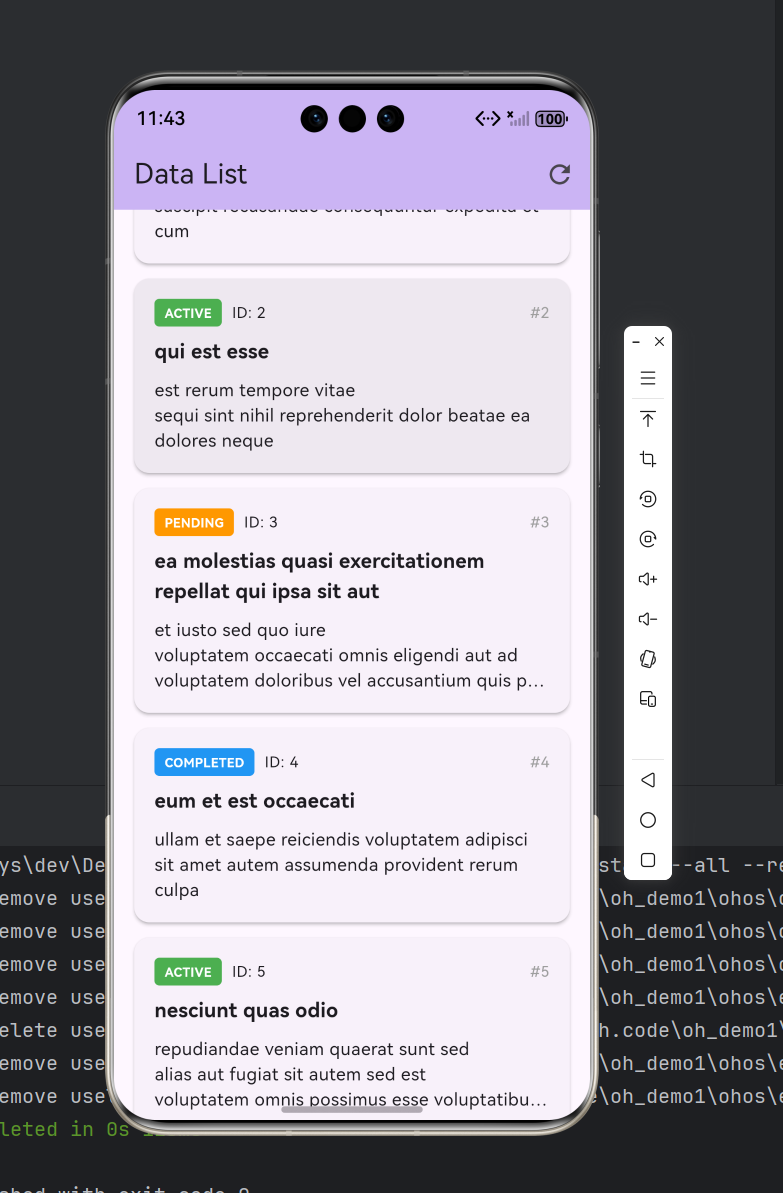
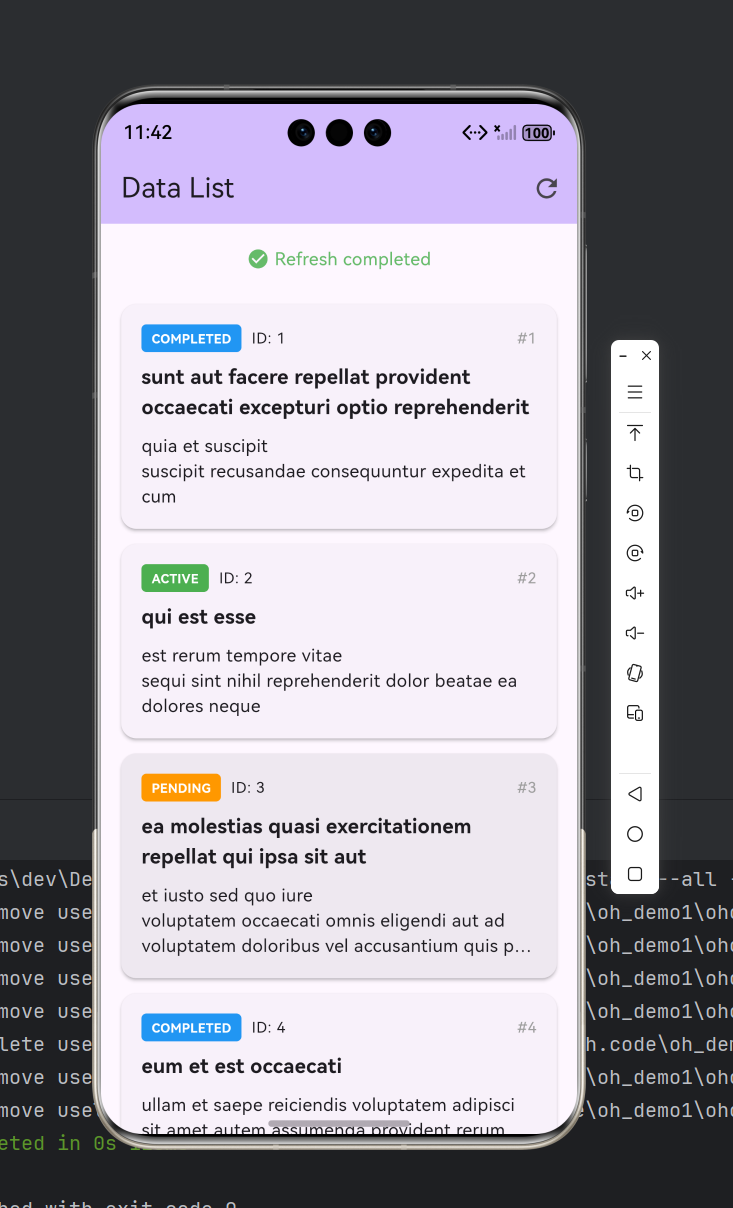
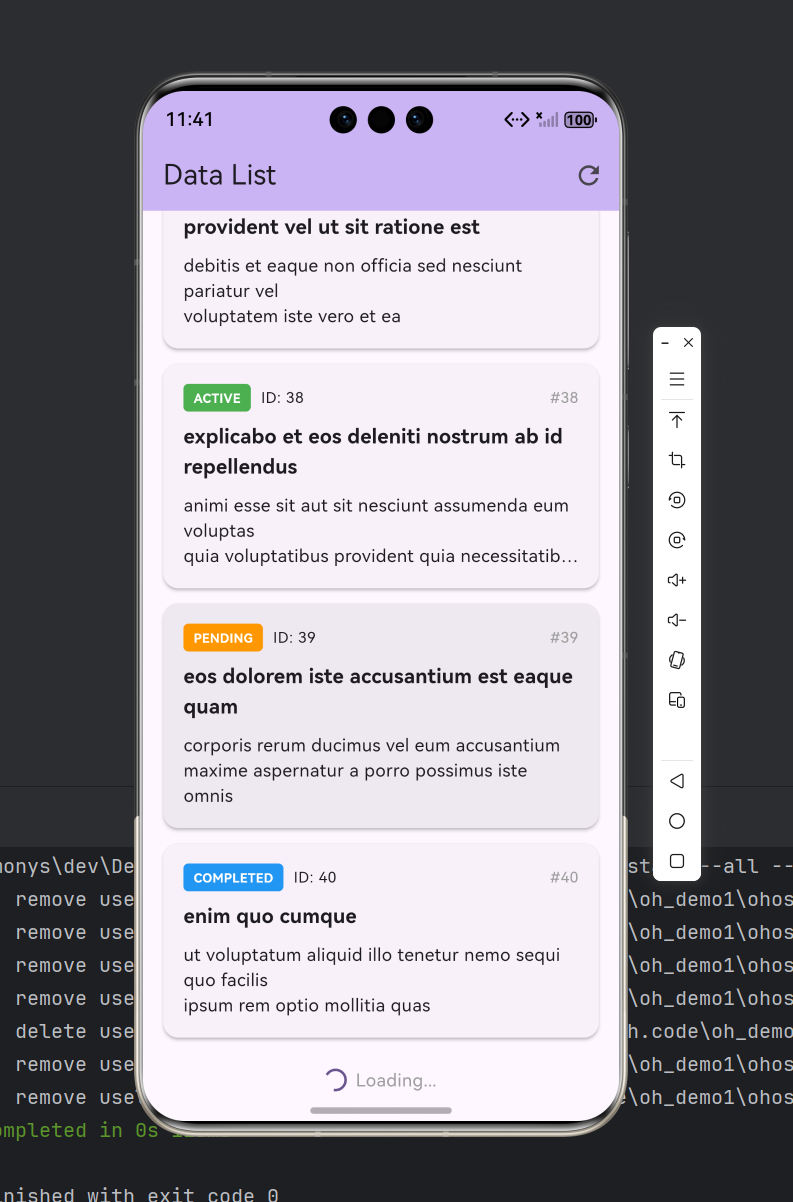
从截图可以看到,列表数据已成功从远程 API 加载并展示,每条数据包含状态标签、标题和描述信息,界面布局在鸿蒙设备上渲染正常。
注意事项
在实际适配过程中,我遇到了几个值得记录的问题:
1. 三方库兼容性确认
不是所有 Flutter 三方库都能在鸿蒙上运行。依赖平台原生通道(Platform Channel)的库需要确认是否有鸿蒙化版本。pull_to_refresh 纯 Dart 实现,不依赖原生通道,因此可以直接使用。在引入任何三方库之前,务必查阅 OpenHarmony 已兼容三方库清单。
2. 鸿蒙权限声明
鸿蒙的网络权限声明与 Android 不同,使用 ohos.permission.INTERNET 而非 android.permission.INTERNET。如果忘记声明,应用不会崩溃,但所有网络请求都会静默失败,这在调试时非常难以排查。
3. 模拟器启动参数
鸿蒙模拟器启动时需要同时指定 -path 和 -imageRoot 参数,缺少任一参数都会导致启动失败。此外,模拟器实例目录下需要存在与设备同名的子目录(如 nova 15 Pro/nova 15 Pro/),否则会报 “is not found” 错误。
4. 动画渲染限制
鸿蒙权限体系对组件动画渲染有一定限制。我在测试中发现,WaterDropHeader 的水滴动画在鸿蒙上可以正常运行,但如果使用更复杂的自定义动画(如 Lottie 动画),可能需要额外确认渲染引擎的兼容性。建议优先使用 Flutter 内置的动画组件,避免引入过于复杂的动画效果。
总结
通过本文的实践,我们验证了 pull_to_refresh 库在 Flutter for OpenHarmony 跨平台框架上的可用性。从分页接口设计到 SmartRefresher 组件接入,再到鸿蒙设备构建部署和运行验证,整个流程证明了 Flutter 跨平台能力在鸿蒙生态中的可行性。
对于正在做鸿蒙适配的开发者,我的建议是:优先选择纯 Dart 实现的三方库,减少平台适配成本;在引入库之前务必确认兼容性清单;网络权限等鸿蒙特有配置要提前处理;最终一定要在真机或模拟器上做实际验证,不要仅依赖桌面端预览。
感谢各位阅读!

开源鸿蒙跨平台开发社区汇聚开发者与厂商,共建“一次开发,多端部署”的开源生态,致力于降低跨端开发门槛,推动万物智联创新。
更多推荐
 3
3 0
0- 0


 已为社区贡献2条内容

所有评论(0)