Flutter for OpenHarmony三方库适配实战:just_audio 音频播放
欢迎加入开源鸿蒙跨平台社区:https://openharmonycrossplatform.csdn.net
本文基于flutter3.27.5开发
一、just_audio 库概述
音频播放是移动应用的核心功能之一,用于音乐播放器、播客应用、有声读物、语音消息等场景。在 Flutter for OpenHarmony 应用开发中,just_audio 是一个功能强大的音频播放插件,提供了完整的跨平台音频播放能力。
just_audio 库特点
just_audio 库基于 Flutter 平台接口实现,提供了以下核心特性:
多种音频源:支持从 URL、本地文件、Asset、字节流等多种来源播放音频。
播放列表:支持播放列表管理,包括顺序播放、随机播放、循环播放等模式。
播放控制:支持播放、暂停、停止、跳转、音量调节、播放速度控制等。
状态监听:提供播放状态、播放位置、缓冲位置、音频时长等实时监听。
后台播放:支持与 audio_session 配合实现后台播放和音频焦点管理。
音频处理:支持音频剪辑、音调调节、静音跳过等高级功能。
音频格式支持对比
| 音频格式 | Android | iOS | OpenHarmony |
|---|---|---|---|
| MP3 | ✅ | ✅ | ✅ |
| AAC | ✅ | ✅ | ✅ |
| WAV | ✅ | ✅ | ✅ |
| FLAC | ✅ | ✅ | ✅ |
| OGG | ✅ | ✅ | ✅ |
| M3U8 | ✅ | ✅ | ✅ |
| DASH | ✅ | ✅ | ✅ |
使用场景:音乐播放器、播客应用、有声读物、语音消息、在线电台、音频学习应用等。
二、安装与配置
2.1 添加依赖
在项目的 pubspec.yaml 文件中添加 just_audio_ohos 依赖:
dependencies:
  just_audio_ohos:
    git:
      url: https://atomgit.com/openharmony-sig/fluttertpc_just_audio.git
      path: just_audio/ohos
然后执行以下命令获取依赖:
flutter pub get
2.2 权限配置
如果需要播放网络音频,需要在 OpenHarmony 项目中配置网络权限。打开 ohos/entry/src/main/module.json5 文件,添加以下权限:
{
  "module": {
    "requestPermissions": [
      {
        "name": "ohos.permission.INTERNET",
        "reason": "$string:reason_internet",
        "usedScene": {
          "abilities": ["EntryAbility"],
          "when": "inuse"
        }
      }
    ]
  }
}
三、核心 API 详解
3.1 AudioPlayer 播放器
AudioPlayer 是音频播放的核心类,提供完整的播放控制功能。
| 属性/方法 | 类型 | 说明 |
|---|---|---|
| playing | bool | 是否正在播放 |
| volume | double | 当前音量 (0.0 ~ 1.0) |
| speed | double | 当前播放速度 |
| pitch | double | 当前音调 |
| duration | Duration? | 音频总时长 |
| position | Duration | 当前播放位置 |
| bufferedPosition | Duration | 缓冲位置 |
| processingState | ProcessingState | 处理状态 |
| loopMode | LoopMode | 循环模式 |
| shuffleModeEnabled | bool | 是否启用随机播放 |
| currentIndex | int? | 当前播放索引 |
3.2 ProcessingState 处理状态
| 状态 | 说明 |
|---|---|
| idle | 空闲状态,未加载音频 |
| loading | 正在加载音频 |
| buffering | 正在缓冲 |
| ready | 准备就绪,可以播放 |
| completed | 播放完成 |
3.3 LoopMode 循环模式
| 模式 | 说明 |
|---|---|
| off | 不循环 |
| one | 单曲循环 |
| all | 列表循环 |
3.4 AudioSource 音频源
| 类型 | 说明 |
|---|---|
| AudioSource.uri | 从 URL 或文件路径加载 |
| ClippingAudioSource | 剪辑音频源 |
| ConcatenatingAudioSource | 播放列表音频源 |
| LoopingAudioSource | 循环音频源 |
四、播放器 API 详解
4.1 setUrl 方法
设置音频 URL 并准备播放。
Future<Duration?> setUrl(String url, {Map<String, String>? headers})
参数说明:
| 参数 | 类型 | 说明 |
|---|---|---|
| url | String | 音频 URL 或文件路径 |
| headers | Map<String, String>? | HTTP 请求头 |
返回值:返回音频总时长。
使用示例:
final player = AudioPlayer();
await player.setUrl('https://example.com/audio.mp3');
4.2 setFilePath 方法
设置本地文件路径并准备播放。
Future<Duration?> setFilePath(String path)
参数说明:
| 参数 | 类型 | 说明 |
|---|---|---|
| path | String | 本地文件路径 |
使用示例:
await player.setFilePath('/path/to/audio.mp3');
4.3 setAsset 方法
设置 Asset 资源并准备播放。
Future<Duration?> setAsset(String assetPath)
参数说明:
| 参数 | 类型 | 说明 |
|---|---|---|
| assetPath | String | Asset 路径 |
使用示例:
await player.setAsset('assets/audio.mp3');
4.4 play 方法
开始或恢复播放。
Future<void> play()
使用示例:
player.play();
4.5 pause 方法
暂停播放。
Future<void> pause()
使用示例:
await player.pause();
4.6 stop 方法
停止播放并释放资源。
Future<void> stop()
使用示例:
await player.stop();
4.7 seek 方法
跳转到指定位置。
Future<void> seek(Duration? position, {int? index})
参数说明:
| 参数 | 类型 | 说明 |
|---|---|---|
| position | Duration? | 目标位置 |
| index | int? | 播放列表中的索引 |
使用示例:
await player.seek(Duration(seconds: 30));
await player.seek(Duration(minutes: 2), index: 1);
4.8 setVolume 方法
设置音量。
Future<void> setVolume(double volume)
参数说明:
| 参数 | 类型 | 说明 |
|---|---|---|
| volume | double | 音量值,范围 0.0 ~ 1.0 |
使用示例:
await player.setVolume(0.5);
4.9 setSpeed 方法
设置播放速度。
Future<void> setSpeed(double speed)
参数说明:
| 参数 | 类型 | 说明 |
|---|---|---|
| speed | double | 播放速度倍率 |
使用示例:
await player.setSpeed(1.5);
await player.setSpeed(0.5);
4.10 setLoopMode 方法
设置循环模式。
Future<void> setLoopMode(LoopMode mode)
参数说明:
| 参数 | 类型 | 说明 |
|---|---|---|
| mode | LoopMode | 循环模式 |
使用示例:
await player.setLoopMode(LoopMode.one);
await player.setLoopMode(LoopMode.all);
await player.setLoopMode(LoopMode.off);
4.11 setShuffleModeEnabled 方法
设置是否启用随机播放。
Future<void> setShuffleModeEnabled(bool enabled)
使用示例:
await player.setShuffleModeEnabled(true);
4.12 dispose 方法
释放播放器资源。
Future<void> dispose()
使用示例:
await player.dispose();
五、流式 API 详解
5.1 positionStream 属性
播放位置流,实时更新当前播放位置。
Stream<Duration> get positionStream
使用示例:
player.positionStream.listen((position) {
  print('当前位置: $position');
});
5.2 durationStream 属性
音频时长流,音频加载完成后触发。
Stream<Duration?> get durationStream
使用示例:
player.durationStream.listen((duration) {
  print('音频时长: $duration');
});
5.3 playerStateStream 属性
播放器状态流,包含播放状态和处理状态。
Stream<PlayerState> get playerStateStream
PlayerState 结构:
| 字段 | 类型 | 说明 |
|---|---|---|
| playing | bool | 是否正在播放 |
| processingState | ProcessingState | 处理状态 |
使用示例:
player.playerStateStream.listen((state) {
  print('播放中: ${state.playing}, 状态: ${state.processingState}');
});
5.4 processingStateStream 属性
处理状态流。
Stream<ProcessingState> get processingStateStream
使用示例:
player.processingStateStream.listen((state) {
  if (state == ProcessingState.completed) {
    print('播放完成');
  }
});
5.5 bufferedPositionStream 属性
缓冲位置流。
Stream<Duration> get bufferedPositionStream
使用示例:
player.bufferedPositionStream.listen((position) {
  print('缓冲位置: $position');
});
5.6 volumeStream 属性
音量变化流。
Stream<double> get volumeStream
5.7 speedStream 属性
播放速度变化流。
Stream<double> get speedStream
六、播放列表 API 详解
6.1 setAudioSource 方法
设置音频源,支持多种类型。
Future<Duration?> setAudioSource(AudioSource source, {Duration? initialPosition, Duration? initialIndex})
参数说明:
| 参数 | 类型 | 说明 |
|---|---|---|
| source | AudioSource | 音频源 |
| initialPosition | Duration? | 初始播放位置 |
| initialIndex | int? | 初始播放索引 |
使用示例:
final playlist = ConcatenatingAudioSource(children: [
  AudioSource.uri(Uri.parse('https://example.com/song1.mp3')),
  AudioSource.uri(Uri.parse('https://example.com/song2.mp3')),
  AudioSource.uri(Uri.parse('https://example.com/song3.mp3')),
]);
await player.setAudioSource(playlist);
6.2 ConcatenatingAudioSource 播放列表
创建播放列表音频源。
ConcatenatingAudioSource({
  required List<AudioSource> children,
  bool useLazyPreparation = true,
  List<int>? shuffleOrder,
})
参数说明:
| 参数 | 类型 | 说明 |
|---|---|---|
| children | List | 音频源列表 |
| useLazyPreparation | bool | 是否延迟准备 |
| shuffleOrder | List? | 随机顺序 |
6.3 播放列表操作方法
| 方法 | 说明 |
|---|---|
| add | 添加音频源 |
| insert | 插入音频源 |
| removeAt | 移除指定位置音频源 |
| move | 移动音频源位置 |
| clear | 清空播放列表 |
| length | 播放列表长度 |
使用示例:
final playlist = ConcatenatingAudioSource(children: []);
await playlist.add(AudioSource.uri(Uri.parse('https://example.com/song.mp3')));
await playlist.insert(0, AudioSource.uri(Uri.parse('https://example.com/intro.mp3')));
await playlist.removeAt(0);
七、OpenHarmony 平台实现原理
7.1 原生 API 映射
| Flutter API | OpenHarmony API |
|---|---|
| 播放器 | media.AVPlayer |
| 网络播放 | AVPlayer.url = “http://…” |
| 本地播放 | AVPlayer.url = “fd://” + fd |
| 播放控制 | AVPlayer.play/pause/stop |
| 跳转 | AVPlayer.seek() |
| 音量 | AVPlayer.setVolume() |
| 速度 | AVPlayer.setSpeed() |
7.2 播放器实现
OpenHarmony 使用 AVPlayer 实现音频播放:
export class AudioPlayer {
  private player: MediaAvPlayer | null = null;
  private processingState: ProcessingState = ProcessingState.none;

  async load(mediaSource: MediaSource, initialIndex: number, initialPos: number) {
    this.player = new MediaAvPlayer();
    this.player.setMediaAvPlayerStateChange(this);

    if (mediaSource.getUri().startsWith("http")) {
      this.player.avPlayer.url = mediaSource.getUri();
    } else {
      let file = fs.openSync(mediaSource.getUri(), fs.OpenMode.READ_ONLY);
      this.player.avPlayer.url = "fd://" + file.fd;
    }
  }

  play(result: MethodResult) {
    this.player?.play(result);
  }

  pause(result: MethodResult) {
    this.player?.pause(result);
  }

  seek(position: number, index: number, result: MethodResult) {
    this.player?.seek(position, index);
  }

  setVolume(volume: number) {
    this.player?.setVolume(volume);
  }

  setSpeed(speed: number) {
    this.player?.setSpeed(speed);
  }
}
7.3 状态回调
onPlaybackStateChanged(state: PlaybackState) {
  switch (state) {
    case PlaybackState.STATE_READY:
      this.processingState = ProcessingState.ready;
      this.broadcastImmediatePlaybackEvent();
      break;
    case PlaybackState.STATE_BUFFERING:
      this.processingState = ProcessingState.buffering;
      break;
    case PlaybackState.STATE_ENDED:
      this.processingState = ProcessingState.completed;
      break;
  }
}
八、MethodChannel 通信协议
8.1 Channel 名称
const MethodChannel _channel = MethodChannel('com.ryanheise.just_audio.methods');
8.2 方法列表
| 方法 | 参数 | 返回值 |
|---|---|---|
| load | audioSource, initialPosition, initialIndex | Duration |
| play | - | void |
| pause | - | void |
| seek | position, index | void |
| setVolume | volume | void |
| setSpeed | speed | void |
| setLoopMode | loopMode | void |
| setShuffleMode | shuffleMode | void |
| dispose | - | void |
九、实战案例
9.1 完整音乐播放器示例
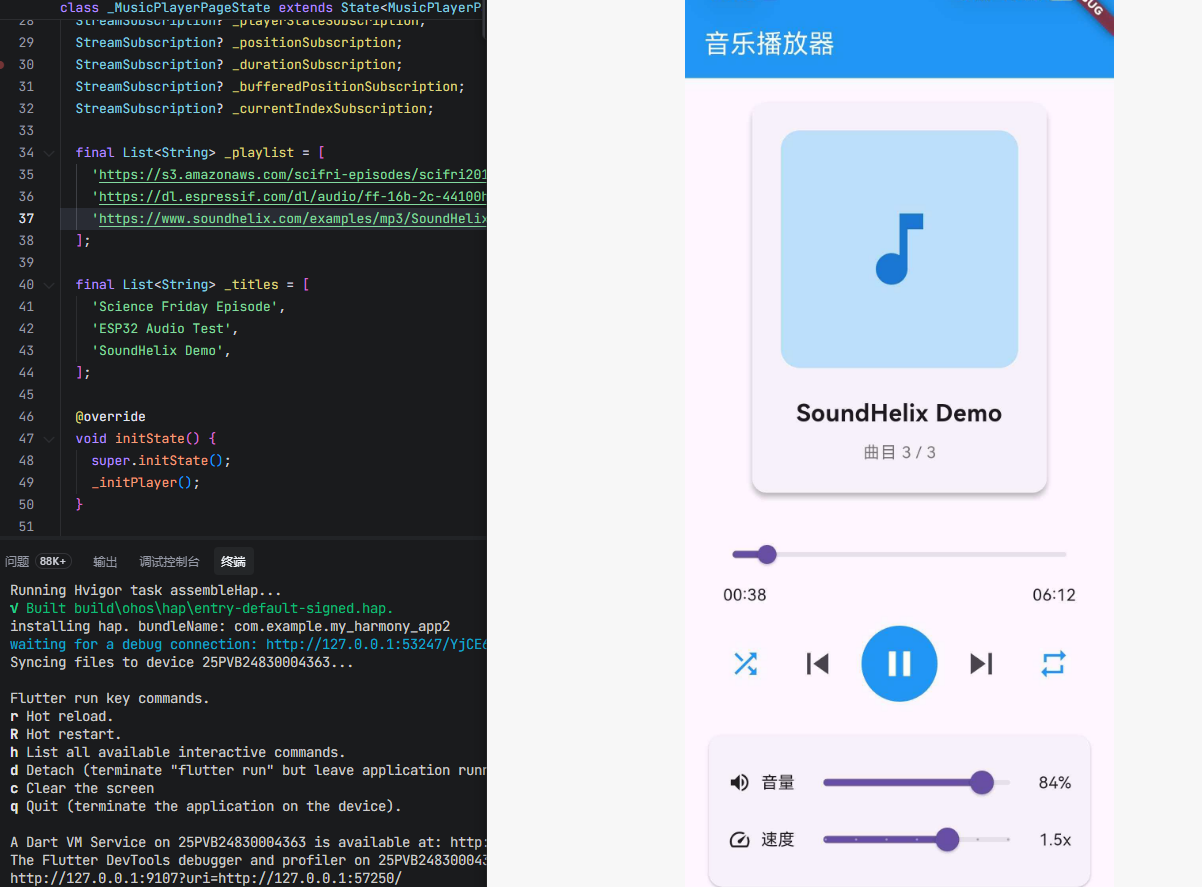
import 'dart:async';
import 'package:flutter/material.dart';
import 'package:just_audio_ohos/just_audio_ohos.dart';
void main() {
runApp(const MaterialApp(home: MusicPlayerPage()));
}
class MusicPlayerPage extends StatefulWidget {
const MusicPlayerPage({super.key});
State<MusicPlayerPage> createState() => _MusicPlayerPageState();
}
class _MusicPlayerPageState extends State<MusicPlayerPage> {
final AudioPlayer _player = AudioPlayer();
bool _isPlaying = false;
Duration _duration = Duration.zero;
Duration _position = Duration.zero;
Duration _bufferedPosition = Duration.zero;
double _volume = 1.0;
double _speed = 1.0;
LoopMode _loopMode = LoopMode.off;
bool _shuffleModeEnabled = false;
int _currentIndex = 0;
StreamSubscription? _playerStateSubscription;
StreamSubscription? _positionSubscription;
StreamSubscription? _durationSubscription;
StreamSubscription? _bufferedPositionSubscription;
StreamSubscription? _currentIndexSubscription;
final List<String> _playlist = [
'https://s3.amazonaws.com/scifri-episodes/scifri20181123-episode.mp3',
'https://dl.espressif.com/dl/audio/ff-16b-2c-44100hz.aac',
'https://www.soundhelix.com/examples/mp3/SoundHelix-Song-1.mp3',
];
final List<String> _titles = [
'Science Friday Episode',
'ESP32 Audio Test',
'SoundHelix Demo',
];
void initState() {
super.initState();
_initPlayer();
}
Future<void> _initPlayer() async {
_playerStateSubscription = _player.playerStateStream.listen((state) {
setState(() {
_isPlaying = state.playing;
});
});
_positionSubscription = _player.positionStream.listen((position) {
setState(() {
_position = position;
});
});
_durationSubscription = _player.durationStream.listen((duration) {
setState(() {
_duration = duration ?? Duration.zero;
});
});
_bufferedPositionSubscription = _player.bufferedPositionStream.listen((position) {
setState(() {
_bufferedPosition = position;
});
});
_currentIndexSubscription = _player.currentIndexStream.listen((index) {
setState(() {
_currentIndex = index ?? 0;
});
});
await _loadPlaylist();
}
Future<void> _loadPlaylist() async {
final playlist = ConcatenatingAudioSource(
children: _playlist.map((url) => AudioSource.uri(Uri.parse(url))).toList(),
);
await _player.setAudioSource(playlist);
}
void dispose() {
_playerStateSubscription?.cancel();
_positionSubscription?.cancel();
_durationSubscription?.cancel();
_bufferedPositionSubscription?.cancel();
_currentIndexSubscription?.cancel();
_player.dispose();
super.dispose();
}
Future<void> _playPause() async {
if (_isPlaying) {
await _player.pause();
} else {
await _player.play();
}
}
Future<void> _seekTo(Duration position) async {
await _player.seek(position);
}
Future<void> _skipToNext() async {
if (_player.hasNext) {
await _player.seekToNext();
}
}
Future<void> _skipToPrevious() async {
if (_player.hasPrevious) {
await _player.seekToPrevious();
}
}
Future<void> _toggleLoopMode() async {
LoopMode newMode;
switch (_loopMode) {
case LoopMode.off:
newMode = LoopMode.one;
break;
case LoopMode.one:
newMode = LoopMode.all;
break;
case LoopMode.all:
newMode = LoopMode.off;
break;
}
await _player.setLoopMode(newMode);
setState(() {
_loopMode = newMode;
});
}
Future<void> _toggleShuffleMode() async {
await _player.setShuffleModeEnabled(!_shuffleModeEnabled);
setState(() {
_shuffleModeEnabled = !_shuffleModeEnabled;
});
}
Future<void> _setVolume(double volume) async {
await _player.setVolume(volume);
setState(() {
_volume = volume;
});
}
Future<void> _setSpeed(double speed) async {
await _player.setSpeed(speed);
setState(() {
_speed = speed;
});
}
String _formatDuration(Duration duration) {
String twoDigits(int n) => n.toString().padLeft(2, '0');
final minutes = twoDigits(duration.inMinutes.remainder(60));
final seconds = twoDigits(duration.inSeconds.remainder(60));
return '$minutes:$seconds';
}
IconData _getLoopIcon() {
switch (_loopMode) {
case LoopMode.off:
return Icons.repeat;
case LoopMode.one:
return Icons.repeat_one;
case LoopMode.all:
return Icons.repeat;
}
}
Color _getLoopColor() {
return _loopMode == LoopMode.off ? Colors.grey : Colors.blue;
}
Widget build(BuildContext context) {
return Scaffold(
appBar: AppBar(
title: const Text('音乐播放器'),
backgroundColor: Colors.blue,
foregroundColor: Colors.white,
),
body: SingleChildScrollView(
padding: const EdgeInsets.all(16),
child: Column(
children: [
Card(
elevation: 4,
child: Padding(
padding: const EdgeInsets.all(24),
child: Column(
children: [
Container(
width: 200,
height: 200,
decoration: BoxDecoration(
color: Colors.blue.shade100,
borderRadius: BorderRadius.circular(16),
),
child: Icon(
Icons.music_note,
size: 80,
color: Colors.blue.shade700,
),
),
const SizedBox(height: 24),
Text(
_titles[_currentIndex],
style: const TextStyle(
fontSize: 20,
fontWeight: FontWeight.bold,
),
textAlign: TextAlign.center,
),
const SizedBox(height: 8),
Text(
'曲目 ${_currentIndex + 1} / ${_playlist.length}',
style: TextStyle(
fontSize: 14,
color: Colors.grey.shade600,
),
),
],
),
),
),
const SizedBox(height: 24),
Column(
children: [
SliderTheme(
data: SliderTheme.of(context).copyWith(
trackHeight: 4,
thumbShape: const RoundSliderThumbShape(enabledThumbRadius: 8),
),
child: Slider(
value: _position.inMilliseconds.toDouble(),
max: _duration.inMilliseconds.toDouble() > 0
? _duration.inMilliseconds.toDouble()
: 1.0,
onChanged: (value) {
_seekTo(Duration(milliseconds: value.toInt()));
},
),
),
Padding(
padding: const EdgeInsets.symmetric(horizontal: 16),
child: Row(
mainAxisAlignment: MainAxisAlignment.spaceBetween,
children: [
Text(_formatDuration(_position)),
Text(_formatDuration(_duration)),
],
),
),
],
),
const SizedBox(height: 16),
Row(
mainAxisAlignment: MainAxisAlignment.spaceEvenly,
children: [
IconButton(
icon: Icon(
_shuffleModeEnabled ? Icons.shuffle : Icons.shuffle,
color: _shuffleModeEnabled ? Colors.blue : Colors.grey,
),
iconSize: 28,
onPressed: _toggleShuffleMode,
),
IconButton(
icon: const Icon(Icons.skip_previous),
iconSize: 36,
onPressed: _player.hasPrevious ? _skipToPrevious : null,
),
Container(
width: 64,
height: 64,
decoration: BoxDecoration(
color: Colors.blue,
borderRadius: BorderRadius.circular(32),
),
child: IconButton(
icon: Icon(
_isPlaying ? Icons.pause : Icons.play_arrow,
color: Colors.white,
),
iconSize: 36,
onPressed: _playPause,
),
),
IconButton(
icon: const Icon(Icons.skip_next),
iconSize: 36,
onPressed: _player.hasNext ? _skipToNext : null,
),
IconButton(
icon: Icon(
_getLoopIcon(),
color: _getLoopColor(),
),
iconSize: 28,
onPressed: _toggleLoopMode,
),
],
),
const SizedBox(height: 24),
Card(
child: Padding(
padding: const EdgeInsets.all(16),
child: Column(
crossAxisAlignment: CrossAxisAlignment.start,
children: [
Row(
children: [
const Icon(Icons.volume_up, size: 20),
const SizedBox(width: 8),
const Text('音量'),
Expanded(
child: Slider(
value: _volume,
onChanged: _setVolume,
),
),
Text('${(_volume * 100).toInt()}%'),
],
),
Row(
children: [
const Icon(Icons.speed, size: 20),
const SizedBox(width: 8),
const Text('速度'),
Expanded(
child: Slider(
value: _speed,
min: 0.5,
max: 2.0,
divisions: 6,
onChanged: _setSpeed,
),
),
Text('${_speed}x'),
],
),
],
),
),
),
const SizedBox(height: 16),
Card(
child: Column(
children: [
const ListTile(
title: Text(
'播放列表',
style: TextStyle(fontWeight: FontWeight.bold),
),
),
...List.generate(_playlist.length, (index) {
return ListTile(
leading: CircleAvatar(
backgroundColor: index == _currentIndex
? Colors.blue
: Colors.grey.shade300,
child: Text(
'${index + 1}',
style: TextStyle(
color: index == _currentIndex
? Colors.white
: Colors.black,
),
),
),
title: Text(_titles[index]),
trailing: index == _currentIndex
? const Icon(Icons.play_arrow, color: Colors.blue)
: null,
onTap: () async {
await _player.seek(Duration.zero, index: index);
await _player.play();
},
);
}),
],
),
),
],
),
),
);
}
}
十、常见问题与解决方案
10.1 播放器初始化失败
问题:调用 setUrl 或 setAudioSource 时抛出异常。
解决方案:
- 检查网络权限是否配置
- 检查 URL 是否有效
- 使用 try-catch 捕获异常
try {
  await player.setUrl(url);
} catch (e) {
  print('加载失败: $e');
}
10.2 播放位置不准确
问题:进度条显示的位置与实际播放位置不一致。
解决方案:
- 使用
positionStream监听位置变化 - 确保在主线程更新 UI
10.3 后台播放中断
问题:应用切换到后台后播放停止。
解决方案:
- 配合
audio_session插件管理音频会话 - 在 OpenHarmony 中配置后台任务权限
10.4 内存泄漏
问题:播放器资源未释放导致内存泄漏。
解决方案:
- 在页面销毁时调用
dispose()方法 - 取消所有流订阅
void dispose() {
_positionSubscription?.cancel();
_player.dispose();
super.dispose();
}

开源鸿蒙跨平台开发社区汇聚开发者与厂商,共建“一次开发,多端部署”的开源生态,致力于降低跨端开发门槛,推动万物智联创新。
更多推荐
 10
10 0
0- 0


 已为社区贡献97条内容

所有评论(0)