mysql-learn(5):多表查询(内连接,外连接,子连接),事务(事务的四大特征,并发事务问题)
多表查询
一对多 多对一
一对一
多表关系
笛卡尔积:是指两个集合A与集合B所有的组合情况
(在多表查询的时候要消除这种现象)
select 字段列表 from 表1,表2 where 判断条件;
多表查询概述
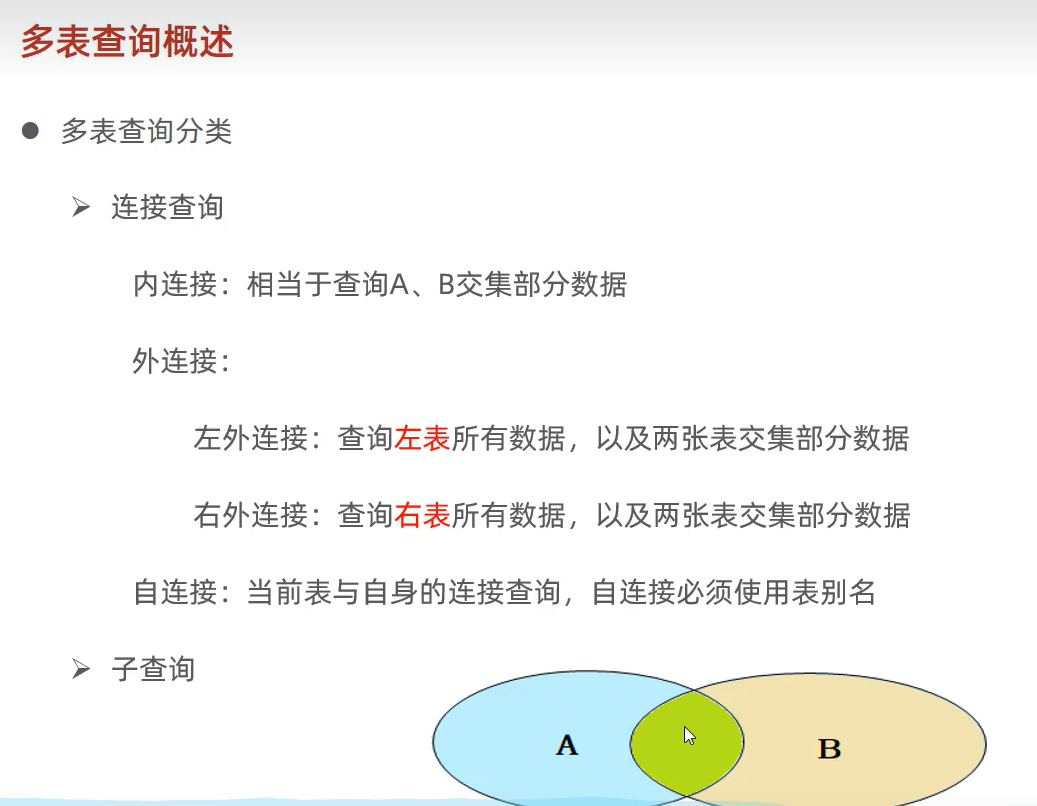
内连接
隐式内连接
select * from 表1,表2 where 条件...;
显示内连接
select 字段列表 from 表1 inner join 表2 on 连接条件..;
相当于查询A,B之间并集的部分
外连接
左连接:查询表1中的全部内容,还有与表2有交集的部分
select 字段列表 from 表1 left outer join 表2 on 连接条件..;
右连接:查询表2中的全部内容,还有与表1有交集的部分
select 字段列表 from 表1 right outer join 表2 on 连接条件..;
-- 创建dept表,并插入数据
create table dept(
id int auto_increment comment 'ID' primary key,
name varchar(50) not null comment '部门名称')comment '部门表';
INSERT INTO dept (id, name) VALUES (1, '研发部'), (2, '市场部'),(3, '财务部'), (4,'销售部'), (5, '总经办'), (6, '人事部');
-- 创建emp表,并插入数据
create table emp(
id int auto_increment comment 'ID' primary key,
name varchar(50) not null comment '姓名',
age int comment '年龄',
job varchar(20) comment '职位',
salary int comment '薪资',
entrydate date comment '入职时间',
managerid int comment '直属领导ID',
dept_id int comment '部门ID'
)comment '员工表';
-- 添加外键
alter table emp add constraint fk_emp_dept_id foreign key (dept_id) references dept(id);

INSERT INTO emp (id, name, age, job,salary, entrydate, managerid, dept_id) VALUES
        (1, '金庸', 66, '总裁',20000, '2000-01-01', null,5),
        (2, '张无忌', 20, '项目经理',12500, '2005-12-05', 1,1),
        (3, '杨逍', 33, '开发', 8400,'2000-11-03', 2,1),
        (4, '韦一笑', 48, '开发',11000, '2002-02-05', 2,1),
        (5, '常遇春', 43, '开发',10500, '2004-09-07', 3,1),
        (6, '小昭', 19, '程序员鼓励师',6600, '2004-10-12', 2,1),
        (7, '灭绝', 60, '财务总监',8500, '2002-09-12', 1,3),
        (8, '周芷若', 19, '会计',48000, '2006-06-02', 7,3),
        (9, '丁敏君', 23, '出纳',5250, '2009-05-13', 7,3),
        (10, '赵敏', 20, '市场部总监',12500, '2004-10-12', 1,2),
        (11, '鹿杖客', 56, '职员',3750, '2006-10-03', 10,2),
        (12, '鹤笔翁', 19, '职员',3750, '2007-05-09', 10,2),
        (13, '方东白', 19, '职员',5500, '2009-02-12', 10,2),
        (14, '张三丰', 88, '销售总监',14000, '2004-10-12', 1,4),
        (15, '俞莲舟', 38, '销售',4600, '2004-10-12', 14,4),
        (16, '宋远桥', 40, '销售',4600, '2004-10-12', 14,4),
        (17, '陈友谅', 42, null,2000, '2011-10-12', 1,null);

# --多表查询-- 笛卡尔积
select * from emp,dept where dept.id = emp.dept_id;

# 内连接的应用场景:需要查询有明确部门归属的员工
## 隐式内连接
select e.name,d.name from emp as e , dept as d where e.dept_id = d.id;
## 显示内连接
select * from emp inner join dept on emp.dept_id = dept.id;

-- 左外连接 -> 应用场景: 需要查询每个员工在哪个部门
select emp.*,dept.name from emp left outer join dept on emp.dept_id = dept.id;
-- 右外连接 -> 应用场景:需要查询每个部分有哪些员工
select dept.*,emp.* from emp right outer join dept on emp.dept_id = dept.id;
自连接
自连接既能是外连接,也能是内连接
select 字段列表 from 表 as 表的别名1 join 表 as 表的别名2 on 连接条件
-- 查询员工以及直属领导的名字 ->内连接
select emp1.name as '员工',emp2.name as '直属领导' from emp as emp1 join emp as emp2 on emp1.managerid = emp2.id;
-- 查询员工以及直属领导的名字 ,如果员工没有领导,也要查询出来 -> 左外连接
select emp1.name as '员工',emp2.name as '直属领导' from emp as emp1 left outer join emp as emp2 on emp1.managerid = emp2.id;
联合查询union
基本语法
select * from 表1...
union[all]
select * from 表2...
1.如果加上all 就是显示两张表都查询出的结构,如果不加上all就是显示去重之后的结果
2.对于联合查询的多张表的列数必须保持一致,字段类型也要一直
子连接
SQL语句中嵌套select查询的称为嵌套查询,又称为子查询
select * from 表1 where colume1 = (select * from 表2);
标量子查询
查询结果为一个值
-- 查询销售部下的所有员工
select * from emp where dept_id = (select id from dept where name = '销售部');
-- 查询在方东白入职之后的所有员工
select * from emp where entrydate > (select entrydate from emp where name = '方东白');
列子查询
查询结果为一行
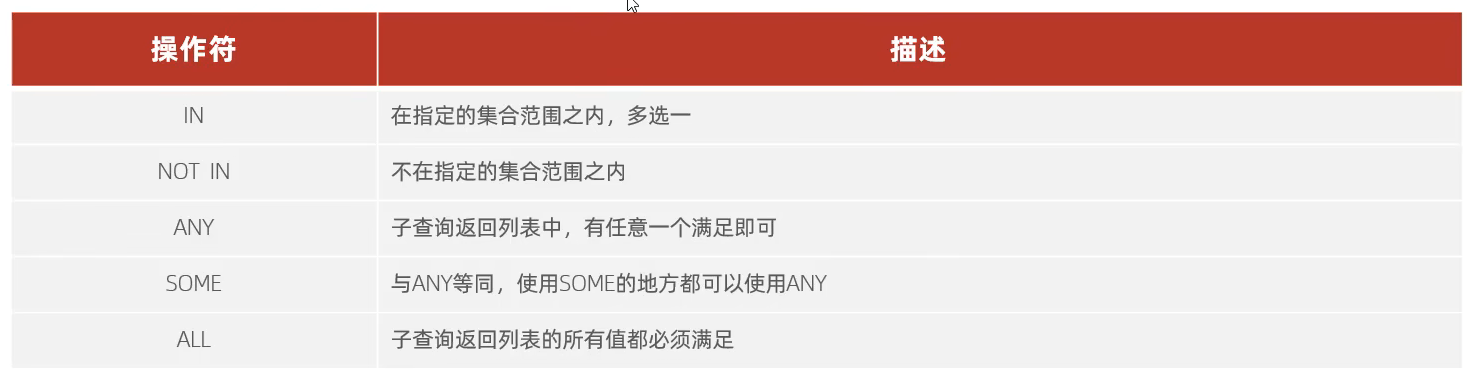
常用操作符:in not in all any some
in : 只要满足在这范围内的一个就行了
not in:不在指定的范围内
any some :子查询列表中,任意一个满足就可以
all : 子查询返回列表中所有值都需要满足
-- 查询在销售部和市场部的全部人员的信息
select * from emp where dept_id in (select id from dept where name in('销售部','市场部'));
-- 查询比财政部中所有人的薪资都要高的人
select * from emp where salary >= all(select salary from emp where dept_id = (select id from dept where name = '财务部'));
select * from emp where salary > (select max(salary) from emp where dept_id = (select id from dept where name = '财务部'));
-- 查询比研发部人任意一人薪资高的人
select * from emp where salary > some (select salary from emp where dept_id = (select id from dept where name = '研发部'));
select * from emp where salary > any (select salary from emp where dept_id = (select id from dept where name = '研发部'));
行子查询
查询结果为一列
-- 查询与张无忌薪资以及直属领导相同的员工
select * from emp where (salary,managerid) = (select salary,managerid from emp where name = '张无忌') && name != '张无忌';
表子查询
查询结果为多行多列
-- 查询工作与薪水与鹿杖客,宋远桥相同的员工的信息
select * from emp where (job,salary) in (select job,salary from emp where name in('鹿杖客','宋远桥'));
-- 查询在“2006-01-01”之后入职的员工以及部门信息
select e.*,d.* from (select * from emp where entrydate > '2006-01-01') as e left outer join dept as d on d.id = e.dept_id;
根据查询的位置分为:where之后,from之后,select之后
多表查询案例
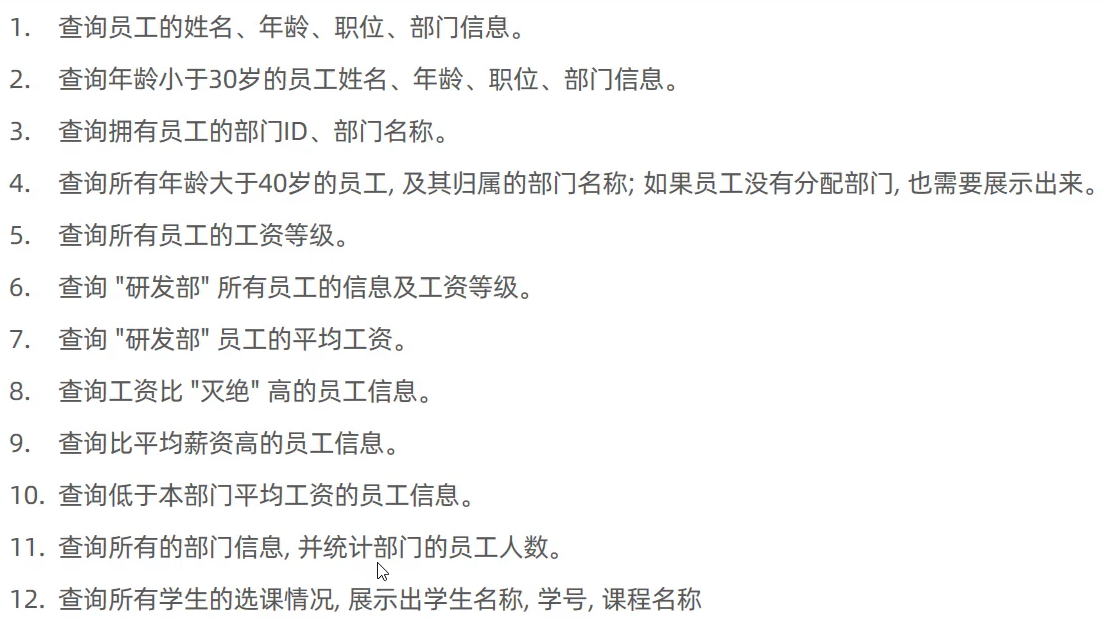
create table salgrade(
    grade int comment '薪资等级',
    losal int comment '最低薪资',
    hisal int comment '最高薪资'
) comment '薪资等级表';

insert into salgrade values(1,0,3000),(2,3001,5000),(3,5001,8000),
                            (4,8001,10000),(5,10001,15000),(6,15001,20000),
                            (7,20001,25000),(8,25001,30000);


#  1.查询员工的姓名、年龄、职位、部门信息。
# select emp.name,age,job,dept.name from emp,dept where emp.dept_id = dept.id;
select emp.name,emp.age,emp.job,dept.name from emp left outer join dept on emp.dept_id = dept.id;
# 2.查询年龄小于30岁的员工姓名、年龄、职位、部门信息。
# select emp.name,emp.age,emp.job,dept.name from emp left outer join dept on (emp.dept_id = dept.id && emp.age < 30);
select emp.name,emp.age,emp.job,dept.name from (select * from emp where age < 30) as emp left outer join dept on emp.dept_id = dept.id;
# 3.查询拥有员工的部门ID、部门名称。
-- 先查询出去重之后并且不是空的部门id 再去查询对应的部门
select * from dept where id in(select distinct dept_id from emp where dept_id is not null);
select distinct d.id,d.name from emp as e,dept as d where e.dept_id = d.id;
# 4.查询所有年龄大于40岁的员工,及其归属的部门名称;如果员工没有分配部门,也需要展示出来。
select e.*,d.name from (select * from emp where age > 40) as e left outer join dept as d on e.dept_id = d.id;
# 5.查询所有员工的工资等级。
select emp.*,salgrade.grade as '工资等级' from emp,salgrade where emp.salary >= salgrade.losal && emp.salary <= salgrade.hisal;
select emp.*,salgrade.grade as '工资等级' from emp,salgrade where emp.salary between salgrade.losal and salgrade.hisal;
select emp.name,salgrade.grade as '工资等级' from emp left outer join salgrade on emp.salary between salgrade.losal and salgrade.hisal;
# 6.查询“研发部”所有员工的信息及工资等级。

select e.*, s.grade as '工资等级'
from emp as e
         inner join dept as d on e.dept_id = d.id
         inner join salgrade as s on e.salary between s.losal and s.hisal
where d.name = '研发部';

select emp.*, salgrade.grade as '工资等级'
from (select * from emp where dept_id = (select id from dept where name = '研发部')) as emp
         left outer join salgrade on emp.salary between salgrade.losal and salgrade.hisal;


select emp.*,salgrade.grade as '工资等级' from emp , dept , salgrade where (emp.dept_id = dept.id) and (emp.salary between salgrade.losal and salgrade.hisal) and (dept.name = '研发部');
# 7.查询"研发部”员工的平均工资。
select avg(salary) from (select * from emp where dept_id = (select id from dept where name = '研发部')) as emp;
select avg(salary) from emp where dept_id = (select id from dept where name = '研发部');
# 8.查询工资比“灭绝”高的员工信息。
select * from emp where salary > (select salary from emp where name = '灭绝');
# 9.查询比平均薪资高的员工信息。
select * from emp where salary > (select avg(salary) from emp);
# 10.查询低于本部门平均工资的员工信息。(自子链接)
select e2.*
from emp as e2
where e2.salary < (select avg(e1.salary) from emp as e1 where e1.dept_id = e2.dept_id);


select * from emp as e1 where e1.salary < (select avg(e2.salary) from emp as e2 where e2.dept_id = e1.dept_id);


# select * from emp where salary < (select avg(salary) from emp where dept_id = 1) && emp.dept_id = 1
# union all
# select * from emp where salary < (select avg(salary) from emp where dept_id = 1) && emp.dept_id = 2
# union all
# select * from emp where salary < (select avg(salary) from emp where dept_id = 1) && emp.dept_id = 3
# union all
# select * from emp where salary < (select avg(salary) from emp where dept_id = 1) && emp.dept_id = 4
# union all
# select * from emp where salary < (select avg(salary) from emp where dept_id = 1) && emp.dept_id = 5
# union all
# select * from emp where salary < (select avg(salary) from emp where dept_id = 1) && emp.dept_id = 6;
# 11.查询所有的部门信息,并统计部门的员工人数。

select d.id,d.name,(select count(*) from emp as e where e.dept_id = d.id) as '部门人数' from dept as d;


# 12.查询所有学生的选课情况,展示出学生名称,学号,课程名称
select student.name '学生姓名' , student.no '学号', c.name '课程名称' from student inner join student_course sc on student.id = sc.studentid inner join course c on sc.courseid = c.id;
事务
事务简介
事务是一组操作的集合,它是一个不可分割的工作单位,事务会把所有的操作作为一个整体一起先系统提交或者撤销请求,所以这些操作要么一起成功,要么一起失败
select @@autocommit; -- autocommit默认值为1 就是自动提交
-- 开启手动提交事务
set @@autocommit = 0;

select money from account where name = '张三';

update account set money = money - 1000 where name = '张三';
程序报错 ....
update account set money = money + 1000 where name = '李四';

-- 提交事务
commit;
-- 回滚事务
rollback;
第二种
-- 开启事务
start transaction; -- 或者 begin

select money from account where name = '张三';

update account set money = money - 1000 where name = '张三';

update account set money = money + 1000 where name = '李四';

-- 提交事务
commit;
-- 回滚事务
rollback;
这两种的区别就是第一种是持久的 而第二种是一次性的
事务四大特征(ACID)
原子性(Atomicity):事务是不可分割的最小执行单元,要么全部成功,要么全部失败。
一致性(Consistency):事务完成时,必须是所有的数据保持一致转态;
隔离性(lsolation):数据库系统提供的隔离机制,保证数据在不收外部并发操作的独立环境下运行;
持久性(Durability):事务一旦提交或者回滚,它对数据库中的数据就是永久的改变;
并发事务问题
并发事务问题 就是多个并发事务同时运行导致的脏读,不可重复读,幻读
脏读:一个事物读取到另一个还没有提交的数据
不可重复读:一个事务在先后读取同一条数据时,读取了两个不同的数据
幻读:一个事务按照条件查询数据时,发现数据不存在,但是插入数据时,又发现数据已近存在了,好像出现了"幻影"。
事务隔离级别
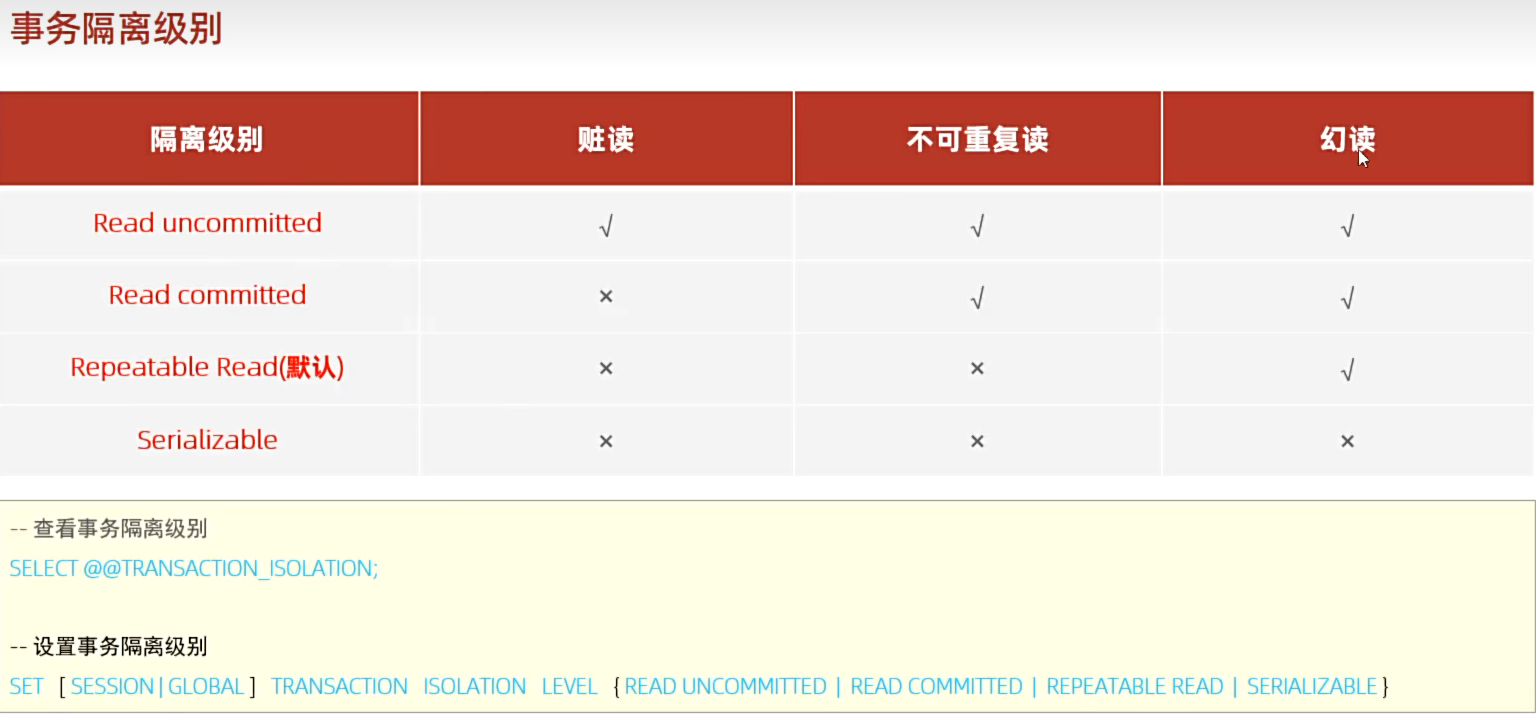
注意:事务隔离级别越高 数据越安全性,但是性能越低;
设置事务的隔离级别
set session transaction isolation level repeatable read;

开源鸿蒙跨平台开发社区汇聚开发者与厂商,共建“一次开发,多端部署”的开源生态,致力于降低跨端开发门槛,推动万物智联创新。
更多推荐


 14
14 0
0- 0


 已为社区贡献1条内容

所有评论(0)