Kubernetes入门:09.Kubernetes Building Blocks-DaemonSet和Services
【翻译】
DaemonSet
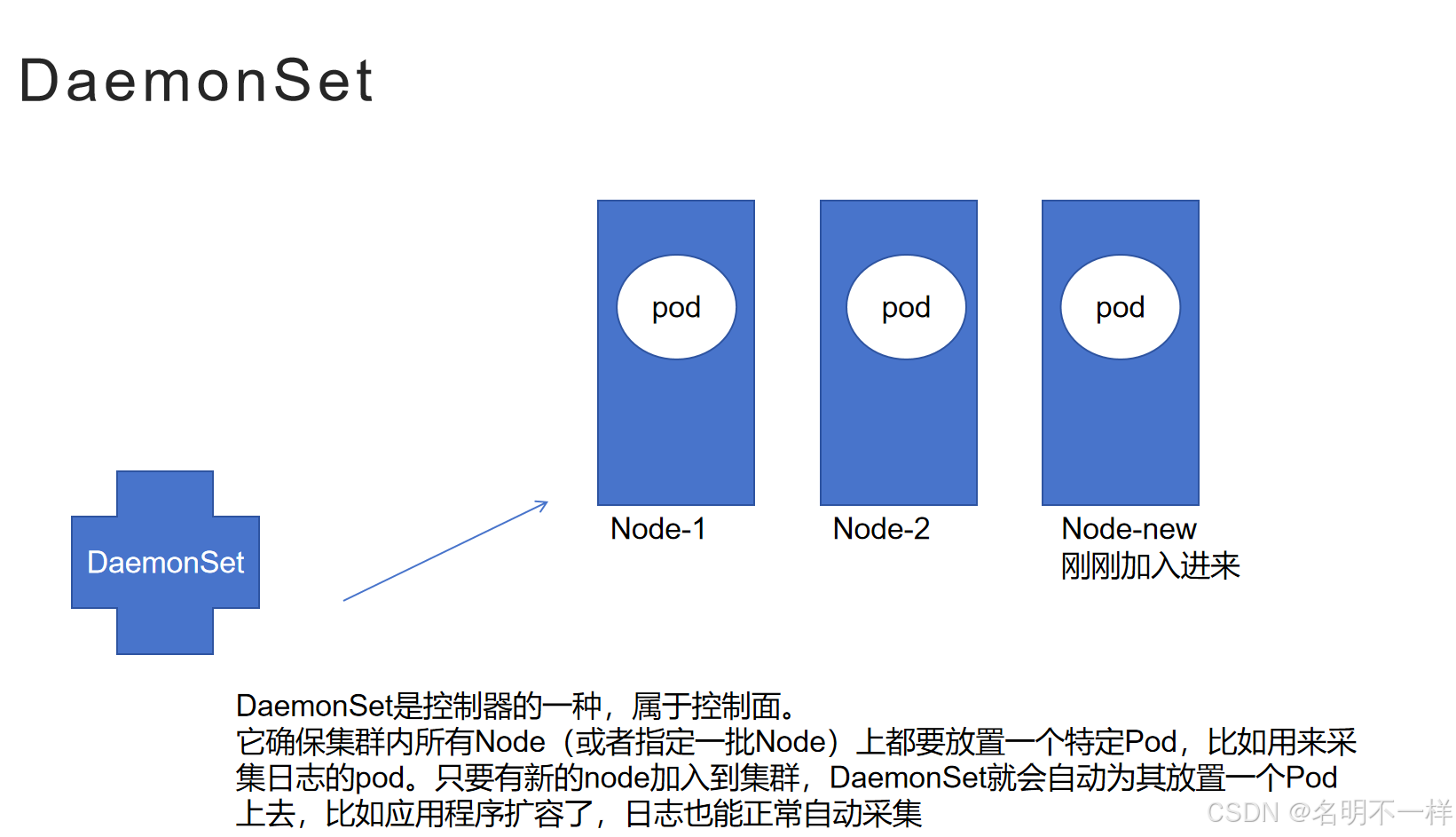
DaemonSets和Operatos是设计用于去管理node代理的。它类似ReplicaSet、Deployment operator可以去管理多个Pod副本和应用程序的更新,但是它有不同的特性,即在所有的节点或者指定的节点子集上,强制为每个节点放置一个单独的Pod副本。相比之下,ReplicaSet和Deployment operator默认情况下无法控制同一个节点上多个Pod副本的调度和放置。
//ReplicaSet和Deployment更多是控制副本的数量、控制Rollout等,至于每个Pod要在哪些Node上执行,前面课程还没有提到,不知道是不是其他控制器来完成的工作,
在某些情况下DaemonSets Operator使用非常广泛,比如我们需要从所有Node上采集监控数据,或者在所有node上运行storage、网络、或者代理Daemons,这可以确保随时随地,在所有上Pod都有我们需要的特定类型的Pod在运行。它是多节点Kubernetes集群情况下至关重要的API。在集群的每一台主机上都有kube-proxy agent作为Pod在运行,或者是Calico、Cilium网络节点agent在集群中部署了一个跨节点的Pod网络,这两种情况都是DaemonSet operator管理应用的例子。
无论何时,一个节点被加入到集群中,DaemonSet将会自动在该节点上放置一个Pod。尽管它确保了自动化的过程,DaemonSet的Pod是被DaemonSet Controller所放到所有集群节点上的,而不是由默认Scheduler进行放置。如果任意一个节点崩溃了或者从集群中删除掉,那么它上面的Daemonset pod就会被回收掉。如果DaemonSet被删除,那么所有与之相关的Pod副本也会被随之删除。
放置DaemonSet Pod这个动作依然会有调度属性来进行控制,因为我们有时需要限制Pod只能被放置到集群中特定的子集,即一部分节点上,而不是所有节点。这种特性可以通过一些Pod调度属性来实现,比如节点选择器(node selector),节点亲和规则(node affinity rules),污点(taints)和容忍度(toleration)。这些措施可以确保DaemonSet Pods只会放置到特定节点上去。然而,默认Scheduler也可以在打开某些特性开关后承担上述调度过程,并再次接受节点亲和度规则。
下面是一个用YAML格式书写的DaemonSet对象的定义清单。
apiVersion: apps/v1
kind: DaemonSet
metadata:
name: fluentd-agent
namespace: default
labels:
k8s-app: fluentd-agent
spec:
selector:
matchLabels:
k8s-app: fluentd-agent
template:
metadata:
labels:
k8s-app: fluentd-agent
spec:
containers:
- name: fluentd
image: quay.io/fluentd_elasticsearch/fluentd:v4.5.2
上述定义清单如果保存为fluentd-ds.yaml文件,将会被加载到集群中并运行一组特定的Pod副本,以及它所关联的容器镜像,数量与集群的节点数量一致。
$ kubectl create -f fluentd-ds.yaml
在进入更复杂的讨论话题之前,请先熟悉如下的一些DaemonSet命令。
$ kubectl apply -f fluentd-ds.yaml --record
$ kubectl get daemonsets
$ kubectl get ds -o wide
$ kubectl get ds fluentd-agent -o yaml
$ kubectl get ds fluentd-agent -o json
$ kubectl describe ds fluentd-agent
$ kubectl rollout status ds fluentd-agent
$ kubectl rollout history ds fluentd-agent
$ kubectl rollout history ds fluentd-agent --revision=1
$ kubectl set image ds fluentd-agent fluentd=quay.io/fluentd_elasticsearch/fluentd:v4.6.2 --record
$ kubectl rollout history ds fluentd-agent --revision=2
$ kubectl rollout undo ds fluentd-agent --to-revision=1
$ kubectl get all -l k8s-app=fluentd-agent -o wide
$ kubectl delete ds fluentd-agent
$ kubectl get ds,po -l k8s-app=fluentd-agent
Services
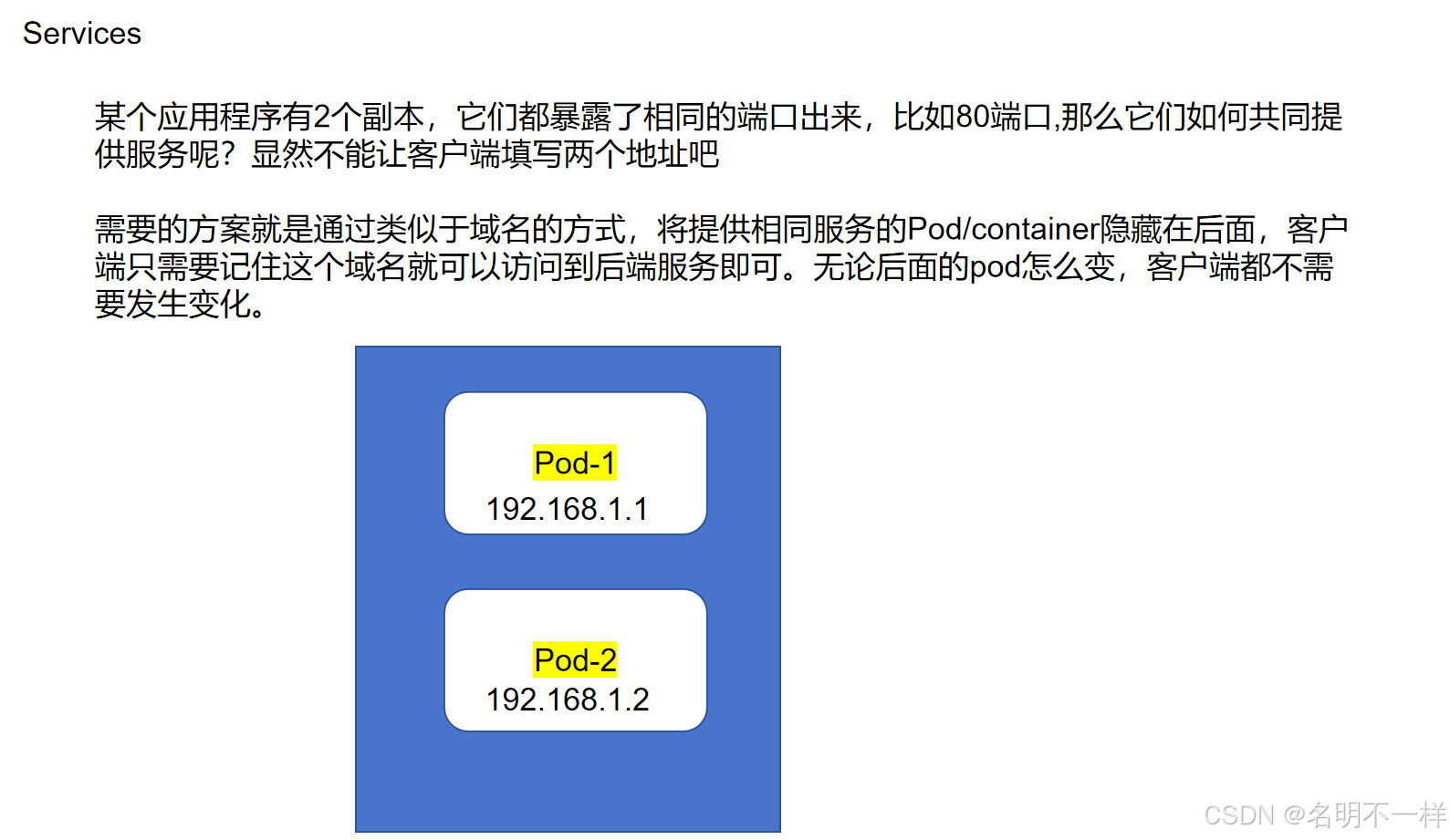
部署在Kubernetes中的容器化应用可能需要访问其他应用程序,或者它也需要被其他应用程序、客户端所访问。这可能成为一个问题,因为容器并不会在集群网络中暴露它的端口,并且也是无法被发现的。解决办法很容易想到用端口映射,即由容器宿主机来提供端口。但是,在kubernetes如此复杂的框架体系下,这样想像起来很简单的端口映射可能并不简单。解决方案相当精妙,需要依靠kube-proxy节点agent、IP tables、路由规则、集群DNS服务器,它们相互作用,共同实施了一个小型的负载均衡机制,将容器端口暴露给集群网络,甚至是在有需要时可以暴露给集群外。这个机制就叫"Services",它也是kubernetes所推荐的,用于将任何容器应用暴露至kubernetes网络的方案。当我们在一个多副本应用,多个容器运行着相同镜像且暴露了相同端口,那Kubernetes的"services"就优势很明显了,这种情况下简单的容器端口mapping到宿主机的方案就行不通!Services在这样复杂场景下就没有任何问题。
这只是kubernetes services资源的简要介绍,services的类型、配置选项、更多的内容我们将会在后续章节中进行讨论。
【原文】
DaemonSets
DaemonSets are operators designed to manage node agents. They resemble ReplicaSet and Deployment operators when managing multiple Pod replicas and application updates, but the DaemonSets present a distinct feature that enforces a single Pod replica to be placed per Node, on all the Nodes or on a select subset of Nodes. In contrast, the ReplicaSet and Deployment operators by default have no control over the scheduling and placement of multiple Pod replicas on the same Node.
DaemonSet operators are commonly used in cases when we need to collect monitoring data from all Nodes, or to run storage, networking, or proxy daemons on all Nodes, to ensure that we have a specific type of Pod running on all Nodes at all times. They are critical API resources in multi-node Kubernetes clusters. The kube-proxy agent running as a Pod on every single node in the cluster, or the Calico or Cilium networking node agent implementing the Pod networking across all nodes of the cluster, are examples of applications managed by DaemonSet operators.
Whenever a Node is added to the cluster, a Pod from a given DaemonSet is automatically placed on it. Although it ensures an automated process, the DaemonSet's Pods are placed on all cluster's Nodes by the controller itself, and not with the help of the default Scheduler. When any one Node crashes or it is removed from the cluster, the respective DaemonSet operated Pods are garbage collected. If a DaemonSet is deleted, all Pod replicas it created are deleted as well.
The placement of DaemonSet Pods is still governed by scheduling properties which may limit its Pods to be placed only on a subset of the cluster's Nodes. This can be achieved with the help of Pod scheduling properties such as nodeSelectors, node affinity rules, taints and tolerations. This ensures that Pods of a DaemonSet are placed only on specific Nodes, such as workers if desired. However, the default Scheduler can take over the scheduling process if a corresponding feature is enabled, accepting again node affinity rules.
Below is an example of a DaemonSet object's definition manifest in YAML format:
apiVersion: apps/v1
kind: DaemonSet
metadata:
name: fluentd-agent
namespace: default
labels:
k8s-app: fluentd-agent
spec:
selector:
matchLabels:
k8s-app: fluentd-agent
template:
metadata:
labels:
k8s-app: fluentd-agent
spec:
containers:
- name: fluentd
image: quay.io/fluentd_elasticsearch/fluentd:v4.5.2
The above definition manifest, if stored by a fluentd-ds.yaml file, is loaded into the cluster to run a set of identical Pod replicas, with their associated container image, matching in count the number of cluster nodes. While create is exemplified below, advanced Kubernetes practitioners may opt to use apply instead:
$ kubectl create -f fluentd-ds.yaml
Before advancing to more complex topics, become familiar with DaemonSet operations with additional commands such as:
$ kubectl apply -f fluentd-ds.yaml --record
$ kubectl get daemonsets
$ kubectl get ds -o wide
$ kubectl get ds fluentd-agent -o yaml
$ kubectl get ds fluentd-agent -o json
$ kubectl describe ds fluentd-agent
$ kubectl rollout status ds fluentd-agent
$ kubectl rollout history ds fluentd-agent
$ kubectl rollout history ds fluentd-agent --revision=1
$ kubectl set image ds fluentd-agent fluentd=quay.io/fluentd_elasticsearch/fluentd:v4.6.2 --record
$ kubectl rollout history ds fluentd-agent --revision=2
$ kubectl rollout undo ds fluentd-agent --to-revision=1
$ kubectl get all -l k8s-app=fluentd-agent -o wide
$ kubectl delete ds fluentd-agent
$ kubectl get ds,po -l k8s-app=fluentd-agent
Services
A containerized application deployed to a Kubernetes cluster may need to reach other such applications, or it may need to be accessible to other applications and possibly clients. This is problematic because the container does not expose its ports to the cluster's network, and it is not discoverable either. The solution would be a simple port mapping, as offered by a typical container host. However, due to the complexity of the Kubernetes framework, such a simple port mapping is not that "simple". The solution is much more sophisticated, with the involvement of the kube-proxy node agent, IP tables, routing rules, cluster DNS server, all collectively implementing a micro-load balancing mechanism that exposes a container's port to the cluster's network, even to the outside world if desired. This mechanism is called a Service, and it is the recommended method to expose any containerized application to the Kubernetes network. The benefits of the Kubernetes Service becomes more obvious when exposing a multi-replica application, when multiple containers running the same image need to expose the same port. This is where the simple port mapping of a container host would no longer work, but the Service would have no issue implementing such a complex requirement.
This is only a brief introduction of the Kubernetes Service resource. Services, their types, configuration options, and more will be discussed in a later chapter.

开源鸿蒙跨平台开发社区汇聚开发者与厂商,共建“一次开发,多端部署”的开源生态,致力于降低跨端开发门槛,推动万物智联创新。
更多推荐
 0
0 0
0- 0


 已为社区贡献6条内容

所有评论(0)