记录:Vue3中使用vue-cropperjs实现图片裁剪
·
vue-cropperjs:一个基于cropperjs 的Vue组件,Demo演示
1. 安装
npm install --save vue-cropperjs
or
yarn add vue-cropperjs
2. 在Vue组件中使用(不要忘记样式文件,安装vue-cropperjs时cropperjs的样式文件会同步安装
)
<script setup lang="ts">
import VueCropper from 'vue-cropperjs'
import 'cropperjs/dist/cropper.min.css'
import { ref } from 'vue'

const imgSrc = new URL('../assets/img/test.png', import.meta.url).href

const cropper = ref(null)
// 确认裁剪
const confirmCrop = () => {
  // 获取裁剪后的图片
  cropper.value.getCroppedCanvas().toBlob((blob) => {
    // 预览url
    const url = URL.createObjectURL(blob)
    console.log(url)
  })
}
</script>

<template>
  <div class="box clmcenter">
    <vue-cropper
      class="vue-cropper"
      ref="cropper"
      :aspect-ratio="16 / 9"
      drag-mode="move"
      :center="true"
      :src="imgSrc"
    />
    <button @click="confirmCrop">确认裁剪</button>
  </div>
</template>

<style lang="scss" scoped>
.box {
  .vue-cropper {
    width: 100%;
    height: 100%;
  }
  button {
    position: absolute;
    bottom: 50px;
    width: 200px;
    height: 75px;
    font-size: 30px;
    border-style: none;
    border-radius: 10px;
    background: #ffffff;
    border: 1px solid #3399ff;
    box-sizing: border-box;
    color: #000;
  }
}
</style>
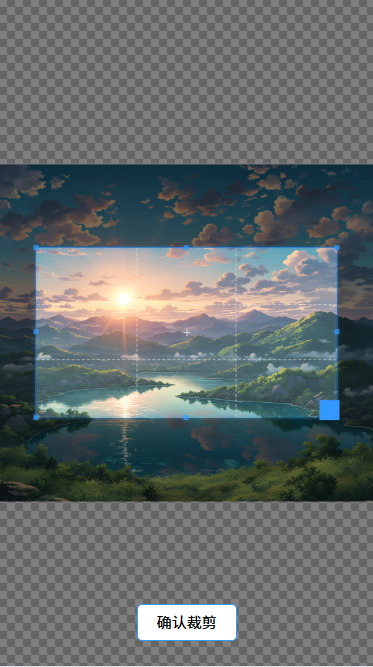
3. 效果

开源鸿蒙跨平台开发社区汇聚开发者与厂商,共建“一次开发,多端部署”的开源生态,致力于降低跨端开发门槛,推动万物智联创新。
更多推荐


 3
3 0
0- 0


 已为社区贡献1条内容

所有评论(0)