Qt扩展1.4.0 VS代码发布
Qt Extension 1.4.0 for VS Code released
Qt扩展1.4.0 VS代码发布
April 14, 2025 by Jörg Bornemann | Comments
2025年4月14日由Jörg Bornemann发表|评论
We're happy to announce the release of version 1.4.0 of the Qt Extension for Visual Studio Code! This release cooked for a bit as pre-release 1.3.0 on the marketplace and has now been promoted to a proper release. Take a look at what's new in this release.
我们很高兴地宣布Visual Studio Code Qt扩展1.4.0版本的发布!此版本在市场上与1.3.0预发行版有点相似,现在已升级为正式版本。看看这个版本的新功能。
This is primarily a bugfix release. In addition, some preparatory work was done for the upcoming QML debugging feature. More about this will be revealed in a separate blog post.
这主要是一个bug修复版本。此外,还为即将推出的QML调试功能做了一些准备工作。更多信息将在另一篇博客文章中披露。
We're adding only one more prominent feature: the ability to create Qt projects and Qt-related files. For that, we've added two new commands:
我们只添加了一个突出的功能:创建Qt项目和Qt相关文件的能力。为此,我们添加了两个新命令:
- Qt: Create New Project
- Qt: Create New File
As usual, these are available via the command palette. The following is a brief rundown of what these commands offer.
与往常一样,这些可以通过命令面板获得。以下是这些命令提供的简要概述。
Create Qt projects
创建Qt项目
This command creates a new Qt project and opens it in VS Code.
此命令创建一个新的Qt项目并在VS Code中打开它。
To create a project, select or create a preset for a particular project type:
要创建项目,请为特定项目类型选择或创建预设:
1.Go to Command Palette, and then select Qt: Create New Project.
1.转到命令面板,然后选择Qt:创建新项目。
2.In New Project, enter a name for the project.
2.在“新建项目”中,输入项目的名称。

A command line UI appears in VS Code's Terminal. Select a preset or Manually select features to create your own preset.
命令行UI出现在VS Code的终端中。选择预设或手动选择功能以创建自己的预设。
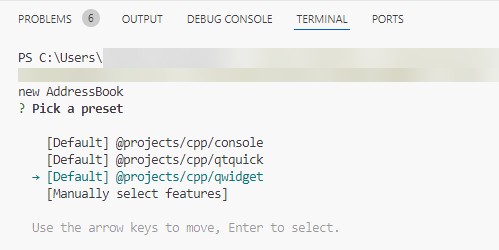
Now, you can select a CMake kit for your project and build and run it.
现在,可以为项目选择一个CMake工具包,并构建和运行它。
Please see the documentation of this command for more details.
有关更多详细信息,请参阅此命令的文档。
Add files to projects
向项目添加文件
Use this command to add Qt-related files to your existing project.
使用此命令将Qt相关文件添加到现有项目中。
To create a file in the current project directory, select or create a preset for a particular file type:
要在当前项目目录中创建文件,请为特定文件类型选择或创建预设:
1.Go to Command Palette, and then select Qt: Create New File.
1.转到命令面板,然后选择Qt:创建新文件。
2.In New File, enter a name for the file.
2.在“新建文件”中,输入文件的名称。

In the command line interface that appears in Terminal, select a preset or Manually select features to create your own preset.
在终端显示的命令行界面中,选择一个预设或手动选择功能以创建自己的预设。
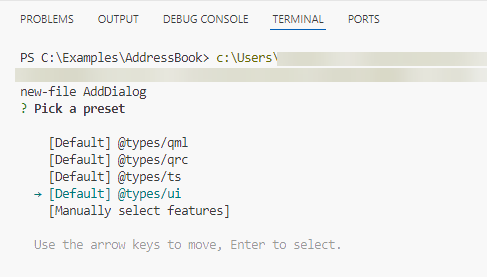
Edit the newly created file to your liking.
根据喜好编辑新创建的文件。
A bit of background on the CLI
CLI的一些背景知识
The command line interface started in the terminal is a standalone application named qtcli. This application is shipped with the qt-core extension. We've chosen this approach because we're hoping that qtcli can be usable in the future in other places, like Neovim and the like.
在终端中启动的命令行界面是一个名为qtcli的独立应用程序。此应用程序随qt核心扩展一起提供。我们选择这种方法是因为我们希望qtcli将来可以在其他地方使用,比如Neovim等。
Also, there's no consistent UI wizard framework established in VS Code that we could use. However, we plan to offer a GUI variant for controlling in the future.
此外,在VS Code中没有建立我们可以使用的一致的UI向导框架。然而,我们计划在未来提供一个GUI变量用于控制。
If you encounter any bugs or usability issues, please report them in our bug tracker.
如果遇到任何错误或可用性问题,请在我们的错误跟踪器中报告。

开源鸿蒙跨平台开发社区汇聚开发者与厂商,共建“一次开发,多端部署”的开源生态,致力于降低跨端开发门槛,推动万物智联创新。
更多推荐
 0
0 0
0- 0


 已为社区贡献43条内容

所有评论(0)