PySide6 + QML - 调试日志02 - 自定义 qInstallMessageHandler 实现分级日志输出,且解决中文乱码
·
导言
上一章节《PySide6 + QML - 调试日志01 - 最简单地解决打印log的中文乱码的方案》是一个简单且暴力的解决方案,它的缺点如下:
- 日志级别的丢失(严重)
- 问题:无法再区分简单的
console.log(调试信息)、console.warn(警告) 还是关键的系统错误。 - 结果:所有消息在终端中看起来都一模一样。您失去了默认处理程序提供的视觉线索(例如:“Warning:” 或 “Critical:”)。
- 问题:无法再区分简单的
- 输出流合并
- 问题:Python 的
print()函数将所有内容都发送到stdout(标准输出)。 - 结果:错误信息,它们通常应该发送到
stderr,但与正常的程序输出混合在一起。这使得日志过滤或在自动化脚本中检测故障变得更加困难。
- 问题:Python 的
- 缺乏调试信息
- 问题:
context上下文参数(其中包含发生日志调用的文件名、行号和函数名)被 Lambda 函数忽略了。 - 结果:调试复杂问题变得更加困难,因为您将无法自动看到警告来自 C++ 或 Python 代码的哪个位置。
- 问题:
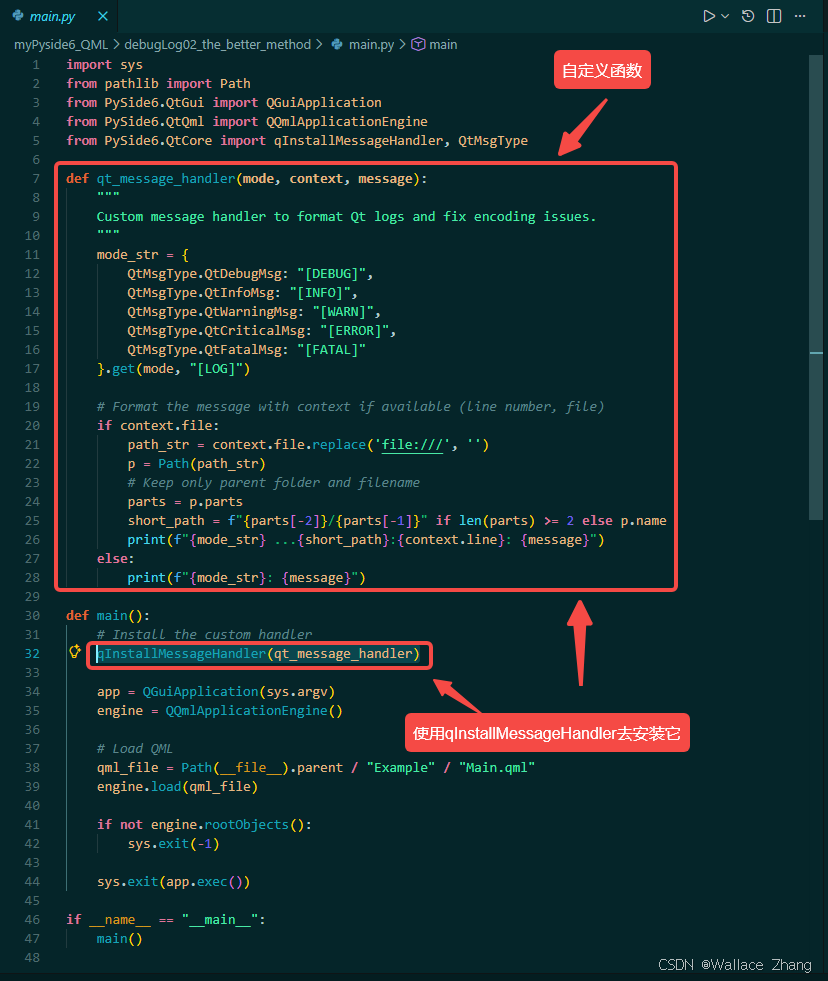
优化方案是自定义一个函数来实现,同样被函数qInstallMessageHandler()调用。函数的实现如下:
def qt_message_handler(mode, context, message):
    """
    Custom message handler to format Qt logs and fix encoding issues.
    """
    mode_str = {
        QtMsgType.QtDebugMsg: "[DEBUG]",
        QtMsgType.QtInfoMsg: "[INFO]",
        QtMsgType.QtWarningMsg: "[WARN]",
        QtMsgType.QtCriticalMsg: "[ERROR]",
        QtMsgType.QtFatalMsg: "[FATAL]"
    }.get(mode, "[LOG]")

    # Format the message with context if available (line number, file)
    if context.file:
        path_str = context.file.replace('file:///', '')
        p = Path(path_str)
        # Keep only parent folder and filename
        parts = p.parts
        short_path = f"{parts[-2]}/{parts[-1]}" if len(parts) >= 2 else p.name
        print(f"{mode_str} ...{short_path}:{context.line}: {message}")
    else:
        print(f"{mode_str}: {message}")
使用qInstallMessageHandler(qt_message_handler)后,调试信息将按照日志等级来分流,方便抓住关键信息。
实际效果如下:
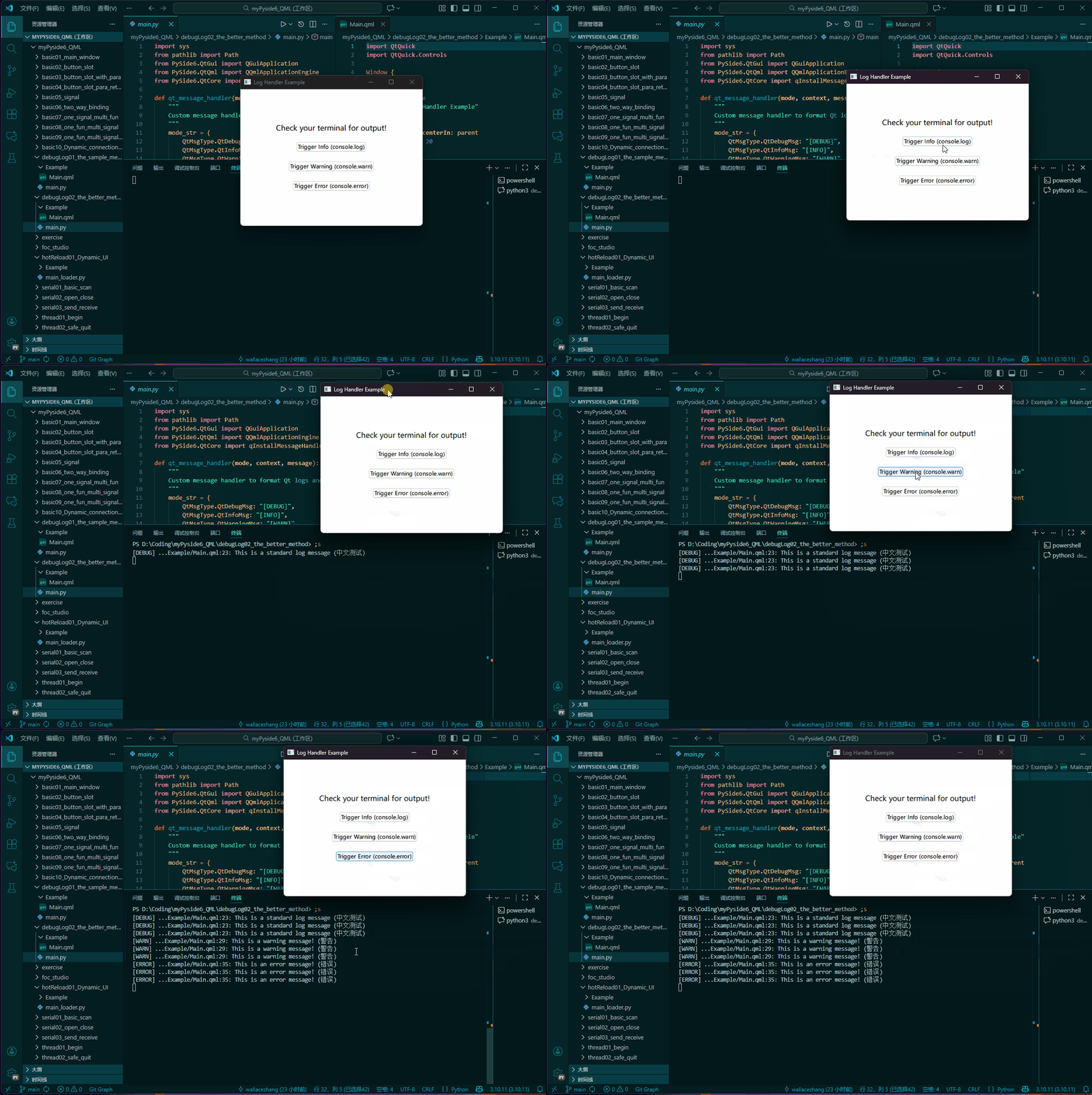
如上所示,log按照日志等级区分开,中文乱码问题也解决了。
工程代码:
- github:https://github.com/q164129345/myPyside6_QML/tree/main/debugLog02_the_better_method
- gitee:https://gitee.com/wallace89/myPyside6_QML/tree/main/debugLog02_the_better_method
一、代码
1.1、main.py
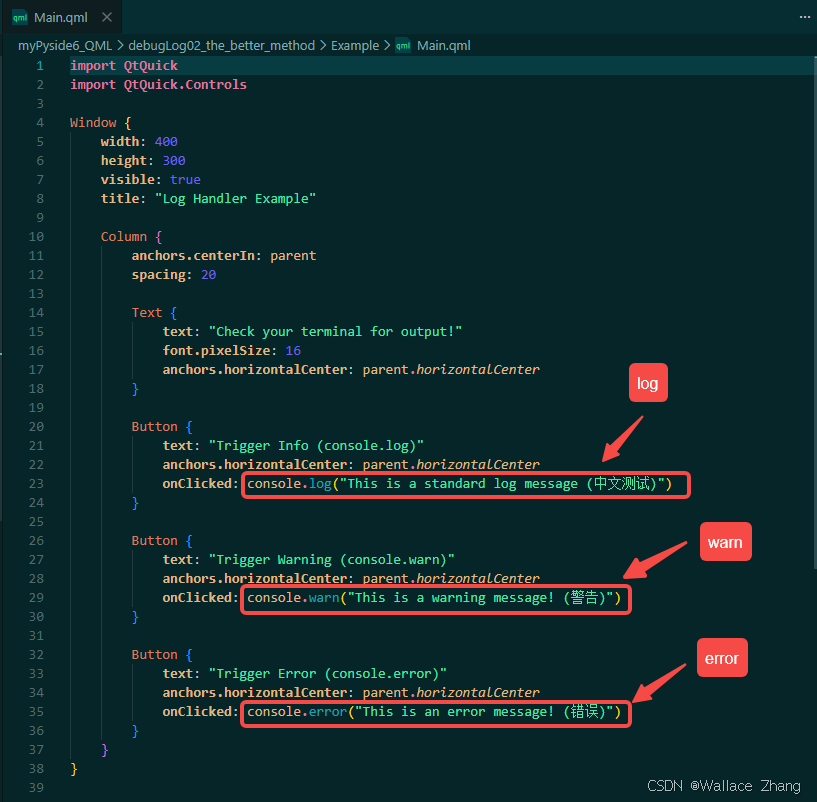
1.2、Main.qml

开源鸿蒙跨平台开发社区汇聚开发者与厂商,共建“一次开发,多端部署”的开源生态,致力于降低跨端开发门槛,推动万物智联创新。
更多推荐


 22
22 0
0- 0


 已为社区贡献1条内容

所有评论(0)