Yarn-tool接口2
前面我们学习了相关的理论,接下来,我们开始去解决开头提出的问题
(五)Tool接口改进代码
(1)新建Maven项目YarnDemo,并设置pom.xml如下:
<?xml version="1.0" encoding="UTF-8"?>
<project xmlns="http://maven.apache.org/POM/4.0.0"
xmlns:xsi="http://www.w3.org/2001/XMLSchema-instance"
xsi:schemaLocation="http://maven.apache.org/POM/4.0.0 http://maven.apache.org/xsd/maven-4.0.0.xsd">
<modelVersion>4.0.0</modelVersion>
<groupId>com.atguigu.hadoop</groupId>
<artifactId>yarn_tool_test</artifactId>
<version>1.0-SNAPSHOT</version>
<dependencies>
<dependency>
<groupId>org.apache.hadoop</groupId>
<artifactId>hadoop-client</artifactId>
<version>3.1.3</version>
</dependency>
</dependencies>
</project>
(2)新建一个包,名字为com.yarn。
(3)在这个包下创建类WordCountDriver并实现Tool接口:
package com.example.mapreduce;
import org.apache.hadoop.conf.Configuration;
import org.apache.hadoop.fs.Path;
import org.apache.hadoop.io.LongWritable;
import org.apache.hadoop.io.Text;
import org.apache.hadoop.mapreduce.Job;
import org.apache.hadoop.mapreduce.lib.input.FileInputFormat;
import org.apache.hadoop.mapreduce.lib.output.FileOutputFormat;
import org.apache.hadoop.util.Tool;
import org.apache.hadoop.util.ToolRunner;
import java.io.IOException;
import java.util.Arrays;
//mapreduce: 分布式计算框架
// 提交任务给hadoop集群执行
// 它要做7件事 hadoop jar mc8.js com.example.mapreduce.WordCountDriver /要处理的文件夹 /结果路径
public class WordCountDriverTool implements Tool {
private Configuration conf;
public static void main(String[] args) throws Exception {
switch(args[0]) {
case "wordcount":
int run = ToolRunner.run(new Configuration(), new WordCountDriverTool(), Arrays.copyOfRange(args,1, args.length));
System.exit(run);
break;
default:
throw new RuntimeException("no such tool" +args[0]);
}
}
@Override
public int run(String[] args) throws Exception {
// 连接到hadoop集群
// conf.set("fs.defaultFS", "hdfs://hadoop100:8020");
Job job = Job.getInstance(conf);
// 2. 关联本地的jar包
job.setJarByClass(WordCountDriverTool.class);
// 3. 关联Mapper和Reducer
job.setMapperClass(WordCountMapper.class);
job.setReducerClass(WordCountReducer.class);
// 4. 设置Map的键值对泛型
job.setMapOutputKeyClass(Text.class);
job.setMapOutputValueClass(LongWritable.class);
// 5. 设置Reduce的键值对泛型
job.setOutputKeyClass(Text.class);
job.setOutputValueClass(LongWritable.class);
// 6. 设置输入路径(D:\vm\wcinput)和输出路径(D:\vm\output01)
FileInputFormat.setInputPaths(job, new Path(args[0]));
FileOutputFormat.setOutputPath(job, new Path(args[1]));
// 7. 提交job,根据返回值设置程序退出code
return job.waitForCompletion(true) ? 0 : 1;
}
@Override
public void setConf(Configuration configuration) {
this.conf = configuration;
}
@Override
public Configuration getConf() {
return conf;
}
}
(4)重新打包生成jar,假设名称为MapReduceDemo1-1.0-SNAPSHOT.jar
(5)上传到集群的节点上。
(6)运行jar
hadoop jar MapReduceDemo1-1.0-SNAPSHOT.jar com.example.mapreduce.WordCountDriverTool wordcount /wcinput /a1
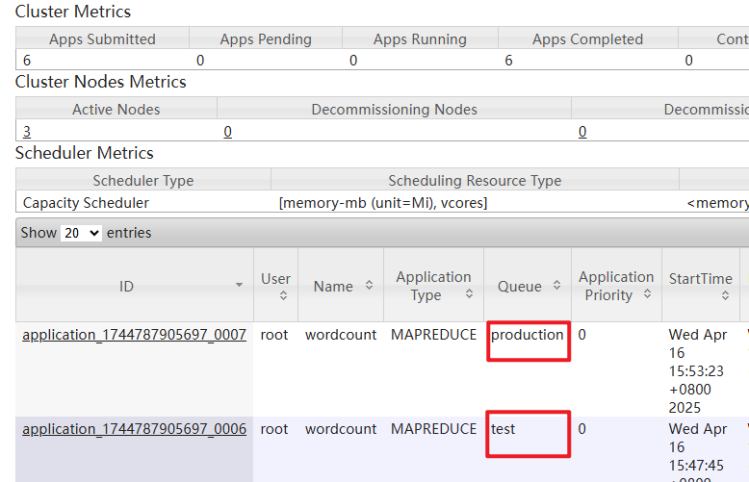
(7)不使用-D参数,测试运行。
接下来,使用-D参数运行效果。
hadoop jar MapReduceDemo1-1.0-SNAPSHOT.jar com.example.mapreduce.WordCountDriverTool wordcount -Dmapreduce.job.queue.name=test /wcinput /a2
(8)运行结果如下

开源鸿蒙跨平台开发社区汇聚开发者与厂商,共建“一次开发,多端部署”的开源生态,致力于降低跨端开发门槛,推动万物智联创新。
更多推荐


 18
18 0
0- 0


 已为社区贡献1条内容

所有评论(0)