设计模式:组合模式——对象结构型模式
·
组合模式(Composite Pattern)是一种结构型设计模式,它允许你将对象组合成树形结构来表示“部分-整体”的层次结构。组合模式使得客户端可以统一地对待单个对象和对象集合。
主要组成
组合模式有三个主要角色:
-
Component(组件):
- 定义一个接口,声明一个方法,所有的叶子节点(Leaf)和容器节点(Composite)都会实现这个接口。
-
Leaf(叶子节点):
- 叶子节点是树形结构中的最底层节点,没有子节点。它实现了
Component接口,并提供具体的业务实现。
- 叶子节点是树形结构中的最底层节点,没有子节点。它实现了
-
Composite(容器节点):
- 容器节点包含一个或多个叶子节点或者其他容器节点。它也实现了
Component接口,并且通常会维护一个子节点的列表。容器节点可以将请求转发给其所有的子节点,并根据需要进行操作。
- 容器节点包含一个或多个叶子节点或者其他容器节点。它也实现了
优点
- 简化客户端代码:客户端可以以一致的方式对待单一对象和组合对象。
- 易于扩展:可以轻松添加新的叶子节点或容器节点,而不需要修改现有的代码。
- 增加灵活性:通过组合,系统能够创建任意复杂的树形结构。
缺点
- 复杂性增加:如果树形结构非常深或者复杂,可能会导致系统设计过于复杂。
- 性能问题:树形结构遍历或者递归时可能会有性能瓶颈,尤其是子节点非常多时。
适用场景
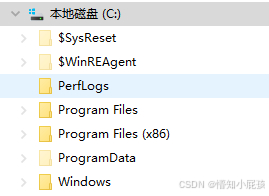
- 文件系统:文件夹可以包含文件或其他文件夹,使用组合模式可以很容易地表示文件和文件夹的层次结构。
- 图形界面框架:在GUI系统中,控件可能会嵌套在其他控件中,组合模式可以用于表示这些层级。
- 组织结构:公司的部门可以包含其他部门或员工,使用组合模式可以表示公司的层级结构。
示例代码
from abc import ABC, abstractmethod
import time


# Component: 文件系统组件
class FileSystemComponent(ABC):
    @abstractmethod
    def display(self, indent: str = ""):
        # 叶子节点(Leaf)和容器节点(Composite)都会实现这个接口。
        pass

    @abstractmethod
    def get_size(self):
        # 叶子节点(Leaf)和容器节点(Composite)都会实现这个接口。
        pass


# Leaf: 文件类
class File(FileSystemComponent):
    def __init__(self, name, size):
        # 叶子节点,无 children
        self.name = name
        self.size = size  # 文件大小(字节)
        self.creation_time = time.ctime()  # 创建时间

    def display(self, indent: str = ""):
        print(
            f"{indent}File: {self.name}, Size: {self.size} bytes, Created: {self.creation_time}"
        )

    def get_size(self):
        return self.size


# Composite: 文件夹类
class Folder(FileSystemComponent):
    def __init__(self, name):
        self.name = name
        # 维护一个子节点的列表 也可以是 dict 看具体实现
        self.children = []

    def add(self, component: FileSystemComponent):
        self.children.append(component)

    def remove(self, component: FileSystemComponent):
        self.children.remove(component)

    def display(self, indent: str = ""):
        # 将请求转发给其所有的子节点
        print(f"{indent}Folder: {self.name}")
        for child in self.children:
            child.display(indent + "    ")  # 增加缩进表示层级

    def get_size(self):
        # 将请求转发给其所有的子节点
        total_size = 0
        for child in self.children:
            total_size += child.get_size()
        return total_size


# 客户端代码
if __name__ == "__main__":
    # 创建文件——部分
    doc_1 = File("file1.txt", 1024)  # 1 KB
    doc_2 = File("file2.txt", 2048)  # 2 KB
    image_1 = File("file3.png", 512)  # 512 B

    # 创建文件夹——既是部分,也是整体
    documents = Folder("Documents")
    images = Folder("Images")
    videos = Folder("Videos")

    # 将文件添加到文件夹
    documents.add(doc_1)
    documents.add(doc_2)

    images.add(image_1)

    # 创建主文件夹并添加子文件夹——整体
    root_folder = Folder("Root")
    root_folder.add(documents)
    root_folder.add(images)
    root_folder.add(videos)

    # 展示文件系统
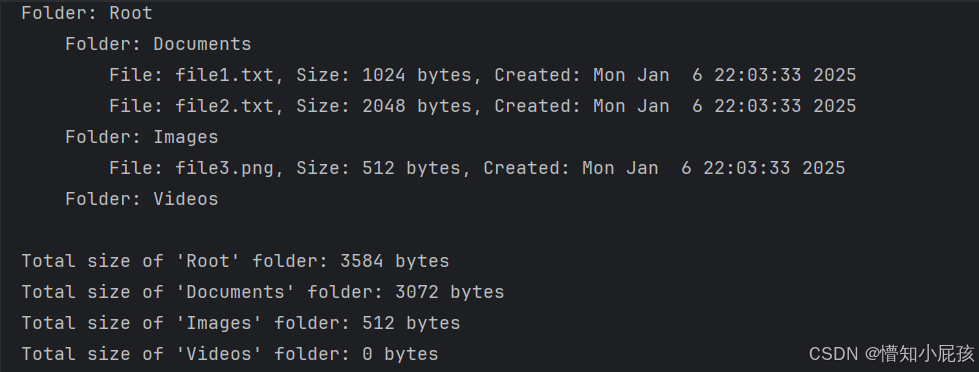
    root_folder.display()

    # 计算文件夹大小 —— 一致的方式对待单一对象和组合对象
    print(f"\nTotal size of 'Root' folder: {root_folder.get_size()} bytes")
    print(f"Total size of 'Documents' folder: {documents.get_size()} bytes")
    print(f"Total size of 'Images' folder: {images.get_size()} bytes")
    print(f"Total size of 'Videos' folder: {videos.get_size()} bytes")

开源鸿蒙跨平台开发社区汇聚开发者与厂商,共建“一次开发,多端部署”的开源生态,致力于降低跨端开发门槛,推动万物智联创新。
更多推荐


 4
4 0
0- 0


 已为社区贡献1条内容

所有评论(0)