K8s部署redis三主三从
·
一、背景介绍
通过github项目下的bitnami/redis来部署的redis三主三从集群,因为bitnami默认暴露服务的方式是ClusterIP,为了暴露服务让外部客户端访问,我这里使用LoadBalancer的方式进行服务暴露。也就是说我这里是需要6个LB地址。
二、下载bitnami包
wget https://charts.bitnami.com/bitnami/redis-cluster-13.0.3.tgz三、解压下载
# 解压
tar -xvf redis-cluster-13.0.3.tgz


# 解压后目录结构
tree redis-cluster
redis-cluster
├── Chart.lock
├── charts
│   └── common
│       ├── Chart.yaml
│       ├── README.md
│       ├── templates
│       │   ├── _affinities.tpl
│       │   ├── _capabilities.tpl
│       │   ├── _compatibility.tpl
│       │   ├── _errors.tpl
│       │   ├── _images.tpl
│       │   ├── _ingress.tpl
│       │   ├── _labels.tpl
│       │   ├── _names.tpl
│       │   ├── _resources.tpl
│       │   ├── _secrets.tpl
│       │   ├── _storage.tpl
│       │   ├── _tplvalues.tpl
│       │   ├── _utils.tpl
│       │   ├── validations
│       │   │   ├── _cassandra.tpl
│       │   │   ├── _mariadb.tpl
│       │   │   ├── _mongodb.tpl
│       │   │   ├── _mysql.tpl
│       │   │   ├── _postgresql.tpl
│       │   │   ├── _redis.tpl
│       │   │   └── _validations.tpl
│       │   └── _warnings.tpl
│       └── values.yaml
├── Chart.yaml
├── README.md
├── templates
│   ├── configmap.yaml
│   ├── extra-list.yaml
│   ├── headless-svc.yaml
│   ├── _helpers.tpl
│   ├── metrics-prometheus.yaml
│   ├── metrics-svc.yaml
│   ├── networkpolicy.yaml
│   ├── NOTES.txt
│   ├── poddisruptionbudget.yaml
│   ├── prometheusrule.yaml
│   ├── psp.yaml
│   ├── redis-rolebinding.yaml
│   ├── redis-role.yaml
│   ├── redis-serviceaccount.yaml
│   ├── redis-statefulset.yaml
│   ├── redis-svc.yaml
│   ├── scripts-configmap.yaml
│   ├── secret.yaml
│   ├── svc-binding-secret.yaml
│   ├── svc-cluster-external-access.yaml
│   ├── tls-secret.yaml
│   └── update-cluster.yaml
└── values.yaml
四、修改values.yaml
# 添加存储类
global:
  imageRegistry: ""
  ## E.g.
  ## imagePullSecrets:
  ##   - myRegistryKeySecretName
  ##
  imagePullSecrets: []
  defaultStorageClass: ""
  storageClass: "nfs-client"


# 添加redis集群密码
usePassword: true
## @param password Redis® password (ignored if existingSecret set)
## Defaults to a random 10-character alphanumeric string if not set and usePassword is true
## ref: https://github.com/bitnami/containers/tree/main/bitnami/redis#setting-the-server-password-on-first-run
##
password: "123456"

#  集群设置
cluster:
  ## @param cluster.init Enable the initialization of the Redis(R) Cluster
  ##
  init: false  # 决定是否需要初始化集群,这里默认是true,搭建一个ClusterIP的集群,之后等下面externalAccess.enable是true获取lb地址以后,这里还需要改为true 用lb地址列表的地址再进行一次初始化
  ## nodes (as replica count is set to 1 by default, there will be 1 replica per master node).
  ## Hence, nodes = numberOfMasterNodes + numberOfMasterNodes * replicas
  ##
  ## @param cluster.nodes The number of master nodes should always be >= 3, otherwise cluster creation will fail
  ##
  nodes: 6  #三主三从
  replicas: 1

  externalAccess:
    ## @param cluster.externalAccess.enabled Enable access to the Redis
    ##
    enabled: true #开启lb,
    ## @param cluster.externalAccess.hostMode Set cluster preferred endpoint type as hostname
    hostMode: false
    service:
      ## @param cluster.externalAccess.service.disableLoadBalancerIP Disable use of `Service.spec.loadBalancerIP`
      ##
      disableLoadBalancerIP: false  #默认为false
      ## @param cluster.externalAccess.service.loadBalancerIPAnnotaion Name of annotation to specify fixed IP for service in. Disables `Service.spec.loadBalancerIP` if not empty
      ##
      loadBalancerIPAnnotaion: ""
      ## @param cluster.externalAccess.service.type Type for the services used to expose every Pod
      ## At this moment only LoadBalancer is supported
      ##
      type: LoadBalancer
      ## @param cluster.externalAccess.service.port Port for the services used to expose every Pod
      ##
      port: 6379
      ## @param cluster.externalAccess.service.loadBalancerIP Array of load balancer IPs for each Redis® node. Length must be the same as cluster.nodes
      ##
      loadBalancerIP:
      - 11.0.1.226
      - 11.0.1.229
      - 11.0.1.230
      - 11.0.1.231
      - 11.0.1.232
      - 11.0.1.233
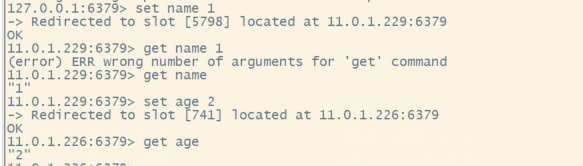
五、参考获取到的LB地址
下面的lb地址中任意一个lb地址,我们都可以在客户端进行访问


开源鸿蒙跨平台开发社区汇聚开发者与厂商,共建“一次开发,多端部署”的开源生态,致力于降低跨端开发门槛,推动万物智联创新。
更多推荐


 8
8 0
0- 0


 已为社区贡献1条内容

所有评论(0)