【开源】xGiWifi:第三方giwifi 客户端,用于模拟其他终端登录
·
前言
在山东科技大学 GiWiFi 自动登录脚本提到,实际上可以在任何设备模拟giwifi的任何终端登录,例如在电脑上用平板登录
于是我用codex快速vibe了一个giwifi的第三方客户端,简单起见使用Flutter框架,可以同时编译出多个平台的应用
此项目地址:https://github.com/Mhenwa/xGiWifi
效果
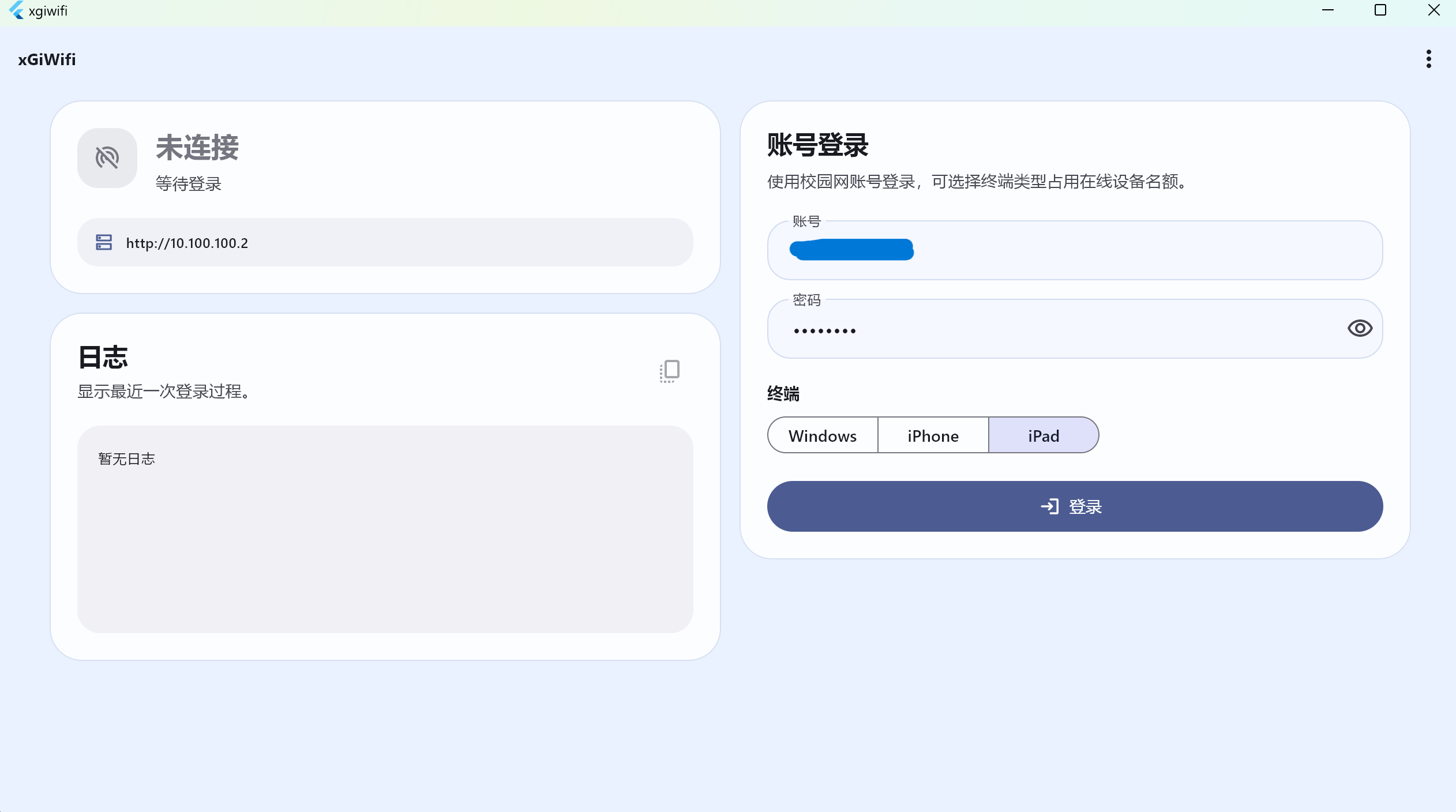
截图如下
功能
可以自由选择需要占用的终端名额,例如在Windows上登录平板端
原理
API加密方法见自动登录脚本
换绑接口
此种返回会要进行换绑
{
  "status": 0,
  "data": {
    "resultCode": 124,
    "resultData": "/Giportal/index.php/Sta/bindSta?..."
  }
}
换绑接口如下
POST /Giportal/index.php/Sta/bindSta?token=...×tamp=...&sign=...
Content-Length: 0
终端画像
Windows
device_mode = Windows NT 10.0
device_type = 1
device_os_type = 3
is_mobile = 0
iPhone
device_mode = iPhone
device_type = 2
device_os_type = 2
is_mobile = 1
iPad
device_mode = iPad
device_type = 3
device_os_type = 2
is_mobile = 1
伪代码
function login(profile, username, password):

    page = GET loginPage(profile)

    cookie = extract PHPSESSID

    params = parse hidden inputs

    override device fields with profile

    params.user_account = username
    params.user_password = password

    plaintext = serialize(params)

    encrypted = AES_CBC_ZeroPadding(
        plaintext,
        key="1234567887654321",
        iv=utf8(params.iv)
    )

    resp = POST loginAction(data=encrypted, iv=params.iv)

    if resp.status == 1:
        return success

    if resp.data.resultCode == 124:
        bindResp = POST bindSta()

        if bindResp.status != 1:
            return fail

        retry up to 3 times:
            resp = POST loginAction(...)
            if resp.status == 1:
                return success

    return fail

开源鸿蒙跨平台开发社区汇聚开发者与厂商,共建“一次开发,多端部署”的开源生态,致力于降低跨端开发门槛,推动万物智联创新。
更多推荐
 7
7 0
0- 0


 已为社区贡献1条内容

所有评论(0)