K8s Istio版本流量分配配置示例部署示例
·
[### K8s Istio版本流量分配配置示例部署示例
文件结构
istio-demo/
├── counter-v1.yaml               # v1 版本 Deployment
├── counter-v2.yaml               # v2 版本 Deployment
├── counter-service.yaml          # Service 配置
├── destination-rule.yaml         # DestinationRule
└── virtual-service.yaml          # VirtualService
1. 创建命名空间并注入边车
[root@master ~]# kubectl create ns sample #创建ns
namespace/sample created
[root@master ~]# kubectl label namespace sample  istio-injection=enabled #注入边车
namespace/sample labeled
[root@master ~]# kubectl get ns sample --show-labels #查看命名空间以及边车标记
NAME     STATUS   AGE     LABELS
sample   Active   4m36s   istio-injection=enabled
2. 创建 Deployments & Service
# counter-v1.yaml
apiVersion: apps/v1
kind: Deployment
metadata:
  name: counter-v1
spec:
  replicas: 1
  selector:
    matchLabels:
      app: counter
      version: v1
  template:
    metadata:
      labels:
        app: counter
        version: v1
    spec:
      containers:
      - name: web
        image: swr.cn-north-4.myhuaweicloud.com/my-istio-demo/counter:v1
        ports:
        - containerPort: 5000
# counter-v2.yaml
apiVersion: apps/v1
kind: Deployment
metadata:
  name: counter-v2
spec:
  replicas: 1
  selector:
    matchLabels:
      app: counter
      version: v2
  template:
    metadata:
      labels:
        app: counter
        version: v2
    spec:
      containers:
      - name: web
        image: swr.cn-north-4.myhuaweicloud.com/my-istio-demo/counter:v2
        ports:
        - containerPort: 5000
# counter-service.yaml
apiVersion: v1
kind: Service
metadata:
  name: counter
spec:
  selector:
    app: counter
  ports:
  - port: 80
    targetPort: 5000
3. 应用配置
kubectl apply -f counter-v1.yaml -n sample
kubectl apply -f counter-v2.yaml -n sample
kubectl apply -f counter-service.yaml -n sample
4. 验证应用部署
[root@master sample]# kubectl get all -n sample #确保pod 为ready2/2 running状态
NAME                              READY   STATUS    RESTARTS   AGE
pod/counter-v1-7c496bbc76-b7tpv   2/2     Running   0          52s
pod/counter-v2-6ccc8d76b6-74zhx   2/2     Running   0          52s

NAME              TYPE        CLUSTER-IP       EXTERNAL-IP   PORT(S)   AGE
service/counter   ClusterIP   10.103.233.110   <none>        80/TCP    50s

NAME                         READY   UP-TO-DATE   AVAILABLE   AGE
deployment.apps/counter-v1   1/1     1            1           52s
deployment.apps/counter-v2   1/1     1            1           52s

NAME                                    DESIRED   CURRENT   READY   AGE
replicaset.apps/counter-v1-7c496bbc76   1         1         1       52s
replicaset.apps/counter-v2-6ccc8d76b6   1         1         1       52s
5.
配置 Istio 流量分配(50/50 比例)
# counter-gateway.yaml
apiVersion: networking.istio.io/v1alpha3
kind: Gateway
metadata:
  name: counter-gateway
  namespace: sample
spec:
  selector:
    istio: ingressgateway  # 使用 Istio 默认的 Ingress Gateway(位于 istio-system 命名空间)
  servers:
  - port:
      number: 80
      name: http
      protocol: HTTP
    hosts:
    - "*"  # 允许任意域名或 IP 访问
# counter-virtualservice.yaml
apiVersion: networking.istio.io/v1alpha3
kind: VirtualService
metadata:
  name: counter
  namespace: sample
spec:
  hosts:
  - "*"  # 匹配所有域名/IP
  gateways:
  - counter-gateway  # 绑定到 Gateway
  http:
  - route:
    - destination:
        host: counter.sample.svc.cluster.local  # 完整服务域名
        subset: v1
      weight: 50
    - destination:
        host: counter.sample.svc.cluster.local
        subset: v2
      weight: 50
# counter-destinationrule.yaml
apiVersion: networking.istio.io/v1alpha3
kind: DestinationRule
metadata:
  name: counter
  namespace: sample
spec:
  host: counter.sample.svc.cluster.local  # 目标服务
  subsets:
  - name: v1
    labels:
      version: v1
  - name: v2
    labels:
      version: v2
#部署VS和gw
kubectl apply -f counter-gateway.yaml -n sample
kubectl apply -f counter-destinationrule.yaml -n sample
kubectl apply -f counter-virtualservice.yaml -n sample
kubectl get svc -n istio-system -l istio=ingressgateway #获取 Ingress Gateway 外部访问地址
NAME                   TYPE           CLUSTER-IP       EXTERNAL-IP   PORT(S)                                                                      AGE
istio-ingressgateway   LoadBalancer   10.106.134.121   <pending>     15021:30398/TCP,80:31101/TCP,443:31885/TCP,31400:30331/TCP,15443:30835/TCP   5d2h
访问验证
效果:反复刷新,出现两种不容的版本内容
方法 1:通过 IP + 端口访问(无需域名)
直接使用 Ingress Gateway 的 EXTERNAL-IP 和 HTTP 端口(如 80:31380 中的 31380):多次刷新浏览器

方法 2:通过域名访问(需配置 Hosts)
-
在本地
/etc/hosts中添加:192.168.3.104 counter.example.com -
访问域名:多次刷新浏览器
http://counter.example.com:31101

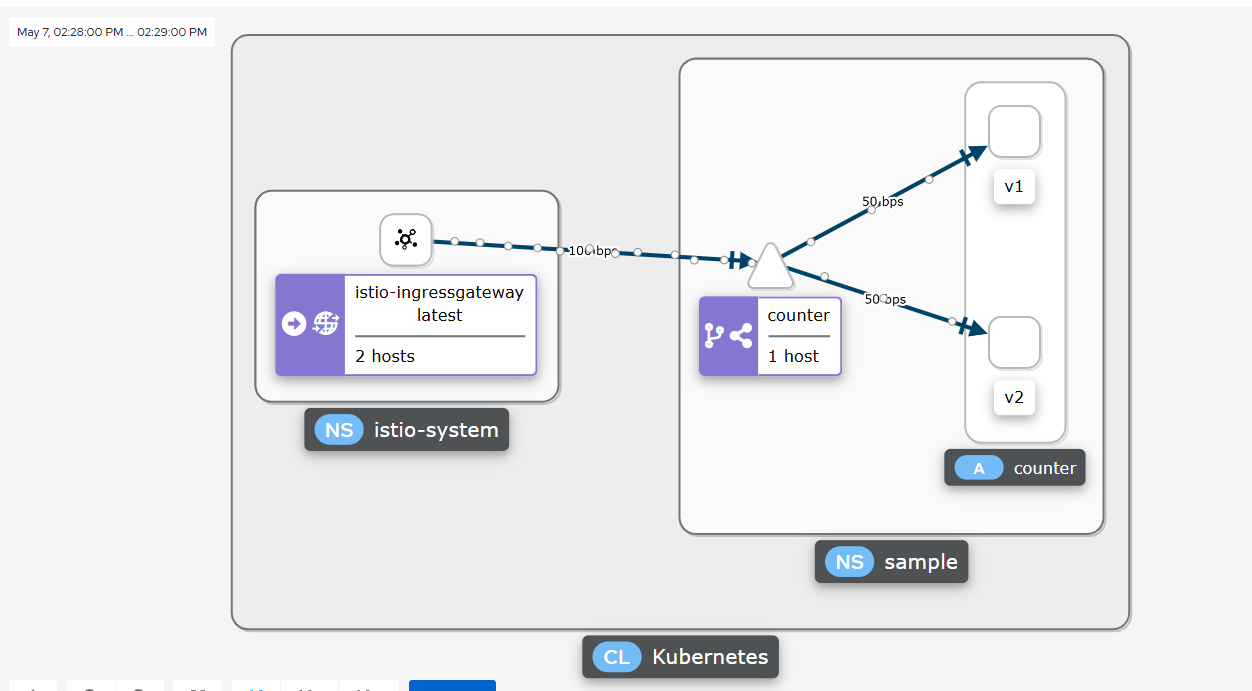
说明,由于权重分配为50,所以也已看到访问的次数相差1次
Kiali console:构建图形

开源鸿蒙跨平台开发社区汇聚开发者与厂商,共建“一次开发,多端部署”的开源生态,致力于降低跨端开发门槛,推动万物智联创新。
更多推荐


 5
5 0
0- 0


 已为社区贡献1条内容

所有评论(0)