Vue3 状态管理新选择:Pinia 从入门到实战
/ 定义并导出 Storeexport const defineStore实例化对象名 = defineStore('状态管理对象名称', {// 状态初始化,相当于data属性名1:属性值1}),// 计算属性(类似 Vue 组件中的 computed)getters: {},// 方法(类似 Vue 组件中的 methond)actions: {函数})基础示例:// 1、导入defineSt
一、什么是pinia?
在 Vue3 生态中,状态管理一直是开发者关注的核心话题。随着 Vuex 的逐步淡出,Pinia 作为官方推荐的状态管理库,凭借其简洁的 API、强大的功能和对 Vue3 特性的完美适配,成为了新时代的不二之选。今天我们就来深入探讨 Pinia 的使用方法和最佳实践。
如果用生活中的例子来解释:
Pinia 就像一个 “共享冰箱”
想象一下,你和室友合租一套公寓,你们有一个 共享冰箱(Pinia Store)。这个冰箱的作用是:
- 存放公共物品(状态 State):比如牛奶、水果、饮料等。
- 规定取用规则(Getters):比如 “只能在早餐时间喝牛奶”。
- 处理特殊操作(Actions):比如 “牛奶喝完后要通知所有人”。
pinia官网:Pinia | The intuitive store for Vue.js
二、为什么选择pinia不选择vuex?
Vuex 和 Pinia 都是 Vue 生态系统中用于状态管理的库,用于解决组件间共享状态的问题。Pinia 作为 Vuex 的继任者,在设计上做了很多改进,下面详细介绍两者的区别:
1. 历史背景与现状
- Vuex:由 Vue 核心团队开发,主要针对 Vue 2 设计,虽然也支持 Vue 3,但存在一些设计上的局限性。最新版本是 Vuex 4(支持 Vue 3)。
- Pinia:同样由 Vue 核心团队开发(主要作者是 Vuex 的作者),是为 Vue 3 量身打造的状态管理库,现在已成为 Vue 官方推荐的状态管理方案,完全替代 Vuex。
2. 核心区别对比
| 特性 | Vuex | Pinia |
|---|---|---|
| 语法风格 | 选项式 API 风格(嵌套结构) | 组合式 API 风格(更简洁) |
| TypeScript 支持 | 需要额外配置,类型推断不友好 | 原生支持,类型推断完善 |
| Mutations | 必须通过 mutations 修改状态(同步) | 废除 mutations,直接在 actions 中修改 |
| 模块化 | 需要通过 modules 嵌套 |
每个 store 本身就是独立模块 |
| 代码组织 | 集中式 store,所有状态在一个对象中 | 分散式 store,可创建多个独立 store |
| 调试工具 | 支持 Vue Devtools,但有局限性 | 完美支持 Vue Devtools,包括时间旅行 |
| 插件系统 | 支持,但 API 较复杂 | 支持,API 更简洁 |
三、怎么创建一个Pinia
1. 创建项目的时候直接选择Pinia
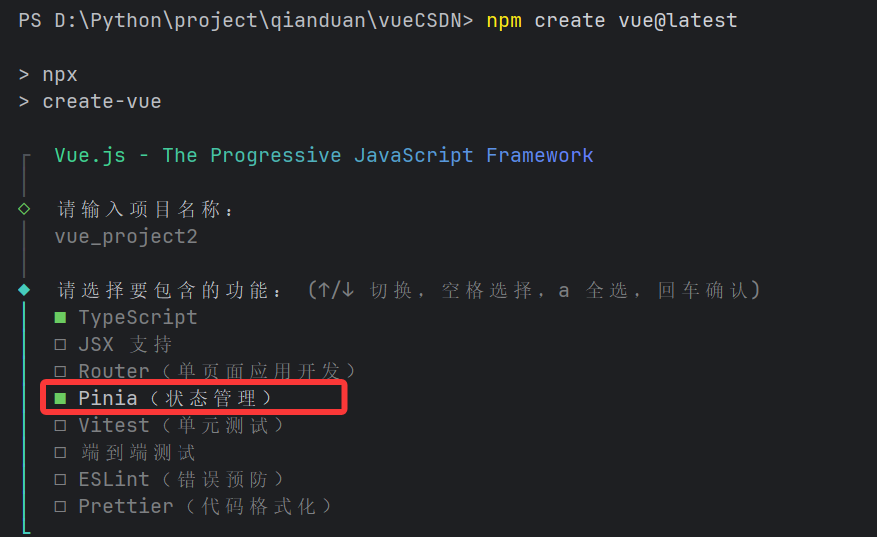
①安装Pinia2. 项目中没有Pinia时,手动下载
npm install pinia②在src中创建stores
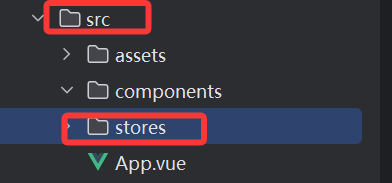
③创建ts文件作为Pinia容器

④在counter.ts中加入以下代码
import { defineStore } from 'pinia'
export const useCounterStore = defineStore('counter', () => {

})
1、defineStore 是 Pinia 状态管理库 中的一个核心函数
2、参数说明
第一个参数 'counter':store 的唯一标识符(不可重复)
第二个参数 () => {}:store 的配置函数,返回 store 的状态和方法
⑤在main.ts中挂载Pinia
import './assets/main.css'

import { createApp } from 'vue'
import { createPinia } from 'pinia'    // 引入创建Pinia方法
import App from './App.vue'

const app = createApp(App)

app.use(createPinia())   // 挂载到app页面

app.mount('#app')
这样就成功手动实现了Pinia的手动安转和配置了。
四、定义第一个Pinia
1、第一个选项式Pinia示例
基础语法:
import { defineStore } from 'pinia'

// 定义并导出 Store
export const defineStore实例化对象名 = defineStore('状态管理对象名称', {
  // 状态初始化,相当于data
  state: () => ({
    属性名1:属性值1
  }),

  // 计算属性(类似 Vue 组件中的 computed)
  getters: {

  },

  // 方法(类似 Vue 组件中的 methond)
  actions: {
    函数
  }
})
基础示例:
/stores/counter.ts
// 1、导入defineStore
import { defineStore } from 'pinia'
import {computed,ref} from "vue";

export const useCounterStore = defineStore('counter', {
    state() {    // 相当于组件中的data
        return {
            title:"选项式计数管理器",
            count: 25   // 状态管理变量数据
        }
    },
    getters: {     // 相当于组件中的computed
        doubleCount: (state) => state.count * 2,   // 2倍计算属性数据
        doubleCountPlusOne: (state) => state.count + 10  // 加10计算属性数据
    },
    actions: {       // 相当于组件中的methods
        increment() {
            this.count++   // 创建函数每次点击按钮,count加1
        },
        decrement(){
            this.count--    // 创建函数每次点击按钮,count减1
        }
    }
})
/src/App.vue
<script setup lang="ts">
// 1、导入
import {useCounterStore} from "@/stores/counter.ts"
// 2、实例化
const counterStore = useCounterStore()
</script>

<template>
// 3、使用
<div class="app">
  <h2>标题{{counterStore.title}}</h2>
  <p>当前计数:{{counterStore.count}}</p>
  <p>双倍计数:{{counterStore.doubleCount}}</p>
  <p>计数+10:{{counterStore.doubleCountPlusOne}}</p>
  <button @click="counterStore.increment()">点击+1</button>
  <button @click="counterStore.decrement()">点击-1</button>
</div>
</template>
运行结果:
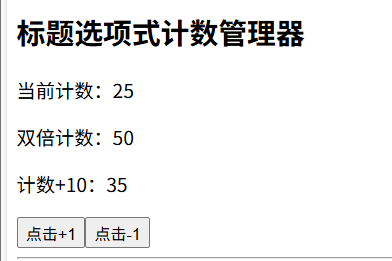
2、第一个组合式Pinia实例
基础语法:
import { defineStore } from 'pinia'
import { ref, computed, reactive } from 'vue'

export const useStoreNameStore = defineStore('storeId', () => {
  // 1. State - 使用 ref 或 reactive
  const count = ref(0)
  const state = reactive({
    name: 'example'
  })

  // 2. Getters - 使用 computed
  const doubleCount = computed(() => count.value * 2)

  // 3. Actions - 普通函数
  function increment() {
    count.value++
  }

  // 4. 返回需要暴露的属性和方法
  return {
    count,
    doubleCount,
    increment
  }
})
基础示例:
/stores/users.ts
import {defineStore} from 'pinia'
import {computed, reactive, ref} from "vue";
export const useUserStore = defineStore('user', ()=>{
    let isLogin = ref(false);
    let username = ref('未知');
    let email = ref('未知');
    let displayName = ref('未知');
    let roles = reactive(['管理员','用户','玩家','游客']);
    let nowRole = ref('未知');
    let theme = ref('白色');
    let language = ref('chinese');
    let message = ref(0);

    function updateLoginStatus(){
        if(isLogin.value){
            isLogin.value = !isLogin.value;
            username.value = "未知";
            displayName.value = "未知";
            nowRole.value = "未知";
            message.value = 0;
            email.value = "未知";
        }
        else{
            isLogin.value = !isLogin.value;
            username.value = "张三";
            displayName.value = "追风少年";
            let random:number = Math.floor(Math.random()*4);
            nowRole.value = roles[random];
            message.value = 10;
            email.value = "zhangsan@163.com";
        }

    }
    function updateUserProfile(){
        theme.value = theme.value === 'white' ? 'dark' : 'white';
        language.value = language.value === 'chinese' ? 'english' : 'chinese';
    }
    function resetUser(){
         username.value = "未知";
         displayName.value = "未知";
         nowRole.value = "未知";
         message.value = 0;
         roles.splice(0,roles.length);
         email.value = "未知";
    }
    return {
        isLogin,
        username,
        email,
        displayName,
        nowRole,
        theme,
        language,
        message,
        updateLoginStatus,
        updateUserProfile,
        resetUser
    }
})
/src/App.vue
<script setup lang="ts">
import { useUserStore } from "@/stores/users.ts";
const userStore = useUserStore();
</script>
<template>
<div class="user-profile">
    <h1>用户资料</h1>
    <!-- 直接访问 -->
    <p>用户名: {{ userStore.username }}</p>
    <p>网名: {{ userStore.displayName }}</p>

    <!-- 解构访问 -->
    <div>
      <p>邮箱: {{userStore.email }}</p>
      <p>登录状态: {{ userStore.isLogin ? '登录':'未登录'}}</p>
    </div>

    <!-- 复杂数据访问 -->
    <div>
      <p>主题: {{ userStore.theme }}</p>
      <p>语言: {{ userStore.language }}</p>
    </div>

    <!-- 数组数据 -->
    <div>
      <p>角色: {{ userStore.nowRole }}</p>
      <p>未读通知: {{ userStore.message}}</p>
    </div>

    <button @click="userStore.updateLoginStatus" >{{ userStore.isLogin ? '退出':'登录'}}</button>
    <button @click="userStore.updateUserProfile">更新资料</button>
    <button @click="userStore.resetUser">重置用户</button>
</div>
</template>
运行结果:
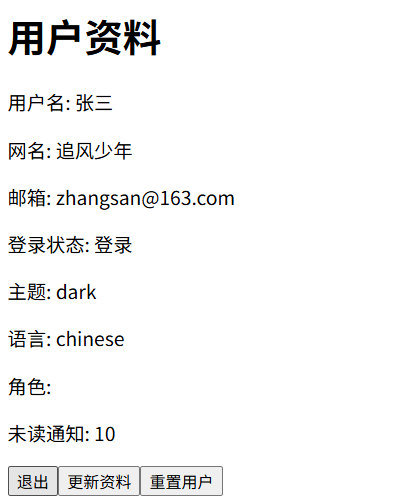
五、综合案例
/stores/counter.ts
import {reactive} from 'vue'
import { defineStore } from 'pinia'

export const useCounterStore = defineStore('counter', () => {
  let products = reactive(
      [
            {
                id: 1, 			    // 商品ID
                name: "苹果16ProMax", // 商品名称
                price: 12999,       // 商品价格
                category: "phone", // 商品类别
                num:123,     // 商品库存数量
                rating: 4.8,       // 商品评分
            },
            {
                id: 2,
                name: "联想拯救者",
                price: 23999,
                category: "laptop",   // 笔记本
                num: 0,
                rating: 3.8,
            },
           {
                id: 3,
                name: "华硕天选6pro",
                price: 11499,
                category: "laptop",   // 笔记本
                num: 15,
                rating: 4.9,
            },
            {
                id: 3,
                name: "iQoo平板7",
                price: 3499,
                category: "tablet",  // 平板电脑
                num: 899,
                rating: 3.7,
            },
            {
                id: 4,
                name: "iPad Air",
                price: 8599,
                category: "tablet",  // 平板电脑
                num: 899,
                rating: 4.1,
            },
            {
                id: 5,
                name: "小米手环7",
                price: 999,
                category: "watch",  // 手表
                num:45,
                rating: 4.61,
            },
            {
                id: 6,
                name: "苹果手表6",
                price: 3888,
                category: "watch",  // 手表
                num:45,
                rating: 4.9,
            },
             {
                id: 6,
                name: "小米手机",
                price: 3999,
                category: "phone",
                num:425,
                nun: 442,
                rating: 4.7,
            },
        ],
  )
    let avgrating = products.reduce((sum,crr) => sum+crr.rating,0) / products.length
    let avgprice = products.reduce((sum,crr) => sum+crr.price,0) / products.length
    let sumNum = products.reduce((sum,crr) => sum+crr.num,0)
    let stockNum = products.filter(item=>item.num <= 0).length
    let categories = reactive(["phone", "laptop", "tablet", "watch"])
    return {
        products,
        categories,
        avgrating,
        avgprice,
        sumNum,
        stockNum
    }
})
/src/App.vue
<script setup lang="ts">
import {useCounterStore} from './stores/counter.ts'
import {computed, ref} from 'vue'
const store = useCounterStore()
const products = store.products
const minPrice = ref(0)
const maxPrice = ref(0)
const filteredProducts = computed(() => {
  return products.filter(
    item => item.price >= minPrice.value && item.price <= maxPrice.value
  )
})
</script>

<template>
  <div class="container">
    <h1>库存管理系统</h1>
    <h2>总产品数据</h2>
    <table>
      <tr>
        <th>商品名</th>
        <th>商品价格</th>
        <th>商品库存</th>
        <th>商品评分</th>
      </tr>
      <tr v-for="(item) in products">
        <td>{{item.name}}</td>
        <td>{{item.price}}</td>
        <td>{{item.num}}</td>
        <td>{{item.rating}}</td>
      </tr>
    </table>
    <strong>产品数量:{{store.sumNum}}</strong>
    <strong>缺货商品数量:{{store.stockNum}}</strong>
    <strong>平均价格:{{store.avgprice}}</strong>
    <strong>平均评分:{{store.avgrating}}</strong>
    <h2>分类统计</h2>
    <div class="classify" v-for="item in store.categories">
      <strong>{{item}}</strong>
      <table>
        <tr>
          <th>商品名</th>
          <th>商品价格</th>
          <th>商品库存</th>
          <th>商品评分</th>
        </tr>
        <template v-for="product in products" :key="product.id">
            <tr v-if="product.category === item">
              <td>{{ product.name }}</td>
              <td>{{ product.price }}</td>
              <td>{{ product.num }}</td>
              <td>{{ product.rating }}</td>
            </tr>
         </template>
      </table>
    </div>
    <h2>商品筛选</h2>
    <div>
      <label>价格区间:</label>
      <input type="number" v-model="minPrice">---<input type="number" v-model="maxPrice">
      <table v-if="filteredProducts.length > 0">
        <tr>
          <th>商品名</th>
          <th>商品价格</th>
          <th>商品库存</th>
          <th>商品评分</th>
        </tr>
        <tr v-for="item in filteredProducts" :key="item.id">
          <td>{{ item.name }}</td>
          <td>{{ item.price }}</td>
          <td>{{ item.num }}</td>
          <td>{{ item.rating }}</td>
        </tr>
      </table>
      <p v-else>暂无符合条件的商品。</p>
    </div>
  </div>
</template>

<style scoped>
.container{
  width:1000px;
  padding: 20px;
  border: #6e7681 1px solid;
  box-shadow: 2px 2px 4px #bdc1c6;
  margin: 0 auto;
}
h1{
  text-align: center;
}
table{
  margin: 0 auto;
  border: #6e7681 1px solid;
  width:1000px;
  border-collapse: collapse; /* 合并边框 */
  margin-bottom: 30px;
}
strong{
  display: block;
  margin-top: 10px;
}
th,tr,td{
   border: #6e7681 1px solid;  /* 关键:为单元格添加边框 */
   padding: 10px;              /* 添加内边距使内容更美观 */
   text-align: center;
}
</style>
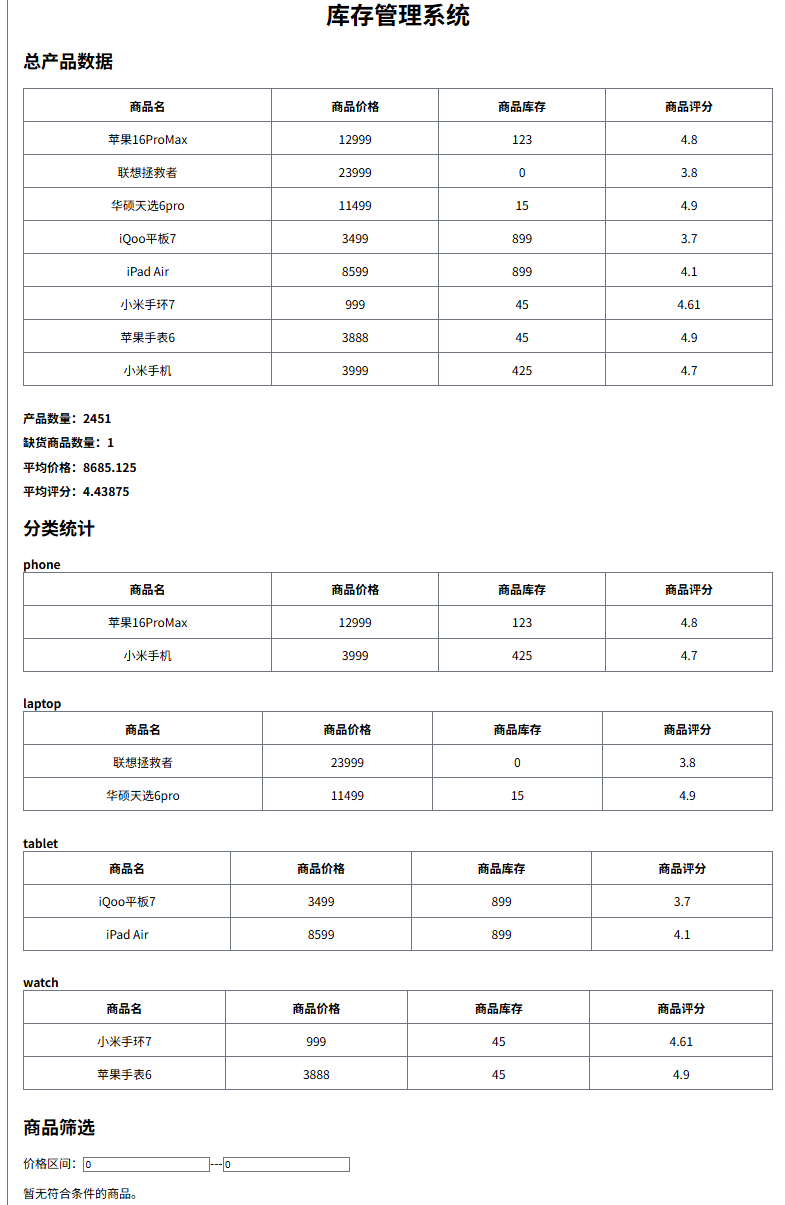
运行结果:

开源鸿蒙跨平台开发社区汇聚开发者与厂商,共建“一次开发,多端部署”的开源生态,致力于降低跨端开发门槛,推动万物智联创新。
更多推荐



 16
16 0
0- 0


 已为社区贡献1条内容

所有评论(0)