flutter - 手势竞争
·
flutter - 手势竞争
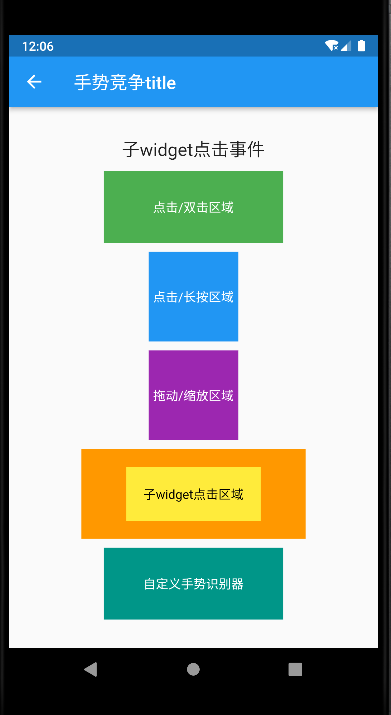
import 'package:flutter/material.dart';
import 'package:flutter/gestures.dart';

/**
 * Author : wn
 * Email : maoning20080808@163.com
 * Date : 2025/6/21 20:35
 * Description : 手势竞争
 */
class GestureCompetitionWidget extends StatelessWidget {

  @override
  Widget build(BuildContext context) {

    return Scaffold(
      appBar: AppBar(
        title: Text("手势竞争title"),
      ),
      body: _GestureCompetitionDemo(),
    );
  }
}

class _GestureCompetitionDemo extends StatefulWidget {

  @override
  State<_GestureCompetitionDemo> createState() => _GestureCompetitionState();

}

class _GestureCompetitionState extends State<_GestureCompetitionDemo>{

  String _message = "请进行手势操作";
  Color _boxColor = Colors.blue;
  double _scale = 1;
  double _rotation = 0;

  void _updateMessage(String msg){
    setState(() {
      _message = msg;
    });
  }

  @override
  Widget build(BuildContext context) {

    return Center(
      child: Column(
        mainAxisAlignment: MainAxisAlignment.center,
        children: [
          Text(_message , style: const TextStyle(fontSize: 20),),

          const SizedBox(height: 10,),

          //示例1, 点击与双击竞争
          GestureDetector(
            onTap: () => _updateMessage("单击事件"),
            onDoubleTap: () => _updateMessage("双击事件"),
            child: Container(
              width: 200,
              height: 80,
              color: Colors.green,
              alignment: Alignment.center,
              child: const Text("点击/双击区域", style: TextStyle(color: Colors.white),),
            ),
          ),

          const SizedBox(height: 10,),
          //示例2:点击与长按竞争
          GestureDetector(
            onTap: () {
              _updateMessage("点击事件b");
              setState(() {
                _boxColor = Colors.blue;
              });
            },
            onLongPress: (){
              _updateMessage("长按事件b");
              setState(() {
                _boxColor = Colors.red;
              });
            },
            child: Container(
              width: 100,
              height: 100,
              color: _boxColor,
              alignment: Alignment.center,
              child: const Text("点击/长按区域", style: TextStyle(color: Colors.white),),
            ),
          ),

          const SizedBox(height: 10,),
          //示例3:拖动与缩放竞争
          Transform.scale(
            scale: _scale,
            child: Transform.rotate(
                angle: _rotation,
                child: GestureDetector(
                  /*onPanUpdate: (details){
                    _updateMessage("拖动事件c");
                    setState(() {
                      _rotation += details.delta.dx / 100;
                    });
                  },*/
                  onScaleUpdate: (details){
                    _updateMessage("缩放事件c");
                    setState(() {
                      _scale = details.scale.clamp(0.5, 2.0);
                    });
                  },
                  child: Container(
                    width: 100,
                    height: 100,
                    color: Colors.purple,
                    alignment: Alignment.center,
                    child: const Text("拖动/缩放区域", style: TextStyle(color: Colors.white),),
                  ),
                ),
            ),
          ),

          const SizedBox(height: 10,),
          //示例4:父子Widget手势竞争
          GestureDetector(
            onTap: () => _updateMessage("父widget点击事件"),
            child: Container(
              width: 250,
              height: 100,
              color: Colors.orange,
              alignment: Alignment.center,
              child: GestureDetector(
                onTap: () => _updateMessage("子widget点击事件"),
                child: Container(
                  width: 150,
                  height: 60,
                  color: Colors.yellow,
                  alignment: Alignment.center,
                  child: const Text("子widget点击区域", style: TextStyle(color: Colors.black),),
                ),
              ),
            ),
          ),

          const SizedBox(height: 10,),
          //示例5:RawGestureDetector自定义手势竞争
          RawGestureDetector(
            gestures: {
              AllowMultipleGestureRecognizer : GestureRecognizerFactoryWithHandlers<AllowMultipleGestureRecognizer>(
                  () => AllowMultipleGestureRecognizer(),
                  (AllowMultipleGestureRecognizer instance) {
                    instance.onTap = () => _updateMessage("自定义手势识别器1");
                  }
              ),
              DoubleTapGestureRecognizer: GestureRecognizerFactoryWithHandlers<DoubleTapGestureRecognizer>(
                  () => DoubleTapGestureRecognizer(),
                  (DoubleTapGestureRecognizer instance){
                    instance.onDoubleTap = () => _updateMessage("自定义手势识别器2");
                  }
              )
            },
            child: Container(
              width: 200,
              height: 80,
              color: Colors.teal,
              alignment: Alignment.center,
              child: const Text("自定义手势识别器", style: TextStyle(color: Colors.white),),
            ),
          ),

        ],
      ),
    );
  }
}

//自定义手势识别器,允许多个识别器同时获胜
class AllowMultipleGestureRecognizer extends TapGestureRecognizer {
  @override
  void rejectGesture(int pointer) {
    //不调用super.rejectGesture,这样即使有其他识别器获胜,这个识别器也不会被拒绝
    acceptGesture(pointer);
  }
}
开源鸿蒙跨平台开发社区汇聚开发者与厂商,共建“一次开发,多端部署”的开源生态,致力于降低跨端开发门槛,推动万物智联创新。
更多推荐
 0
0 0
0- 0


 已为社区贡献95条内容

所有评论(0)