【Kubernetes】Alertmanager 配置 DingTalk 告警
·
让我们一起来深入探讨如何高效配置钉钉告警,确保及时获取重要信息!
- 此处需部署 Prometheus 和 Alertmanager,且需要配置一定的告警规则
- 部署 Prometheus:【Kubernetes】在 K8s 上部署 Prometheus-CSDN博客
- 部署 Alertmanager:【Kubernetes】在 K8s 上部署 Alertmanager-CSDN博客
1、创建 DingTalk 机器人
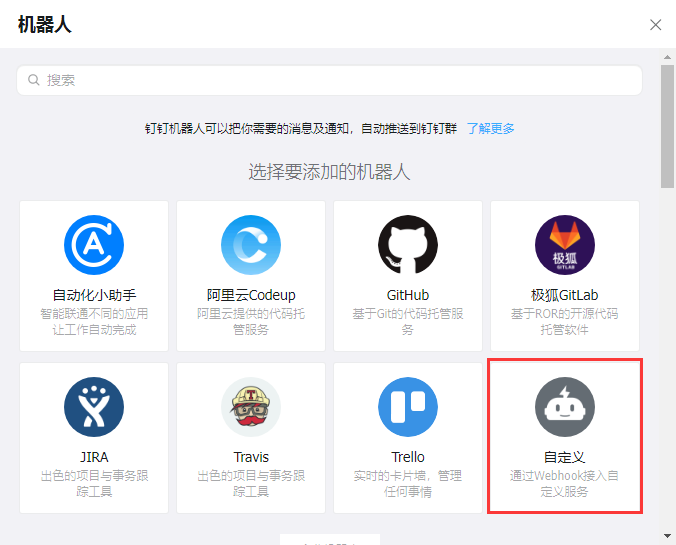
- 群聊 - 群设置 - 机器人 - 添加机器人 - 自定义
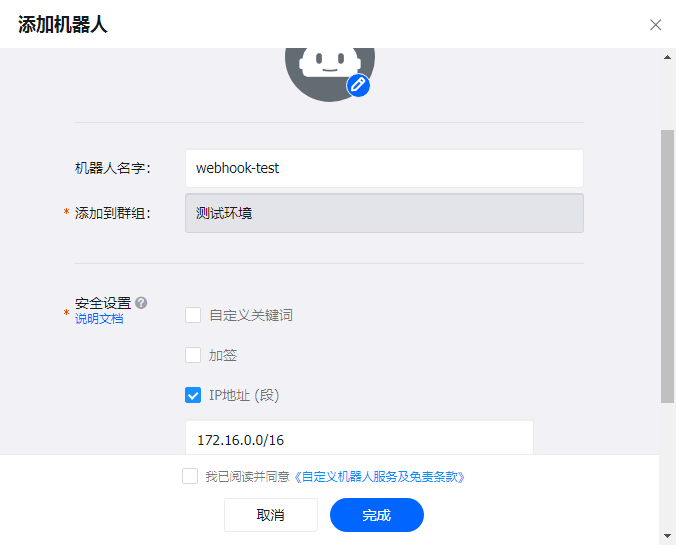
- 添加机器人 - 填写机器人名字 - 选择一项安全设置(结合实际)
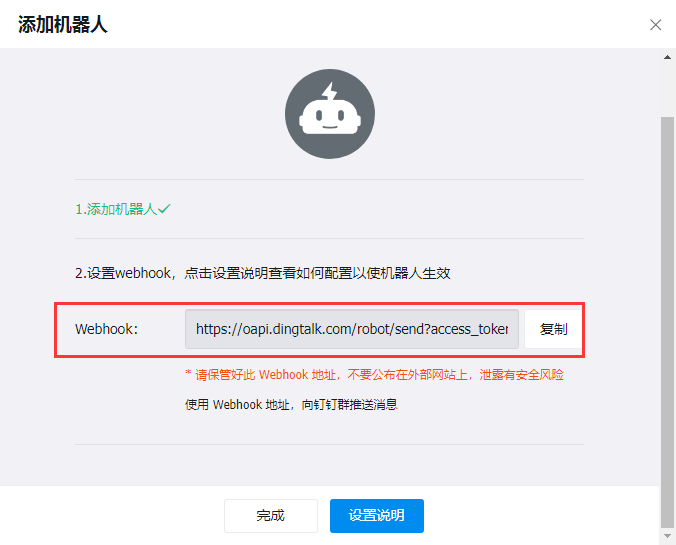
- 完成后获取到 webhook 地址(用于配置下方 webhook - ConfigMap)
2、部署 webhook
- 官网提供 webhook:https://github.com/timonwong/prometheus-webhook-dingtalk
- 若使用官网提供 webhook 可跳过步骤 2,直接访问上方 github 进行应用部署
- 此处为了实现自定义消息格式,自行编写了一个 webhook 代码
2.1、DingTalk 机器人消息请求格式
# 钉钉发送消息格式文档
https://open.dingtalk.com/document/robots/custom-robot-access#66407430cd5xr
# 文本示例
curl "https://oapi.dingtalk.com/robot/send?access_token=xxxxxxxxxxxxxxxxxxxxxxxxxxxxxxxxx" -H 'content-type: application/json' -d '{"text": {"content":"这是一条测试!"},"msgtype":"text"}'

# 下方 webhook 镜像同样适用企业微信的 "消息推送" 功能
# 请求文档:https://developer.work.weixin.qq.com/document/path/99110
# 文本示例
curl 'https://qyapi.weixin.qq.com/cgi-bin/webhook/send?key=xxxxxxxxxxxxxxxxxxxxxxxxxxxxxxxxx' -H 'Content-Type: application/json' -d '{ "msgtype": "text", "text": { "content": "hello world" } }'
2.2、Alertmanager 告警请求格式
# github 地址
https://prometheus.io/docs/alerting/latest/configuration/#webhook_config
# 请求内容
{
  "version": "4",
  "groupKey": <string>,              # 用于识别一组警报的关键信息(例如,去重)
  "truncatedAlerts": <int>,          # 由于 “max_alerts” 限制,有多少警报被截断
  "status": "<resolved|firing>",
  "receiver": <string>,
  "groupLabels": <object>,
  "commonLabels": <object>,
  "commonAnnotations": <object>,
  "externalURL": <string>,           # 指向 Alertmanager 反向链接
  "alerts": [
    {
      "status": "<resolved|firing>",
      "labels": <object>,
      "annotations": <object>,
      "startsAt": "<rfc3339>",
      "endsAt": "<rfc3339>",
      "generatorURL": <string>,      # 实际告警
      "fingerprint": <string>
    },
    ...
  ]
}
2.3、具体实现
### 伪代码逻辑 ###
# 1. 读取配置文件 config.yml 定义的 dingding 机器人目标 target(可配置多个机器人)
# 2. 根据目录 target 创建对应的 POST 接口,监听 9090 端口使之能接收 Alertmanager 发送的告警
# 3. 解析收到的 Alertmanager 发送的告警,转换为 dingding 能识别的请求体格式
# 4. 转发到目标 target 对应机器人 url,然后机器人就接受到消息并发送到群中

#  具体代码可见下方步骤 4(使用 ubuntu24.04 作为基础镜像)

# 具体编排如下
---
kind: Namespace
apiVersion: v1
metadata:
  name: monitoring
  labels:
    namespace: monitoring
---
apiVersion: v1
data:
  config.yml: |
    targets:
      webhook_abc:
        url: https://oapi.dingtalk.com/robot/send?access_token=xxxxxxxxxxxxxxxxxxx
      webhook_test:
        url: https://oapi.dingtalk.com/robot/send?access_token=xxxxxxxxxxxxxxxxxxx
      webhook_wechat:
        url: https://qyapi.weixin.qq.com/cgi-bin/webhook/send?key=xxxxxxxxxxxxxxxxxxx
kind: ConfigMap
metadata:
  name: webhook-dingtalk-config
  namespace: monitoring
---
apiVersion: v1
kind: Service
metadata:
  name: webhook-dingtalk-svc
  namespace: monitoring
  labels:
    app: webhook-dingtalk
spec:
  ports:
    - name: http
      port: 9090
      targetPort: 9090
  selector:
    app: webhook-dingtalk
---
apiVersion: apps/v1
kind: Deployment
metadata:
  name: webhook-dingtalk
  namespace: monitoring
  labels:
    app: webhook-dingtalk
spec:
  replicas: 1
  selector:
    matchLabels:
      app: webhook-dingtalk
  template:
    metadata:
      labels:
        app: webhook-dingtalk
    spec:
      volumes:
        - name: config
          configMap:
            name: webhook-dingtalk-config
            defaultMode: 511
        - name: timezone
          hostPath:
            path: /etc/localtime
      containers:
        - name: webhook-dingtalk
          image: alert-webhook:v1
          volumeMounts:
            - name: config
              mountPath: /data/config
            - name: timezone
              mountPath: /etc/localtime
            - name: timezone
              mountPath: /etc/timezone
          resources:
            requests:
              cpu: 100m
              memory: 100Mi
            limits:
              cpu: 200m
              memory: 200Mi
          ports:
            - name: http
              containerPort: 9090
3、配置 Alertmanager
- Prometheus 告警配置可参考下方文章步骤 3
- 【Kubernetes】在 K8s 上部署 Alertmanager-CSDN博客
# alertmanager-config.yaml
apiVersion: v1
kind: ConfigMap
metadata:
  name: alertmanager-config
  namespace: monitoring
data:
  alertmanager.yml: |
    global:
      resolve_timeout: 5m

    route:
      group_by: ['alertname']
      group_wait: 10s
      group_interval: 10s
      repeat_interval: 1h
      receiver: 'web.hook'
      routes:
      - receiver: 'ding-webhook'
        group_by: ['application_type']
        repeat_interval: 10m
        group_interval: 1d
        match_re:
          application_type: app-test                    # 根据实际 label 匹配

    receivers:
    - name: 'web.hook'
      webhook_configs:
      - url: 'http://example.com/webhook'
    - name: 'ding-webhook'
      webhook_configs:
      - url: http://webhook-dingtalk-svc:9090/webhook
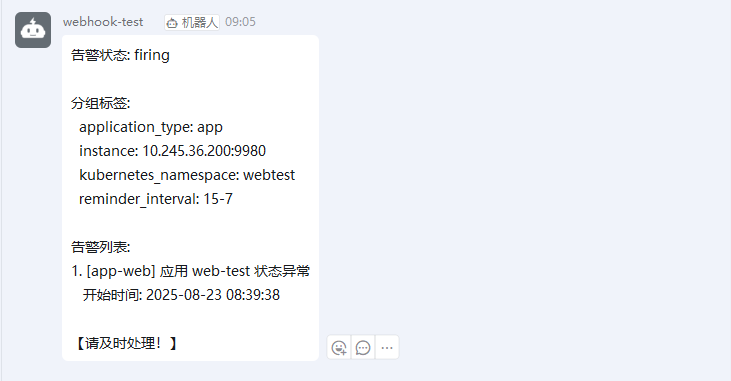
send_resolved: true- 部署完成后就可见到类似下方的告警信息
4、应用实现代码
package main

import (
	"bytes"
	"encoding/json"
	"fmt"
	"io"
	"net/http"
	"os"
	"regexp"
	"strings"
	"time"
)

// AlertInfo 定义告警具体信息的结构体
type AlertInfo struct {
	Status       string            `json:"status"`
	Labels       map[string]string `json:"labels"`
	Annotations  map[string]string `json:"annotations"`
	StartsAt     time.Time         `json:"startsAt"`
	EndsAt       time.Time         `json:"endsAt"`
	GeneratorURL string            `json:"generatorURL"`
	Fingerprint  string            `json:"fingerprint"`
}

// AcceptAlert 定义接收告警完整请求的结构体
type AcceptAlert struct {
	Version           string            `json:"version"`
	GroupKey          string            `json:"groupKey"`
	TruncatedAlerts   int               `json:"truncatedAlerts"`
	Status            string            `json:"status"`
	Receiver          string            `json:"receiver"`
	GroupLabels       map[string]string `json:"groupLabels"`
	CommonLabels      map[string]string `json:"commonLabels"`
	CommonAnnotations map[string]string `json:"commonAnnotations"`
	ExternalURL       string            `json:"externalURL"`
	Alerts            []AlertInfo       `json:"alerts"`
}

// DingMsgInfo 定义发送 Dingding 请求的结构体
type DingMsgInfo struct {
	MsgType string `json:"msgtype"`
	Text    struct {
		Content string `json:"content"`
	} `json:"text"`
}

var targets = map[string]string{"tmp": "tmp"}

func GetTargetsInfo(targets map[string]string) {
	// 以只读方式打开配置文件
	configF, err := os.Open("./config/config.yml")
	if err != nil {
		fmt.Println("[DEBUG] Failed to open config.yml: ", err)
		return
	}
	// 读取配置文件
	buf := make([]byte, 1024*2)
	for {
		n, err := configF.Read(buf)
		if err != nil {
			if err == io.EOF {
				break
			}
			fmt.Println("[DEBUG] Failed to read config.yml: ", err)
		}
		configF.Write(buf[:n])
	}
	// 操作完毕关闭文件
	defer configF.Close()
	// 正则匹配 target -> name
	regNames := regexp.MustCompile(`webhook_(.*):`)
	if regNames == nil {
		fmt.Println("[ERROR] Failed to read targets.name:", regNames)
		return
	}
	resNames := regNames.FindAllStringSubmatch(string(buf), -1)

	// 正则匹配 target -> url
	regUrls := regexp.MustCompile(`url:\s*(http\S+)`)
	if regUrls == nil {
		fmt.Println("[ERROR] Failed to read targets.url:", regUrls)
		return
	}
	resUrls := regUrls.FindAllStringSubmatch(string(buf), -1)
	// 删除临时 targets
	delete(targets, "tmp")
	// 构建客户端配置结构体
	for i, resUrl := range resUrls {
		resUrl1 := strings.Trim(resUrl[1], "\x00") // 清理 url 的无效字符
		targets[resNames[i][1]] = resUrl1
	}
}
func handleWebhook(w http.ResponseWriter, r *http.Request) {
	// 仅支持 POST 请求
	if r.Method != http.MethodPost {
		http.Error(w, "[ERROR] Invalid request method! ", http.StatusMethodNotAllowed)
		return
	}

	// 读取请求体
	body, err := io.ReadAll(r.Body)
	if err != nil {
		http.Error(w, "[ERROR] Incorrect request body! ", http.StatusInternalServerError)
		return
	}
	defer r.Body.Close()

	// 解析 Alert 告警消息
	var acceptAlert AcceptAlert
	err = json.Unmarshal(body, &acceptAlert)
	if err != nil {
		http.Error(w, "[ERROR] Incorrect request body! ", http.StatusBadRequest)
		return
	}

	// 处理告警信息并转发到钉钉
	err = SendToDingTalk(acceptAlert, r.URL.Path)
	if err != nil {
		fmt.Println(err)
		http.Error(w, "[ERROR] Error in forwarding to DingTalk! ", http.StatusInternalServerError)
		return
	}

	w.WriteHeader(http.StatusOK)
	w.Write([]byte("OK"))
}
func SendToDingTalk(acceptAlert AcceptAlert, path string) error {
	regPath := regexp.MustCompile(`/webhook/(.*)`)
	if regPath == nil {
		return fmt.Errorf("[ERROR] Failed to read path: %v", regPath)
	}
	resPath := regPath.FindAllStringSubmatch(path, -1)
	DingdingWebhook := targets[resPath[0][1]]

	// 处理告警信息(这里可以根据需要修改告警内容)
	message := formatAlertMessage(acceptAlert)

	// 构建钉钉消息
	dingdingMsg := DingMsgInfo{}
	dingdingMsg.MsgType = "text"
	dingdingMsg.Text.Content = message

	// 转换为 JSON
	jsonData, err := json.Marshal(dingdingMsg)
	if err != nil {
		return fmt.Errorf("[ERROR] Error marshaling DingTalk message: %v", err)
	}
	// 发送到钉钉
	resp, err := http.Post(DingdingWebhook, "application/json", bytes.NewBuffer(jsonData))
	if err != nil {
		return fmt.Errorf("[ERROR] Error sending to DingTalk: %v", err)
	}
	defer resp.Body.Close()

	// 检查响应
	if resp.StatusCode != http.StatusOK {
		body, _ := io.ReadAll(resp.Body)
		return fmt.Errorf("[ERROR] DingTalk API error: %s, %s", resp.Status, string(body))
	}

	fmt.Printf("[INFO] Alert forwarded to Dingding successfully: %v,  %v\n", path, DingdingWebhook)
	return nil
}
func formatAlertMessage(acceptAlert AcceptAlert) string {
	// 根据 Alertmanager 通知构建自定义消息
	var message string
	message += fmt.Sprintf("告警状态: %s\n", acceptAlert.Status)

	if len(acceptAlert.GroupLabels) > 0 {
		message += "\n分组标签:\n"
		for k, v := range acceptAlert.GroupLabels {
			message += fmt.Sprintf("  %s: %s\n", k, v)
		}
	}

	message += "\n告警列表:\n"
	for i, alert := range acceptAlert.Alerts {
		message += fmt.Sprintf("%d. [%s] %s\n", i+1, alert.Labels["alertname"], alert.Annotations["summary"])
		message += fmt.Sprintf("   开始时间: %s\n", alert.StartsAt.Format("2006-01-02 15:04:05"))

		if val, ok := alert.Annotations["description"]; ok {
			message += fmt.Sprintf("   描述: %s\n", val)
		}
	}

	// 添加自定义内容
	message += "\n【请及时处理!】"

	return message
}
func main() {
	GetTargetsInfo(targets)
	// fmt.Println("targets = ", targets)
	for key, _ := range targets {
		// 设置 HTTP 路由
		http.HandleFunc("/webhook/"+key, handleWebhook)
	}
	// 启动 HTTP 服务器
	port := ":9090"
	fmt.Printf("[INFO] Listening on localhost%v\n", port)
	http.ListenAndServe(port, nil)
}

开源鸿蒙跨平台开发社区汇聚开发者与厂商,共建“一次开发,多端部署”的开源生态,致力于降低跨端开发门槛,推动万物智联创新。
更多推荐
 4
4 0
0- 0


 已为社区贡献2条内容

所有评论(0)