Kubernetes入门:09.Kubernetes Building Blocks-Deployment
【翻译】
Deployment对象为Pod和ReplicaSet提供了声明式的更新。Deployment控制器是控制平面节点上、控制管理器的一部分,作为一个controller,它确保了运行中容器应用的实际运行状态始终与期望状态保持一致。它允许应用程序无缝更新和回滚,即知名的“RollingUpdate(滚动更新)”策略,通过"rollout"和"rollback",它直接管理ReplicaSet来进行应用程序扩缩容。它还支持破坏式的,不那么流行的更新策略,即"Recreate"。
下面是一个用YAML格式编写的Deployment对象的定义清单,它表示用声明的方式定义了一个Deployment对象,如果有需要可以作为更复杂Deployment定义清单的模板。
apiVersion: apps/v1
kind: Deployment
metadata:
name: nginx-deployment
labels:
app: nginx-deployment
spec:
replicas: 3
selector:
matchLabels:
app: nginx-deployment
template:
metadata:
labels:
app: nginx-deployment
spec:
containers:
- name: nginx
image: nginx:1.20.2
ports:
- containerPort: 80
下面对上面的定义清单进行解析:
第一个字段是apiVersion,它指定了我们希望连接的API server和API endpoint,它必须要与已存在的对象类型版本相一致;
第二个字段是kind,定义了对象的类型,在我们的这篇课程中是Deployment,但还可以是Pod、ReplicaSet、Namespace、Service等等;
第三个字段是metadata,承载了对象的基本信息,比如名字(name)、注解(annotations)、标签(labels)、命名空间(namespaces)等。
我们的示例展示了两个spec字段,分别是spec和spec.template.spec,第一个spec是Deployment的规格说明,而第二个则是Pod模板中,Pod的规格说明。
第四个字段spec,标记了Deployment对象的期望状态部分。在我们的示例中,我们请求了3个副本,即3个Pod实例,在任何给定时间内都是如此,这便是Deployment的期望状态。
Pod会使用"spec.template"所定义的Pod模板来进行创建,这是一个嵌套的对象,就像是Pod是Deployment的一部分一个道理。Pod模板中保留了metadata和spec字段,没有保留它自己的apiVersion和kind字段,都被template所替换掉。
在"spec.template.spec"字段中,我们定义了Pod的期望状态,我们的Pod是单容器Pod,创建了一个名为nginx的容器,从dockerhub拉取nginx:1.20.2镜像,并且暴露容器端口为80.
上述的定义清单,如果被保存为def-deploy.yaml文件,将会被加载到集群中,运行一组三副本的Pod和其相关的容器镜像,以及管理它们的ReplicaSet。下面的命令使用了"create"关键字,高阶kubernetes实践者可能倾向于使用apply来代替。
$ kubectl create -f def-deploy.yaml
如果使用交互命令式,我们可以简单地运行一个Deployment(不使用定义清单模式),如下是一个多行命令,我们在使用时需要整体复制和粘贴(包括反斜杠\)
$ kubectl create deployment nginx-deployment \
--image=nginx:1.20.2 --port=80 --replicas=3
然而,在开始编写定义清单的时候,知道如何生成它就极有帮助了。若使用交互式命令,添加额外参数如dry-run和yaml output,就可以生成一个定义清单,不需要运行起来之后再创建。目前我们的模板存储在nginx-deploy.yaml文件,如下是一个多行命令,我们在使用时需要整体复制和粘贴(包括反斜杠\)
$ kubectl create deployment nginx-deployment \
--image=nginx:1.20.2 --port=80 --replicas=3 \
--dry-run=client -o yaml > nginx-deploy.yaml
我们可以生成一个Deployment定义清单,用JSON格式
$ kubectl create deployment nginx-deployment \
--image=nginx:1.20.2 --port=80 --replicas=3 \
--dry-run=client -o json > nginx-deploy.json
YAML和JSON定义文件都可以作为模板,且都可以加载到cluster中,
$ kubectl create -f nginx-deploy.yaml
$ kubectl create -f nginx-deploy.json
当Deployment对象被创建后,Kubernetes系统会在对象上添加status字段,并且用所有必要的状态字段来填充它。
在下面的样例中,一个新的Deployment创建了ReplicaSet A,后者创建了3个Pods,每个Pod的Pod模板被配置为运行一个nginx:1.20.2容器镜像。在这个case中,ReplicaSet A与nginx:1.20.2相关联,并且表示了Deployment的一种状态。这个特定的状态被记录为Revision 1(版本 1)
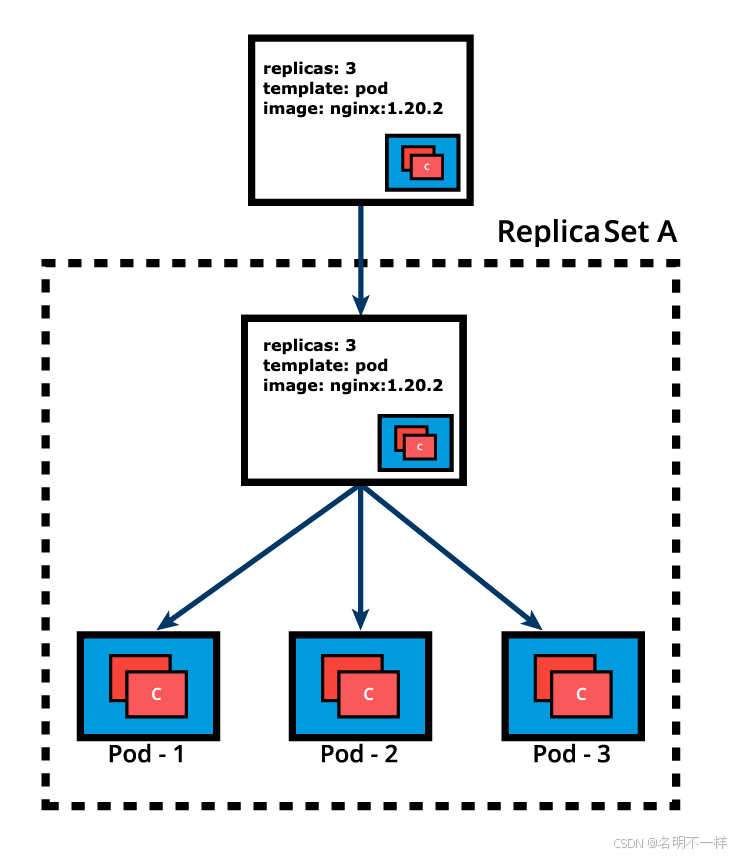
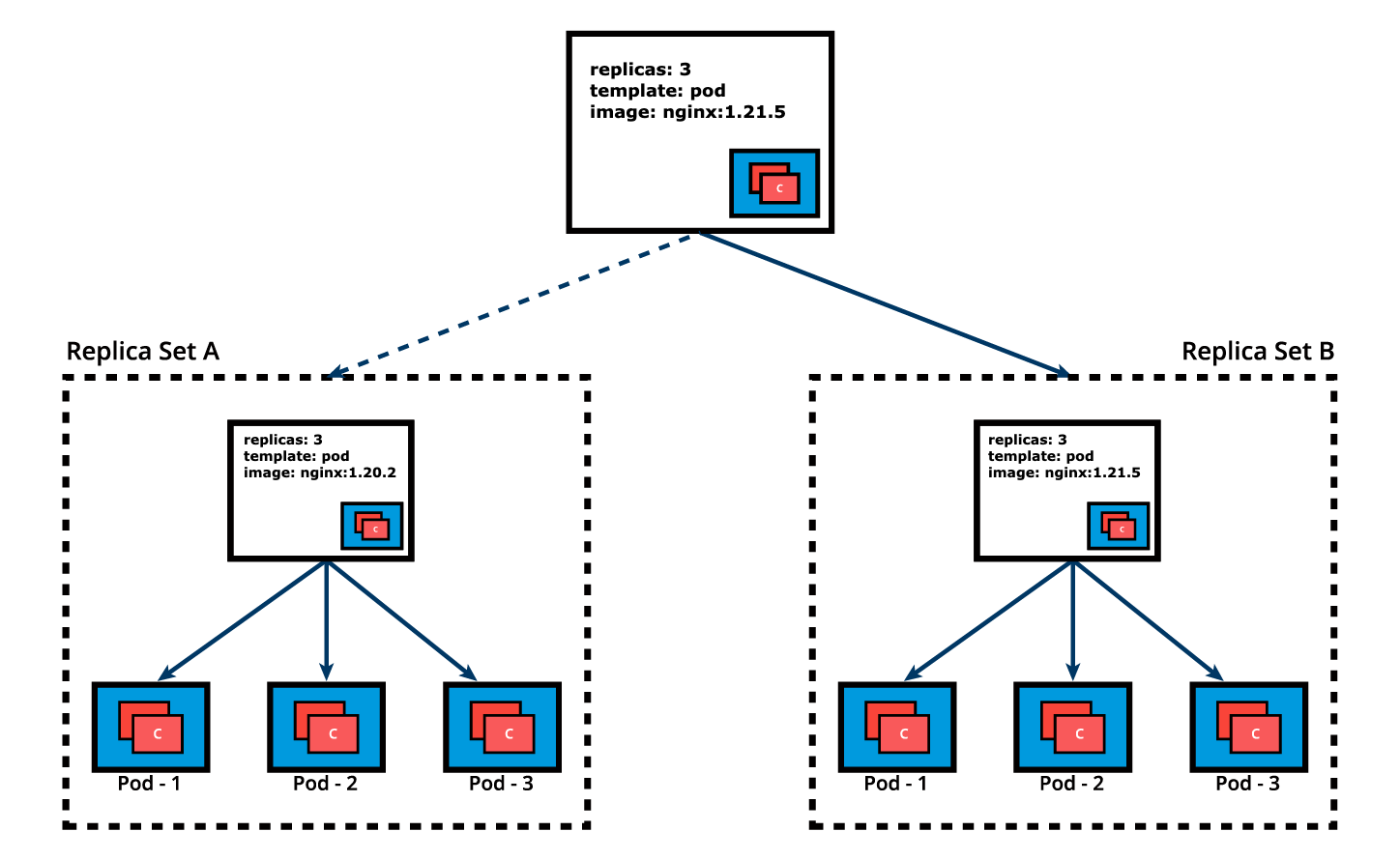
很多时候我们需要通过Deployment对象来推动应用程序的更新。让我们来修改Pod模板,将容器镜像从nginx:1.20.2更新到nginx:1.21.5.这时,Deployment将会触发一个ReplicaSet B用来创建新的容器镜像,其版本为1.21.5,与此同时这也表示将会有一个新的状态被记录下来——Deployment,版本 2(Deployment,Revision 2)。
这个在两个ReplicaSet之间无缝的迁移过程:从ReplicaSet A(3个Pod,版本是nginx:1.20.2),到ReplicaSet B(3个新的Pod,版本是nginx:1.21.5),或者说从Revision 1到Revision 2,这就是Deployment的Rolling Update(滚动更新)。
"Rolling Update"将会在我们更新了Deployment的Pod模板中的某种资源时被触发,计划内的变化比如更新容器镜像、容器端口、卷、挂载点,这些变化将会触发Revision(版本),其他一些动态的操作,比如对Deployment进行扩缩容、打标签,将不会触发Rolling Update,因此不会修改Revision版本号。
一旦当Rolling Update完成,Deployment将会展示ReplicaSet A和ReplicaSet B,A已经被缩容为0个Pod,而B扩容为3个Pod。这就是Deployment如何记录其先前的状态设定,即Revisions。换句话说,虽然当前状态已经是Revision B,但Deployment还是会把Revision A给记录下来。
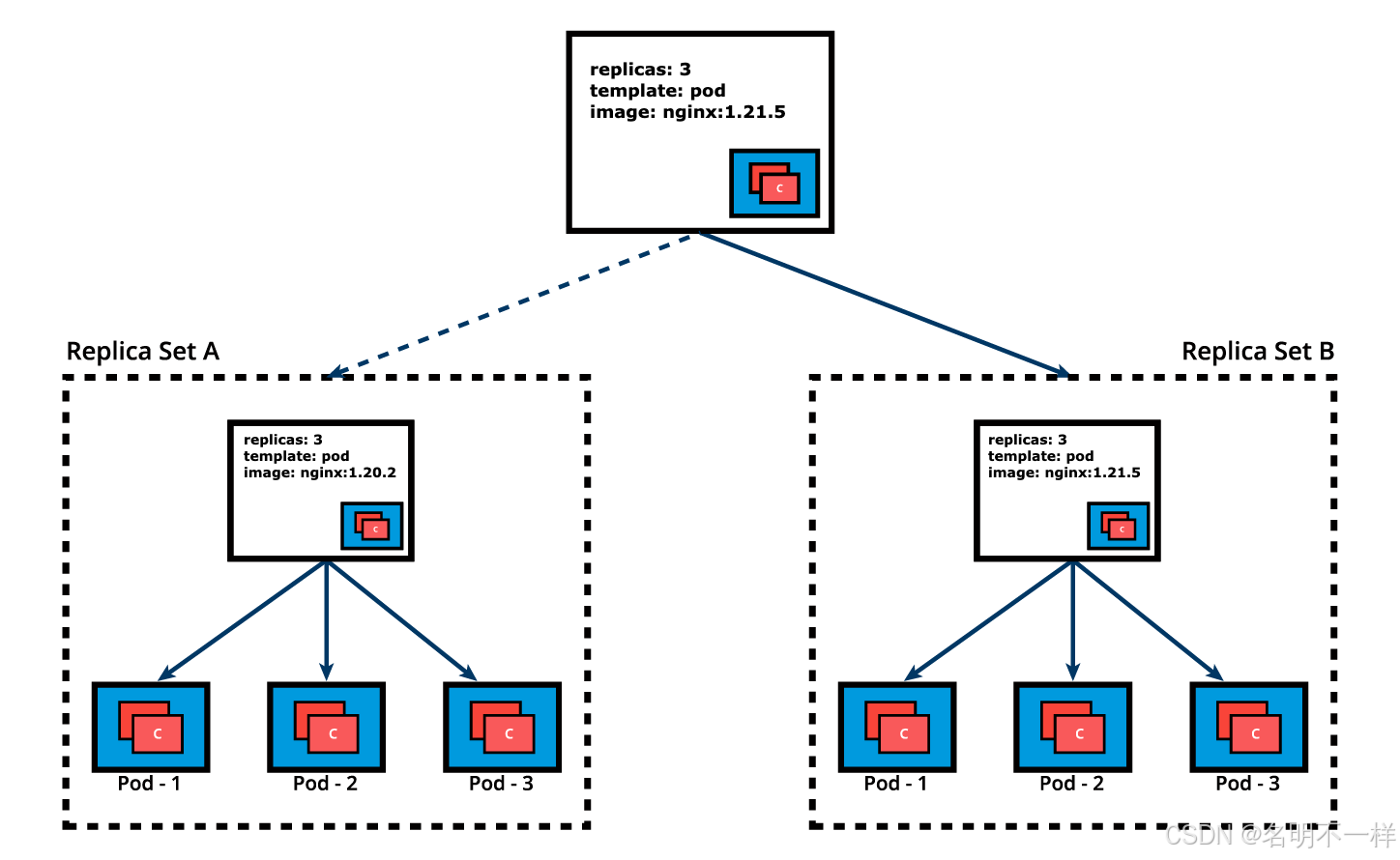
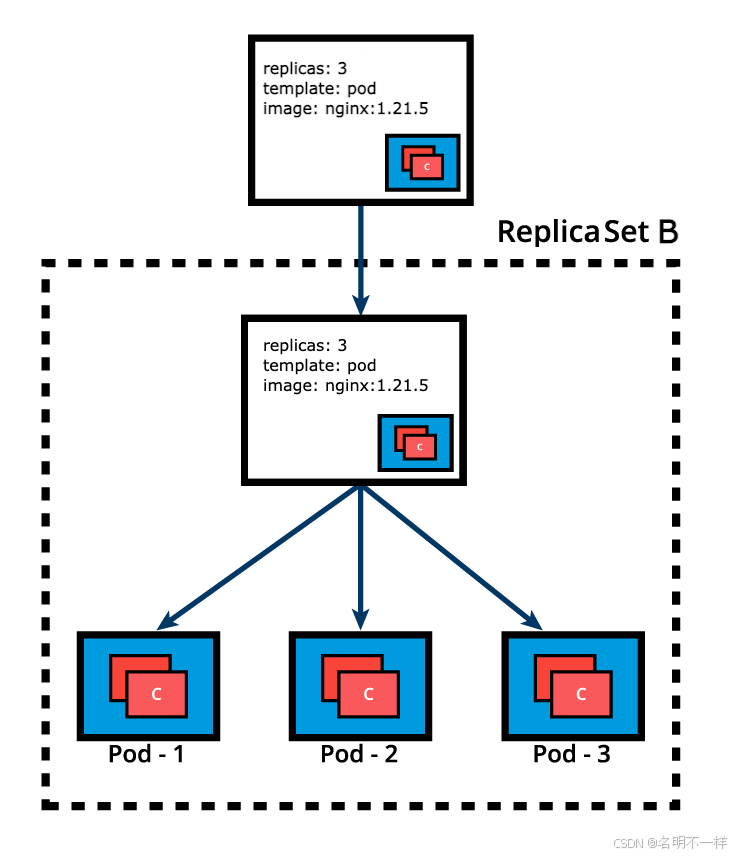
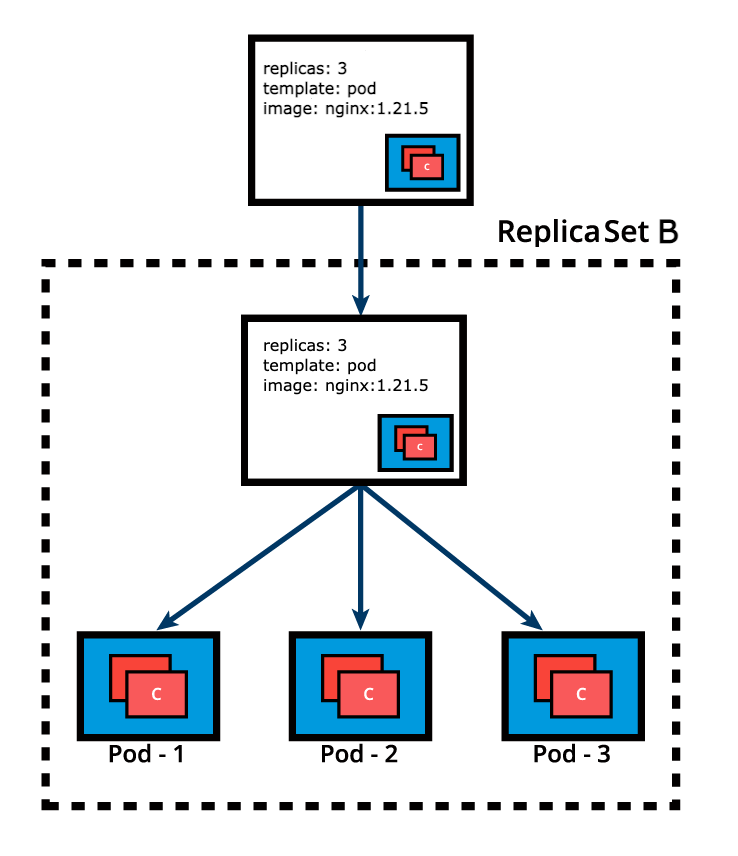
当ReplicaSet B以及其3个Pod(nginx版本为1.21.5)Ready的时候,Deployment就会开始主动地管理它们。然而,Deployment会保留先前的配置状态(保存为Revision),因为这些配置将在Rolling Back的时候发挥至关重要的作用,即回滚到先前的配置状态。在我们的示例中,如果新的nginx:1.21.5表现不如意,Deployment可以回滚到之前的Revision,在这个例子中就是从Revision 2回滚到Revision 1,运行nginx:1.20.2
在我们进入到更复杂的讨论之前,请确保熟悉下面这些命令:
$ kubectl apply -f nginx-deploy.yaml --record
$ kubectl get deployments
$ kubectl get deploy -o wide
$ kubectl scale deploy nginx-deployment --replicas=4
$ kubectl get deploy nginx-deployment -o yaml
$ kubectl get deploy nginx-deployment -o json
$ kubectl describe deploy nginx-deployment
$ kubectl rollout status deploy nginx-deployment
$ kubectl rollout history deploy nginx-deployment
$ kubectl rollout history deploy nginx-deployment --revision=1
$ kubectl set image deploy nginx-deployment nginx=nginx:1.21.5 --record
$ kubectl rollout history deploy nginx-deployment --revision=2
$ kubectl rollout undo deploy nginx-deployment --to-revision=1
$ kubectl get all -l app=nginx -o wide
$ kubectl delete deploy nginx-deployment
$ kubectl get deploy,rs,po -l app=nginx
【原文】
Deployments (1)
Deployment objects provide declarative updates to Pods and ReplicaSets. The DeploymentController is part of the control plane node's controller manager, and as a controller it also ensures that the current state always matches the desired state of our running containerized application. It allows for seamless application updates and rollbacks, known as the default RollingUpdate strategy, through rollouts and rollbacks, and it directly manages its ReplicaSets for application scaling. It also supports a disruptive, less popular update strategy, known as Recreate.
Below is an example of a Deployment object's definition manifest in YAML format. This represents the declarative method to define an object, and can serve as a template for a much more complex Deployment definition manifest if desired:
apiVersion: apps/v1
kind: Deployment
metadata:
name: nginx-deployment
labels:
app: nginx-deployment
spec:
replicas: 3
selector:
matchLabels:
app: nginx-deployment
template:
metadata:
labels:
app: nginx-deployment
spec:
containers:
- name: nginx
image: nginx:1.20.2
ports:
- containerPort: 80
The apiVersion field is the first required field, and it specifies the API endpoint on the API server which we want to connect to; it must match an existing version for the object type defined. The second required field is kind, specifying the object type - in our case it is Deployment, but it can be Pod, ReplicaSet, Namespace, Service, etc. The third required field metadata, holds the object's basic information, such as name, annotations, labels, namespaces, etc. Our example shows two spec fields (spec and spec.template.spec). The fourth required field spec marks the beginning of the block defining the desired state of the Deployment object. In our example, we are requesting that 3 replicas, that is 3 instances of the Pod, are running at any given time. The Pods are created using the Pod Template defined in spec.template. A nested object, such as the Pod being part of a Deployment, retains its metadata and spec and loses its own apiVersion and kind - both being replaced by template. In spec.template.spec, we define the desired state of the Pod. Our Pod creates a single container running the nginx:1.20.2 image from Docker Hub.
The above definition manifest, if stored by a def-deploy.yaml file, is loaded into the cluster to run a set of three identical Pod replicas and their associated container image, together with their managing ReplicaSet. While create is exemplified below, advanced Kubernetes practitioners may opt to use apply instead:
$ kubectl create -f def-deploy.yaml
Imperatively, we can simply run the Deployment defined above without the definition manifest as such. The following is a multi-line command that should be selected in its entirety for copy/paste (including the backslash character “\”):
$ kubectl create deployment nginx-deployment \
--image=nginx:1.20.2 --port=80 --replicas=3
However, when in need of a starter definition manifest, knowing how to generate one can be a life-saver. The imperative command with additional key flags such as dry-run and the yaml output, can generate the definition template instead of running the Deployment, while the template is then stored in the nginx-deploy.yaml file. The following is a multi-line command that should be selected in its entirety for copy/paste (including the backslash character “\”):
$ kubectl create deployment nginx-deployment \
--image=nginx:1.20.2 --port=80 --replicas=3 \
--dry-run=client -o yaml > nginx-deploy.yaml
We can generates a Deployment definition manifest in JSON:
$ kubectl create deployment nginx-deployment \
--image=nginx:1.20.2 --port=80 --replicas=3 \
--dry-run=client -o json > nginx-deploy.json
Both the YAML and JSON definition files can serve as templates or can be loaded into the cluster respectively as such:
$ kubectl create -f nginx-deploy.yaml
$ kubectl create -f nginx-deploy.json
Once the Deployment object is created, the Kubernetes system attaches the status field to the object and populates it with all necessary status fields.
In the following example, a new Deployment creates ReplicaSet A which then creates 3 Pods, with each Pod Template configured to run one nginx:1.20.2 container image. In this case, the ReplicaSet A is associated with nginx:1.20.2 representing a state of the Deployment. This particular state is recorded as Revision 1.
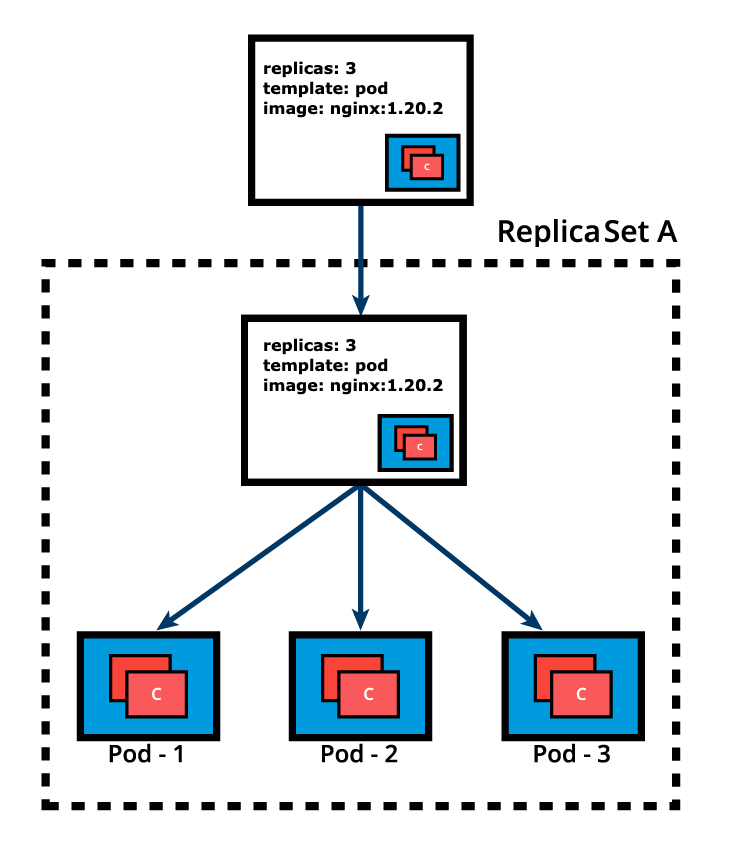
Deployment (ReplicaSet A Created)
In time, we need to push updates to the application managed by the Deployment object. Let's change the Pods' Template and update the container image from nginx:1.20.2 to nginx:1.21.5. The Deployment triggers a new ReplicaSet B for the new container image versioned 1.21.5 and this association represents a new recorded state of the Deployment, Revision 2. The seamless transition between the two ReplicaSets, from ReplicaSet A with three Pods versioned 1.20.2 to the new ReplicaSet B with three new Pods versioned 1.21.5, or from Revision 1 to Revision 2, is a Deployment rolling update.
Cont’d on the next page.
Deployments (2)
A rolling update is triggered when we update specific properties of the Pod Template for a deployment. While planned changes such as updating the container image, container port, volumes, and mounts would trigger a new Revision, other operations that are dynamic in nature, like scaling or labeling the deployment, do not trigger a rolling update, thus do not change the Revision number.
Once the rolling update has completed, the Deployment will show both ReplicaSets A and B, where A is scaled to 0 (zero) Pods, and B is scaled to 3 Pods. This is how the Deployment records its prior state configuration settings, as Revisions.
Deployment (ReplicaSet B Created)
Once ReplicaSet B and its 3 Pods versioned 1.21.5 are ready, the Deployment starts actively managing them. However, the Deployment keeps its prior configuration states saved as Revisions which play a key factor in the rollback capability of the Deployment - returning to a prior known configuration state. In our example, if the performance of the new nginx:1.21.5 is not satisfactory, the Deployment can be rolled back to a prior Revision, in this case from Revision 2 back to Revision 1 running nginx:1.20.2 once again.
Deployment Points to ReplicaSet B
Before advancing to more complex topics, become familiar with Deployment operations with additional commands such as:
$ kubectl apply -f nginx-deploy.yaml --record
$ kubectl get deployments
$ kubectl get deploy -o wide
$ kubectl scale deploy nginx-deployment --replicas=4
$ kubectl get deploy nginx-deployment -o yaml
$ kubectl get deploy nginx-deployment -o json
$ kubectl describe deploy nginx-deployment
$ kubectl rollout status deploy nginx-deployment
$ kubectl rollout history deploy nginx-deployment
$ kubectl rollout history deploy nginx-deployment --revision=1
$ kubectl set image deploy nginx-deployment nginx=nginx:1.21.5 --record
$ kubectl rollout history deploy nginx-deployment --revision=2
$ kubectl rollout undo deploy nginx-deployment --to-revision=1
$ kubectl get all -l app=nginx -o wide
$ kubectl delete deploy nginx-deployment
$ kubectl get deploy,rs,po -l app=nginx

开源鸿蒙跨平台开发社区汇聚开发者与厂商,共建“一次开发,多端部署”的开源生态,致力于降低跨端开发门槛,推动万物智联创新。
更多推荐
 0
0 0
0- 0


 已为社区贡献6条内容

所有评论(0)