学习014-01-02-03-05-01 Implement a Custom Security System User Based on an Existing Business Class(基于现
Implement a Custom Security System User Based on an Existing Business Class(基于现有业务类实现自定义安全系统用户)
Consider the following situation. You have an unsecure XAF application, and its business model includes the Employee business class. This class exposes information such as personal data, the associated department, and assigned tasks. When enabling the Security System, a User object is added to the business model, but the Users who log in to your application are Employees. This topic explains how to merge the User and Employee into a single entity. For this purpose, several security-related interfaces in the Employee class will be supported, and as a result, the Security System will recognize the Employee type as one of the possible User types. You will assign the Employee type to the SecurityStrategy.UserType property in the Application Designer. As an additional benefit, it will be possible to use the CurrentUserId() Function Criteria Operator to get the identifier of the current Employee (for example, to define a “tasks assigned to me” List View filter).
考虑以下情况。你有一个不安全的XAF应用程序,其业务模型包含“员工”业务类。此类公开诸如个人数据、相关部门和分配任务等信息。启用安全系统时,会向业务模型中添加一个“用户”对象,但登录到应用程序的用户都是员工。本主题介绍如何将“用户”和“员工”合并为单个实体。为此,“员工”类中将支持几个与安全相关的接口,结果是安全系统会将“员工”类型识别为可能的用户类型之一。你将在应用程序设计器中将“员工”类型分配给SecurityStrategy.UserType属性。另外一个好处是,可以使用CurrentUserId()函数条件运算符来获取当前员工的标识符(例如,定义“分配给我的任务”列表视图筛选器)。
Tip
A complete sample project is available in the DevExpress Code Examples database at https://supportcenter.devexpress.com/ticket/details/e4160/xaf-how-to-implement-a-security-system-user-based-on-an-existing-business-class.
一个完整的示例项目可在 DevExpress 代码示例数据库中获取,网址为 https://supportcenter.devexpress.com/ticket/details/e4160/xaf-how-to-implement-a-security-system-user-based-on-an-existing-business-class 。
Note
- A similar example for Entity Framework Core is available at https://github.com/DevExpress-Examples/xaf-how-to-implement-a-security-system-user-based-on-an-existing-business-class.
Entity Framework Core 的类似示例可在 https://github.com/DevExpress-Examples/xaf-how-to-implement-a-security-system-user-based-on-an-existing-business-class 获取。- As an alternative to the technique described in this topic, you can inherit the Employee class from PermissionPolicyUser. To see an example, refer to the following topic: How to: Implement Custom Security Objects (Users, Roles, Operation Permissions).
作为本主题所述技术的替代方法,你可以从PermissionPolicyUser继承Employee类。有关示例,请参阅以下主题:如何:实现自定义安全对象(用户、角色、操作权限)。
Initial Business Model(初始商业模式)
Start with a new XAF solution. Add the following Employee and EmployeeTask business classes to the module project.
从一个新的XAF解决方案开始。将以下的Employee和EmployeeTask业务类添加到模块项目中。
C# (EF Core)
[DefaultClassOptions]
public class Employee : Person {
    public virtual IList<EmployeeTask> OwnTasks { get; set; } = new ObservableCollection<EmployeeTask>();
}


public class Person : BaseObject {
    public virtual string FirstName { get; set; }
    public virtual string LastName { get; set; }
}


[DefaultClassOptions,ImageName("BO_Task")]
public class EmployeeTask : BaseObject {
    public virtual string Subject { get; set; }
    public virtual Employee Owner { get; set; }
}


// Make sure that you use options.UseChangeTrackingProxies() in your DbContext settings.
C# (XPO)
[DefaultClassOptions]
public class Employee : Person {
    public Employee(Session session)
        : base(session) { }
    [Association("Employee-Task")]
    public XPCollection<EmployeeTask> OwnTasks {
        get { return GetCollection<EmployeeTask>(nameof(OwnTasks)); }
    }
}
[DefaultClassOptions, ImageName("BO_Task")]
public class EmployeeTask : Task {
    public EmployeeTask(Session session)
        : base(session) { }
    private Employee owner;
    [Association("Employee-Task")]
    public Employee Owner {
        get { return owner; }
        set { SetPropertyValue(nameof(Owner), ref owner, value); }
    }
}
Support the ISecurityUser Interface(支持 ISecurityUser 接口)
Add a reference to the DevExpress.ExpressApp.Security.v24.1.dll assembly for the project that contains the Employee class. Extend the Employee class with the following code:
为包含Employee类的项目添加对DevExpress.ExpressApp.Security.v24.1.dll程序集的引用。使用以下代码扩展Employee类:
C# (EF Core)
using DevExpress.ExpressApp.Security;
using DevExpress.Persistent.Validation;
// ...
public class Employee : Person, ISecurityUser {
    // ...
    #region ISecurityUser Members
    public virtual bool IsActive { get; set; } = true;
    [RuleRequiredField("EmployeeUserNameRequired", DefaultContexts.Save)]
    [RuleUniqueValue("EmployeeUserNameIsUnique", DefaultContexts.Save,
        "The login with the entered user name was already registered within the system.")]
    public virtual string UserName { get; set; }
    #endregion
}


// Make sure that you use options.UseChangeTrackingProxies() in your DbContext settings.
C# (XPO)
using DevExpress.ExpressApp.Security;
using DevExpress.Persistent.Validation;
// ...
public class Employee : Person, ISecurityUser {
    // ...
    #region ISecurityUser Members
    private bool isActive = true;
    public bool IsActive {
        get { return isActive; }
        set { SetPropertyValue(nameof(IsActive), ref isActive, value); }
    }
    private string userName = String.Empty;
    [RuleRequiredField("EmployeeUserNameRequired", DefaultContexts.Save)]
    [RuleUniqueValue("EmployeeUserNameIsUnique", DefaultContexts.Save,
        "The login with the entered user name was already registered within the system.")]
    public string UserName {
        get { return userName; }
        set { SetPropertyValue(nameof(UserName), ref userName, value); }
    }
    #endregion
}
Refer to the ISecurityUser interface description for details on this interface and its members.
有关此接口及其成员的详细信息,请参阅 ISecurityUser 接口说明。
Support the IAuthenticationStandardUser Interface(支持IAuthenticationStandardUser接口)
Note
If you are not planning to use the AuthenticationStandard authentication type, skip this section.
如果您不打算使用“身份验证标准”身份验证类型,请跳过本节。
Extend the Employee class with the following code:
使用以下代码扩展Employee类:
C# (EF Core)
using System.ComponentModel;
using DevExpress.ExpressApp.Security;
using DevExpress.Persistent.Base;
using DevExpress.Persistent.Base.Security;
// ...
public class Employee : Person, ISecurityUser, IAuthenticationStandardUser {
    // ...
    #region IAuthenticationStandardUser Members
    public virtual bool ChangePasswordOnFirstLogon { get; set; }
    [Browsable(false), FieldSize(FieldSizeAttribute.Unlimited), SecurityBrowsable]
    public virtual string StoredPassword { get; set; }
    public bool ComparePassword(string password) {
        return PasswordCryptographer.VerifyHashedPasswordDelegate(this.StoredPassword, password);
    }
    public void SetPassword(string password) {
        this.StoredPassword = PasswordCryptographer.HashPasswordDelegate(password);
    }
    #endregion
}


// Make sure that you use options.UseChangeTrackingProxies() in your DbContext settings.
C# (XPO)
using System.ComponentModel;
using DevExpress.ExpressApp.Security;
using DevExpress.Persistent.Base;
using DevExpress.Persistent.Base.Security;
// ...
public class Employee : Person, ISecurityUser, IAuthenticationStandardUser {
    // ...
    #region IAuthenticationStandardUser Members
    private bool changePasswordOnFirstLogon;
    public bool ChangePasswordOnFirstLogon {
        get { return changePasswordOnFirstLogon; }
        set {
            SetPropertyValue(nameof(ChangePasswordOnFirstLogon), ref changePasswordOnFirstLogon, value);
        }
    }
    private string storedPassword;
    [Browsable(false), Size(SizeAttribute.Unlimited), Persistent, SecurityBrowsable]
    public string StoredPassword {
        get { return storedPassword; }
        set { storedPassword = value; }
    }
    public bool ComparePassword(string password) {
        return PasswordCryptographer.VerifyHashedPasswordDelegate(this.storedPassword, password);
    }
    public void SetPassword(string password) {
        this.storedPassword = PasswordCryptographer.HashPasswordDelegate(password);
        OnChanged(nameof(StoredPassword));
    }
    #endregion
}
Refer to the IAuthenticationStandardUser interface description for details on this interface and its members.
有关此接口及其成员的详细信息,请参阅IAuthenticationStandardUser接口说明。
Support the IAuthenticationActiveDirectoryUser Interface(支持IAuthenticationActiveDirectoryUser接口)
Note
If you are not planning to use the AuthenticationActiveDirectory authentication type, skip this section.
如果您不打算使用“Active Directory 身份验证”身份验证类型,请跳过本节。
Add the IAuthenticationActiveDirectoryUser interface to the supported interfaces list of the Employee class.
将IAuthenticationActiveDirectoryUser接口添加到Employee类的支持接口列表中。
C# (EF Core)
using DevExpress.ExpressApp.Security;
using DevExpress.Persistent.Base.Security;
// ...
public class Employee : Person, ISecurityUser,
    IAuthenticationStandardUser, IAuthenticationActiveDirectoryUser {
    // ...
}
C# (XPO)
using DevExpress.ExpressApp.Security;
using DevExpress.Persistent.Base.Security;
// ...
public class Employee : Person, ISecurityUser,
    IAuthenticationStandardUser, IAuthenticationActiveDirectoryUser {
    // ...
}
The IAuthenticationActiveDirectoryUser.UserName property declared by this interface has already been implemented in your code as a part of the ISecurityUser interface.
此接口声明的IAuthenticationActiveDirectoryUser.UserName属性,在您的代码中已作为ISecurityUser接口的一部分实现。
Support the ISecurityUserWithRoles Interface(支持 ISecurityUserWithRoles 接口)
Extend the Employee class with the following code:
使用以下代码扩展Employee类:
C# (EF Core)
using DevExpress.ExpressApp.Security;
using DevExpress.Persistent.Base.Security;
using DevExpress.Persistent.Validation;
using System.Collections.ObjectModel;
//...
[DefaultClassOptions]
public class Employee : Person, ISecurityUser,
    IAuthenticationStandardUser, IAuthenticationActiveDirectoryUser, ISecurityUserWithRoles {
    // ...
    #region ISecurityUserWithRoles Members
    IList<ISecurityRole> ISecurityUserWithRoles.Roles {
        get {
            IList<ISecurityRole> result = new List<ISecurityRole>();
            foreach (EmployeeRole role in EmployeeRoles) {
                result.Add(role);
            }
            return result;
        }
    }
    [RuleRequiredField("EmployeeRoleIsRequired", DefaultContexts.Save,
        TargetCriteria = "IsActive",
        CustomMessageTemplate = "An active employee must have at least one role assigned")]
    public virtual IList<EmployeeRole> EmployeeRoles { get; set; } = new ObservableCollection<EmployeeRole>();
    #endregion
}
C# (XPO)
using DevExpress.ExpressApp.Security;
using DevExpress.Persistent.Base.Security;
using DevExpress.Persistent.Validation;
//...
[DefaultClassOptions]
public class Employee : Person, ISecurityUser,
    IAuthenticationStandardUser, IAuthenticationActiveDirectoryUser,
    ISecurityUserWithRoles {
    // ...
    #region ISecurityUserWithRoles Members
    IList<ISecurityRole> ISecurityUserWithRoles.Roles {
        get {
            IList<ISecurityRole> result = new List<ISecurityRole>();
            foreach (EmployeeRole role in EmployeeRoles) {
                result.Add(role);
            }
            return result;
        }
    }
    #endregion
    [Association("Employees-EmployeeRoles")]
    [RuleRequiredField("EmployeeRoleIsRequired", DefaultContexts.Save,
        TargetCriteria = "IsActive",
        CustomMessageTemplate = "An active employee must have at least one role assigned")]
    public XPCollection<EmployeeRole> EmployeeRoles {
        get {
            return GetCollection<EmployeeRole>(nameof(EmployeeRoles));
        }
    }
}
Refer to the ISecurityUserWithRoles interface description for details on this interface and its members.
有关此接口及其成员的详细信息,请参阅 ISecurityUserWithRoles 接口说明。
A many-to-many association with the built-in PermissionPolicyRole class cannot be defined (this class is already associated with the PermissionPolicyUser), which is why the following custom Role class should be implemented in the module project.
无法定义与内置的PermissionPolicyRole类的多对多关联(该类已与PermissionPolicyUser关联),这就是为什么应在项目模块中实现以下自定义Role类的原因。
C# (EF Core)
using System.Linq;
using DevExpress.Persistent.Base;
using DevExpress.Persistent.BaseImpl.PermissionPolicy;
using System.Collections.ObjectModel;
// ...
[ImageName("BO_Role")]
public class EmployeeRole : PermissionPolicyRoleBase, IPermissionPolicyRoleWithUsers {
    public virtual IList<Employee> Employees { get; set; } = new ObservableCollection<Employee>();
    IEnumerable<IPermissionPolicyUser> IPermissionPolicyRoleWithUsers.Users {
        get { return Employees.OfType<IPermissionPolicyUser>(); }
    }
}
C# (XPO)
using System.Linq;
using DevExpress.Persistent.Base;
using DevExpress.Persistent.BaseImpl.PermissionPolicy;
// ...
[ImageName("BO_Role")]
public class EmployeeRole : PermissionPolicyRoleBase, IPermissionPolicyRoleWithUsers {
    public EmployeeRole(Session session)
        : base(session) {
    }
    [Association("Employees-EmployeeRoles")]
    public XPCollection<Employee> Employees {
        get {
            return GetCollection<Employee>(nameof(Employees));
        }
    }
    IEnumerable<IPermissionPolicyUser> IPermissionPolicyRoleWithUsers.Users {
        get { return Employees.OfType<IPermissionPolicyUser>(); }
    }
}
Support the IPermissionPolicyUser Interface(支持IPermissionPolicyUser接口)
Extend the Employee class with the following code:
使用以下代码扩展Employee类:
C#
using System.Linq;
using DevExpress.ExpressApp.Security;
using DevExpress.Persistent.Base;
using DevExpress.Persistent.Base.Security;
// ...
[DefaultClassOptions]
public class Employee : Person, ISecurityUser,
    IAuthenticationStandardUser, IAuthenticationActiveDirectoryUser,
    IPermissionPolicyUser {
    // ...
    #region IPermissionPolicyUser Members
    IEnumerable<IPermissionPolicyRole> IPermissionPolicyUser.Roles {
        get { return EmployeeRoles.OfType<IPermissionPolicyRole>(); }
    }
    #endregion
}
Refer to the IPermissionPolicyUser interface description for details on this interface and its members.
有关此接口及其成员的详细信息,请参阅IPermissionPolicyUser接口说明。
Support the ICanInitialize Interface(支持ICanInitialize接口)
The ICanInitialize.Initialize method is used to assign the default role when you use the AuthenticationActiveDirectory authentication and set the AuthenticationActiveDirectory.CreateUserAutomatically property to true. If you do not need to support user autocreation, skip this step. Otherwise, extend the Employee class with the following code:
当你使用AuthenticationActiveDirectory身份验证并将AuthenticationActiveDirectory.CreateUserAutomatically属性设置为true时,ICanInitialize.Initialize方法用于分配默认角色。如果你不需要支持用户自动创建功能,则跳过此步骤。否则,使用以下代码扩展Employee类:
C#
using DevExpress.ExpressApp;
using DevExpress.ExpressApp.Security;
using DevExpress.Data.Filtering;
using DevExpress.Persistent.Base;
using DevExpress.Persistent.Base.Security;
// ...
[DefaultClassOptions]
public class Employee : Person, ISecurityUser,
    IAuthenticationStandardUser, IAuthenticationActiveDirectoryUser,
    IPermissionPolicyUser, ICanInitialize {
    // ...
    #region ICanInitialize Members
    void ICanInitialize.Initialize(IObjectSpace objectSpace, SecurityStrategyComplex security) {
        EmployeeRole newUserRole = (EmployeeRole)objectSpace.FirstOrDefault<EmployeeRole>(role => role.Name == security.NewUserRoleName);
        if (newUserRole == null) {
            newUserRole = objectSpace.CreateObject<EmployeeRole>();
            newUserRole.Name = security.NewUserRoleName;
            newUserRole.IsAdministrative = true;
            newUserRole.Employees.Add(this);
        }
    }
    #endregion
}
Support the ISecurityUserWithLoginInfo Interface(支持 ISecurityUserWithLoginInfo 接口)
In applications that support multiple authentication schemes, a user type must implement the ISecurityUserWithLoginInfo interface so that a user account record can store login information for all available schemes. Implement this interface as follows:
在支持多种身份验证方案的应用程序中,用户类型必须实现 ISecurityUserWithLoginInfo 接口,以便用户账户记录可以存储所有可用方案的登录信息。按如下方式实现此接口:
C# (EF Core)
using DevExpress.ExpressApp;
using DevExpress.ExpressApp.Security;
using DevExpress.Data.Filtering;
using DevExpress.Persistent.Base;
using DevExpress.Persistent.Base.Security;
using System.ComponentModel.DataAnnotations;
// ...
[DefaultClassOptions]
public class Employee : Person, ISecurityUser,
    IAuthenticationStandardUser, IAuthenticationActiveDirectoryUser,
    IPermissionPolicyUser, ICanInitialize, ISecurityUserWithLoginInfo {
    // ...
    #region ISecurityUserWithLoginInfo Members
    public Employee() : base() {
        // ...
        EmployeeLogins = new ObservableCollection<EmployeeLoginInfo>();
    }


    [Browsable(false)]
    [DevExpress.ExpressApp.DC.Aggregated]
    public virtual IList<EmployeeLoginInfo> EmployeeLogins { get; set; }


    IEnumerable<ISecurityUserLoginInfo> IOAuthSecurityUser.UserLogins => EmployeeLogins.OfType<ISecurityUserLoginInfo>();


    ISecurityUserLoginInfo ISecurityUserWithLoginInfo.CreateUserLoginInfo(string loginProviderName, string providerUserKey) {
        EmployeeLoginInfo result = ((IObjectSpaceLink)this).ObjectSpace.CreateObject<EmployeeLoginInfo>();
        result.LoginProviderName = loginProviderName;
        result.ProviderUserKey = providerUserKey;
        result.User = this;
        return result;
    }
    #endregion
}


public class EmployeeLoginInfo : ISecurityUserLoginInfo {


    public EmployeeLoginInfo() { }


    [Browsable(false)]
    public virtual Guid ID { get; protected set; }


    [Appearance("PasswordProvider", Enabled = false, Criteria = "!(IsNewObject(this)) and LoginProviderName == '" + SecurityDefaults.PasswordAuthentication + "'", Context = "DetailView")]
    public virtual string LoginProviderName { get; set; }


    [Appearance("PasswordProviderUserKey", Enabled = false, Criteria = "!(IsNewObject(this)) and LoginProviderName == '" + SecurityDefaults.PasswordAuthentication + "'", Context = "DetailView")]
    public virtual string ProviderUserKey { get; set; }


    [Browsable(false)]
    public virtual Guid UserForeignKey { get; set; }


    [Required]
    [ForeignKey(nameof(UserForeignKey))]
    public virtual Employee User { get; set; }


    object ISecurityUserLoginInfo.User => User;
}
C# (XPO)
using DevExpress.ExpressApp;
using DevExpress.ExpressApp.Security;
using DevExpress.Data.Filtering;
using DevExpress.Persistent.Base;
using DevExpress.Persistent.Base.Security;
using System.ComponentModel.DataAnnotations;
// ...
[DefaultClassOptions]
public class Employee : Person, ISecurityUser,
    IAuthenticationStandardUser, IAuthenticationActiveDirectoryUser,
    IPermissionPolicyUser, ICanInitialize, ISecurityUserWithLoginInfo {
    // ...
    #region ISecurityUserWithLoginInfo Members
    [Browsable(false)]
    [Aggregated, Association("User-LoginInfo")]
    public XPCollection<EmployeeLoginInfo> LoginInfo {
        get { return GetCollection<EmployeeLoginInfo>(nameof(LoginInfo)); }
    }


    IEnumerable<ISecurityUserLoginInfo> IOAuthSecurityUser.UserLogins => LoginInfo.OfType<ISecurityUserLoginInfo>();


    ISecurityUserLoginInfo ISecurityUserWithLoginInfo.CreateUserLoginInfo(string loginProviderName, string providerUserKey) {
        EmployeeLoginInfo result = new EmployeeLoginInfo(Session);
        result.LoginProviderName = loginProviderName;
        result.ProviderUserKey = providerUserKey;
        result.User = this;
        return result;
    }
    #endregion
}


[DeferredDeletion(false)]
[Persistent("PermissionPolicyUserLoginInfo")]
public class EmployeeLoginInfo : BaseObject, ISecurityUserLoginInfo {
    private string loginProviderName;
    private Employee user;
    private string providerUserKey;
    public EmployeeLoginInfo(Session session) : base(session) { }


    [Indexed("ProviderUserKey", Unique = true)]
    [Appearance("PasswordProvider", Enabled = false, Criteria = "!(IsNewObject(this)) and LoginProviderName == '" + SecurityDefaults.PasswordAuthentication + "'", Context = "DetailView")]
    public string LoginProviderName {
        get { return loginProviderName; }
        set { SetPropertyValue(nameof(LoginProviderName), ref loginProviderName, value); }
    }


    [Appearance("PasswordProviderUserKey", Enabled = false, Criteria = "!(IsNewObject(this)) and LoginProviderName == '" + SecurityDefaults.PasswordAuthentication + "'", Context = "DetailView")]
    public string ProviderUserKey {
        get { return providerUserKey; }
        set { SetPropertyValue(nameof(ProviderUserKey), ref providerUserKey, value); }
    }


    [Association("User-LoginInfo")]
    public Employee User {
        get { return user; }
        set { SetPropertyValue(nameof(User), ref user, value); }
    }


    object ISecurityUserLoginInfo.User => User;
}
Support the ISecurityUserLockout Interface (.NET 6+)(支持 ISecurityUserLockout 接口(.NET 6+))
Implement the ISecurityUserLockout interface to support the user lockout feature (the ability to lock out users who fail to enter the correct password several times in a row).
实现 ISecurityUserLockout 接口以支持用户锁定功能(即能够锁定连续多次输入错误密码的用户)。
EF Core
using System.Collections.ObjectModel;
using System.ComponentModel;
using DevExpress.ExpressApp.Security;
using DevExpress.Persistent.Base;
using DevExpress.Persistent.BaseImpl.EF;
using DevExpress.Persistent.BaseImpl.EF.PermissionPolicy;
// ...
public class Employee : Person, ISecurityUser,
    IAuthenticationStandardUser, IAuthenticationActiveDirectoryUser,
    IPermissionPolicyUser, ICanInitialize, ISecurityUserWithLoginInfo, ISecurityUserLockout{
    // ...
    #region ISecurityUserLockout Members
    [Browsable(false)]
    public virtual int AccessFailedCount { get; set; }


    [Browsable(false)]
    public virtual DateTime LockoutEnd { get; set; }
    #endregion
}
XPO
using System.ComponentModel;
using DevExpress.ExpressApp;
using DevExpress.ExpressApp.Security;
using DevExpress.Persistent.Base;
using DevExpress.Persistent.BaseImpl.PermissionPolicy;
using DevExpress.Xpo;
// ...
public class Employee : Person, ISecurityUser,
    IAuthenticationStandardUser, IAuthenticationActiveDirectoryUser,
    IPermissionPolicyUser, ICanInitialize, ISecurityUserWithLoginInfo, ISecurityUserLockout {
    // ...
    #region ISecurityUserLockout Members
    private int accessFailedCount;
    private DateTime lockoutEnd;


    [Browsable(false)]
    public int AccessFailedCount {
        get { return accessFailedCount; }
        set { SetPropertyValue(nameof(AccessFailedCount), ref accessFailedCount, value); }
    }


    [Browsable(false)]
    public DateTime LockoutEnd {
        get { return lockoutEnd; }
        set { SetPropertyValue(nameof(LockoutEnd), ref lockoutEnd, value); }
    }
    #endregion
}
Note .
NET Framework applications do not support user lockout.
.NET Framework应用程序不支持用户锁定。
Configure the Security System in Order to Utilize Custom User, Role, and Login Info Types(配置安全系统以使用自定义用户、角色和登录信息类型)
To use the custom EmployeeRole, custom Employee user, and custom EmployeeLoginInfo instead of the default types, modify the SecurityStrategyComplex.RoleType and SecurityStrategy.UserType values, as shown below.
要使用自定义的EmployeeRole、自定义的Employee用户以及自定义的EmployeeLoginInfo,而非默认类型,请按如下所示修改SecurityStrategyComplex.RoleType和SecurityStrategy.UserType的值。
In an ASP.NET Core Blazor application(在一个ASP.NET Core Blazor应用程序中)
File: MyApplication.Blazor\Startup.cs
C#
public class Startup {
    // ...
    public void ConfigureServices(IServiceCollection services) {
        // ...
        services.AddXaf(Configuration, builder => {
            builder.Security
                .UseIntegratedMode(options => {
                    // ...
                    options.RoleType = typeof(EmployeeRole);
                    options.UserType = typeof(Employee);
                    options.UserLoginInfoType = typeof(EmployeeLoginInfo);
                })


            // ...
        })
        // ...
    }
}
In WinForms Applications(在Windows窗体应用程序中)
File: MyApplication.Win\Startup.cs
C#
public class ApplicationBuilder : IDesignTimeApplicationFactory {
    // ...
    public static WinApplication BuildApplication(string connectionString) {
        var builder = WinApplication.CreateBuilder();
        // ..
        builder.Security
            .UseIntegratedMode(options => {
                options.RoleType = typeof(EmployeeRole);
                options.UserType = typeof(Employee);
                options.UserLoginInfoType = typeof(EmployeeLoginInfo);
                // ...
            })
            // ..
    };
}
In ASP.NET Web Forms Applications(在ASP.NET Web Forms应用程序中)
File: MyApplication.Web\WebApplication.cs
C#
partial class MainDemoWindowsFormsApplication {
    // ...
    private void InitializeComponent() {
        // ...
        this.securityStrategyComplex1.Authentication = this.authenticationStandard1;
        this.securityStrategyComplex1.RoleType = typeof(EmployeeRole);
        this.securityStrategyComplex1.UserType = typeof(Employee);
        this.securityStrategyComplex1.UserLoginInfoType = typeof(EmployeeLoginInfo);
        // ...
    }
}
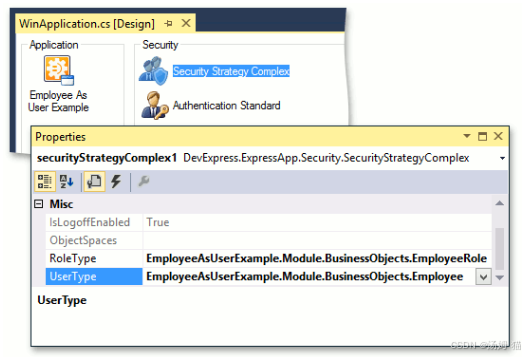
In .NET Framework projects, you can alternatively invoke the Application Designer, and drag the SecurityStrategyComplex component from the Toolbox to the Security pane. Then, place the AuthenticationStandard or AuthenticationActiveDirectory component near the SecurityStrategyComplex. To use the custom EmployeeRole role and custom Employee user instead of the default role and user, modify the SecurityStrategyComplex.RoleType and SecurityStrategy.UserType values in the Properties window. This step should be executed in WinForms and ASP.NET Web Forms applications.
在 .NET Framework 项目中,你也可以调用应用程序设计器,然后将“SecurityStrategyComplex”组件从“工具箱”拖到“安全性”窗格中。接着,将“AuthenticationStandard”或“AuthenticationActiveDirectory”组件放置在“SecurityStrategyComplex”附近。若要使用自定义的“EmployeeRole”角色和自定义的“Employee”用户,而不是默认的角色和用户,请在“属性”窗口中修改“SecurityStrategyComplex.RoleType”和“SecurityStrategy.UserType”值。此步骤应在 WinForms 和 ASP.NET Web Forms 应用程序中执行。
Create an Administrative Account(创建一个管理账户)
If you decide to utilize Active Directory authentication, you can skip this section. The minimum requirements for starting with Standard Authentication is an Administrator role and the Administrator user associated with this role. To add these objects, edit the Updater.cs(Updater.vb) file located in the DatabaseUpdate folder of your module project. Override the ModuleUpdater.UpdateDatabaseAfterUpdateSchema method in the following manner.
如果您决定使用 Active Directory 身份验证,则可以跳过此部分。开始使用标准身份验证的最低要求是管理员角色以及与此角色关联的管理员用户。要添加这些对象,请编辑模块项目的 DatabaseUpdate 文件夹中的 Updater.cs(Updater.vb)文件。按以下方式重写 ModuleUpdater.UpdateDatabaseAfterUpdateSchema 方法。
C#
using DevExpress.ExpressApp.Security.Strategy;
// ...
public override void UpdateDatabaseAfterUpdateSchema() {
    base.UpdateDatabaseAfterUpdateSchema();
    EmployeeRole adminEmployeeRole = ObjectSpace.FirstOrDefault<EmployeeRole>(role => role.Name == SecurityStrategy.AdministratorRoleName);
    if (adminEmployeeRole == null) {
        adminEmployeeRole = ObjectSpace.CreateObject<EmployeeRole>();
        adminEmployeeRole.Name = SecurityStrategy.AdministratorRoleName;
        adminEmployeeRole.IsAdministrative = true;
    }
    Employee adminEmployee = ObjectSpace.FirstOrDefault<Employee>(employee => employee.UserName == "Administrator");
    if (adminEmployee == null) {
        adminEmployee = ObjectSpace.CreateObject<Employee>();
        adminEmployee.UserName = "Administrator";
        adminEmployee.SetPassword("");
        adminEmployee.EmployeeRoles.Add(adminEmployeeRole);
        ((ISecurityUserWithLoginInfo)adminEmployee).CreateUserLoginInfo(SecurityDefaults.PasswordAuthentication, ObjectSpace.GetKeyValueAsString(adminEmployee));
    }
    ObjectSpace.CommitChanges();
}
Enable User Lockout (.NET 6+)(启用用户锁定(.NET 6+))
In the application builder code, set the LockoutOptions.Enabled property to true.
在应用程序生成器代码中,将LockoutOptions.Enabled属性设置为true。
File: MySolution.Blazor.Server\Startup.cs, MySolution.Win\Startup.cs
C# (Blazor)
//...
using DevExpress.ExpressApp.Security;


namespace YourApplicationName.Blazor.Server;


public class Startup {
    // ...
    public void ConfigureServices(IServiceCollection services) {


        services.AddXaf(Configuration, builder => {
            //...
            builder.Security
                .UseIntegratedMode(options => {
                    options.Lockout.Enabled = true;
                })
        });
    }
}
C# (WinForms)
//...
using DevExpress.ExpressApp.Security;


namespace YourApplicationName.Win;


public class ApplicationBuilder : IDesignTimeApplicationFactory {
    public static WinApplication BuildApplication(string connectionString) {
        var builder = WinApplication.CreateBuilder();
        //...
        builder.Security
            .UseIntegratedMode(options => {
                options.Lockout.Enabled = true;
                //...
            })
        //...
    }
}
Run the Application(运行应用程序)
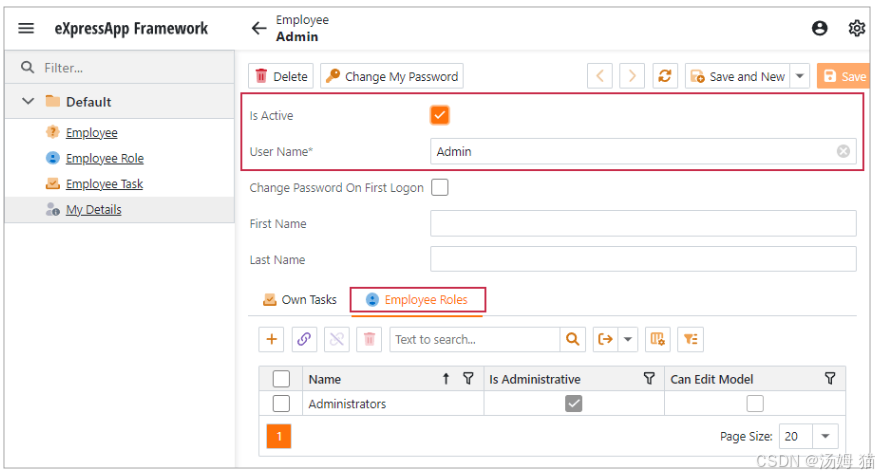
You can now run the application to see the result. You will see that the Employee objects are utilized as a custom user type.
现在你可以运行应用程序查看结果。你会看到,员工对象被用作自定义用户类型。
Filter Tasks that Belong to the Current Employee(筛选属于当前员工的任务)
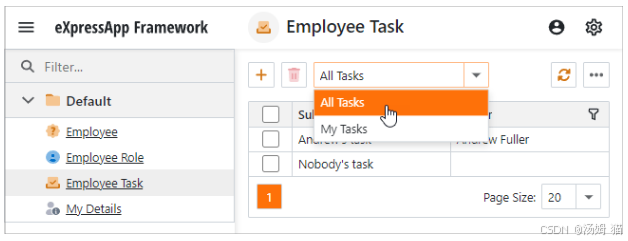
Apply the ListViewFilterAttribute attributes to the EmployeeTask class to define List View filters. To refer to the current Employee identifier, use the CurrentUserId() function.
将ListViewFilterAttribute特性应用于EmployeeTask类,以定义列表视图筛选器。若要引用当前员工标识符,请使用CurrentUserId()函数。
C#
using DevExpress.ExpressApp.SystemModule;
// ...
[ListViewFilter("All Tasks", "")]
[ListViewFilter("My Tasks", "[Owner.Id] = CurrentUserId()")]
public class EmployeeTask : Task {
    // ...
}
The image below shows the result.
下面的图片展示了结果。

开源鸿蒙跨平台开发社区汇聚开发者与厂商,共建“一次开发,多端部署”的开源生态,致力于降低跨端开发门槛,推动万物智联创新。
更多推荐


 14
14 0
0- 0


 已为社区贡献1条内容

所有评论(0)